






Roman Urdu to English translation comes up again and again in Urdu learner communities, and the question usually arrives in the same shape: someone has a message typed in English letters, and no translator seems to understand it. A colleague in Lahore writes "Sir meeting kal 11 bje ki bjaye 12 bje kr dein?" and the reader has no idea whether kal means yesterday or tomorrow, because it means both. Roman Urdu has no fixed spelling, so the same word shows up as kya, kia, or kiya, and English words such as meeting and invoice land in the middle of Urdu grammar. We wanted a straight answer to that question, so I ran 31 real-style Roman Urdu messages through 10 online translators and checked every English line against what the sender meant.
What I tested: 31 realistic Roman Urdu messages modeled on office chats and family groups, with spelling variants and English words mixed in.
How I tested: I used the same 31-message text set, signed in where required, and used the settings described below. JotMe received messages individually with added Translation preference context; other services received the numbered batch where described, and DeepL needed its source language set manually. This is a practical workflow review, not a controlled benchmark with identical context and input format.
What I judged: Errors that change your next step, such as a wrong day or amount, plus the features that help you write a reply.
By the end of this review, you'll know which translator fits how Roman Urdu reaches you, from a single WhatsApp line to a weekly call with a team in Karachi.
Key Takeaways
JotMe is the best Roman Urdu to English online translator as it can add notes on idioms and cultural words and combines saved text preferences, separate chat-room conversation memory, and live meeting translation. JotMe is free to start, and JotMe Pro comes at $10/month billed annually.
Google Translate offers instant Roman Urdu translation in the browser and handled clock words such as dhai baje well, though it labels the text as Hindi.
ChatGPT is free and offers accurate prompt-based translation that got almost every test message right, and ChatGPT Go comes at $8/month for higher limits.
Claude Pro comes at $17/month billed annually and offers careful translations that kept family terms such as Phuppo with their relationship intact.
Google Gemini is free and offers natural translations that kept inshallah and Nani in brackets next to the English, and Google AI Plus comes at $4.99/month.
Microsoft 365 Premium comes at $19.99/month and brings Copilot into Word and Outlook, and the free Copilot chat translated my messages almost as cleanly as ChatGPT.
Microsoft Translator is free and offers casual, chat-friendly English inside Bing and Edge, though it merged my numbered list into a single paragraph.
DeepL offers paid plans with regional pricing and offers polished document translation, though its auto-detect read my Roman Urdu as English.
Perplexity Pro comes at $20/month and offers translation with cited web lookups, though the free version changed "your leave application" into "my leave application".
QuillBot Premium comes at $8.33/month billed annually and offers unlimited translation next to a paraphraser, though the free version read my messages as Tagalog.
Why Is This Roman Urdu to English Translator Review Different From Others?
Most Roman Urdu translator pages rank tools without showing a single test message. We published the full test set and wrote an answer key before opening any translator.
Real-style messages: Every test line follows how people type in Pakistan, with kia next to kya and nhi next to nahi.
Same input everywhere: Each service received the same message wording. Input format and added context differed as explained above, so the results compare those practical workflows rather than identical benchmark conditions.
An answer key first: I wrote the English meaning of each message before testing, which kept my judgment consistent across tools.
Errors ranked by impact: A dropped "tomorrow" counts as a meaning error, and an untranslated Nani counts as a minor slip.
Fair accounts: I signed in wherever a tool asks for an account, so every translator ran at its normal level.
Screenshots from my own sessions: Each tool appears with my messages on screen.
Who Should Read This Roman Urdu to English Online Translator Guide?
This guide suits anyone who receives Roman Urdu messages they can't fully read and needs to reply with confidence. It also helps teams that pick a translator for staff who work across English and Urdu.
Managers with teams in Pakistan: Read daily updates from developers or support staff in Lahore and Islamabad without asking them to rewrite in English.
Gulf employers: Understand messages from Pakistani staff in Dubai, Abu Dhabi, or Riyadh who type Urdu in English letters.
Buyers working with Pakistani suppliers: Check prices and delivery dates in supplier chats before you confirm an order.
Overseas Pakistani families: Help children or spouses who grew up abroad follow the family WhatsApp group.
Recruiters and HR teams: Read candidate and employee messages that switch between English and Urdu mid-sentence.
Customer support teams: Answer Roman Urdu tickets in English with the right tone.
Roman Urdu to English Online Translator: Quick Guide
Use this table to match a translator to your situation, then jump to its section for my test notes.
| Translator | Best For | Free Plan | Paid From | Auto Detect Label | Tone and Idiom Notes |
|---|---|---|---|---|---|
| JotMe | Multilingual chats and meetings | ✅ | $10/month billed annually | Urdu (ur-PK) with a context line | ✅ Notes in my test |
| Google Translate | Quick free lookups | ✅ | Free | Hindi | ❌ |
| ChatGPT | Prompt-based translation | ✅ | $8/month (Go) | None, prompt-based | ❌ Only when you ask |
| Claude | Careful translations of family terms | ✅ | $17/month billed annually | None, prompt-based | ❌ Only when you ask |
| Google Gemini | Natural English with Urdu terms kept in brackets | ✅ | $4.99/month (Google AI Plus) | None, prompt-based | ✅ Brackets for key terms |
| Microsoft Copilot | Microsoft 365 users | ✅ | $19.99/month (Microsoft 365 Premium) | None, prompt-based | ❌ Only when you ask |
| Microsoft Translator | Casual chat messages in Bing and Edge | ✅ | Free | Hindi | ❌ |
| DeepL | Polished document translation | ✅ | Regional pricing; see current plans | English | ❌ |
| Perplexity | Translation with cited lookups | ✅ | $20/month | None, prompt-based | ❌ Only when you ask |
| QuillBot Translate | Translating and polishing in a single app | ✅ | $8.33/month billed annually | Tagalog | ✅ Cultural tips when signed in |
How Did We Test Roman Urdu to English Online Translators?
I wrote 31 messages in Roman Urdu that people in Pakistan type into office chats and family groups, then wrote a reference English line for each message. Every translator got the same text, and I checked each English line against my answer key.
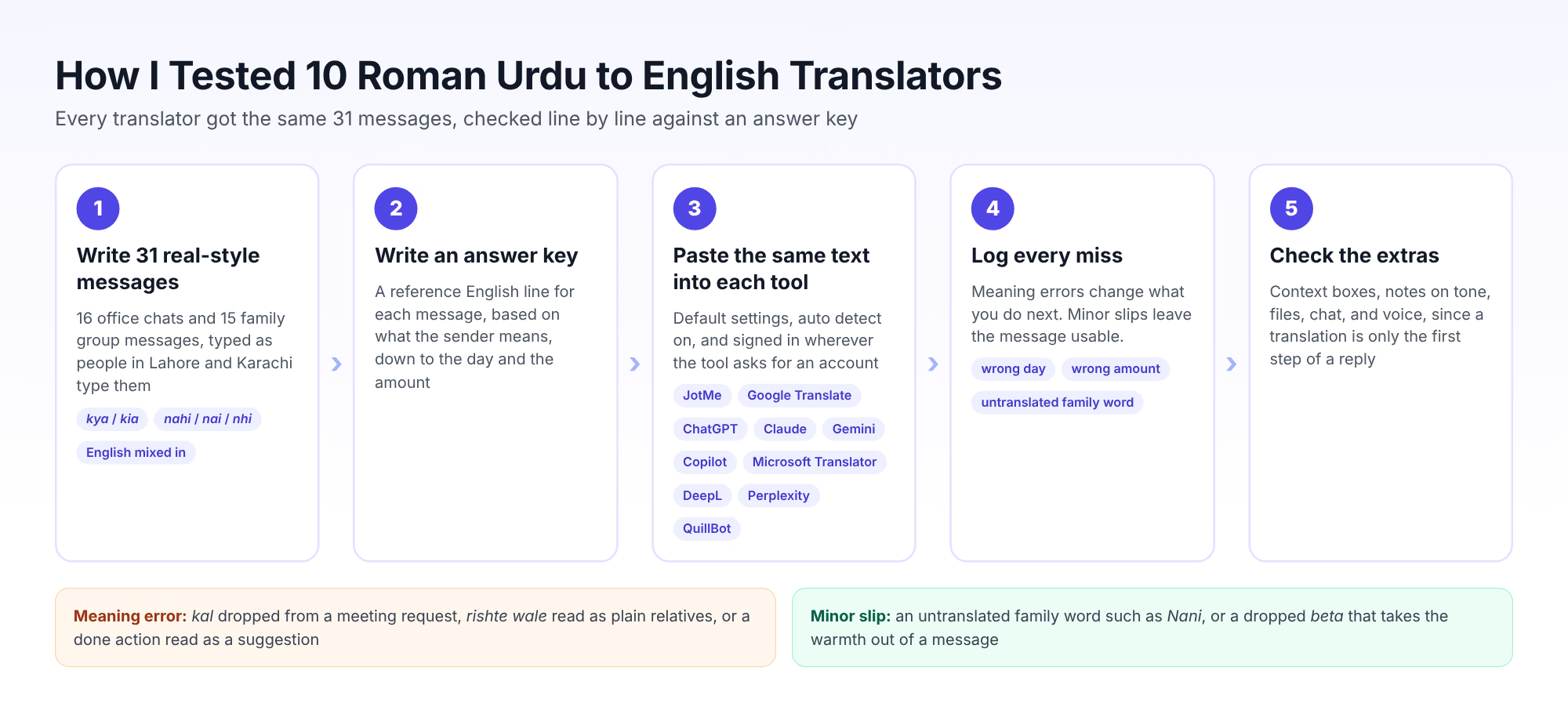
Spelling variants: The messages mix kya and kia, nahi and nhi, and short forms such as q for kyun. A 2025 study on Roman Urdu transliteration notes that Roman Urdu lacks standardized spelling conventions, which leads to high variability, so a fair test has to include that variety.
English mixed in: Words such as reschedule and invoice appear inside Urdu grammar, as they do in real chats. A December 2024 paper on English-to-Roman Urdu translation lists phonetic variability and code-switching with English among the main challenges for language tools.
Fact words: Several messages turn on kal, which means yesterday or tomorrow depending on the verb, and on clock words such as dhai baje for 2:30.
Error grading: I logged a meaning error when the English changed what you would do next, such as a dropped "tomorrow", and a minor slip when the message stayed usable.
Extras that help you reply: I checked notes on tone, context boxes, file options, and chat features, since understanding a message is only the first half of answering it.
Which Roman Urdu Messages Did I Use?
Copy any of these into the translator you use, and treat the English column as the answer key.
| # | Roman Urdu Message | English Meaning |
|---|---|---|
| 1 | Sir, meeting kal 11 bje ki bjaye 12 bje kr dein? Client ki flight late hai | Sir, could we move tomorrow's meeting from 11 to 12? The client's flight is late. |
| 2 | Report bhej di hai, check kr k bta dein agr koi changes chahiye hon | I've sent the report. Please check it and let me know if it needs any changes. |
| 3 | Aj office nai aa skta, tabiyat thk nhi hai. Ghar se kaam kr lunga | I can't come to the office today; I'm not feeling well. I'll work from home. |
| 4 | Invoice abhi tak clear nahi hua, accounts walon se zara pucho | The invoice still hasn't cleared. Please ask the accounts team. |
| 5 | Yar ye deadline bohat tight hai, kia hum friday tak extend kr skte hain? | Man, this deadline is tight. Can we extend it to Friday? |
| 6 | Boss ka mood aj kharab hai, sambhal k baat krna | The boss is in a bad mood today, so choose your words carefully. |
| 7 | Presentation ki slides final hogai hain? 3 bje tak chahiye | Are the presentation slides final? I need them by three. |
| 8 | Main lunch pe hun, 20 mint mein wapas aata hun | I'm at lunch. I'll be back in 20 minutes. |
| 9 | Naye intern ko login details de do, wo kal se kaam shuru karega | Give the new intern the login details. He starts work tomorrow. |
| 10 | Salary is dafa late q hai? kisi ko kch pta hai? | Why is the salary late this time? Does anyone know anything? |
| 11 | Client ne revision manga hai, logo ka color thora dark krna hai | The client has asked for a revision. The logo color needs to be a little darker. |
| 12 | Thik hai mai dekh leta hu, tension na lo | Okay, I'll look into it. Don't worry. |
| 13 | Dhai baje wali call cancel hogyi, sawa teen pe reschedule krdi hai | They canceled the 2:30 call. I've rescheduled it for 3:15. |
| 14 | Bhai printer phir se kharab ho gaya, IT walon ko bulao | The printer broke down again. Call the IT people. |
| 15 | Kal ki meeting mein kya decide hua tha? mai miss kr gaya tha | What did we decide in yesterday's meeting? I missed it. |
| 16 | Apni leave application HR ko forward krdo, inshallah approve hojayegi | Forward your leave application to HR. God willing, it'll go through. |
| 17 | Ammi keh rahi hain raat ka khana sath khayenge, jaldi aa jana | Mom says we'll have dinner together tonight, so come home early. |
| 18 | Beta dawai time pe li thi? Bukhar utra ya nahi? | Did you take your medicine on time, dear? Has the fever come down? |
| 19 | Shadi pe kia pehen rahi ho? Mehndi wale din yellow pehnna | What are you wearing to the wedding? Wear yellow on the mehndi day. |
| 20 | Abu ki BP ki goliyan khatam hogai hain, aate hue le aana | Dad's blood pressure pills have run out. Pick some up on your way home. |
| 21 | Bachon ka result aagya, dono pass hain alhamdulillah | The kids' results are out. Both passed, thank God. |
| 22 | Nani ki tabiyat theek nahi, hum weekend pe Lahore ja rahe hain | Grandma isn't well. We're going to Lahore this weekend. |
| 23 | Mujhe nahi pata tha tum naraz ho, sorry yaar dil pe mat lo | I didn't know you were upset. Sorry, don't take it to heart. |
| 24 | Gas ka bill bhar diya? last date kal hy | Did you pay the gas bill? The due date is tomorrow. |
| 25 | Chhotu ne phir se mera charger gum kr diya, naak mein dum kr rakha hai | Chhotu lost my charger again. He's driving me up the wall. |
| 26 | Phuppo sham ko aa rahi hain, ghar zarur saaf kr lena | Your aunt (father's sister) is coming this evening. Make sure you clean the house. |
| 27 | Eid pe kitne din ki chutti mil rahi hai? ghar kab aao ge? | How many days off are you getting for Eid? When will you come home? |
| 28 | Mai nikal gai hun, 10 mint mein pohanch jaungi | I've left. I'll get there in 10 minutes. |
| 29 | Sabzi wale se 2 kilo tamatar le lena, 300 se zyada mat dena | Get two kilos of tomatoes from the vegetable seller. Don't pay more than 300 rupees. |
| 30 | Rishte wale Sunday ko aa rahe hain, sab tayar rehna | The marriage-proposal family is coming on Sunday. Everyone be ready. |
| 31 | Acha suno, kal subah jaldi utha dena mujhe, flight 6 bje ki hai | Listen, wake me up early tomorrow morning. My flight is at 6. |
Best Roman Urdu to English Online Translators
The best Roman Urdu to English online translators are JotMe, Google Translate, ChatGPT, Claude, Google Gemini, Microsoft Copilot, Microsoft Translator, DeepL, Perplexity, and QuillBot Translate. Here's a detailed analysis of each online translator we tried.
JotMe: Roman Urdu to English Online Translator for Multilingual Communication
JotMe is our AI platform for translation, transcription, and meeting notes, and it reads Roman Urdu from the Text option in Translate with FROM set to Auto detect. JotMe interprets what the sender means in context, and can provide a short note on idioms and cultural words such as inshallah and mehndi.
That note matters if you're an English-speaking manager who works with staff or suppliers in Pakistan, since a literal line can hide a deadline or a complaint. You see why the sender phrased the message as they did, and you can reply without a follow-up email to ask what they meant.
JotMe keeps your context too. A line in Translation preferences applies to everything you paste after it, and each chat room remembers what its conversation is about. JotMe supports 200+ languages and 39,000+ language pairs, and JotMe has reported adoption by more than 1,700 organizations for cross-border communication.
JotMe's Key Features
JotMe's AI Memory
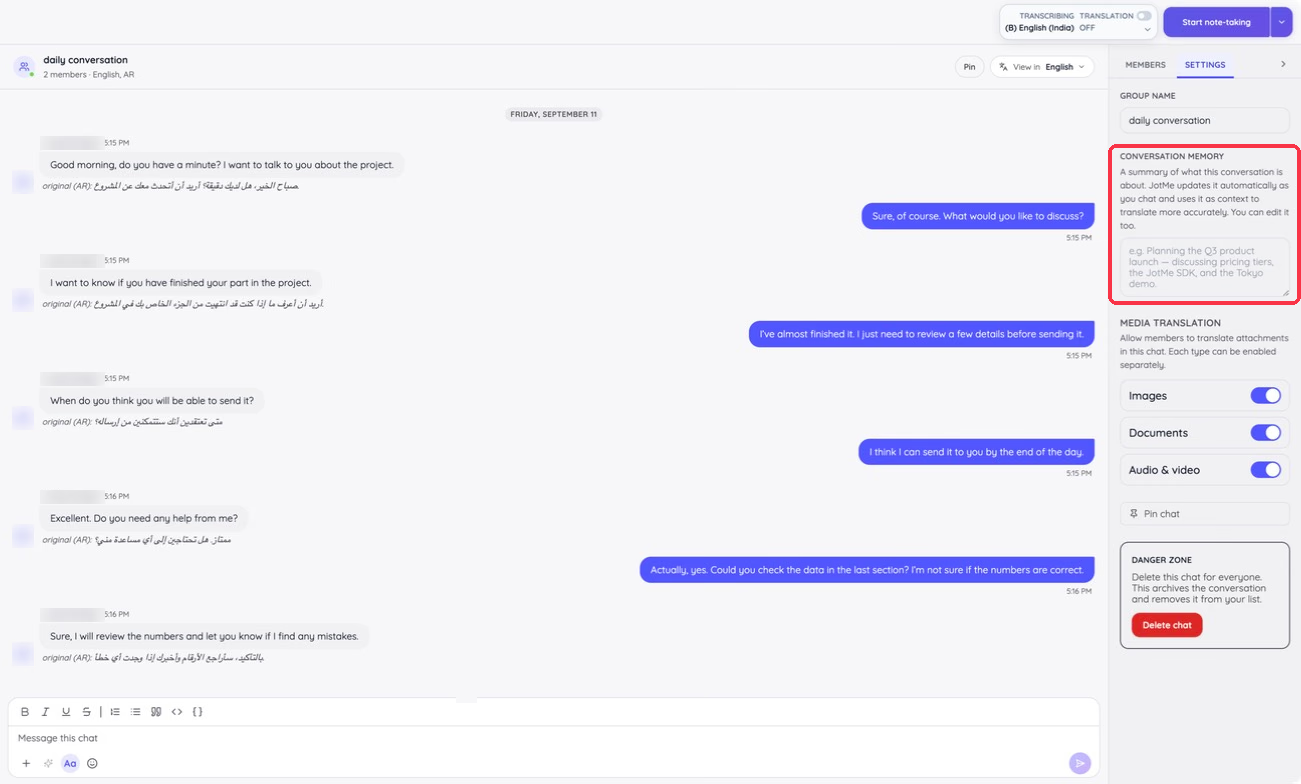
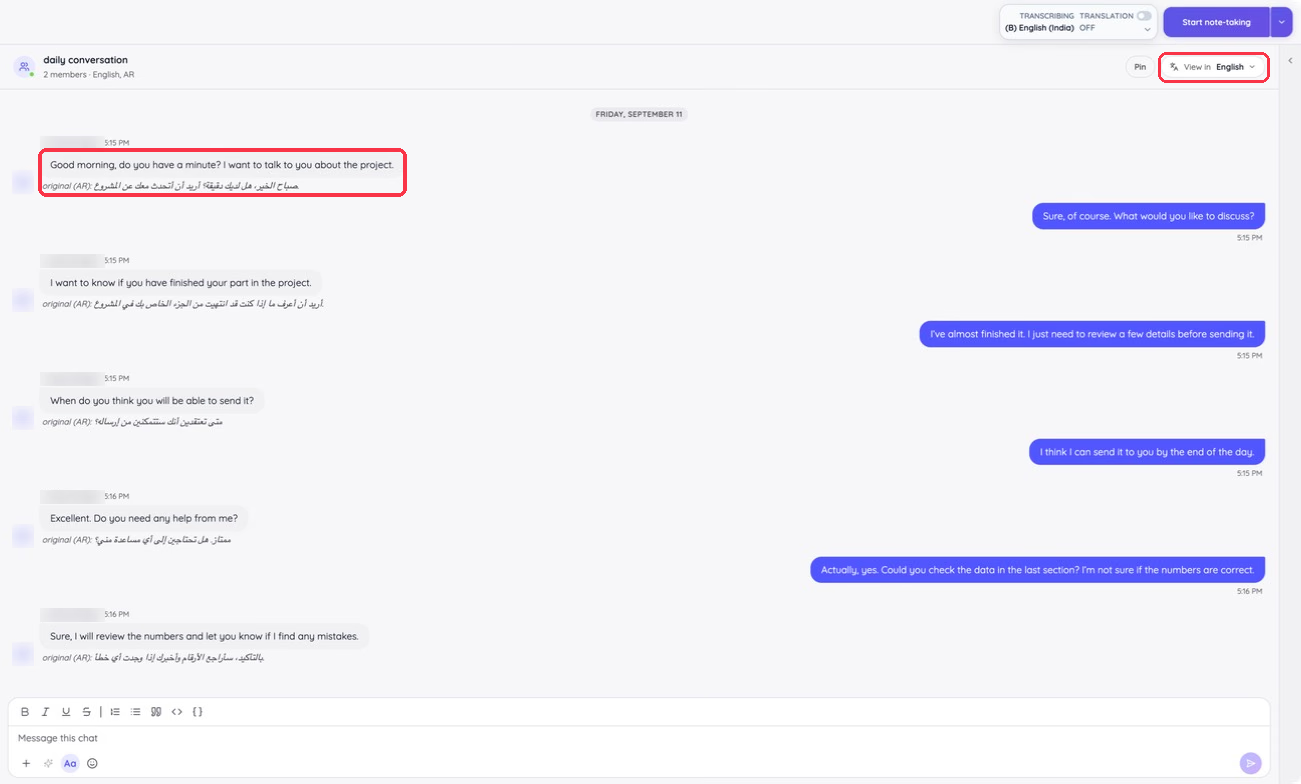
Every multilingual chat room keeps a Conversation Memory, a summary of what the conversation is about. JotMe updates it as people chat and uses it as context to translate more accurately, and you can edit the summary yourself.
JotMe's Language Support
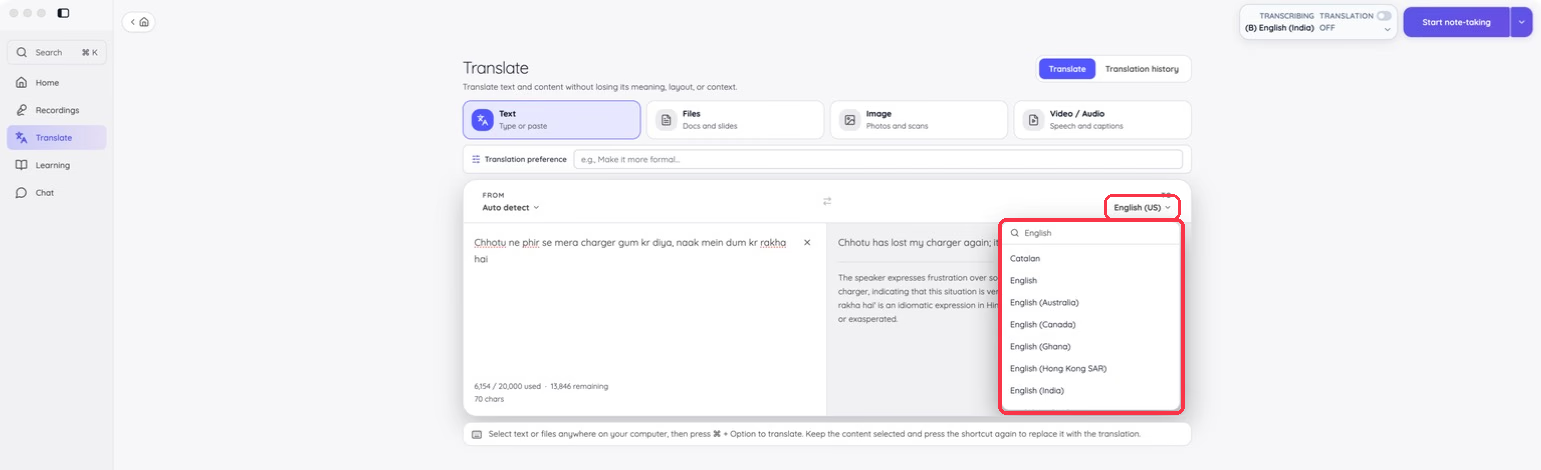
JotMe translates across 200+ languages, and the TO menu lists English varieties such as English (US), English (Australia), English (Canada), and English (India), so the output matches your reader.
JotMe's Contextual Awareness
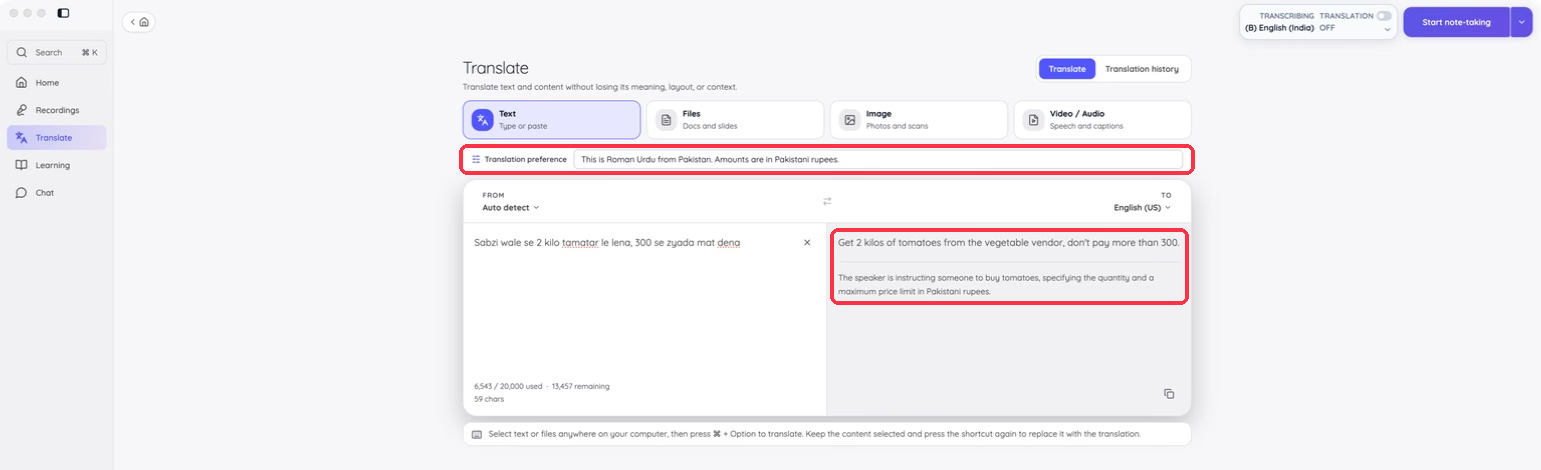
The Translation preference box takes a line of context, such as "Amounts are in Pakistani rupees," and JotMe applies it to every translation after that. When provided, the note under the result shows how JotMe read the message, so you can catch a wrong assumption before you reply.
JotMe's File Translation
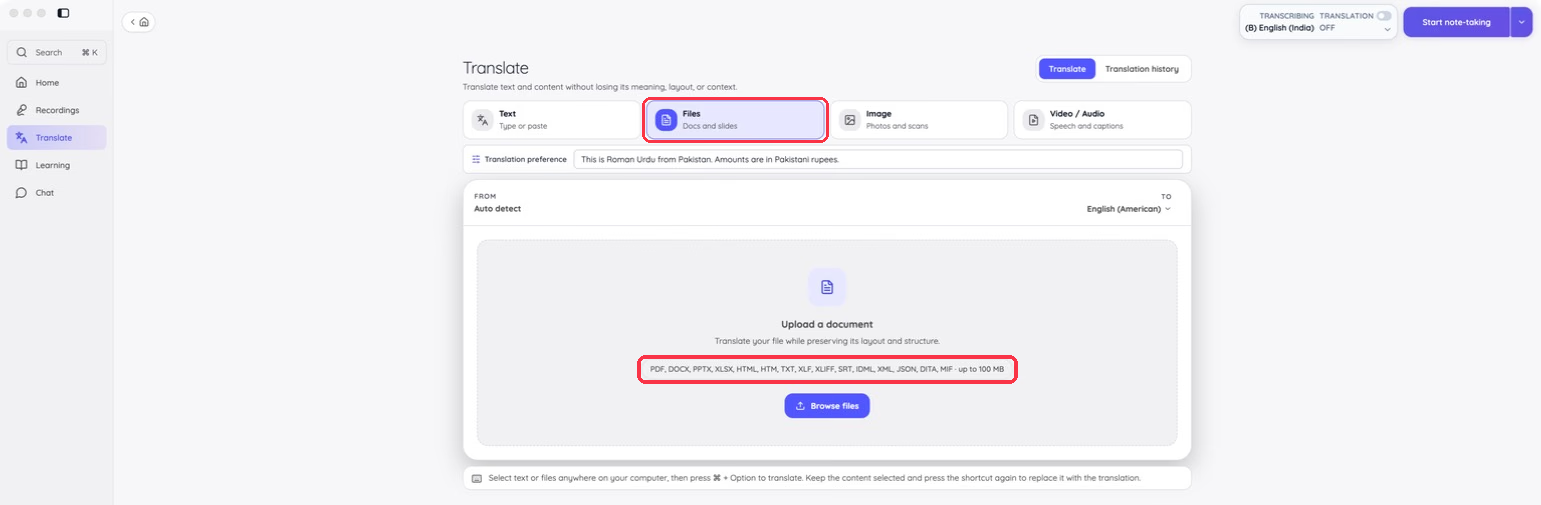
The Files option translates DOCX, PDF, PPTX, XLSX, HTML, TXT, SRT, XLIFF, XML, JSON, IDML, DITA, and MIF files up to 100 MB while keeping the layout. Screenshots of WhatsApp chats go through image translation in the same Translate screen.
JotMe's Voice Keyboard
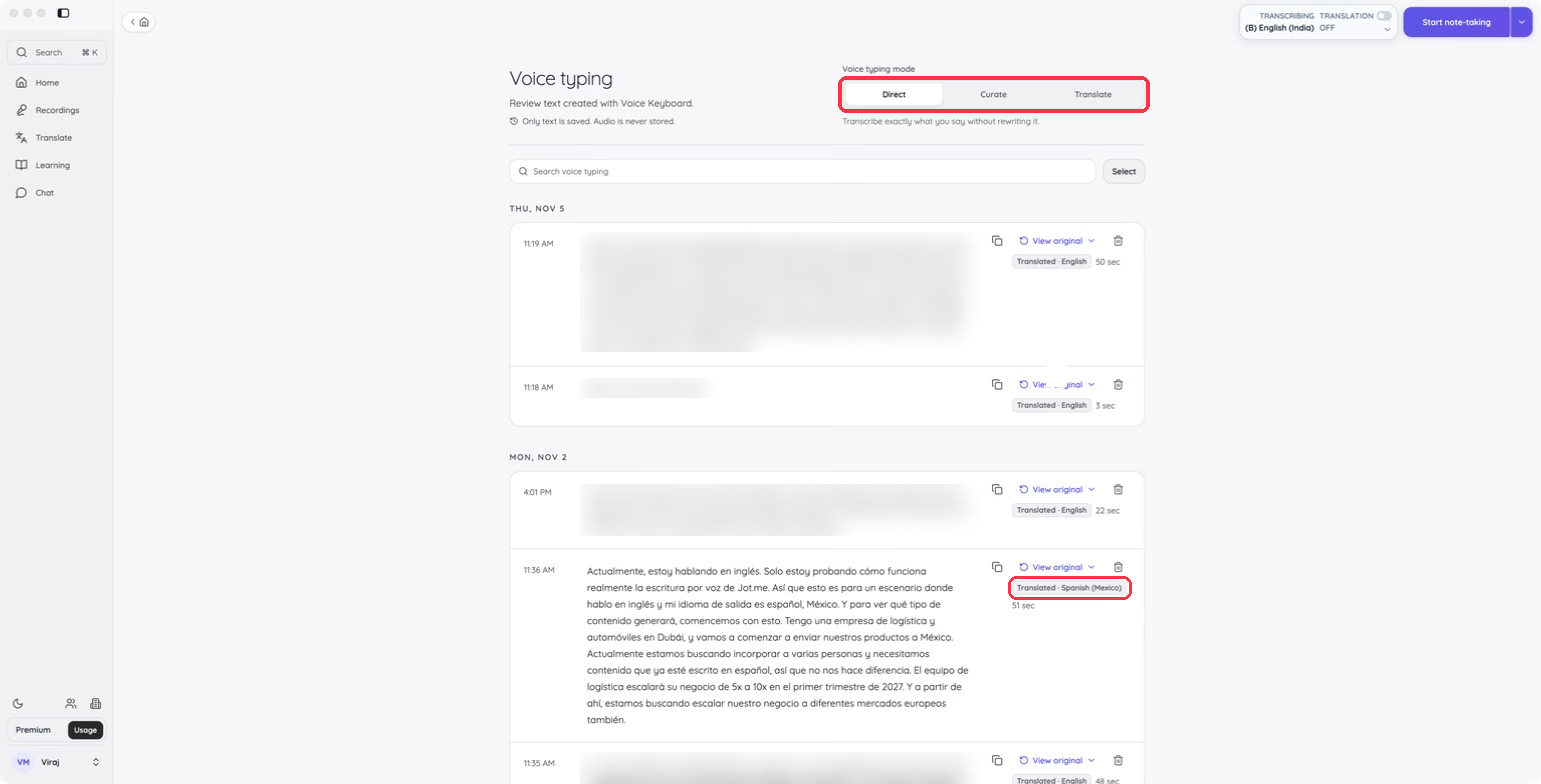
Hold Fn on a Mac, or Ctrl + Win on Windows, and speak to type in any app. Translate mode writes your words in the output language you pick, so you can answer a Roman Urdu message by speaking.
JotMe's Multilingual Chat Rooms
Each member of a multilingual chat room reads the conversation in their own language, with the original text kept under every translated message. Guests join without creating an account, and JotMe translates files shared in the room too.
How Did JotMe Perform in Online Translation?
I pasted each of the 31 messages into the Text option individually, with FROM on Auto detect and TO on English (US). The English read naturally, and the note underneath spelled out what a word-for-word translation would miss.
For "Chhotu ne phir se mera charger gum kr diya, naak mein dum kr rakha hai," JotMe returned "Chhotu has lost my charger again, it's driving me crazy" and noted that naak mein dum kr rakha hai is an idiom for being fed up. For message 16, it returned "Please forward your leave application to HR; God willing, it will be approved" and flagged inshallah as a cultural reference to divine will.
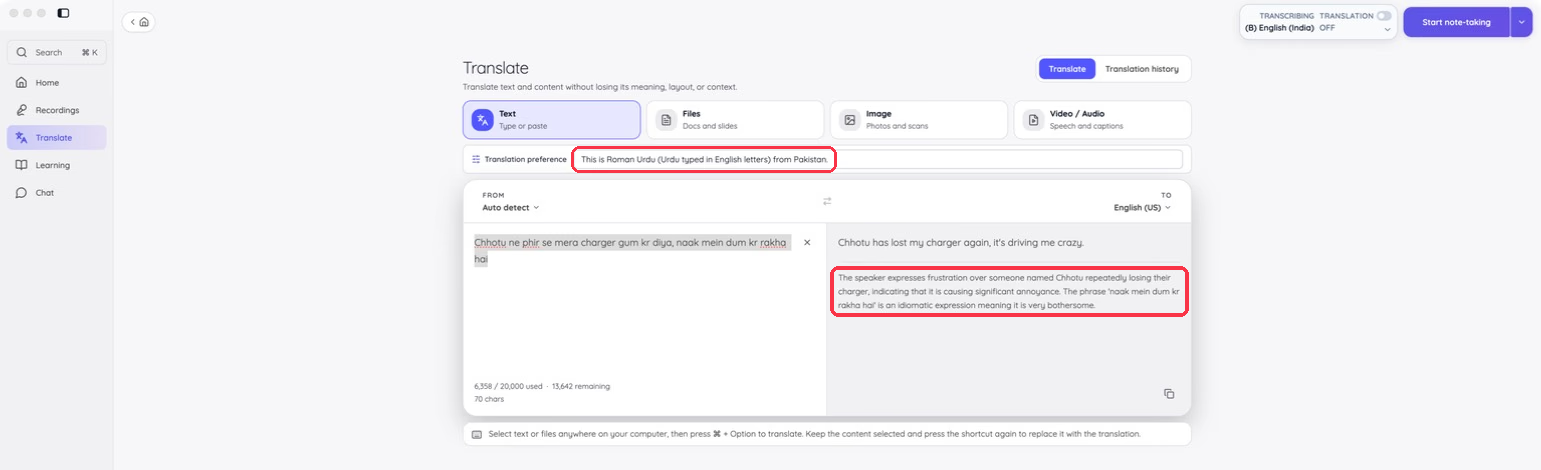
The Translation preference box made the biggest difference on messages that assume shared knowledge. With "This is Roman Urdu from Pakistan. Amounts are in Pakistani rupees." in the box, message 29 came back as "Get 2 kilos of tomatoes from the vegetable vendor, don't pay more than 300," and the note confirmed the limit was in Pakistani rupees. A second line, "Rishte wale means the family coming with a marriage proposal," kept the reason for the Sunday visit in message 30.
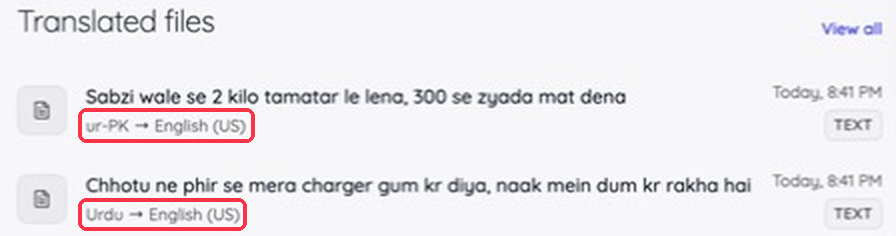
JotMe's Translated files list on the Home screen then logged those messages as Urdu and ur-PK, which shows JotMe read them as Urdu once the context line was in place.
What Are JotMe's Pros and Cons?
| Pros | Cons |
|---|---|
| Adds a note on idioms and cultural words in my test translations | The Free plan includes 20,000 tokens a month shared across text translation and chat; users who exceed that allowance need more capacity |
| Translation preference applies your context to every message after it | |
| Chat rooms remember each conversation and keep the original under every message | |
| Covers text, files, voice typing, and live meeting translation in a single desktop app |
Price: JotMe is free to use, with 20 minutes of live translation, 50 minutes of transcription, 5 AI credits, and 20,000 tokens a month shared across text translation and chat.
JotMe Pro costs $20/month, or $10/month billed annually, with 300,000 monthly text-translation and chat tokens, and JotMe Premium costs $30/month, or $15/month billed annually, with 700,000 monthly text-translation and chat tokens. Tokens, credits, and minutes work differently on each JotMe plan.
Google Translate: Roman Urdu to English Translator for Quick Free Lookups
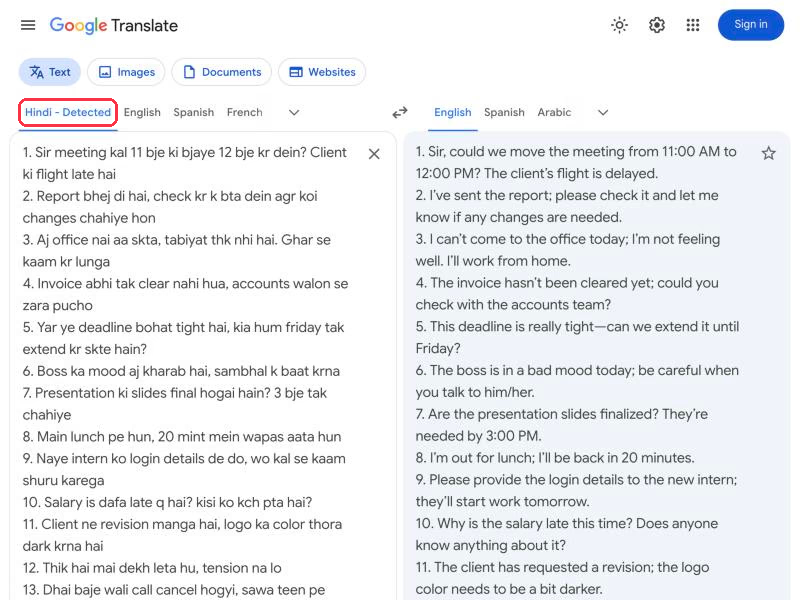
Google Translate is the free translator most people open first, and it accepts Roman Urdu without a sign-in. When I pasted my 31 messages, its detector labeled them "Hindi - Detected" and returned fluent English anyway, since Romanized Hindi and Urdu share most everyday words.
Google Translate's Key Features
Auto-detect: Paste text and Google picks the source language for you.
Documents and images: Separate tabs translate uploaded documents and photos of text.
Website translation: The Websites tab translates a full page from its link.
How Did Google Translate Perform in Online Translation?
Google Translate handled fact words better than I expected. It turned dhai baje and sawa teen into 2:30 PM and 3:15 PM and kept 300 as a price. It also read rishte wale as the family coming for a marriage proposal.
Its misses clustered around time and family. It dropped kal from message 1, so the meeting request lost "tomorrow", and it left Abu, Nani, and Phuppo untranslated. It also dropped inshallah from message 16 and beta from message 18, which took the warmth out of both messages.
What Are Google Translate's Pros and Cons?
| Pros | Cons |
|---|---|
| Free with no sign-in | Labels Roman Urdu as Hindi |
| Handled clock words and prices in my test | Dropped "tomorrow" from a meeting request |
| Translates documents and websites too | Left family words such as Nani untranslated |
Price: Google Translate is free to use.
ChatGPT: Roman Urdu to English Translator for Prompt-Based Translation
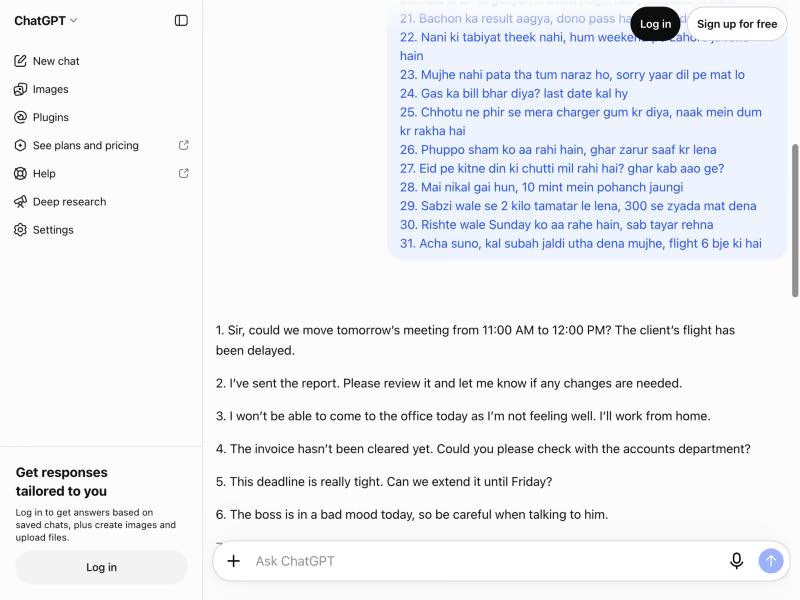
ChatGPT translates Roman Urdu when you ask it to, and the free version works without an account. I opened it signed out and typed "Translate to English:" above my 31 messages, and it returned a clean numbered list.
ChatGPT's Key Features
Prompt control: Ask for a formal tone or notes on idioms in the same message as the text.
Follow-up questions: Ask what a phrase means or request another version in the same chat.
File uploads: Attach a document or a chat screenshot and ask for an English version.
How Did ChatGPT Perform in Online Translation?
ChatGPT got almost every message right. It kept "tomorrow's meeting" in message 1 and translated Abu as Dad and beta as dear. It also read rishte wale as the family interested in the marriage proposal.
It slipped twice. Message 27 asks "ghar kab aao ge?" about you, and ChatGPT changed the first question to "How many days off are we getting for Eid?" It also added "with me" to message 23, which the sender never wrote.
What Are ChatGPT's Pros and Cons?
| Pros | Cons |
|---|---|
| Got almost every test message right | You write the prompt every time |
| Answers follow-up questions about a phrase | Changed "you" to "we" in an Eid question |
| Free without an account | Notes on tone appear only when you ask |
Price: ChatGPT is free to use.
ChatGPT Go costs $8/month in the US, and ChatGPT Plus costs $20/month in the US.
Claude: Roman Urdu to English Translator for Careful Family Terms
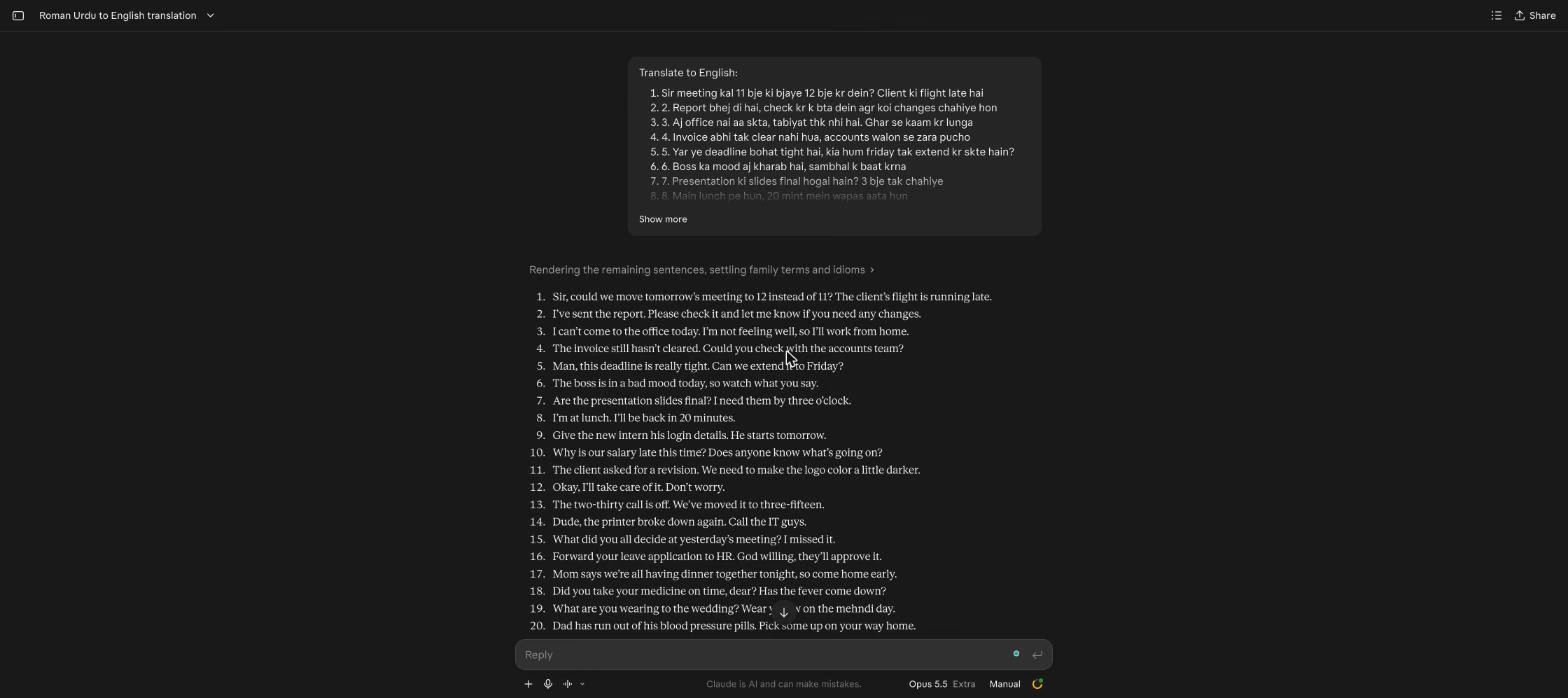
Claude is Anthropic's AI assistant, and it translates Roman Urdu through a chat prompt. I signed in, pasted the same "Translate to English:" prompt with my 31 messages, and Claude returned a numbered list that read like a person had translated it.
Claude's Key Features
Long context: Paste a long chat export and ask for an English version with notes.
Projects: Save instructions such as "Amounts are in Pakistani rupees" for every chat inside a project.
File uploads: Attach documents or screenshots and ask for English.
How Did Claude Perform in Online Translation?
Claude handled the culture-heavy messages best of the chat tools. It turned Phuppo into "Auntie (Dad's sister)", read rishte wale as "the prospective in-laws", and kept naak mein dum kr rakha hai as "he's driving me up the wall." It also kept "tomorrow" in message 1 and moved the call in message 13 from 2:30 to 3:15.
Its only slip matched ChatGPT's. Message 23 came back as "I didn't know you were upset with me", which adds "with me" to a message that never says it.
What Are Claude's Pros and Cons?
| Pros | Cons |
|---|---|
| Kept family relationships in the English, such as "Dad's sister" | You write the prompt every time |
| Read rishte wale as the prospective in-laws | Added "with me" to message 23 |
| Natural, conversational English | Notes on tone appear only when you ask |
Price: Claude is free to use.
Claude Pro costs $20/month, or $17/month billed annually.
Skip the Prompt and Get the Meaning
Paste a Roman Urdu message into JotMe and get accurate English, with explanatory notes when provided, with no prompt to write. Type "This is Roman Urdu from Pakistan" once in Translation preference, and every message after it uses that context. Start free on Mac or Windows.
Download JotMe for FreeGoogle Gemini: Roman Urdu to English Translator for Natural English With Urdu Terms
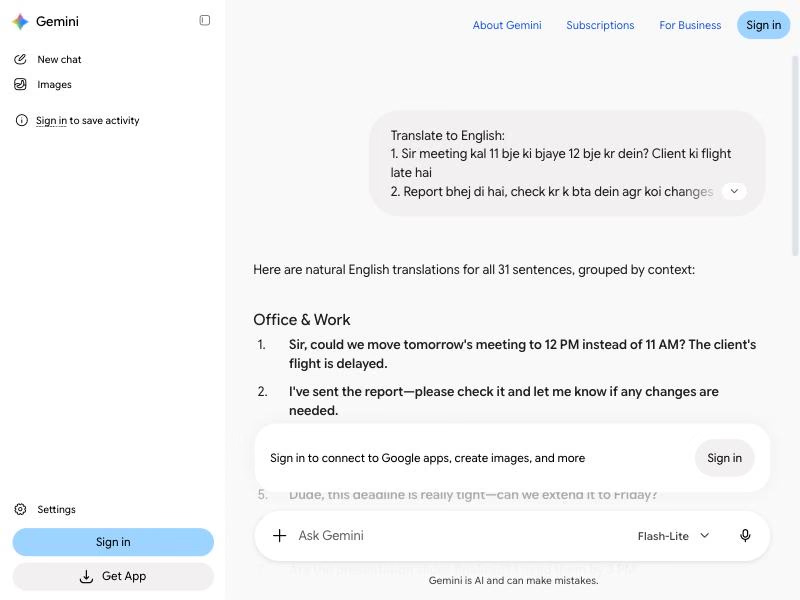
Gemini is Google's AI assistant, and it translates Roman Urdu through a prompt in the Gemini app. I ran my 31 messages in Gemini's free mode, and it grouped the English under "Office & Work" and "Family, Home & Everyday Life" headings.
Google Gemini's Key Features
Google app access: Gemini works with Gmail, Docs, and Drive on eligible plans, so you can translate a message where it arrived.
Image input: Upload a screenshot of a chat and ask for the English.
Gemini Live: Talk to Gemini by voice on your phone and ask what a phrase means.
How Did Google Gemini Perform in Online Translation?
Gemini kept every factual word in my test. It held on to "tomorrow" in message 1, moved the call to 3:15, read rishte wale as "the marriage proposal guests", and kept "you" in the Eid question that tripped up ChatGPT. It also put the Urdu term in brackets next to the English, as in "Grandma (Nani)" and "hopefully (Insha'Allah)", which helps a reader who wants to learn the word.
The output needed a little editing before I could forward it. Gemini offered alternatives inside some lines, such as "son/dear" in message 18 and "I've left / I'm on my way" in message 28, so you still pick the version that fits.
What Are Google Gemini's Pros and Cons?
| Pros | Cons |
|---|---|
| Kept every fact word in my test | Offers slash alternatives inside some lines |
| Keeps Urdu terms in brackets next to the English | Regroups your messages under its own headings |
| Some web features work without an account; availability and limits apply | You write the prompt every time |
Price: Google Gemini is free to use.
Google AI Plus costs $4.99/month in the US, and Google AI Pro costs $19.99/month in the US.
Microsoft Copilot: Roman Urdu to English Translator for Microsoft 365 Users
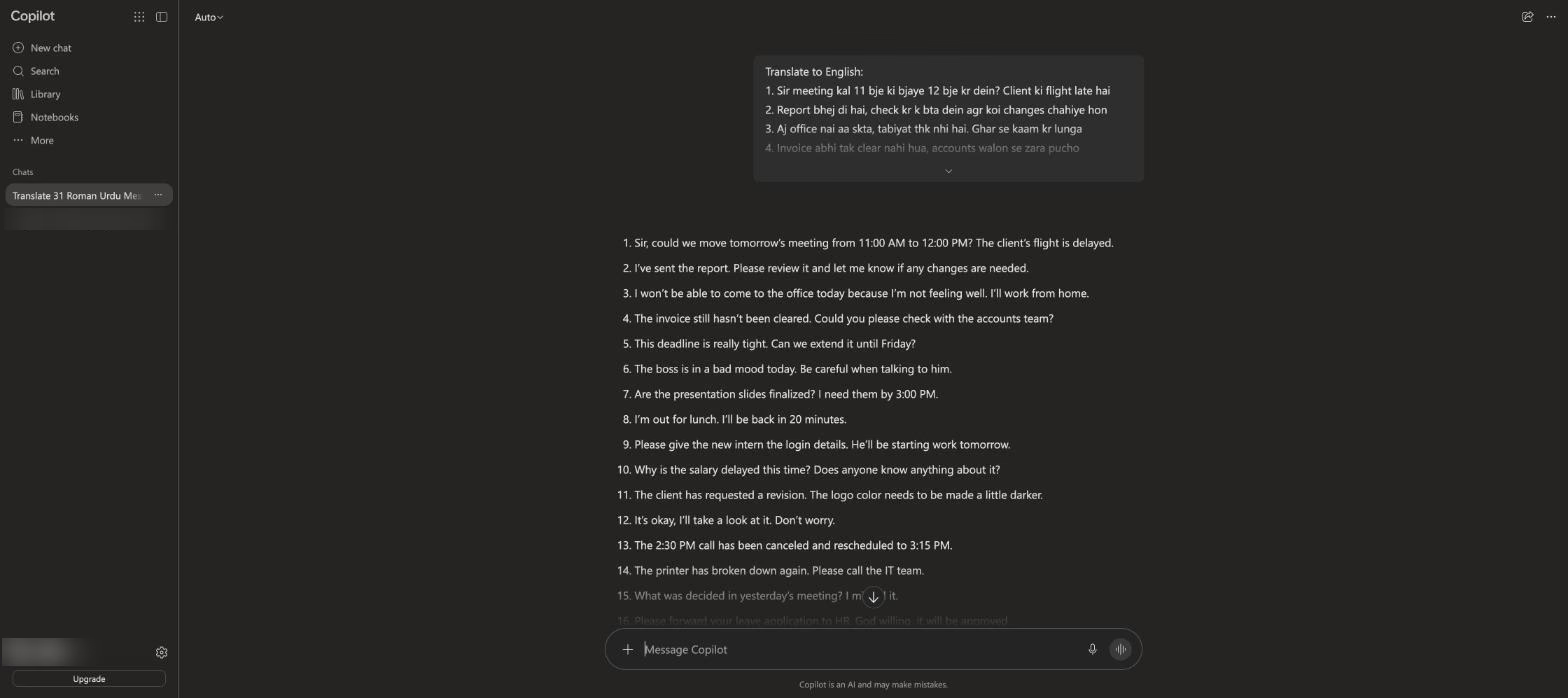
Copilot is Microsoft's AI assistant, available free on the web and inside Word and Outlook with Microsoft 365 plans. I signed in, sent the same prompt, and Copilot returned a tidy numbered list in seconds.
Microsoft Copilot's Key Features
Microsoft 365 access: Translate and answer a message inside Outlook or Word.
Follow-up suggestions: Buttons under the answer offer a more natural or more formal version.
File analysis: Attach a document and ask for an English summary or translation.
How Did Microsoft Copilot Perform in Online Translation?
Copilot's English came out almost as clean as ChatGPT's. It kept "tomorrow's meeting" in message 1, moved the call to 3:15, turned inshallah into "God willing", and read rishte wale as "the family coming to discuss the marriage proposal."
Copilot made the same Eid slip as ChatGPT, asking "How many days off are we getting?" in message 27. It also dropped the Urdu script for alhamdulillah into the English line of message 21, which looks odd in a message meant for an English reader.
What Are Microsoft Copilot's Pros and Cons?
| Pros | Cons |
|---|---|
| Kept the day, time, and amount in my test | Changed "you" to "we" in an Eid question |
| Works inside Outlook and Word with Microsoft 365 | Inserted Urdu script into an English line |
| Suggested follow-ups for a more formal version | Needs a Microsoft account |
Price: Microsoft Copilot is free to use.
Microsoft 365 Premium costs $19.99/month, or $199.99/year at the regular US price, and includes the former Copilot Pro.
Microsoft Translator: Roman Urdu to English Translator for Casual Messages
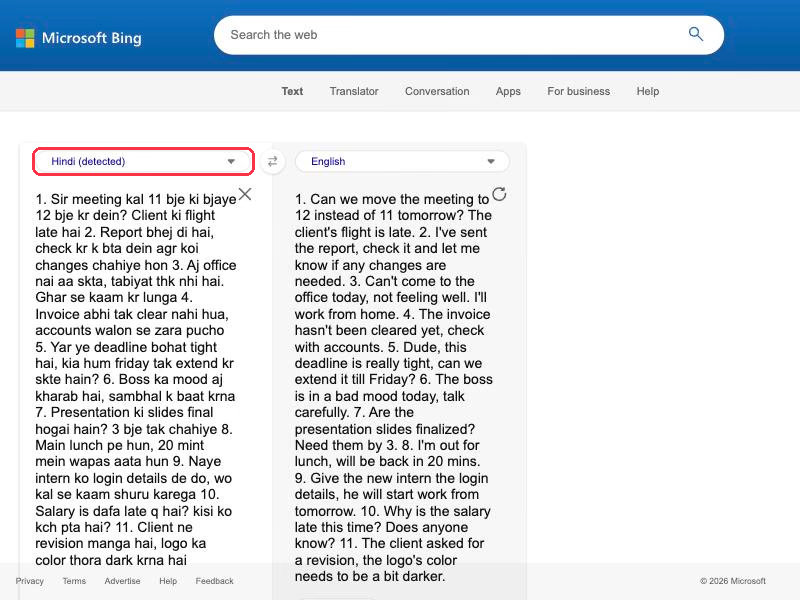
Microsoft Translator runs inside Bing and Microsoft Edge, and it translates Roman Urdu for free with no sign-in. Like Google, it labeled my messages "Hindi (detected)" before it translated them.
Microsoft Translator's Key Features
Casual tone: A Casual option under the output keeps the English relaxed, which suits chat replies.
Conversation tab: The Bing page offers a Conversation option for spoken back-and-forth translation.
Edge page translation: Microsoft Edge uses Microsoft Translator to translate full web pages.
How Did Microsoft Translator Perform in Online Translation?
Microsoft Translator wrote the English closest to real chat. It kept "tomorrow" in message 1 and turned inshallah into "God willing". Abu became Dad, and Nani became Grandma.
The output needed cleanup, though. My numbered list came back as a single run-on paragraph, and three messages lost meaning: message 27 became "we" instead of "you", message 28 turned "I've left" into "I'm leaving", and message 30 read rishte wale as plain relatives.
What Are Microsoft Translator's Pros and Cons?
| Pros | Cons |
|---|---|
| Free in Bing and Edge with no sign-in | Labels Roman Urdu as Hindi |
| Casual English that fits chat replies | Merged my numbered list into a single paragraph |
| Kept "tomorrow" and "God willing" in my test | Read rishte wale as plain relatives |
Price: Microsoft Translator is free to use.
DeepL: Roman Urdu to English Translator for Polished Documents
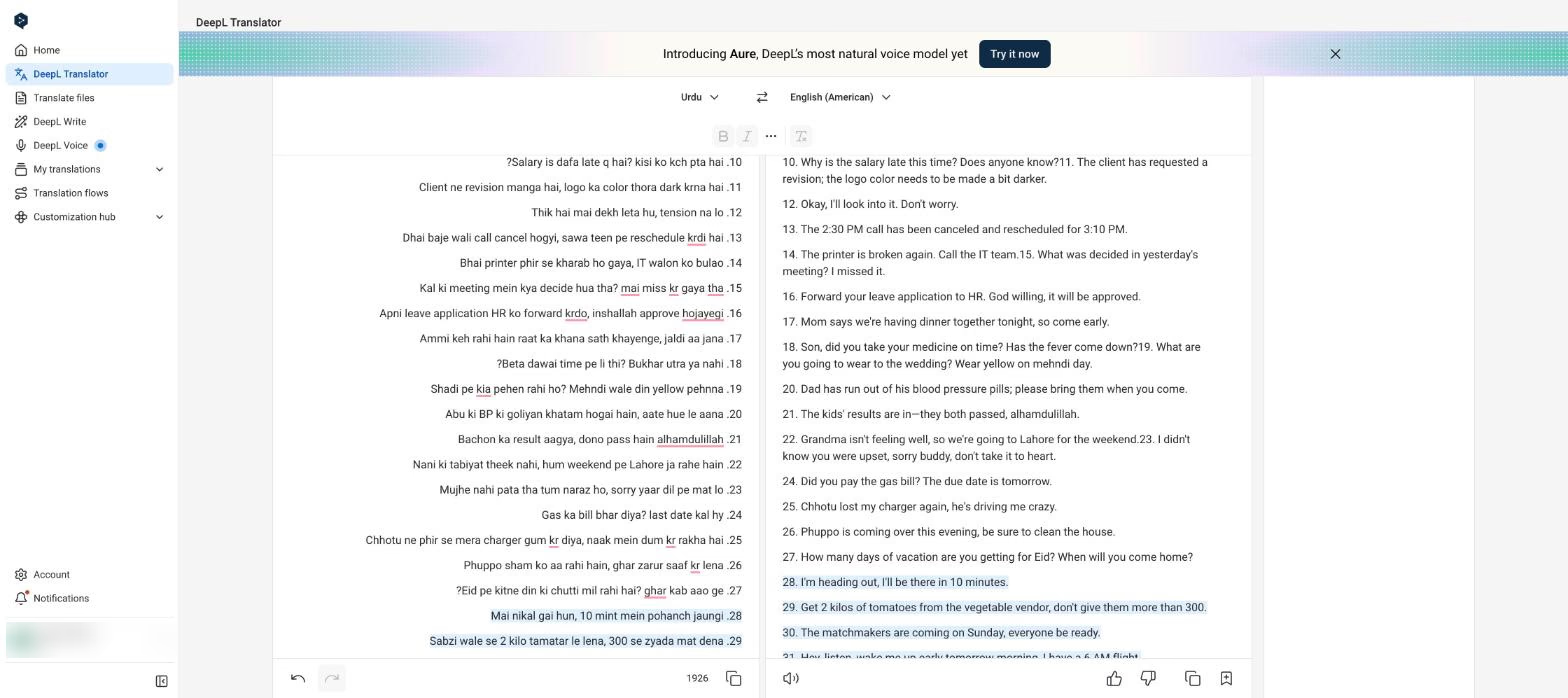
DeepL built its name on natural-sounding translations and now supports Urdu. I signed in to my DeepL account and pasted the 31 messages with the source on Detect language, and DeepL labeled them "English (detected)" and translated them into German. Once I set the source to Urdu by hand, it produced English.
DeepL's Key Features
Document translation: Upload Word, PowerPoint, or PDF files and keep the formatting.
Glossaries: Save preferred terms for supported language pairs; Urdu is not on DeepL’s current glossary-language list.
Alternatives: For supported languages, click a word in the output to see other translations. Check DeepL’s language-specific availability before relying on this for Urdu.
How Did DeepL Perform in Online Translation?
DeepL handled tone well. It turned inshallah into "God willing", translated the idiom in message 25 as "he's driving me crazy", and wrote Abu as Dad.
Fact words caused trouble. DeepL dropped "tomorrow" from message 1, moved the call in message 13 to 3:10 PM when sawa teen means 3:15, and read rishte wale as "the matchmakers." It also joined several pairs of messages into single lines, such as the second message running straight into the third.
What Are DeepL's Pros and Cons?
| Pros | Cons |
|---|---|
| Natural tone on idioms and religious phrases | Auto-detects Roman Urdu as English |
| Keeps formatting in uploaded documents | Turned sawa teen into 3:10 instead of 3:15 |
| Glossaries for supported pairs; not currently Urdu | Joined some messages into a single line |
Price: DeepL has a free version. Its current pricing page lists 50,000 text characters per user per month; limits and available features depend on the plan.
Paid plans and prices vary by country. The German pricing page currently lists DeepL Individual at €7.49/month billed annually, including VAT. Check DeepL’s current pricing for your country before subscribing.
Perplexity: Roman Urdu to English Translator for Research-Backed Answers
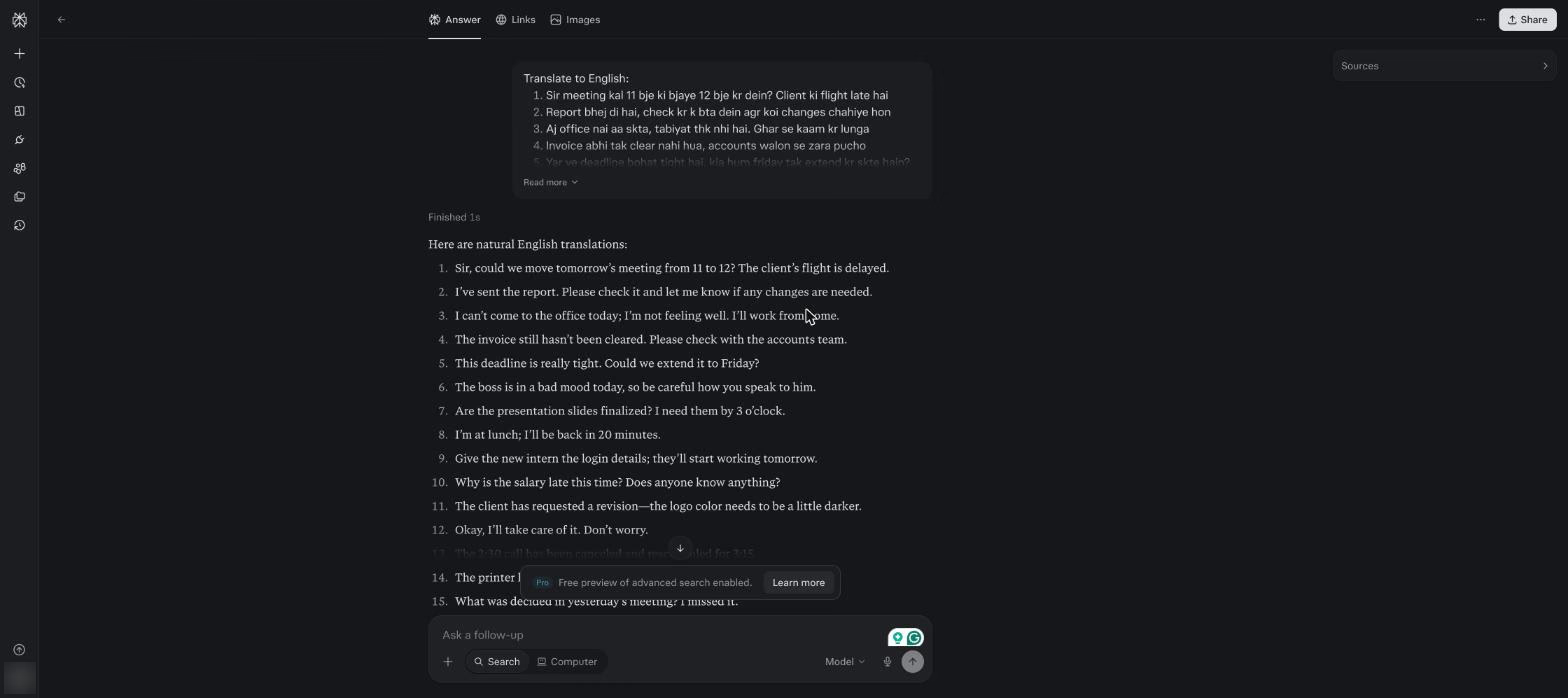
Perplexity is an AI answer engine that cites its sources, and it translates text when you ask in a prompt. I signed in on the free plan and sent the same prompt, and Perplexity answered in about a second.
Perplexity's Key Features
Cited answers: Ask what a Roman Urdu phrase means and see the sources behind the answer.
Model choice: Pro users pick between several AI models.
File uploads: Attach PDFs and spreadsheets and ask for English.
How Did Perplexity Perform in Online Translation?
Perplexity got the office messages right, including "tomorrow's meeting" in message 1 and the 3:15 call in message 13. The family messages caused most of its misses.
Message 16 says apni, meaning your, and Perplexity wrote: "Please forward my leave application to HR." It also read rishte wale as relatives, changed "you" to "we" in the Eid question, dropped "tonight" from message 17, and translated the nickname Chhotu as "Little one."
What Are Perplexity's Pros and Cons?
| Pros | Cons |
|---|---|
| Fast answers on the free plan | Changed "your" to "my" in message 16 |
| Got the office messages right | Read rishte wale as plain relatives |
| Cited sources when you ask about a phrase | Translated the nickname Chhotu |
Price: Perplexity is free to use.
Perplexity Pro costs $20/month.
QuillBot Translate: Roman Urdu to English Translator for Writers
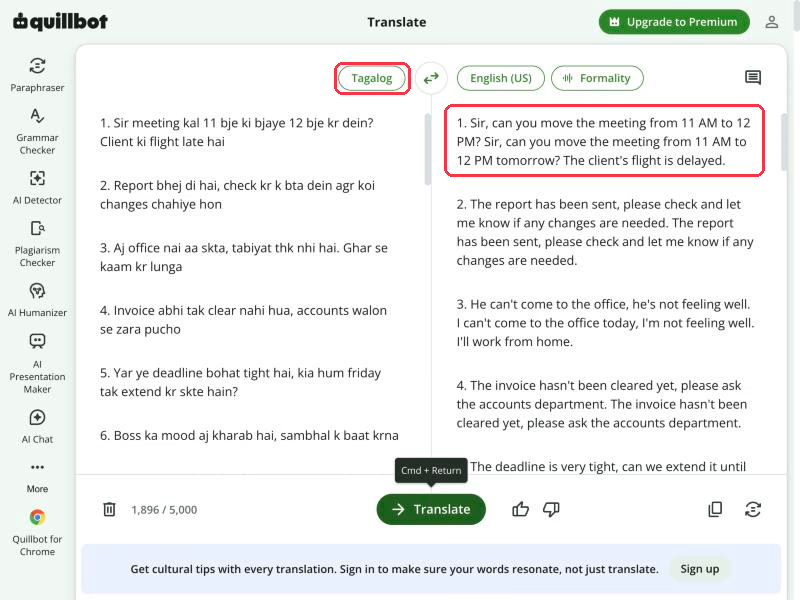
QuillBot Translate lives next to QuillBot's paraphraser and grammar checker, and its free version takes up to 5,000 characters per translation. It accepted my 31 messages without a sign-in, and its detector labeled them Tagalog.
QuillBot Translate's Key Features
Formality control: Premium unlocks a Formality setting for English, and free translations use Auto.
Cultural tips: QuillBot adds cultural tips to translations once you sign in.
Writing tools: Send the English to the paraphraser or grammar checker in the same app.
How Did QuillBot Translate Perform in Online Translation?
QuillBot's output took the most cleanup in my run. Most lines came back twice in a row, and some pairs disagreed: the third message opened with "He can't come to the office" and then said "I can't come to the office today", and message 10 first asked why the salary is "always" late.
The second version of each line was usually right. It kept "tomorrow" in message 1 and turned dhai baje into 2:30. The idiom in message 25 came out as "he's driving me crazy." It still read rishte wale as relatives and left inshallah and Abu as written.
What Are QuillBot Translate's Pros and Cons?
| Pros | Cons |
|---|---|
| Free up to 5,000 characters per translation with no sign-in | Labeled my Roman Urdu as Tagalog |
| Paraphraser and grammar checker in the same app | Repeated most lines twice in my run |
| Cultural tips for signed-in users | Read rishte wale as plain relatives |
Price: QuillBot Translate is free to use, up to 5,000 characters per translation.
QuillBot Premium costs $19.95/month, or $8.33/month billed annually.
How to Translate Roman Urdu to English Online for Free
JotMe's Free plan covers Roman Urdu text translation with 20,000 tokens a month shared across text translation and chat. These are the steps I followed for every test message.
Step 1: Open Translate and Choose Text
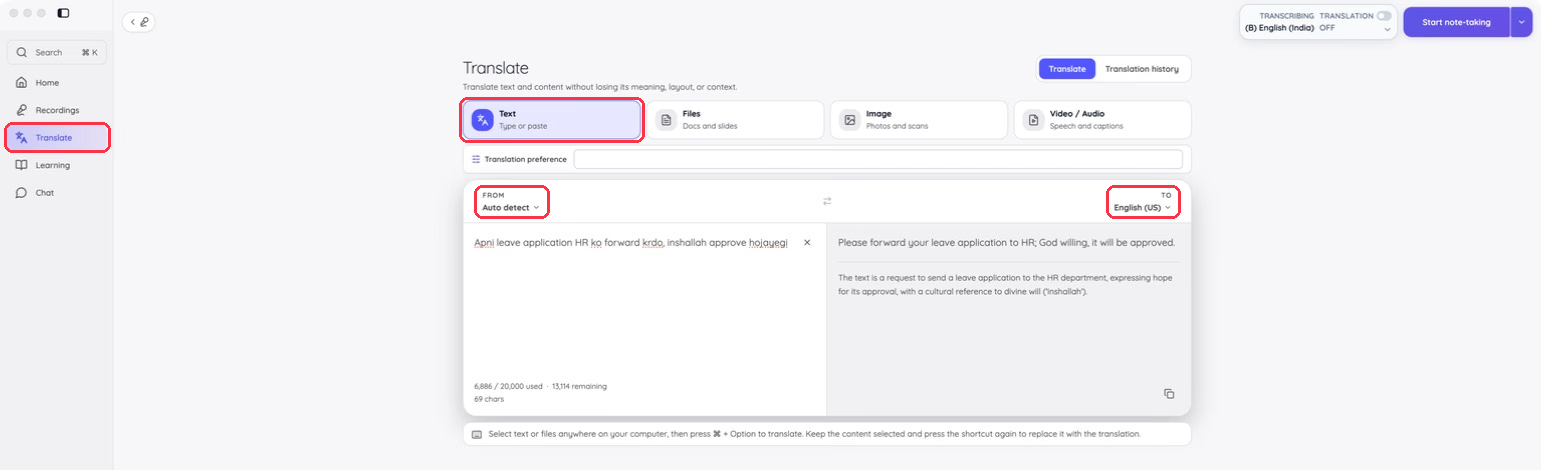
Download JotMe for Mac or Windows, sign in, and click Translate in the sidebar. Choose Text, leave FROM on Auto-detect, and set TO to the English your reader uses.
Step 2: Add a Line of Context
Type whatever the message assumes you already know into Translation preference, such as "This is Roman Urdu from Pakistan. Amounts are in Pakistani rupees." JotMe applies the line to every message you paste after it.
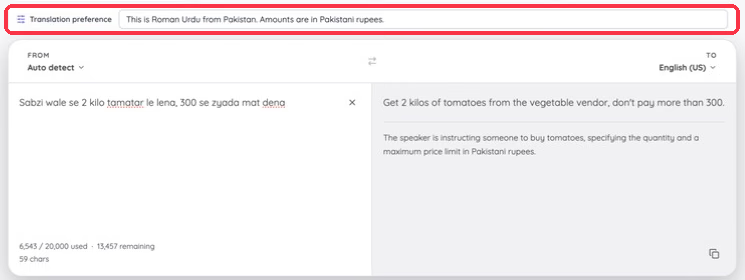
Step 3: Paste a Single Message and Read the Note
Paste a single message into the left box. The English appears on the right with a note on idioms and cultural words when one is provided, and the copy icon puts the translation on your clipboard.
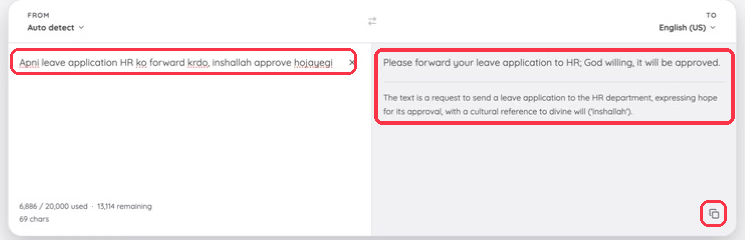
Step 4: Translate Without Copying
Select a Roman Urdu message in any app on your computer and press ⌘ + Option on Mac or Win + Alt on Windows to translate it. Press the shortcut again to replace the selected text with the English, which saves a trip to the Translate screen during a busy chat.
Tips for Accurate Roman Urdu to English Translation
These habits made the biggest difference across my 31 messages, whatever translator you use.
Paste a single message at a time: A single message gives the translator clear context, and in JotMe it lets you review any explanatory note with its own message. Split a long numbered list or a copied chat thread into separate messages before you translate.
Tell the translator the text is Roman Urdu: Google Translate and Microsoft Translator labeled my messages Hindi, and DeepL labeled them English. In JotMe, "This is Roman Urdu from Pakistan" in Translation preference sets the context for every message after it.
Check kal before you act: Kal means yesterday with a past-tense verb and tomorrow with a future verb. Confirm the English kept the right day, since a dropped "tomorrow" changes a meeting request.
Check clock words: Sawa teen means 3:15, dhai baje means 2:30, and paune paanch means 4:45. Read every time in the English against the original before you add it to a calendar.
Check whether the action already happened: "Reschedule krdi hai" means the sender already moved the call, while "reschedule kr do" asks you to move it. Read the English verb before you reply.
Add context for amounts and family words: A number with no unit in a Pakistani shopping message may refer to Pakistani rupees; confirm the currency rather than assuming it, and rishte wale means the family coming with a marriage proposal. Put both in the context box when they matter.
Back-check important replies: Paste your English reply into our free English-to-Urdu translator and compare the Urdu with what you meant before you send it.
Switch to live translation for calls: When a conversation moves to a call, our Urdu to English live translation turns speech into English as people talk, which skips the spelling problem entirely.
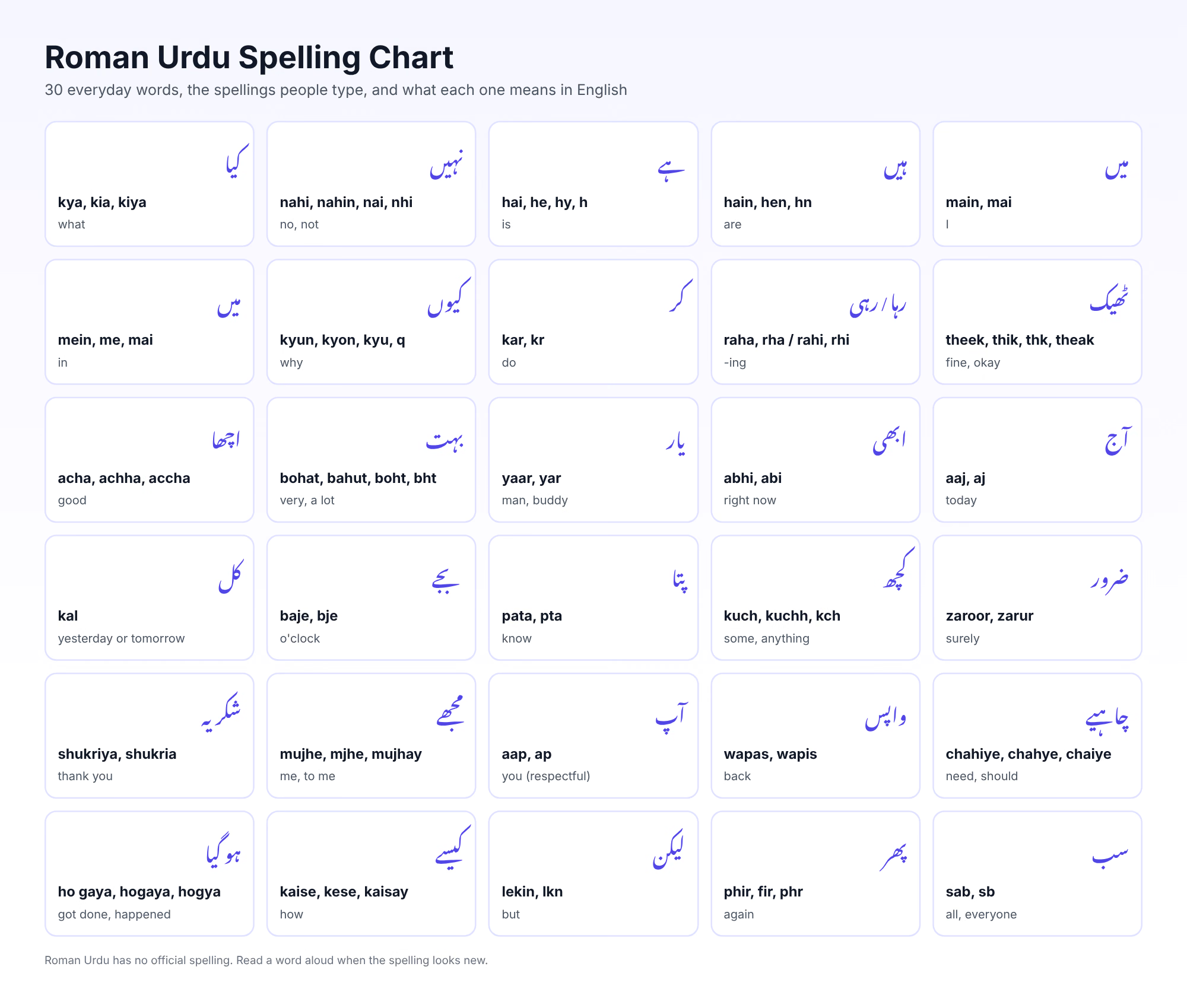
Keep this spelling chart open the next time a Roman Urdu word looks unfamiliar. Roman Urdu spellings follow sound, so reading a new spelling aloud usually tells you which word the sender meant.
Roman Urdu to English for Global Communication
Every translator in this review turns Roman Urdu into readable English, and the right pick depends on what you do with that English next. Google Translate and Microsoft Translator cover quick, free lookups, and ChatGPT, Claude, Gemini, and Copilot suit people who don't mind writing prompts. DeepL fits polished document work once you set the source to Urdu, while Perplexity and QuillBot make sense when translation is a side task inside research or writing.
JotMe is the pick for multilingual communication, since it can add explanatory notes, applies your saved text-translation preferences, and offers separate chat-room memory plus live meeting translation for your team in Pakistan. Download JotMe for free and paste the next Roman Urdu message you receive today!
Translate Every Roman Urdu Message With Confidence
Get accurate English, explanatory notes when provided, and a Translation preference box for the context only you know. Use the same app for multilingual chat rooms and live meetings. Start free on Mac or Windows.
Download JotMe for FreeFAQs
Which Is the Best Roman Urdu to English Translator?
JotMe is the best Roman Urdu to English translator for multilingual communication because it can add notes on idioms and cultural words and applies your saved text-translation preferences. For a quick, free lookup, Google Translate and Microsoft Translator work in the browser with no sign-in.
Can Google Translate Translate Roman Urdu to English?
Google Translate accepts Roman Urdu and returns English, though its detector labeled my messages Hindi. It handled clock words and prices well in my test, and it dropped "tomorrow" from a meeting request, so check kal in the output.
Is There a Free Roman Urdu to English Translator?
Every tool in this review has a free option. JotMe's Free plan includes 20,000 tokens a month shared across text translation and chat, and Google Translate and Microsoft Translator offer free browser translation without signing in. ChatGPT and Gemini also provide limited signed-out access where available; additional features may require an account.
Why Does My Translator Detect Roman Urdu as Hindi?
Everyday spoken Hindi and Urdu share most common words, so a romanized sentence often looks identical in both. Tell the translator the text is Roman Urdu, as JotMe's Translation preference box lets you do, when Urdu-specific words such as shukriya or rishta matter.
Does Kal Mean Yesterday or Tomorrow in Roman Urdu?
Kal means both, and the verb tense tells you which. A past-tense verb such as "hua tha" makes it yesterday, and a future verb such as "karega" makes it tomorrow.
Can I Translate Roman Urdu Voice Notes to English?
A voice note is spoken Urdu, so the spelling problem disappears once you translate the audio itself. Upload the voice note through the Video / Audio option in JotMe's Translate section, and you get the English without typing a word.
Is Roman Urdu the Same as Roman Hindi?
Romanized Urdu and Hindi read the same in many everyday sentences. They split on certain words, such as shukriya in Urdu and dhanyavaad in Hindi for "thank you", and on religious and formal vocabulary.
Try JotMe
Accurate translation for your meetings, events, and everyday work, with AI Memory that remembers your context.