Knowledge Base
JotMe Pricing 2026: Plans, Costs & Modes Explained

Viraj Mahajan
September 7, 2026
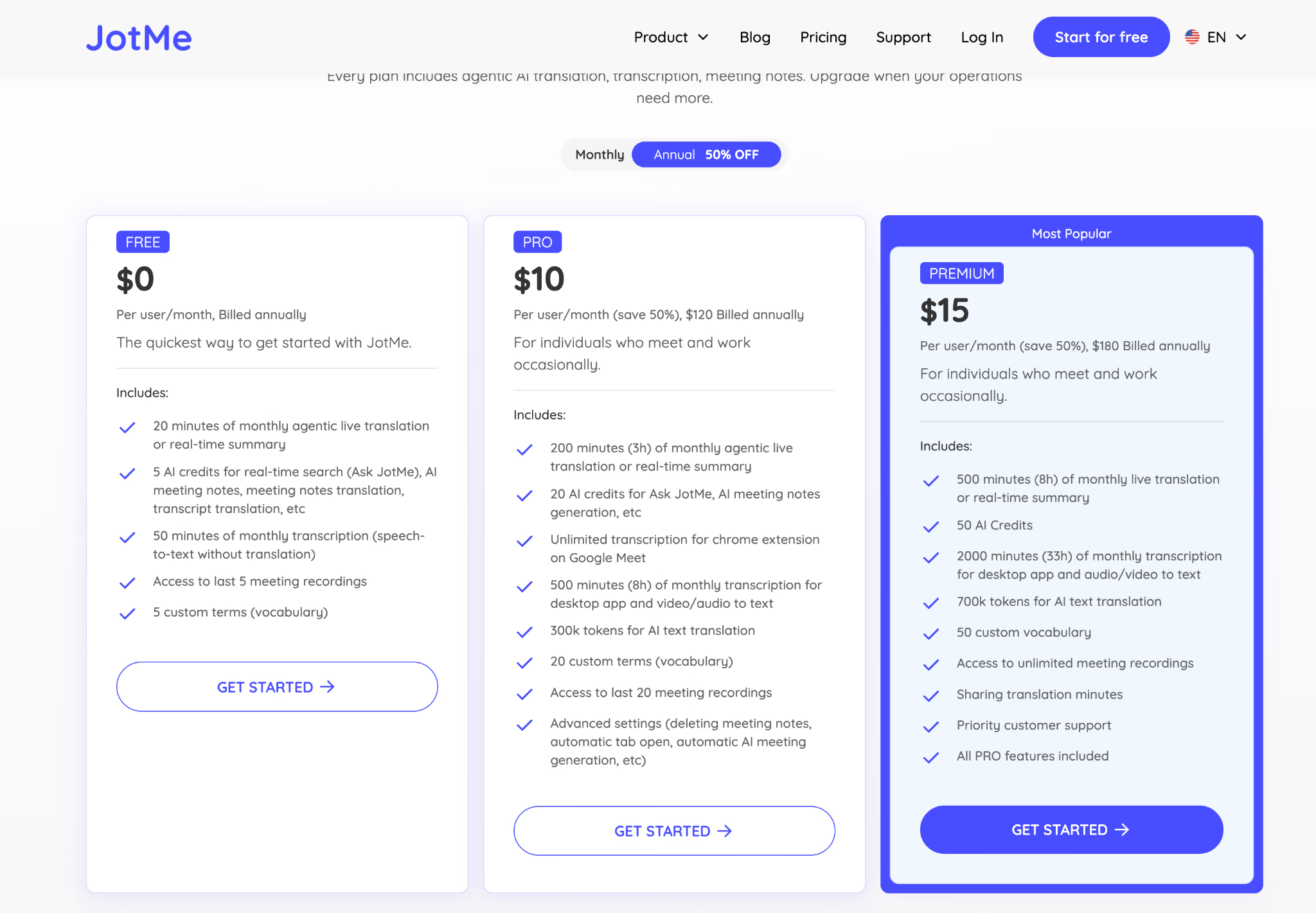
JotMe pricing starts at $0 with its Free plan. Paid individual plans start at $20/month for Pro and $30/month for Premium, while annual billing brings those rates down to $10/month and $15/month, billed upfront. Teams start at $60/month, and Enterprise and Events pricing depends on your requirements.
There is one important detail to understand before choosing a plan: your JotMe subscription and your live-translation mode are separate. Free, Pro, Premium, Teams, and Enterprise determine your allowances and account features, while Basic, Premium Quality, and Fast Audio determine how quickly live-translation minutes are consumed. For example, Basic uses translation minutes at 1x, Premium Quality at 2x, and Fast Audio at 5x.
So a 60-minute meeting does not necessarily use 60 JotMe translation minutes. Depending on the mode and delivery setup, the same meeting can consume 60, 120, or 300 minutes before additional multilingual or participant multipliers are applied.
What Will You Learn in This Guide
- How much the Free, Pro, Premium, Teams, Enterprise, and Events options cost
- What changes between Basic, Premium Quality, and Fast Audio
- How translation minutes differ from transcription minutes, AI credits, and text-translation tokens
- Why a one-hour session may consume more than 60 minutes
- How to estimate the right plan for an individual, team, or event
How Much Does JotMe Cost
JotMe has three individual plans, a flexible Team plan, custom Enterprise pricing, and a separate event estimator. Individual customers can pay monthly or choose annual billing at the displayed 50% discount. Teams combine a seat charge with a selected pool of live-translation minutes, while Enterprise and larger event deployments may require a sales quote.
You can read the complete billing and pricing details on JotMe’s billing and payment page.
Prices above reflect JotMe's published pricing on September 7, 2026. Team totals vary with seats and the live-translation-minute pool. Event totals vary with duration, model, delivery method, and recipients.
Is JotMe Free
Yes, JotMe has a recurring Free plan rather than a short countdown trial. It provides enough allowance to test the actual workflow you care about before paying.
- 20 live-translation minutes or real-time-summary minutes per usage cycle
- 50 transcription minutes
- 5 AI credits
- 20,000 text-translation or chat tokens
- 5 custom vocabulary terms
- Access to the last 5 meeting recordings
Best for A short product test, one brief translated conversation, or someone who mainly wants to understand the interface before choosing a paid plan.
Does JotMe's Annual Plan Charge Monthly or All at Once
JotMe charges an annual subscription in one payment. The $10 Pro and $15 Premium prices are monthly equivalents used to show the annual rate. They are not the amounts charged each month.
Scenario: Mei selects Premium with annual billing on September 7. The checkout charge is $180 for the year, not $15 for the first month. Her plan allowances still refresh on the account's monthly usage date, while the subscription renews annually unless she cancels.
What Is the Difference Between a JotMe Plan and a JotMe Mode
Your plan determines your allowances and features, while your mode determines how JotMe processes your translation. The confusion starts because JotMe uses several different labels for these two separate layers.
Is the Premium Plan the Same as Premium Quality Mode
No, Premium is a paid subscription with larger allowances and account features. Premium Quality is a live speech model that uses translation minutes at 2x. Upgrading the subscription does not automatically switch every session to that model.
Example: If Premium Quality appears in Daniel's live-translation picker and he runs it for 30 minutes, it uses 60 live-translation minutes. Moving from Pro to Premium gives him a larger balance, but he still chooses the model used for each session.
JotMe Free vs. Pro vs. Premium: What Is the Difference
All three individual plans provide live translation, transcription, AI assistance, and recording access. The differences are the size of each allowance and the features available around the core workflow.
Who Should Choose the JotMe Free Plan
The JotMe Free plan is a good choice if you want to test whether JotMe works for your specific meeting setup before paying for a subscription. Use the free allowance to run an actual meeting rather than a quick feature check. For example, if you normally use Zoom with Bluetooth headphones or need multilingual captions, test JotMe with those same settings. This gives you a realistic idea of the audio quality, transcription, translation, and overall experience you can expect in your regular meetings.
Is JotMe Pro Enough for Regular Meetings
Pro is usually the practical individual plan when meetings are occasional and live translation is not being shared with other viewers. Its 200-minute translation balance can cover 200 minutes in Basic, 100 minutes in Premium Quality, or 40 minutes in Fast Audio before any additional multilingual or recipient multipliers.
Best for Freelancers, researchers, consultants, interviewers, or individual team members who need translated captions and meeting records but do not need to fund other participants' live translation.
What Does JotMe Premium Include That Pro Does Not
Premium raises every major individual allowance and adds the two operational features most likely to matter in frequent multilingual work: sharing translation minutes and priority support. It also removes the 20-recording history limit.
Best for People who run translated meetings every week, need longer recording history, translate more files or text, or want clients, colleagues, or attendees to follow a live translation using the host's balance.
How Much Actual Meeting Time Does Each Plan Provide
The headline balance is not always equal to real meeting duration. The selected spoken-language model changes the amount deducted for every minute the session remains active.
These figures assume one target language and no participants receiving a shared translation on their own devices. Multilingual output and sharing can increase usage further.
What Is the Difference Between Basic, Premium Quality, and Fast Audio Modes
Basic, Premium Quality, and Fast Audio are spoken-language models inside the live-translation workflow. Choose the model before the session begins because JotMe cannot change the speech-recognition stream after recording has started.
Which JotMe Mode Is Best for Regular Live Captions
Start with Basic when people need readable translated captions, and the conversation uses a known language. It offers the lowest minute rate and is therefore the easiest mode to budget for recurring meetings.
Best for Weekly project meetings, classes, interviews, and webinars where readable captions matter more than spoken translation.
When Should You Use Premium Quality Mode
Use Premium Quality when caption quality matters enough to justify consuming minutes twice as quickly. The model always includes English alongside the selected supported language. Select the expected non-English language before starting the session.
Best for Client presentations, technical reviews, negotiations, or discussions where names, accents, and detailed wording deserve a higher-quality speech model.
Which JotMe Mode Supports Multilingual Meetings
JotMe separates the speech model from the output choice. Basic can automatically follow speakers switching among English, Spanish, French, German, Hindi, Russian, Portuguese, Japanese, Italian, and Dutch. A Multilingual output can display up to three target languages at once on Premium.
- Single output produces one target language.
- Multilingual output produces multiple target languages and multiplies usage by the number of outputs.
- Fast Audio pairs the Fast spoken-language model with translated audio.
Which JotMe Mode Do You Need for Voice-to-Voice Translation
Fast Audio is the speech-to-speech model. It is intended for situations in which someone needs to hear translated audio rather than only read captions. JotMe can route translated speech in one direction or both directions, depending on the audio setup.
Important: Fast Audio uses translation minutes at 5x as soon as the model is selected. Turning translated audio playback off does not reduce it to the Basic rate.
Which JotMe Plan and Mode Should You Choose
Choose the mode first, estimate its effective monthly usage, and then choose a plan. This avoids buying from the headline minute balance while mentally assuming every mode uses 1x.
If you want to see how JotMe works in practice, you can also see how to use the JotMe Desktop App and explore its complete set of features, including live translation, transcription, meeting notes, recordings, file translation, multilingual chat, and more.
Scenario: Ravi has one 30-minute English-Japanese call every week and reads captions in one language. Basic uses about 120 minutes across four calls, so Pro covers the translation time. If he switches those same calls to Premium Quality, usage becomes about 240 minutes, making Premium the safer individual plan.
What Are JotMe Translation Minutes, Transcription Minutes, AI Credits, and Tokens
JotMe tracks four separate balances. They are not interchangeable. Running out of AI credits does not remove unused translation minutes, and having transcription minutes left does not keep live translation running after its own balance reaches zero.
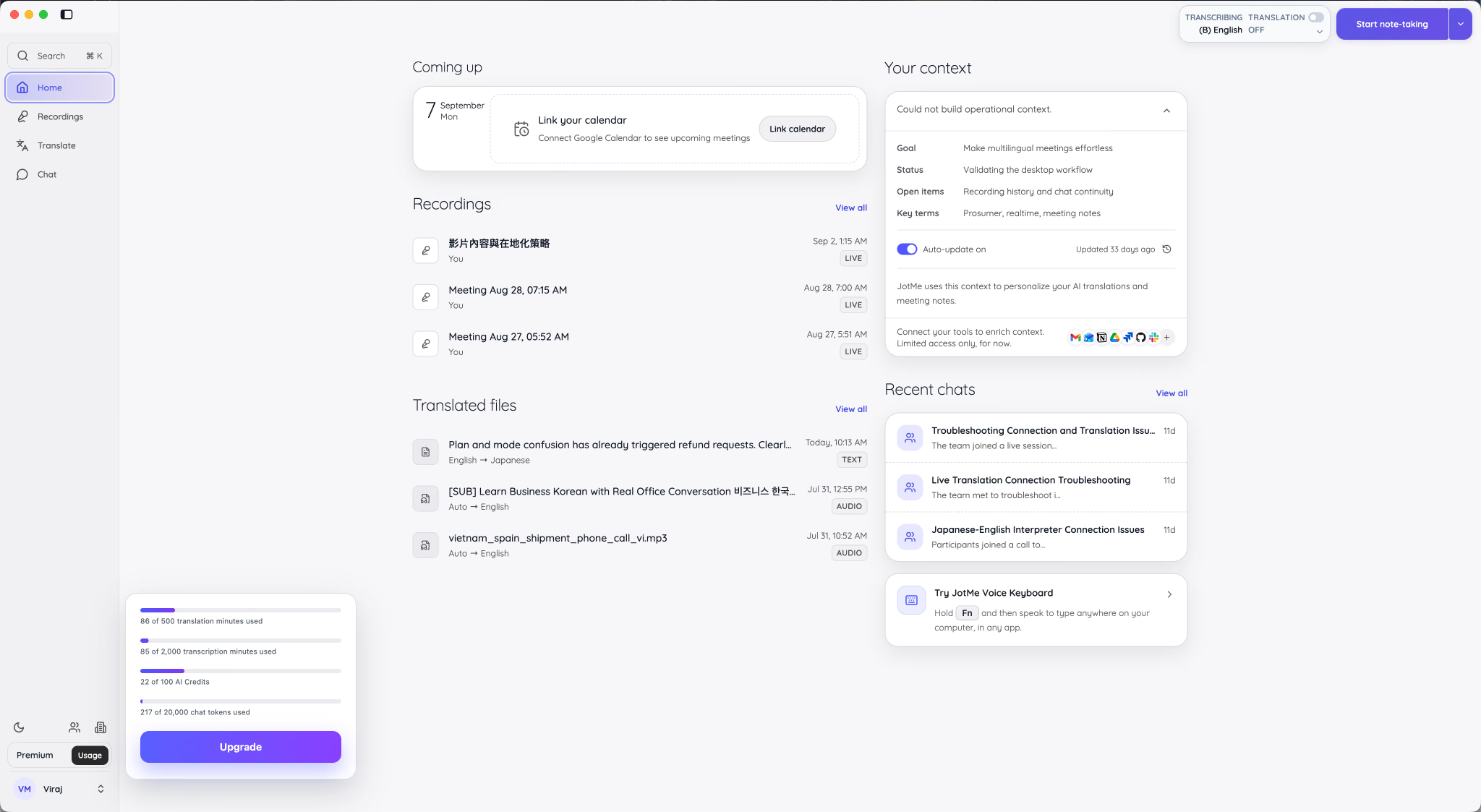
The totals shown in a customer's usage panel can reflect the account's own plan, team allocation, purchases, or other account-specific capacity. Use the numbers displayed in your account when checking your remaining balance.
What Uses JotMe Live-Translation Minutes
- A live session with translation turned on
- A live session using real-time summary
- A shared session funded by the host
- Fast Audio and speech-to-speech translation
- Audio or video dubbing from an uploaded file
If everyone already understands the spoken language and you only need a searchable transcript, turn translation off and use transcription. That draws from the transcription balance instead.
What Uses JotMe Transcription Minutes
Transcription minutes cover speech-to-text without translated output. Desktop recordings, uploaded audio or video transcription, and desktop Voice Keyboard use this balance. Paid plans also include unlimited transcription for the JotMe Chrome extension on Google Meet.
What Uses JotMe AI Credits
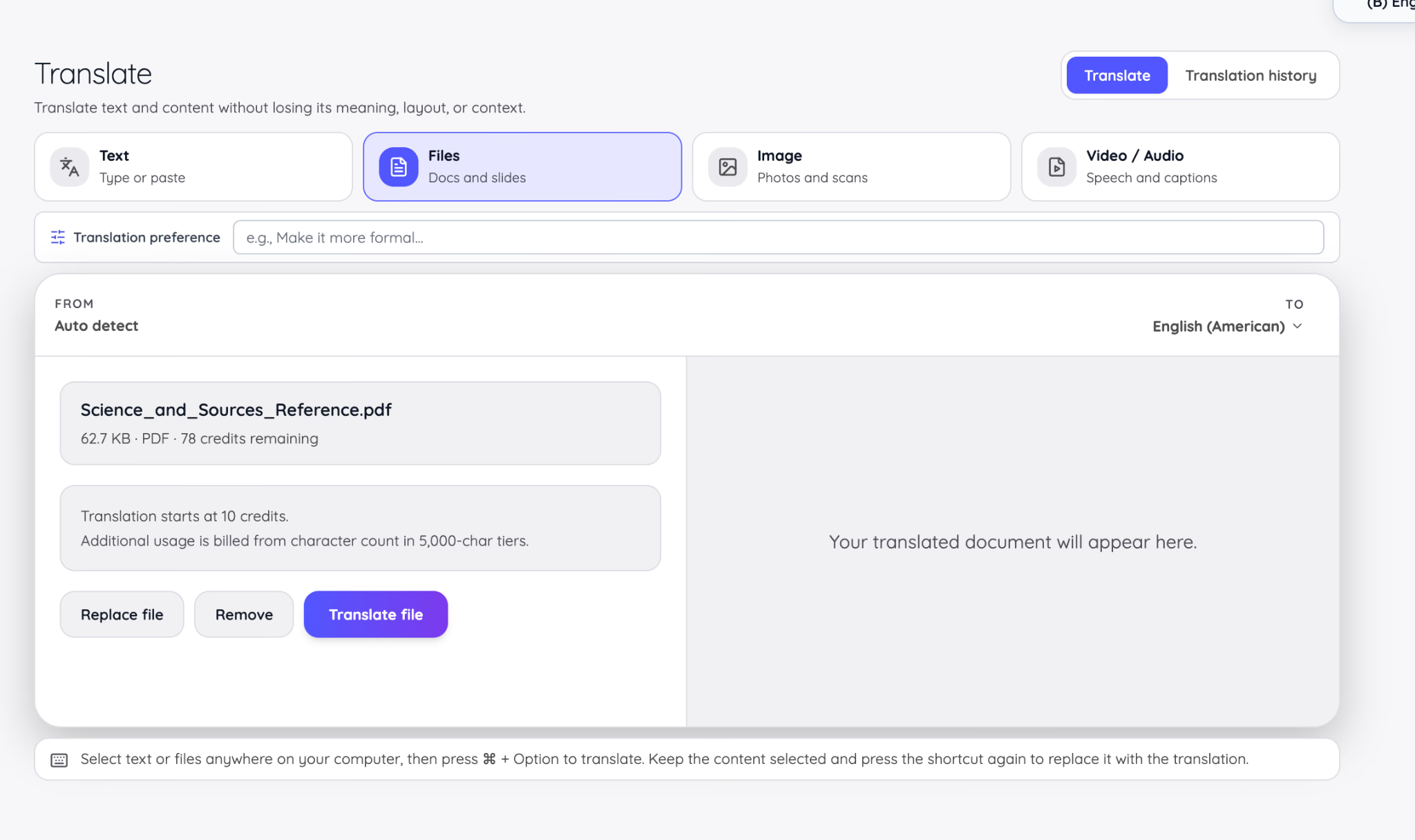
Document translation starts at 10 AI credits for up to 50,000 characters. Each additional 5,000 characters adds one credit. JotMe estimates the charge before the customer confirms the job.
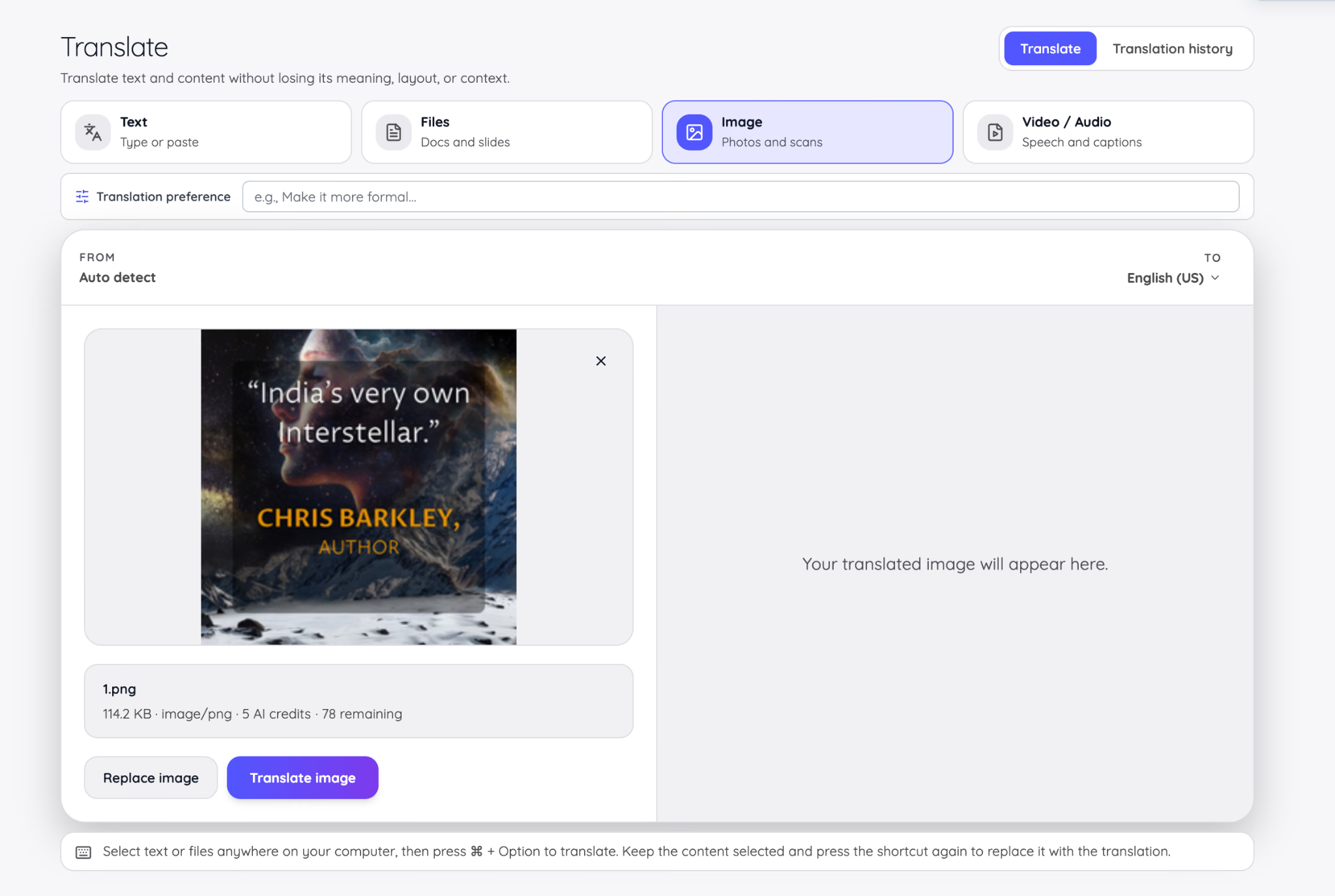
Image translation uses five AI credits. The file size shown in the interface is useful for identifying the upload, but the charge is tied to the image-translation action rather than live meeting duration.
What Uses JotMe Text-Translation Tokens
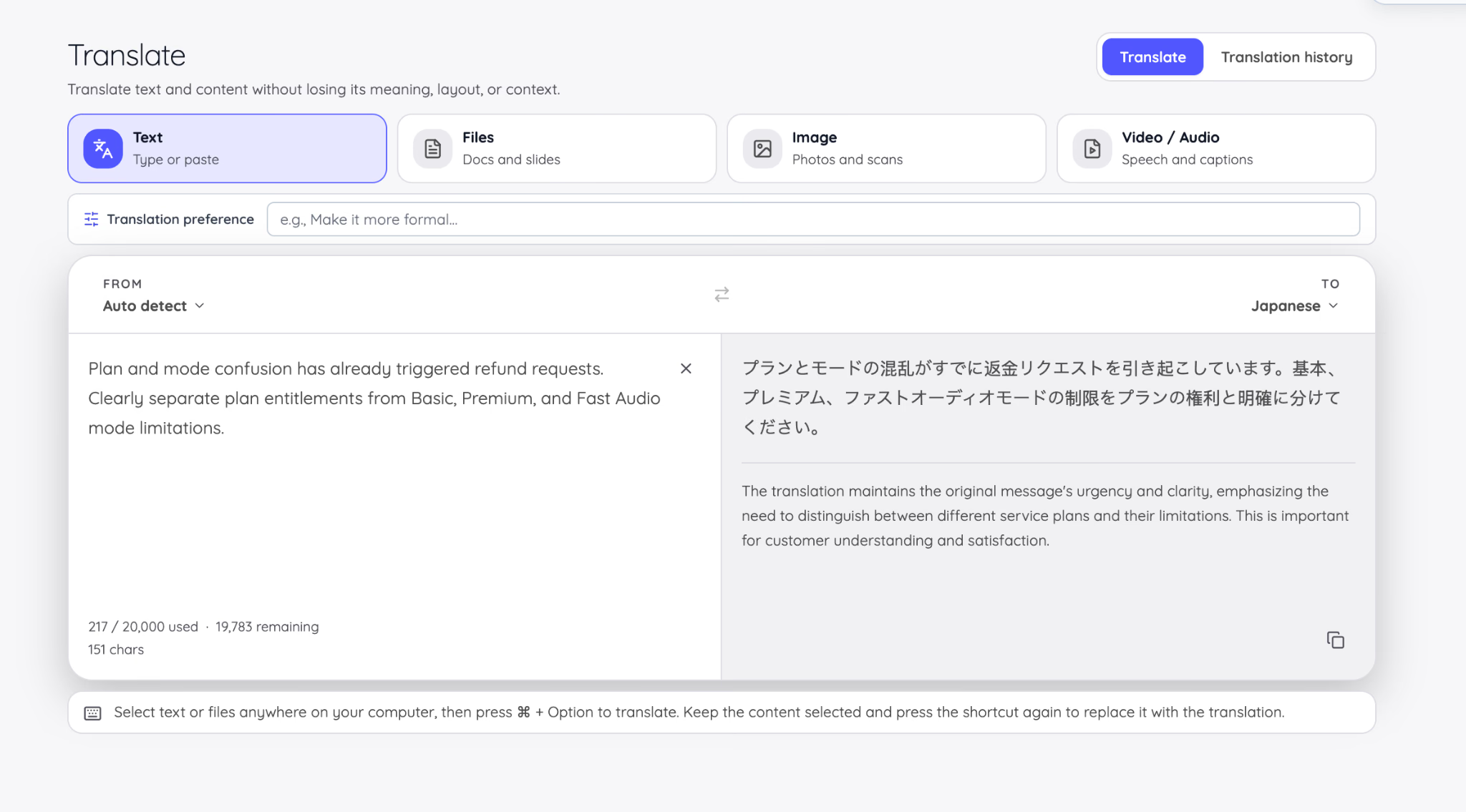
Typed text translation and multilingual chat draw from the token balance. Tokens represent the text processed by the model, not a fixed number of words or characters. The interface shows the amount used and the amount remaining.
How Are Audio and Video Translations Charged
Dubbing an uploaded audio or video file uses live-translation minutes at 20 times the media duration. JotMe rounds the required balance up to a whole minute and displays the cost before processing begins. In our guide on how to translate audio, you can explore detailed steps to translate audio to text.
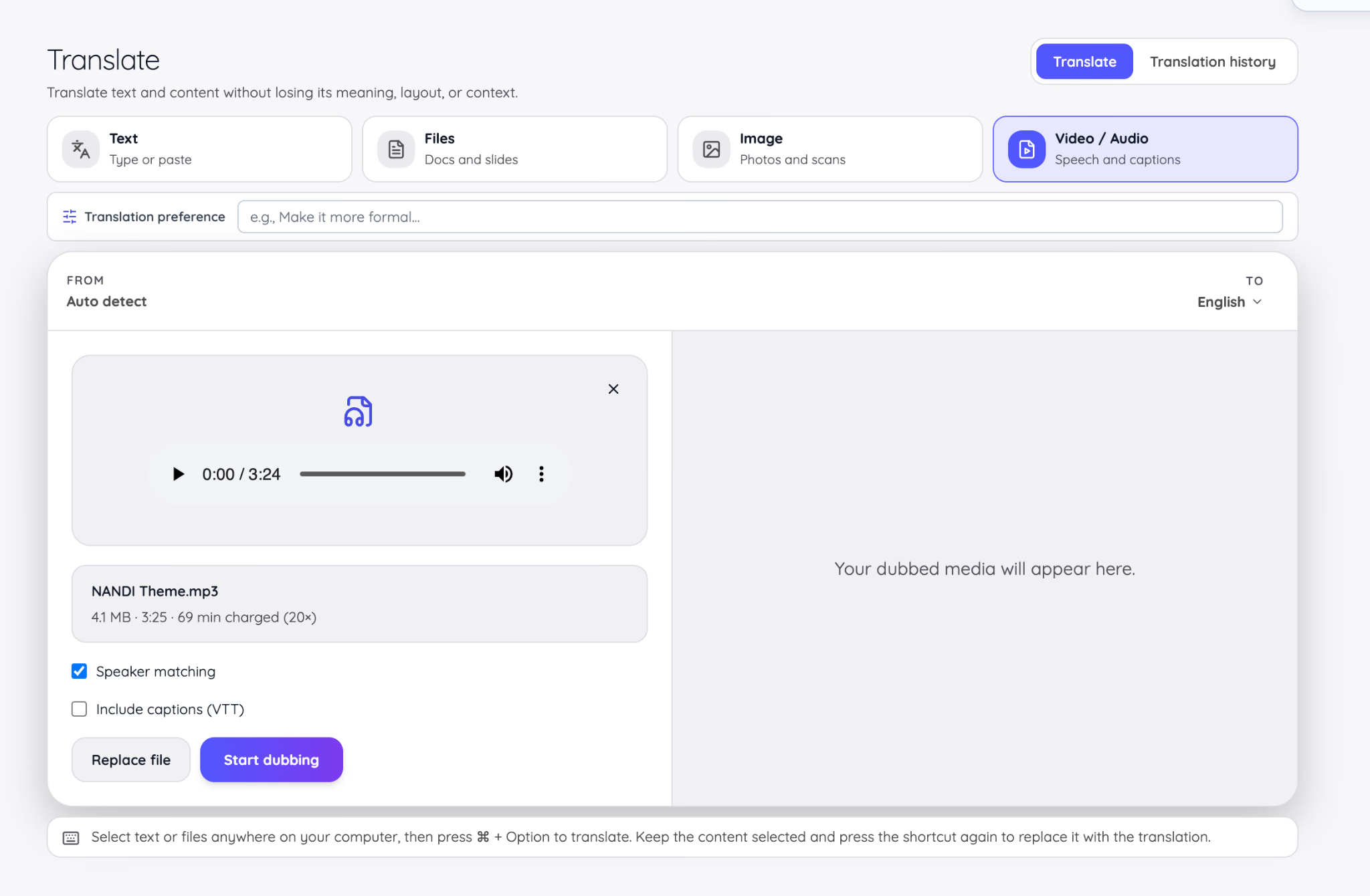
Scenario: A 10-minute product video requires 200 live-translation minutes for one dubbed output. That could consume an entire Pro translation allowance even though the source video is only 10 minutes long.
Why Are My JotMe Minutes Being Used Faster Than My Meeting Length
The clock on the meeting is only the first part of the calculation. JotMe then applies the selected model, target-language outputs, and participant delivery where relevant.
Does Sharing JotMe Translation Use the Host's Minutes
Yes, People joining through a browser link or QR code do not need their own subscription, but their connected time is funded by the host's live-translation balance. The model multiplier is applied before or alongside the recipient calculation.
Scenario: A host shares a 45-minute Basic caption session with 12 people on their own devices. The estimate is 45 x 1 x 12, or 540 live-translation minutes. Showing one translated language on a shared projector would use one output instead of multiplying by all 12 viewers.
What Happens When JotMe Translation Minutes Run Out
When the live-translation balance reaches zero, JotMe stops translated output or offers transcription-only continuation. If the transcription balance reaches zero, the recording stops and is saved. Other balances remain independent, so unused AI credits or tokens do not convert into meeting minutes.
How Many JotMe Translation Minutes Do You Need Each Month
The number of JotMe translation minutes you need depends on how long your meetings are, how often you use JotMe, and which translation mode you choose. For a simple meeting with one target language, start by estimating your total meeting time for the month, then account for the mode you plan to use.
Basic mode uses translation minutes at the standard rate, while Premium Quality uses twice as many minutes and Fast Audio uses five times as many. This means the same meeting can consume very different amounts of your monthly allowance depending on the mode.
If you translate into multiple languages or share the translation with other participants, your usage can increase further. Target languages, connected recipients, and other delivery options can add additional usage on top of the model multiplier.
These examples assume a single translated output and no shared recipients. Use the Event estimator when an audience will receive captions or voice on personal devices.
How Does JotMe Team Pricing Work
The Team plan combines two separately adjustable resources: seats and a shared pool of live-translation minutes. The current self-service calculator starts at two users, requires at least 200 translation minutes per user, and supports up to 200 users and 200,000 monthly minutes before a custom sales conversation is needed.
Team pricing formula: Seat charge + live-translation-minute pool, with the selected monthly or annual billing rate
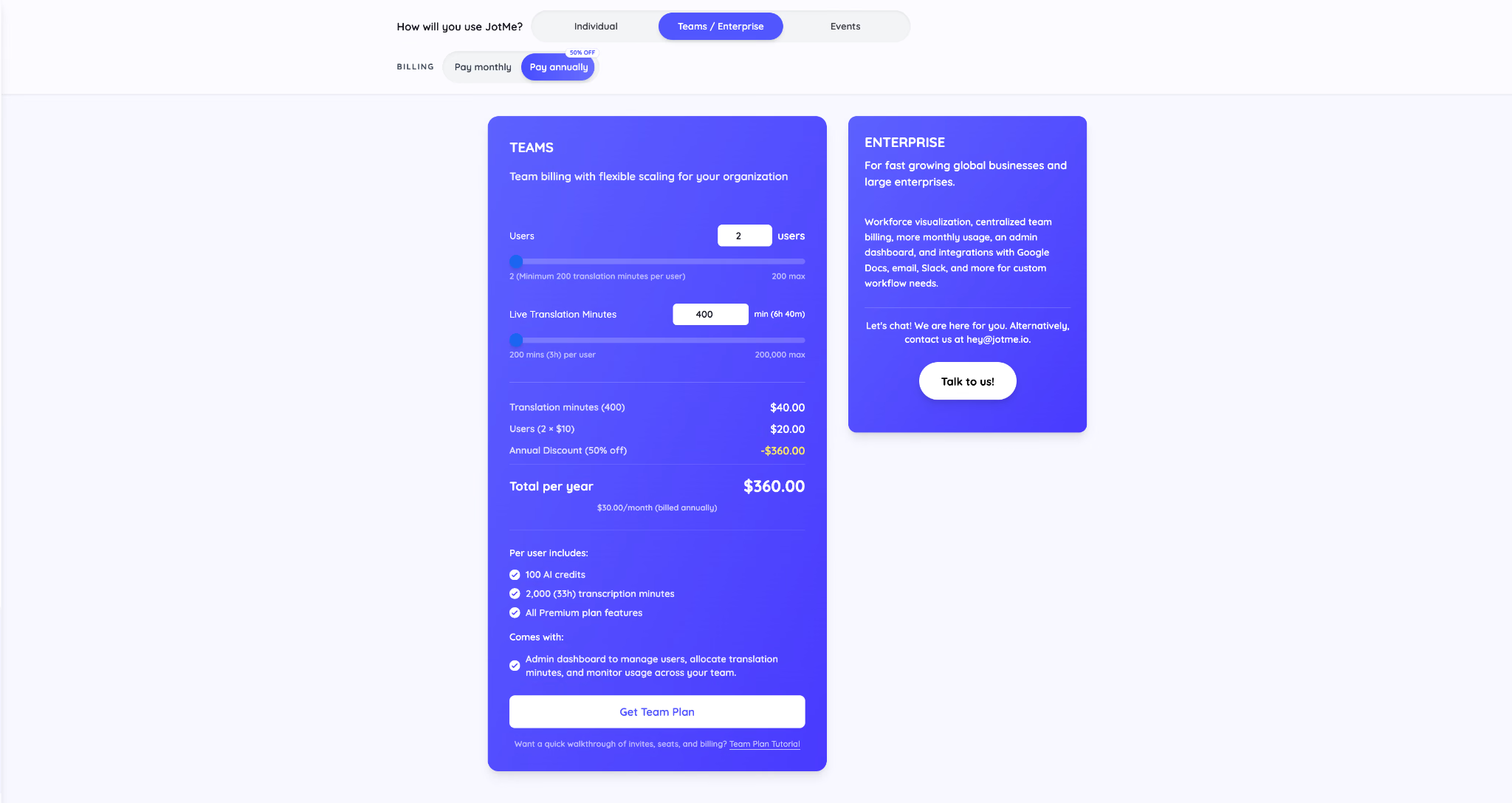
In the two-user example, the calculator combines $20 in seat charges with $40 for 400 monthly translation minutes. Annual billing applies the displayed 50% discount, producing a $360 yearly charge, equivalent to $30 per month.
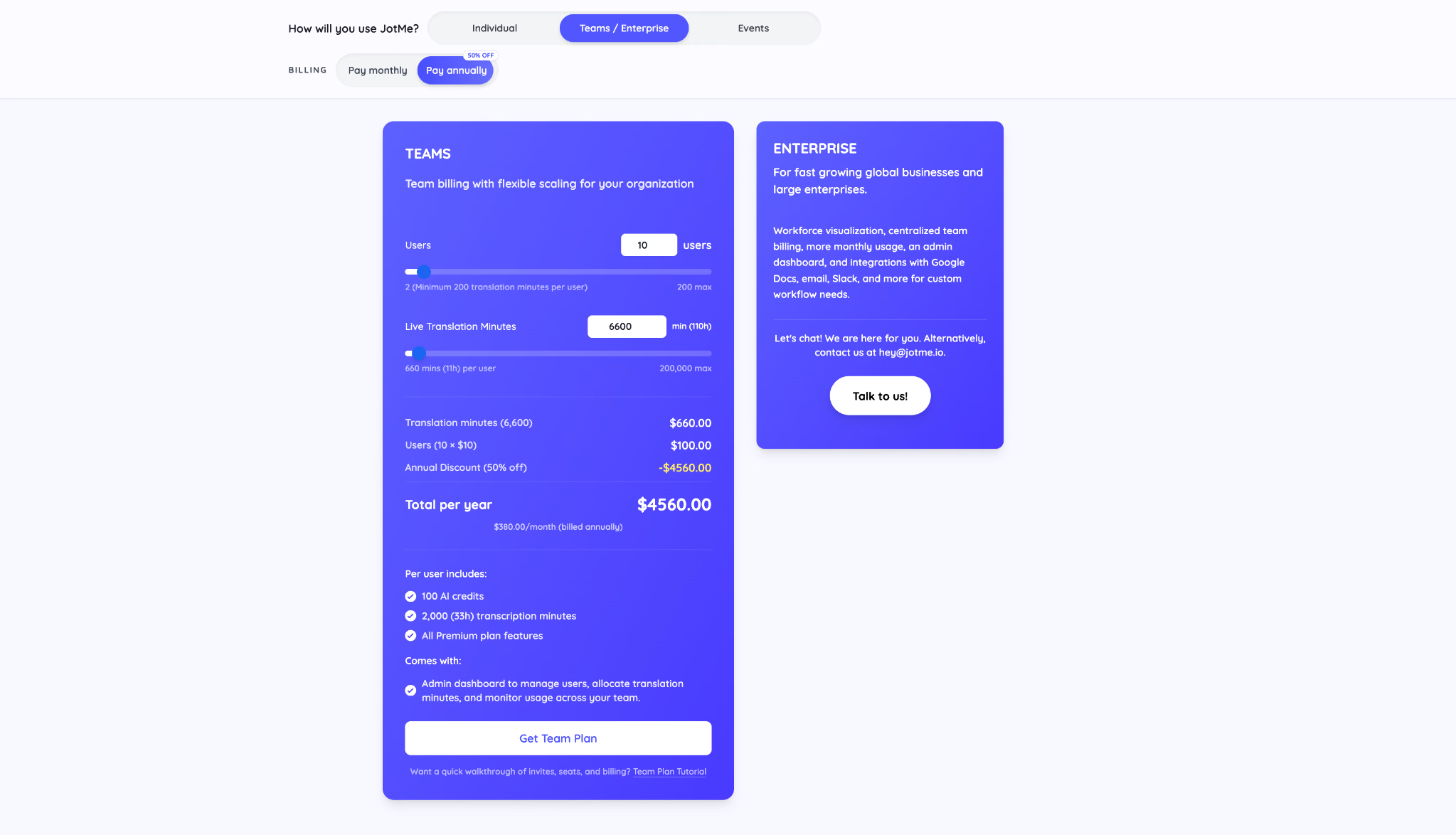
In the ten-user example, $100 in seat charges and $660 for 6,600 translation minutes produce a $760 monthly list total. With annual billing, the calculator shows $4,560 charged for the year, equivalent to $380 per month.
What Does Each JotMe Team Seat Include
- 100 AI credits per user
- 2,000 transcription minutes per user
- All Premium-plan features
- Access to centralized team administration
The shared live-translation pool is separate. After a team is created, administrators allocate part of that pool to each member. A new member begins with a zero-minute allocation until an administrator assigns minutes.
Is JotMe Team Pricing Charged Per User
Each team needs enough seats for its members, and each added seat requires at least 200 live-translation minutes. The translation pool is then distributed among members rather than being fixed equally forever.
Best for A company with at least two active users that wants one bill, controlled invitations, pooled translation capacity, and visibility into who is using the service.
When Should a Business Choose JotMe Enterprise
Enterprise is the route for deployments that cannot be represented by a self-service seat-and-minute calculator. Pricing is custom because requirements can include more usage, centralized oversight, security reviews, procurement, data-processing agreements, or integrations with systems such as Google Docs, email, and Slack.
- Company-wide rollout across departments or regions
- More than the self-service Team limits
- Custom operational workflows or integrations
- Procurement, security, or contractual requirements
- Centralized reporting beyond normal team administration
Best for Fast-growing global businesses and large organizations that need JotMe to fit an existing workflow rather than asking every user to manage an individual subscription.
How Does JotMe Event Pricing Work
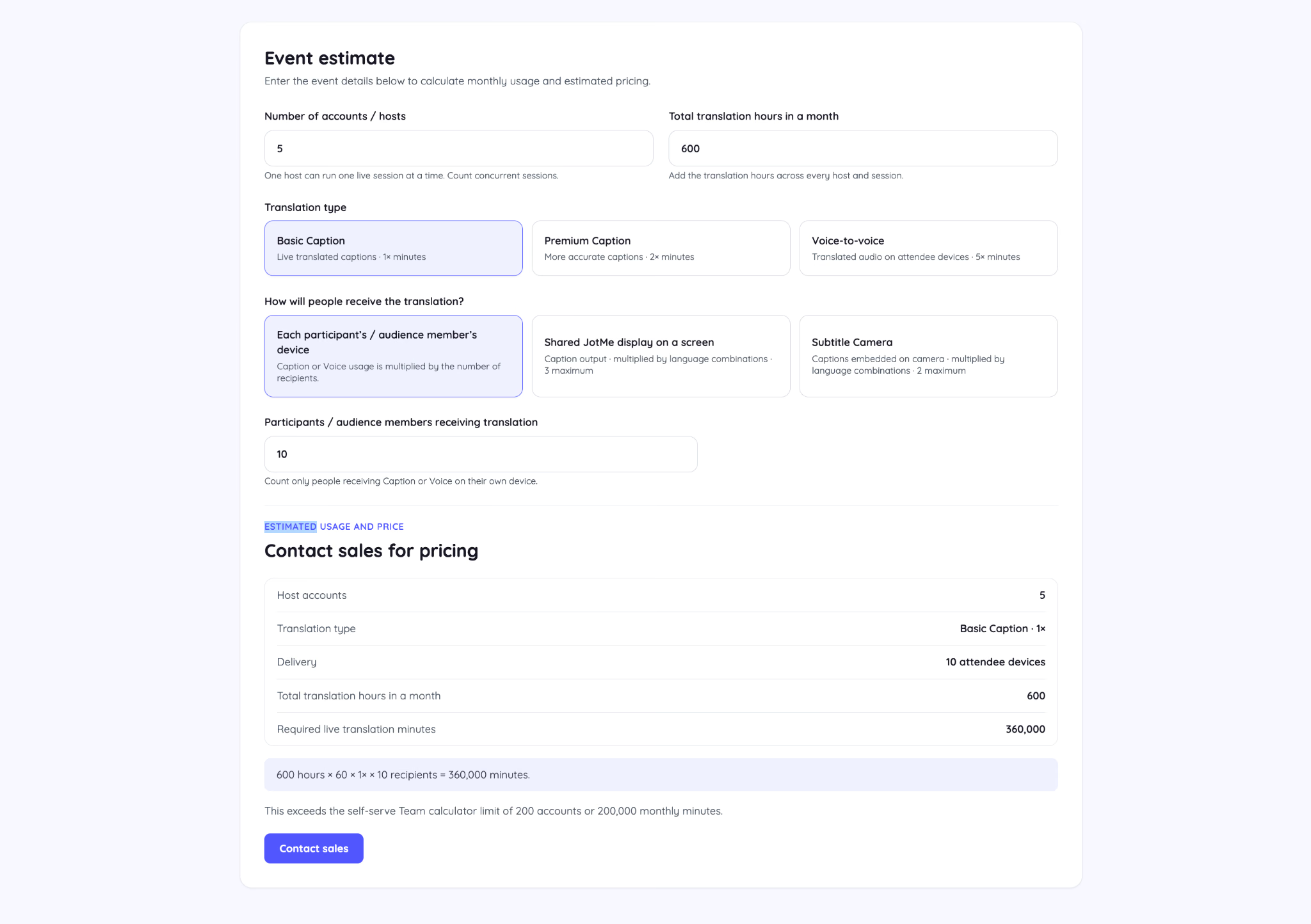
JotMe does not treat every event as one flat package. The estimator calculates required live-translation minutes from the number of concurrent hosts, total hours, translation type, delivery method, and number of people receiving translation on their own devices.
What Factors Change JotMe Event Usage
Does Every Event Attendee Multiply JotMe Usage
Only when attendees receive translation on their own connected devices. A shared screen or Subtitle Camera is calculated by displayed language combinations rather than the number of people watching.
Event scenario: A 90-minute workshop with 50 attendees using Basic captions on their own phones requires about 4,500 minutes: 90 x 1 x 50. If the same audience reads one translated language on a shared projector, the estimate is about 90 minutes. Delivery design can matter more than room size.
How Many JotMe Host Accounts Does an Event Need
One JotMe account can host one live session at a time. A conference with a keynote and two simultaneous breakout rooms therefore needs three host accounts during that period. Enter total translation hours across every host and session in the calculator; do not multiply those already-summed hours by the host count again.
When Does an Event Need Custom Pricing
The self-service Team calculator supports up to 200 accounts and 200,000 monthly live-translation minutes. When an event estimate exceeds those limits, JotMe directs the organizer to contact sales.
Best for Conferences, bilingual church gatherings, training programs, webinars, exhibitions, and hybrid events where captions or translated voice must reach people beyond the person operating JotMe.
Can You Buy More JotMe Minutes Without Upgrading
Yes, JotMe offers a one-time purchase of 500 additional live-translation minutes that remains valid for one month. This is a minutes add-on, not a subscription upgrade.
- It adds live-translation minutes only.
- It does not add transcription minutes, AI credits, or text-translation tokens.
- It does not unlock Pro or Premium account features by itself.
- Buying it while on Free leaves the account labeled as Free.
Team administrators can also buy recurring minutes for future billing cycles or make a one-time purchase for the current usage cycle. A minutes-only Team add-on starts at 500 minutes.
When Do JotMe Minutes and Credits Reset
JotMe usage cycles follow the account's purchase or usage anchor date, not automatically the first day of the calendar month. Check the renewal and usage dates shown in the account or team billing area instead of assuming that every balance refreshes on the first.
- Annual subscriptions are charged in full and renew annually unless cancelled.
- Included monthly allowances refresh according to the account's usage cycle.
- Team billing and Team usage-cycle dates can be different.
- One-time Team minutes remain available only until the next usage-cycle reset.
Which JotMe Plan Should You Start With
Start with the smallest plan that covers the workflow you have actually tested, not the workflow you imagine you might use later. Then recalculate whenever you change the model, add target languages, share with participants, or begin translating audio and video files.
- Choose Free to test your real microphone, headphones, meeting platform, languages, and preferred mode.
- Choose Pro for individual captioning and transcription within moderate monthly limits.
- Choose Premium when you need more capacity, unlimited recording history, translation sharing, or priority support.
- Choose Teams when two or more users need centralized billing and allocated minutes.
- Use Events when participants or audiences receive translation, especially on their own devices.
- Talk to Enterprise sales when self-service limits or standard workflows no longer fit the deployment.
Ready to test the workflow? Download JotMe now or compare current pricing before choosing a paid plan.
Frequently Asked Questions About JotMe Plans and Modes
Is JotMe completely free?
JotMe offers a Free plan with recurring translation, transcription, AI-credit, token, vocabulary, and recording allowances. Paid plans are optional when the Free limits or features no longer fit the workflow.
What is the cheapest paid JotMe plan?
Pro is the lowest-priced paid individual plan at $20 per month or $120 charged annually, equivalent to $10 per month.
Is Pro or Premium better for voice translation?
Voice translation uses Fast Audio at 5x. Premium has a larger 500-minute balance, but frequent speech-to-speech meetings can still require added capacity or a Team plan.
Do unused JotMe minutes roll over?
JotMe describes plan allowances as resetting on the account's usage-cycle date. Treat included monthly allowances as cycle-based rather than as a balance that accumulates indefinitely.
Can I use Premium Quality mode without the Premium plan?
Premium Quality is a translation model, not the name of an entitlement tier. Check the model picker available to the current account and product surface. When selected, it consumes translation minutes at 2x.
Does the Premium plan automatically use Premium Quality mode?
No. Premium expands the account's allowances and features. The user still selects the spoken-language model for the session.
Can I share live translation on the Pro plan?
Translation-minute sharing is listed as a Premium feature. Customers who need participants to join a host-funded live translation should use Premium, Teams, Events, or an appropriate Enterprise setup.
Does JotMe charge guests who join a shared translation?
Guests joining a browser session do not need their own paid plan. Their connected usage is drawn from the host's live-translation balance.
Does JotMe renew subscriptions automatically?
Yes, subscriptions renew automatically until cancelled. Annual plans are charged as one yearly payment.
What happens after I cancel JotMe?
Cancellation stops the next renewal. The paid plan remains available until the end of the period already purchased. Cancelling does not automatically refund the current period.
Are JotMe subscriptions refundable?
JotMe's published policy states that subscriptions are non-refundable after purchase except where applicable law requires otherwise. Use Free to test the intended setup before buying.
Why does JotMe show Free even though I paid?
The most common cause is signing in with a different email or sign-in method from the account that holds the subscription. Check the email shown in the account area before purchasing again.
Does uninstalling JotMe cancel the subscription?
No, deleting the desktop app or Chrome extension does not cancel billing. Cancel the subscription from the JotMe account dashboard.
Does JotMe Consume Minutes When Nobody Is Speaking
Yes, if the session is still running. Live translation is metered by active session time rather than the number of spoken words. Pausing the session stops the meter, so pause it during a long break instead of leaving it active in a silent room.
Last updated on
September 14, 2026
Follow us on social media:
![JotMe — Is Google Translate Accurate? [2026 Test]](/_webflow-assets/0d0512afc7b037d74dff536f22fed08f.avif)