Share meeting notes that make the handoff clear
Give teammates the decisions, next steps, accurate transcript, and recording. Share JotMe AI meeting notes by link, email, or chat while My notes stay private.
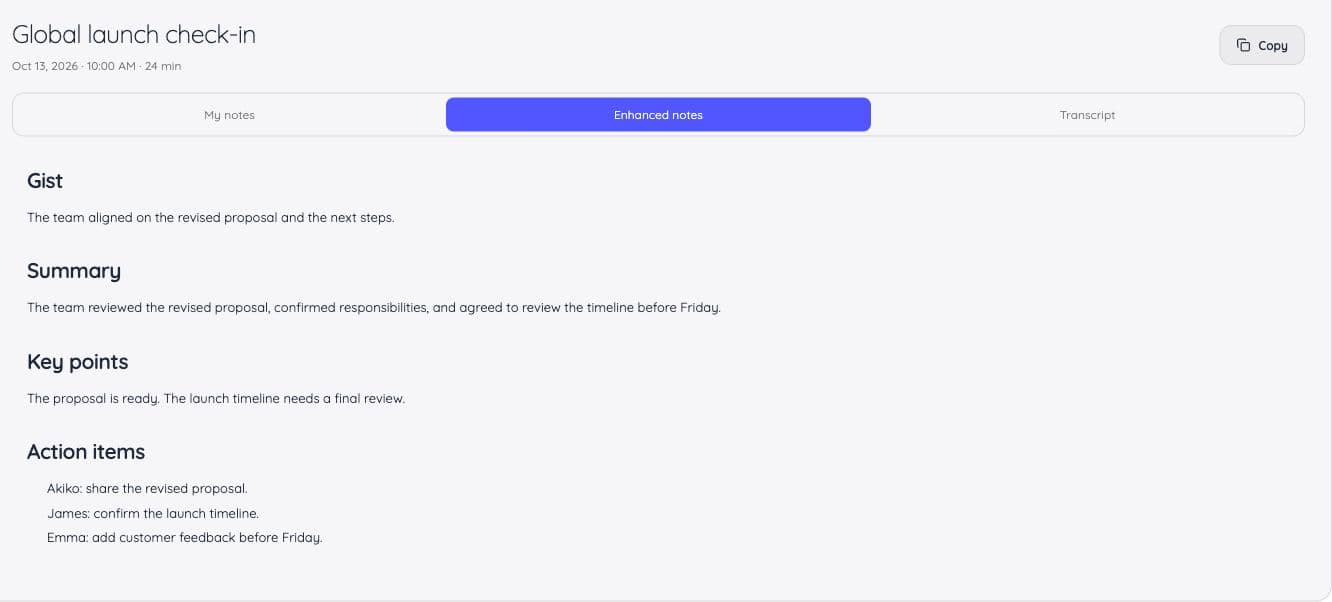
Enhanced AI notes · transcript · audio
Join 500,000 of the world’s most capable global professionals















 Rated 4.7/5
 GDPR Compliant
 SOC 2 Type II
Give the next person more than an action-item list
Share the summary, decisions, and next steps with the transcript and audio behind them. A teammate can catch up, check the original discussion, and understand why a task matters. Keep your own My notes private and choose the recipient access supported by link, email, or chat sharing.
Create AI meeting notes Share meeting
Keep the original conversation within reach
The shared meeting includes the transcript and audio recording alongside the AI notes. Recipients can review the discussion behind a summary or action item.
Explore meeting recordingKeep private notes private. Choose recipient access
Your writing under My notes is excluded from the shared record. Use a view-only link, or choose view, comment, or edit access when sharing by email or JotMe Chat.
Share the discussion in multilingual chatHow to share your meeting notes
Open the saved recording
Review the Enhanced notes and transcript before sharing. Check the names, decisions, and action items that matter.
Choose Share and a destination
Select Email, Chat, or Link. For email and chat, choose Can view, Can comment, or Can edit.
Review the recipient’s access
A link is view-only; email permissions can be managed from the dialog. Private My notes are excluded from the shared record.
Use cases
Bring it into the work you already do.
Team meeting recaps
Give teammates the decisions and source conversation in one record.
Explore the use caseProject handoffs
Help the next person understand the work behind an action item.
Explore the use caseTraining follow-up
Share a session’s AI notes, transcript, and audio for later review.
Explore the use caseTrusted by 2,000 teams
Across 134 countries
From multilingual meetings to everyday teamwork. Hear from the people using JotMe.
 G2
 Chrome Web Store
“JotMe streamlines our multilingual meetings, ensuring seamless collaboration in our fast-paced work environment.”


“This bilingual feature streamlines note-taking at work, saving time and boosting efficiency in both languages.”


“Essential for non-fluent speakers; simplifies complex meetings with real-time translation and accurate transcriptions.”

 Upwork
“As my job involves translation and bridging cultures, I have found this tool as a game changer to my daily work.”


“Japanese was once a mystery to me, but this product made it clear and accessible with contextual understanding.”


“The translation we've needed for years – now a reality with JotMe!”

What formats and usage should I check?
- Included
- Enhanced AI notes · transcript · audio
- Excluded
- Private My notes
- Email and chat
- View, comment, or edit permission
- Link
- View-only access for anyone with the enabled link
Check the language options and output settings in the selected tool before starting.
View usage detailsHow do I share AI meeting notes?
Open the saved recording, select Share, and choose Email, Chat, or Link. Review recipient permissions before sharing.
Can recipients see my private My notes?
No. My notes is private. The share includes the Enhanced AI notes, transcript, and audio recording.
What can recipients edit?
Edit permission lets recipients read, comment on, and edit the AI meeting notes and transcript text. View permission allows reading and playback; Comment adds the ability to leave comments.
What does a shared link allow?
Meeting Link sharing is view-only. Anyone with the enabled link can read the shared AI notes and transcript and play the audio recording.
Can I share notes into an existing chat?
Yes. Use Share on the recording or the chat composer’s Meeting notes picker. The selected chat permission applies to everyone in that chat.
Can JotMe share the record with a post-meeting chat?
If you enable post-meeting chat before stopping, JotMe can create a group chat for people who joined and share the AI notes, transcript, and recording using your selected permission.