




How to Translate Text Using ChatGPT [With Prompts]

Quick Answer
To translate text using ChatGPT, open your ChatGPT account on the website or the mobile app and start a new chat. Paste or type your text and name the language you want. Add a line about the reader, such as "Translate this into Korean for a supplier and keep it polite." Send it, then ask follow-up questions to fix the tone or wording.
Photos and screenshots go in through the + button, and speech goes in through the microphone. To translate a Word file or PDF, upload the document and ask ChatGPT to keep the headings and tables in place.
If you want to translate text but have realized that Google Translate's translation is sometimes not that accurate, or you have found DeepL a little complicated for your work, and you are now looking to use ChatGPT to translate text, then you are in the right place.
ChatGPT looks at the whole paragraph when it translates a sentence. That helps it keep the meaning of a line that a word-for-word tool breaks apart. You can also tell it who will read the translation, and it changes the wording for that person.
On October 23, 2026, I put ChatGPT's translation features to the test. I translated Japanese news as pasted text and as a screenshot. I also photographed a Japanese article off my laptop screen and dictated a Spanish conversation into my phone.
Some results impressed me. ChatGPT explained a baseball nickname that a word-for-word tool would have left as it was, and it marked a Spanish phrase it couldn't make out. It also guessed the reading of a lawyer's name and the lawyer's gender, two things the Japanese text never spells out.
Below, you'll find each method step by step, along with the prompts I used and better ones you can copy. Keep these points in mind before you start:
- ChatGPT is free to start: You can translate text on the Free plan and on the ChatGPT Translate page without paying.
- Every input works: You can paste text, upload a screenshot, take a photo, speak into the microphone, or upload a file.
- Context matters most: Tell ChatGPT who will read the translation and how formal it should sound, or it will guess.
- Review still matters: Check names and numbers before you send anything important, especially in contracts and medical text.
Who Should Read This How-To Guide?
These steps help anyone who needs foreign text in another language today, from a street sign to a 20-page contract. They help these readers the most, and our list of business translation use cases covers more situations at work.
- Managers who work with overseas suppliers: You receive emails from partners in Korea, Japan, China, or Taiwan and want to reply in their language without waiting a day for an agency.
- Students and researchers: You read papers and news in a language you only half know, and you need the key terms right.
- Travelers: You want a menu or a train notice in your own language within seconds.
- Marketers and freelancers: You adapt product pages and social posts for buyers in another country.
- Support teams: You answer customer messages that arrive in Spanish or German.
- Language learners: You want a translation plus an explanation of the grammar behind it.
Why Is This How-To Guide Different?
Most guides on how to translate using ChatGPT stop at "paste your text and ask for a translation." That advice works for a short line, and it falls apart once you hand ChatGPT a blurry photo or a voice note. I ran the methods on real material and kept the screenshots, mistakes included.
- Real screenshots: The steps show my own screen on my laptop and my phone.
- Several languages: The examples cover Japanese, Chinese, Spanish, and English, and the prompts and tips add Korean, German, French, Portuguese, Arabic, and Hindi.
- Prompts you can copy: Every method comes with prompts you can paste into your own chat.
- What to double-check: I point out each spot where ChatGPT guessed, so you know where to look in your own translations.
- A clear line on limits: The last section explains where ChatGPT translation is enough and where you need a different tool.
How to Translate Text Using ChatGPT
ChatGPT can translate text from almost anywhere, and how to translate using ChatGPT depends on where your text lives. Typed text works best in a chat or on the ChatGPT Translate page. If the text is part of a picture, upload a screenshot or take a photo. Spoken words go through the microphone, and long files go in as uploads.
| Method | Best For | Where It Works |
|---|---|---|
| Paste or type text in a chat | Emails and articles you can copy | chatgpt.com and the ChatGPT app |
| ChatGPT Translate page | Short lines with ready-made tone buttons | chatgpt.com/translate in any browser |
| Upload a screenshot or image | News pages and posts you can't copy | chatgpt.com and the ChatGPT app |
| Take a photo in the app | Signs and printed pages | The ChatGPT app on your phone |
| Dictate with the microphone | Voice notes and short spoken lines | chatgpt.com and the ChatGPT app |
| Upload a document | Word files and PDFs | chatgpt.com and the ChatGPT app |
I used GPT-6.1 Sol on Light effort on my laptop and GPT-6 Astra on Max effort on my phone. My screenshots come from ChatGPT Work, which explains the "Work with ChatGPT" label in my message box. A regular chat has the same + button and microphone, and free accounts follow the same steps with a different model list and lower limits.
I've covered every method below in order, starting with typed text.
How to Translate Typed or Pasted Text in ChatGPT
Typed text is the most common starting point. Anything you can copy works here, from a supplier email or a WhatsApp message to a product review or a news story.
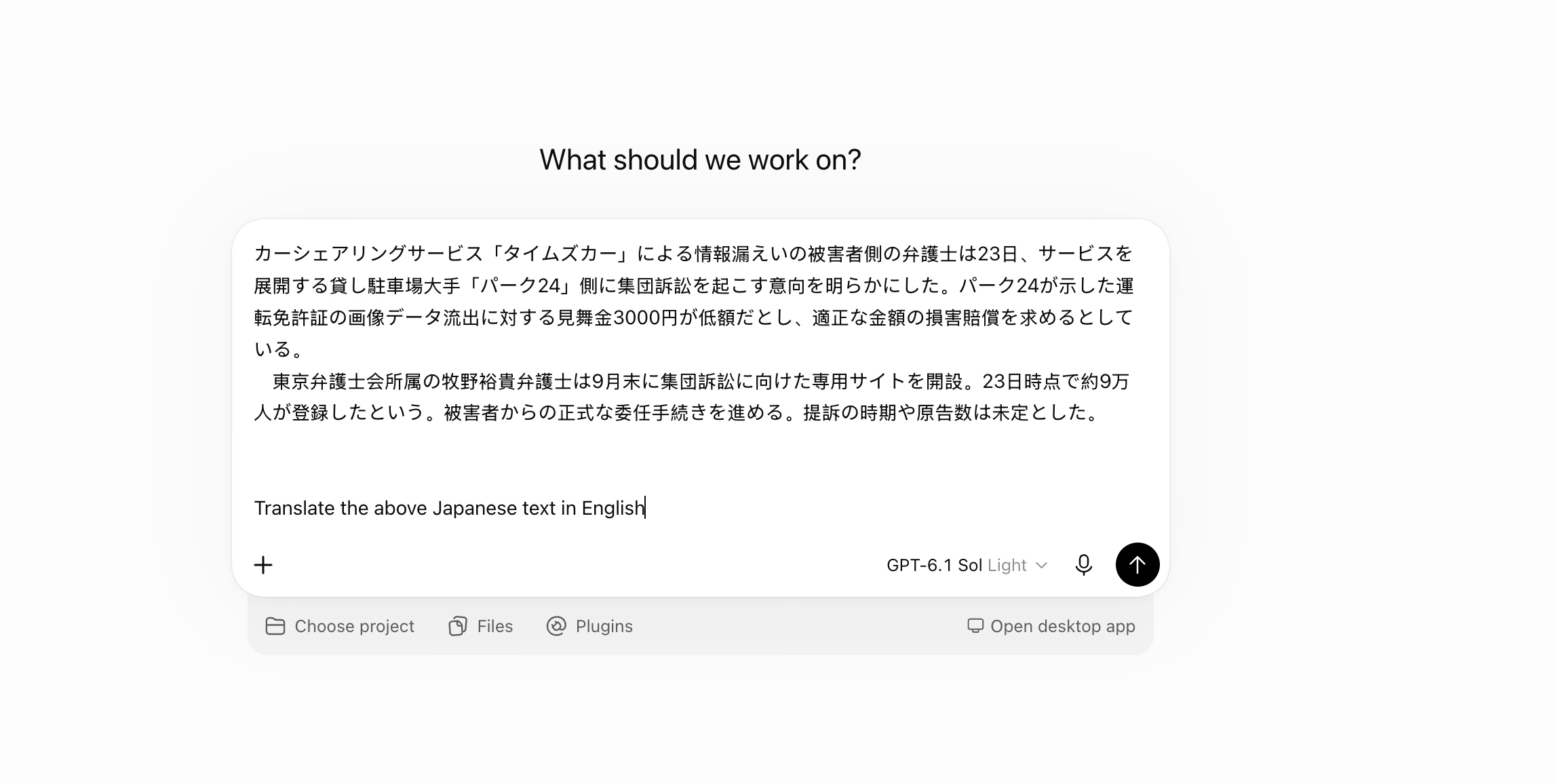
For my test, I copied two paragraphs from a Japanese news story. The story covers a data leak at Times Car, a car-sharing service in Japan, and a planned lawsuit against Park24, the company behind it.
Step 1: Paste Your Text and Write a Short Request
Open chatgpt.com or the ChatGPT app and start a new chat. Paste your text into the message box. Leave an empty line, then type your request under it.
I kept my request short on purpose: "Translate the above Japanese text in English." The empty line helps ChatGPT tell your request apart from the text you want it to translate.
Step 2: Read the Translation and Check Names and Numbers
ChatGPT returned two English paragraphs that read like a news wire story. Every number survived, from the ¥3,000 payment and the date of the 23rd to "late September" and the roughly 90,000 people who had registered. It turned 集団訴訟 into "collective lawsuit," which matches what the lawyer plans to file.
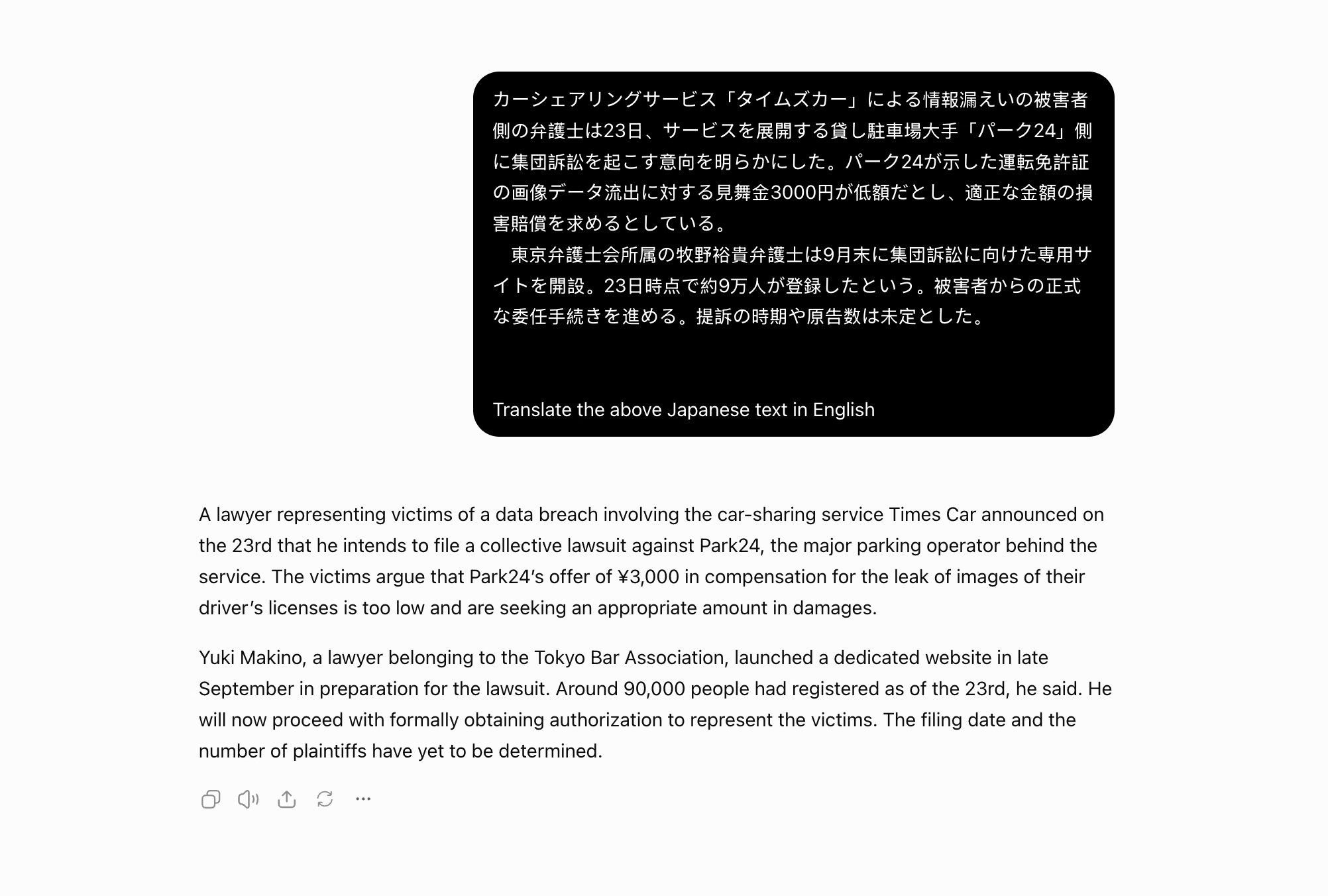
A careful reader will still spot a few guesses in this translation:
- The lawyer's name: ChatGPT wrote 牧野裕貴 as "Yuki Makino." The given name 裕貴 can also read as Hiroki, and the article never prints the reading, so confirm the name from an English source before you publish it.
- The lawyer's gender: The Japanese text never says if the lawyer is a man or a woman. ChatGPT picked "he" in three places.
- The payment: 見舞金 means a goodwill or consolation payment. ChatGPT called it "compensation," a stronger word that blurs the line between Park24's gesture and the damages the victims want.
Step 3: Ask a Follow-Up to Make the Meaning Clear
The chat remembers your text, so a follow-up takes a single line. I asked: "Can you translate the news in a way that helps a non-native understand what exactly happened?"
ChatGPT rewrote the story in short paragraphs and put the key facts in bold. This time, it called the ¥3,000 a "goodwill payment," which fits the Japanese better. It also spelled out two points the original leaves implied: registering on the website doesn't make someone part of the lawsuit, and the report doesn't explain how the leak happened.
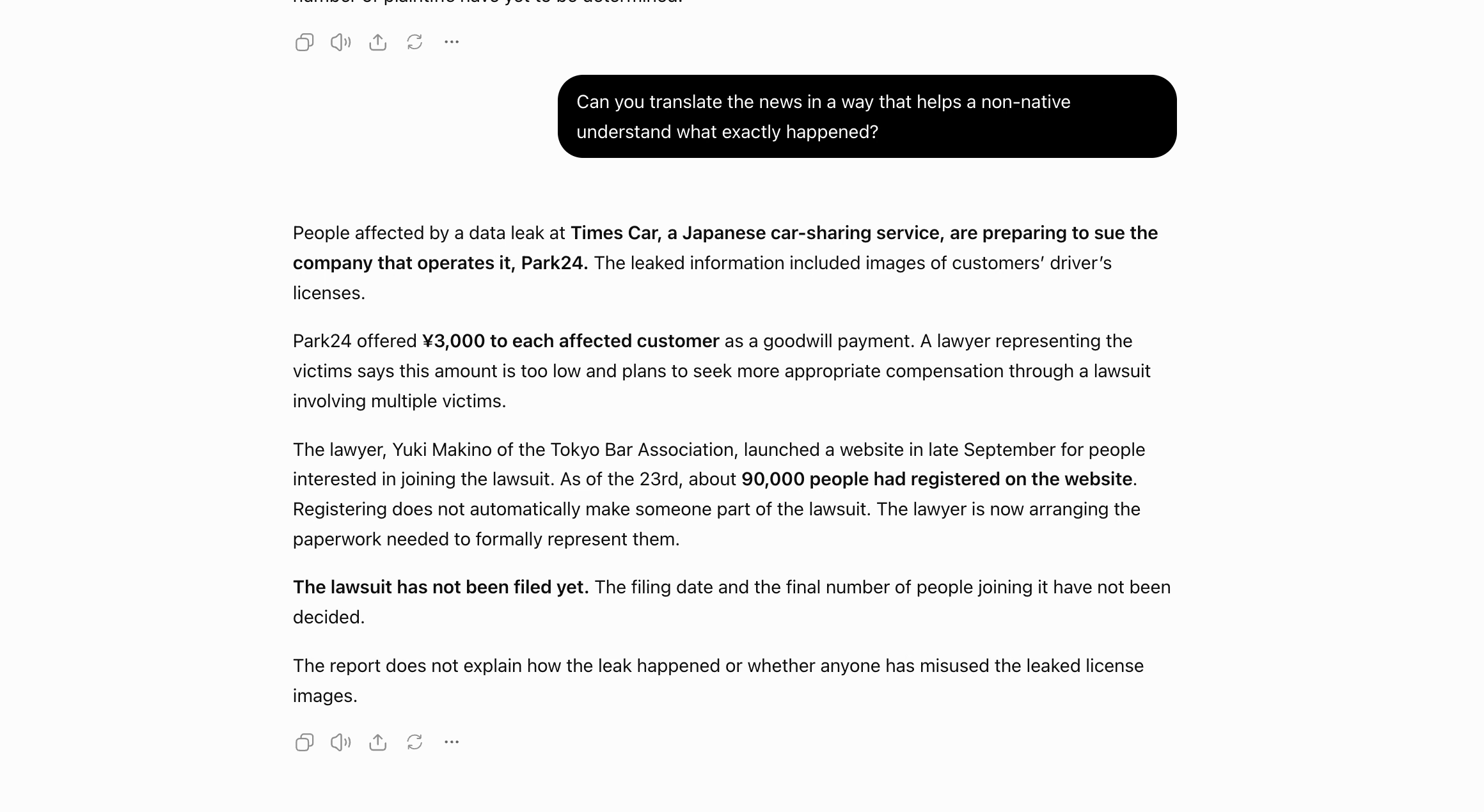
Keep both versions when the text matters. The first stays closer to the Japanese, and the second is easier for your team to act on.
Prompts to Copy for Typed or Pasted Text
Swap the languages and details in brackets for your own. The first prompt heads off the name and gender guesses from my test.
Prompt: Japanese to English with guesses flagged
| Translate the Japanese text below into English for my team in the US. Keep all names and numbers exactly as written. If a name has several possible readings, keep the kanji next to your reading and flag it. If the text doesn't state a person's gender, use their name or "they." [Paste your Japanese text here] |
The second prompt suits a manager writing to a supplier in Korea. Korean has several speech levels, so name the level you want.
Prompt: English to Korean for a supplier
| Translate this email into Korean for our supplier in Busan. Use formal business Korean with 합쇼체 endings. Keep the order number and the date unchanged. Hi Mr. Park, thank you for the samples. Could you confirm the delivery date for order #4471 by Friday? |
A formal Korean email ends its sentences in -습니다 or -주시기 바랍니다. If the reply ends its sentences in -해 or -야, ChatGPT has slipped into casual speech, so ask it to make the email more formal.
Japanese partners expect the same care. Ask for business Japanese and a standard opening line.
Prompt: English to Japanese for a business partner
| Translate this email into business Japanese for a supplier in Osaka. Use polite keigo and open with a standard business greeting. Keep the product names in English. Hello Tanaka-san, we received the revised quote. Can your team ship 500 units by November 20? |
A Japanese business email usually opens with いつもお世話になっております and ends its sentences in polite forms such as -ます and -です. If the greeting is missing, ask ChatGPT to add a standard business opening.
The last prompt shows how much a single word about the country changes. Spanish in Mexico and Spanish in Spain use different everyday words.
Prompt: English to Mexican Spanish for a customer
| Translate this message into Spanish for a customer in Mexico. Use "usted," keep it warm and short, and avoid words used only in Spain. Your order shipped today. You can track it with the link below. |
Look for "usted" verb forms such as "puede rastrearlo." If you see "puedes," the message uses the informal "tú," so ask ChatGPT to switch.
How to Translate Text With ChatGPT Translate
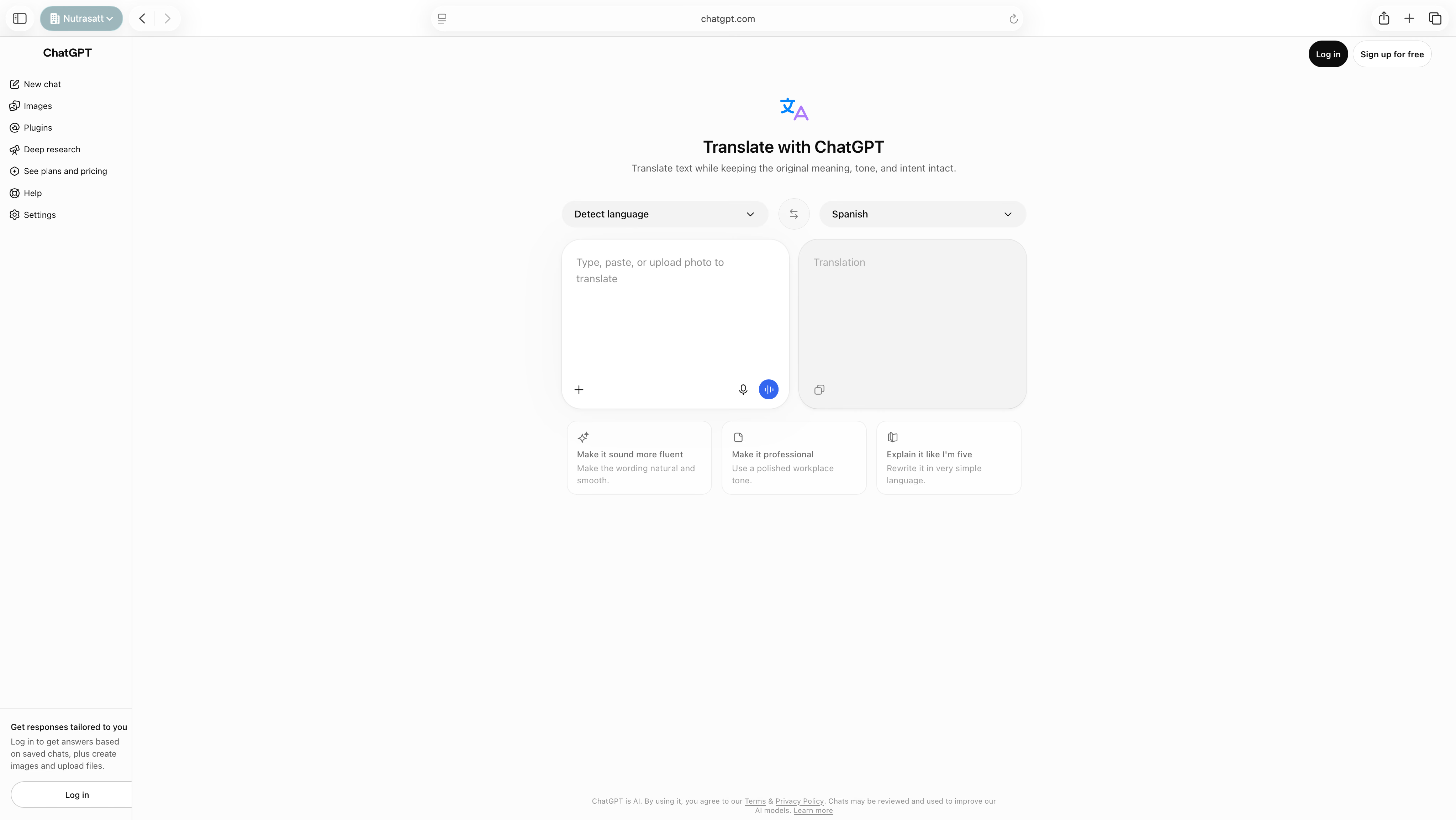
According to Slator, OpenAI launched ChatGPT Translate on January 15, 2026, as a separate page. The page headline reads "Translate with ChatGPT," and the layout looks like Google Translate, with your text on the left and the translation on the right.
The page advertises 40+ languages and includes a "Start live translation" button for speech. Under the translation, you get rewrite buttons such as "Make it professional" and "Explain it like I'm five."
Step 1: Open ChatGPT Translate and Pick Your Languages
Go to chatgpt.com/translate in any browser. Leave the source language on "Detect language" unless your text mixes two languages, and pick your target language on the right.
Step 2: Paste Your Text and Read the Translation
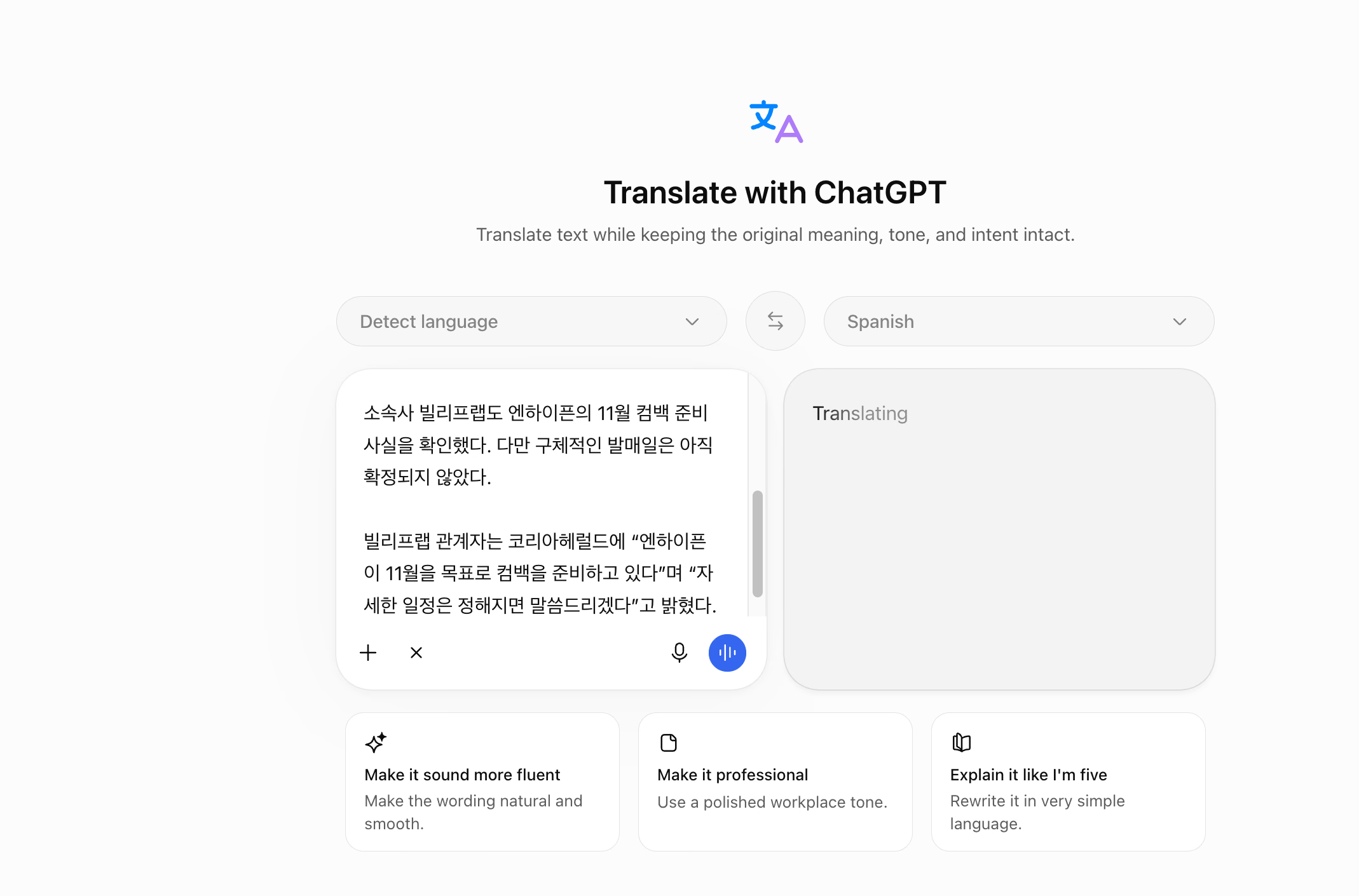
Paste or type your text in the left box, and the translation shows up on the right. This page needs no prompt, which makes this ChatGPT translator the fastest choice for a single sentence or a short message.
Step 3: Use a Rewrite Button or Ask a Follow-Up
Pick "Make it professional" for a work email, or "Make it sound more fluent" when the translation feels stiff. Slator found that these buttons open the full ChatGPT chat, where you can keep refining the result with follow-up questions.
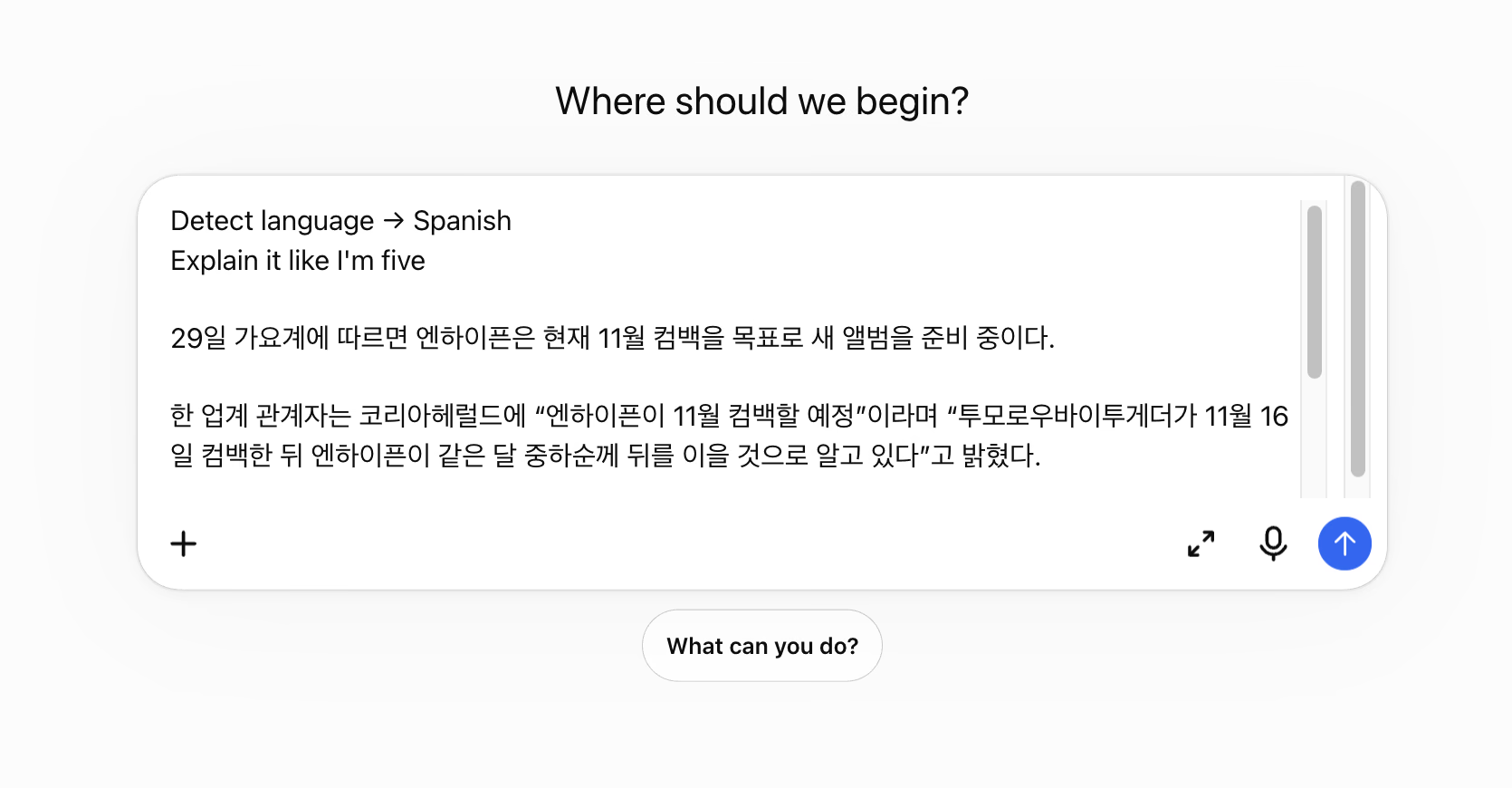
You can translate on this page without a paid plan, and logging in adds saved chats and file uploads. Use the regular chat when you need instructions, such as a glossary or a description of your reader. The Translate page has no box for that context.
How to Translate Text From a Screenshot or Image
Copying text doesn't always work. Paywalled news pages and scanned PDFs often lock their text inside a picture, and a screenshot gets it out.
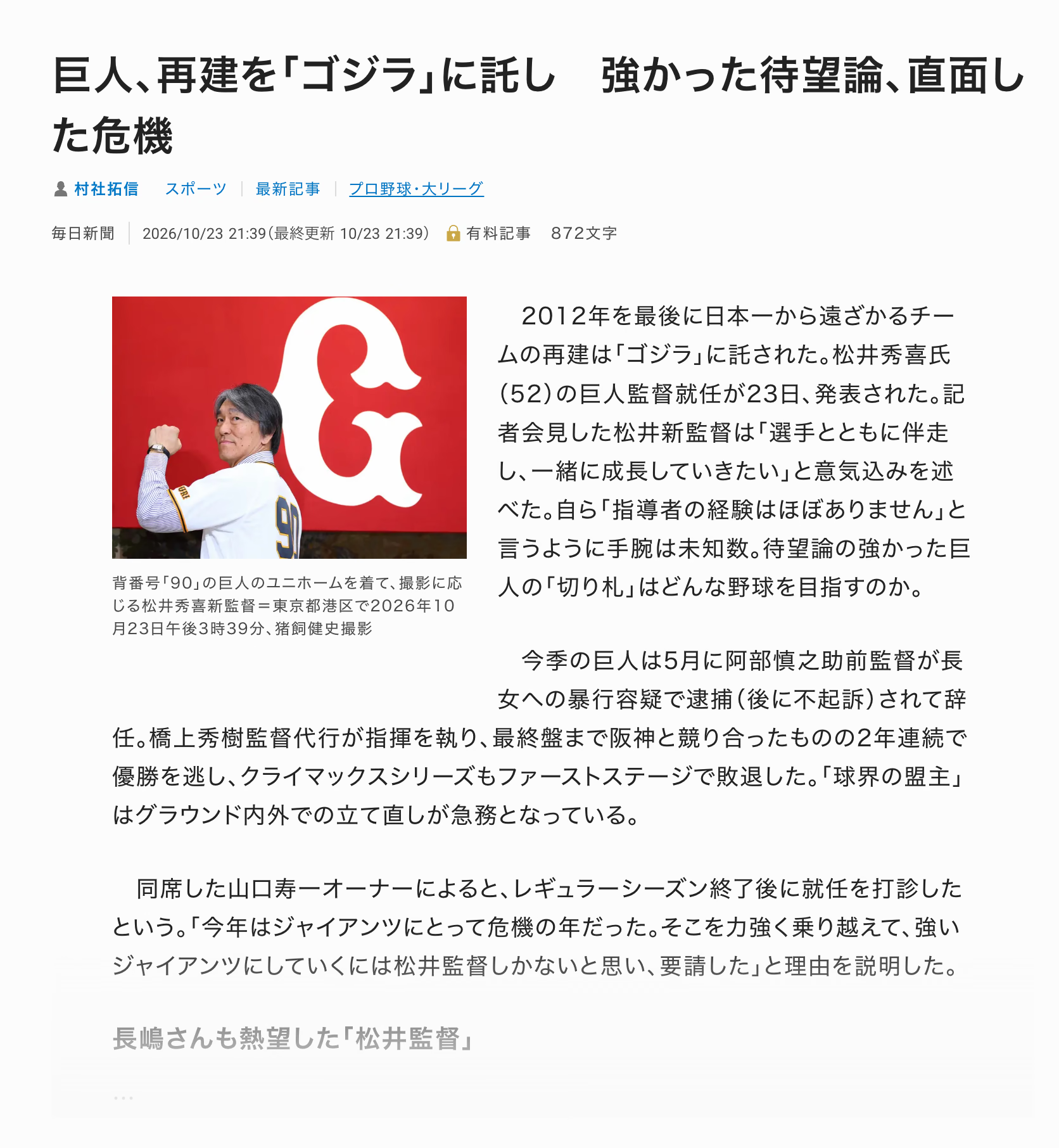
I took a screenshot of a Mainichi Shimbun sports story from October 23, 2026. The story covers the Yomiuri Giants naming Hideki Matsui as their new manager.
Step 1: Take a Screenshot of the Text You Need
Capture the headline and the paragraphs you want, and leave out ads and menus. My screenshot covered the headline, the byline, a photo, and the opening paragraphs.
A sharp, straight screenshot gives ChatGPT the best chance of reading small Japanese characters correctly.
Step 2: Upload the Image and Ask for Two Things
Click the + button in the message box or drag the image into it. Then write your prompt. I asked for a translation and an explanation in the same message: "Please translate the text from the image in English and then explain what the news is actually trying to convey."
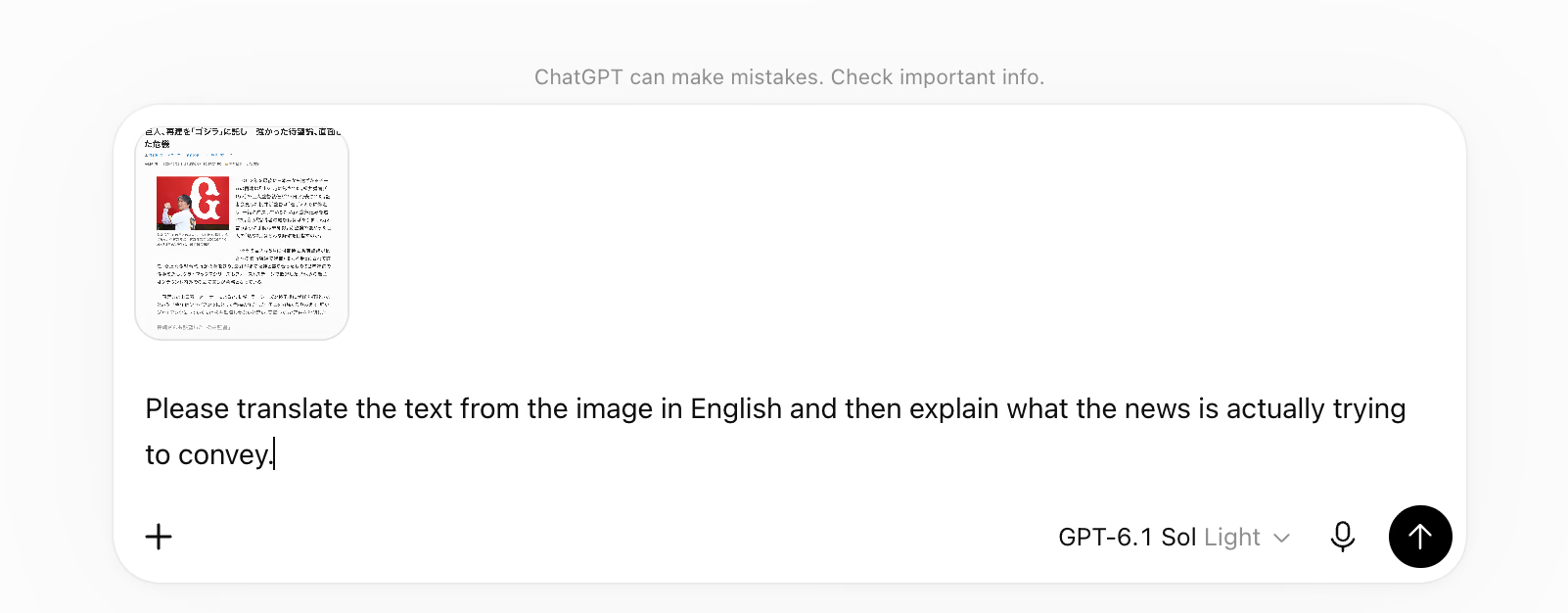
Asking for the meaning in the same prompt saves a round trip. It also tells ChatGPT that you care about context, so it explains references a literal translation would leave alone.
Step 3: Review the Translation Line by Line
ChatGPT worked for 11 seconds and returned a full English version. It read the byline as "Mainichi Shimbun | October 23, 2026" and got every name right, including the acting manager Hideki Hashigami and the owner Toshikazu Yamaguchi.
The best line came from 球界の盟主, which translates word for word as "leader of the baseball world." ChatGPT wrote "traditionally regarded as a leading force in Japanese baseball," which tells an English reader why the Giants' slump makes news.
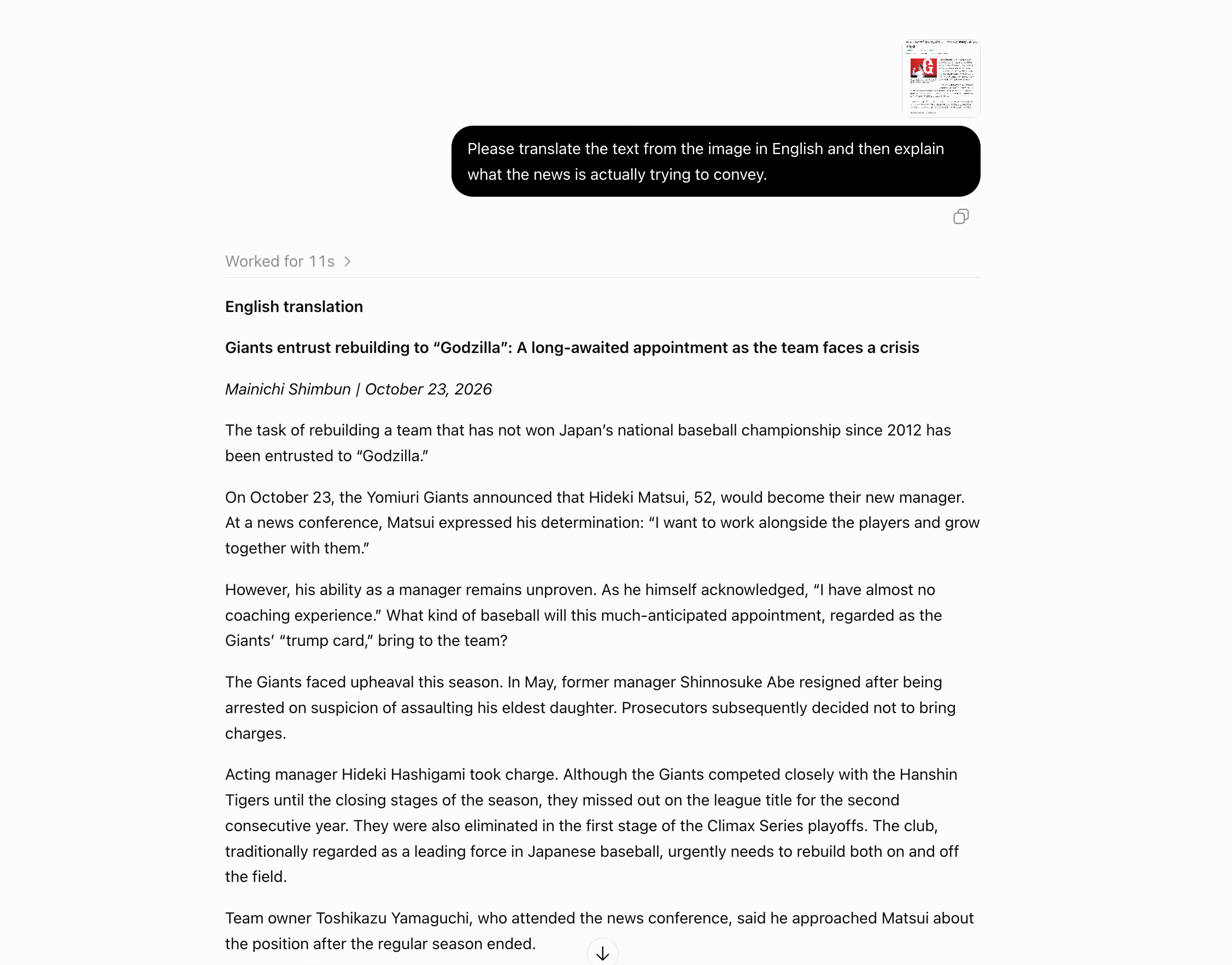
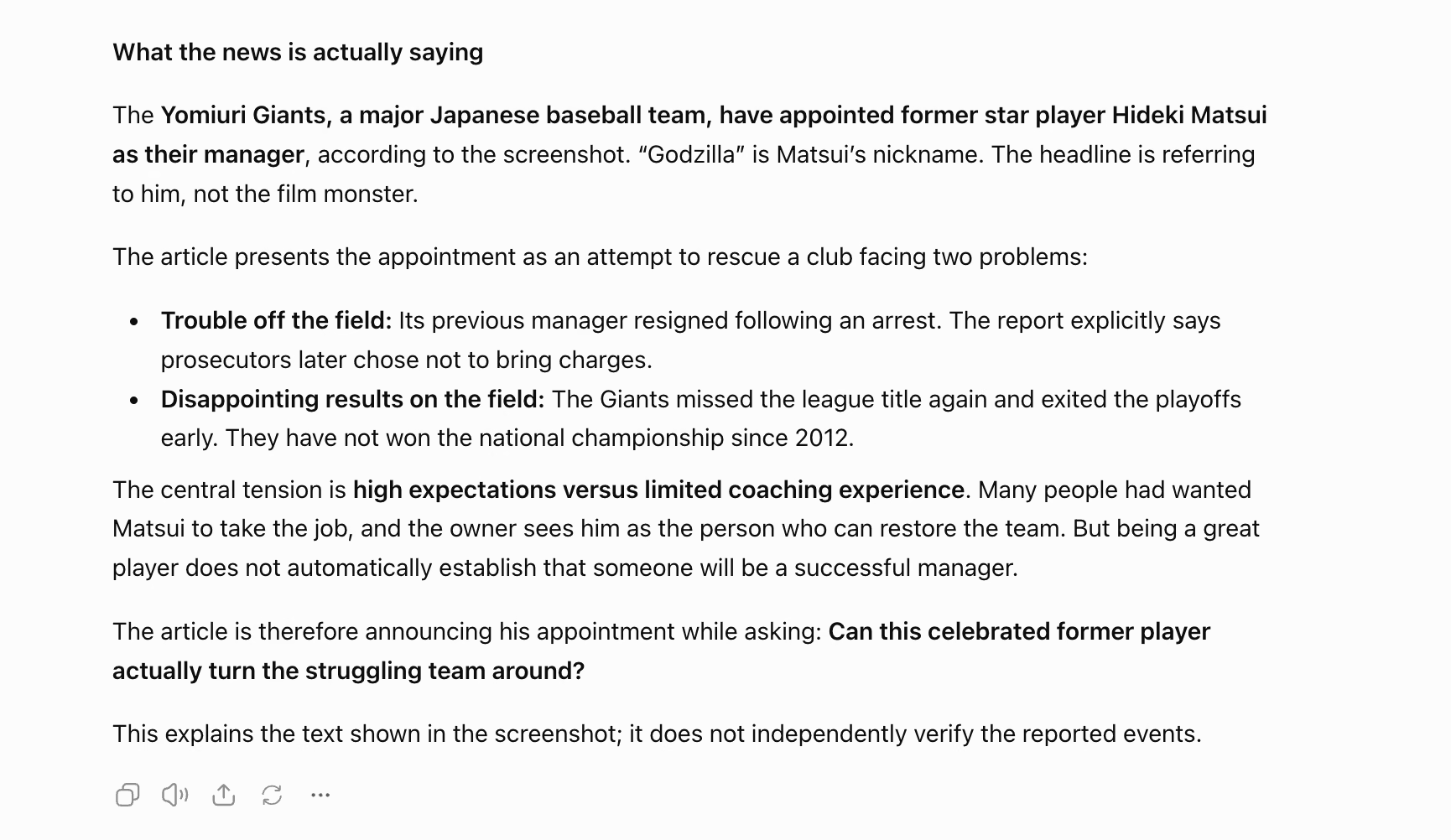
The headline kept "Godzilla" in quotes. On its own, that word would confuse anyone who doesn't follow Japanese baseball, and the second half of my prompt took care of it.
Step 4: Ask ChatGPT What the Text Means
ChatGPT explained that "Godzilla" is Matsui's nickname, so the headline refers to the player himself. It then summed up the club's troubles on and off the field and named the central tension: high expectations against limited coaching experience.
It closed with a note that it explains the screenshot and doesn't verify the events. That's a fair warning for anything you plan to quote.
Prompt to Copy for Screenshots and Images
Use this prompt when an image mixes headlines and captions with a table. It keeps the order of the original and asks ChatGPT to mark blurry words instead of guessing.
Prompt: Translate everything in an image
| Translate all the text in this image from Japanese into English. Keep the original order, from the headline down to the last paragraph. Translate any table as a table. Mark any word you can't read as [unclear] instead of guessing. |
For a side-by-side test of image translators, read our guide on how to translate an image.
How to Translate Text From a Photo Using the ChatGPT App
On your phone, you can skip the screenshot and point the camera at the text. This works for menus, signs, printed letters, and even a screen across the desk.
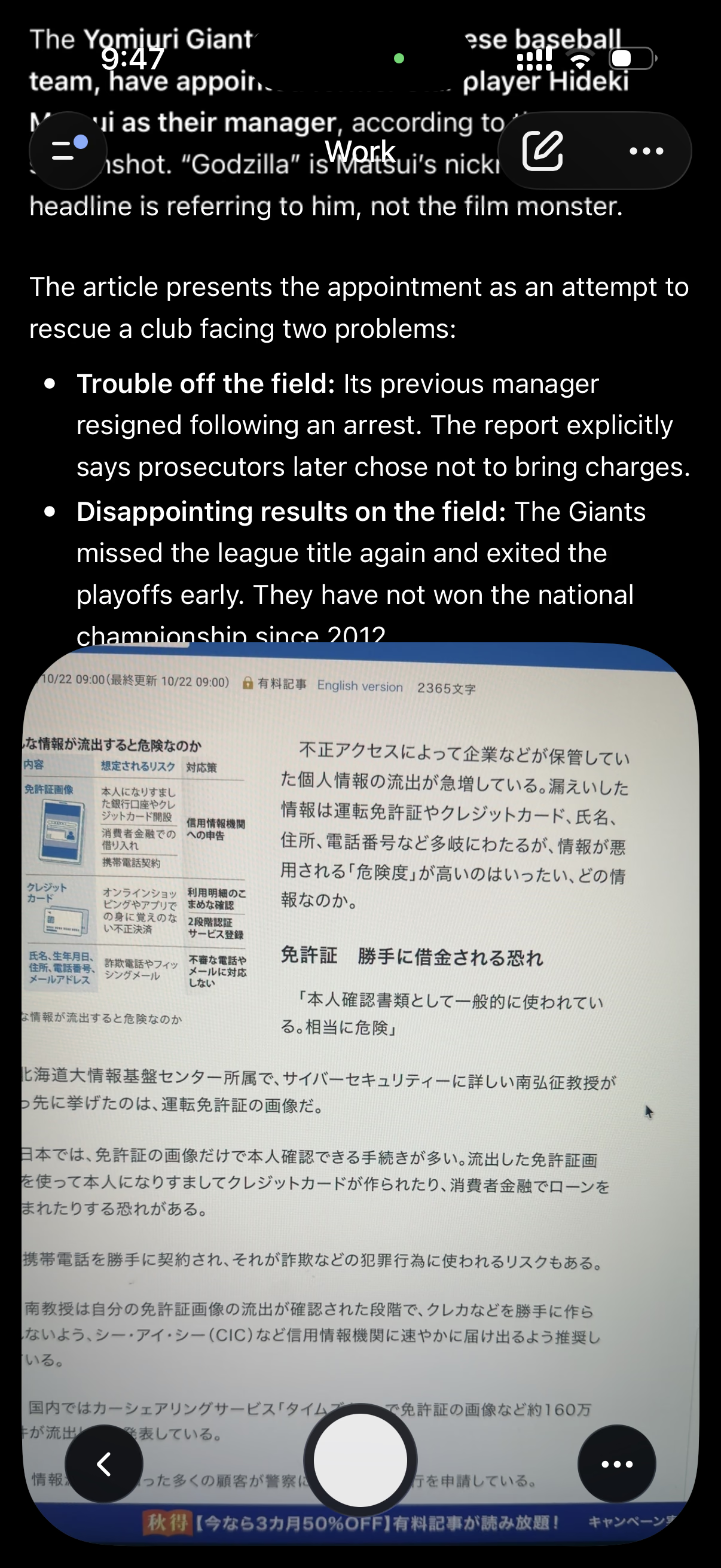
I photographed a Japanese article about personal data leaks on my laptop screen and asked for Chinese. I wanted to see how ChatGPT handles a translation that never touches English.
Step 1: Tap the + Button and Take a Photo
Open a chat in the ChatGPT app and tap the + button to open the camera. Hold the phone straight so the lines of text don't bend, and fill the frame with the text you need.
My photo had glare and a slight angle, which made it a fair real-world test.
Step 2: Name the Target Language and Send
I typed "Translate this Japanese text in Chinese" and sent the photo. ChatGPT replied in Simplified Chinese and kept the structure of the article. The section heading came through in bold as 驾驶证:可能被他人冒名借贷, which means "Driver's license: someone could borrow money in your name."
ChatGPT also read the professor's name, 南弘征, and the Hokkaido University department correctly from a photo of a screen.
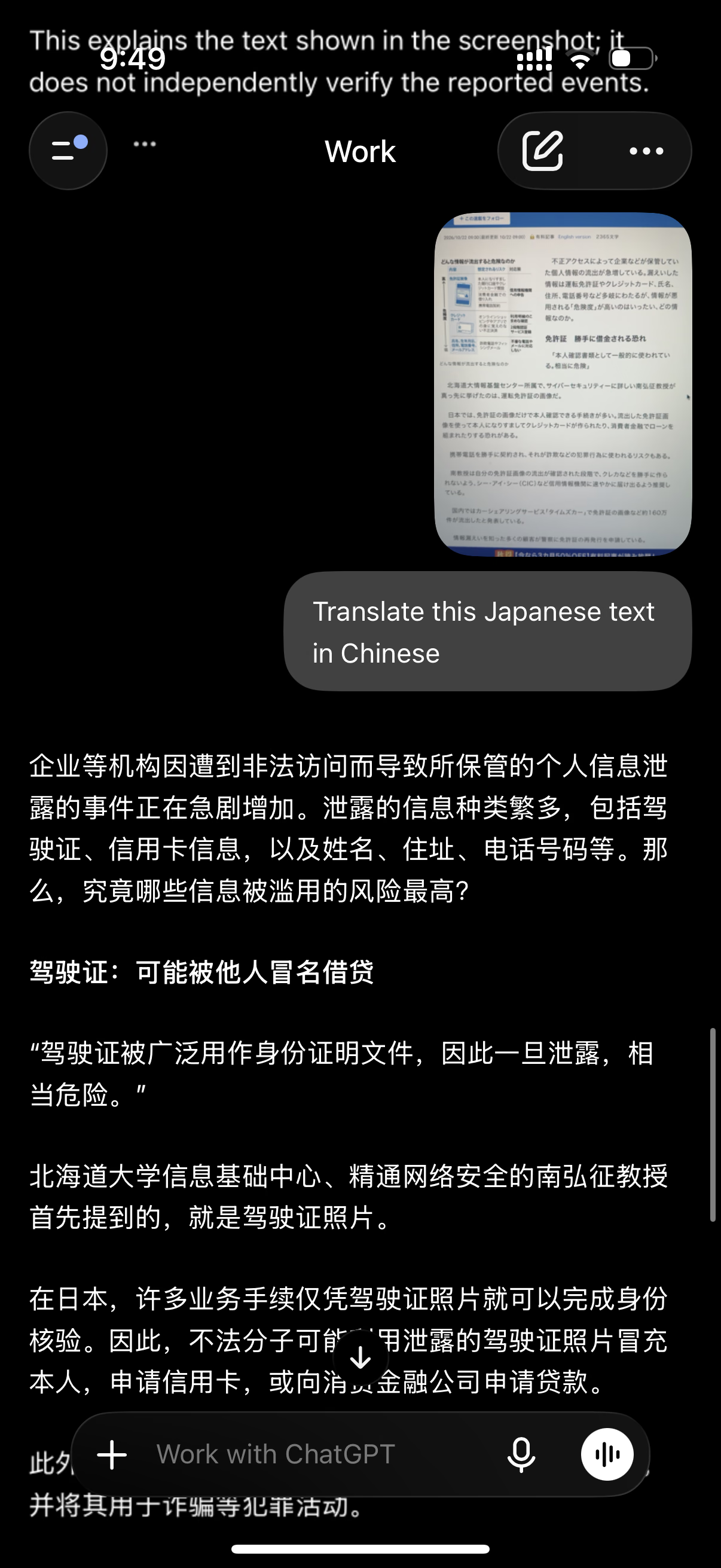
A couple of details deserve a second look. ChatGPT picked Simplified Chinese on its own, and readers in Taiwan and Hong Kong use Traditional characters, so name the script in your prompt.
ChatGPT also filled in words the Japanese only implies. The quote 「本人確認書類として一般的に使われている。相当に危険」 became a Chinese sentence that names the driver's license as the subject and adds 因此一旦泄露 ("so once it leaks"). That helps a reader, and it's still an addition, so ask ChatGPT to put added words in brackets when the text carries legal weight.
The photo also had a small table of risks on the left. The reply opens with the main article, so if you need a table or a caption, ask for it in your prompt.
Prompt to Copy for Photos
This prompt covers both fixes from my test: the script and the table.
Prompt: Photo to Traditional Chinese
| Translate the Japanese text in this photo into Traditional Chinese for a reader in Taiwan. Include the table on the left, and keep it as a table. Put any word you add for clarity in [brackets]. |
How to Translate Spoken Words Into Text Using ChatGPT Dictation
Sometimes the words you need to translate exist only as speech, like a voice note from a supplier or a few lines from a colleague. The microphone in ChatGPT turns your speech into text in the message box, and ChatGPT translates that text once you send it.
I dictated a short Spanish conversation to test this method.
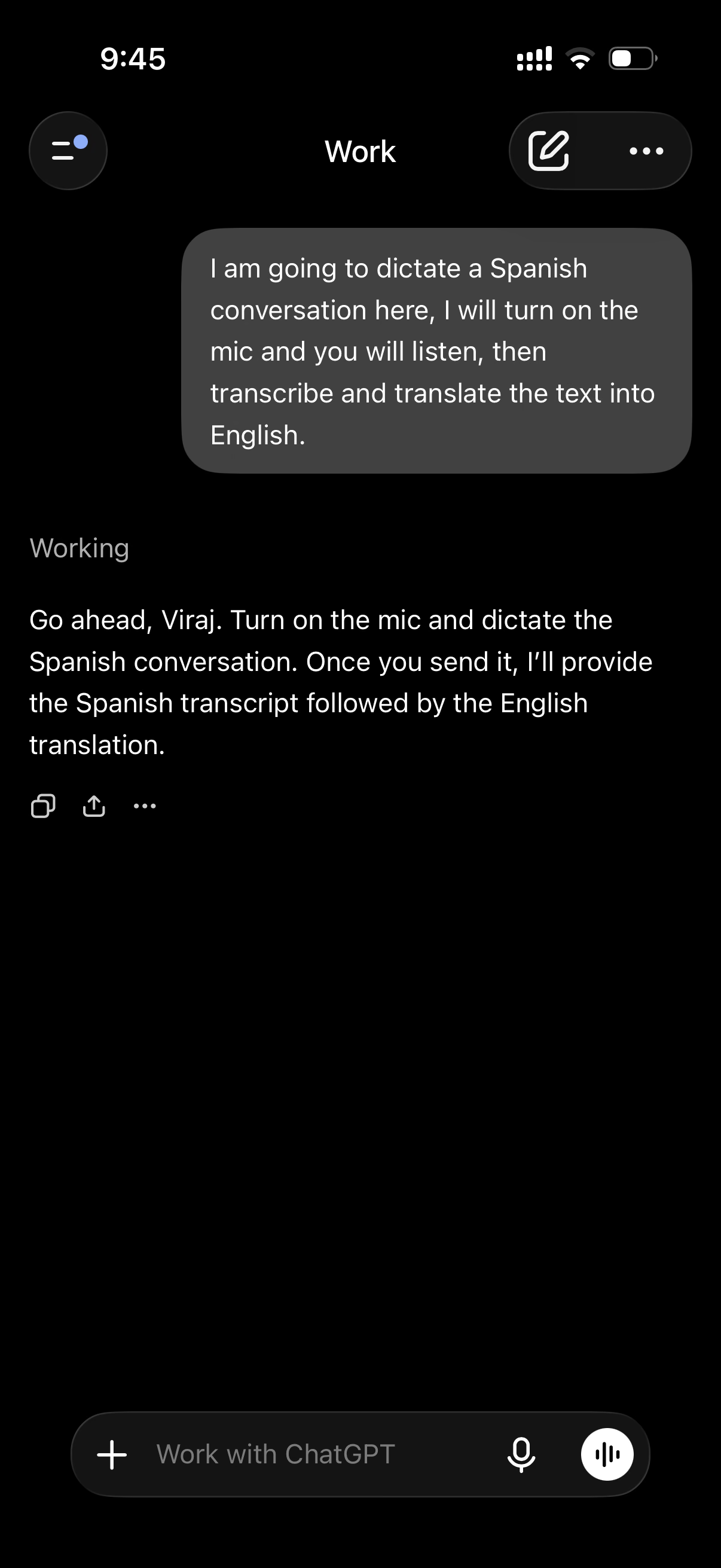
Step 1: Tell ChatGPT What You Plan to Do
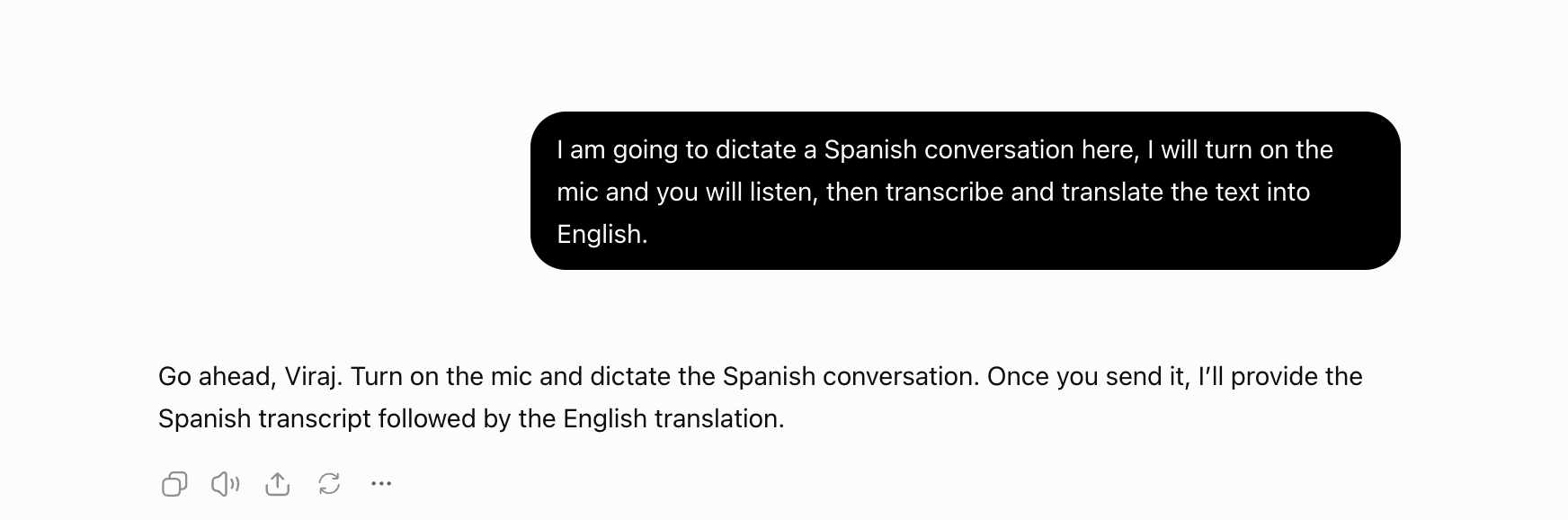
Before recording, send a message that sets up the task. Mine said: "I am going to dictate a Spanish conversation here, I will turn on the mic and you will listen, then transcribe and translate the text into English."
ChatGPT confirmed that it would return the Spanish transcript first and the English translation after it.
Step 2: Find the Microphone in the Message Box
If you started on a laptop, open the same chat on your phone, since ChatGPT keeps your chats in sync. The message box shows two buttons on the right.
The microphone turns your speech into text. The round button with sound bars starts Voice mode, where ChatGPT talks back, so skip it for this method.
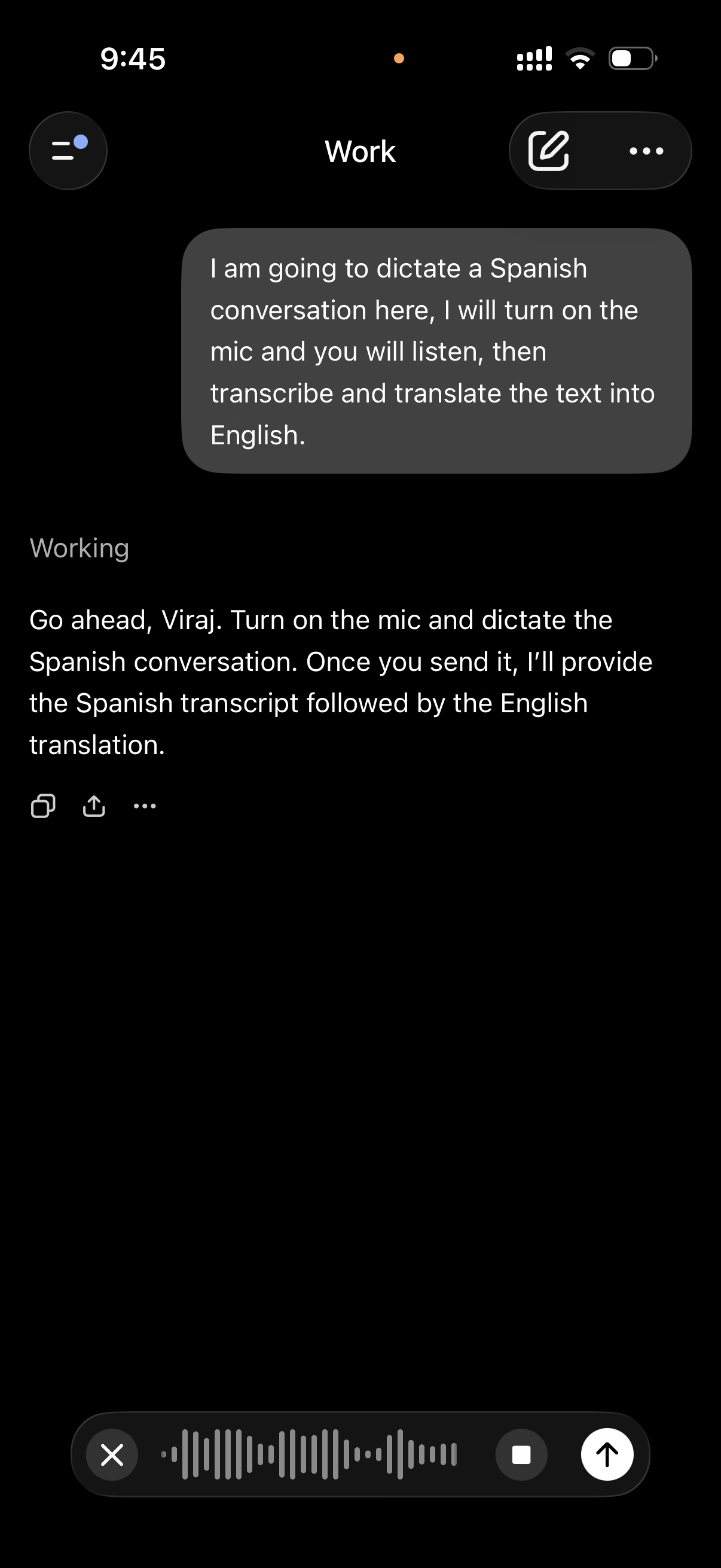
Step 3: Speak and Stop the Recording
Tap the microphone and start speaking. A moving sound wave shows that ChatGPT is listening. Tap the square to stop, or tap the X to throw the recording away.
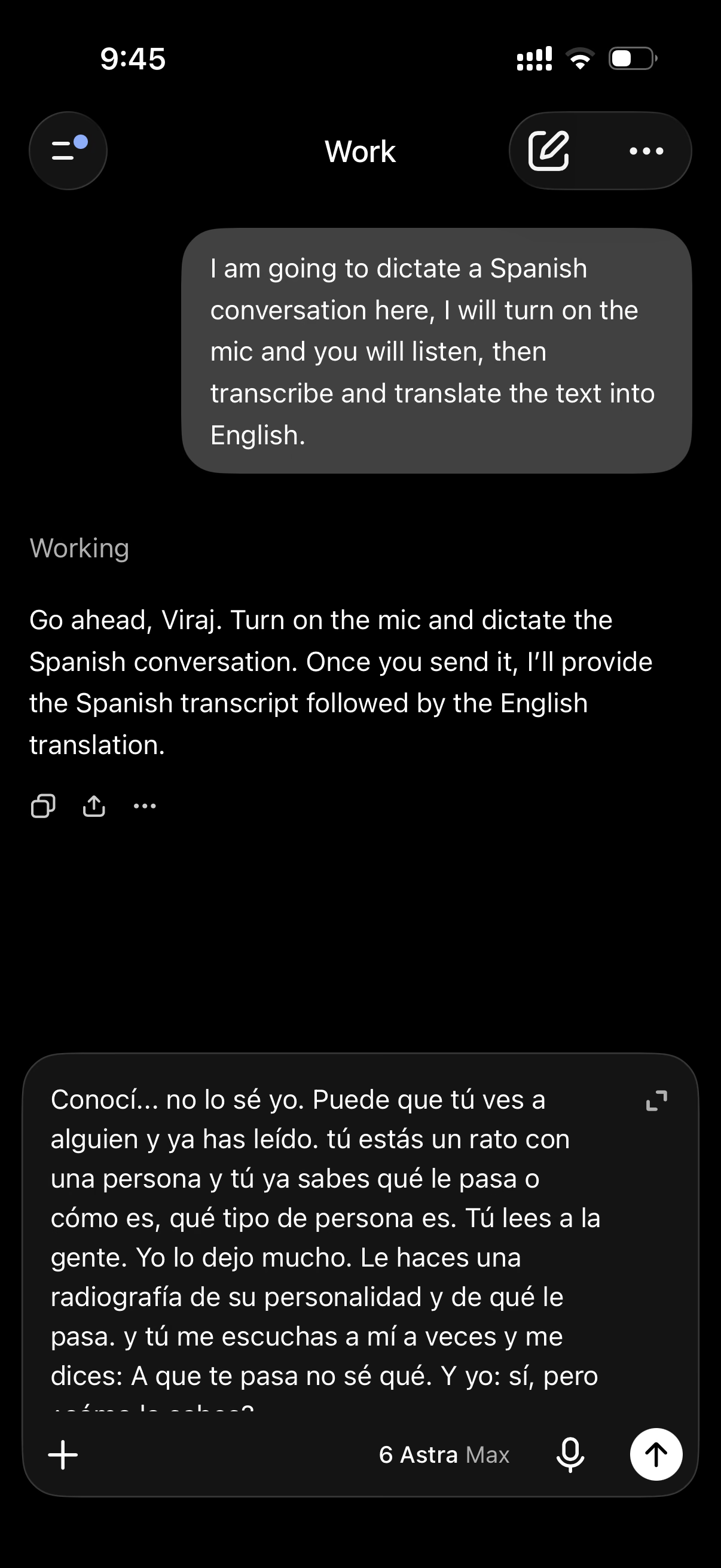
Step 4: Check the Dictated Text Before You Send It
Your words land in the message box as text, and any dictation error will carry into the translation. Mine came through with a few lowercase sentence starts and no question marks around "A que te pasa no sé qué."
Fix obvious slips here, or leave them for ChatGPT to clean up as I did. The model picker on my phone showed GPT-6 Astra on Max effort.
Step 5: Send It and Read the Transcript and Translation
ChatGPT worked for 38 seconds. It returned a cleaned-up Spanish transcript with proper capitals and the missing ¿ and ? marks, then the English translation.
The English read like natural speech. "Tú lees a la gente" became "You can read people," and "Le haces una radiografía de su personalidad" became "It's like you can take an X-ray of their personality." ChatGPT also caught the Spanish "¿A que...?" pattern and turned it into "I bet you're going through such and such," which matches the meaning.
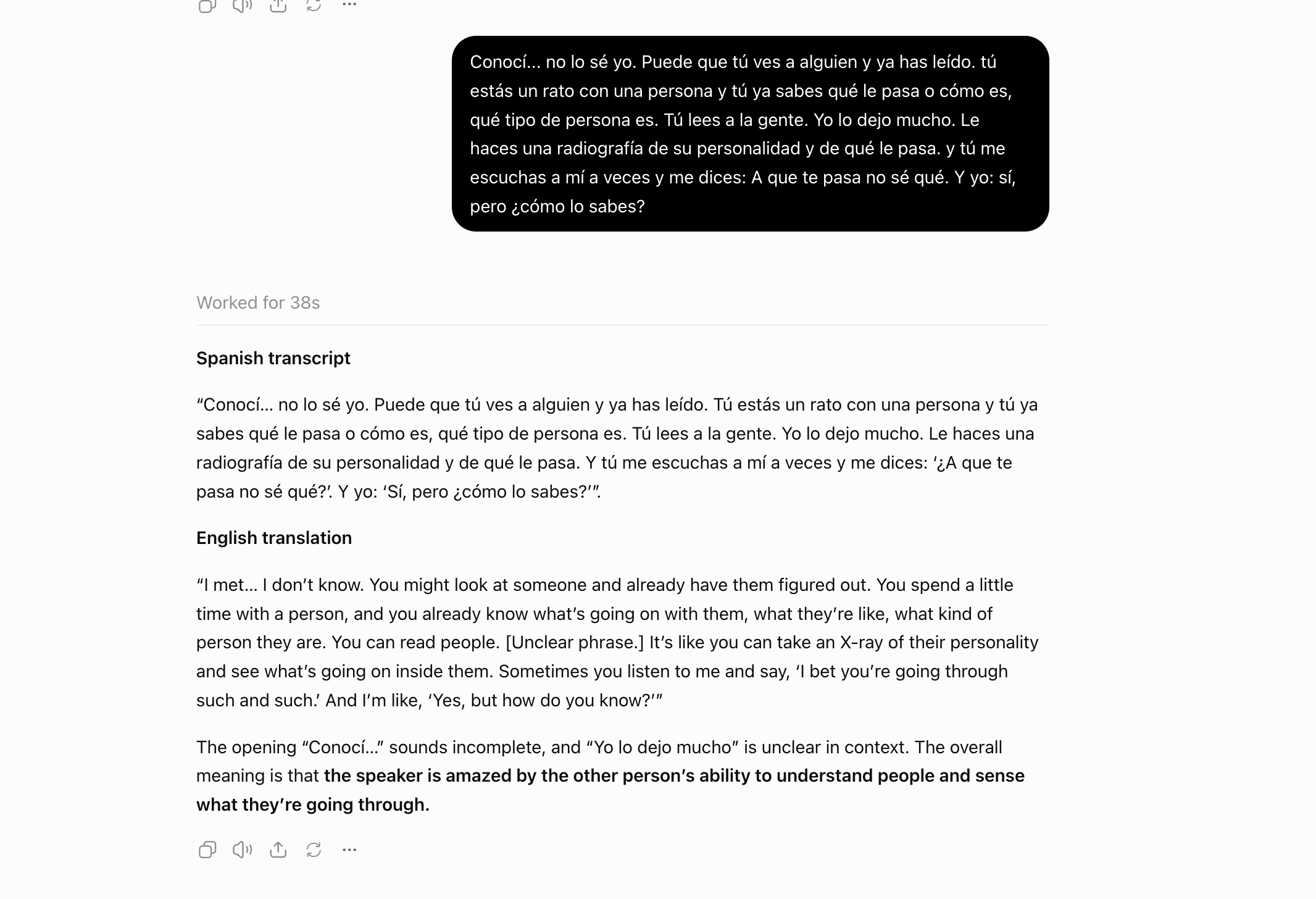
The part I liked most came at the end. ChatGPT marked "Yo lo dejo mucho" as an unclear phrase and said the opening "Conocí..." sounds incomplete. That line looks like a dictation slip, so a flag beats a confident wrong guess.
A 38-second wait works for a voice note, and it's far too slow for a live conversation. For longer recordings, see our test of ChatGPT's audio transcription.
Prompt to Copy for Dictation
Send this prompt before you tap the microphone. It asks for a clean transcript first, which makes errors easy to spot.
Prompt: Dictation to translation
| I'll dictate a short clip in [Spanish] next. First, write a clean transcript in [Spanish] with punctuation. Then translate it into [English] for [reader]. Mark anything you can't make out as [unclear] instead of guessing. |
How to Use ChatGPT to Translate a Document
Files go in as uploads, from Word documents to PDFs. Learning how to use ChatGPT to translate a document comes down to the chat method plus a few rules that protect the format.
OpenAI's file upload FAQ allows up to 512MB per file and two million tokens per text document. The same page says ChatGPT doesn't read PDFs made only of images, so for a scanned PDF, take screenshots of the pages and use the image method above.
Step 1: Upload the File to a New Chat
Click the + button and choose your file. Wait for the upload to finish before you type.
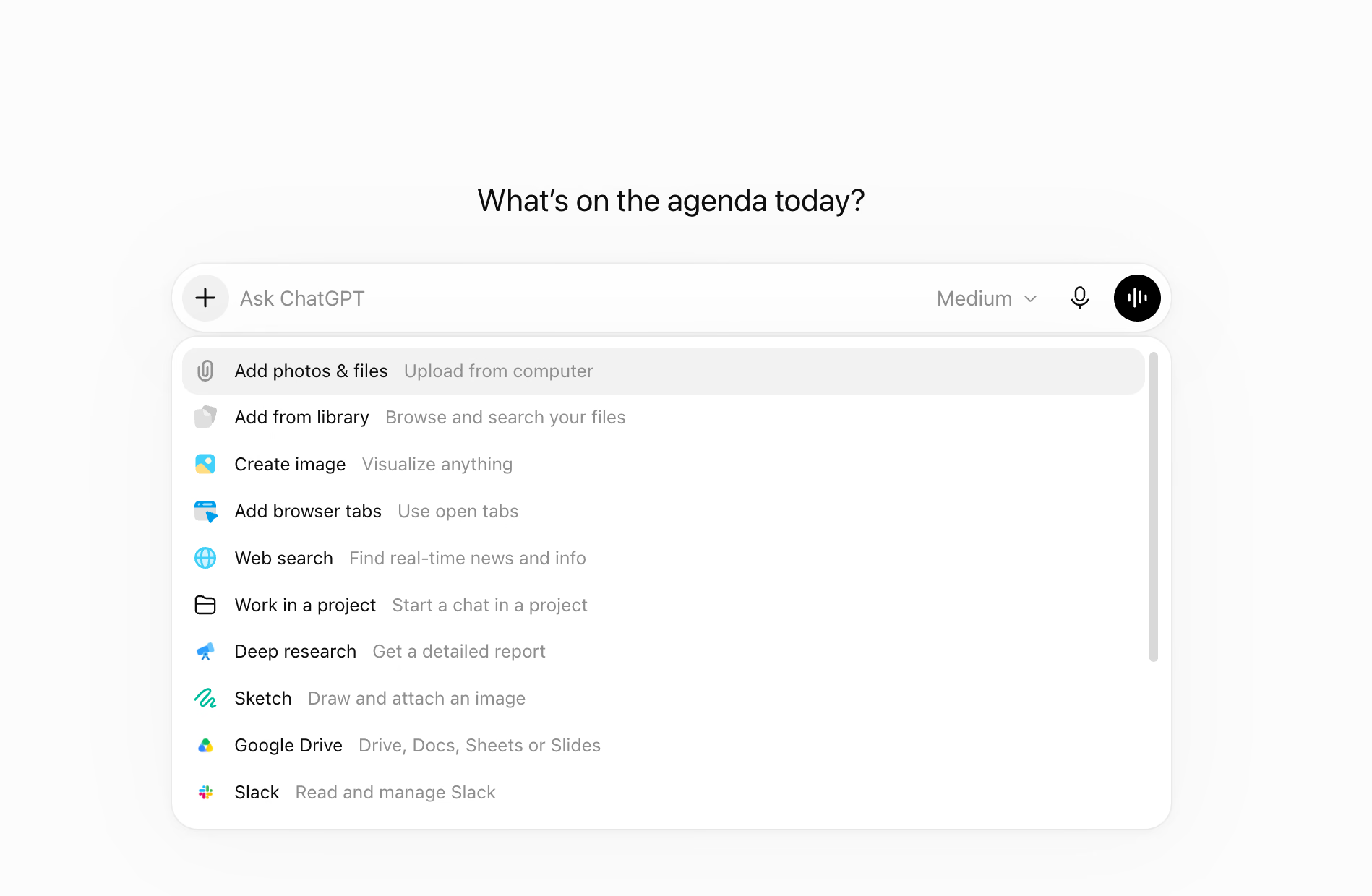
Step 2: Write a Prompt That Protects the Format
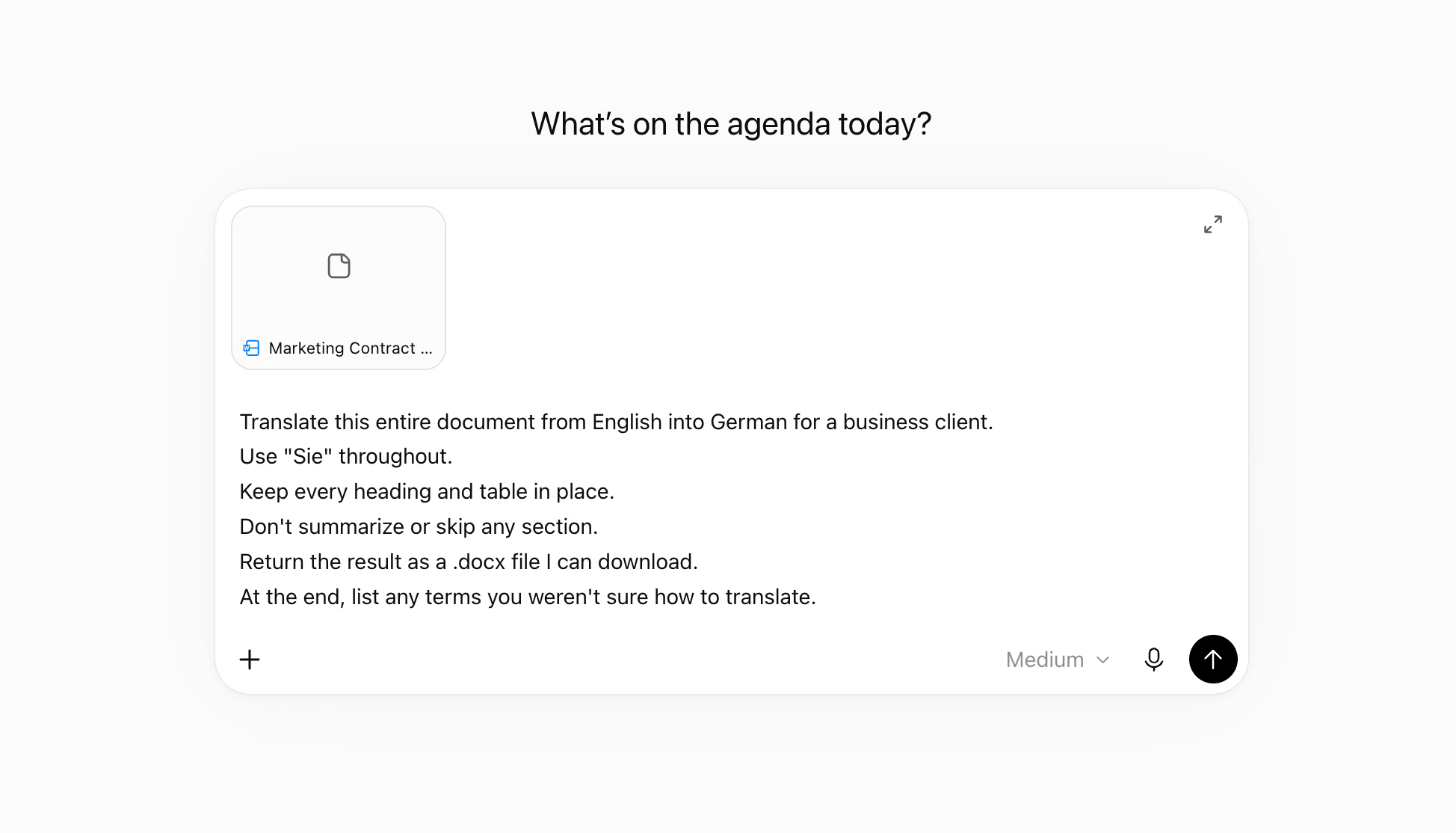
Tell ChatGPT to translate the whole file and keep its structure, then ask for a downloadable file. Without those lines, you can end up with a summary or a wall of text in the chat.
Prompt: Translate a Word file into German
| Translate this entire document from English into German for a business client. Use "Sie" throughout. Keep every heading and table in place. Don't summarize or skip any section. Return the result as a .docx file I can download. At the end, list any terms you weren't sure how to translate. |
Step 3: Download the File and Check It Section by Section
Open the translated file next to the original. Check that every heading made it across and that the tables kept their columns, then match the numbers and dates against the original.
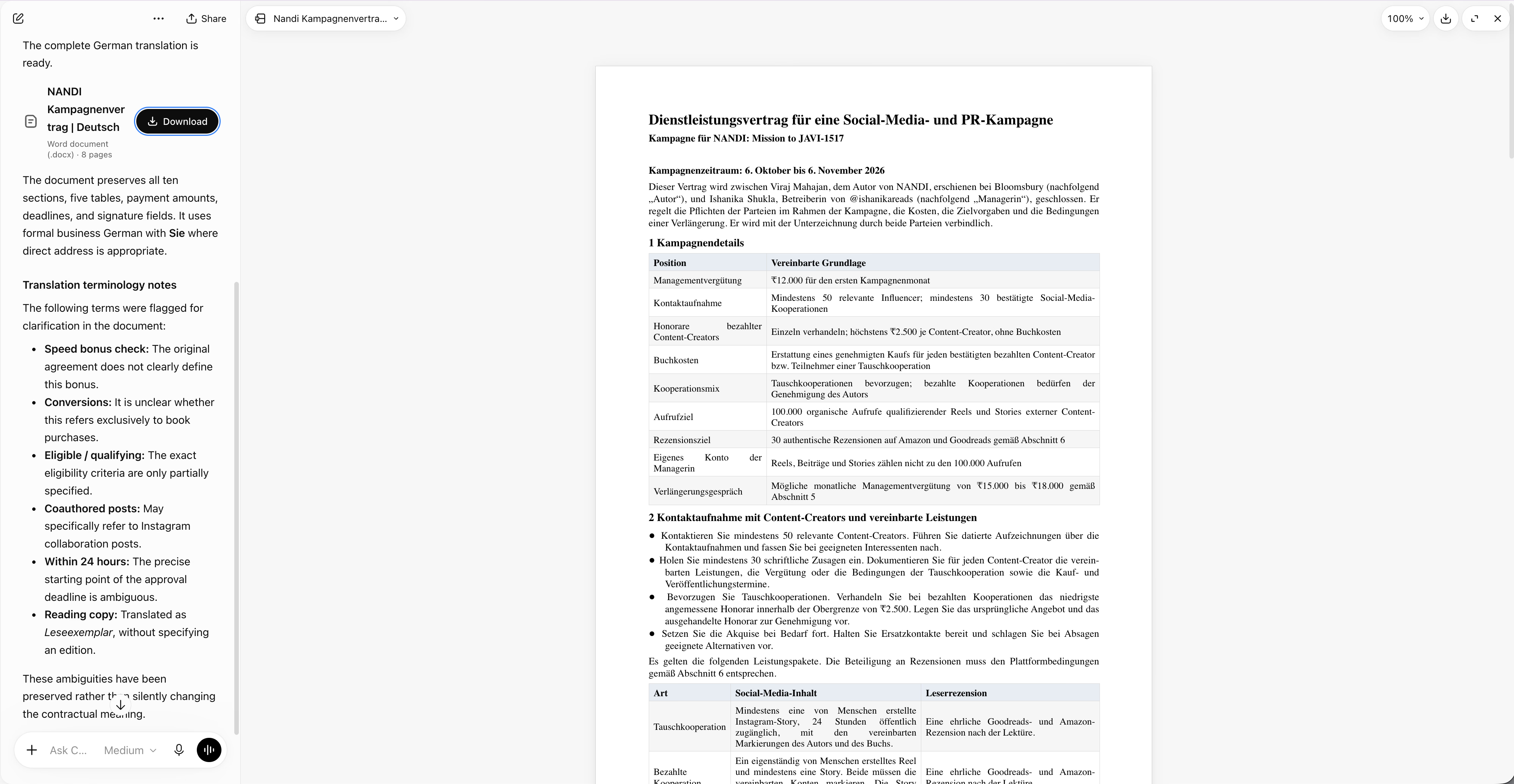
Translated text rarely matches the original length. German, for example, often runs longer than English, so check that headings still fit and tables still line up.
For files where the layout has to stay exact, our guides on how to translate a DOC file online and how to translate a PDF walk through tools that keep the formatting.
How to Improve ChatGPT Translation?
Most of the slips in my tests came from missing context. ChatGPT guessed a name and a gender, and it picked a stronger word for a payment than the source used. A few extra lines in your prompt prevent most of these slips, whichever method you use.
Tell ChatGPT Who Will Read the Translation
The reader decides the wording. A note to a supplier in Osaka needs different Japanese from a post for teenagers in Tokyo.
Add a line such as "Reader: a purchasing manager at a Japanese supplier," and ChatGPT adjusts its vocabulary and politeness to match.
Name the Region and the Formality Level
Many languages change with the country and the relationship. If you leave these out, ChatGPT picks for you, as it did when it chose Simplified Chinese for my photo.
| Language | Tell ChatGPT | Why It Matters |
|---|---|---|
| Spanish | The country, and "tú" or "usted" | Mexico says "computadora," and Spain says "ordenador" |
| Portuguese | Brazil or Portugal | A bus is "ônibus" in Brazil and "autocarro" in Portugal |
| Chinese | Simplified or Traditional characters | Mainland China uses Simplified, while Taiwan and Hong Kong use Traditional |
| Japanese | The keigo level | Casual Japanese in a supplier email sounds rude |
| Korean | 합쇼체 for formal or 해요체 for polite | Business emails to partners use formal endings like -습니다 |
| German | "Sie" or "du" | Clients expect "Sie," while many startups use "du" |
| French | France or Canada, and "vous" or "tu" | Quebec French favors "courriel" for email |
| Arabic | Modern Standard Arabic or a dialect | Formal documents use Modern Standard Arabic, and chats often use Egyptian or Gulf Arabic |
| Hindi | Formal Hindi or Hinglish | Many readers in India expect English words for tech terms |
Add a line like this to any prompt:
Prompt: Region and formality line
| Target: Brazilian Portuguese, informal "você," for customers aged 20 to 35. |
Give ChatGPT a Glossary and a Do-Not-Translate List
Product names and industry terms drift from chat to chat. A short glossary at the top of your prompt keeps them steady.
Prompt: Glossary block
| Use this glossary in every translation: - Model X200 → keep as Model X200 - purchase order → 発注書 - lead time → リードタイム Don't translate brand names or model numbers. |
Ask ChatGPT to Flag What It Isn't Sure About
ChatGPT flagged an unclear Spanish phrase on its own, yet it never flagged the lawyer's name or gender in my Japanese test. A line in your prompt makes flagging the default.
Prompt: Flag the guesses
| After the translation, list anything you guessed: name readings, gendered words, idioms, and unclear phrases. Show the original next to each guess. |
Ask for a Back-Translation
A back-translation turns ChatGPT's output into the source language again, so you can spot meaning that shifted in translation. Run it in a new chat, so ChatGPT can't lean on the original text it already saw.
Prompt: Back-translation check
| Translate this Korean text into English as literally as you can. Keep the awkward parts, since I'm checking a translation for errors. |
Translate Long Text in Smaller Parts
In a long paste, a skipped sentence is easy to miss. Send long documents a section at a time, and ask ChatGPT to quote the first and last sentence of each part so you can see that nothing went missing.
Keep Repeat Work in a Single Project
For ongoing work, such as weekly supplier updates, create a project in ChatGPT and put your glossary and reader notes in its instructions. Every new chat in that project starts with your rules, so you stop pasting them again. On desktop, the "Choose project" option under the message box handles this.
Raise the Effort for Tricky Text
The model picker lets you set how long ChatGPT thinks before it answers. Light effort handled my news screenshot in 11 seconds. Save higher effort for contracts and dense technical text, where a slower answer pays off.
Have a Native Speaker Review High-Stakes Text
Treat AI output on contracts and medical instructions as a first draft. In a 2025 study in npj Digital Medicine, professional linguists edited ChatGPT-4o translations of medical texts, and reviewers rated the results comparable to, and often higher than, fully professional translations. The edits took 7.1 minutes on average, against 16.8 minutes for translating from scratch.
Is ChatGPT Translation Enough?
For written text, using ChatGPT for translation covers most everyday needs. In my tests, it handled Japanese news as pasted text and as a screenshot. It also read a photo of a screen and turned a Spanish voice clip into clean English.
The gaps show up in live conversations and in work where the context and the format have to survive:
- Live meetings: ChatGPT doesn't join your Zoom or Google Meet call. Voice mode can interpret between two people on a single device, and my short dictation took 38 seconds to come back.
- Guessed context: When the source leaves out a name, a reading, or a gender, ChatGPT fills the gap without telling you unless you ask.
- Less common languages: In a 2024 Pediatrics study, ChatGPT-4.0 rated close to professional translators for Spanish and Brazilian Portuguese. Its Haitian Creole translations carried potentially clinically significant errors 33.3% of the time, against 8.3% for professionals (HealthDay).
- Images: ChatGPT returns the translation as text. My Japanese screenshot and photo stayed in Japanese, so a translated flyer or slide needs a separate tool.
- Privacy: The ChatGPT Translate page warns that OpenAI may review your chats and use them to improve its models. You can switch that off in your data controls, and you should still check your company's policy before you paste client contracts.
For these gaps, I keep JotMe next to ChatGPT. The JotMe platform runs AI agents in the background that read the intent behind speech, helping translations stay accurate and retain context as a conversation moves. A custom dictionary in JotMe holds your product names and industry terms steady from call to call.
JotMe's document translation reads the whole file for context and keeps the original layout. JotMe's image translation puts the translated text back into the picture, so a Japanese flyer comes back as an English flyer. JotMe supports 200+ languages across 39,000+ language pairs and translates Zoom, Google Meet, Microsoft Teams, and Webex calls live, with no bot joining the meeting.
If you want a ChatGPT alternative that handles live calls as well as files and images, download JotMe for free and run your next translation through both. You can also compare it with other ChatGPT alternatives we tested.
Translate your calls and files in 200+ languages
JotMe keeps the context of your conversations and the layout of your documents and images. Start on the free plan and try it on your next meeting.
Download JotMe for FreeFAQs
What Are the Best Practices for Better Translations?
Using ChatGPT for translation works best when you name the target language and the reader up front. Set the region and formality in the same prompt. Paste a glossary for product names and industry terms, and ask ChatGPT to list anything it guessed. For important text, run a back-translation in a new chat and have a native speaker review the final version.
How to Translate Your Website Using ChatGPT?
For a small site, copy each page into ChatGPT and name the target language and region. Ask it to leave HTML tags and links unchanged. For a larger site, export your text as a JSON or XLIFF file and translate it in sections, then import it back so the keys stay intact. Publish each language on its own URL with hreflang tags, and review product names and legal pages by hand.
Can ChatGPT Translate in Real Time?
Yes, through voice. In Voice mode, you can ask ChatGPT to interpret between two languages, and it keeps translating each speaker until you tell it to stop. GPT-Live, the voice model OpenAI introduced in July 2026, listens and speaks at the same time, and free accounts get the smaller GPT-Live-1 mini. Voice mode works best for two people sharing a single device. It doesn't join Zoom or Microsoft Teams calls, so a multilingual meeting needs a live translation feature that captures the call audio.
Is ChatGPT Accurate for Translation?
Yes for everyday text in widely spoken languages, and less so for languages with little text online. The organizers of the WMT24 machine translation competition summed up the field in the title of their findings: "The LLM Era Is Here but MT Is Not Solved Yet." Check names and numbers yourself, and use a human reviewer for legal and medical text.
How Many Languages Does ChatGPT Support?
OpenAI doesn't publish a single count for translation. The ChatGPT Translate page advertises 40+ languages, and OpenAI's help center lists 59 interface languages, from Albanian to Vietnamese. In a regular chat, ChatGPT works with many more, though quality drops in languages with less text online.
Is ChatGPT a Good Tool for Translating From English?
Yes. English has more training data than any other language, so ChatGPT translates from English into major languages such as Spanish, French, German, and Japanese with strong results. Quality drops as the target language gets rarer, so plan a native review for languages such as Haitian Creole. Name the formality in your prompt, since English has a single "you" and ChatGPT has to pick a level for languages that have several.