Tips
How to Translate Doc File Online [With Test Results]

Lovely Mangla
July 25, 2026
![JotMe — How to Translate Doc File Online [With Test Results]](/_webflow-assets/f3b663ddf852a4bef3fffabd6f03e2c2.avif)
You translate a doc file online by opening JotMe, selecting Translate document, uploading your Word file, and choosing an output language. JotMe reads the whole document for context and returns a translated doc that keeps the original formatting, so the file reads as though a native speaker wrote it first. As an online doc translator built for real work, JotMe scored 8 out of 10 in an independent ChatGPT review of the same government contract against 5 out of 10 for the Google Docs version.
Most people translate a doc through a free online doc translator, get the words swapped one at a time, and then find the technical terms and legal headings broken in ways they cannot see without a second reader. This guide walks through how to translate doc files step by step, runs a real accuracy test against Google Docs, and shows what each translation costs. JotMe works as a professional AI documentation translation tool that handles a contract, a research paper, and a technical manual through one flow.
Key Takeaways
- You translate doc files in JotMe through the Translate document tab, which accepts DOCX, PDF, PPTX, XLSX, HTML, TXT, SRT, XLIFF, XML, JSON, IDML, DITA, and MIF files up to 100 MB.
- In a ChatGPT accuracy test on the same Spanish government contract, JotMe scored 8 out of 10 and Google Docs scored 5 out of 10.
- A doc up to 50,000 characters costs 10 AI credits, and every additional 5,000 characters adds 1 credit.
- JotMe saves no document to a server and applies contextual translation, which makes it safe and accurate for contracts, research papers, and government files.
Can JotMe Translate Doc Files Online in Any Language?
Yes, JotMe is an online doc translator that handles Word files in 200+ languages across 39,000+ language pairs, and the same online doc translator covers 12 more file types. As an online doc translator, JotMe runs in your browser: open the translate bar and pick the Translate document to start.

The tab accepts DOCX, PDF, PPTX, XLSX, HTML, HTM, TXT, XLF, XLIFF, SRT, IDML, XML, JSON, DITA, and MIF up to 100 MB, so you instantly translate large document files without splitting them first. You can check the full language list on the available languages page, and new users can follow the JotMe setup guide to get started.
How to Translate a Doc File With JotMe: Step-by-Step
You translate doc files in 6 steps, and the whole run takes under 2 minutes for a standard file. The screenshots below follow one real government contract from upload to download.
Step 1: Open JotMe and select Translate document.
Go to app.jotme.io, open the translate bar, and click Translate document. The bar also carries Translate text, Translate image, Translate video, Translate audio, and Transcribe file.
Step 2: Upload your Word file.
Drag your DOCX into the panel or click Select document. JotMe shows the file name, the file size, the starting AI credit cost, and your remaining credits, so you see the price before anything runs. This 19.0 KB contract starts at 10 credits.
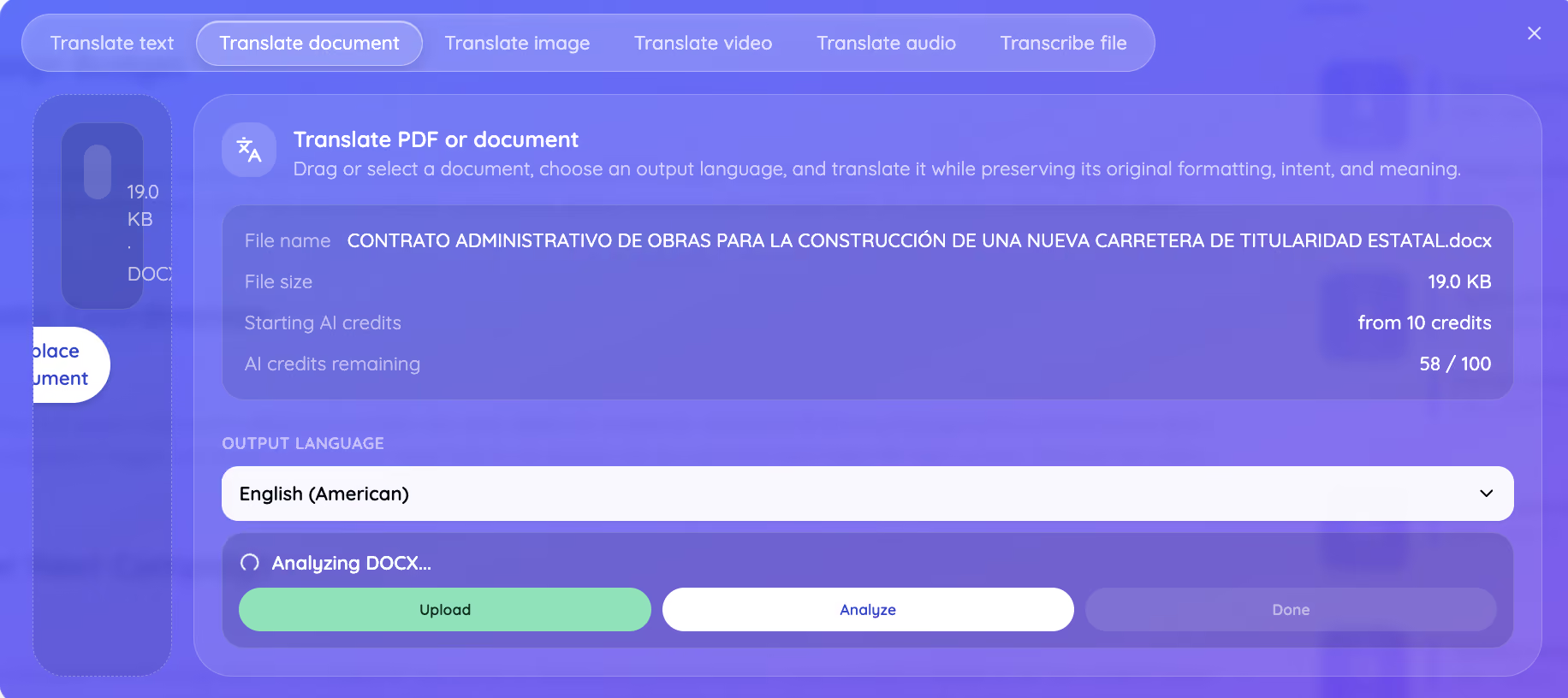
Step 3: Choose your output language.
Open the Output language menu and search from 200+ languages. This test used English (American). To handle how to translate a Google Doc into Spanish, you would export the Google Doc as DOCX and pick Spanish here instead.
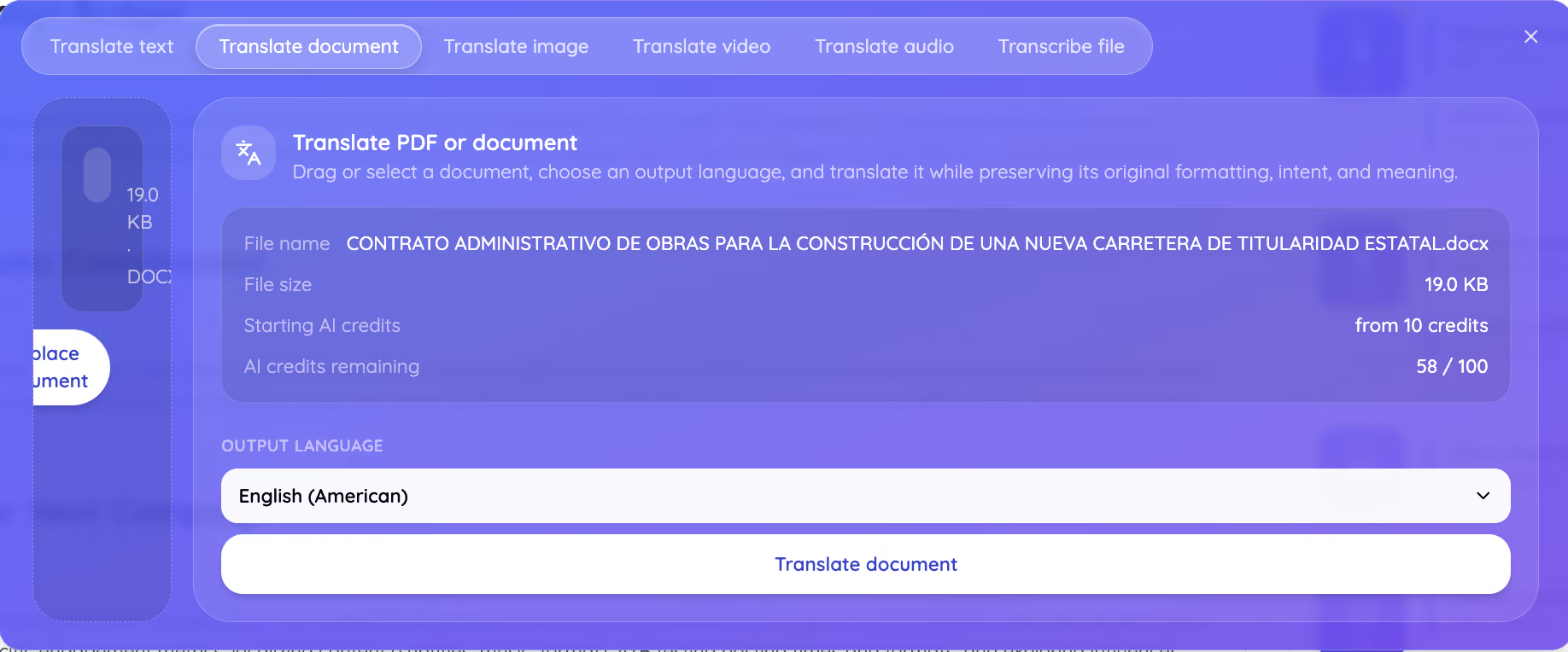
Step 4: Confirm the translation and check the price.
Click Translate document, and JotMe shows a confirmation with your output language and the pricing rule, which starts at 10 credits for up to 50,000 characters and adds 1 credit per additional 5,000. Click Confirm and translate.
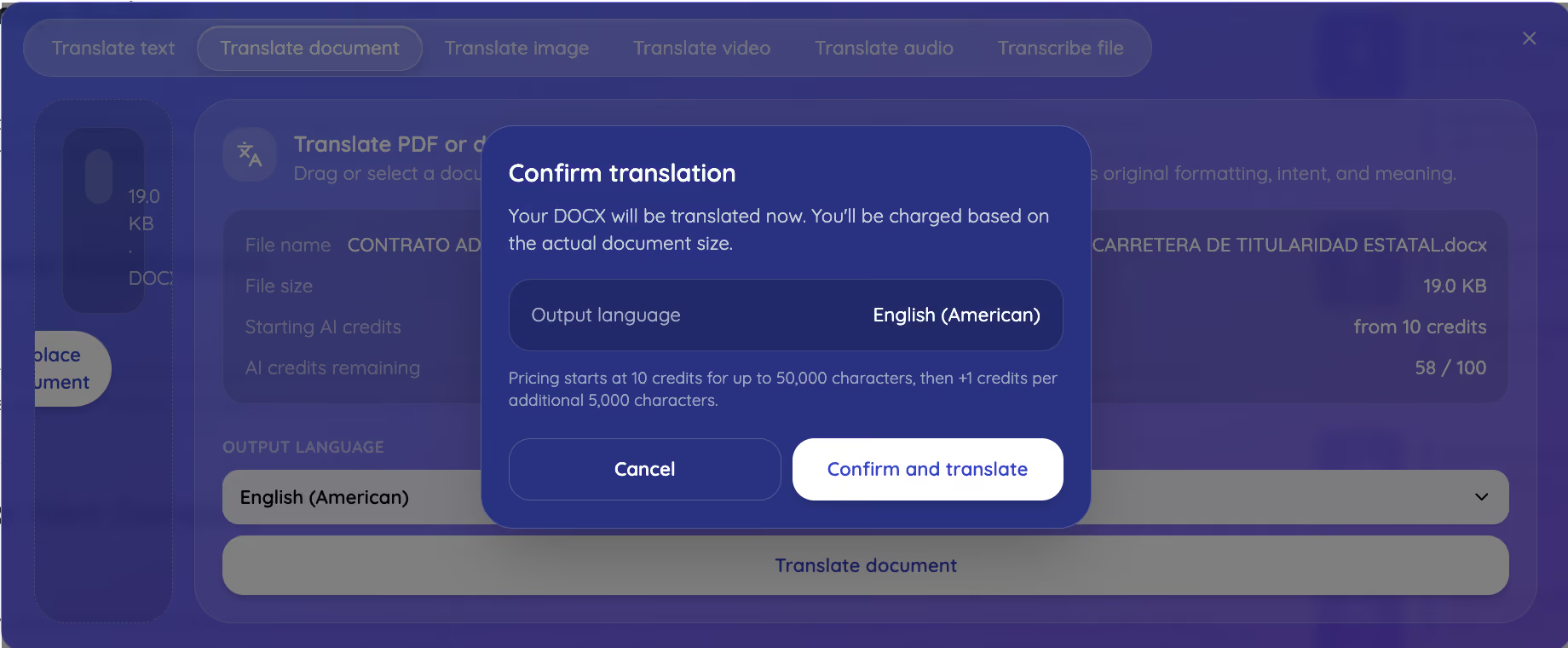
Step 5: Let JotMe analyze the document.
JotMe reads the file before translating it, shown as an Analyzing DOCX step in the panel above. This analysis is what makes the difference on a technical contract, because JotMe builds an understanding of the subject, the terminology, and the register across the whole document before it writes a single line.
Step 6: Download your translated doc.
JotMe returns a finished DOCX with the formatting intact. You download the translated file, translate it again into another language, or move to another document. This contract cost 10 AI credits for 50,000 billed characters.
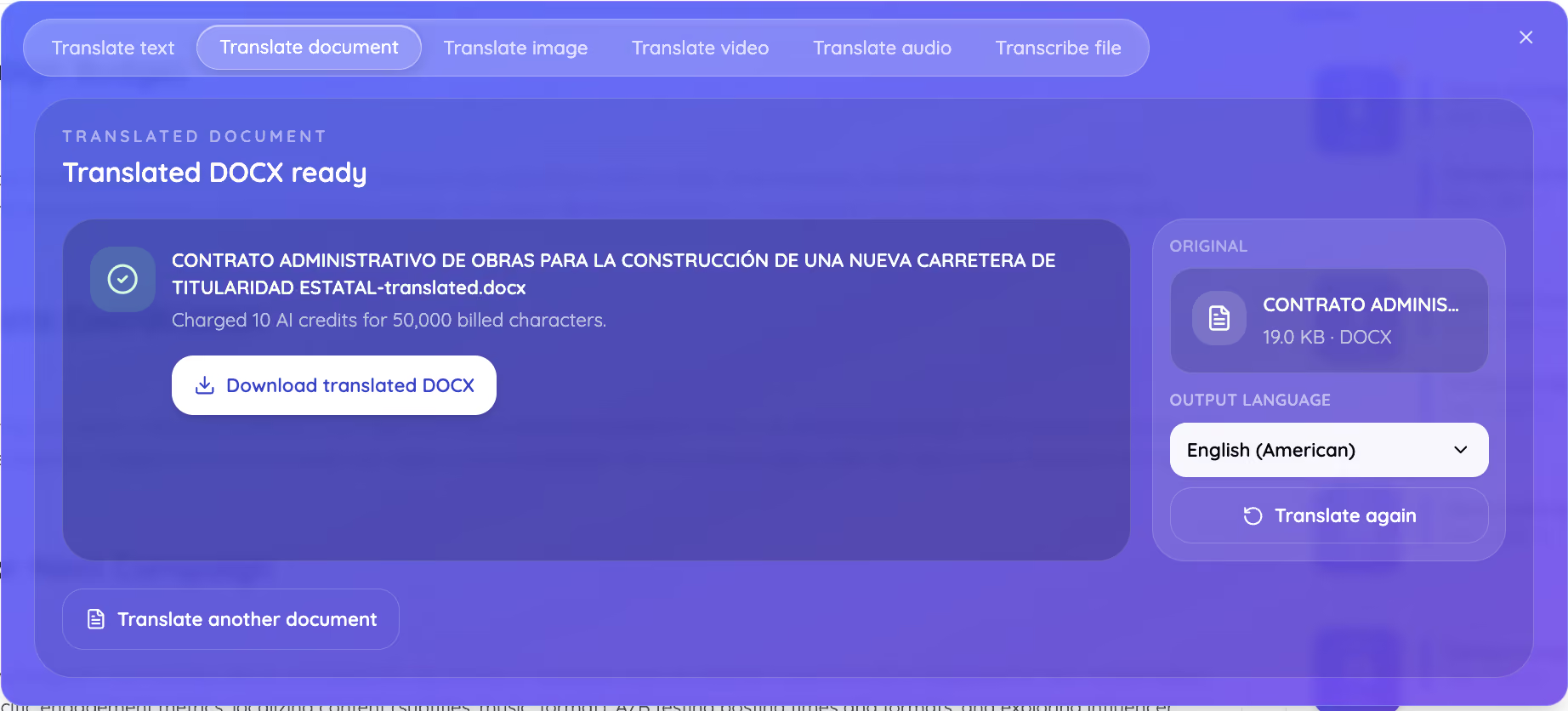
Google Docs Translator vs. JotMe Docs Translator: We Tested Both
We ran the same Spanish government construction contract through both tools into English, then asked ChatGPT to score each translation, and JotMe scored 8 out of 10 against 5 out of 10 for Google Docs. The test removes our own opinion from the comparison, because a third tool judged the output.
How We Ran the Test
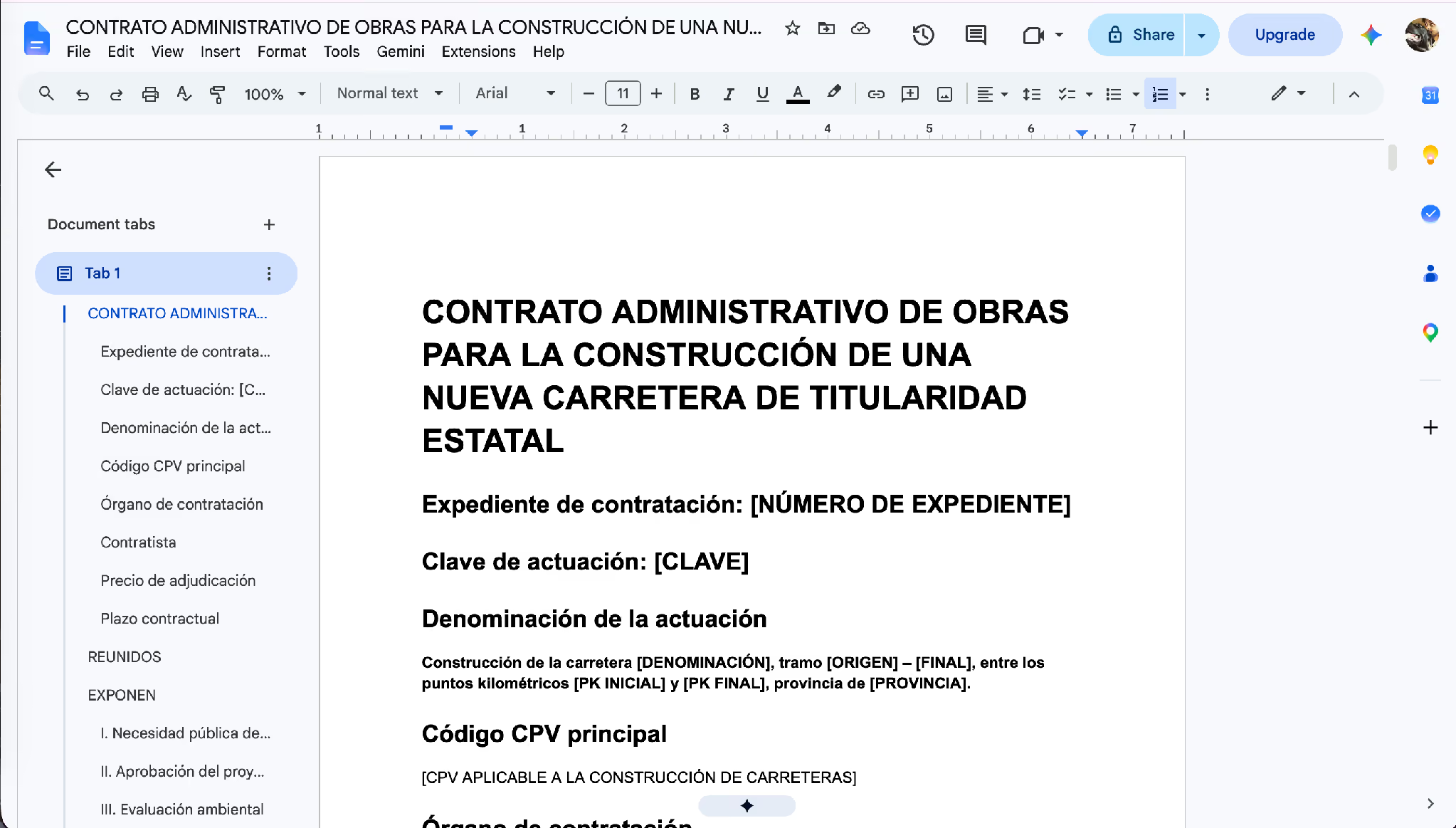
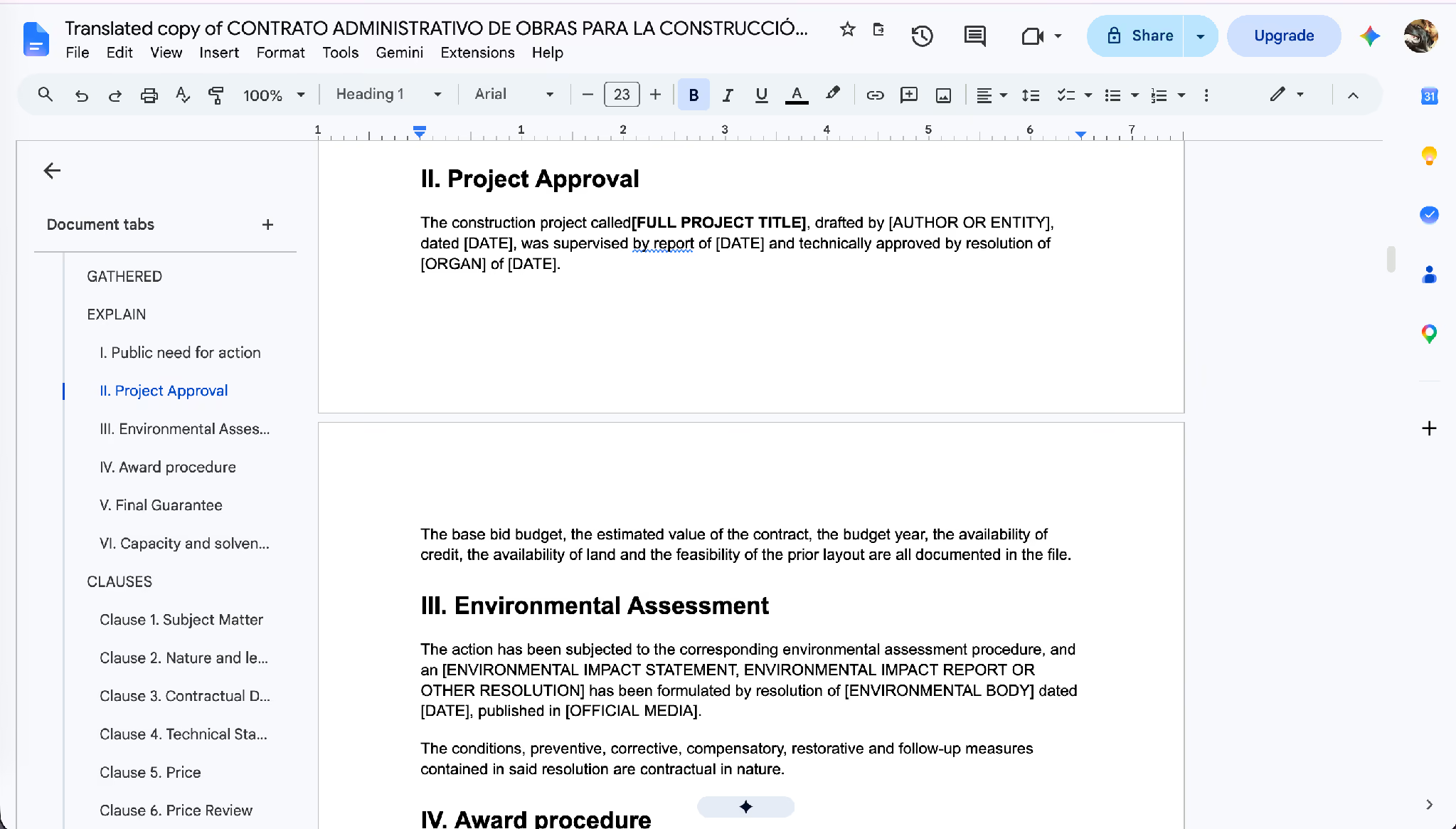
We started with a real Spanish contract, a state road construction tender full of administrative and engineering terminology, open in Google Docs.
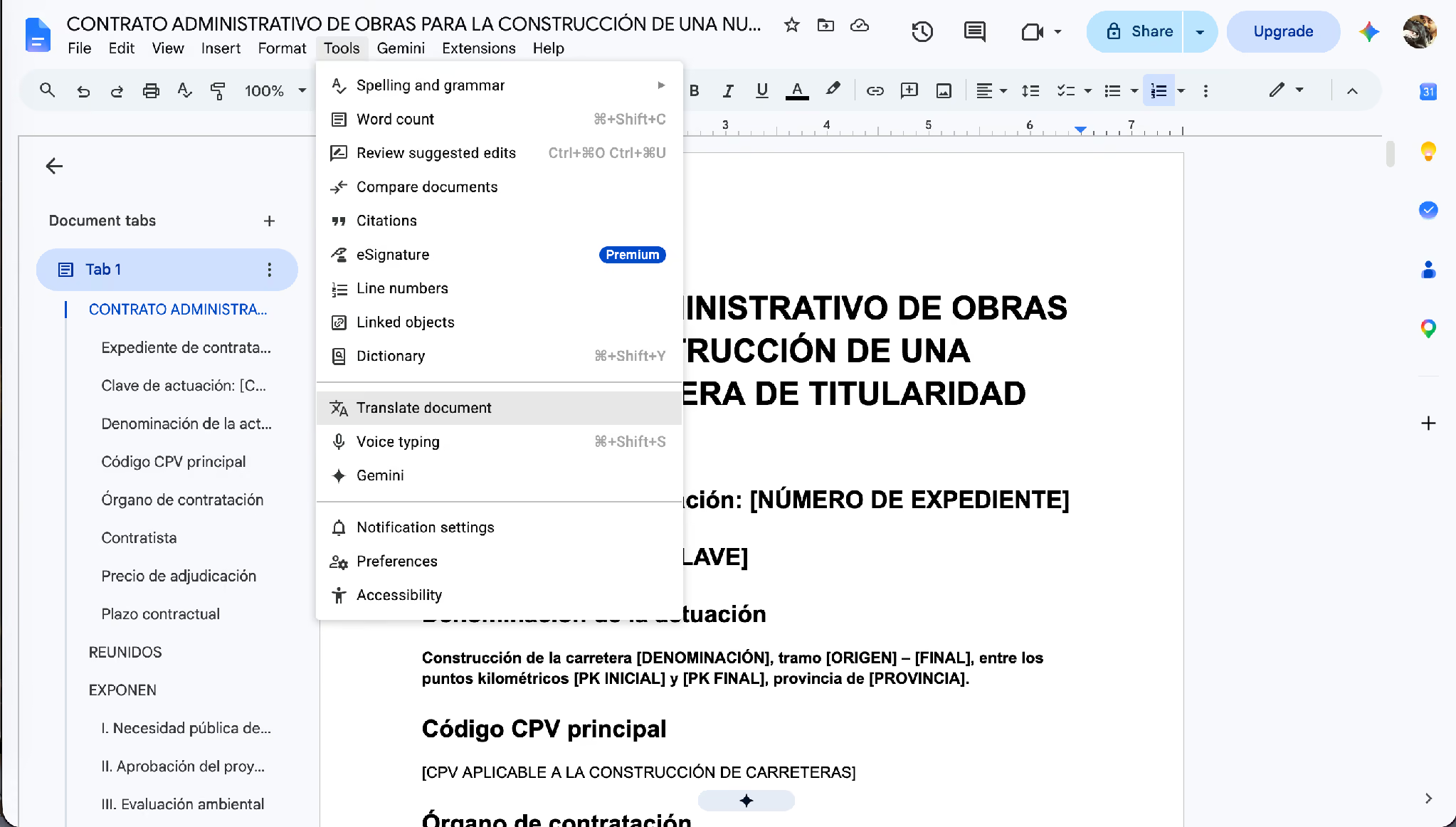
Inside Google Docs, we opened Tools, then Translate document, which creates a translated copy of the current file.
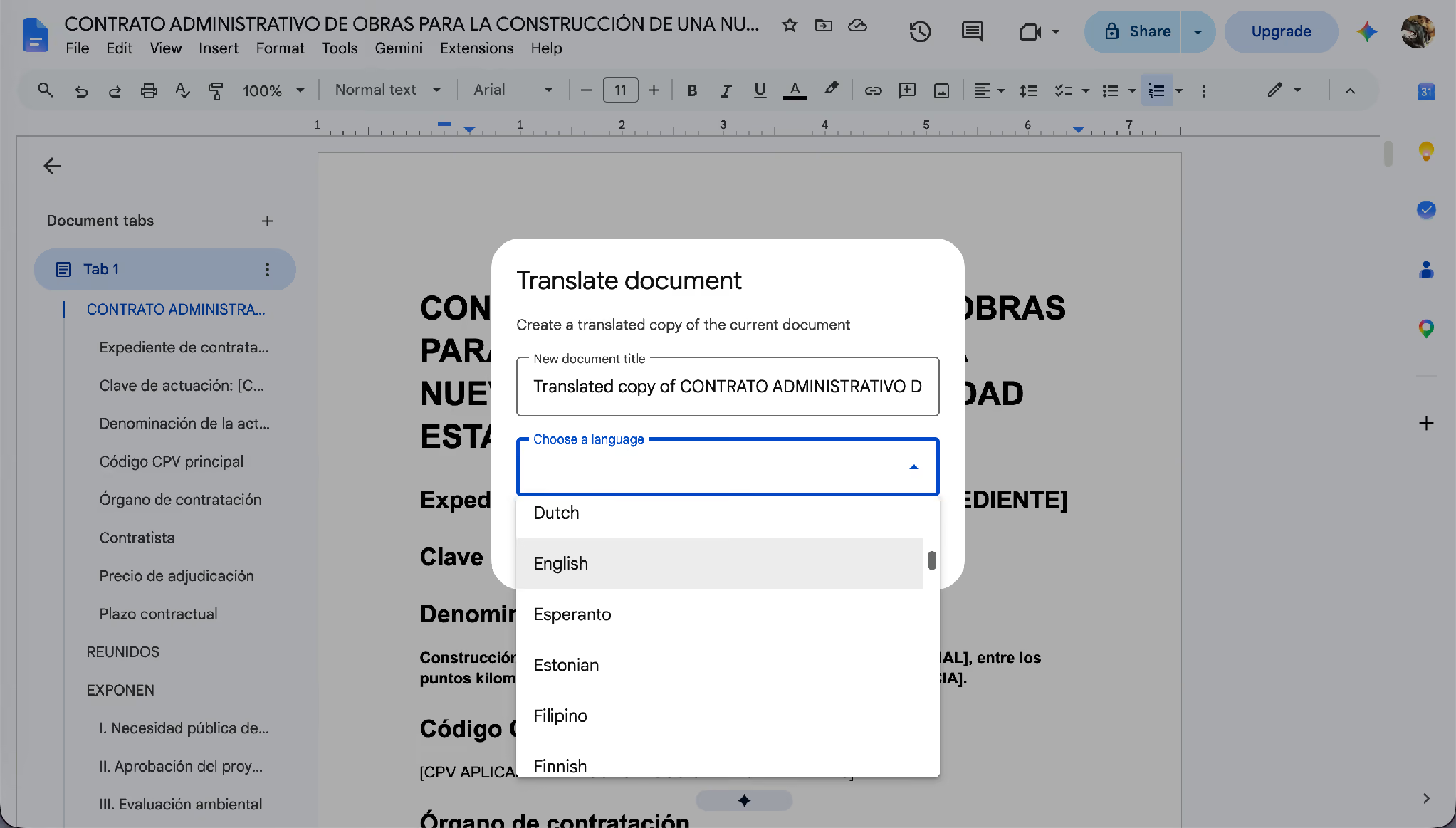
We named the copy and chose English as the target language.
Google Docs produced a translated copy in a new document, and the problems showed up straight away in the heading structure and the untranslated placeholders.
What ChatGPT Said About the Google Docs Translation
We gave ChatGPT the original Spanish and the Google Docs English copy and asked for a quality score and the contextual mistakes. ChatGPT rated it 5 out of 10 and called it not reliable enough for official or contractual use without professional legal review
What ChatGPT Said About the JotMe Translation
We ran the same contract through the JotMe docs translator, gave ChatGPT the original and the JotMe copy, and asked the same question. ChatGPT rated the JotMe translation 8 out of 10 and said it preserves the legal structure, technical meaning, placeholders, and professional tone far more consistently than the Google Docs version.
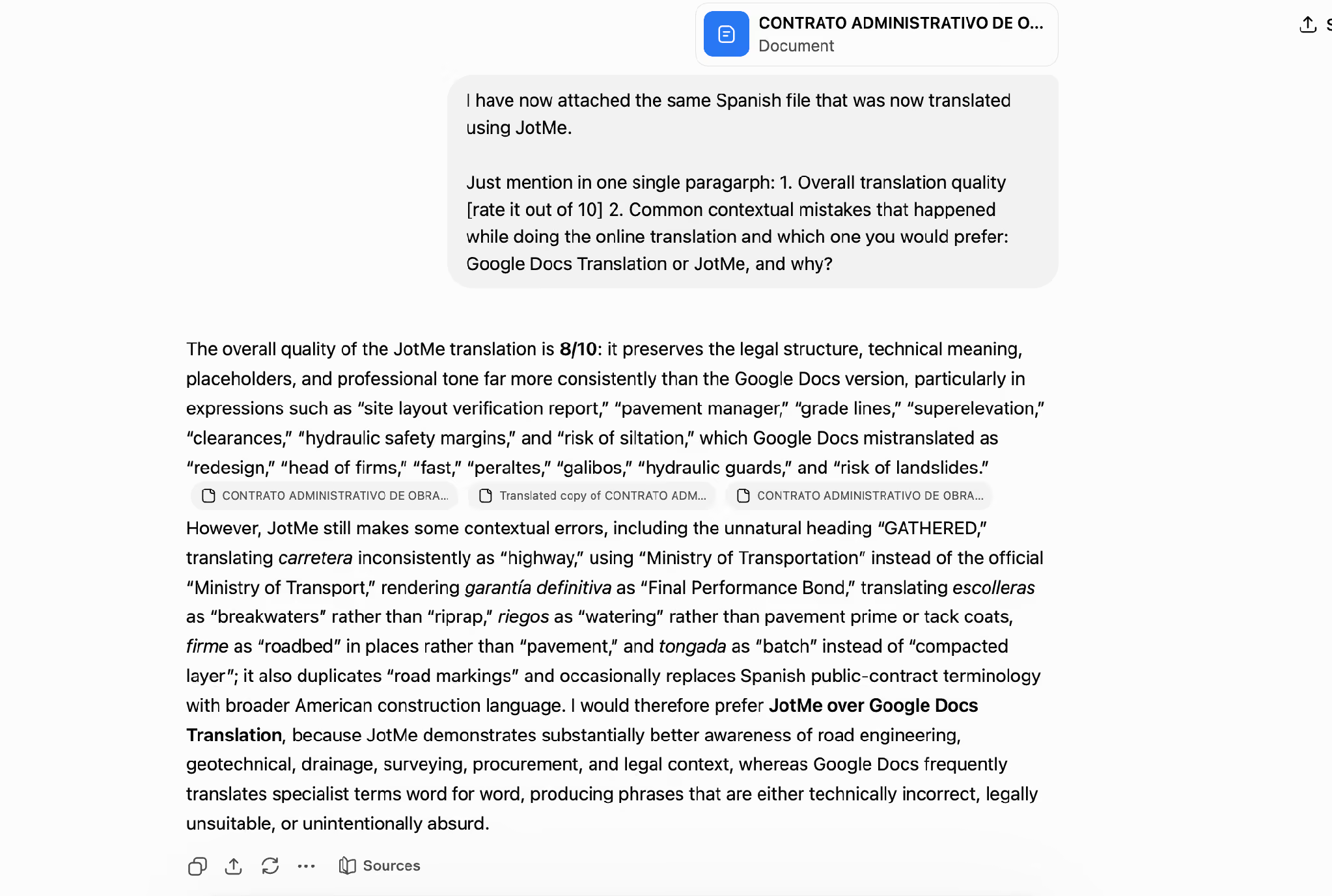
ChatGPT credited JotMe with correct engineering terms like "site layout verification report," "pavement manager,” "grade lines," "superelevation," and "hydraulic safety margins," the same expressions Google turned into "redesign," "head of firms," "fast," and "hydraulic guards." It noted JotMe still made minor terminology choices a specialist would refine, which is why the score is 8 rather than 10, and it concluded that it would prefer JotMe over Google Docs translation because JotMe shows substantially better awareness of road engineering, geotechnical, drainage, surveying, procurement, and legal context.
JotMe keeps evolving, and with contextual memory awareness that draws on your previous work, teams can expect a 9 or higher accuracy rate when they translate doc files as the vocabulary compounds across projects.
For the full field beyond these two, our guide to a free language translator covers the no-cost options for quick jobs.
How Does JotMe Translate Technical and Government Terms Accurately?
JotMe reads your whole document first, then translates each section against that understanding, which is how it produces accurate translate doc files where a general engine drops the specialist meaning, so every translated doc job holds its terminology. The analysis step in Step 5 exists for exactly this reason, and the contract test above shows it working on real legal and engineering vocabulary.
This matters most where one word carries a fixed meaning inside a field.
- Government and legal contracts. Administrative terms, tender vocabulary, and clause headings keep their official register instead of turning into literal phrases.
- Biology and life sciences. Terms like monosaccharide and nucleotide keep their scientific form rather than becoming descriptions.
- Chemistry. Compound names, reaction terms, and unit conventions hold across the document.
- Finance. Words like acquisition, provision, and security carry their accounting sense rather than the everyday one.
- Nanotechnology and engineering. Material names, scale units, and process terms stay consistent from the abstract to the conclusion.
JotMe also draws on context and terminology from your previous work, so the vocabulary your team already uses carries into the next translated doc. The result reads as though a native speaker in that field wrote the document first, rather than as a translation of the original. This is what makes JotMe a professional AI documentation translation tool rather than a word swapper.
Is It Safe to Translate Confidential and Government Doc Files?
Yes. JotMe saves no document to a server, which means none of your file gets translated and returned without being stored. It is a design choice that decides whether a tool suits confidential work. That makes JotMe usable for signed contracts, unpublished research papers, patent drafts, financial statements before disclosure, and government files.
The government case is a large one. Under Title VI of the Civil Rights Act of 1964, programs and organizations that receive federal financial assistance have long carried obligations to provide meaningful language access to people with limited English proficiency, which for many agencies includes translating vital documents. The scope of those rules is under active review, and the Congressional Research Service lays out the current picture in its overview of language-access requirements. For any agency or contractor translating official documents, no-storage handling and accurate terminology decide whether a translated doc holds up.
How Many AI Credits Does It Cost to Translate a Doc File?
A doc up to 50,000 characters costs 10 AI credits, and every additional 5,000 characters adds 1 credit. As an online doc translator, JotMe bills on the character count inside the document rather than the file size, so a text-heavy 2 MB doc can cost less than a 10 MB file full of images, and this online doc translator shows the cost on screen before you commit.
The free tier carries 5 AI credits, enough for one image translation rather than a full document, so anyone who needs to translate doc files at work should start on Pro at $10 per user in per month for 20 credits, or Premium at $15 for 50.
Which Doc Translator Should You Use for Your Next File?
The decision comes down to who reads the file next. When you only need the gist of a foreign document for yourself, a free online doc translator does the job in seconds, and Google Docs handles that well for anyone already inside Drive, and a free online doc translator covers the rest. There is no reason to reach for anything heavier when the reader is only you.
The moment a colleague, a client, a reviewer, or a government office reads the translated file, the standard changes, and the test above shows why: the same contract scored 5 out of 10 from Google Docs and 8 out of 10 from JotMe, judged by a neutral third tool. JotMe reads the whole document first, keeps technical and legal terms intact, preserves your formatting, and saves nothing to a server. Open app.jotme.io and translate doc files on your next document to see the difference against your current setup. Teams that also run multilingual meetings can pair it with English to Spanish live translation for the spoken side of the same work.
FAQs
How do I translate a doc file online for free?
Google Docs translates an open document for free through Tools, then Translate document, which suits quick comprehension. To translate doc files accurately from an online doc translator that another person will read, JotMe applies contextual translation and starts at 10 AI credits per document.
How do I translate a Google Doc into Spanish?
Inside Google Docs, open Tools, then Translate document, choose Spanish, and Google creates a translated copy. For a professional AI documentation translation tool that keeps legal and technical terms intact, export the file as DOCX and run it through JotMe into Spanish instead.
Can I translate a doc file and keep the original layout?
Yes. JotMe preserves the original formatting, intent, and meaning, so headings, clause numbering, and document structure survive the translation.
What is the largest doc file JotMe accepts?
JotMe accepts documents up to 100 MB, which lets you instantly translate large document files without splitting them.
Is JotMe accurate enough for a government or legal doc?
In a ChatGPT review of a real government contract, JotMe scored 8 out of 10 against 5 out of 10 for Google Docs, and it saves no document to a server, which suits confidential official files.
How many languages can JotMe translate a doc into?
JotMe translates doc files into 200+ languages across 39,000+ language pairs, covering Spanish, Hindi, Chinese, Arabic, and more from the same screen.
Last updated on
July 29, 2026
Follow us on social media:
![JotMe — Is Google Translate Accurate? [2026 Test]](/_webflow-assets/0d0512afc7b037d74dff536f22fed08f.avif)