

Quick Answer
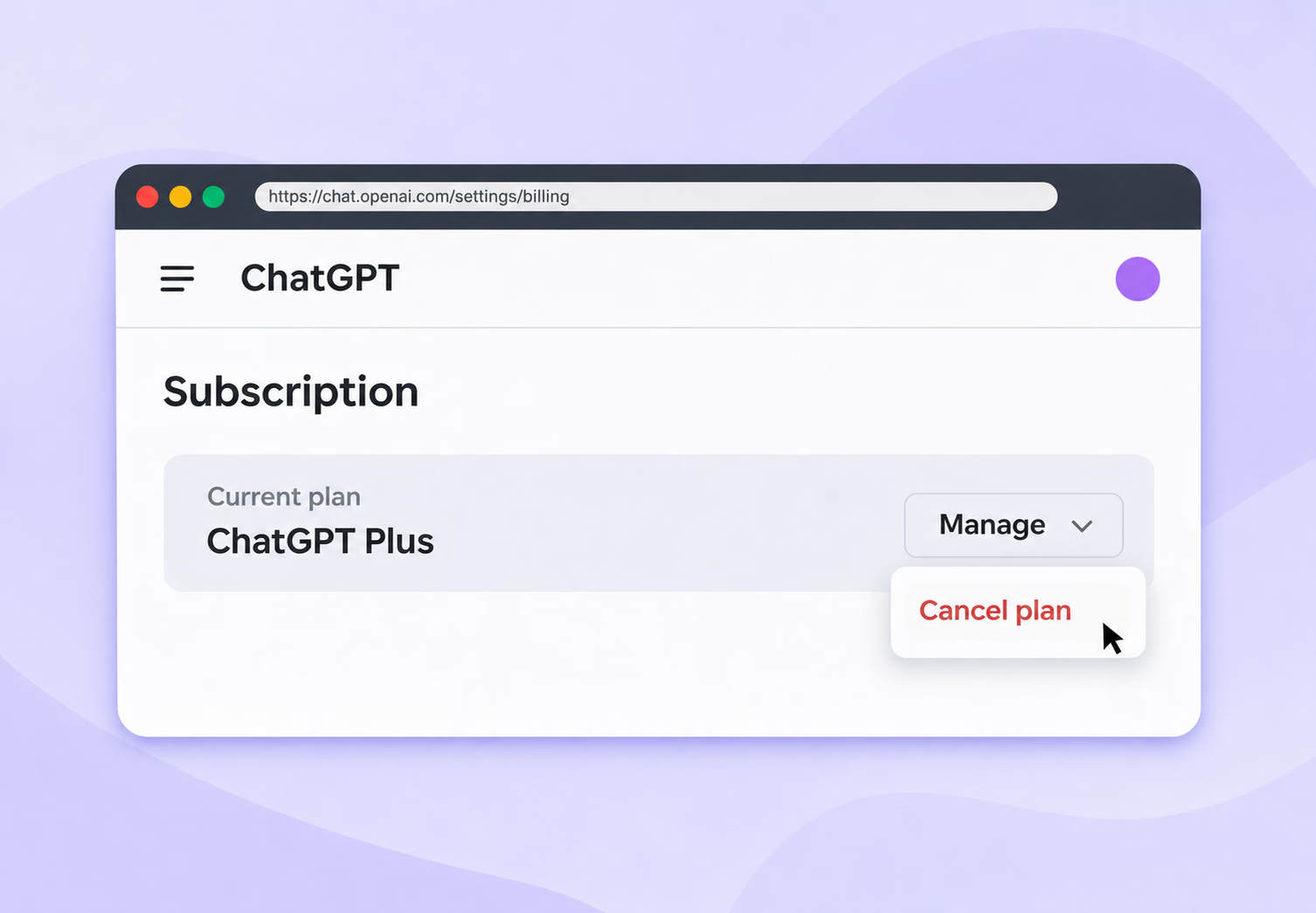
To cancel your ChatGPT subscription on the web, open ChatGPT, click your name in the bottom-left corner, and select Settings. Go to Billing and click Cancel plan, then confirm with Cancel subscription. Your paid features stay active until the end of your billing period.
If you subscribed in the iPhone app, cancel in your iPhone's Settings under your name, then Subscriptions. If you subscribed through Google Play, cancel in the Play Store under Subscriptions. Deleting the app doesn't cancel anything.
Are you paying for ChatGPT every month and opening it less than you used to? You are far from alone, and people cancel for all sorts of reasons:
- The bill keeps growing: ChatGPT Plus costs $20 a month, and ChatGPT Pro starts at $100.
- The free plan is enough: Many people only need ChatGPT for quick questions and short drafts.
- Another AI fits better: Claude, Gemini, Perplexity, and JotMe now handle specific jobs that used to need ChatGPT.
- Privacy worries: Some users would rather keep work files and client data out of a chatbot.
- A short project ended: People subscribe for a launch or an exam and forget to cancel.
In this guide, you will find detailed steps to cancel your ChatGPT Plus subscription on the web, iPhone, iPad, and Android. You will also see what happens after you cancel, how refunds work, and which AI tools to try next.
Key Takeaways
- You can cancel ChatGPT from Settings, then Billing, then Cancel plan on chatgpt.com.
- Cancel subscriptions bought in the iPhone or Android app through Apple or Google Play.
- Paid features stay active until the end of your current billing period.
- Cancel at least 24 hours before your next billing date to avoid another charge.
- Canceling doesn't refund past charges, and refunds depend on your purchase and location.
- Deleting the ChatGPT app or your account doesn't cancel an Apple subscription.
What Are the Reasons to Cancel a ChatGPT Subscription?
Most people cancel for a mix of cost and fit. ChatGPT is still the most used AI assistant, and the market around it changed fast in the past year, so check that the plan you picked last winter still matches how you work.
The Monthly Cost Adds Up
ChatGPT's personal plans run from free to $100 a month and up, and the jump between tiers is steep:
| Plan | Price | Who It Suits |
|---|---|---|
| Free | $0 | Quick questions and short drafts |
| Go | $8 a month (announced U.S. price) | Light users who want higher limits than Free |
| Plus | $20 a month | Regular users who want the stronger models |
| Pro | From $100 a month | Heavy users who run long tasks and agents every day |
Prices are U.S. dollar reference figures, not local-currency quotes. OpenAI announced Go at $8 a month in January 2026; check the current checkout for your country and billing channel. Annual equivalents require the full annual payment.
A $20 plan looks small until you stack it with other AI subscriptions. In Menlo Ventures' 2026 State of Consumer AI report, the top 14% of payers, who spend $100 or more a month, account for 60% of all consumer AI spending.
You Barely Use the Paid Features
The free plan covers what most people use ChatGPT for: answering questions and rewriting emails. If you open ChatGPT a few times a week, the paid limits rarely matter. Menlo's survey found that paying users use AI daily at almost twice the rate of non-payers, 50% against 26%, which suggests the paid plans pay off mostly for daily users.
You Don't Trust Every Answer
ChatGPT's own footer reminds you that "ChatGPT can make mistakes. Check important info." Many people feel the same way:
- Distrust is common: In the same Menlo survey, 70% of U.S. adults who don't use AI said they distrust AI-generated information.
- Bias worries: 52% of that group believes AI tools are biased.
- Fact-checking takes time: If you verify every answer anyway, a paid plan saves you less time than it promises.
Your Data and Privacy Matter
Privacy is the most common worry among people who stay away from AI. Menlo found that 76% of non-users have privacy concerns, and some paying users share them once they start pasting client work into a chat.
- Chats can train models: OpenAI’s ChatGPT Translate page says chats may be reviewed and used to improve its models. For ordinary personal chats, you can switch model improvement off in Data controls; separate feedback and special-program rules may apply.
- Work files leave your device: Files you upload to ChatGPT are processed by OpenAI, which matters for contracts and client data.
- Team rules: Many companies limit which AI tools staff can use with confidential material.
Ads Arrived on the Cheaper Plans
On February 9, 2026, OpenAI began testing ads in ChatGPT for logged-in adults in the U.S. on the Free and Go plans, as Analytics Insight reported. Plus, Pro, Business, Enterprise, and Education stay ad-free. If you pay for Go and see ads anyway, the plan loses some of its appeal.
Other AI Tools Do Some Jobs Better
People now spread their work across several assistants. Similarweb data reported by PPC Land shows ChatGPT's share of generative AI website traffic falling from 76.4% in June 2025 to 52.7% in May 2026. Over the same period, Gemini climbed from 8.9% to 27.3%, and Claude from 1.6% to 8.9%.
Live translation and meeting notes are different jobs. ChatGPT’s Meetings beta on macOS can take notes from online calls on eligible Pro and Business plans without a meeting bot. For live translation during a Zoom or Microsoft Teams call with clients in Korea or Japan, compare the dedicated multilingual meeting workflow you need.
Meetings in other languages need more than a chatbot
JotMe Desktop provides accurate live caption translation alongside Zoom, Google Meet, Microsoft Teams, and Webex, with no bot joining the meeting. Its Basic and Premium Quality models offer 200+ language and regional options. After the meeting, you can generate and share AI notes in supported note languages.
Download JotMe for FreeHow to Cancel ChatGPT Plus Subscription
The process of canceling a ChatGPT Plus subscription depends on where you bought it. If you subscribed on chatgpt.com, you cancel from ChatGPT's settings. Apple bills subscriptions bought in the iPhone or iPad app, so you cancel those through Apple, and Google Play handles the ones bought in the Android app.
The same steps work for every personal plan, from Go to Pro. If you don't remember where you subscribed, search your email for the payment receipt, since the sender tells you who bills you. A ChatGPT Business workspace is different: the workspace owner cancels it from Workspace settings, then Billing, then Manage plan.
Plan your timing too. OpenAI's cancellation guide asks you to cancel at least 24 hours before your next billing date to avoid the next charge.
How to Cancel ChatGPT Subscription on the Web
This is the fastest OpenAI cancellation route, and it works on any browser for subscriptions you bought on chatgpt[dot]com. The ChatGPT cancel subscription button lives inside Settings, under Billing.
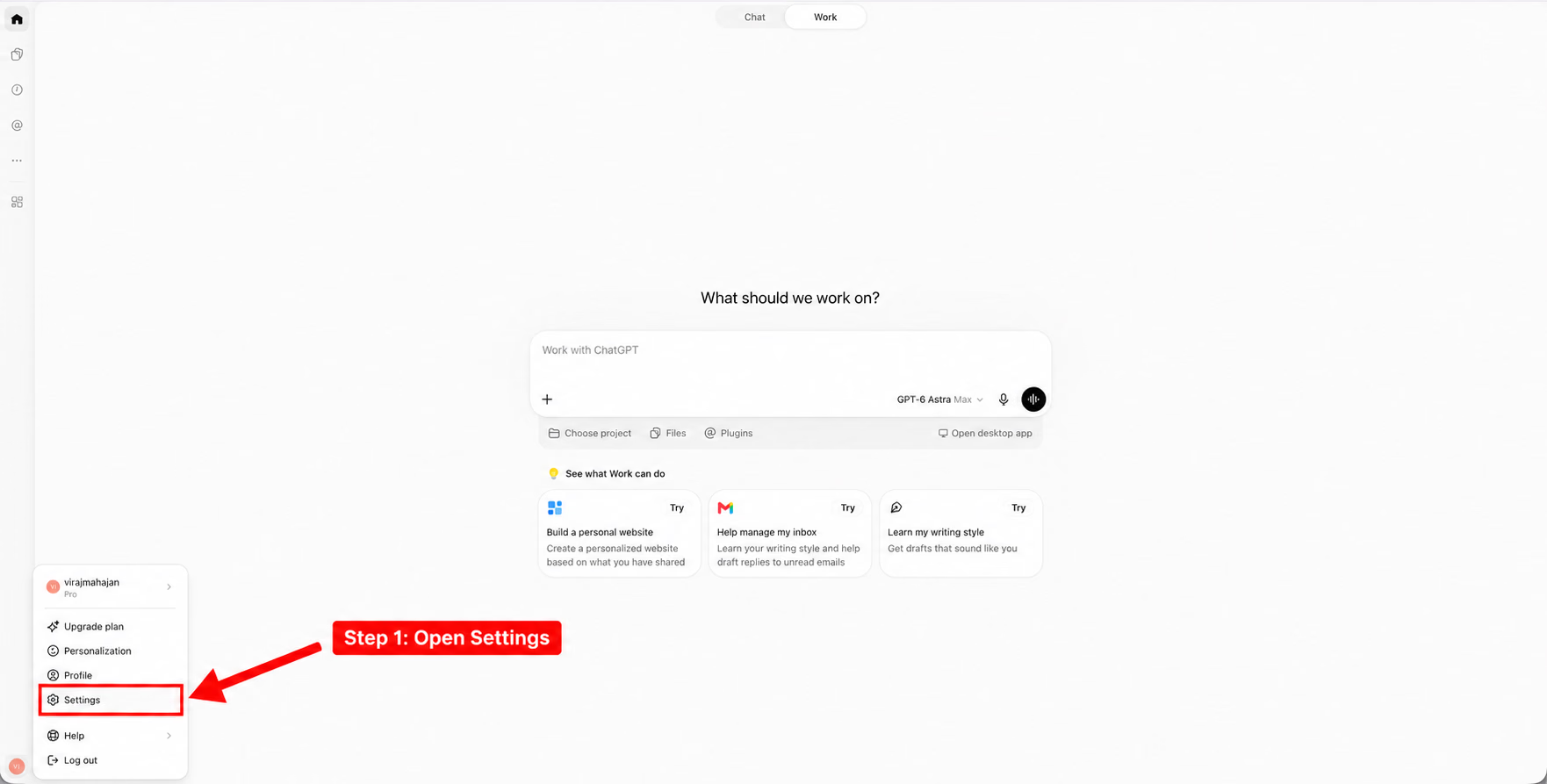
Step 1: Open Settings From Your Account Menu
Sign in to chatgpt.com and click your name in the bottom-left corner. Select Settings from the menu.
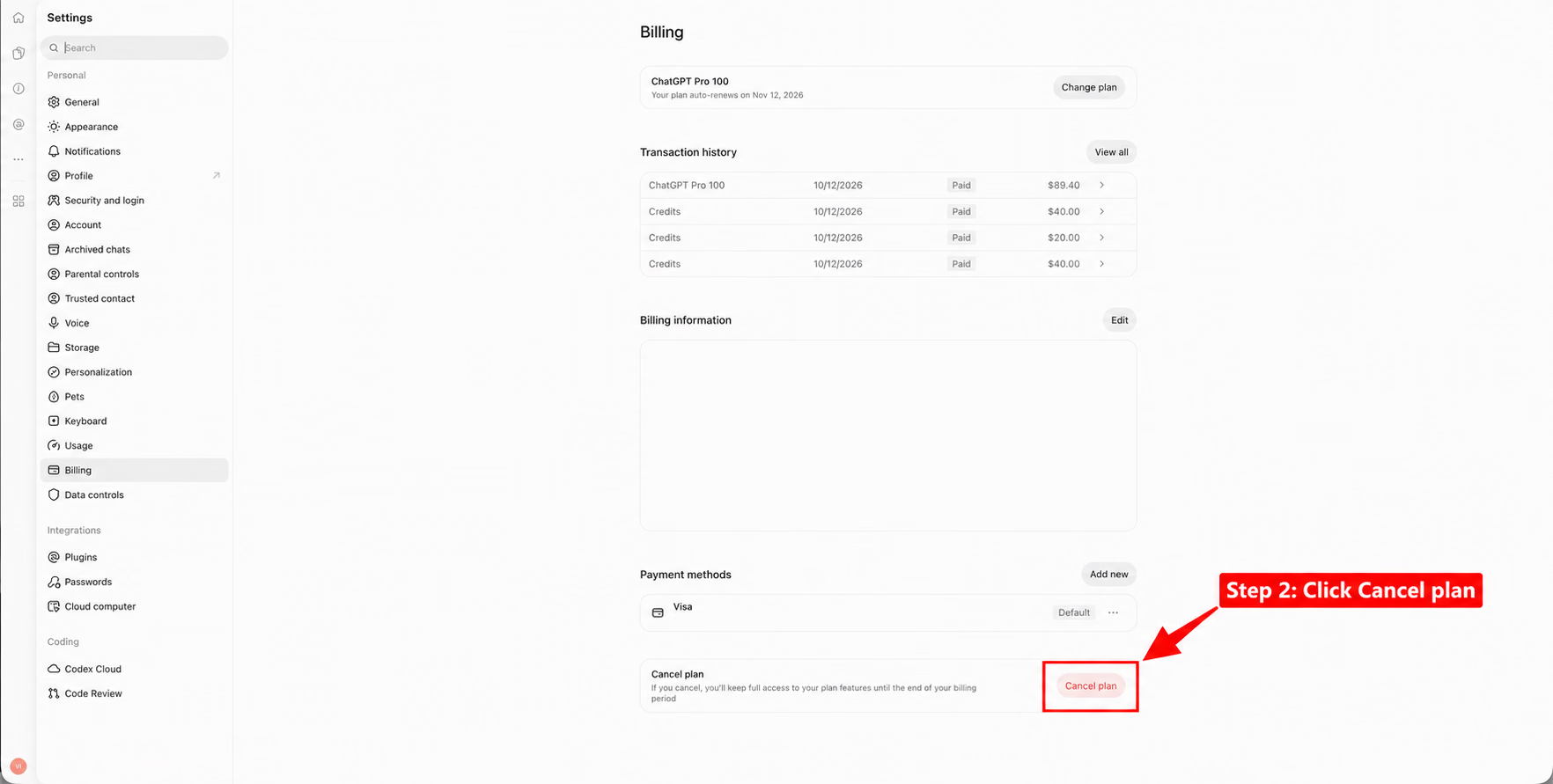
Step 2: Select Billing and Click Cancel Plan
Select Billing from the Settings menu on the left. Your current plan and renewal date appear at the top, which tells you how long your paid access lasts. Scroll down and click Cancel plan.
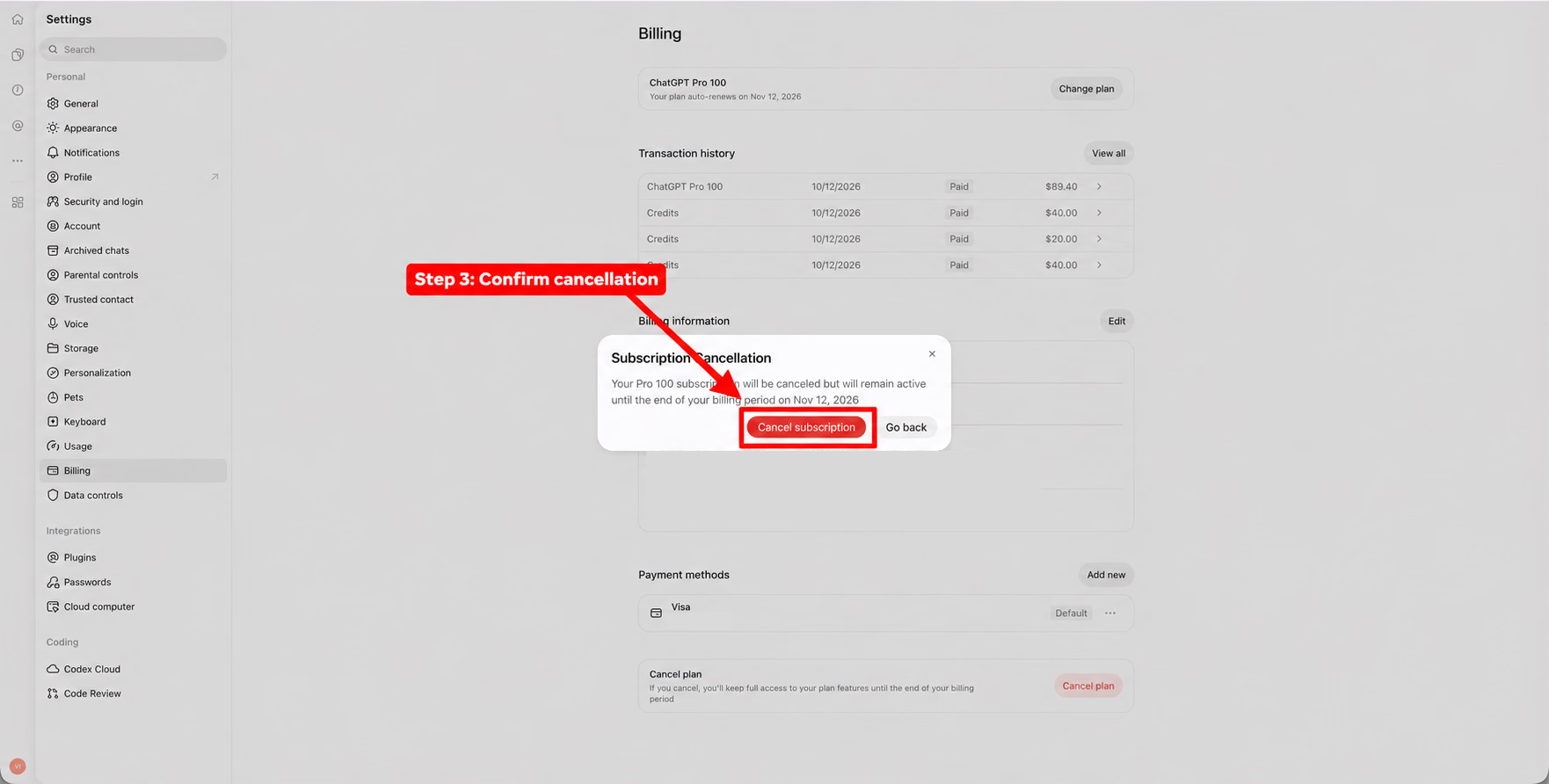
Step 3: Confirm the Cancellation
ChatGPT asks you to confirm and shows the date your paid access ends. Click Cancel subscription to finish. Once your ChatGPT subscription cancellation request goes through, your plan won't renew, and you keep your paid features until that date.
How to Cancel ChatGPT Subscription on iPhone or iPad
Apple handles billing for subscriptions bought in the ChatGPT iOS app, so you cancel in your device's Settings app. The OpenAI cancellation options inside ChatGPT can't stop an Apple subscription.
- Open the Settings app on your iPhone or iPad.
- Tap your name at the top.
- Tap Subscriptions.
- Tap ChatGPT.
- Tap Cancel Subscription. You may need to scroll down to find it.
- Confirm your cancellation.
If you don't see a Cancel button, Apple says the subscription is already canceled. If ChatGPT doesn't appear in the list, check which Apple Account appears on your "receipt from Apple" email and sign in to that account.
How to Cancel ChatGPT Subscription on Android [Google Play Store]
Google Play handles billing for subscriptions bought in the ChatGPT Android app. Sign in to the Play Store with the same Google account that made the purchase.
- Open the Google Play Store app.
- Tap your profile icon in the top-right corner.
- Tap Payments & subscriptions, then Subscriptions.
- Tap ChatGPT.
- Tap Cancel subscription.
- Follow the on-screen steps to confirm your cancellation.
To manage ChatGPT subscription renewals from a computer, open your Google Play subscriptions page and sign in. Click Manage next to ChatGPT, then select Cancel subscription. Google's help page confirms that uninstalling the app doesn't cancel the plan.
Things to Keep In Mind After Canceling ChatGPT Subscription
Canceling stops future renewals, and your account stays open on the Free plan. A few details trip people up, so check these before and after you cancel:
- Access until the period ends: You keep paid features until your current billing period ends, and the confirmation screen shows that date.
- The 24-hour rule: Cancel at least 24 hours before your next billing date, or you risk paying for another month.
- The app doesn't cancel: Deleting the ChatGPT app from your phone leaves the subscription running.
- Account deletion: Deleting your ChatGPT account cancels subscriptions billed by OpenAI, and it doesn't cancel an Apple subscription. Cancel through Apple first.
- No automatic refund: Canceling stops renewals and doesn't refund past charges. Refund rules depend on your purchase and location, covered in the FAQs below.
- Your chats: If you want a copy of your history, use Export data under Settings, then Data controls.
- Coming back: You can subscribe again anytime from Upgrade plan in your account menu.
Learning how to cancel AI subscription plans takes a few minutes, and the same rules apply to most AI apps: cancel where you paid, and cancel before the renewal date.
Try a free AI assistant for your meetings
Try accurate live translation and AI meeting notes on JotMe’s free plan. Live captions in its Basic and Premium Quality models offer 200+ language and regional options; AI meeting notes support 21 language and regional options. Paid plans start at $10 a month, billed $120 annually.
Download JotMe for FreeWhat to Choose After Canceling ChatGPT Subscription
Canceling ChatGPT doesn't have to mean giving up AI. Menlo Ventures' 2026 survey of 5,067 U.S. adults found that the average AI user now relies on 3.0 general assistants, up from 2.2 a year earlier, and that people add tools for specific jobs instead of switching for good. The tools below each cover a job ChatGPT handles poorly or prices too high, and our full list of ChatGPT alternatives covers more.
JotMe: Choose This for Multilingual Meetings and Events
JotMe is an AI platform for calls and events where people speak different languages. Its desktop app offers accurate live caption translation alongside Zoom, Google Meet, Microsoft Teams, and Webex without a meeting bot. Basic and Premium Quality models support 200+ language and regional options; Fast Mode has a smaller language set. After a call, AI meeting notes can be generated in 21 language and regional options and shared with participants. Sharing depends on the host’s setup and recipient permissions, and each generated notes language uses one AI credit. JotMe has a free plan, and paid plans start at $10 a month, billed $120 annually.
Anthropic Claude: Choose This for Coding and Long Reasoning
Claude is Anthropic's AI assistant, and many developers and analysts pick it for careful, long-form reasoning. Claude has a free plan, and Claude Pro costs $20 a month, or $17 a month billed annually.
Google Gemini: Choose This for Images and Google Workspace
Gemini works inside Gmail and Google Docs on eligible Google AI or Workspace plans, so it suits people who already work in Google’s apps. Google’s Nano Banana image models support image generation. Gemini has a free plan, and Google AI Plus starts at $4.99 a month in the U.S.; the entry plan does not include every Docs or Meet benefit.
Meta AI: Choose This for Instagram and WhatsApp
Meta AI comes free inside WhatsApp, Instagram, Facebook, and Messenger, so you can ask questions without opening a separate app. Meta One Core starts at $7.99 a month in the U.S. and adds more AI and app features; availability and benefits vary by region and account.
Perplexity AI: Choose This for Research With Sources
Perplexity answers questions with linked sources and inline citations that readers can check, which helps students and journalists with research. It has a free plan, and Perplexity Pro costs $20 a month or $200 a year—about $17 a month when billed annually.
ChatGPT vs Other AI: A Quick Glance
JotMe supports live caption translation across Zoom, Google Meet, Microsoft Teams, and Webex. Its $10 monthly equivalent on annual billing is lower than ChatGPT Plus’s $20 monthly plan. Compare the billing period and the specific meeting features, since the platforms serve different workflows.
| Tool | Best For | Live Meeting Translation | Free Plan | Paid Plans From |
|---|---|---|---|---|
| JotMe | Multilingual meetings and events | Yes, 200+ language/regional options in Basic and Premium Quality; no bot | Yes | $10 a month (billed annually) |
| ChatGPT | General writing and chat | Voice mode; Meetings beta takes notes, not the same live-translation workflow | Yes | $8 a month (Go’s announced U.S. price) |
| Claude | Coding and long reasoning | No | Yes | $17 a month (billed annually) |
| Gemini | Images and Google Workspace | Available inside Google Meet on eligible plans | Yes | $4.99 a month |
| Meta AI | Instagram and WhatsApp | No | Yes | $7.99 a month |
| Perplexity | Research with sources | No | Yes | About $17 a month ($200 billed annually) |
Final Thoughts
Canceling a ChatGPT plan is usually quick once you know who bills you. To manage ChatGPT subscription settings later, return to the same Billing page, and you can come back to a paid plan anytime. Before picking a replacement, test free plans on the tasks you do most: Claude, Gemini, Meta AI, and Perplexity all let you start at $0. If your work involves meetings with clients or partners who speak another language, try JotMe on its free plan.
FAQs
How Much Does ChatGPT Plus Cost?
ChatGPT Plus costs $20 a month in the U.S., and Pro starts at $100 a month. Go was announced at $8 a month in the U.S. in January 2026; check its current checkout price. Prices can differ by country, and subscriptions bought through the App Store or Google Play sometimes cost more than the same plan on chatgpt.com.
Does Deleting the ChatGPT App Cancel My Subscription?
No. Deleting the app from your phone leaves your subscription active, and you keep paying until you cancel. Cancel the plan where you bought it, using the steps above for your device.
What's the Free Alternative to ChatGPT Plus for Me?
The best free alternative depends on your work. Claude's free plan suits writing and coding, and Gemini's free plan suits images. Perplexity works well for research with sources, and Meta AI is free inside WhatsApp and Instagram. For multilingual meetings, JotMe's free plan gives you live translation and AI meeting notes.
How to Get a Refund After Canceling ChatGPT?
Canceling does not trigger an automatic refund. OpenAI’s refund policy says payments are generally non-refundable, subject to applicable legal rights and eligible exceptions. An unused individual plan may qualify for a discretionary refund if you contact Support within seven days of the charge. Users in the EU, the UK, and Turkey can receive a prorated refund within 14 days of purchase; Korea and Brazil also have specific rules. Eligibility depends on your location, purchase channel, use and circumstances, so check the current policy. For web and Google Play purchases, request a refund through the chat on help.openai.com while signed in. For Apple purchases, request a refund from Apple.
Why Can't I Cancel My ChatGPT Subscription?
If the ChatGPT cancel subscription button doesn't appear on your Billing page, you most likely bought the plan somewhere else. If you subscribed in the iPhone app, ChatGPT's Billing page can't cancel it, and you need to cancel through Apple. The same goes for Google Play. Check that you're signed in to the account that pays for the plan, since a second email address or a family member's Apple Account can hide the subscription. If your plan belongs to a Business workspace, ask the workspace owner. If none of this works, contact OpenAI Support through the chat on help.openai.com.
Try JotMe
Accurate translation for your meetings, events, and everyday work, with AI Memory that remembers your context.