

Google Translate vs. ChatGPT: Which One Is the Best Language Translator?

Quick Answer
Google Translate is the better language translator for speed and reach, with instant results across 249 languages and varieties, all for free. ChatGPT is the better pick when meaning and tone matter, since it reads whole sentences and follows instructions about your reader. It also keeps a document's structure intact.
Use Google Translate for quick lookups and rare languages. Use ChatGPT for emails and long-form writing that people will read closely. For live meetings on Zoom or Microsoft Teams, use a dedicated live translation platform such as JotMe.
We have all been using Google Translate for ages. If I am not mistaken, everyone who uses the internet and has ever needed to understand something in another language has used Google Translate at least once.
With AI showing up everywhere, a lot of users have now shifted to ChatGPT and other alternatives for translation. I was pretty amazed when my father took a picture of my recently released novel and asked ChatGPT to translate the prologue into Hindi for him. A human translator would still do better, and ChatGPT did a pretty decent job.
That got me thinking about why people are moving away from Google Translate to ChatGPT, and which of the two is the best language translator out there.
So I did what I do best: I started using both tools for almost every sort of translation. I checked their accuracy and their limits, and I worked out when you need a better AI tool.
Here's what I found:
- Google Translate: It is the faster tool with far more languages, and it stays close to the source text. It returned my PDF in seconds, though it broke sentences apart wherever the PDF had a line break.
- ChatGPT: It reads for meaning and follows instructions about tone and the reader. It kept my PDF's sentences whole and redrew my book cover in Spanish, though the PDF took 5 minutes and 53 seconds.
In this detailed comparison guide, you will see me compare Google Translate and ChatGPT on multiple factors, including text, images, PDFs, language coverage, accuracy, price, and live translation.
Key Takeaways
- Google Translate supports 249 languages and varieties, while the ChatGPT Translate page advertises 40+.
- Both tools are free to start, and Google's Cloud Translation API charges $20 per million characters once you pass the free 500,000 each month.
- ChatGPT plans start at $8 a month for Go and $20 a month for Plus, and the free plan covers everyday translation.
- In a 2024 study, ChatGPT got 3.8% of Spanish sentences wrong against 18.1% for Google Translate, and Google Translate did better in Vietnamese with 10.6% against 24.2%.
- Google Translate keeps a 5,000-character limit per text box, and ChatGPT accepts long pastes and whole files in a chat.
- ChatGPT lets you describe your reader and tone, while Google Translate offers Fast and Advanced modes for text.
- Both tools now offer live speech translation, and neither translates a Zoom or Microsoft Teams call for everyone in it.
Translate your meetings live in 200+ languages
Google Translate and ChatGPT handle the text before and after a call. JotMe handles the call itself, with live translation on Zoom, Google Meet, Microsoft Teams, and Webex, and no bot joining your meeting.
Download JotMe for FreeWho Should Read This Comparison Guide?
If you translate anything more than a word now and then, the right tool saves you time and an awkward mistake. This Google Translate vs ChatGPT comparison helps these readers the most:
- Business managers: You email suppliers or partners in Korea, Japan, China, or Taiwan and want your message to sound polite in their language.
- Students and researchers: You read papers and articles in a language you only half know, and the key terms have to be right.
- Writers and authors: You want a chapter or a book cover in another language without paying an agency upfront.
- Travelers: You need a menu or a street sign in your own language within seconds.
- Marketers and support teams: You adapt product pages and customer replies for buyers in another country.
Why Is This Comparison Guide Different?
Most comparisons of Google Translate vs ChatGPT paste a single sentence into both tools and call a winner. I ran the same Spanish text and the same book cover through both tools, followed by the same 13-page PDF, and I kept every screenshot.
- Same files in both tools: Each test used identical material, so the differences come from the tools and nothing else.
- Real screenshots: You see what each tool returned, including the parts that went wrong.
- Real users: I went through Reddit threads where translators and language teachers share what these tools get right and wrong.
- Recent studies: Every number in this guide comes from research published in 2024 or later.
- A clear pick: The last section tells you which tool to use for which job.
Google Translate vs ChatGPT Translation: Quick Glance
Google Translate wins on speed and language count, and it costs nothing. ChatGPT wins on context and tone, and the table below shows where each tool stands.
| Feature | Google Translate | ChatGPT |
|---|---|---|
| Price | Free website and app; Cloud Translation API at $20 per million characters after the free tier | Free plan and free ChatGPT Translate page; Go at $8 a month and Plus at $20 a month |
| Languages | 249 languages and varieties | 40+ on ChatGPT Translate, with more in a regular chat |
| Text limit | 5,000 characters per box | Long pastes in a chat, within your plan's usage limits |
| Documents | .docx, .pdf, .pptx, and .xlsx up to 10 MB, returned in seconds | Uploads in a chat, returned as a new file after a few minutes |
| Images | Places translated text over the original image | Explains the text, or redraws the image with translated typography |
| Tone and reader | Fast and Advanced modes for text | Prompts and rewrite buttons such as "Make it professional" |
| Live speech | Live Translate in the app, 70+ languages | Voice mode and a "Start live translation" button |
| Best for | Quick lookups and rare languages | Emails and long-form writing that people read closely |
What Is Google Translate and How to Use It?
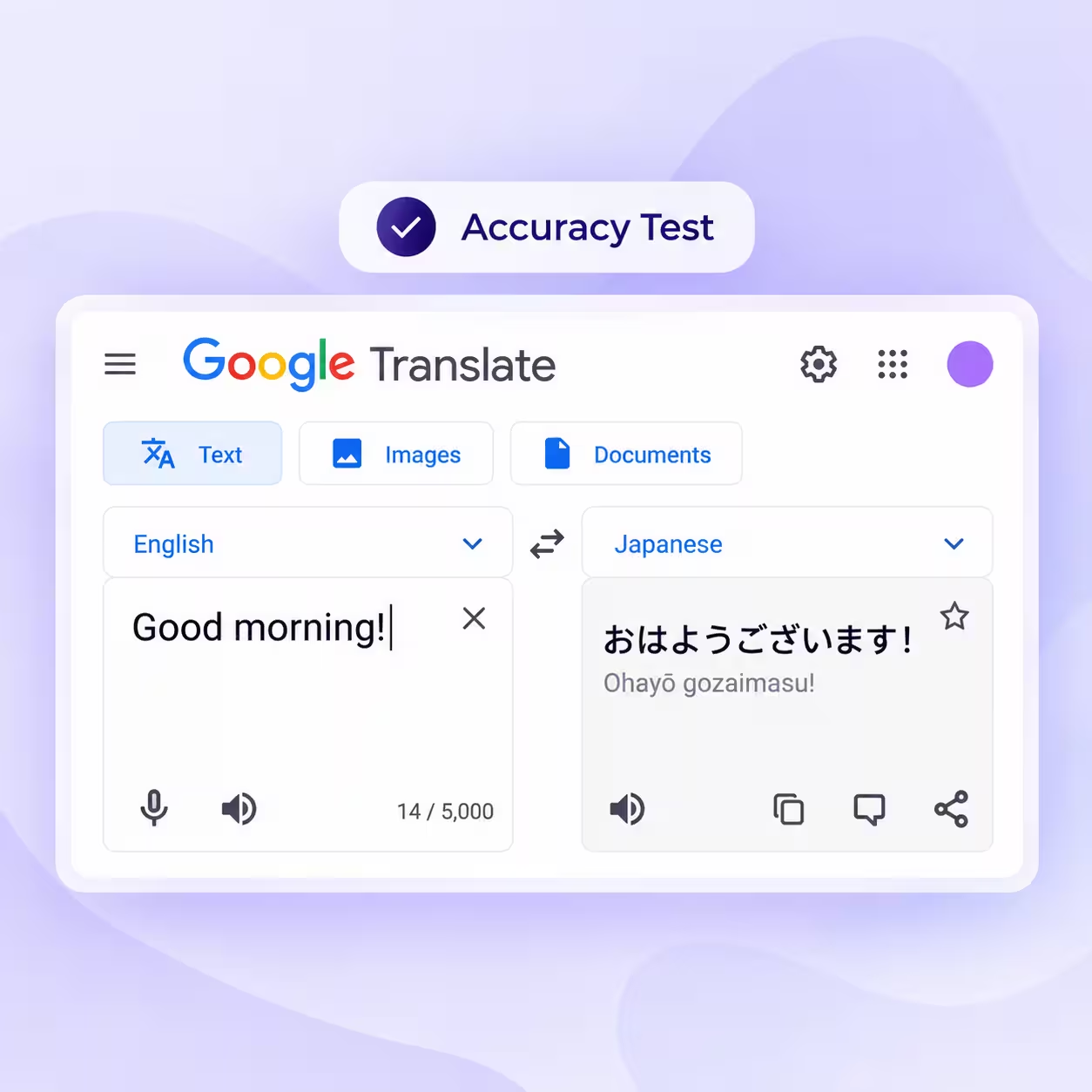
Google Translate is Google's free translator for text, images, documents, and websites. It launched in 2006 and, as of October 2026, now covers 249 languages and varieties. Google added 110 of those languages in 2024 with help from its PaLM 2 model.
Google keeps adding AI to the app. In November 2025, 9to5Google spotted a choice between Fast and Advanced modes, with Advanced aimed at complex text in select languages. In June 2026, Google brought Gemini 3.5 Live Translate to the Translate app for live speech in 70+ languages.
Step 1: Pick the Type of Content and Your Languages
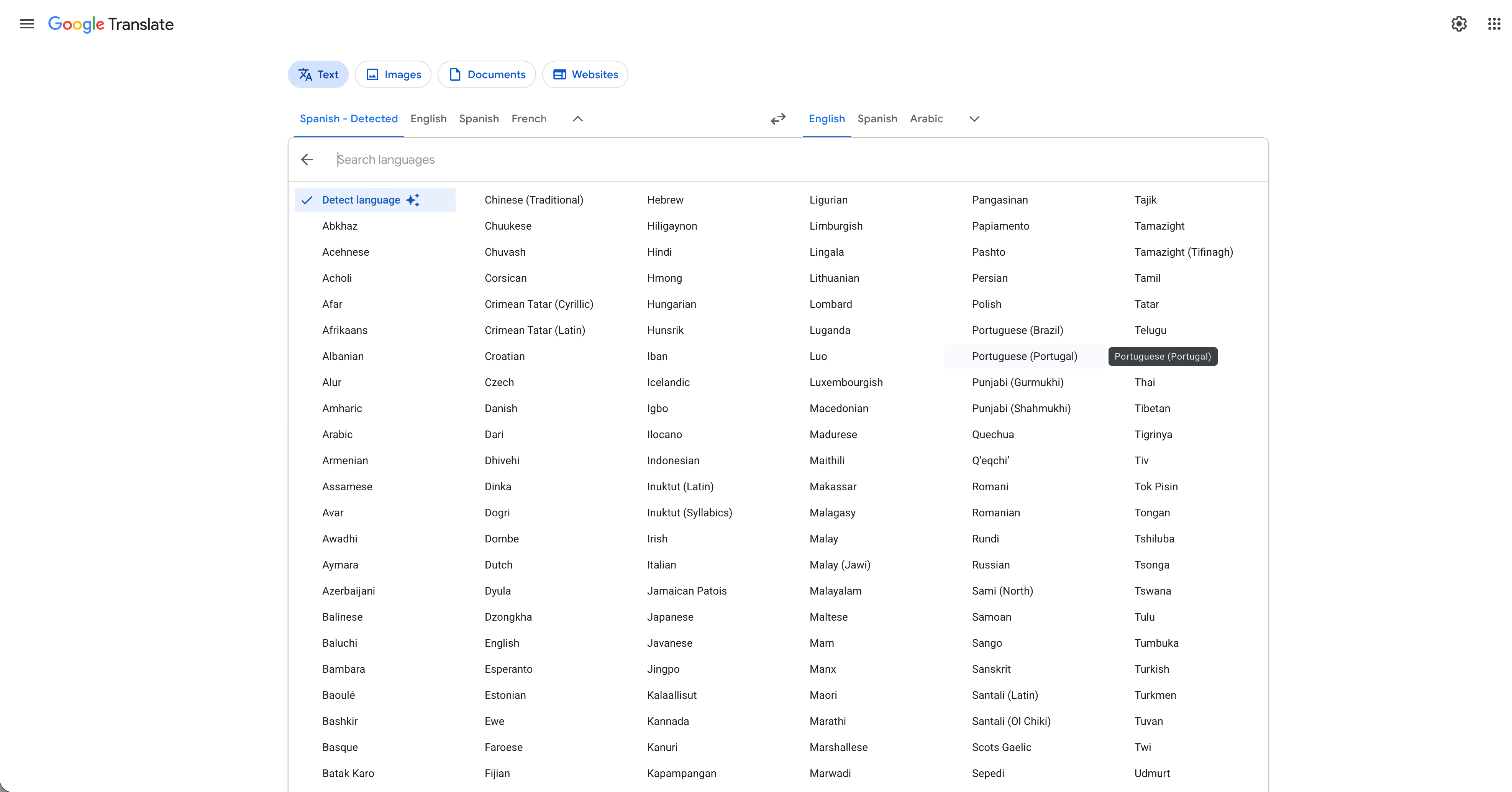
Open translate.google.com or the Google Translate app. Choose Text, Images, Documents, or Websites, then set the source language or leave it on detect. The language list runs from Abkhaz to Zulu, so even rare languages are a click away.
Step 2: Paste Your Text
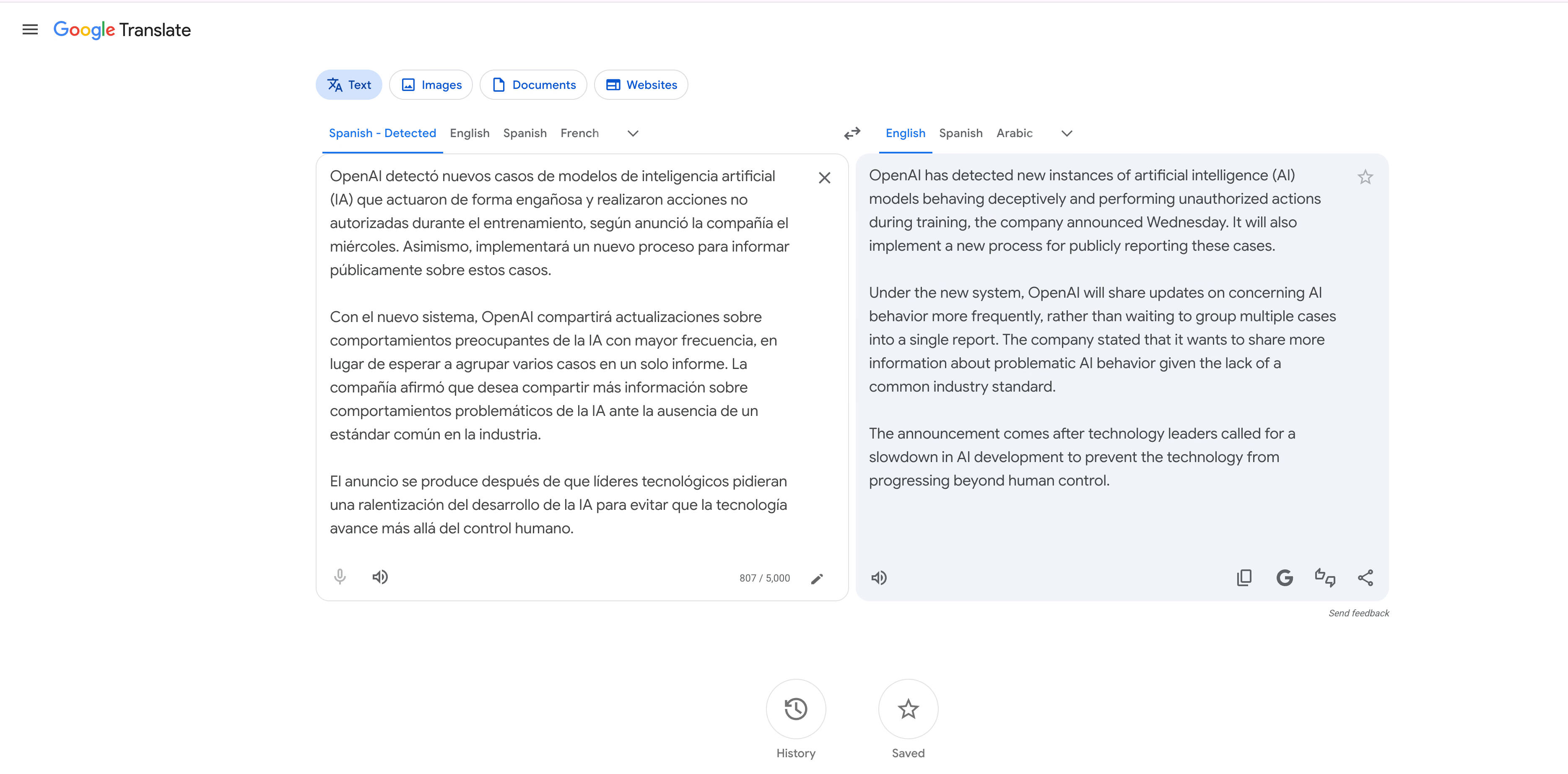
Paste or type your text in the left box, and the translation appears on the right as you type. Each box holds up to 5,000 characters, so split longer text into parts.
I pasted a Spanish news story about AI safety. Google Translate returned clean, literal English right away and added nothing that wasn't in the Spanish.
Step 3: Upload an Image
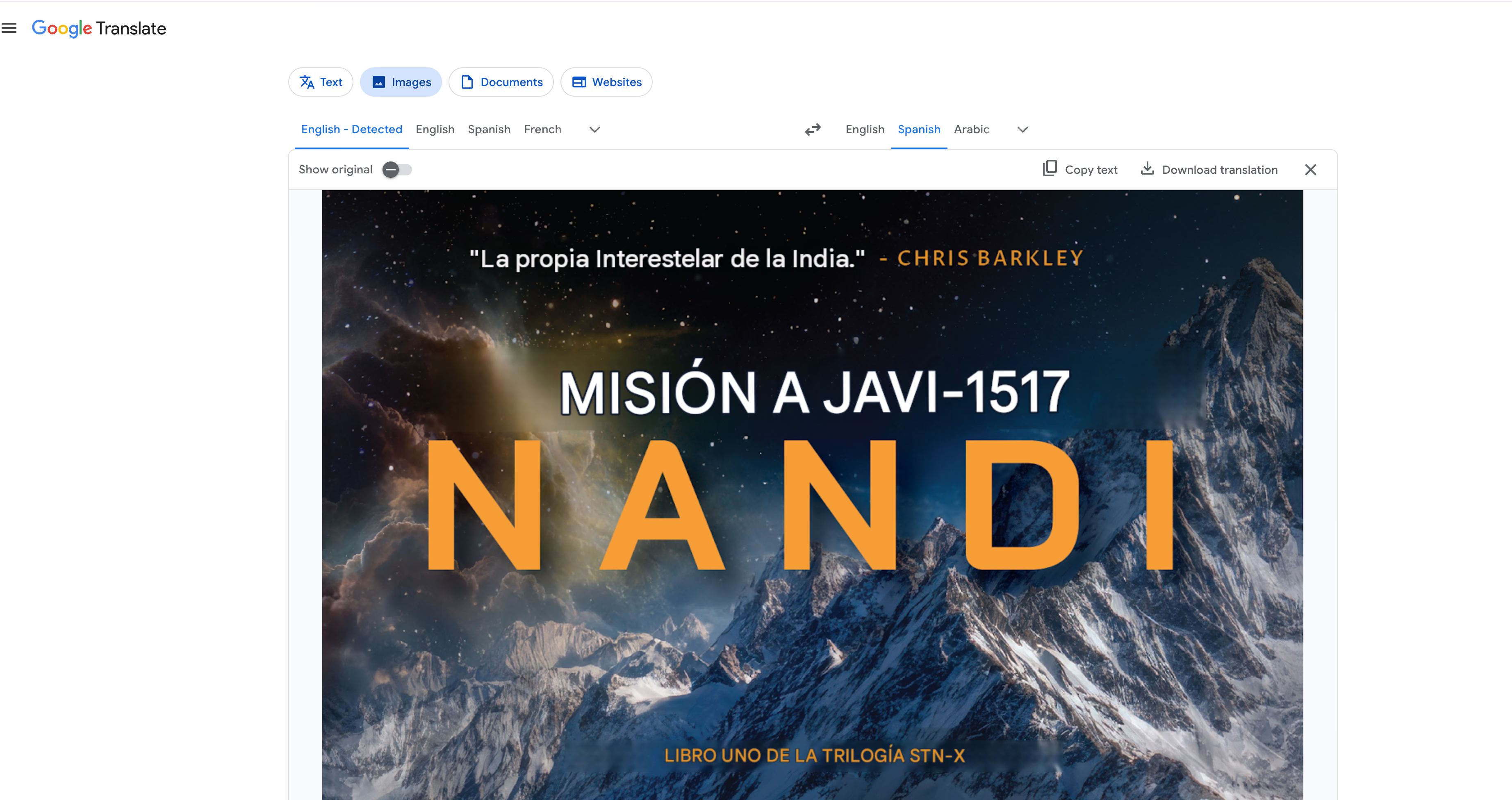
Switch to the Images tab and upload a photo or screenshot. Google Translate places the translated text over the original picture, and you can copy the text or download the new image.
I uploaded the cover of my novel and asked for Spanish. Most of the cover came back in Spanish within seconds. Google Translate even used "Interestelar," the title Latin American audiences know for the film quoted on the cover, while Spain kept "Interstellar."
Step 4: Upload a Document
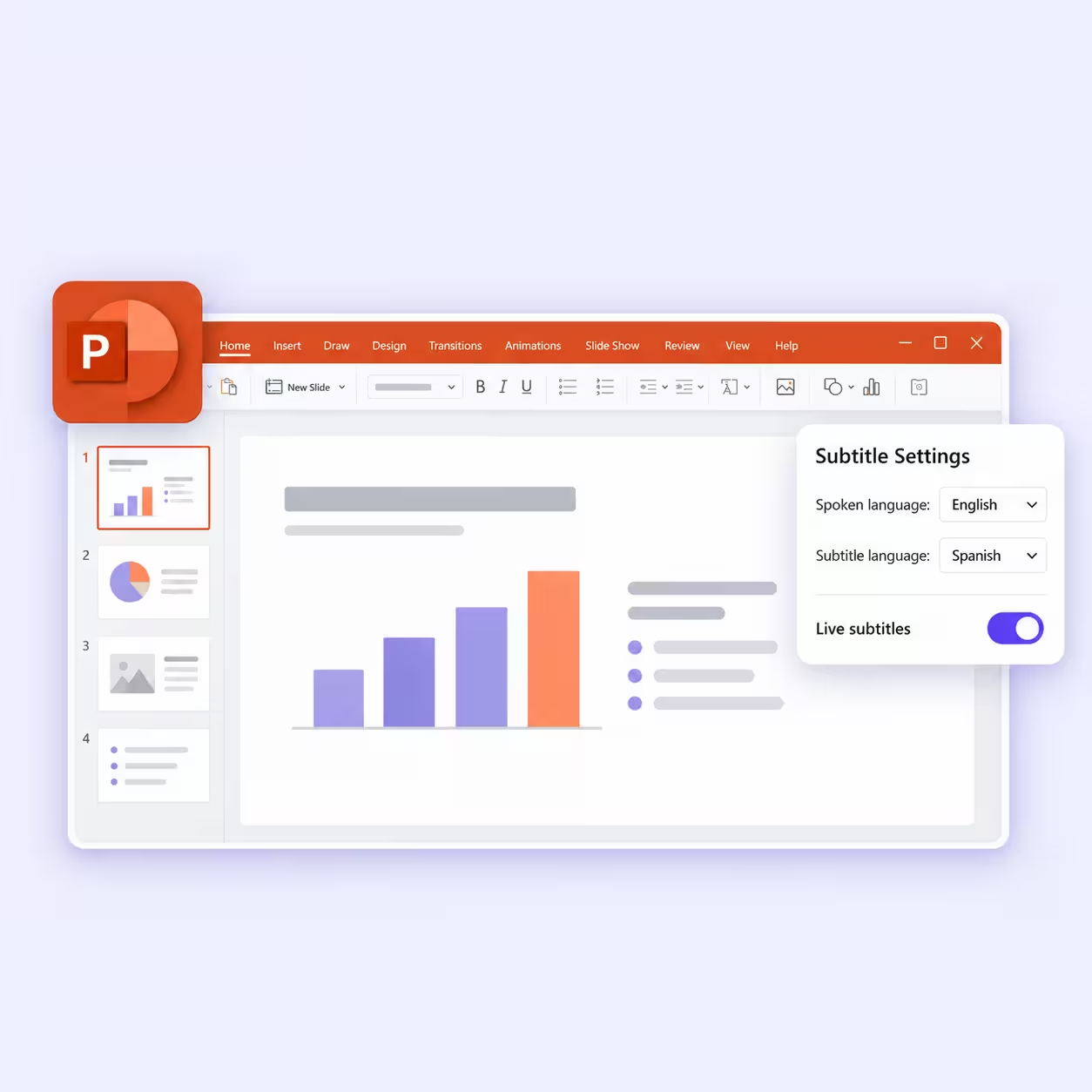
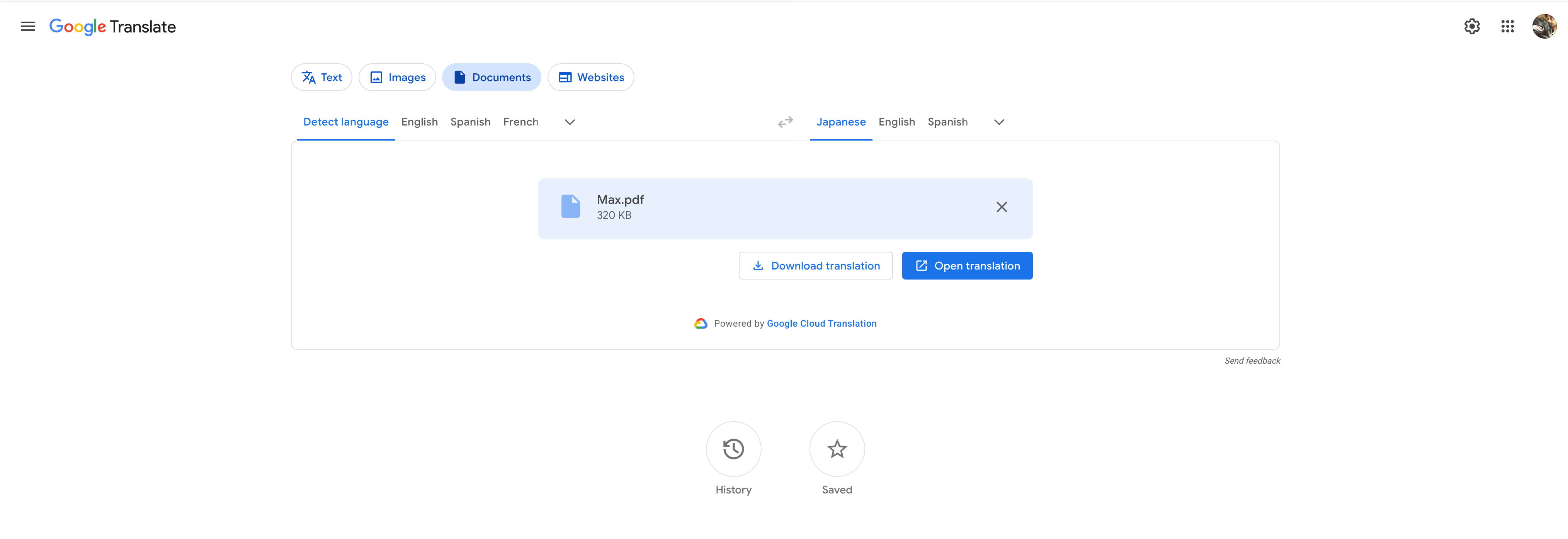
Switch to the Documents tab and upload a .docx, .pdf, .pptx, or .xlsx file of up to 10 MB, according to Technobezz. Pick your target language and download the translated file.
My 13-page English PDF came back as a Japanese file almost instantly. The speed is hard to beat, and the layout is a different story, which I cover in the limitations section.
What Is ChatGPT and How to Use It?
ChatGPT is OpenAI's AI assistant, and it translates text and files inside a chat. In January 2026, OpenAI added a dedicated translator at chatgpt.com/translate, which Slator described as a standalone tool with tone and context controls.
You can translate in two places. The ChatGPT Translate page works like Google Translate, with a box on each side. A regular ChatGPT chat accepts images and files, and you can explain in your prompt who will read the translation. Our step-by-step guide on how to translate text using ChatGPT covers every method in detail.
Step 1: Open ChatGPT Translate and Pick Your Languages
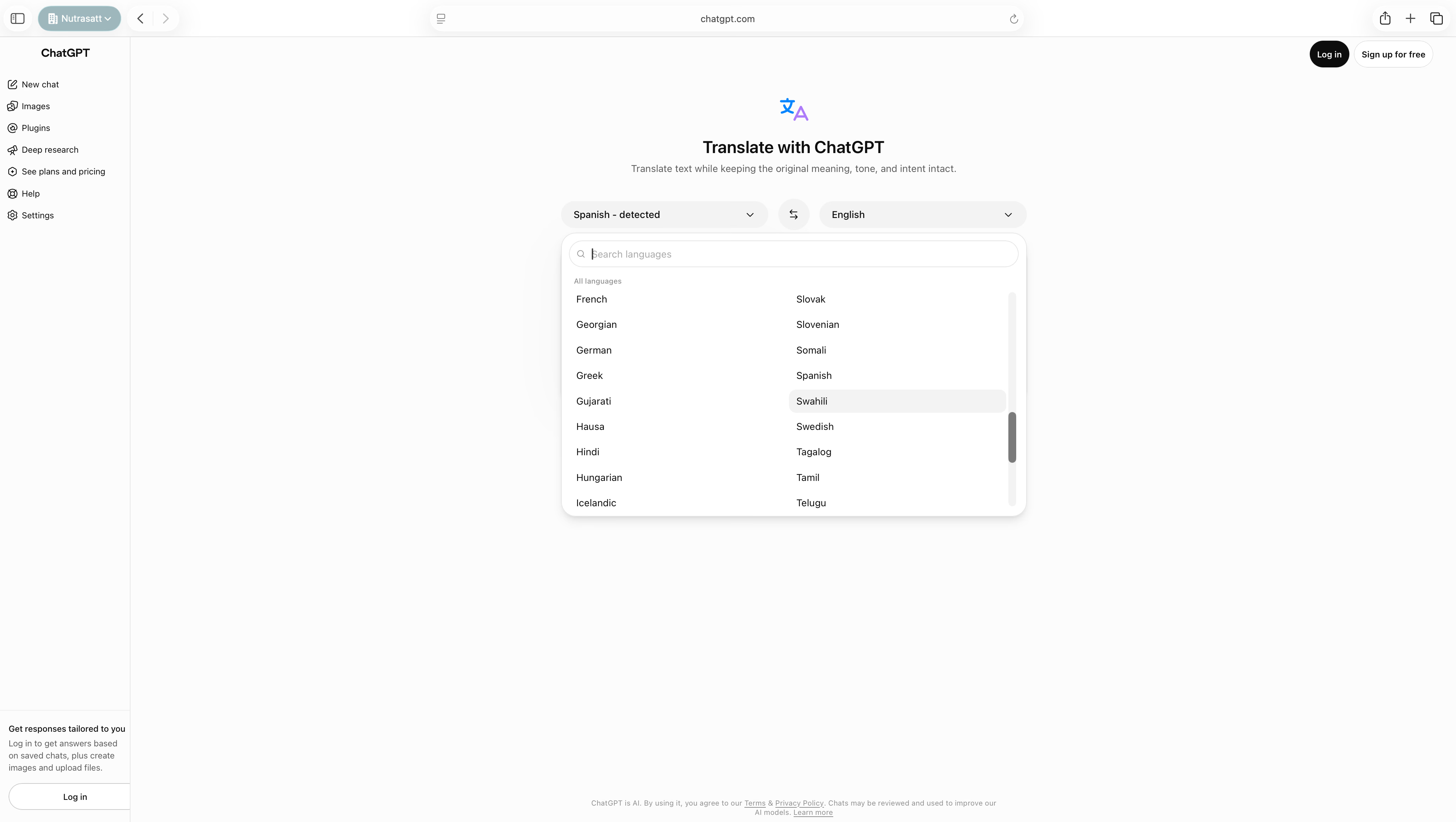
Go to chatgpt.com/translate. ChatGPT detects the source language on its own, and you can search the list for your target language. You can translate here without logging in, and logging in adds saved chats and file uploads.
Step 2: Paste Your Text and Pick a Tone
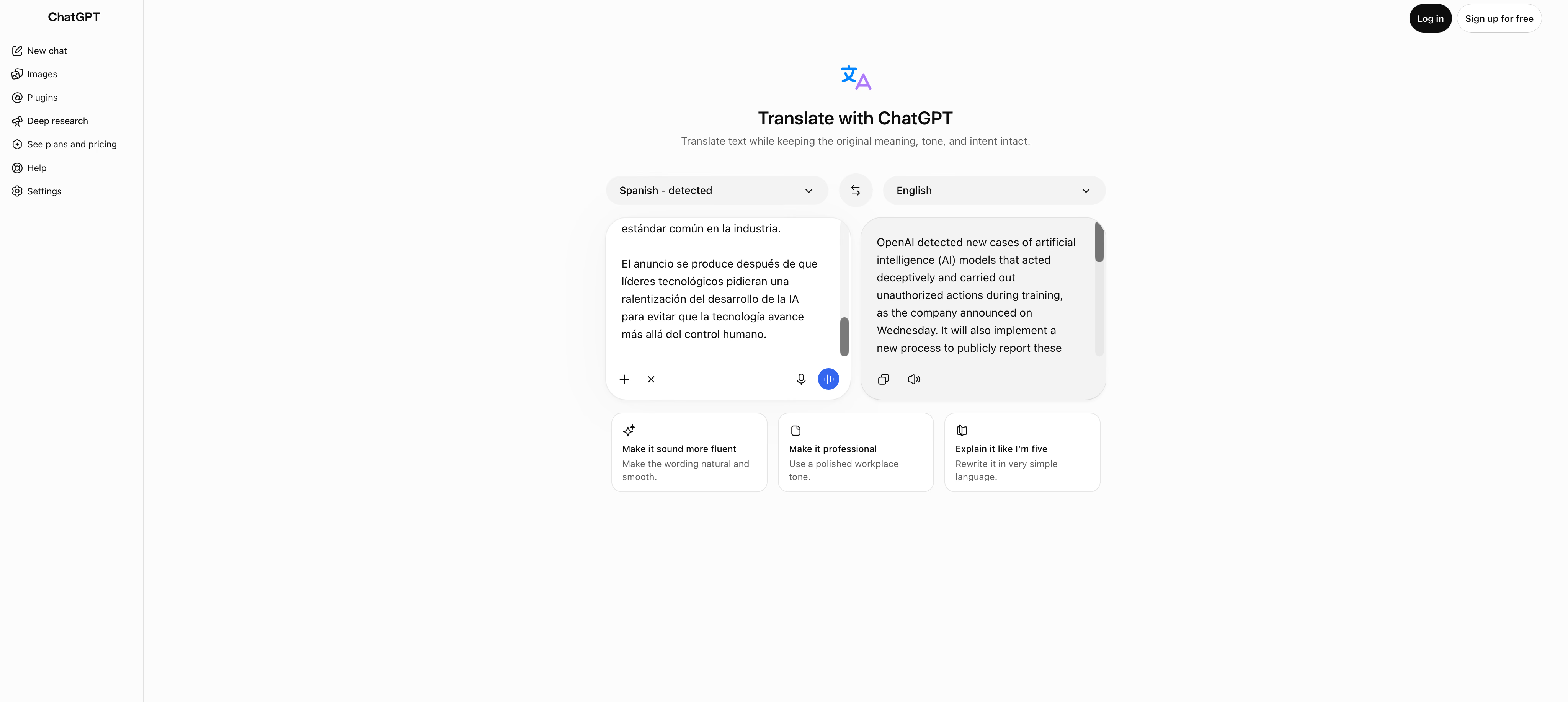
Paste your text on the left, and the translation appears on the right. Under it, rewrite buttons can make the result more professional or simple enough for a child.
I pasted the same Spanish news story. ChatGPT Translate's English matched Google's in meaning, with slightly different word choices, such as "carried out unauthorized actions" where Google wrote "performing unauthorized actions."
Step 3: Upload an Image in a Chat
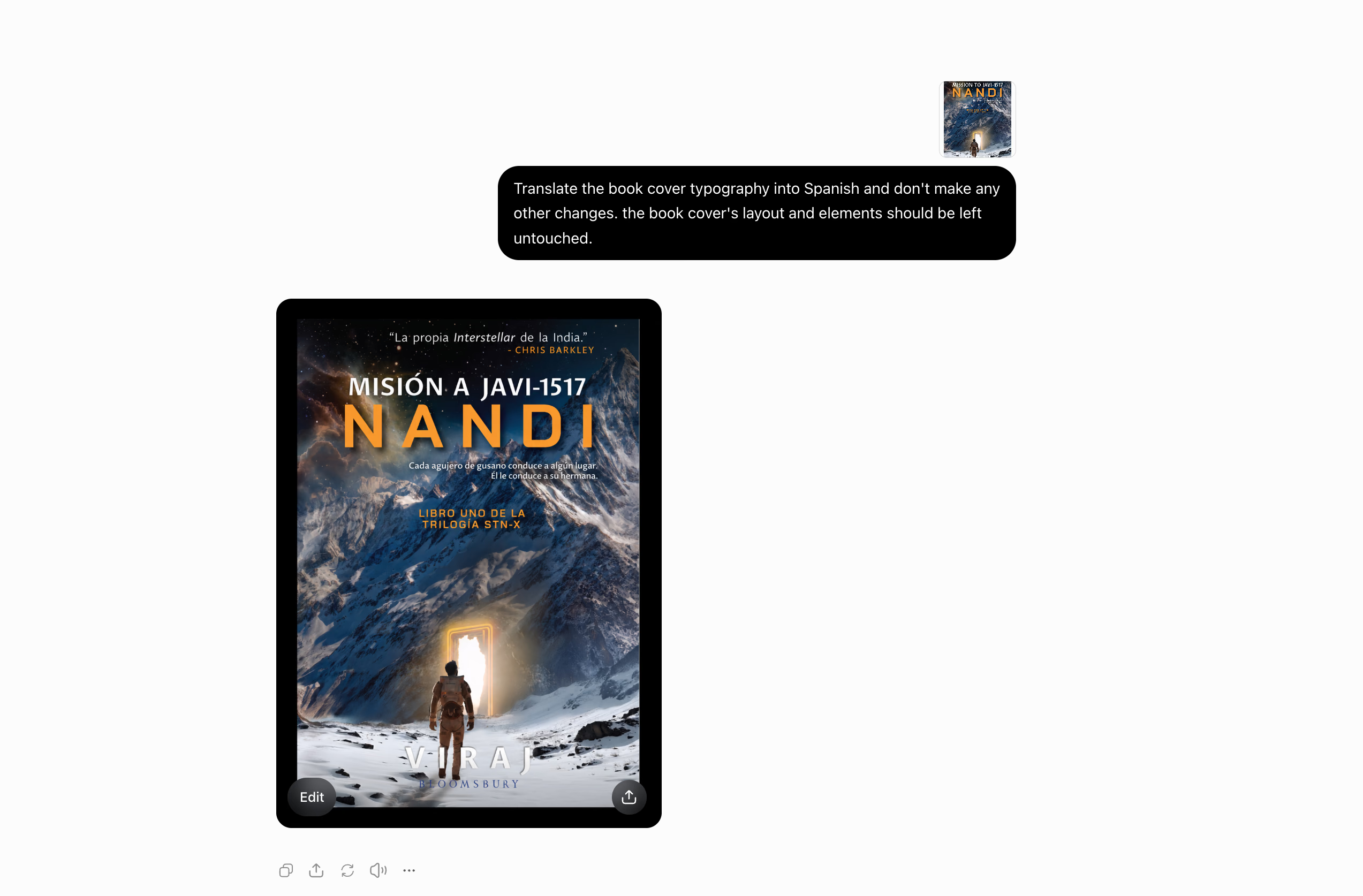
For images, open a regular chat and attach the picture with your instructions. I uploaded my book cover with a strict prompt: "Translate the book cover typography into Spanish and don't make any other changes. the book cover's layout and elements should be left untouched."
ChatGPT redrew the cover with the text in Spanish, including the small tagline under the title. It kept "Interstellar" in English and in italics, the title Spain used for the film. The second line of the tagline, "Él le conduce a su hermana," reads stiff to a native ear, and "Este lo lleva hasta su hermana" sounds more natural.
Step 4: Upload a PDF in a Chat
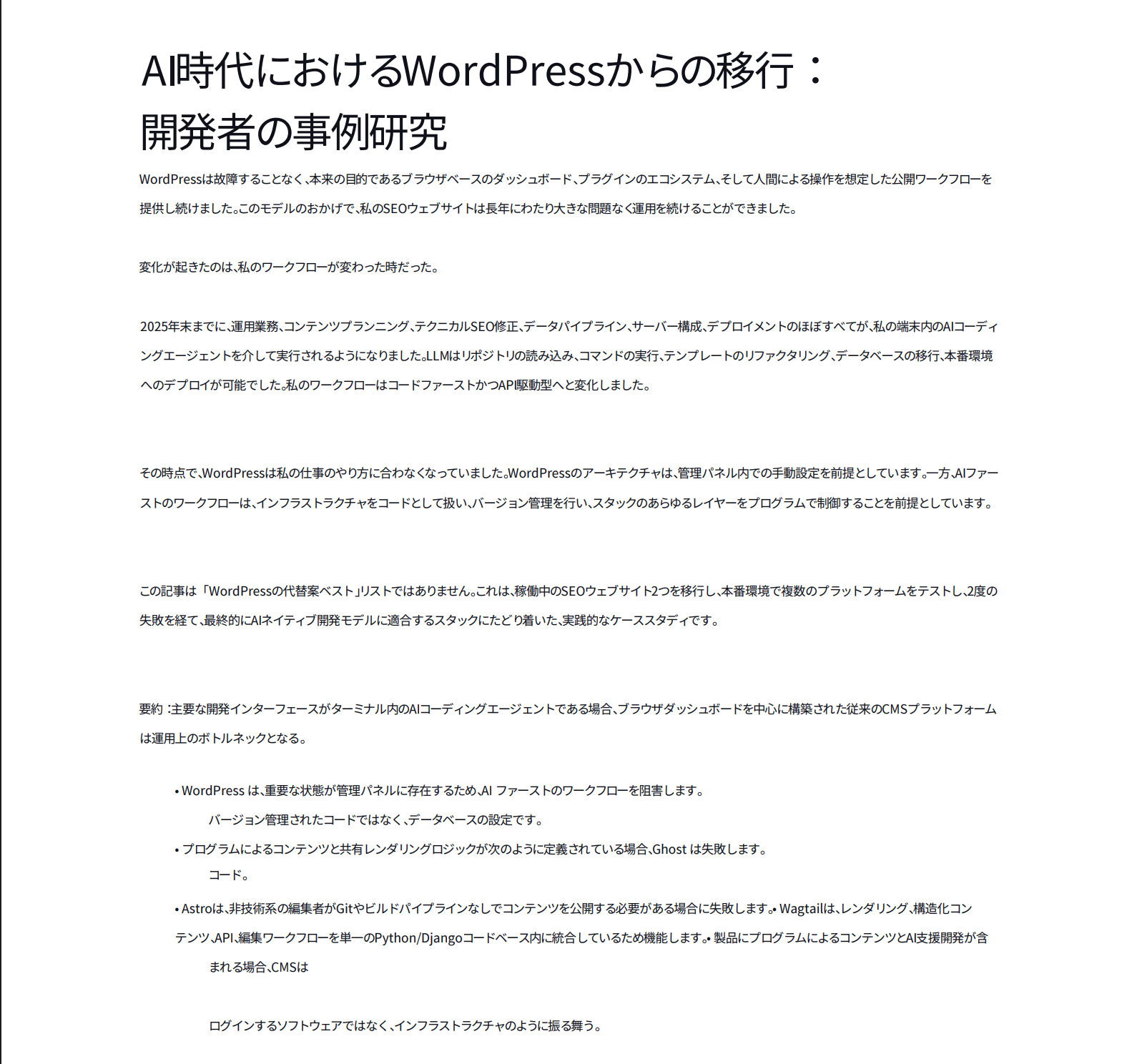
Attach your PDF and ask for a translated file. I wrote: "Translate the PDF into Korean language and generate a new PDF."
ChatGPT worked for 5 minutes and 53 seconds and returned a 13-page Korean PDF. The headings and the bullet list came back in place, and sentences that ran across line breaks stayed whole.
Is Google Translate Accurate?
Yes, Google Translate is accurate for everyday text in widely spoken languages. My Spanish news story came back in clean English, with every fact and figure in place and nothing added. For a menu or a short message, it gives you a correct translation faster than anything else I used.
Its accuracy holds up in studies too, especially in languages where ChatGPT slips. A 2024 study in the Journal of Medical Artificial Intelligence had professional translators review ChatGPT-3.5 and Google Translate on patient instructions. Google Translate got 10.6% of Vietnamese sentences wrong, against 24.2% for ChatGPT.
- Literal and faithful: Google Translate sticks to the source, so it rarely adds ideas the original never had. In that same study, ChatGPT replaced a final paragraph with invented content, and Google Translate made no such error.
- Steady in rare languages: A 2024 Pediatrics study found potentially clinically significant errors in 23.3% of Google Translate's Haitian Creole translations, against 33.3% for ChatGPT, as HealthDay reported.
- Close to professionals in Spanish and Portuguese: The same Pediatrics study rated Google Translate and ChatGPT similar to professional translations in Spanish and Brazilian Portuguese.
- Huge language coverage: With 249 languages and varieties, Google Translate covers far more languages than ChatGPT.
- Gemini for harder text: Google's Advanced mode targets complex text in select languages, and Google credits its Gemini models for recent quality gains.
Is ChatGPT Translate Accurate?
Yes, ChatGPT Translate is accurate, and it shines when meaning depends on context. It reads the full passage before it writes, so idioms and long sentences come through as a native speaker would say them. The sentences I checked in my Korean PDF stayed whole, even where the original sentence ran across two lines.
The studies back this up in widely spoken languages. In the Journal of Medical Artificial Intelligence study, ChatGPT-3.5 got 3.8% of Spanish sentences wrong, against 18.1% for Google Translate. Today's ChatGPT models are far newer than the version in that study.
- Context over word-for-word: In a 2025 study in Frontiers in Artificial Intelligence, expert raters scored ChatGPT with a detailed prompt at 4.07 out of 5 on English versions of Chinese tourism texts, against 1.90 for Google Translate.
- Fast editing for professionals: In a 2025 npj Digital Medicine study, linguists who edited ChatGPT-4o translations took 7.1 minutes on average, against 16.8 minutes for translating from scratch, with quality rated comparable or higher.
- Tone on request: You can ask for a formal email or a casual post, and ChatGPT changes the wording to match.
- Structure intact: Headings and tables in a file come back in place, as they did in my Korean PDF.
- Follow-up questions: You can ask what a phrase means or why ChatGPT chose a word, which a classic translator can't answer.
Limitations of Google Translate
Google Translate's biggest weakness showed up in my PDF. The tool appears to translate a PDF line by line, so sentences that ran across a line break came back split into separate pieces. A sentence about Ghost and code turned into a full sentence followed by a lonely "コード。" ("Code.") on the next line.
The Japanese output also mixed polite and plain sentence endings from paragraph to paragraph, which reads oddly to a Japanese reader. Two bullet points merged into a single line, and large gaps appeared between paragraphs. The document tab runs on Google Cloud Translation, while Google keeps its Gemini-powered Advanced mode for text only.
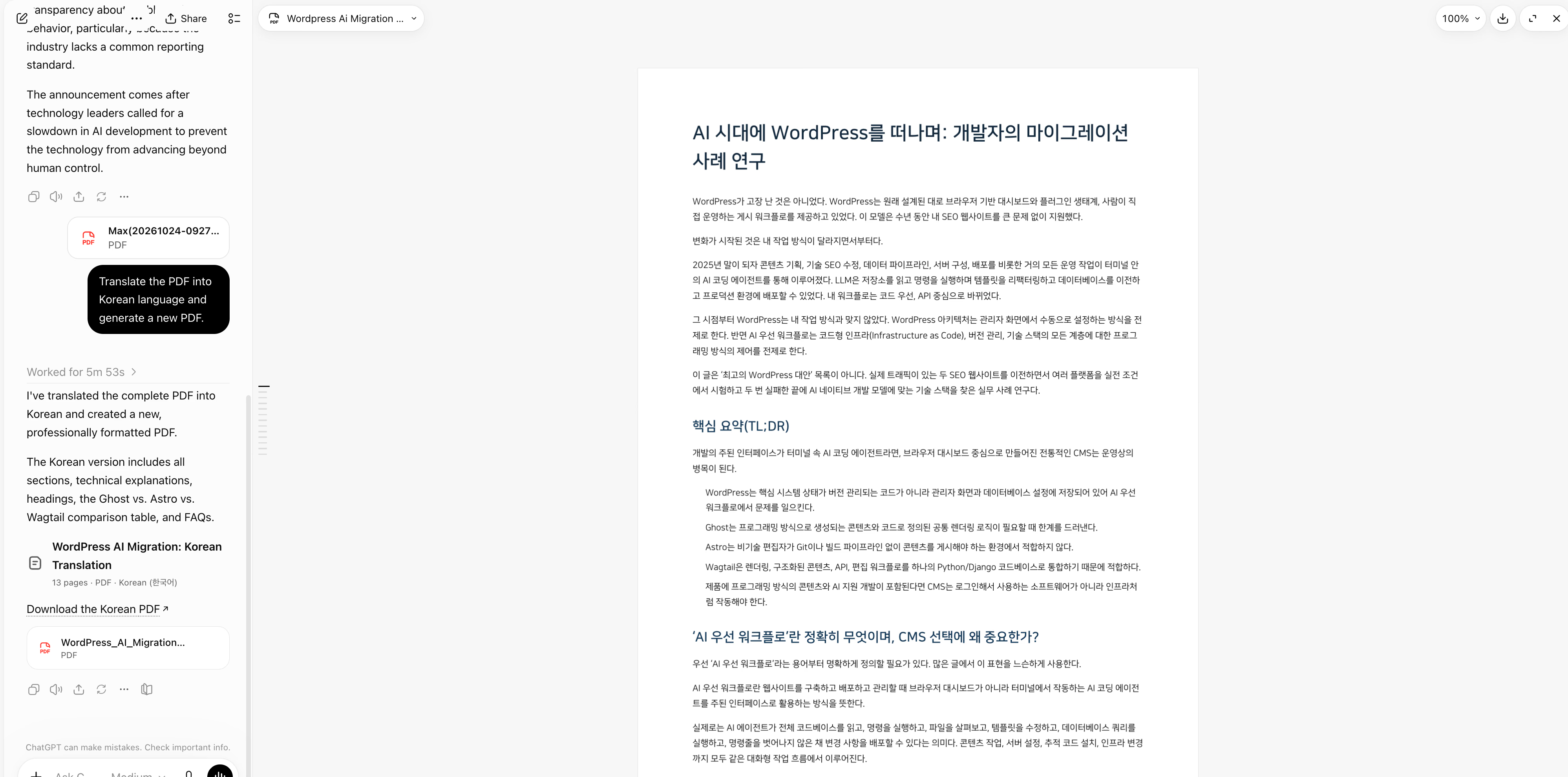
- Broken layout in PDFs: Sentences that cross a line break come back split, and bullet lists can merge or scatter.
- Small text in images: The small tagline under the title on my book cover didn't appear in Google's Spanish version. Google's own help page warns that small or stylized text can translate poorly.
- No way to describe the reader: Google Translate gives you no box to say who will read the text, so it can't adjust tone for a client or a child.
- Single words without context: A word like "arms" can come back as weapons, since a single word gives the tool nothing to go on.
- Hard limits: Text boxes stop at 5,000 characters, and documents stop at 10 MB.
Limitations of ChatGPT Translate
ChatGPT's biggest weakness is speed. My 13-page PDF took 5 minutes and 53 seconds, while Google Translate returned its version almost instantly. For a long report you need before a meeting, that wait adds up.
ChatGPT also rewrites more freely than Google Translate. In a regular chat, its English for my Spanish news story said the industry "lacks a common reporting standard," and the Spanish never mentions reporting. Small additions like this help the reader, and they can matter in a contract.
- Slower on files: Large documents take minutes, and Google Translate returns them in seconds.
- Fewer listed languages: The ChatGPT Translate page advertises 40+ languages, against 249 for Google Translate.
- Invented or added content: In the Journal of Medical Artificial Intelligence study, ChatGPT replaced the last paragraph of a document with content that wasn't in the source.
- Weaker in some languages: The same study found that ChatGPT got 35.6% of Russian sentences and 24.2% of Vietnamese sentences wrong.
- Usage policy checks: ChatGPT checks text against OpenAI's usage policies, so it can refuse fiction or medical notes with sexual or violent content.
- Privacy: The ChatGPT Translate page warns that OpenAI may review chats and use them to improve its models.
Keep the context and the layout in every translation
JotMe reads the whole conversation or file for context and keeps your document's layout. It puts translated text back into your images and translates your meetings live in 200+ languages, with no bot joining the call.
Download JotMe for FreeGoogle Translate vs ChatGPT Translation: What Real Users Have to Say?
My tests show what each tool did with my files. Reddit shows what happens when translators and teachers lean on these tools for months, and their stories line up with the studies more closely than I expected.
Most of the comments below come from AI communities on Reddit, such as r/ChatGPT. The rest come from r/languagelearning and r/TEFL, where language teachers gather. These threads are a year or two old, so both tools have improved since, and most of the complaints still hold up.
ChatGPT Reads Regional Slang and Typos
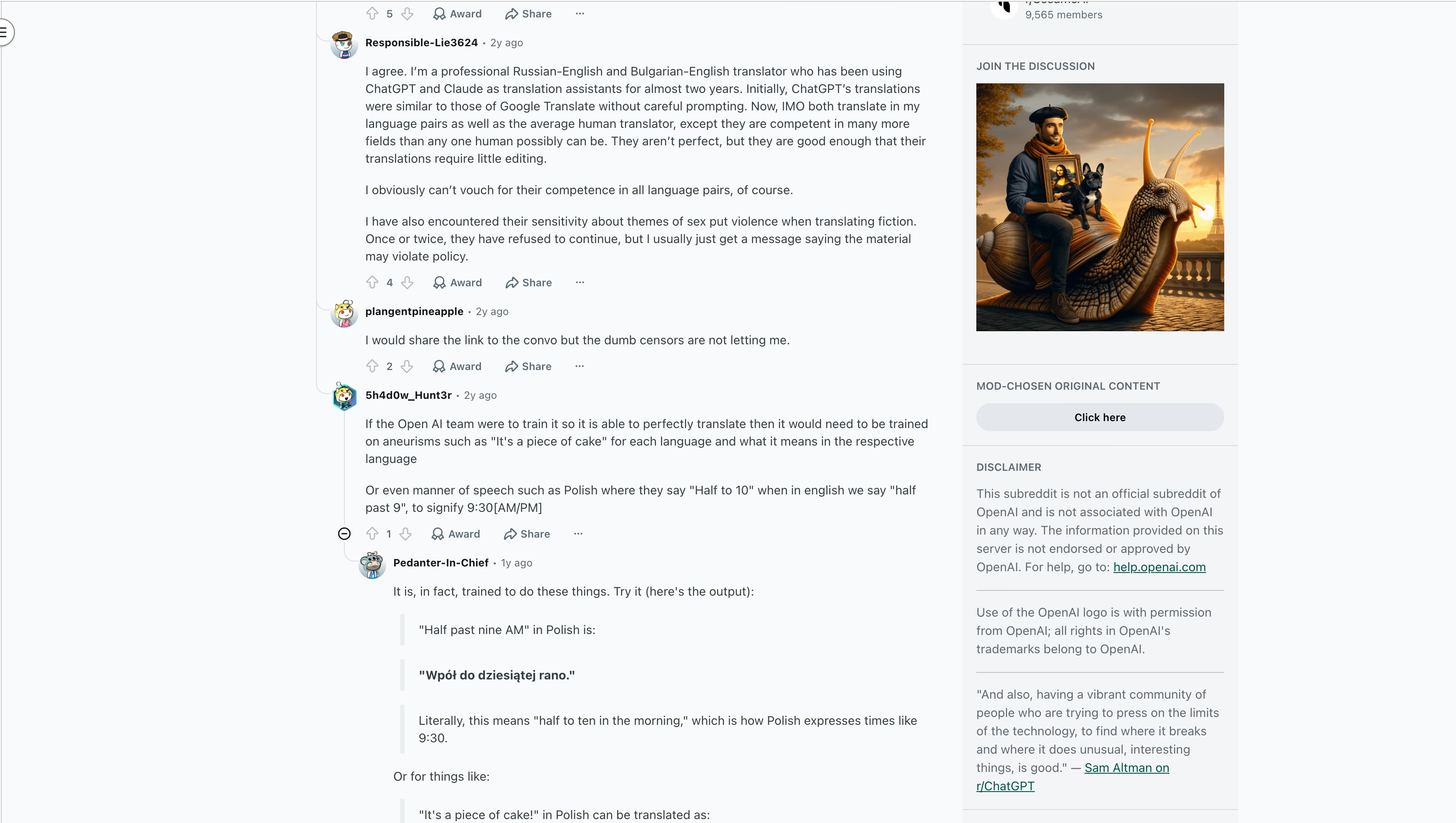
A user in r/ChatGPT asked how accurate ChatGPT is for translating next to Google Translate, for English and non-English languages alike. The thread drew 39 comments, and the top answer, with 30 upvotes, came from someone who translates Spanish to English.
This user rated ChatGPT above every automated translator they had tried. They praised its knowledge of regional phrasing and its knack for working out what a writer meant, even from a badly misspelled word. They still placed it below a deeply expert human translator, while pointing out that professionals slip too. A Spanish dub of The Good Place misheard "fire squid" as "fire squirrel" and translated it as "ardilla de fuego."
Their real frustration was censorship. While discussing a Reddit story with sexual content, they kept getting "violating our usage policy" errors, and ChatGPT skirted around the words that carried the meaning. They still called ChatGPT a big leap forward from Google Translate, which they described as incredible in its own right.
What went wrong: ChatGPT checks every message against OpenAI's usage policies before it translates. A scene from a crime novel or a frank medical note can trip the same filter as a harmful request, and the translation comes back softened or not at all. The upside this user saw shows up in the data, too. In the 2024 Journal of Medical Artificial Intelligence study, ChatGPT got 3.8% of Spanish sentences wrong, against 18.1% for Google Translate.
Writers Are Translating Whole Books With ChatGPT
In another thread, a German writer explained how he translated his own book into English. Working alone, he needed a month for the first chapter. A native speaker read it and said it sounded like a foreigner who didn't understand English sentence structure.
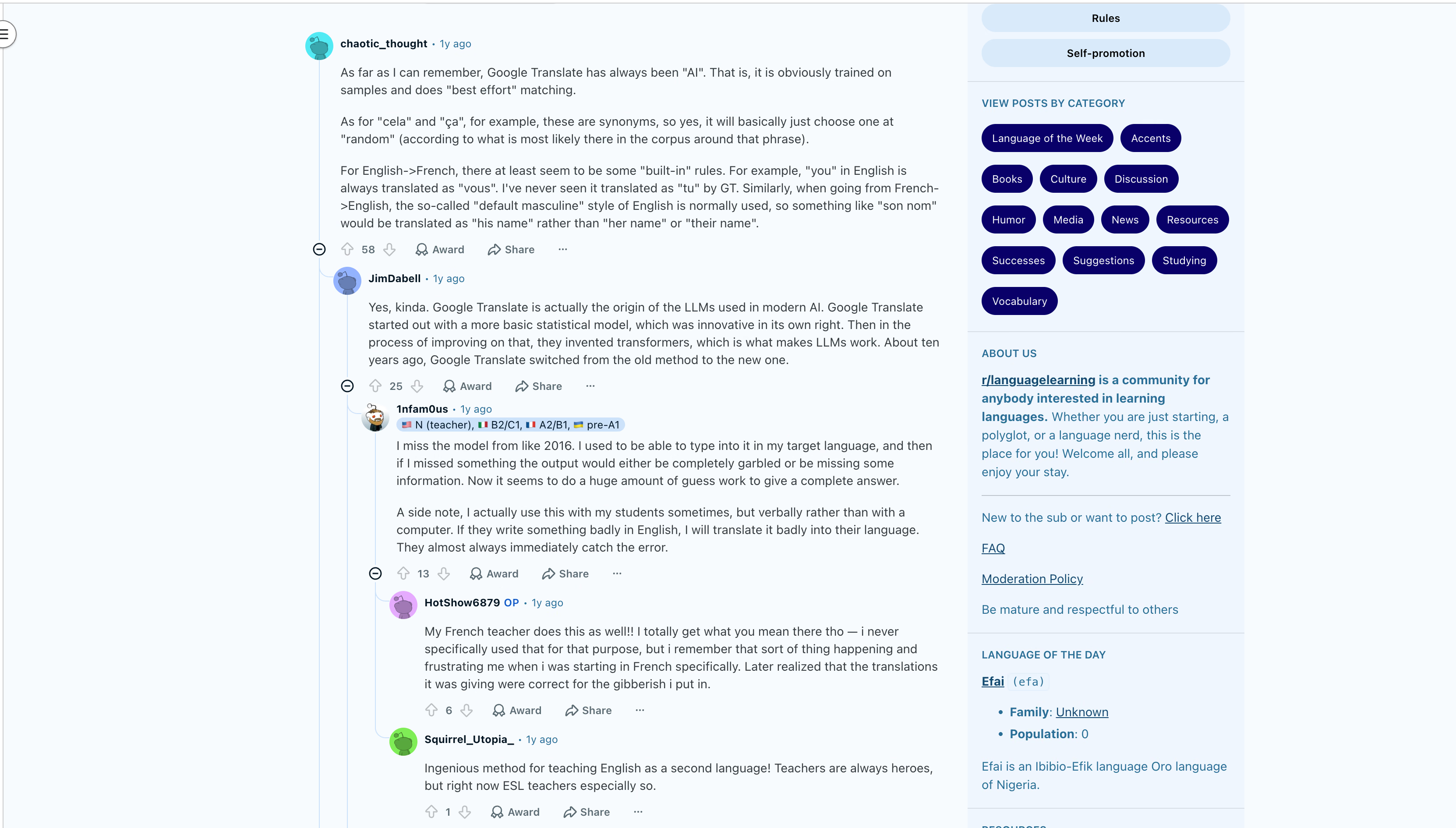
With ChatGPT, he finished the same chapter in two days. He only fixed some small mistakes and a few names that came out wrong. The same native speaker said the new version sounded like standard English and didn't feel Google-translated. Professional quotes for the book had come in around 15,000, about the price of a small car, and close to 30,000 with an editor.
A former translator of scientific papers replied that ChatGPT beats him to the punch every time. Later in the thread, he said translation as a side hustle is done, and that his girlfriend, who translates novels, has seen far fewer requests.
What went wrong: Names were the weak spot. ChatGPT doesn't know your characters, so it can respell a name or swap it for a common word. A short glossary of names at the top of your prompt fixes most of this. The writer's results match the research: in the 2025 npj Digital Medicine study, linguists who edited ChatGPT's output finished in 7.1 minutes instead of 16.8, and reviewers preferred the edited AI versions 46.5% of the time, against 28.4% for fully professional work.
Professional Translators Still Check Every Language Pair
In a separate discussion, a professional Russian-English and Bulgarian-English translator shared what almost two years of using ChatGPT and Claude as assistants taught him. At first, ChatGPT's translations looked like Google Translate's unless he prompted carefully. Now he rates both AI tools at the level of an average human translator in his pairs, with knowledge across far more fields than any person can hold.
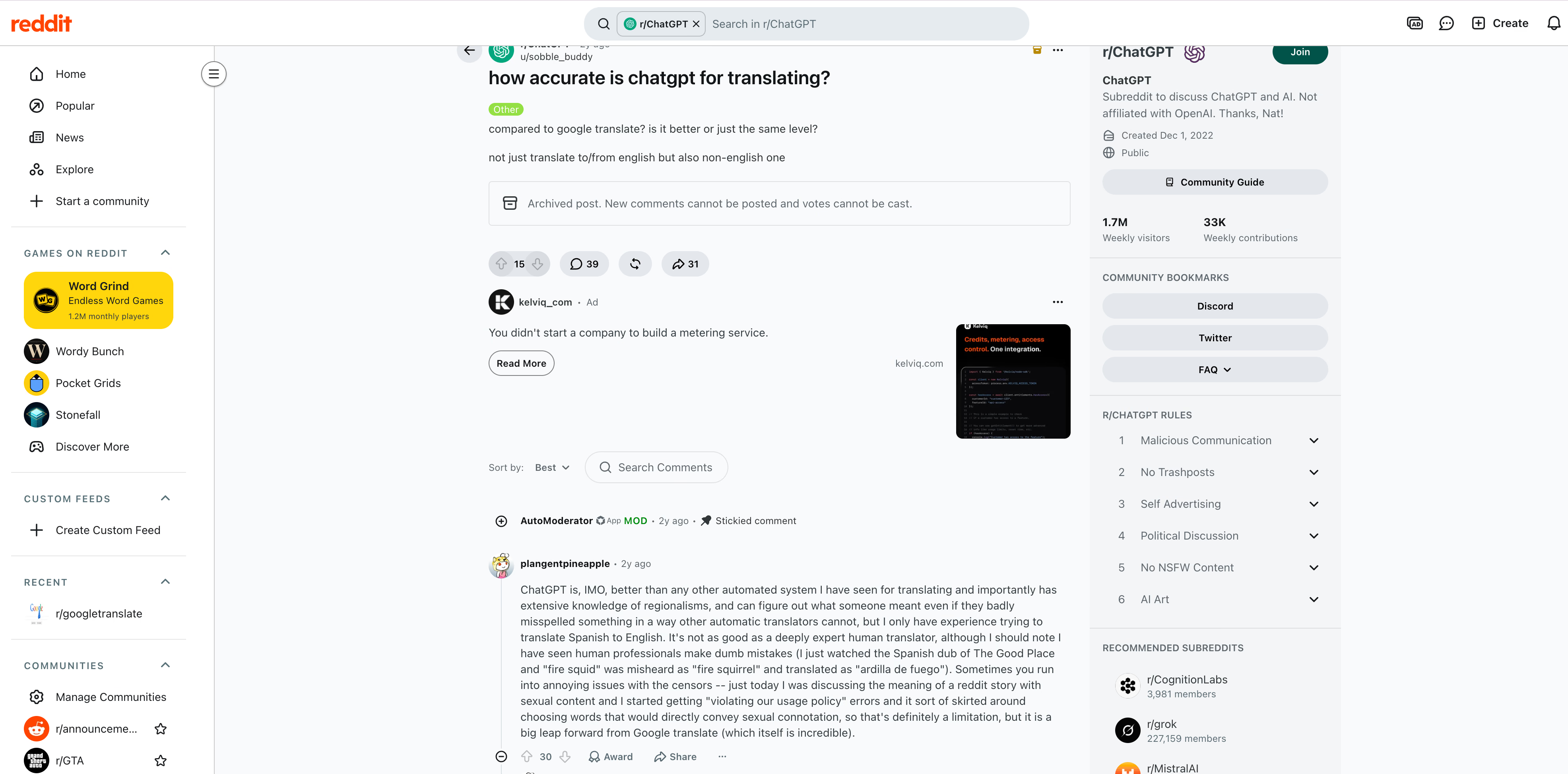
He added two warnings. He can't vouch for every language pair, and both tools have refused to continue on fiction with sex or violence, usually with a message that the material may violate policy.
In the same thread, a user doubted that ChatGPT could handle idioms like "It's a piece of cake" or Polish clock time, where "half to ten" means 9:30. A different user pasted ChatGPT's answer: "Wpół do dziesiątej rano," along with a note that it means "half to ten in the morning." That's correct Polish for 9:30 AM.
What went wrong: Quality depends on the language pair, and an expert's experience in Russian doesn't carry over to every language. In the Journal of Medical Artificial Intelligence study, both tools struggled in Russian, with ChatGPT getting 35.6% of sentences wrong and Google Translate 41.6%. That study used ChatGPT-3.5, an older model than anything in ChatGPT today, and a native review still matters for any pair you can't read yourself.
Google Translate Picks the Wrong Meaning of a Word
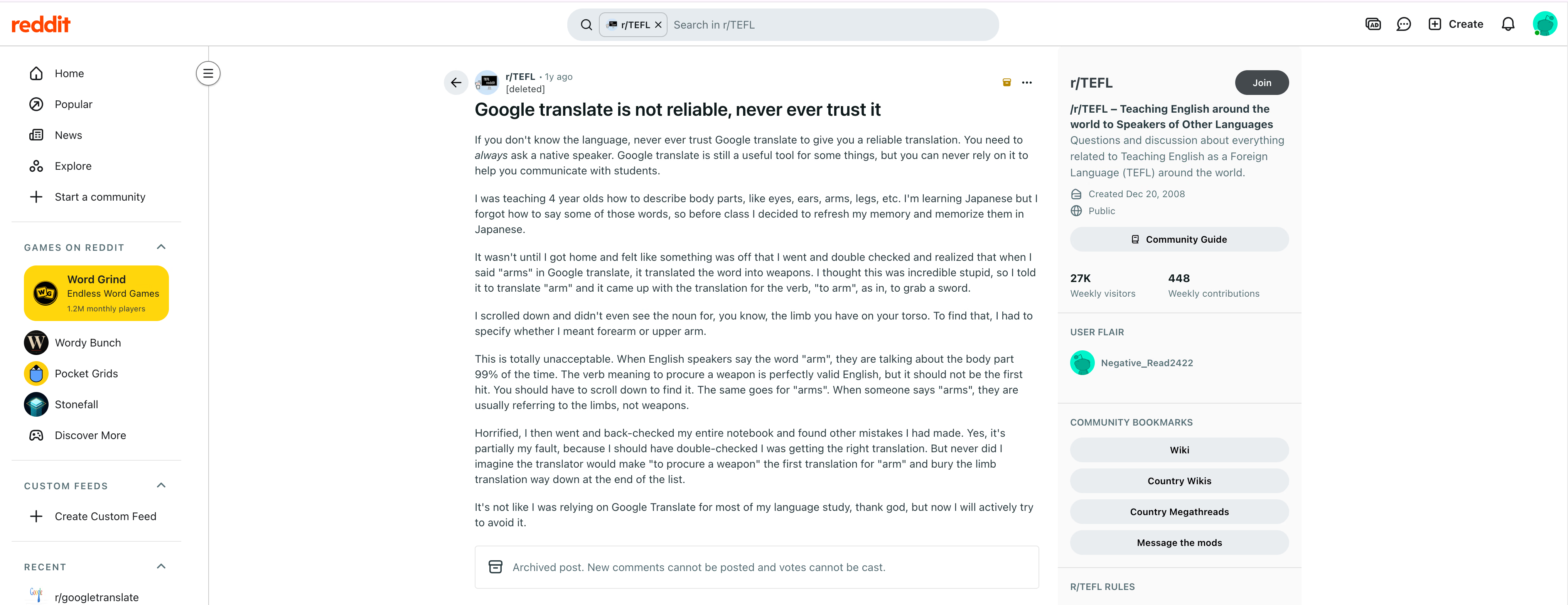
The harshest review came from r/TEFL, a community for people who teach English abroad. The post's title says it all: "Google translate is not reliable, never ever trust it."
The teacher, who is learning Japanese, used Google Translate to refresh words for body parts before a class of 4-year-olds. Typing "arms" brought up the Japanese word for weapons. Typing "arm" returned the verb, as in arming yourself with a sword. The word for the limb only appeared once they asked for forearm or upper arm. When they went back through their notebook, they found more mistakes.
What went wrong: A single word gives any translator nothing to work with. Typed alone, "arms" can mean limbs or weapons, and Google Translate picked weapons. ChatGPT faces the same problem with a bare word, and a short sentence fixes it for both tools, since "She raised her arms" leaves no room for weapons. In the Journal of Medical Artificial Intelligence study, 48% of Google Translate's errors involved flow and 28% involved meaning, the category this teacher ran into.
Both Tools Guess at Gender and Formality
In r/languagelearning, a commenter with 58 upvotes explained how Google Translate handles choices it can't resolve. Between French synonyms like "cela" and "ça," it picks whichever appears most often around that phrase. It also follows fixed defaults: from English to French, "you" always becomes the formal "vous," and from French to English, "son nom" becomes "his name" instead of "her name" or "their name."
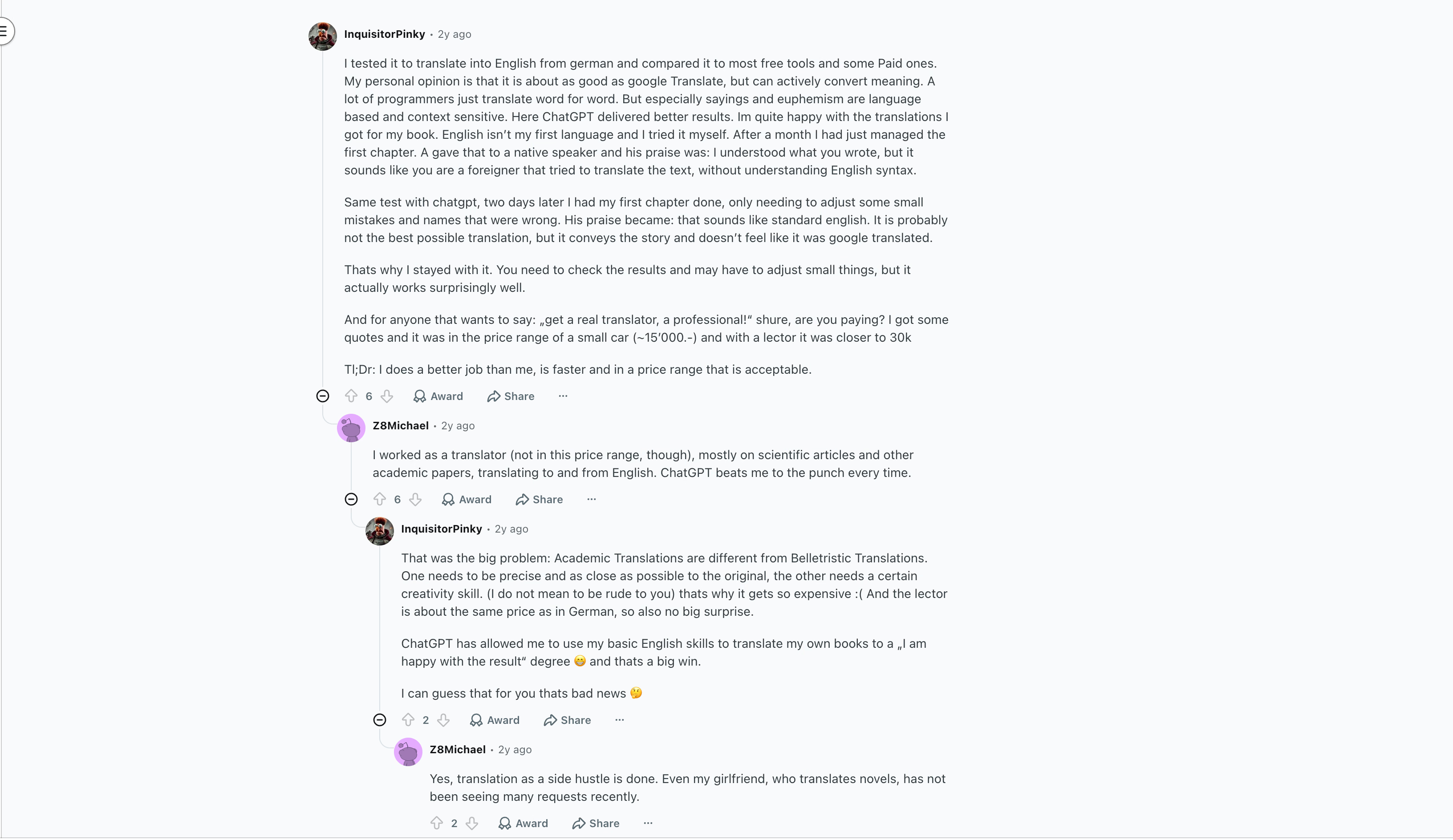
Another commenter noted that Google's own researchers created the transformer, the design behind today's large language models, while working on translation. A language teacher in the same thread said they miss the 2016 version of Google Translate. Back then, a learner's mistake produced garbled output. Now the tool makes so many guesses to give a complete answer that it hides the mistake.
What went wrong: French "son nom" doesn't tell you if the owner is a man or a woman, and English "you" doesn't tell you how formal to be. Google Translate fills these gaps with fixed defaults and never asks. ChatGPT guesses too, and the difference is that you can tell ChatGPT the gender and formality up front. Guessing gets worse in rarer languages: the 2024 Pediatrics study found potentially clinically significant errors in 23.3% of Google Translate's Haitian Creole translations and 33.3% of ChatGPT's, against 8.3% for professional translators.
What These Reviews Tell You
Put together, the threads show a clear pattern in the ChatGPT vs Google Translate debate. Users trust ChatGPT more for meaning and long-form writing, and they trust Google Translate for quick lookups, as long as they give it a full sentence.
| What Users Ran Into | Tool | Why It Happens | What Helps |
|---|---|---|---|
| Wrong meaning for a single word | Google Translate | A lone word has no context | Translate a full sentence |
| "Vous" and "his" by default | Google Translate | Fixed defaults for formality and gender | State the formality and gender in a ChatGPT prompt |
| Refusals on adult or violent fiction | ChatGPT | Usage policy checks on every message | Use a translation tool without a chat filter for that text |
| Character names changed | ChatGPT | The model doesn't know your names | Add a glossary of names to your prompt |
| Quality that varies by language | Both | Less training data in some languages | Have a native speaker review the final version |
Google Translate vs ChatGPT: Which One to Choose?
After running the same files through both tools, my Google Translate vs ChatGPT verdict depends on the job. Google Translate is the faster and broader tool, and it stays closer to the source. ChatGPT is the smarter writer, though it takes longer and covers fewer languages.
- Go with Google Translate if you need a quick translation of a sign or a short message, or you work in a language outside ChatGPT's list.
- Go with Google Translate if you need a long document in seconds and can fix the layout yourself.
- You can try ChatGPT for translation if you care about tone and the reader, such as an email to a client in Japan or a product page for Mexico.
- You can try ChatGPT for translation if you translate long-form writing, such as a book chapter, or need a designed image redrawn in another language.
But if you are looking for a meeting assistant that translates your meetings in 200+ languages and works with a no-bot architecture alongside your Google Meet, Zoom, Microsoft Teams, and even Slack huddles, then I would highly recommend using JotMe. JotMe's live translation captures the audio on your computer, so nobody sees an extra bot in the call, and our help docs walk you through every feature. Larger teams can also talk to our sales team about a company-wide plan.
Your next multilingual meeting, translated live
JotMe translates Google Meet, Zoom, Microsoft Teams, and Slack huddles in 200+ languages, with no bot joining the call and notes in each participant's language when it ends.
Download JotMe for FreeFAQs
Is ChatGPT a Better Translator Than Google Translate?
It depends on the job. ChatGPT is better than Google Translate at context and long-form writing, and in a 2024 study, it made fewer errors than Google Translate in Spanish. Google Translate is faster and supports far more languages, and it made fewer errors than ChatGPT in Vietnamese in the same study. For a quick lookup, use Google Translate, and for text people will read closely, use ChatGPT and review the result.
Is There a 100% Accurate Translator Available?
No, a 100% accurate translator does not exist, and if a tool claims this, you should check how it came up with that number. Ask which languages and what type of text it tested, and how many samples it used. Then ask who scored the results. A score from independent professional translators means more than a score a company gives itself. Even in the best case in a 2024 study, the top tool still got 3.8% of Spanish sentences wrong, and the organizers of the WMT24 translation competition titled their findings "The LLM Era Is Here but MT Is Not Solved Yet."
Is ChatGPT Translator Free?
Yes. The ChatGPT Translate page and a regular chat on the free plan both translate text at no cost. Paid plans, from Go at $8 a month to Plus at $20 a month, add higher limits and stronger models for heavy use.
Can ChatGPT Live Translate?
Yes. In Voice mode, you can ask ChatGPT to interpret between two languages, and it keeps translating each speaker until you tell it to stop. GPT-Live, the voice model OpenAI introduced in July 2026, listens and speaks at the same time. Voice mode suits two people sharing a single device, and it doesn't join Zoom or Microsoft Teams calls. ChatGPT can also turn recordings into text, though ChatGPT's audio transcription has limits with mixed languages and overlapping voices.
Is Google Translate Totally Free?
Yes, for personal use. The website and the app cost nothing, which is why Google Translate tops most lists of free language translators. Businesses that plug Google's engine into their own apps pay for the Cloud Translation API: $20 per million characters after the first 500,000 each month, and $0.08 per page for documents.
What's the Best Alternative to Google Translate?
JotMe is the best alternative to Google Translate for meetings and files. It reads the whole conversation or file for context and keeps your document's layout, with 200+ languages across 39,000+ language pairs. JotMe also translates Zoom, Google Meet, Microsoft Teams, and Webex calls live without a bot joining, and our list of Google Translate alternatives compares more options.
What's the Best Alternative to ChatGPT Translate?
JotMe is the best alternative to ChatGPT Translate when you need translation during a live conversation. JotMe runs in the background of your calls and events, translating speech in 200+ languages and giving each participant notes in their own language when the meeting ends. For other jobs, such as coding or research, our guide to ChatGPT alternatives covers more tools.
Try JotMe
Accurate translation for your meetings, events, and everyday work, with AI Memory that remembers your context.