


ChatGPT vs JotMe: Which One to Choose for Live Meetings and Events?

Quick Answer
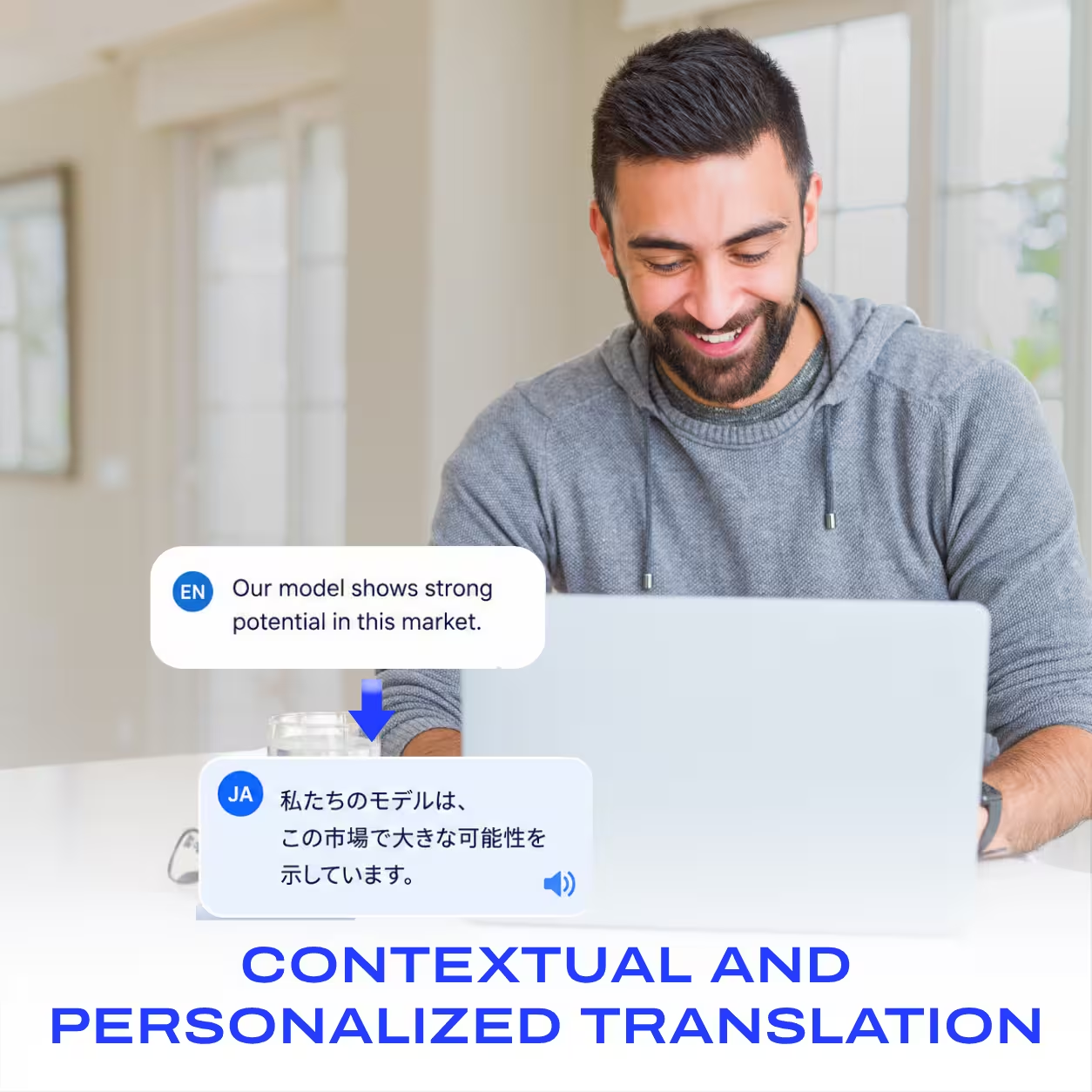
Choose JotMe for live meetings and events. JotMe translates and transcribes your calls as people speak, in 200+ languages, on Zoom, Google Meet, Microsoft Teams, and Webex, with no bot joining. It also works at in-person events and writes notes in each participant's language.
Choose ChatGPT for everything an LLM does best: solving complex problems, writing, research, and building tools. ChatGPT Record can record and summarize a meeting on a Mac, though it doesn't translate the conversation while it happens.
Are you looking for a live translation and transcription tool and wondering which one you should choose? I have been analyzing ChatGPT for the past two to three weeks to understand how well it supports professionals and companies as a meeting assistant.
That work led me to write a detailed review of ChatGPT translation and a guide to the best ChatGPT alternatives. Then I compared Google Translate vs. ChatGPT, and found that both tools excel at certain jobs. Both fall short when you need a live meeting tool that transcribes the call, translates it into your preferred language, and writes the notes.
See, I manage JotMe's entire content, so I don't want to sound biased. Still, I thought, why not test JotMe against ChatGPT? That way, we can see where our translation platform excels and where it needs improvement. It also shows where ChatGPT stays far ahead.
Key Takeaways
- For live multilingual meetings, JotMe offers live translation and transcription in 200+ languages on Zoom, Google Meet, Microsoft Teams, and Webex, with no bot joining the call.
- For recording on a Mac, ChatGPT offers ChatGPT Record, which lets you record live meetings, podcasts, and events for up to 4 hours and turns them into a summary.
- For solving complex problems and building tools, ChatGPT offers reasoning and coding, plus an agent that builds websites and apps, something JotMe doesn't try to do.
- For translating pasted text, ChatGPT kept every sentence of my Japanese test and flagged the words the transcript had missed.
- For meeting notes, JotMe writes notes in each participant's language, while ChatGPT Record works best in English.
- For in-person events, JotMe shares the live translation to attendees' phones through a link or code.
- JotMe Pro costs $10/month billed annually, and ChatGPT Plus costs $20/month.
Run your next multilingual meeting with JotMe
Live translation and transcription in 200+ languages, with notes in each participant's language and no bot in your Zoom, Google Meet, Microsoft Teams, or Webex call.
Download JotMe for FreeWho Is This Article For?
If your work involves people who speak another language, you need to know which tool to open before the call starts. These readers will get the most from this comparison:
- Managers with overseas partners: You run calls with suppliers or clients in Japan, Korea, China, or Taiwan and lose time to follow-up emails.
- Students in online classes: Your lecturer teaches in a language you are still learning, and you need to follow along live.
- Event organizers: You host conferences or workshops where the audience speaks several languages.
- Sales and support teams: You speak with customers across countries every day.
- ChatGPT users: You already pay for ChatGPT and want to know if it can replace a meeting tool.
Why Is This Article Different?
Most comparisons stop at feature lists. I ran the same Japanese lesson through both tools and checked every claim against OpenAI's and JotMe's own pages.
- Hands-on tests on my own accounts: I ran every JotMe test on my Premium account and every ChatGPT translation test on my Pro 100 plan.
- Primary sources only: Every ChatGPT claim comes from OpenAI's own help pages, and every JotMe claim comes from our product and docs.
- JotMe's weak spots included: I point out where JotMe slipped, since I want our product team to fix them.
- Real use cases: Each test mirrors a real job, from a call with a Japanese partner to an online class.
- A clear pick for each job: ChatGPT wins some rounds, and I say so plainly.
What Is ChatGPT?
ChatGPT is OpenAI’s AI assistant. In February 2026, OpenAI reported more than 900 million weekly active users. It writes, reasons, codes, researches, and translates text in a chat.
The app now has two modes. Chat answers your questions, and Work runs longer jobs, such as building a website or a spreadsheet, on its own. On a Mac, ChatGPT Record adds meeting recording and summaries.
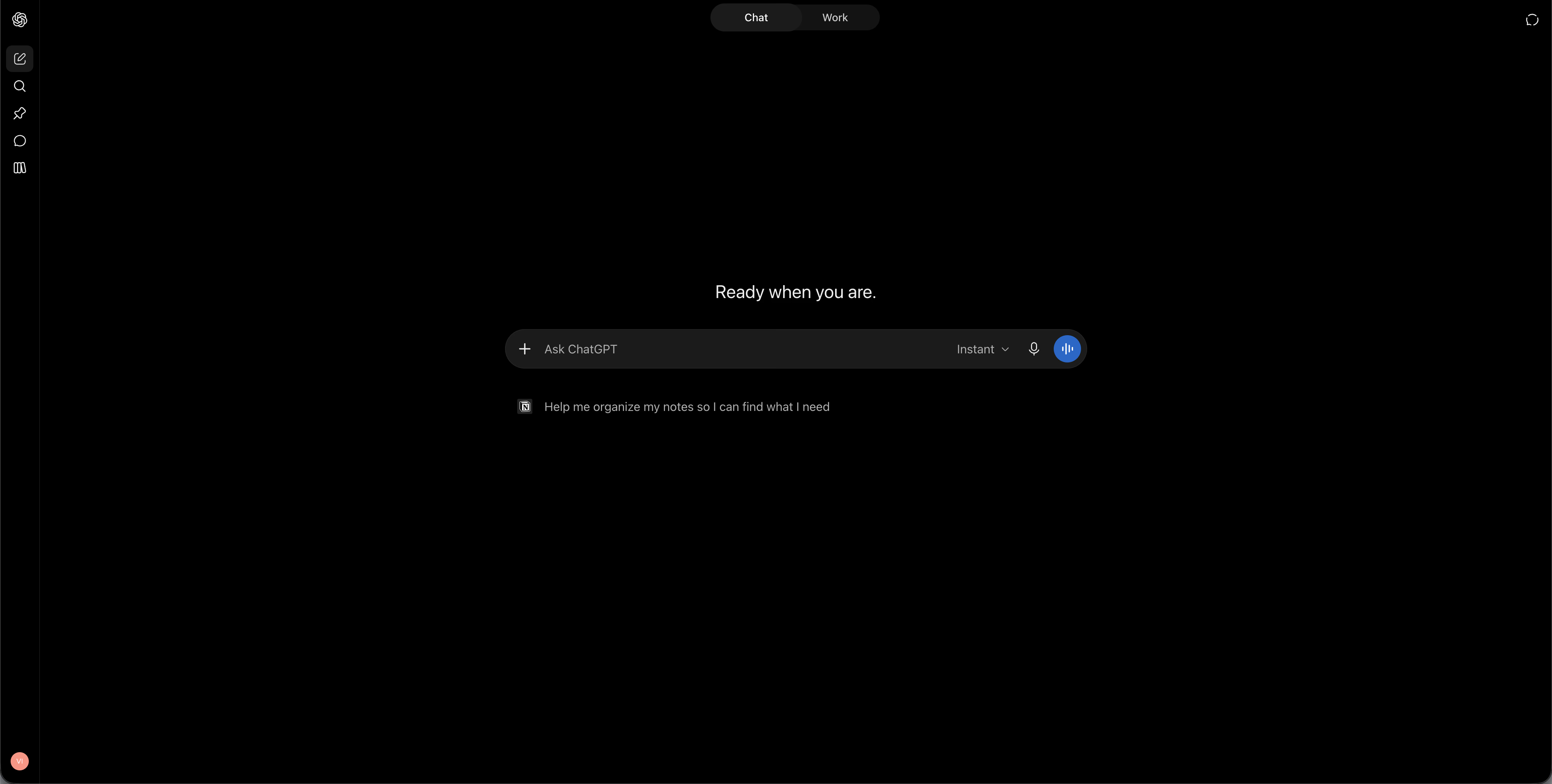
- Models: GPT-6 Astra and GPT-6.1 Sol, with effort levels from Light to Max
- Modes: Chat for answers, Work for longer tasks that end in a finished file or app
- Translation: ChatGPT Translate page with 40+ languages, plus translation in any chat
- Meetings: ChatGPT Record on the Mac app, and a Meetings plugin in beta for Pro and Business
- Voice: GPT-Live voice mode, which can interpret between two people on a single device
- Price: Free, Go at $8 a month, Plus at $20 a month, and Pro from $100 a month
What is JotMe?
JotMe is an AI meeting assistant that translates and transcribes live meetings and events in 200+ languages. Our desktop app captures the audio on your computer, so no bot joins your Zoom, Google Meet, Microsoft Teams, or Webex call. The same app works for in-person conversations and events.
After the call, JotMe gives you a recording with the transcript and translation side by side, meeting notes in each participant's language, and Ask JotMe for questions about what was said. More than 500,000 professionals and 2,000 teams across 134 countries use JotMe today.
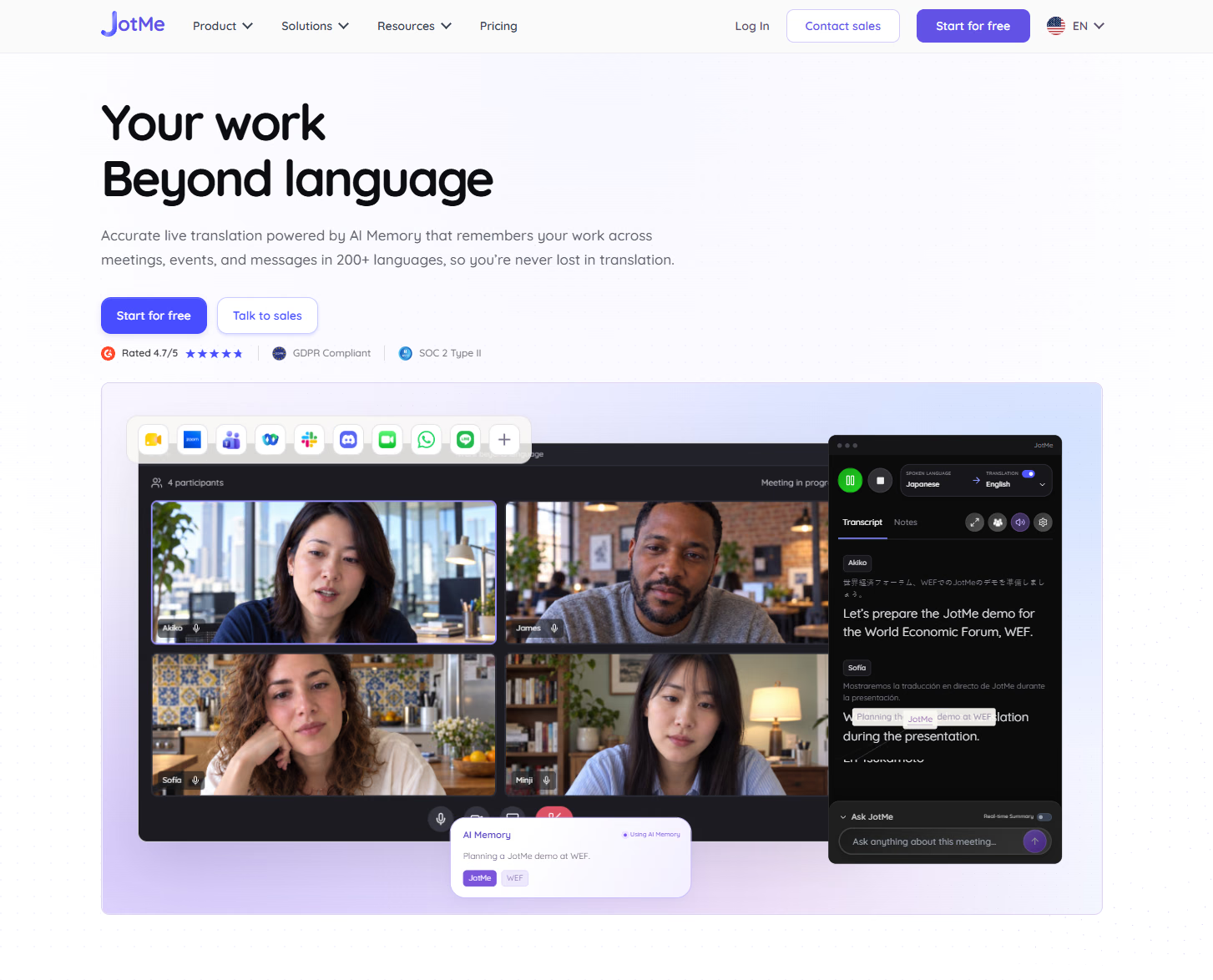
- Live translation: 200+ languages across 39,000+ language pairs
- Devices: Mac and Windows desktop apps, iPhone and Android apps, and a Chrome extension for Google Meet
- Calls: Zoom, Google Meet, Microsoft Teams, Webex, Slack, WhatsApp, LINE, and more, with no bot
- Notes: AI meeting notes in each participant's language, with action items
- Ask JotMe: Answers questions during or after a meeting, in your own language
- Custom vocabulary: Up to 50 terms on Premium for names and industry jargon
- Translate tab: Text, documents, images, and audio or video files
- Price: Free plan, Pro at $10 a month billed annually, and Premium at $15 a month billed annually
ChatGPT vs JotMe: Quick Comparison
ChatGPT is the stronger general AI, and JotMe is the stronger meeting tool. Once a conversation is live and people speak different languages, the table tilts toward JotMe.
Feature | ChatGPT | JotMe |
|---|---|---|
Best for | Reasoning, writing, coding, and building tools | Live multilingual meetings and events |
Live translation during a call | No | Yes, in 200+ languages |
How it captures a meeting | Record on the Mac app, up to 4 hours | Desktop and mobile apps, no bot |
Translation for other attendees | No | Shared through a link, a code, or on-screen subtitles |
Meeting notes language | Works best in English | Each participant's language |
Questions about a meeting | After the recording | During and after the meeting |
Custom vocabulary | No, memory only | Yes, up to 50 terms on Premium |
Translating pasted text | Excellent | Good |
Building apps and solving problems | Excellent | Not designed for it |
Starting price | Plus at $20 a month | Pro at $10 a month billed annually |
Where Is ChatGPT Better Than JotMe?
ChatGPT is the better tool for almost everything that happens outside a live conversation. It solves math and logic problems, writes and debugs code, plans projects, and researches topics with sources. In Work mode, it can build a personal website or a spreadsheet and hand you the finished file.
In my test, ChatGPT also translated a pasted Japanese transcript more completely than JotMe's Translate tab. It kept every sentence, and it warned me that the Japanese had missing words from the audio transcription.
- Complex problem solving: GPT-6 models work through multi-step problems in math and finance.
- Building tools: Work mode and Codex create websites and apps from a prompt.
- Writing and research: ChatGPT drafts reports and emails, and it cites sources when it searches the web.
- Text translation: ChatGPT keeps the full meaning of pasted text and explains idioms when you ask.
- Images and files: ChatGPT creates images and reads PDFs and spreadsheets.
Where Is JotMe Better Than ChatGPT?
JotMe is better the moment a conversation goes live. ChatGPT Record listens and summarizes, and it can't put a translation on your screen while your Japanese partner is still talking. JotMe can, and everyone on the call can follow the translation through a shared link.
JotMe also covers the places ChatGPT doesn't reach. ChatGPT Record runs only on the Mac app, and on my Pro 100 plan, the Record button didn't appear. JotMe runs on Mac, Windows, iPhone, and Android, and it captures the call audio without asking the host to admit a bot.
- Live meeting translation: JotMe translates speech as people talk, in 200+ languages.
- Support during online calls: JotMe works across Zoom, Google Meet, Microsoft Teams, and Webex without a bot.
- In-person events: JotMe runs on your phone or laptop and shares the live translation with attendees.
- Multilingual transcription: JotMe transcribes mixed-language calls and shows the original next to the translation.
- Notes in every language: Each participant gets meeting notes in their own language.
- Company vocabulary: Custom terms keep product names and jargon accurate in the transcript.
Translate the meeting while it happens
JotMe shows the original and the translation line by line during your call, then hands you notes and a searchable transcript when it ends.
Download JotMe for FreeHow I Tested Both ChatGPT and JotMe
I used a two-minute Japanese business lesson as my test meeting. The lesson covers hō-ren-sō, the Japanese habit of reporting, contacting, and consulting at work, along with tips on listening to colleagues. I treated it like a real call with a Japanese partner and like an online class taught in Japanese.
- The live call: I played the lesson on my laptop while JotMe translated it from Japanese to English, as it would during a Zoom call with a Japanese supplier.
- The online class: I followed the lesson through JotMe's live transcript, as a student in a Japanese-language class would.
- The pasted text: I copied the same Japanese paragraph into ChatGPT and into JotMe's Translate tab.
- After the call: I checked JotMe's meeting notes and asked Ask JotMe a question about the lesson.
- Sharing: I tested how each tool lets you send notes to a teammate who missed the call.
- ChatGPT Record: I looked for Record on my Pro 100 plan, and I studied a public walkthrough of the feature for the Record screenshots you'll see below.
ChatGPT vs JotMe: Hands-On Test Results
Most results below come from the same Japanese lesson, so the differences come from the tools. ChatGPT won the text round, and JotMe won every round that happened during or right after the live session.
Can ChatGPT Translate a Meeting While People Are Still Talking?
No. ChatGPT Record and the new Meetings plugin capture audio and summarize it, and OpenAI's help pages mention no live translation. OpenAI also says Record works best in English, and accuracy in other languages can vary.
JotMe translated the lesson in real time. Each Japanese line appeared on my screen with the English directly under it. When the teacher said "hō-ren-sō," JotMe added the meaning in brackets: reporting, communicating, and consulting.
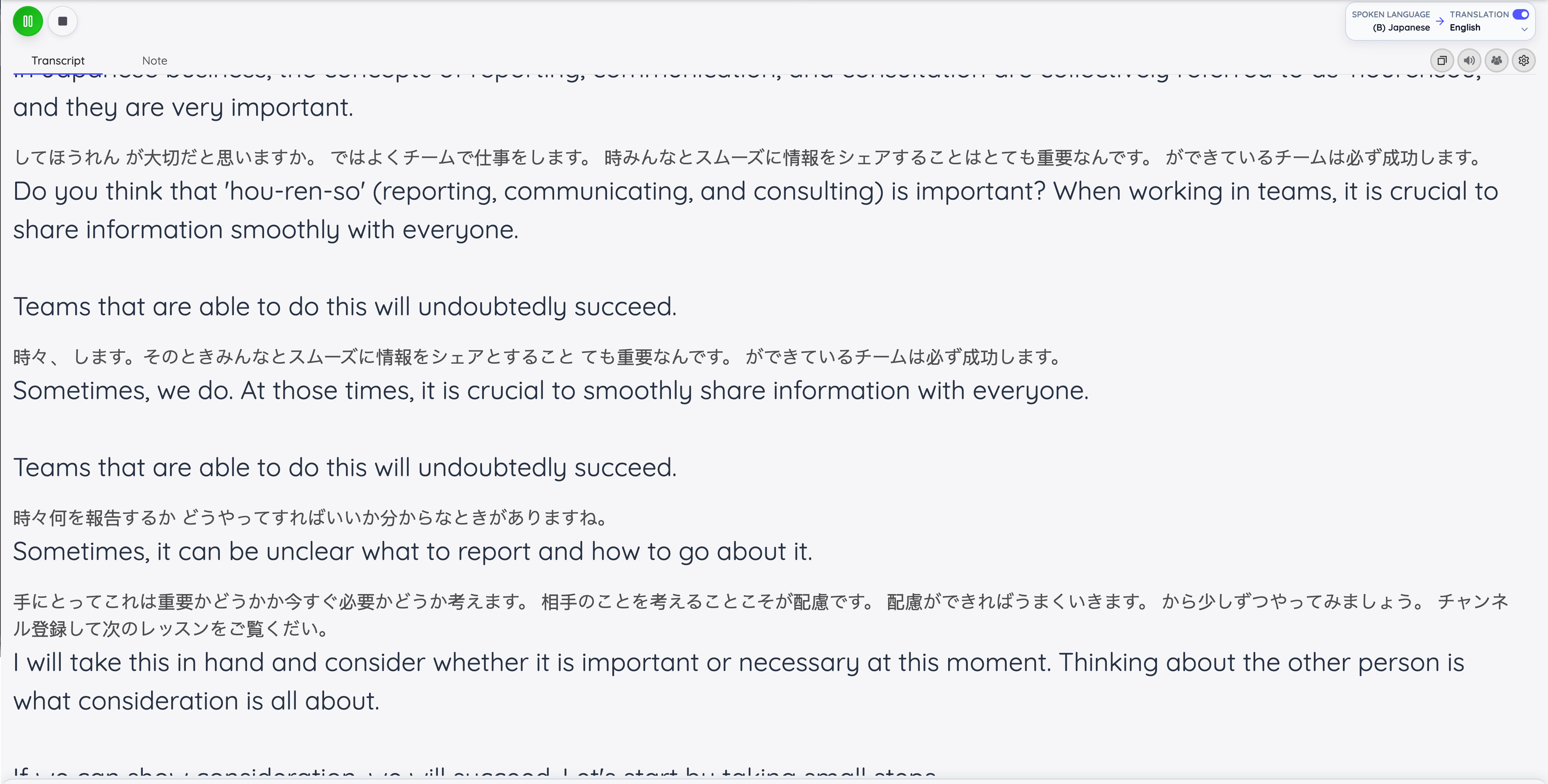
For a manager on a call with a Japanese partner, this is the difference between replying in the meeting and sending an email the next morning.
Which Translates a Japanese Transcript More Accurately?
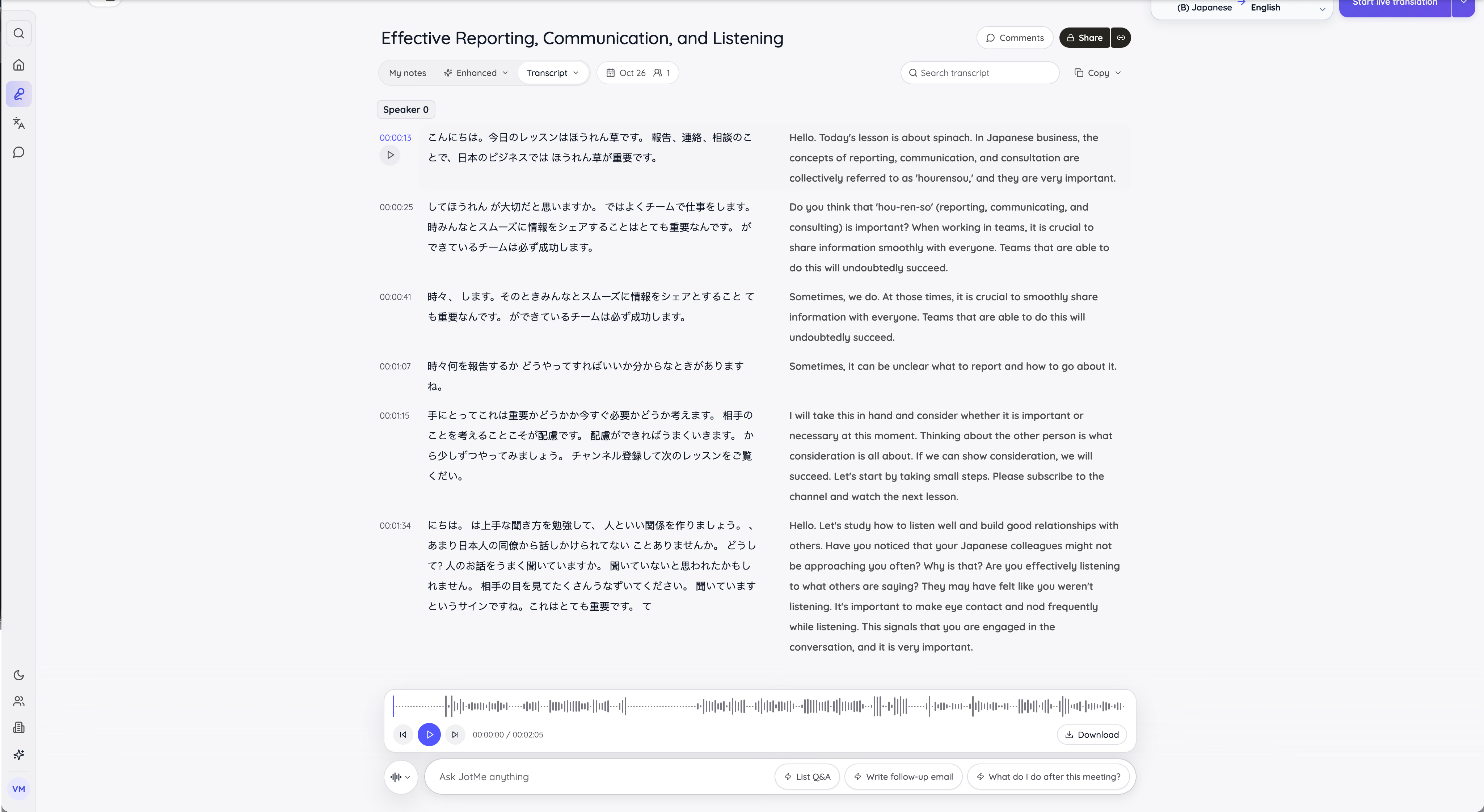
ChatGPT, by a small margin. I copied the same Japanese paragraph from JotMe's transcript into both tools. ChatGPT kept every sentence on its own line and added a note that the Japanese had missing words, likely from audio transcription. That note was correct, since the transcript had dropped the first syllables of "こんにちは."
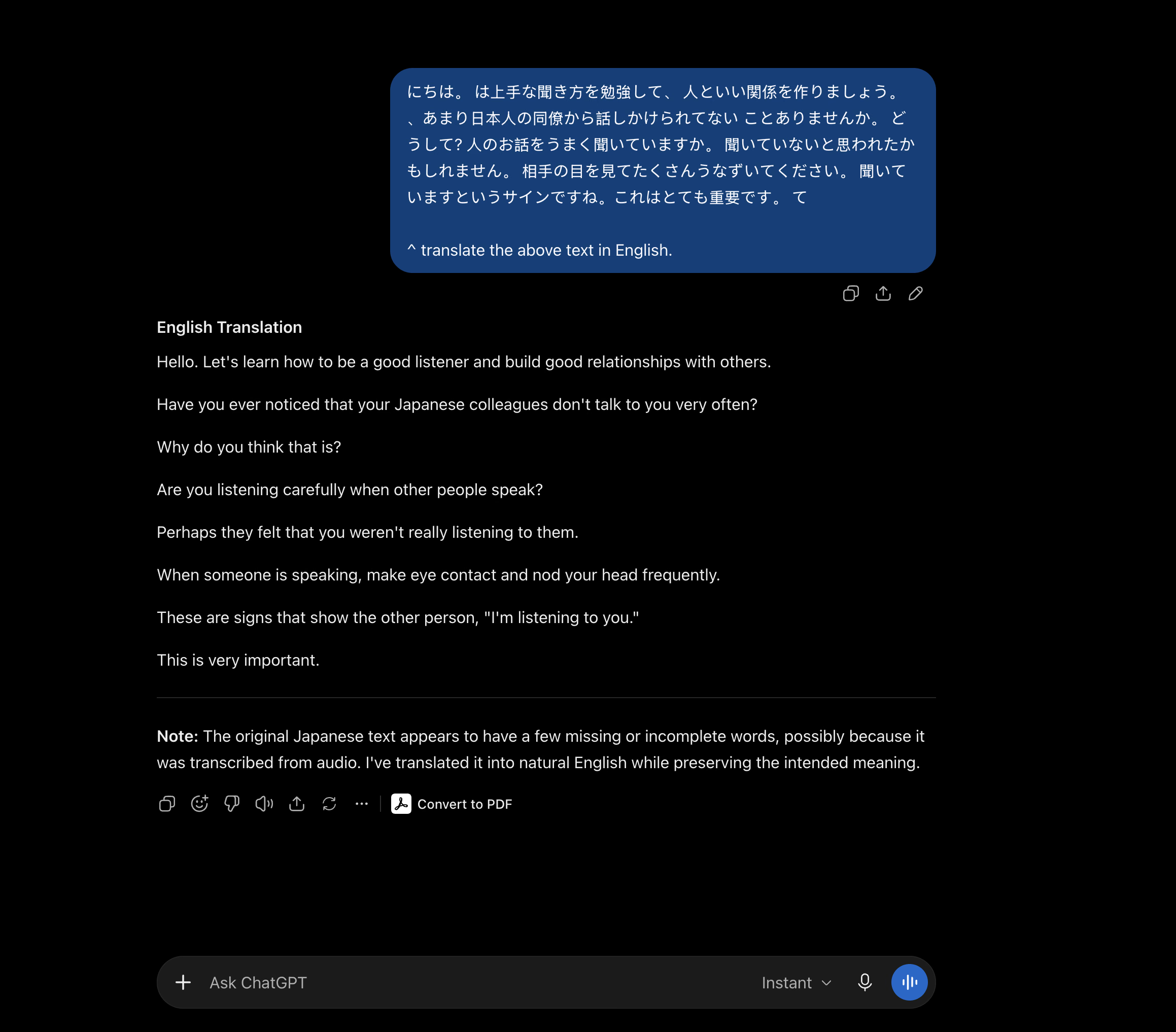
JotMe's Translate tab returned smooth English in a single paragraph, and it left out the question "人のお話をうまく聞いていますか" ("Are you listening well when people speak?"). It also added a short summary under the translation, written in Japanese instead of English, which an English reader can't use.
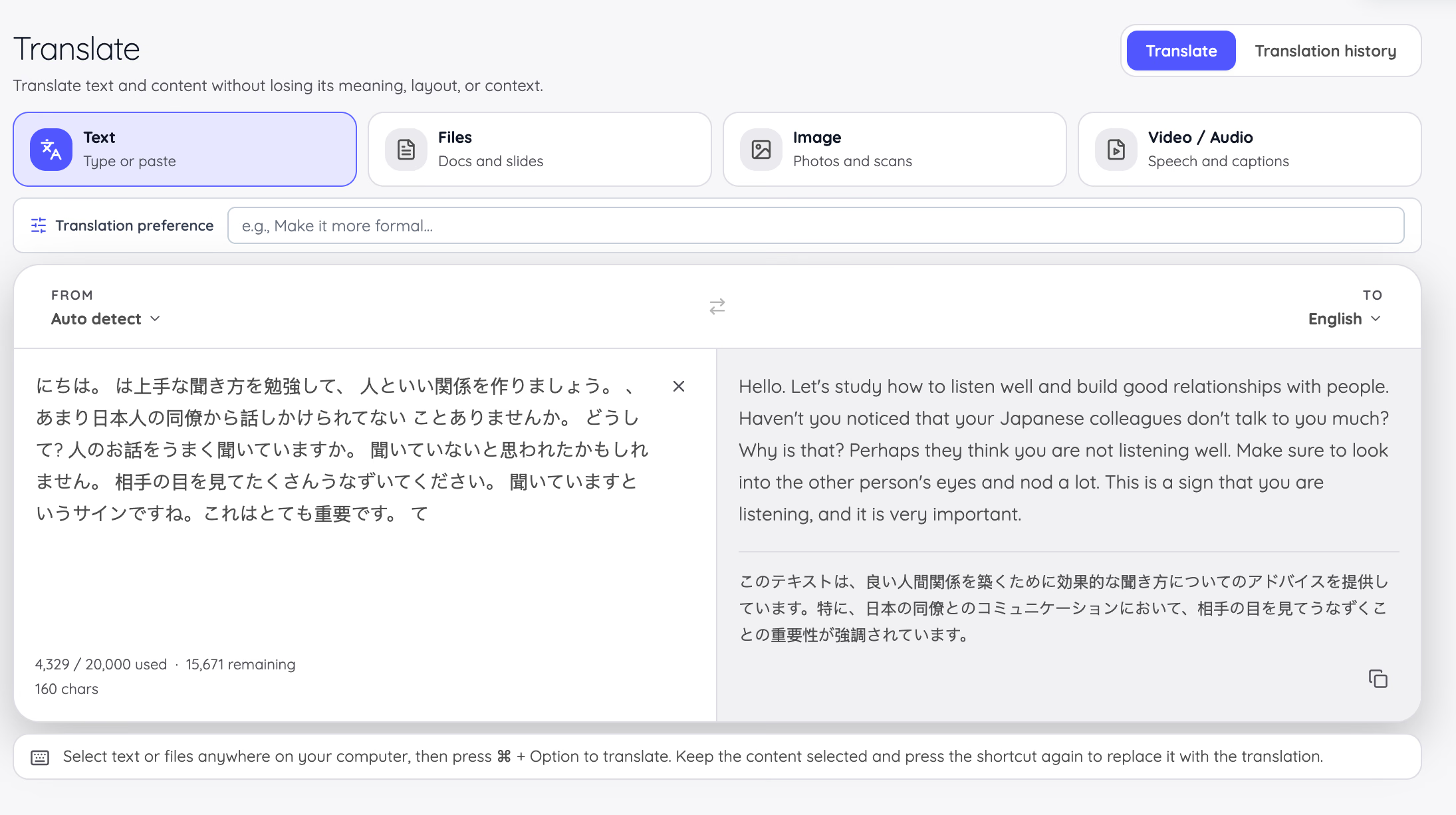
JotMe's live recording told a different story. The translation it produced during the session kept that question and every other sentence.
Japanese Line | ChatGPT | JotMe Translate Tab | JotMe Live Recording |
|---|---|---|---|
人のお話をうまく聞いていますか。 | "Are you listening carefully when other people speak?" | Left out | "Are you effectively listening to what others are saying?" |
聞いていないと思われたかもしれません。 | "Perhaps they felt that you weren't really listening to them." | "Perhaps they think you are not listening well." | "They may have felt like you weren't listening." |
相手の目を見てたくさんうなずいてください。 | "When someone is speaking, make eye contact and nod your head frequently." | "Make sure to look into the other person's eyes and nod a lot." | "It's important to make eye contact and nod frequently while listening." |
聞いていますというサインですね。 | "These are signs that show the other person, 'I'm listening to you.'" | "This is a sign that you are listening" | "This signals that you are engaged in the conversation" |
JotMe slipped once in the live session too. In an earlier line, the transcript dropped the first character of 相手にとって ("for the other person"), and the English became "I will take this in hand." The meeting notes still captured the point correctly, and this is a fix I want our team to make.
Is ChatGPT Record Good Enough for Meeting Notes?
For a meeting in English, yes. Record turns a session of up to 4 hours into a summary with key points, action items, and open questions, and it saves the result in your chat history. OpenAI deletes the audio after transcription.
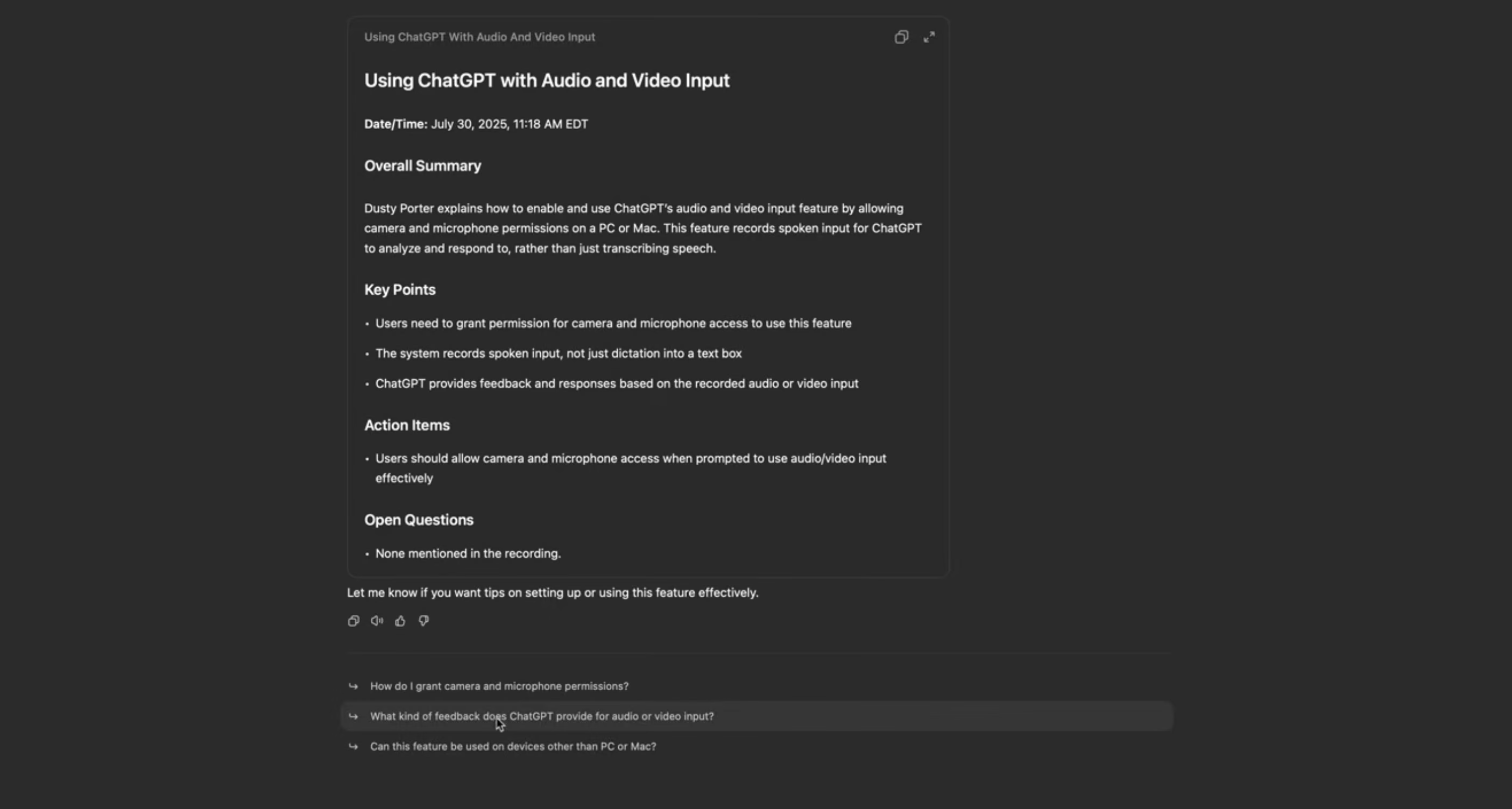
The limits show up in multilingual work. Record runs only on the Mac app, and OpenAI says it works best in English. On my Pro 100 plan, the Record button never appeared, even though OpenAI's help page lists Pro among the supported plans. Features like this often reach accounts gradually, so check your own account before you plan a meeting around it.
Can JotMe Turn a Japanese Lesson Into English Meeting Notes?
Yes. JotMe's AI notes opened with a gist and grouped the key points under communication and listening, followed by action items. The live transcript opened with "Today's lesson is about spinach," since ほうれん草 is a pun on hō-ren-sō, and the notes went straight to the business meaning: reporting, contacting, and consulting.
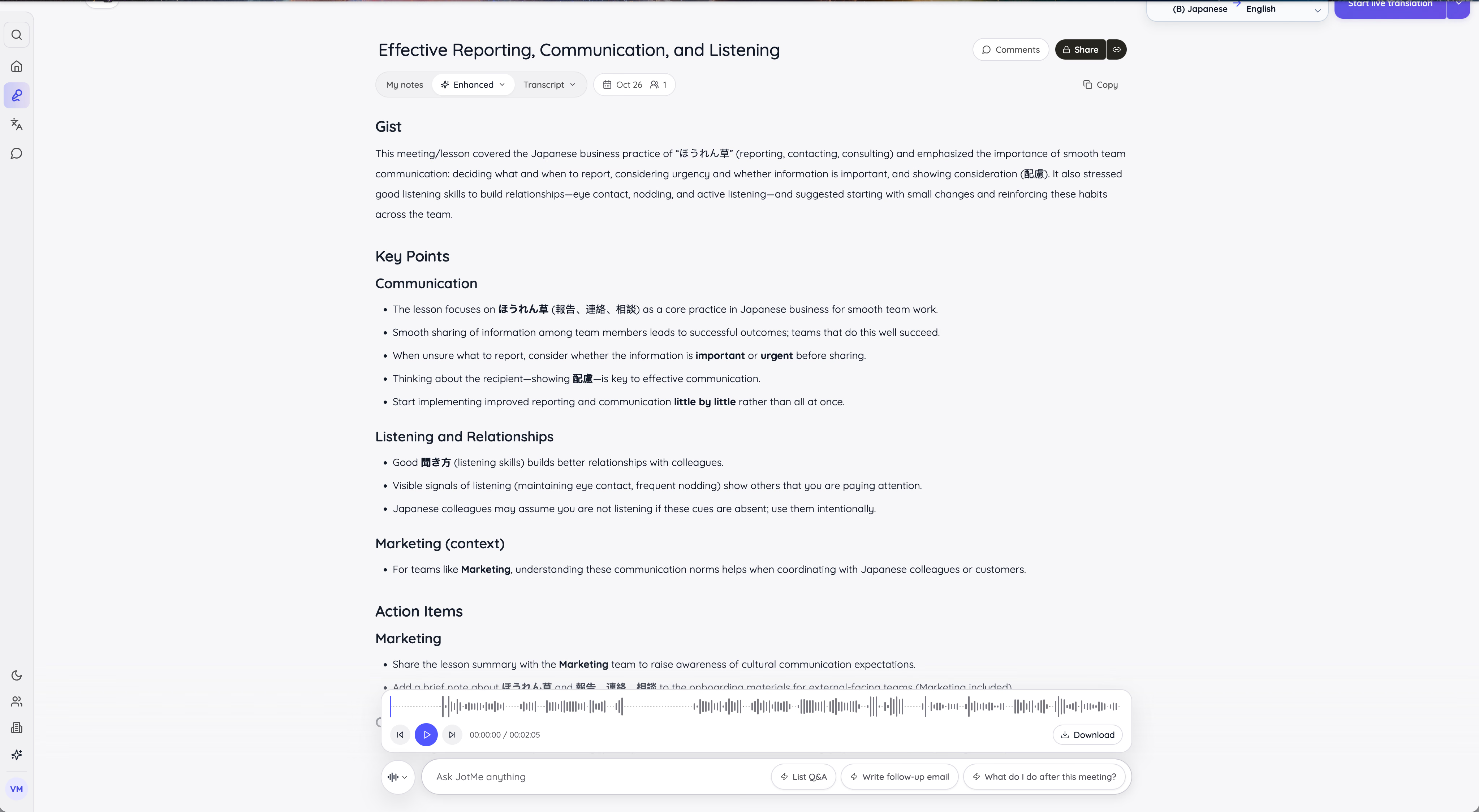
JotMe kept key Japanese terms such as 配慮 (consideration) next to their English meaning, which helps anyone learning the culture behind the language. It also added a "Marketing (context)" section with action items for a marketing team. JotMe personalizes notes with the context in your account, and you can edit that context if you want neutral notes.
Can I Ask Questions About What Was Said in a Meeting?
Yes, in both tools. ChatGPT suggests follow-up questions under a Record summary, and the Meetings plugin lets you ask about past meetings. Ask JotMe works during the meeting as well as after it.
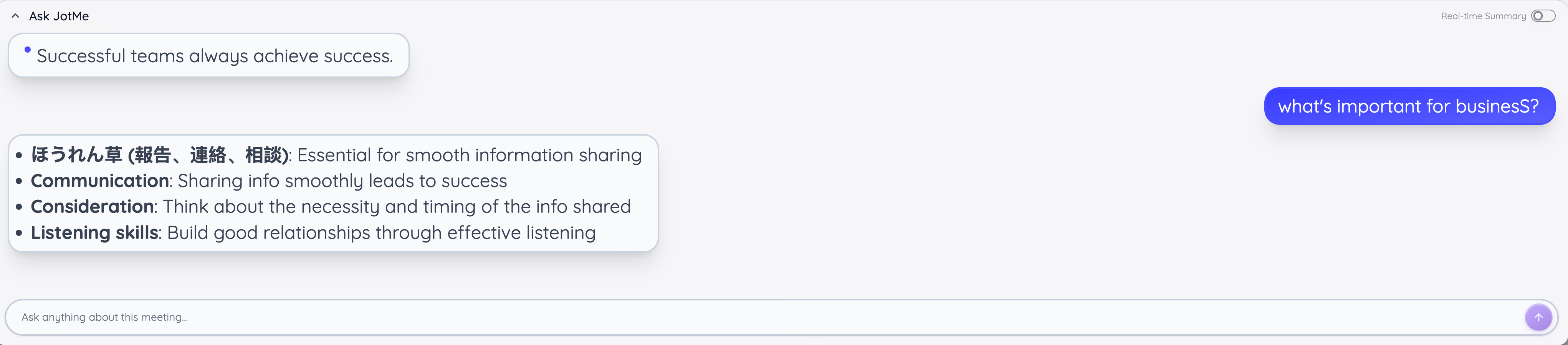
I asked Ask JotMe, "What's important for business?" It answered with 4 points taken straight from the lesson: hō-ren-sō, smooth communication, consideration, and listening skills.
How Do I Share Meeting Notes With People Who Missed the Call?
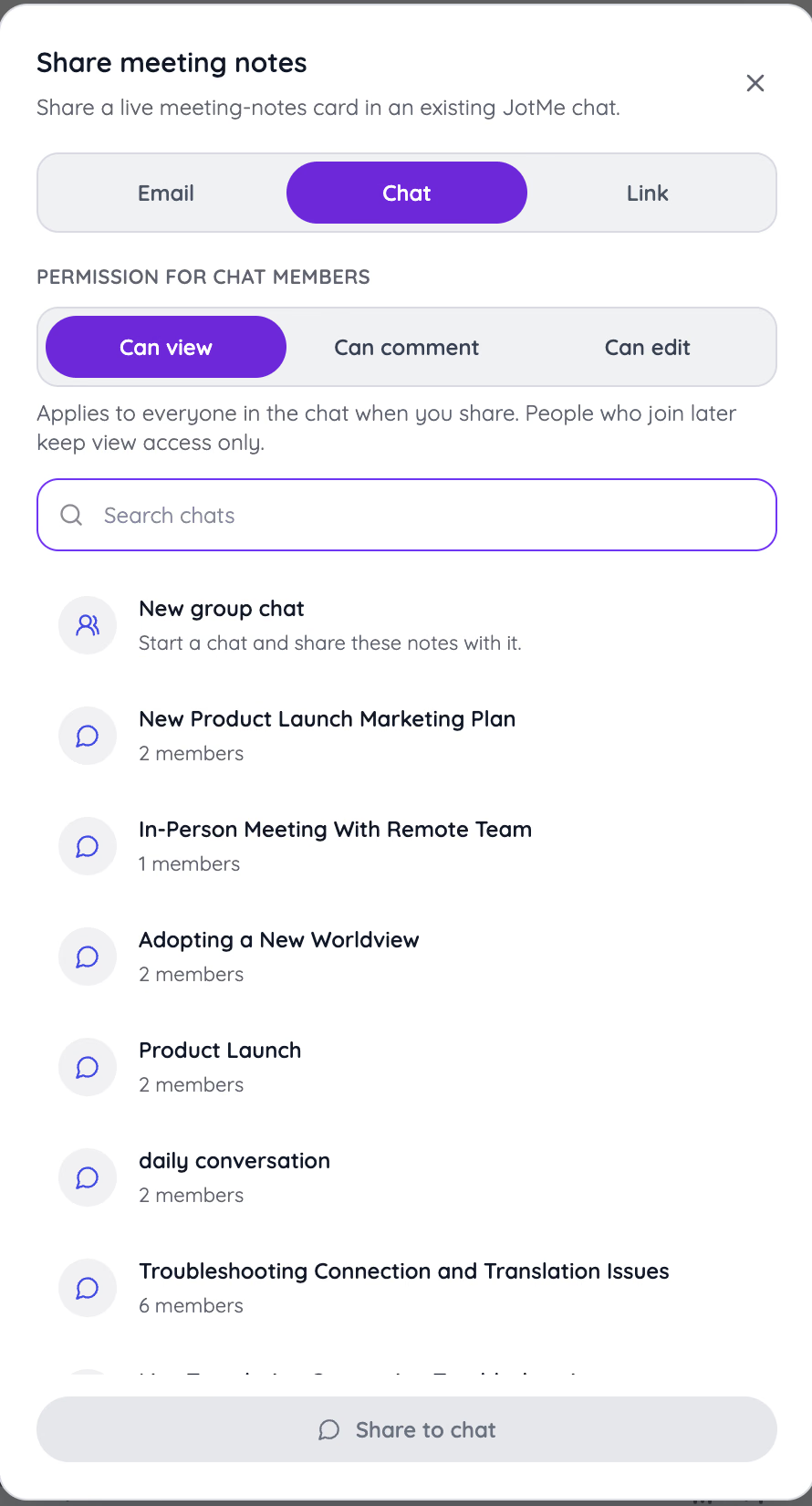
JotMe gives you more control here. You can share notes by email, by link, or inside a JotMe chat, and you choose if people can view, comment, or edit. People who join a chat later keep view access only.
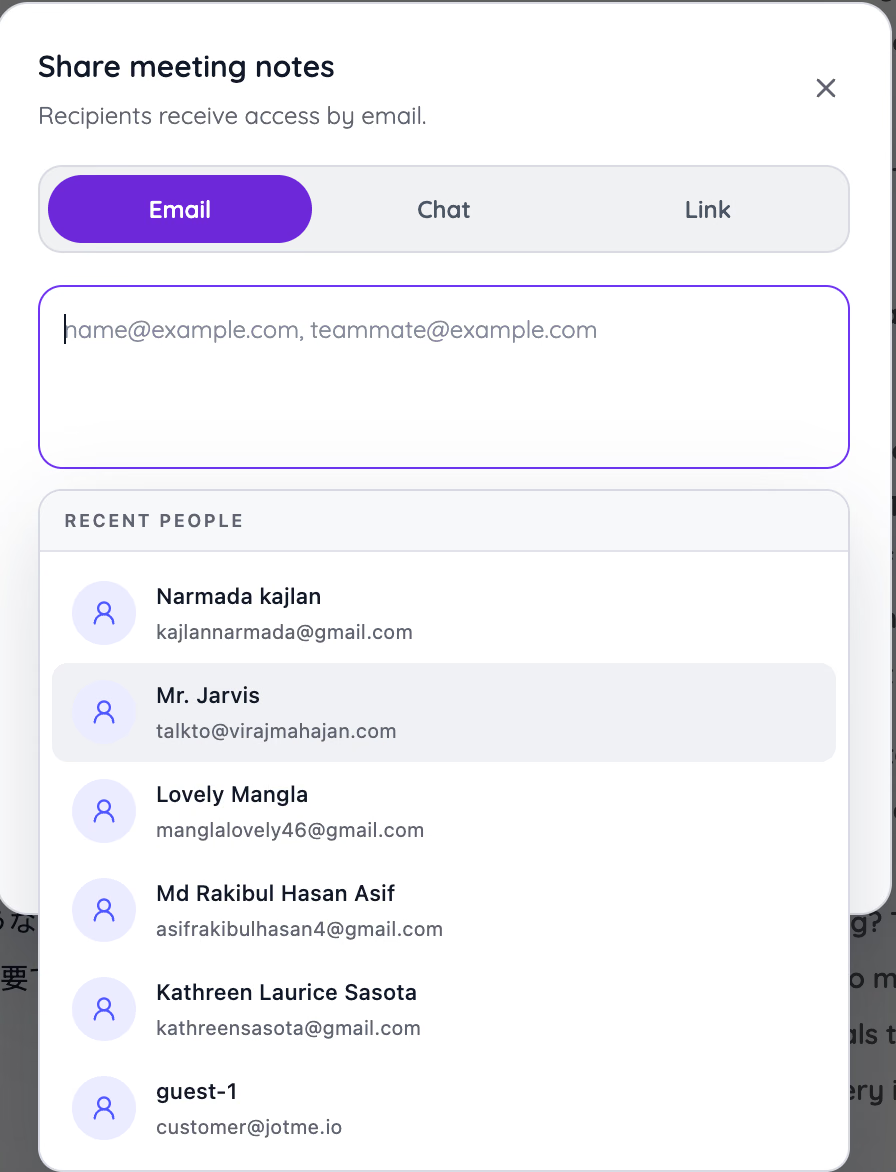
Email sharing remembers the people you shared with recently, so a weekly call takes a couple of clicks. ChatGPT lets you share a chat link, and the Meetings plugin keeps notes private until you share them.
Can These Tools Learn My Company's Names and Jargon?
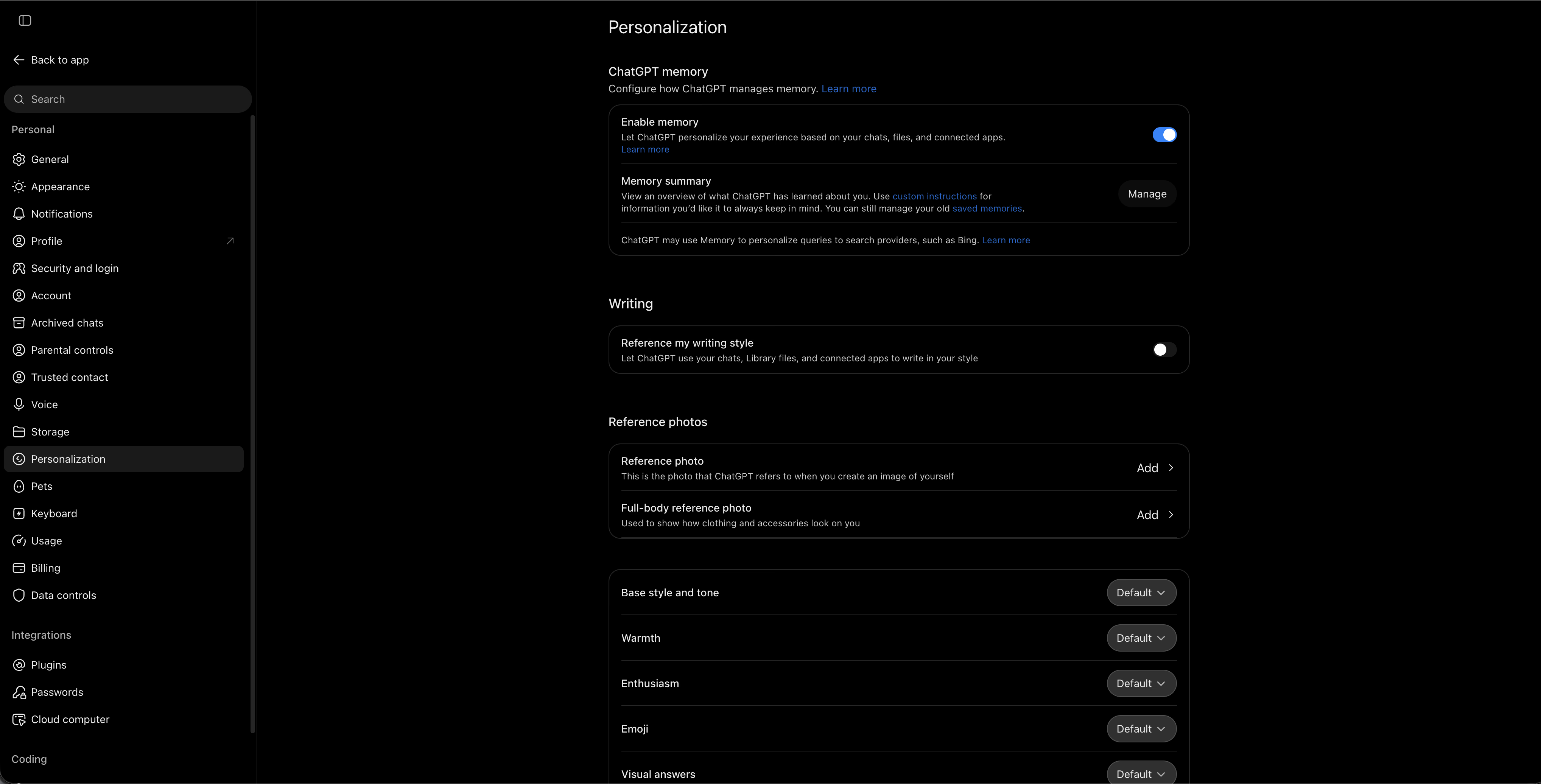
ChatGPT learns about you through memory. It can personalize answers based on your chats and files, and it can copy your writing style. It has no list of terms for transcription, so a product name can come back misspelled in a Record summary.
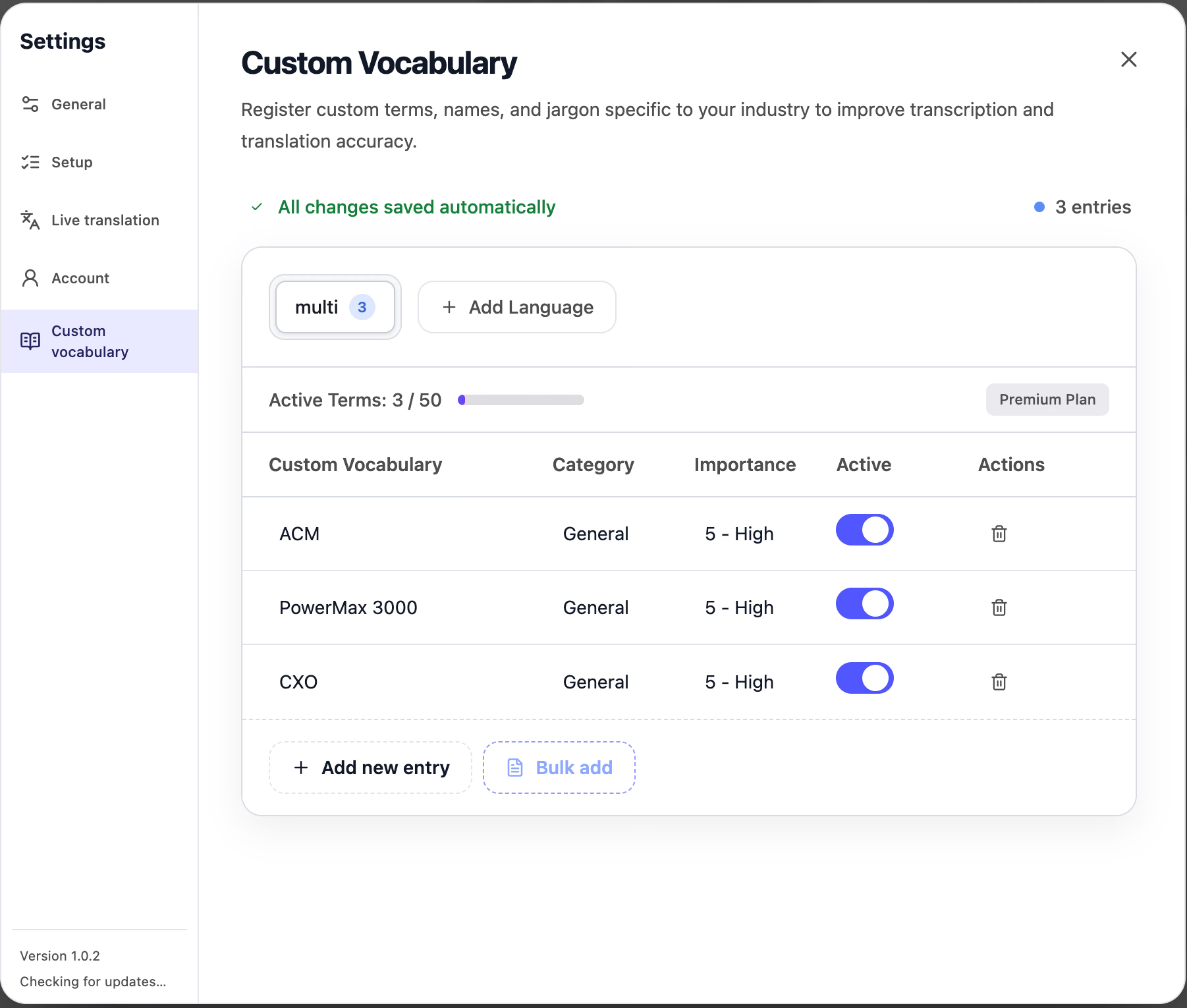
JotMe has a custom vocabulary list for meetings. I added three terms, such as PowerMax 3000 and CXO, and set each to high importance. JotMe uses them to improve transcription and translation. Premium allows 50 terms.
Can JotMe Translate Text and Files Like ChatGPT Does?
Yes, with fewer instructions. JotMe's Translate tab handles text, documents, images, and audio or video files, and a translation preference box lets you ask for a formal tone. On a Mac, you can select text in any app and press ⌘ + Option to translate it in place.
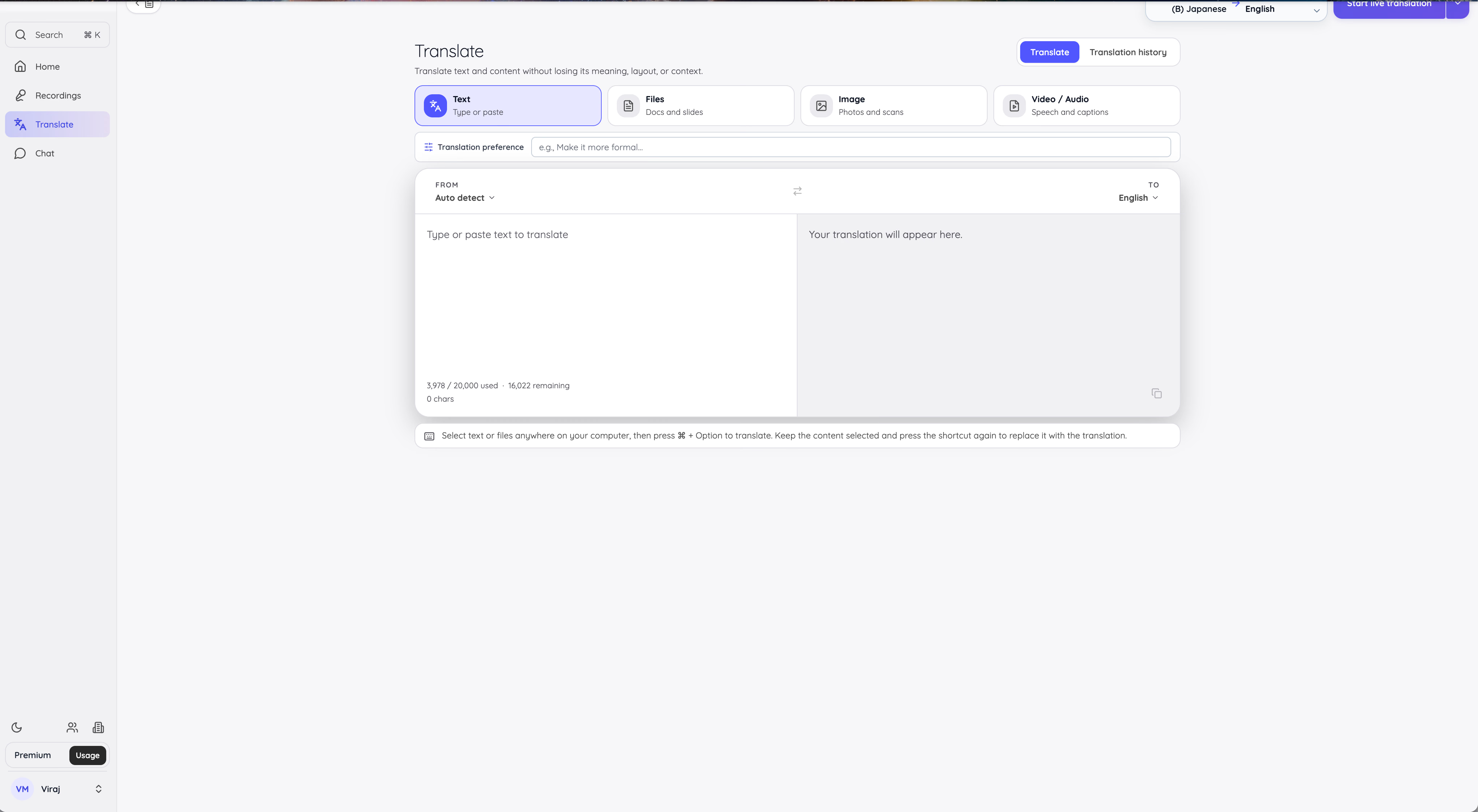
ChatGPT stays more flexible for text. You can explain your reader and ask follow-up questions, which is why it won the pasted-text round above. Our guide on how to translate text using ChatGPT covers its prompts in detail.
How to Use ChatGPT for Live Meetings?
ChatGPT handles meetings through Record in the Mac desktop app. It records and summarizes, and it doesn't translate during the call.
Step 1: Open Record in the Mac App
Open the ChatGPT desktop app on your Mac and sign in to a supported plan. Click the Record button at the bottom of a chat, and allow microphone and system audio access when macOS asks.
Step 2: Record the Meeting
Let the meeting run while ChatGPT listens. A timer shows how long you've been recording, and Stop pauses the session.
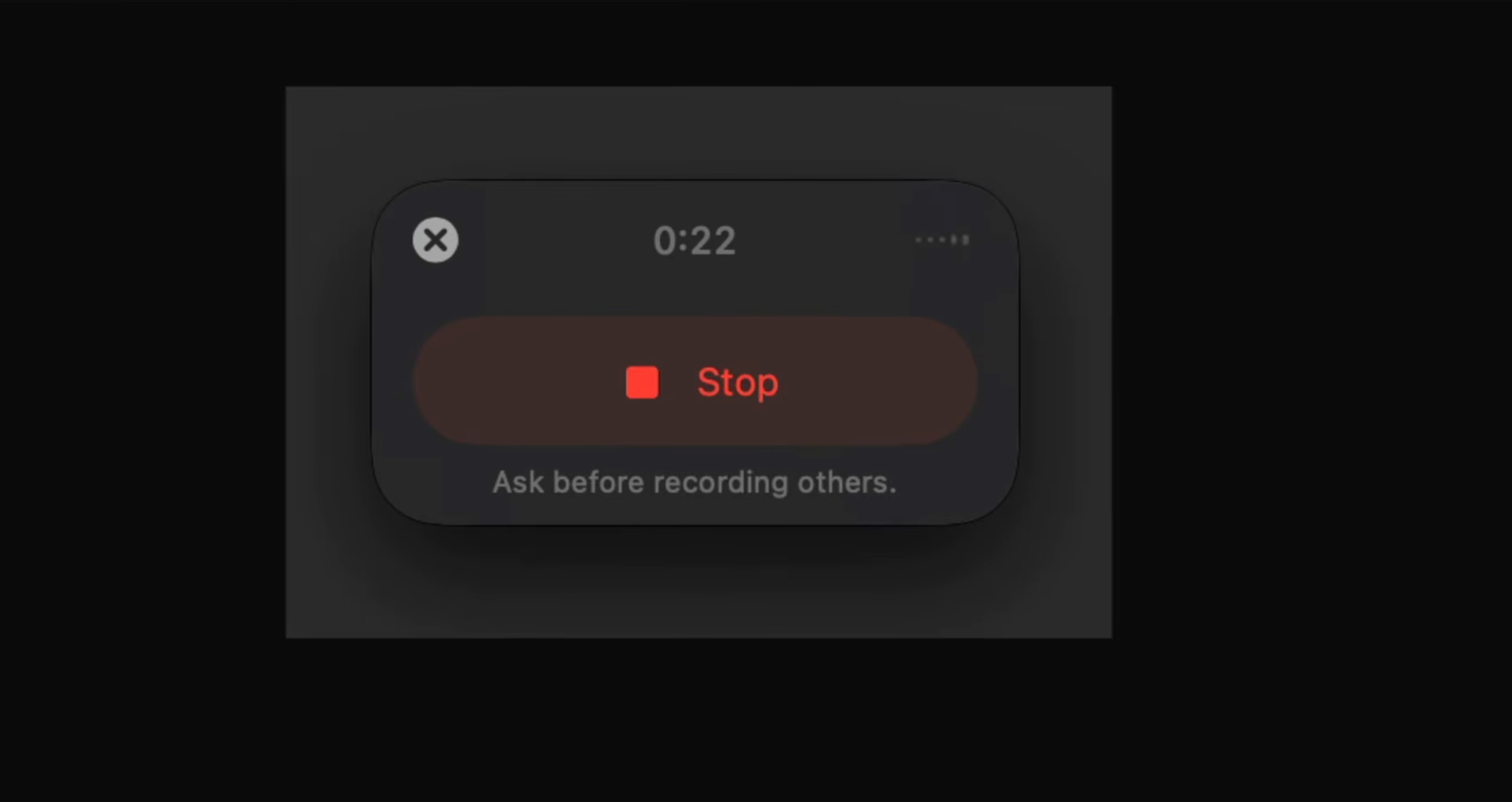
Step 3: Resume or Send the Recording
Click Resume to keep recording in the same session, or Send to upload it. ChatGPT then writes the summary as a canvas in your chat.

Even a $100-a-month Pro plan doesn't guarantee the Record option. On my Pro 100 account, the button never showed up, and OpenAI lists Record for the Mac app only. Sessions stop at 4 hours, and OpenAI says Record works best in English. ChatGPT also translates nothing while people talk. Ask everyone's permission before you record, as ChatGPT's own reminder says.
How to Use JotMe for Live Meetings?
JotMe works in the background of your call, and it translates while people speak.
Step 1: Pick Your Languages and Start Live Translation
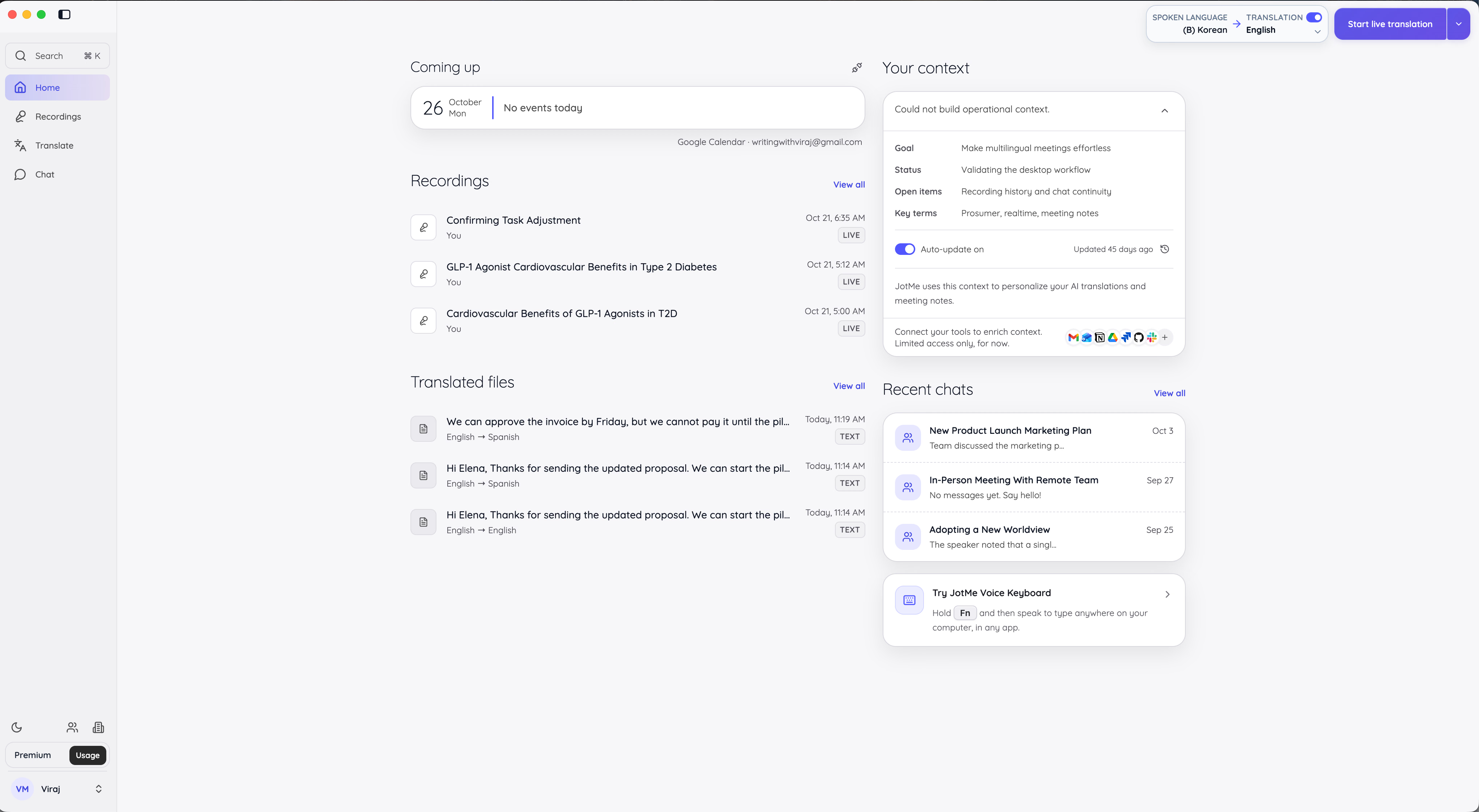
Download JotMe for Mac or Windows and sign in. Pick the spoken language and your translation language at the top right, then click Start live translation.
Step 2: Set the Translation Quality
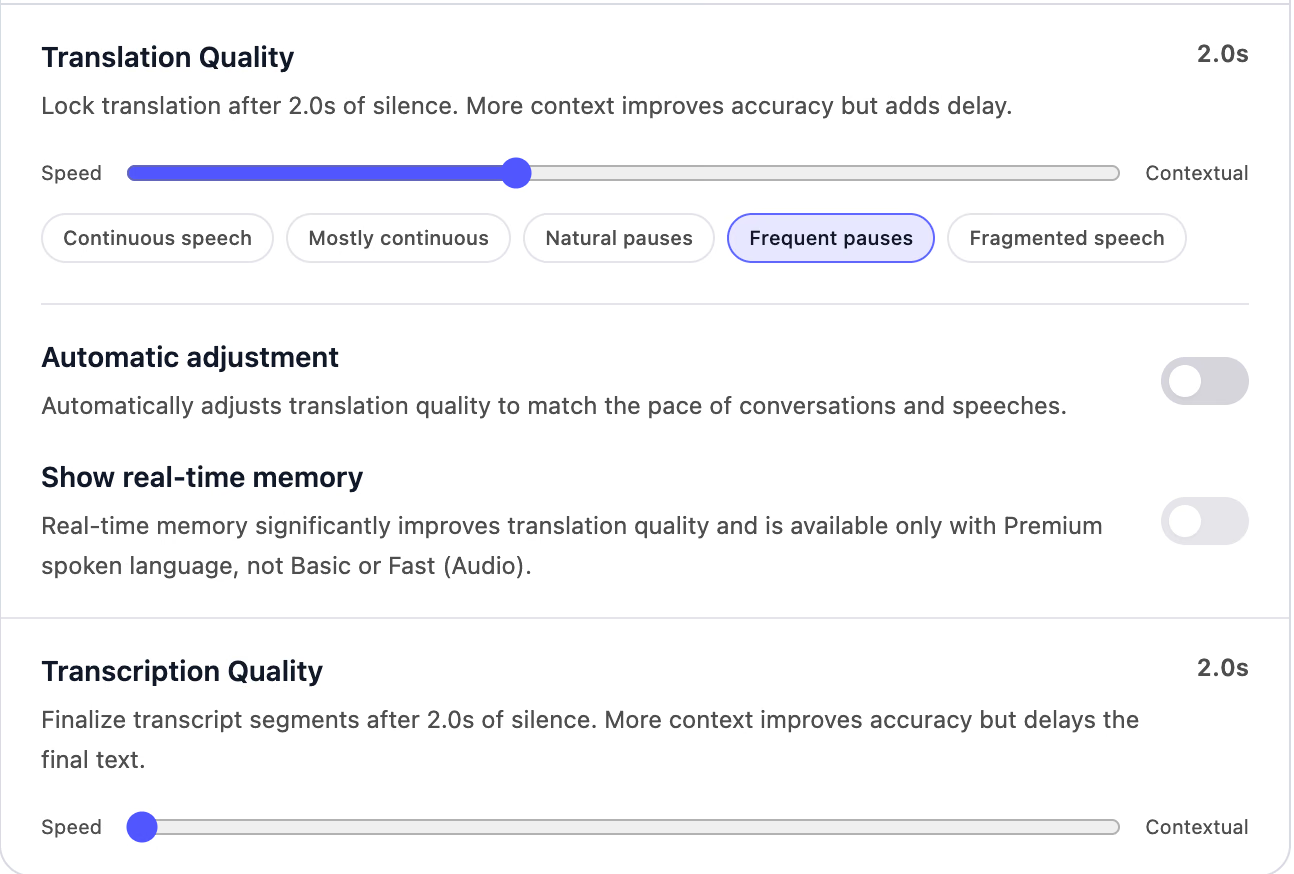
In Settings, open Live translation and set Translation Quality. Move the slider toward Speed for quicker captions, or toward Contextual for more accurate translation with a short delay. You can also pick a preset that matches how people talk, from continuous speech to fragmented speech.
Step 3: Join Your Call or Start Your Event
Join your Zoom, Google Meet, Microsoft Teams, or Webex call, or start your in-person session. JotMe shows the original and the translation as people speak, and you can share the translation with attendees.
Step 4: Open the Notes and Share Them
Click Stop when the meeting ends. Open the recording to read the notes and the full transcript, and use Ask JotMe for questions. Then share the notes with your team by email, chat, or link.
Our help docs walk through every setting, from recognition modes to sharing live translation with attendees.
ChatGPT vs JotMe: Which One Should You Choose?
Many professionals will end up using both. ChatGPT does the thinking before and after the meeting, and JotMe handles the meeting itself. The right first choice depends on where your hardest problem shows up.
Choose JotMe If You Want Live Translation for Meetings and Events
Choose JotMe if your calls involve people who speak different languages. Our live translation shows up while the conversation happens, so you can answer your partner in the same meeting.
JotMe also fits event organizers and teachers. Attendees can follow the translation on their own phones, and every participant gets notes in their own language when the session ends.
- Live translation: 200+ languages across 39,000+ language pairs
- No bot: Works in Zoom, Google Meet, Microsoft Teams, and Webex
- In-person events: Runs on your phone or laptop, with translation shared to attendees
- Meeting notes: Written in each participant's language
- Ask JotMe: Answers questions during and after the call
- Custom vocabulary: Keeps names and jargon accurate
Choose ChatGPT If You Want an AI That Solves Problems and Builds Tools
Choose ChatGPT if most of your work happens in documents and code. It reasons through hard problems and writes in any tone. In Work mode, it also builds working tools.
ChatGPT also prepares you for a meeting. You can research a client before the call or polish a follow-up email after it, and the two tools work well together, as our guide to drafting a blog with Google Meet and ChatGPT shows.
- Reasoning: GPT-6 models for hard, multi-step problems
- Work mode: Websites and apps built from a prompt
- Writing and research: Drafts with sources from the web
- Translation: Text and files with detailed instructions
- ChatGPT Record: English meetings recorded and summarized on a Mac
If your meetings cross languages, don't wait for the summary. JotMe puts the translation on your screen while your partner is still talking, and our free plan lets you try it on your next call.
Try JotMe on your next multilingual call
Live translation and transcription in 200+ languages for online meetings and in-person events. Start free in under a minute.
Download JotMe for FreeFAQs
How Many Languages Does ChatGPT Support for Translation?
OpenAI doesn't publish a single number. The ChatGPT Translate page advertises 40+ languages, and OpenAI's help center lists 59 interface languages. In a regular chat, ChatGPT can translate many more, with quality dropping in languages that have less text online.
How Many Languages Does JotMe Support?
JotMe supports 200+ languages for translation and transcription, across 39,000+ language pairs. Its Fast (Audio) model recognizes 100+ spoken languages without asking you to pick a language first, and meeting notes can come out in each participant's language.
How Much Does ChatGPT Cost?
ChatGPT has a free plan. Go costs $8 a month, Plus costs $20 a month, and Pro starts at $100 a month. OpenAI bills Business plans per user, and prices can differ by country and by app store.
Try JotMe
Accurate translation for your meetings, events, and everyday work, with AI Memory that remembers your context.