Personal language learning, built around your context
Turn your own context into language practice. Learn with personalized quizzes, keep going alongside peers on the leaderboard, and turn social-media time into optional learning breaks.
Your context · Your language · Your pace
What does “ありがとうございます” mean?
Arigatō gozaimasu
Try it. Choose an answer to see the feedback.
Join 500,000 of the world’s most capable global professionals















 Rated 4.7/5
 GDPR Compliant
 SOC 2 Type II
Your context becomes your language practice
Translate a meeting, work with documents, and keep moving in JotMe. Your saved Your context profile brings your work background and vocabulary into personal language practice. Build it from meeting notes or add your own brief on Home, then use that context for quizzes that feel relevant to you.
- Use your saved work background and key terms
- Keep the language practice at your chosen level
- Add a specific topic whenever you want a different focus
I work with a Japanese team and want to feel more confident in project conversations.
Practice your language, one quiz at a time
Choose your language and one of five levels, from Beginner to Advanced. Answer short quizzes, understand the explanations, and retry questions you miss. Revisit saved quizzes whenever you want to practice again.
See how language practice works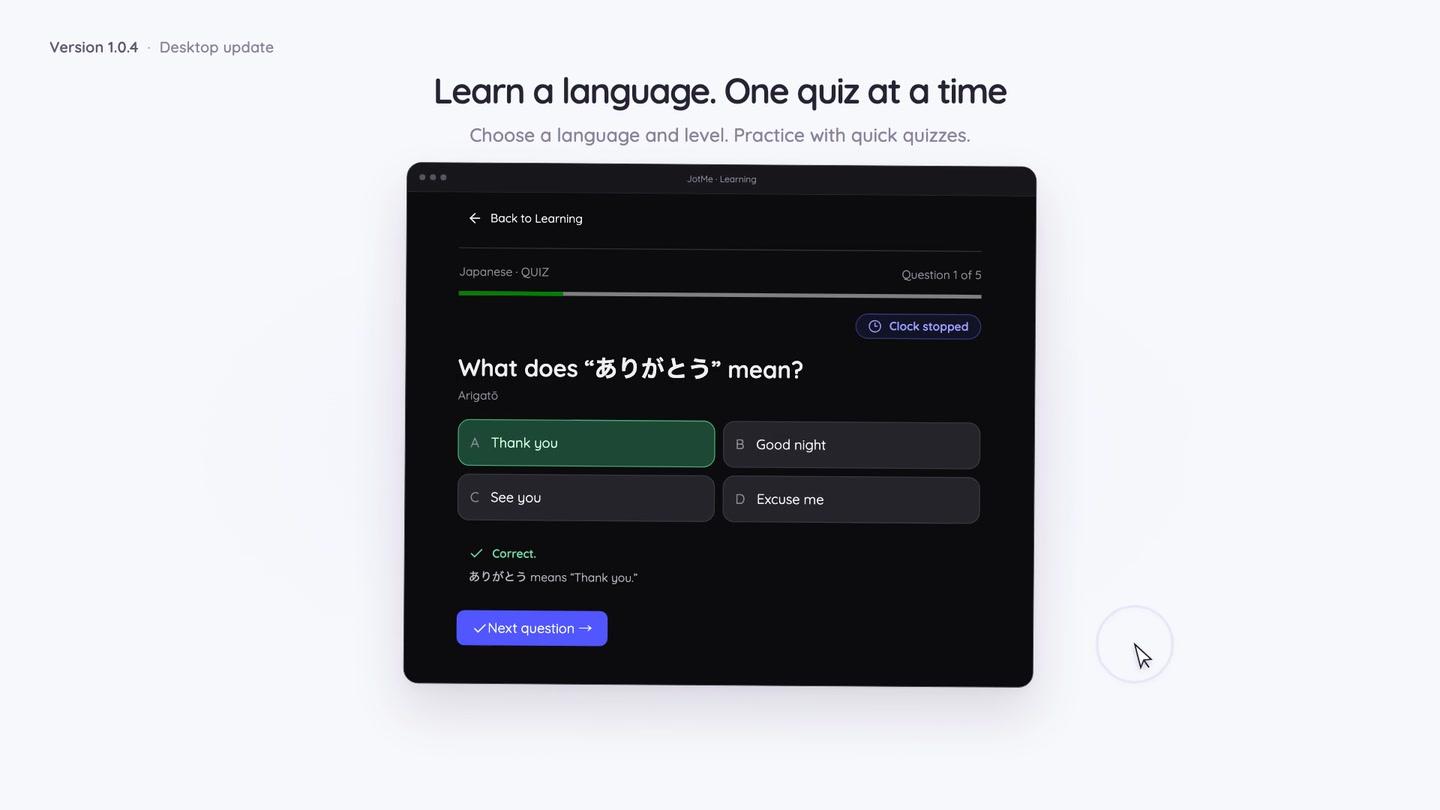
Keep learning alongside your peers
Join the leaderboard with a game name and learning language. See where you stand, work toward your next correct-answer milestone, and find motivation in other learners’ progress. Track your own correct answers, questions tried, and accuracy as you go.
See leaderboard and profile detailsKeep learning alongside your peers
Turn browsing time into a learning break
Choose the social-media sites or custom domains you want to spend less time on. Set your browsing interval and questions per break. When your active allowance runs out, JotMe closes the distracting tab and opens a quiz. Pause or switch off these optional breaks whenever you want.
Set up your learning breaksA little less scrolling
A little more learning
How to start learning a language
Start with your context
Open Your context on Home. Add your own brief or build context from meeting notes. Turn on automatic meeting-context updates only if you want them.
Choose your language and practice
Open Learning, choose a language and level, and start a quiz from your saved context. Enter a topic when you want to practice something specific.
Build your own learning rhythm
Review explanations, return to saved quizzes, and join the leaderboard. Set optional browsing breaks around the sites and intervals you choose.
Use cases
Bring it into the work you already do.

Prepare for a client conversation
Practice language inspired by the work background and vocabulary in your saved context.
Explore the use case
Build everyday language confidence
Choose a topic for travel or daily conversation and practice at your own level.
Explore the use case
Make practice part of your workday
Use optional browsing breaks to make room for short language quizzes.
Explore the use caseTrusted by 2,000 teams
Across 134 countries
From multilingual meetings to everyday teamwork. Hear from the people using JotMe.
 G2
 Chrome Web Store
“JotMe streamlines our multilingual meetings, ensuring seamless collaboration in our fast-paced work environment.”


“This bilingual feature streamlines note-taking at work, saving time and boosting efficiency in both languages.”


“Essential for non-fluent speakers; simplifies complex meetings with real-time translation and accurate transcriptions.”

 Upwork
“As my job involves translation and bridging cultures, I have found this tool as a game changer to my daily work.”


“Japanese was once a mystery to me, but this product made it clear and accessible with contextual understanding.”


“The translation we've needed for years – now a reality with JotMe!”


What JotMe Learning does
- Platforms
- JotMe desktop app for Mac and Windows
- Personalization
- Saved Your context profile: brief, context details, and key terms
- Difficulty
- Five levels, from Beginner to Advanced
- New quizzes
- Generating quizzes and requesting AI explanations uses chat tokens
- Saved quizzes
- Replay without generating a new set
Browsing breaks require supported browsers and desktop permissions. Check the token balance in Learning before generating quizzes.
View usage detailsHow does language learning in JotMe work?
Open Your context on Home to add a personal brief or build your profile from meeting notes. Then open Learning, choose a language and level, and start a quiz. JotMe uses the saved context to inspire relevant vocabulary and practice situations. You can enter a separate topic for a specific focus.
Where does my personal learning context come from?
Context-based quizzes use the brief, context details, and key terms in your saved Your context profile. You can add your own brief or build context from meeting notes. Automatic updates from new meetings are optional. An explicit learning topic is used instead of the saved profile for that quiz.
Can I practice vocabulary for my work?
Yes. Your saved context can inspire useful vocabulary and situations from your work. You can also enter a topic such as sales calls or your next presentation. The selected difficulty still governs the language level.
Does generating a quiz use my allowance?
Generating new quizzes and requesting AI explanations uses your chat-token allowance. Check the balance in Learning before starting. Replaying a saved quiz does not require generating a new set. See pricing and usage limits for plan details.
Do I have to turn on browsing breaks?
No. You can start practice quizzes whenever you want. Optional browsing breaks require the installed macOS or Windows app and the permissions shown in Learning. They count active use of selected websites; background tabs and idle time do not count. Browsing activity stays on your device. Firefox and native social apps are not supported.
What is visible on the leaderboard?
If you join, your game name, country, learning language, bio, and score are public. Your account name and email stay private. Open Leaderboard in Learning to join or edit your profile.