Resources
WhatsApp vs Signal: Best Message App for Businesses

Narmada Kajla
July 21, 2026
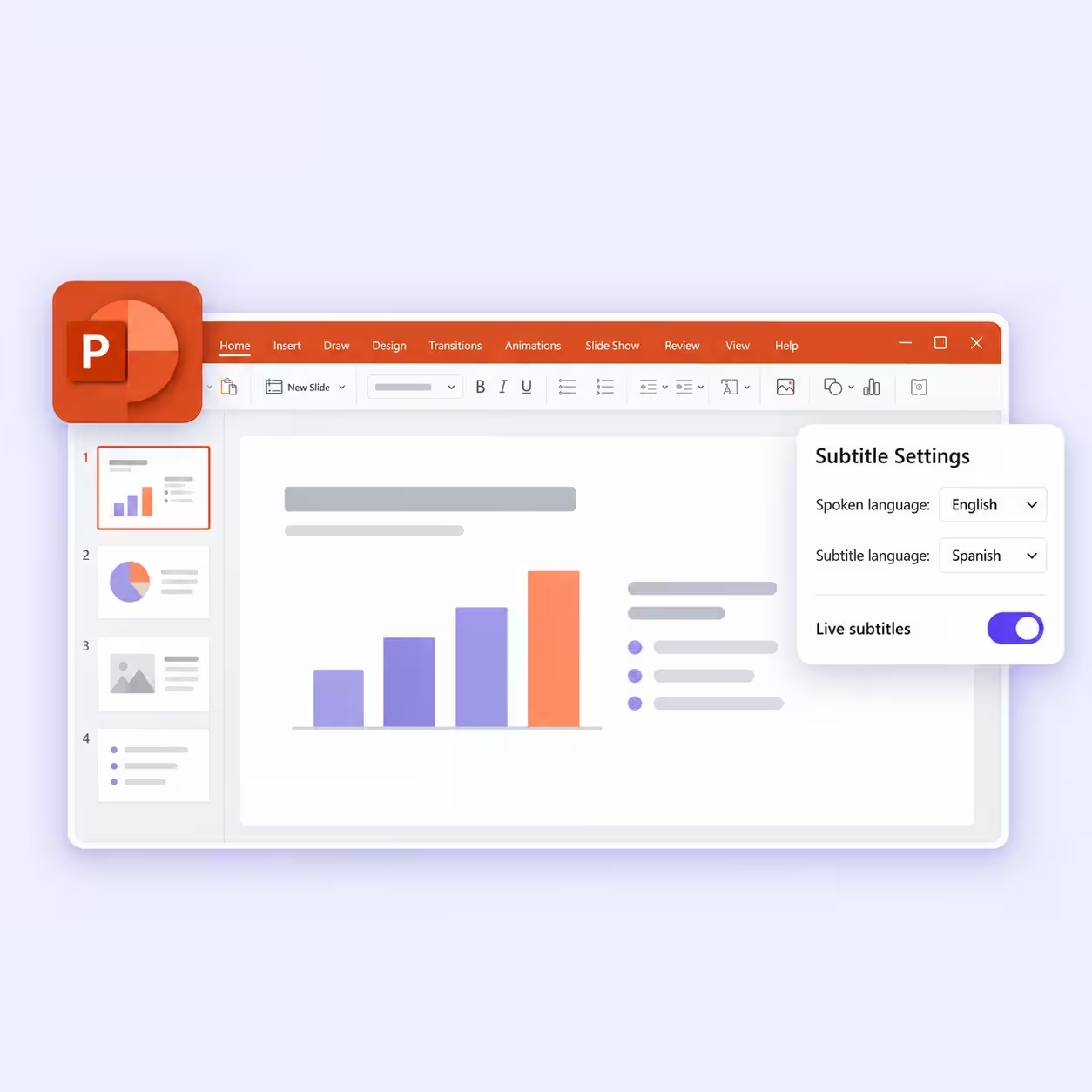
WhatsApp recently introduced Web Calling, allowing users to make and receive audio and video calls directly from WhatsApp Web without downloading the desktop app. Announced on July 28, 2026, the update brings browser-based calling along with features like screen sharing, reactions, and a dedicated Calls tab.
Web calling makes WhatsApp even more accessible for businesses that rely on browser-based communication. However, like Signal, WhatsApp still does not provide built-in real-time translation for multilingual conversations.
If you are thinking whether Signal is better than WhatsApp for your business, then the answer depends on more than security. WhatsApp is the better messaging app for businesses that need customer reach, a catalog, and API-driven automation. Signal works as a WhatsApp alternative for teams that prioritize privacy over advanced business features.
For teams that work with multilingual teams and work more on desktops, another factor matters just as much: how easily your team can collaborate across languages. That is where combining a messaging app with an AI translation tool, like JotMe, can create a much smoother workflow.
This WhatsApp vs. Signal guide compares the two messaging apps across desktop usability, messaging features, collaboration, business capabilities, privacy, and multilingual communication to help you choose the best option.
What is Signal and How Does It Work
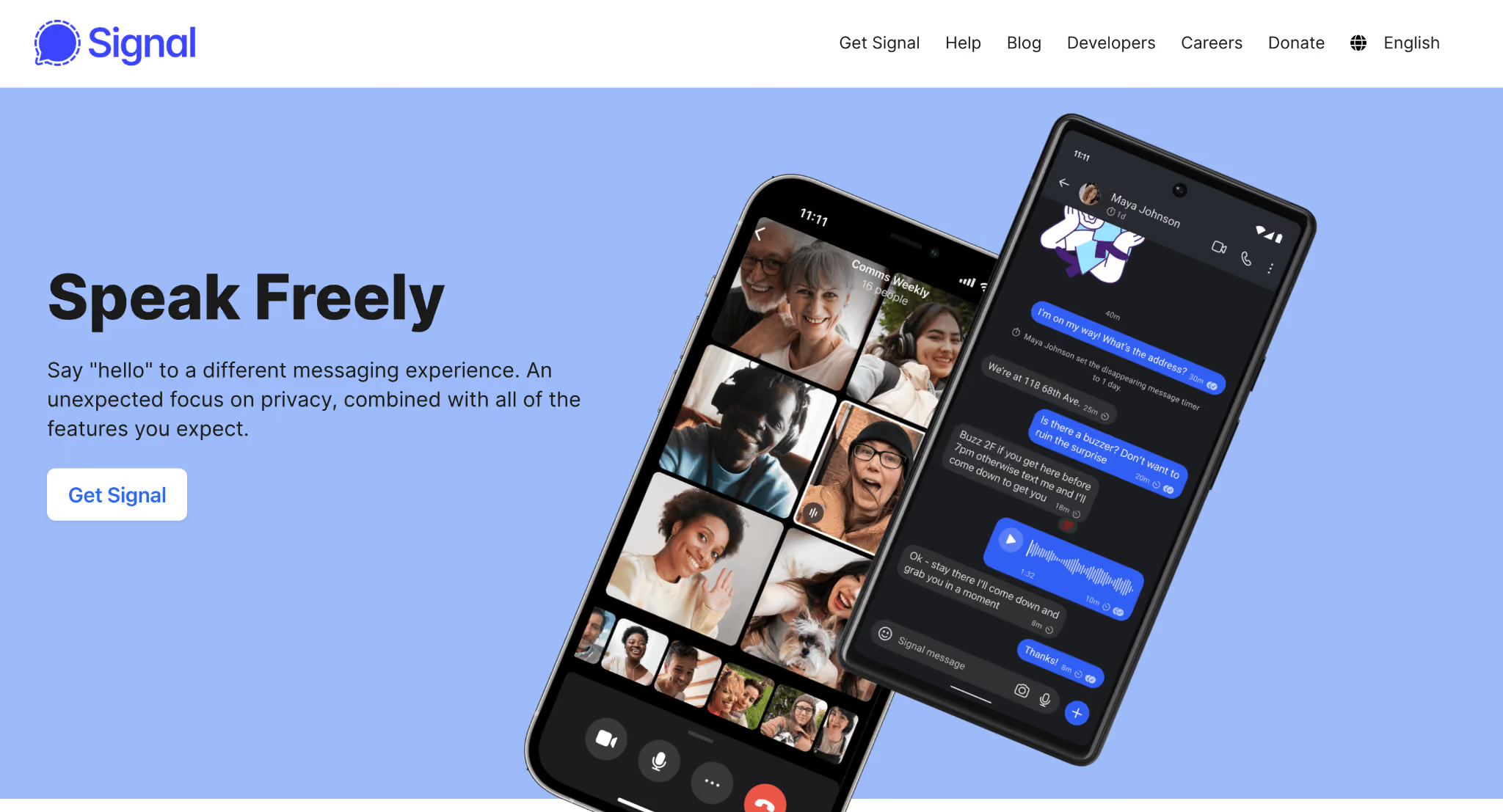
Signal is a free messaging app built around one goal: protecting user privacy. Developed by the nonprofit Signal Foundation, it offers end-to-end encrypted messaging, voice calls, video calls, and file sharing without collecting extensive user data. Unlike many messaging platforms, Signal is open source, allowing security researchers to inspect its code.
Businesses often choose Signal as a WhatsApp alternative when confidential conversations and privacy are top prioritize.
For example:
- Legal firms sharing sensitive documents
- Healthcare organizations discussing protected information
- Executive teams handling confidential projects
- Security-focused companies communicating internally
Signal Desktop lets employees continue conversations from Windows, macOS, and Linux after linking a desktop device, making it practical for office-based work.
What is WhatsApp and How Does It Work
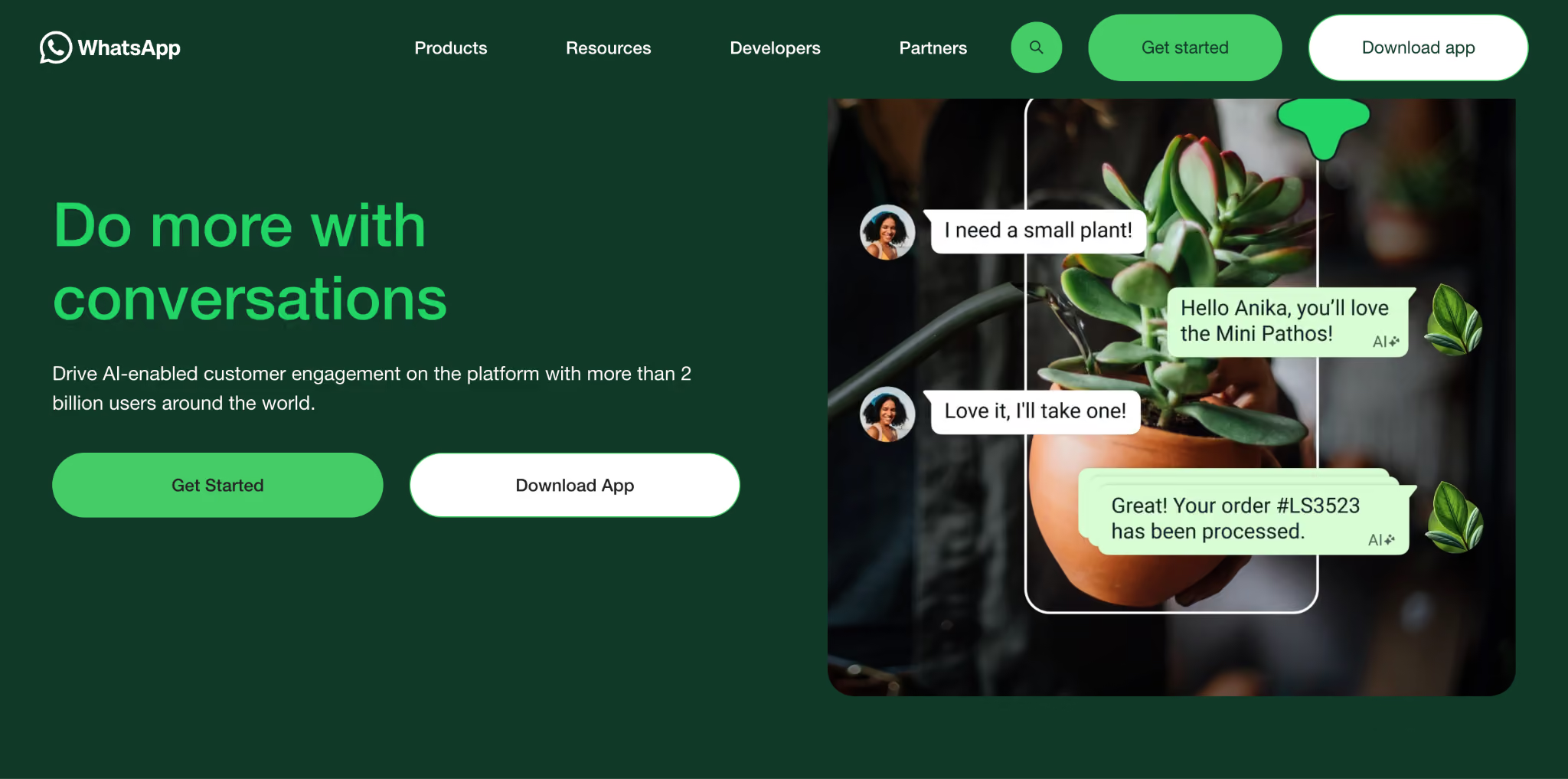
WhatsApp is the world's most widely used messaging platform and has become a standard communication channel for businesses. Along with personal messaging, it offers WhatsApp Business, business profiles, catalogs, automated replies, and API integrations for larger organizations.
Recent WhatsApp updates added Web Calling, usernames, AI-powered writing assistance, voice message transcripts, and additional productivity improvements that make the platform more flexible for business communication.
Because millions of customers already use WhatsApp every day, businesses rarely need to convince people to install another app.
WhatsApp vs. Signal at a Glance
WhatsApp vs. Signal: Which Messaging App is Best for Businesses
WhatsApp is the better choice for most customer-facing businesses, while Signal is better for organizations that prioritize privacy over business features.
The decision often comes down to how your team communicates.
If your employees interact with customers throughout the day, WhatsApp offers a more familiar experience because most customers already have it installed.
If your conversations involve confidential projects, legal discussions, or sensitive client information, Signal's privacy-first approach becomes much more attractive.
Most customers are already using WhatsApp.
Your sales team can start conversations without asking customers to download another messaging app. That reduces friction during onboarding and customer support.
Signal removes many distractions found in other messaging apps.
If your company mainly communicates internally, employees often appreciate the cleaner interface because conversations stay focused.
One thing is common in both WhatsApp and Signal desktop apps: they do not provide a complete multilingual communication workflow for businesses.
Think this way: Your customer success team had a conversation over WhatsApp or Signal, and they received a message throughout the day:
- Chinese product questions
- Japanese partnership requests
- Spanish customer support inquiries
Employees typically have to:
- Copy messages
- Open another translator
- Translate
- Copy responses back
That process slows everyone down.
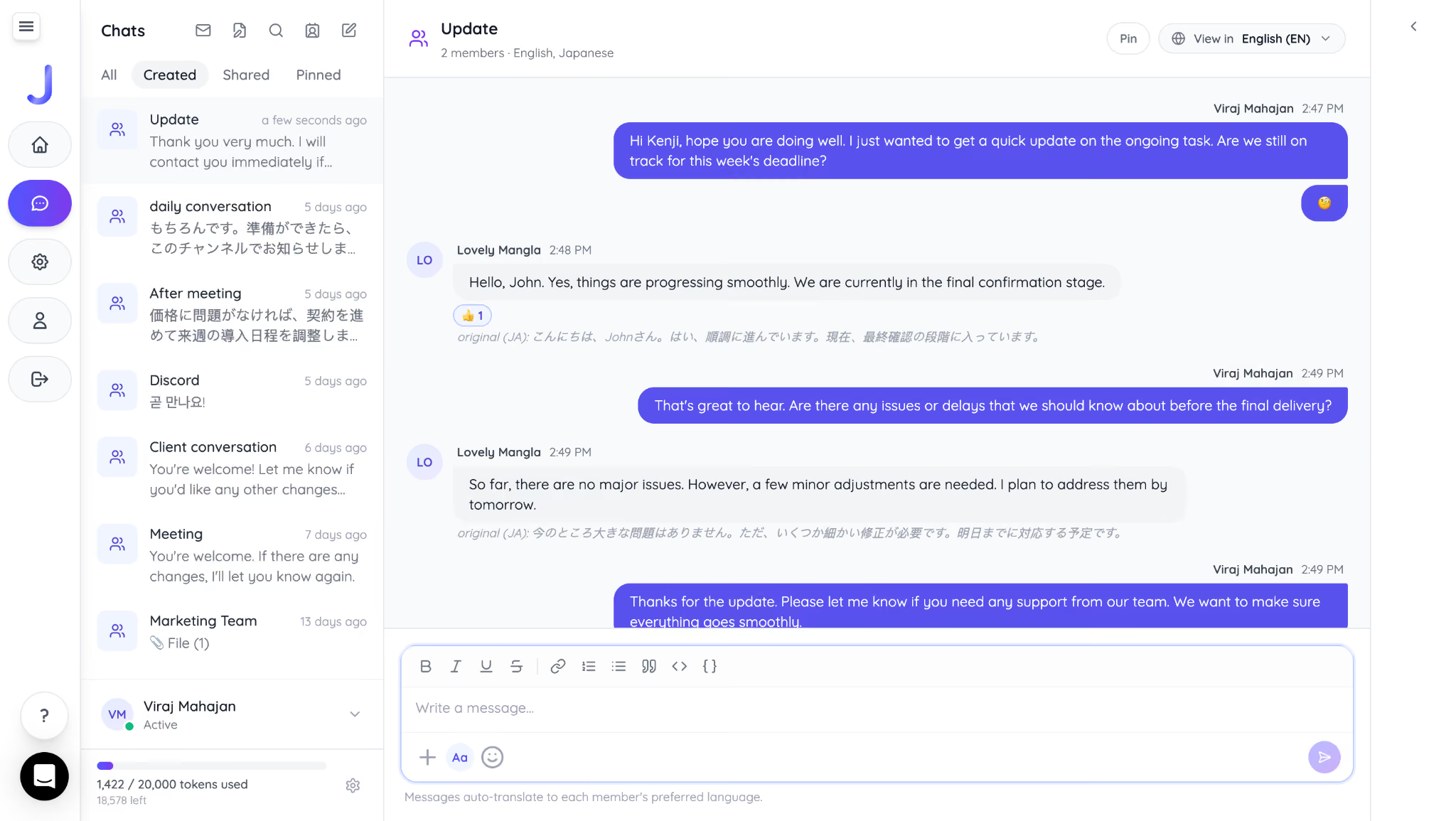
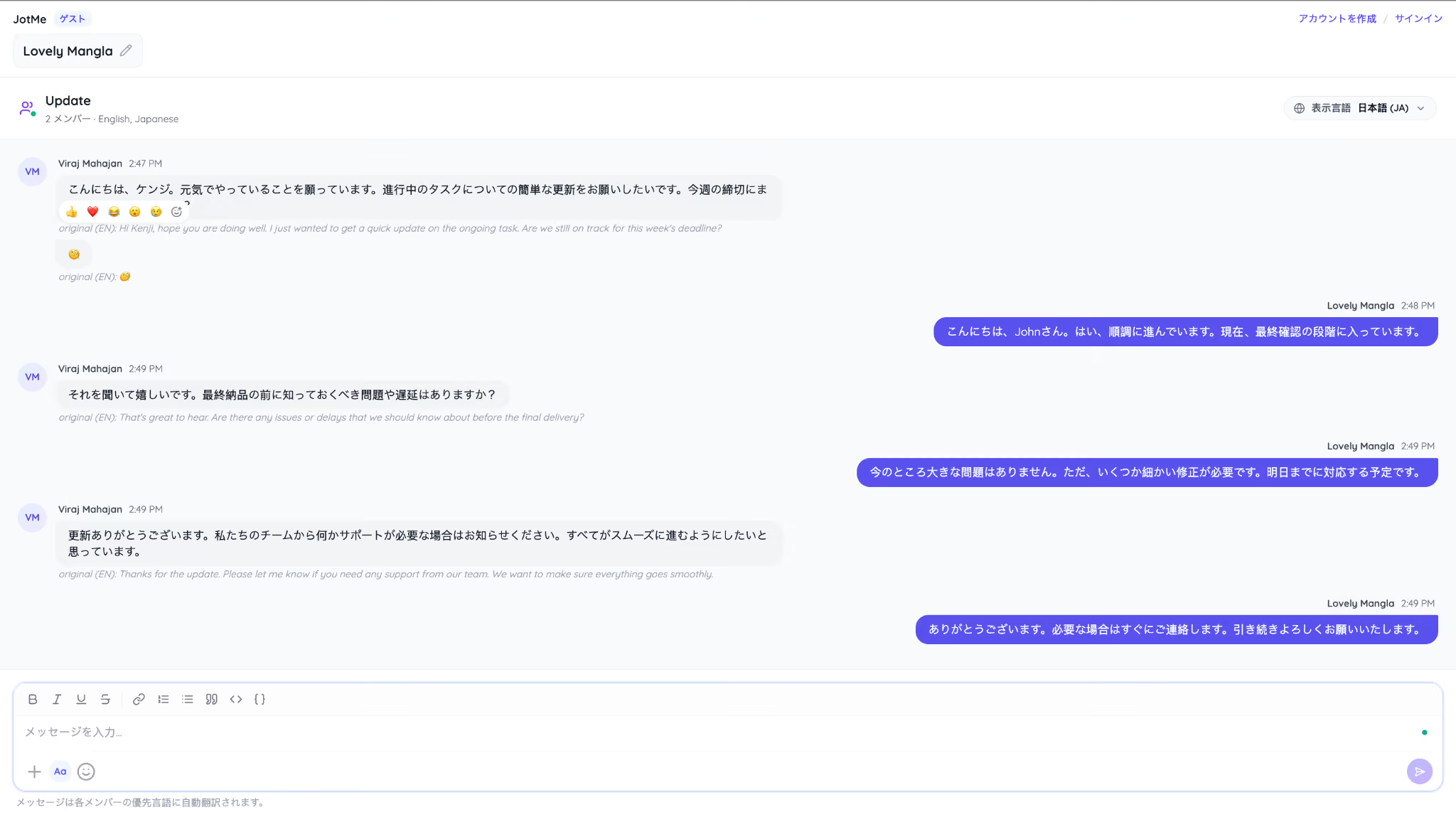
Instead, you can use JotMe AI chat, which offers seamless chat, file upload, and privacy with GDPR compliance. With JotMe, you do not need to use a different translator. If you message in Hindi or English, your Japanese client will see your message in Japanese, and you will receive his message in English. This helps teams communicate clearly across languages, improve collaboration, and make cross-cultural communication in business more efficient.
See how you get real-time text translation in English:
Here is how your client reads all your messages in Japanese:
WhatsApp vs. Signal: Which App Has Better Desktop Features
WhatsApp currently offers more built-in business functionality, including browser-based calling through WhatsApp Web and dedicated features through WhatsApp Business. Signal Desktop delivers the same privacy protections as its other clients without exception. If your team runs its workday from a computer, this comparison carries more weight than most.
Customer support teams get similar practical value from WhatsApp's quick replies and labels, both of which sync across every linked device. Employees who need to sort and manage dozens of open conversations at a time will notice the difference immediately.
Signal, on the other hand, gives every desktop user the exact same privacy guarantees as its other clients, with no watered-down version of encryption or data handling for desktop use. That consistency matters for legal teams, HR departments, or any group discussing sensitive information from an office computer.
Employees managing conversations across both apps will notice one more practical difference. WhatsApp Desktop keeps every chat searchable and organized with labels, which helps a support agent juggling dozens of open tickets find the right conversation fast.
Signal Desktop keeps search functional too, but it skips the labeling system entirely, since Signal treats every added metadata field as one more piece of information that doesn't need to exist.
Here is where the desktop story runs for global teams. You can pick WhatsApp Web, Desktop or Signal Desktop, and the result stays the same: neither app understands a language it wasn't typed or spoken in. If your sales rep is closing a deal with a client in Tokyo, the conversation still depends on both people finding a shared language.
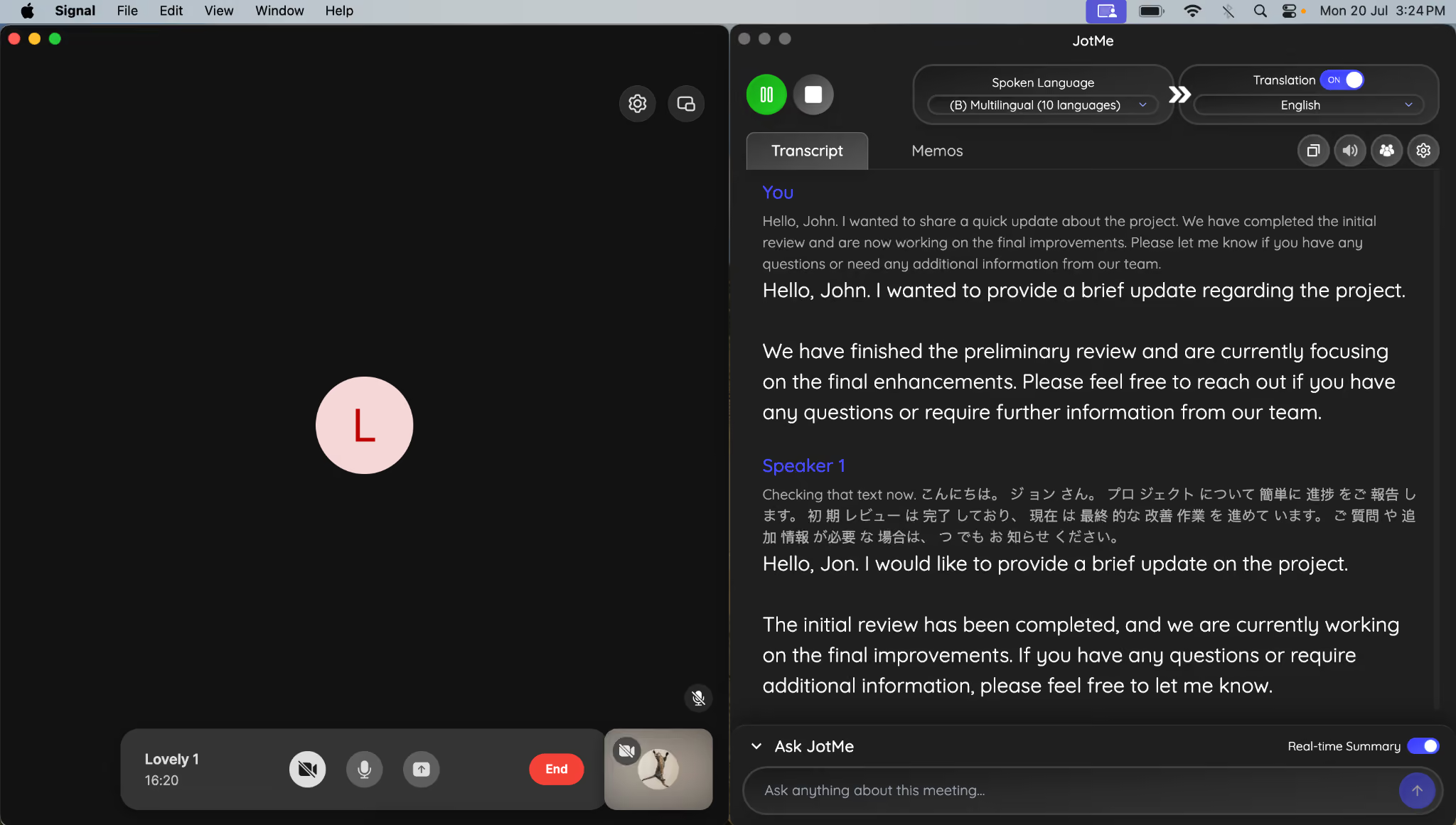
Here, JotMe can bridge the language gap with live translation in over 200 languages, including Spanish, Korean, Arabic, Chinese, Japanese, and more.
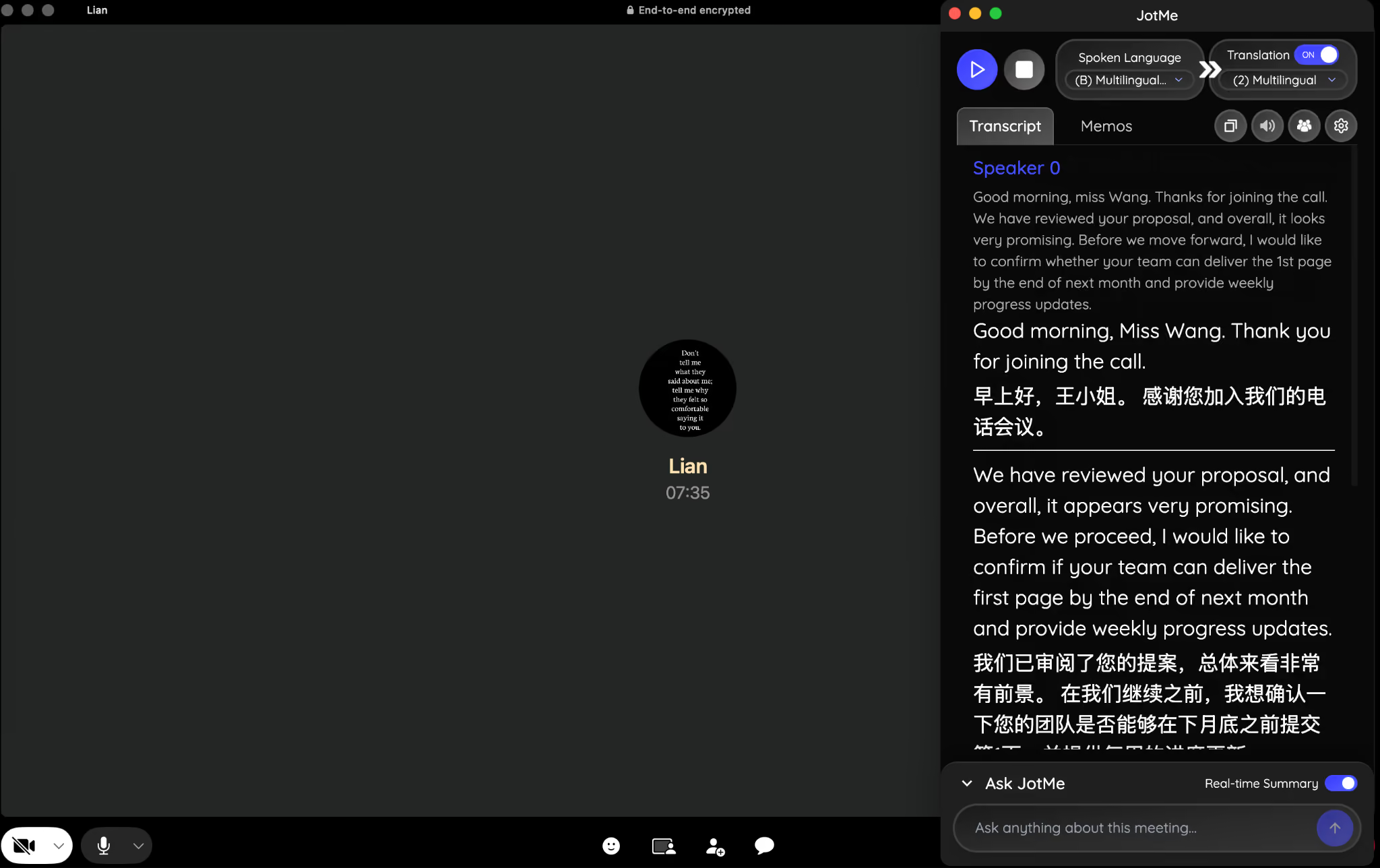
Your client calls you on WhatsApp or Signal, and you open JotMe inside. It will record the call and translate it in real time without adding a bot to the call. If you are a team of 5 people and all are speaking different languages, JotMe gives you a multilingual option for spoken language. You all will get a translation into English, or you can choose all spoken languages as output. Chinese participants will see an English to Chinese live translation, and Japanese participants will see a live Japanese translation.
WhatsApp vs. Signal: Which App Offers Better Messaging Features
WhatsApp offers a richer messaging experience for most businesses because it includes features like polls, communities, broadcast messaging, voice message transcripts, and AI writing assistance that Signal doesn't currently offer. Signal focuses on secure, distraction-free messaging and includes the core communication features most teams need.
WhatsApp's voice message transcript feature converts a voice message to text, which helps when playing audio isn't practical. Voice to text currently supports a limited set of languages, including English, Spanish, Portuguese, and Russian, and it processes everything on the device rather than sending audio to a server.
Signal's disappearing messages give you more granular control, since the timer can be configured per conversation and applies from the moment each recipient reads the message. For businesses that discuss confidential deal terms or legal matters, that level of control adds a meaningful layer of protection.
Polls show up on both apps now, and both let a team gather quick input without leaving the conversation to open a separate survey tool. The feature works nearly identically on each platform, so this comparison rarely factors into a final decision either way.
WhatsApp vs. Signal: Which App is Better for Group Chats and Team Collaboration
WhatsApp is stronger for larger communities and customer-facing groups, while Signal works better for smaller, privacy-focused teams. The difference comes down to scale vs. control.
WhatsApp Communities let you organize several related groups, such as different departments or client accounts, under one structure. That makes it a natural fit for businesses managing large customer bases or multiple project teams at once.
Signal keeps things tighter. Its 1,000-member group cap and lack of a broadcast feature signal that it was designed for coordinated teams rather than mass communication. Every admin action requires explicit approval, which adds friction but also adds accountability.
JotMe Chat for Multilingual Communication
Group collaboration gets harder the moment your team spans more than one language, and this is a problem neither WhatsApp nor Signal solves on its own. JotMe Chat addresses this directly by translating text conversations between team members or clients in real time.
Here's how text translation plays out in practice. You type a message in English inside your project group. Your colleague in Guangzhou receives it instantly translated into Chinese, and when they reply, you read their response back in English, with no copying text into a separate translator and no waiting for someone to paraphrase.
See how you get text in English:
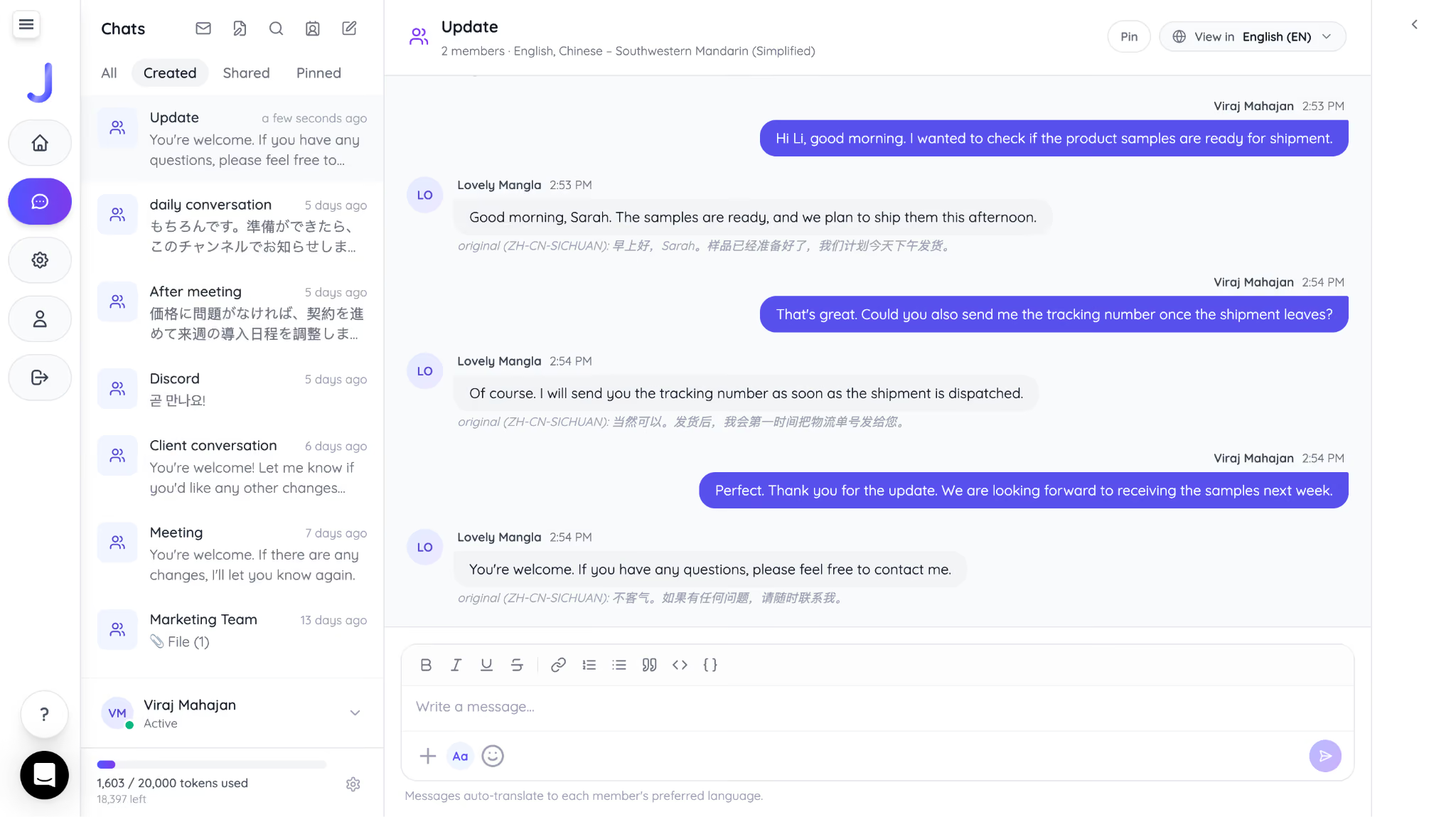
Your client is reading messages in Chinese in real time:
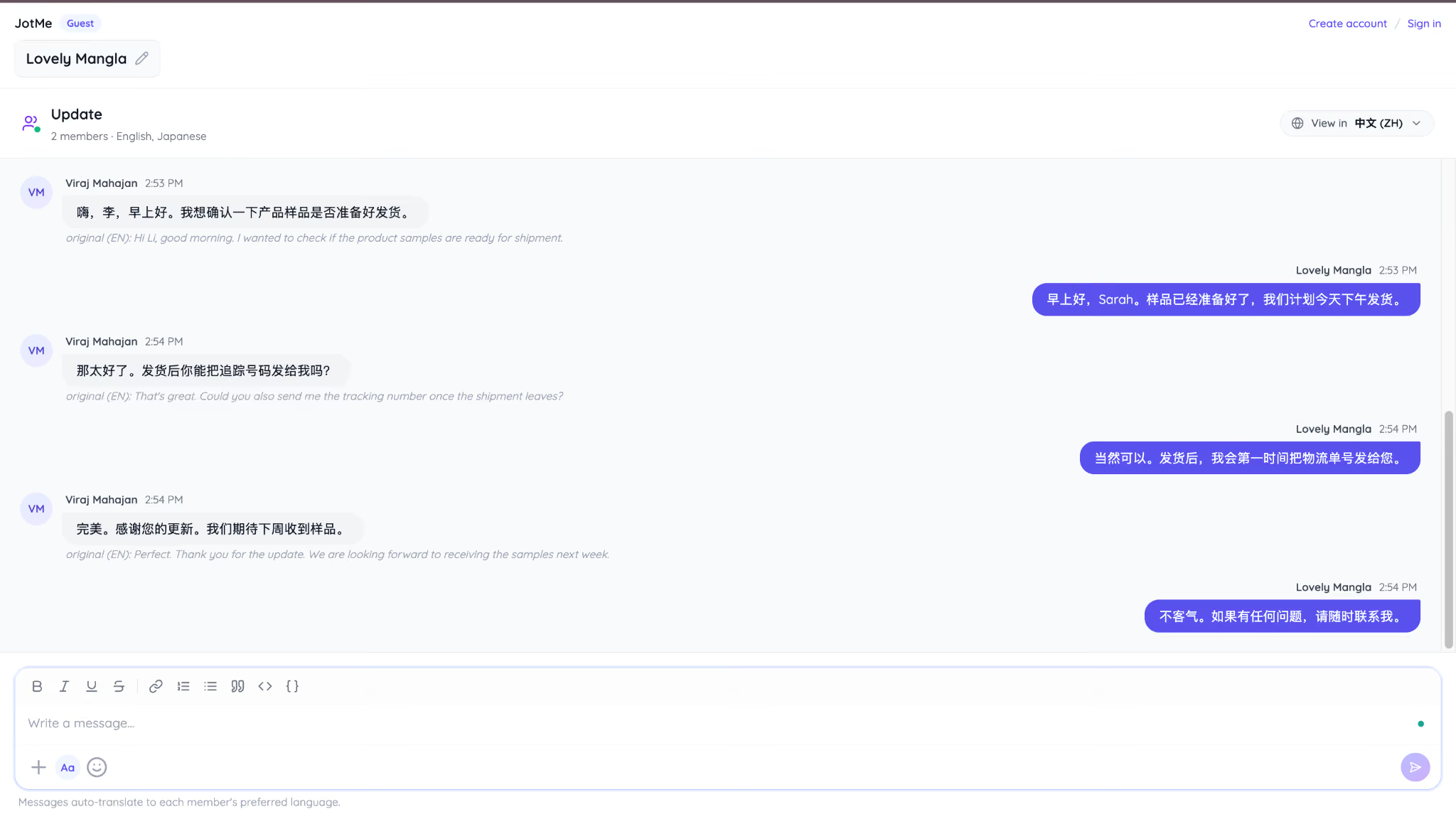
JotMe Chat works from the desktop app, which means it fits directly into the same workflow your team already uses for WhatsApp Desktop or Signal Desktop. Instead of adding another communication channel, it removes the language barrier in the workplace from the one you already rely on.
WhatsApp vs. Signal: Which App is Better for Business Communication
WhatsApp is a stronger business platform because it includes dedicated business tools, customer messaging solutions, and API integrations. Signal focuses on secure messaging but doesn't offer a dedicated business ecosystem.
If your business regularly communicates with customers, WhatsApp provides features that Signal simply does not offer.
Many companies already use WhatsApp as their primary customer communication channel.
For example, an online furniture store receives product inquiries, sends invoices, confirms deliveries, and answers support questions without asking customers to install another application.
WhatsApp Business also integrates with CRM platforms and automation tools, making it easier to manage thousands of customer conversations.
Signal doesn't include customer-facing business features. Instead, it works best as a secure communication platform for internal teams.
Companies in healthcare, legal, and financial services, handling sensitive discussions, often appreciate Signal's limited data collection and open-source architecture.
WhatsApp vs. Signal: Which App Handles File Sharing Better
WhatsApp handles larger files more comfortably, while Signal keeps stricter limits in line with its privacy-first design. Document-heavy teams will feel this difference quickly.
WhatsApp's 2GB file limit covers most business documents without a second thought, from presentation decks to recorded training videos. Its optional cloud backup also means your team doesn't lose chat history if a device is lost or replaced.
Signal caps files at 100MB, which covers contracts, spreadsheets, and most business documents but rules out large video files. Signal also skips cloud backup by default, a decision tied directly to its privacy stance, since a cloud backup could become a point of exposure. Signal recently began rolling out an opt-in secure backup feature, though it started in beta and desktop support is still coming.
WhatsApp vs. Signal: Which App Provides Better Privacy and Security
Signal provides stronger privacy protections across the board, making it a strong WhatsApp alternative for privacy-focused users, while WhatsApp offers solid encryption paired with broader data collection practices tied to the Meta ecosystem. This is Signal's strongest category by a wide margin.
Is Signal safer than WhatsApp? For privacy-focused businesses, the answer is yes, but the difference comes from data protection practices rather than message encryption alone.
Both apps run on the same underlying encryption technology, so message content stays private in transit either way. The real difference shows up in everything around the message.
Signal's sealed sender technology hides who is messaging whom from Signal's own servers, and its fully open-source codebase means independent researchers can audit every line. WhatsApp, as part of Meta, collects behavioral and device data that feeds into the broader Meta advertising ecosystem, even though message content itself stays encrypted.
For teams handling confidential client data, legal documents, or sensitive negotiations, yes. Signal's minimal data collection and transparent codebase give it a meaningful edge over WhatsApp's broader data practices.
This does not mean WhatsApp is unsafe for everyday business use. Message content stays protected by the same proven encryption Signal uses, and most businesses never run into a scenario where Meta's data collection creates a real problem. The distinction matters most for regulated industries, legal practices, or any team where client confidentiality carries contractual or legal weight.
WhatsApp vs. Signal: Which App Has Better Voice and Video Calling Features
WhatsApp supports larger group video calls, while Signal keeps calling simple and private without exception. Both apps deliver reliable call quality for standard business use.
WhatsApp's new Web Calling update also improves its desktop calling experience by allowing users to start audio and video calls directly from the browser. This gives businesses more flexibility when joining client conversations from shared computers or work devices where installing apps may not be possible.
WhatsApp's desktop and web screen sharing makes it practical for sales demos, product walkthroughs, or support sessions because teams can move from a chat directly into a video call with screen sharing without switching to another tool. This can help save time during client conversations.
Signal also supports screen sharing during calls, along with call links that allow people to join without creating a group chat beforehand. These call links do not reveal participants' phone numbers, which adds an extra layer of privacy when businesses need to connect with external contractors, vendors, or clients for one-time conversations. For businesses looking for a WhatsApp alternative focused on secure communication, Signal offers a privacy-first option with fewer data-sharing concerns.
How to Use JotMe with WhatsApp
When having a WhatsApp call with your teammates, open JotMe side by side and see how the best AI note taker works seamlessly and translates WhatsApp calls:
Step 1: Open WhatsApp and JotMe on the web or desktop. Choose Spoken language (multilingual) and translation language.
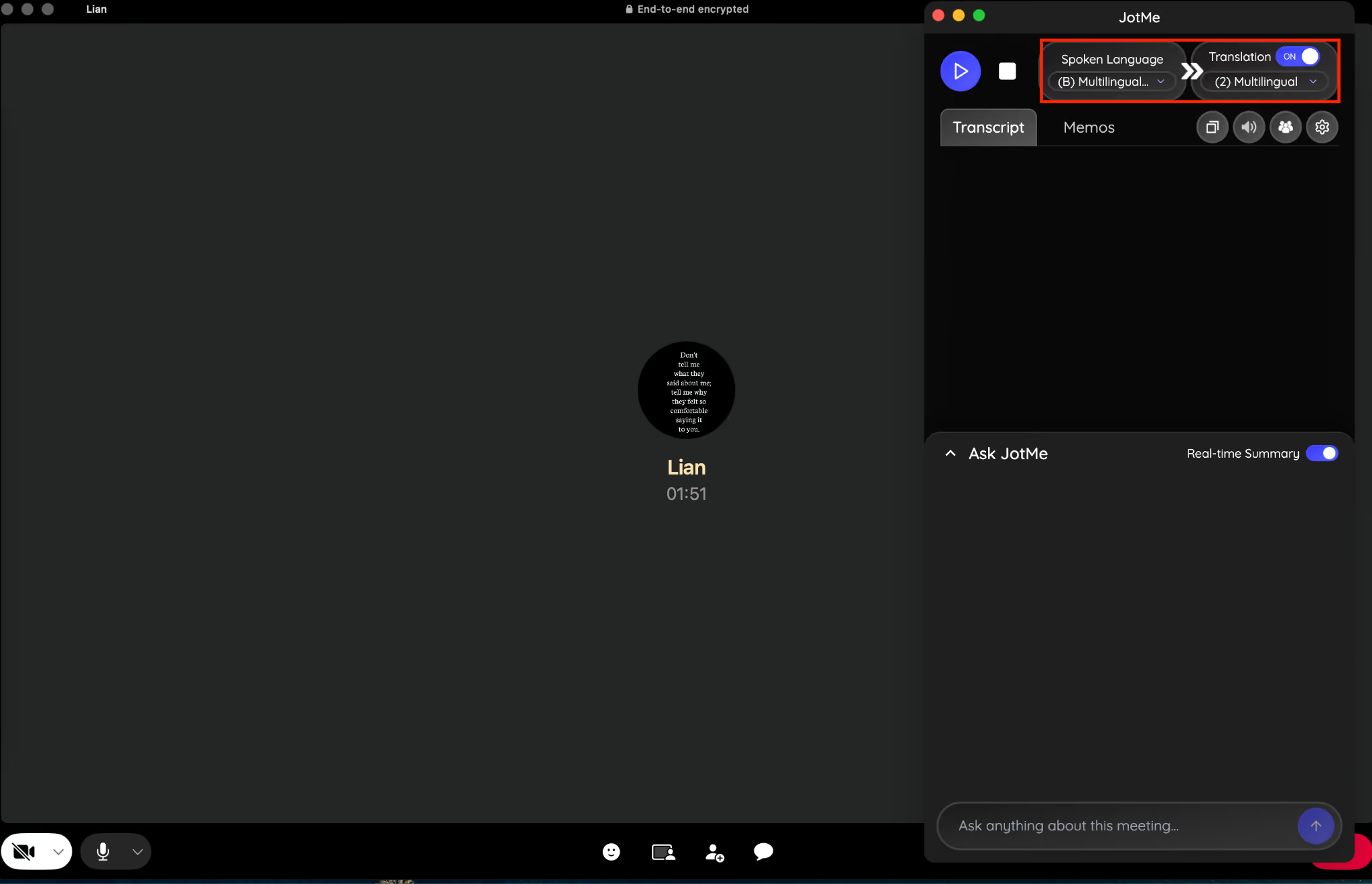
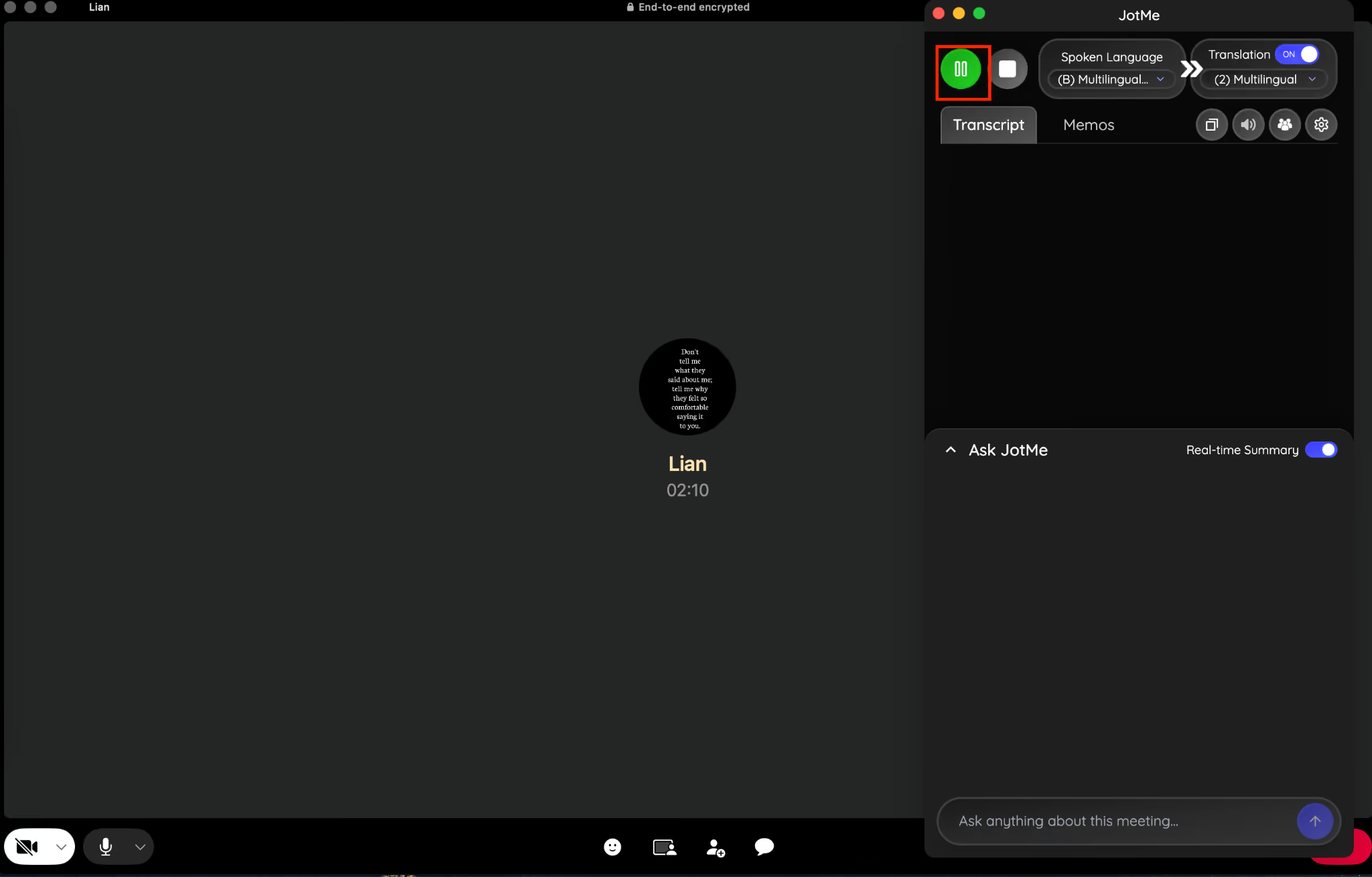
Step 2: Start a voice or video call and click the Start button on JotMe.
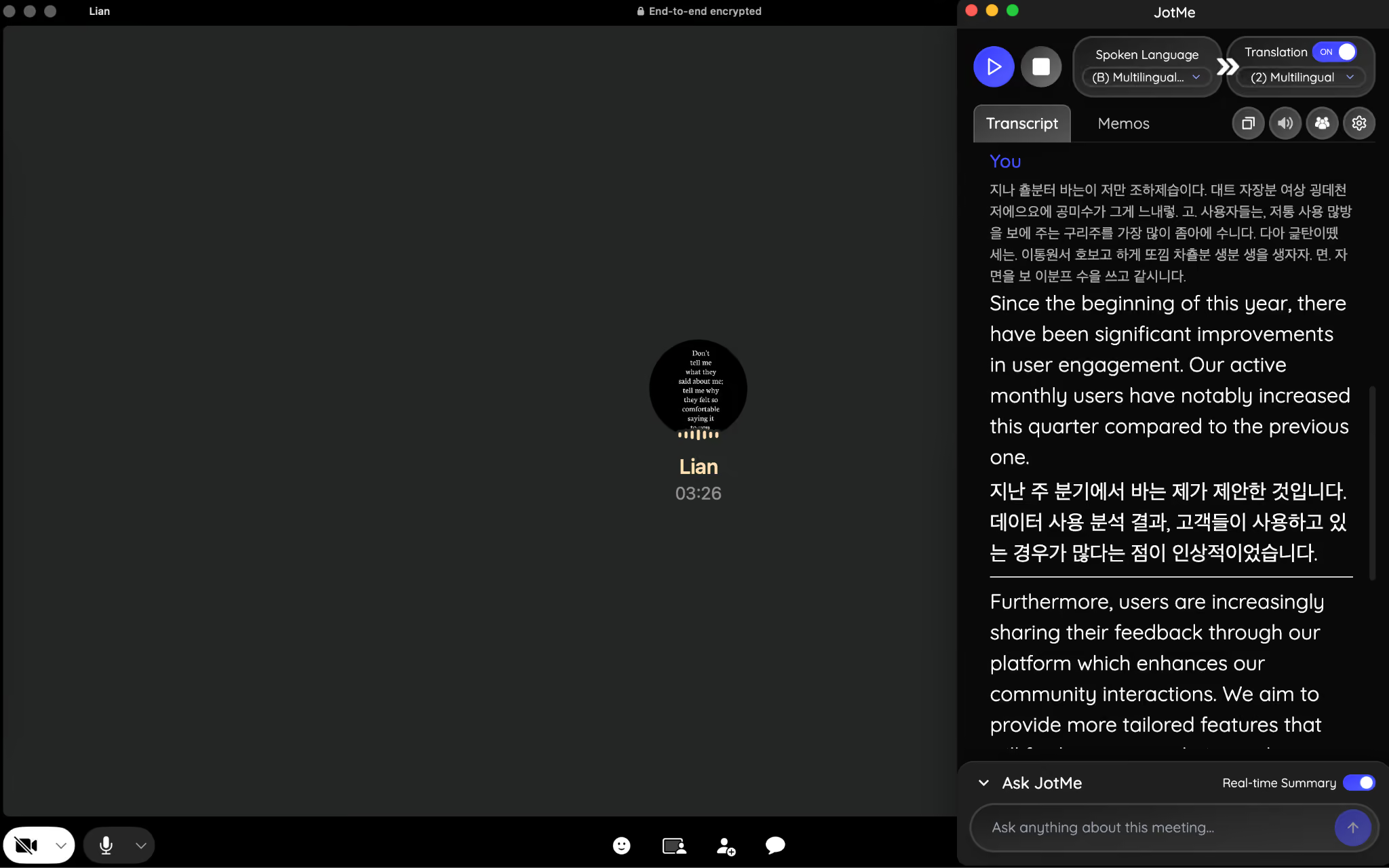
Step 3: When you start speaking in English and the Korean client speaks in Korean, you and the Korean client will see live translation from English to Korean and from Korean to English with 1-second latency.
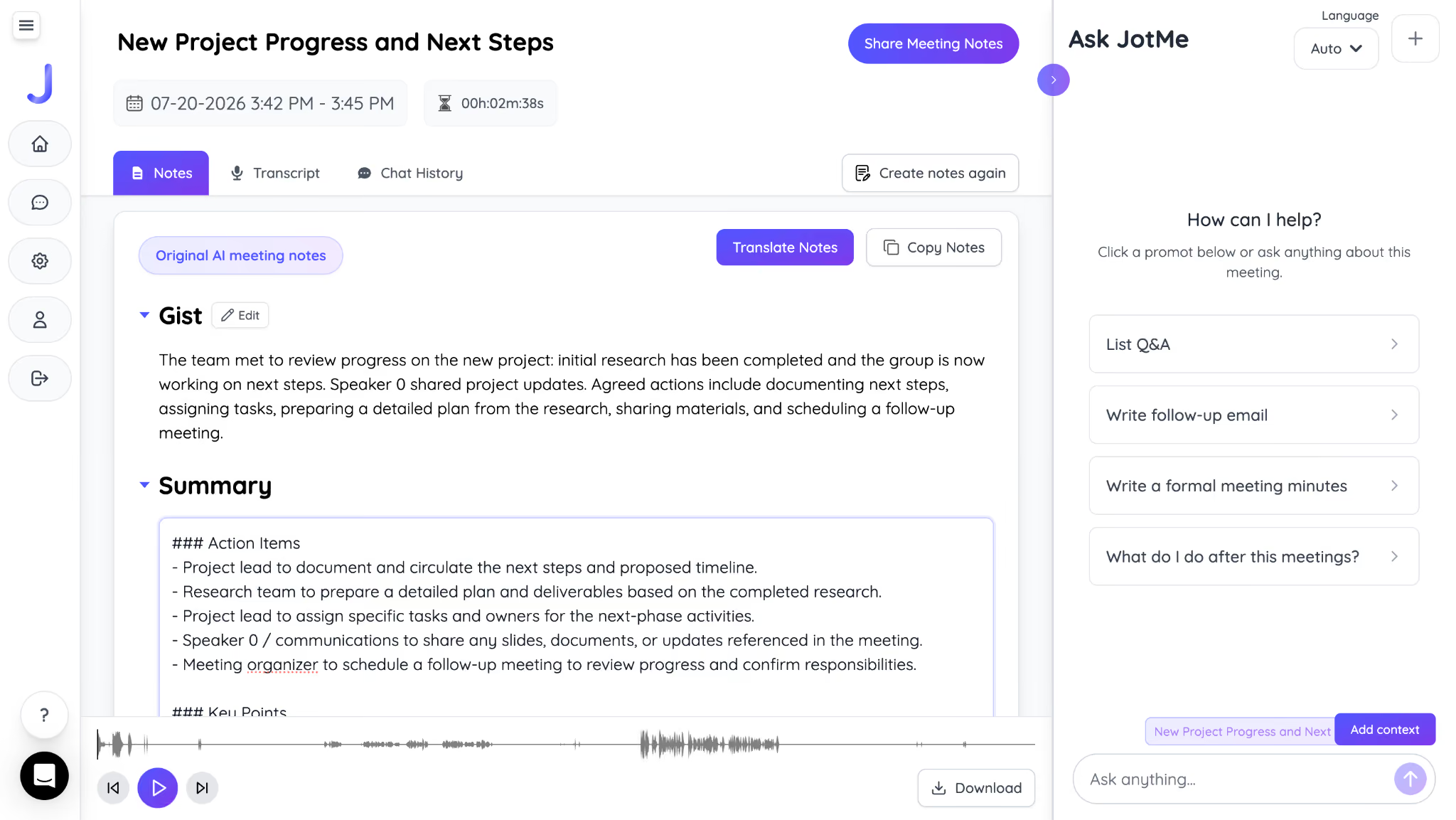
Step 4: Once you're done with the call, JotMe will generate the meeting notes and a detailed summary.
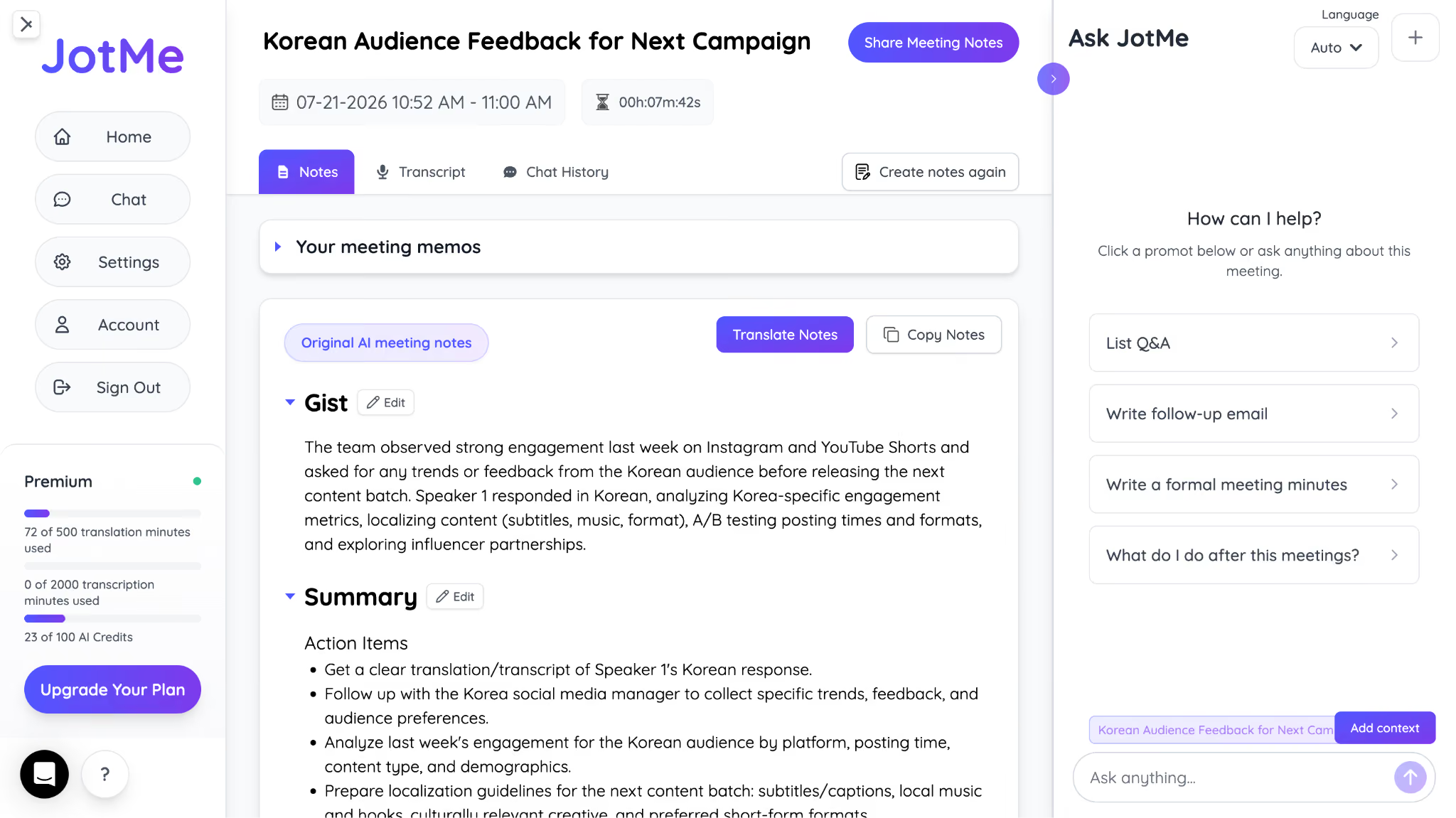
Step 5: If you want to send a follow-up email to your client, Ask JotMe will create an email based on the discussion.
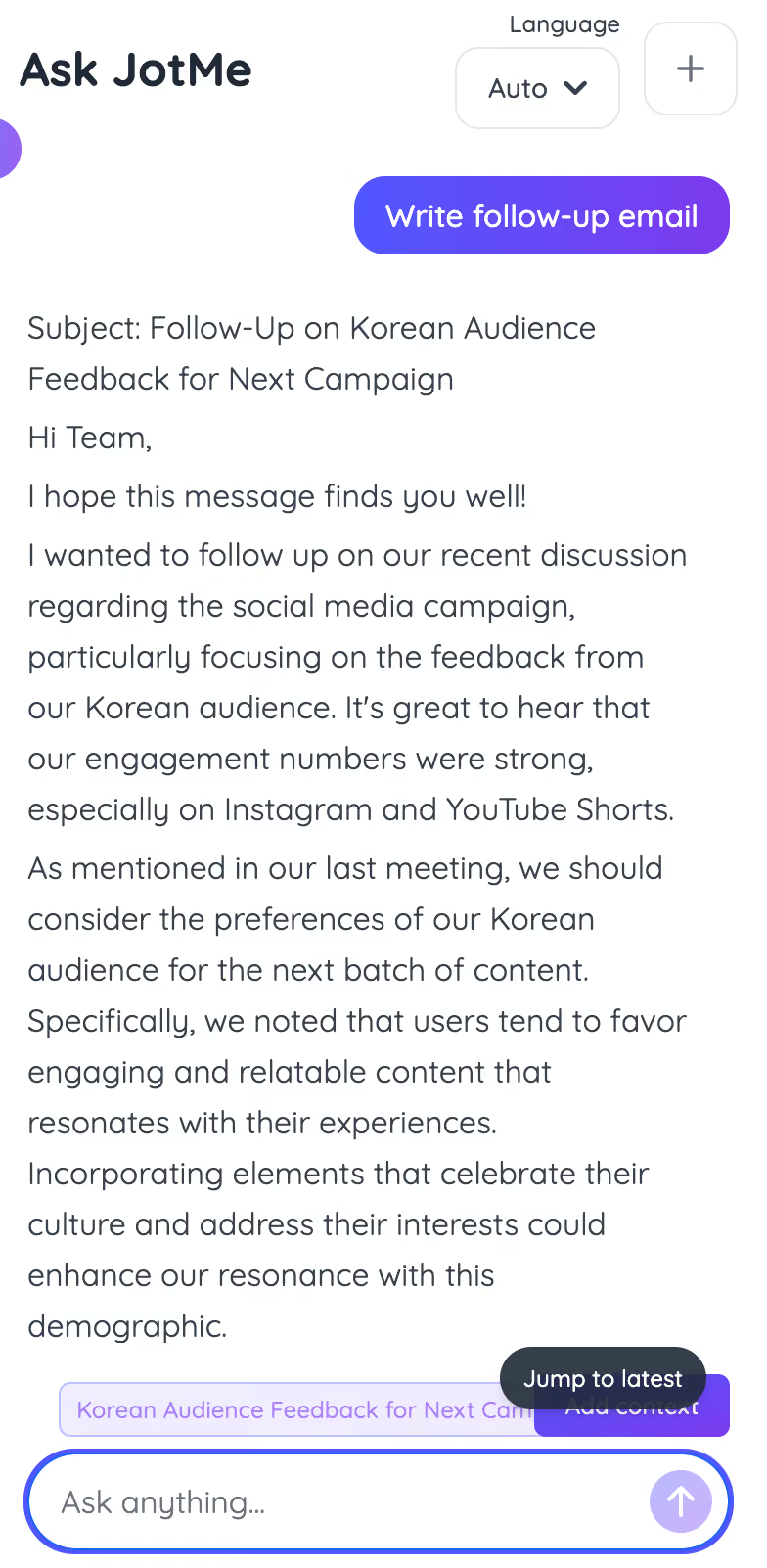
How to Use JotMe with Signal
Step 1: Open Signal and JotMe. Select the spoken language. If 4 people are speaking different languages, choose Multilingual as spoken and English as the outcome.
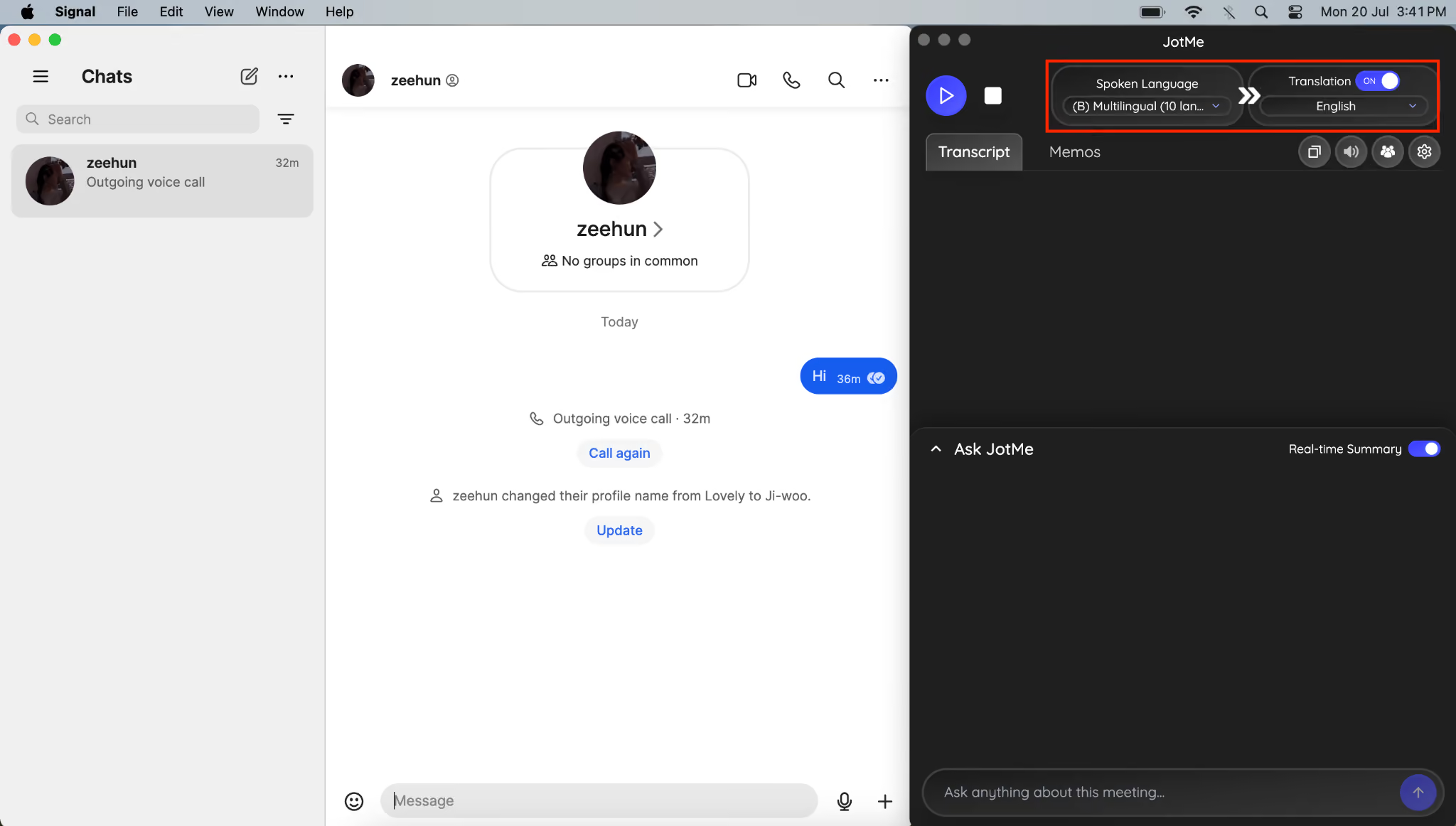
Step 2: Start the meeting and tap the start button in JotMe.
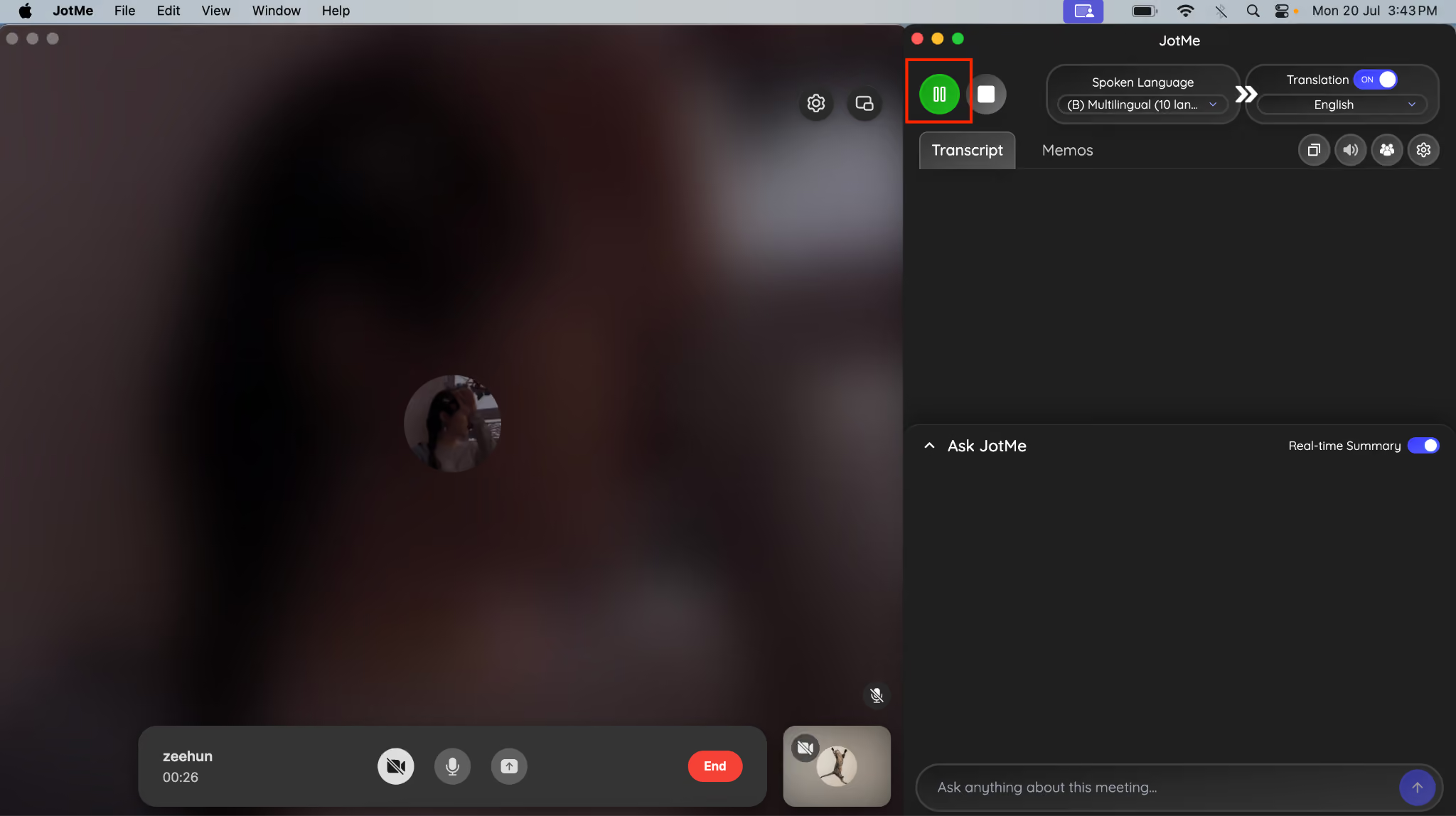
Step 3: JotMe will provide you with real-time translation into English so you all can stay in the moment and not miss any information.
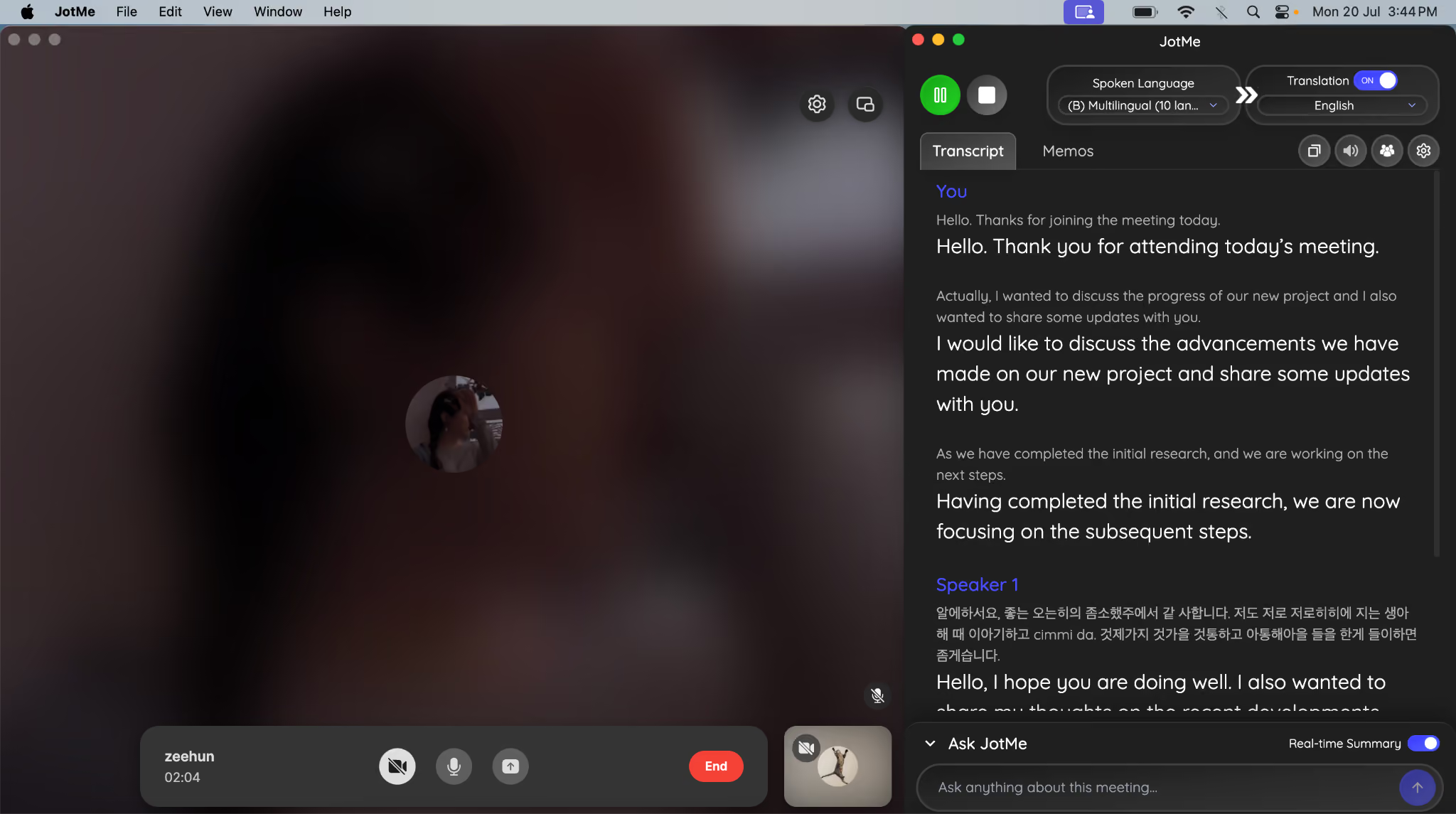
Step 4: When the call ends, you can share the AI meeting notes and summary with your clients in their languages.
WhatsApp vs. Signal: Which App Works Better With AI Tools for Meetings and Translation
Neither app works better with a live translation app on its own, since neither one offers real-time translation as a built-in feature. This is the gap that defines the rest of this comparison.
Messaging apps are useful for everyday conversations, but global teams need more than a chat window. Businesses increasingly rely on AI tools for:
- Real-time translation during calls
- Meeting transcription
- AI-generated summaries
- Multilingual communication
- Faster collaboration across languages
Here's the practical reality: your business can keep using WhatsApp or Signal exactly as it does today for day-to-day messaging, while running JotMe alongside either app for the moments when language becomes a barrier.
Picture a quarterly client call where your account manager speaks English, and the client speaks Spanish. JotMe delivers a live Spanish-to-English translation during the call, then produces a bilingual transcript afterward, so both sides can review exactly what was discussed in their own language.
Now picture the same setup with a client in Shanghai. JotMe handles Chinese-to-English translation with the same real-time accuracy, adapting to context and business terminology rather than translating word for word. Your next call might run in Japanese, Spanish, or Chinese, and the workflow on your end stays identical either way: open your messaging app, launch JotMe, and let the translation happen in the background.
This combination matters most for businesses managing international accounts, remote teams across time zones, or client relationships that started because of a language gap rather than despite one.
WhatsApp vs. Signal: Which Messaging App is More Suitable for Businesses
There is no single winner here, since the right app depends entirely on what your business needs from it.
For customer-facing businesses, WhatsApp wins. E-commerce stores, restaurants, service businesses, and customer support teams all benefit from WhatsApp's catalog, automated replies, and the fact that most customers already have the app installed.
For privacy-focused organizations, Signal wins. Security teams, legal departments, and any group handling confidential communication benefit from Signal's minimal data collection and open-source transparency.
For remote or global teams, the answer becomes a combination rather than a single app. If your business is exploring a WhatsApp alternative, Signal can be a strong choice for secure communication. However, the best messaging app depends on whether your priority is customer engagement, privacy, or team collaboration.
WhatsApp vs. Signal: How to Enable Multilingual Communications
Neither Signal nor WhatsApp lets you enable multilingual communication on its own, since translation isn't part of either app's built-in feature set. The only way to enable multilingual communication is by pairing your chosen app with a dedicated translation tool.
Your team might run on WhatsApp for its business reach or Signal as a WhatsApp alternative for its privacy guarantees, and the language gap shows up the same way either time once you start working with international clients, remote hires, or multilingual events. JotMe solves this from the desktop, working quietly alongside whichever app your business already relies on.
For meetings and large events specifically, JotMe adds another layer of value. It supports live translation for calls, voice-to-voice translation, real-time messaging translation through JotMe Chat, and post-call transcription, all inside a single AI platform. Instead of juggling a messaging app, a separate translator, and a manual note-taking process, your team runs one workflow that covers the entire conversation from start to finish.
If your business already relies on WhatsApp or Signal for daily communication, adding JotMe doesn't require your team to change their habits. It simply removes the one barrier that neither app was ever designed to solve.
WhatsApp vs. Signal: FAQs
How is Signal better than WhatsApp?
Signal is better than WhatsApp for privacy, since it collects almost no user data, publishes fully open-source code, and adds extra protections like sealed sender technology and post-quantum encryption. WhatsApp is better for business reach and built-in commerce tools.
Is Signal safer than WhatsApp?
Yes, Signal is generally considered safer than WhatsApp because of its minimal data collection and transparent, independently audited codebase. Both apps use the same encryption for message content, but Signal collects far less metadata around each conversation.
What are the disadvantages of the Signal app?
Signal's main disadvantages are a smaller user base, no built-in business tools such as a catalog or CRM integration, and lower file size limits than WhatsApp. It also lacks a dedicated broadcast feature for reaching large audiences at once.
Why are people choosing Signal over WhatsApp?
People choose Signal over WhatsApp mainly for privacy reasons, since Signal's nonprofit structure means it has no advertising business model and collects minimal user data. Its open-source code also lets security researchers verify its privacy claims directly.
What is the most-used messaging app?
WhatsApp is the most-used messaging app worldwide, with billions of active users across personal and business accounts. Its scale gives businesses a practical advantage, since most customers already have it installed.
Which is best to use, WhatsApp or WhatsApp Business?
WhatsApp Business is the better choice for any business, since it adds a business profile, product catalog, automated messages, and quick replies that the standard WhatsApp app does not include, all at no extra cost for the free tier.
Is there a more secure messaging app for teams and businesses?
Signal is generally considered the most secure option for teams and businesses that prioritize privacy, thanks to its open-source code and minimal data collection. For businesses that need customer-facing features alongside strong security, WhatsApp Business remains a practical middle ground.
Which messaging app is best for privacy-focused users?
Signal is the best messaging app for privacy-focused users, since it was purpose-built around data minimization and transparency rather than added as a feature to an existing platform.
Should I switch from WhatsApp to Signal?
Switching from WhatsApp to Signal makes sense if privacy is your top priority and your business doesn't rely on WhatsApp's catalog, automation, or customer reach. If your business depends on customer-facing features, running both apps for different purposes often works better than switching entirely.
Is Signal free to use?
Yes, Signal is completely free to use, with no premium tier, subscription, or hidden business plan. It operates as a nonprofit funded through donations and grants rather than through user fees or advertising.
What is the best alternative to WhatsApp?
The overall best WhatsApp alternative is Signal because it offers stronger privacy, end-to-end encryption, and a clean messaging experience. However, the right choice depends on your needs. Signal is ideal for users and teams that prioritize security, while other alternatives may be better suited for businesses that need customer support tools, integrations, or advanced collaboration features.
Last updated on
July 29, 2026
Follow us on social media:
![JotMe — Is Google Translate Accurate? [2026 Test]](/_webflow-assets/0d0512afc7b037d74dff536f22fed08f.avif)