Resources
Microsoft Teams Update 2026: All the New Features You Should Know

Narmada Kajla
July 13, 2026
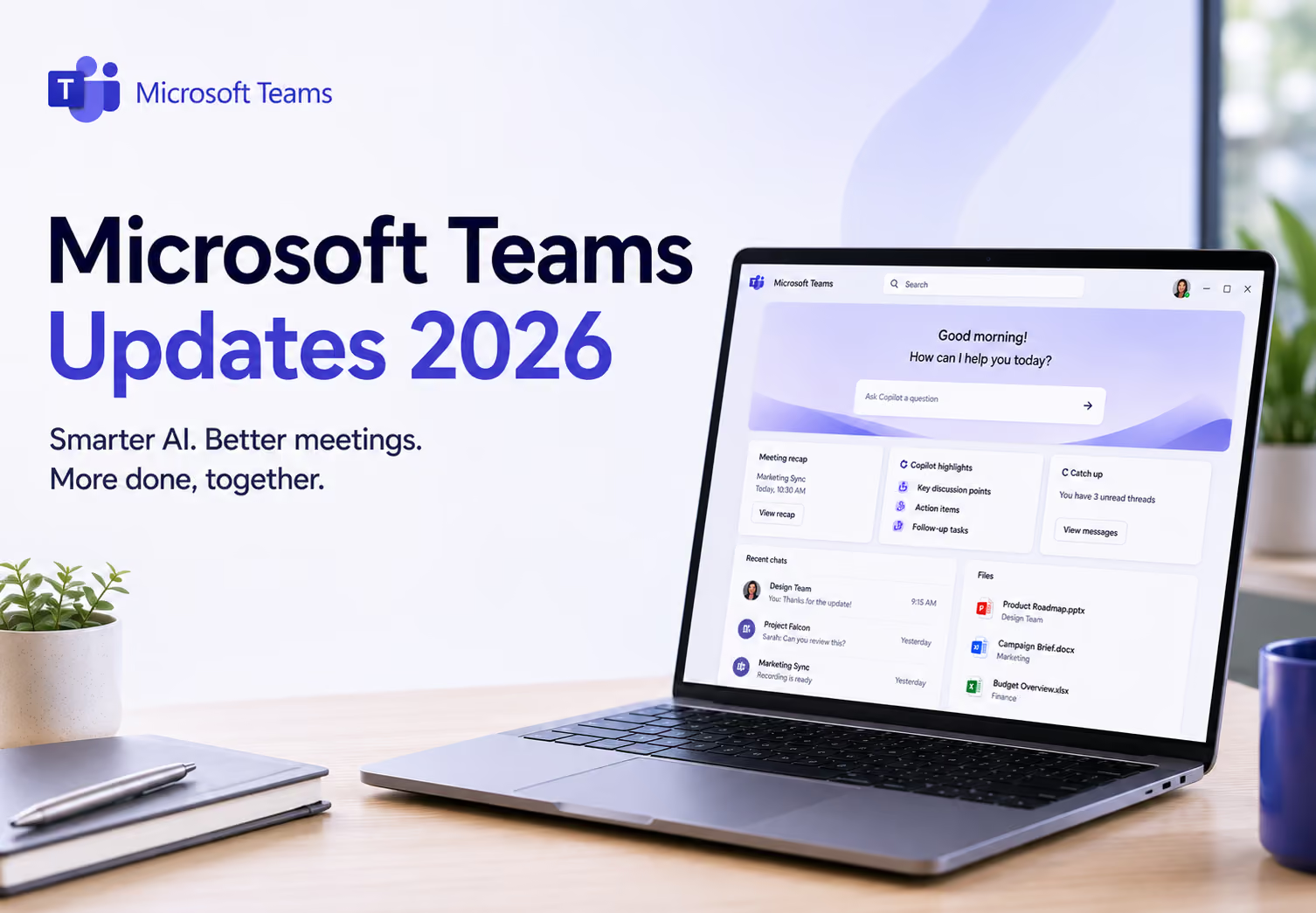
Microsoft is making AI the center of the Microsoft Teams update in 2026. New Copilot features help you find information faster, catch up on missed meetings, and spend less time searching through chats and recordings.
However, it's also worth knowing where these AI features work best. Copilot is designed for the Microsoft ecosystem, so if your organization also uses platforms like Zoom, Google Meet, or Webex, you'll likely need separate AI tools for those meetings. I'll come back to this later when we look at JotMe, which works across meeting platforms and offers live translation in 200+ languages plus AI chat to keep a multilingual team on the same page.
Microsoft Teams Update 2026 at a Glance
- Video Recap: Creates a short AI-generated highlight reel from recorded meetings, making it easier to catch up without watching the full recording.
- Smarter Copilot Recaps: Generates customizable meeting summaries with key discussion points, action items, and important moments from screen sharing.
- Copilot Search: Lets you search chats, files, and conversations using natural language instead of exact keywords.
- Copilot Call Delegation: Allows Copilot to answer calls, take messages, and schedule follow-ups when you're unavailable.
- Better Meeting Collaboration: Adds screen annotation, resizable shared content, draft messages, Quick Views, slash commands, and multi-message forwarding to improve daily teamwork.
- Teams Phone Improvements: Introduces AI-powered Teams Phone Agent, PSTN consult and merge, automatic queue call transcription, and suspicious call reporting.
- Teams Rooms & Events Enhancements: Adds voice-activated Facilitator, IntelliFrame people labels, larger town halls, and more event features included with Teams Enterprise.
- Language & Translation Updates: Automatically detects each speaker's language, expands Audio Recap language support, and improves Interpreter with clearer translated voices and reduced background noise.
What are the New Microsoft Teams AI and Copilot Updates
Microsoft Teams update in 2026 added a lot of AI features this year, and most of them center on saving you time after a meeting ends.
Video recap turns a recorded meeting into a short, narrated highlight reel with real clips from the call. It works for English-language recordings between 10 and 90 minutes, and you need a Microsoft 365 Copilot license to use it.
Smarter meeting recaps and insights let you pick a recap format and tone instead of getting a generic summary. Recaps now also show key on-screen moments, like a screen share, right next to the part of the summary where it was discussed.
Copilot Call Delegation helps Copilot answer incoming Microsoft Teams calls and book follow-ups when you're not available, so you don't miss anything important.
Copilot Search lets you find chats and files by asking a plain question instead of hunting for the exact keyword.
Here's the catch: almost every one of these needs a Microsoft 365 Copilot license, on top of your regular Teams plan.
Even with a Microsoft 365 Copilot license, Copilot only works inside Microsoft Teams. Say your team runs client calls on Zoom and internal check-ins on Microsoft Teams. Copilot can summarize the Microsoft Teams side, but it has nothing to say about the Zoom call your client just joined from.
That's a real gap if your work spans more than one platform, and it's where a tool like JotMe fits in. It transcribes Teams meetings, provides live translation, and creates AI meeting notes across Microsoft Teams, Zoom, Google Meet, Webex, and more, so you're not stuck with a summary tool that only understands half your week.
What New Collaboration Features Are Coming to Microsoft Teams in 2026
Resizable shared content, draft messages, code formatting in chat, Quick Views, and several other collaboration improvements make Microsoft Teams easier to use in 2026. Here's a closer look at each feature:
- Resizable shared content: Drag the divider between shared content and the video gallery to change how much space each gets.
- Screen annotation on shared windows: You and others can annotate directly on a single shared app window.
- Draft messages: An unsent message now shows up under Chat > Drafts, so you never lose a half-written reply.
- Code formatting in chat: Shared code gets automatic language detection and line numbers, making it easier to reference.
- Slash commands: Type a slash in the compose box to change your status, schedule a message, or trigger other quick actions.
- Quick views: Filter your chat list by mentions, followed threads, and more with one click.
- Catch-up features: Thread summaries and forwarded message links help you jump back into a conversation without scrolling through everything.
- Multi-message forwarding: Forward up to five messages at once instead of one at a time.
Together, these updates reduce the minor friction points that used to slow you down in chat and meetings.
Does Microsoft Teams Support Phone Calls
Yes, Microsoft Teams supports business phone calls through Microsoft Teams Phone, and the 2026 update adds several new calling capabilities, including PSTN consult and merge, AI-powered Teams Phone Agent, improved call queues, automatic call recording and transcription, and suspicious call reporting.
- PSTN call merge lets meeting organizers consult with an outside phone caller and merge them into a live meeting, even if reaching that person means navigating an automated phone menu first. This is one of the most buzzed-about Microsoft Teams updates in March 2026.
- Queue app improvements include a faster setup wizard for call queues and auto attendants, plus automatic call recording and transcription for queue calls.
- Teams Phone Agent is a new AI calling agent that can answer incoming calls for a department, understand what the caller needs, and route or resolve simple requests on its own.
- Better call management now includes suspicious call reporting, so you can flag a call that looks like a scam directly from your call history.
If you're searching for a phone call translator, it's worth knowing that Teams Phone focuses on AI-powered calling rather than translating every business conversation. For multilingual online meetings on desktop, dedicated AI meeting assistants like JotMe can fill that gap, which you will find later.
What is New in Microsoft Teams Events and Rooms Updates
Microsoft made a major licensing change: as of April 1, 2026, several features that previously required Teams Premium are now built into Teams Enterprise. That includes town hall chat, custom event emails, attendee reactions and polls, 1080p streaming, and attendance reports. Town halls can now reach up to 100,000 attendees with an add-on capacity pack, and webinars get waitlists, registration windows, and manual registrant approval.
On the room side, the Facilitator in Teams Rooms is now voice-activated. Just speak to the room to join a meeting or ask it a question, and it checks the room for problems like a blocked camera before anyone walks in.
IntelliFrame people labels identify each person in a meeting room and place their name next to them, so remote attendees always know who's speaking.
Teams Rooms on Android picked up outbound SIP and H.323 dialing through partners like Pexip, improved Zoom and Webex interop, and a shift toward the new Teams Rooms Pro Management Portal.
How Does Microsoft Teams Handle Live Translation and Captions
Microsoft Teams now automatically detects each speaker's spoken language during a meeting and updates it in real time. Manual language selection has been removed entirely.
Audio recap, the podcast-style AI meeting summary, now works in eight languages: English, Chinese, French, German, Italian, Japanese, Portuguese, and Spanish. Interpreter, the live voice translation feature, also received improvements, including distinct voices for each speaker and reduced background noise.
One thing to keep in mind is that language support isn't consistent across every Microsoft Teams feature. Live translation, live transcription, Interpreter, audio recap, and Copilot each support different languages, so a language available in one feature may not be available in another. These capabilities are also limited to the Microsoft Teams ecosystem.
This usually isn't an issue if all of your meetings happen in Teams. But if your team switches between Microsoft Teams, Zoom, Google Meet, or Webex, you'll need separate AI features on each platform, and the language experience can vary from one meeting to the next.
In those cases, a dedicated Windows live translator like JotMe can provide a more consistent experience by offering multilingual meeting notes, bilingual transcripts, and live translation across multiple meeting platforms from a single workspace.
When Should You Use JotMe Alongside Microsoft Teams
Use JotMe alongside Microsoft Teams when your meetings involve multiple languages or take place across different meeting platforms. Microsoft Teams offers powerful built-in AI features like Copilot, meeting recaps, and live translation, and these may be enough if all of your meetings happen within the Microsoft ecosystem.
The challenge starts when language becomes a barrier.
Imagine you're leading a product demo in English, but your client is more comfortable speaking Spanish. Another teammate joins from Japan, while your engineering partner speaks Arabic. Asking everyone to switch to English is not always practical, and translating everything after the meeting takes time.
This is where dedicated AI note takers like JotMe come in.
JotMe is designed for multilingual collaboration. Instead of simply converting speech into captions, it provides context-aware live translation, helping conversations flow more naturally.
For example, if you're looking for an English to Spanish meeting translator or need the best Arabic translator for business meetings, JotMe translates conversations while preserving the meaning of the discussion rather than translating each sentence word for word.
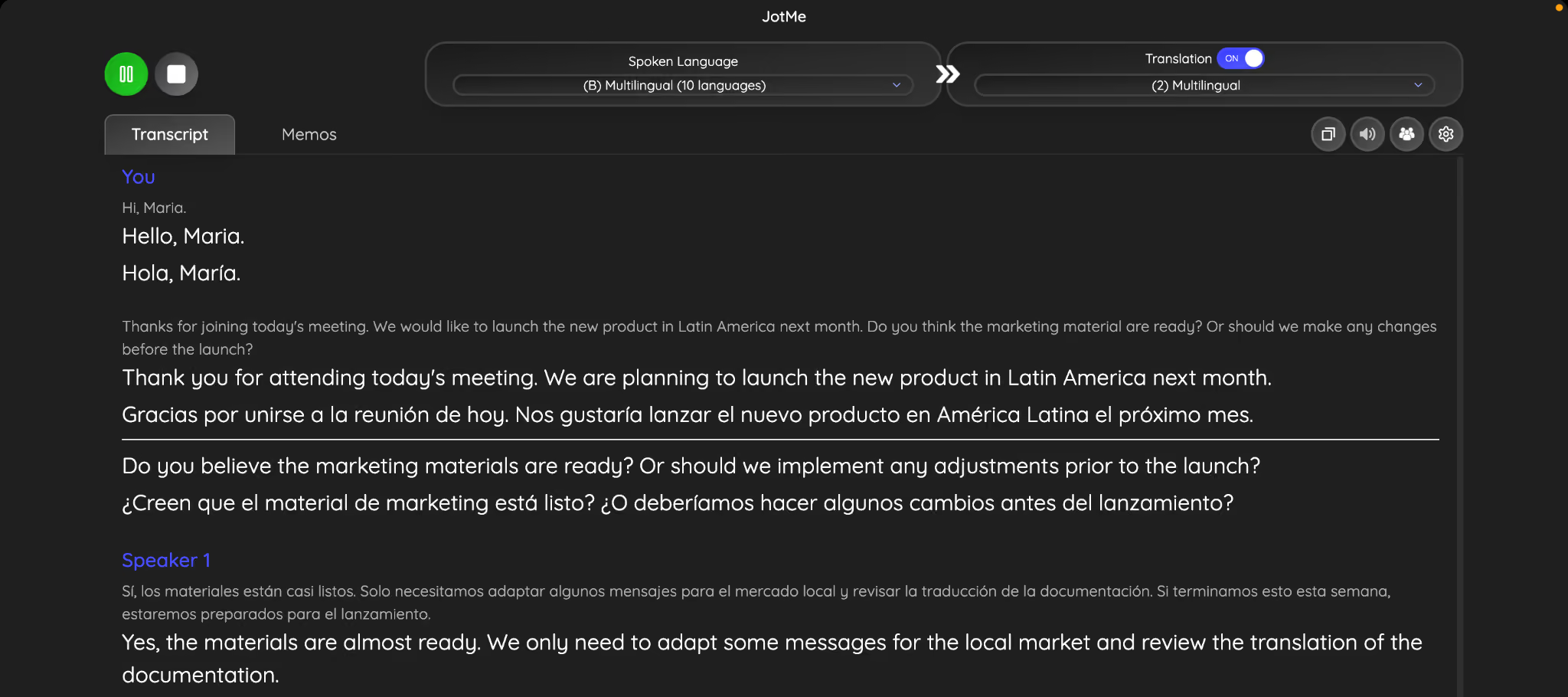
JotMe also supports voice-to-voice translation, allowing participants to hear translated speech in supported conversations. This makes discussions feel more natural than constantly reading subtitles, especially during longer meetings.
Language barriers don't stop when the meeting ends. Team members often continue discussions in chat, and not everyone is comfortable writing in English. JotMe's AI Chat helps bridge this gap by letting you read messages in your preferred language while your teammate sees the conversation in theirs. For example, you can write in Hindi or Japanese, while your colleague receives the message in English or Spanish, making cross-language collaboration much smoother.
Here is how JotMe gave me translated text in English:
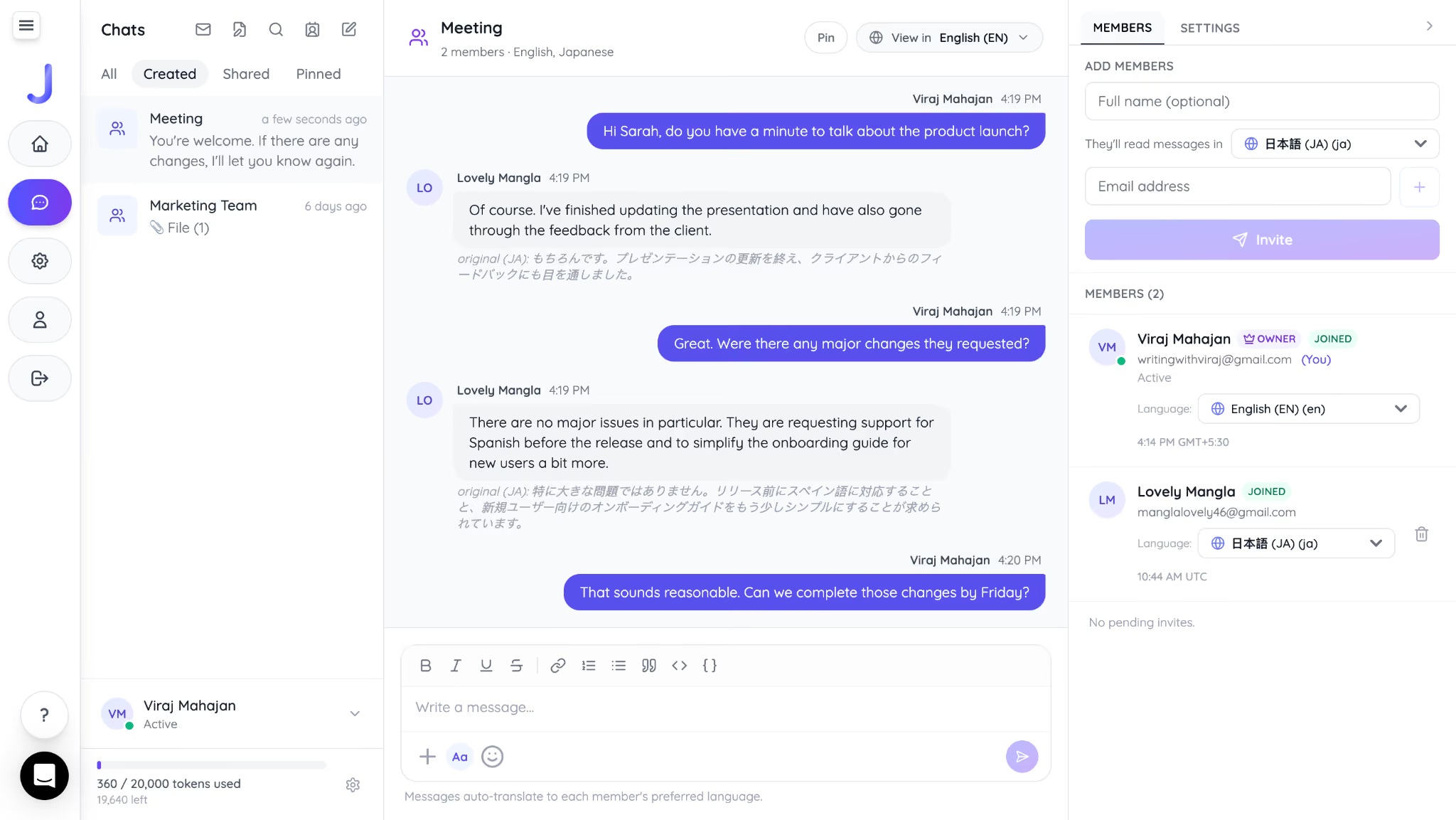
Here is how my Japanese teammate gets my message in Japanese:
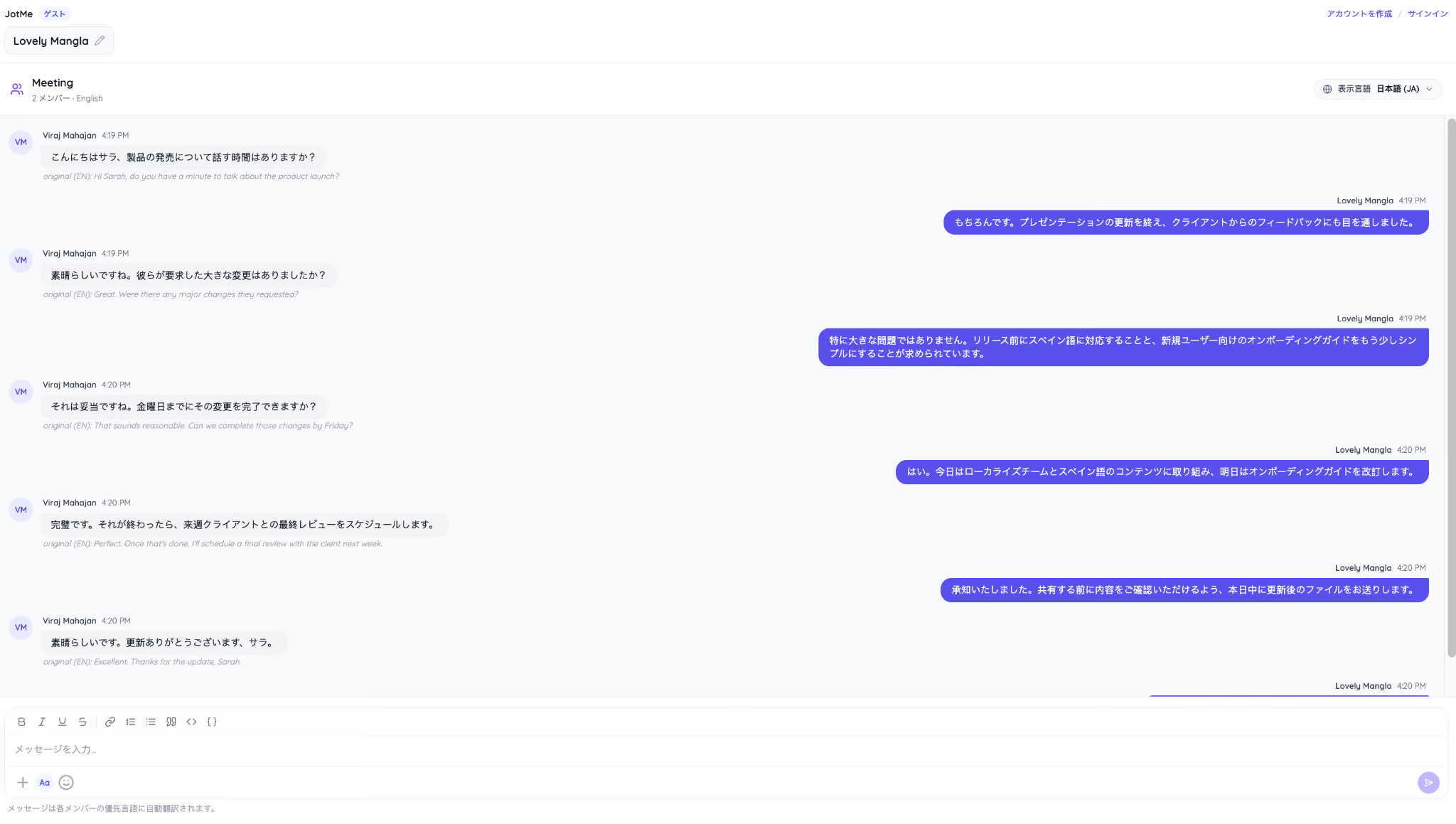
For organizations with multilingual customers, international partners, or globally distributed teams, this can reduce misunderstandings and make meetings more inclusive without changing the way people naturally communicate.
Is Microsoft Teams Enough for Multilingual Collaboration
Yes, Microsoft Teams is enough for many organizations that work entirely within the Microsoft ecosystem. Microsoft Teams 2026 updates bring smarter AI features, better meeting recaps, improved calling, and stronger collaboration tools.
However, teams that collaborate across multiple meeting platforms or languages may benefit from a dedicated solution like JotMe, which provides consistent live translation in 200+ languages, bilingual communication, and AI meeting notes across Microsoft Teams, Zoom, Google Meet, Webex, and more. Together, these tools help modern global teams communicate more effectively.
FAQs
How do I update Microsoft Teams?
Microsoft Teams usually updates automatically in the background. To manually check for the latest Microsoft Teams update, open Microsoft Teams, select the three-dot menu next to your profile picture, and choose Check for updates. The desktop app will download and install any available updates without affecting your current work.
How do I update Microsoft Teams on Mac?
Open Microsoft Teams on your Mac, click the three-dot menu beside your profile picture, and select Check for updates. Teams will download the latest version automatically. If you installed Teams from the Mac App Store, you can also update it through the App Store.
What is the latest version of Microsoft Teams?
Microsoft regularly releases new Teams builds for Windows, Mac, web, and mobile, so the latest version depends on your device and update channel. The easiest way to check is by opening Settings > About > Version in Teams or selecting Check for updates from your profile menu.
What are the new Microsoft Teams features in 2026?
The Microsoft Teams update in 2026 brings AI-powered features like Copilot Search, Video Recap, smarter meeting summaries, and Teams Phone Agent. It also introduces automatic spoken language detection, PSTN consult and merge, improved Teams Rooms and town halls, plus collaboration tools like screen annotation, draft messages, Quick Views, and multi-message forwarding.
Is Microsoft Teams better than Zoom?
It depends on how your organization works. Microsoft Teams is a better choice if you already use Microsoft 365 because it integrates closely with Outlook, OneDrive, SharePoint, and Copilot. Zoom is often preferred for its simple meeting experience and broad third-party compatibility. If your team regularly switches between multiple meeting platforms, you may also benefit from the best live translation tool, like JotMe, that provides a consistent translation and note-taking experience across different services.
Last updated on
July 17, 2026
Follow us on social media:
![JotMe — Is Google Translate Accurate? [2026 Test]](/_webflow-assets/0d0512afc7b037d74dff536f22fed08f.avif)