Guides
12 Best Arabic Translator Apps in 2026 [Detailed Analysis]

Viraj Mahajan
April 29, 2026
![JotMe — 12 Best Arabic Translator Apps in 2026 [Detailed Analysis]](/_webflow-assets/75dae9a00ac77dd5dec8274a37d743e4.avif)
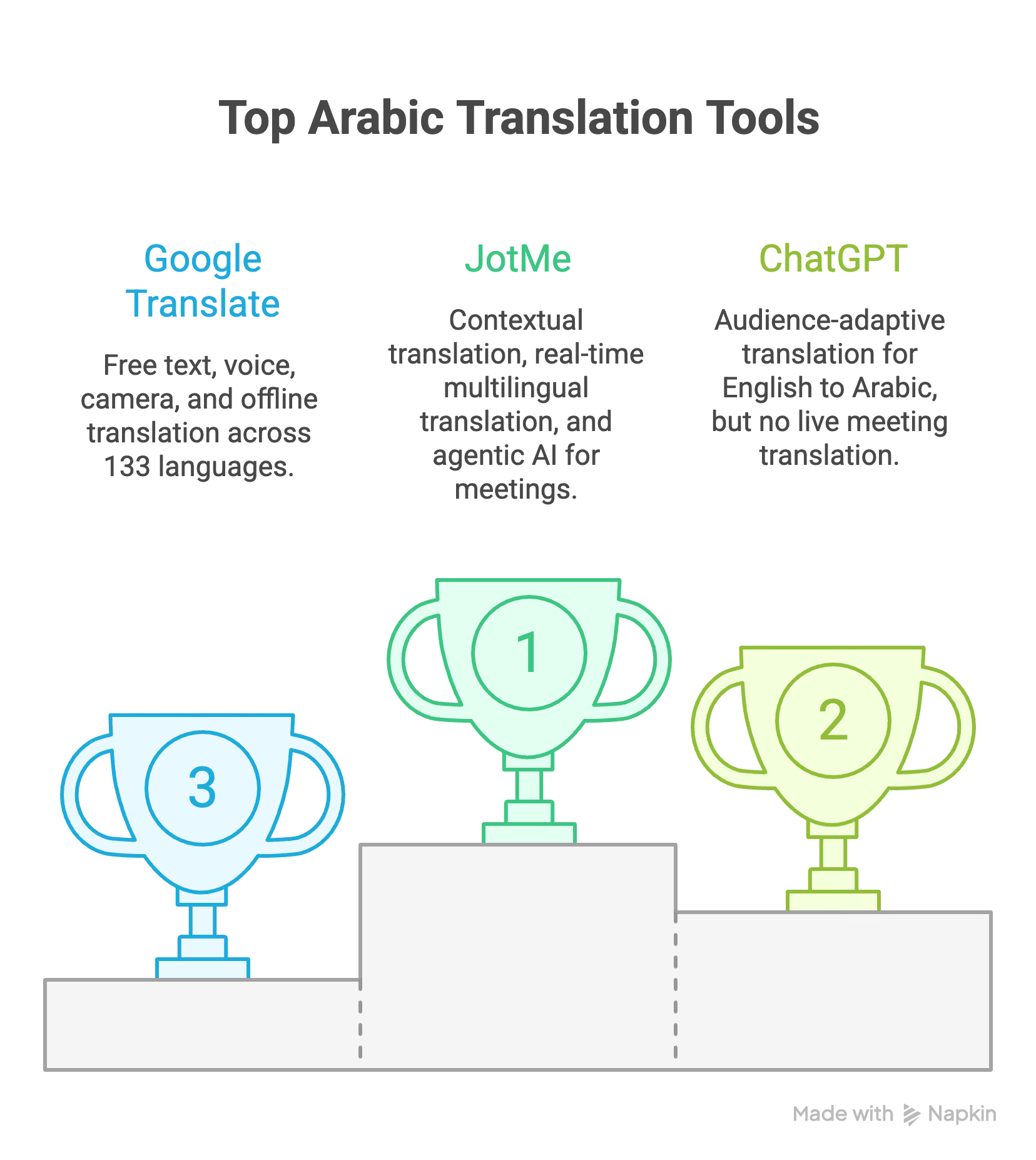
The best Arabic translator apps for businesses, travelers, and students are JotMe, ChatGPT, Google Translate, DeepL, Systran, Tarjama AMT, iTranslate, QuillBot, Wordly AI, OpenL Translate, Reverso Context, and ElevenLabs. Among these Arabic to English translation tools, JotMe handles both live Arabic translation and document translation.
An Arabic translator is one of the most searched terms in the translation space, and for good reason. Over 400 million people speak Arabic across 25 countries, but they speak it in more than 30 modern varieties. Gulf Arabic in the UAE sounds different from Egyptian Arabic in Cairo, which sounds different from Maghrebi Arabic in Casablanca. When you translate English to Arabic using different online tools, the output defaults to Modern Standard Arabic, which is a formal written register that native speakers rarely use in everyday conversation.
And the cost of getting it wrong adds up faster than most teams realize.
- Freelance Arabic translation on Upwork costs $30 to $40 per hour.
- ZipRecruiter reports the average Arabic translator salary at $23.12 per hour in the United States.
- Glassdoor puts the annual range at $80,000 to $92,000.
- For live meetings, professional interpreters charge $150 to $300 per hour.
- A company running three English-Arabic meetings weekly can spend $21,600 to $43,200 annually on interpretation for a single language pair.
As you can see, this is another layer in your multilingual operations that most teams do not budget for until the invoice arrives.
So, here are the best Arabic translator apps that you can use in 2026.
- JotMe: For $10/month [billed annually], JotMe is the best Arabic translator app as it offers contextual Arabic translation, real-time multilingual translation and transcription during live meetings, and agentic AI that generates summaries, meeting notes, and action items.
- ChatGPT: ChatGPT has become a go-to English to Arabic translation tool, especially for audience-adaptive translation, but ChatGPT operates on a prompt-response cycle and cannot translate live meetings in real time.
- Google Translate: Google Translate is a free Arabic translator that offers text, voice, camera, and offline translation across 133 languages. However, even Google Translate offers only MSA and has no dialect awareness.
- DeepL: DeepL produces the most natural-sounding English-to-Arabic translation for written documents. However, even DeepL has limitations when it comes to live meetings.
- Systran: Systran offers on-premises Arabic-to-English deployment for organizations where translation data cannot leave internal servers.
- Tarjama AMT: Tarjama is the only tool built exclusively for Arabic business translation. It is trained on 12+ years of curated MENA content. However, Tarjama is available only in English-to-Arabic, and at $13.50/user/month, it is limited to 15,000 words per month.
- iTranslate: iTranslate offers an AR lens that overlays Arabic translation on your camera view. However, users on TrustPilot and G2 have stated that iTranslate allegedly has limitations in translation quality.
- QuillBot: QuillBot's Arabic translator includes a formality toggle that adjusts between formal and casual Arabic registers. QuillBot is a free English-to-Arabic translator, but if you want to access premium features, you will need to pay $9.95 per month.
- Wordly AI: Wordly AI scales live translation to 100,000 simultaneous users for conferences and enterprise events. However, Wordly AI is unsuitable for individual text translation or for individuals who want a quick meeting solution.
- OpenL Translate: OpenL handles text, images, PDFs, audio, and SRT files with OCR for Arabic RTL text.
- Reverso Context: Reverso shows contextual phrase examples from real documents and subtitles, which is useful for language learners.
- ElevenLabs: For Arabic translation, ElevenLabs preserves the original speaker's voice while dubbing into 20+ Arabic dialect voices.
In this article, we will walk you through the best Arabic translator apps, similar to what we covered in our guide on the best live translation tools and our review of the top translation services in 2026. This comprehensive guide will show you what the Arabic output actually looks like, cover the features that matter for different use cases, explain when it makes sense to use an English to Arabic translator, and highlight which tools work best for real-time Arabic translation in meetings.
Quick Comparison: 12 Best Arabic Translator Apps in 2026
Before we proceed further, here is how all 12 Arabic translator apps compare on the parameters that matter most for real-world English to Arabic and Arabic to English translation: accuracy, live translation, dialect support, platform coverage, free access, and pricing.
How Did We Evaluate Different Arabic Translators?
Choosing the right Arabic translator is more involved than comparing language counts. We tested each tool against five criteria that reflect how Arabic translation actually performs in real business scenarios, including how well each Arabic translator tool can translate from English to Arabic, preserve context, and support multilingual workflows.
Features and Limitations
We ran the same English business sentence through every tool and compared the Arabic output for meaning accuracy, tone preservation, and how each one handled the deliberately ambiguous phrase. We also tested round-trip translation (English to Arabic back to English) to measure meaning drift, because in professional settings, a translation that drifts on the return trip will drift in real conversations too.
Pricing and Affordability
We checked whether each tool's pricing is transparent or requires contacting a sales team. We also compared subscription costs against the baseline of hiring freelance Arabic translators at $30-40/hour on Upwork or full-time translators at $80,000-92,000/year (Glassdoor), to understand whether the tool genuinely saves money in real operations.
Multilingual Operational Support
Arabic is rarely the only language a global team needs. We evaluated whether each tool supports broader multilingual workflows or is limited to a single language pair. JotMe's 200+ language support and Wordly's 50+ language coverage stood out here; tools like Tarjama AMT, which only handles English-Arabic, serve a narrower use case.
Arabic Dialect Support
This was the most revealing test. Arabic has over 30 spoken varieties, and a tool that only outputs Modern Standard Arabic is missing the way most Arabic speakers actually communicate. JotMe offers 20+ regional Arabic variants (including Algerian, Bahraini, Egyptian, and Gulf Arabic). ChatGPT can produce dialect-specific output when prompted. Every other tool on this list defaults to MSA with no dialect options.
Advanced Features Beyond Translation
We looked at what each tool does beyond converting text from one language to another.
- JotMe generates AI meeting summaries, action items, and gists from translated content.
- ChatGPT adapts formality and register on demand.
- ElevenLabs preserves the original speaker's voice.
- QuillBot offers formality toggling.
These features separate translation tools from translation platforms.
12 Best Arabic Translators for English to Arabic Translation [2026 List]
We tested every tool on this list with the same business sentence, in real meetings and text scenarios, across desktop and mobile, where available. Here is how each one performed and where each one fits.
JotMe: Best Arabic Translator for Multilingual Operations and Events
JotMe is the most complete Arabic translator we tested for live, real-world scenarios. It is simple to set up, responds in real time, and works consistently across Zoom, Google Meet, Microsoft Teams, Webex, and in-person meetings. As of April 2026, JotMe supports 200+ languages for live translation, including 20+ Arabic regional dialects, and begins translating as soon as your meeting starts, without adding a separate bot or requiring host permissions.
Here is what makes JotMe the best Arabic translator for English to Arabic translation and Arabic to English translation:
Contextual Arabic Translation
During our testing, we found that JotMe goes beyond basic word-for-word or sentence-by-sentence translation in Arabic. The contextual engine reads multiple sentences as a cohesive unit to preserve tone, flow, and meaning. This matters enormously for Arabic, where formality registers can change the entire meaning of a business communication.
When we spoke our test sentence aloud, JotMe handled the ambiguous phrase "What does the budget look for?" by interpreting it within the context of the preceding sentences about hiring from the UAE. The Arabic output reflected the budget question as a hiring-related inquiry rather than a standalone grammatical puzzle. Google Translate, DeepL, and QuillBot each interpreted the same phrase differently because they processed it in isolation.
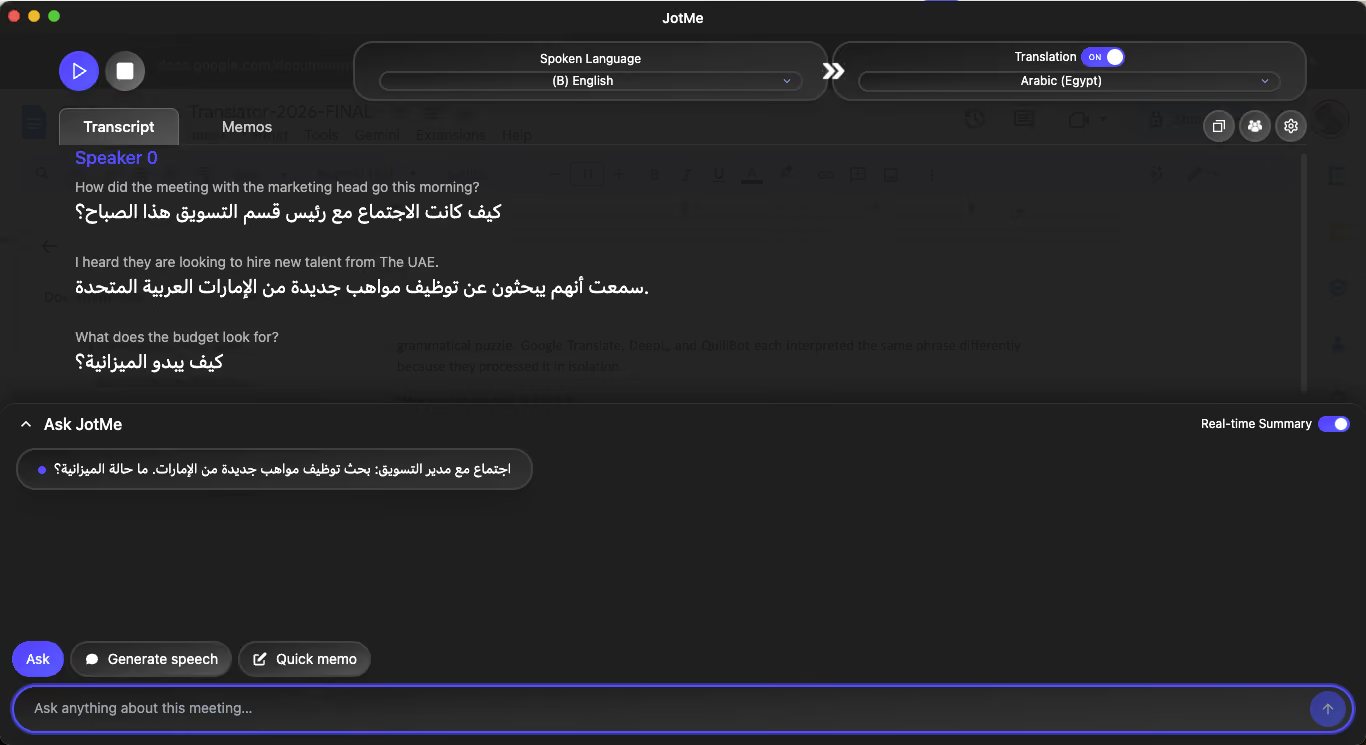
Here’s what we said in English:
How did the meeting with the marketing head go this morning? I heard they are looking to hire new talent from the UAE. What does the budget look for?
Here’s what JotMe’s contextual awareness translates the same from English to Arabic:
Live Translation and Transcription in 200+ Languages
JotMe’s live translation feature translates spoken content into Arabic (or any of 200+ languages) in real time, directly on your screen. During our test, we set the spoken language to English and the translation language to Arabic. The tool picked up the sentence within seconds, displayed the English transcript alongside the Arabic translation, and continued translating as we kept speaking. The live translation adapts to quick language shifts mid-conversation, and we noticed it maintains accuracy across business terminology without lag.
As you can see from the image here, we changed the dialect from Arabic (Egypt) to Arabic (Algeria) mid-translation, and JotMe understood the context, and we didn’t have to start the meeting all over again.
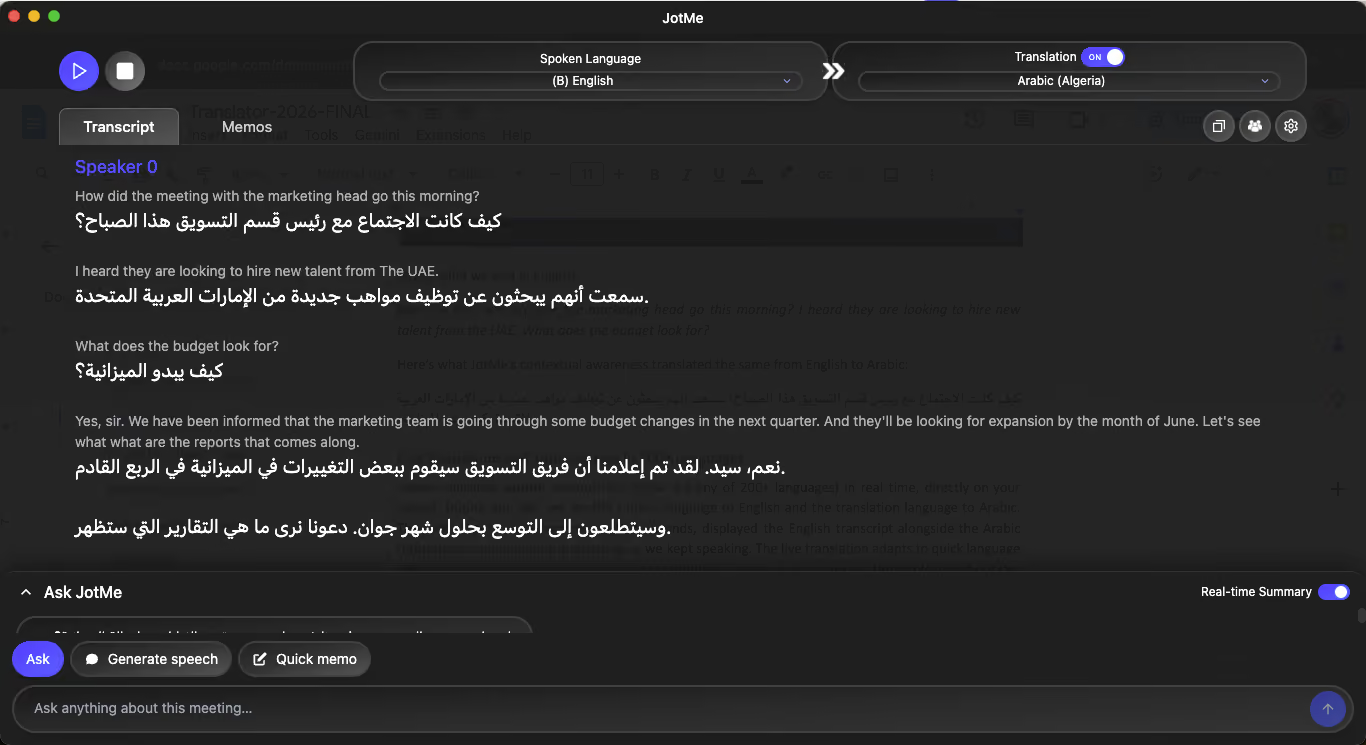
Alongside the real-time translation, JotMe also transcribes every spoken word into text. The transcripts are saved in the dashboard for easy access, so teams can search and revisit earlier points without losing critical context from multilingual discussions. If your team also works with Mandarin-speaking stakeholders, you can check out our detailed guide on the best Chinese to English live translation tools. We have also covered the best Japanese to English live translation apps for teams working across East Asian languages.
20+ Arabic Dialect Support
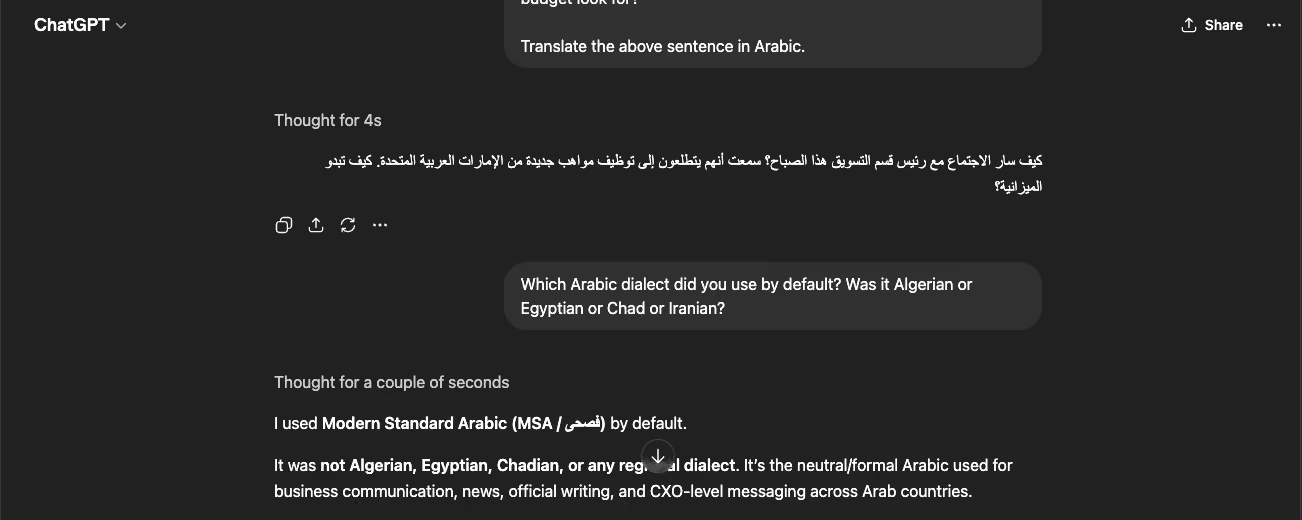
This is where JotMe separates from every other tool on this list. The language selection menu offers Arabic (Algeria), Arabic (Bahrain), Arabic (Chad), Arabic (Egypt), Arabic (Jordan), and more. When we selected Arabic (Egypt) instead of the generic Arabic option, the spoken language detection calibrated to Egyptian Arabic pronunciation patterns. For meetings with participants from specific Arabic-speaking regions, this dialect granularity is the difference between a translation that reads naturally and one that feels like a textbook.
We did not find this level of Arabic dialect selection in Google Translate, DeepL, QuillBot, Systran, or any other tool on this list. ChatGPT can approximate dialects through prompting, but it requires manual instruction each time and cannot detect spoken dialect automatically.
Works Without Joining a Meeting
JotMe does not require a scheduled meeting to function. You can open the desktop app, start a session from your system, and use it as a standalone Arabic translator for learning, quick draft transcription, or translating spoken content into Arabic text.
During our testing, we used this mode to translate a practice conversation into Arabic without being on any call. This makes JotMe useful for language learning, preparing translated email drafts, or generating Arabic transcripts from recorded audio. You can even use JotMe to translate Discord calls if your team communicates through Discord for gaming or community management.
This is how you can enable JotMe for learning:
- Go to your applications and launch JotMe. Make sure that you are using the latest version of the Arabic to English translator.
- Select the spoken language and then choose from 20+ Arabic dialects as your output language.
- Click Play and start speaking. This Arabic translator app will start transcribing and translating in real-time.
- Or you can even access the free live translation demo from JotMe to see the tool in action.
Quick Meeting Summary and Ask JotMe
This is the feature that put the biggest gap between JotMe and every other tool we tested. From our single 54-second test recording, JotMe auto-generated:
A meeting gist: "The marketing team is planning to recruit new talent from the UAE."
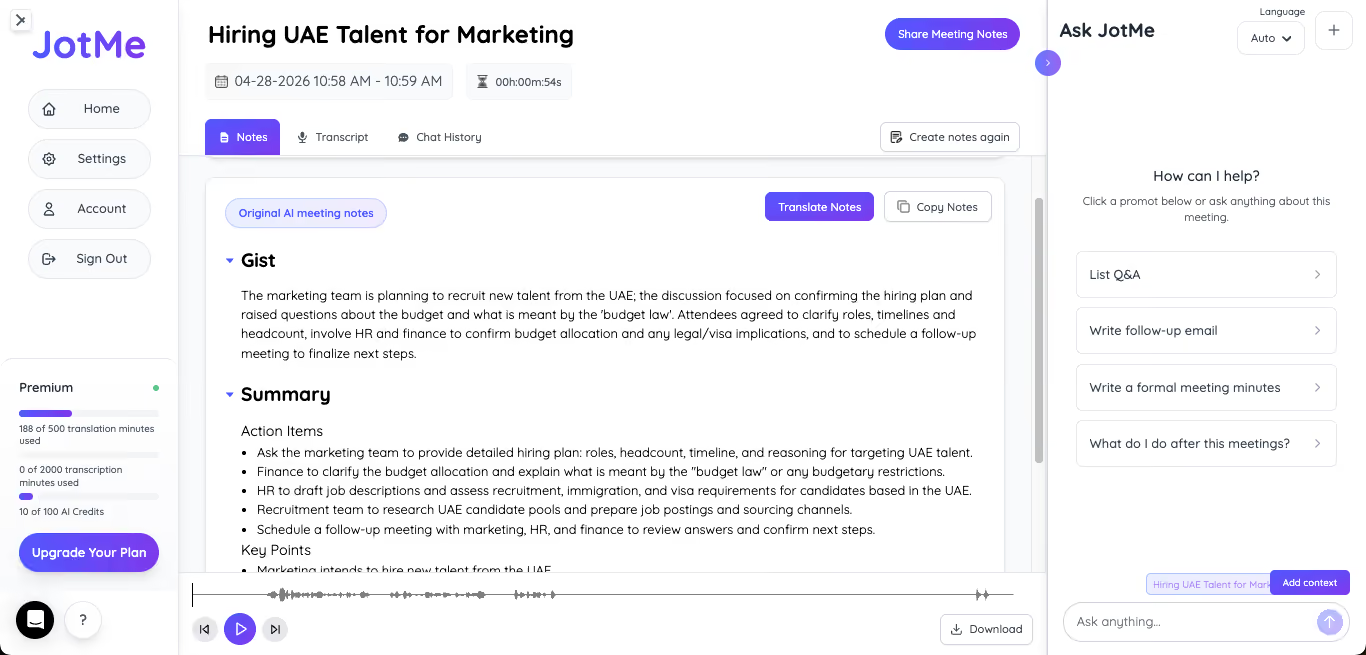
Action items: Ask the marketing team to provide a detailed hiring plan with roles, headcount, and timeline. Clarify what is meant by the "budget law" and any budgetary restrictions. Coordinate with HR and finance to confirm budget allocation and legal/visa implications. Schedule a follow-up meeting.
Key points: Marketing intends to hire new talent from the UAE. Uncertainty exists about the budget. Coordination between marketing, HR, and finance is required.
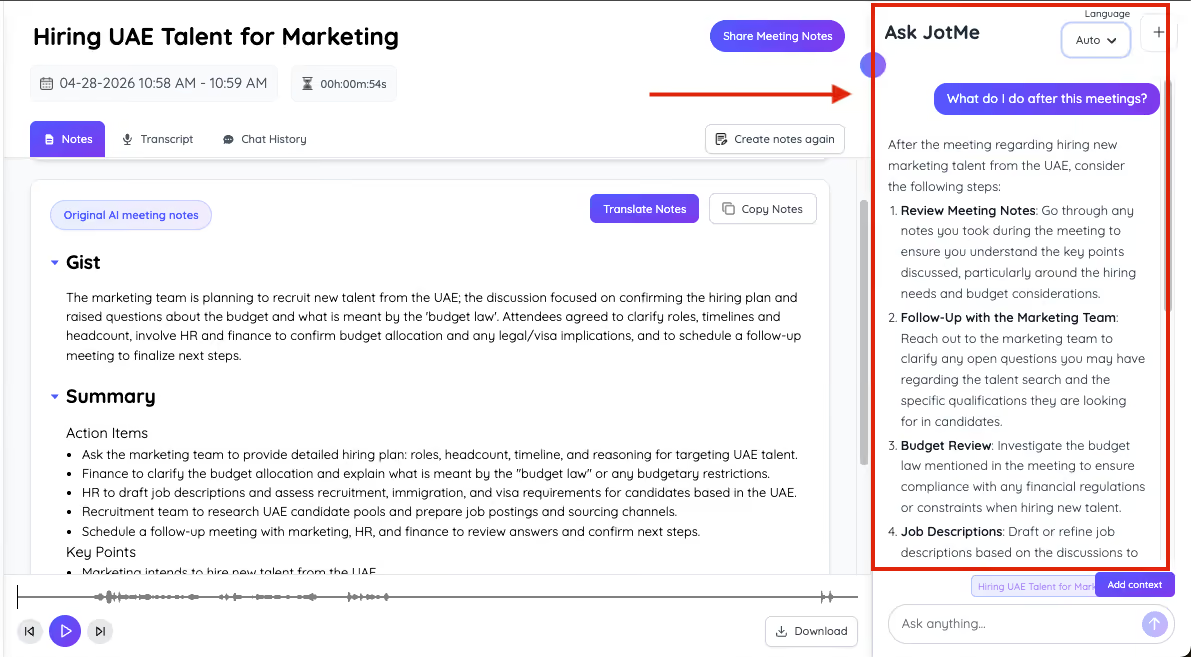
We then used the "Ask JotMe" feature to ask a question about the meeting content in Arabic. The AI responded with a contextual answer drawn from the transcript. For comparison, we ran the same sentence through all the other 11 tools. None of them produced anything beyond a translated sentence.
JotMe Pros
- Works across Zoom, Meet, Teams, Webex, and in-person meetings via desktop and mobile app.
- Offers both live translation and transcription with searchable, stored transcripts.
- 20+ Arabic dialect options that no other tool on this list matches.
- AI-generated meeting summaries, action items, and gists reduce post-meeting workload.
- Free tier available for testing before committing.
- Users can access the free demo, where they can see how live translation works for different language pairs.
JotMe Cons
- JotMe does not let you translate an Arabic document into your preferred language.
Free Plan
- JotMe Free Plan includes 20 minutes of live translation and 50 minutes of transcription per month.
Paid Plan
- JotMe Pro Plan comes at $10 per month (billed annually).
- JotMe Premium Plan costs $15 per month (billed annually) and includes 500 translation minutes and 2000 transcription minutes.
- JotMe’s prepaid mobile plan costs $50 as a one-time payment.
FAQs on JotMe
Does JotMe support Arabic dialects?
Yes, JotMe offers 20+ Arabic regional variants, including Algerian, Bahraini, Egyptian, and Gulf Arabic for spoken language detection during live meetings.
Can JotMe translate meetings in real time?
Yes, JotMe translates live meeting audio from English to Arabic (and 200+ other languages) in real time across Zoom, Google Meet, Microsoft Teams, and Webex.
Does JotMe work without a meeting?
Yes, you can start JotMe from your desktop without joining any call and use it for standalone Arabic translation, language learning, or drafting translated content.
What makes JotMe different from Google Translate for Arabic?
JotMe translates live meeting audio in real time, generates meeting summaries and action items, and offers 20+ Arabic dialect options. Google Translate is a text-input tool that outputs MSA only and cannot process live meeting audio.
ChatGPT: Ideal Arabic Translator for Quick Translation
ChatGPT has become a go-to English-to-Arabic translation tool for professionals who need more than a one-size-fits-all output.
We asked ChatGPT to translate our test sentence, and the initial Arabic was clean and accurate.
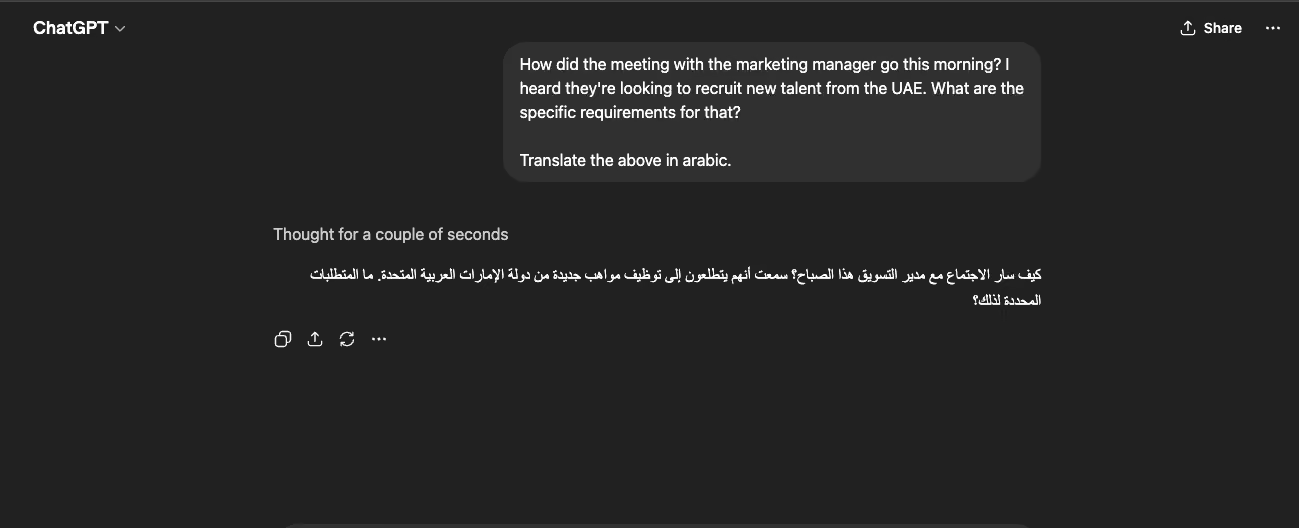
Then we prompted: "Translate it for large businesses and CXOs."
ChatGPT rephrased the Arabic entirely, shifting to a senior executive register with formal vocabulary and restructured sentences.
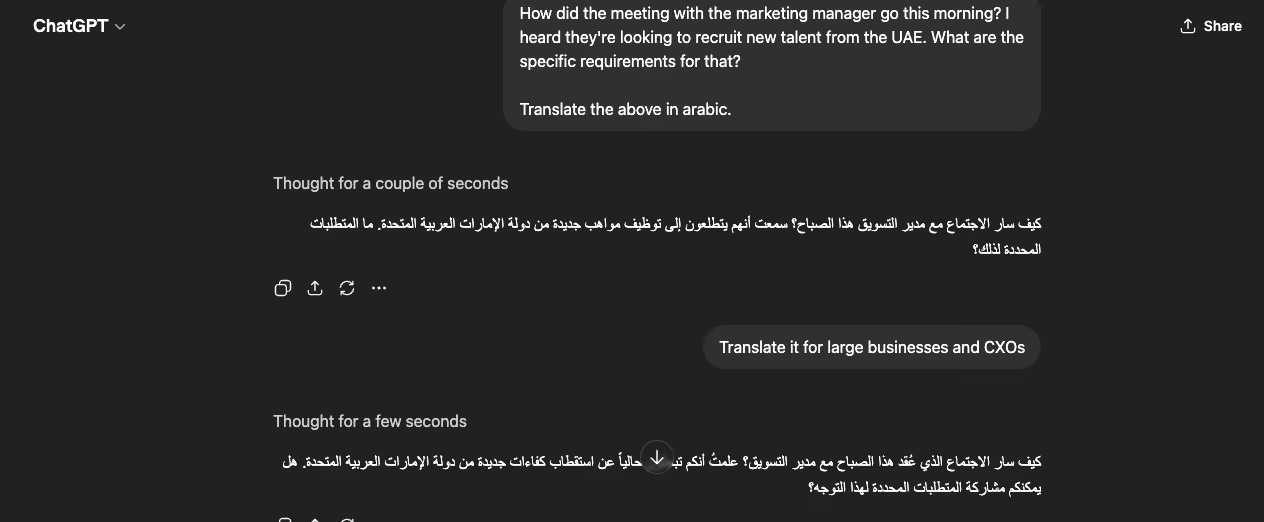
The two outputs were substantially different, generated from a single follow-up.
Best for: Business professionals crafting high-stakes Arabic communications who need audience-specific formality, dialect control, and iterative refinement.
Key Features of ChatGPT
Some of the key features of ChatGPT when it comes to being used as an Arabic to English translator are:
- Once you specify the Arabic dialect, it quickly catches on and generates the translation accordingly.
- ChatGPT can adjust formality as per the demand.
- ChatGPT can even explain translation choices and add cultural nuances if needed.
- ChatGPT easily handles ambiguous English better than rule-based translators.
- ChatGPT Arabic to English or English to Arabic translator works across the web, mobile, and via APIs.
ChatGPT Pros
- Most contextually intelligent Arabic translator on this list.
- Dialect flexibility through prompting.
- Can iterate on translations with follow-up instructions.
ChatGPT Cons
- The prompt-response cycle means it cannot translate in real time.
- There’s no live meeting integration in ChatGPT.
- The quality of English-to-Arabic translation depends on prompt specificity.
FAQs on ChatGPT for Arabic Translation
Can ChatGPT translate Arabic to English?
Yes, ChatGPT can translate Arabic to English, but it operates on a text prompt basis and cannot process live audio. For meeting translation, a dedicated tool like JotMe is more suitable.
Can ChatGPT handle Arabic dialects?
Yes, you can prompt ChatGPT to translate any text into different Arabic dialects, including Egyptian, Gulf, Levantine, or Maghrebi Arabic. The output quality depends on how specific your prompt is.
Is ChatGPT better than Google Translate for Arabic?
For audience-specific, context-aware Arabic translation where tone and formality matter, ChatGPT produces more nuanced output compared to Google Translate.
Can ChatGPT translate in real time?
No, as of April 2026, ChatGPT can process text input and return text output. It cannot listen to live meeting audio, nor does it allow you to upload an MP3 audio file for quick transcription or translation into different languages.
Google Translate: Best Free Arabic Translator for Quick Use
Google Translate remains the default translator for the Arabic language, and for quick, everyday use, it earns that position. We typed our test sentence in, and the Google Translate English to Arabic output handled business terms competently.
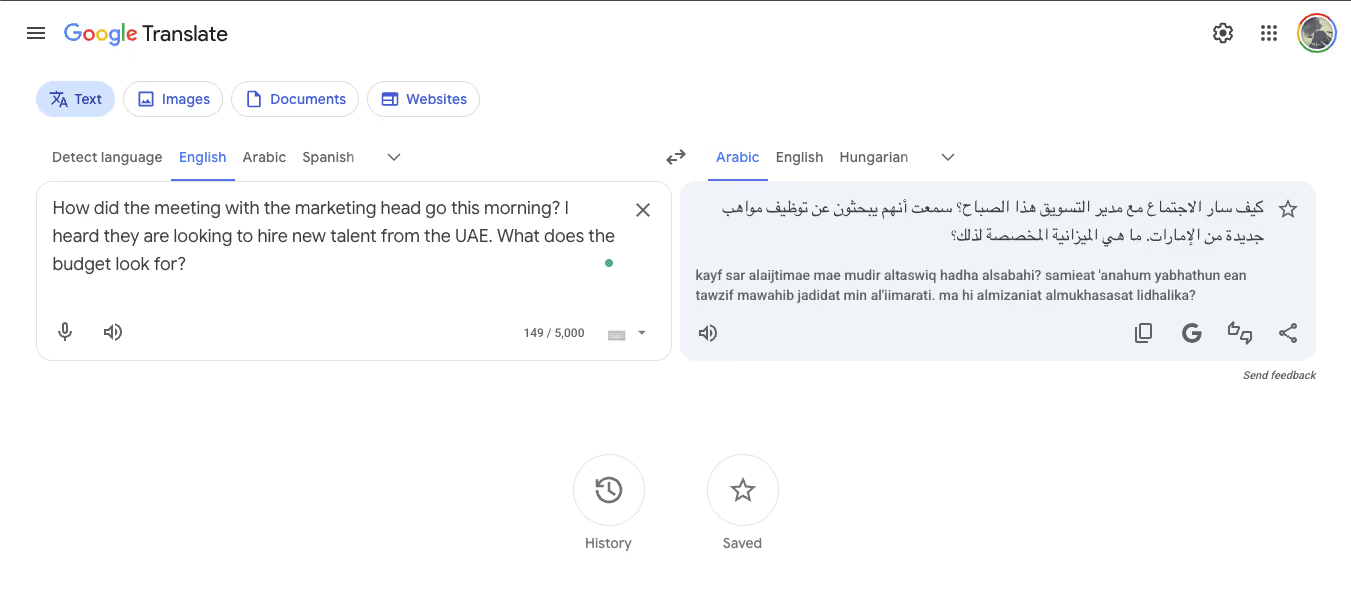
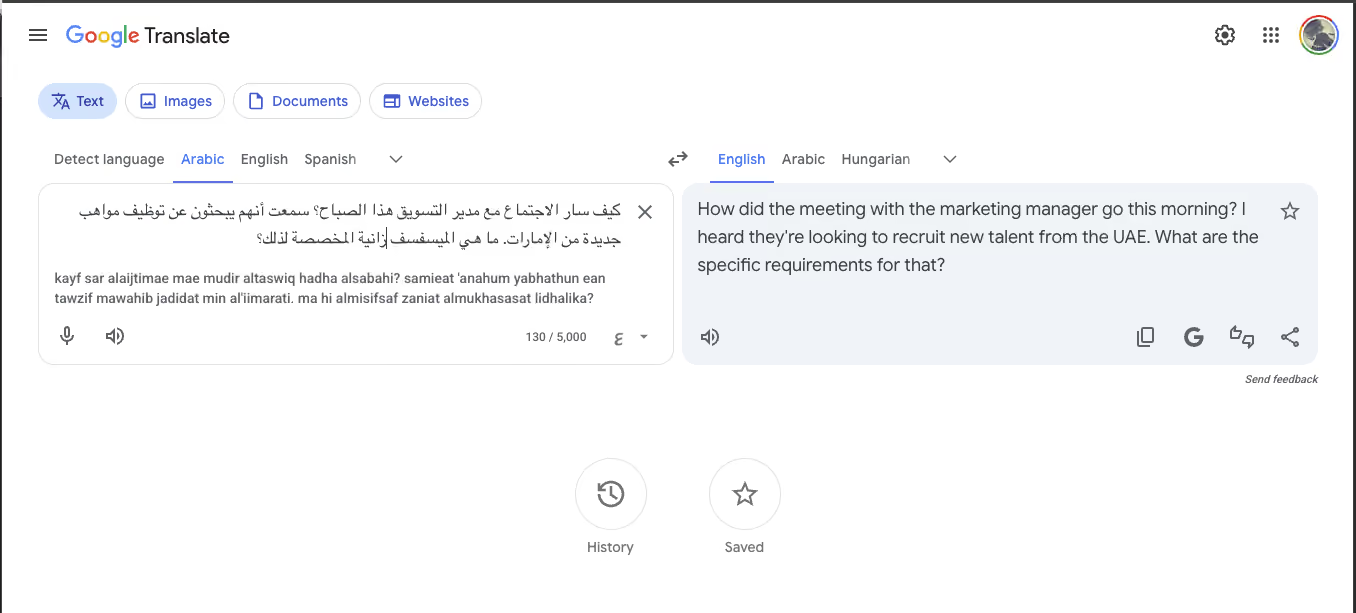
However, the round-trip test (Arabic back to English) revealed meaning drift: "budget" disappeared entirely, replaced by "specific requirements."
Even a Trustpilot reviewer confirmed that conversation mode cuts off mid-sentence during spoken translation.
Key Features of Google Translate
Some of the prominent features of using Google Translate to translate Arabic to English are:
- Text, voice, camera, and document translation in 100+ languages.
- Google Translate comes with an offline Arabic language pack that is handy for travel.
- Conversation mode in Google Translate is ideal for two-way spoken translation.
- Google Translate also comes with a Chrome extension for entire website translation.
Google Translate Pros
- Completely free.
- Camera translation reads Arabic signs and menus instantly.
- Except for a few countries, Google Translate is universally available.
Google Translate Cons
- MSA only with zero Arabic dialect awareness.
- Google Translate’s conversation mode is unreliable for sustained speech.
- Round-trip translation shows a different meaning.
FAQs on Google Translate for Arabic
Can Google Translate handle Arabic dialects?
No, Google Translate English to Arabic provides Modern Standard Arabic only. For dialect-aware translation, use JotMe, which comes with 20+ dialect variants.
Is Google Translate accurate for Arabic business communication?
Yes, Google Translate is accurate for casual usage. However, for business-critical communication, our round-trip test showed meaning drift on nuanced sentences. For reliable Arabic to English and English to Arabic language translation, you can use JotMe or DeepL.
Does Google Translate work offline for Arabic?
Yes, Google Translate for Arabic translation works offline. For this, you will need to download the Arabic offline language pack, and you can access all the important features of Google Translate even in an area with no internet connectivity.
Can Google Translate translate live meetings?
No, Google Translate is a text-input tool with a limited conversation mode. For live meeting translation, where context plays a very important role, it is highly recommended to use JotMe.
DeepL: Best Arabic Translator for Written Documents
DeepL produces the most natural-sounding Arabic translation for formal written content among all 12 tools we tested. Native speakers rated the output as more fluent than Google Translate's, particularly on longer documents where sentence-to-sentence coherence matters.
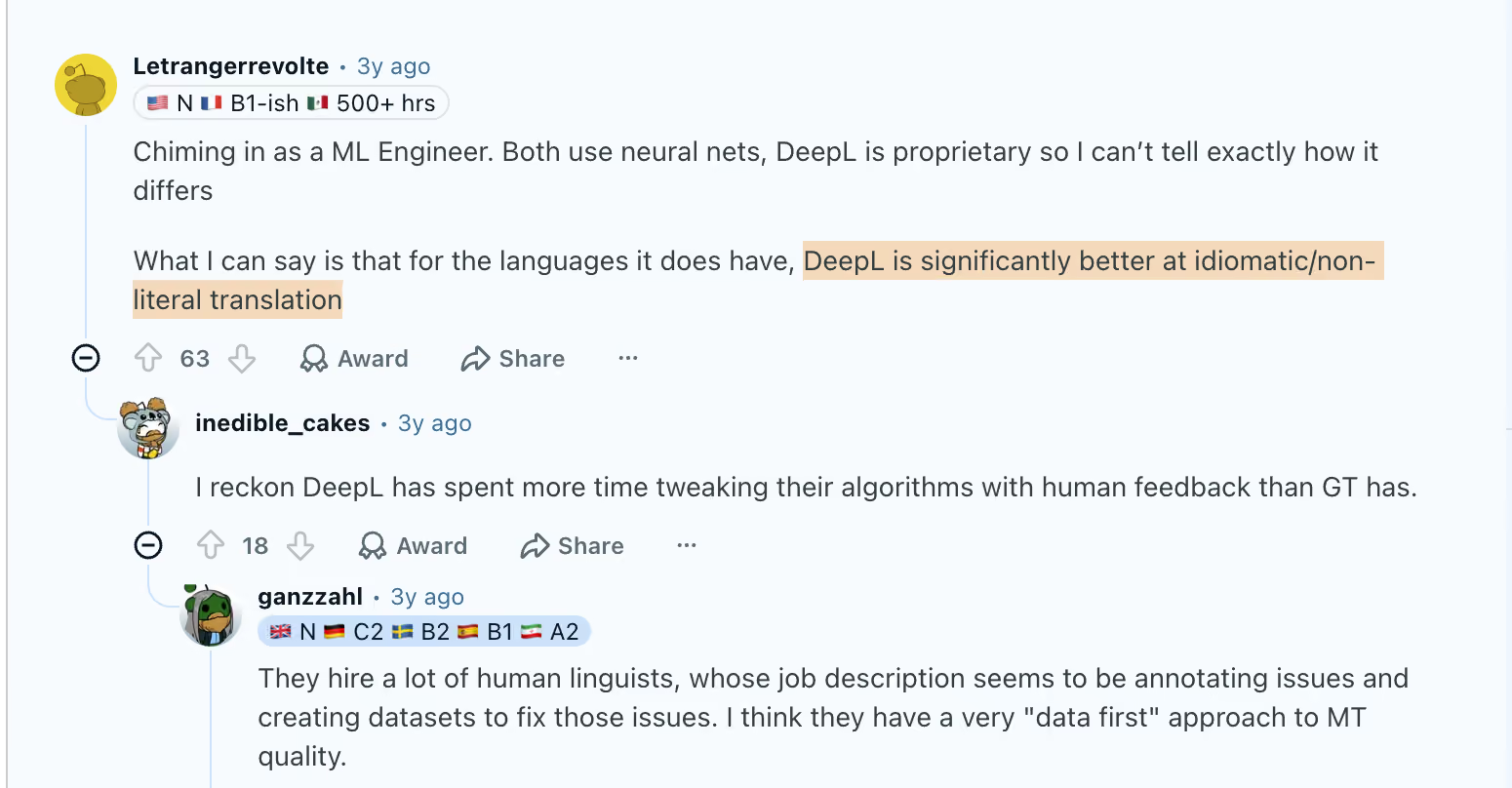
Users on Reddit have even quoted “DeepL is significantly better at idiomatic/non-literal translation.”
Key Features of DeepL
Some of the key features that make DeepL one of the best Arabic translators for written documents are:
- DeepL translates Word, PowerPoint, and PDF documents while preserving the original formatting.
- The glossary feature in DeepL lets teams lock in specific terminology so that a phrase like "budget allocation" translates identically across every page of a 200-page contract.
- DeepL's Write feature improves the original English text before translation, which catches ambiguities that would produce poor Arabic output.
- DeepL is available as a browser extension, desktop app, and mobile app for quick access across devices.
DeepL Pros
- Produces the most natural-sounding Arabic translation for formal written content.
- Native Arabic speakers we consulted rated DeepL's output as more fluent than Google Translate's.
- DeepL’s Glossary-driven consistency is valuable for legal and financial teams producing Arabic versions of English documents.
DeepL Cons
- DeepL has no live meeting translation capability and cannot process audio input.
- In DeepL, Arabic dialect options are limited to MSA only.
- The free tier of DeepL has a monthly character limit that professional users exhaust quickly.
- Arabic was added to DeepL after most European languages, so the training data depth is smaller.
FAQs on DeepL for Arabic
Is DeepL more accurate than Google Translate for Arabic?
For formal written content, yes, DeepL is more accurate than Google Translate because it produces more natural-sounding Arabic translation with better sentence flow. For quick, casual translation, Google Translate is faster and free.
Does DeepL support Arabic dialects?
No, as of April 2026, DeepL generates Arabic in MSA with no dialect options, which limits the user experience.
Can DeepL translate live meetings?
No, DeepL is a text and document translation tool and cannot help you with live meeting assistance. If you want a no-bot experience that can record audio directly from your system while creating real-time transcripts and translations, you can always use JotMe.
Does DeepL translate Arabic documents?
Yes, DeepL translates Word, PowerPoint, and PDF files from English to Arabic while preserving the original formatting.
Systran: Best Arabic Translator for Regulated Industries
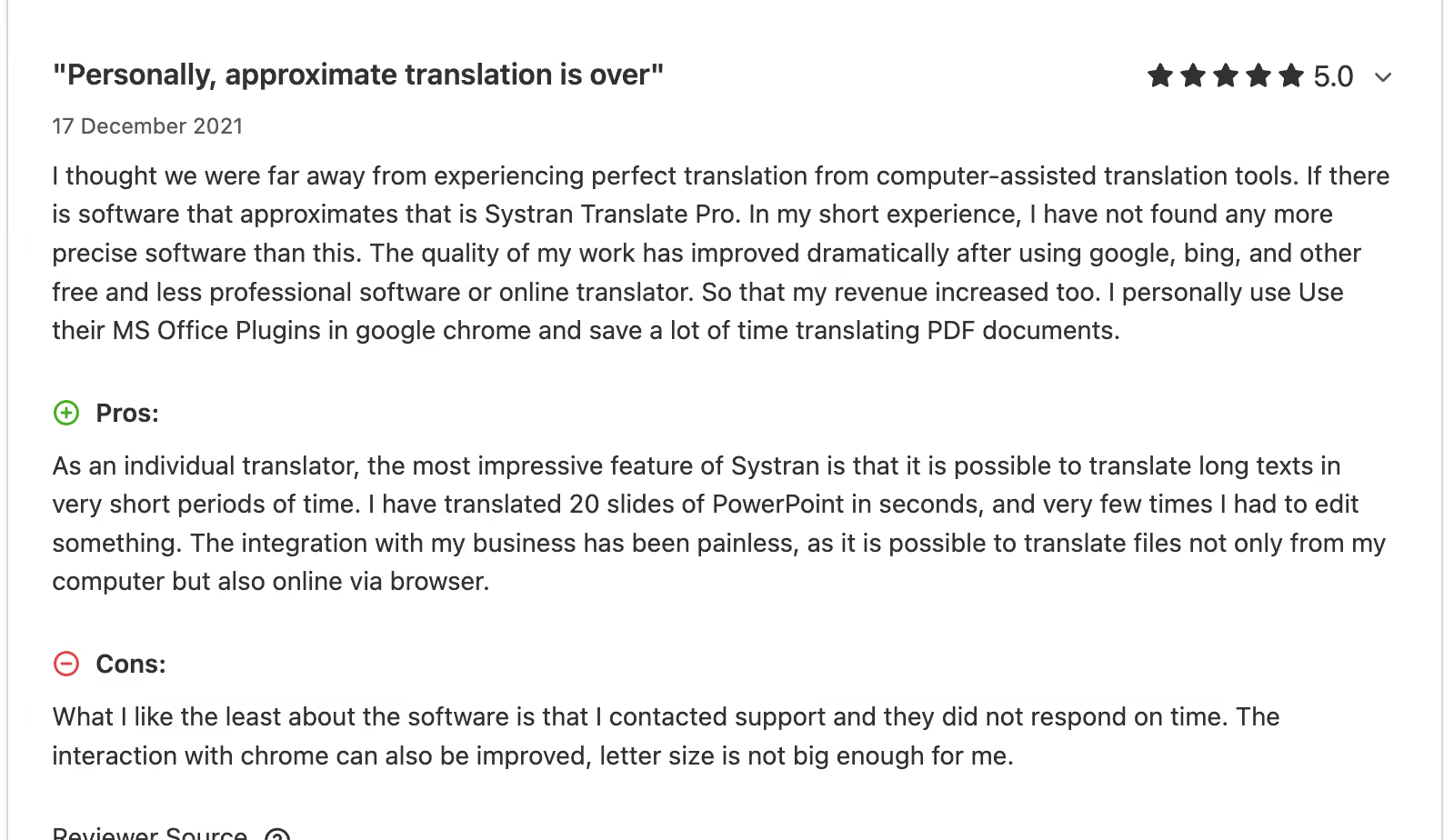
Systran has been building translation engines for 50+ years. The on-premise deployment means your data never leaves your servers. Industry-specific models cover legal, medical, IT, and financial Arabic translation. A Capterra reviewer reported translating 20-slide PowerPoint decks in seconds with minimal editing.
Key Features of Systran
Some of the key features that make Systran a strong Arabic translator for regulated industries are:
- Systran offers on-premise deployment, which means your translation data never leaves your internal servers.
- Industry-specific translation models from Systran Pro cover Legal, Medical, IT, and Financial domains with specialized Arabic terminology.
- Custom user dictionaries and translation memory within Systran ensure that the same Arabic phrasing appears consistently across large document sets.
- Systran's MS Office plugin lets users translate directly inside Word, Excel, and PowerPoint without switching platforms.
Systran Pros
- Data sovereignty through on-premise deployment is a capability most cloud-based translators cannot match.
- Over 50 years of linguistic data development gives Systran deep Arabic language modeling.
Systran Cons
- Systran has no live meeting or real-time audio translation capability.
- Multiple reviewers on Reddit noted a meaningful learning curve on the interface.
- Enterprise pricing lacks transparency and may be prohibitive for small teams or individual users.
FAQs on Systran Pro
Does Systran support Arabic dialects?
Yes, Systran offers dialect recognition in its translation processing, but the primary output is always MSA. If you want translation in different Arabic dialects, then you can use ChatGPT or JotMe.
Can Systran be deployed on-premise?
Yes, Systran offers on-premise deployment, which makes it suitable for defense, healthcare, and finance organizations where data residency is required.
Is Systran suitable for small teams?
Systran's enterprise pricing and setup complexity make it better suited for large organizations. If you are just starting out, then you can use DeepL, but if you are from a medium-sized company who aspirese to become an enterprise or if you want to host webinars and events, then you can choose JotMe.
Does Systran translate live meetings?
No, Systran Pro is predominantly a document and text translation platform and cannot translate any live meeting that happens on Zoom, Meet, Teams, Webex, or other platforms. For live meeting Arabic translation, you can check out JotMe.
Tarjama AMT: Best Arabic Translator for MENA Business Content
Tarjama AMT is the only tool on this list that was built exclusively for Arabic business translation. The company is based in Dubai and has been serving the MENA region for over 14 years, which means their neural engine was trained on over a decade of curated English-Arabic business content across legal, financial, consulting, healthcare, and eCommerce domains.
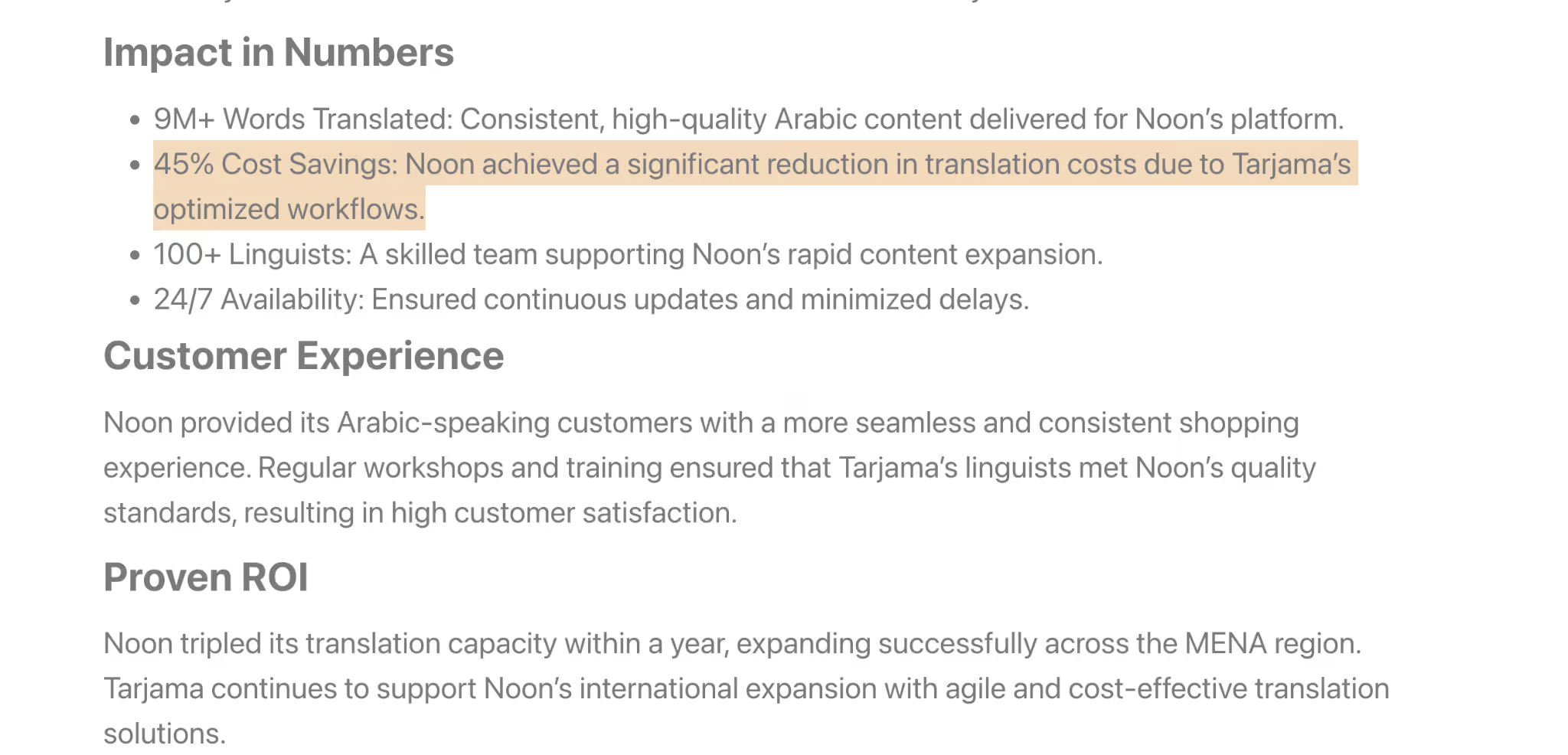
As per a case study on its website, when Noon, the e-commerce platform, integrated Tarjama into its workflow, it saw a 45% reduction in translation spend while tripling its translation capacity.
Key Features of Tarjama
The most prominent features of Tarjama are:
- Tarjama's neural engine was trained exclusively on 12+ years of curated English-Arabic business content across legal, financial, consulting, healthcare, and e-commerce domains.
- The platform reports 50%+ perfect translation accuracy for business content.
- Tarjama handles document translation across Word, Excel, PowerPoint, XLIFF, HTML, JSON, and XML.
- Tarjama has been recognized among the top 20 machine translation engines globally.
Tarjama Pros
- The most Arabic-specialized translation engine on this entire list.
- Deep MENA cultural and linguistic expertise that general-purpose engines lack.
Tarjama Cons
- Tarjama is limited to English-Arabic and Arabic-English only.
- There is no live meeting or real-time audio translation capability in Tarjama.
- Tarjama’s enterprise-focused pricing may be inaccessible for individual users and small teams.
FAQs on Tarjama AMT
Does Tarjama support languages beyond Arabic?
No, Tarjama AMT is limited to English-Arabic and Arabic-English translation. For multilingual needs for meetings and events, you can use the JotMe desktop that comes with 200+ languages.
Is Tarjama suitable for small businesses?
Tarjama's enterprise focus may be cost-prohibitive for small teams. Consider DeepL for document translation or JotMe for meeting translation as more accessible alternatives.
Does Tarjama translate live meetings?
No, Tarjama is a document and text translation platform and is not recommended to translate live meetings or events. If translating and getting transcriptions for your meeting is your goal, then JotMe is the right app for you.
What industries does Tarjama specialize in?
Tarjama serves multiple industries, including legal, financial, healthcare, consulting, and e-commerce.
iTranslate: Mobile Arabic Translator
We downloaded iTranslate to test its Arabic translation on both text and camera input. The AR lens is where the app genuinely impressed us. You point your phone at Arabic signage, a restaurant menu, or a printed document, and the translated text overlays directly on your camera view in real time. It felt more intuitive than Google Translate's camera mode for quick visual translation, and for travelers navigating Arabic-speaking countries.
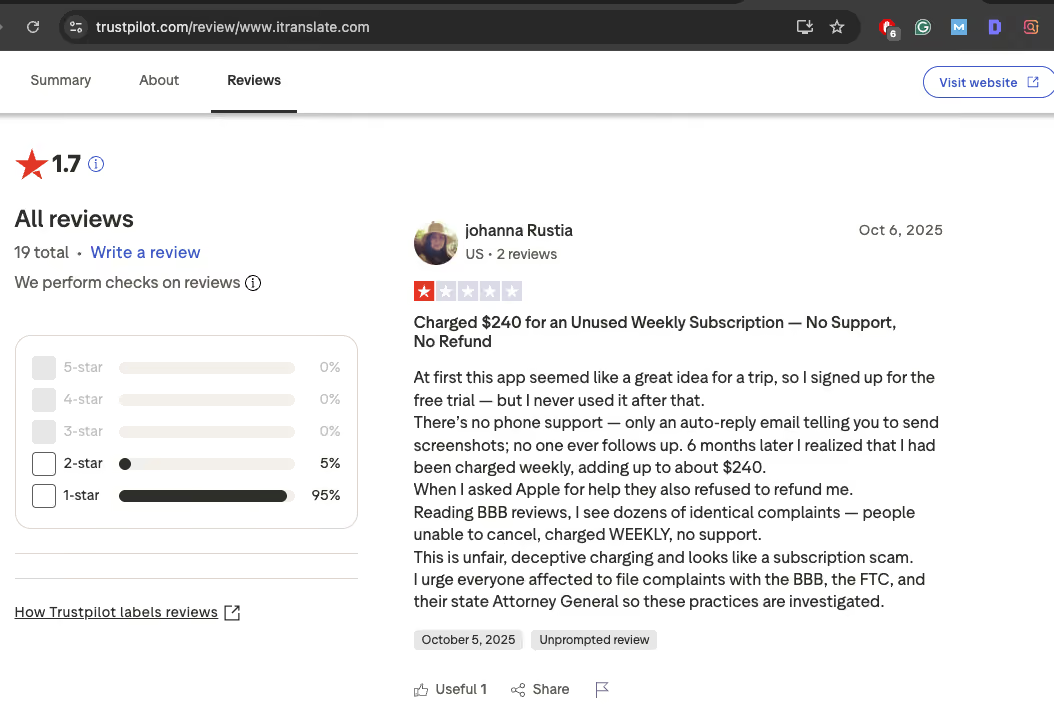
That said, the translation quality of iTranslate for typed text was functional but did not produce noticeably better Arabic output than what Google Translate offers for free. At the same time, there are several users who have complained about the tool’s accuracy and billing subscription.
Key Features of iTranslate
Some notable key features of iTranslate are:
- iTranslate's AR lens is useful for reading Arabic signage, menus, and printed documents in real time.
- iTranslate supports text, voice, and camera translation across 100+ languages.
- iTranslate offers an offline mode with downloadable language packs for use without internet access.
iTranslate Pros
- iTranslate’s AR lens is user-friendly
iTranslate Cons
- Users have complained about iTranslate’s billing issues.
- The Arabic translation quality does not exceed what Google Translate offers for free.
FAQs on iTranslate
Is iTranslate free?
No, iTranslate is not free for an Arabic to English language translator, but it does offer a limited free tier. iTranslate’s subscription typically ranges from $4.99 - $9.99 weekly top of around $99.99 annually.
Is iTranslate better than Google Translate for Arabic?
For general Arabic translation, Google Translate is free and offers comparable or better quality. iTranslate's only advantage is the AR lens overlay. The only area where iTranslate has a genuine edge is the AR lens overlay, which provides a more visually intuitive camera translation experience. If that specific feature matters to you, iTranslate may be worth trying. For everything else, Google Translate is the safer and more capable choice.
Does iTranslate support Arabic dialects?
No, iTranslate does not support Arabic dialects. The app outputs Modern Standard Arabic only, which means it will not adjust for Gulf, Egyptian, Levantine, or Maghrebi Arabic. If you are looking for an Arabic translator that recognizes regional dialects during live conversations, you can use JotMe as it offers 20+ Arabic dialect variants, including Algerian, Bahraini, Egyptian, and Gulf Arabic.
Does iTranslate translate live meetings?
No, iTranslate is a mobile translation app designed for text, voice, and camera input. It cannot join or translate live meetings on Zoom, Google Meet, or Microsoft Teams. For real-time Arabic translation during live meetings with transcription and meeting summaries, JotMe is the recommended tool.
QuillBot: Best Arabic Translator for Academic Writing
QuillBot is primarily known as a paraphrasing and grammar tool, but when we tested its Arabic translator module, it surprised us. The standout feature is the formality toggle. In Arabic, the register gap between a formal business letter and a casual WhatsApp message is linguistically vast, which involves different vocabulary, verb forms, and sentence structures entirely.
Just like what we did for Google Translate and JotMe, we tested QuillBot for both English to Arabic and Arabic to English translation.
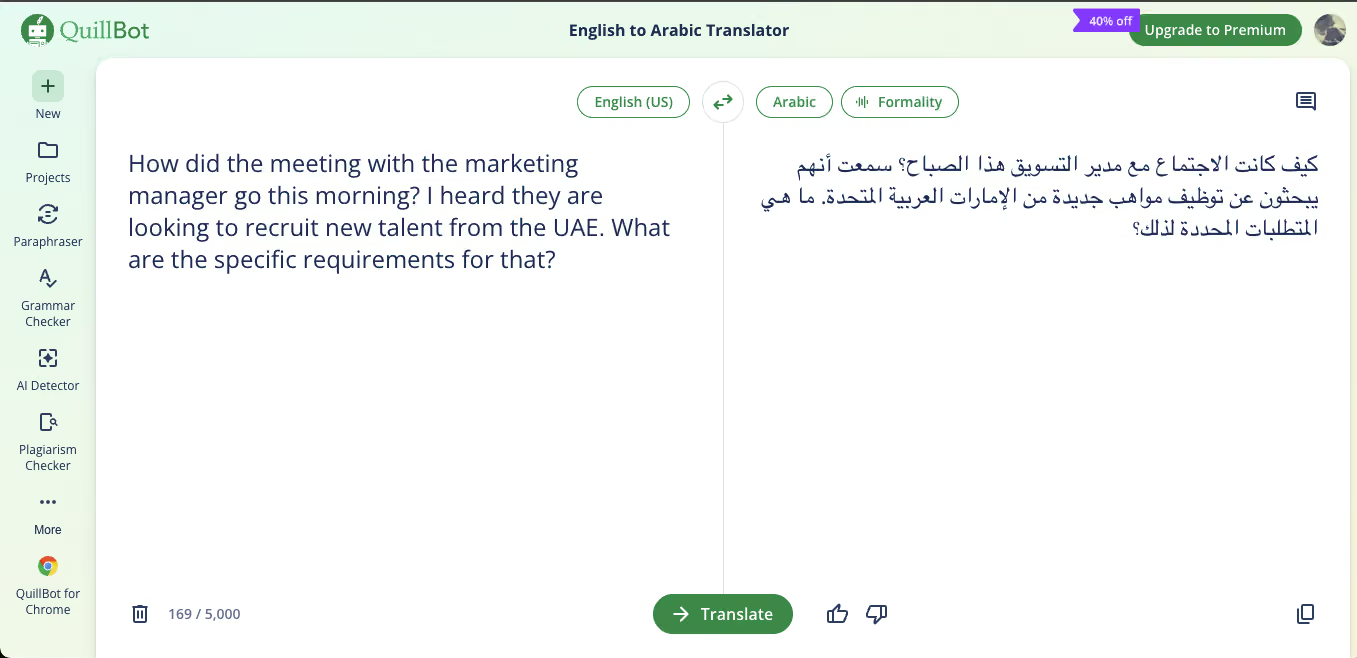
The result came back as:
"How was the meeting with the marketing manager this morning? I heard they are looking to hire new talent from the United Arab Emirates. What are the specific requirements for that?"
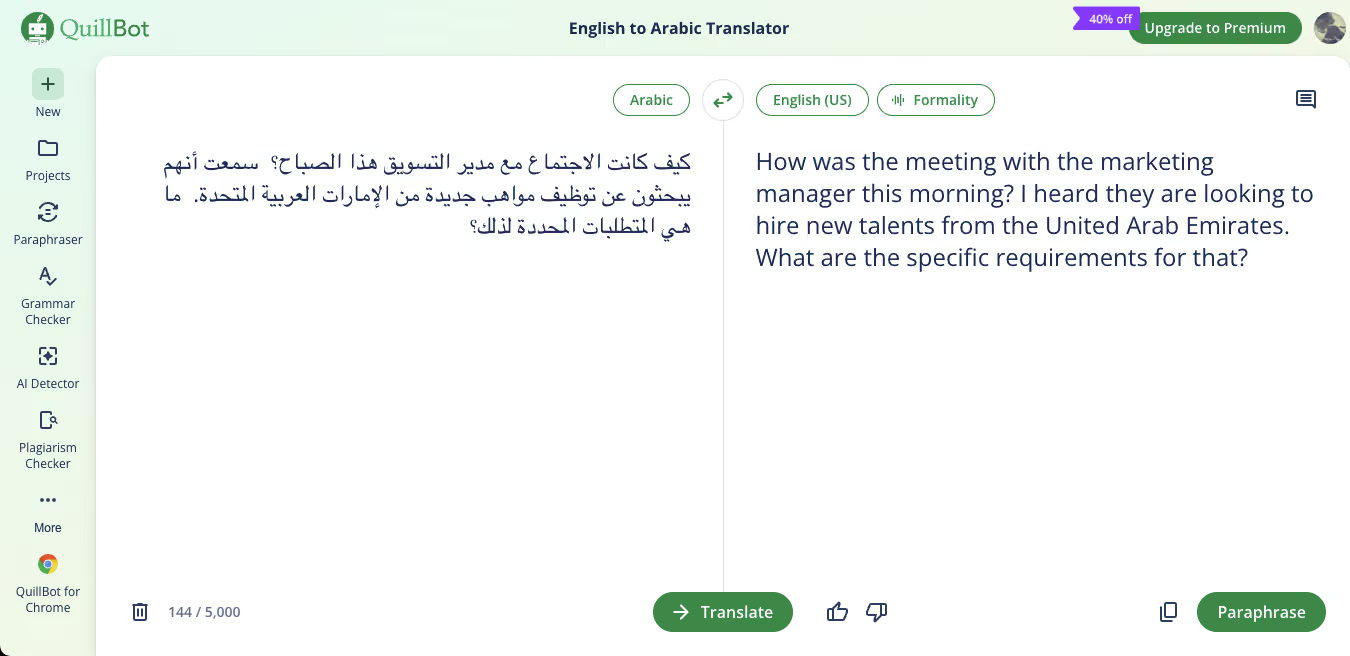
Compared to Google Translate's round-trip, where the word "budget" vanished entirely, QuillBot preserved noticeably more of the original meaning.
Key Features of QuillBot
If you want to use QuillBot as a language translator, then the following key features will be highly useful:
- QuillBot's formality toggle lets you adjust the language output, just like JotMe’s translation quality control.
- QuillBot combines a translator, paraphraser, grammar checker, AI detector, and plagiarism checker in a single interface.
- QuillBot supports 45+ languages with a 5,000-character limit per translation input.
QuillBot Pros
- QuillBot holds the highest user satisfaction on this entire list.
- Our round-trip test showed QuillBot preserved more of the original English meaning than Google Translate.
- Arabic-speaking reviewers from Iraq and Algeria have praised the quality.
QuillBot Cons
- QuillBot has no live translation capability.
- The 5,000-character limit per translation restricts longer document work.
- Arabic dialect support is MSA only.
- There is no document translation that preserves original formatting.
FAQs on QuillBot for Arabic
Does QuillBot support Arabic dialects?
No, QuillBot does not support Arabic dialects at this time. The tool outputs Modern Standard Arabic only. Reviewers from Iraq and Algeria have publicly requested dialect detection and a dedicated Arabic humanizer feature. If dialect-specific Arabic translation is important for your work, JotMe offers 20+ regional Arabic variants for spoken language detection.
Can QuillBot translate long documents?
QuillBot translates text up to 5,000 characters per input, which covers roughly 700 to 900 words depending on the content. For longer documents, you would need to break the text into multiple segments. If you need to translate full documents with formatting preserved (Word, PDF, PowerPoint), DeepL or Tarjama AMT are better suited for that workflow.
Is QuillBot free for Arabic translation?
Yes, QuillBot's free tier includes Arabic translation with the formality toggle, which is the tool's most distinctive feature for Arabic. QuillBot’s Premium plan costs $2.50/month (based on the ongoing promotional discount at 40%).
How accurate is QuillBot for Arabic?
In our testing, QuillBot's Arabic output was clean and natural-sounding, and the round-trip translation (English to Arabic back to English) preserved more original meaning than Google Translate's version of the same sentence.
Wordly AI: Ideal Arabic Translator for Events and Meetings
Wordly AI operates in a fundamentally different category from the text-based Arabic translators on this list. It is live event infrastructure. When we researched Wordly's deployment, the scale immediately stood out, similar to what JotMe offers for sharing translation credits.
Wordly reports that its AI translation can reduce interpretation costs by up to 90% compared to hiring human interpreters, and for organizations hosting multilingual events regularly, the financial case is significant.
Key Features of Wordly AI
Some of the key features that make Wordly AI the best Arabic translator for large events and conferences are:
- Wordly AI supports up to 100,000 simultaneous users per session.
- Attendees access translation by scanning a QR code with their phone and selecting Arabic.
- Worldly AI integrates with Zoom, Microsoft Teams, Google Meet, Webex, and Cvent.
- Worldly AI’s custom glossaries let organizations boost, block, or replace up to 3,000 specific phrases to match company or industry terminology.
Wordly AI Pros
- Scales to 100,000 simultaneous users per session
- QR code access eliminates the setup friction that kills adoption at large events, just like what JotMe does when it comes to sharing AI translation credits with QR.
- Reports up to 90% reduction in interpretation costs.
Wordly AI Cons
- Wordly AI has no free tier.
- Google Play reviews mention mobile app friction.
- Worldly AI is unsuitable for individual text translation, document translation, or casual everyday use.
FAQs on Wordly AI
Can Wordly AI translate small team meetings?
Yes, Wordly AI can technically handle small meetings, but its pricing, setup, and feature set are all optimized for large events with hundreds or thousands of participants. If you are running recurring team meetings with 5 to 10,000 people, you can use JotMe.
Does Wordly AI support Arabic dialects?
Yes, Wordly AI handles Modern Standard Arabic with accent recognition for spoken input, but it does not offer dialect-specific Arabic output the way JotMe does. JotMe's language selection includes 20+ Arabic regional variants (Algerian, Bahraini, Egyptian, Gulf, and more), which allows spoken language detection to be calibrated to the actual dialect being spoken in the room.
Is Wordly AI free?
No, Wordly AI does not offer a free tier or a self-serve trial. All plans are enterprise-priced and quote-based, meaning you need to contact the Wordly sales team to discuss your event size, language needs, and platform requirements before receiving pricing.
How does Wordly AI compare to JotMe for meetings?
Wordly AI excels at large-scale events where you need 100,000+ attendees receiving real-time Arabic captions. JotMe excels at both recurring team meetings and large-scale events where you need real-time translation combined with meeting intelligence like summaries, action items, and gists.
OpenL Translate: Best Budget Arabic Translator for Multi-Format Documents
OpenL Translate caught our attention because it covers more input formats than almost any other tool on this list. Text, images, screenshots, PDFs, Word files, audio files, and SRT subtitle files can all be translated through a single platform supporting 100+ languages, including Arabic.
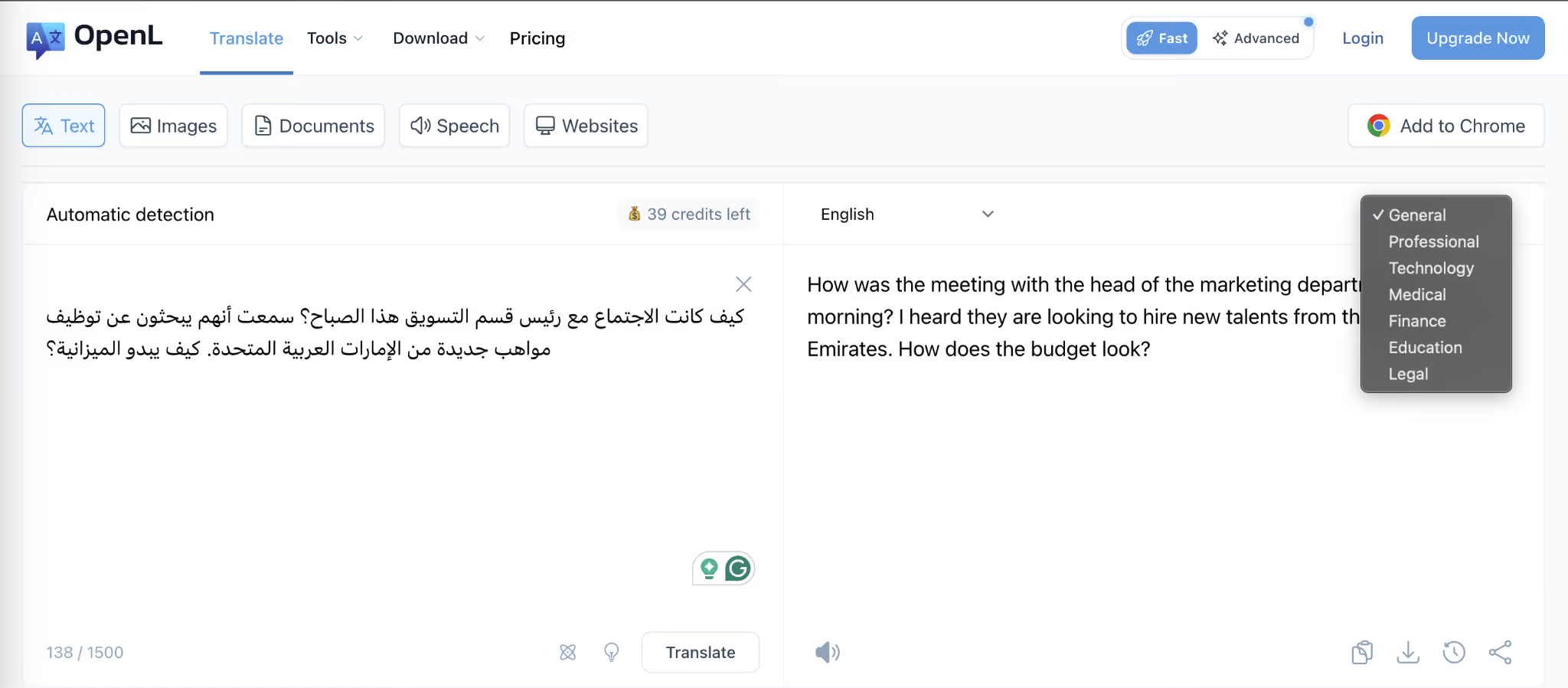
For users who regularly need to translate Arabic content across different media types and do not want to switch between three or four separate tools, OpenL consolidates the entire workflow into one interface. As you can see from the image below, OpenL Translate lets you choose from different translation tones, including General, Professional, Technology, Medical, Finance, Education, and Legal.
Key Features of OpenL Translate
Some of the features that make OpenL Translate a solid budget Arabic translator for multi-format documents are:
- OpenL handles text, images, screenshots, PDFs, Word files, audio, and SRT subtitle files through a single platform.
- The OCR-powered image translation handles Arabic right-to-left text in photos and screenshots.
- OpenL states that it does not store translation data on its servers.
- Document translation preserves original formatting across PDF, Word, PowerPoint, Excel, EPUB, and SRT files.
OpenL Pros
- OpenL Translate offers daily free credits without account creation.
- Privacy-first approach from OpenL Translate with no server-side data storage is a good option for professionals.
OpenL Cons
- OpenL has no live meeting or real-time audio translation capability.
- Web and iOS subscriptions are separate and cannot be shared across devices.
- Pay-per-use pricing for document translation can accumulate faster than expected for high-volume users.
FAQs on OpenL Translate
Does OpenL support Arabic dialects?
No, OpenL does not support Arabic dialects. The platform outputs Modern Standard Arabic only. If your Arabic translation needs require dialect awareness for Gulf, Egyptian, Levantine, or Maghrebi Arabic, JotMe offers 20+ regional Arabic variants for spoken language detection, and ChatGPT can produce dialect-specific Arabic output when prompted.
Is OpenL Translate free?
OpenL offers 30 free daily credits without requiring you to create an account, which is enough for occasional text and image translation.
Can OpenL translate Arabic images?
Yes, OpenL's OCR handles Arabic right-to-left text in photos, screenshots, and scanned documents. This is one of its strongest features for Arabic, since many OCR tools struggle with RTL script and produce garbled results.
Does OpenL translate live meetings?
No, OpenL is a document and file translation platform designed for text, images, and files. It cannot join or translate live meetings. For real-time Arabic translation during meetings on Zoom, Google Meet, or Microsoft Teams, JotMe is the recommended tool.
Reverso Context: Arabic Phrase Lookup for Language Learners
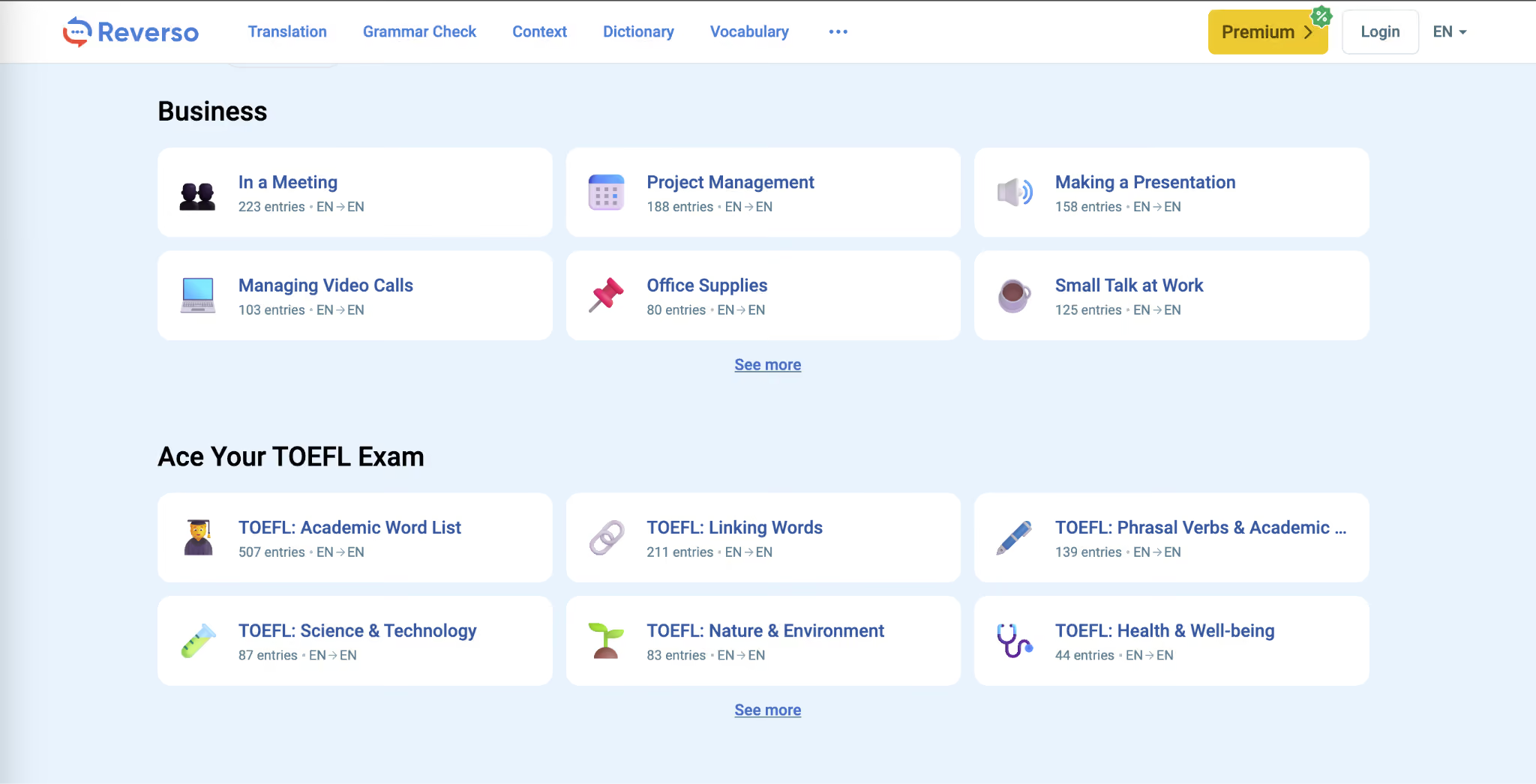
Reverso Context takes a fundamentally different approach from every other tool on this list. Instead of translating a full sentence or document, Reverso shows you real-world examples of how specific phrases have been translated in existing documents, movie subtitles, and parallel text corpora. If you type in an Arabic phrase, you see multiple examples of how that exact phrase has been used and translated in professional and published contexts.
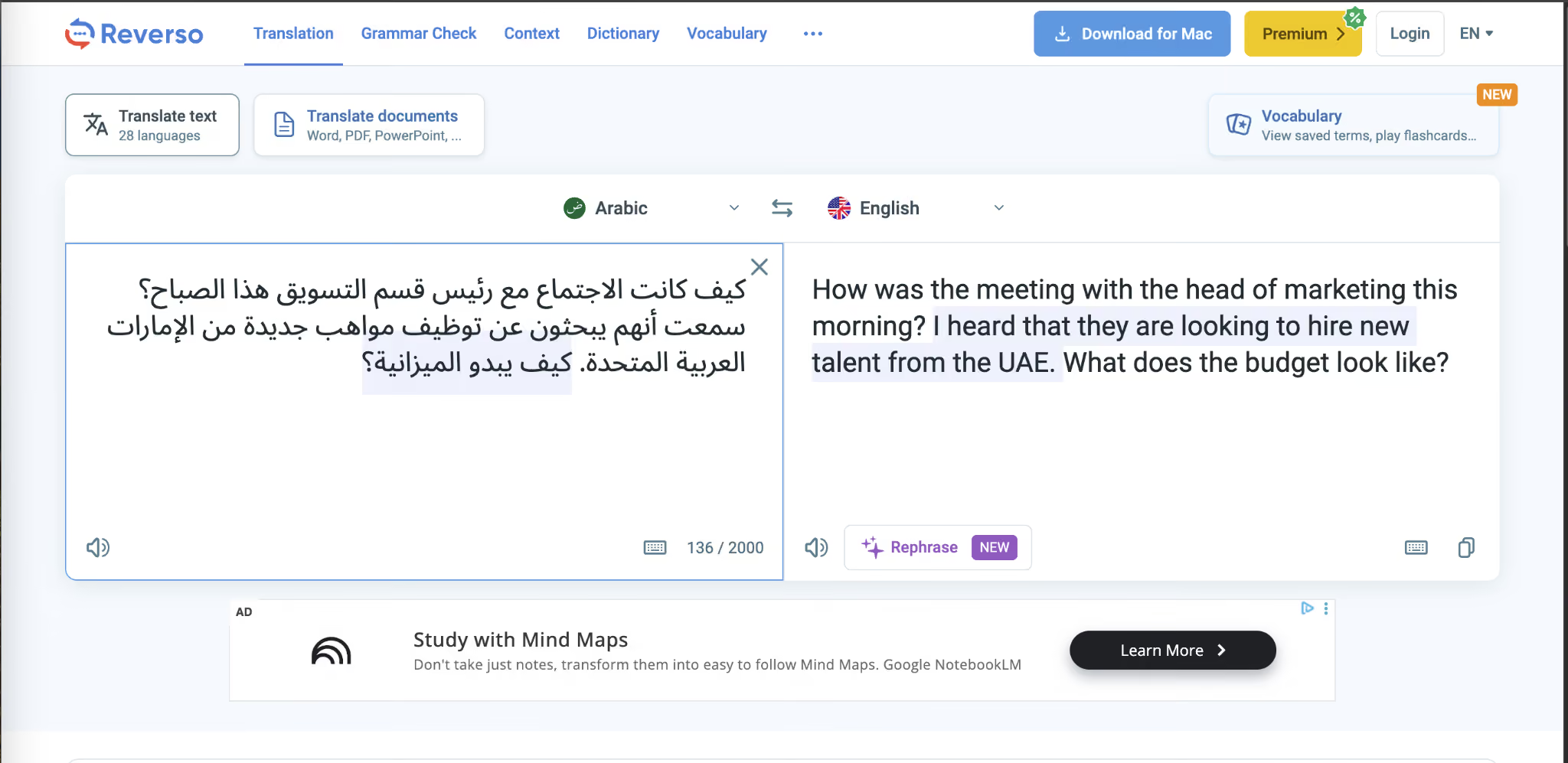
For Arabic language learners trying to understand how a particular idiom works in real conversation, or for professional translators cross-referencing whether a specific Arabic phrasing sounds natural, this contextual approach has genuine educational value.
Key Features of Reverso Context
Some of the features that make Reverso Context useful for Arabic language learners are:
- Reverso displays real-world examples of how specific Arabic phrases have been translated.
- Reverso Context includes a dictionary with Arabic synonyms, conjugation tables, and grammar references.
- Flashcards and vocabulary-building tools from Reverso Context let you save Arabic phrases you encounter and review them over time for retention.
Reverso Pros
- Reverso Context comes with language learning features, like flashcards, conjugation tables, and vocabulary building.
Reverso Cons
- Reverso is limited to phrase-level lookups.
- Reverso Context reportedly showed errors while translating long documentation.
- The platform covers Modern Standard Arabic only, with no dialect awareness or options.
FAQs on Reverso Context
Is Reverso accurate for Arabic?
Yes, for phrase-level reference and understanding how Arabic idioms work in a real-world context, Reverso provides genuinely useful examples. However, because the platform relies on crowdsourced corrections rather than employed linguists, the quality of individual examples can vary.
Does Reverso employ linguists?
No, Reverso acknowledged in one of their customer support replies that they do not employ linguists and instead rely on users to provide corrections and "solutions." This crowdsourced model means the contextual examples may be professionally translated content or user-submitted translations of varying quality, with no clear way to distinguish between the two.
Does Reverso support Arabic dialects?
No, Reverso covers Modern Standard Arabic only. There are no options for Gulf, Egyptian, Levantine, or Maghrebi Arabic. For dialect-aware Arabic translation, JotMe offers 20+ regional variants for spoken language detection.
Can Reverso translate documents?
No, Reverso Context is a phrase-level contextual reference tool. It is designed for looking up how specific phrases are used in context, not for translating full documents.
ElevenLabs: Best Arabic Translator for Audio and Video Dubbing
ElevenLabs occupies a unique position on this list because it does something fundamentally different from every other tool here. It takes audio or video content you have already recorded in English, translates the speech into Arabic, and regenerates the audio in the original speaker's voice while preserving the tone, pacing, and emotional delivery of the source material. The result is your voice speaking Arabic, and it still sounds like you.
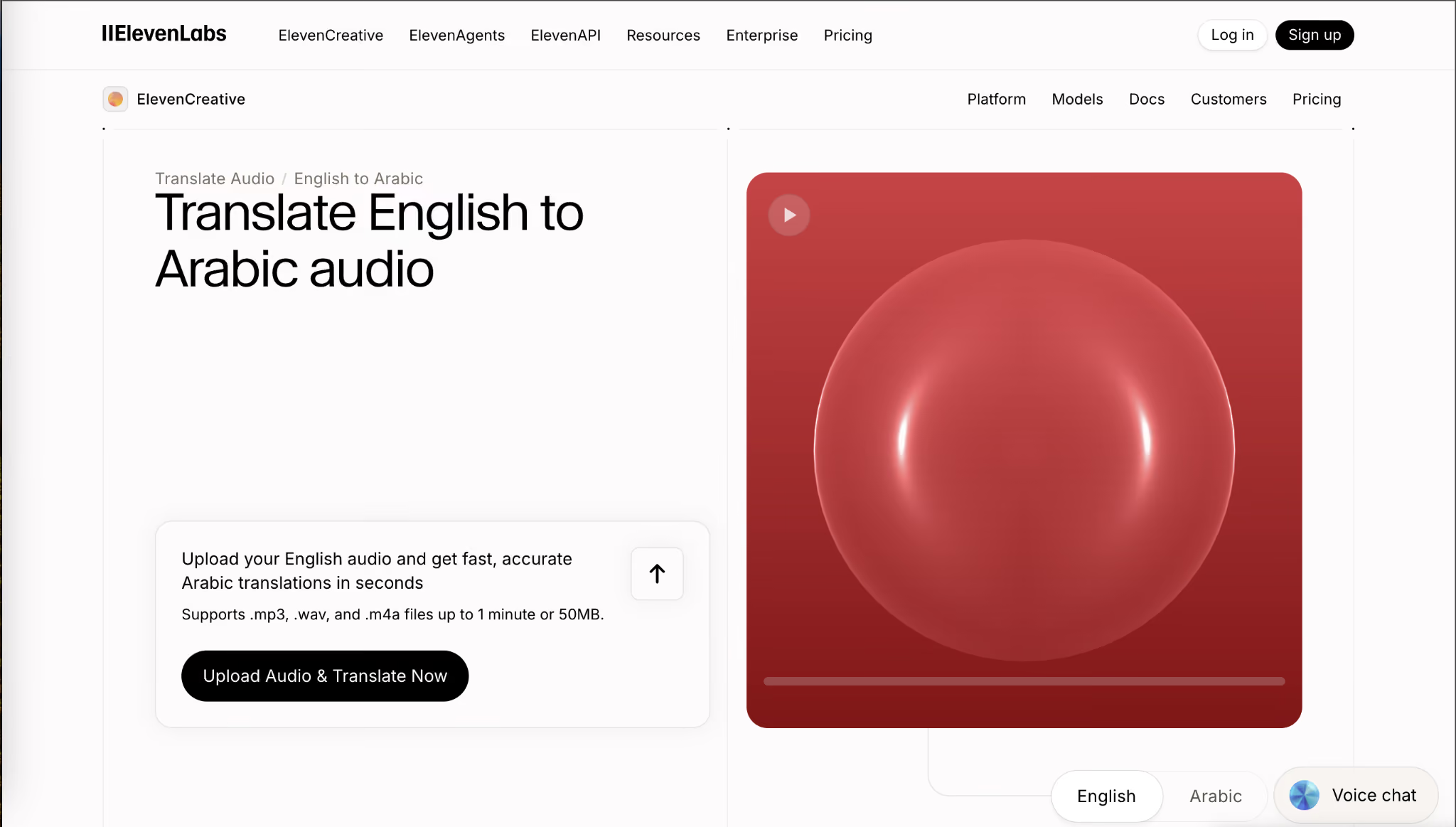
ElevenLabs supports dubbing across 29 to 32 languages, including Classic Arabic, with speaker diarization that identifies individual voices in multi-speaker content. If you are into anime or manga content, ElevenLabs also works well for dubbing, and you can check out our list of the best tools for anime translation to English.
Key Features of ElevenLabs
Some of the features that make ElevenLabs the best Arabic translator for audio and video dubbing are:
- ElevenLabs translates pre-recorded audio and video into Arabic while preserving the original speaker's voice, tone, and emotional delivery.
- The Arabic text-to-speech library includes over 20 voice options spanning Egyptian, Gulf, Lebanese, and Kuwaiti dialects.
- ElevenLabs' Scribe model achieves a 3.1% word error rate on the FLEURS benchmark for Arabic speech-to-text transcription, outperforming Google Gemini and OpenAI Whisper.
ElevenLabs Pros
- The only tool on this entire list that preserves the original speaker's voice when translating audio into Arabic.
- Enterprise-grade security certifications (SOC 2 Type II, ISO 27001, PCI DSS Level 1) make it viable for organizations with strict compliance requirements.
- Used by major creators including Ali Abdaal, Colin & Samir, and 20VC, which validates the production quality of the Arabic output.
ElevenLabs Cons
- ElevenLabs works exclusively on pre-recorded content. It cannot translate live meetings, live conversations, or real-time audio in any form.
- In ElevenLabs, dubbing is currently limited to Classic Arabic.
- Credit-based pricing escalates quickly on long-form content.
- The Dubbing Studio at ElevenLabs has a learning curve for its advanced editing features.
FAQs on ElevenLabs
Can ElevenLabs dub in Arabic dialects?
No, ElevenLabs can only provide dubbing in Classic Arabic. However, the text-to-speech feature offers over 20 Arabic voice options spanning Egyptian, Gulf, Lebanese, and Kuwaiti dialects, and the speech-to-text transcription supports Arabic with strong benchmark accuracy. The dialect options are expected to expand into the dubbing pipeline, but as of April 2026, Classic Arabic is the only dubbing output.
Can ElevenLabs translate live meetings?
No, ElevenLabs works exclusively on pre-recorded audio and video content. It cannot join live meetings, process real-time conversations, or provide live Arabic captions. For real-time Arabic translation during meetings on Zoom, Google Meet, or Microsoft Teams, with meeting summaries and action items, JotMe is the recommended tool.
Is ElevenLabs free?
ElevenLabs offers a limited free tier that lets you test basic features, including some dubbing and text-to-speech. If you need to use the full dubbing capabilities, voice cloning, and advanced Dubbing Studio features, you will need to pay $6 per month or avail professional voice cloning for $11 per month.
How does ElevenLabs compare to Google Translate?
ElevenLabs and Google Translate serve entirely different use cases and do not compete. ElevenLabs dubs pre-recorded audio and video content into Arabic while preserving the speaker's voice. Google Translate handles real-time text and basic voice translation for everyday use. If you need to translate a meeting, use JotMe. If you need to translate a document, use DeepL.
Best Arabic Translator for Different Use Cases
The best Arabic translator depends entirely on what you are using it for. Here is how the tools break down by specific scenario:
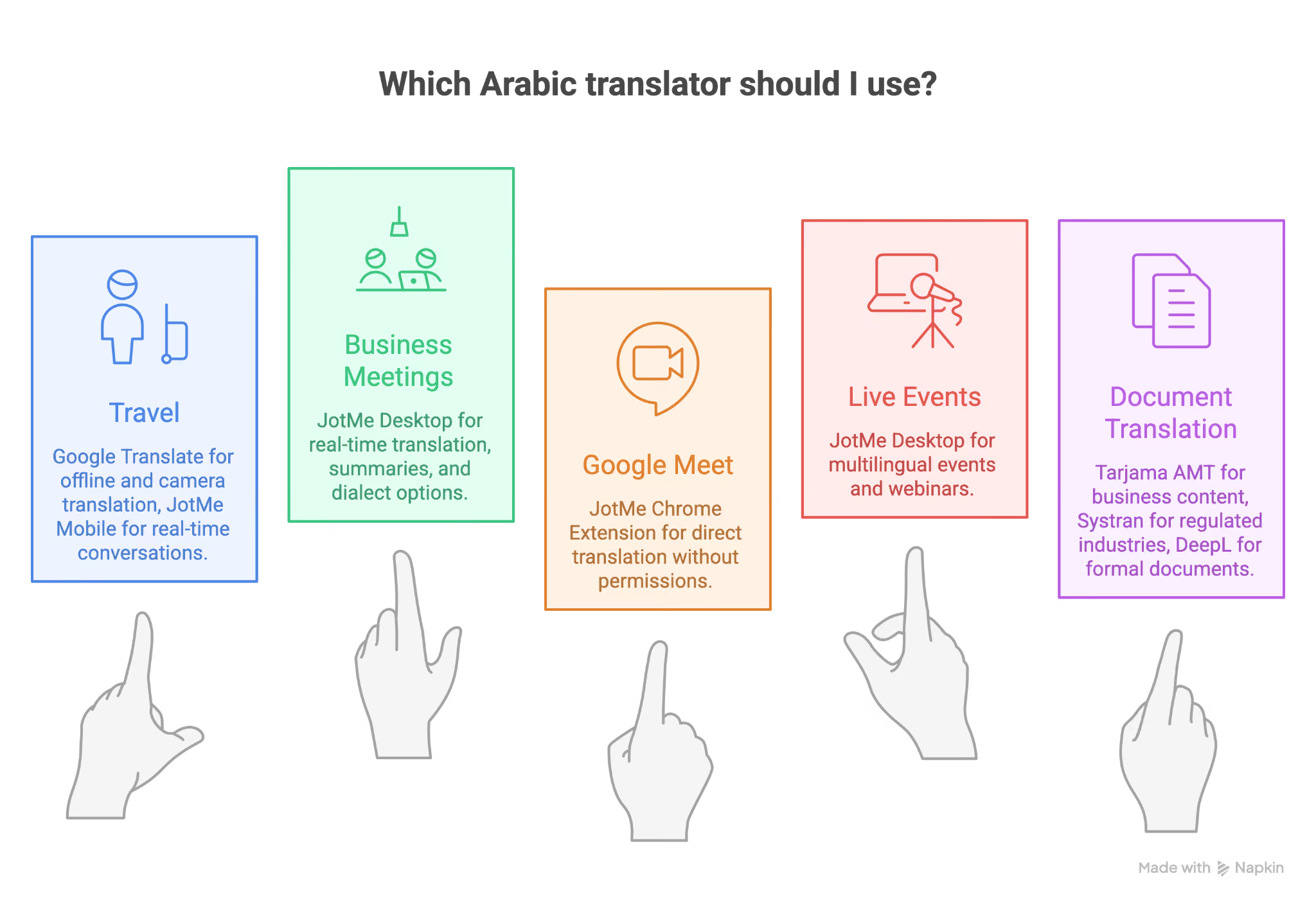
Best Arabic Translator for Travel
Google Translate (free, offline, camera translation) and JotMe Mobile App (real-time conversation translation for in-person meetings while traveling).
Best Arabic Translator for Business Meetings
JotMe is the best English to Arabic translator for business meetings because it combines real-time translation, transcription, summaries, and 20+ Arabic dialect options.
Best Arabic Translator for Google Meet
JotMe Chrome Extension, as it provides Google Meet Translation directly inside the meeting without adding a bot or requiring host permissions.
Best Arabic Translator for Live Events and Conferences
JotMe desktop Arabic translator app for multilingual events and webinars.
Best Arabic Translator for Document Translation
Tarjama AMT for Arabic-specific business content, Systran for regulated industries needing on-premise deployment, and DeepL for general formal documents.
Which Arabic Translator Is Best for Your Business & Event in 2026?
After testing all 12 tools, the answer for businesses is clear: JotMe.
JotMe is the only Arabic translator on this list that translates live meeting audio in real time, generates meeting intelligence (summaries, action items, gists), supports 20+ Arabic dialects for spoken language detection, and works across every major meeting platform. JotMe handles the complete workflow that businesses actually need: translate the meeting, record the transcript, summarize the outcomes, and distribute the notes, all in one session.
For document translation, DeepL and Tarjama AMT are strong choices. For audience-adaptive translation, ChatGPT offers unmatched flexibility. For travel, Google Translate remains the best free option.
But if your organization runs multilingual meetings with Arabic-speaking stakeholders, clients, or teams, and you are currently spending $20,000+ annually on human interpreters or losing meeting context to language gaps, JotMe is the tool that solves both problems simultaneously. If your meetings frequently involve extended discussions that last over an hour, you may also want to explore the best continuous translation apps that handle long-form conversations without dropping context.
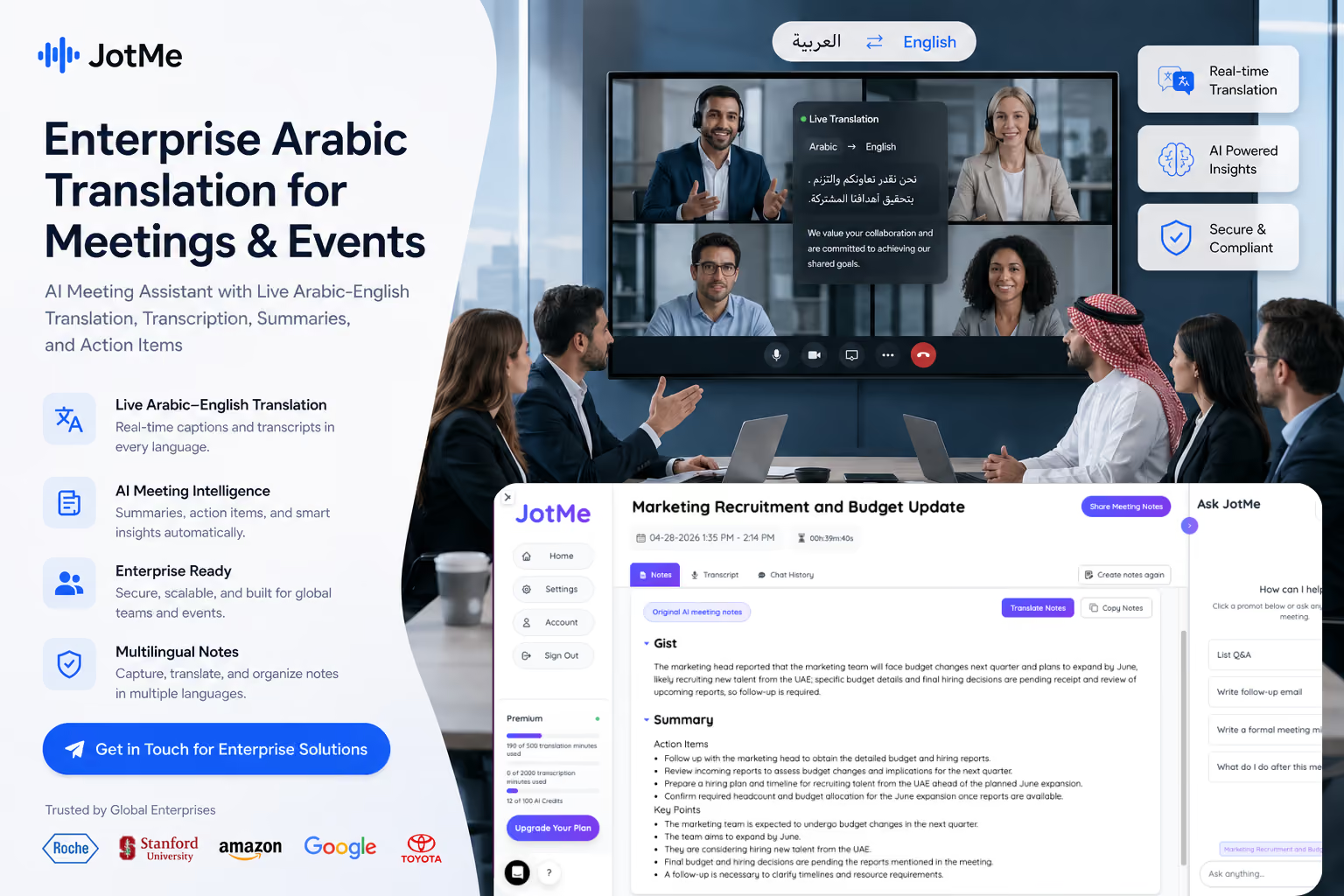
Download JotMe for Mac or Windows today and start translating English to Arabic in less than 60 seconds.
Frequently Asked Questions About Arabic Translator Apps
What is the best free Arabic translator?
JotMe is the best free Arabic translator because it offers a free tier with live meeting translation, real-time transcription, and AI meeting summaries. Google Translate is the best fully free option for text-based translation with offline and camera support.
What is the highest-rated Arabic translator?
Google Translate and DeepL are the highest-rated translators in terms of general recognition, but each has limitations: Google Translate outputs only MSA, and DeepL lacks live meeting capability. If you want an all-around Arabic translator that supports 200+ languages, real-time meeting translation, and awareness of Arabic dialects, JotMe offers the most comprehensive package as of April 2026.
Which app is best for the Arabic language?
Duolingo is considered the best app for learning Arabic language fundamentals. But if you want a Windows or Mac app that helps you learn Arabic through real conversations while also supporting your business meetings and events with live translation, JotMe serves both purposes in a single tool.
Can ChatGPT translate Arabic to English?
Yes, ChatGPT can translate Arabic to English with strong contextual understanding and dialect awareness. The limitation is that it operates on a text prompt-response cycle, cannot process live meeting audio, and translation quality depends on how specific your instructions are.
Which AI is best for Arabic?
JotMe's agentic AI is the best for Arabic in operational settings because it combines contextual memory, contextual translation, and adaptive accuracy. What it means is that the more you speak, the better the translation becomes as the AI builds context from the ongoing conversation. For text-based Arabic translation, ChatGPT offers the most flexibility through prompt-based dialect and formality control.
Can I translate from English to Arabic in real time?
Yes. JotMe offers live meeting translation and transcription, making it more useful when you need spoken English to Arabic translation in meetings.
Is there a free English to Arabic translation tool?
JotMe’s free trial makes it the best free English to Arabic translator app for business meetings and events because it supports real-time translation, 20+ Arabic dialect options, and AI meeting notes. Google Translate is better for quick free-text translation, while DeepL is stronger for formal written documents.
What is the best English to Arabic translator app?
JotMe is the strongest option for English to Arabic translation because it translates speech in real time and keeps the transcript, summary, and action items. For short text, ChatGPT and Google Translate can work if you review the output carefully.
Image Credit: The banner image and some supporting visuals in this article were generated using ChatGPT for illustrative purposes.
Last updated on
July 29, 2026
Follow us on social media:
![JotMe — Is Google Translate Accurate? [2026 Test]](/_webflow-assets/0d0512afc7b037d74dff536f22fed08f.avif)