Resources
Slack Updates: Slackbot AI & Focus Mode for Global Teams

Viraj Mahajan
July 15, 2026
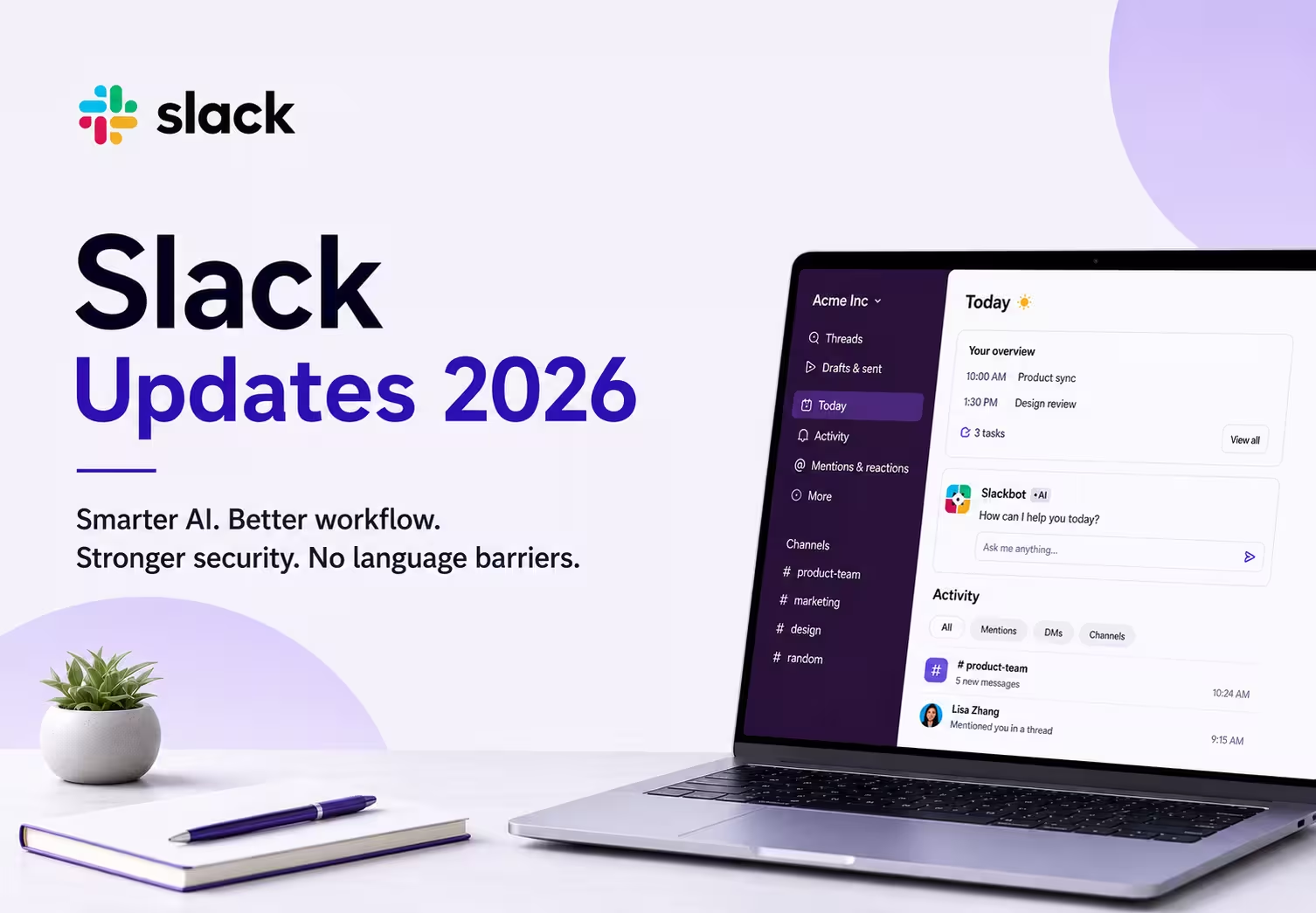
Every Slack update in 2026 is pushing the app toward one goal: helping you get more done without leaving Slack. Slack has recently added a smarter Slackbot, a new Today view, an Activity view, a Focus Mode, and MCP integrations for automation. Enterprise search and fresh security controls round out the update to the Slack rollout this year.
But even with all these Slack updates and 2026 changes, Slack still doesn't fix one common workplace problem: language barriers. Messages stay in whatever language they were typed in. That's where JotMe steps in, translating chats, huddles, and meeting notes in real time so global teams actually understand each other.
Slack Update 2026: What's New for Businesses & Enterprises
Slack update 2026 touches almost every part of the app. Here's quick look at each update:
- Slackbot AI improvements: Slackbot now works like a personal AI agent and not just a chatbot.
- Today View: A daily briefing that pulls your calendar, tasks, and priorities into one screen.
- Activity View: A single feed for DMs, mentions, and updates.
- Focus Mode: A one-click way to mute notifications and protect deep work time.
- MCP integrations: Slackbot connects to outside tools and takes action for you.
- Enterprise Search: One search bar for Slack messages, files, and connected apps.
- Voice dictation: Speak a message instead of typing it.
- Native charts: Ask Slackbot to turn data into a chart.
- Security improvements: Secret scanning, tighter admin controls, and audit log policies.
How Slackbot is Becoming an AI Work Assistant
Slackbot in this Slack update does a lot more than summarize threads. It now works as a personalized AI agent that:
- Remembers past conversations and decisions (its new memory feature)
- Takes dictation through a microphone icon in the message field
- Runs web searches when admins turn the setting on
- Builds native charts from your workspace data on request
- Follows "skills" you create for repeating tasks, like meeting agendas
Slackbot is genuinely useful for internal work, but it's designed to operate in a single language within Slack. JotMe goes further by helping teams communicate across languages and meeting platforms.
- JotMe translates messages between teammates in real time instead of just summarizing them in one language.
- JotMe works across the apps your team already uses.
- JotMe keeps context accurate across languages, so nothing gets lost when a message moves from English to Chinese or Japanese.
- JotMe captures meeting audio, does live translation, and when the meeting ends, it turns the whole meeting into AI meeting notes and memos, even when the meeting is not a Slack Huddle.
What is Slack Today View
Today view is Slack's answer to starting the day with too many unread messages. It pulls together:
- Your calendar for the day
- Your top priorities
- Open tasks assigned to you
- A single daily overview instead of a wall of notifications
Think of Slack Today View as your Slack homepage each morning. It's currently rolling out to Business+ and Enterprise plans.
How Slack Activity View Helps Employees Stay Organized
Slack Activity View replaces the old notifications sidebar with one full feed. It brings together:
- A new notification center for everything happening in your workspace
- Mentions, sorted so you don't miss them
- Direct messages and channel updates in one place
- Saved views and filters, so managing your workflow takes less effort
If your team runs a lot of Slack Huddles, this is also where JotMe helps. Many people search for how to transcribe Slack Huddle conversations because Slack's own huddle notes are limited and don't always catch every speaker clearly. JotMe records huddles and turns them into searchable AI meeting notes, so nothing said in a quick call gets lost.
How Does Slack Focus Mode Improve Business Productivity
Slack’s Focus Mode gives you a way to signal "I'm heads-down" without turning off Slack completely. It includes:
- Quiet notifications that hold non-urgent alerts
- A dedicated setting for deep work blocks of 30 minutes, an hour, or two
- Better availability signals so teammates know not to expect an instant reply
It's available on every Slack plan, which makes it one of the easiest updates to start using right away.
How Slack MCP Integrations Help Businesses Automate Workflows
This part of the Slack update is aimed at automation. Slack now has a native MCP (Model Context Protocol) server, which means:
- Slackbot can connect to outside tools like Jira, Notion, Google, and DocuSign
- You can pull live data from those tools directly into a Slack conversation
- Slackbot can complete actions, like updating a record, without you switching apps
- Admins control which apps and users get MCP access, with write actions requiring manual confirmation
How Slack Enterprise Search Helps Teams Find Information Faster
Enterprise search turns Slack into one search bar for your whole company's knowledge. It covers:
- Searching messages across channels and DMs
- Finding files shared anywhere in your workspace
- Connecting to third-party apps so you don't have to open them separately
- Pulling answers from multiple sources instead of one at a time
What are the Slack Security Updates in 2026
Security is a steady focus in every Slack update this year. The main additions are:
- Data Loss Prevention: Secret scanning catches credentials pasted into channels before they become a risk.
- Admin Controls: Channel Managers and Org Admins get more granular permission settings.
- Security Improvements: Regular patches plus a two-year audit log retention policy for compliance teams.
How JotMe Removes Language Barriers in Slack-Based Team Communication
Slack's AI features improve productivity inside a single conversation. But multilingual teams face a different challenge: understanding each other in the first place.
Here's what usually happens without help:
- A team member writes a message in English.
- A colleague who speaks Japanese or Chinese has to translate it manually.
- That extra step slows down every conversation and creates room for mistakes.
Slack's own live captions and huddle notes are limited to a small set of languages, and accuracy drops fast with accents or fast speech. That's a real gap for any diversity and inclusion software for enterprise teams working across regions.
With JotMe AI Chat, the process looks different:
- You write in English.
- A Chinese teammate receives your message in Chinese.
- A Japanese teammate receives the same message in Japanese.
- You receive their replies in English, automatically.
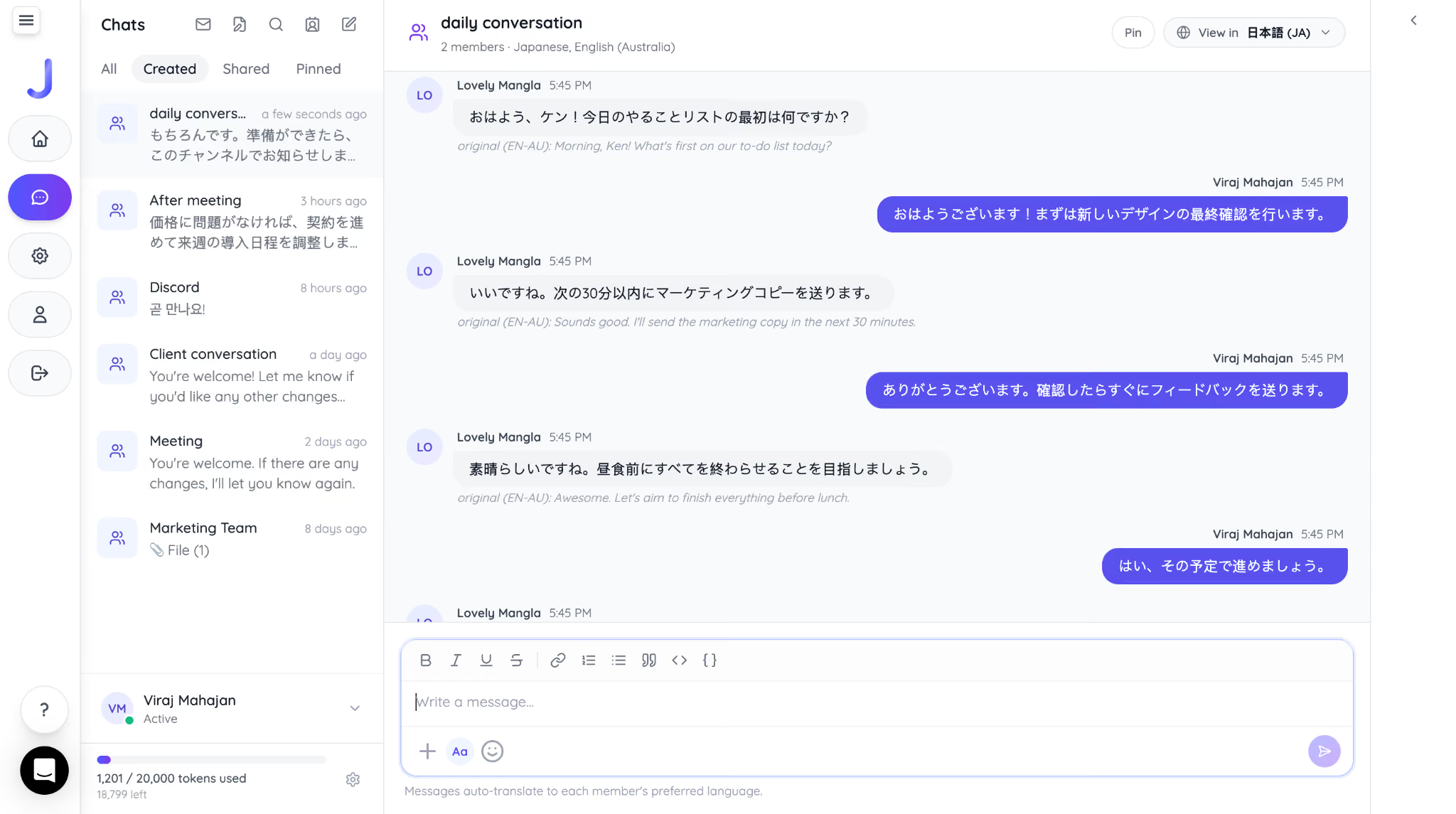
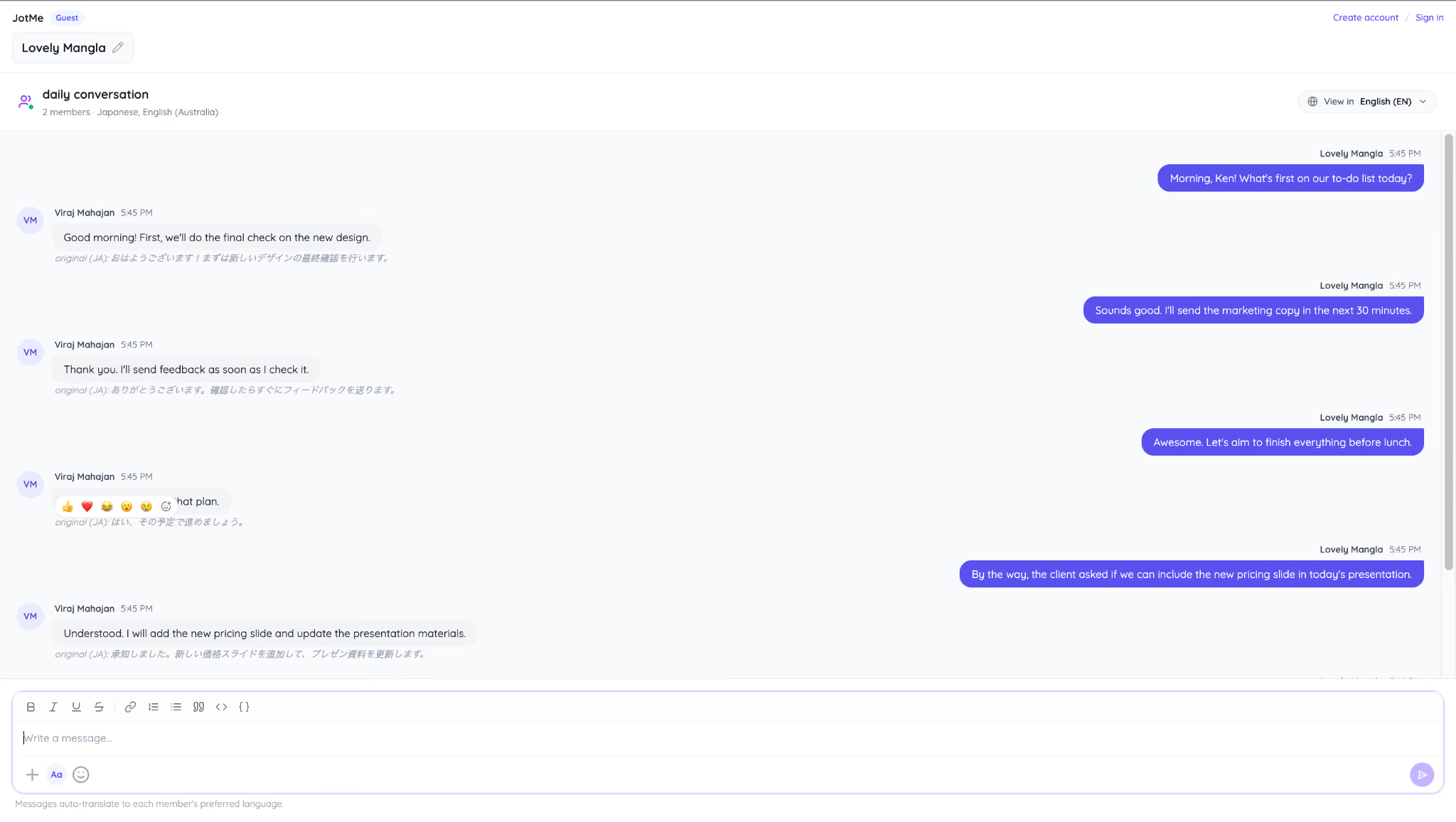
Imagine a support team in India writes daily updates in English. Their Tokyo teammate reads every message in Japanese and replies in Japanese, while the support team reads the reply in English. No one opens a separate translation tool. As one of the best live translation tools built into daily chat, JotMe removes the manual step entirely.
This way JotMe translate English message in Japanese for you:
This is how support team get message in English:
The same multilingual experience extends to voice conversations. JotMe's voice-to-voice real time translation lets people speak naturally in their preferred language while others hear the conversation in theirs. For example, an English-speaking manager can talk with a Spanish-speaking colleague, who hears the conversation in Spanish, while the manager continues speaking and listening in English.
Combined with voice translation and AI-powered multilingual transcription, JotMe helps multilingual teams communicate naturally without relying on separate translation tools.
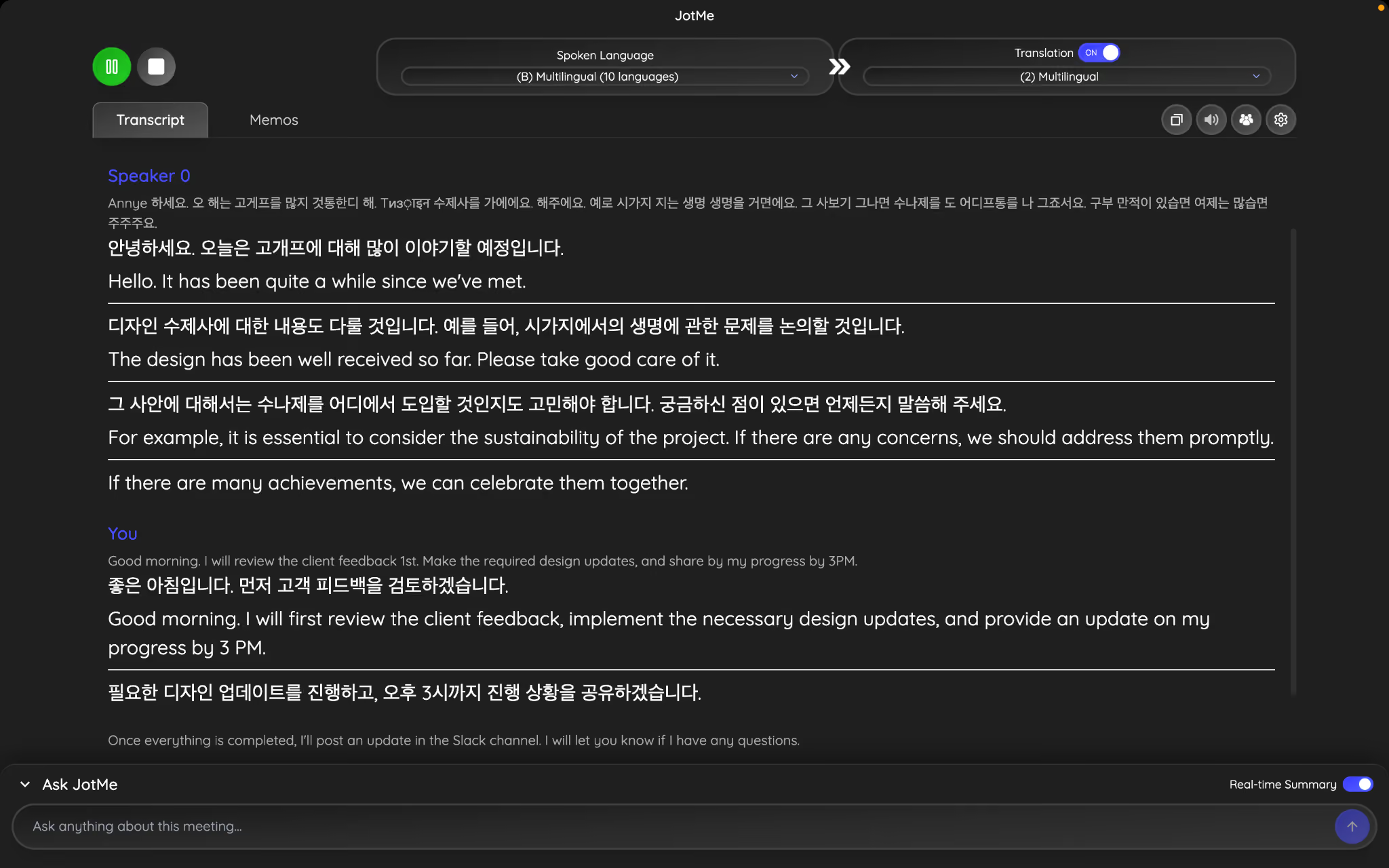
Here is how a daily conversation with a Korean client goes fluently with JotMe:
Are Slack's 2026 Updates Enough for Global Teams
This year's Slack updates made Slack smarter and faster to use, from Slackbot's new AI skills to Focus Mode and enterprise search. If you want to stay current, checking Slack updates news each month is worth the five minutes it takes. But no Slack app update solves the language gap on its own. For teams that work across countries and languages every day, pairing Slack with JotMe means everyone reads and replies in their own language, without slowing the conversation down.
Frequently Asked Questions
How do I update Slack?
Open Slack, click your workspace name or profile picture, and look for "Check for Updates." On the desktop, Slack usually updates itself automatically in the background. If you don't see a prompt, just download the latest version from Slack's website and reinstall it.
Why is my Slack not updating?
Your Slack might not be updating because of a slow internet connection, an outdated operating system, or admin restrictions on your work device. Try restarting the app first. If that doesn't work, uninstall and reinstall Slack, or check with your IT admin if you're on a managed enterprise account.
Does Slack have built-in translation?
No, Slack doesn't automatically translate messages between languages. You can copy messages into a translation tool or use third-party apps for multilingual communication. If your team works across different languages every day, tools like JotMe can translate messages in real time so everyone reads conversations in their preferred language.
Which Slack plans include the latest AI features?
Most of Slack's newest AI features, such as Today View, Enterprise Search, and the enhanced Slackbot AI experience, are available on Business+ and Enterprise plans. Some features are rolling out gradually, so availability may vary depending on your workspace and region.
Can Slack transcribe Huddles automatically?
Slack provides AI-generated notes and summaries for Huddles on eligible paid plans, but automatic transcription features and language support are limited. Teams that need more accurate transcripts, multilingual meeting notes, or support for meetings outside Slack often use dedicated AI note-taking tools like JotMe.
Last updated on
July 29, 2026
Follow us on social media:
![JotMe — Is Google Translate Accurate? [2026 Test]](/_webflow-assets/0d0512afc7b037d74dff536f22fed08f.avif)