Guides
How JotMe Handles Diversity and Inclusion for Large Enterprises and Events

Narmada Kajla
May 26, 2026
.avif)
Brief Answer: JotMe handles diversity and inclusion for large enterprises and events by running as a no-bot real-time translation layer across 200+ languages and 39,000+ direct language pairs, working alongside Zoom, Google Meet, Microsoft Teams, Webex, and Slack huddles without joining the call as a third-party participant. With GDPR compliance and SOC II in progress, JotMe translates live conversations with contextual accuracy rather than word-for-word output.
Most diversity and inclusion software platforms log demographic data, run pulse surveys, and surface dashboard reports, while the moments that actually shape inclusion happen live, inside multilingual meetings and global events, where the wrong tool turns participation into silence. JotMe operates at that live layer, with real-time translation across 200+ languages, a no-bot architecture, and agentic AI that produces post-meeting notes and bilingual transcripts, making it one of the few DEI tools that enterprise operations teams can deploy across both internal meetings and external events without compromising privacy or context.
In this guide, you will learn how JotMe was tested in a real multilingual meeting workflow, how its core features align with diversity and inclusion goals, and where it fits alongside other diversity management software in a modern enterprise stack.
What is Diversity and Inclusion in Enterprise Operations?
Diversity and inclusion in enterprise operations refers to the systems, tools, and practices that allow people from different languages, cultures, abilities, and backgrounds to participate fully in the daily work of the company, from hiring conversations to operational reviews to all-hands events. Diversity describes who is in the room, which covers nationality, language, ethnicity, gender, age, ability, and lived experience.
Inclusion describes whether those people can actually contribute, which depends on whether the conversation reaches them, whether their input is heard, and whether the systems around the meeting carry their voice forward into decisions.
Understanding diversity inside an enterprise setting means recognizing that representation on paper rarely equals participation in practice.
What is Diversity and Inclusion Software in 2026?
Diversity and inclusion software in 2026 covers three broad categories:
- Analytics platforms that track demographic representation and pay equity across the workforce.
- Survey and engagement platforms that measure employees' sense of inclusion using pulse data.
- Operational tools that work inside the live conversation to remove language, accessibility, and context barriers in real time.
This shift toward communication-focused platforms is why many companies now consider live translation and accessibility solutions among the best HR tools for companies.
JotMe operates in that third category and serves as both a diversity and inclusion tool for internal enterprise meetings and an event-grade translation platform for conferences, town halls, and customer-facing sessions in 200+ languages and 39,000+ language pairs, including Spanish-to-English, English-to-Chinese, Arabic-to-English, and so on.
How Does JotMe Work as a Diversity and Inclusion Tool for Large Enterprises?
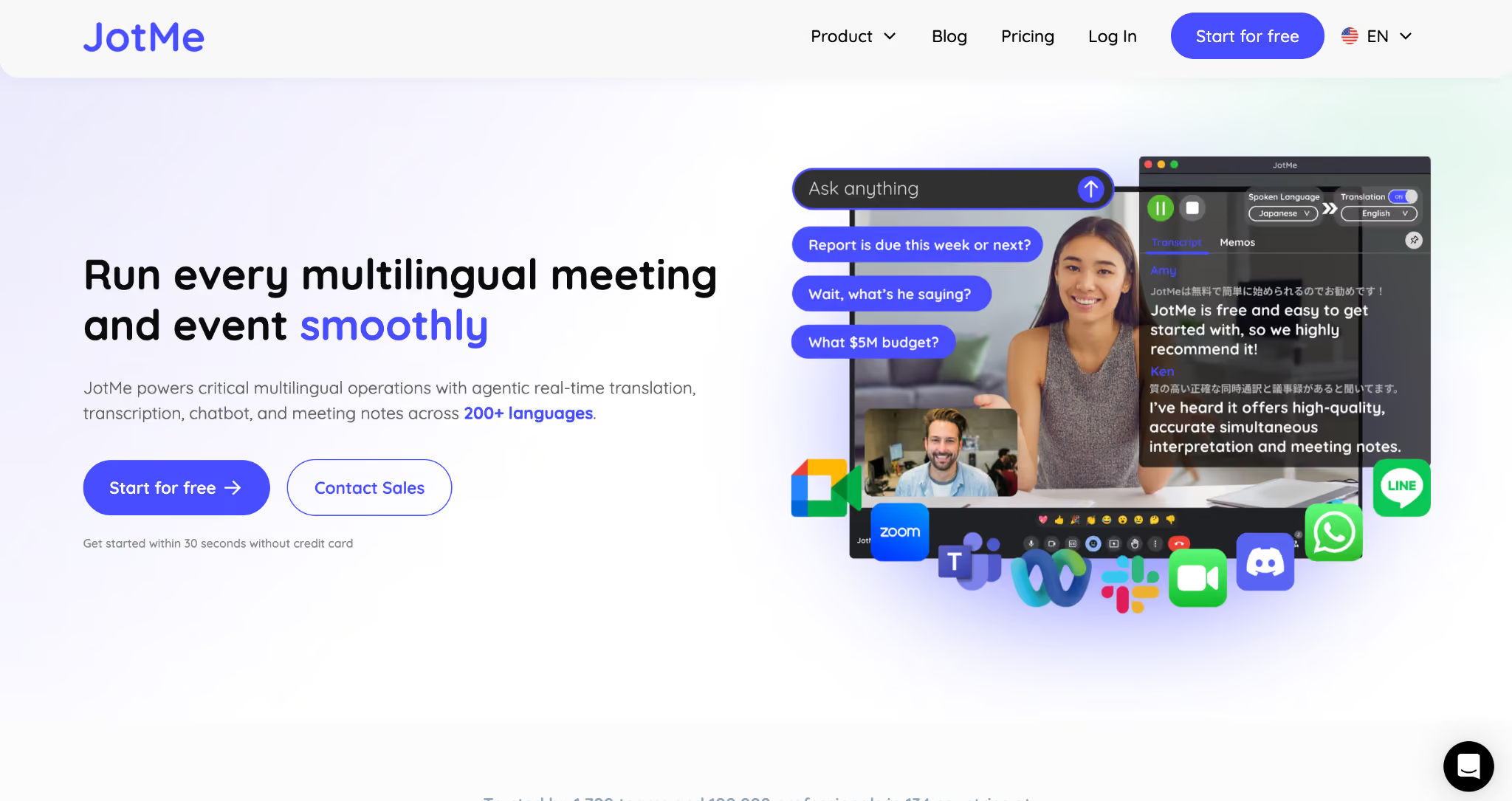
JotMe works as a live translation, transcription, and meeting intelligence platform that runs alongside any video conferencing tool, including Zoom, Google Meet, Microsoft Teams, Webex, and Slack huddles, without joining the call as a bot.
JotMe’s desktop app captures audio locally on the device, translates speech across 200+ languages with contextual accuracy, and generates AI meeting notes and bilingual transcripts that teams can review after the conversation ends.
For enterprise diversity and inclusion goals, the value comes from three combined capabilities operating inside the same workflow:
- Live translation that keeps non-native speakers in the conversation
- Agentic AI that captures the meeting in both languages, and
- The option for sharing live translation with a wider audience through a QR code link.
To document how this works in practice, we ran JotMe across a real multilingual meeting workflow, from joining the call to reviewing the post-meeting notes. The screenshots in the next three subsections come from that test session, which simulated a June marketing and operations review where one participant spoke English, and the listener understood Spanish.
How Does JotMe Perform in a Multilingual Meeting?
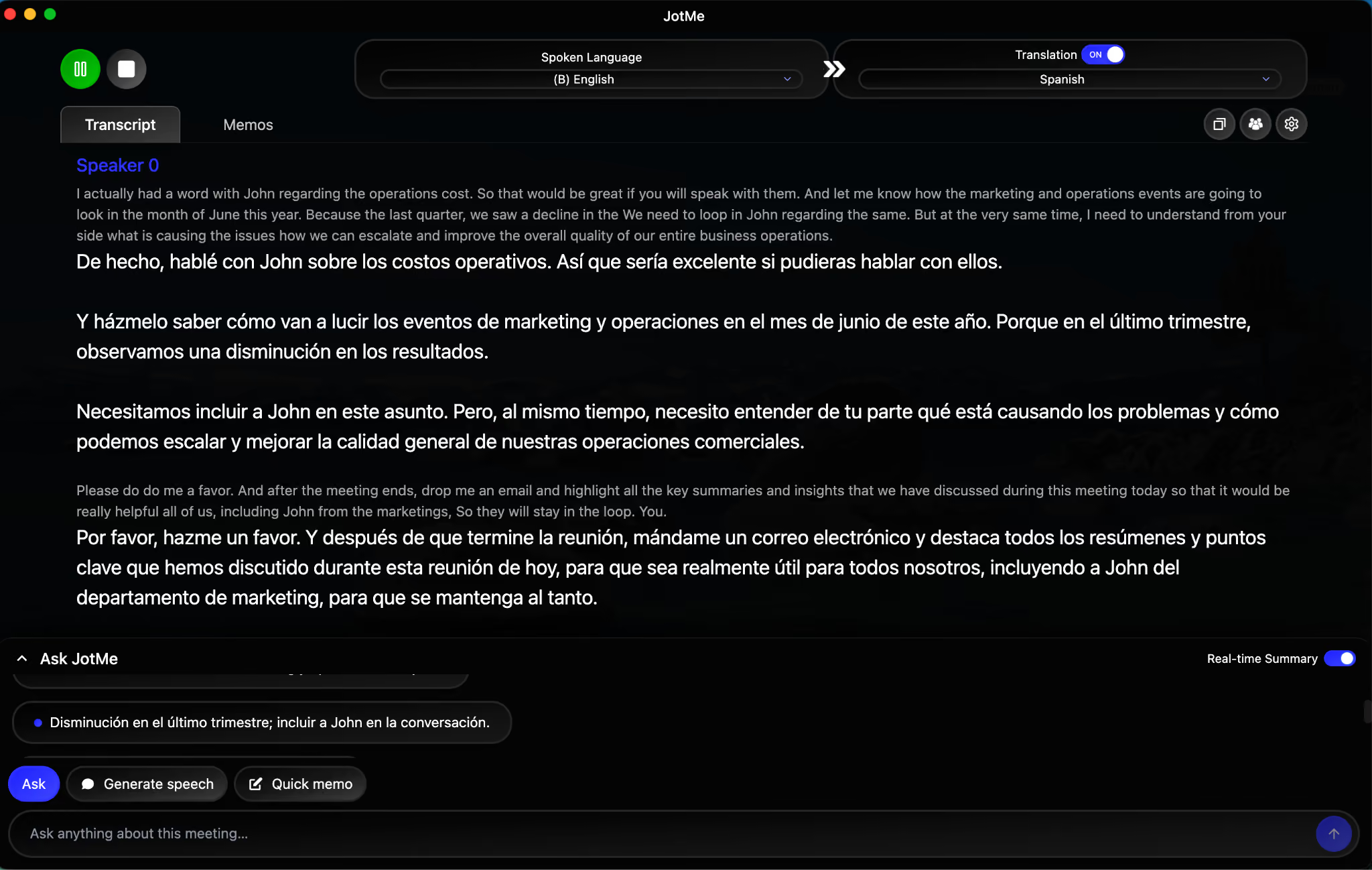
JotMe serves as a parallel translation layer running on the listener's device, capturing the spoken language on one side and rendering the translated text on the other in real time, paragraph by paragraph, as the speaker continues speaking.
In the test session, the speaker addressed the listener in English about an operations cost discussion involving John from marketing, while the listener saw the same content rendered in Spanish within a second or two of each spoken phrase. The Spanish translation preserved the operational context, including the reference to last quarter's decline and the request to loop John into the conversation, rather than producing a literal word-for-word swap that would have lost the business meaning.
How to Set Up Real-Time Translation in JotMe for Any Call?
Setting up bot-less real-time translation in JotMe takes four steps, regardless of whether the call runs on Zoom, Google Meet, Microsoft Teams, Webex, or a Slack huddle.
- Open JotMe on the device that will receive the translation and select the Spoken Language from the dropdown, which is the language the other participant will speak in.
- Select the Translation language from the second dropdown, which is the language the listener wants to read on screen.
- Toggle the Translation switch to ON, which activates the parallel rendering of the original transcript and translated text.
- Join the audio/video call in the conferencing tool of choice and start speaking. JotMe captures audio from the device and renders both transcripts in real time without joining the call as a bot.
Since JotMe never joins the call directly, enterprise IT teams do not need to whitelist a new meeting bot, approve a third-party integration with the conferencing platform, or modify their existing conferencing security policy. Audio capture occurs on the listener's device, so data residency and privacy controls remain aligned with the enterprise's existing endpoint security posture.
How Does JotMe Highlight Key Points During a Multilingual Meeting?
JotMe highlights key points during a meeting through the real-time summary panel inside the Ask JotMe sidebar, which surfaces bullet-point insights in the listener's chosen language as the conversation progresses.
In the test session, the panel rendered multiple live bullets in Spanish summarizing the meeting flow:
- A note about consulting on June marketing and operations events
- A note about the last-quarter decline and looping John into the conversation, and
- A note about understanding the root causes of the operational problems.
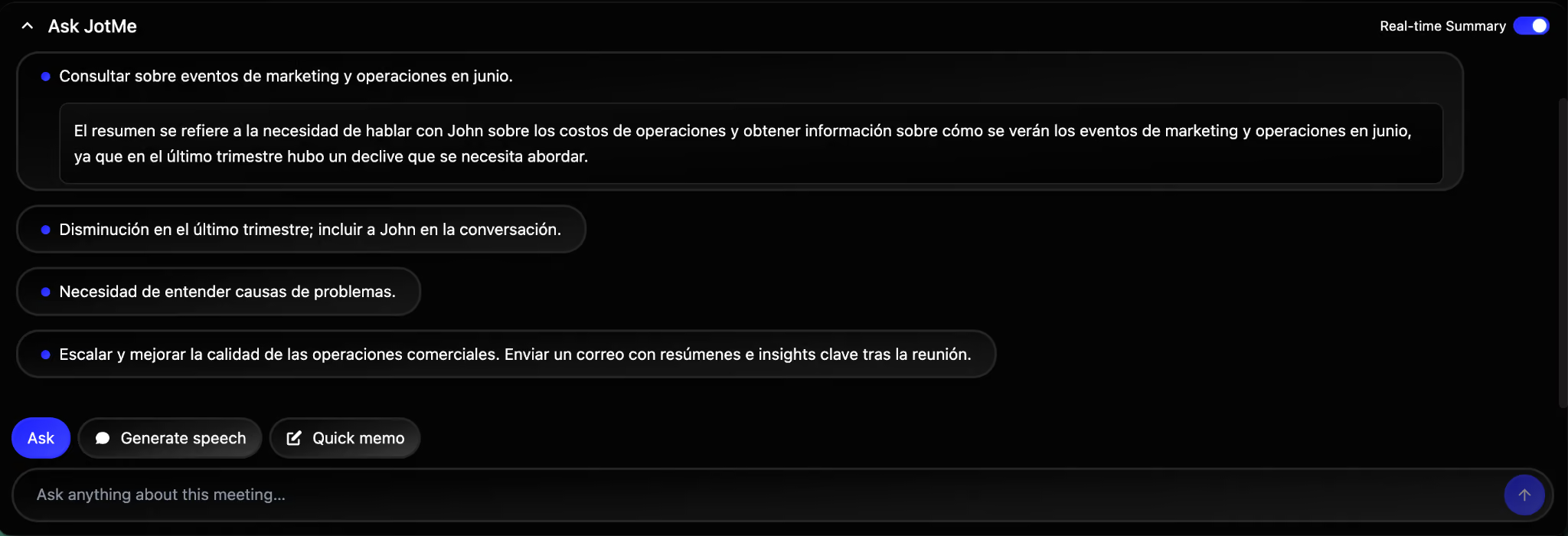
These live bullets serve two purposes inside a diversity and inclusion context.
Comprehension: A listener whose primary language is not the meeting language can scan the bullets to confirm they are following the conversation, which reduces the cognitive load of simultaneous listening and translation.
Participation: Once the listener knows the key points, they can prepare a response in their own language and reply through the Generate Speech feature.
How to Use JotMe's Generate Speech Feature?
JotMe's Generate Speech feature converts a response typed or spoken in the listener's language into the speaker's language, with both the translated text and a pronunciation guide displayed on screen.
In the test session, the listener typed a Spanish reply, "Sí, entendí y hablaré con John," and JotMe rendered the English equivalent, "Yes, I understood, and I will talk to John," along with a phonetic pronunciation, "yes, ai un-der-stud and ai wil tok tu John," that helped the listener voice the reply naturally on the call.
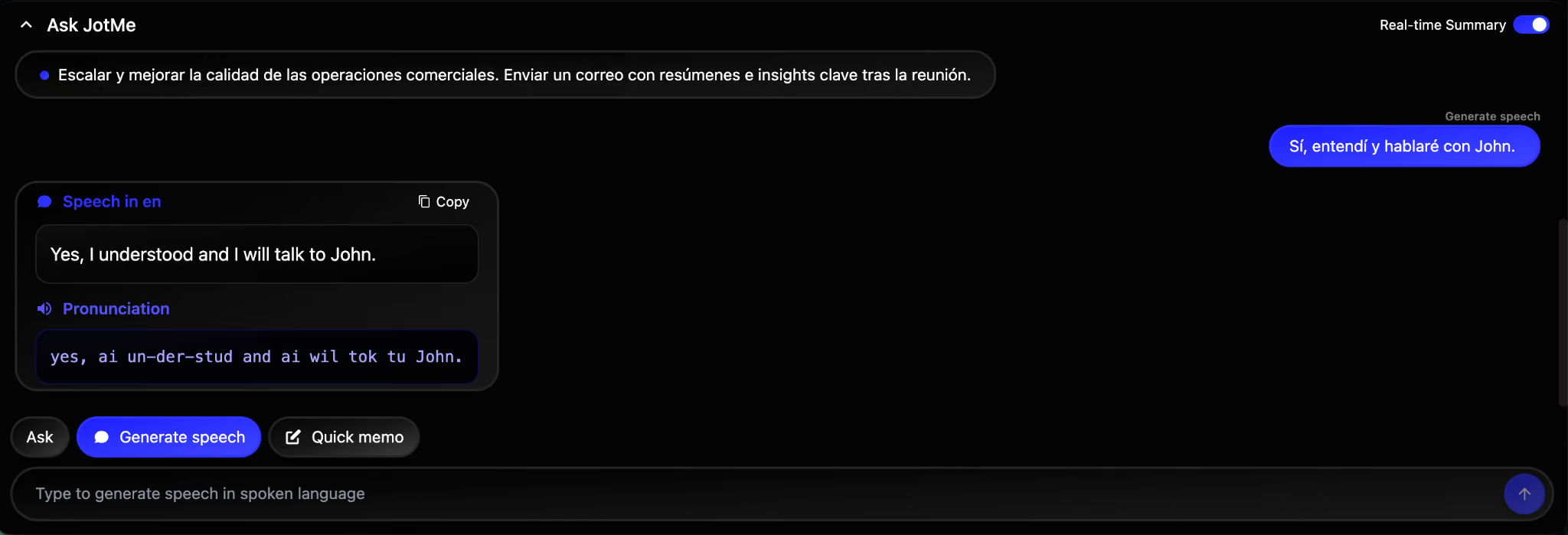
JotMe’s Generate Speech feature directly addresses one of the most common inclusion gaps in multilingual enterprise meetings, which is the inability of non-native speakers to respond in real time even when they understand the conversation.
Here’s how to use JotMe’s Generate Speech:
- Open the Ask JotMe panel during the live meeting and click the Generate Speech button at the bottom of the panel.
- Type or speak the reply in the listener's preferred language, which is the same as the Translation language set during meeting setup.
- JotMe renders the translated reply in the spoken language of the meeting, along with a phonetic pronunciation guide below the translation.
- Read the translated reply aloud during the call, using the pronunciation guide as needed. JotMe does not speak the reply directly into the call, which keeps the human voice in the conversation.
As you would agree here, comprehension and production are two separate language skills, and a global hire who follows English meetings well may still struggle to respond in English under time pressure. Generate Speech lets the listener compose the reply in the language they think in, then deliver it confidently in the language the meeting runs in, with the pronunciation guide acting as a safety net.
How to Access Meeting Notes and Transcripts in JotMe?
Meeting notes and transcripts in JotMe live inside the meeting record once the session ends, with a Notes tab, a Transcript tab, and a Chat History tab that contains the agentic AI conversation from during the meeting.
The Notes tab opens to a Gist section that summarizes the meeting in a single paragraph, followed by a Summary section with Action Items and key discussion points, which the agentic AI automatically generates based on the conversation.
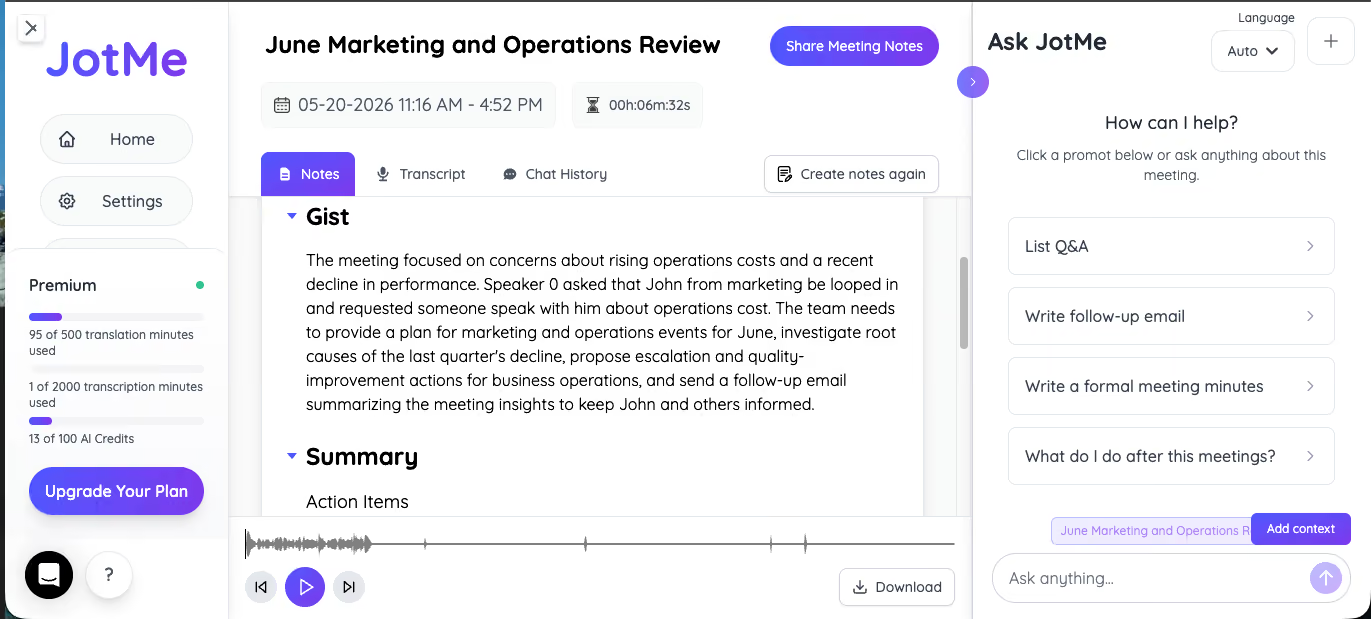
In the test session, the Gist captured the operational substance of the meeting accurately, including the focus on rising operational costs, the request to loop John from marketing into the conversation, and the action items to investigate root causes of the previous quarter's decline.
The agentic AI handled both the translated and the original-language content seamlessly, which means a meeting conducted across English and Spanish produces notes that surface insights from both sides of the conversation.
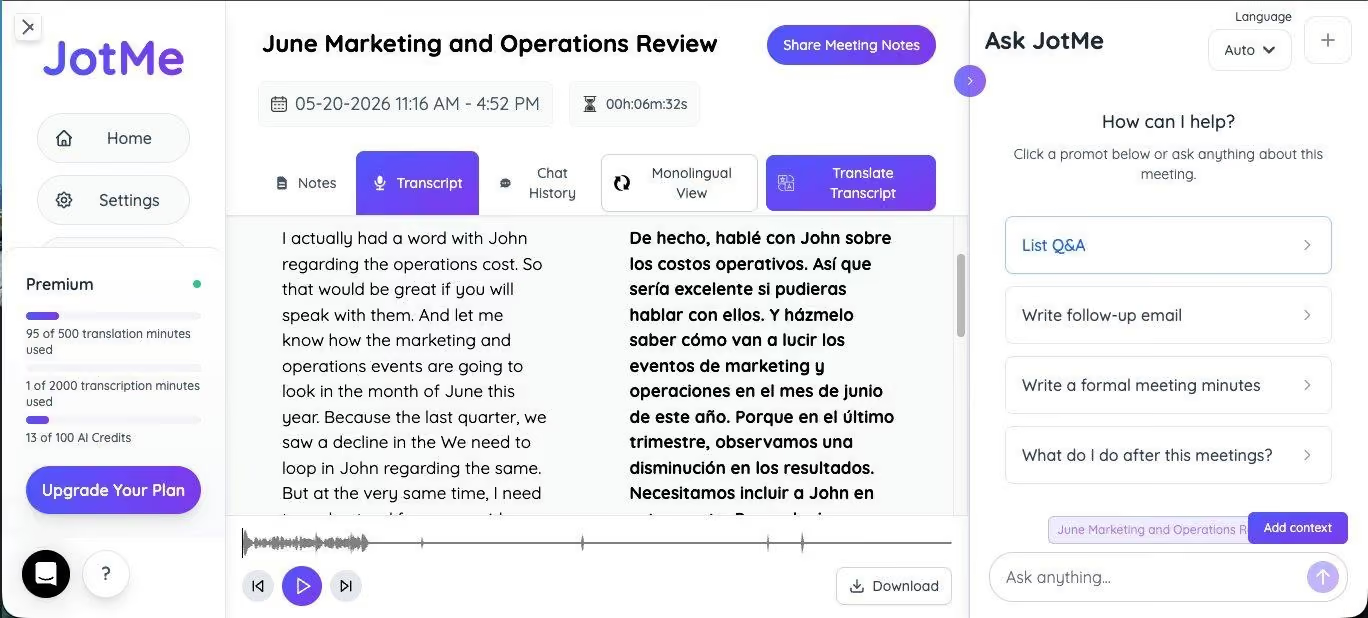
JotMe displays bilingual transcripts in a side-by-side view inside the Transcript tab, with the original spoken language rendered in the left column and the translated language rendered in the right column. The two columns scroll together, paragraph aligned to paragraph, which makes it easy to verify the translation against the source or to share the transcript with a colleague who speaks one of the two languages.
What Are the Key Features of JotMe for Enterprises and Events?
JotMe combines several core features that together make it useful for both internal enterprise diversity and inclusion work and external event operations. Each feature addresses a specific operational gap that traditional DEI tools and conferencing platforms leave open, from broadcast-scale translation at events to enterprise-grade privacy and security inside the meeting itself.
Share AI Live Translation via QR Code Work in JotMe
Share AI live translation via QR Code lets an event organizer or meeting host broadcast the live translated feed from JotMe to any number of audience devices, with each audience member scanning a single QR code to receive captions in their chosen language on their own phone or laptop. The host runs JotMe on the speaker's system, generates a QR code from inside the application, and projects or shares the code on screen at the start of the session.
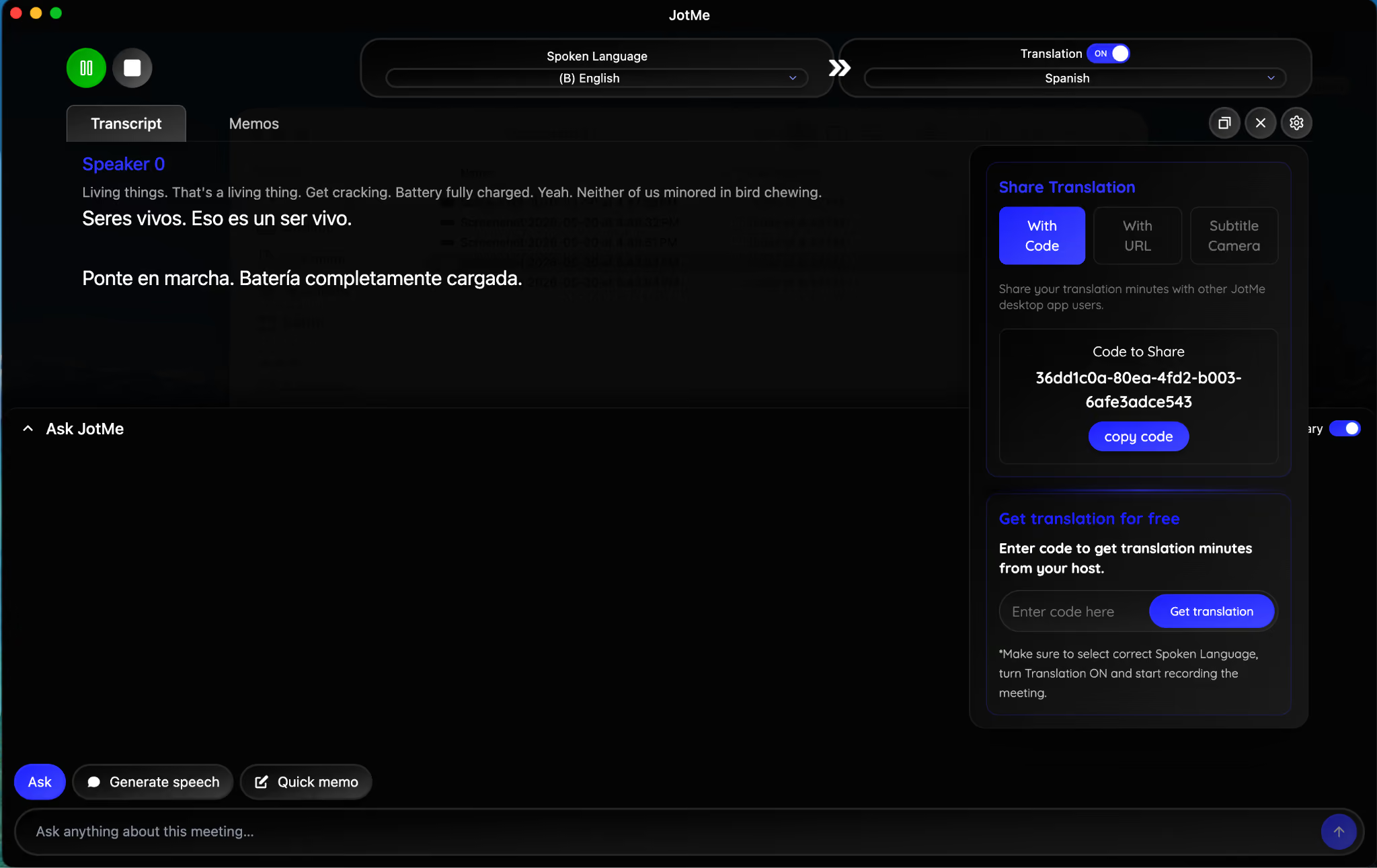
For large enterprises running town halls, all-hands meetings, customer events, conferences, and panel sessions, this feature replaces the cost and logistics of hiring on-site interpreters for every language pair the audience represents. A 500-person all-hands meeting with attendees across 12 working languages would normally require either a multi-booth interpreter team, a pre-translated recording approach that loses the live energy, or an English-only delivery that excludes a portion of the audience. The QR code broadcast model lets every attendee receive the same live content in their preferred language at the same moment, without additional equipment, without booking interpreter resources, and without compromising the speaker's natural delivery.
Language Pairs That JotMe Supports
As of May 2026, JotMe supports 39,000+ language pairs across 200+ languages, meaning any source language in the catalog can be translated into any other language, with no restrictions on specific source-target combinations.
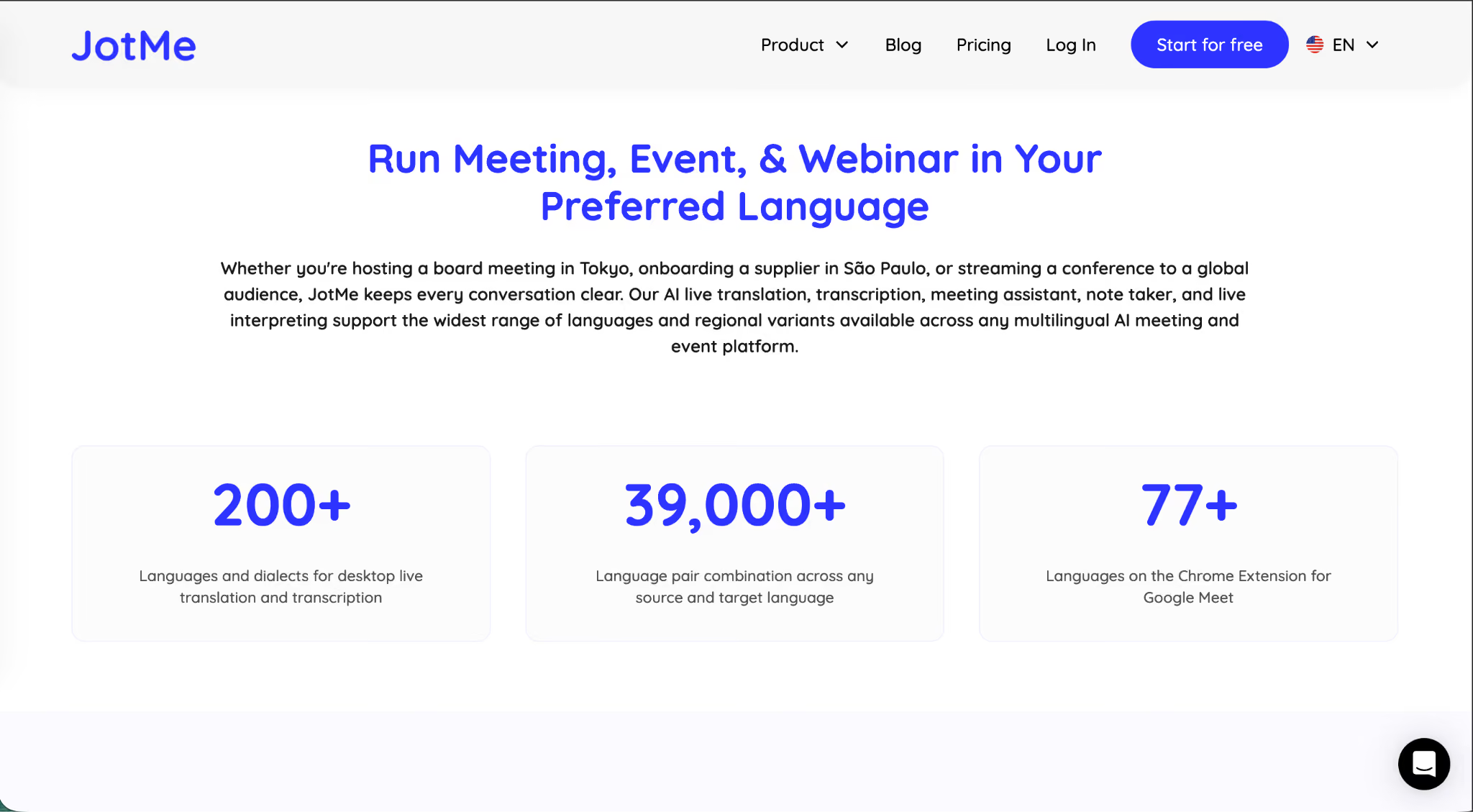
A meeting conducted in Mandarin can be translated into Arabic, Portuguese, Hindi, or Swahili directly, without routing through English as an intermediate language. The direct-pair model preserves contextual accuracy because each pair is handled as a primary translation rather than as a two-step conversion that compounds error rates.
JotMe’s No-Bot Architecture for Enterprises
JotMe uses a no-bot architecture because enterprise privacy, security, and meeting hygiene policies increasingly restrict third-party AI participants from joining business calls. A traditional meeting AI tool joins the call as a separate participant, which means it appears in the attendee list, shows up in the recording, requires admission by the host, and is visible to every other participant on the call. JotMe avoids this entirely by running on the listener's device and capturing audio locally, with no presence inside the conferencing platform itself.
Through a diversity and inclusion lens, no-bot architecture also reduces the visibility of language-support tooling to users. A non-native speaker using JotMe to follow an English meeting does not have to announce their need for translation to the rest of the call. The accommodation remains personal and private, a discreet option that many DEI tools fail to provide and that many users actually prefer over visible accommodations.
JotMe’s Enterprise-Grade Security and Compliance
JotMe handles enterprise-grade security through a combination of on-device audio capture, encrypted data transmission, and a compliance roadmap that aligns with the standards enterprise procurement teams require.
The application is currently GDPR-aligned in its data handling posture, which covers the European Union's regulatory requirements for personal data, meeting records, and cross-border data movement.
SOC II Type II certification is in progress, which adds the operational controls audit that North American enterprise procurement teams typically request during vendor review.
The on-device audio capture model contributes directly to the security posture.
Audio is processed on the user's endpoint rather than being routed through a third-party bot present inside the conferencing platform, which limits the surface area for data exposure. Meeting recordings, transcripts, and notes remain associated with the user's JotMe account, with access controls that align with standard enterprise identity management practices.
Why Companies Use JotMe to Smoothly Run Operations?
As of 2026, 300,000+ users and 1,700+ organizations use JotMe because it consolidates real-time voice-to-text translation, meeting transcription, post-meeting notes, and event-scale broadcast into a single application that works across every major conferencing platform without requiring infrastructure changes. For operations teams, this means one tool covers the multilingual meeting layer, the post-meeting documentation layer, and the large-event accessibility layer, which would otherwise require three separate vendors with three separate procurement cycles, three separate security reviews, and three separate integrations to manage.
The operational efficiency comes from the consolidation.
A global operations leader running weekly multilingual reviews, monthly all-hands meetings, and quarterly customer events can run all three through JotMe without switching tools, retraining teams, or maintaining separate workflows. The agentic AI generates notes for every session automatically, which removes the manual note-taking burden that traditionally falls on one team member and which often produces inconsistent records across meetings.
For operations leaders evaluating diversity management software for 2026 budget cycles, JotMe operates in a different category than the analytics dashboards and survey platforms that dominated previous DEI tool stacks. It is operational rather than analytical, which means the inclusion impact happens in the meetings themselves rather than in the reports about the meetings.
Download JotMe today to see how this AI live translation app helps you smoothly run your meetings and events.
FAQs
Which Conferencing Platforms Does JotMe Work With for Multilingual Meetings?
JotMe works with Zoom, Google Meet, Microsoft Teams, Webex, Slack huddles, and any other video conferencing platform that runs audio through the device, because JotMe captures audio locally rather than joining the call as a bot. Enterprise IT teams do not need to whitelist JotMe inside the conferencing platform or approve a new integration, which makes deployment faster than bot-based meeting AI tools.
How Many Languages Does JotMe Support for Enterprise Translation?
JotMe supports 200+ languages and 39,000+ direct language pairs, meaning any source language can be translated into any other supported language without routing through English. The catalog includes major working languages, regional variants, and specialized languages that smaller translation tools typically exclude, which makes JotMe suitable for enterprise workforces with diverse language needs.
Is JotMe GDPR-Compliant and SOC 2 Certified?
JotMe is GDPR-aligned in its data handling posture, which covers European Union regulatory requirements for personal data and meeting records. SOC II Type II certification is currently in progress.
How Does JotMe's QR Code Translation Work for Large Events?
JotMe's QR code feature lets an event organizer broadcast live translated captions to audience devices through a single QR code shown on screen. Audience members scan the code, select their preferred language from 200+ options, and receive real-time captions on their phones or laptops. This removes the need for multilingual interpreter booths at town halls, conferences, all-hands meetings, and customer events.
What Does the JotMe Teams Plan Cost for Enterprise Deployment?
The JotMe Teams plan starts at a minimum of 2 users with 200 translation minutes per user, and scales up to 200 users and 200,000 minutes for larger enterprises. As an example, a 5-user team with 5,000 live translation minutes per month, equivalent to roughly 83 hours of interpreted conversation, comes out to $3,300 per year, billed at $275 per month annually after the 50% annual discount. Custom enterprise terms are available for organizations with higher volume or specific compliance needs.
Last updated on
July 29, 2026
Follow us on social media: