Guides
7 Best Japanese to English Live Translation Tools [Tested 2026]

Viraj Mahajan
August 21, 2025
.avif)
Updated 2026: This article was originally published in 2025 and updated in September 2026 to reflect how best Japanese-to-English live translation tools have actually evolved. We did in-depth research to update the article based on the new features of each tool. The list of real-time Japanese-to-English translation tools includes JotMe, EventCAT, Boostlingo, VoicePing 2.0, Interprefy, Maestra, and Immersive Translate.
Brief Answer: The best Japanese-to-English live translation tools are JotMe, EventCAT, Boostlingo, VoicePing 2.0, Maestra, Interprefy, and Immersive Translate. All the tools cater to different needs and budgets and offer various other features, helping you make the right choice.
If you landed on this page, chances are you’re looking to communicate better with your Japanese client or teammate. Not knowing Japanese shouldn’t have to become a big hurdle in your professional environment, but there is a growing need to know more languages than your own, which applies to a complex language like Japanese as well. This has now become a common problem for people who frequently conduct multilingual meetings on video conferencing platforms.
Given that there are various live translation tools available in the market, it can be overwhelming to find the one that fits your needs and budget. One tool may work well with small teams but struggle when your team expands, while another tool may have so many features that it becomes confusing to use.
We reviewed and tested over 15 live translation tools that offer accurate Japanese-to-English translations and have listed the top 7 based on their efficiency and pricing. Here’s what we discovered:
- JotMe offers contextual and real-time translation in 200+ languages at just $10/month (billed annually). It even offers a free plan to try its features like AI meeting summaries, note-taking, and more.
- VoicePing 2.0’s pricing starts at $41.25 and offers translation in over 60 languages.
All these tools are efficient and affordable. But if you’re looking for a tool that offers more than just live translation, you should try JotMe.
In this guide, we’ve curated the best Japanese-to-English live translation tools and other features that they offer.
Quick Recommendations based on Use Cases
Here’s a quick look at the use cases of the best Japanese-to-English translation tools:
- JotMe: Ideal for contextual real-time translation in 200+ languages.
- EventCAT: Good for AI-powered real-time translation for online meetings and conferences.
- Boostlingo: Known for instant AI captioning in 130+ languages.
- VoicePing 2.0: Ideal for real-time speech translation for global businesses.
- Interprefy: Ideal for interpretation and live translation for multilingual events.
- Maestra: Ideal for two-way multilingual conversations with AI voice dubbing for large hybrid events and conferences.
- Immersive Translate: Ideal for real-time bilingual subtitles across online meetings, videos, and other content.
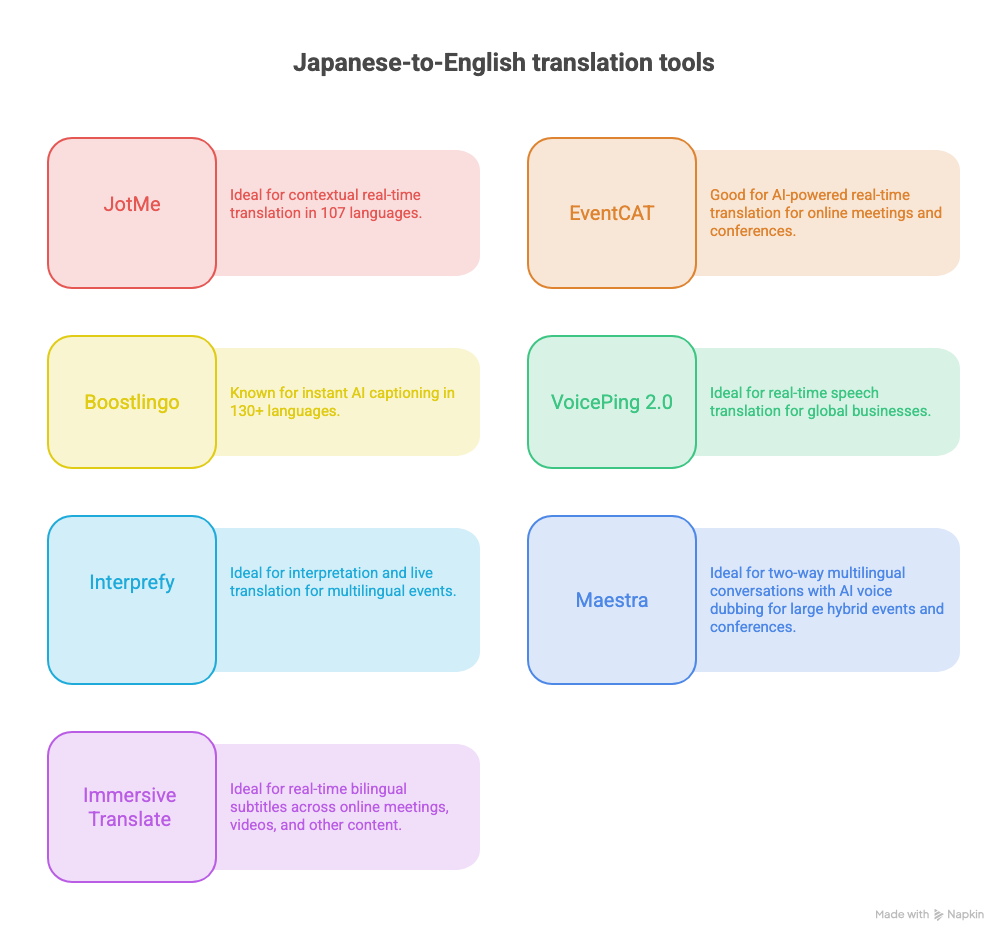
Best Tools for Japanese to English Live Translation at a Glance
Top 7 Japanese-to-English Live Translation Tools
AI tools like live translators and note-takers, such as JotMe for live translation from popular languages like Japanese, Mandarin, Spanish, French, and more. So, here are the top 7 live translation tools for Japanese to English that we have reviewed and tested.
JotMe: Ideal for Contextual Real-time Translation in 200+ Languages
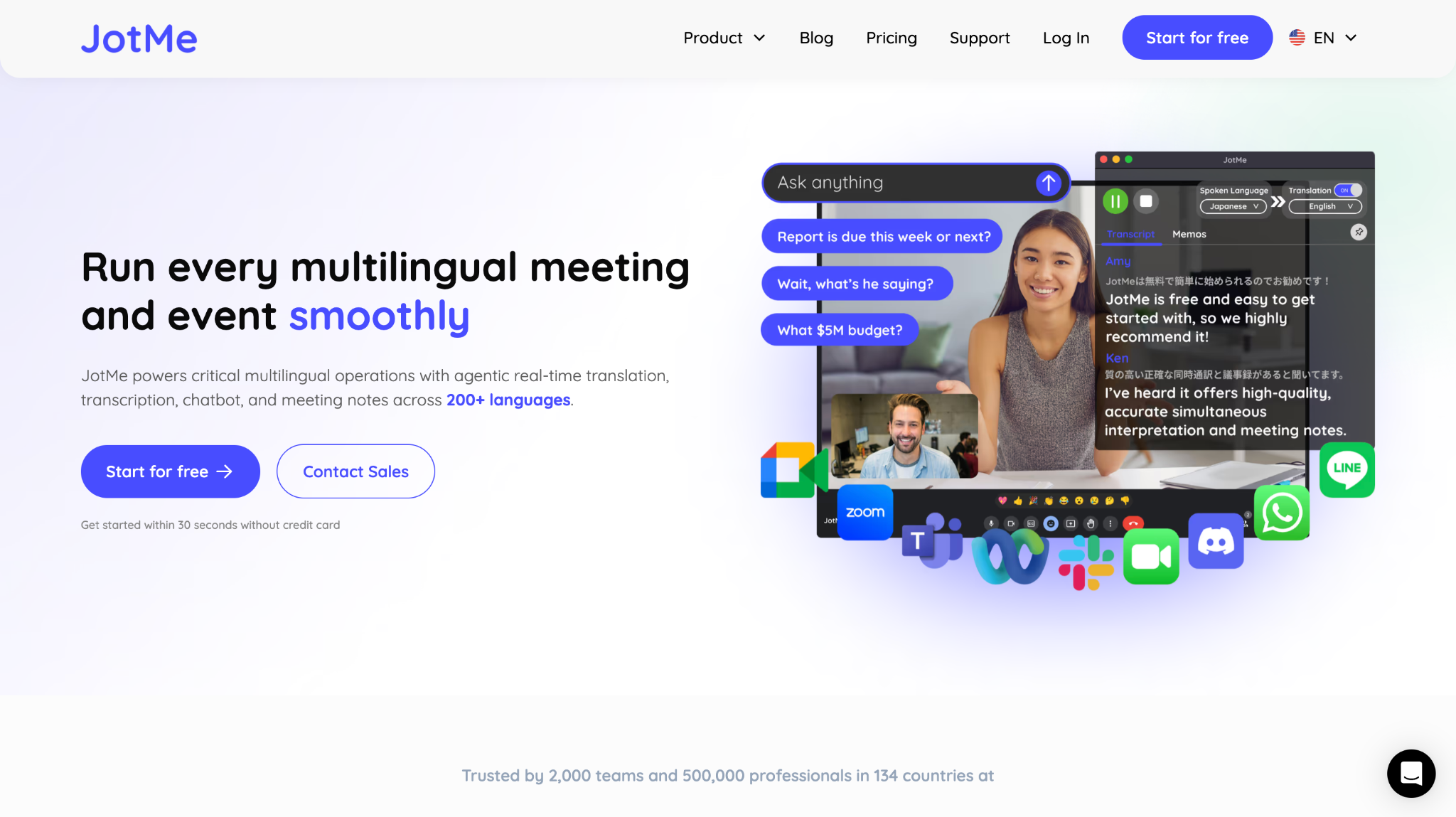
Out of all the tools we tested, JotMe was one of those that stood out. We tested it during a Google Meet and were impressed with its accuracy and speed. We started the meeting in Japanese, and JotMe instantly started the translation in English with a few clicks. It was like having an assistant with us during our call who could answer questions and provide real-time contextual translation.
JotMe offers AI-powered real-time translation in over 200+ languages, with other features like live transcription, AI meeting notes, AI insights during an ongoing call, meeting recording, and more. It also supports multiple platforms and does not require a bot to join your virtual meetings.
Supported Platforms: Zoom, Microsoft Teams, Google Meet, Webex, Slack, and more.
JotMe Key Features
Contextual Translation
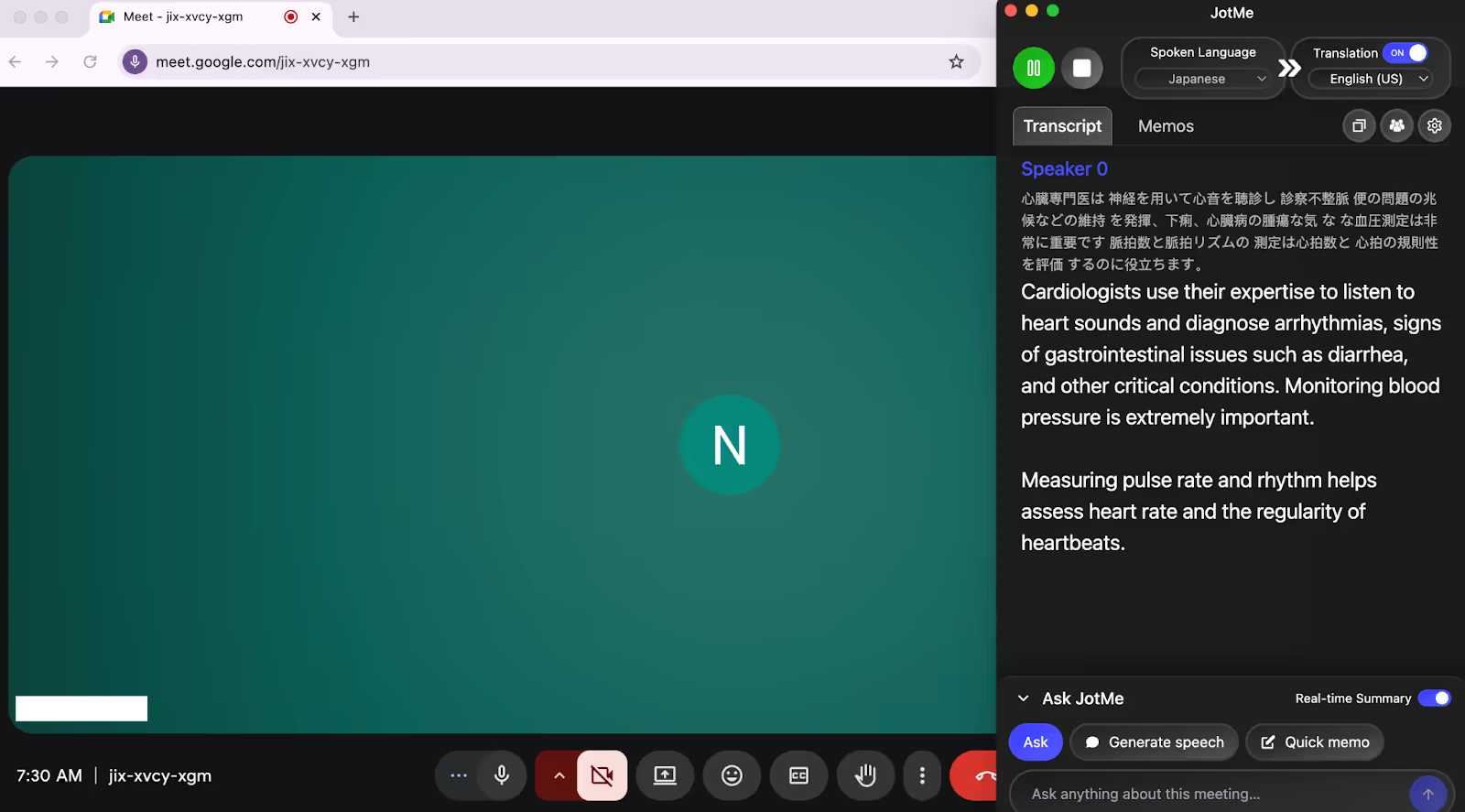
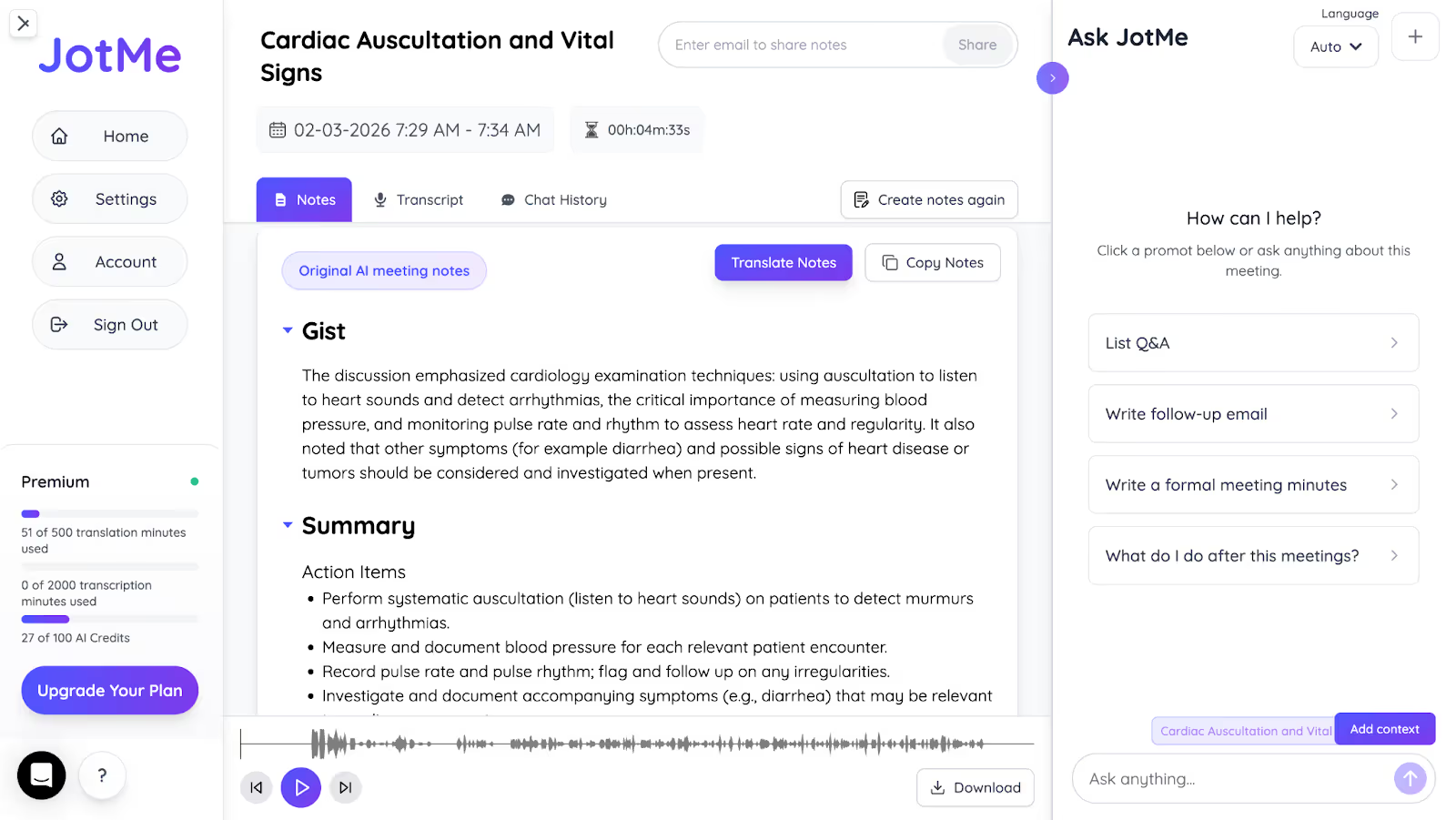
Traditional word-for-word translation tools may fail to understand industry-specific terms. But JotMe provides contextual translation in real time using advanced technologies like natural language processing and speech recognition that understand the tone and flow of the conversation and the industry’s domain knowledge. Consider the following example about a cardiologist in Japanese:
X: 心臓専門医は聴診器を用いて心音を聴診 し、診察 不整脈、便の問題の兆候などの異常を発揮 下痢
Y: 心臓病の主要な危険因子となる可能性があるため 定期的な血圧測定は非常に重要です
Z: 脈拍数と脈拍リズムの測定は 心拍数と心拍の規則性を評価するのに役立ちます
A word-for-word translator may read it like:
X: A cardiologist will use a stethoscope to listen to the heart sounds and examine the patient to detect abnormalities such as irregular heartbeats and signs of bowel problems.
Y: Regular blood pressure monitoring is very important as it can be a major risk factor for heart disease.
Z: Measuring pulse rate and pulse rhythm helps assess heart rate and rhythmicity
However, JotMe’s contextual translation will deliver this result:
“Cardiologists use their expertise to listen to heart sounds and diagnose arrhythmias, signs of gastrointestinal issues such as diarrhea, and other critical conditions. Monitoring blood pressure is extremely important. Measuring pulse rate and rhythm helps assess heart rate and the regularity of heartbeats.”
Unlike the initial word-for-word output, this output understands the context and flow of the entire conversation instead of one sentence at a time and delivers accurate and natural translation.
Share AI Live Translation With a URL
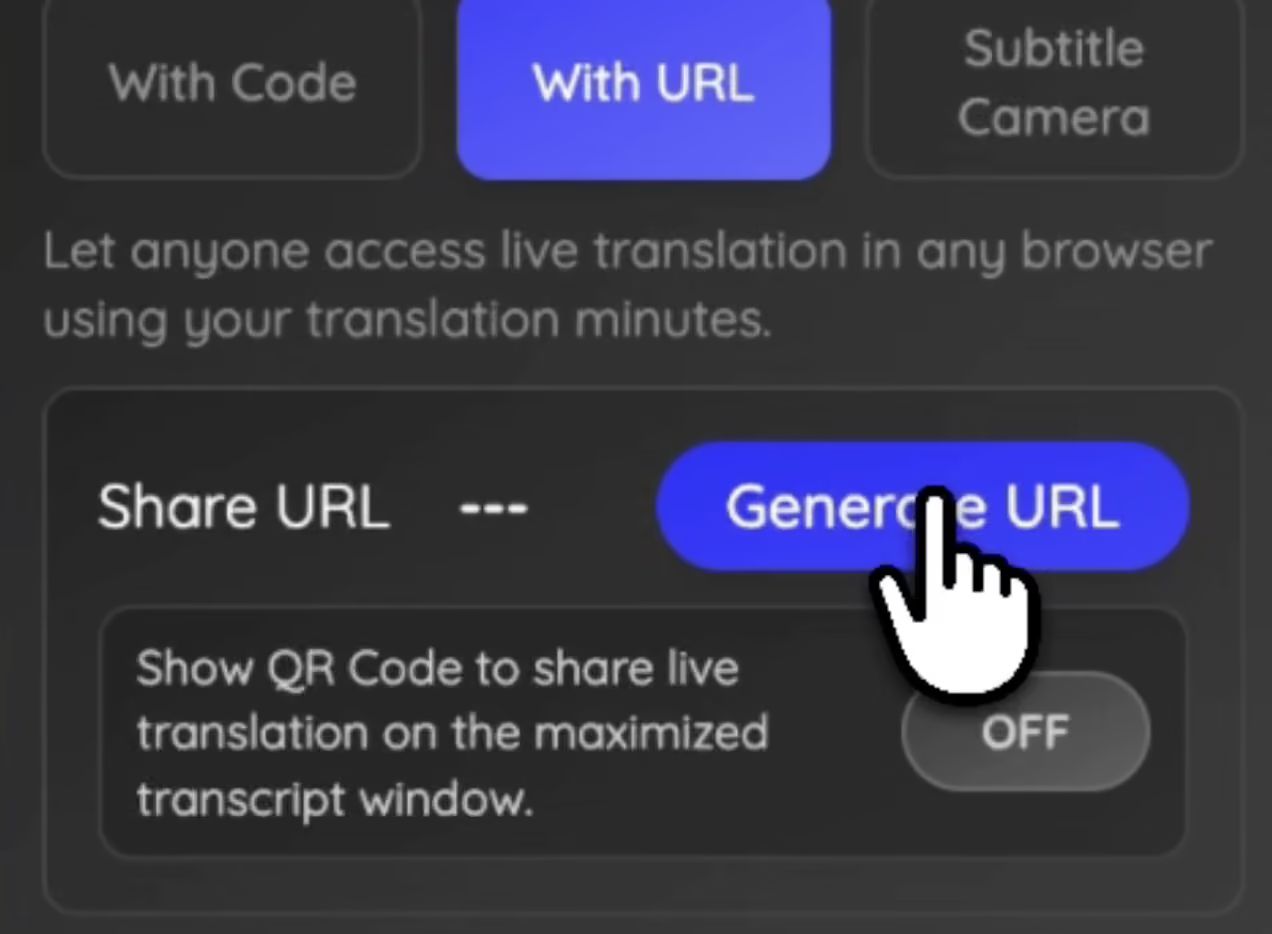
For many online meetings, the simplest way to provide translation is through a shareable link. With JotMe, hosts can generate a translation link and send it to multilingual teammates before or during the meeting. Once the team opens the link, they can follow live translated captions in their preferred language from any device, including mobile, laptop, or tablet.
Live translation sharing works well for international training sessions, customer onboarding webinars, or partner meetings where participants join from different countries and may not share the same language. Instead of asking everyone to install a tool or enable complex settings, attendees simply open the link and follow the conversation with real-time subtitles.
If you want to see how it works, you can learn how to share AI live translation with a URL.
Share AI Live Translation With a QR Code
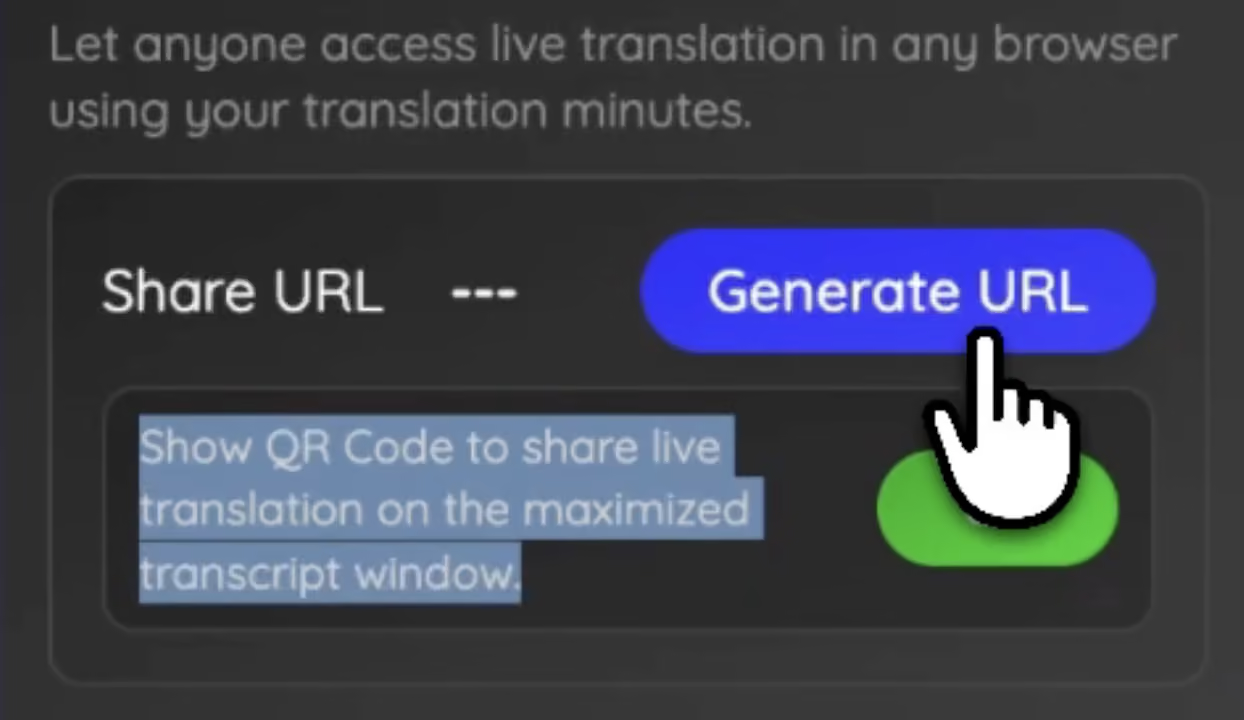
For hybrid events or in-person conferences, sending links can slow things down. Participants often need to search through emails or manually type the URL. To simplify this, JotMe allows hosts to display a QR code when the transcript view is maximized, so global teammates can scan it and access live translation instantly.
This approach is particularly useful during international conferences, university lectures, or corporate town halls where large audiences may speak different languages. Attendees simply scan the code from a presentation slide or event screen and immediately start receiving translated captions on their phones.
For in-person events, you can also see how to share AI live translation with a QR code so participants can join instantly.
Share AI Live Translation Through Your Web Camera
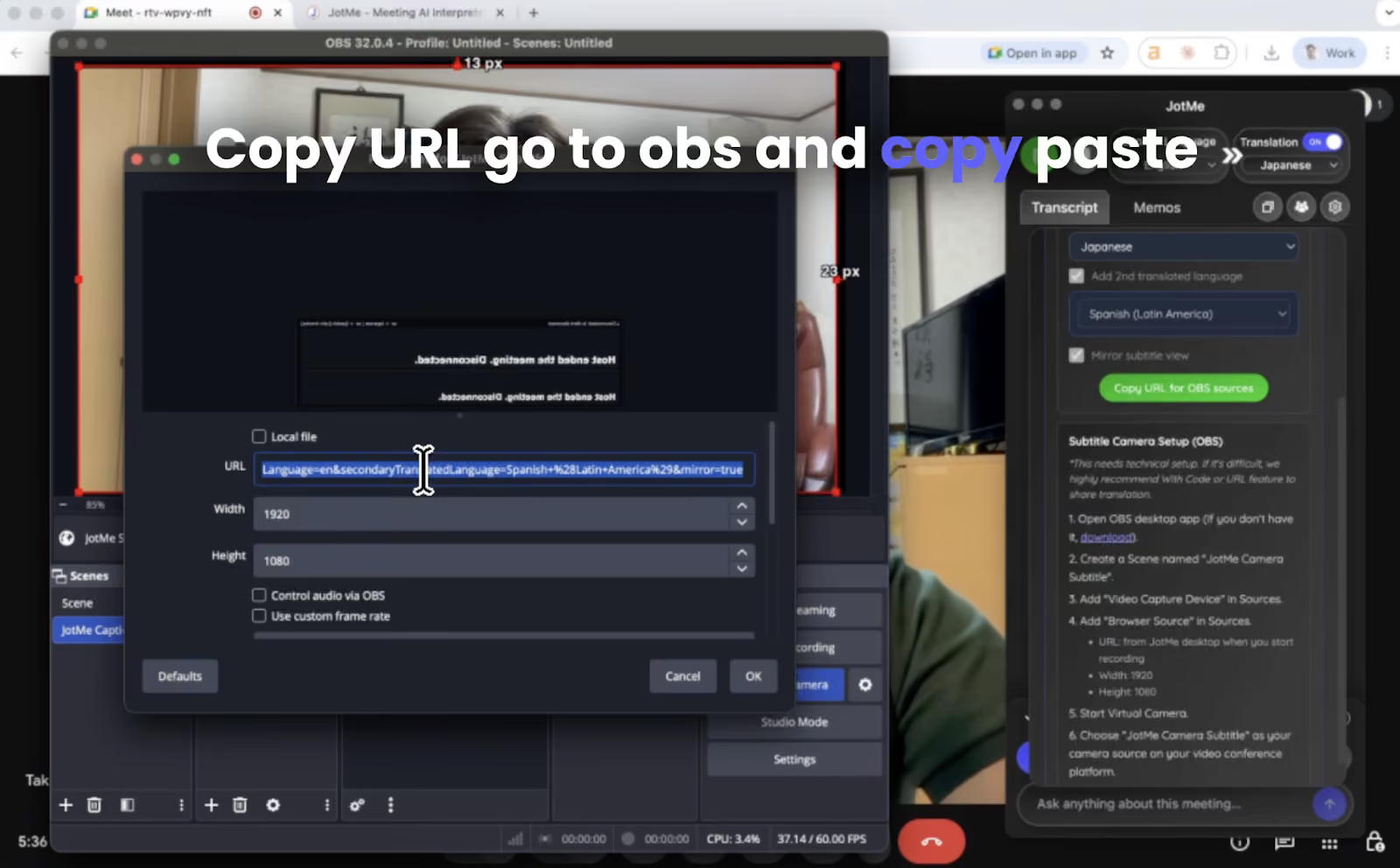
In large webinars or global all-hands meetings, even sharing a link can sometimes be overlooked. Some participants may forget to open it or may not realize translation is available. To make the experience more seamless, JotMe also allows translated subtitles to appear directly on the host’s webcam feed.
With this setup, captions are embedded into the video stream, so everyone in the meeting can see them automatically without opening another page or tool. This is especially useful for company-wide updates, product launches, or large webinars where hundreds of participants are watching the presentation.
If you want subtitles to appear directly in the video feed, you can also learn how to share AI live translation through your web camera.
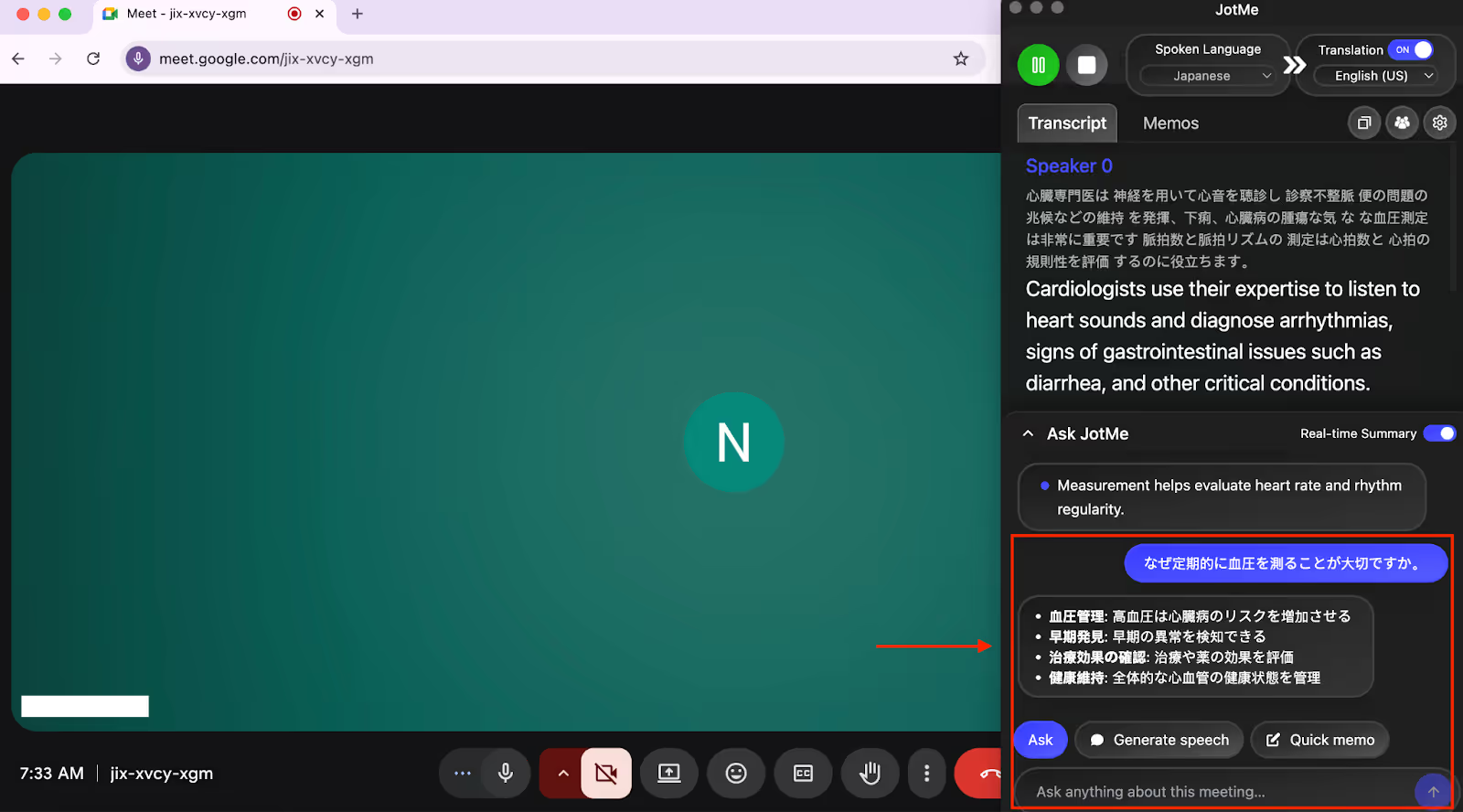
AI Chat
During multilingual meetings, it’s common to miss a term, reference, or concept, and stopping the conversation to search on Google can break the flow. JotMe’s AI Chat solves this by letting us ask questions in real time, during the meeting itself.
While testing the AI chat feature, we asked JotMe to clarify unfamiliar business terms, summarize what a speaker meant, and even explain references in simpler language, all without leaving the meeting screen. The responses were instant and context-aware, making it feel like having a smart assistant alongside us who understands the ongoing discussion.
Real-Time Summary in Bullet Points
Keeping track of long or complex meetings can be challenging, especially when discussions switch languages. JotMe’s real-time summary in bullet points addresses this by generating a live, structured overview of the conversation as it happens.
During our tests, we could see key discussion points appear in bullet form while the meeting was still ongoing. This made it easier to understand priorities, revisit important moments, and stay aligned, even if we joined the meeting late or missed a segment.
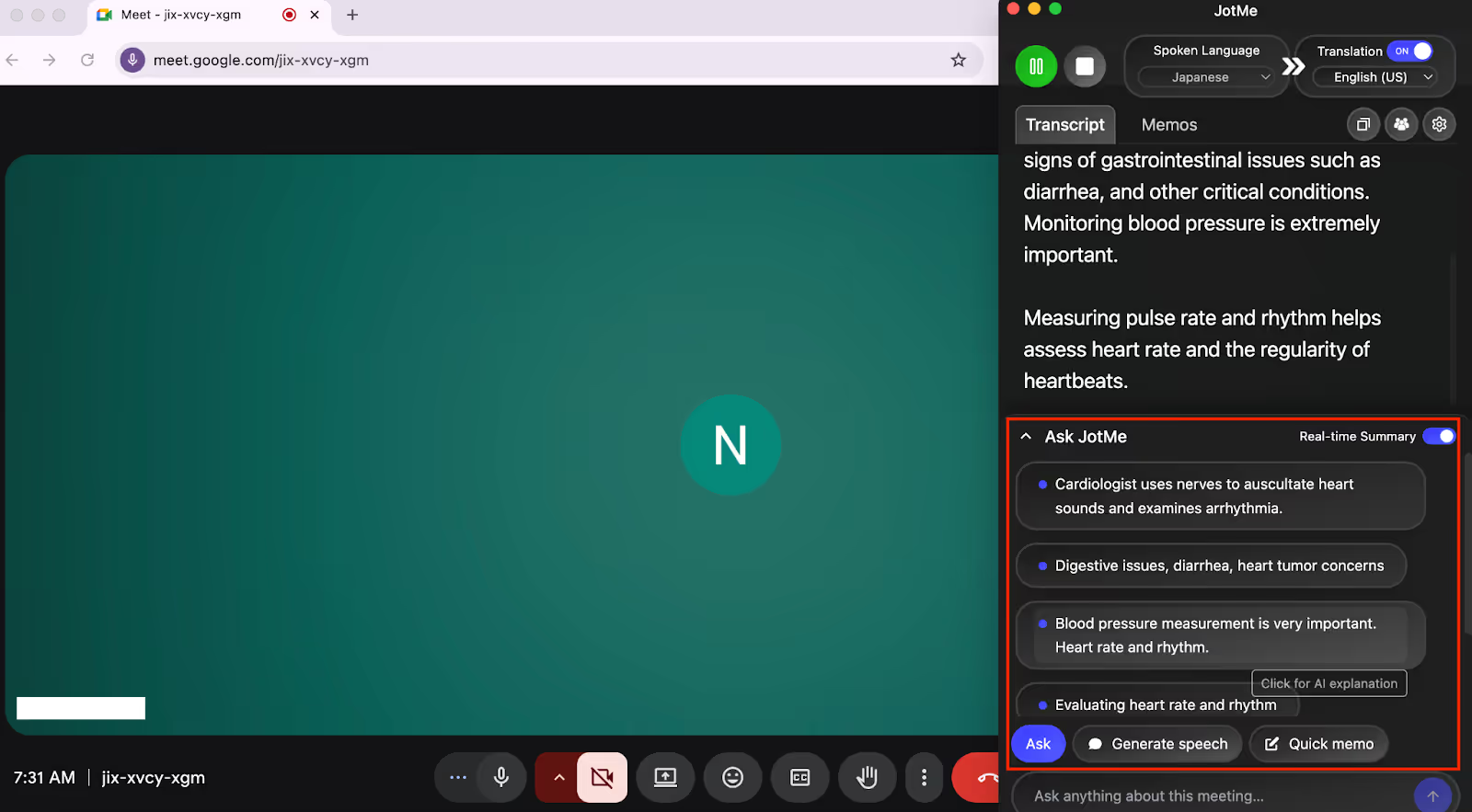
Unlike post-meeting summaries, the real-time summary feature helps candidates and participants stay oriented in real time, not after the call ends.
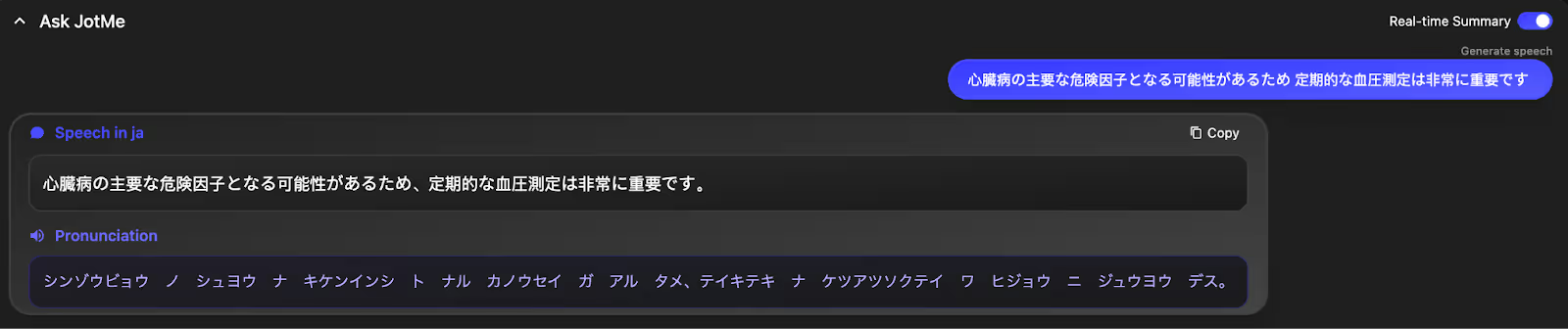
Real-Time Pronunciation Support
When speaking in a non-native language, especially in professional settings, pronunciation can affect confidence and clarity. JotMe’s real-time pronunciation feature helps bridge that gap.
For example, during a Japanese-to-English meeting, we pasted a message we wanted to say in English. JotMe generated a clear pronunciation guide, allowing us to convey the message with the right tone and confidence. This reduced hesitation and made spoken responses feel more natural and professional.
Text-to-Text Translation with Tone Control
JotMe’s text-to-text translation goes beyond basic language conversion. Instead of just translating text into another language, it lets us customize how the translation sounds.
We could ask JotMe to translate text and make it formal, informal, funny, professional, or simplified, depending on the audience. What stood out during testing was that JotMe also explains the translated text in the target language, which helps ensure clarity, especially when dealing with nuanced or sensitive messages.
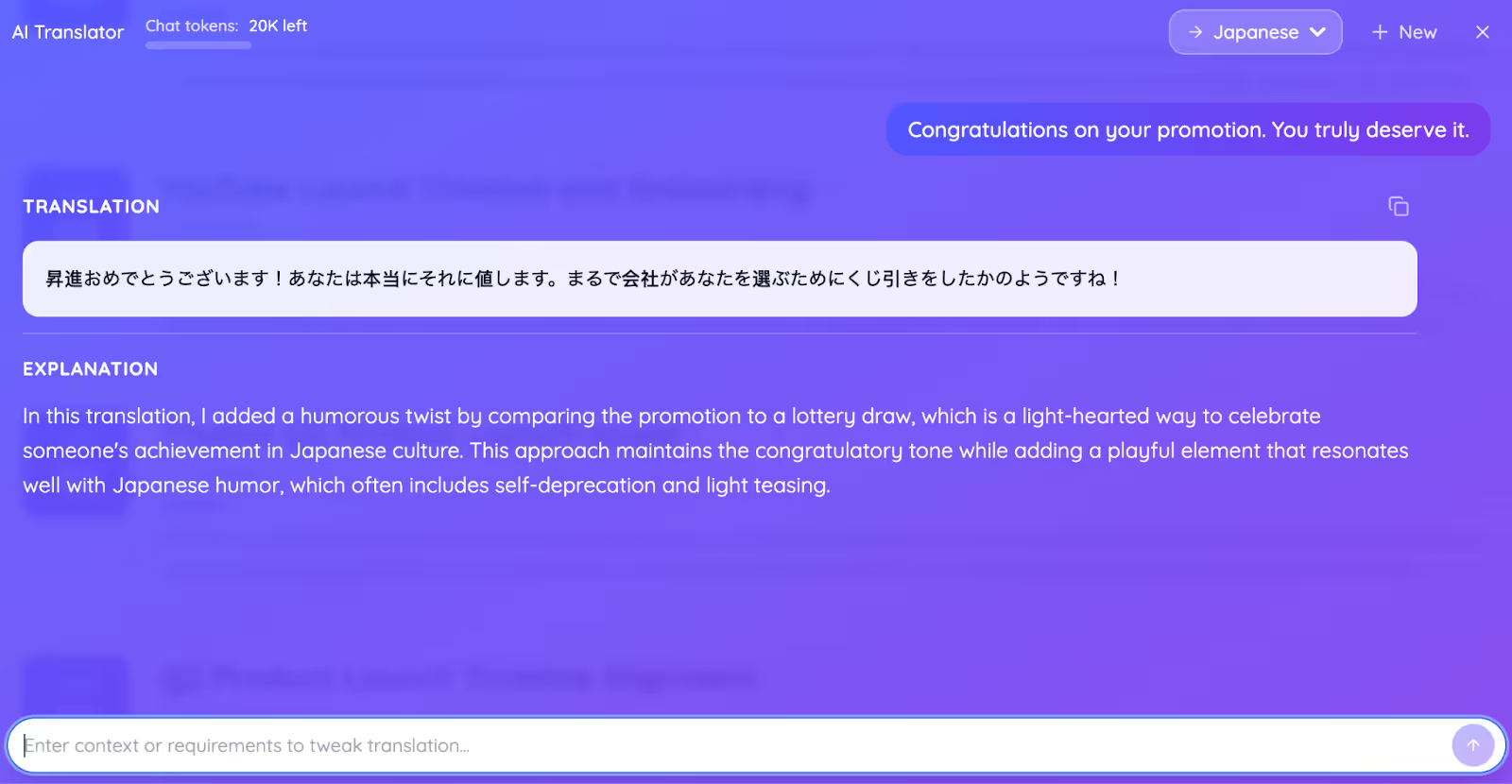
The text-to-text translation feature is particularly useful for follow-up messages, written explanations during meetings, or preparing responses that match the right tone.
AI Meeting Notes Translator
One of the features that we loved was the translation of the post-meeting notes. You can translate the notes into another language once the meeting is over. We conducted a meeting in Japanese, and JotMe translated it into English in real time. After the meeting, we translated the English notes into Japanese, and the results impressed us.
Post-meeting Transcripts
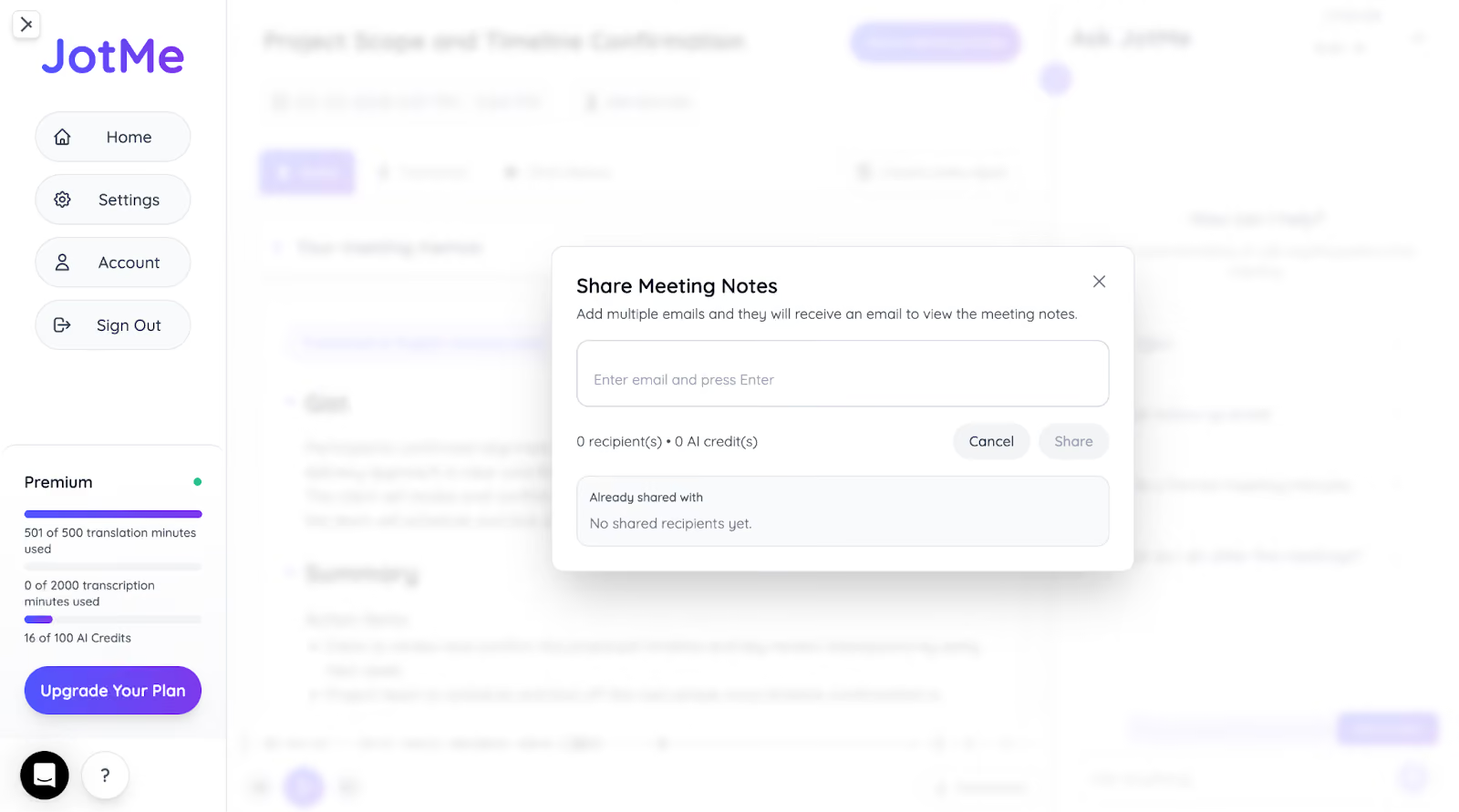
Need to verify details from a meeting or maintain records for compliance? When multiple topics are discussed, it’s easy to miss important points. JotMe solves this by generating AI meeting notes with transcripts immediately after the meeting ends. For participants who join through translation URL or QR code sharing, the system automatically sends the meeting notes and translated transcripts to their email once the session finishes, so everyone can review the discussion, summaries, and key decisions without the host needing to share them manually.
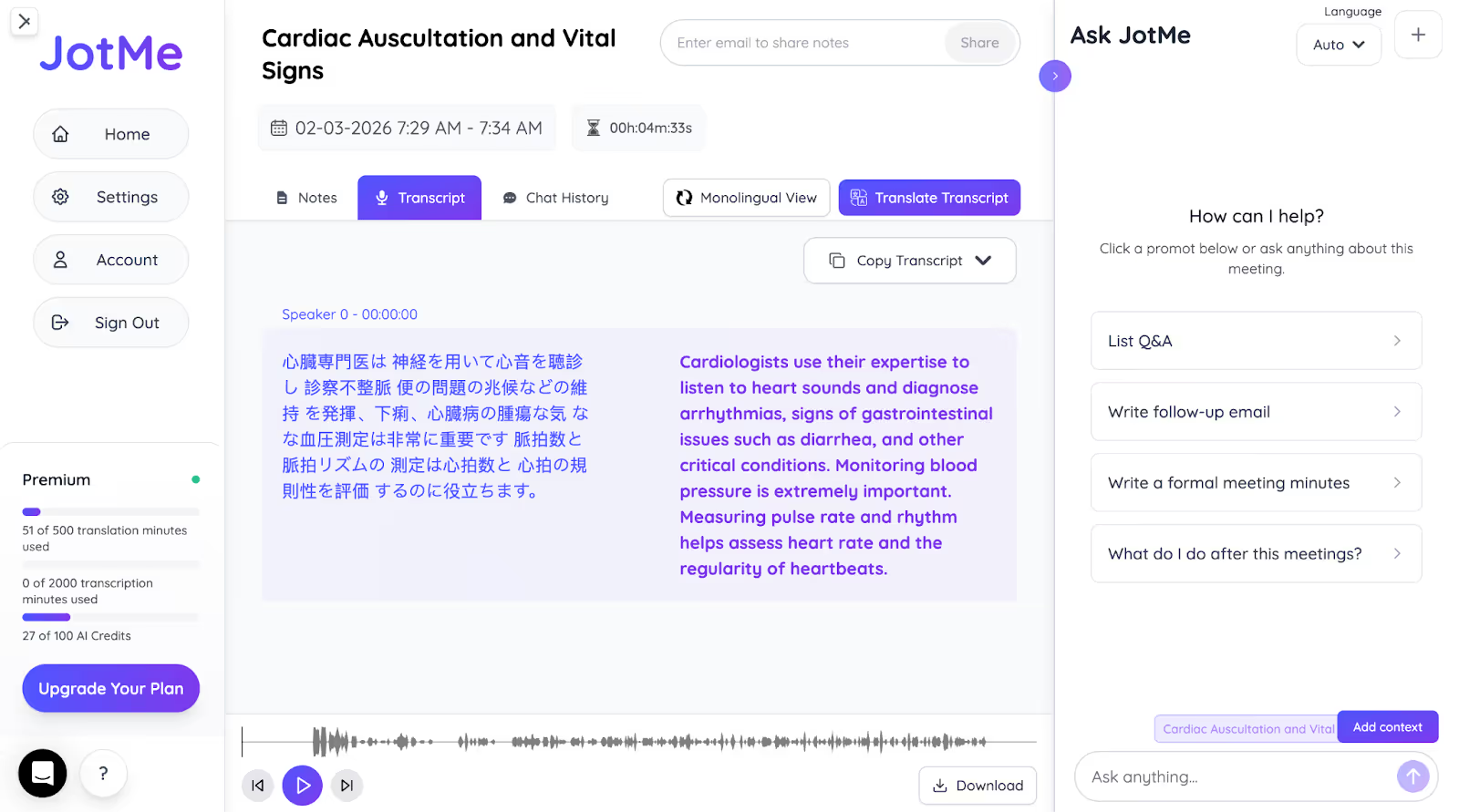
JotMe also makes it easy to share or reuse these meeting notes. From the dashboard, you can open the meeting record and share the transcript, summary, and notes with teammates, or simply copy the summary and paste it into email, chat tools, or internal documents. This ensures everyone can quickly access the key outcomes of the meeting without needing to attend it live.
JotMe Mobile App
JotMe launched its Android and iOS mobile app in 2026, bringing the same contextual, real-time translation experience from virtual meetings to face-to-face conversations. While the desktop app works best for structured online meetings, the JotMe mobile app is built for in-person discussions, where conversations move fast, and misunderstandings can’t afford to happen.
We tested the JotMe mobile app during in-person business discussions, quick follow-ups after meetings, and casual conversations with multilingual participants. Just like the desktop version, the mobile app focuses on context, tone, and intent, not just word-by-word translation.
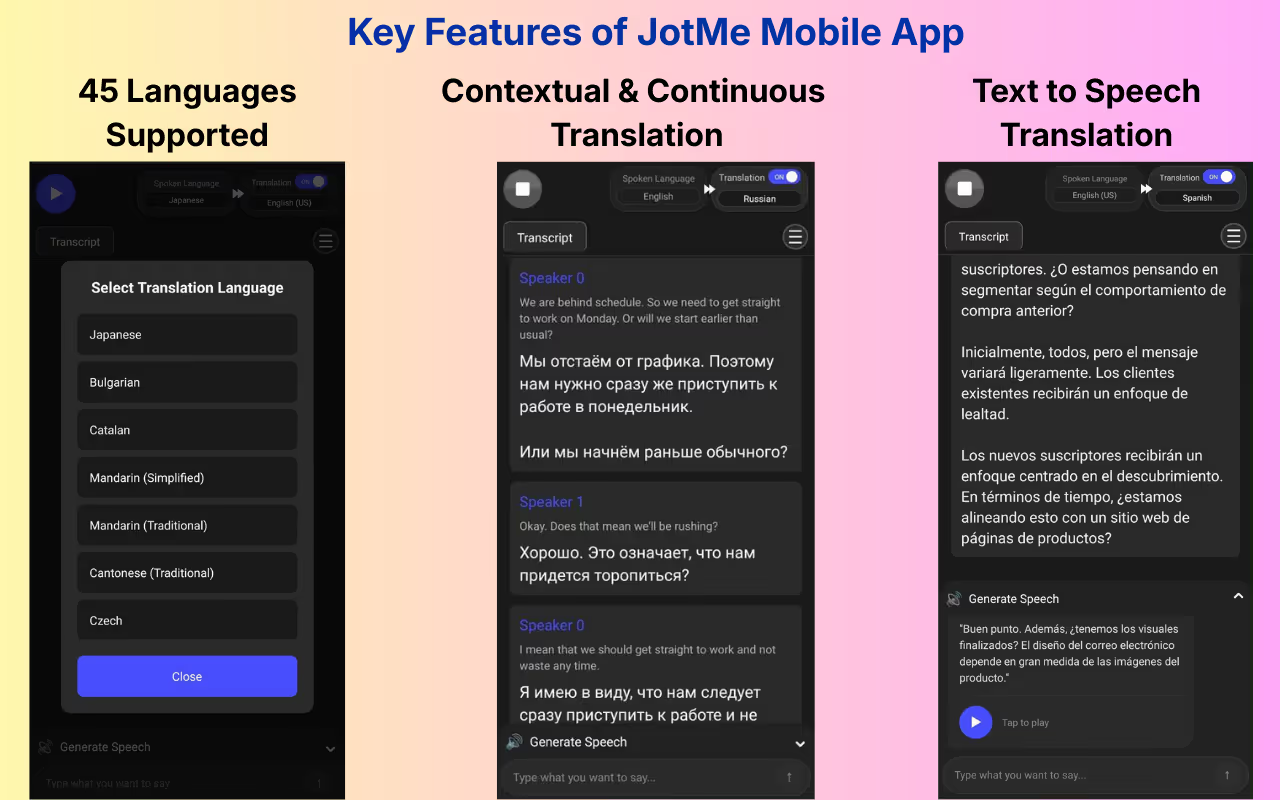
- Live Voice-to-Text Translation: JotMe translates spoken conversations into text in real time, making it easier to follow discussions without interrupting the speaker or asking them to repeat themselves.
- Context-Aware Translation: During testing, we noticed that JotMe’s mobile app preserves the meaning and flow of conversations, even when speakers use idioms, technical terms, or informal phrasing, something most mobile translators struggle with.
- Continuous Translation Mode: Instead of translating one sentence at a time, JotMe keeps the conversation running continuously. This is especially useful during meetings, lectures, or long discussions where stopping and restarting would break the flow.
- Generate Speech from Text: When speaking in an unfamiliar language, we could type what we wanted to say and let JotMe speak it aloud with clear pronunciation. This helped avoid hesitation and mispronunciation during real-world conversations.
- Translation Accuracy Control: The mobile app lets us switch between faster translations for quick exchanges and more contextually accurate translations for important conversations, giving flexibility based on the situation.
- Multilingual Conversations in One View: JotMe can handle conversations where multiple languages are spoken and translate everything into a single preferred language, which is useful during group discussions or international meetups.
JotMe Pricing [Updated 2026]
Apart from the Free plan, JotMe offers affordable plans: Pro and Premium.
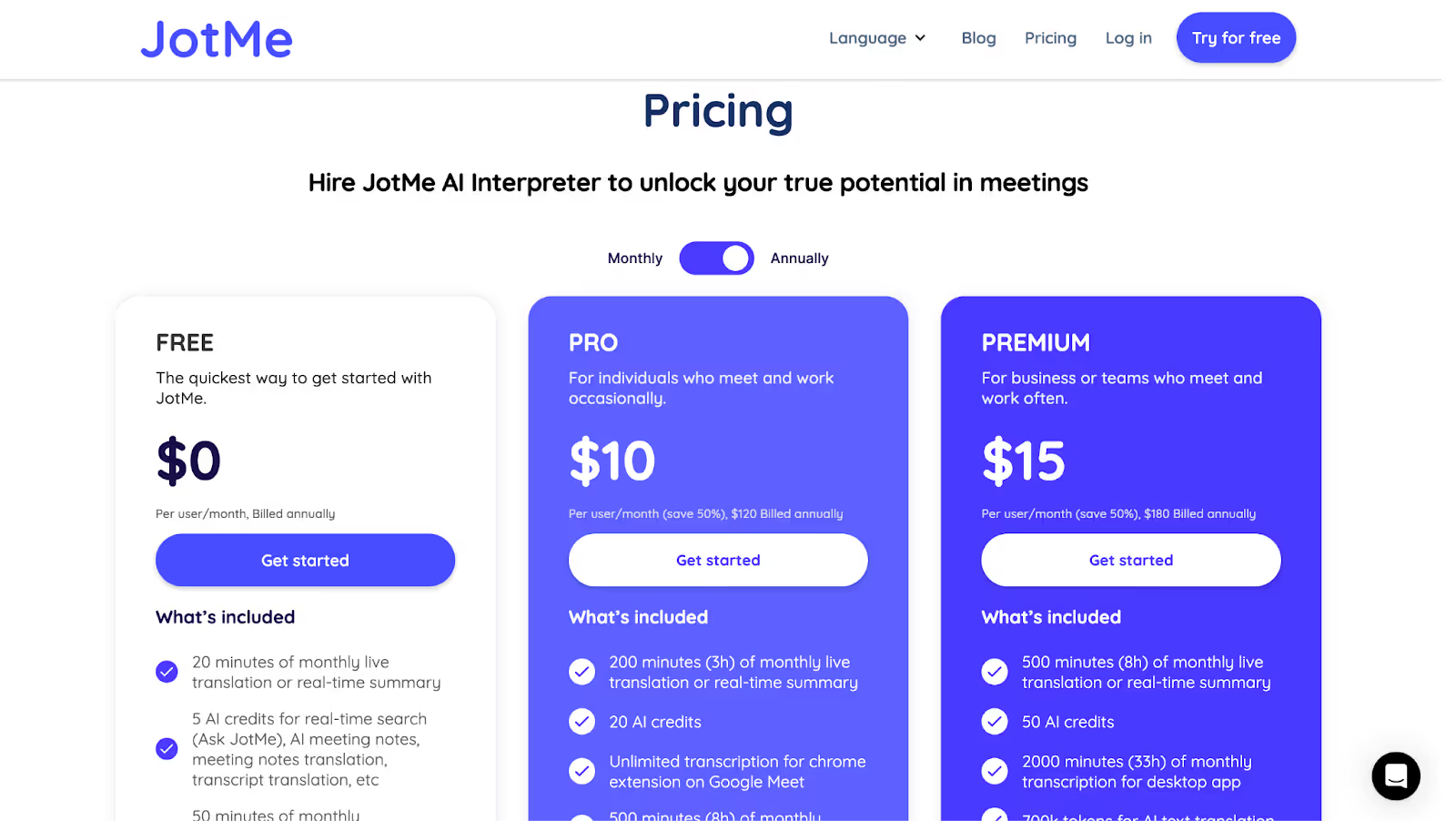
Free Plan
- JotMe’s Free plan comes with 20 translation minutes and 50 transcription minutes per month, along with 5 AI credits for real-time answers, AI note summaries, and more.
Paid Plans
- JotMe’s Pro plan, starting at $10/month ($120 billed annually), offers 200 translation minutes, 20 AI credits, and 500 transcription minutes for the desktop app.
- The Premium plan starts at $15/month ($180 billed annually), offers 500 translation minutes, 50 AI credits, 2,000 transcription minutes, and access to unlimited meeting recordings.
Pros
- No credit card details are needed for the free plan.
- Offers a Chrome extension for Google Meet.
- Offers multilingual translation in 200 languages.
Cons
- Translation accuracy may fluctuate when you do not speak clearly
JotMe FAQs
What is the most accurate translator for Japanese to English?
JotMe is the most accurate translator for Japanese to English translation. JotMe doesn’t provide line-by-line translation; instead, it uses natural language processing to understand the context, tone, and flow of what’s being said and provides real-time translation in 200 languages.
What is included in JotMe's free plan?
JotMe’s free plan offers 20 translation minutes and 50 transcription minutes per month, 5 AI credits for AI meeting notes, live AI insights, etc, and access to the last 5 meeting recordings.
How to use JotMe for real-time translation in a meeting?
To use JotMe for real-time translation in a meeting, simply select the spoken language of the meeting and the language you want the translation in. JotMe will instantly start the live translation without any delay as the speaker speaks.
Does JotMe offer AI insights into a topic?
Yes, JotMe offers live AI insights into a topic. For that, you need to turn on the translation in bullet points. Once JotMe translates the conversation into bullet points, you can get AI insights into any topic by just clicking the translated bullet point.
Is there a JotMe mobile app for real-world conversations?
Yes. JotMe offers an Android mobile app designed for conversations that happen outside a desktop setup. It’s useful for in-person discussions, quick follow-ups, or spontaneous conversations when you’re on the move. The app supports live voice-to-text translation, contextual interpretation, and multilingual dialogue without relying on meeting links or setup steps.
Does JotMe provide live translation during ongoing conversations?
Yes. JotMe starts translating as soon as audio is detected, without requiring bots, invitations, or manual configuration. Live captions and translations appear in real time, allowing participants to follow the discussion naturally without interrupting the conversation flow.
Can JotMe handle two-way Japanese and English translation in real time?
Yes. JotMe supports bidirectional Japanese to English translation during live conversations. In testing, it handled both professional terminology and everyday speech effectively, producing translations that preserved meaning and tone rather than rigid, word-for-word output.
How accurate and responsive is JotMe’s real-time translation?
JotMe delivers high contextual accuracy, even in fast-paced or jargon-heavy conversations. Translations typically appear within a few seconds, which keeps discussions moving smoothly and avoids awkward pauses or miscommunication during active dialogue.
EventCAT: Known for AI-powered Real-time Translation for Online Meetings and Conferences
While researching EventCAT, we found that it offers real-time translation in 43 languages for Zoom, Google Meet, and Teams with just one click. Whether you want to increase global sales conversion, enhance participation and engagement in your webinar, or break educational barriers in international classes, EventCAT might be the tool for you. It is easy to set up and offers instant subtitles via QR code or URL.
Supported Platforms: Zoom, Google Meet, and Microsoft Teams.
EventCAT Key Features
- Audio Translation: Allows you to listen to translations while viewing subtitles.
- Easy Platform Integration: Instantly integrates with Zoom, Google Meet, and Teams without requiring any downloads.
- Custom Glossary: Accurately translates industry-specific terms and company vocabulary.
EventCAT Pricing
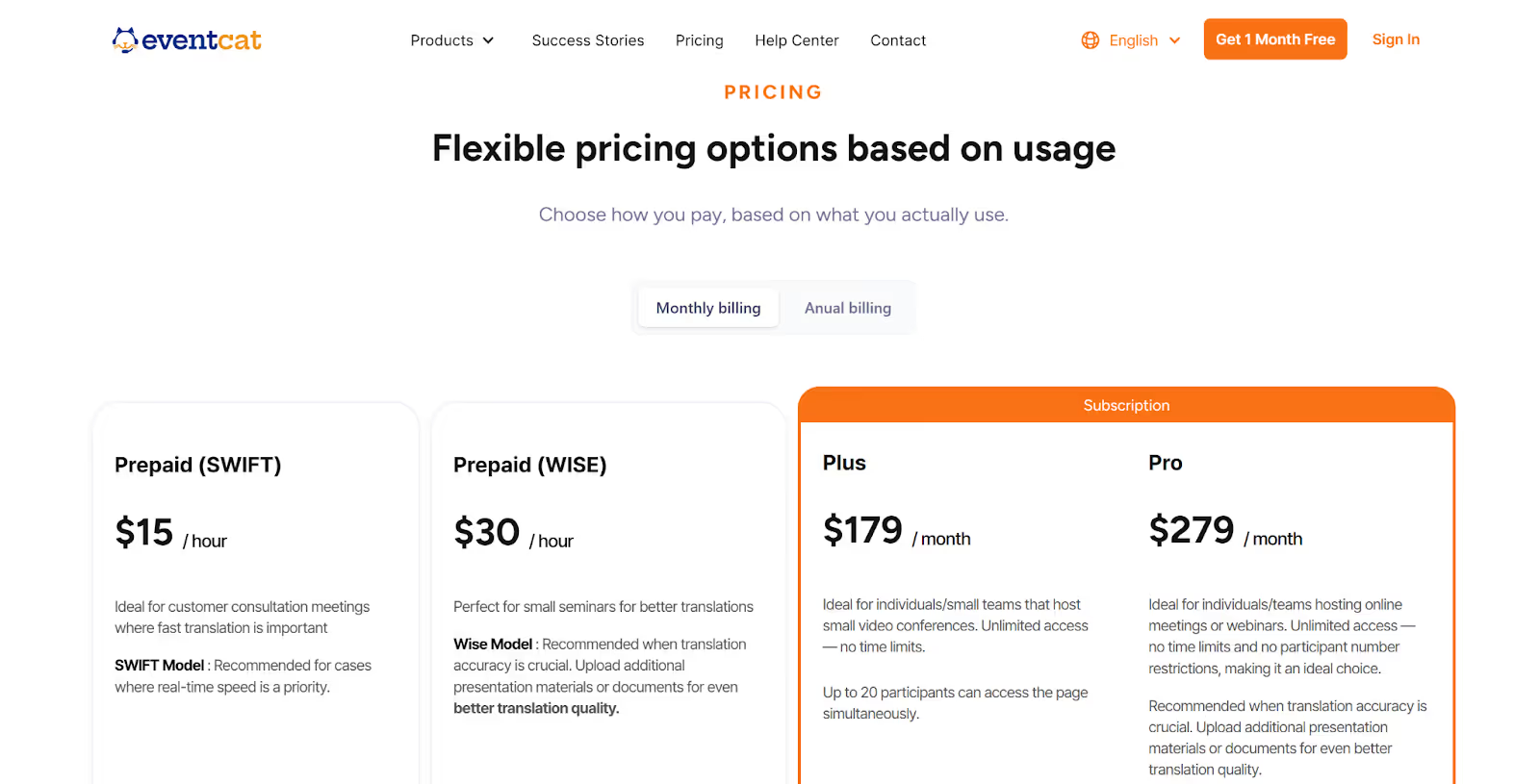
EventCAT offers two prepaid and two subscription plans apart from the 30-day free trial.
Prepaid Plans
- The prepaid plan with the SWIFT model costs $15/hour and has average translation accuracy. It is ideal for customer consultation meetings where fast translation is important.
- The WISE model is priced at $30/hour with high translation accuracy and customized glossary support. It is perfect for small seminars where translation accuracy is crucial.
Subscription Plans
- The Plus plan, starting at $179/month, only supports the SWIFT model, has average translation accuracy in 43 languages, and allows up to 20 participants to access the page simultaneously.
- The Pro plan, priced at $279/month, supports both SWIFT and WISE models, offers excellent translation accuracy, and has no restrictions on the number of participants.
Pros
- Offers two models based on translation accuracy needs.
- Lets you download meeting transcripts in multiple languages.
Cons
- Requires a credit card to access the free trial.
- Limited only to Zoom, MS Teams, and Google Meet.
- Pricing models can be expensive for smaller teams.
EventCAT FAQs
What is the difference between CAT and machine translation?
The Computer-Assisted Translation (CAT) tools are built to assist human translators, allowing them to make nuanced and contextual translations. Machine translation, on the other hand, is fully automated and gives translation based on algorithms and models without human input.
What is the pricing of EventCAT's subscription for online meetings?
EventCAT’s subscription for online meetings starts at $179/month, which is ideal for small video conferences. The Pro plan costs $279/month for teams hosting online meetings or webinars. Other than that, EventCAT offers two prepaid plans priced at $15/hour and $30/hour.
How to use the EventCAT OnlineMeeting tool?
To use the EventCAT OnlineMeeting tool, you need to create a session where you have to paste the meeting URL, select the speaking and translation languages, and invite the AI bot to join your meeting for real-time translation.
Can I share translation minutes with other participants?
No, you cannot share translation minutes with other participants in EventCAT. However, if you need a tool that lets you share translation minutes with other participants, you can use JotMe. JotMe lets you do it via a code-sharing system.
Boostlingo: Known for Instant AI Captioning in 130+ Languages
We tried Boostlingo in a Zoom meeting for Japanese-to-English translation and found that it offers two sessions: a note-taker for quick notes and a multilingual session for translation. In the multilingual session, we could choose to transcribe audio into text, translate the transcriptions, translate audio from one language to another, or do it all at once. We could even add a custom glossary for accurate translation. It is perfect for meetings or events in on-site, hybrid, or virtual settings.
Supported Platforms: Zoom, Microsoft Teams, and Google Meet.
Boostlingo Key Features
- Remote Simultaneous Interpretation: Access interpreters remotely to engage multilingual audiences with live translation.
- AI Speech Translation: Enable AI speech to listen to spoken translation in real-time during your meetings.
- Interpretation Management System: Simplify interpretation with easy scheduling, billing, and reporting.
Boostlingo Pricing
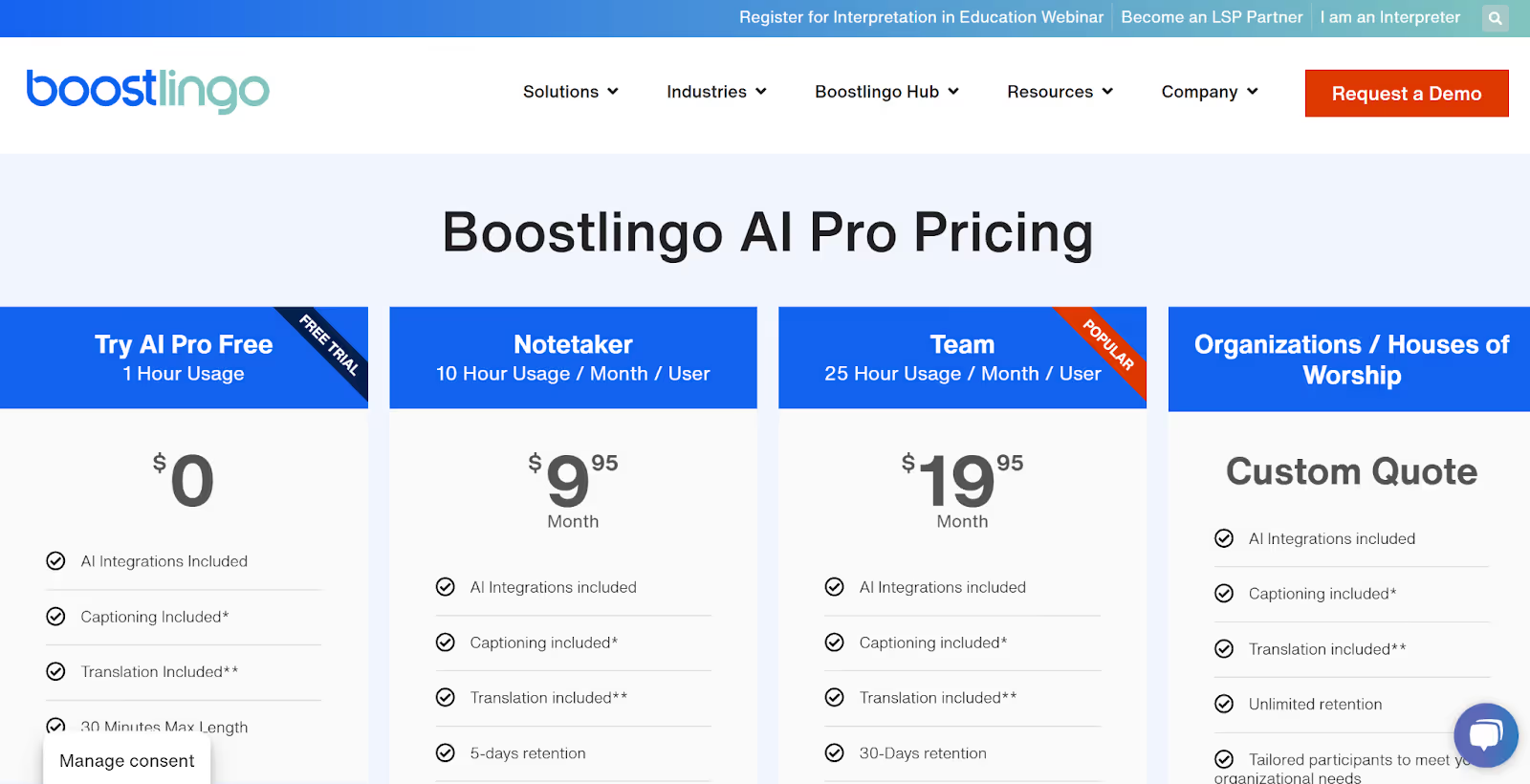
Boostlingo offers a free trial for 1 hour and 3 other plans.
Free Trial
- Boostlingo’s free trial offers to try AI Pro for 60 minutes for free, including translation, captioning, and AI integrations.
Paid Plans
- The Notetaker plan, starting at $9/month, offers 10 hours of usage per month per user, along with two languages, 5-day retention, and more.
- Boostlingo’s Team plan offers 25 hours of usage per month per user at $19, with five languages, up to 10 participants, and 45 minutes per session.
Pros
- Offers access to American Sign Language interpreters for deaf individuals.
- The platform supports 300+ languages with 24/7 support.
Cons
- Some users said the customer team was impossible to get in touch with.
- Requires a bot to join the meeting, which may raise privacy concerns.
- Some users reported they were billed even after submitting a cancellation request.
Boostlingo FAQs
What is the app that translates Japanese to English in real time?
There are several apps that translate Japanese to English in real time, like JotMe, Boostlingo, Interprefy, and more. These tools use machine learning and speech recognition technology to deliver contextual and accurate translations in real time.
How does Boostlingo work?
Once you install Boostlingo on your device, you have to launch it during your virtual meeting, set up the multilingual translation session, and it will start translating the meeting in your selected language in real time.
Does Boostlingo offer a free plan?
Boostlingo offers a free trial where you can do live translation and take notes for 60 minutes. However, if you need tools that offer a free monthly plan, you should try JotMe. JotMe offers 20 minutes of monthly translation, and AI credits for meeting notes and AI insights in its free plan.
How many languages are there in Boostlingo?
Boostlingo supports 130+ languages for AI captioning, transcription, and speech translation in real time. On the other hand, JotMe supports 200+ languages and offers translation in bullet points that give live AI insights into a topic during the ongoing meeting.
VoicePing 2.0: Ideal for Real-time Speech Translation for Global Businesses
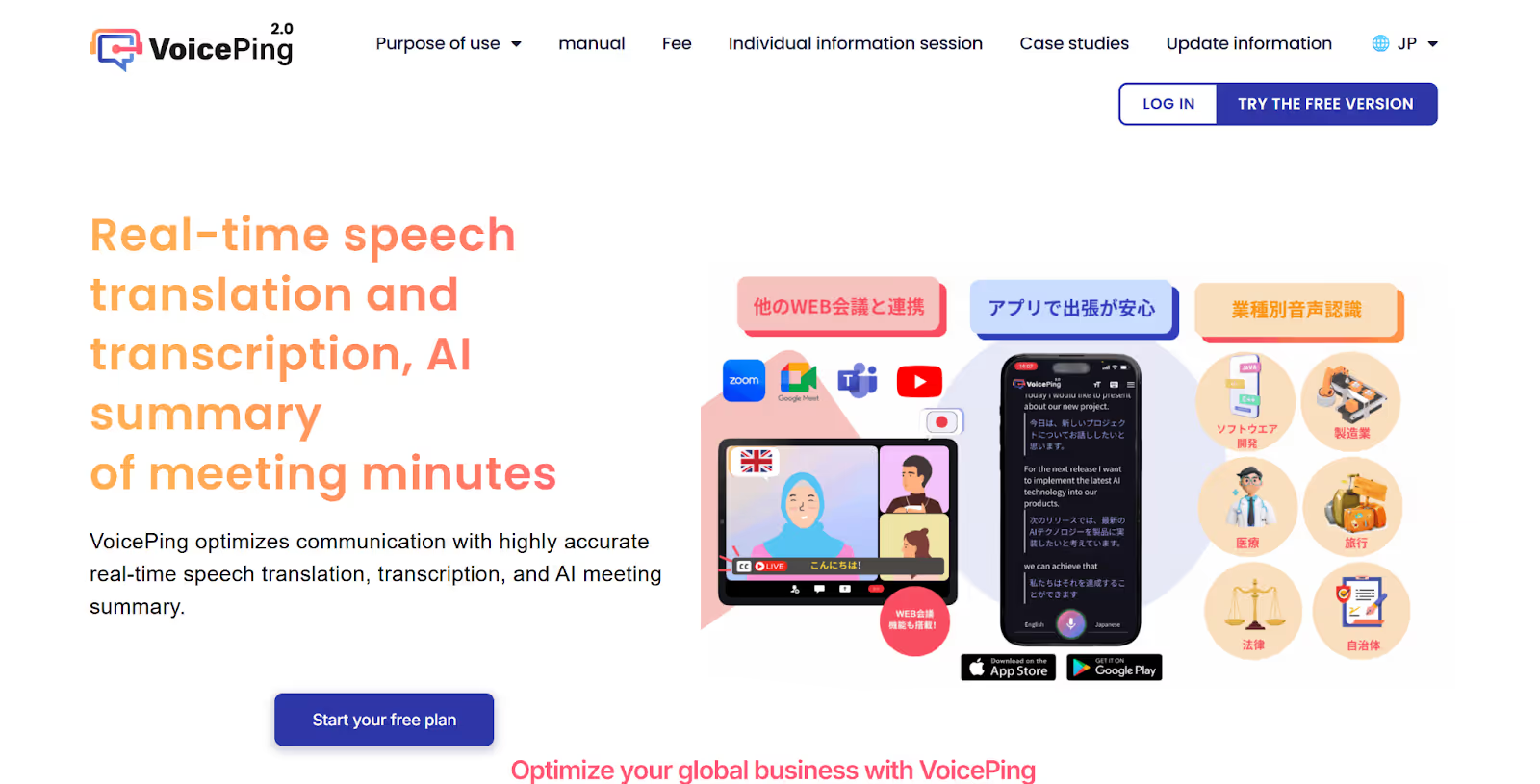
When we tried VoicePing in one of our Zoom calls, it instantly started the Japanese-to-English translation with speakers differentiated. Once the meeting was over, it even offered to create an AI summary of the meeting and translate it into other languages that we chose while setting up the tool. The tool automatically detects when you start or join an online meeting and gives an option to start the recording and translation.
Supported Platforms: Google Meet, MS Teams, Zoom, Discord, Slack, Chatwork, and more.
VoicePing 2.0 Key Features
- Notes Translation: Allows you to translate the post-meeting notes into other languages that you choose while setting up the tool.
- Dictionary Setting: Add special words that are often misrecognized and create a dictionary to translate them accurately.
- Download Options: Lets you download the meeting’s audio file and post-meeting transcription file on your device.
VoicePing 2.0 Pricing
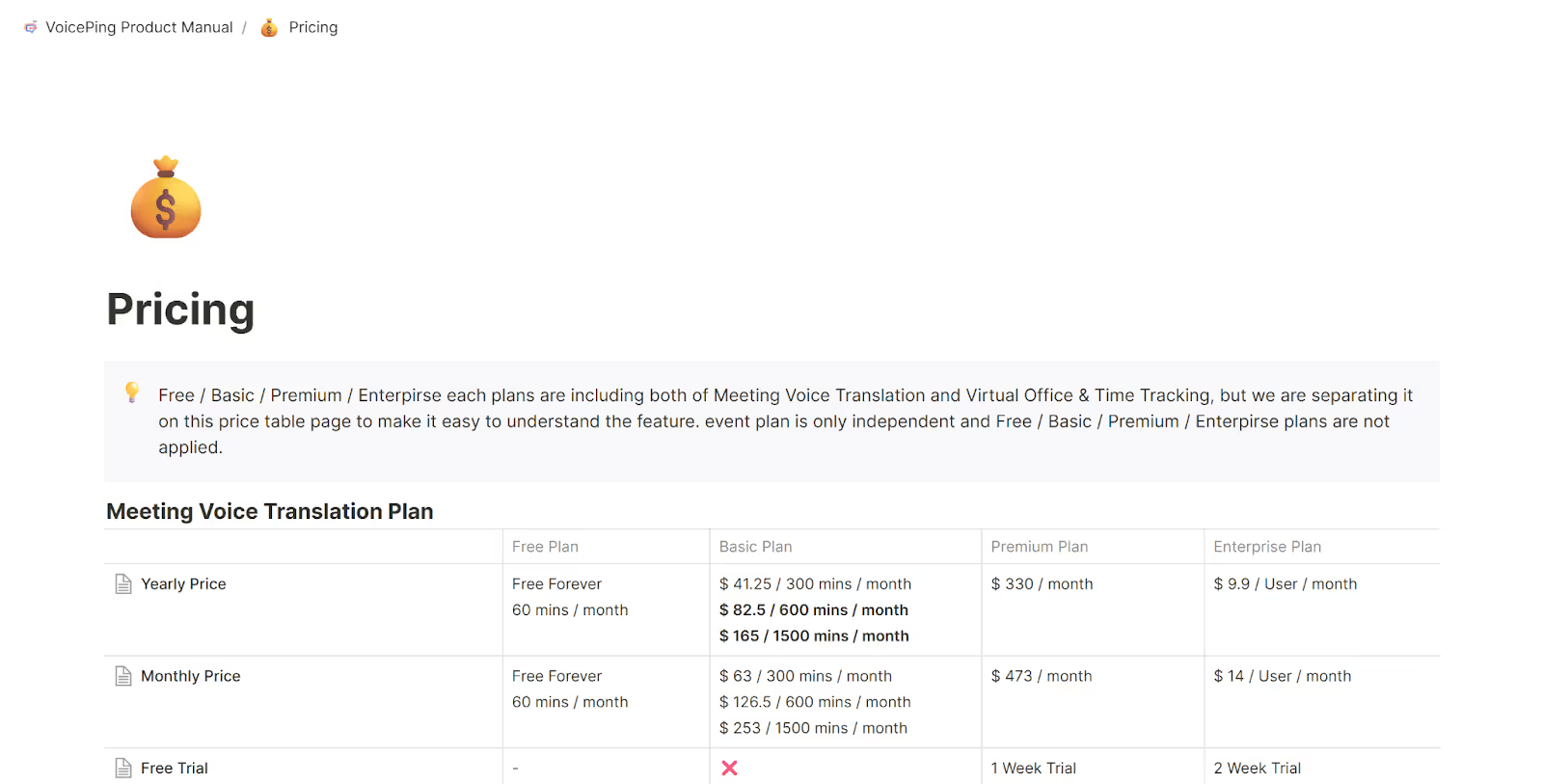
VoicePing 2.0 offers three plans other than the Free plan: Small, Premium, and Enterprise.
Free Plan
- The Free plan offers 60 translation minutes per month with high-accuracy translation in 43 languages.
Paid Plans
- The Small plan offers 300 minutes monthly at $41.25, 600 minutes at $82.5, and 1500 minutes at $165. It offers a 1-year retention period for minutes and a 3-month storage period for audio data.
- The Premium plan, priced at $330/month, offers a free trial of one week, up to 150 guest invitations, and unlimited offline translation for mobile.
- VoicePing’s Enterprise plan starts at $9.9/person/month, with a minimum of 50 members and a free trial of two weeks.
Pros
- Offers decent AI meeting summaries.
- Automatically detects meetings in other apps and starts live translation.
Cons
- Some users find it hard to keep track of older messages due to notifications.
- Translation of other languages to English can be inaccurate at times.
- Some users say the desktop application interface could be designed better.
VoicePing 2.0 FAQs
Which translator works in real time?
There are several translators that work in real time, including JotMe, VoicePing 2.0, Boostlingo, Interprefy, and EventCAT. All these tools offer multiple features other than live translation like human interpretation, AI note-takers, post-meeting summaries, and more.
What is the cost of VoicePing 2.0's monthly subscription?
The cost of VoicePing 2.0’s monthly subscription starts at $41.25 and offers 300 minutes of translation in 43 languages. Its Premium plan is priced at $330/month and the Enterprise plan starts at $9.9/user/month.
How many languages does VoicePing 2.0 support?
VoicePing 2.0 supports 43 languages for real-time AI translation. However, tools like JotMe offer contextual real-time translation in 200+ languages, along with various other features like multilingual transcription, post-meeting transcripts, and more.
Is VoicePing 2.0's translation accurate?
VoicePing 2.0’s translation can be inaccurate while translating from other languages to English. But if you’re looking for a tool that offers quick, contextual and accurate translation in real-time with multiple language support, JotMe might be the right tool for you.
Interprefy: Best for Interpretation and Live Translation for Multilingual Events
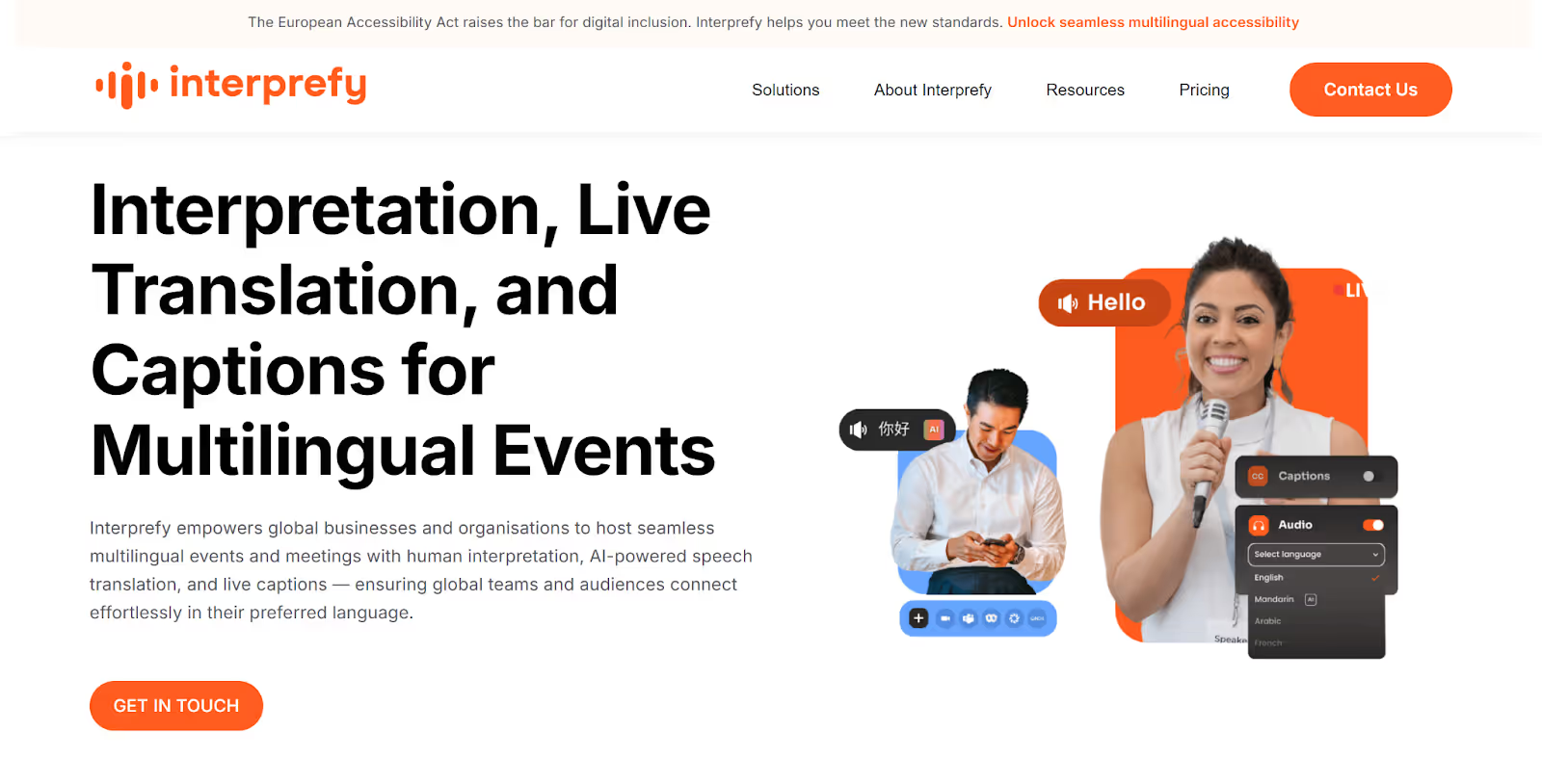
Interprefy helps global businesses and organizations to host seamless multilingual events and meetings with AI-powered speech translation, live captions, and human interpretation. While researching Interprefy, we found that it offers real-time translation of spoken content in more than 80 languages using machine translation. Interprefy can be a great tool if you regularly conduct multilingual events, whether they are in-person, online, or hybrid.
Supported Platforms: MS Teams, Webex, Zoom, ON24, RingCentral, and more.
Interprefy Key Features
- AI Speech Translation: Instantly translates spoken content across multiple languages using natural-sounding, male and female AI voices.
- Live Captions: Transcribes spoken content instantly in the original or translated language with Interprefy’s powerful AI.
- Media Services: Offers three post-event recording solutions to share live event recordings with others.
Interprefy Pricing
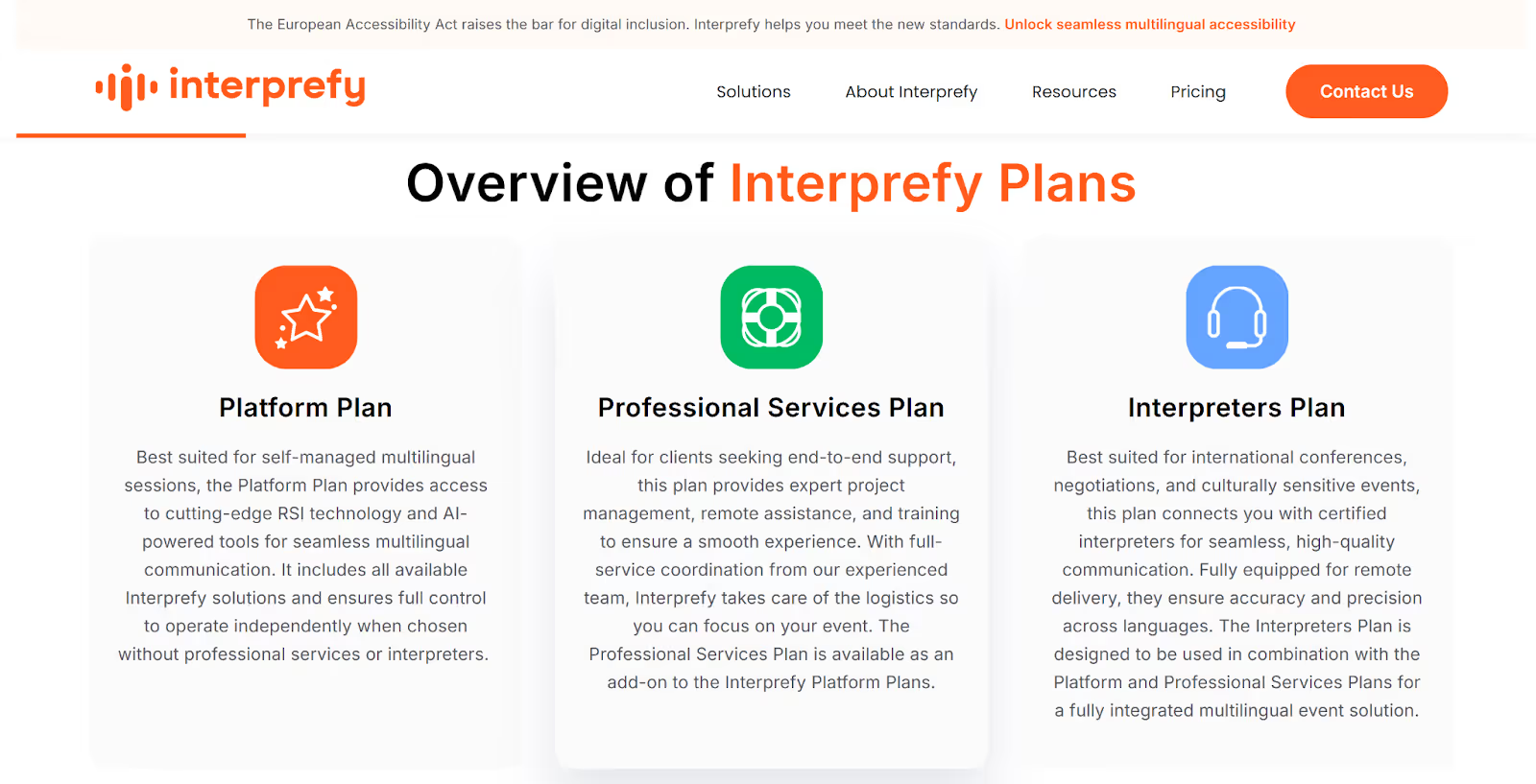
Interprefy offers three plans but has not disclosed its pricing publicly. You need to contact them for custom pricing according to your needs.
Pros
- Supports multiple events, like in-person, online, hybrid, and broadcasting.
- Provides access to remote interpreters, which helps cut down travel expenses.
Cons
- Some users complain of not getting answers to their questions from the team.
- Pricing not disclosed makes budget planning difficult.
- Some users said you need to know HTML to use its embeddable widget.
Interprefy FAQs
What are the real-time translation tools?
The real-time translation tools are JotMe, Interprefy, EventCAT, VoicePing 2.0, and Boostlingo. All these tools have unique strengths and provide Japanese to English translation in real time.
What does Interprefy do?
Interprefy offers human interpretation, AI-powered speech translation, and live captions for global businesses to host seamless multilingual events.
What plans does Interprefy offer?
Interprefy offers three plans for platform, professional services, and interpreters. However, their pricing is not disclosed publicly and you need to contact them for a quote.
Can I try Interprefy before buying the paid plan?
No, you cannot try Interprefy; you need to contact their team for a demo. But if you’re looking for a tool that you can try before buying a paid plan, you can use JotMe. JotMe offers a free monthly plan to try its features before buying a paid plan.
Maestra: Ideal for Multi-Speaker Live Translation and AI Voice Dubbing
We tried Maestra during a multilingual Zoom workshop where speakers switched between Japanese and English mid-discussion. It caught every shift effortlessly, dubbing translations aloud in natural AI voices while diarizing who said what.
Maestra delivers real-time translation in 125+ languages with multi-speaker support and live voice dubbing. Maestra integrates smoothly without bots joining calls and handles hybrid events via QR code sharing. Maestra is ideal when conversations bounce between tongues, and you need spoken output, not just text.
Supported Platforms: Zoom, Microsoft Teams, OBS, vMix, YouTube, TikTok, Slack, and more.
Maestra Key Features
- Two-Way Real-Time Translation: Maestra enables live, back-and-forth translation between speakers in different languages. It auto-detects language switches, shows real-time captions, and delivers instant voice translations via shared links.
- AI Voice Dubbing & Cloning: Maestra converts translations into natural-sounding AI speech instead of silent text. It also supports voice cloning, preserving tone and pacing for webinars, trainings, and live presentations.
- Instant Sharing: Sessions can be shared instantly using a QR code or link for live access. Afterward, Maestra lets you save recordings, export transcripts, generate AI summaries, and download dubbed audio files.
Maestra Pricing
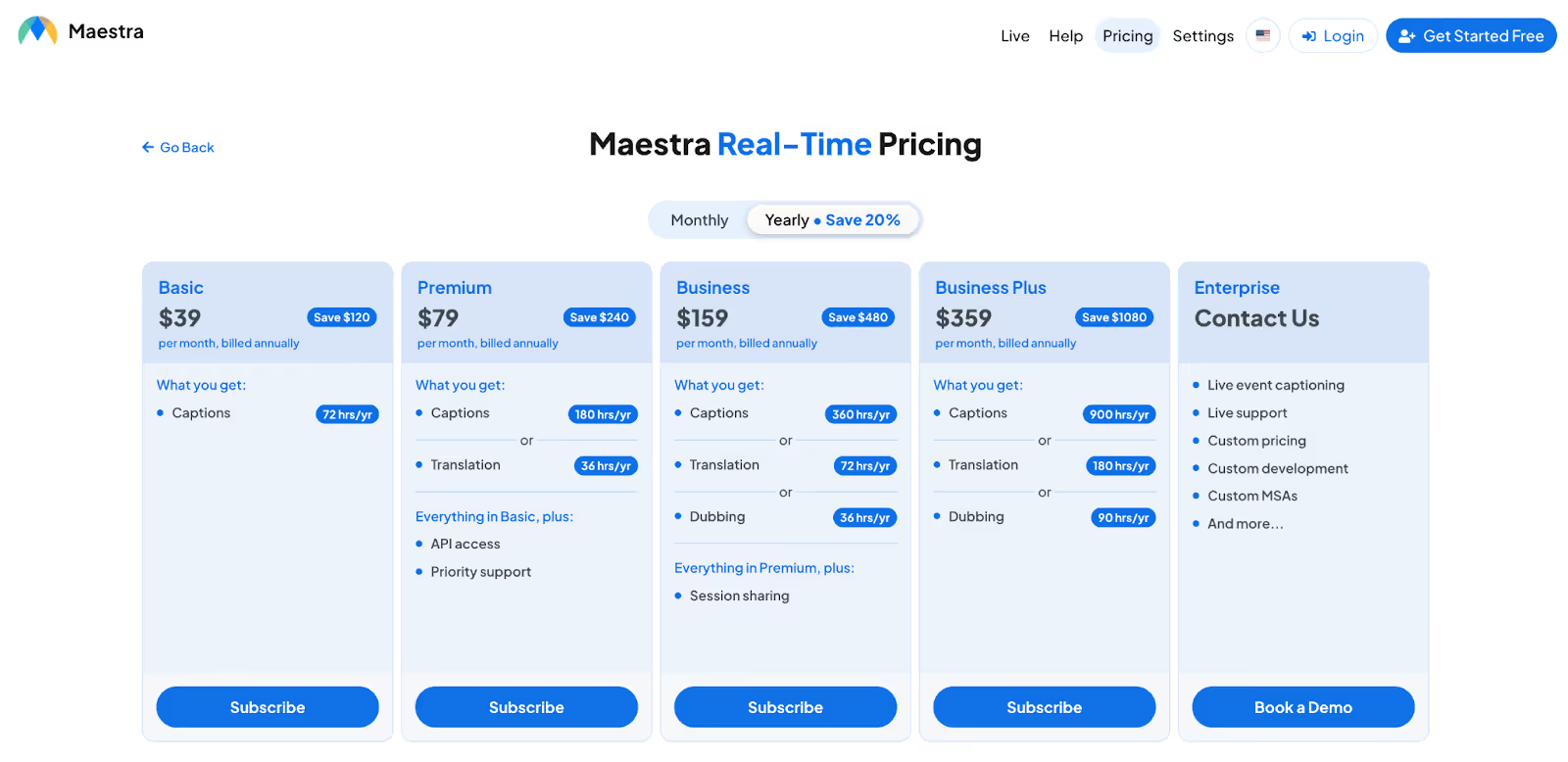
Maestra offers multiple paid plans for real-time captions, live translation, and AI dubbing, with discounts available on annual billing.
Subscription Plan
- Maestra Basic plan starts at $39 per month when billed annually. It includes 72 hours per year of live captions, making it suitable for light usage such as small meetings.
- Maestra Premium plan costs $79 per month on annual billing. It offers 180 hours per year of captions or 36 hours of live translation, along with API access and priority support.
- Maestra Business Plan priced at $159 per month when billed annually, the Business plan includes 360 hours of captions, 72 hours of live translation, or 36 hours of AI dubbing per year.
- The Maestra Business Plus plan is available at $359 per month on annual billing. It provides 900 hours of captions, 180 hours of live translation, or 90 hours of dubbing annually.
- Maestra’s Enterprise plan offers custom pricing and is built for large-scale deployments. It includes live event captioning, live support, custom development, and tailored MSAs, with pricing available on request through a demo.
Maestra Pros
- Handles 125+ languages with two-way, multi-speaker magic.
- AI dubbing makes translations audible and natural.
- QR/link sharing includes everyone without accounts.
- Integrates with streaming tools like OBS for events.
Maestra Cons
- Live sessions locked behind Business Plan.
- Pricing opaque; requires a demo for details, tough for solo users.
- Some users note setup tweaks needed for perfect diarization in noisy calls.
Maestra FAQs
How many languages does Maestra support for live translation?
Maestra supports 125+ languages across live transcription, real-time captions, and AI voice dubbing. It also includes automatic language detection, which works well in multilingual meetings where speakers switch languages mid-conversation. This makes Maestra a strong choice for global events and cross-border communication.
Does Maestra offer free live translation?
Maestra provides a free trial so users can test its live translation capabilities. However, full live sessions and advanced features are only available on Business and Enterprise plans. If you’re looking for ongoing free usage, tools like JotMe offer limited monthly translation and transcription minutes without requiring an enterprise upgrade.
Can Maestra handle two-way conversations?
Yes, Maestra supports two-way, real-time conversations, allowing participants to speak in different languages and hear instant voice translations in return. It’s effective for interviews, discussions, and live calls. That said, platforms like JotMe go a step further by adding AI-generated action points and AI chat, real-time summaries, and more.
Is Maestra good for events with multiple speakers?
Maestra performs well in multi-speaker environments, thanks to automatic speaker diarization and easy session sharing via links or QR codes. It’s particularly suited for conferences and webinars. However, for teams looking for more affordable, contextual translation across 100+ languages, JotMe may be easier to adopt without enterprise-level pricing or sales demos.
Immersive Translate: Ideal for Real-time Bilingual Subtitles Across Meetings and Videos
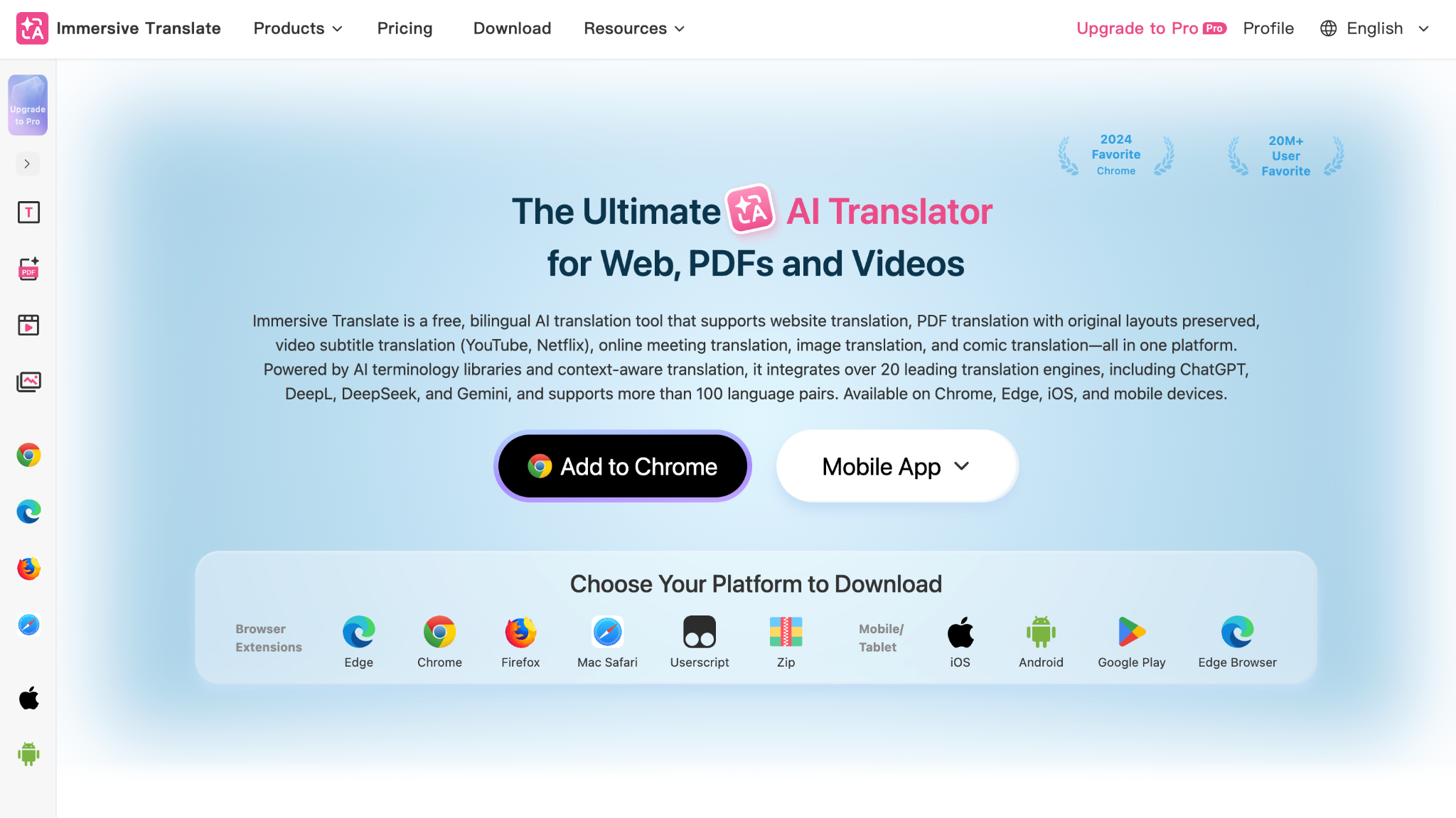
Immersive Translate is a bilingual AI translation tool that helps users understand foreign-language content without switching between different translation tools. We tested its translation capabilities across online meetings and videos and found that it provides real-time bilingual subtitles while keeping the original language visible alongside the translation.
Immersive Translate supports translation across more than 100 language pairs, including Japanese and English. It works with popular meeting platforms like Zoom, Google Meet, and Microsoft Teams and can translate spoken content into bilingual subtitles in real time.
Supported Platforms: Zoom, Google Meet, Microsoft Teams, YouTube, Netflix, and more.
Immersive Translate Key Features
- Real-Time Meeting Translation: Provides bilingual subtitles during online meetings on Zoom, Google Meet, and Microsoft Teams, allowing participants to follow conversations in their preferred language.
- Bilingual Video Subtitles: Translates subtitles in real time across supported video platforms while displaying the original and translated text together.
- Document Translation: Supports translation of PDFs, ePub, TXT, DOCX, and other document formats while preserving the original layout in supported workflows.
Immersive Translate Pricing
Immersive Translate offers a free plan with access to several translation features. Free users can use website translation, PDF translation, YouTube bilingual subtitles, and other features, while paid plans provide higher usage limits and access to additional premium AI translation capabilities.
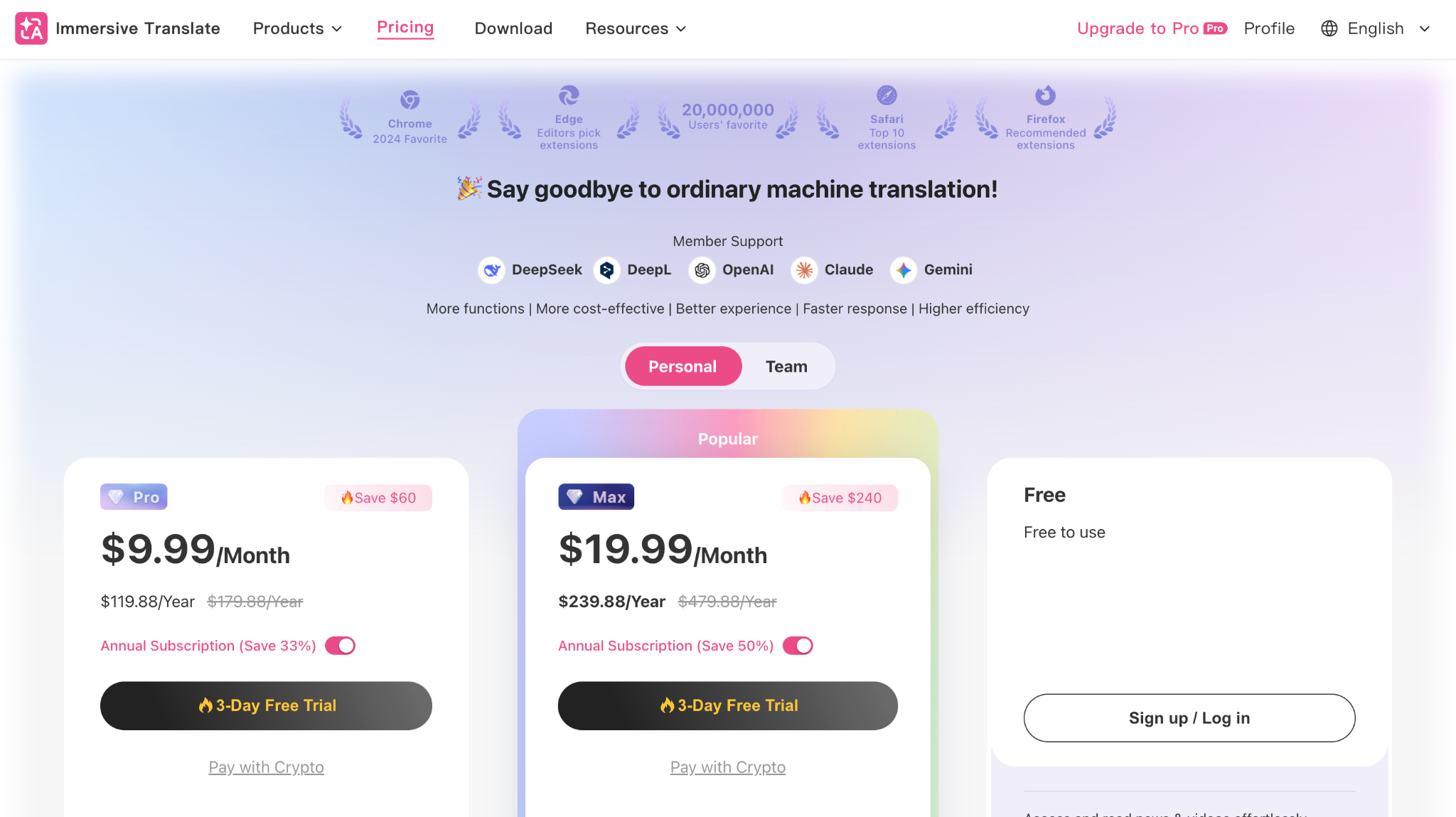
The Pro plan starts at $9.99/month, while the Max plan starts at $19.99/month. Annual plans are also available at discounted rates.
Immersive Translate Pros
- Offers real-time bilingual subtitles for online meetings.
- Supports 100+ language pairs.
- Works across websites, videos, documents, and images.
- Offers a free plan with no subscription required to get started.
Immersive Translate Cons
- Some advanced AI translation features are limited to paid plans.
- The number of features can feel overwhelming for users who only need simple meeting translation.
Immersive Translate FAQs
Can Immersive Translate translate Japanese to English in real time?
Yes, Immersive Translate supports Japanese-to-English translation and can display bilingual subtitles in real time during supported online meetings and videos.
Can Immersive Translate translate meetings?
Yes, Immersive Translate supports real-time bilingual subtitles for Zoom, Google Meet, and Microsoft Teams. Users need to enable subtitles in the meeting platform and then activate the bilingual subtitle translation feature.
Does Immersive Translate offer a free plan?
Yes, Immersive Translate offers a free plan with access to several translation features, including webpage translation, PDF translation, and YouTube bilingual subtitles. Paid plans provide higher usage limits and additional premium features.
Can Immersive Translate translate videos?
Yes, Immersive Translate can provide bilingual subtitles for videos across supported platforms, including YouTube and Netflix. It can also generate subtitles for videos that do not have original subtitles in supported workflows.
Which Tool Should You Pick for Japanese to English Live Translation?
Japanese to English live translation should be easily accessible with various tools available in the market. Choosing the right tool completely depends on your requirements, budget, and how frequently you attend multilingual meetings. Let’s take a look at which tool you can pick for the translation:
- If you work in a cross-functional or global team and attend calls with different contexts or languages, use JotMe. JotMe uses natural language processing to understand the context of the meeting and provide accurate translations in 200+ languages.
- If you’re a salesperson looking to consult with global customers with real-time interpretation in 43 languages, EventCAT can be a great option for you.
- If you host multilingual business conferences or seminars, you can check out tools like VoicePing 2.0 and Interprefy.
- If you host multilingual business conferences or seminars with multiple speakers talking simultaneously, you can check out Maestra for its two-way translation and AI voice dubbing.
- If you regularly work with foreign-language websites, documents, videos, or online meetings and want bilingual subtitles rather than translation alone, Immersive Translate can be a great option.
However:
Even though all the tools provide Japanese-to-English translation without much hassle, some of them miss out on accuracy, and some on budget. But JotMe comes with accurate real-time translation that understands your industry’s domain knowledge and doesn’t cost you much.
JotMe’s paid plans start at just $10/month and offer translation in 200+ languages in real time. It even offers other post-meeting features, like AI notes, AI summaries, transcript translation, and more. For conversations that move beyond the call, JotMe’s mobile app extends the same live translation experience to in-person discussions and quick follow-ups.
Try JotMe desktop and mobile app today and see how effectively you can communicate with your Japanese client or teammate.
FAQs
What is the most accurate translator for Japanese to English?
The most accurate translation tool for Japanese to English is JotMe. JotMe offers instant and contextual Japanese-to-English translations using NLP and speech recognition.
Is ChatGPT good for translation?
No, ChatGPT is not good for translation. If you want contextual translation for complex terms that also understands your industry’s domain knowledge, then use JotMe.
Can AI translate spoken language in real time?
Yes, there are several AI live translation tools, like JotMe, that translate a spoken language to another in real time. JotMe offers contextual and real-time translation in 200+ languages. You just have to select the spoken and translated language, and JotMe will instantly give you the translation in real time.
Can Google Meet do live translation?
No, you need third-party tools, like JotMe, to do live translation in Google Meet. JotMe works in the background and does live translation while you can focus on your meeting. It even offers a Chrome extension for live translation on Google Meet in real time.
Can Japanese be translated into English in real time?
Yes, real-time Japanese-to-English translation is possible for conversations, meetings, presentations, and other spoken content. Depending on the translation method, the output may appear as live captions, subtitles, or translated speech.
Is the Japanese translation accurate for business conversations?
It can be accurate enough for many business conversations, but context is important. Japanese business communication often uses formal language, honorifics, and indirect expressions, so translations should be reviewed when the conversation involves important decisions, contracts, or other sensitive information.
Last updated on
September 17, 2026
Follow us on social media: