Guides
QuillBot Alternatives: QuillBot vs. JotMe for Russian to English Translation (2026)

Viraj Mahajan
February 3, 2026
Text translation apps like QuillBot have evolved beyond word-for-word swaps and use a neural machine translation network to translate sentences within a specific context. This makes QuillBot a popular Russian to English translation tool for students.
However, those who use QuillBot regularly know there’s room for improvement. QuillBot’s translations are accurate, but the tone selection is limited for English to German, French, Spanish, and Portuguese translations. Moreover, QuillBot does not offer any control over the translations.
This is where QuillBot’s alternatives like JotMe offer context-aware translations, prompt-based tweaks, and clear nuance explanations. In theory, JotMe seems better suited to students and language learners who want to translate their Russian coursebooks and learn the language at the same time.
- QuillBot, at $4.17/month (billed annually), offers text-only translations and provides access to paraphrasing, summarizing, and advanced writing tools.
- JotMe is a real-time voice translator with a text-to-text translation feature. At just $10/month (billed annually), JotMe can translate text into 131 languages, with explanations. JotMe can also translate live meetings in 45 languages on desktop and 77 languages on the Chrome extension, where QuillBot only supports text-to-text translations in 50+ languages.
We put both QuillBot and JotMe to the test on several parameters like speed, accuracy, pricing, and the available features, and the results are in this guide. So, go through the QuillBot vs. JotMe guide and select the text translation tool that best suits you.
70% of Working Professionals Use QuillBot for AI Detection; 10% Uses for AI Translation [2026 Short Survey]
QuillBot is often described as a paraphrasing or AI translation tool, so we ran a short LinkedIn poll to understand how people really use it. The poll received 23 responses from learners and working professionals.
The results were straightforward:
- 65% said they have used QuillBot
- 30% said they don’t use QuillBot
- 4% said they weren’t familiar with QuillBot
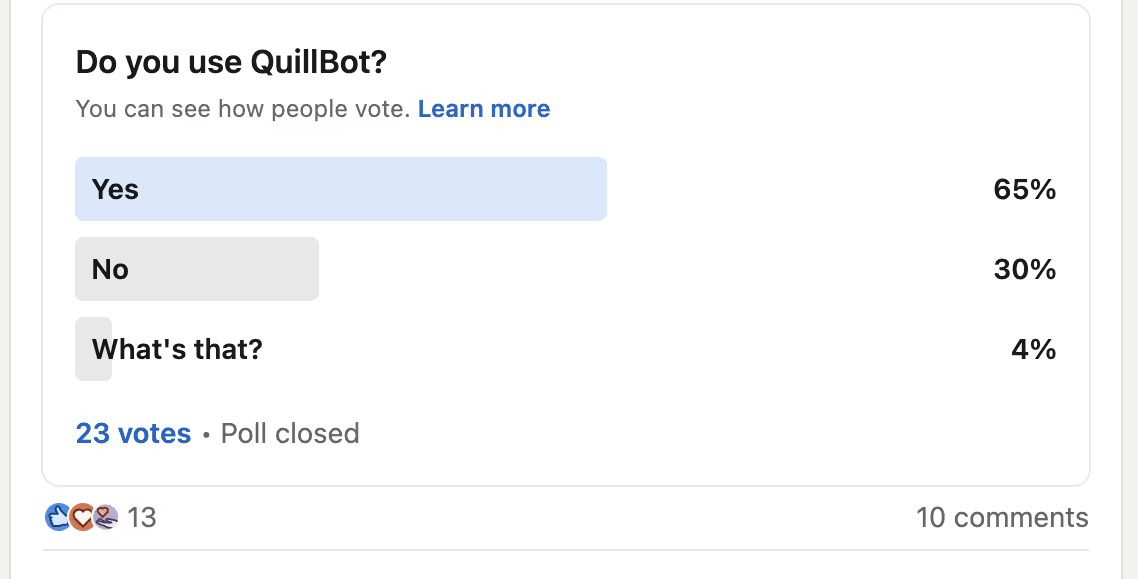
Along with the poll, around 10 respondents (about 44%) left comments explaining how they use QuillBot and which features they find useful.
Here’s what came up most often in the comments:
- Grammar and spell checking of QuillBot were the most common use cases
- QuillBot AI detection was mentioned frequently, with mixed feedback on reliability and accuracy
- Only one person mentioned using the AI translation feature, and the experience wasn’t positive
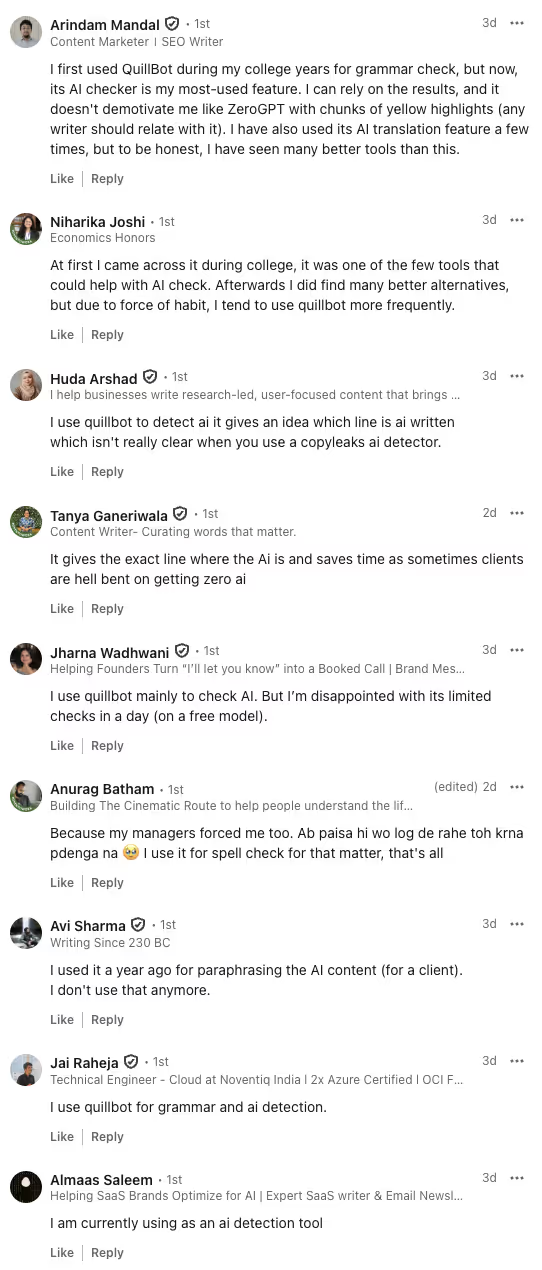
The responses suggest that AI translation isn’t a primary reason most people use QuillBot. Instead, users seem to rely on QuillBot for basic writing assistance, which is why many eventually explore QuillBot alternatives that offer stronger grammar, detection, or translation capabilities.
What are the Best QuillBot Alternatives?
From the LinkedIn poll, it’s clear that QuillBot is popular for its AI detection and grammar checking features, so we were curious to see what other translation tools are available. So, we went out searching, and these are the best QuillBot alternatives that we found:
- JotMe: A live translation software with a text-to-text translation feature that understands the tone, flow, idiomatic expressions, and subtle cultural nuances to provide a contextually accurate translation. JotMe also offers additional features like an explanation box, prompting, and support for 131 languages.
- DeepL: A text-to-text translator known for its accuracy, especially when compared to traditional translators. DeepL also has a Dictionary feature that provides definitions or explanations of terms.
- Microsoft Translator: A free-to-use text translator with support for 100+ languages, and decent accuracy. Microsoft Translator also supports voice translation, but lacks advanced features such as an explanation box and a dictionary.
- Amazon Translate: Amazon Translate can be a useful text translation tool for your app or website, but isn't usable for smartphone translations during your business trips.
- Reverso: A machine translation software that provides AI-powered translations in 15+ languages, and comes with an integrated grammar checker and dictionary. Reverso is better suited to students who need assistance with both translations and write-ups.
How We Tested These QuillBot Alternatives?
We understand how overwhelming it can be to pick the right QuillBot alternative. You may be tempted by a free tool, but end up compromising on accuracy and advanced features. Meanwhile, a feature-packed tool can be expensive.
So, to establish a balance of everything (price, accuracy, and features), here are a few things we looked into when selecting the best QuillBot competitor:
Accuracy: The primary criterion for the best QuillBot alternative is accuracy. That is, how well the text translation tools understand the tone, flow, and idioms to preserve the meaning in the final output.
Language Support: Language support and speed were also a priority, and JotMe’s text translation in 131 languages stood out. What impressed us was how quickly the translations appeared alongside the explanation box.
Pricing: Pricing transparency was also important when searching for a QuillBot alternative. We compared free and paid plans to ensure there were no hidden costs.
For instance, JotMe provides AI credits for translation, tone setting, and more, while DeepL offers a million characters and 20 file translations per month with its starter plan.
Advanced Features: Another thing we looked into was whether the tools have features beyond text translation. For instance, JotMe provides an explanation box and prompt-based tone and language settings for translation.
Meanwhile, DeepL has a dictionary feature that provides definitions for terms.
Why are Teams Choosing Tools like QuillBot and JotMe?
Typical language-learning apps are good for basic English to Russian translations or vice versa, but they don’t provide cultural context, fluency, or spontaneous conversation practice. This is where the best text translation tools like JotMe and QuillBot are helpful.
- You can choose JotMe for context-aware text translation in 131 languages, along with an explanation box that helps you understand the meaning and definitions. You can further set a custom tone using prompts to help you get fluent in your target language.
- QuillBot can be a decent choice when you need to quickly translate text and rewrite it in another language. There’s also an option to set the translation tone, but it is limited only to selected languages, such as English to German, French, and Spanish.
What Makes JotMe Stand Out?
JotMe is one of the best live translation apps with a text translation feature that understands the tone, intent, flow, and core meaning of sentences and restores them in translation. As a result, the translations are accurate and feel natural.
Not only that, JotMe provides a brief explanation of translation and lets you adjust the tone with prompts. This way, students understand why a phrase was translated in a certain way, and switch between academic, simple, or formal tones to tailor translations for essays or notes.
Language learners can also understand cultural nuances and how people communicate in various tones (humorous, empathetic, sarcastic, etc.) in the language. This is potentially one of the best ways to learn a language.
What Makes QuillBot Stand Out?
QuillBot’s AI translation can translate text into over 50 languages. We also liked how we could change the tone (formal and informal), which helps language learners practice different writing styles and understand how to express an idea in multiple ways. However, the tone customization is limited to English to French, Spanish, German, and Portuguese translations.
How do QuillBot and JotMe Compare in Terms of Features?
Both QuillBot and JotMe perform text-to-text translation and provide language learning assistance. But JotMe takes the lead for English to Russian translation due to QuillBot's lack of tone customization.
Here’s a quick tabular comparison of QuillBot and JotMe’s features to help you understand why:
What are the Notable Features of JotMe?
The notable features of JotMe include continuous and contextual text-to-text translation, tone setting, explanation box, and text-to-speech. JotMe also offers voice-to-text translations, which you can use for online classes, course videos, and live meetings. These are detailed as follows:
JotMe Offers a Contextual Translation
Most traditional translators perform a word-for-word swap, so the output sounds robotic and may lose its intended meaning.
JotMe, however, takes a different approach. This QuillBot competitor uses a contextual engine to understand the tone, intent, and emotions in the typed text.
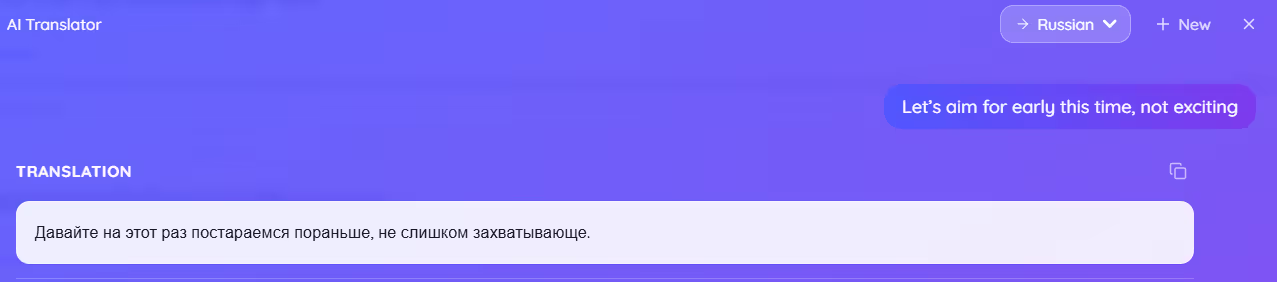
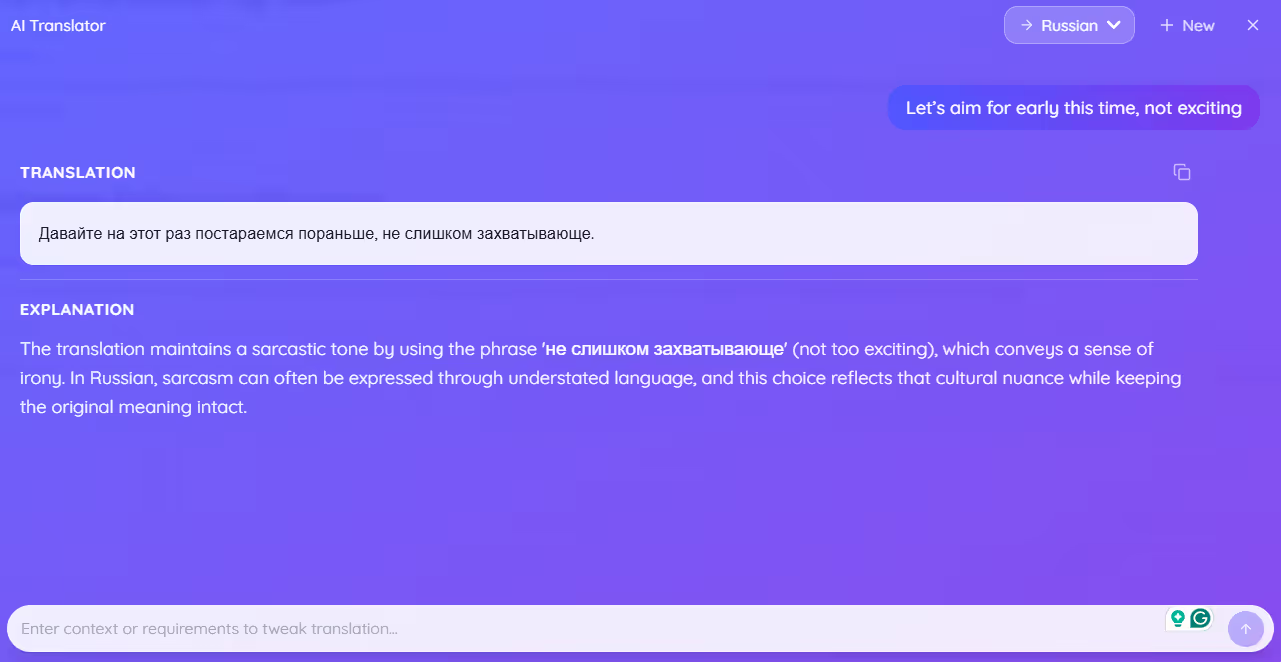
We put JotMe to the test and typed in sentences with a hint of humor, technical jargon, and sarcasm. We were impressed with how JotMe kept the tone and meaning intact in translations. Moreover, we could change the translation's tone just by adding a “Request.”
So, when we wrote “Let’s aim for early this time, not exciting,” and made a request: Keep a sarcastic tone, JotMe’s translation came out as:
Meanwhile, most traditional tools translated the sentence literally into Russian as:
JotMe understood the core meaning and maintained the sarcastic tone the speaker intended.
JotMe’s Translations are Continuous
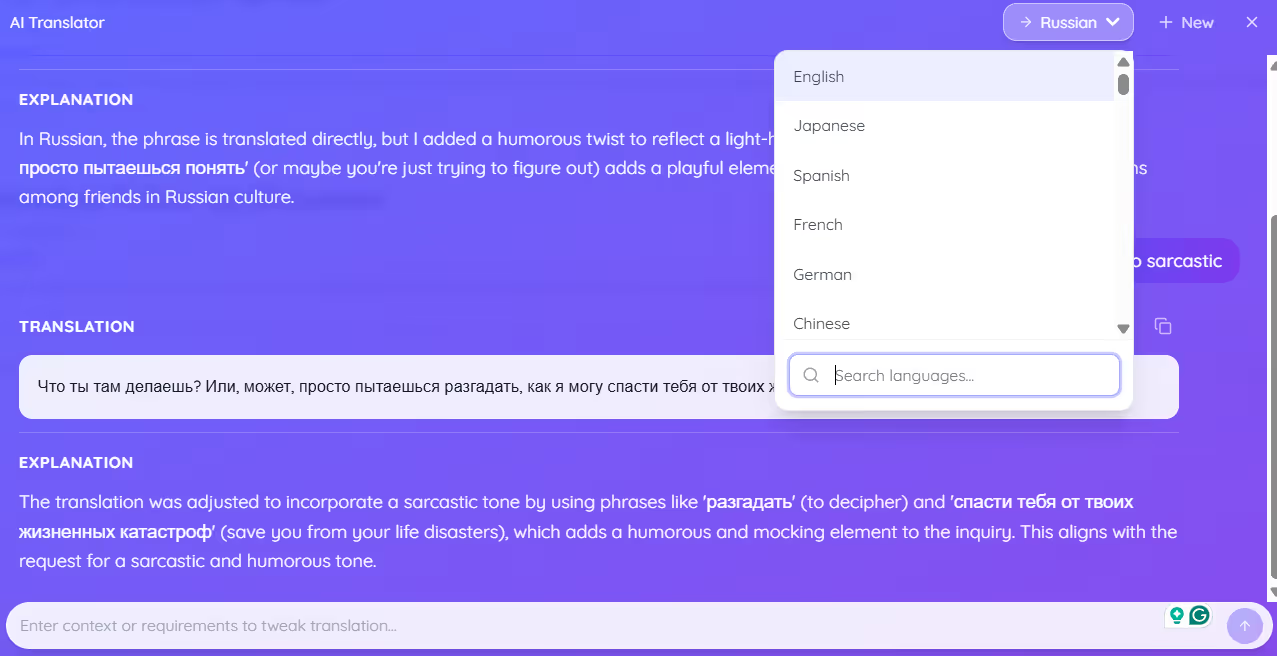
JotMe’s text translator has a chat-based interface where you can enter text to translate, ask the AI to adjust the translation tone, and switch languages. Unlike QuillBot, JotMe saves the translations as long as you keep the window open.
In the midst of all these, the naturalness and accuracy of the translation remain intact. So, during our tests, we typed a sentence ("What are you doing?"), set the language to Russian, and requested a bit of a humorous tone.
Now that JotMe provides translations with explanations, we instructed it to “change the tone to sarcastic.” JotMe understood our request and provided translations accordingly.
More importantly, this prompt-based flexibility lets students refine JotMe’s translations using prompts such as “use academic tone” or “make it simpler.” This way, the translations become learning aids rather than mere outputs, helping build a deeper understanding of grammar and style.
JotMe Provides Text Translations in Multiple Languages
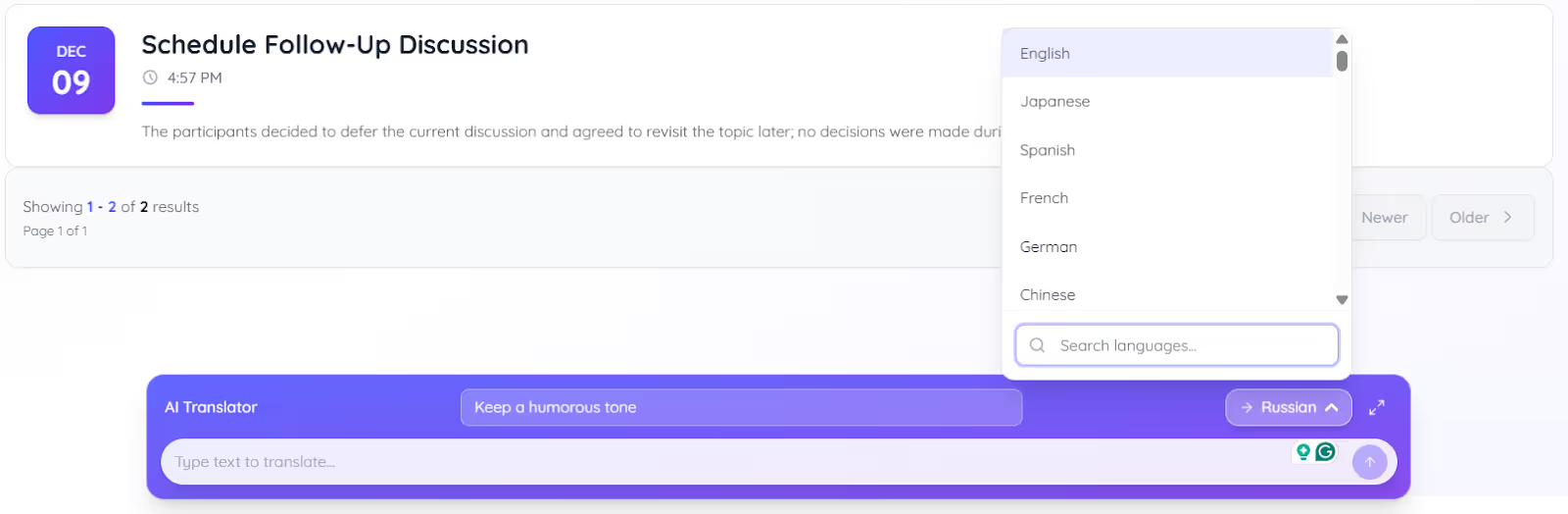
JotMe is one of the best AI translators for text-to-text translations in 131 languages, including Russian, Chinese, German, and many more. Regardless of the language, the translations seemed natural and context-based, and the flow wasn’t affected even in long paragraphs. Meanwhile, QuillBot only offers translations in 50+ languages.
So, whether you’re translating your notes, coursebooks, or crafting quick replies, JotMe can be a more helpful text-to-text translator than QuillBot. You can also use JotMe to practice speaking, build vocabulary, and improve reading comprehension in 131 languages.
JotMe Offers an Explanation Box
If you’re someone trying to be proficient in Russian or any other language, JotMe can be your reliable AI interpreter. Alongside accurate text translations, JotMe provides a short, easy-to-read explanation of the intent, meaning, and context of key terms.
This way, the translation becomes a mini-lesson that builds your vocabulary, improves your comprehension, and helps you become more confident in speaking the language over time.
JotMe's Mobile App for One-to-One Conversations
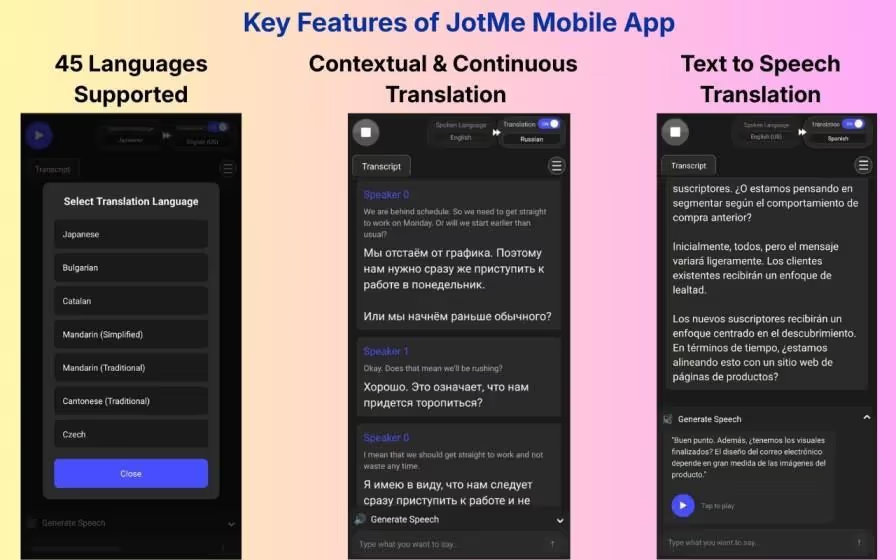
JotMe has a mobile app that performs text-to-text and text-to-speech translation, primarily suitable for one-on-one conversations. The mobile app was a major help during our business trip to Russia last month.
Whenever we had to talk to locals, we used JotMe mobile’s “Generate Speech” feature to type what we wanted to say, and it not only provides text translation but also generates a speech you can play. This way, the listener understood us fully and responded accordingly.
JotMe is the Right Choice if You:
✅ Need an AI translator that provides contextually accurate translation.
✅ Want support for 130+ languages for text translation.
✅Prefer an explanation of the provided translation to understand the intent and understand the included terms.
✅ Reliable translation software to communicate with locals on the go.
JotMe isn’t the Right Choice if You:
❌ Have a PDF or Word file to upload for translation.
❌ Need to paraphrase or rewrite a document.
What are the Notable Features of QuillBot?
QuillBot’s features include text-to-text translation, a paraphraser, multilingual support, and a mobile app. Here are the details:
QuillBot Produces Accurate Translations
QuillBot is better known as a paraphraser and rewriting tool for academics and students, with an added AI translation feature. The text translation tool is said to be accurate, so we used QuillBot to perform English to Russian translation of notes, and the results turned out fine.
However, if you compare the output with JotMe’s, there’s a difference. QuillBot sometimes couldn’t understand the subtle cultural nuances, tone, and flow of the typed text. This way, the translations sound more literal than natural.
To add to it, the tone-setting is limited to a few language combinations (English to German, Spanish, and French) in QuillBot and isn’t available for English to Russian translations.
QuillBot Supports Translations in 50+ Languages
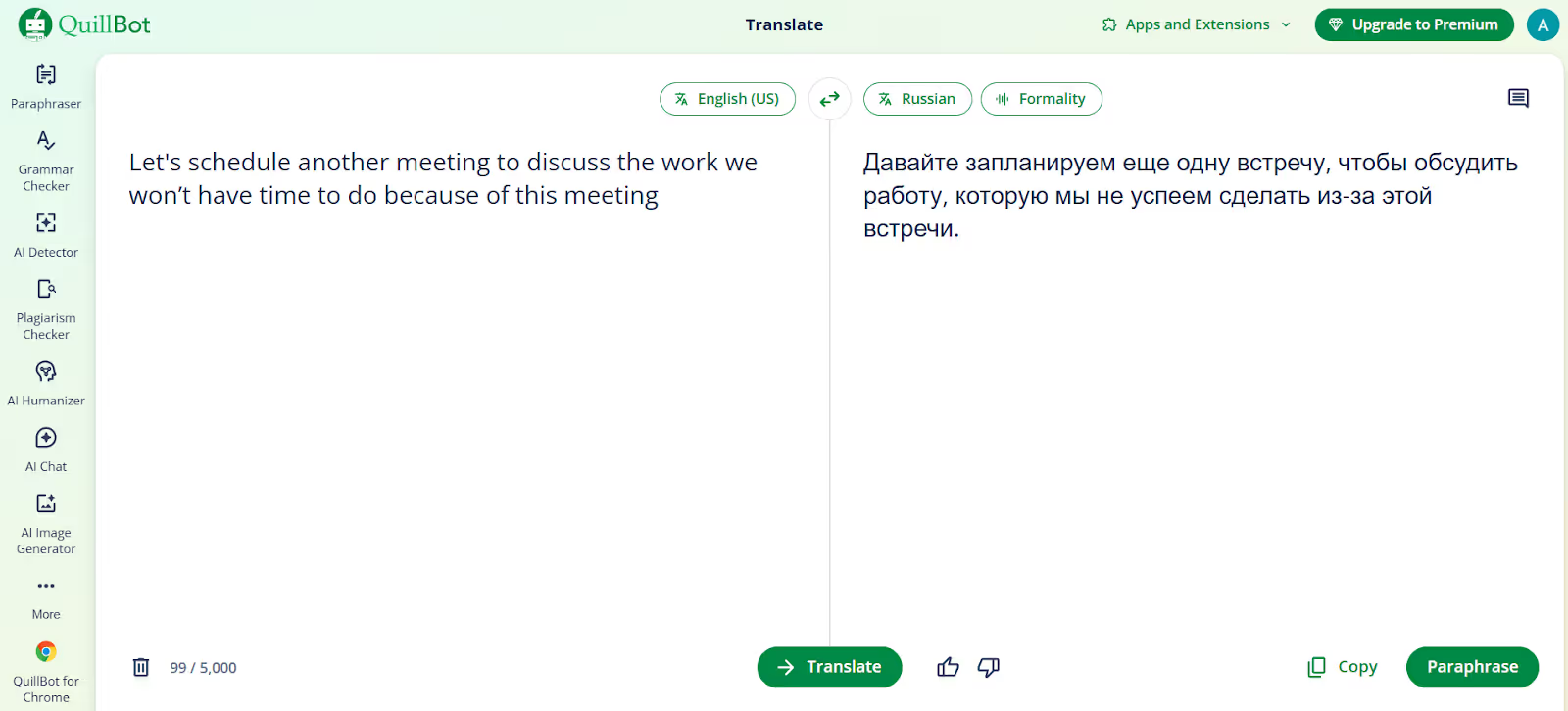
QuillBot provides accurate text translations in 50+ languages, fewer than JotMe (131). Regardless, there’s support for English to Russian translation, and the translations were pretty quick, even for large chunks of text and lengthy documents.
QuillBot's Bilingual Translation Interface
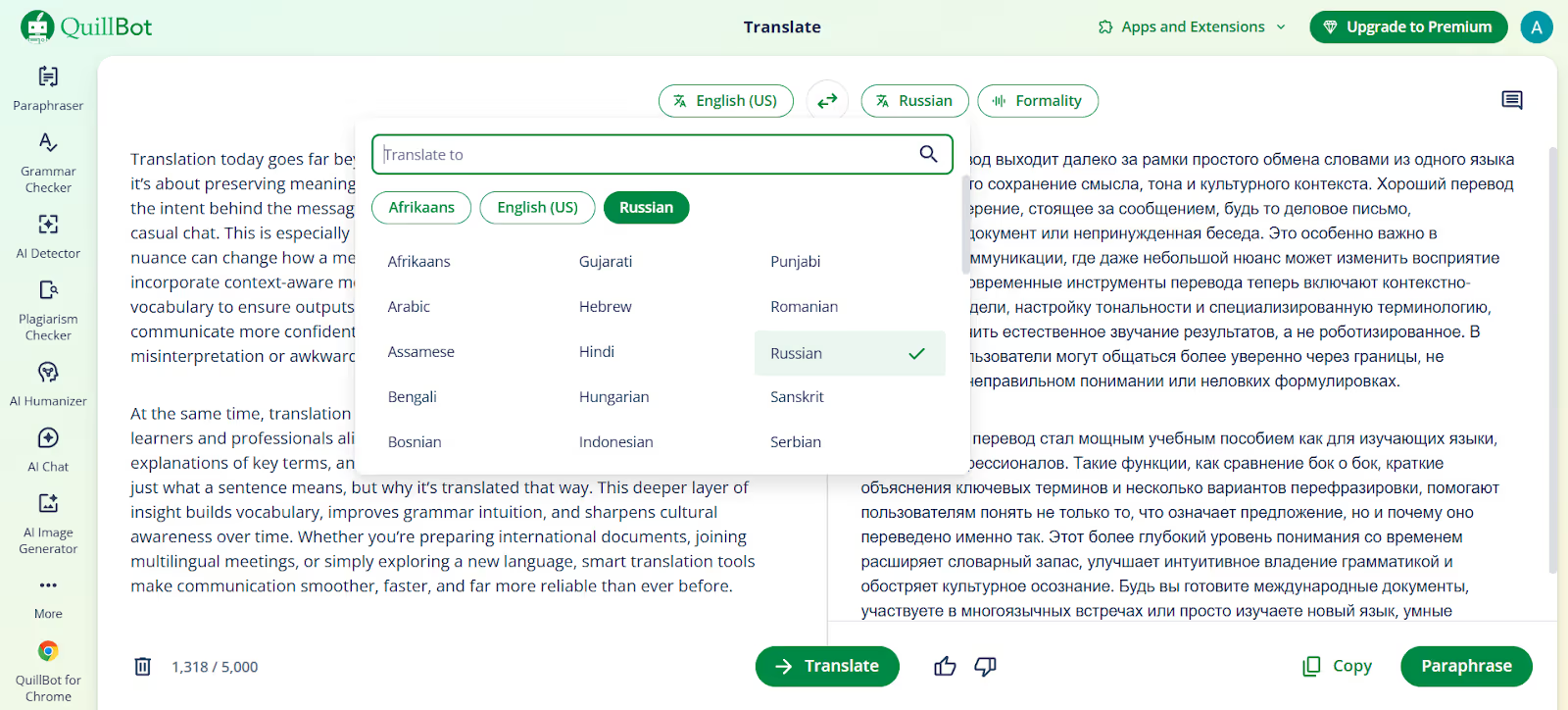
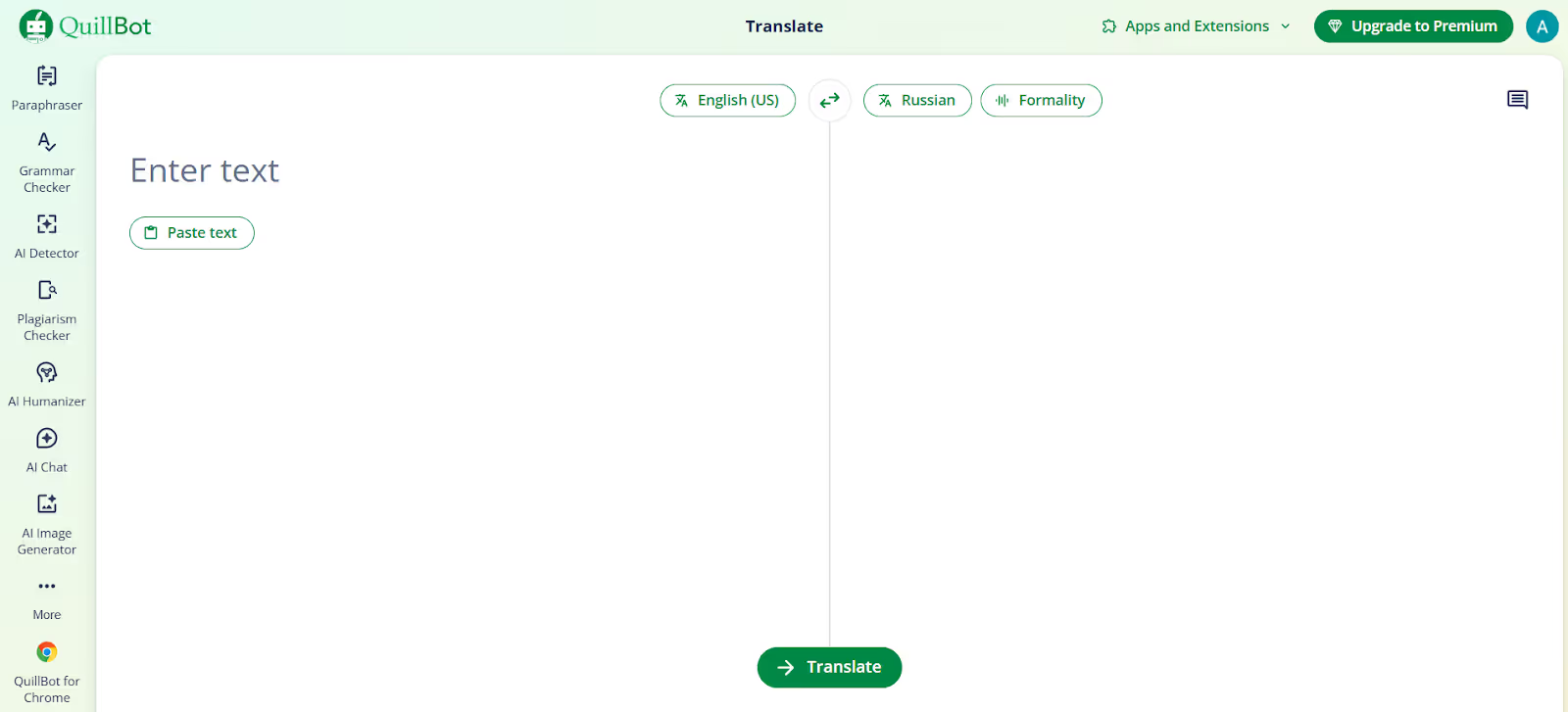
QuillBot has a traditional translator interface where you type or paste a text and see its translation appear. You can paste a lengthy text at a time, or add some later, but you cannot change the language or tone during an ongoing translation.
QuillBot seems helpful for students who want to quickly translate their articles, homework assignments, or study materials.
However, as you change the translation language or tone, you’re back on a blank slate, and your previous translations are gone. If you’re someone who wants interactive practice or quick comparisons, JotMe can be a preferred choice.
QuillBot's Mobile App
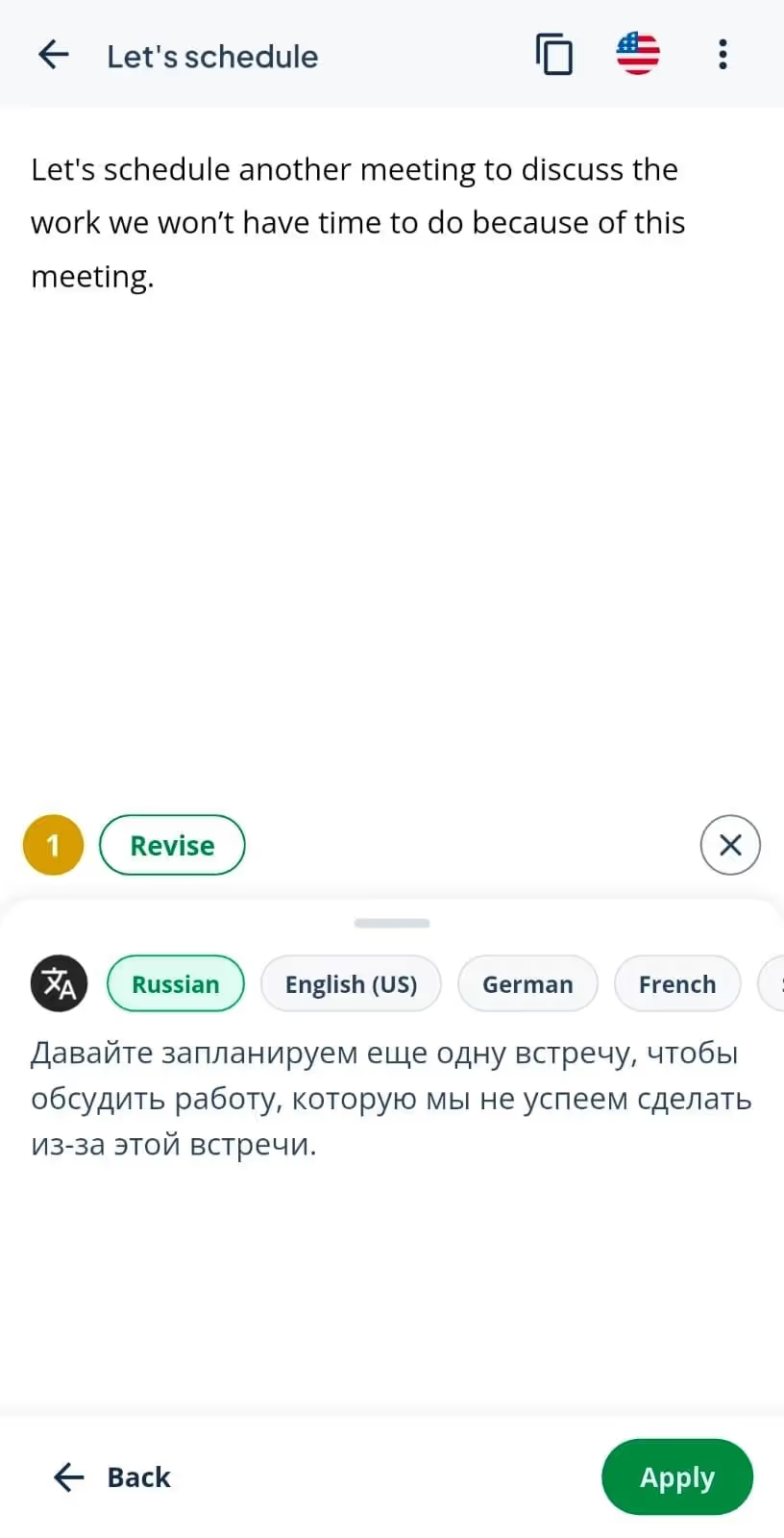
Like JotMe, QuillBot has a mobile app with all the features of its desktop app. The interface is clean, and you can even paste a long text to get a translation into your preferred language within seconds.
The translation accuracy of QuillBot is decent, but there’s no text-to-speech feature, as you can find in JotMe. The locals have to read the translation aloud if needed, or switch to another text-to-speech app.
However, unlike traditional language-learning apps, QuillBot’s strength lies in practical language use rather than structured lessons or drills. It corrects grammar, adjusts formality, and suggests synonyms to help improve your vocabulary.
JotMe provides contextually accurate speech translation in 45+ languages that preserve tone, flow, and meaning, and help learners achieve greater fluency.
Quillbot is the Right Choice if You:
✅ Want to rewrite a translated text in a clean and simple manner.
✅ Need translations in a tone like formal and informal tone.
QuillBot isn’t the Right Choice if You:
❌ Need context-based translation in several languages.
❌ Upload Word or PDF files for translations.
❌Need speech-to-text feature.
How Much do JotMe and QuillBot Cost? (Updated: 2026)
Both JotMe and QuillBot offer free and paid pricing models, and here’s a quick breakdown of what they offer:
- JotMe provides a small monthly credit allowance and limited AI credits for free. If you want more credits and can translate longer texts at a time, there are $20/month ($10/month if billed annually) and $30/month ($15/month if billed annually) plans available.
- QuillBot, like JotMe, offers translation and basic features to use for free. There’s a Premium plan at $9.95/month ($4.17/month, billed annually) and a Team plan for advanced features like definitions, unlimited paraphrasing, and more.
Here’s a detailed break down into the pricing models of JotMe and QuillBot:
JotMe Pricing
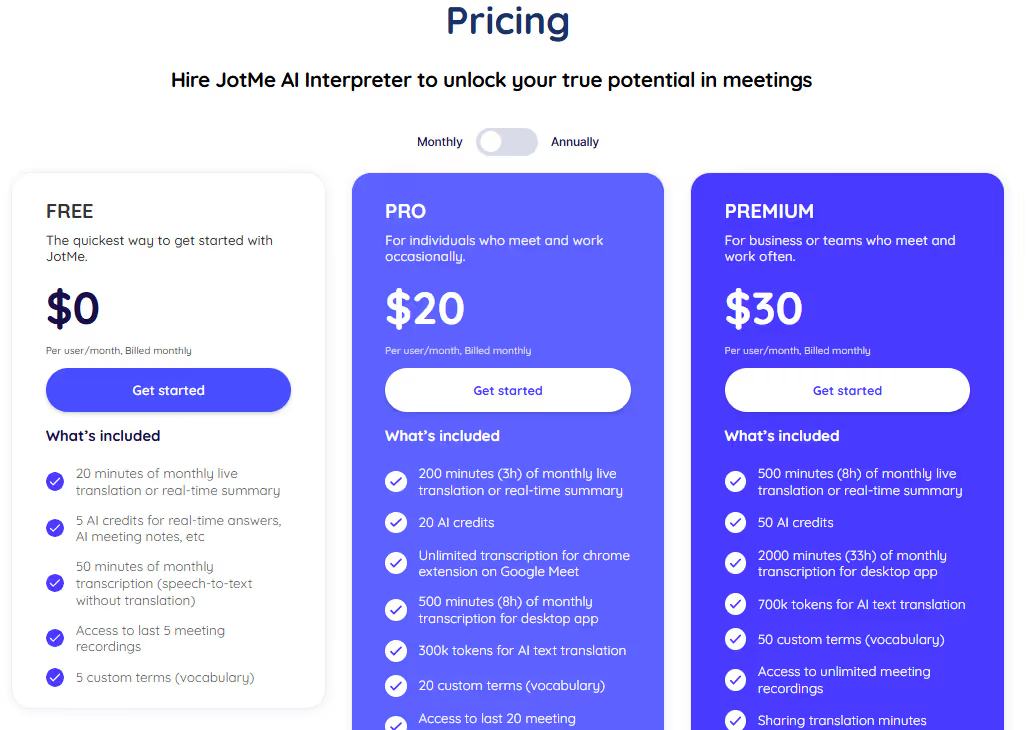
JotMe offers a range of payment plans suited to your varying text translation needs.
- Free Plan: JotMe offers limited AI credits per month to translate your texts, craft replies, and more. This is suitable for users who want to translate short messages or want to test the tool.
- Pro at $20/month ($10/month, if billed annually): JotMe offers more translation volume, AI credits, and higher token limits for longer text. This plan is suitable for users who translate text often and need a reliable quality.
- Premium at $30/month ($15/month, if billed annually): This plan gives you the highest number of AI credits and tokens to translate any amount of text. It’s especially suitable for translating lengthy texts and documents.
- Pay As You Go Prepaid Plan at $50 (one-time payment) for mobile gets you 500 minutes of translation.
QuillBot Pricing
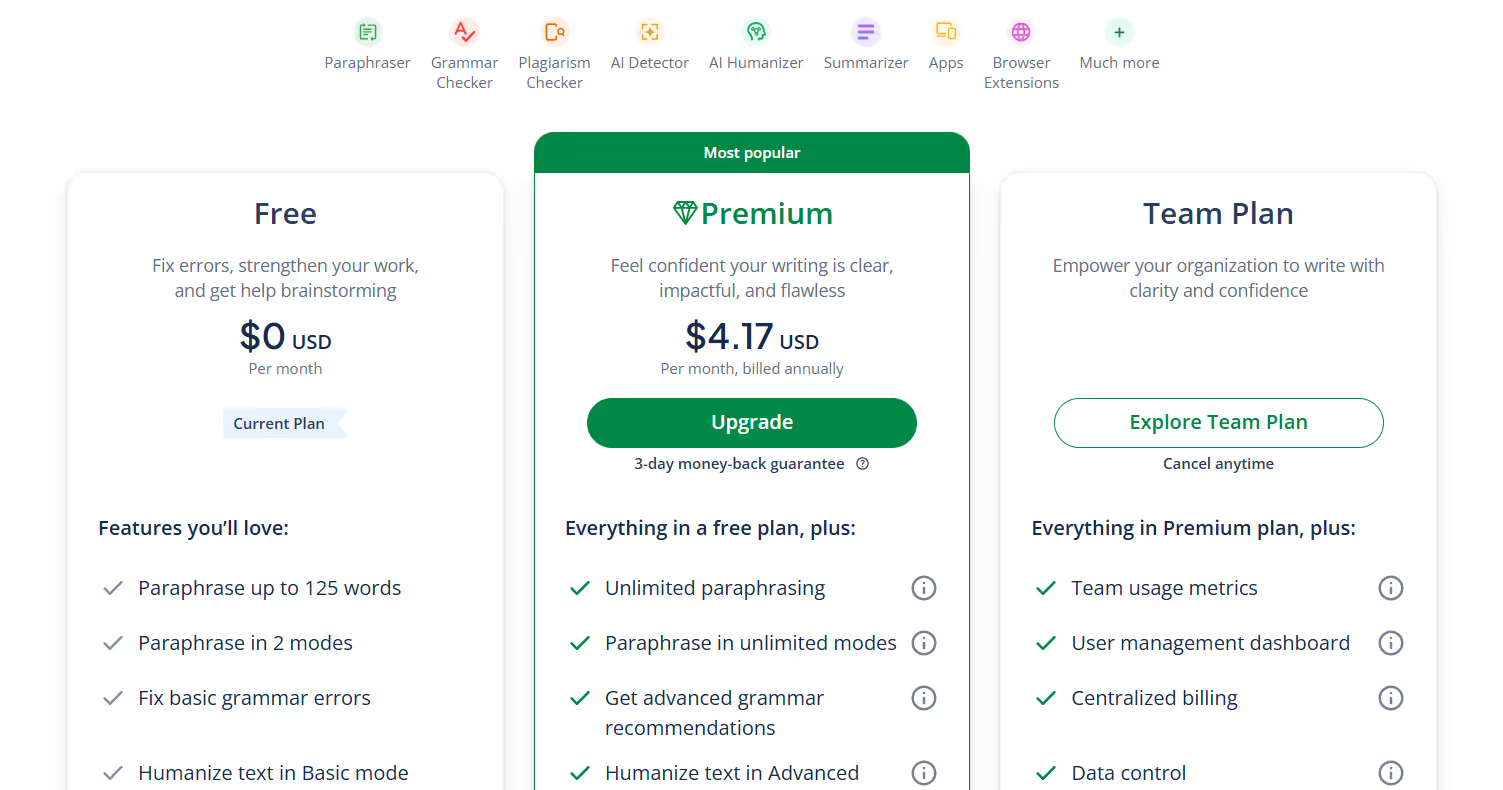
QuillBot's pricing options are rather limited compared to JotMe's, offering only a free and a paid plan.
- Free Plan: Offers basic translation, paraphrasing, and writing tools. It’s suitable for someone who needs a quick translation or needs to test the tool.
- Premium Plan at $9.95/month ($4.17/month, billed annually): QuillBot offers full access to its translation, paraphrasing, and advanced writing tools. This is useful if you write or edit content daily.
What Customers Have to Say About JotMe and QuillBot?
After features and pricing, customer reviews are a must when comparing tools. Both JotMe and QuillBot have received praise from their customers.
- With a 4.6 rating on G2, users praise JotMe’s easy-to-understand interface, its accuracy, and its “understanding of technical terms.”
- QuillBot has received positive feedback for its simple interface and quick translations. However, some users have complained that QuillBot may sound too formal or robotic.
JotMe Review (G2): 4.6/5
QuillBot Review (G2): 4.4/5
What users love about JotMe?
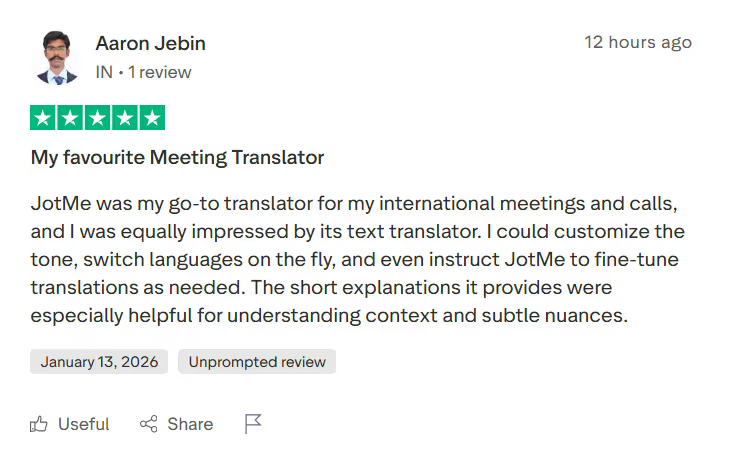
✅ Users on Trustpilot were impressed by the continuous translation feature of JotMe.
✅ They found the translation “especially helpful for understanding context and subtle nuances.”
What do users not like about JotMe?
Users didn’t have to say anything negative about JotMe's text translation feature.
What users love about QuillBot?
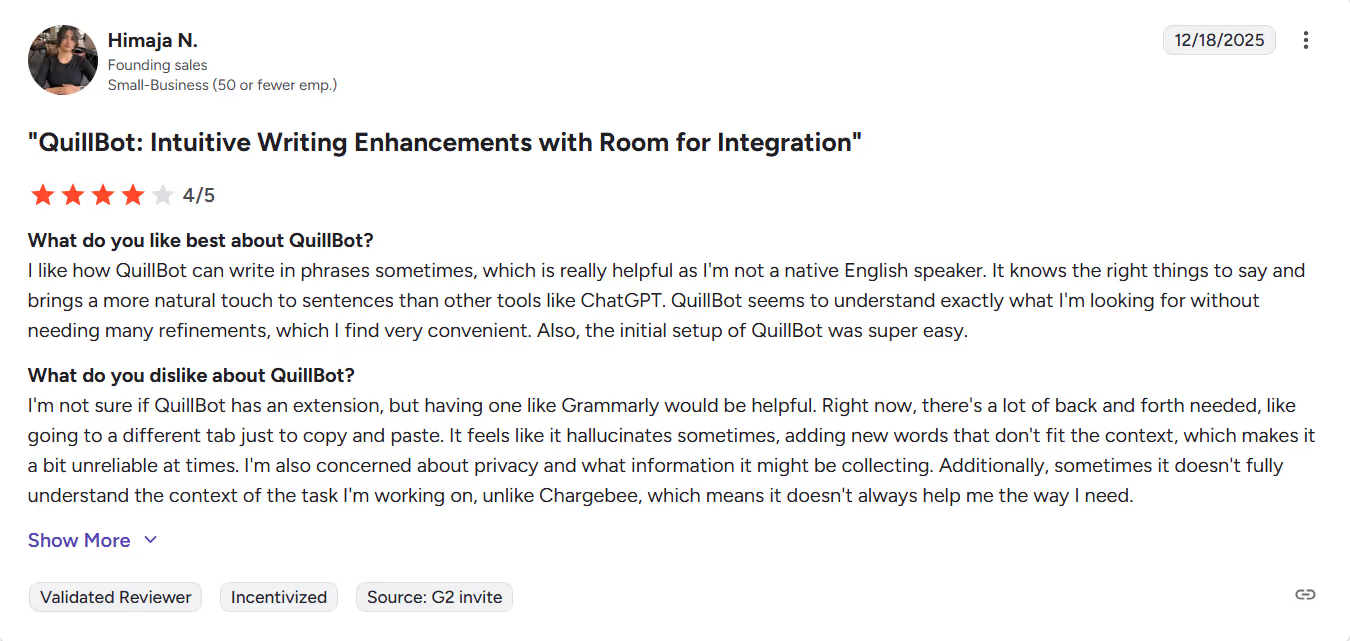
✅ Users on G2 were impressed with how simple it is to use QuillBot.
✅ They found it’s a great writing software.
What do users not like about JotMe?
❌ Users wish QuillBot could understand the context better.
❌ QuillBot’s support for other languages isn’t as strong.
What to Choose for Text Translations: JotMe or QuillBot?
Choosing the best English to Russian translation software depends on your translation needs, budget, and workflow. Here’s a quick overview of each tool:
- JotMe can be a great language-learning tool thanks to its context-aware translations, ease of use, continuous translation, and features such as multiple-language support and short translation explanations.
- QuillBot works like a traditional text translator with a side-by-side translation interface and support for 50+ languages.
Among the two, JotMe stands out with its contextually accurate translations at $10/month and lets you tweak the translation tone as needed. Not only that, JotMe’s other features, such as short explanations, continuous translations, and more, help you become proficient in your intended language.
Use JotMe today and experience how it provides accurate translations every time.
FAQs for JotMe or QuillBot as a Text-to-Text Translator
Can QuillBot translate PDFs and Word documents?
No, QuillBot can handle longer pasted text, but there’s no option to upload a word or PDF file for translation. Regardless, the final output of QuillBot may require thorough proofreading to perfect. JotMe, on the other hand, understands the context and provides accurate translations most of the time.
Does QuillBot support voice translation?
No, QuillBot is a text-first translation tool with no feature to translate audio or live conversations. If you need a reliable platform to translate your live meetings, calls, or videos, try JotMe. JotMe supports both live voice and text translation, making it a reliable QuillBot alternative.
Is QuillBot AI Translator accurate?
QuillBot AI translator performs word-for-word translation, which sometimes results in poor translations. It’s therefore crucial to choose a reliable translator like JotMe that uses a contextual translation engine to understand the tone, flow, and meaning, and to maintain that meaning in translations.
What is the best way to learn a language?
The best way to learn a language is to focus on high-frequency words and cultural context, and practice consistently. JotMe can be a reliable language-learning app that offers context-aware translations and provides short explanations of the subtle nuances it covers. One can read through the translations to understand the context and improve their language skills.
Last updated on
April 14, 2026
Follow us on social media: