Resources
What Is a Voice Translator and How to Choose One for Meetings

Lovely Mangla
April 18, 2026

A voice translator is a tool that converts spoken language from one language to another in real time. Instead of typing text into a translation box and waiting for a written output, a voice translator listens to live speech, processes the spoken words, and delivers the translation as text, audio, or both.
Voice translators are used in business meetings, international conferences, live events, supplier calls, and any situation where two or more people need to communicate across languages without pausing to type. The core job of a voice translator is to keep the conversation moving forward without forcing anyone to switch to a shared second language or wait for a human interpreter.
Translating voice is fundamentally different from translating text. When you type a sentence into Google Translate, the tool works with clean, written input. Spoken language is messier. People pause mid-sentence, change direction, use filler words, and rely on tone and context to carry meaning. A voice translator has to handle all of that and still produce something accurate on the other end.
How Voice Translators Work in Real Time?
Most voice translator apps follow a three-step process:
- Automatic speech recognition (ASR) converts spoken audio into text in the original language.
- A translation engine converts that text into the target language.
- The output is delivered as on-screen captions, translated text, or synthesized speech in the target language.
A voice to voice translator completes all three steps and delivers the output as spoken audio, so the listener hears the translation rather than reading it. A voice to text translator stops at step two and delivers the output as written captions or a transcript.
The quality of a voice translator app depends on how well each step performs. If the speech recognition misidentifies words because of background noise, accent variation, or overlapping speakers, the translation engine receives bad input and produces bad output. This is why voice translators built for meetings perform differently from voice translators built for casual travel phrases.
Where Google Translate Stops and Contextual Interpretation Starts?
Google Translate is the most widely used text-to-text translation tool in the world. It handles typed input well for short, simple sentences. But when voice enters the picture, especially in a professional context, the gaps become visible. This gap is also reflected in ongoing research, which shows that real-time speech translation is still more complex than translating written text.
Here is a real example. A Spanish-speaking marketing lead sends a message to an English-speaking operations manager before the weekend:
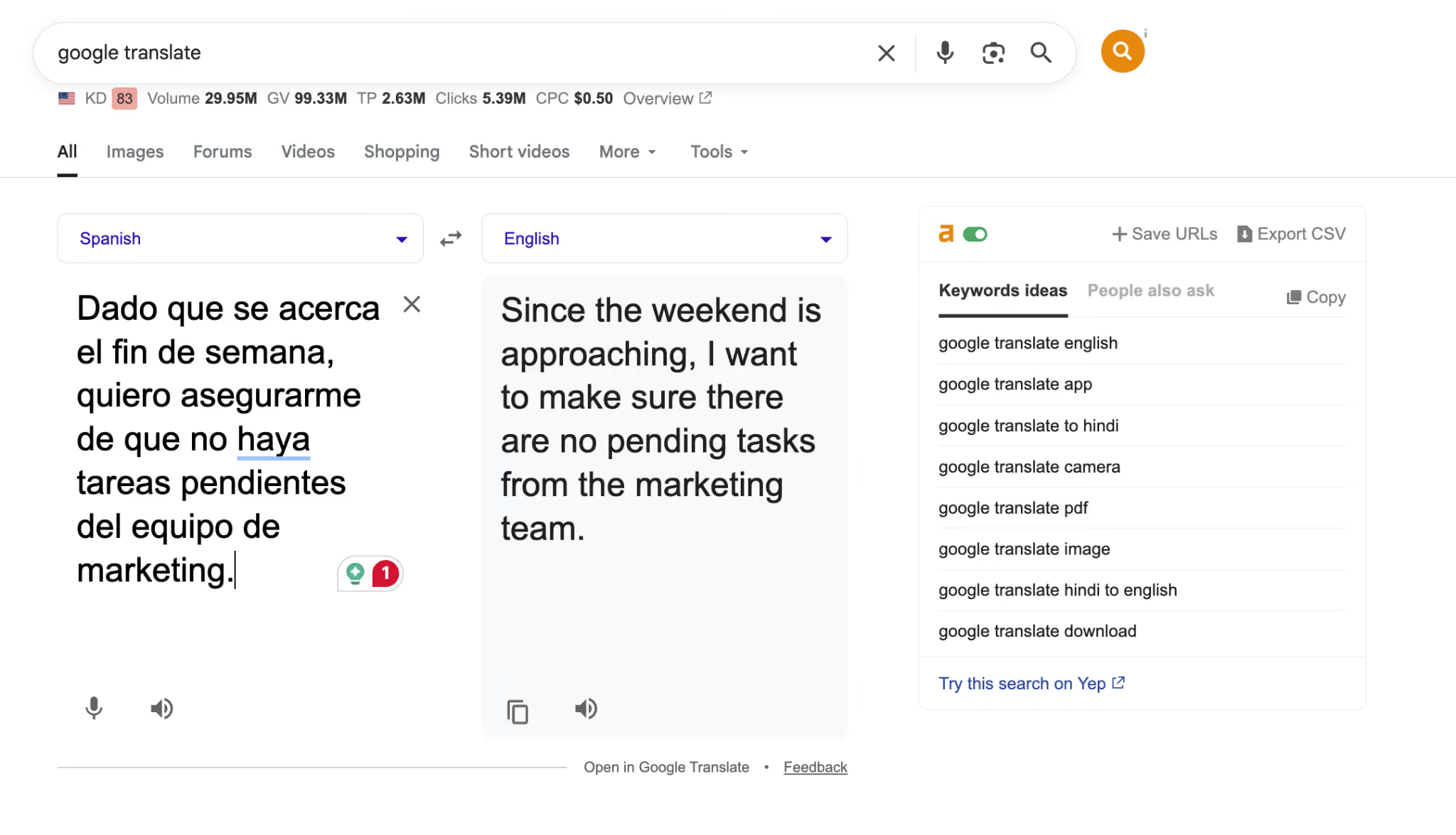
Original Spanish
Google Translate Output
"Since the weekend is approaching, I want to make sure there are no pending tasks from the marketing team."
This is a correct word-for-word translation. Grammatically accurate. But in a business meeting, this sentence is doing more than stating a fact. The speaker is checking in, assigning accountability, and closing out the week. A literal translation captures the words but loses the operational weight behind them.
When the same Spanish audio was processed through JotMe, the tool delivered three outputs. First, the original Spanish transcript appeared on screen in real time. Second, the English translation appeared alongside it, contextualized for a business conversation. Third, the Ask JotMe feature generated a quick summary of the key takeaway: "Ensure no pending tasks from the marketing team before the weekend."
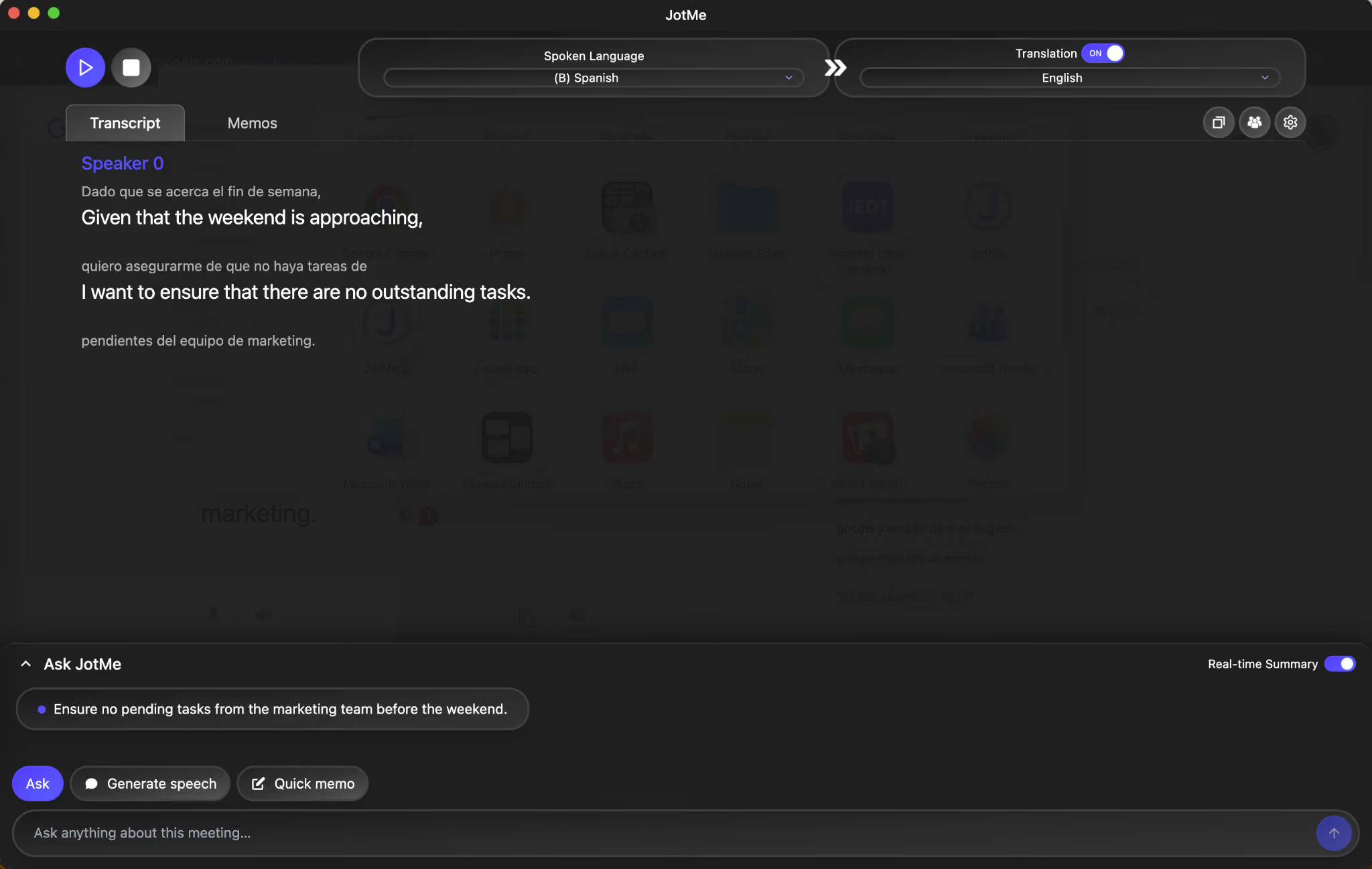
That third layer is what separates a voice translator from a text translator. Google Translate gave the English-speaking manager a sentence to read. JotMe gave them a transcript, a translation, and a clear action item they could forward to the team without rewriting anything.
This is why many teams evaluating a Google Translate alternative for meetings prioritize tools that go beyond literal translation and capture intent, context, and actionable insights.
What to Look for When Choosing a Voice Translator for Meetings?
Choosing a voice translator for meetings comes down to a few key factors: real-time accuracy, multi-speaker handling, contextual understanding, and useful outputs like summaries and action items. Not every tool is built for this. Many are designed for travel or short conversations, which leads to poor accuracy, missing context, and extra work after the meeting.
This gap is driving demand for more advanced solutions. According to Statifacts, the remote simultaneous interpretation (RSI) platform market is projected to reach $1.19 billion in 2026, up from $1.11 billion in 2025, reflecting the increasing need for real-time multilingual communication in global, hybrid work environments.
Here are the factors that matter when the use case is professional:
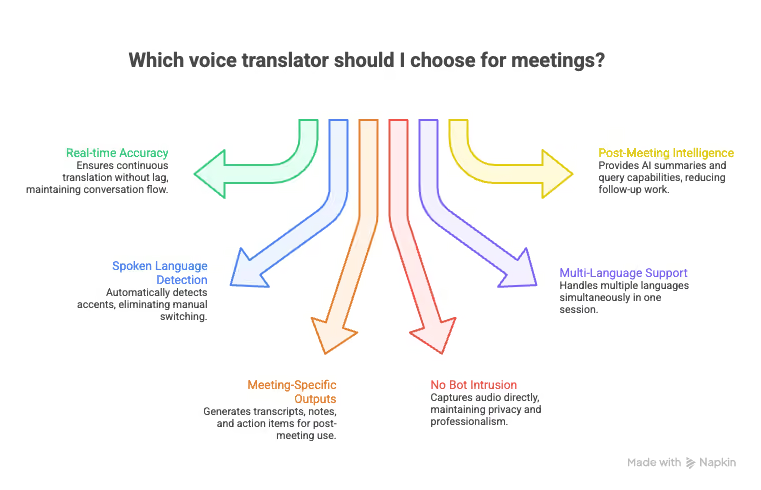
- Real-time speed with contextual accuracy. A voice translator for meetings needs to keep up with natural speech without sacrificing meaning. If the tool lags by 15 to 20 seconds, the conversation has already moved on, and the translated output becomes useless. Look for tools that translate continuously, not sentence by sentence.
- Spoken language detection across accents. Business calls involve speakers from different regions. A Korean supplier in Busan sounds different from a Korean executive in Seoul. A Spanish voice translator needs to handle Mexican Spanish, Argentine Spanish, and Castilian Spanish without manual switching. The voice translator tool should detect the spoken language automatically.
- Meeting-specific outputs beyond raw translation. A translated caption is useful during the call. But after the call ends, what remains? The best voice translators for meetings generate structured outputs: full transcripts, translated meeting notes, action items, and searchable archives. If the tool only gives you live captions and nothing else, you are still going to spend time writing up what happened.
- No bot intrusion or host permission required. Many meeting translation tools require a bot to join the call, which means the host and all participants see a third-party name in the meeting. For sensitive client calls, supplier negotiations, or board meetings, that is a dealbreaker. Look for tools that capture system audio directly without joining as a visible participant.
- Multi-language support in a single session. If your meeting involves a Japanese operations lead, a Korean supplier, and an English-speaking project manager, the voice translator needs to handle all three simultaneously. Tools limited to two languages per session force you to choose which pair gets translated, leaving one participant out.
- Post-meeting intelligence. The meeting is 45 minutes. The follow-up email chain is three hours. A voice translator that generates multilingual AI meeting notes, summaries, and lets you query what was said ("What did the supplier commit to on the delivery timeline?") eliminates that entire post-meeting back-and-forth cycle.
One thing we’ve noticed in multilingual meetings is that the real friction doesn’t usually happen during the call; it shows up after. People walk away thinking they’re aligned, but when follow-ups start, small differences in interpretation become obvious. Even if the translation during the meeting was mostly accurate, someone still ends up double-checking decisions, rephrasing notes, or clarifying who committed to what.
Over time, that adds up. Tools that combine translation with clear summaries and action items tend to remove a lot of that cleanup, because everyone leaves the meeting with the same understanding of what actually needs to happen next.
Last updated on
July 29, 2026
Follow us on social media:
![JotMe — Is Google Translate Accurate? [2026 Test]](/_webflow-assets/0d0512afc7b037d74dff536f22fed08f.avif)