Desktop app for all the calls on your computer

Multilingual transcription, live translation, note-taker, AI search, real-time summary, custom vocabulary, AI meeting notes, audio recordings, and more.

Mobile App for in-person conversation

Live translation and AI speech generation for iPhone and Android.

Chrome extension for Google Meet

Real-time transcription, live translation, note-taker, AI meeting notes.
Add to
Chrome
A quick trial is available

Translate Video

Translate video to text online — free, no sign up
Trusted by 1,700 teams and 100,000 professionals in 134 countries at


Rated 4.7/5
GDPR Compliant
SOC 2 Type II (In Progress)

Free Video Translator — Translate Video to Text

Translate video to text online with JotMe's free video translator. Upload a video file, choose your target language, and JotMe transcribes the speech and translates it — showing the original and translated transcript segments side by side. No sign up, no installation.

How do I translate a video?

In 3 easy steps!

STEP 1

1. Choose Translation Language

Select the target language for the translated video transcript before uploading your file.

1. Choose Translation Language
STEP 2

2. Upload and Confirm Video

Drag and drop a video file, review its duration and target language, then click Proceed to start video translation.

2. Upload and Confirm Video
STEP 3

3. Read Translated Segments

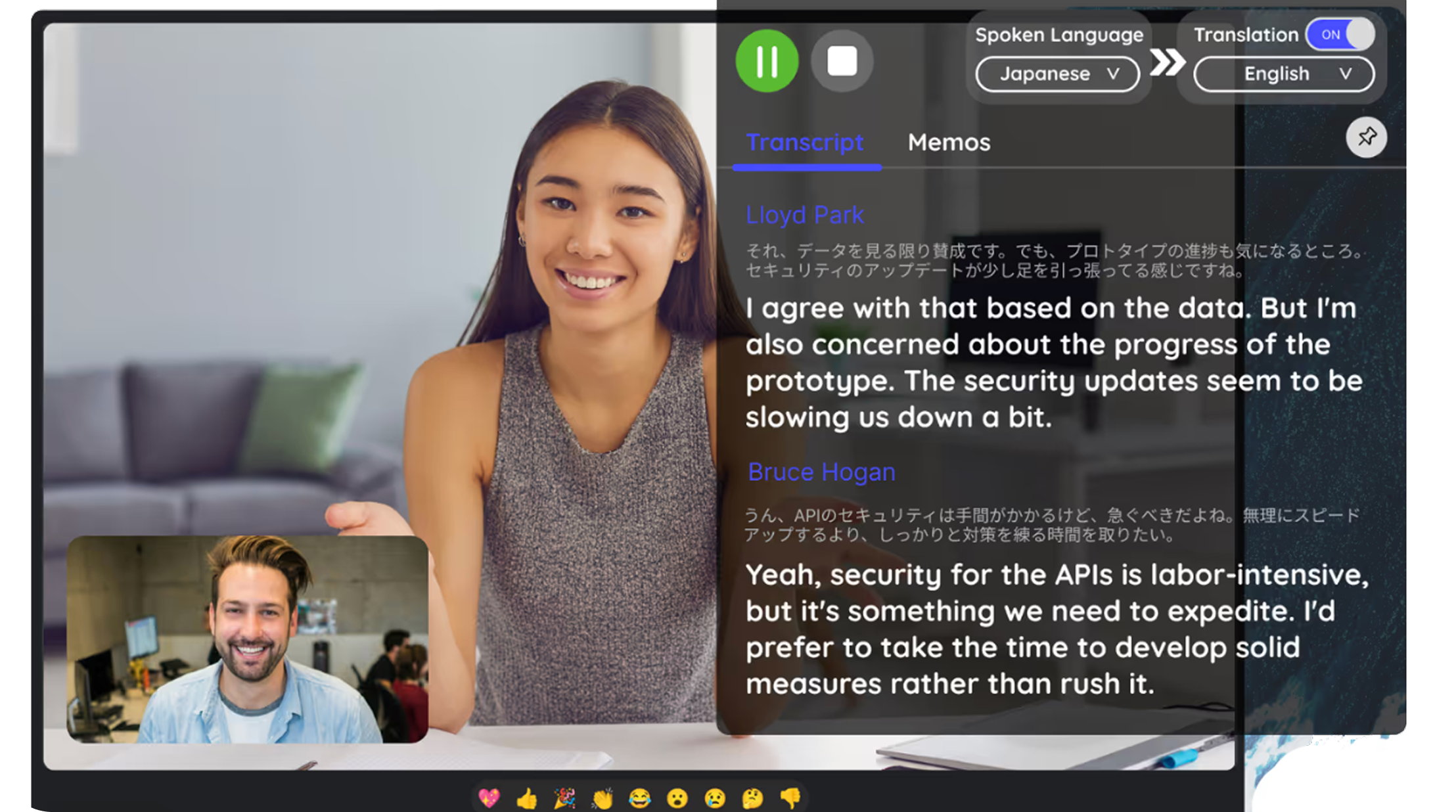
JotMe extracts speech from the video, auto-detects the spoken language, and shows original and translated transcript segments side by side.

3. Read Translated Segments

See It in Action!

Use Translate Video to

Translate videos into any language

Select the target language for the translated video transcript before uploading your file.

Understand multilingual recordings

Drag and drop a video file, review its duration and target language, then click Proceed to start video translation.

See original and translation side by side

JotMe extracts speech from the video, auto-detects the spoken language, and shows original and translated transcript segments side by side.

Frequently asked questions

Everything you need to know about running meetings and events with JotMe.

What is a video translator and how does it work?

A video translator converts speech from a video into translated text. JotMe extracts the spoken audio, transcribes it, auto-detects the source language, and translates each segment into your target language.

Can I translate video to text online for free?

Yes. You can try JotMe's video translator for free in your browser. Upload a video file, choose a target language, and preview the translated text.

How do I translate video to English?

Choose English as the target language, upload your video file, and JotMe will transcribe the recording and translate the video speech into English text.

Which video formats can I translate?

JotMe supports common video formats including MP4, AVI, MKV, MOV, WMV, FLV, WebM, MPEG, and 3GPP.

Does JotMe auto-detect the spoken language in the video?

Yes. JotMe auto-detects the spoken language in your uploaded video, so you only need to choose the language you want the translated text in.

The free, no-sign-up way to translate video to text online

Run every meeting and event smoothly for your multilingual operations

Transcribe, interpret, translate, and turn every critical conversation into insights with context so everyone stays aligned across languages.

Translate Video

Translate video to text online — free, no sign up

Get started within 30 seconds without credit card

Trusted by 1,700 teams and 100,000 professionals in 134 countries at

Rated 4.7/5
GDPR Compliant
SOC 2 Type II (In Progress)

Try live translation

Select model, langauges, click start and start speaking. JotMe AI will improve the translation quality as you speak.

How do I translate a video?

STEP 1

1. Choose Translation Language

Select the target language for the translated video transcript before uploading your file.

1. Choose Translation Language
STEP 2

2. Upload and Confirm Video

Drag and drop a video file, review its duration and target language, then click Proceed to start video translation.

2. Upload and Confirm Video
STEP 3

3. Read Translated Segments

JotMe extracts speech from the video, auto-detects the spoken language, and shows original and translated transcript segments side by side.

3. Read Translated Segments

Use Translate Video to

From internal operations to client relationships to live events, JotMe keeps every multilingual conversation aligned, during and after.

Translate videos into any language

Turn a video in one language into a readable transcript in the language you need — across many language pairs.

Understand multilingual recordings

JotMe auto-detects the spoken language, so you only choose the language you want the text in.

See original and translation side by side

Each segment shows the original speech next to its translation, so nothing gets lost.

See JotMe live translation in action

Frequently asked questions

Everything you need to know about running meetings and events with JotMe.

What is a video translator and how does it work?

A video translator converts speech from a video into translated text. JotMe extracts the spoken audio, transcribes it, auto-detects the source language, and translates each segment into your target language.

Can I translate video to text online for free?

Yes. You can try JotMe's video translator for free in your browser. Upload a video file, choose a target language, and preview the translated text.

How do I translate video to English?

Choose English as the target language, upload your video file, and JotMe will transcribe the recording and translate the video speech into English text.

Which video formats can I translate?

JotMe supports common video formats including MP4, AVI, MKV, MOV, WMV, FLV, WebM, MPEG, and 3GPP.

Does JotMe auto-detect the spoken language in the video?

Yes. JotMe auto-detects the spoken language in your uploaded video, so you only need to choose the language you want the translated text in.

No items found.

The free, no-sign-up way to translate video to text online