Tips
How Real-Time Voice Translation Works on Mobile Apps

Narmada Kajla
February 27, 2026
Brief Answer: Real time translation converts speech into text and provides accurate translations in seconds. Voice translation tools like JotMe take this further with contextual translation and continuous processing. Thus, the conversations stay smooth and natural.
You are standing in a busy airport trying to explain a flight change to someone who does not speak your language. Announcements echo overhead. People move past you. You cannot afford delays or awkward pauses. In that moment, accuracy in noisy rooms and real-time translation becomes essential because you need clear answers immediately.
JotMe mobile app supports that kind of live interaction. You speak naturally, JotMe mobile app captures your voice, converts speech into text, understands the context, and delivers the translation within seconds. The conversation continues without constant tapping or resets.
To see how that flow works in practice, look at how you select languages, start live translation, and use voice pronunciation inside the app.
- Select Languages: Choose the spoken (or turn on Multilingual mode) and translation languages in the JotMe mobile app.
- Start Translating: Tap ‘Play’ icon and begin real-time voice translation.
- Use AI Tools: Use the Generate Speech feature to deliver precise responses in the other person’s native language without worrying about pronunciation.
Step 1: How to Choose the Spoken and Translation Languages?
Open the JotMe Android/iOS mobile app, select the spoken and translation language. You can also select the multilingual option in spoken language if the conversation includes people from different languages.
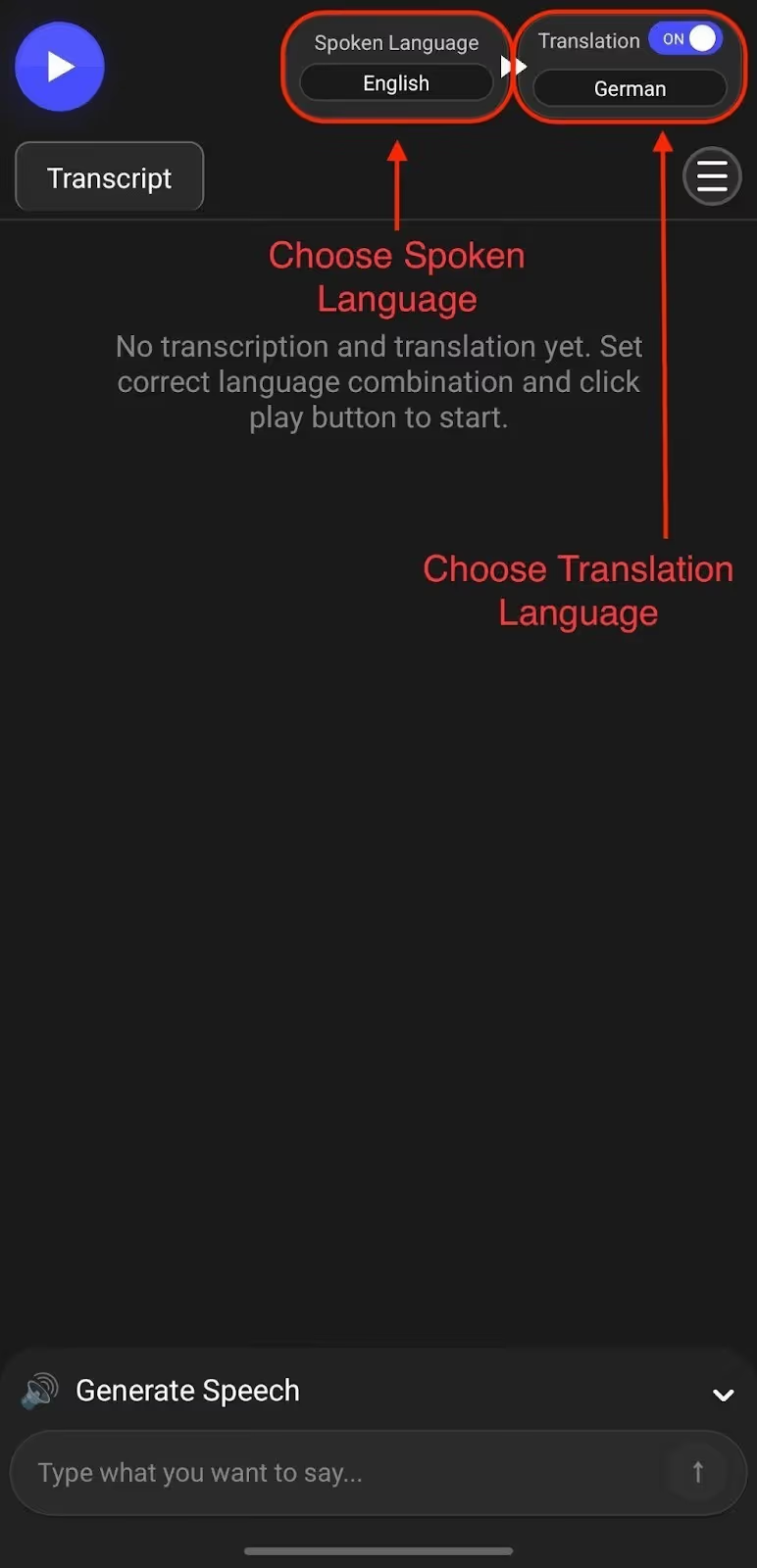
Step 2: How to Start Real-Time Voice Translation in the JotMe Mobile App?
Tap the ‘Play’ button and begin speaking. JotMe mobile app starts listening immediately and provides speech to text translations in real time. The conversation stays in a continuous thread, so you don’t have to restart every time you and your colleague pause.
If you’ve wondered, how does the JotMe mobile app work without breaking the flow? The answer lies in continuous speech recognition and contextual processing. Just speak naturally and let the JotMe mobile app handle the translation flow.
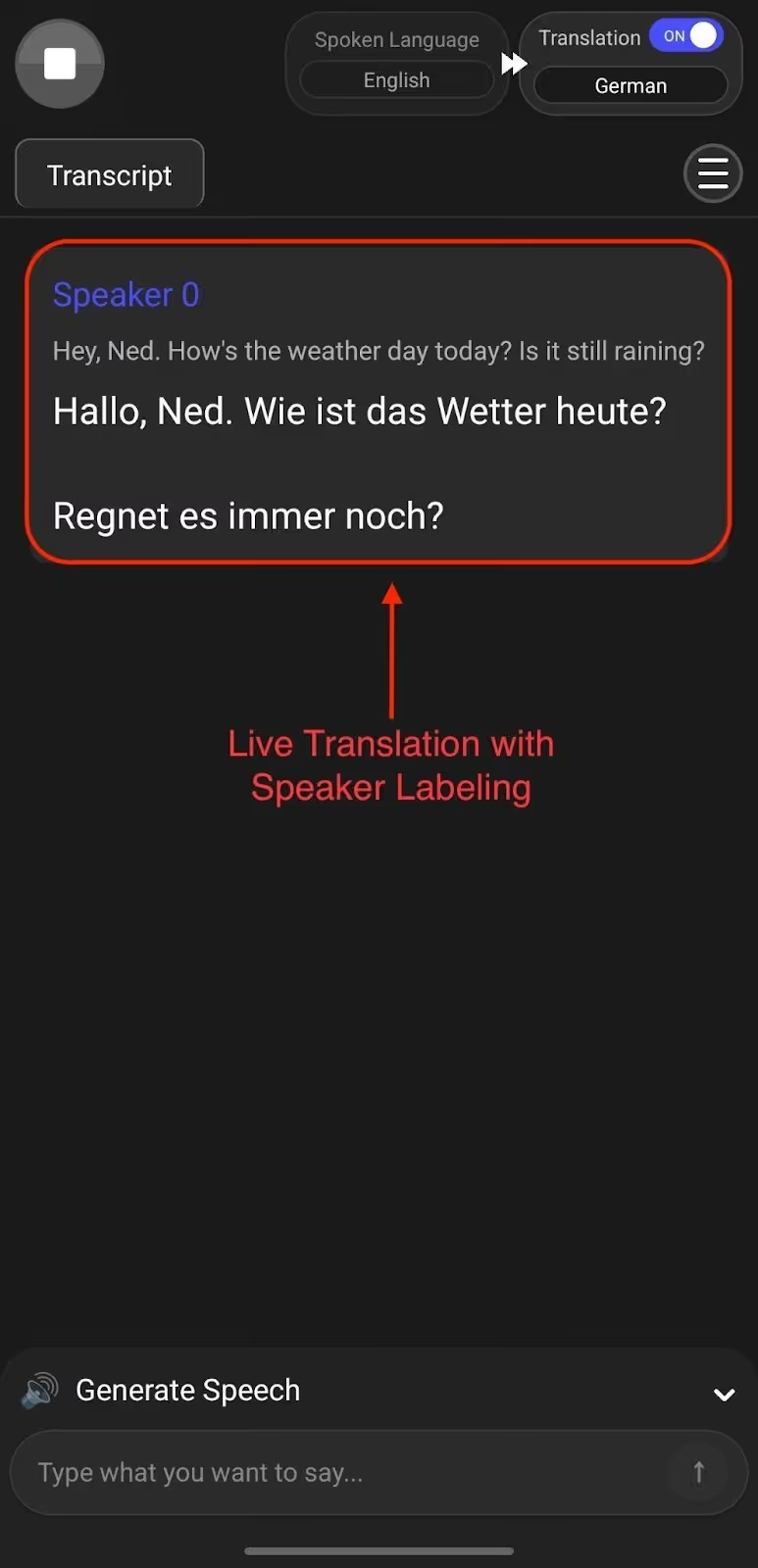
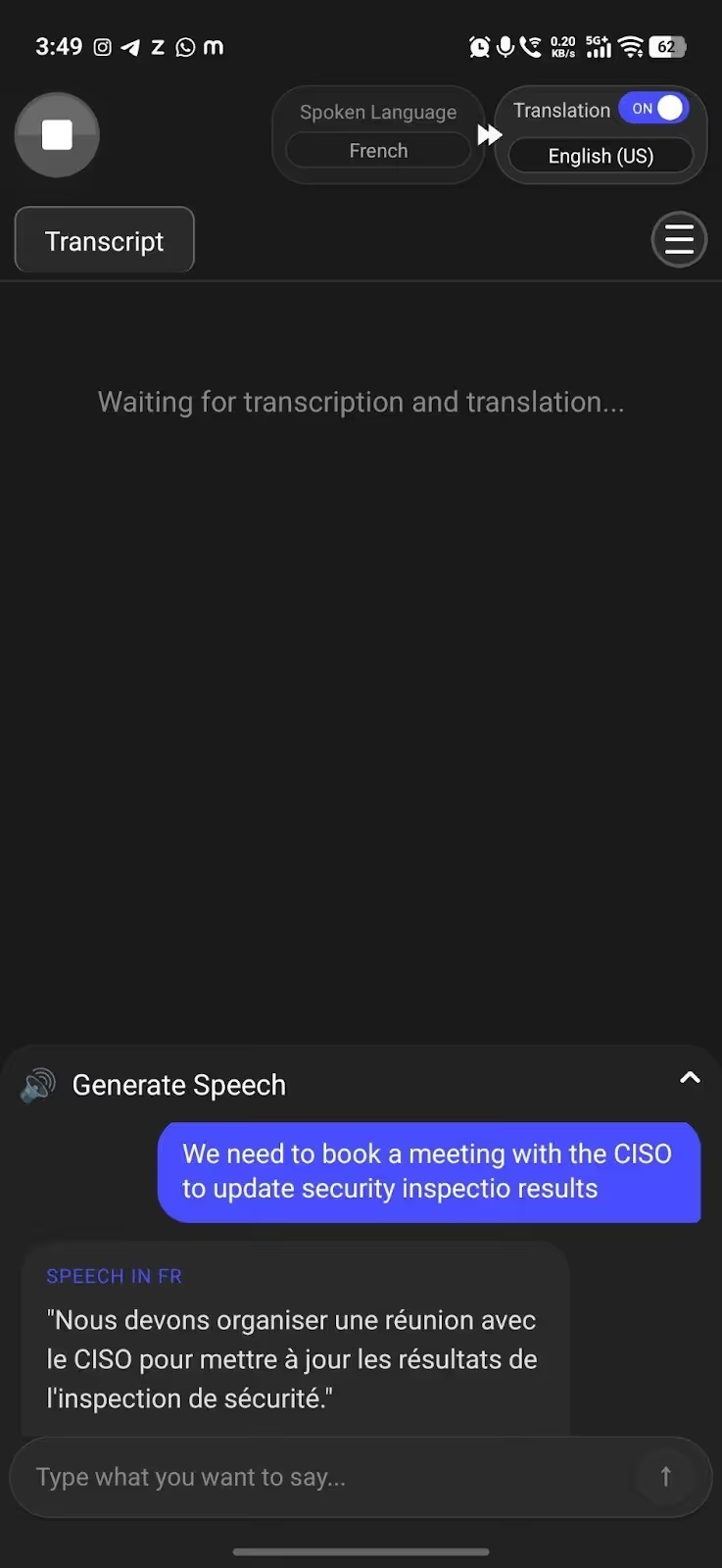
Step 3: How to Use Generate Speech in the JotMe Mobile App?
If the person in front of you is speaking Spanish and you want to respond clearly in Spanish with accurate pronunciation, use the Generate Speech feature. Type your message in your own language, and the JotMe mobile app will convert it into natural Spanish voice output instantly. You stay precise with your wording, and the other person hears a fluent, correctly pronounced response without hesitation.
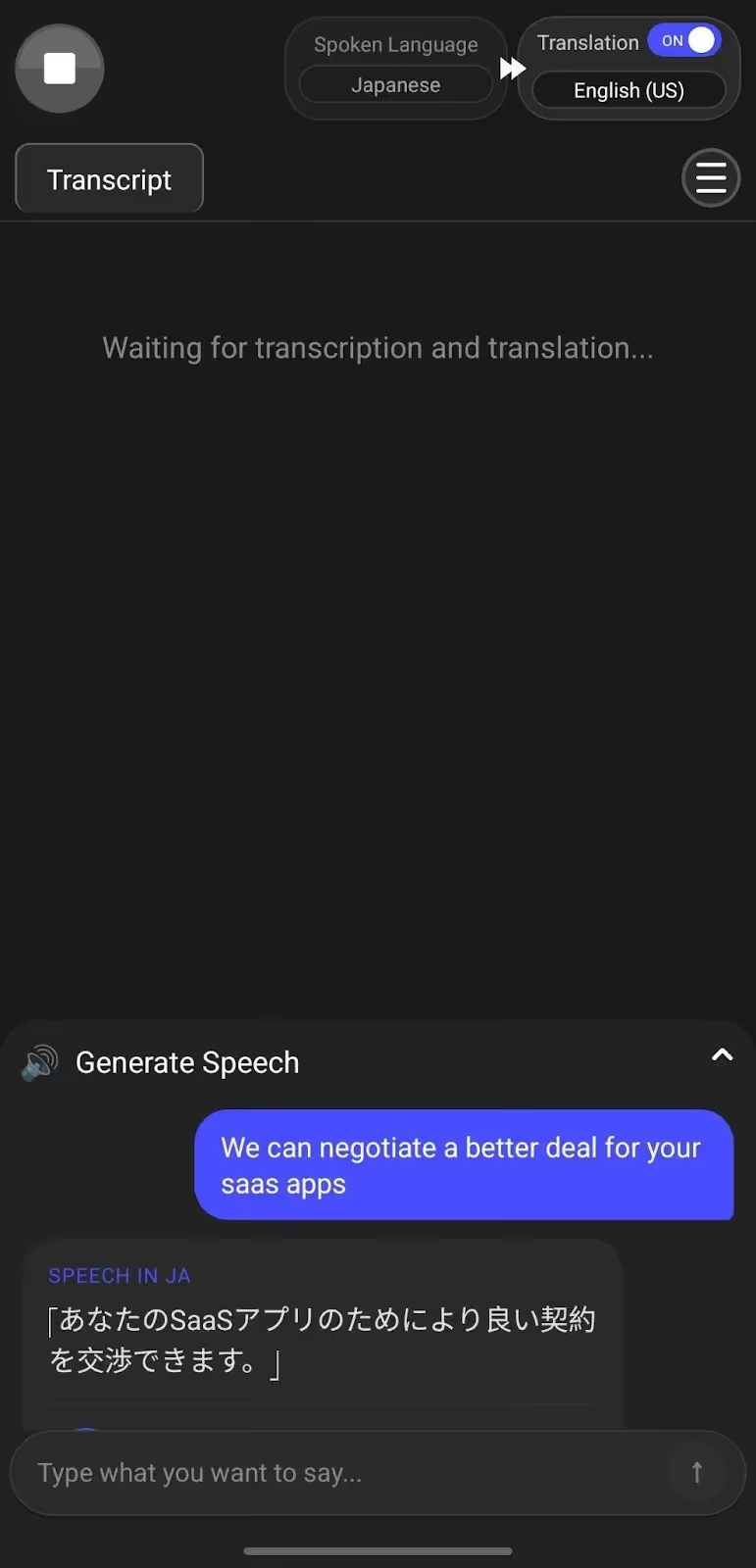
JotMe also offers a desktop app that gives you more control and flexibility over your translations. In addition to the features available in the JotMe mobile app, the JotMe desktop app offers quick memo, AI chat, real-time summary, sharing translation minutes, text-to-text translation, etc.
What are Some Core Features of the JotMe Mobile App?
Live contextual and continuous translation, generate speech, and translation quality adjustment are core features of JotMe’s Android and iOS mobile apps. To understand how JotMe maintains accuracy and flow during live conversations, let's explore the feature breakdown below:
JotMe Mobile App’s Live Contextual Translations
JotMe mobile app provides contextual translation, so you can translate not only words but also their meanings.
As you speak, the JotMe mobile app captures your tone and intent to create natural-sounding translations. You don’t have to guess whether the message came across correctly. The conversation feels clearer because the context stays intact.
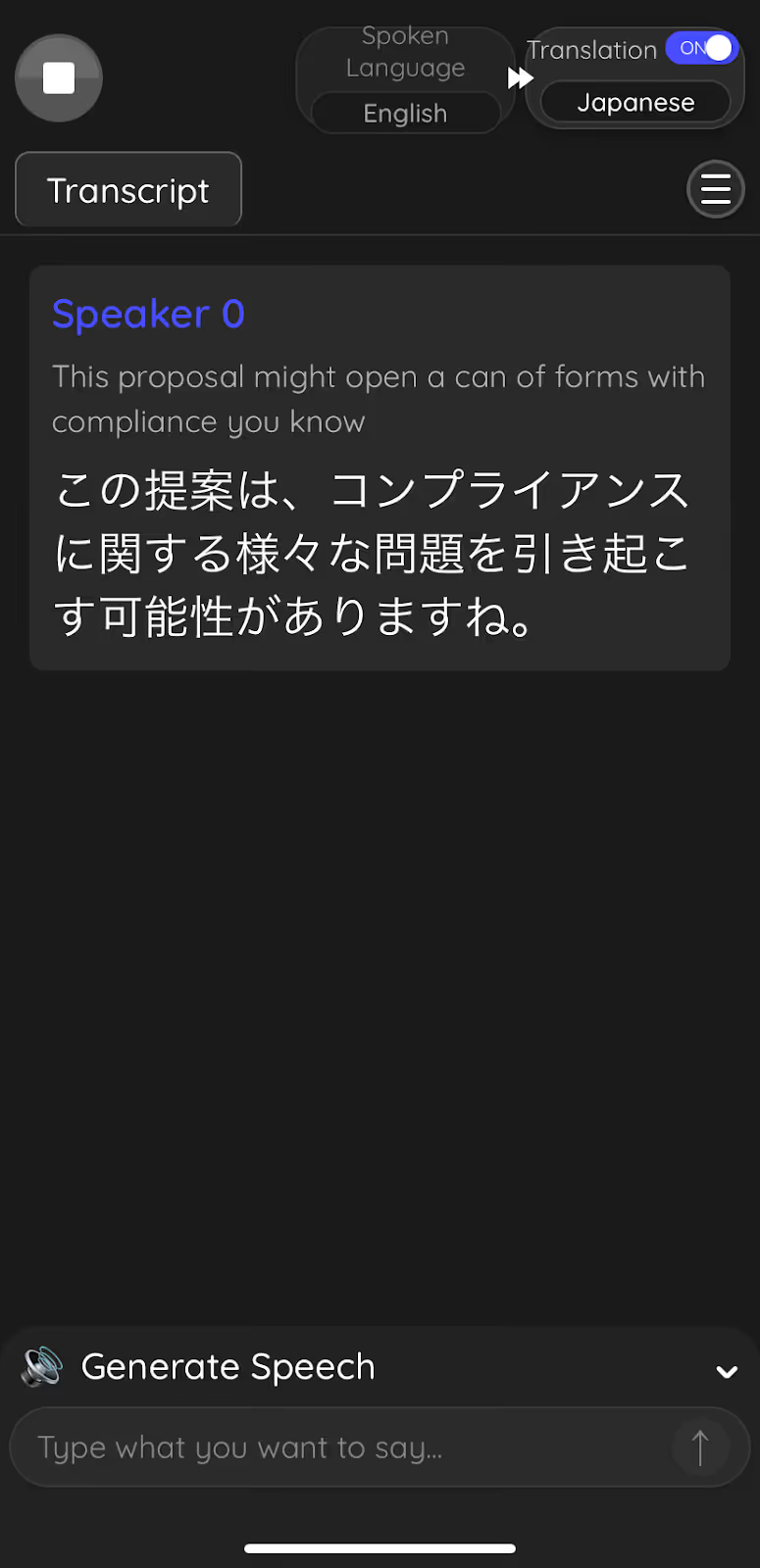
Let’s say you’re attending a business meeting with your Japanese business partners. During the conversation, you said in English: This proposal might open a can of worms with compliance, you know.
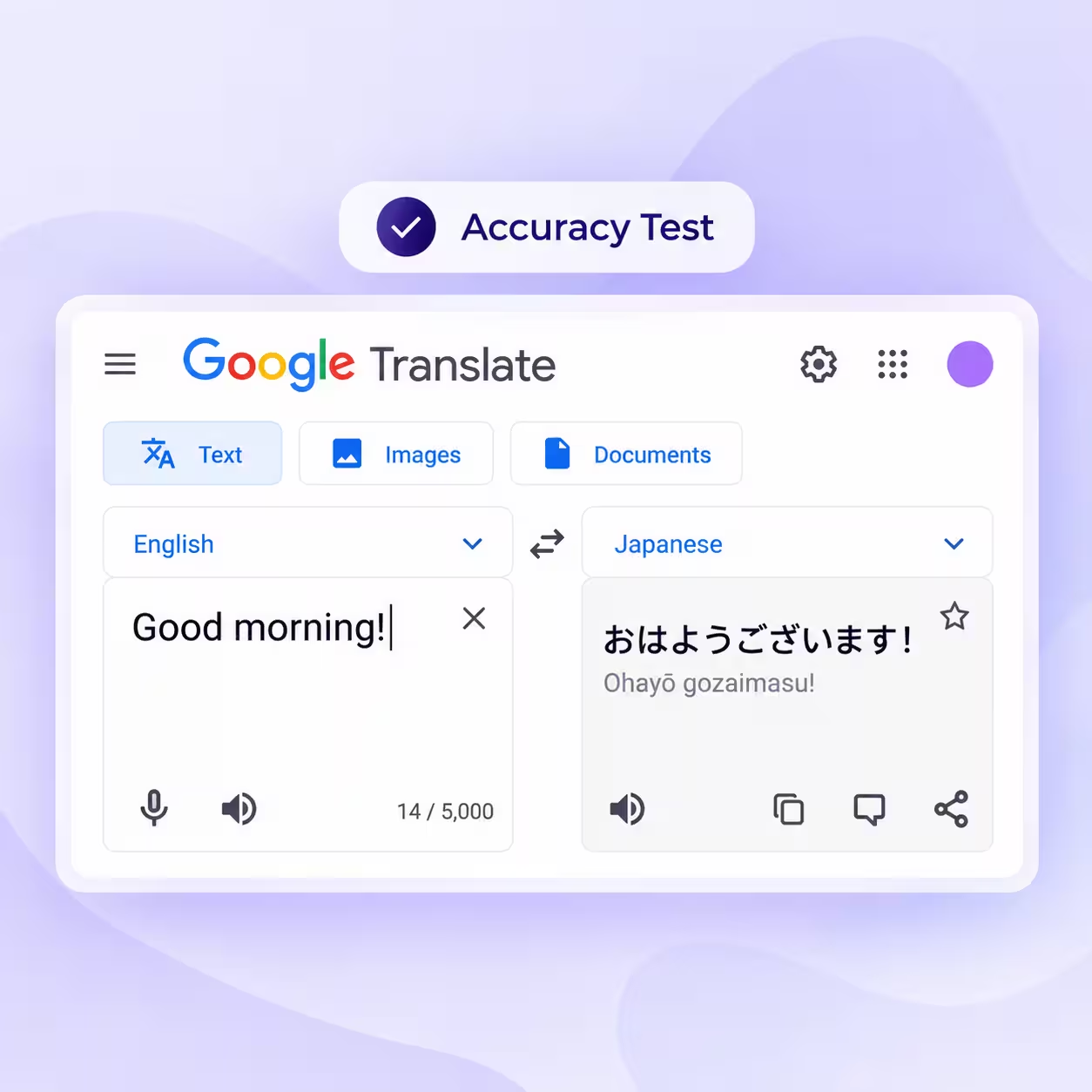
If you rely on Google Translate, you’ll receive this output:
If you cross-check, the translated Japanese language in Google Translate means: This proposal could cause compliance problems.
Google Translate kept the meaning original but changed the formation and failed to identify the idiom. But with the JotMe mobile app, you can preserve both the original meaning and idiom.
Upon saying the same thing, here’s how the JotMe mobile app provides contextual translation:
The JotMe’s mobile app live translation keeps the original intent and the idiomatic tone intact, so you do not lose meaning along the way.
JotMe Mobile App’s Continuous Translations
JotMe keeps the conversation moving even when you pause to think, breathe, or listen. You speak naturally, the other person responds, and the app maintains the entire exchange in one continuous thread. Each speaker appears separately, and translations display clearly under every message, so you can follow the dialogue without confusion.
In many basic translation apps like Google Translate, even a short pause can stop the recording. You often need to tap the microphone again and restart the process. That interruption may seem small, but during live conversations, it breaks rhythm and slows communication.
JotMe removes that friction and lets the exchange continue smoothly. If you’re looking for a more fluid Google Translate alternative for real-time dialogue, the JotMe mobile app removes that friction and lets the exchange continue smoothly.
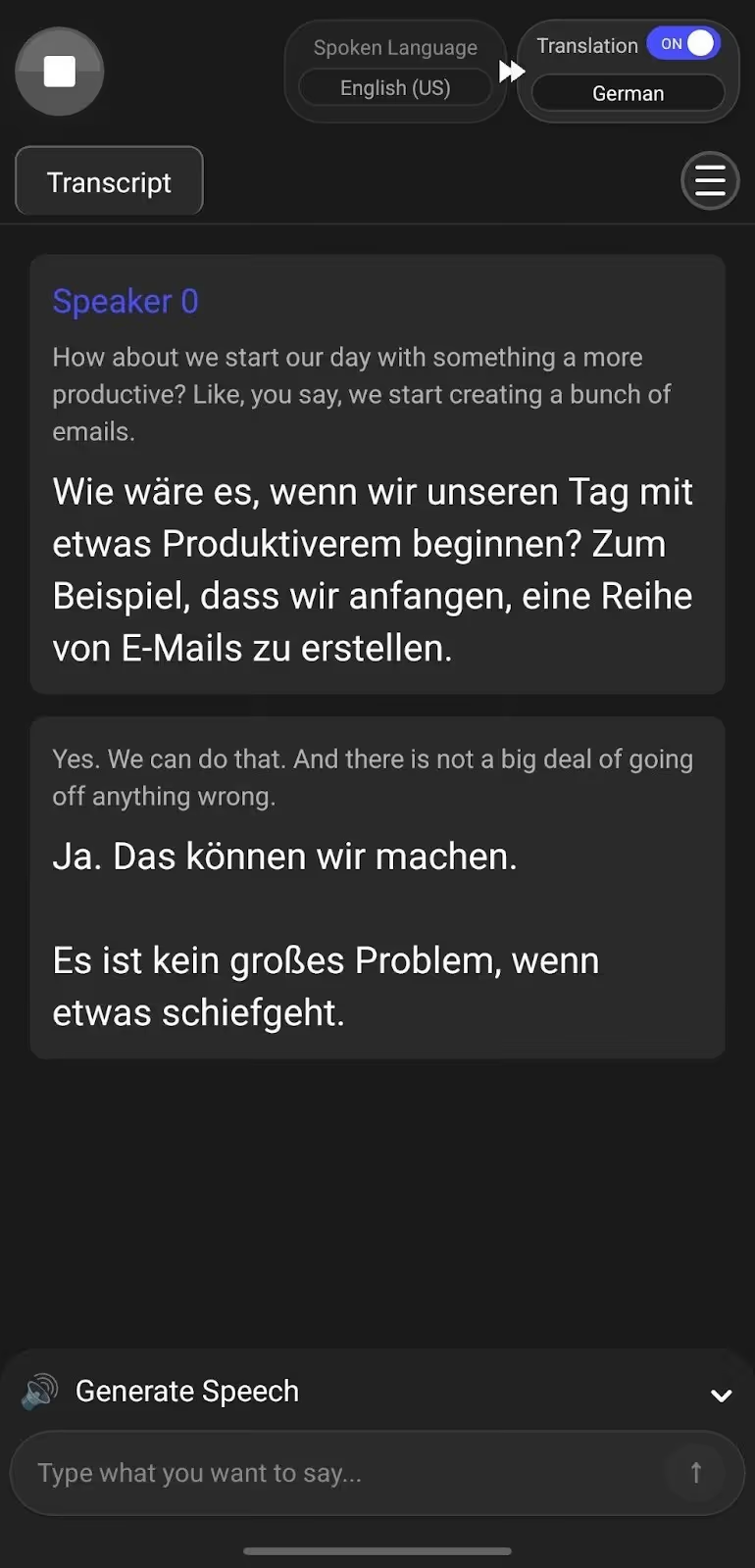
Text to Speech Feature
Use JotMe’s Generate Speech feature when you know exactly what you want to say but want to avoid pronunciation mistakes. Type your message in your own language, and JotMe delivers it aloud in the selected language with natural voice output.
For multilingual sales and customer support conversations, that level of clarity improves trust, reduces misunderstandings, and keeps discussions professional without slowing the exchange.
Translation Quality
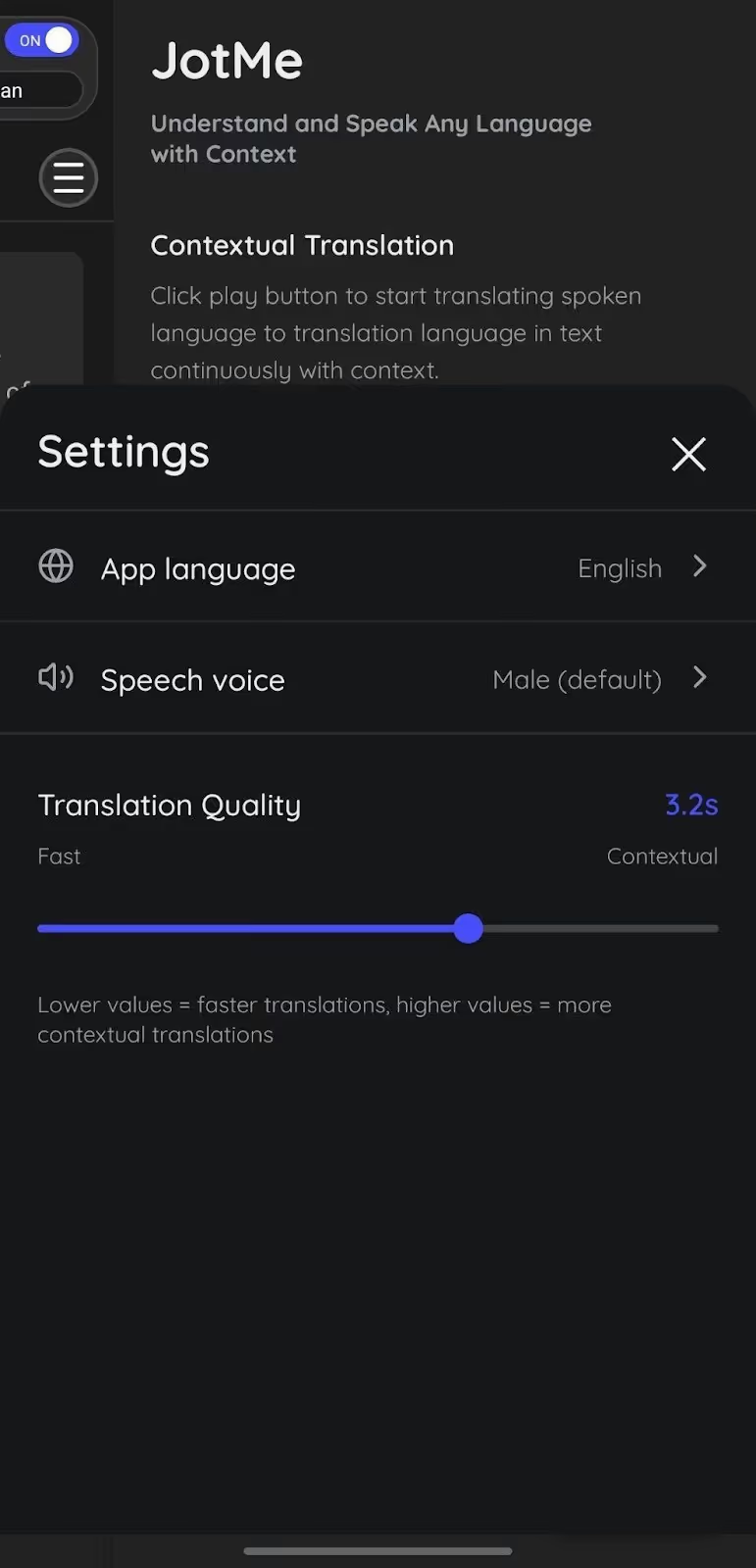
Not every conversation requires the same level of depth. During quick exchanges, you may prioritize speed. In detailed discussions, you may need stronger contextual accuracy. JotMe allows you to choose between Fast Mode for instant responses and Contextual Mode when nuance and precision matter more.
JotMe mobile app also adjusts intelligently during live conversations. As the discussion becomes more detailed or technical, JotMe mobile app’s smart AI Adjustment prioritizes contextual understanding. When the exchange becomes brief and direct, it responds faster. You stay in control while the translation adapts to the pace and complexity of the conversation.
Privacy and Policy for Data Protection
The conversation with the JotMe mobile app is yours and yours alone. JotMe mobile app uses encryption both in transit (TLS) and at rest to protect your data. JotMe won’t use your content for background model training unless you explicitly consent.
Moreover, JotMe’s privacy policy gives you full control over your data. For example, you can request deletion, and the JotMe mobile app will permanently remove data within defined timelines. JotMe complies with GDPR guidelines for handling and retaining your information transparently.
JotMe Mobile App’s Cost-Effective Pricing Structure
Hiring a professional interpreter usually costs between $75 and $150 per hour. If you book one interpreter for a four-hour meeting, you pay between $300 and $600. Longer sessions or recurring meetings increase the total cost quickly.
Now compare that with the JotMe mobile app. If JotMe costs $10 per month and you use it for four hours during that month, the effective cost becomes $2.50 per hour. If you use it for eight hours, the cost drops to $1.25 per hour.
Instead of paying hourly every time you schedule a meeting, the JotMe mobile app gives you continuous access at a predictable monthly rate. The more you use it, the lower the effective hourly cost becomes.
Free: $0 per user/month
What’s included:
- 20 minutes of monthly live translation or real-time summary
- 5 AI credits (Ask JotMe, AI meeting notes, transcript translation, etc.)
- 50 minutes of monthly transcription
- Access to the last 5 meeting recordings
- 5 custom terms (vocabulary)
Prepaid (Pay as you go): $50/month (one-time payment)
What's included:
- +500 minutes of translation
How Does Real-Time Translation Work Step by Step?
Real-time translation begins when the voice-to-text translation Android app captures your voice through the microphone. It converts spoken words into text using speech recognition, processes the meaning with AI translation models, and delivers the result instantly as readable text or natural voice output. The entire process happens within seconds, allowing conversations to continue without interruption.
Here’s how the process works step by step:
- The live translation app listens to spoken audio through your device’s microphone or system audio.
- The LLM algorithms convert your spoken words into text in the original language using speech recognition models.
- Real-time translation apps like JotMe analyze sentence structure, tone, intent, and conversational context to understand meaning rather than just individual words.
- The LLM then translates the text into the selected target language using neural translation engines.
- The output appears as text or plays aloud as natural-sounding speech.
Compared to Google Translate, Hi Translate, and DeepL, the JotMe mobile app focuses more on conversational flow than isolated sentence translation. Instead of translating each line independently, the JotMe mobile app maintains context across the discussion and processes meaning before generating the output.
That approach helps preserve intent rather than simply replacing words. The JotMe mobile app also keeps the exchange continuous, so even if you pause briefly, the conversation does not reset or lose momentum.
What is the Future of Real-Time Translation on Mobile Apps?
According to McKinsey & Company in The State of AI in 2025, 88% of organizations now use AI in at least one business function. However, most remain in experimentation or pilot stages. The companies seeing meaningful impact are redesigning workflows and embedding AI directly into daily operations instead of treating it as a side tool.
Real-time translation is moving in that same direction. Instead of acting as a standalone utility, tools like JotMe integrate directly into live conversations. Context awareness, continuous processing, and multilingual flow reflect how AI evolves from isolated features to an embedded communication infrastructure.
As organizations push AI beyond pilots and into real operational use, seamless language translation becomes part of everyday collaboration rather than a separate technical task.
How Real-Time Voice Translation Helps You?
Real-time voice translation is not just about switching words from one language to another. You want conversations to move at a natural pace, without awkward silences, while an app processes fragments of speech. In real life, especially in travel, negotiations, or urgent situations, even a few seconds of delay can break confidence and disrupt flow.
That is where the JotMe mobile app stands apart. Instead of translating sentence by sentence in isolation, the JotMe mobile app maintains context across the entire exchange. You speak naturally. The other person responds naturally. JotMe mobile app keeps everything in a single conversational thread, separates speakers clearly, and adapts between speed and contextual depth based on how the discussion evolves.
Features like Generate Speech give you additional control. When precision matters, you can type your message and let JotMe deliver it aloud in the other person’s language with accurate pronunciation. That makes a difference in sales conversations, support calls, or sensitive discussions where wording matters.
Real-time translation should feel invisible. With contextual processing, continuous flow, multilingual support, and a true botless workflow, the JotMe mobile app turns language barriers into fluid conversations instead of technical obstacles. Try the JotMe mobile app today!
FAQs
How to translate voice in real time?
With the JotMe mobile app, select your spoken and target languages, tap Play, and speak naturally. JotMe mobile app instantly converts your speech into text and applies contextual translation. The conversation continues in a single thread, so you don’t need to restart when someone pauses.
Do real-time translators really work?
Yes, real-time translators work. However, this applies only if the app handles more than simple phrases. JotMe mobile app is designed to handle full conversations, not just phrases. With contextual translation and continuous processing, the JotMe mobile app preserves tone and intent across multilingual meetings.
Which voice translator provides natural results?
JotMe mobile app provides natural results; it understands intent rather than just vocabulary. JotMe mobile app understands context and keeps conversations continuous, which can give you more accurate translations.
Last updated on
April 14, 2026
Follow us on social media: