Guides
4 Best Android Apps to Translate Voice to Text [Expert Review 2026]

Narmada Kajla
January 28, 2026
![JotMe — 4 Best Android Apps to Translate Voice to Text [Expert Review 2026]](/_webflow-assets/477538ce54822361264bb20559359fb7.avif)
Want the best Android app for voice to text translation for face-to-face communication? Well, you’re in luck. JotMe Android mobile app can translate voice to text almost instantly, while preserving the tone, flow, and core meaning of the conversation.
JotMe Android mobile app offers more than just voice translation. There are features like continuous translation to keep the conversation flowing, the ability to listen to translations, and accuracy controls to switch between fast and accurate translations. This further enhances your overall in-person communication experience.
We aren’t saying this based on feature lists alone; we've tested JotMe’s mobile app and other top-ranking Android apps that can translate voice to text in real-world situations. This includes in-person business meetings, where a single misunderstanding could mess things up.
Aside from JotMe, only a few Android voice to text translation apps could get the job done. Here’s what we found:
- JotMe Android mobile app offers real-time, contextually accurate translations in over 45 languages and can generate translated speech from text. JotMe is quick, reliable, and efficient for in-person business communications, lectures, and webinars.
- Google Translate is good for quick, free voice to text translations in 100+ languages. Google Translate’s translations, however, sometimes cannot capture the tone and flow of the conversation and may sound a bit robotic.
- Microsoft Translator Android app also provides a simple way to translate voice to text online, with an added dictionary feature for better accuracy. According to a G2 user, Microsoft Translator has some weaknesses in grammar and spelling when sentences are long.
- Papago mobile app is great for translating voice to text when you travel to East Asian countries like Korea, Japan, and China. However, Papago has limited capabilities for translating European languages such as French, Polish, and Portuguese.
In this article, we’ll walk you through the best Android apps to translate voice to text and highlight where they work best, and why you should choose a particular voice translation tool.
Quick Comparison of Best Android Apps to Translate Voice to Text
Before we review each voice translator app for Android we tested in detail, here’s a quick comparison table of the tools across several parameters. This should help you understand what kind of functionality each tool offers in real-world scenarios:
What are the Best Android Apps to Translate Voice to Text?
The best Android apps to translate voice to text in 2026 are JotMe, Google Translate, Microsoft Translator, and Papago. Each offers something unique and can serve different use cases, such as one-to-one conversations during travel, corporate meetings, or international conferences.
Here’s a breakdown of how each Android voice translation app performed, what we liked, and its respective use cases.
JotMe Mobile App: Best Android Voice Translator for Students, Travelers, and Professionals
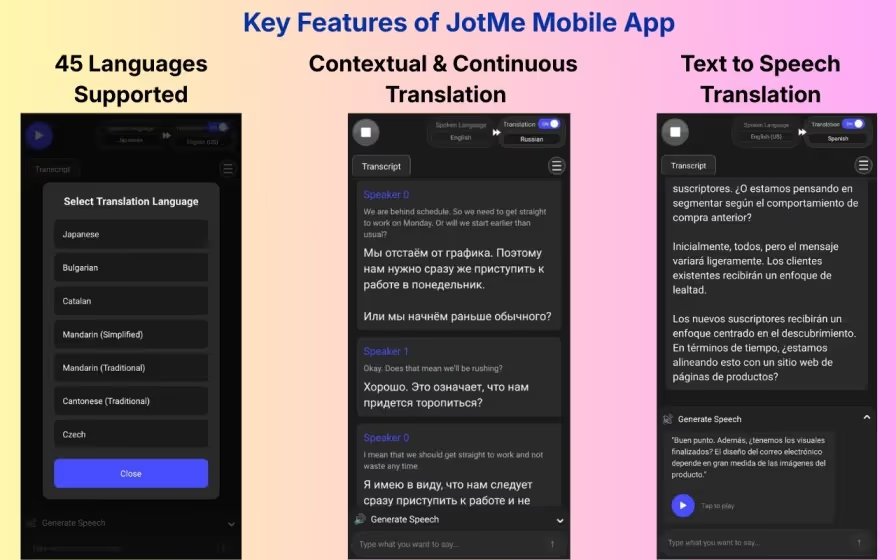
JotMe provides one of the best live translation apps for Android for in-person conversations, known for lag-free, contextually accurate translations. The JotMe Android mobile app is better suited for travelers, professionals, students, and language learners.
- Handles Technical Jargon: The JotMe Android mobile app has a contextual translation engine that handles industry-specific terms pretty well. So, when complex ideas were shared, the translations stayed accurate, and we could understand everything that was mentioned.
- No Latency: Imagine someone speaks, and you keep staring at your smartphone, waiting for a translation. As JotMe’s Android mobile app displays translations as soon as conversations start, you’re saved from the awkward moment.
- More than a Translation App: In addition to accurate translations in 45+ languages, JotMe offers extra features such as continuous translation, speech-to-text, and translation accuracy control.
If you need a live AI interpreter for live meetings, presentations, videos, and similar, you can check out JotMe’s desktop app. It has all the features of the JotMe Android mobile app and provides extras like AI Ask (get instant answers to queries), real-time summary (a bulleted summary during conversations), and post-meeting notes.
Key Features of JotMe Android Mobile App
JotMe Android mobile app’s key features include live, continuous, and context-aware translation, speech generation, and accuracy control. Learn about these in detail now:
JotMe Android Mobile App Delivers Live Contextual Translation
Have you tried those traditional live translation apps that perform word-for-word swaps for your in-person conversations, only to end up confused? Well, JotMe doesn’t fall in that category.
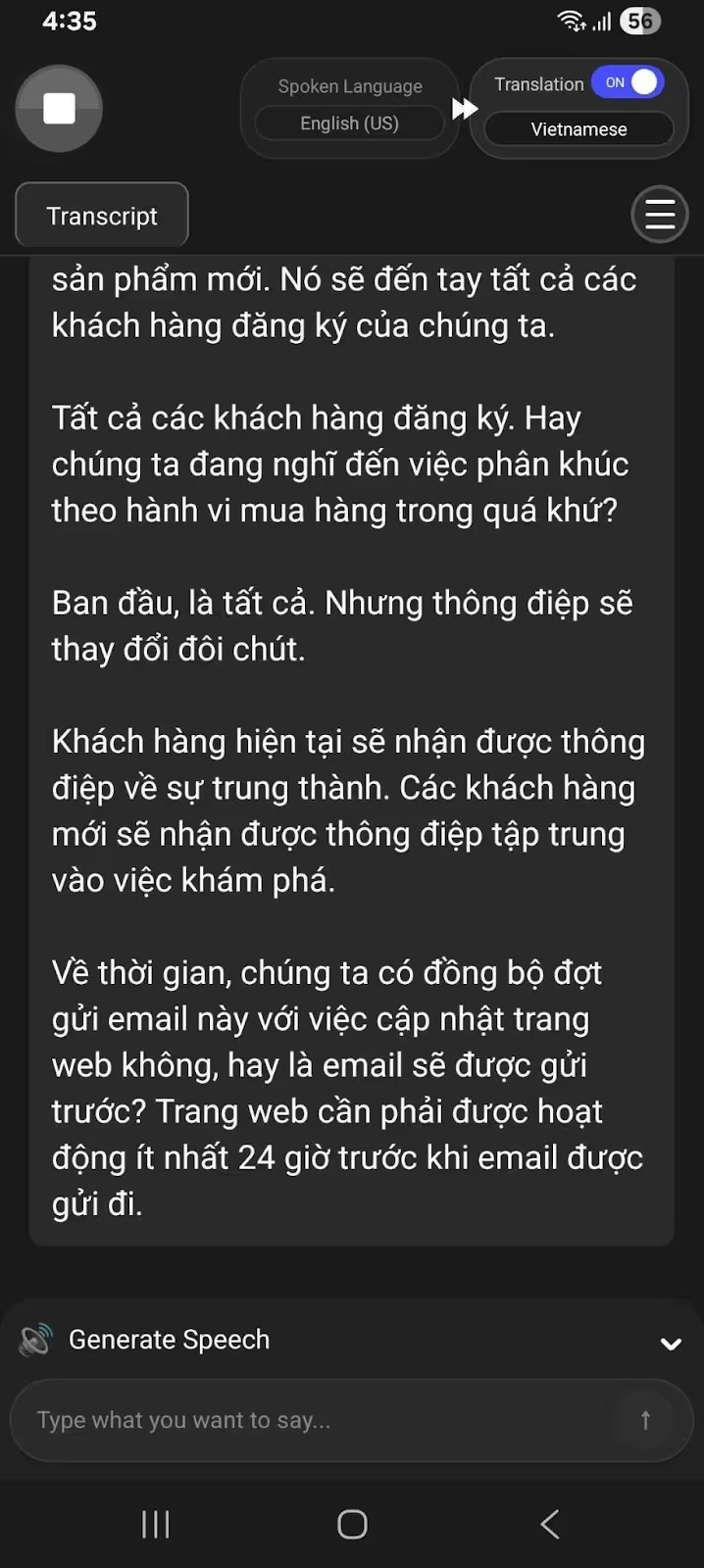
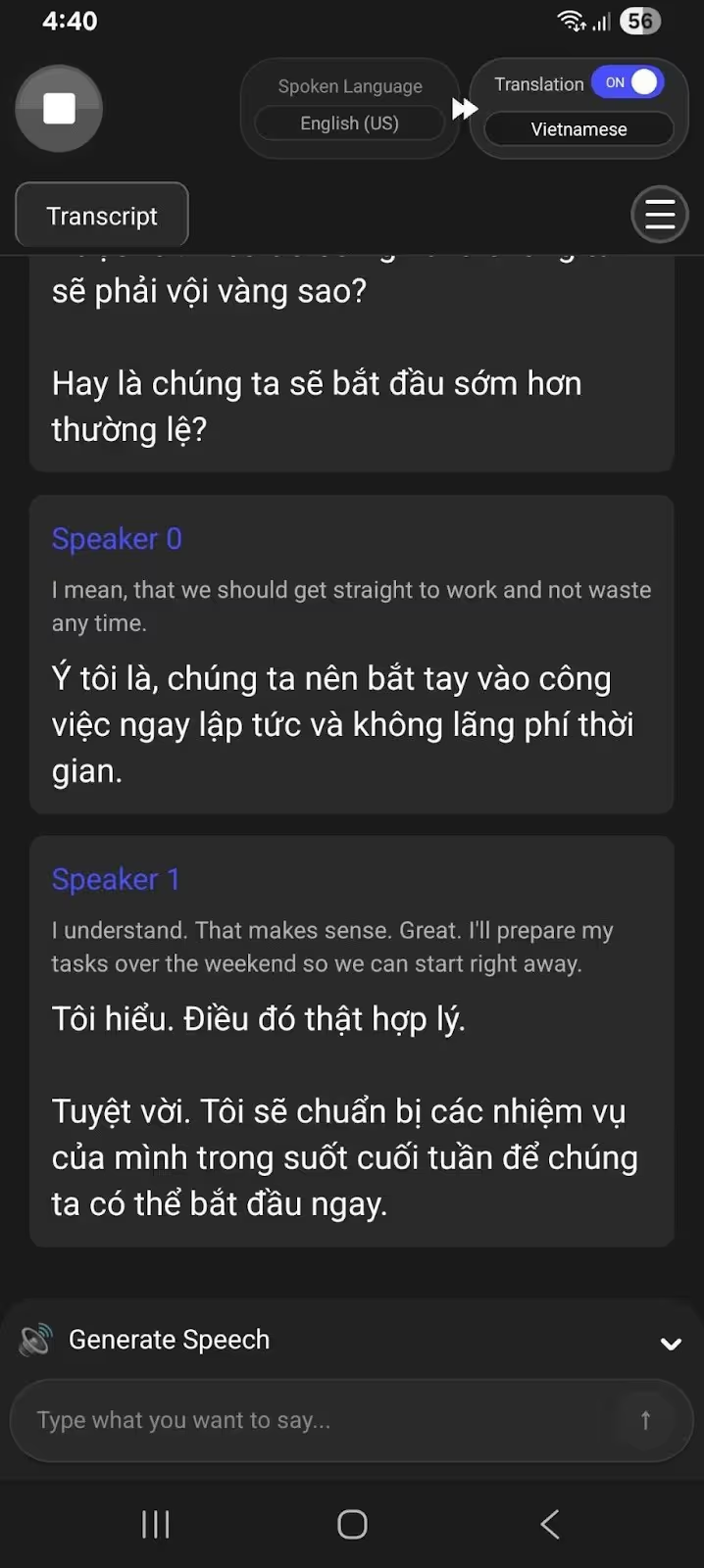
During our in-person business meetings with Vietnamese clients, the JotMe Android mobile app used advanced speech recognition technology to understand the tone, flow, nuance, and emotions in a sentence, providing contextually accurate live translations.
So, while discussing the plans for our next quarter, someone says, “We are planning a launch blast to promote the new product line.”
The literal translators expressed it as:
Meanwhile, JotMe understood the context and translated it correctly to:
The output reads naturally and expresses the core meaning the speaker intended, making the JotMe Android mobile app one of the best English to Vietnamese translation apps for sensitive business-related conversations.
Another important feature of the JotMe Android mobile app is its multilingual translation feature. That is, you can translate up to 10 languages (English, Japanese, Spanish, French, German, Hindi, Russian, Portuguese, Italian, and Dutch) into your preferred language. This is useful when you are in conversation with people speaking different languages.
JotMe Android Mobile App’s Translations are Continuous
While using JotMe’s live translations in in-person business meetings, you’ll see that it has a chat-based interface where translations appear as the conversation moves on.
In simple words, JotMe splits the content into speaker turns, and each message is paired with its translation. This way, it feels like a live interpreter and makes it much easier for us to skim, replay, or point out anything important.
That’s much better than dense text blocks in traditional voice translators.
JotMe Android Mobile App Generates Speech from Text
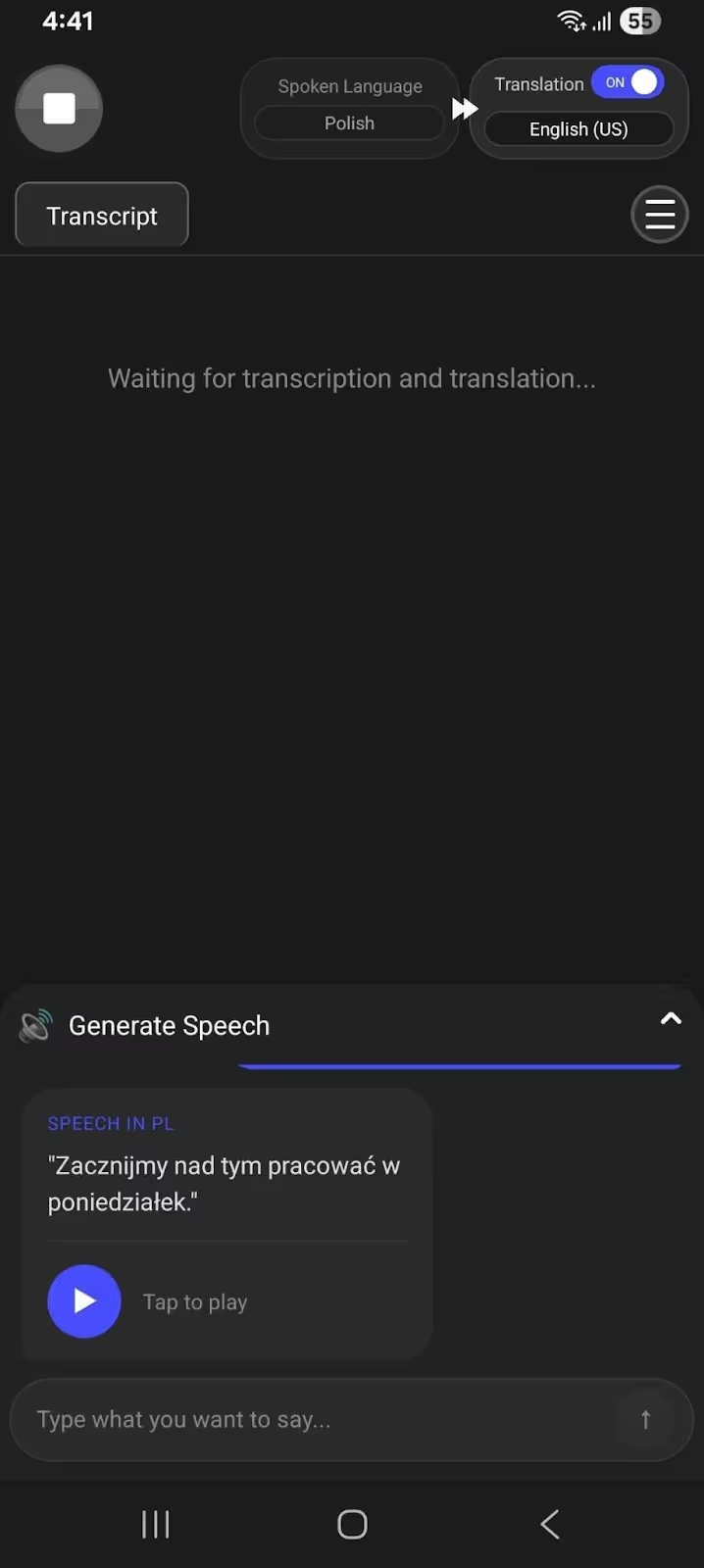
Aside from providing contextually accurate translations, the JotMe Android mobile app can generate speech translations of your typed text. This means you don’t have to struggle with pronunciation when talking to locals, clients, or colleagues in their language.
The speech generation feature of JotMe was useful during our last month’s Europe business trip when we needed English to Polish business translations, as well as other languages like Spanish, Greek, and Portuguese. We could participate orally in meetings or discussions and avoid awkward pauses that occur with static text.
To use the text-to-speech feature of the JotMe Android mobile app, you can head over to the Generate Speech feature and type whatever you want to say. JotMe Android mobile app “speaks” in the selected spoken language with clear pronunciation, so listeners understand and respond accordingly.
JotMe Android Mobile App Lets You Control Translation Accuracy
Different moments demand different outputs. That is, you might need a fast translation output when asking a local for directions, and contextually accurate translations in highly sensitive business meetings.
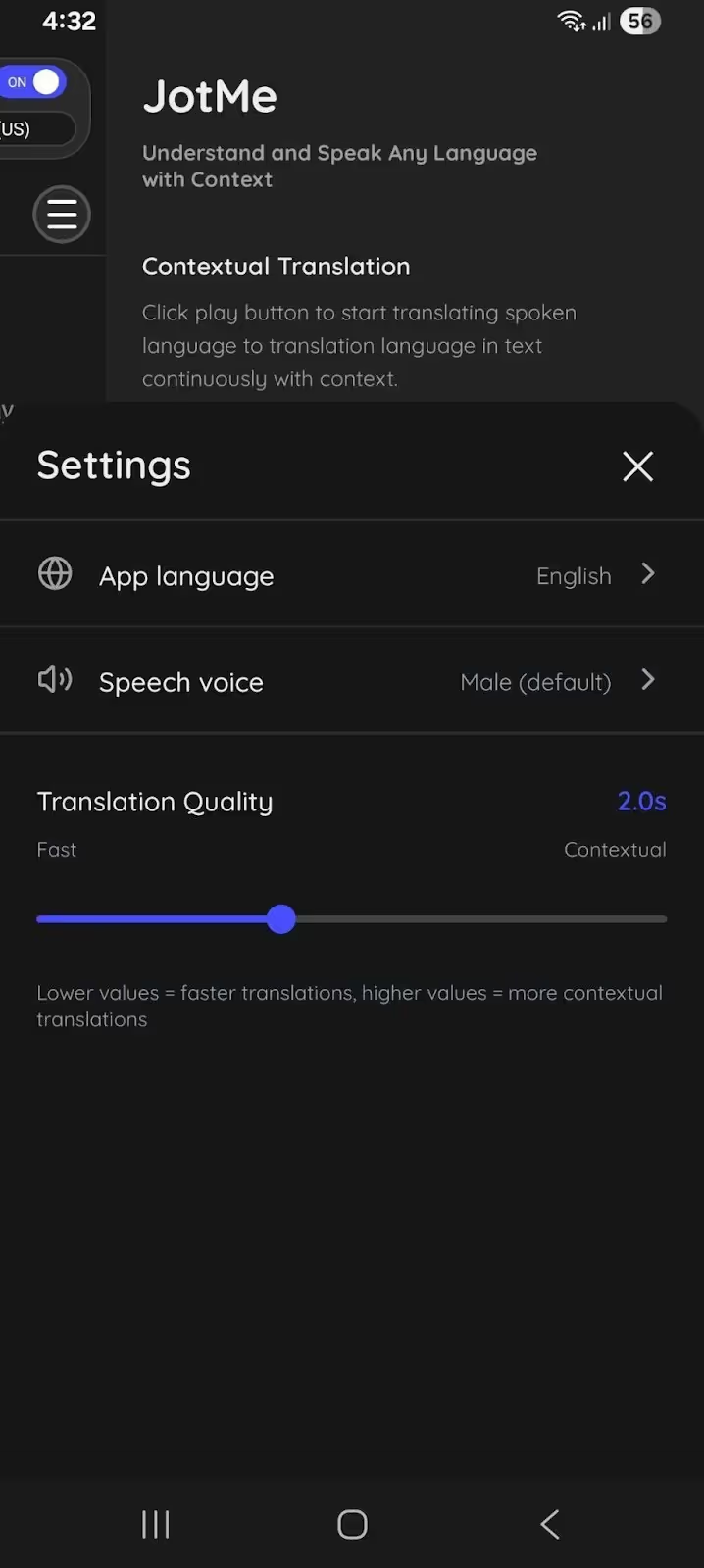
To meet both needs, the JotMe Android mobile app has a dedicated “Translation Quality” setting. You can set the bar at the highest or lowest level, depending on your needs, and establish a balance between speed and accuracy.
- Set the “Translation Quality” to Fast if you need quick translations.
- Set the “Translation Quality” to Contextual for accurate and context-based translations.
However, don’t worry if you aren’t sure about which setting is apt for the conversation you’re in. JotMe has a smart AI adjustment feature that detects the conversation types and provides translations accordingly. For example, JotMe moves the slider to Fast mode during a quick conversation and to Contextual mode for an important, detailed discussion where context matters.
Pricing of JotMe
JotMe offers a free monthly plan with 20 minutes of translation and 50 minutes of transcription, plus 5 AI credits. This is better suited for testing features or for one-time use.
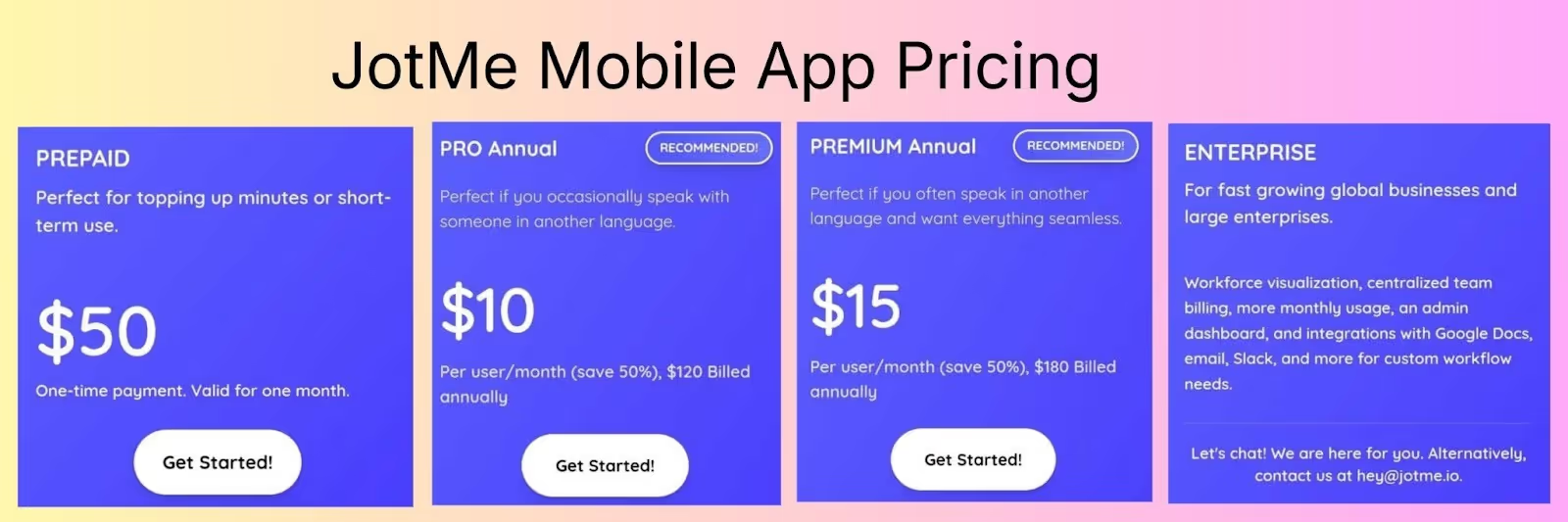
If you need more translation minutes or AI credits, JotMe offers flexible pricing. JotMe’s plans are as follows:
- Pay as you go (Prepaid): At a one-time payment of $50, you get 500 minutes of translation valid for a month.
- Pro: At $10/month (billed annually), JotMe offers 200 minutes/month of translation and 500 minutes/month of transcription, alongside 20 AI credits.
- Premium: At $15/month (billed annually), JotMe offers 500 minutes//month of translation and 2000 minutes/month of transcription, alongside 50 AI credits.
- Enterprise: Contact JotMe’s sales team if you need unlimited monthly translation, additional AI credits, and custom features. This is especially suitable for fast-growing global businesses and large enterprises.
Use Cases of JotMe
Considering the features JotMe Android mobile offers, its use cases can extend to travelers, in-person meetings, and academic seminars.
Google Translate: Ideal for Casual In-Person Conversations
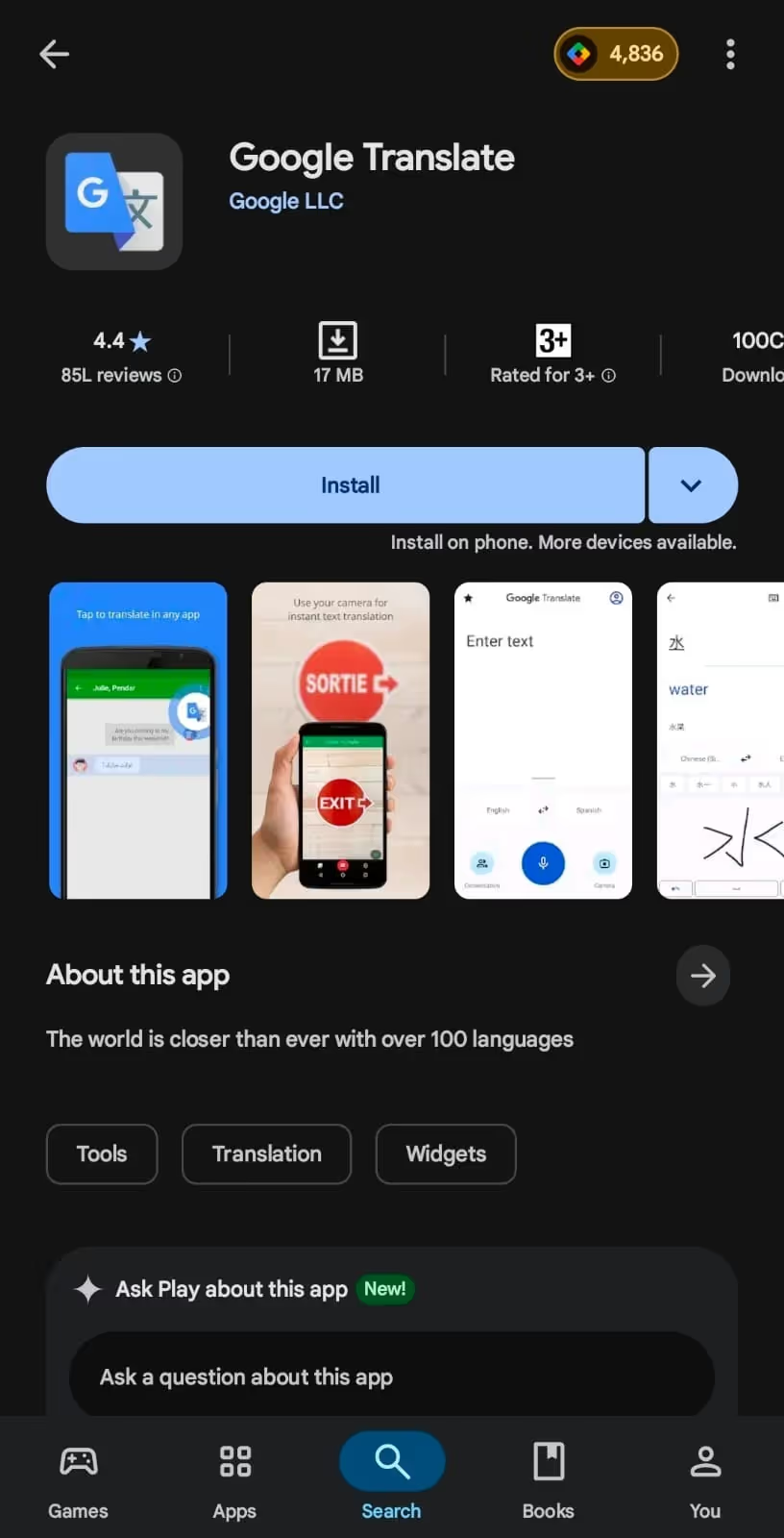
Google Translate Android mobile app is the first name that comes to mind when we are asked to translate from voice to text or from simple text to text, and for good reason. The free voice translator app for Android supports 100+ languages and provides quick translations, making it suitable for speaking with locals on your foreign trips.
One more feature that we liked about Google Translate is that it automatically detects the spoken language and translates in your selected language. This makes Google Translate suitable for face-to-face conversations between people speaking different languages.
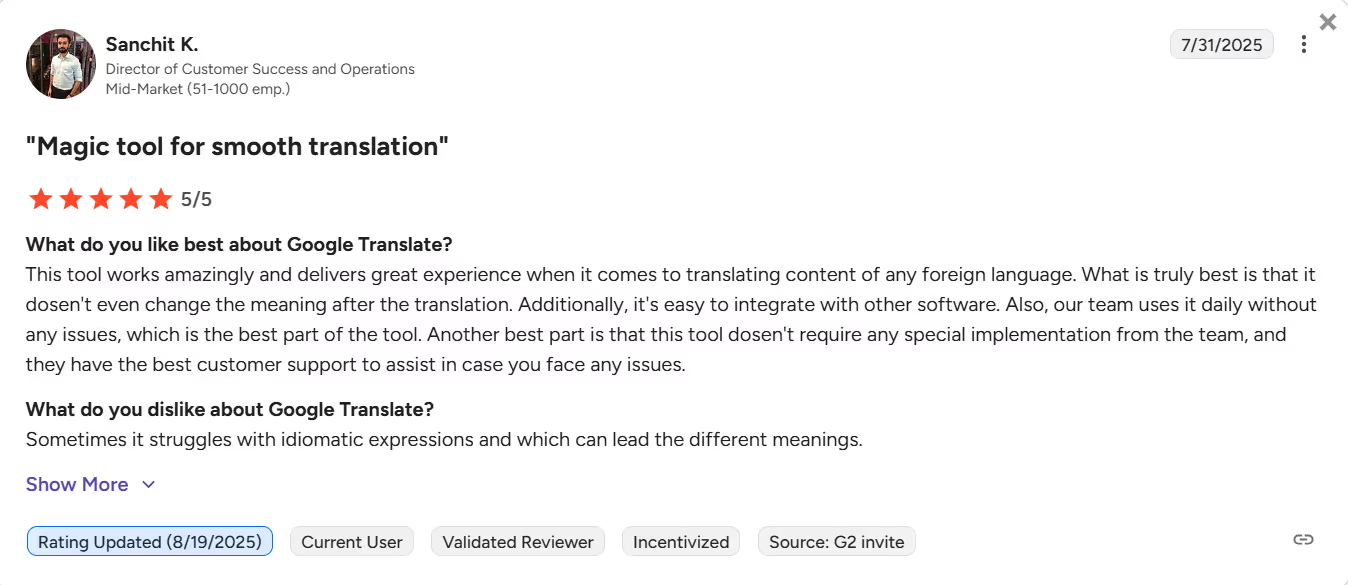
However, Google Translate’s translation quality hasn’t improved much since its launch. According to a G2 user, the app sometimes struggles with idiomatic expressions, which can lead to different meanings.
Pricing of Google Translate
Google Translate is entirely free to use on mobile, and you can use it to translate voice to text in 100+ languages.
Use Cases of Google Translate
The Google Translate app can be suitable for translating voice to text for casual conversations. The following are its use cases:
Microsoft Translator: Suitable for Quick Translations
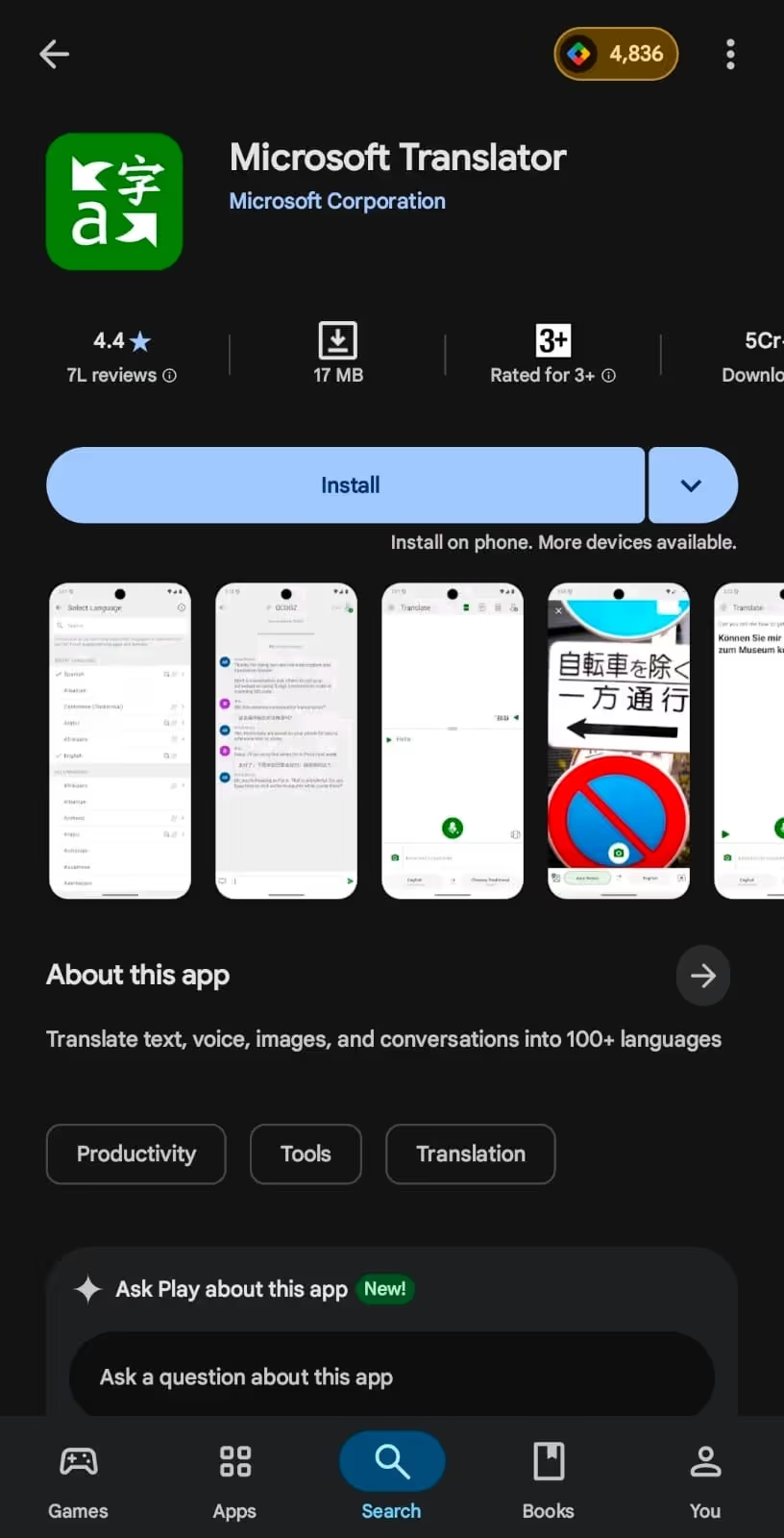
Microsoft Translator is a Google Translate-like voice translator app for Android with a bilingual translation window and decent accuracy. Its simple interface, support for 60+ languages, and quick translations make it more suitable for casual interactions with locals or colleagues.
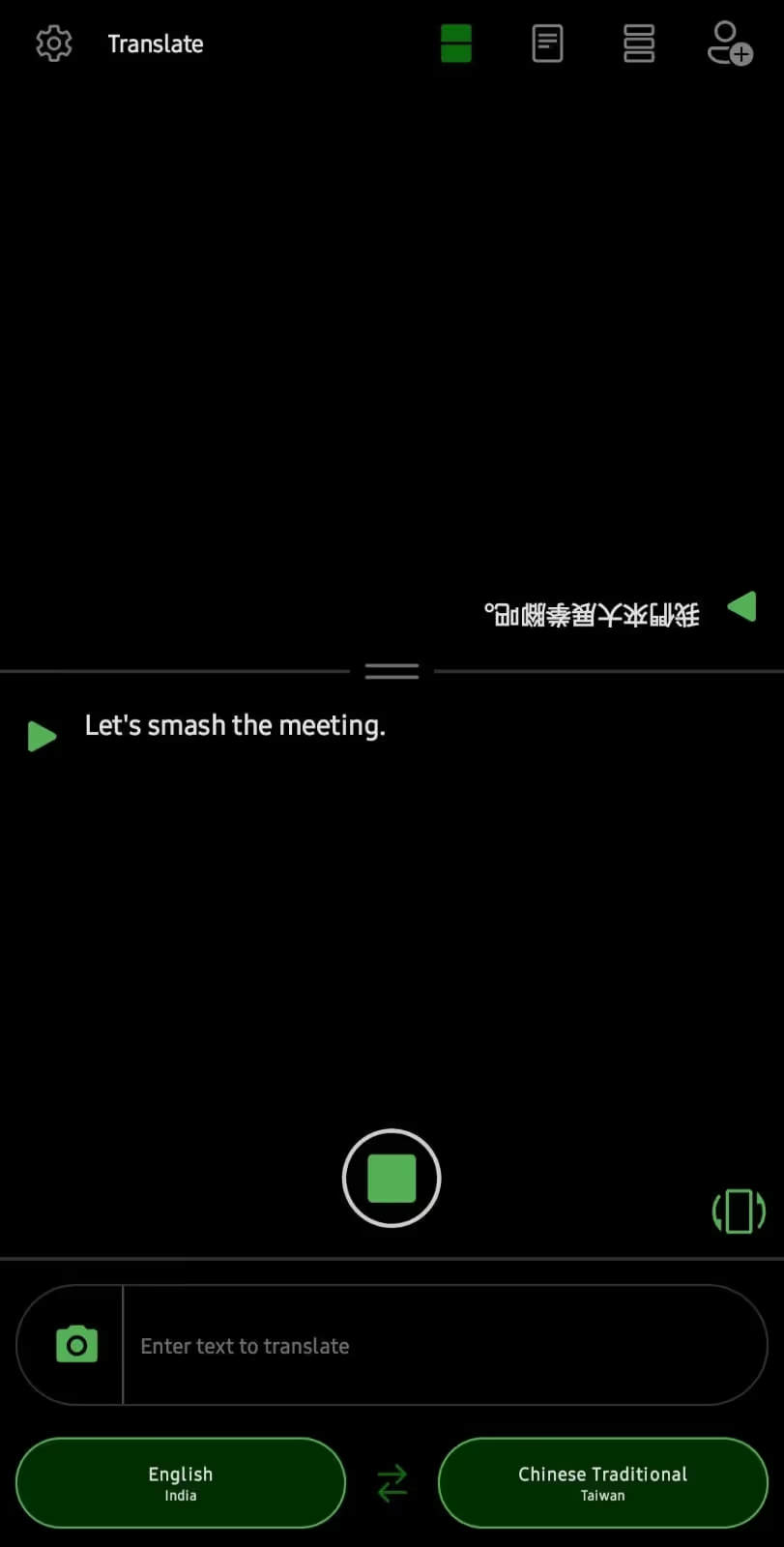
We tried Microsoft Translator for English to Chinese translation and said, “Let’s smash the meeting.”
Microsoft Translator translated it as:
That’s a typical word-for-word translation that might create confusion and lead to awkward silences in conversations. Although the translation was fast, Microsoft Translator couldn’t map the idiomatic expression correctly.
Pricing of Microsoft Translator
Like Google Translate, Microsoft Translator is free to use on Android, but there isn’t much information available about its premium plans.
Use Cases of Microsoft Translator
Microsoft Translator can be a decent app for translating voice to text in certain situations. Here are some of its use cases:
Papago: Ideal for Trips to East & South-Asian Countries
We came across Papago when we were planning to visit Korea to discuss the deliverables and workflow for the next quarter with our clients. When testing Papago’s Android mobile app for in-person conversations, we found its translations quick and its speech generation feature quite handy.
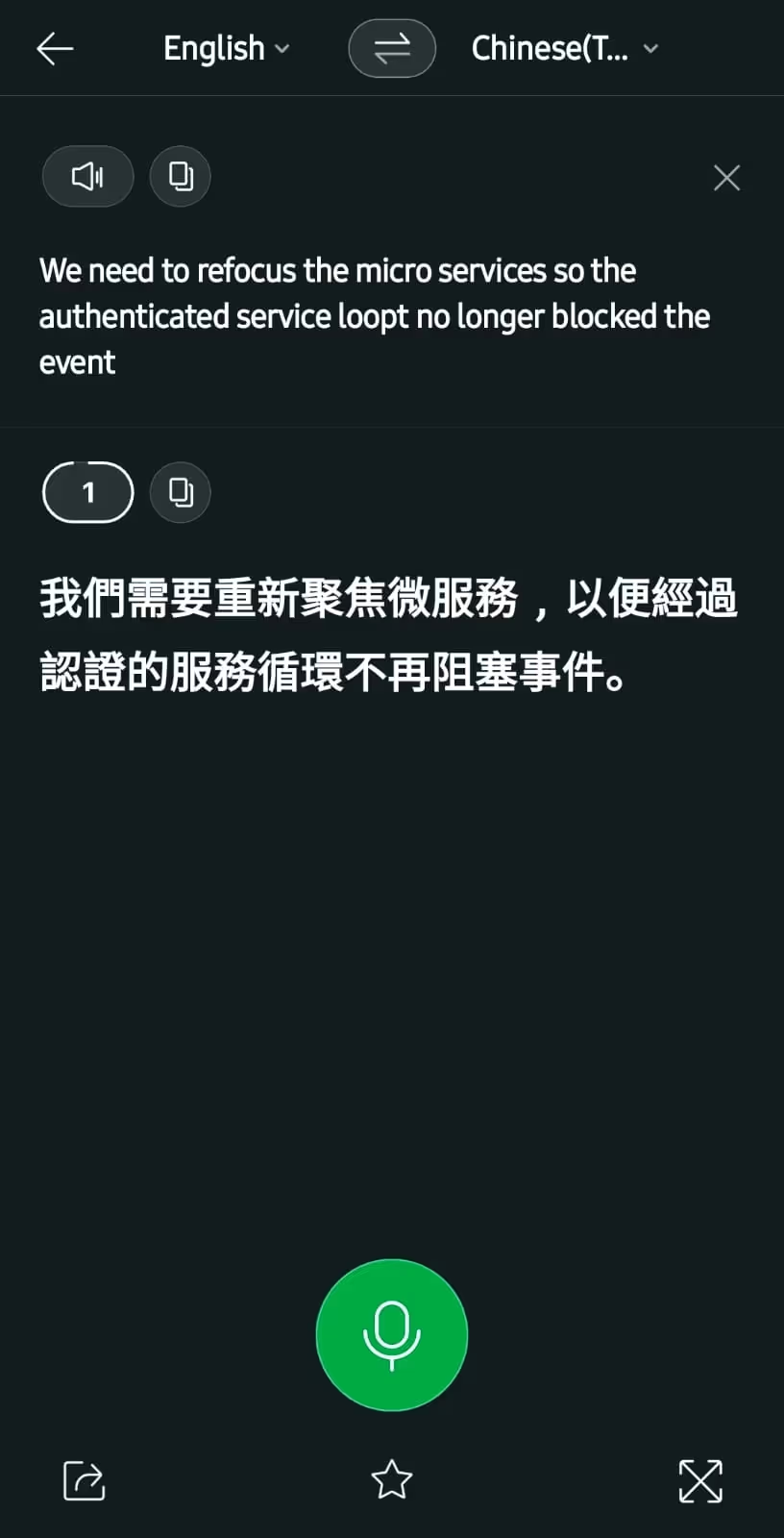
Despite the speed, we found Papago’s translations to be accurate. The translation of “We need to refocus the micro services so the authenticated service loop no longer blocked the event” in Chinese came out as:
Although accurate, Papago sometimes mishears conversations, especially when technical jargon or industry-related terms are used. For instance, in the above sentence, Papago misheard “refactor” as “refocus,” and “blocks” as “blocked.”
Not only that, Papago mostly supports translations of East and South Asian languages and has limited support for European languages.
Pricing of Papago
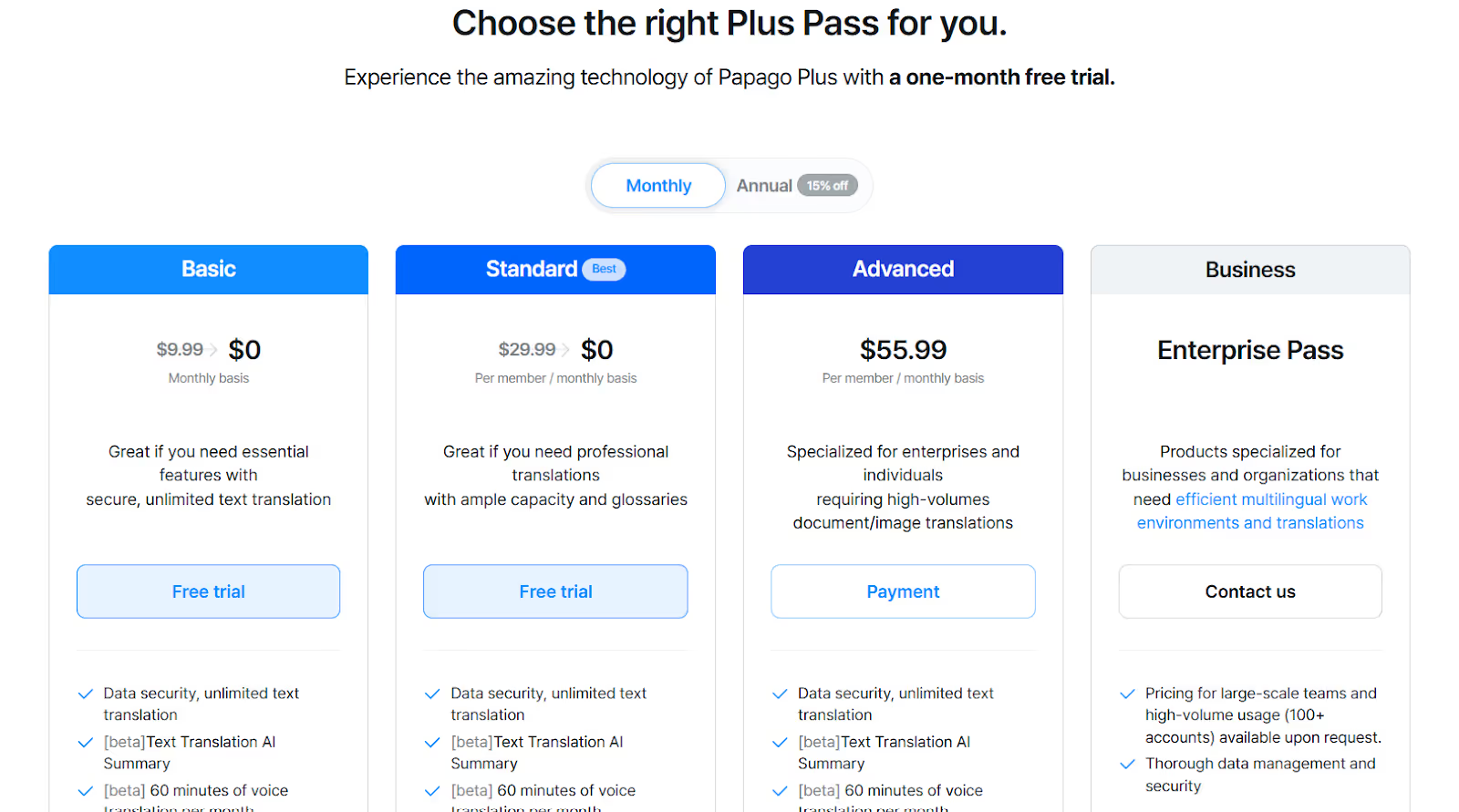
Papago offers four plans, including Basic, Standard, Advanced, and Enterprise Pass, with a free trial for its Basic and Standard plans.
- Basic ($8.49/month, billed annually): Offers 60 minutes of voice translation and a custom glossary of up to 5,000 terms.
- Standard ($25.49/month, billed annually): Offers 60 minutes of voice translation and 10 shareable custom glossaries, each with a limit of 10,000 terms.
Use Case of Papago
Papago is especially suitable for business travel in East and South Asian countries, and its use cases are as follows:
Conclusion: Which Voice Translator for Android Is Best for Learning, Work & Travel?
Choosing the best voice translator app for Android for learning, work, and travel depends on your priorities, that is, whether you need it for casual or business-related conversations. Here’s a quick breakdown of the speech-to-text apps for you to decide:
- You can use the JotMe Android mobile app for your business trips, language learning, or translating at in-person events. JotMe’s continuous translations and speech generation feature improve the communication experience.
- Use the Google Translate Android mobile app for quick and casual in-person voice-to-text translations. Google Translate's support for 100+ languages can be helpful, but it struggles with technical conversations.
- If you go on a business trip to East Asian countries like China, Korea, or Japan, Papago can be a reliable Android mobile app to translate voice to text, but it is limited to 14 languages.
If you need a reliable mobile app to translate voice to text in 45+ languages with high accuracy, the JotMe Android mobile app can be great for face-to-face communication during foreign trips, for business professionals, and for language learners.
Try JotMe Android mobile app today and see how effortless in-person conversations can be, regardless of the other person's language.
FAQs for the Apps to Translate Voice to Text
Which app can I use to convert voice to text?
There are many Android apps to translate voice to text, but the JotMe Android mobile app stands out for its contextually accurate translations and speech generation feature. Unlike most traditional apps, JotMe has a continuous chat-type translation window for an immersive translation experience.
Can ChatGPT do voice to text?
Yes, ChatGPT can do voice to text translation, but the outputs aren’t very accurate, especially in business-related conversations. Here. JotMe Android mobile app can be a viable ChatGPT alternative for voice-to-text translation as it understands the tone, flow, and emotions of the spoken sentence and provides contextually accurate translations.
Which AI is best for audio translation?
JotMe is one of the best AI voice to text tools for audio translation, as it uses a contextual translation engine that preserves the core meaning of spoken sentences in the output, keeping everyone on the same page.
How do I convert audio to text easily?
You can use the JotMe Android mobile app to easily convert audio to text. Just access the JotMe Android mobile app, select the spoken and translation languages, press “Play,” and start speaking. You’ll see the translation appear on screen in real time.
Last updated on
April 14, 2026
Follow us on social media:
![JotMe — Is Google Translate Accurate? [2026 Test]](/_webflow-assets/0d0512afc7b037d74dff536f22fed08f.avif)