Guides
Portuguese Translated in English: 6 Best Translation Apps I Used in 2026

Viraj Mahajan
May 23, 2026
.avif)
Brief Answer: The best Portuguese to English translation apps that I tried for meetings, webinars, and events are JotMe, DeepL, Systran, Translate, Google Translate, and Microsoft Translator. With free real-time translation and transcription in 200+ languages, JotMe offers a wide range of Brazilian Portuguese to English translation features. It helps students, businesses, travelers, and movie watchers get Portuguese translated into English for personal or professional endeavors.
Ever wondered how to get Portuguese translated into English when the conversation matters, the meeting is happening live, and a half-baked literal translation is going to embarrass everyone in the room? I have been in that exact situation more times than I would like to admit, and I went hunting for apps that could actually convey the meaning rather than just swap words one for one. The six Portuguese to English translation apps I review below are the ones that survived my testing rounds across live meetings, document uploads, webinars, and casual conversations, and each one handles the Brazilian Portuguese to English flow a little differently.
Here is what I cared about while testing:
- Live meeting accuracy when someone is speaking Portuguese and I am listening in English (and the reverse)
- Whether the tool understands Brazilian Portuguese versus European Portuguese, because the difference matters more than most people realize
- Document and PDF translation that does not strip away the original text I want to compare against
In this comprehensive guide, I will walk you through different Portuguese to English translation apps that you can use for your meetings and live events, plus the right tool to translate Portuguese to English documents, webpages, and casual conversations. I have personally tested these applications across multiple scenarios, so if you want to get Portuguese translated in English or are trying to translate from English in Portuguese for a reply, you will know which application gets the job done.
TL;DR: 6 Best Portuguese to English Translation Apps in 2026
Before we move forward and learn how to get Portuguese translated in English, let us quickly see what the Portuguese to English translation apps offer in 2026 that I personally think is really helpful for you:
- JotMe: At $10 per user/month ($120 billed annually), JotMe offers 200 minutes of monthly agentic live translation in 200+ languages and 39,000+ language pairs, including Portuguese to English, Spanish to English, French to English, and more.
- DeepL: DeepL’s individual plan comes at $8.74 per month (billed annually) and lets you translate 300,000 characters per month, and lets you translate whole Portuguese webpages instantly into English.
- Systran: Systran Translate is your one-stop solution if you want to get your PDF files in Portuguese translated in English for ~$20.91 per month (billed annually).
- Translate: Translate is your next-generation AI translation tool that integrates with Zapier and other tools. Translate rates start at $0.09 per word and offer translation of words, documents, and websites across 5,900 language pairs.
- Google Translate: Google Translate is a free website and mobile translation app that lets you get your Portuguese translated in English.
- Microsoft Translator: Microsoft Translator is integrated with the Microsoft 365 suite and works across the entire ecosystem where translation is required.
How Did I Choose Apps for Getting Portuguese Translated in English?
When I Googled the term “Portuguese to English,” I came across 100s of websites that claimed to translate Portuguese in English. However, when I started testing them across different scenarios, I found that only a few actually fit the bill.
So, I tested 10 live translation applications and finalized the 6 I am reviewing here today. That said, you need to understand the grounds on which I tested these applications.
Real-Time Voice Translation in a Live Meeting
I wanted to see how each app handled an actual conversation in motion, not a clean text block pasted into a box. I picked apps that could capture spoken Portuguese, push out English fast enough to keep up with the speaker, and not drop context when someone paused mid-sentence. If a voice to text tool failed at this, it failed at the most important use case.
Accuracy Across Brazilian Portuguese and European Portuguese
Brazilian Portuguese and European Portuguese share the same script and most of the grammar, but their vocabularies, idioms, and even verb conjugations diverge in ways that trip up lazy translation engines. I tested each app with the same conversation in both variants and checked whether the English output preserved the Brazilian warmth and informality versus the European structure. Apps that defaulted to a flat, generic Portuguese got knocked down.
Context Awareness and Tone Preservation
A nervous new hire on their first day sounds different from a marketing executive pitching a client. The Portuguese phrasing carries that emotional signal, and a good translator carries it forward into English. I tested whether the apps preserved the tone, hesitation, politeness, and social register of the original speaker, or flattened everything into the same neutral business prose.
Document and PDF Translation Workflow
I uploaded Word and PDF files in Portuguese to several translation apps and checked the output. Some apps gave me a clean bilingual file. Others stripped away the original Portuguese, leaving me with only the English version and no way to verify the translation against the source. I also looked at character limits, daily caps, and whether the formatting held up on the round trip.
Pricing, Free Tier, and Real-World Value
The cheapest app is not always the most useful one, and the most expensive app is not always the most accurate. I looked at what each tool actually gives you at its free tier, what unlocks on the paid plans, and whether the pricing makes sense for someone who needs Portuguese translated in English on a regular basis versus someone who needs it once a quarter.
Plus, I used a conversation that happened between two people. One who could only speak Portuguese and one who could only understand English. As you can see here, here is the conversation between a new joinee from Brazil and a company’s HR head from New York. Here is the transcript of their conversation:
That’s completely normal. The first days are always a little stressful.
You actually arrived on time, so you did great already.
Speaker 2: No worries at all. Today, we’ll just focus on helping you settle in.
Speaker 2: First, we’ll complete your onboarding documents and system setup.
Speaker 2: Yes. The IT team will provide everything this afternoon.
Speaker 2: That’s perfectly fine. The team is very supportive of new employees.
Speaker 2: Don’t worry too much about that. Most meetings include transcripts and notes.
Speaker 2: Trust me, after a few weeks, you’ll feel much more comfortable.
Speaker 2: And we’re excited to have you here as well.
You will see how this conversation will help you understand the best Portuguese to English translation tool for your needs.
6 Apps to Get Your Portuguese Translated in English
Now that you have seen how I tested each of the applications, here are my extensive takes on them to help you understand which one fits your situation, your budget, and the kind of Portuguese to English translation you actually need.
JotMe: Portuguese Translated in English for Free
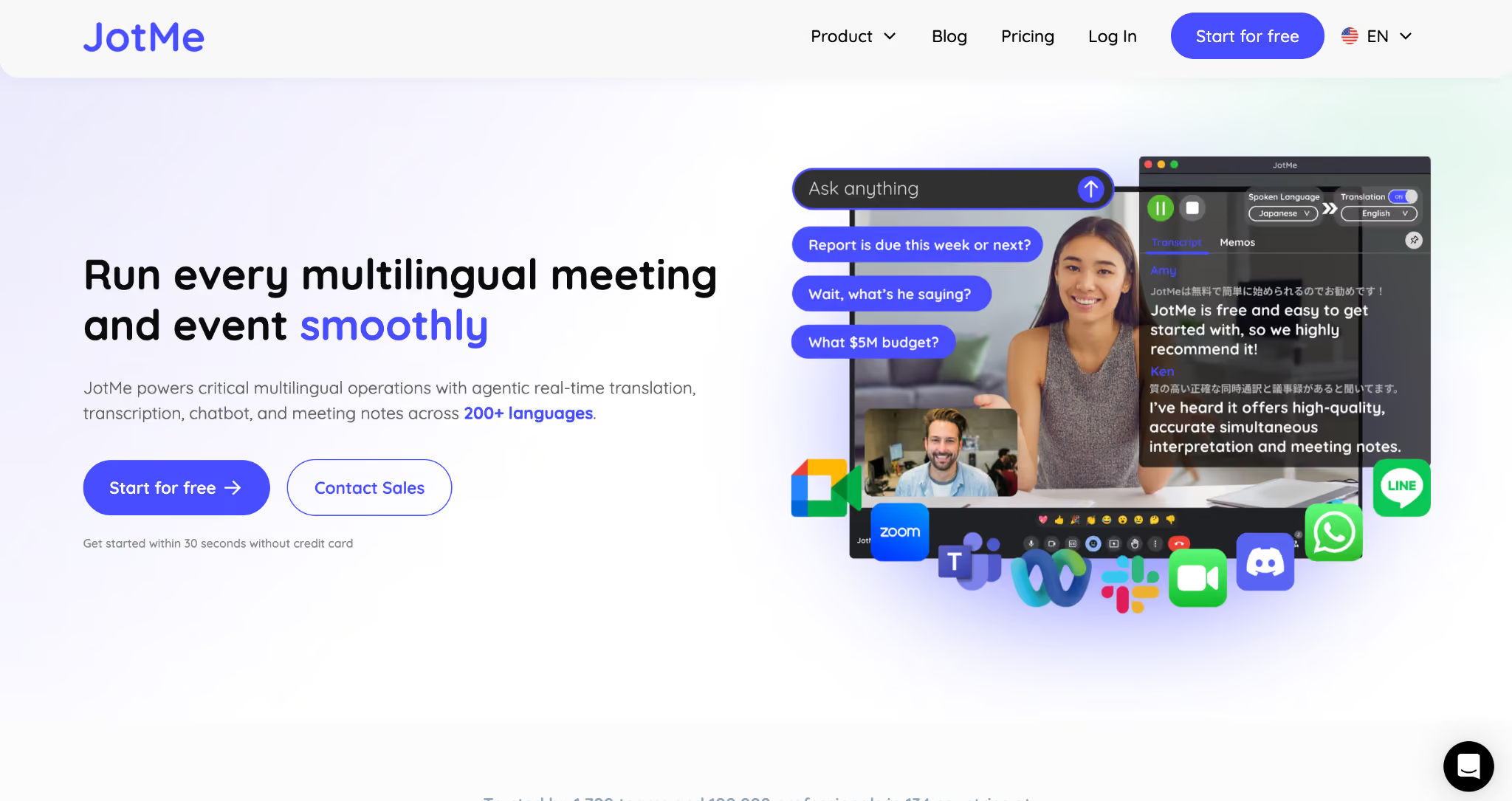
JotMe was the first application I tested because it kept showing up in my searches as an agentic AI translation tool that works inside live meetings without joining the call as a bot.
The free tier alone lets you translate Portuguese to English and English to Portuguese in 200+ languages with a 5,000-character window, which is already more than most paid tools offer in their starter plans. The paid plan starts at $10 per user per month (billed annually at $120) and unlocks 200 minutes of live agentic translation per month across video calls on Zoom, Google Meet, Microsoft Teams, Webex, and Slack huddles.
If you specifically need Brazilian Portuguese to English translation for hiring calls or onboarding sessions, JotMe handles that variant natively without forcing a detour through generic Portuguese.
What set JotMe apart for me during testing was how it handled the Brazilian new-hire scenario. The conversation was emotional, hesitant in places, and full of small cultural cues that other tools missed entirely. JotMe carried the nervousness, the politeness, and even the moment when the new hire admitted they needed to improve their English for meetings. The translation went beyond simple word-for-word translation and preserved the human texture of the conversation, which is exactly what you want when you are using an app to bridge a real workplace relationship.
How JotMe Performed When Getting Portuguese Translated in English?
Now, when the actual conversation happened on JotMe, here is how it happened. I set the spoken language to Portuguese (Brazil) and the translation to English, toggled the Translation switch on, and joined the call. The Brazilian new hire spoke first, and within a second or two, the English translation appeared right below their Portuguese transcript inside the JotMe window.
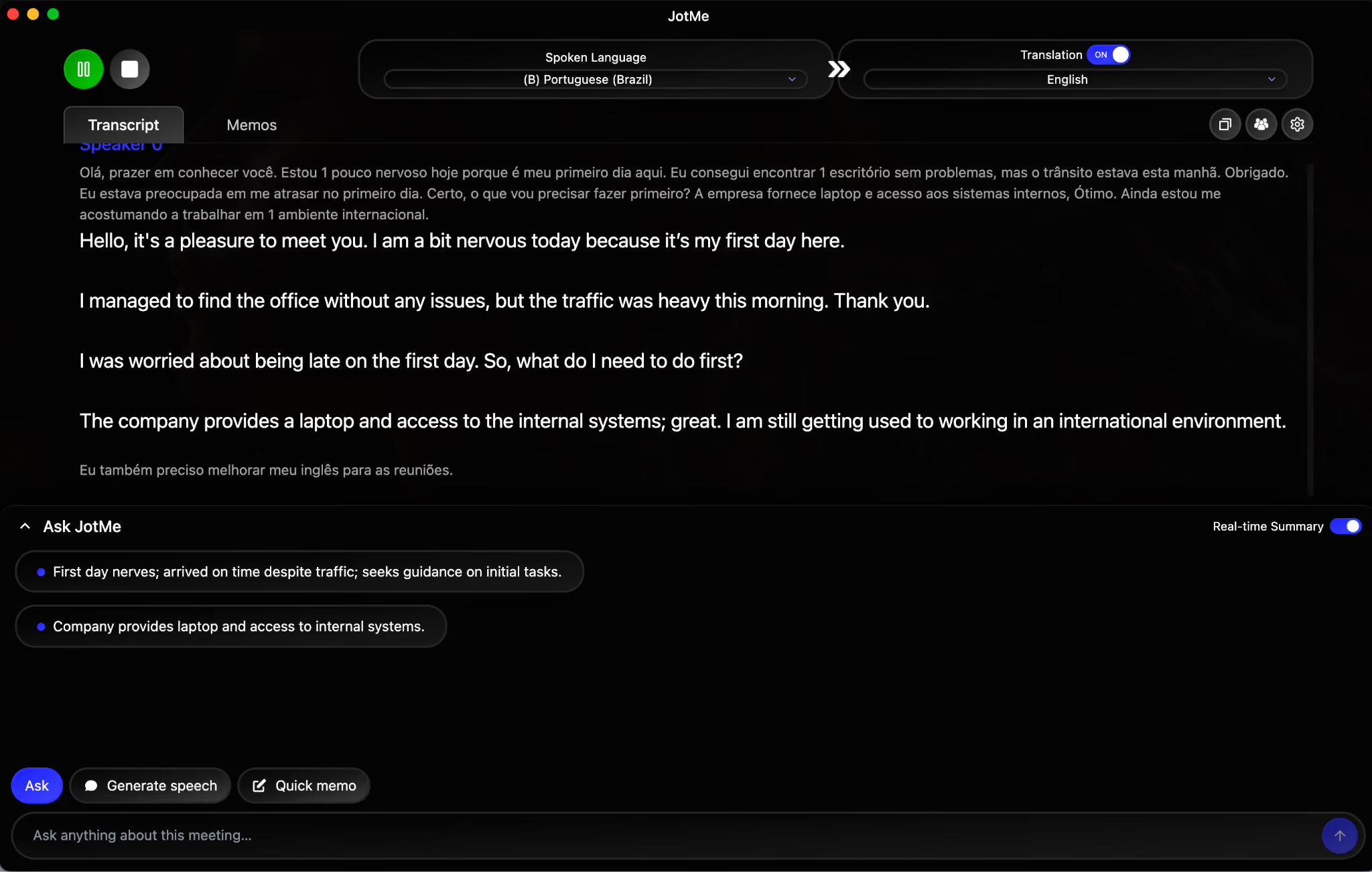
You can see the original Portuguese at the top in smaller text, while the translated English appears below in larger, easier-to-read text. JotMe even cleaned up the small disfluencies in the Portuguese audio (the “um” and “uh” moments that natural speech is full of) and produced an English version that reads like the new hire was actually composing it in English.
How JotMe’s Real-Time Summary Highlights Meeting Points?
While the conversation was happening, JotMe’s real-time summary panel inside the Ask JotMe sidebar started pulling out the key points and rendering them in English bullets on the right side of the screen. This is where the agentic AI part kicks in, because the summary goes beyond a basic transcript dump. It actually understands what is happening in the conversation and groups related ideas together.
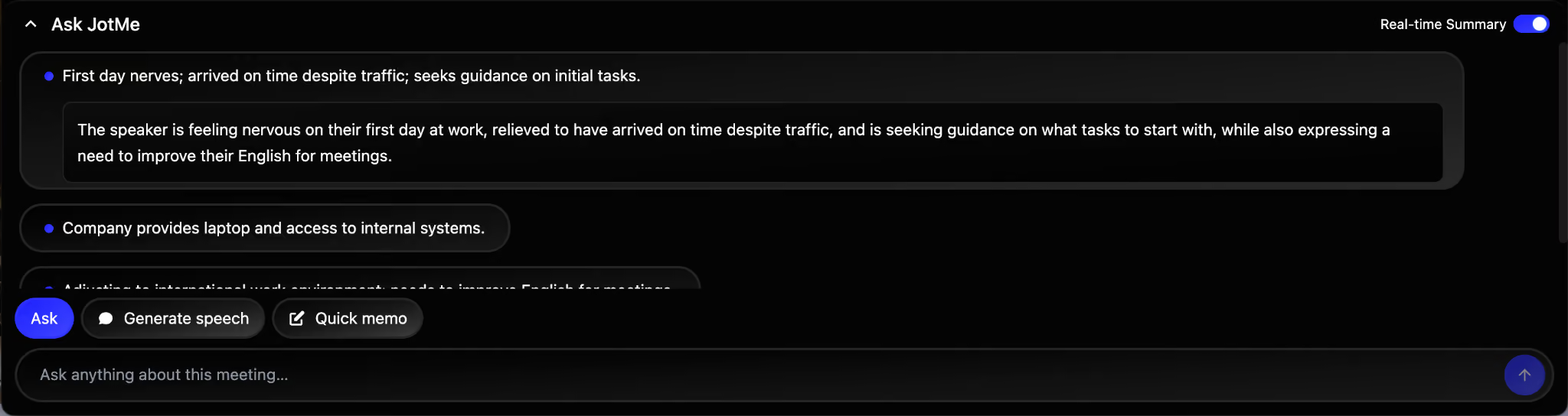
You can see the first bullet captured the new hire’s first-day nerves, the comment about traffic, and the request for guidance on initial tasks, all condensed into a single sentence. The second bullet picked up the laptop and internal systems question that came later in the conversation. The third bullet (partially visible) concerns adjusting to an international work environment. For an HR head running multiple onboarding calls per week, this summary handles real-time note-taking, so the AI meeting notes are ready by the time the call ends.
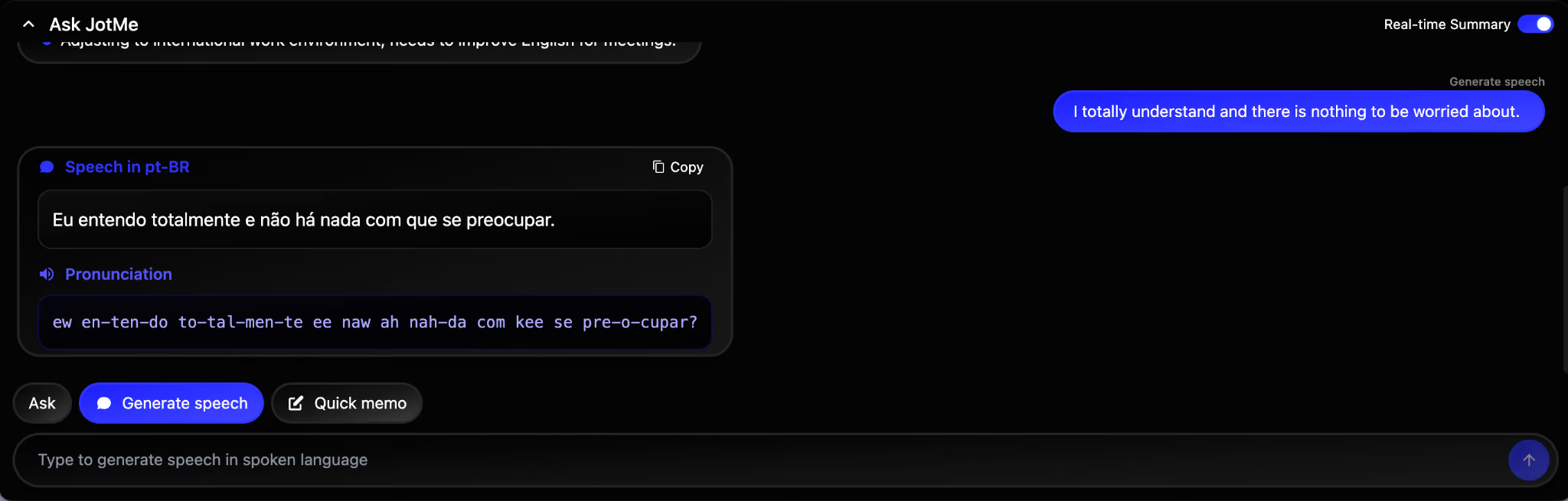
How JotMe’s Generate Speech Feature Lets You Reply in Portuguese?
The HR head wanted to address the new hire’s nervousness with a reassuring message, but they did not speak Portuguese fluently enough to deliver it on the spot. So they used JotMe’s Generate Speech feature. They typed the reply in English (“I totally understand and there is nothing to be worried about”), and JotMe rendered the Portuguese version along with a phonetic pronunciation guide.
How JotMe’s Free Text Translation Handles Portuguese Conversations?
Now, when I used JotMe’s free text translation, here is how it performed. I dropped the full Portuguese conversation transcript into JotMe’s free text translation, set the source to Portuguese (Brazil) and the target to English, and waited a couple of seconds.
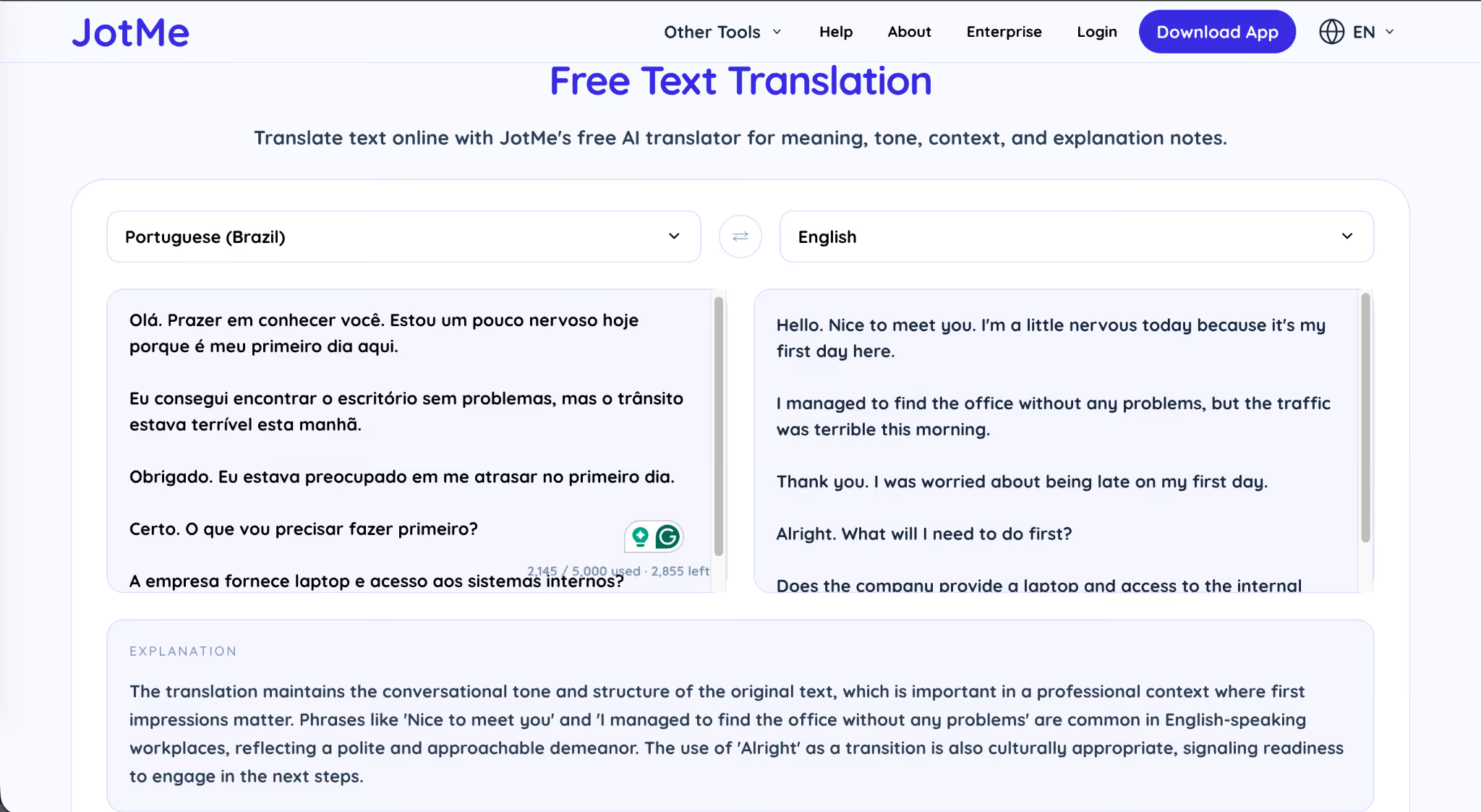
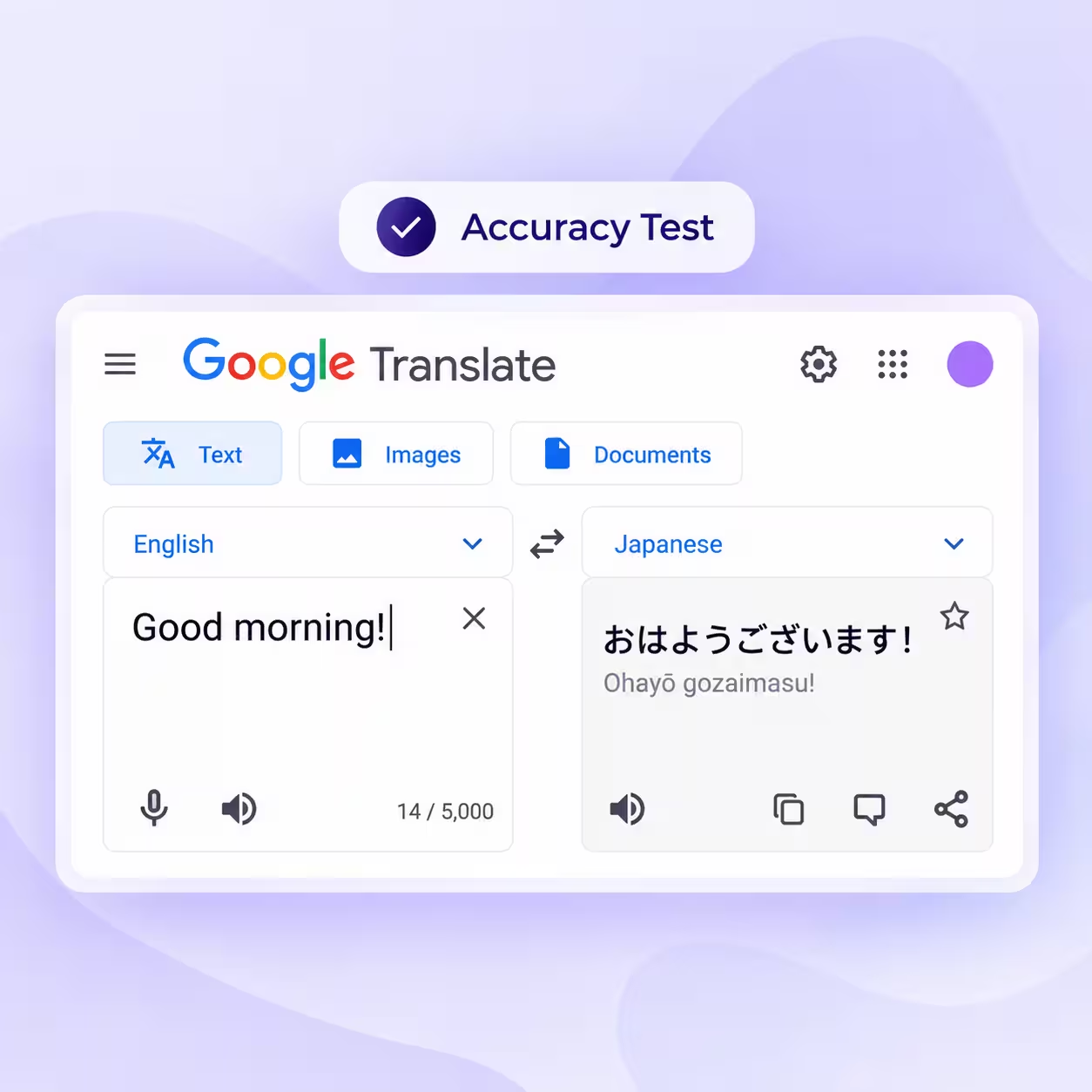
As you can see in the screenshot above, this is much better than what Google Translate generally offers, because JotMe went one step further and even provided an explanation of the meaning. The Explanation panel at the bottom is doing something none of the other free tools I tested did. It explains why the translation choices were made, which phrases are common in English-speaking workplaces, and how the cultural register of the original Portuguese maps to the English output.
For someone trying to understand Portuguese rather than translate it word by word, this is a small but significant differentiator. Moreover, I can change the default language from Portuguese (Brazil) to Portuguese (Portugal), so I can switch between the two major variants without losing the tool’s intelligence about local idioms.
Key Features of JotMe for Portuguese to English Translation
- 200+ languages, including Brazilian Portuguese to English, European Portuguese to English, and rare dialects that smaller translation tools do not cover.
- 39,000+ language pairs that route translations directly between any two supported languages without forcing a detour through English.
- No-bot architecture that runs the translation layer on the listener’s device, so JotMe never joins the meeting as a third-party participant on Zoom, Google Meet, Microsoft Teams, Webex, or even YouTube videos.
- Share live translation via a QR code so audiences at events, webinars, conferences, and town halls can scan a single code to receive captions in their own language on their phone or laptop.
- Provides text-to-text and audio-to-text translation in a single application, so one tool handles both your live meetings and your document or chat translation needs.
DeepL: Premium Portuguese to English for Documents and Text
DeepL has been the gold standard for high-quality machine translation across European languages for years, and its Portuguese to English translation continues to hold up against newer entrants. For long-form documents and polished business writing, DeepL is arguably the best Portuguese to English translation tool when output quality is the only thing that matters.
The free tier lets you translate up to 1,500 characters at a time, and the Starter plan at $8.74 per month (billed annually) bumps that to 300,000 characters per month with full document translation, glossary support, and the ability to translate whole Portuguese webpages instantly into English.
When I dropped the new-hire conversation into DeepL Pro, the output came back as clean, formal English that read like a professional translation rather than machine-generated.
DeepL’s strength is in this kind of text-based work, where you are processing a Portuguese document, email thread, or webpage and need an English version that reads as polished writing. Where DeepL falls short in my testing scenario is the live meeting use case: it does not capture audio from your video conferencing tool in real time, unlike JotMe. You can use DeepL Voice for short conversations on mobile, but the meeting workflow is not its primary strength.
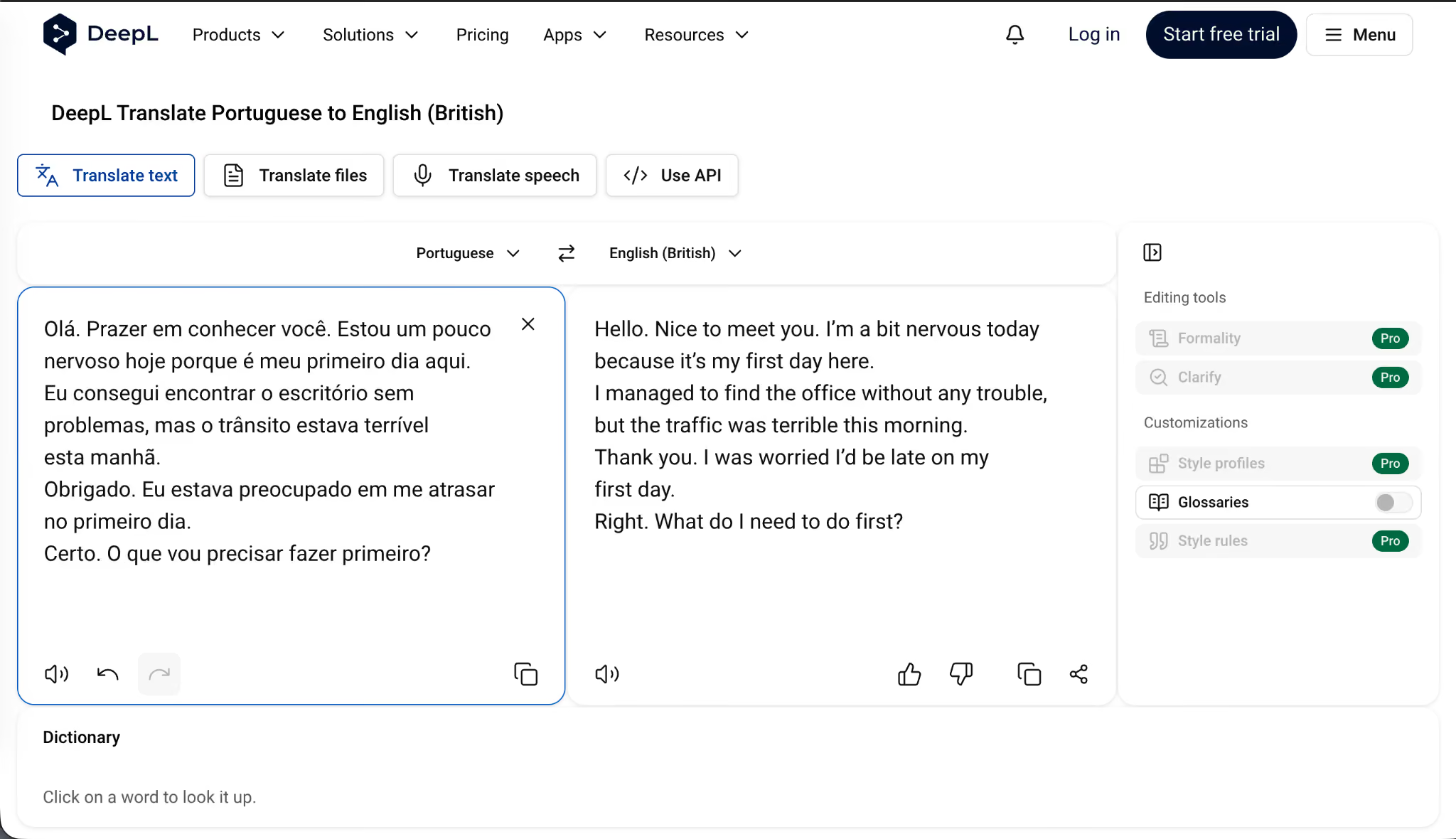
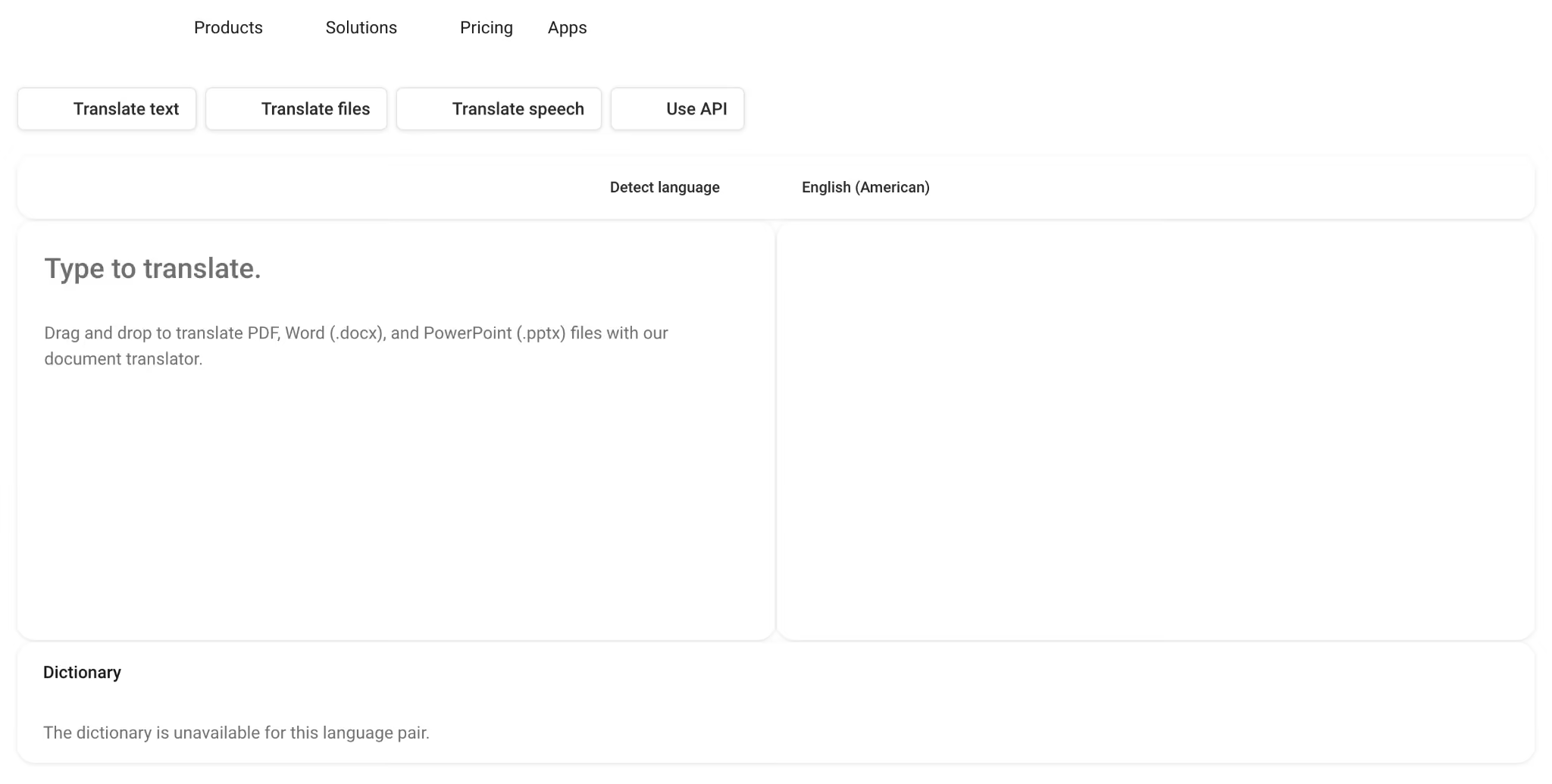
You can see from the above screenshot that DeepL gave me the option to choose between English (British) and English (American), which most other translation tools do not offer cleanly.
The translation itself is sharp, but notice the small drift from the original.
The Style profiles, Glossaries, and Style rules options on the right sidebar are powerful features for translation teams who need consistent terminology across documents, though most of them are locked behind the Pro tier.
Key Features of DeepL for Portuguese to English Translation
- 300,000 characters per month on the Starter plan, with higher tiers offering unlimited document translation across Word, PDF, and PowerPoint files.
- Glossary support that lets you define how specific Portuguese terms should always be translated into English (useful for technical or industry-specific vocabulary).
- Style profiles and tone customization on Pro plans, including formal, casual, simple, and business registers.
- Full webpage translation via the DeepL browser extension, which converts any Portuguese site into English with formatting preserved.
- DeepL Voice for short mobile-based voice translation, available on the Pro tier.
Systran: Portuguese PDF and Document Translation Specialist
Systran Translate is one of the oldest players in machine translation, and the company has built its reputation on enterprise document translation across industries like legal, government, healthcare, and finance. If your primary use case is to translate PDF Portuguese to English files with original formatting intact, Systran is probably the best Portuguese to English translation tool for that specific workflow.
The Systran Translate Pro plan comes in at roughly $20.91 per month (billed annually) and gives you unlimited text translation, file upload translation for Word, PDF, Excel, and PowerPoint, and the option to download the translated file in the same format you uploaded.
I tested Systran by uploading the Portuguese conversation as a Word file and downloading the translated version. The translation itself was accurate and the formatting held up, but I ran into an issue that I want to flag before you trust Systran for your workflow.
I uploaded a Word file that consisted of text in Portuguese, and it then automatically translated the same to English. However, the downloaded file contained only English text, not the original Portuguese, so I had to switch between two documents to verify the translation, which is annoying when reviewing a long contract or a multilingual report.
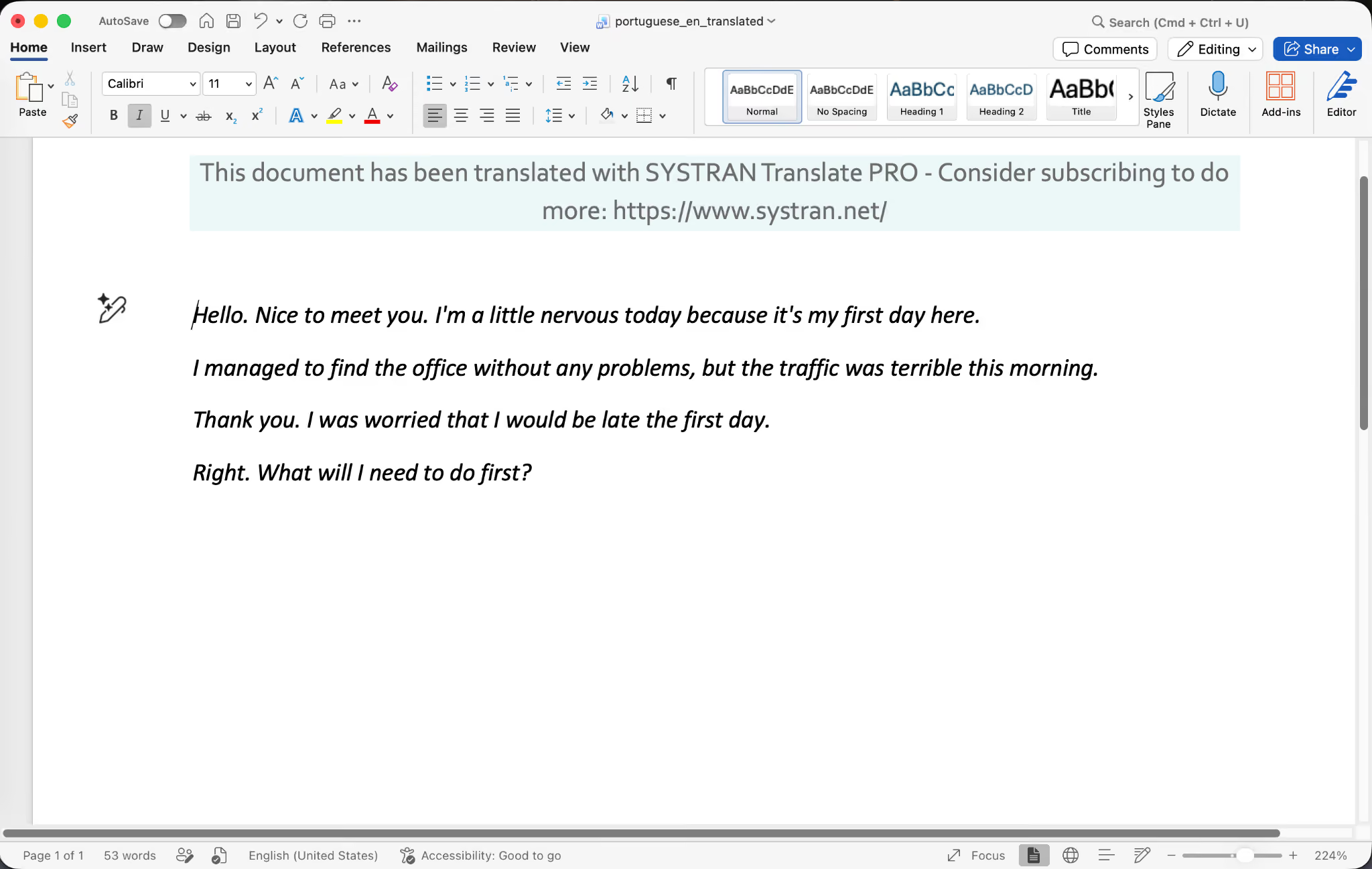
You can see that the downloaded file contains only the English translation, with a Systran header at the top advertising the Pro tier. The original Portuguese text is gone. For document workflows that require a bilingual reference (which is most enterprise compliance and legal review work), this is a structural problem.
You either have to keep the source file open in a separate window or manually paste both versions into a third document. JotMe and DeepL both handle this better by showing you bilingual output side by side by default.
Key Features of Systran for Portuguese to English Translation
- Specialized translation models for industries like legal, financial, technical, healthcare, and government, which fine-tune the output for domain-specific terminology.
- File upload translation for Word, PDF, Excel, PowerPoint, and image files with optical character recognition for scanned documents.
- An on-premise deployment option for enterprises that cannot send sensitive documents to cloud-based translation services.
- Integration with Microsoft Office, SharePoint, and Outlook for organizations standardized on the Microsoft ecosystem.
- Customizable translation profiles that adapt to your organization’s preferred terminology and writing style.
Translate: AI Translation With Zapier Integration for Portuguese to English
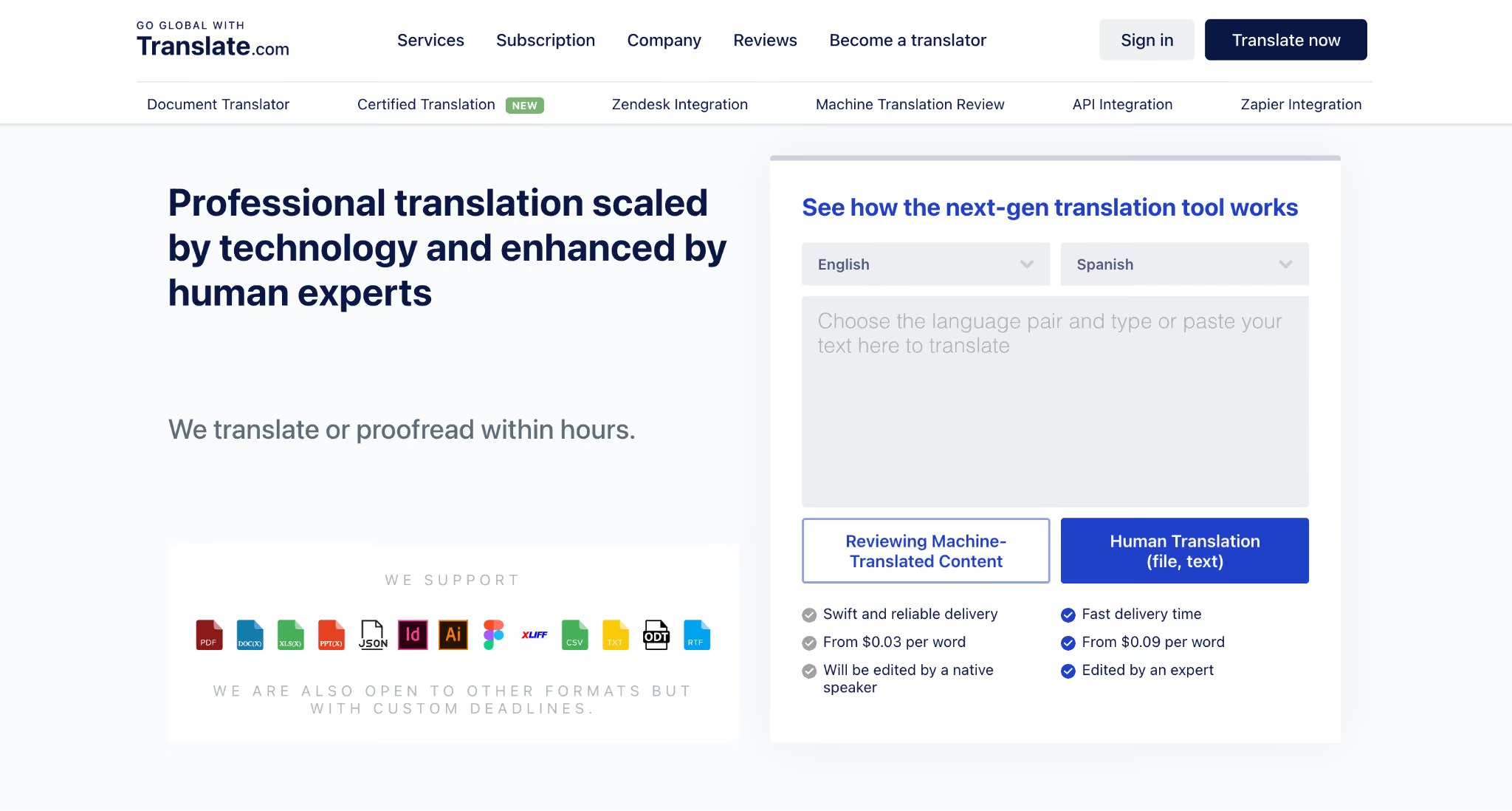
Translate (the service at translate[dot]com) is a newer entrant that positions itself as a next-generation AI translation tool with integrations into Zapier, Make, and other automation platforms. For teams that want to translate Portuguese to English content programmatically inside a larger workflow, Translate is one of the best Portuguese to English translation tools because of its API and Zapier hooks.
The pricing model is unusual because it charges per word ($0.09 per word for machine translation) rather than per month or per user, which makes it a fit for businesses that need translation as part of a workflow automation rather than as a daily user-facing tool. Translate supports translation across 5,900 language pairs, including Portuguese to English in both Brazilian and European variants.
When I tested Translate on the Portuguese conversation, the output fell somewhere between Google Translate and DeepL in quality.
The translation was accurate but slightly stiff, missing some of the warmth that JotMe and DeepL preserved.
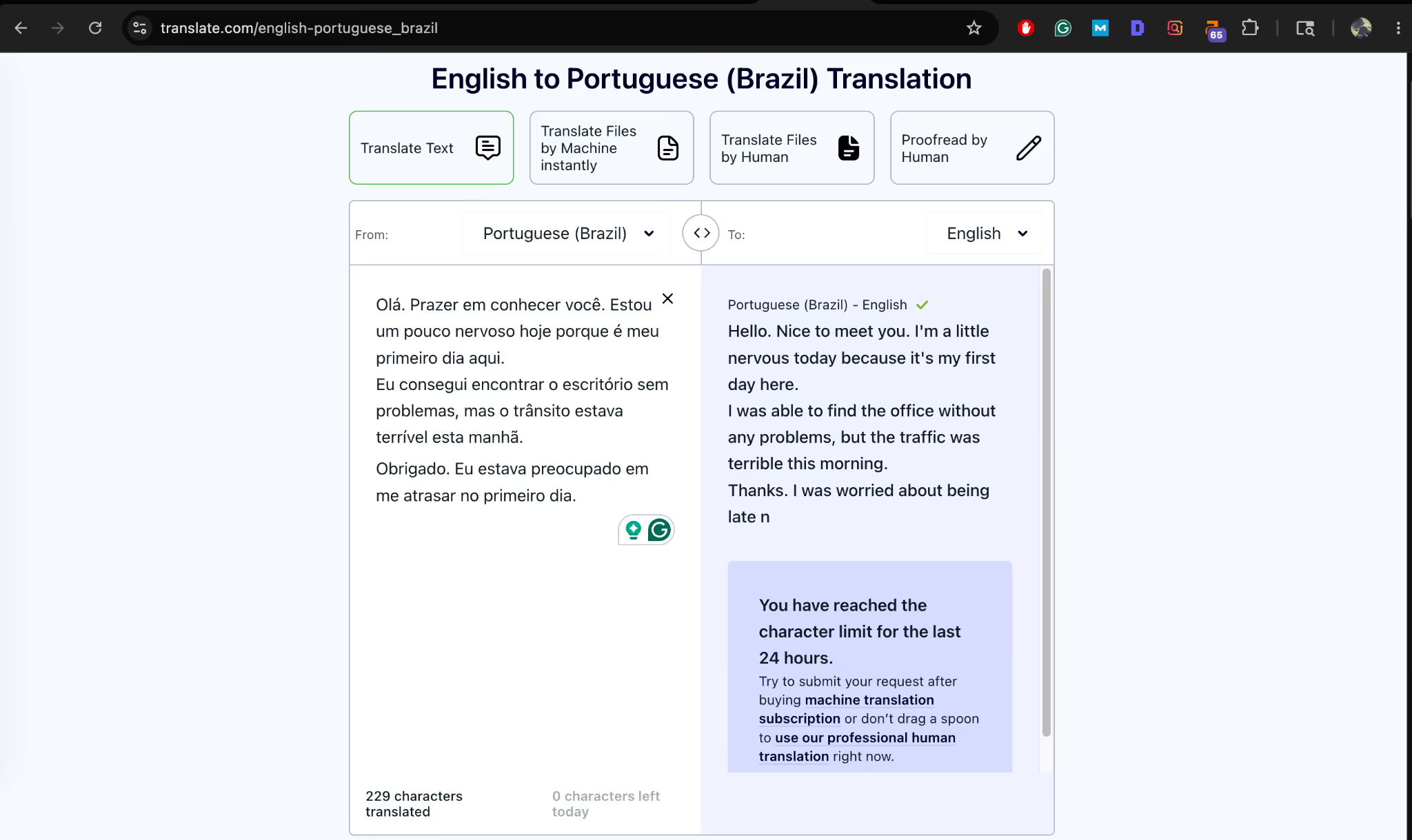
You can see the English output in the right column is competent but unremarkable.
The bigger thing in this screenshot is the notice in the bottom right corner: “You have reached the character limit for the last 24 hours.”
The free tier on Translate caps you at a small daily limit (229 characters used out of the daily allowance in my test), so you cannot rely on it for any real volume. You either pay per word, sign up for a machine translation subscription, or escalate to human translation services, which Translate also offers through its platform.
Key Features of Translate for Portuguese to English Translation
- 5,900 language pairs covering common variants like Brazilian Portuguese, European Portuguese, and regional dialects.
- Zapier and API integration that lets you build automated translation pipelines for customer support, content localization, and document workflows.
- Human translation services are available on demand for high-stakes documents that need professional review.
- Per-word pricing model starting at $ 0. Suits sporadic high-volume needs rather than steady daily use.
- Document upload translation for Word, PDF, and other office formats with formatting preservation.
Google Translate: The Free Default for Casual Portuguese to English
Google Translate is the tool most people reach for first when they need to translate Portuguese into English, and there is a reason for that. It is free, covers 130+ languages, including both Brazilian Portuguese and European Portuguese, and works across the web, mobile, browser extensions, and inside Google Workspace tools like Docs, Sheets, and Chrome.
The Google Translate Portuguese to English experience on the free web version handles long-form text reasonably well, and the mobile app even lets you translate Portuguese to English words from camera input when you point your phone at a sign or menu. For quick one-off translations, casual messages, restaurant menus, and the occasional Portuguese article you stumble across online, Google Translate gets the job done at zero cost.
When I tested Google Translate on the new-hire conversation, the translation was technically accurate but flat. There was no sense of the speaker’s nervousness, no preservation of the warm cultural register that Brazilian Portuguese carries, and no explanation of why certain choices were made.
Google Translate can translate Portuguese to English words and short phrases at lightning speed, but the moment you push it into a full conversation with emotional nuance, the gaps show. At the same time, the voice speaking was way too robotic when I tried the audio feature, which makes Google Translate Portuguese to English a poor fit for any context where you want the translation to sound like a real human spoke it.
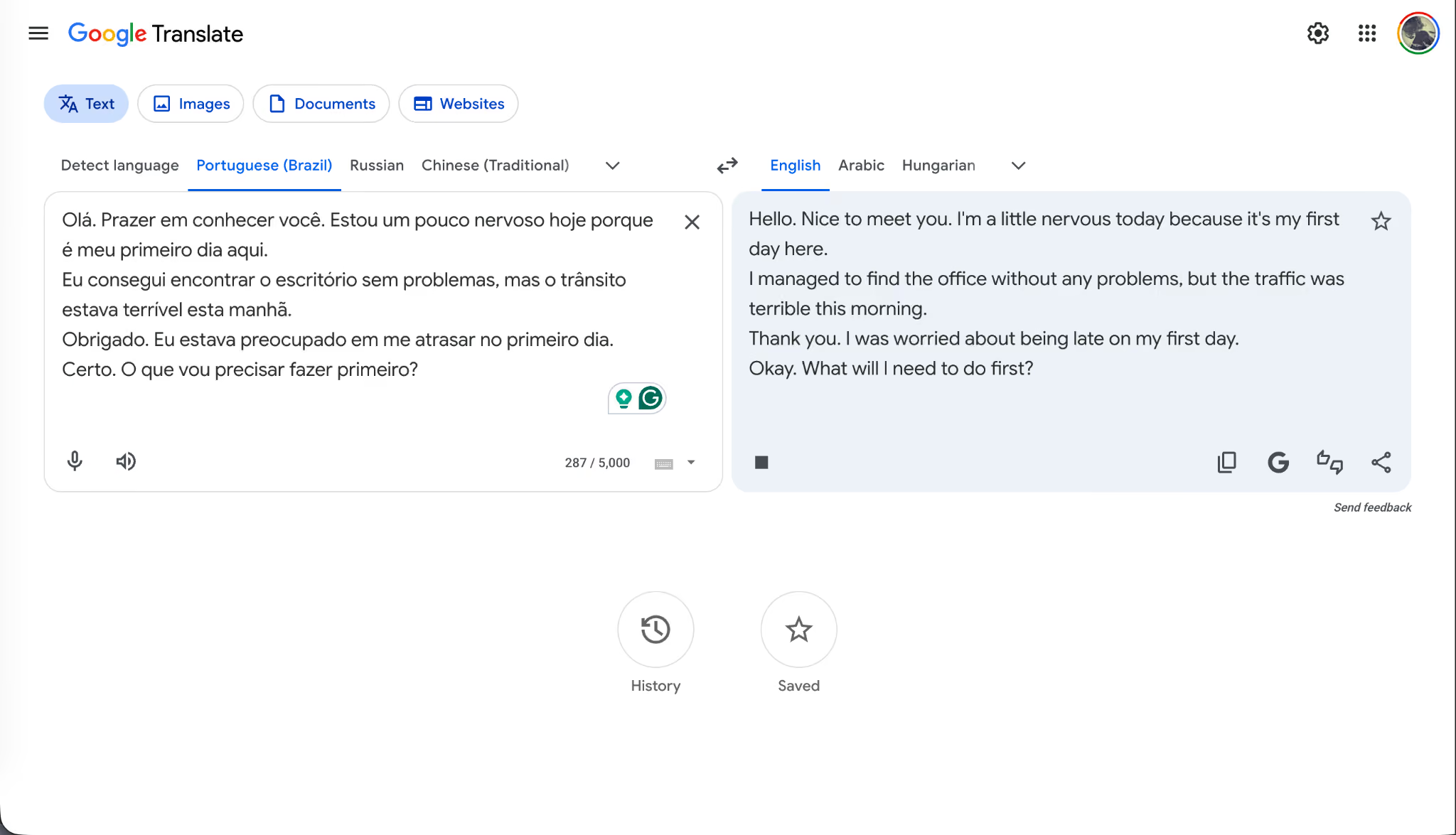
You can see the side-by-side output is clean, and the translation is correct, but compare it to JotMe’s output, and the difference is obvious.
Key Features of Google Translate for Portuguese to English Translation
- Free unlimited use across the web, mobile apps for iOS and Android, a browser extension, and built-in Google Workspace integration.
- Camera translation that translates Portuguese to English words in real time when you point your phone at signs, menus, or printed material.
- An offline mode on mobile that lets you download Portuguese language packs to translate Portuguese words to English without any internet connection.
- A conversation mode that handles back-and-forth voice translation between two speakers on a single phone.
- Document and website translation up to 10 MB on the free web version.
Microsoft Translator: Portuguese to English Inside the Microsoft 365 Ecosystem
Microsoft Translator is the translation engine baked into the Microsoft 365 suite, which means if your organization runs on Outlook, Teams, Word, PowerPoint, and Edge, you already have translation capabilities built in without buying a separate tool. Microsoft Translator supports both Brazilian and European Portuguese, and the translation quality is solid for everyday business communication. It is also free for personal use through the standalone Microsoft Translator app on iOS, Android, and Windows.
I tested Microsoft Translator inside Microsoft Teams during a simulated multilingual meeting, and the live captions feature handled Brazilian Portuguese audio reasonably well.
The translation was accurate, much like Google Translate, but it lacked the contextual depth that JotMe brought to the same scenario.
Where Microsoft Translator wins is the ecosystem play.
If you are already paying for Microsoft 365 Business or Enterprise, the translation tool is essentially free, and it integrates directly into the applications your team already uses every day. For Outlook email translation, Word document translation, and PowerPoint slide translation, it is a low-effort default to translate Portuguese to English content inside the Microsoft ecosystem.
Key Features of Microsoft Translator for Portuguese to English Translation
- Built into Microsoft 365 applications, including Outlook, Word, PowerPoint, Excel, and Microsoft Teams, with no separate setup required.
- Live captions and translation inside Microsoft Teams meetings, with Brazilian Portuguese and European Portuguese both supported.
- Microsoft Translator standalone app for iOS, Android, and Windows with offline language packs for Portuguese.
- Conversation mode that pairs two phones for live back-and-forth translation between Portuguese and English speakers.
- Translator API for developers building Portuguese to English translation into their own applications through Azure.
As virtual collaboration becomes standard across global teams, the demand for real-time multilingual communication is accelerating alongside it. According to Grand View Research, the global virtual events market is projected to grow from USD 98.07 billion in 2024 to USD 297.16 billion by 2030, driven by the widespread adoption of communication and collaboration platforms across industries. That growth is one reason Portuguese to English translation apps are becoming essential for international meetings, webinars, and hybrid events.
Quick Comparison Table: Portuguese Translated in English Apps
Here is a quick side-by-side look at how all six apps stack up across the parameters that actually matter when you are choosing a Portuguese to English translation tool for live meetings, document work, and event use. The ratings below are based on my hands-on testing rather than on each vendor's marketing claims.
How JotMe Gets Portuguese Translated in English Smoothly?
Across every test I ran, JotMe handled the Portuguese to English flow more completely than the other five apps I reviewed, which is why I would call JotMe the best Portuguese to English translation tool for live translation and real-time conversation.
The other five tools each have a place.
- DeepL is the right pick if you primarily work with long-form Portuguese documents and need polished English output for client-facing reports.
- Systran fits regulated industries where on-premise deployment is a hard requirement.
- Translate works as an automation layer when translation is one step in a larger workflow.
- Google Translate remains the free default for casual use.
- Microsoft Translator is essentially free if your organization already runs on Microsoft 365.
But for the specific use case of running live multilingual meetings, webinars, and events where Portuguese and English speakers need to communicate in real time, JotMe is the one I would put on the company laptop.
If you are running global hiring calls with Brazilian or Portuguese candidates, hosting customer events with audiences across Lusophone markets, or onboarding international team members who are still building confidence in English, JotMe is worth everything it claims to be.
The free text translation tier alone is good enough to translate Portuguese to English content and test the contextual quality before you sign up for the paid plan, and the 200-minute live translation allowance covers a meaningful number of meetings per user per month.
Try JotMe on your next Portuguese to English call and see whether the difference is as obvious to you as it was to me.
FAQs
How Accurate Is Google Translate for Portuguese to English?
Google Translate’s Portuguese to English translation is accurate enough for casual use, including menus, signs, articles, and basic conversational text in both Brazilian and European Portuguese. The literal accuracy is competitive with paid tools, but the output tends to be flat and lacks contextual awareness, idiomatic flair, or cultural framing. For professional translation of contracts, marketing copy, or client-facing communication, tools like JotMe or DeepL produce noticeably better results because they preserve tone and register more reliably.
Can JotMe Translate Audio in Real Time From Portuguese to English?
Yes, JotMe can translate Portuguese to English audio in real time during live video calls on Zoom, Google Meet, Microsoft Teams, Webex, and Slack huddles, covering both Brazilian Portuguese to English and European Portuguese to English routes. The application captures audio locally on the listener’s device without joining the meeting as a bot, then renders both the original Portuguese transcript and the translated English text side by side as the speaker continues talking.
Does JotMe Support Brazilian Portuguese and European Portuguese?
Yes, JotMe supports both Brazilian Portuguese to English and European Portuguese to English as distinct translation routes, which means the engine adjusts for vocabulary, verb conjugations, idioms, and cultural register differences between the two variants. For most enterprise teams hiring from Brazil, the Brazilian Portuguese to English flow is the most commonly used variant.
What Is the Best Free App to Get Portuguese Translated in English?
For unlimited free use and better contextual quality, JotMe’s free text Portuguese to English translator handles up to 5,000 characters per session and includes the Explanation panel that breaks down why each translation choice was made. If you only need occasional short translations and contextual accuracy matters, JotMe’s free tier produces better output.
How Do I Translate a PDF From Portuguese to English?
For users who need to translate PDF Portuguese to English files, the strongest options are Systran (which specializes in document translation, including PDFs and preserves formatting), DeepL (which translates PDFs cleanly on its Starter plan and above), and Google Translate (which handles PDF uploads up to 10 MB for free on the web).
Can I Use JotMe for Live Events and Webinars in Portuguese?
Yes, JotMe supports live events and webinars through its share AI live translation via QR Code feature. The event organizer runs JotMe on the speaker’s device, generates a QR code within the application, and displays it on the screen at the start of the session. Audience members scan the QR code with their phone camera, select their preferred language (English, Spanish, Hindi, Arabic, or any of the 200+ supported languages), and receive live captions on their device while the Portuguese speaker continues presenting.
Does JotMe Replace Human Interpreters at Multilingual Events?
JotMe replaces the need for on-site interpreters at most internal enterprise events, multilingual webinars, and global town halls where the goal is comprehension rather than diplomatic precision. For high-stakes diplomatic, legal, or medical contexts where exact wording carries legal or clinical weight, human interpreters remain the right choice.
How Does JotMe Handle Brazilian Slang and Regional Expressions in Portuguese?
JotMe’s Brazilian Portuguese to English model handles common slang, regional expressions, and informal contractions reasonably well. For deeply regional slang from specific Brazilian states or very current internet slang, no machine translation tool is perfect, but JotMe’s output stays closer to natural English than Google Translate or Microsoft Translator on the same input.
Last updated on
July 29, 2026
Follow us on social media: