Guides
DeepL Alternatives: DeepL Voice Vs. JotMe for English Translations [2026]

Viraj Mahajan
January 17, 2026
![DeepL Alternatives: DeepL Voice Vs. JotMe for English Translations [2026]](/_webflow-assets/025d9e311a95cfccfc521f6224a81cb3.avif)
Accurate and context-based English translations are pivotal in modern businesses, which traditional tools with a word-for-word translation mechanism simply can’t deliver.
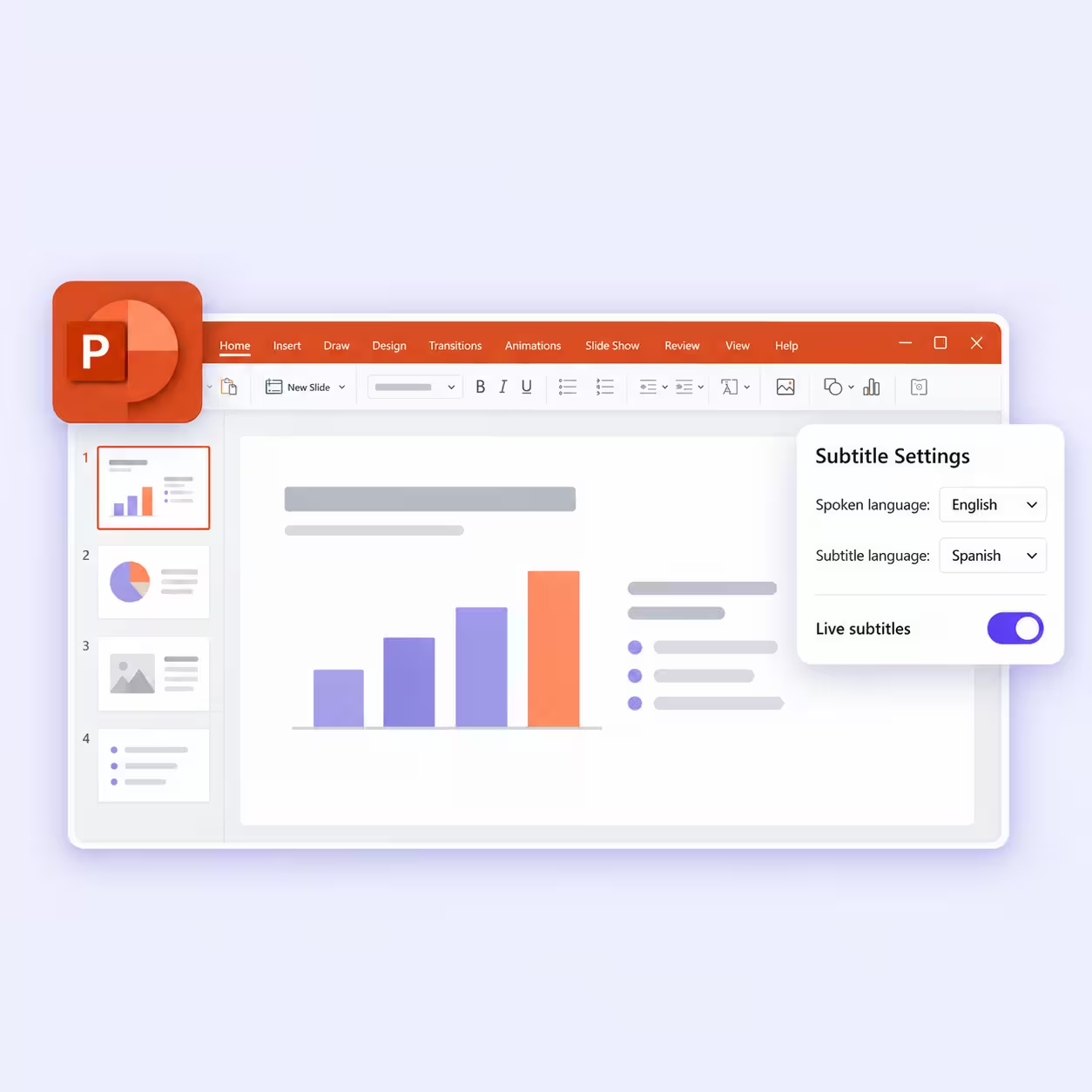
This is why many prefer live translation tools like DeepL Voice for their important and sensitive business communications. DeepL Voice is known for providing accurate translations and making them accessible to all through its integration with Microsoft Teams and Zoom.
However, DeepL Voice’s setup process is fairly technical. You must contact their sales team to obtain a license and follow a detailed setup guide.
If you’re not very confident about that, JotMe can be a reliable DeepL alternative. The setup is simple, no licensing is required, and JotMe offers extra features like AI Ask, real-time summaries, and post-meeting notes to streamline your meeting workflow.
We’re saying this based on real-world tests of both DeepL and JotMe, including bilingual Google Meet meetings and internal Slack calls. Here’s what we found:
- At $20/month, JotMe provides live translations in 107 languages (45 on desktop and 77 via the Chrome extension), along with features such as AI Ask, real-time summaries, and post-meeting notes. It also offers a mobile app for one-on-one conversations.
- DeepL Voice offers real-time captioning services on Zoom and Microsoft Teams meetings and generates meeting records. However, they haven’t publicly disclosed their pricing plan, and you must contact their sales team for a customized quote.
In this article, we will compare JotMe and DeepL Voice’s features, pricing, and performance in real-time meetings to determine which works best in real-world situations.
What are the Best DeepL Voice Alternatives for Live and Real-Time Translation?
DeepL Voice is considered an accurate live translation app, but it has a few limitations, including complex licensing, limited support for a few video conferencing platforms, and non-transparent pricing. So, here are a few DeepL Voice alternatives to consider:
- JotMe: Uses an advanced speech recognition technology to understand the tone, flow, and meaning of conversations, and preserve them in translations. Unlike DeepL Voice, it is simple to deploy, provides post-meeting documentation, and offers transparent pricing.
- Maestra AI: Provides instant and real-time voice translation in 125+ languages. Maestra AI also provides the option to choose between AI-generated voices or voice cloning that mirrors your tone and cadence to maintain naturalness in translations.
- Interprefy: Hybrid solution that combines professional human interpreters with AI speech translation across 80+ languages.
- KUDO: Designed for large-scale, multilingual meetings, webinars, and conferences.
- Wordly: Real-time translation and transcription in over 60 languages, without relying on human interpreters.
- LiveVoice: Enables organizers to stream real-time audio and translations and invite more than thousands of listeners at once.
How We Selected the Best DeepL Alternatives?
Choosing the best DeepL competitors isn’t just about the languages they support, but also how easy they are to deploy, how transparent their pricing is, and how well they streamline meetings. Here’s how we evaluated AI live translation tools:
- Easy to Deploy: We checked how easy it is to deploy the live translation tool. Tools like JotMe, Maestra AI, and LiveVoice don’t require complex licensing.
- Platform Compatibility: Unlike DeepL Voice, alternatives like JotMe and Maestra AI work with most video conferencing platforms, including Zoom, Microsoft Teams, Google Meet, and more.
- Pricing Transparency: Price is one of the first things we looked at, and unlike most AI translators, JotMe doesn’t require you to contact their sales teams.
- AI Features: We wanted a DeepL Voice alternative that does more than live voice translation. Among the available options, JotMe stood out for features such as AI Ask, Generate Speech, and post-meeting notes.
Based on the selection criteria, JotMe emerged as a suitable DeepL alternative, so we conducted a detailed comparison between the two.
Quick Comparison of DeepL Voice vs. JotMe Features
Here’s a quick comparison table for DeepL Voice and JotMe on different parameters that would help you understand the functionality both tool offers in real-world scenarios:
Why are Users Choosing Tools like DeepL Voice and JotMe?
Users primarily choose tools like DeepL Voice and JotMe due to their translation accuracy in professional settings and strong data privacy standards. Although both serve a similar purpose, their use cases are different.
- You can go ahead with DeepL Voice if you need voice translations for live business meetings for large teams and enterprise use. DeepL Voice requires you to integrate with Zoom or Microsoft Teams to make translations accessible to all.
- You can choose JotMe when you need accurate and natural translations for multilingual meetings, and an AI assistant that answers your questions, generates real-time summaries, and drafts an email on your behalf.
Here’s a tabular comparison of JotMe and DeepL Voice based on their use cases:
DeepL Voice vs. JotMe: How do Their Core Features Compare?
Both DeepL Voice and JotMe are live translation tools designed to streamline your business communication. However, JotMe takes the lead with its simple interface, no-integration requirement, concise summaries, and a mobile app that can generate speech and let you set the translation quality.
Here’s a quick comparison table of DeepL Voice and JotMe features that will help you understand better:
What are the Key Features of JotMe?
Some of the standout features of JotMe include real-time contextual translation, AI Ask, real-time summary, generate speech, and AI meeting notes. Let’s take a closer look at their offerings:
JotMe Provides Context-Based Translation
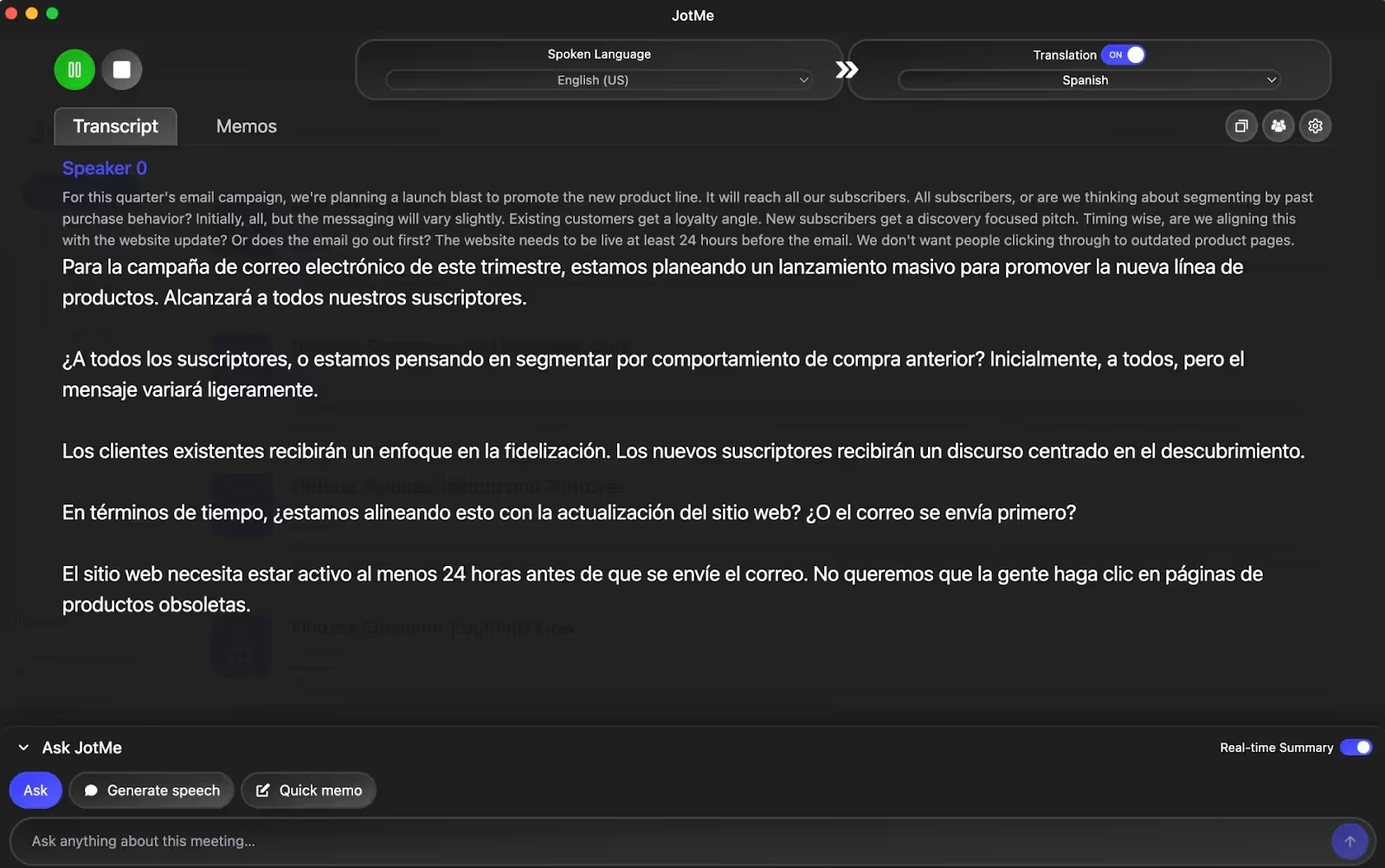
One of the standout features we loved about JotMe is its contextual translation engine, which goes beyond word-for-word translations. The live translation listens to the conversations in real time, understands the tone, flow, and intent, and preserves them in translation.
We saw this in action during last week’s calls with our Spanish-speaking colleagues. The meeting agenda was to discuss the deliverables for our next quarter, and one of us mentioned:
“For this quarter’s email campaign, we’re planning a launch blast to promote the new product line.”
JotMe understood the context and displayed:
On the other hand, the following was the output with a traditional translator:
The traditional translator kept the idiom “launch blast” as it is in Spanish, which could confuse the Spanish-speaking colleagues. JotMe, at the same time, translated it as “large-scale launch,” which is correct. This makes JotMe a reliable English to Spanish translation tool.
JotMe Requires No Platform Integrations or Permissions
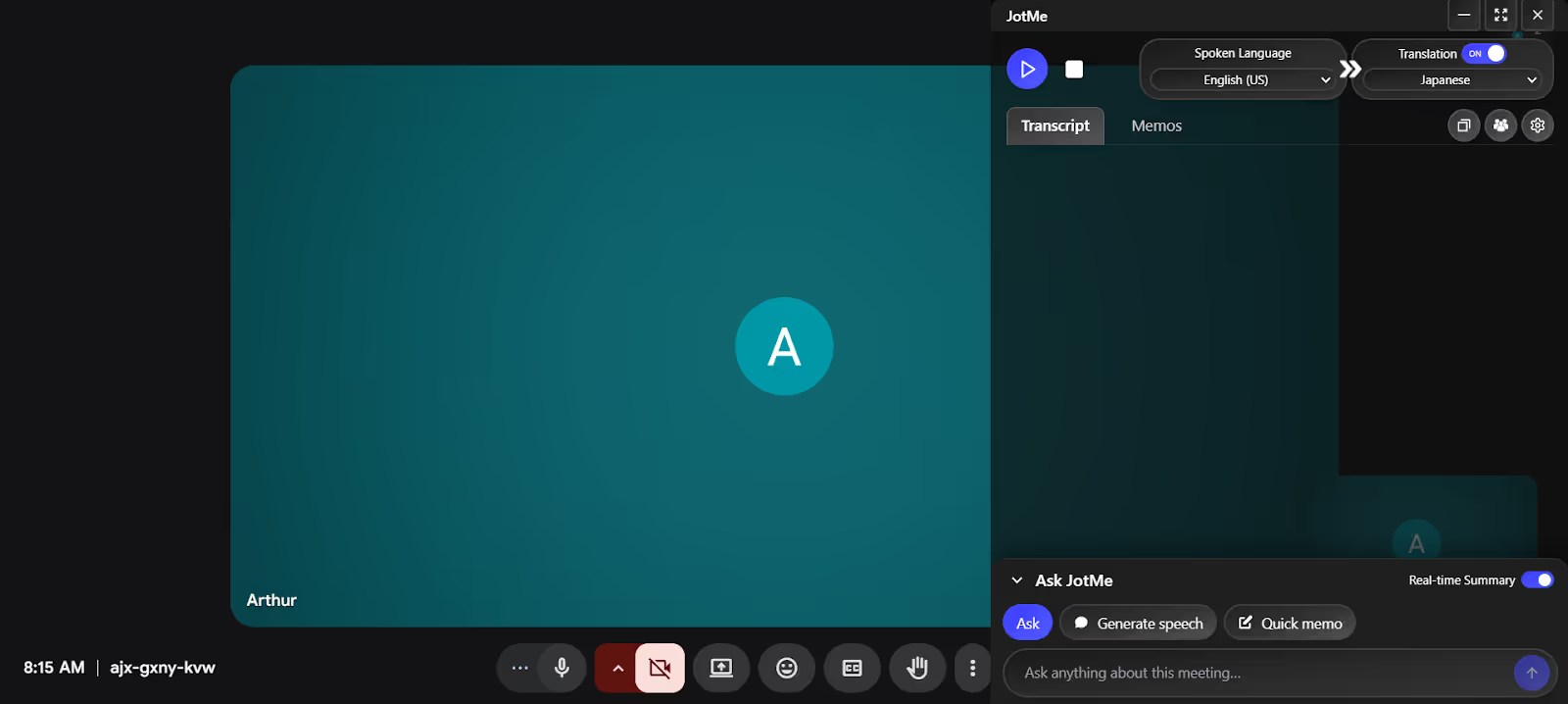
We love how JotMe works at the OS level, as it listens to what you say and provides translations directly on the screen. That means the DeepL Voice competitor requires no complex integrations with Zoom or Microsoft Teams, nor the addition of a bot to the meeting.
The level of simplicity JotMe offers makes anyone on your team set it up and get started quickly.
JotMe Generates Post-Meeting Notes
It’s a serious hassle when you’re asked to take meeting notes while brainstorming and providing necessary feedback. We’ve all been there.
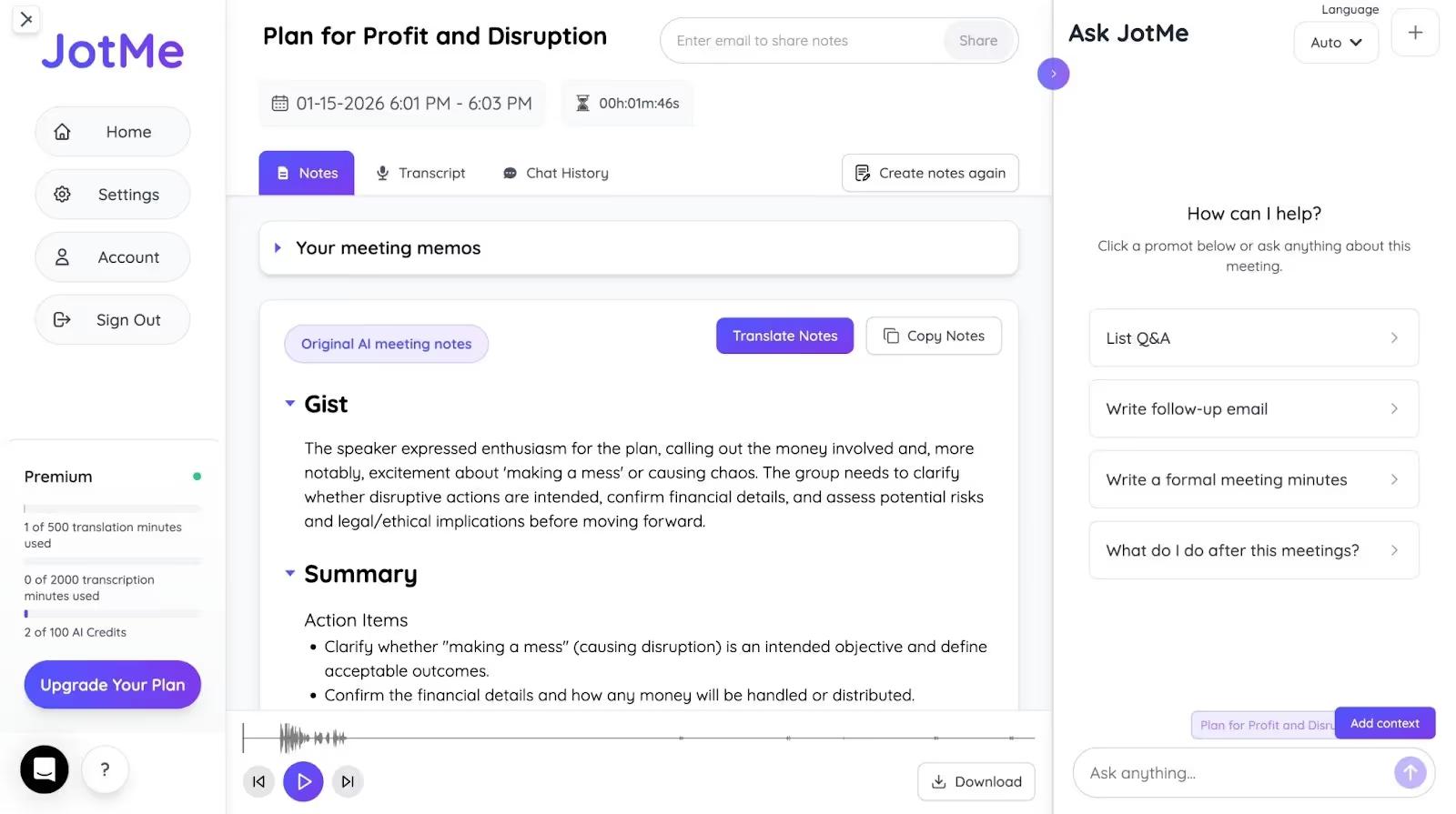
However, with JotMe, that’s a thing of the past. Aside from translating conversations in real time, JotMe is one of the best AI note-takers that generates meeting notes, divided into Gist, Summary, and Action items, after the meeting. This serves as a reference for future meetings.
Not only that, JotMe’s AI Meeting Notes Translator can translate the notes in 13+ languages and draft an email based on the conversations, which you can share with others.
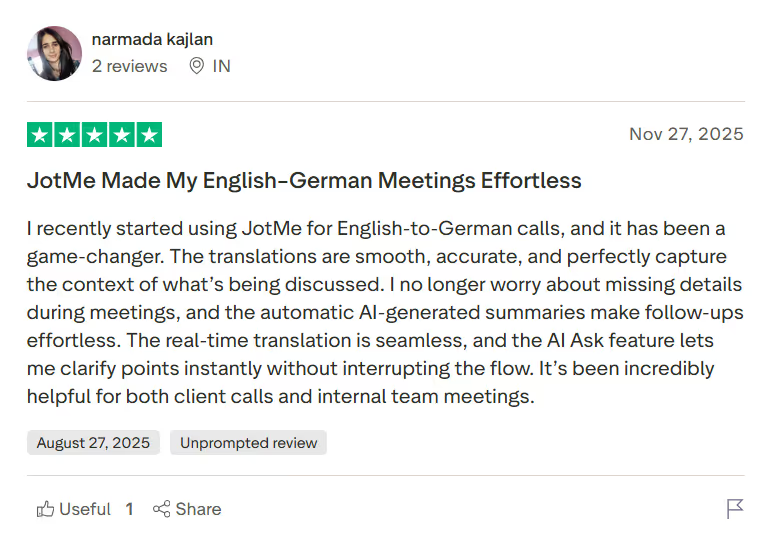
A user on Trustpilot mentions how the automated AI-generated summaries keep them in sync and make post-meeting follow-ups effortless.
JotMe Lets You Set Translation Quality
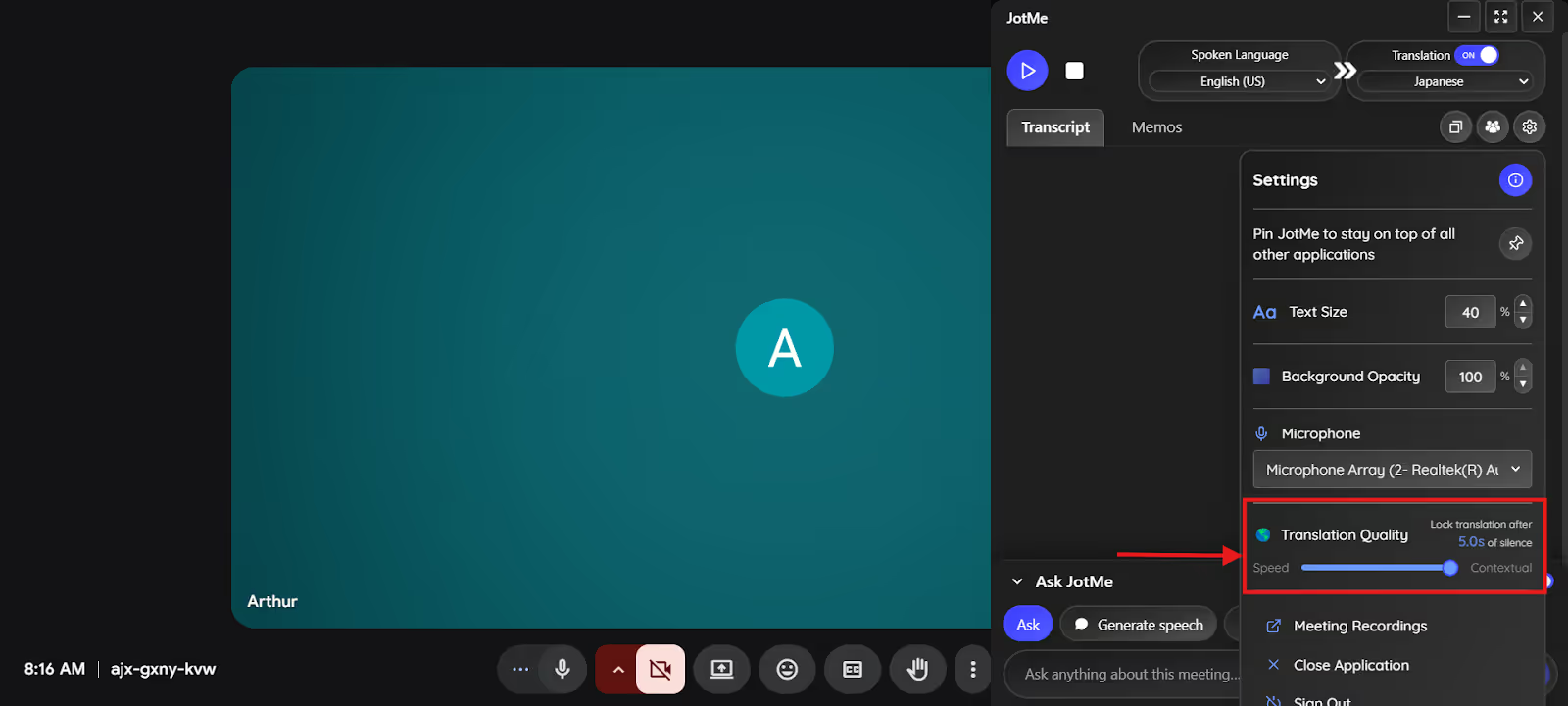
Different moments may demand different outputs. That is, during casual conversations, you may want fast translations to keep up with the pace, while for sensitive business meetings, accuracy can be the priority.
To support both needs, JotMe has a dedicated “Translation Quality” setting. Unlike many traditional translation tools, this lets you adjust the balance between speed and accuracy.
When you set the bar to the highest or “Contextual,” there’s a slight latency in translation, but the accuracy will be the highest. Meanwhile, setting the bar to the extreme left can produce fast translations, but the accuracy will be slightly less.
JotMe’s Mobile App Can Turn Text into Speech
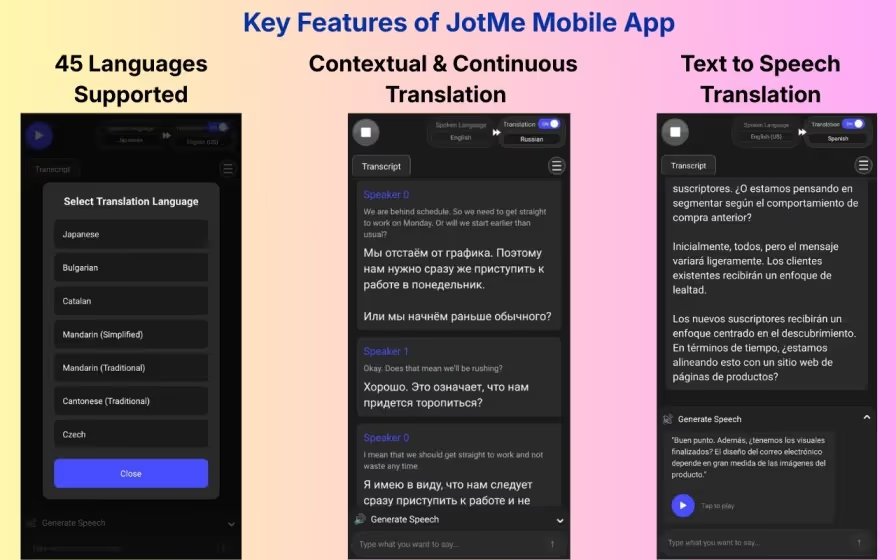
Not only remote international meetings, but JotMe also offers a solution for your one-to-one conversations. JotMe’s mobile app has a Generate Speech feature that generates voice translations of the conversations.
Open the app on your phone, go to its “Generate Speech” feature, and type anything you want to say. JotMe provides translations in your preferred language with clear pronunciation, so listeners understand you fully and respond accordingly.
TL;DR:
JotMe is a great fit for users who:
✅ Want real-time, context-aware translations in 107 languages.
✅ Need auto-generated, downloadable transcripts and translations after every call.
✅ Want to get answers about the meeting or specific terms.
✅ Want to speak with others in their language
JotMe isn’t the best fit for users who:
❌ Want subtitles of their downloaded videos
❌ Need to translate their coursework or PDFs
Frequently Asked Questions About JotMe
How to use JotMe?
To use live translators like JotMe for contextual translation, download the app from its official website and install it on your device. Then start your meeting on your preferred platform, launch JotMe, select the languages, press Play, and start speaking to receive real-time contextual translations.
Is JotMe safe?
Yes, according to JotMe’s privacy policy, it implements industry-standard security measures and aligns its practices with the GDPR, including secure servers and encryption, data minimization to protect your sensitive business conversations from unauthorized access, loss, or misuse.
What languages are supported by JotMe?
JotMe supports 107 languages (45 on desktop, 77 in the Chrome extension), including less common options like Burmese, Filipino, Swahili, Hungarian, and more.
What are the Core Features of DeepL Voice?
Some of the standout features of DeepL Voice include live translations, integrations with Zoom and Microsoft Teams, the ability to create a custom glossary, downloadable meeting transcripts, and DeepL Voice for Conversations. Let’s explore these features in detail:
DeepL Voice Offers Real-Time Translation
DeepL Voice is well recognized as an accurate live translation tool, and in our tests, it was clear to us that the tool is built for businesses and enterprises in mind. It didn’t just perform word-for-word swaps; it also captured industry jargon well.
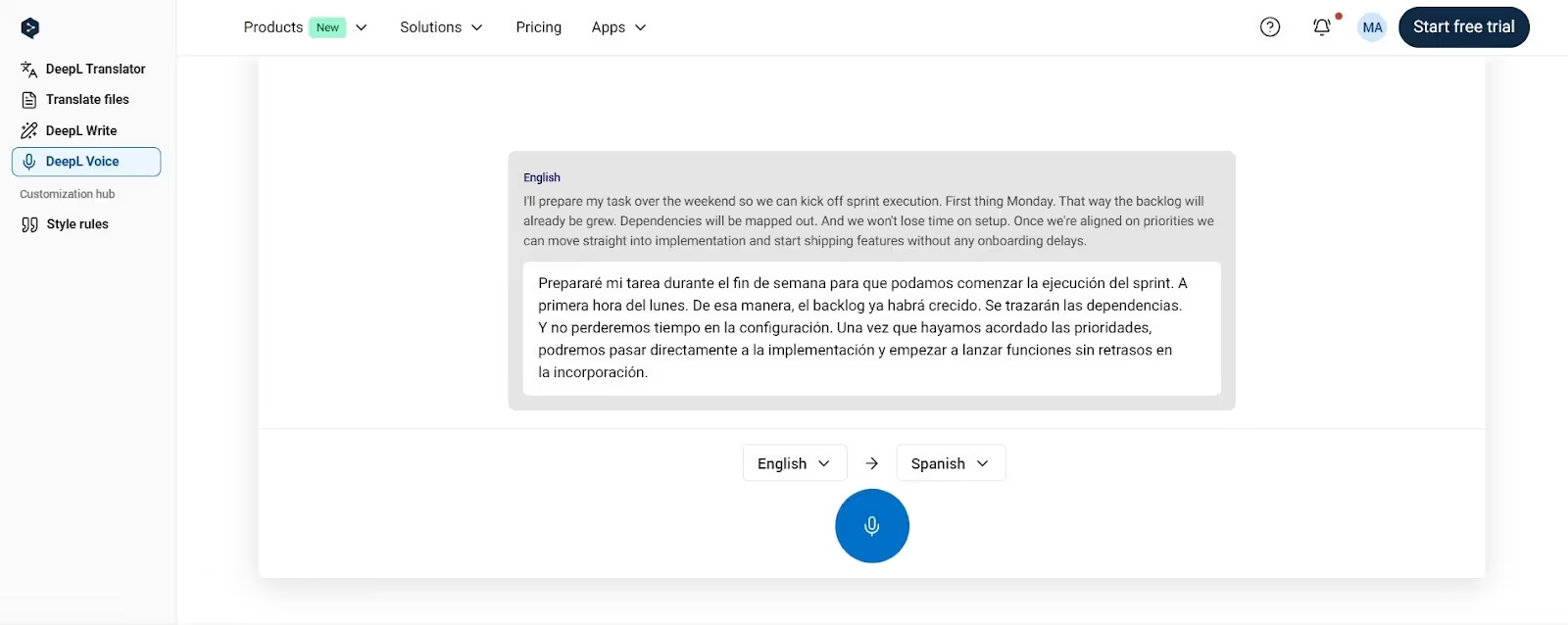
We validated this during one meeting with our Spanish-speaking team, when everyone was asked to use idiomatic expressions and technical jargon in their conversations. So, when someone said, “I’ll prepare my tasks over the weekend so we can kick off sprint execution.”
DeepL Voice translates as:
DeepL Voice understood the context and translated “we can kick off” to “we can begin.” That’s a major upgrade over traditional translators.
However, DeepL Voice might mishear words (as in the screenshot, it misheard “groomed” as “grow”). Meanwhile, JotMe carefully listens to every word, produces contextually accurate translations, and removes any scope for misunderstandings or confusion.
DeepL Requires Integrations With Zoom and Microsoft Teams
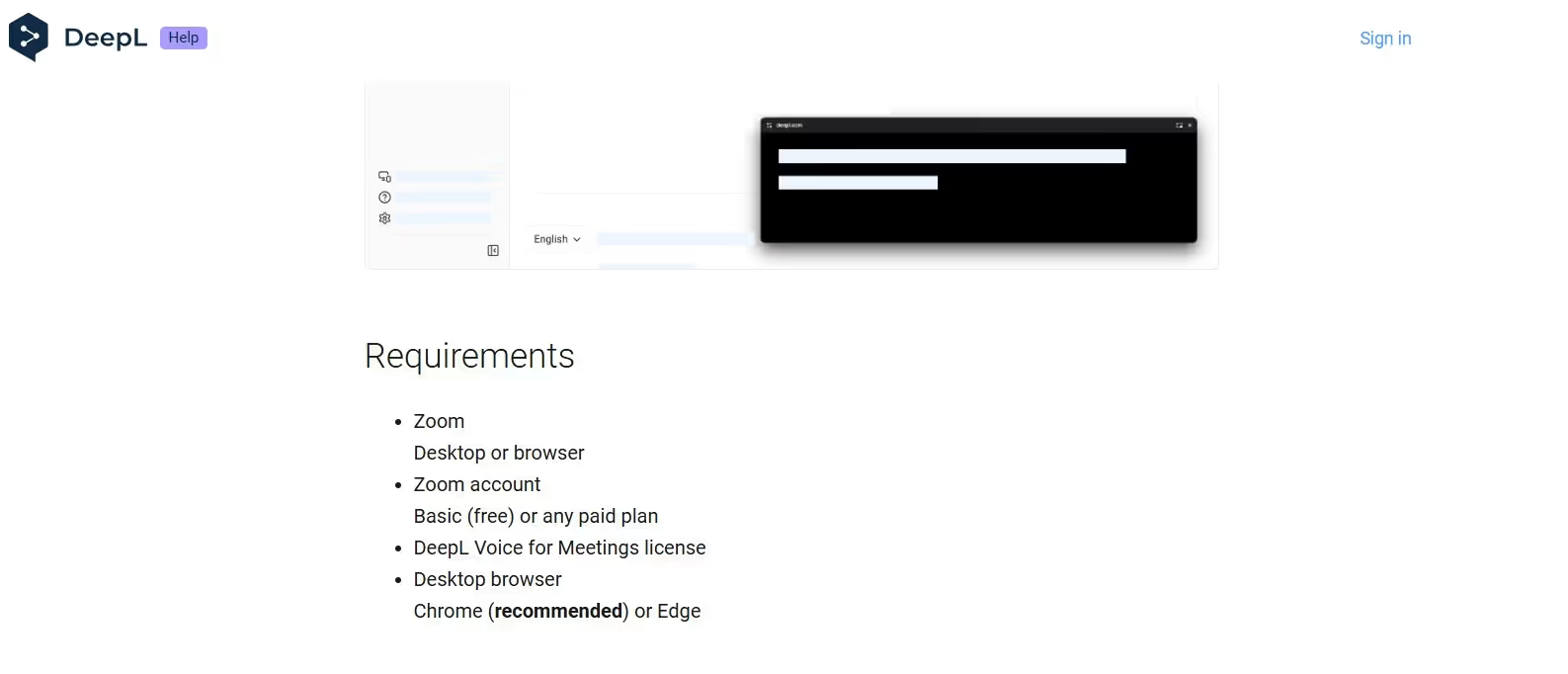
Unlike JotMe, which captures audio from Zoom and Microsoft Teams when running in the background, DeepL requires direct integration with the video conferencing platforms.
Once you do that, every participant in the meetings has access to meeting translations. Each participant can select their preferred language and stay in sync with the meeting discussions. No need to make an individual purchase.
This is convenient, but the real struggle is the process in between. You must contact their sales team to obtain a DeepL Voice license and follow the provided guide to integrate it with Zoom and Microsoft Teams.
Due to this multi-step, technical setup, DeepL Voice is better suited for enterprises and large teams with dedicated IT support.
Meanwhile, DeepL Voice’s alternative (JotMe) has a simple installation and a flexible pricing policy. This makes JotMe accessible to all, be it individuals or enterprises.
DeepL Voice Lets You Create a Custom Glossary
Another DeepL Voice feature we found handy is its custom glossary. Here, you can add specialized technical terms that you feel AI can misinterpret. This can potentially improve the overall translation quality.
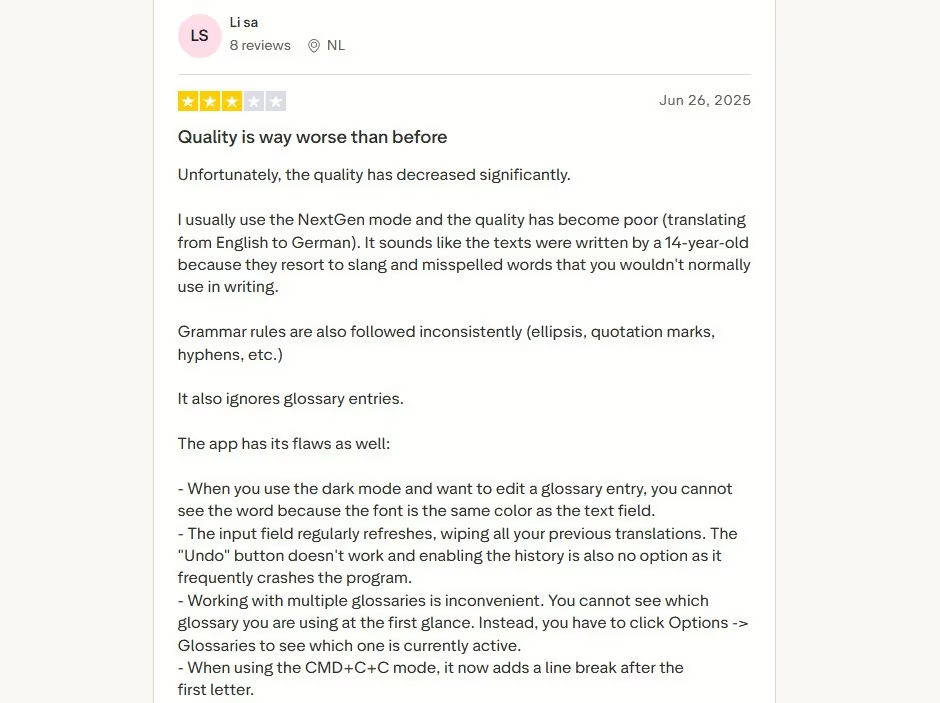
However, on the flip side, a Trustpilot user reports that DeepL Voice sometimes ignores glossary entries, leading to translation errors. That’s not something you’ll see in JotMe, which provides accurate translations without the need to create a custom glossary.
DeepL Voice Offers Downloadable Meeting Transcripts
According to DeepL’s Help Center, DeepL Voice generates a detailed meeting transcript and makes it available for download at the end of the meeting.
The transcript itself is fairly comprehensive, showing conversations in the speaker’s original language alongside translations in your chosen language. This makes it useful as a future reference and simplifies reviews, follow-ups, and documentation.
That said, this feature isn’t available on DeepL Voice’s free plan, so we couldn’t test it firsthand. Based on what’s offered, JotMe stands out by providing searchable notes into Action Items, Gist, and Summary, making them much easier to skim and act on.
DeepL has a Mobile App for One-to-One Conversations
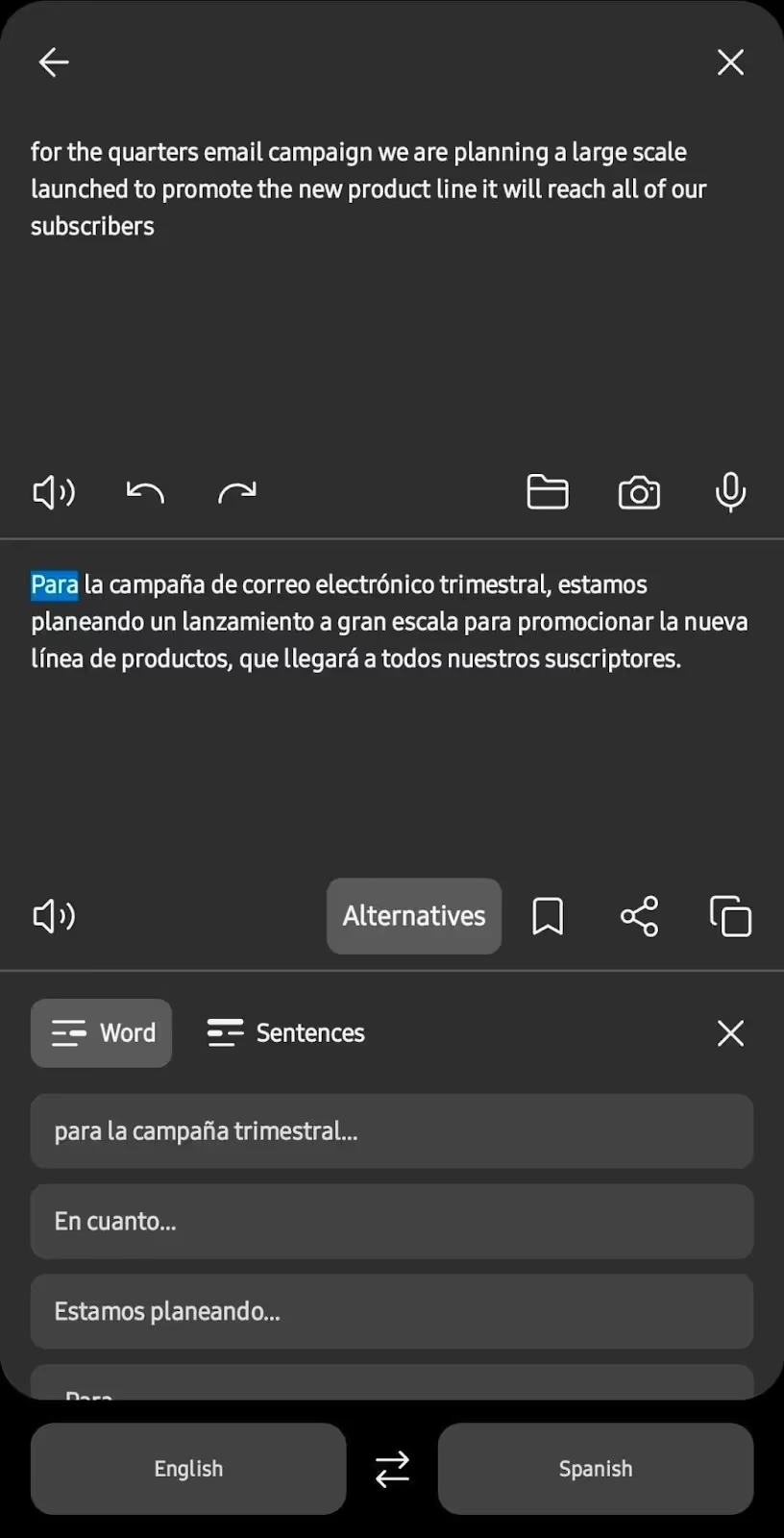
Like JotMe, DeepL has a mobile app (DeepL for Conversations), suitable for one-to-one conversations. The app’s interface is fairly simple, so you select the spoken and translation languages, then start speaking. DeepL displays translations almost instantly.
Besides being quick, the translations are accurate, and DeepL provides alternatives to the translated words, so we can pick the phrasing that best matches the tone and context. DeepL Voice’s competitor (JotMe), however, offers greater control over the translation accuracy.
TL;DR
DeepL Voice is suitable for users who:
✅ Want integration with Microsoft Teams and Zoom.
✅ Need transcriptions after the meeting.
✅ Need live translations for large teams and enterprises.
DeepL Voice isn’t suitable for users who:
❌ Students and freelancers who want to translate their online classes and meetings, respectively.
❌ Need context-aware and accurate translations.
❌ Want a free trial to test the available features.
FAQs for DeepL Voice’s Translations
Can DeepL translate an audio file?
No, DeepL is specifically built for live voice translation and cannot translate audio or video files. If you have an audio file to translate, play it and open JotMe in the background. JotMe will provide the translation as the conversation occurs.
Is ChatGPT or DeepL better?
Accuracy-wise, DeepL is a much better real-time translator than ChatGPT, and also offers extra features like a custom glossary and downloadable meeting notes. However, most of its advanced features are available upon licensing, which can be obtained through DeepL Voice’s sales team.
Meanwhile, JotMe offers a free plan that lets you try each of its features, including AI Ask, real-time summary, generate speech, and more. Also, unlike DeepL Voice, JotMe’s premium plans are transparent.
Does DeepL do voice translation?
Yes, DeepL is designed to translate conversations in real time during Zoom and Microsoft Teams meetings. However, the installation is fairly complex and is ideally suited for enterprises with a dedicated IT team.
On the other hand, JotMe’s installation is fairly simple, and getting started with it takes a few steps. It doesn’t require any complex installations or licensing.
How does the Pricing of DeepL Voice vs. JotMe Compare? (Last Updated: January 2026)
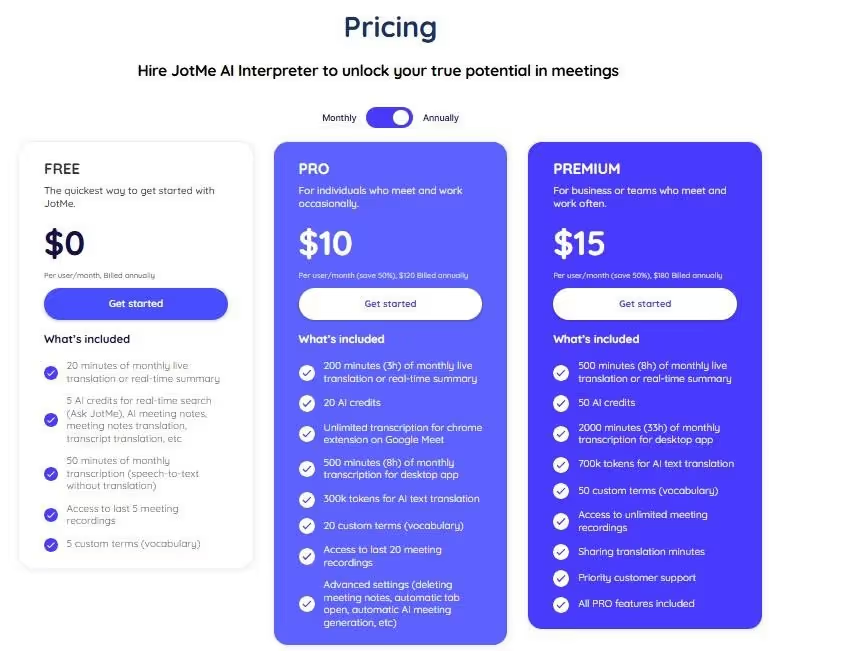
JotMe offers a free plan with 20 minutes of live translation, 50 minutes of live transcription, and 5 AI credits per month. Its other plans include Pro and Premium, which are detailed as follows:
- Pro ($20/month): This plan provides 200 minutes of live translation, 500 minutes of live transcription, and 20 AI credits per month.
- Premium ($30/month): This plan includes 500 live translation and 2000 live transcription minutes, 50 AI credits, and unlimited access to meeting recordings.
On the other hand, DeepL Voice doesn’t publicly list its pricing plans. Its costs depend on specific translation requirements, so you must contact its sales team to obtain a customized quote.
When Should Users Choose DeepL Voice and JotMe?
Both JotMe and DeepL are known for their accurate live translations, but they serve different audiences. So,
Choose DeepL Voice if:
- You host meetings primarily on Zoom and Microsoft Teams.
- You require a centralized live translation tool, which is accessible to every participant.
- You have a dedicated IT team that can handle the complex licensing and setup.
Choose JotMe if you:
- Need a translation tool that understands the tone, flow, and intent to provide context-aware translations.
- Need advanced AI features like AI Ask, generate speech, and post-meeting summaries.
- Want a live translation tool with transparent pricing.
- Want to share the translation minutes with your team.
Conclusion: Which One Should You Pick, DeepL Voice or JotMe?
Selecting an English translation software depends on your translation needs, budget, and workflow. Here’s a quick overview of DeepL voice and JotMe:
- DeepL Voice is more suited for enterprises and large teams working on complex projects, thanks to features such as Zoom and Microsoft Teams integration and custom glossaries.
- JotMe’s simple interface, transparent pricing policy, no-integration setup, and additional features like real-time summary and AI meeting notes make it suitable for individuals, small teams, and even enterprises.
From the detailed DeepL Voice vs. JotMe comparisons, it’s clear that JotMe can be a reliable companion to your everyday meetings. JotMe provides context-based translations to ensure there aren’t any mistranslations or awkward pauses in your international meetings.
Other than that, at $20/month, JotMe provides real-time summaries, meeting notes, and a mobile app to support one-on-one conversations. DeepL Voice, on the other hand, requires a license and a pretty lengthy setup. This makes its use case pretty limited.
Download JotMe today and get accurate, real-time translations.
FAQs for DeepL Voice vs. JotMe Live Translation
What is the most accurate online translation tool?
DeepL Voice and JotMe are neck-and-neck in terms of accuracy, as both understand tone, flow, and meaning and preserve them in translations. However, DeepL sometimes mishears some phrases or words, which can mess up the translation.
JotMe, meanwhile, captures almost every word correctly and uses its advanced speech recognition technology to provide accurate English translations.
How accurate is AI translation?
Many online AI live translation tools claim to be accurate, but JotMe ensures everyone understands what’s discussed in the meeting and avoids misunderstandings caused by mistranslation. You get live translation in 45 languages on desktop and 77 languages on the Chrome extension.
What is better than DeepL?
JotMe is a better live translation tool than JotMe with its hassle-free setup, no integrations, and added features such as AI Ask, real-time summary, and AI Meeting notes. DeepL Voice, although accurate, requires licensing and a complex setup.
Last updated on
April 14, 2026
Follow us on social media:
![JotMe — Is Google Translate Accurate? [2026 Test]](/_webflow-assets/0d0512afc7b037d74dff536f22fed08f.avif)