


Bing Translate vs. Google Translate: Better Alternative for Multilingual Companies

Viraj Mahajan
October 31, 2026
Short Answer
In the Bing Translate vs. Google Translate matchup, I'd choose Google Translate for longer passages and whole documents. Its web translator accepts 5,000 characters, compared with Bing's 1,000, and its Documents tab handles Word, PDF, PowerPoint, and Excel files up to 10 MB. Bing is useful when I want a short translation with a Standard, Casual, or Formal tone. When my work continues into supplier calls, webinars, and follow-up notes, I'd choose JotMe for its live translation, custom vocabulary, and meeting tools. Language coverage varies between live captions, translated speech, and files, so I check the mode I need before choosing.
I have been using Google Translate for almost everything. When a message from my colleague in Shenzhen, China, arrives in Traditional Chinese, I copy it straight into Google Translate because Microsoft Teams' built-in translation loses the message's context. I have also seen several people I work with run their work through Bing Translate. Watching both habits up close pushed me to compare these two translators on the grounds that matter at work. I wanted to know where each tool helps, where I still need to check the wording, and which AI translation tool can also support my online meetings, webinars, client visits, and in-person events.
For this comparison, I use “Bing Translate” to mean the Bing website. I identify Microsoft Translator app features, Word translation, Teams Interpreter, and Azure separately because they have different capabilities and access requirements.
| Feature | Bing Translate Website | Google Translate | JotMe AI Translator |
|---|---|---|---|
| Best for | Short text with a choice of tone | Free text, document, image, and website translation | Live meetings plus text, document, image, and voice translation for work |
| Text per translation on the web | 1,000 characters | 5,000 characters | 5,000 characters in the free web translator |
| Text language coverage | 135 entries in Microsoft's text translation matrix | About 250 languages | 100+ for text and file translation, 200+ languages for live translation. |
| Document upload | No document-upload tab | .docx, .pdf, .pptx, and .xlsx up to 10 MB on a computer | PDF, Word, PowerPoint, Excel, and more in the desktop app |
| Tone and context control | Standard, Casual, and Formal tones | Understand and Ask for alternative phrasings in supported app rollouts | Explanation notes, translation preferences, custom vocabulary, and work context |
| Live meeting translation | No meeting capture in the website; Teams Interpreter is a separate feature | No meeting capture in the website; the mobile app supports live conversations, and Google Meet has separate speech translation | Desktop audio capture alongside Zoom, Microsoft Teams, Google Meet, and Webex, with no bot in the call |
| Meeting notes | Not generated by the website | Not generated by Google Translate | AI notes in 21 languages and regional options |
| Consumer pricing | Free | Free | Free plan; Pro at $20 monthly or $10 per user/month billed annually |
I checked the feature counts against Microsoft's language matrix, Google's language overview, and JotMe's feature coverage.
TL;DR
- My pick for everyday text and documents: Google Translate handles longer passages and full documents in the browser. Bing gives me tone options for shorter text; translation inside Word, Edge, and Teams is a separate Microsoft workflow.
- Meetings need a different workflow: Neither Google Translate nor Bing Translate captures my Zoom, Google Meet, or even Teams call and creates notes afterward. Microsoft's and Google's meeting products offer their own translation features, with separate eligibility and language limits.
- JotMe covers the workaround for translation: We built JotMe to provide live translation alongside Zoom, Microsoft Teams, Google Meet, and Webex without a bot joining the call. Desktop live translation offers 200+ languages and 39,000+ language pairs; spoken input and voice output depend on the model.
- A single app for every format: With JotMe, text, documents, images, audio, and video go through the same Translate tab on Mac and Windows, and translated speech works in supported languages.
- Notes and context included: JotMe writes AI meeting notes in 21 languages and regional options and keeps a custom vocabulary of up to 50 terms on Premium.
Who Should Read This Article?
I wrote this for people whose work looks like mine: Google Translate is the first stop for a message, Bing has had a turn, and a difficult phrase still leaves me checking what my colleague meant. At JotMe, we build for managers and operations leads who deal directly with clients and suppliers in Korean, Japanese, Chinese, or Spanish, often without a bilingual colleague relaying every message. Throughout this comparison, I have supplier calls, support tickets, documents, and follow-up notes in mind as business translation use cases.
A PLOS ONE study published on October 23, 2025 compared Google Translate, Bing Translator, and GPT-4o on ten chapters of Uyghur literature translated into English. Two professional translators rated the results; GPT-4o with one prompt scored 4.65 out of 5 for fidelity. I read this as evidence that cultural meaning deserves close attention, rather than a ranking for every language or workplace task.
What Makes This Article Different
I compared the English outputs for the same Rioplatense Spanish passage about a production outage, using Bing's Casual tone and the Google Translate and JotMe outputs reproduced below. The captures are dated October 13, 2026. I quote the visible wording, label the clipped JotMe result as an excerpt, and compare individual phrases. I also include a separate JotMe Spanish-to-Japanese example. These are text examples, not a scored benchmark of document or live-meeting accuracy.
Try a Message Your Team Would Actually Send
What I take from this study is that readable English can still miss the original meaning. Before choosing a translator for work, I would try a message containing the terminology and informal language my team actually uses. Our AI text translator provides a translation and explanation I can compare with the original before sending a reply.
Bing Microsoft Translator Review
Bing Translator is the free web front end for Microsoft Translator. I distinguish it from the Microsoft Translator mobile app and the translation features in Edge, Word, Outlook, and Teams. If I search for Microsoft Translator vs Google Translate, I first check which Microsoft interface the comparison covers.
Microsoft's text language matrix lists 135 supported entries, while the Bing page accepts up to 1,000 characters and offers Standard, Casual, and Formal tones. That makes the website useful for short messages, but a long email thread needs multiple pastes, and a whole document requires a separate workflow.
Key Features of Bing Microsoft Translator
Text Translation With Tone Control
I can paste up to 1,000 characters and choose a Standard, Casual, or Formal tone. Bing's regenerate button gives me another version when I want to compare the wording.
Speech and Image Translation
Microsoft's feature-by-language matrix lists 48 speech-input and 39 image-translation entries across its supported experiences. Bing's web camera option also lets me translate text from a picture; I check the required language and interface before relying on either mode.
Microsoft Translator App
The Bing Translate app people search for is Microsoft Translator, available on Android and iOS. On Android, downloaded language packs support offline text and camera translation; voice features require a connection.
Translation Within Microsoft's Apps
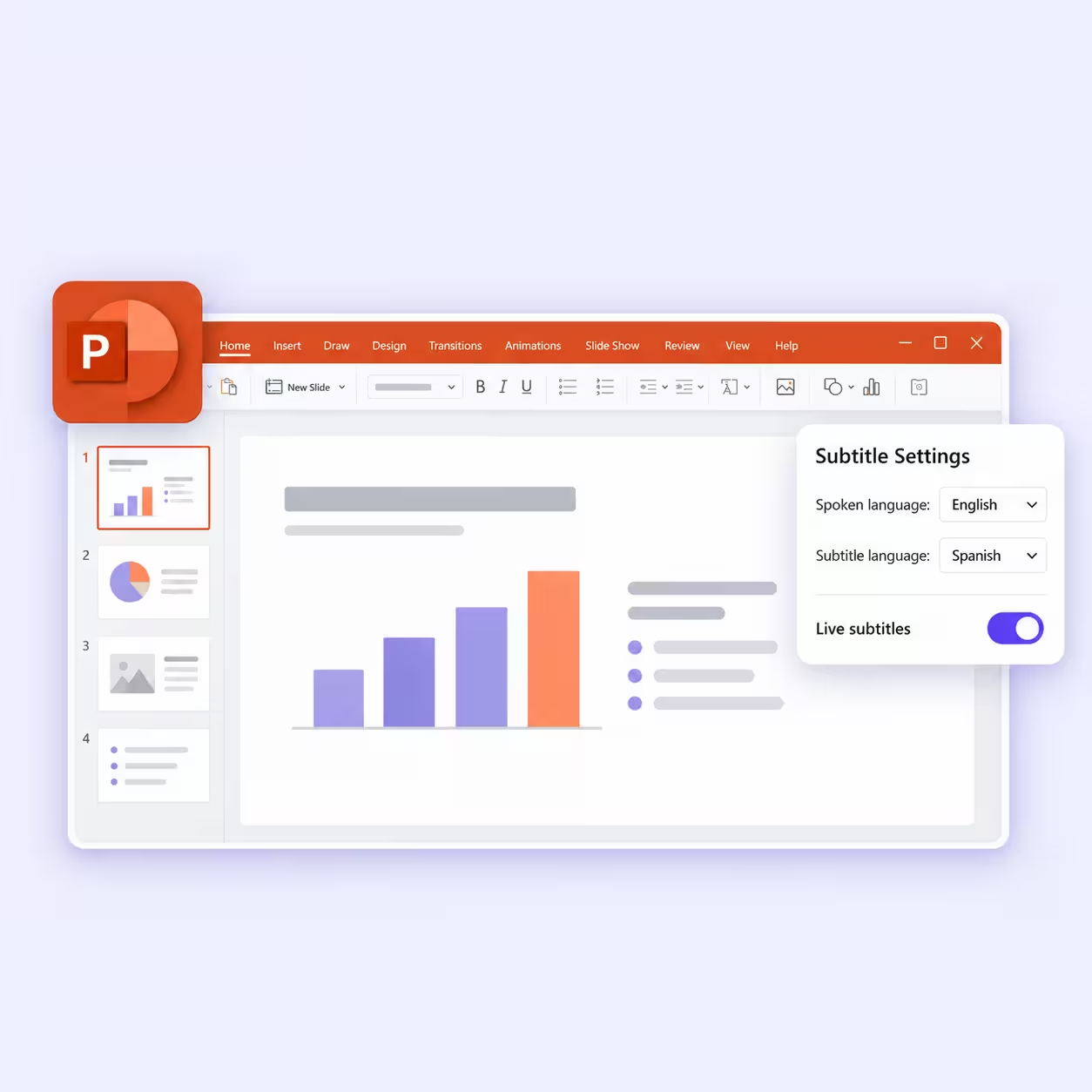
I can translate web pages in Edge, documents in Word, and messages in Teams without using the Bing website. For spoken meetings, Teams Interpreter currently lists ten supported language entries; access depends on Microsoft 365 Copilot or eligible Teams Rooms licensing.
Azure Translator for Developers
If I need translation inside a company's own software, Azure is a separate developer service. Its F0 tier includes two million characters per month; paid S1 pricing and billing are separate from that free-tier allowance.
How Does Bing Microsoft Translator Perform?
In the following example, Bing made the production outage understandable and kept a conversational tone. Its 1,000-character web limit is a separate practical constraint: for a longer message, I have to split the text, which can separate a sentence from the context it needs. I also want to check whether its casual wording preserves the original idioms.
To test it, I used a paragraph of Buenos Aires office slang about a production outage. Rioplatense Spanish packs idioms like a los ponchazos and saltó la ficha into everyday speech, and a word-for-word translator turns them into nonsense. I set Bing to the Casual tone, since the original reads like a developer venting to a friend.
Original Text in Spanish:
Apenas me bajé del bondi y llegué al laburo, me desayuné con un quilombo bárbaro: el servidor de producción estaba caído, la base de datos tenía más conexiones abiertas de las que podía bancar y el jefe, que de infraestructura entiende lo mismo que yo de bailar malambo, insistía en que bastaba con desenchufar el rúter. «Pará un cacho, che, que esto no se arregla a los ponchazos», le dije mientras revisaba los registros de errores, la latencia de la red y el consumo de memoria del proceso principal. El pibe que había implementado el último cambio juraba que el código estaba joya, pero cuando le pregunté por las pruebas de carga empezó a guitarrear y enseguida saltó la ficha: había probado todo en su computadora, con tres usuarios de mentira y una conexión que andaba como los dioses.
Bing Translate Spanish to English (Casual tone):
As soon as I got off the bus and arrived at work, I was hit with a huge mess: the production server was down, the database had more open connections than it could handle, and the boss, who knows about infrastructure as much as I do about dancing malambo, insisted that just unplugging the router would be enough. "Hold on a sec, man, you can't fix this with quick hits," I told him while checking the error logs, network latency, and the main process's memory usage. The guy who had implemented the latest change swore the code was perfect, but when I asked him about the load tests, he started dodging, and I immediately realized: he had tested everything on his computer, with three fake users and a connection that was working flawlessly.
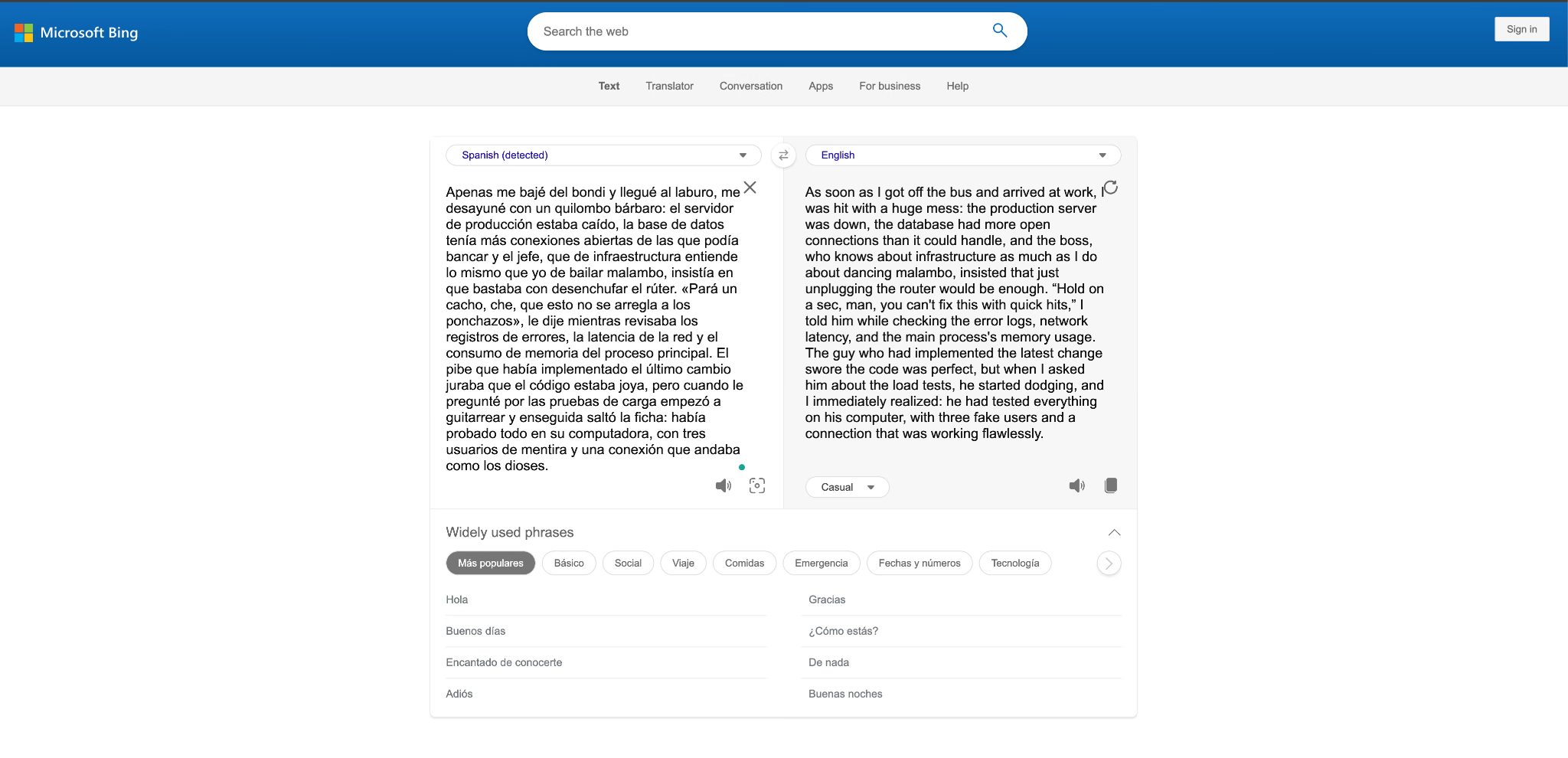
- Where Bing got it right: It knew that bondi means "bus" and laburo means "work," two Argentine words that rarely show up in textbook Spanish. "Hold on a sec, man" keeps the friendly push of Pará un cacho, che.
- Where Bing slipped: “You can't fix this with quick hits” reads too literally for a los ponchazos, which describes an improvised or haphazard approach here. “He started dodging” captures evasiveness in empezó a guitarrear, but misses the sense of talking without the knowledge to back it up.
- My verdict: I could follow the outage and the argument, and the Casual tone suited the speaker. I would still rewrite “quick hits” before sharing the translation with a colleague.
Google Translate Review
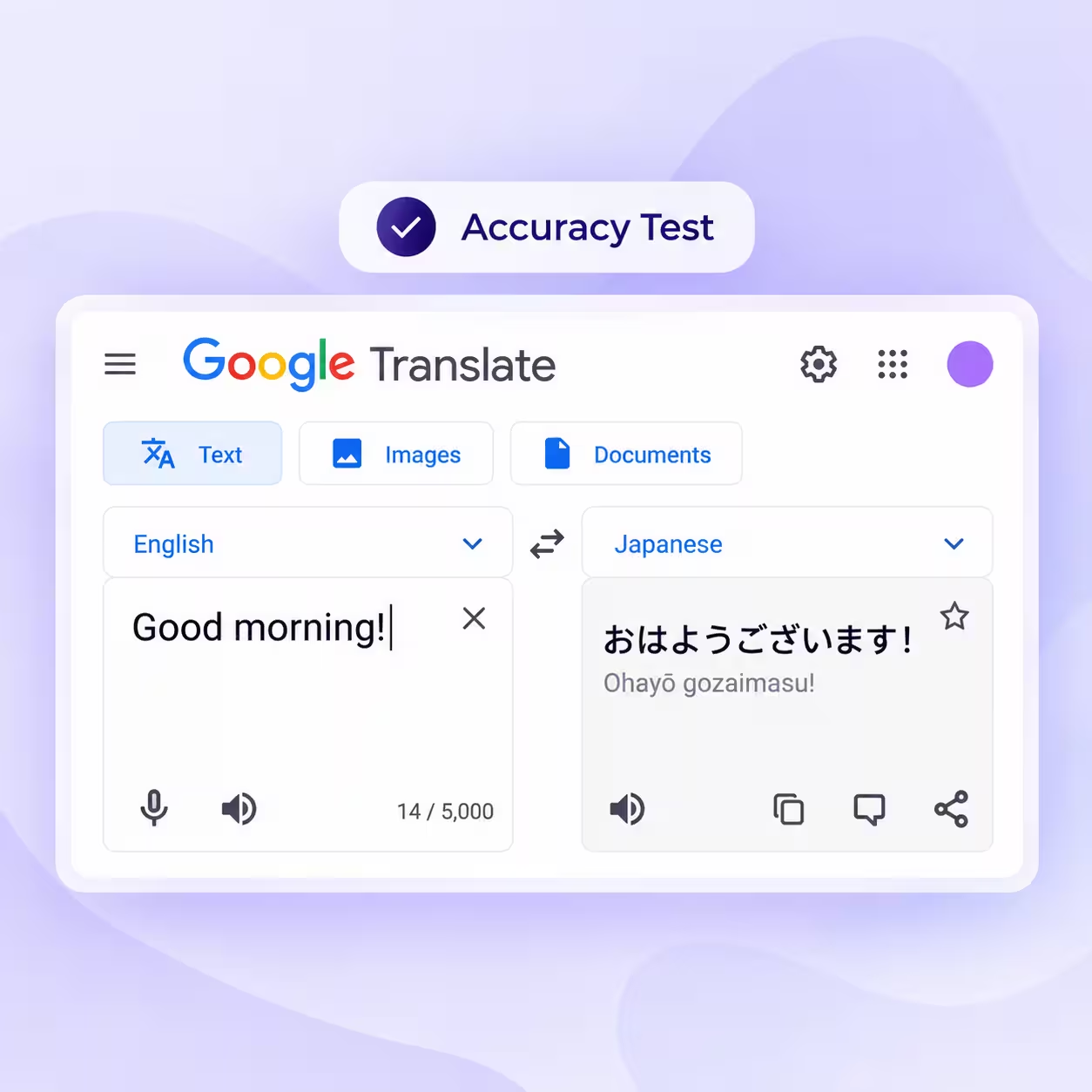
Google Translate has always been a go-to translator for everyone I personally and professionally know. Google describes its text coverage as about 250 languages, and the web text box accepts 5,000 characters. Separate browser tabs handle text, images, documents, and websites. The Android and iOS apps also support live conversations in 70+ languages, with Gemini-powered context help in supported rollouts. For my Teams messages, I still need to bring the relevant context into the translation. The website also leaves text inside images and scanned PDF pages untranslated.
Key Features of Google Translate
5,000 Characters per Translation
I can fit a longer email or short report into one paste, up to five times Bing's web limit. Auto-detect helps identify the source language.
Document Translation
I can upload .docx, .pdf, .pptx, or .xlsx files up to 10 MB, with a 300-page limit for PDFs. Text inside images and scanned PDF pages remains untranslated, and you need a computer to upload documents.
Image and Website Translation
I use the Images tab for text in photos and the Websites tab for a page URL. Website translation is not available in every region.
Live Translation on the Phone
Google's app supports live audio translation in 70+ languages. Its September 2026 update lets Android users keep it running in the background, and iPhone users listen through the earpiece.
Context Help With Gemini
I can use alternative phrasings with Understand and Ask in supported app rollouts to explore tone and meaning. Google introduced this update in February 2026, starting in the U.S. and India.
Offline Mode and Developer Access
I can download supported languages for offline use in the app. For software projects, Google Cloud's standard NMT text pricing provides a monthly $10 credit covering 500,000 characters, then charges $20 per million within the listed usage tier.
Microsoft Bing Translator vs Google Translate: Which Is Better?
I'd choose Google Translate for longer pasted text and whole documents. Bing is useful for short text when I want its tone options. If I'm translating inside Edge, Word, or Teams, I am using those apps' Microsoft translation features rather than gaining extra capabilities on the Bing website. For meetings, I compare Teams and Google Meet's separate options with JotMe.
To make that choice practical, I pictured an operations role in Chicago working with a supplier in Shenzhen and a development partner in Buenos Aires. These are workflow examples for the two websites, not additional accuracy tests:
| Task That Week | Bing Translate Website | Google Translate Website | My Pick for This Task |
|---|---|---|---|
| A 600-character Teams message in Traditional Chinese | Fits in a single paste | Fits in a single paste | Either fits; the wording still needs checking |
| A 3,000-character incident report in Rioplatense Spanish | Needs at least three pastes | Fits in a single paste | Google for convenience |
| A 40-page supplier contract as a PDF | No direct document upload; I need another tool or a conversion workflow | Uploads if within 10 MB; scanned text remains untranslated | Google for a text-based PDF, followed by review |
| A 45-minute Teams call with the Shenzhen supplier | Does not capture the call | Does not capture the call | A separate meeting translation tool |
| Notes and a follow-up email from the call | Does not capture or summarize the meeting | Does not capture or summarize the meeting | A meeting tool that saves a transcript and notes |
The longer report and PDF are easier to handle in Google Translate. The call and its follow-up need another workflow:
- I want the delivery date agreed during the meeting to survive into the email that confirms it.
- Teams Interpreter has separate licensing requirements.
- Google Meet speech translation currently pairs English with French, German, Hindi, Italian, Portuguese, and Spanish in its standard experience, and is available on eligible Workspace and Google AI Pro or Ultra plans.
- Alpha-program access can differ.
For this reason, we built JotMe live translation to work alongside different meeting platforms and keep the transcript and notes with the session.
Bing Translate vs. Google Translate: How Do They Compare?
I compared both tools on the 4 points people ask about most: languages, accuracy, price, and ease of use.
Bing Translate vs. Google Translate: Supported Languages
Google describes its text coverage as about 250 languages, while Microsoft lists 135 supported entries for text translation. I compare those text totals separately from speech and image coverage. Microsoft's matrix lists 48 speech-input and 39 image-translation entries, and Google's live conversation feature covers 70+ languages. A language available for typed text is not necessarily available for spoken input.
With JotMe, I check the coverage for the specific feature: desktop live translation has 200+ language and dialect options, while text, document, image, audio, and video translation cover 100+ languages. Speech recognition and generated voice have their own limits. I would check my supplier's language settings for input and output rather than use a total language-pair count as an accuracy claim.
Bing Translate vs. Google Translate: Accuracy
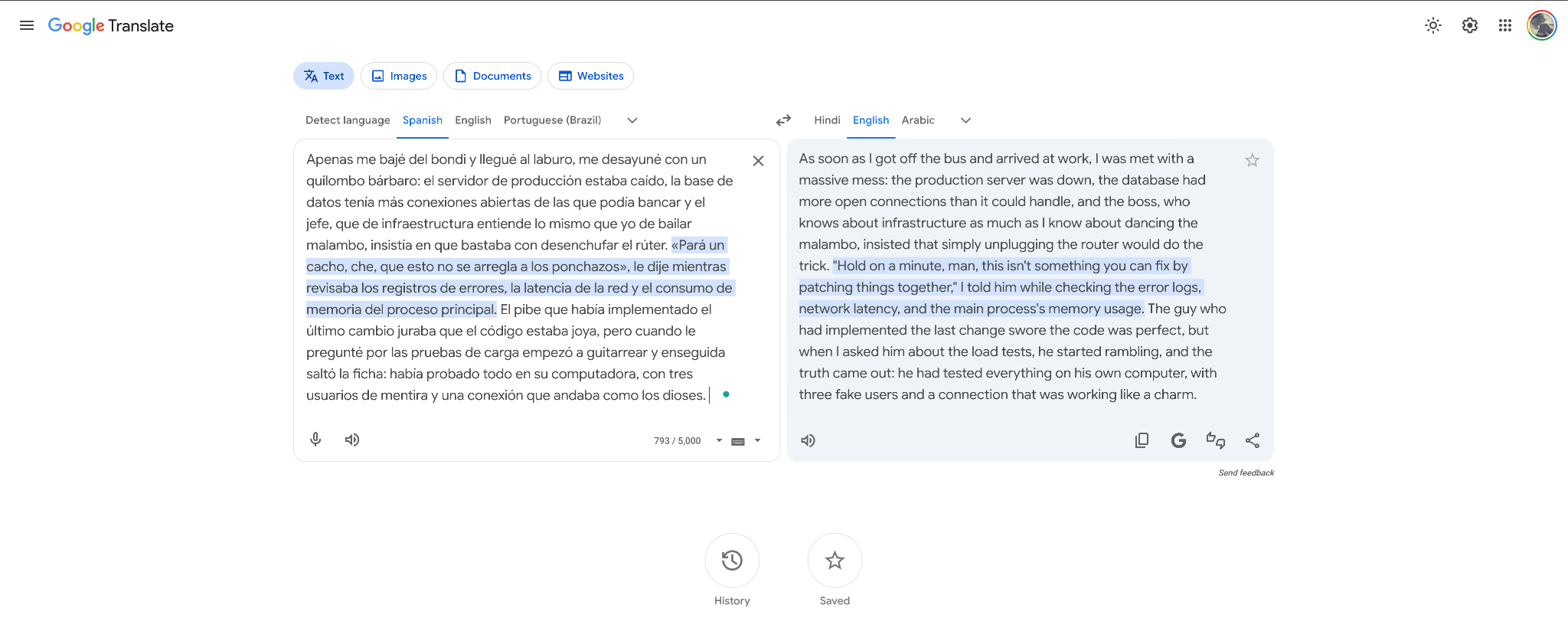
I could follow the main outage story in all three English outputs, but the idioms exposed differences worth checking. Here is Google Translate's result alongside the visible excerpt from our free AI text translator.
Google Translate Spanish to English:
As soon as I got off the bus and arrived at work, I was met with a massive mess: the production server was down, the database had more open connections than it could handle, and the boss, who knows about infrastructure as much as I know about dancing the malambo, insisted that simply unplugging the router would do the trick. "Hold on a minute, man, this isn't something you can fix by patching things together," I told him while checking the error logs, network latency, and the main process's memory usage. The guy who had implemented the last change swore the code was perfect, but when I asked him about the load tests, he started rambling, and the truth came out: he had tested everything on his own computer, with three fake users and a connection that was working like a charm.
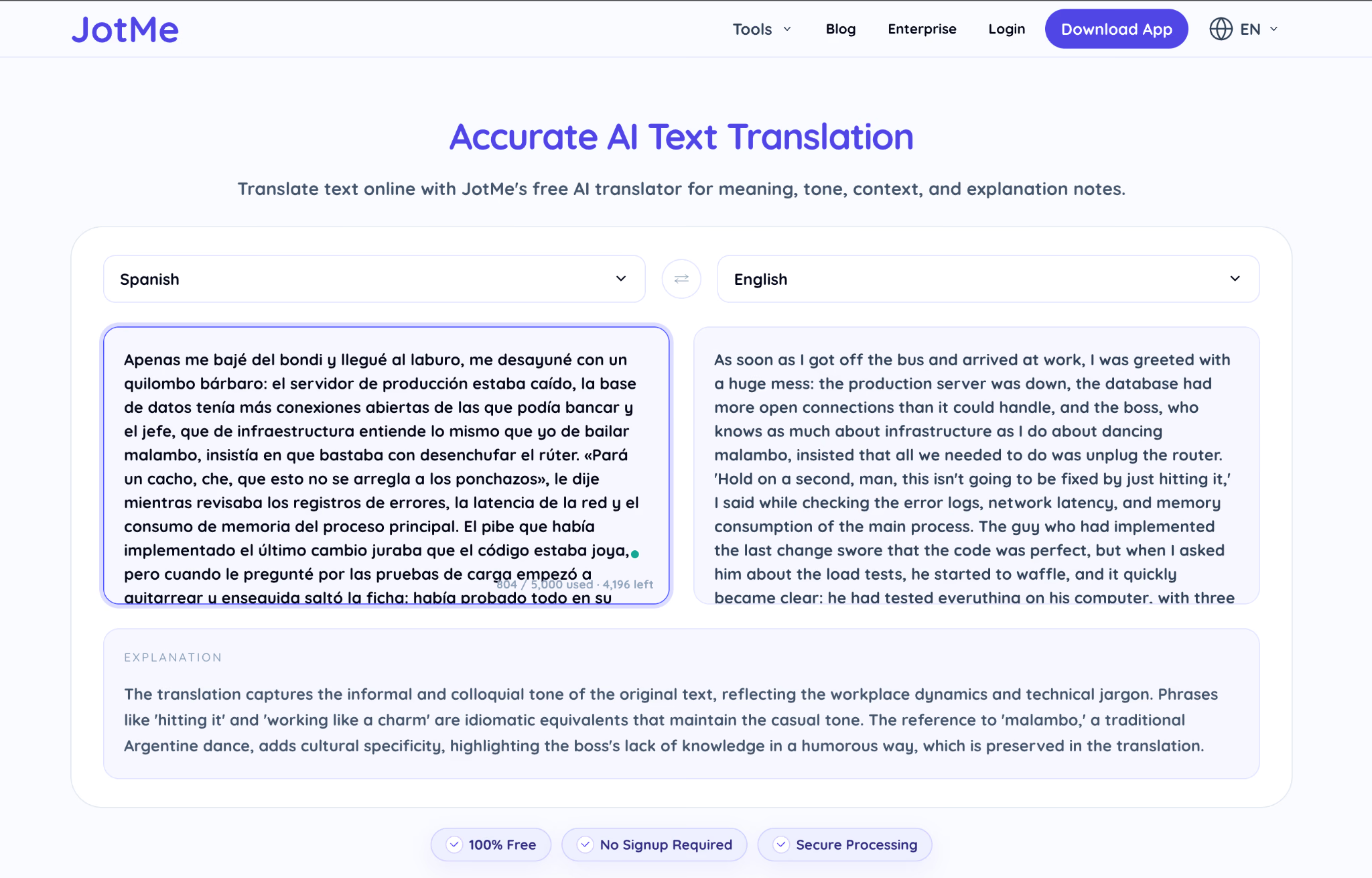
JotMe Translate Spanish to English:
As soon as I got off the bus and arrived at work, I was greeted with a huge mess: the production server was down, the database had more open connections than it could handle, and the boss, who knows as much about infrastructure as I do about dancing malambo, insisted that all we needed to do was unplug the router. 'Hold on a second, man, this isn't going to be fixed by just hitting it,' I said while checking the error logs, network latency, and memory consumption of the main process. The guy who had implemented the last change swore that the code was perfect, but when I asked him about the load tests, he started to waffle, and it quickly became clear: he had tested everything on his computer, with three […]
| Rioplatense Phrase | What It Means | Google Translate | Bing Translate | JotMe |
|---|---|---|---|---|
| me desayuné con un quilombo bárbaro | I walked straight into a huge mess | I was met with a massive mess | I was hit with a huge mess | I was greeted with a huge mess |
| no se arregla a los ponchazos | You can't fix this with a haphazard approach | this isn't something you can fix by patching things together | you can't fix this with quick hits | this isn't going to be fixed by just hitting it |
| empezó a guitarrear | He talked without the knowledge to back it up | he started rambling | he started dodging | he started to waffle |
| saltó la ficha | The truth came out | the truth came out | I immediately realized | it quickly became clear |
| andaba como los dioses | It worked perfectly | working like a charm | working flawlessly | Final clause not visible in the captured translation |
As you can see from the results here, Google handled a los ponchazos better in this example.
“Patching things together” gets closer to an improvised fix than Bing's “quick hits” or JotMe's “just hitting it.” I preferred JotMe's “waffle” for the developer's evasive answer, but it does not fully convey speaking without enough knowledge, and it does not cancel out the earlier mistake. JotMe's explanation identifies the informal tone and malambo reference, which is useful context.
This passage gives me specific phrases to compare; it does not establish one winner across languages, documents, and live conversations. When I choose a tool for work, I also consider whether I can supply product terminology, follow a meeting, and recover the agreed actions afterward. Those are additional reasons to consider JotMe.
Bing Translate vs. Google Translate: Pricing and Plans
I can use Bing Translator, Microsoft Translator's consumer app, and Google Translate without a subscription for their standard consumer features. Developer APIs and meeting products have separate pricing. For JotMe, I compare both the subscription and the allowance consumed by the mode I plan to use.
| Plan | Price | What You Get |
|---|---|---|
| Bing Translator and Microsoft Translator app | Free | Consumer translation features; available modes depend on the interface and language |
| Azure Translator API | F0 free tier; paid S1 billed separately | F0 includes two million characters monthly; check the Azure rate for the selected region and currency |
| Google Translate on the web and in the app | Free | Text, documents, images, websites, and mobile live translation, depending on the interface |
| Google Cloud standard NMT text API | $20 per million characters within the listed usage tier | A monthly $10 credit covers 500,000 characters; document and other model pricing differ |
| JotMe Free | $0 | 20 base live translation minutes and 50 transcription minutes monthly, plus 5 AI credits |
| JotMe Pro | $20 per user/month, or $10 per user/month billed annually ($120/year) | 200 base live translation minutes and 500 transcription minutes monthly, plus 20 AI credits |
| JotMe Premium | $30 per user/month, or $15 per user/month billed annually ($180/year) | 500 base live translation minutes, 2,000 transcription minutes, 50 AI credits, and translation sharing |
I use the current Azure pricing, Google Cloud pricing, and JotMe plans for this comparison. Google's listed Translation LLM text rate is $10 per million input characters plus $10 per million output characters; it is a separate model price, not the standard NMT rate.
I also check how JotMe uses minutes and credits before choosing a plan.
- Basic uses minutes at 1×, Premium Quality at 2×, and Fast Audio or speech-to-speech at 5×.
- Multiple target languages and shared participants can increase usage.
- Fast Audio's multiplier applies even with voice playback off.
- A document translation starts at 10 AI credits, so the Free plan's five included credits do not cover one document by themselves.
For centralized billing and administration, I can compare JotMe's Teams and Enterprise options separately.
Bing Translate vs. Google Translate: Ease of Use
Both web pages let me start with source-language detection and no sign-in for basic text. Google is more convenient for longer passages, with a 5,000-character text box and a Documents tab beside it. If I am already in Edge, Word, or Teams, their built-in Microsoft translation features can save a separate trip to either website.
Switching between Teams and a browser during a negotiation breaks my attention, and a copied message may leave out the thread around it. For my own replies, JotMe's desktop text shortcut can translate selected text in an editable field. On a Mac, it uses Command + Option and requires Accessibility permission; I follow the insertion prompt for the installed version. I can also use voice typing to turn my dictation into editable text.
Keep the Translation With the Meeting and Follow-Up
When I need more than a translated message, JotMe can follow my Zoom, Microsoft Teams, Google Meet, or Webex call, save the translated transcript, and generate AI notes. I can try the Free plan's base allowance with my own language pair and terminology before choosing a paid plan.
Why Choose JotMe Over Bing Translate & Google Translate
At JotMe, our mission is to help people work in any language. For me, that means following the live call, translating the surrounding documents, and keeping the decisions available afterward. We build for managers and teams who talk directly to clients and suppliers, often without a bilingual colleague or a human interpreter in the middle.
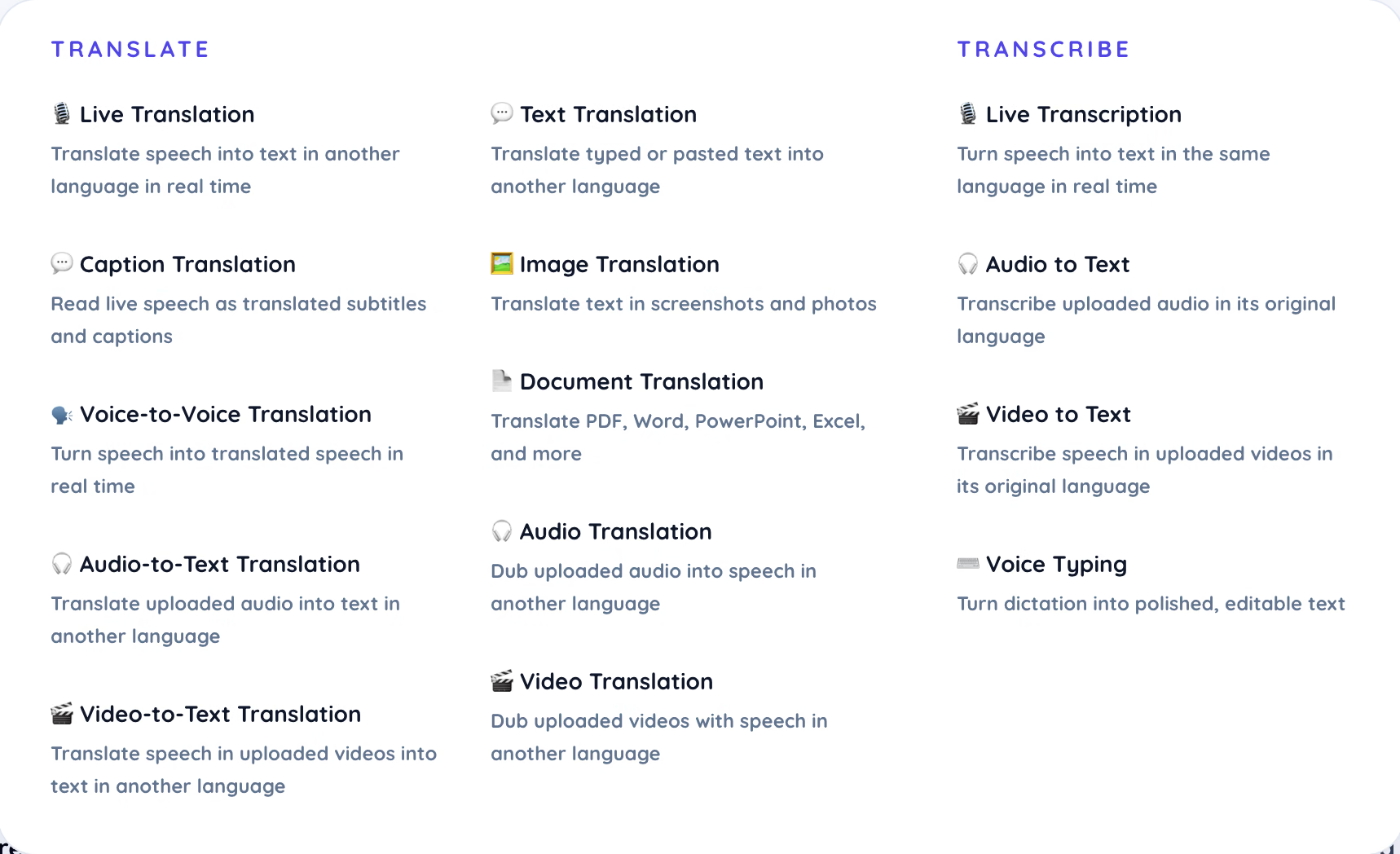
JotMe runs on Mac and Windows, and the JotMe translation app supports in-person conversations away from the laptop. I can choose a tool for the task, such as translating a supplier's voice note or reading the text on a packing-list photo.
Accuracy and Work Context
I want a translation I can assess, especially when a message contains an idiom or a technical term. Our text translator adds an explanation, and the desktop app lets me provide translation preferences and custom vocabulary. I can also review and edit the work context in Home, including goals and open items, to help personalize translations and notes. These controls help me supply context; they do not make every output correct.
Translation history lets me return to earlier results before answering a supplier who asks 納期を来週の金曜日までに変更できますか? (“Can you move the delivery date to next Friday?”).
Speech-to-Speech Translation
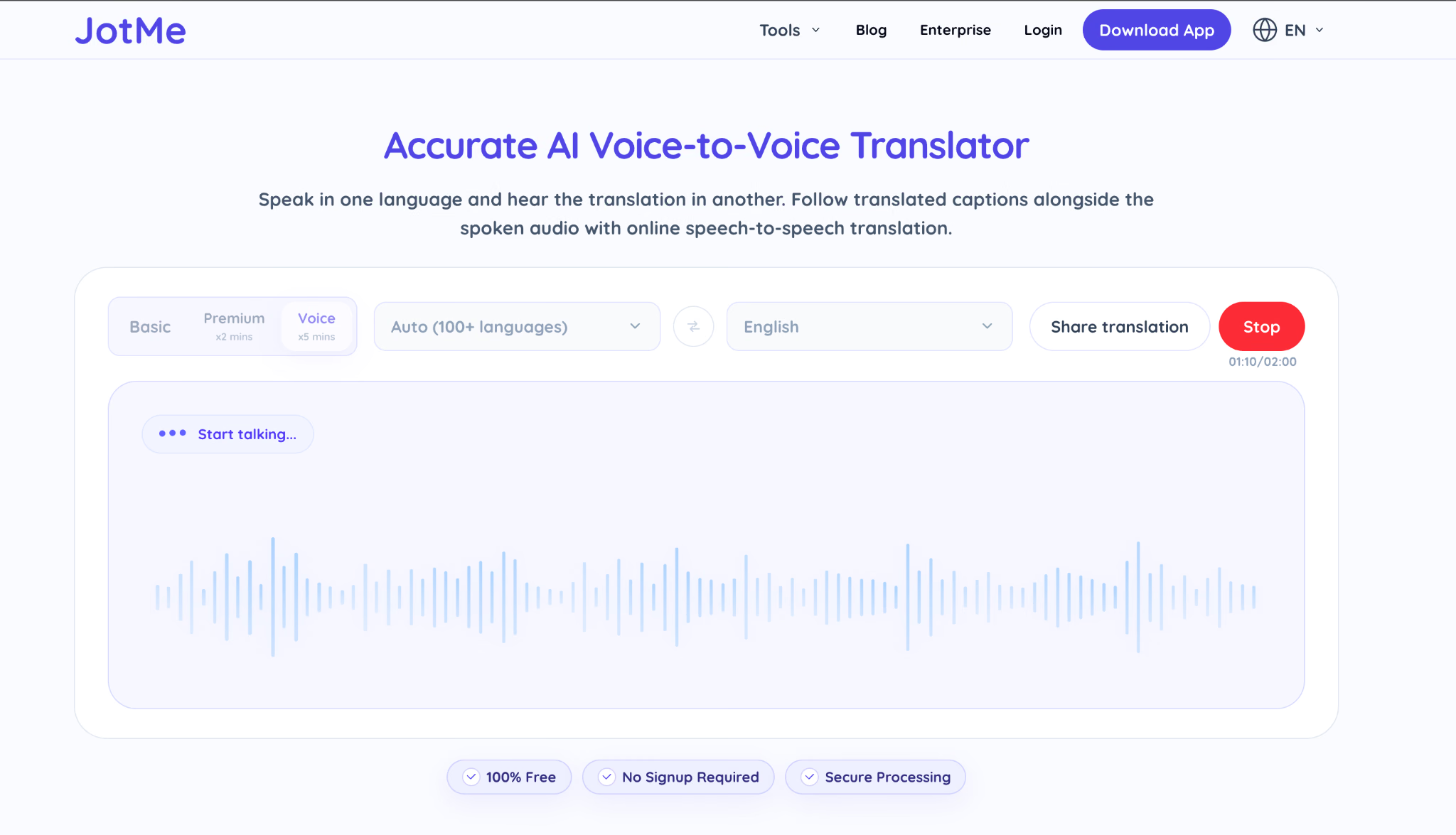
For a conversation, I may need the other person to hear the translation rather than read it. Our real-time voice-to-voice translation supports 100+ spoken input languages and 13 generated voice output languages in the documented desktop workflow.
I can try the browser tool first, then configure the microphone, system audio, and the required audio routing for a two-way desktop call. For in-person conversations, the JotMe Android and iPhone apps can speak supported translations aloud.
AI Translation for Text and Files
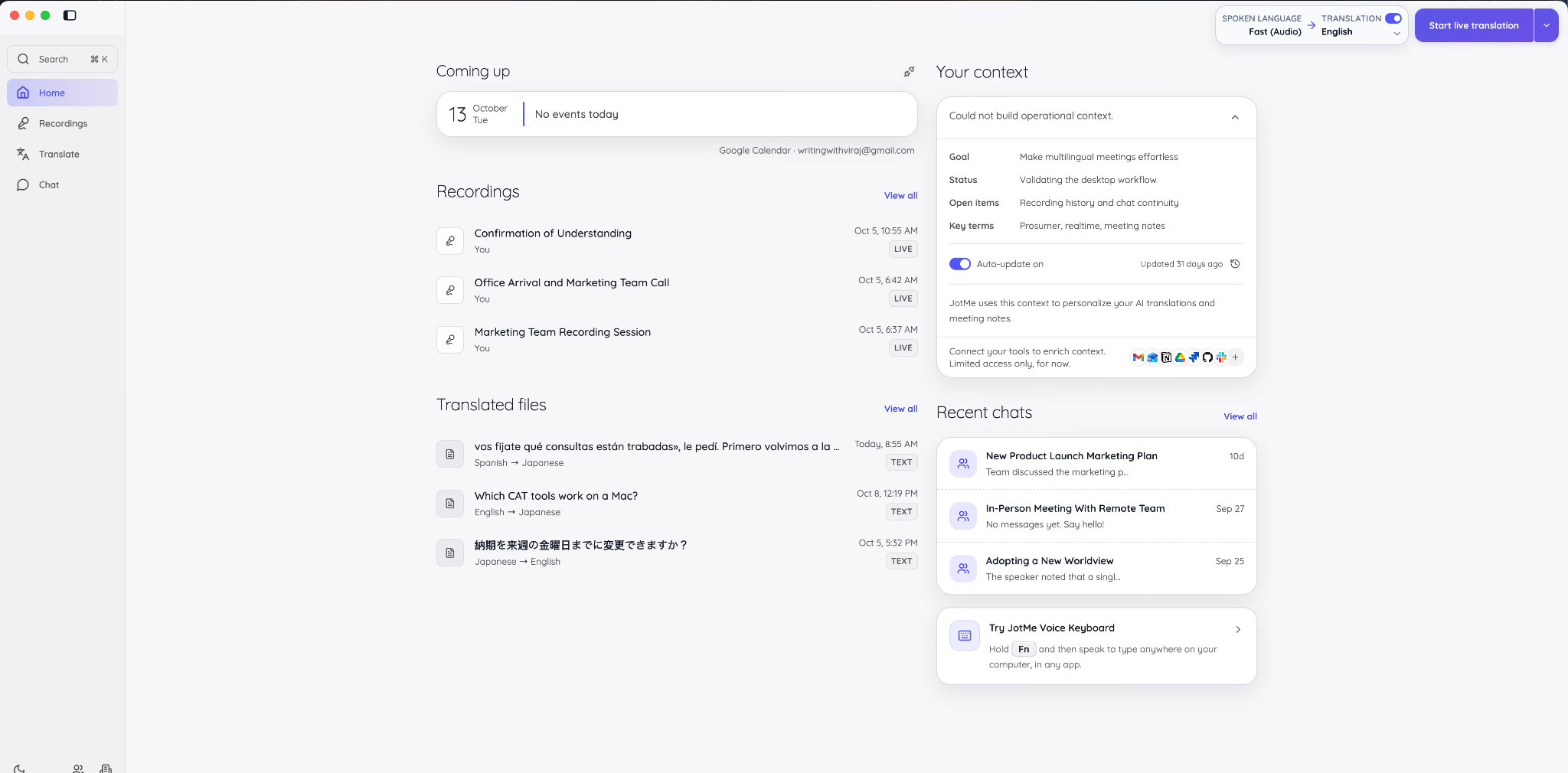
I can translate text, documents, images, and audio or video through the desktop Translate workspace. The text preference field takes instructions such as “make it more formal.” For the rest of the Buenos Aires outage story, I used the desktop app to translate Spanish into Japanese, the language a Tokyo stakeholder would read.
Original Text in Spanish
[…] vos fijate qué consultas están trabadas», le pedí. Primero volvimos a la versión anterior; después revisamos el plan de ejecución, ajustamos el límite de conexiones y preparamos una política de reintentos con espera exponencial. El jefe preguntó si no convenía meter inteligencia artificial, y casi se me fue el mate por la nariz: «Aflojá con el chamuyo, que una red neuronal no te va a arreglar una consulta mal escrita». Cuando el servicio volvió a responder, el proveedor apareció para hacerse el sota, como si no hubiera pasado nada. Le mostramos las métricas, los tiempos de respuesta y la configuración que nos había entregado. Ahí se le terminó la sanata.
JotMe Translate Spanish to Japanese
「どのクエリが詰まっているか見てみて」と頼んだ。まずは以前のバージョンに戻り、その後実行計画を見直し、接続制限を調整し、指数バックオフの再試行ポリシーを準備した。上司が人工知能を導入した方がいいのではないかと尋ねたとき、私は思わず飲んでいたマテを鼻から吹き出しそうになった。「そんなおしゃべりはやめて、ニューラルネットワークが間違ったクエリを直すわけじゃない」と言った。サービスが再び応答するようになったとき、プロバイダーは何事もなかったかのように現れた。私たちはメトリクス、応答時間、そして彼が提供した設定を示した。そこで彼の言い訳は終わった。
English Paraphrase of the Japanese Output
"Check which queries are stuck," I asked. We first rolled back to the previous version, then reviewed the execution plan, adjusted the connection limit, and set up a retry policy with exponential backoff. When the boss asked whether we should bring in artificial intelligence, I nearly blew the mate I was drinking out through my nose. "Stop the chatter, a neural network won't fix a badly written query," I said. When the service started responding again, the vendor showed up as if nothing had happened. We showed him the metrics, the response times, and the settings he had given us. That ended his excuses.
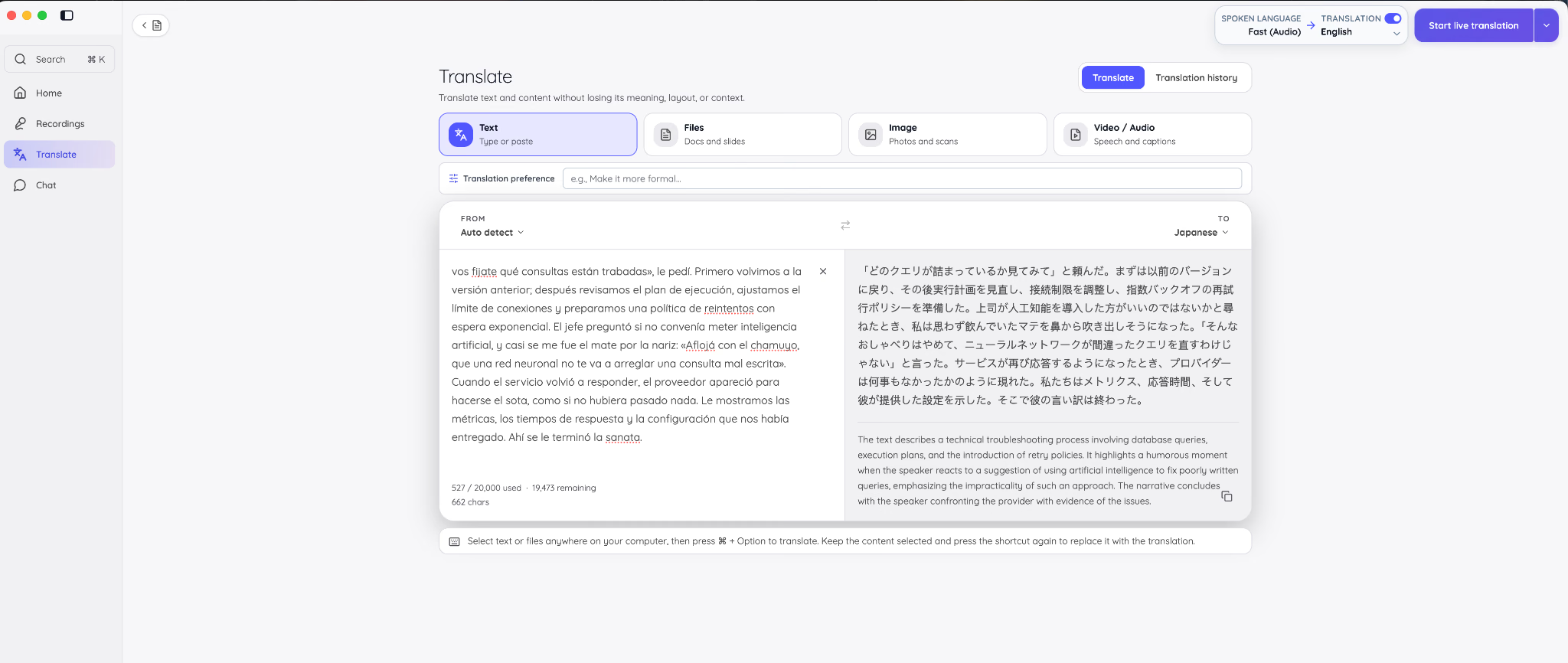
In the Japanese output, I can identify 実行計画 for “execution plan” and 指数バックオフ for “exponential backoff.” The ending renders Ahí se le terminó la sanata as the end of the vendor's excuses. I also notice that hacerse el sota, meaning to play dumb, becomes “as if nothing had happened,” which softens the accusation.
My English paraphrase is there to help readers follow the example; it is not a separate back-translation test or a professional Japanese review. For a formal report, I would specify the intended register and review the result before sending it.
Custom Vocabulary
I can add names, product codes, acronyms, and project terms to help JotMe recognize them consistently across supported features. I use the term's source language, keep each entry to three words or fewer, and give hard-to-hear terms a higher importance score. Free accounts hold 5 terms, Pro holds 20, and Premium holds 50. The JotMe documentation explains the vocabulary settings and language options; I still check important names and numbers in the result.
Meeting Translation
I open JotMe before a Zoom, Microsoft Teams, Google Meet, or Webex call, grant microphone and system-audio permissions, and choose the appropriate language settings. The desktop app captures the audio without adding a bot to the participant list. Premium supports up to three target languages at once and translation sharing by link. During the session, I can ask JotMe questions about the conversation.
Meeting Notes
After a recorded translation session, I can return to the transcript and generate AI notes in 21 languages and regional options. JotMe uses the transcript and my writing to create separate Enhanced notes; my original notes remain under My notes. Ask JotMe to help draft a follow-up from the conversation. Each language of generated notes uses one AI credit, so I check the remaining allowance before creating extra versions.
Run Your Next Supplier Call in Your Own Language
I would start with a short supplier conversation in the languages I use most, then review the transcript and notes before a longer call. JotMe's Free plan includes 20 base live translation minutes, 50 transcription minutes, and five AI credits each month. Model and sharing multipliers affect how long that allowance lasts.
FAQs
How Does Google Translate Work?
I think of Google Translate as an AI system that predicts a target-language rendering from the source text. Neural machine translation is part of that history, and Google now uses Gemini-powered features for speech and contextual alternatives in supported experiences. The model and available controls depend on the translation mode.
How to Use Bing Translator?
I open Bing Translator, choose my target language, and leave source detection on if I need it. I paste up to 1,000 characters, compare the Standard, Casual, or Formal tone options, and check the result before copying it. For a whole web page or a mobile conversation, I use the separate Edge or Microsoft Translator app features.
How to Use Google Translate or Gemini to Translate?
In Google Translate, I choose Text, Images, Documents, or Websites for the material I have. The web text box takes 5,000 characters, and supported document files can be up to 10 MB. In Gemini, I give the text and a specific instruction, such as “Translate this into Japanese for a supplier and keep it polite.” If I upload a file, I check the supported format and whether the returned translation preserves the layout I need. I compare names and numbers with the original before sending either result.
What Is an Alternative to Google Translate?
I'd choose JotMe when the job includes live meetings, transcripts, and follow-up notes as well as text and documents. For other needs, I'd compare DeepL for a dedicated document workflow, ChatGPT or Claude for translations guided by instructions, Papago for Korean-language work, and Apple's translation features for supported calls on Apple devices. I check the language pair and format before committing.
How Accurate Is Google Translate?
I would not give Google Translate one accuracy percentage across all languages and tasks. In my Spanish example, it preserved the main outage story and handled a los ponchazos better than Bing or JotMe, though that is one passage rather than a broad benchmark. I use the result as a starting point and check idioms, technical terms, names, and numbers before sharing it.
How Accurate Are Automatic Translations?
I judge an automatic translation by whether it preserves the meaning I need, including names, numbers, technical terms, and tone. My examples show why fluent wording alone is not enough. For live speech, I also check what was transcribed: a recognition error can carry into the translation. I confirm important prices and commitments in writing, and use custom vocabulary to help with specialist terms.
Can JotMe Translate Documents Like Google Translate?
Yes. I can translate PDF, Word, PowerPoint, Excel, and other supported files in JotMe's desktop Translate workspace. Under the current credit rules, document translation starts at 10 AI credits for up to 50,000 characters, with one additional credit per extra 5,000 characters. Pro includes 20 credits monthly and Premium includes 50; the Free plan's five included credits are not enough for a document by themselves. For photos and scanned pages, I use Image translation rather than assuming every scanned PDF is handled like an editable document.
Last updated on
October 31, 2026
Follow us on social media: