Guides
Zoom AI Companion vs. JotMe AI: Detailed Comparison for Multilingual Teams

Viraj Mahajan
March 11, 2026
TL;DR
Zoom's AI features include AI Companion capabilities built into Zoom Workplace, while ZoomMate is its newer agentic AI product designed to help users search, automate workflows, and complete tasks. Eligible paid Zoom Workplace plans include AI Companion at no additional cost, and Zoom Workplace Pro currently starts at $14.16 per user per month. AI Companion is strongest for meeting productivity, summaries, workflow automation, and Zoom-native collaboration.
- Zoom AI Companion generates meeting summaries, action items, and smart recording chapters.
- It provides agentic workflows that can draft follow-ups, update CRM records, create project plans, and move work forward from meeting context.
- Zoom translated captions support a broad set of languages, but availability depends on the Zoom plan or a Translated Captions add-on.
- Zoom's Voice Translator is now generally available for eligible accounts; it provides spoken translation during meetings and requires the Live Translation add-on or ZoomMate credits.
- Zoom's AI features are integrated into Zoom Workplace. Native features such as My Notes do not require a separate AI bot to join the meeting, while Zoom AI can join eligible third-party meetings as a participant for transcription and summaries.
- Custom AI Companion features currently have English-language limitations.
JotMe is a dedicated Real-time AI translation and transcription tool built for multilingual teams. This live translation tool runs alongside any meeting platform as a translation layer that Zoom AI Companion was not designed to be.
- JotMe provides real-time contextual translation across 200+ languages that understands business intent and nuances.
- JotMe AI works across Zoom, Google Meet, MS Teams, Webex, Slack, Discord, WhatsApp, Line, WeChat, and in-person conversations
- It can translate up to 10 languages simultaneously in a single meeting
- As of March 2026, JotMe has introduced a feature that lets you share live translation with clients or partners via URL or QR code at no extra cost to them.
- JotMe's AI meeting notes, summaries, and action items are available in 21 languages.
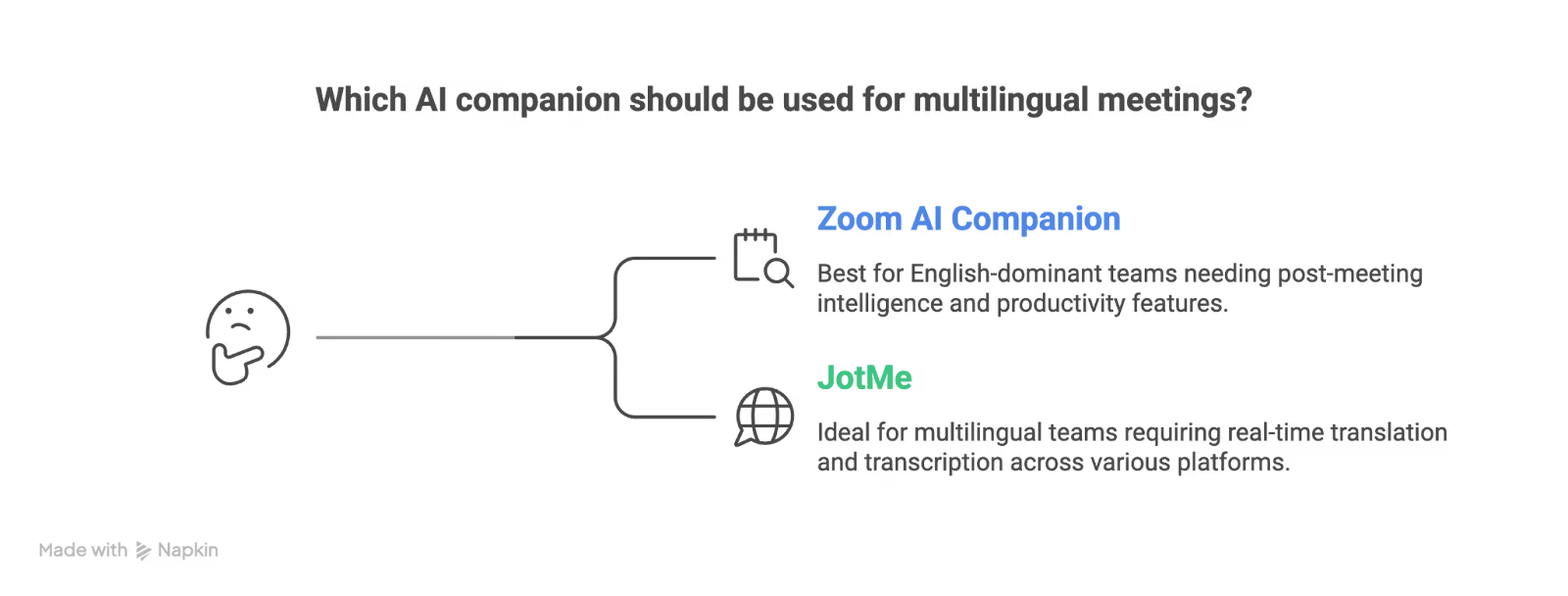
The bottom line: Zoom AI Companion and JotMe solve different parts of the multilingual-meeting problem. Zoom AI Companion is the stronger choice for Zoom-native meeting productivity and workflow automation, while JotMe is the stronger translation layer when you need 200+ language coverage, cross-platform translation, voice-to-voice output, or document translation.
Why Zoom AI Companion vs. JotMe Comparison Matters to Multilingual Teams?
Zoom AI Companion has tripled its monthly active users year-over-year in Q4 FY2026. It is one of the fastest-adopted AI features in enterprise software, and for good reason.
If you are on a paid Zoom plan, you get a genuinely capable AI assistant for free: meeting summaries, action items, smart recording chapters, chat composition, and now with 3.0, agentic workflows that connect meetings to documents and follow-ups.
For English-dominant teams running all their meetings on Zoom, there is little reason to look beyond AI Companion.
But the moment your work involves a second language, the picture shifts.
A sales team in New York closing deals with prospects in Tokyo. An engineering standup split between Berlin and Seoul. A customer success team onboarding clients in São Paulo. These are the scenarios where Zoom AI Companion's architecture starts to show its limits, because Zoom was built as a video meeting platform first and added translation as an afterthought.
JotMe, on the other hand, was built as a live translation engine from the ground up and designed to work inside any meeting, including Zoom and other prominent virtual meeting providers.
JotMe vs. Zoom AI Companion at a Glance
Here is the head-to-head comparison across the parameters that matter most for teams evaluating these tools.
What Zoom AI Companion Does Well
Before getting into limitations, Zoom AI Companion deserves full credit for what it does right. And whoever is using this tool for meetings or webinars would agree that this is not a tool to dismiss. For its intended use case, it is genuinely impressive.
Meeting Summaries and Action Items
AI Companion generates post-meeting summaries that capture key discussion points, decisions, and action items with assigned owners. For English-language meetings, the quality is consistently strong. It also breaks recorded meetings into chapters with keyword search, letting you jump to specific moments without scrubbing through the full recording.
AI Companion 3.0 Web Surface
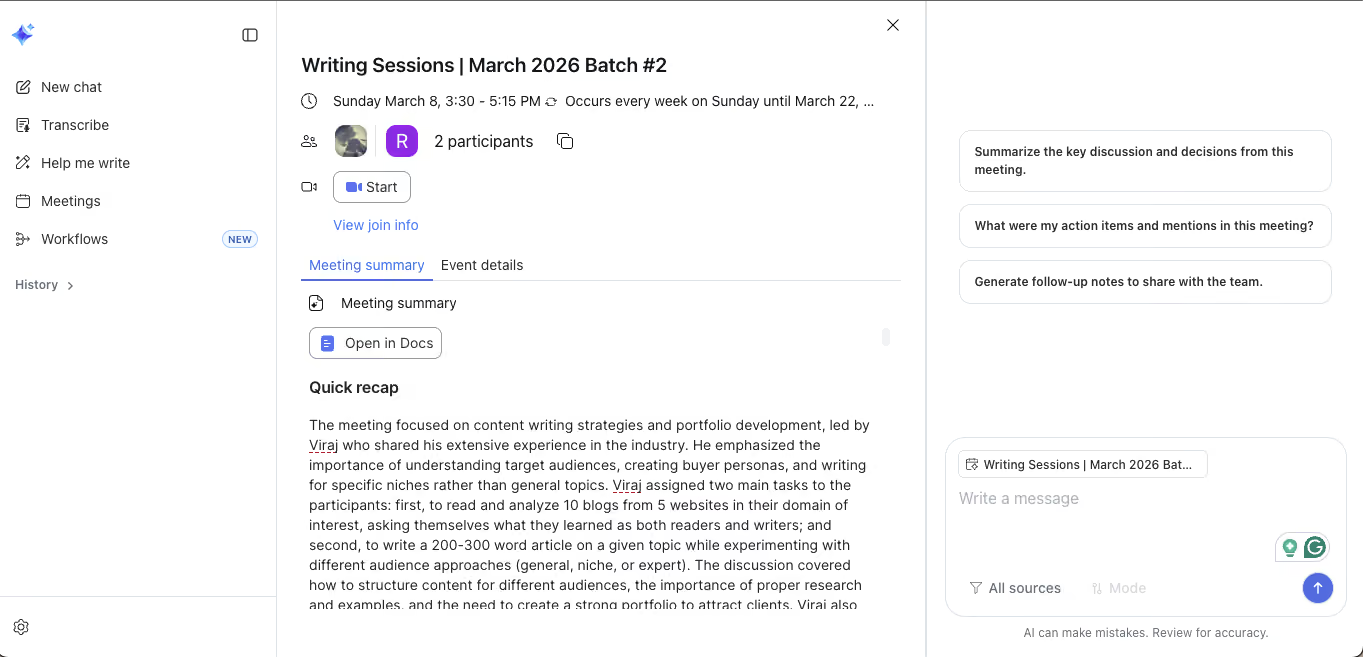
With the launch of AI Companion 3.0 in December 2025, Zoom introduced a conversational AI interface at ai.zoom.us that connects to your meeting history, documents, and calendar. The Daily Reflection Report pulls insights from your meetings, documents, and notes to start your day with clarity.
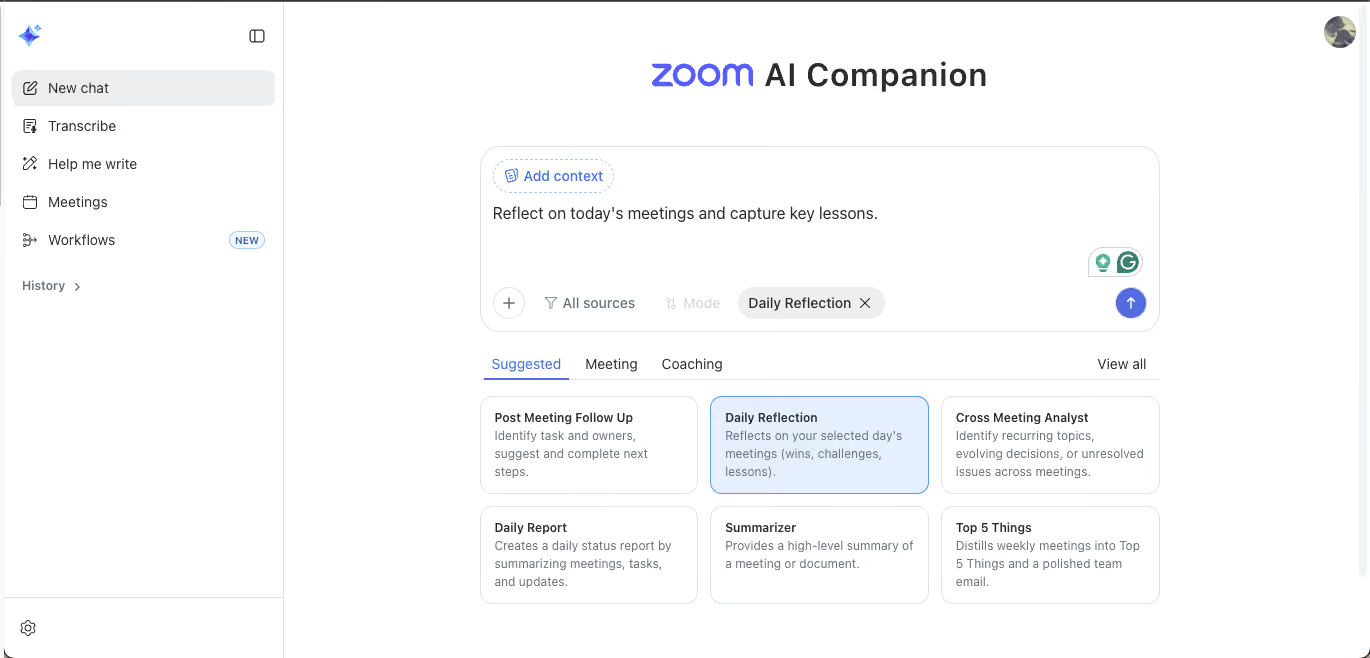
The Cross Meeting Analyst feature identifies recurring topics, evolving decisions, and unresolved issues across multiple meetings. This is the kind of contextual intelligence that turns raw meeting data into operational awareness.
Agentic Workflows and Automation
AI Companion 3.0 can trigger post-meeting workflows automatically: drafting follow-up emails, updating CRM entries, generating project plans from meeting discussions, and routing action items to the right people.
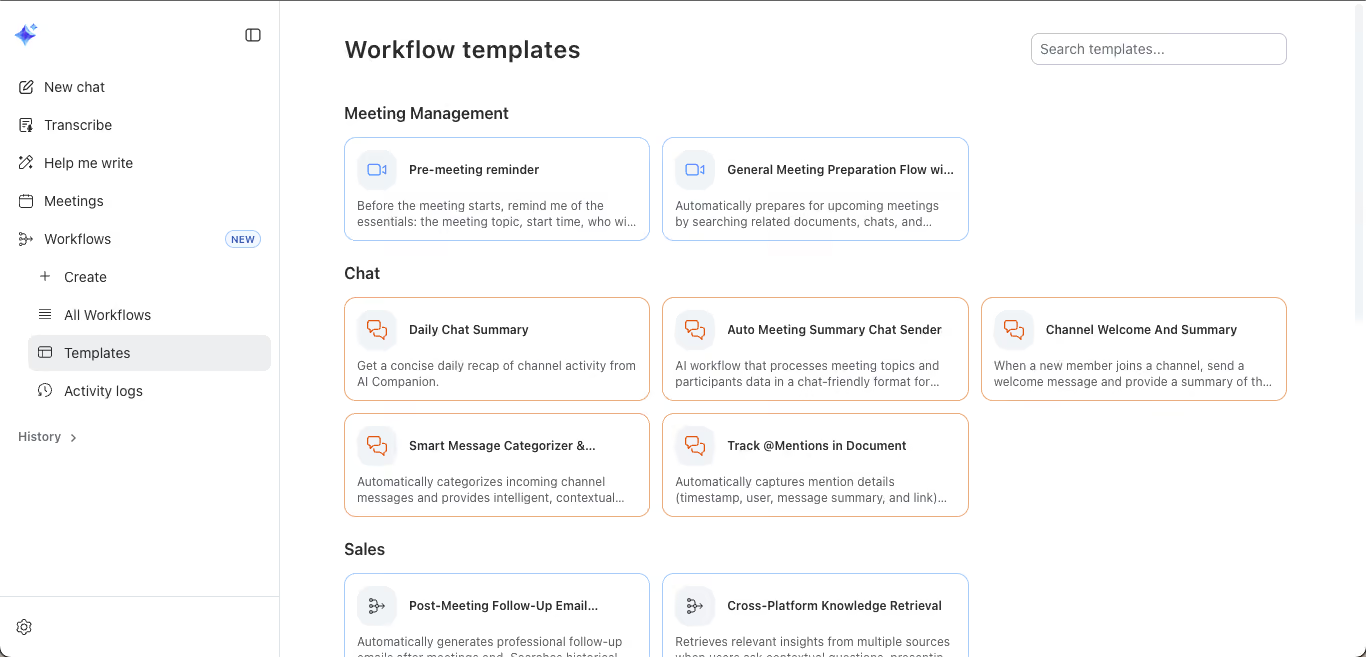
The no-code agent builder lets admins create custom AI agents that connect to third-party systems like Salesforce, Jira, and ServiceNow through the Model Context Protocol (MCP).
ZoomMate: Zoom's New Agentic AI Product
On June 1, 2026, Zoom added a new feature ZoomMate, an agentic AI work surface designed to help users move from workplace conversations to completed tasks. ZoomMate connects conversational context with enterprise search, workflow automation, and AI-powered content creation.
Unlike traditional AI features that focus on individual tasks such as meeting summaries or transcription, ZoomMate is designed to help users take action on information gathered from meetings, chats, and connected business applications.
Key ZoomMate features include:
- Agentic Search: Searches across Zoom, the web, and connected enterprise applications such as Salesforce, Jira, Slack, and ServiceNow to find relevant information.
- Workflow Orchestration: Helps automate follow-up actions, update records, create tasks, schedule events, and coordinate workflows across connected systems.
- AI Content Creation: Generates presentations, documents, spreadsheets, reports, and project plans using meeting context and enterprise information.
- Custom AI Agents: Supports AI agents that can help organizations automate tasks and work with connected business applications.
Federated AI Architecture
Rather than relying on a single AI model, Zoom combines its own language models with models from OpenAI and Anthropic. This means an AI Companion can route different tasks to the model best suited for the job.
Summarization might use one model while document drafting uses another. This flexibility keeps the output quality high across different use cases.
AI Docs, Sheets, and Slides
On March 10, 2026, Zoom introduced AI-first document, spreadsheet, and presentation tools that work directly within Zoom Meetings.
While announcing AI 3.0, Velchamy Sankarlingam, president of Product & Engineering at Zoom, stated how the next phase of enterprise AI will be defined by the ability to move from conversation to action.
“Zoom’s agentic AI platform is designed to orchestrate action across systems, turning every meeting, call, and customer interaction into a trigger for workflow automation.”
Right Price for Teams
AI Companion is included at no additional cost with paid Zoom Workplace plans. If you are already paying for Zoom Pro ($14.16/month per user) or Business ($18.33/month per user), you get all of the above for free.
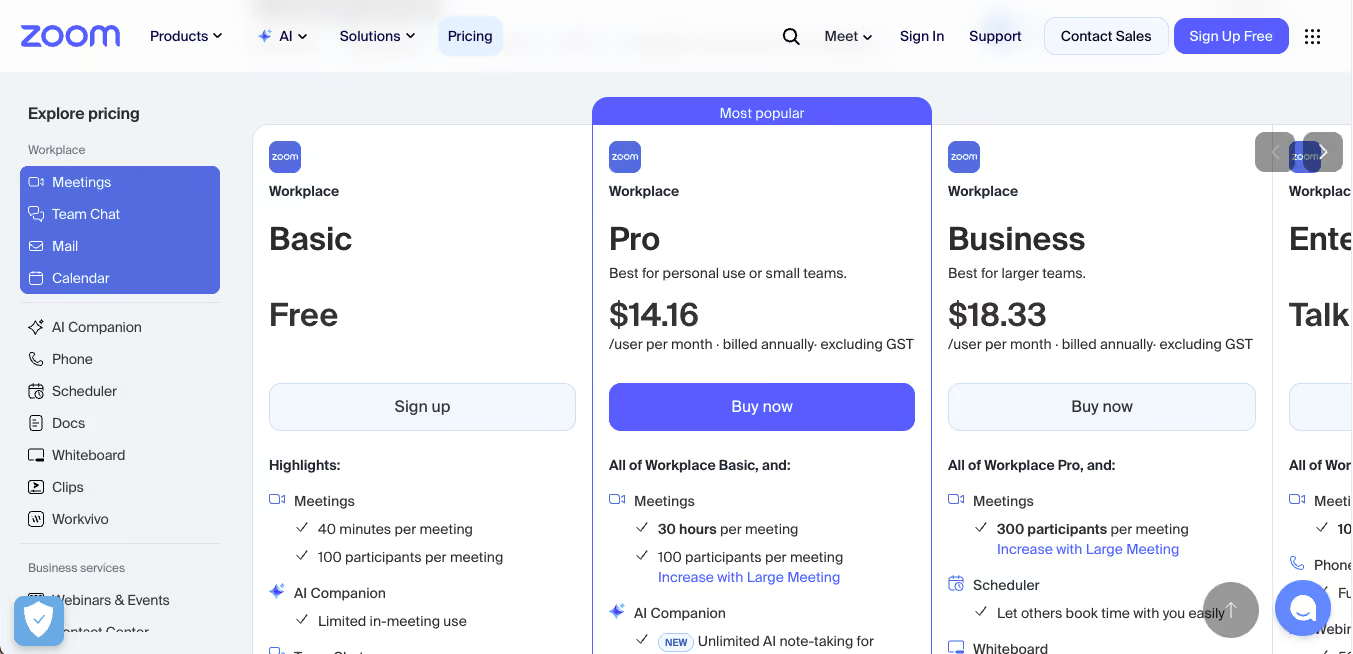
That is a remarkable value proposition for meeting productivity. It is also available as a standalone subscription at $10/month for users without a paid Zoom plan.
What are the Limitations of Zoom AI Companion for Multilingual Teams
Zoom AI Companion was designed as a meeting productivity tool, and not a translation tool. When multilingual teams try to use it for cross-language communication, they run into structural limitations that cannot be solved by updates or patches because they reflect architectural choices. Here are a few limitations of Zoom AI Companions:
Zoom Voice Translator: Availability and Language Limitations
Voice Translation Is Available, but It Is Not the Same as Broad Translation Coverage
The earlier version of this article described Zoom's voice translator as being in limited beta. That is outdated. Zoom now offers Voice Translator for meetings, which can convert translated captions into spoken audio in real time.
However, access requires an eligible account plus the Live Translation add-on or ZoomMate credits, and the currently documented spoken-output language set is narrower than JotMe's 200+ language coverage. Translation quality can also vary by language pair, audio quality, and speaking clarity.
For teams that need spoken translation across a very broad range of languages, JotMe remains the more translation-focused option.
Translated Captions Are Not Free
Translated Captions Are Not Included in Every Zoom Plan
Zoom translated captions are a separate capability from the core AI Companion productivity features. Current Zoom documentation lists translated captions for eligible Zoom Workplace plans such as Business Plus and Enterprise tiers, or through the Zoom Translated Captions add-on.
So while AI Companion meeting summaries and other core productivity features can be included with eligible paid plans, teams should not assume that translated captions are automatically included with Zoom Workplace Pro. This distinction matters when comparing Zoom's built-in productivity features with a dedicated translation layer such as JotMe.
Wrong-Language Summary Problem
This is a widely reported issue in Zoom's community forums. English meetings produce summaries in Hindi, Vietnamese, Japanese, Tamil, or Indonesian because speakers have non-English accents.
One user reported that all settings were in English, yet AI Companion generated the meeting summary in Filipino.
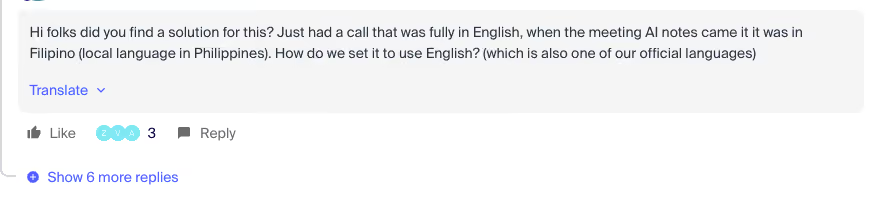
Another described English meetings with Indian participants producing summaries in Hindi or Tamil.
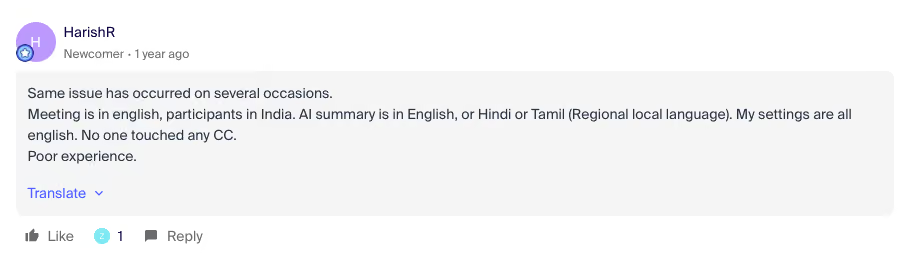
A third reported Japanese summaries from an English meeting simply because all participants were based in Japan.

Zoom's accent-detection system misidentifies the spoken language based on phonetic patterns, and the downstream AI generates output in the wrong language. For multilingual teams where accented English is the norm, this is a trust-breaking failure.
Custom AI Companion Features are English-only
Zoom's own documentation confirms that Custom AI Companion features currently support English only, with plans to expand over time. This means if you are paying the additional $12/month per user for Custom AI Companion to build custom AI agents and workflows, those features do not work in other languages.
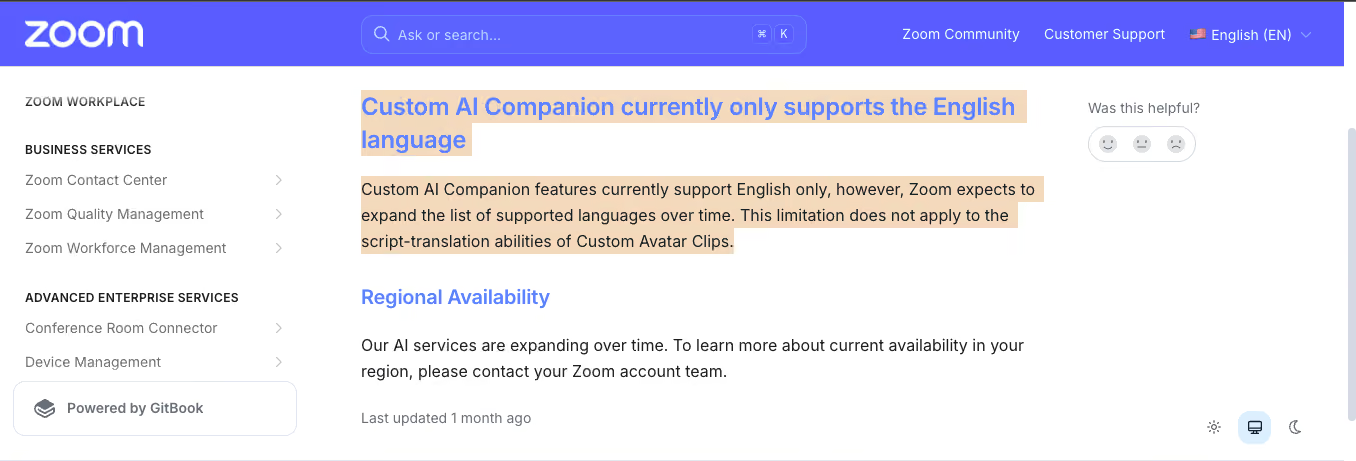
For multinational teams, the premium add-on delivers value only in English contexts.
What JotMe Does That Zoom AI Companion Cannot
As mentioned above, JotMe was built as a translation-first tool. Every feature is designed around the assumption that meeting participants speak different languages and need to understand each other in real time. Here is what that looks like in practice:
Contextual Translation that Understands Business Intent
JotMe's translation engine uses advanced speech recognition that interprets meaning and intent, not just individual words.
When someone in a product meeting says "we are planning a launch blast to promote the new product line," a literal translator might produce confusion.
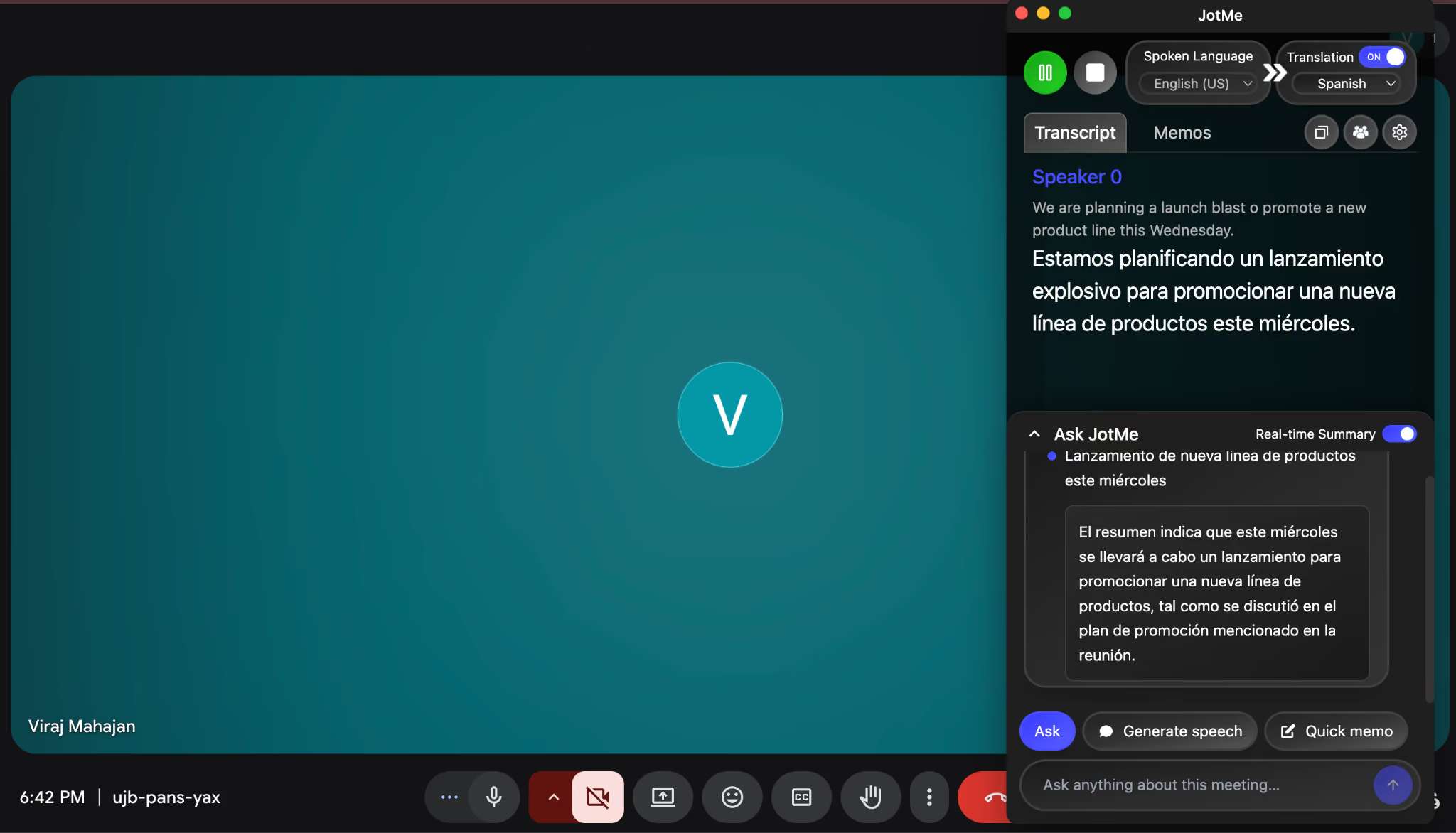
As you can see from the screen above, JotMe's contextual engine understood that "launch blast" refers to a promotional campaign and translated the concept accurately in Spanish.
This distinction matters in every business conversation where idiom, jargon, and industry-specific language are the norm.
Platform-Agnostic: Works Everywhere You Meet
JotMe runs on Mac, Windows, iPhone, Android, and Chrome browser. JotMe captures audio directly from your device, which means it works inside Zoom, Google Meet, Microsoft Teams, Webex, Slack, Discord, WhatsApp, and even in-person face-to-face conversations.
With JotMe, you do not need different translation tools for different platforms. One subscription, every meeting, every platform, and you are good to go!
No Bot, No Third Party, No Privacy Concerns
JotMe captures system audio directly from your computer without a bot joining the Zoom meeting on your behalf. No one in the meeting sees a notification that a recording or translation tool has joined. Unlike human interpreters or add-on tools, no one listens to your conversation.
This is a meaningful difference for sensitive discussions around M&A, product strategy, client negotiations, or personnel matters where the presence of an external bot changes what people are willing to say.
Shareable Translation Sessions via URL or QR Code
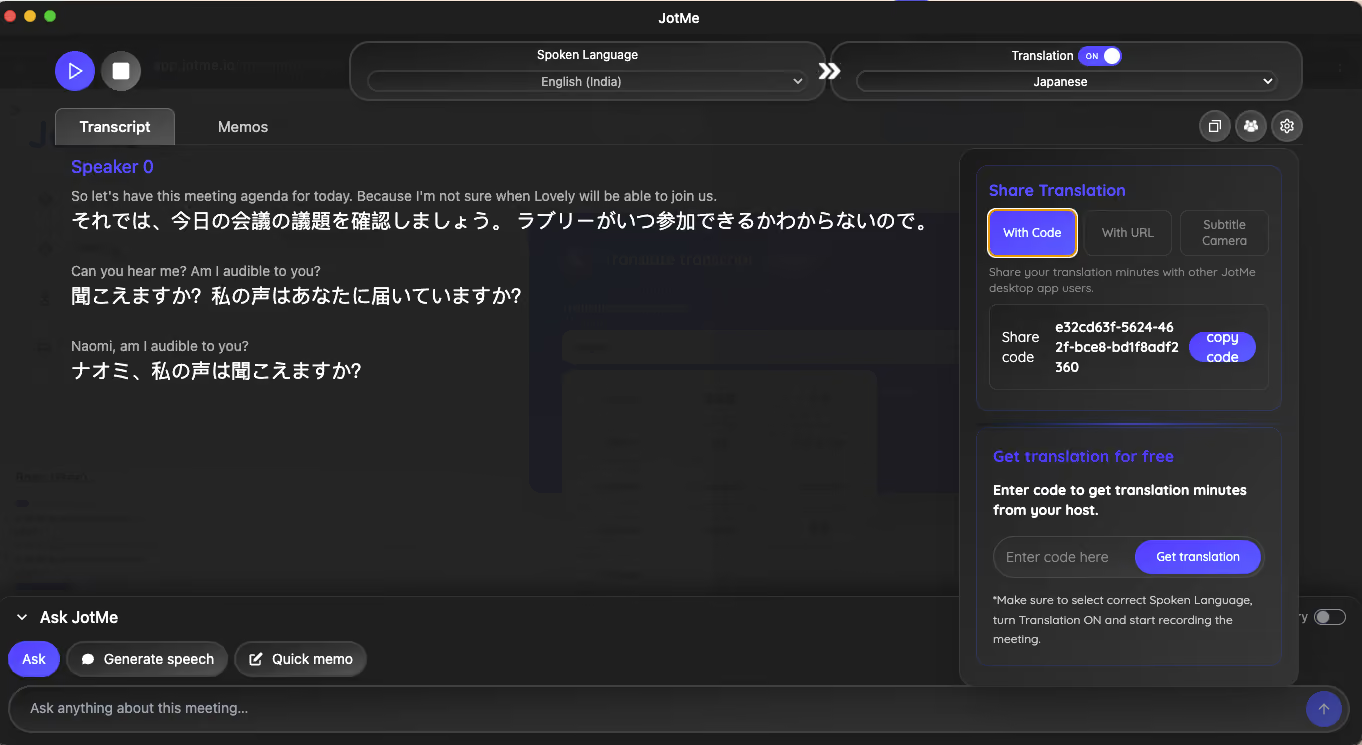
Any team member on a paid JotMe plan can start a translated session and share it with participants who do not have a subscription.
Recipients enter a shared code or scan a QR code to get live translation, post-meeting notes, and AI summaries for free.
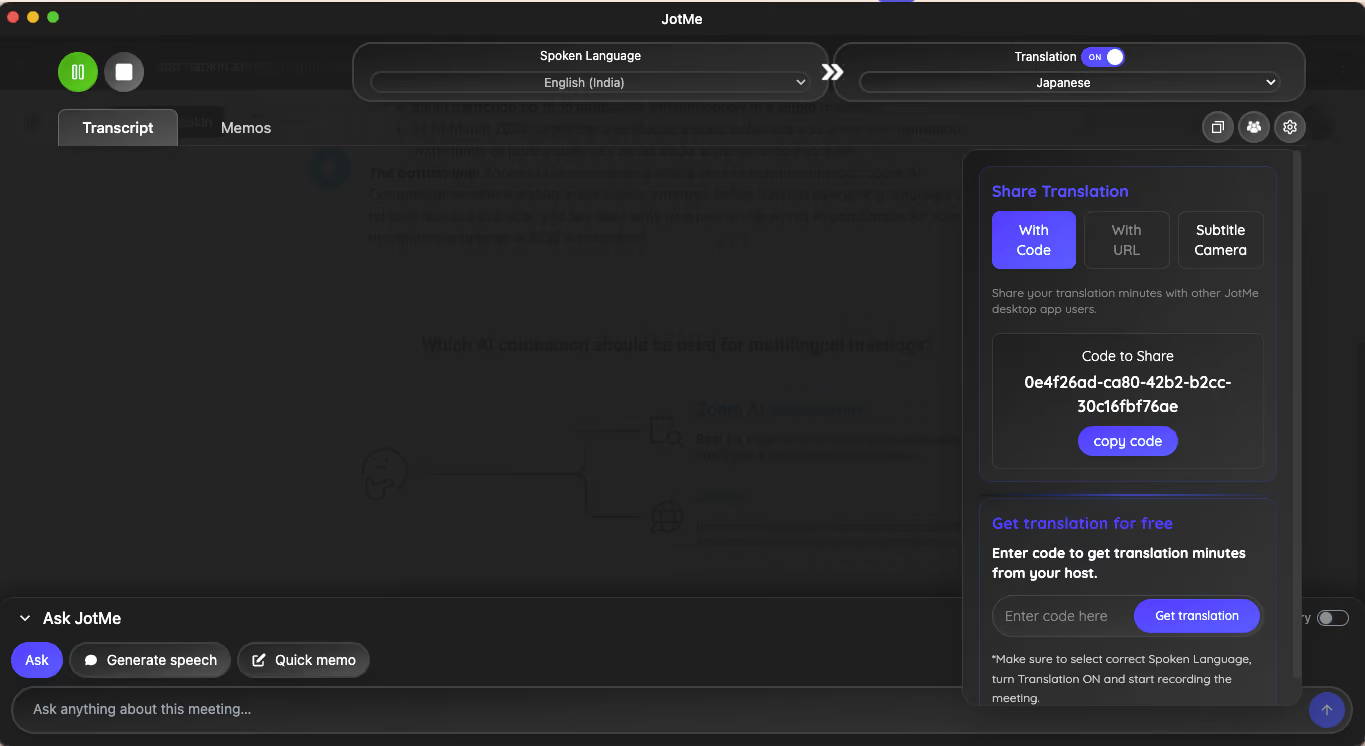
This is critical for client-facing scenarios: your Japanese client does not need a JotMe account to receive live English-to-Japanese translation during your call. For a step-by-step guide on sharing translation sessions, see: How to set up JotMe for your entire team in 15 minutes.
Multilingual Post-meeting Notes and Summaries
After the meeting, JotMe stores the full transcript, meeting chats, and AI-generated meeting notes on your dashboard. JotMe's AI meeting notes, summaries, and action items are available in 21 languages, while its broader live translation and transcription coverage reaches 200+ languages.
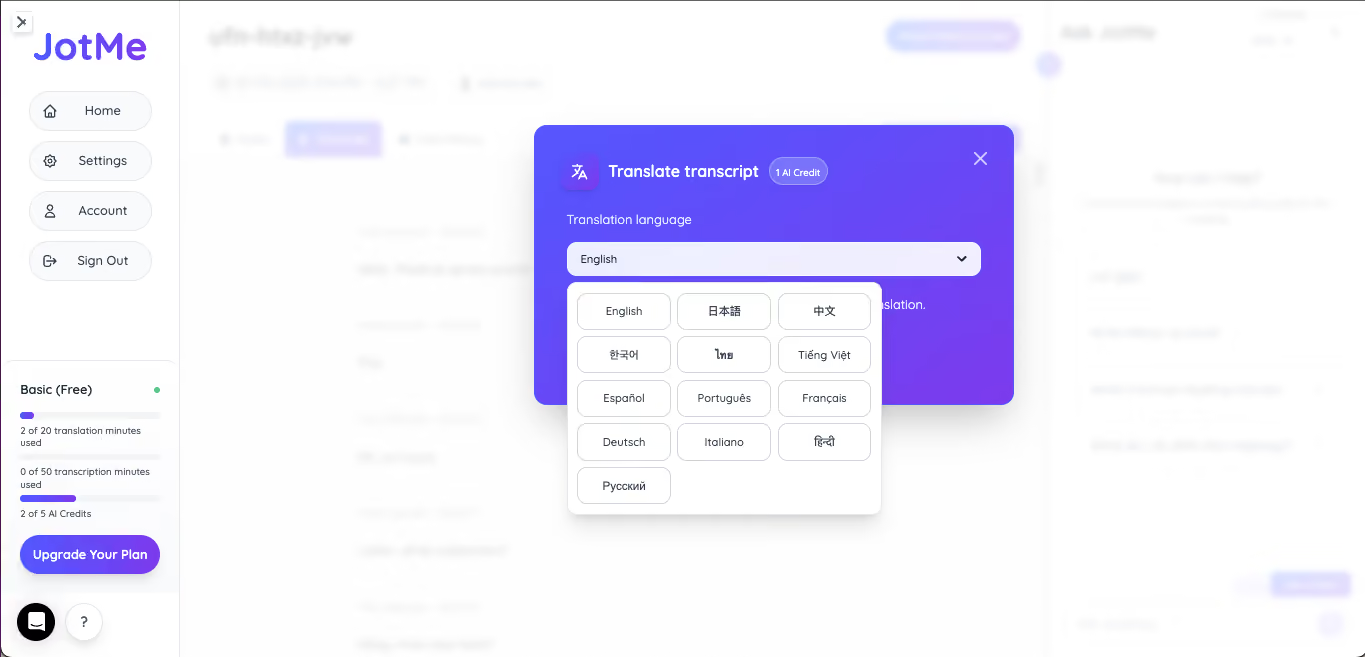
Voice-to-Voice Translation
JotMe can translate spoken conversation into spoken output, so participants can hear the translated message instead of relying only on on-screen text. Its Voice-to-Voice translation workflow is designed for meetings, calls, webinars, interviews, and other conversations where real-time spoken translation is useful.
This makes JotMe particularly useful when reading captions is inconvenient or when participants want a more natural back-and-forth conversation.
In-person Conversation Translation
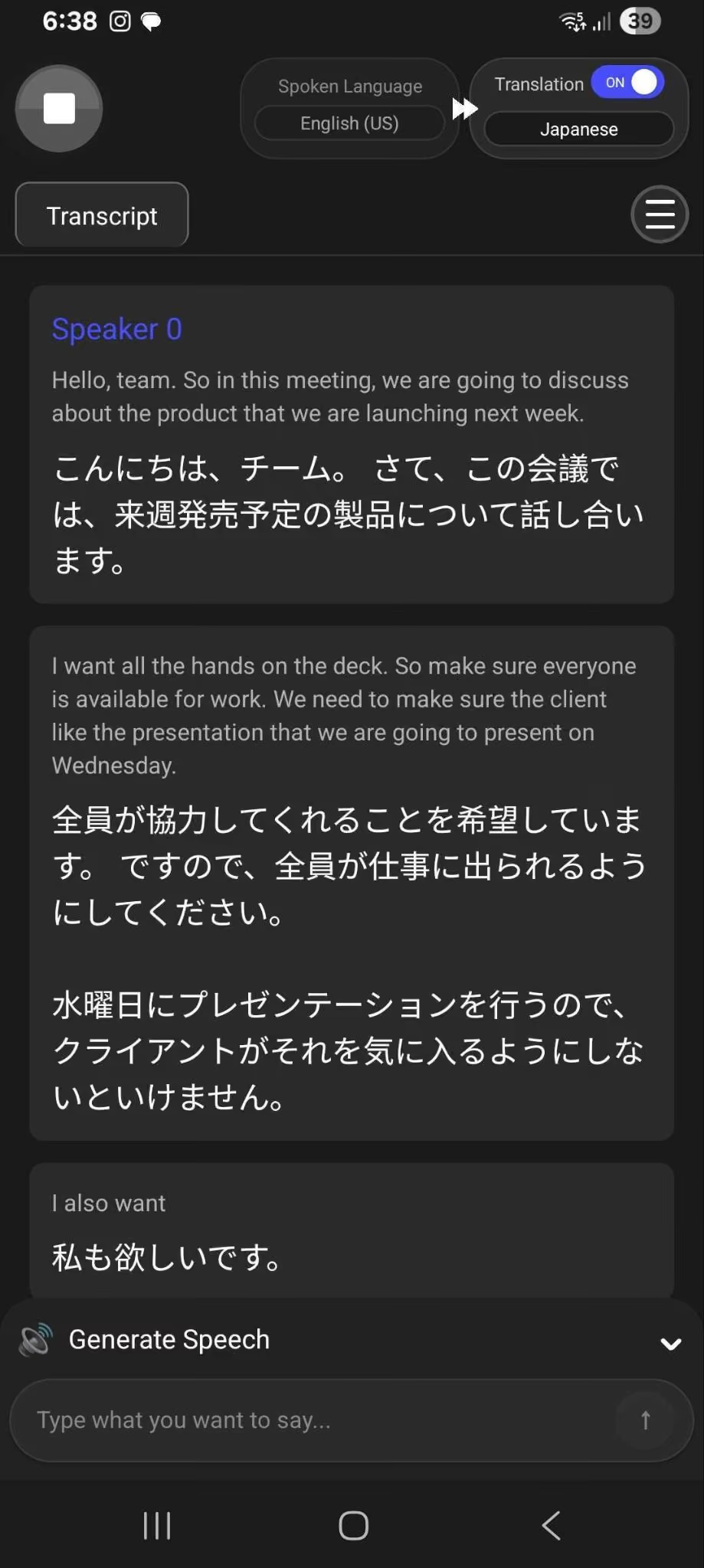
JotMe's mobile app supports real-time translation for face-to-face conversations without a video call. At a conference, a trade show, a client dinner, or an on-site factory visit, pull out your phone, and the JotMe mobile app will translate the spoken conversation live.
When to Use Zoom AI Companion vs. JotMe: A Use Case Guide
See, we are very much clear on this front that JotMe is not a Zoom replacement. It is a translation layer that runs alongside Zoom.
Many teams use both tools simultaneously: Zoom AI Companion for meeting summaries and workflow automation, and JotMe for everything language-related. The question is not which to choose. It is which scenarios call for which tool.
As you can see from the wide list of different use cases, when the task is about meeting productivity in English on Zoom, AI Companion wins.
When the task involves translation, multiple languages, multiple platforms, or external participants, JotMe fills the gap.
The strongest setup for multilingual teams is using both tools together: Zoom AI Companion handling the workflow automation side, JotMe handling everything language-related.
Need live Zoom translation without changing the host’s settings? See how JotMe works with Zoom.
How to Test JotMe Alongside Zoom AI Companion
You do not need to commit to anything to compare the two tools. Here is how to run a side-by-side test in your next meeting:
Step 1: Use Zoom AI Companion with JotMe
Keep your Zoom setup as is and leave AI Companion running. Now download JotMe’s desktop app on Mac or Windows and start your Zoom meeting.
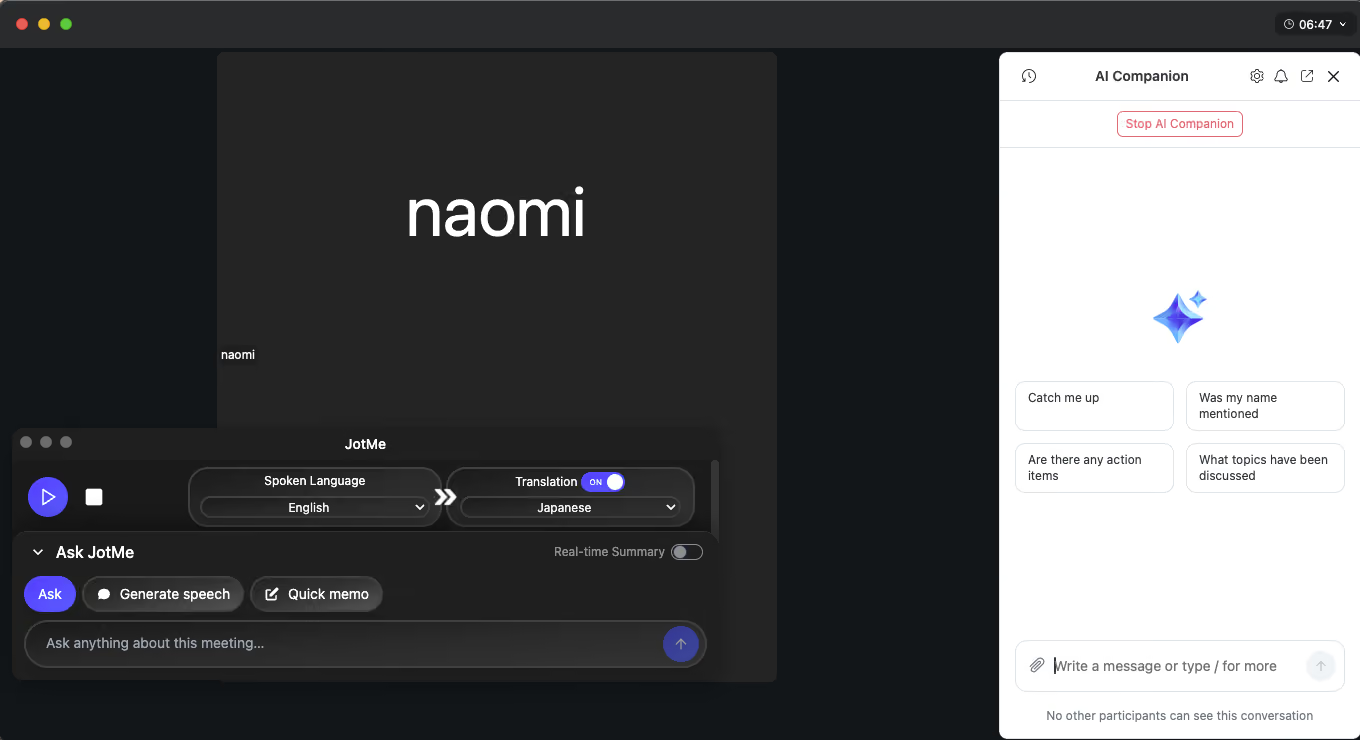
Step 2: Compare Zoom and JotMe
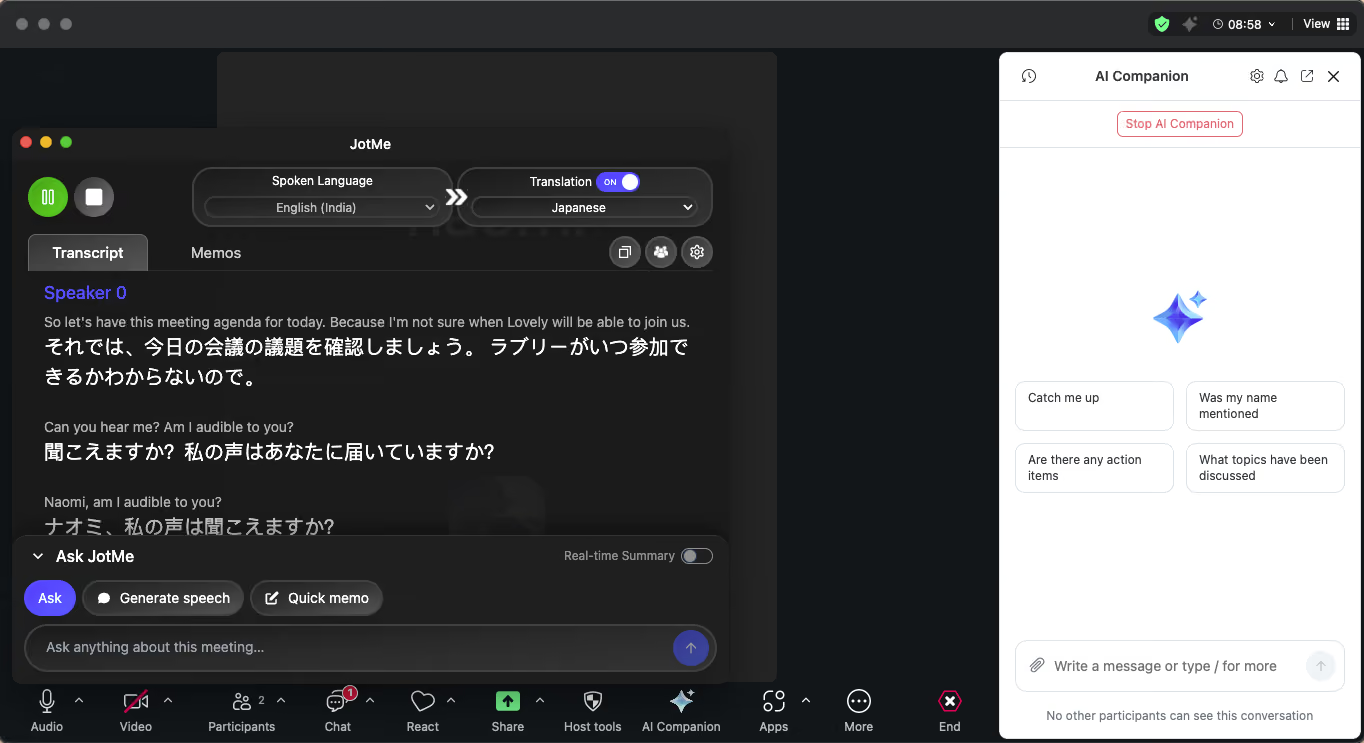
Now inside the Zoom meeting, use an AI companion and JotMe together. You will see how JotMe will capture audio from your system and translate it in real time. AI Companion will do its usual summaries and action items.
Step 3: Check Zoom’s Summary and JotMe’s Transcripts
After the meeting, look at Zoom's summary and look at JotMe's multilingual transcript and AI notes, and ask yourself: Which one captured the cross-language conversation more accurately? Which output is more useful for your non-English-speaking teammates?
Step 4: Share Translation Meetings with a Client
Go the extra mile when considering JotMe. In your next meeting, try sharing your JotMe translation session via the shared code. Let an external participant who does not have JotMe access the live translation and see how they react and what they have to say about the tool.
The free plan gives you 20 minutes of live translation per month. That is enough for one full test. When you are ready to scale, the Teams plan covers 10 users with 2,000 translation minutes per month for $1,800 per year. For a full breakdown of how JotMe's team pricing compares to human interpreters, you can check out our detailed guide on human interpreter vs. AI interpreter’s cost in 2026.
Last updated on
September 17, 2026
Follow us on social media:
![JotMe — Is Google Translate Accurate? [2026 Test]](/_webflow-assets/0d0512afc7b037d74dff536f22fed08f.avif)