Guides
iTranslate vs. JotMe: Which is the Better Language Interpretation App

Lovely Mangla
January 29, 2026
Have you ever been in an important conversation with someone who speaks a different language and wished you had a translator with you? That’s where a language interpretation app, like iTranslate or JotMe, can help. iTranslate’s main focus is on quick voice, text, and speech-to-text translations.
However, iTranslate doesn’t have a desktop app, and its web app supports only text-to-text translation. The main features, like voice translation, speech-to-text translation, and more, are available only in iTranslate’s mobile app.
On the other hand, JotMe comes with a desktop as well as a mobile app, offering continuous real-time translation that keeps conversations flowing without interruptions. JotMe makes communication and learning better with contextual live translation and the ability to tweak the tone of your text-to-text translations and get explanations that teach you why phrases are used in certain ways.
Check out what each of these tools offers:
- JotMe is a powerful AI live translation app for interpreting languages that comes with features like continuous voice-to-text translation, AI Translator for text-to-text translation, Generate Speech (text-to-voice), real-time summary, and more, with pricing plans starting at just $10/month (billed annually). It is designed for language learners who want to get AI-powered explanations to learn the intent behind specific terms and travelers who want to follow entire conversations without losing context.
- iTranslate, starting at $9.99/week ($39.96/month), is ideal for travelers who need quick text-to-text translation, voice translation, speech-to-text translation, and more for everyday situations like asking for directions or ordering at a restaurant. However, iTranslate’s web application supports only text-to-text translation, and features like voice-to-voice translation and speech-to-text translation are available only in iTranslate’s mobile app.
What are the Best iTranslate Alternatives for Language Interpretation?
The best iTranslate alternatives for language interpretation include JotMe, Google Translate, DeepL Translator, Say hi Translate, and Reverso Context. These iTranslate competitors offer more advanced features, and can be useful if you’re looking to solve any of these problems:
- You want continuous translation that doesn’t reset every time you pause.
- You want an app that works on both desktop and mobile devices for language learning and while traveling.
- You want to translate PDFs or Word files, or wish to create your own vocabulary.
So here we have curated five best alternatives to iTranslate that will solve your problem:
- JotMe: Ideal for contextual text-to-text translation with AI-powered explanations and travelers who need continuous voice-to-text translation without interruptions.
- Google Translate: A free iTranslate alternative for quick voice-to-text translation and text translation with camera support for basic travel needs.
- DeepL Translator: Ideal for translation of text, PDFs, .docx, and .pptx files in 100+ languages, and multiple platform integration.
- Say hi Translate: Good for on-the-go voice translation of conversation in 25+ languages on mobile devices.
- Reverso Context: Ideal for language learning with customized vocabulary on desktop, mobile, and Chrome.
How We Tested the Best iTranslate Alternatives?
We tested the best iTranslate alternatives with the same inputs of real-world scenarios to ensure a fair comparison:
- Daily conversation phrases (ordering food, asking for directions)
- Longer conversations (long dialogues with pauses to test continuous translation)
- Understanding of technical terms (industry-specific terms like medical, finance, etc.)
- Tone variations (polite, formal, sarcastic)
After testing the tools based on the above inputs, we scored them based on:
- Translation accuracy (does it understand the conversation flow or provide word-for-word translation?)
- Device compatibility (does it work on web, desktop, and mobile?)
- Ease of use (how simple is the setup and navigation?)
- Additional features (does it offer advanced features other than live translation?)
Using our selection criteria, we found JotMe as a better alternative to iTranslate, so we compared the two in detail.
Quick Comparison of the Language Interpretation Apps: iTranslate and JotMe
Before we get into the details of the features and pricing of iTranslate and JotMe, here is a quick comparison of the voice translation tools. This table highlights the key differences in real-time translation accuracy, device compatibility, and features to help you choose the right app for language interpretation.
In this article, we’ll explore the features, accuracy, pricing, and reviews of iTranslate and JotMe, and determine which is the best-suited live translation app for language interpretation.
What Makes Users Choose a Language Interpretation App Like JotMe or iTranslate?
Users choose a language interpretation app like JotMe or iTranslate to overcome language barriers with quick, contextual, and accurate live translation across multiple languages. Whether you’re learning a new language or traveling abroad, these AI interpreter tools make learning and communication easier and faster.
- Choose JotMe when you are looking to learn a new language and want more than basic translations. JotMe’s desktop app gives you contextual, real-time translation for voice and text. You can also use the JotMe mobile app while traveling to get continuous voice-to-text translation that lets you understand lengthy conversations.
- Choose the iTranslate mobile app when you’re traveling and need voice-to-voice translations for everyday situations like asking for directions or ordering food. iTranslate’s camera translation and offline mode make it convenient when you’re on the move and don’t have internet access.
Where does JotMe Stand Out?
JotMe stands out with its continuous voice-to-text translation feature, keeping conversations flowing without restarting after every pause. JotMe is built for language learners and travelers who want translations with context, not just words. The JotMe desktop app also allows you to adjust the tone of your text-to-text translation to be more formal, casual, or sarcastic.
Where does iTranslate Stand Out?
iTranslate’s mobile version stands out for its voice translation feature that lets you translate your speech from one language to another. iTranslate’s mobile app is useful when you’re exploring a new place and need to communicate with locals.
How do JotMe and iTranslate Compare in Terms of Features?
Both JotMe and iTranslate offer live translation, but they’re designed with different users in mind. JotMe is for people who need continuous and accurate live translation, while iTranslate focuses on quick voice-to-voice translation for travelers. Here’s how their features differ:
- JotMe keeps conversations flowing without restarting every pause, while iTranslate treats each pause as an end and starts a new chat.
- JotMe lets you adjust text-to-text translation tones to formal, casual, sarcastic, etc., using the Request feature. iTranslate doesn’t offer any tone customization options.
- JotMe offers a desktop app for live translation of conversations, including voice and text. However, iTranslate doesn’t have a desktop app and offers only text translation on its web app.
- JotMe provides explanations alongside text-to-text translations to help you understand phrases and the intent behind conversations, and learn the language, while iTranslate lacks this feature.
- JotMe offers a mobile app with features like Generate Speech (text-to-voice), text translation, and speech-to-text translation. On the other hand, the iTranslate mobile app offers voice translation, camera translation, website translation, phrasebook, and more.
What are the Key Features of JotMe?
The key features of JotMe include live contextual translation, continuous translation, Generate Speech, and an AI translator. These features are explained in detail below:
JotMe’s Live Contextual Translation (Speech-to-Text)
When you’re learning a new language, you need to understand how people actually speak and not get just word-for-word translations.
JotMe’s advanced speech recognition technology understands the tone, flow, and context of the conversation, and technical words to deliver accurate translation in real time, helping you learn how native speakers naturally express themselves.
Whether you use the desktop app for language learning or the mobile app for in-person conversations, JotMe delivers contextual speech-to-text translation to ensure smooth communication without disrupting the flow of your conversation.
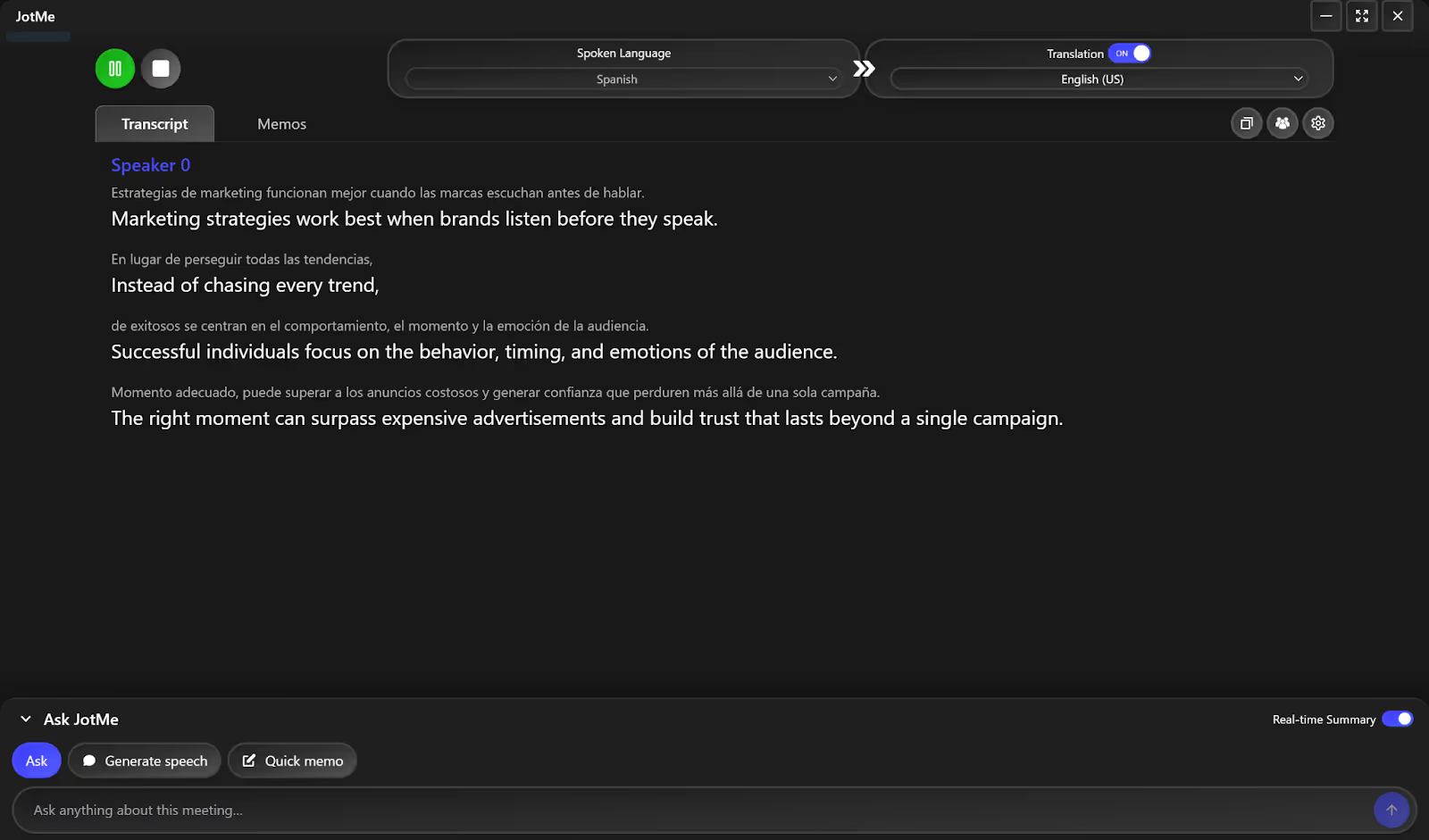
You can even set the “Translation Quality” of your live translations between Fast and Contextual. If you set it to Fast, you’ll get quick translations with slightly low accuracy. However, if you keep it to Contextual, you will get accurate translations but with a slight delay.
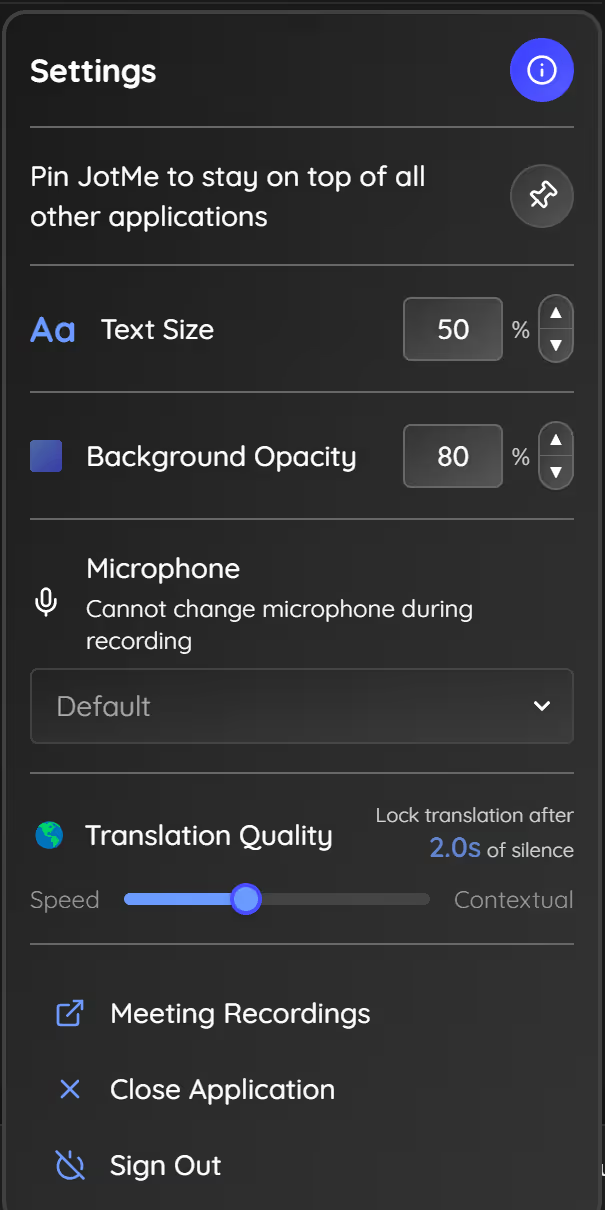
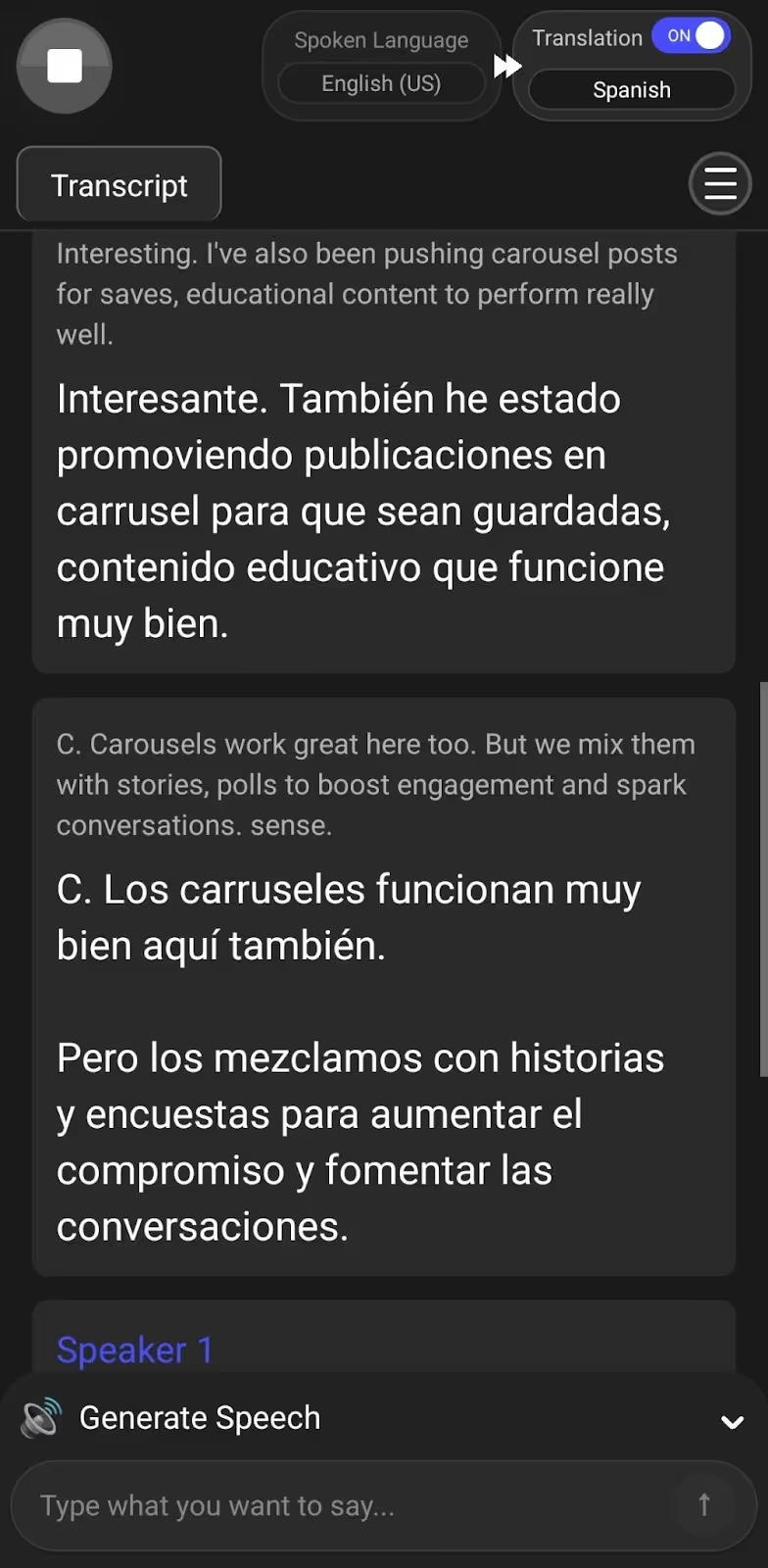
JotMe’s Continuous Translation
When you’re in the middle of a conversation and pause to think, most translation apps treat it as an end and start fresh when you speak again. This ruins the flow of the conversation, and you need to jump between multiple chats to understand what was discussed.
But JotMe’s mobile and desktop app waits for you to continue and picks up right where you left off, keeping the speech-to-text translation going as one continuous flow. This can come in handy to understand the context of your conversations when you’re communicating with locals while traveling.
JotMe’s AI Translator
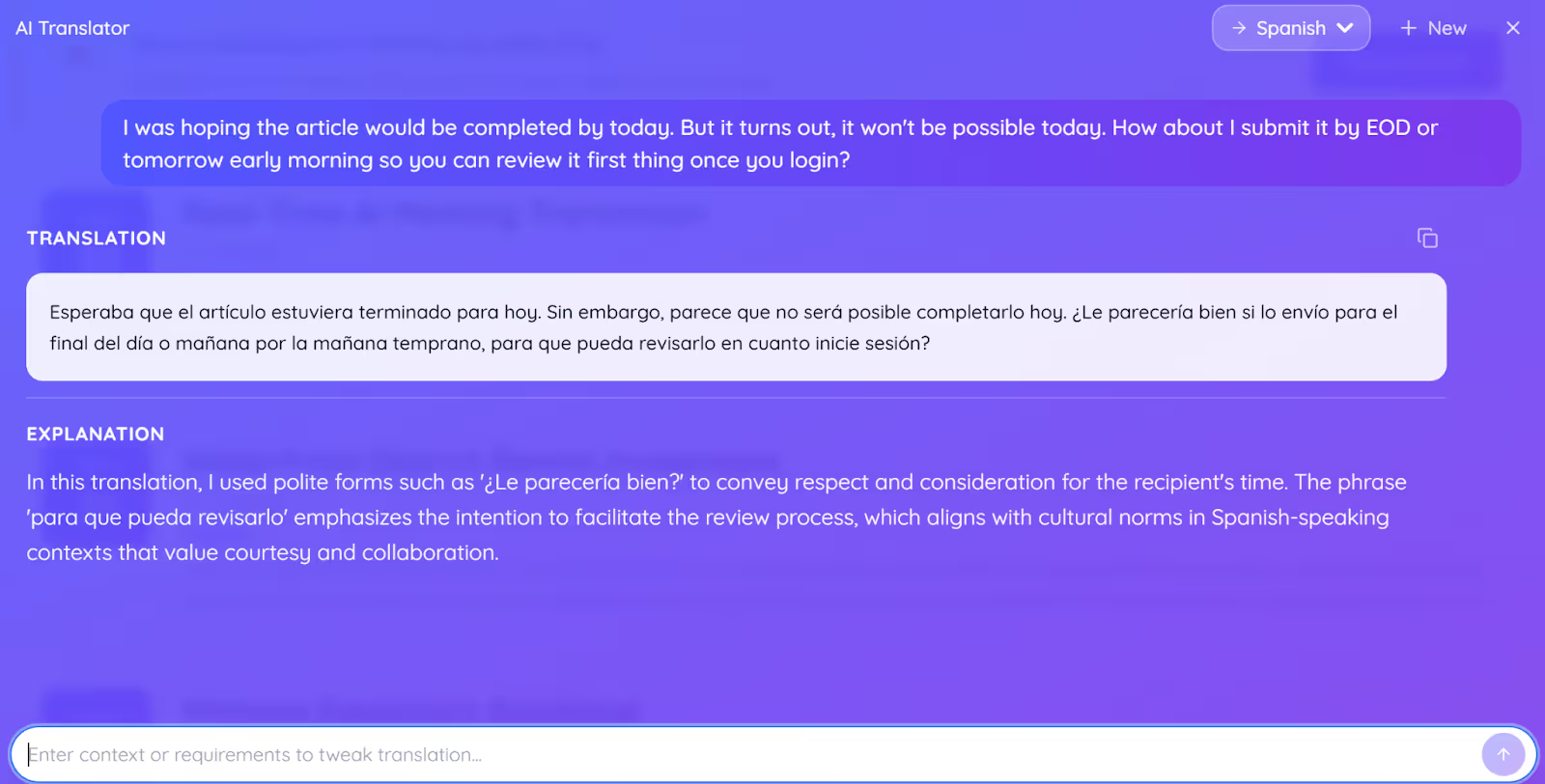
JotMe’s desktop app offers an AI Translator for text-to-text translation in over 130 languages. You can add a “Request” to keep the translation more formal, polite, or funny. It also provides an explanation to help you understand the phrases and intent behind the conveyed message. This feature makes language learning easier by explaining why certain words are used in specific situations.
Consider the following statement as an example.
Statement:
A line-by-line translator would read this as:
JotMe’s translation with the Request “Make it more polite:”
JotMe Mobile App
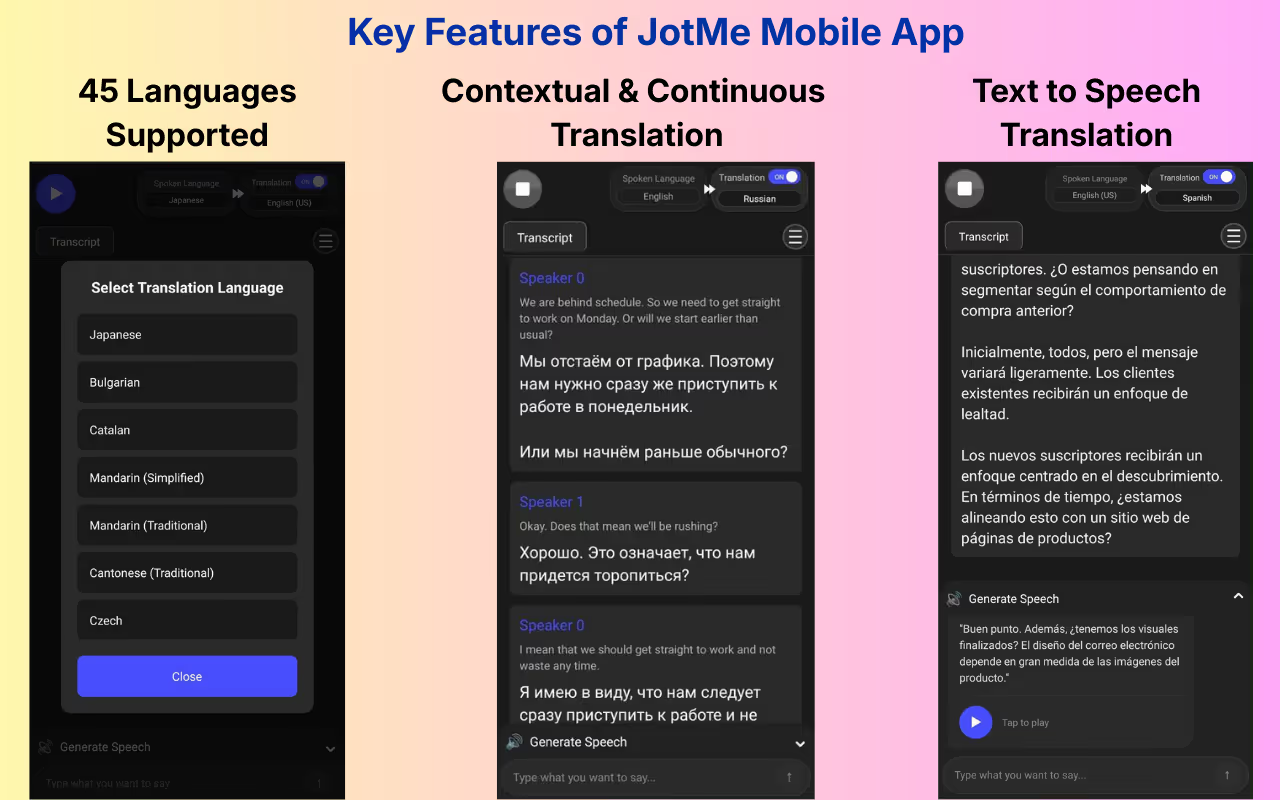
JotMe offers a mobile app for language interpretation of in-person conversations in 45 languages, with support for speech-to-text, text-to-text, and text-to-speech.
JotMe also supports multilingual transcription and translation in up to 10 different languages simultaneously in your preferred language, including English, Japanese, Spanish, French, etc. This makes it easy for travelers exploring multicultural cities where people speak different languages.
During our visit to Spain, when we had to ask for directions to the locals, we used the “Generate Speech” feature to simply type the message in English. This generated a text translation, along with a speech that we could play. This made the communication easier for the listener as well, and he could respond accordingly.
JotMe is the Right Fit if You:
✅ Are learning a new language and need real-time translation with context and explanations for text translations.
✅ Want continuous voice-to-text translation that doesn’t reset every time you pause.
✅ Need text-to-speech to communicate with locals while traveling.
✅ Want to understand why phrases are used in a certain way, not just what they mean.
JotMe might not be the Right Fit if You:
❌ Need camera translation to translate text from images.
❌ Want to translate documents by uploading PDF or Word files.
What are the Key Features of iTranslate?
The key features of iTranslate include text translation, voice translation, speech-to-text translation, and more. While iTranslate’s web app offers only text-to-text translation, its mobile app offers voice-to-voice translation, speech-to-text translation, website translation, and more. Take a detailed look at these features below:
iTranslate’s Text Translation
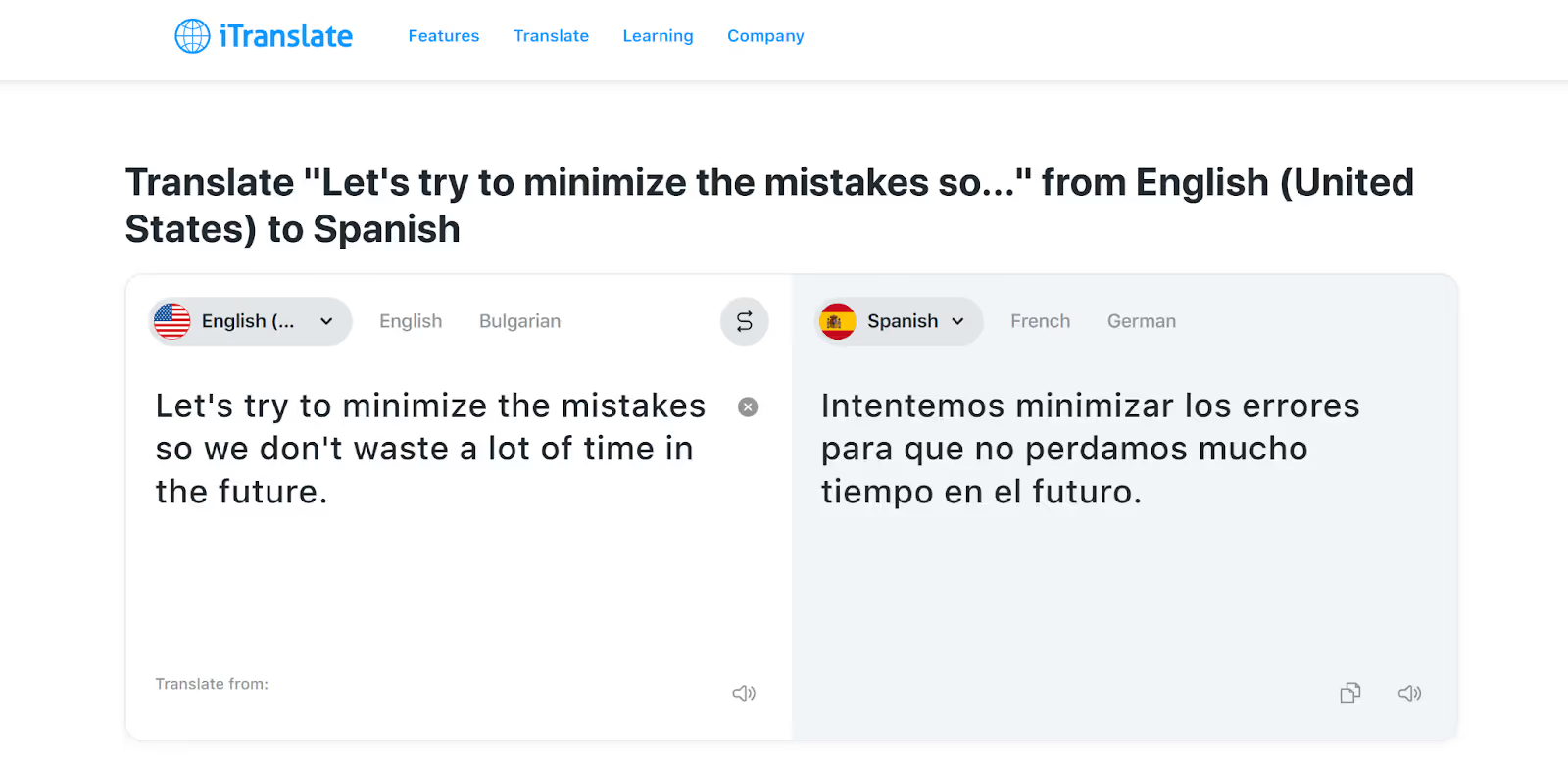
iTranslate offers text translation in 100+ languages through its mobile and web apps. We tried translating English into Spanish, and it instantly gave the results. We could also play the translated text, which helped us understand the pronunciation of the Spanish words.
iTranslate can be useful when you’re learning a new language and want to improve your reading and speaking skills. However, it lacks the “Request” feature like JotMe’s desktop app, meaning you can’t customize the tone of your text translation.
When we used the same statement in JotMe and made a request to make it sarcastic, this is what it delivered:
iTranslate’s Voice Translation
If you’re traveling and need quick help communicating with locals, iTranslate provides voice-to-voice translation in 100+ languages. However, this feature is available only in the mobile app, and even the translations lack accuracy, especially when translating from other languages into English.
While iTranslate’s translation seems word-for-word, JotMe delivers contextual and accurate translations in real time and understands the tone, flow, and even technical terms used in the conversation.
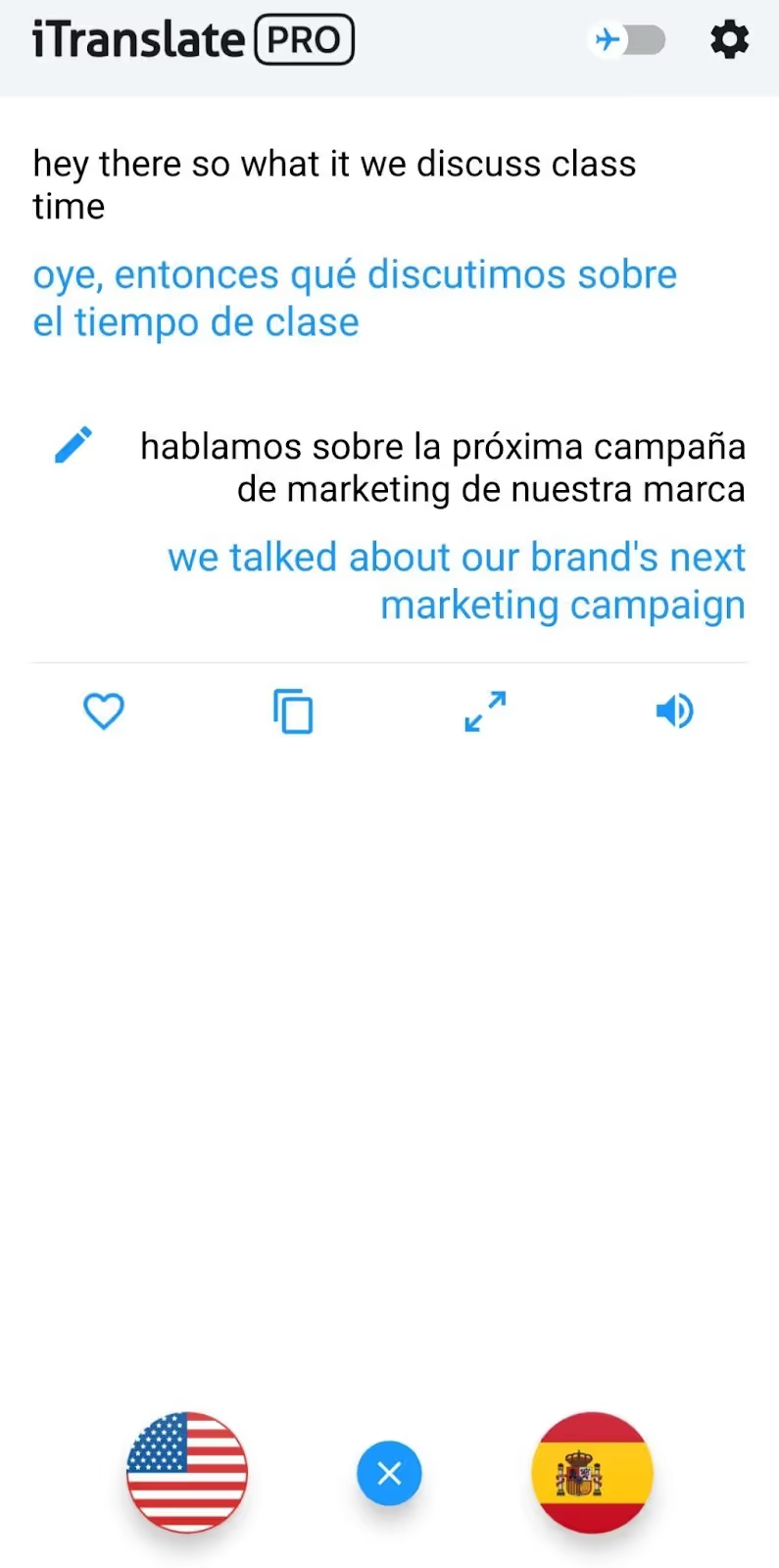
Another inconvenience of iTranslate is that you need to tap the flag icon at the bottom of the screen every single time you or the other person has to speak, breaking the flow of the conversation. But with JotMe, there’s no tapping required once you start the live translation. It automatically detects when you’re speaking and translates in real time.
iTranslate’s Speech-to-Text Translation
iTranslate offers speech-to-text translation in its mobile app, where you can speak into the app and convert your words into another language. It also provides verb conjugations in different tenses, which can be helpful for language learners to understand how verbs change based on the subject.
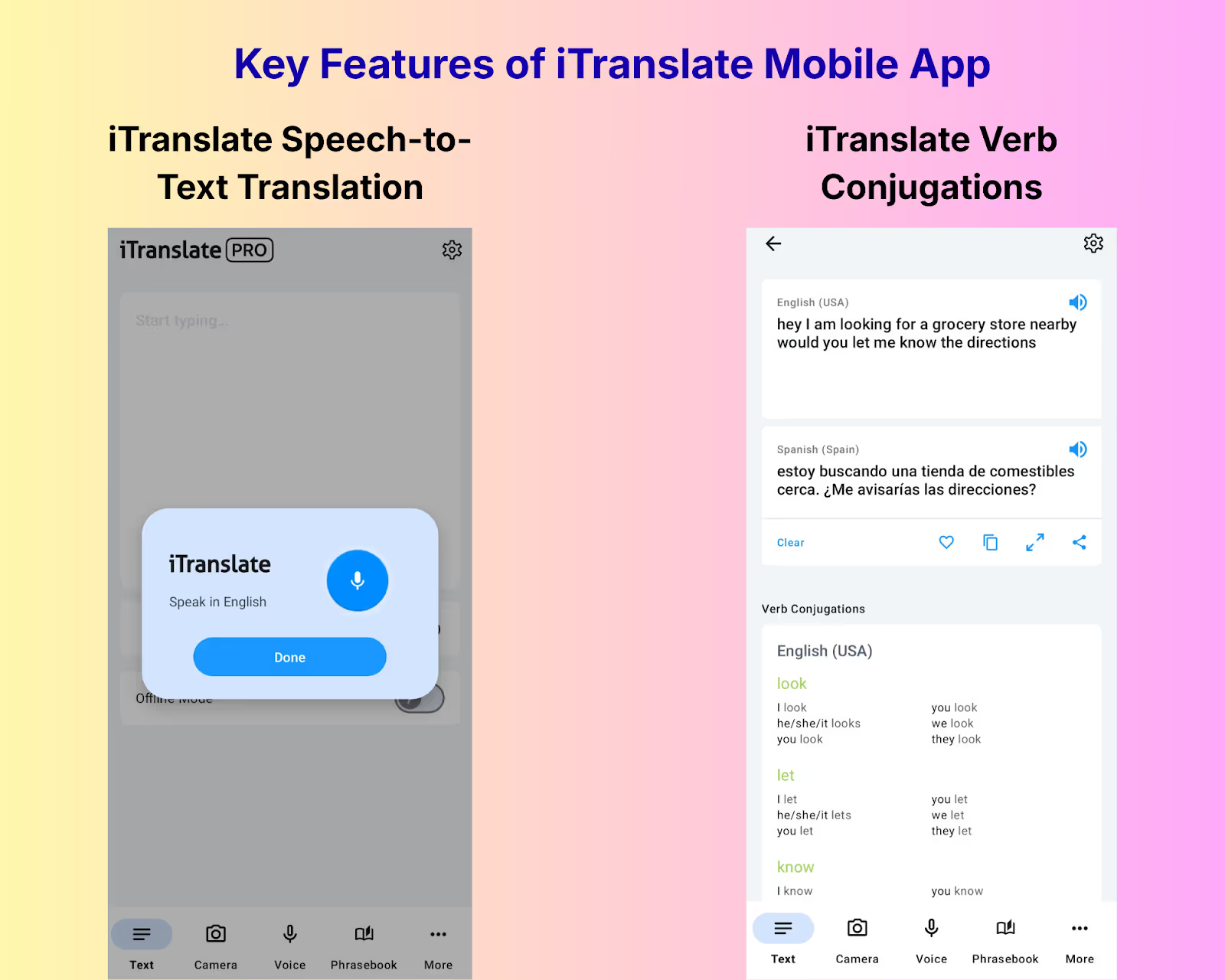
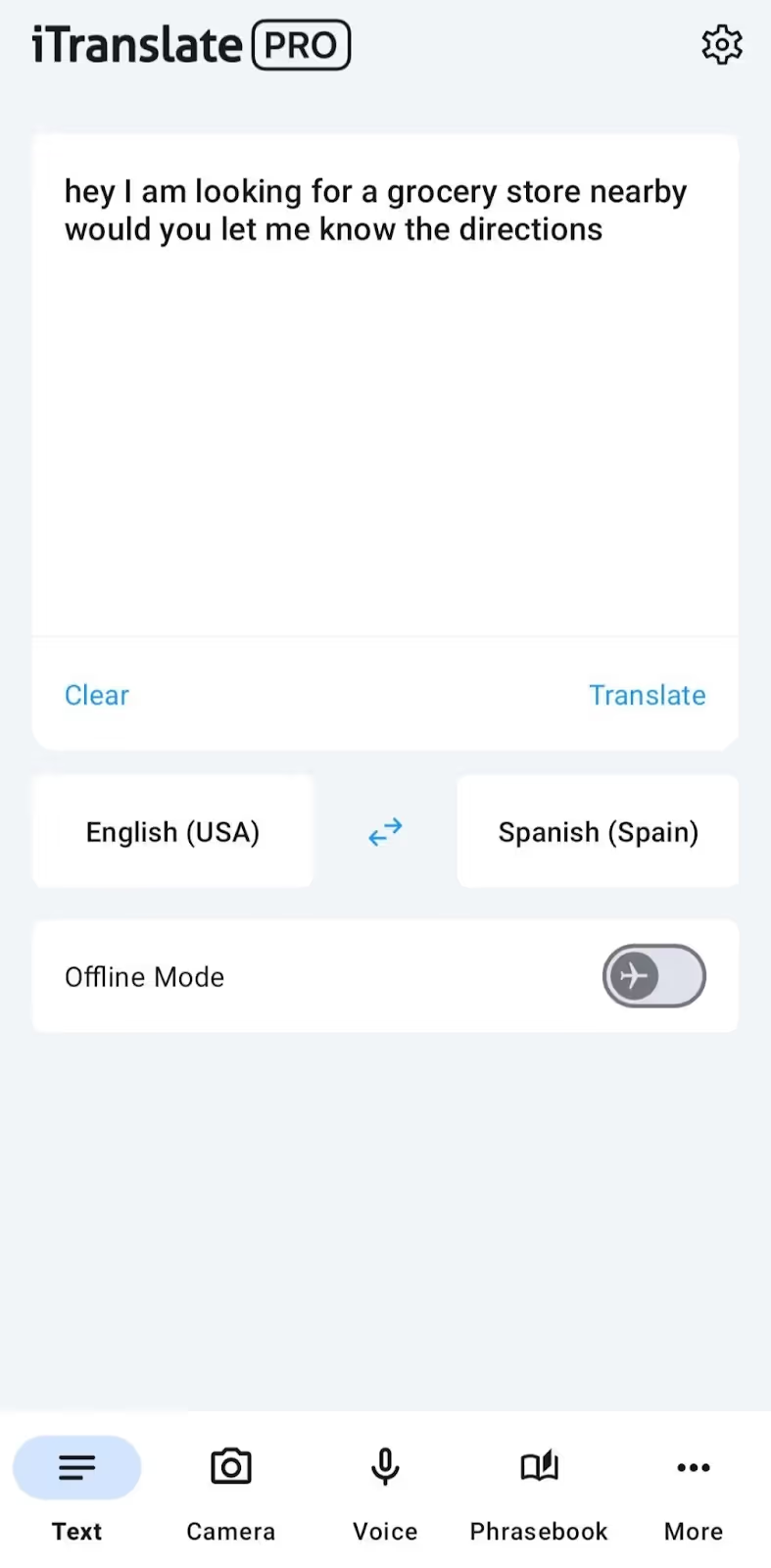
However, iTranslate does not offer a direct translation. The app first converts your speech into text in the same language you’re speaking. Then, you’ll need to manually click on the “Translate” option to get the translation in your preferred language. It’s a two-step process and won’t be ideal for real-time conversations where you need quick communication.
Also, there’s no continuous live translation in iTranslate, meaning every time you pause, the app treats it as the end of your conversation. This makes it harder to follow lengthy discussions or understand the full context of what’s being said.
JotMe, on the other hand, keeps the conversation going even when you pause, making it easier to translate long conversations without losing context.
iTranslate is the Right Fit if You:
✅ Want quick voice translations in 100+ languages for daily use.
✅ Need to scan and translate text from an image using the camera.
iTranslate might not be the Right Fit if You:
❌ Want to customize the tone of your text translations.
❌ Need continuous translation for lengthy conversations/meetings.
❌ Want reliable offline translation (users have reported it doesn’t work well).
How Much do JotMe and iTranslate Cost? (Updated January 2026)
JotMe and iTranslate costs start from $10/month (billed annually) and $9.99/week ($39.96/month), respectively, with both of them offering a free plan/version. Below is a quick breakdown of what they offer:
- JotMe offers a free monthly plan with limited translation and transcription minutes and AI credits. If you want more minutes or credits, it offers $10/month and $15/month (billed annually) pricing plans.
- iTranslate offers text translation (web and mobile app) and speech-to-text translation (only in mobile app) for free. iTranslate mobile’s Pro plan costs $9.99/week ($39.96/month) or $99.99/year and offers other features like voice translation, website translation, and more in its mobile version.
Take a look at the detailed breakdown of their pricing plans.
What Pricing Plans Does JotMe Offer?
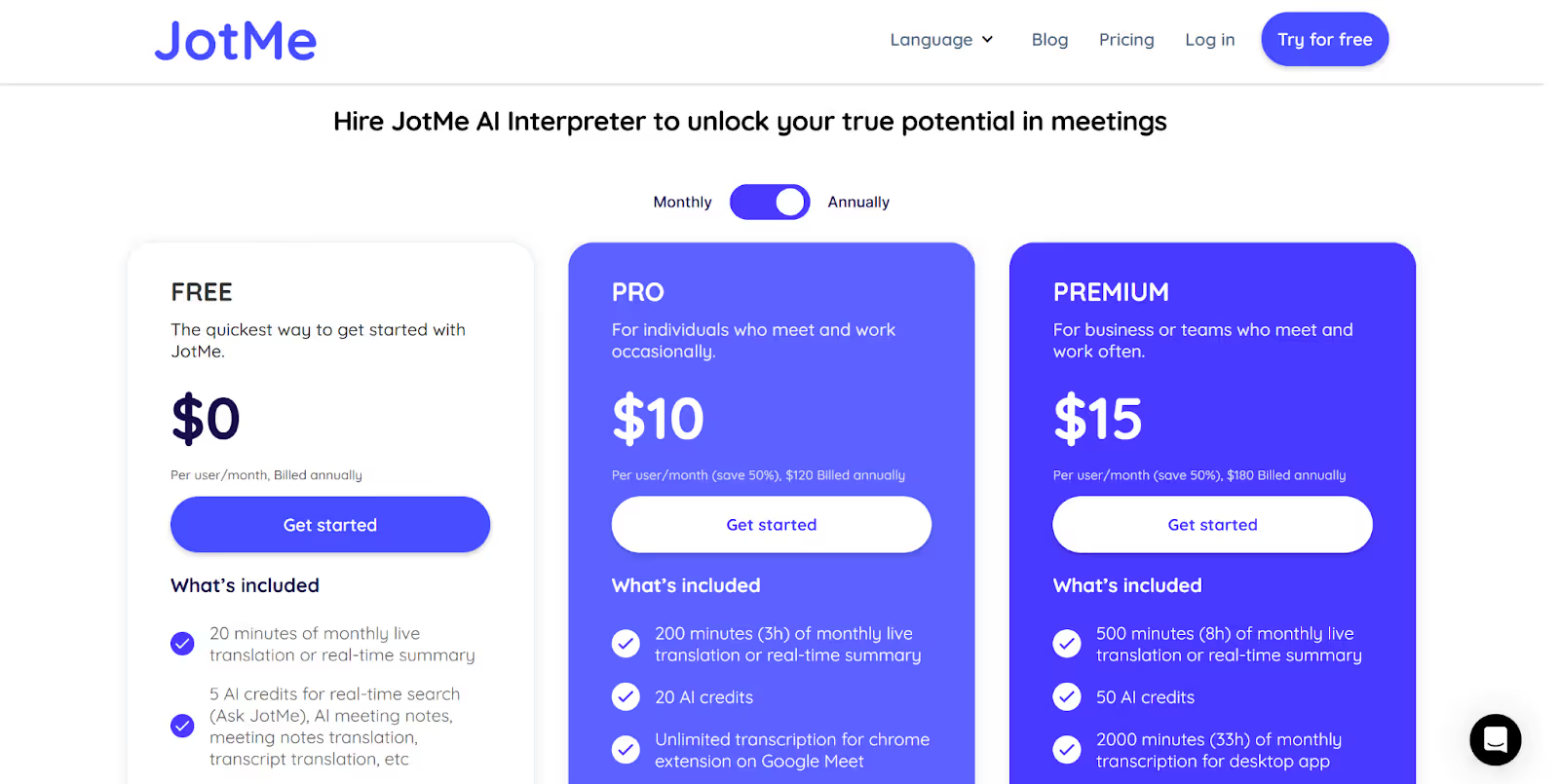
JotMe offers a free monthly plan, along with two paid models – Pro and Premium.
Free Plan
- JotMe’s free monthly plan includes 20 minutes of live translation or real-time summary, 50 minutes of transcription, 5 AI credits for real-time search, post-meeting notes, translation of notes and transcript, and more.
Paid Plans
- JotMe’s Pro plan is priced at $10/month (billed annually), and offers 200 minutes of monthly live translation/real-time summary, 500 minutes of monthly transcription for the desktop app, 20 AI credits, 300k tokens for AI text translation (desktop app), access to the last 20 meeting recordings, and more.
- The Premium plan, costing $15/month (billed annually), comes with 500 minutes of monthly live translation/real-time summary, 2000 minutes of monthly transcription for the desktop app, shareable translation minutes, 700k tokens for AI text translation (desktop app), 50 AI credits, access to unlimited meeting recordings, and more.
What Pricing Plans Does iTranslate Offer?
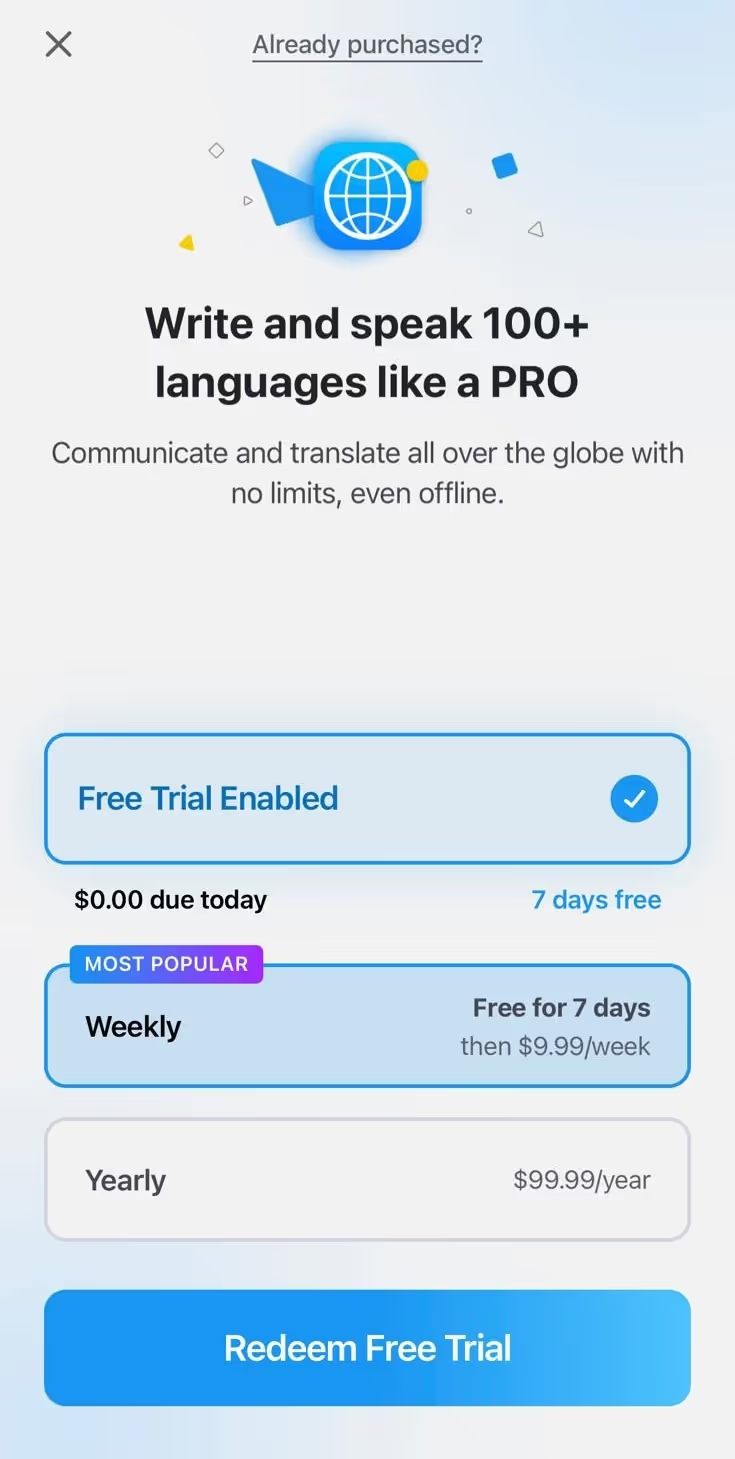
iTranslate mobile offers a free trial of seven days, and the Pro plan with weekly and monthly payment options.
Free Trial
- While text translation, speech-to-text translation, and phrasebook are free forever, iTranslate’s mobile app offers a free trial of seven days to try the Pro features like voice translation, camera translation, offline mode, and more.
Pro Plan
- iTranslate mobile’s Pro plan costs $9.99/week ($39.96/month) or $99.99/year and offers features like camera translation, offline mode, website translation, voice translation, and more.
What do Users Say About JotMe and iTranslate?
Users praise JotMe as a specialized AI tool for real-time translation of conversations. iTranslate is viewed as a user-friendly app that interprets languages for quick and everyday voice translations. Check out what the users like and dislike about both the tools.
What do users like about JotMe?
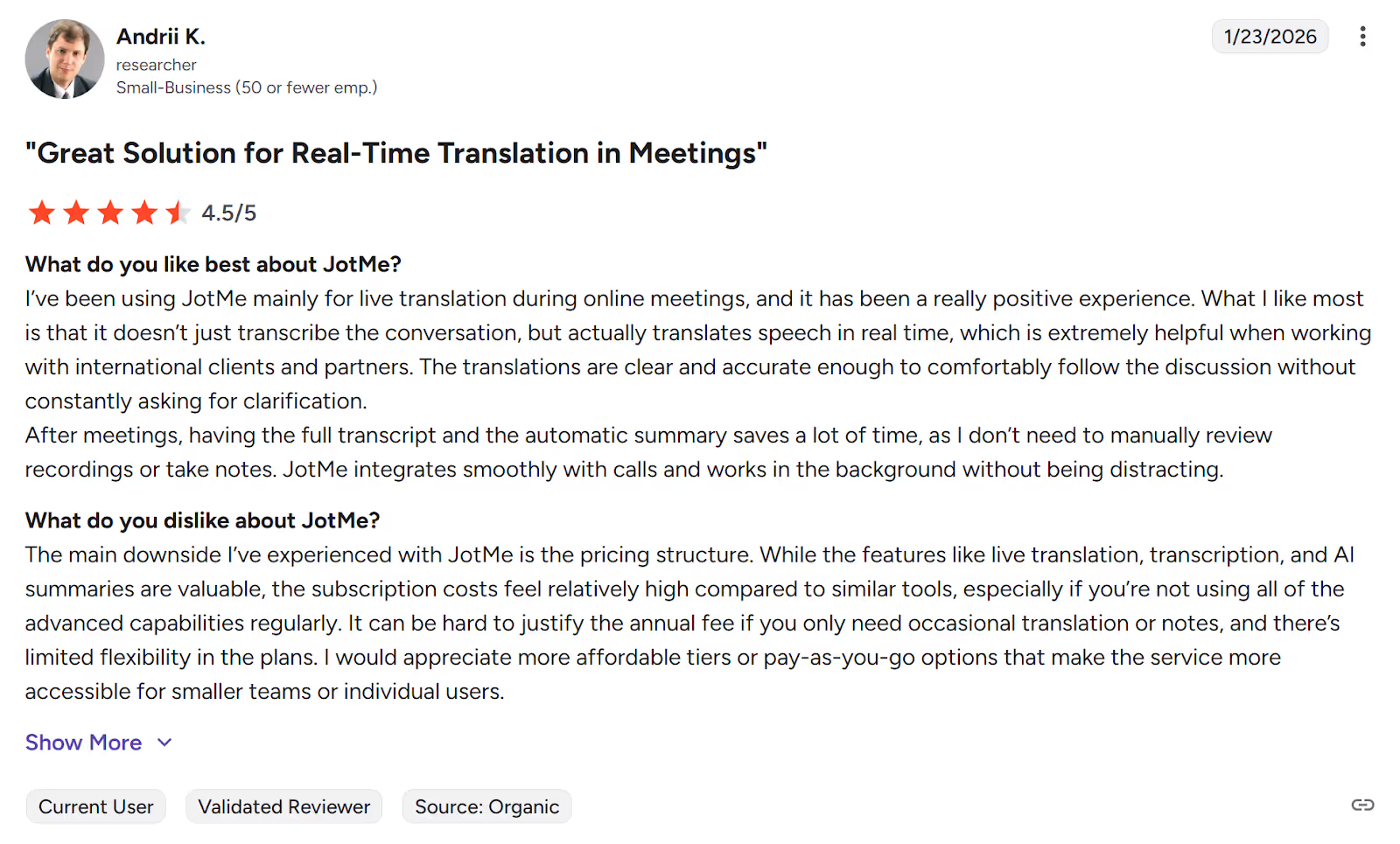
✅ Users on G2 were impressed with the clear and accurate translations of JotMe.
✅ They could “comfortably follow the discussion without constantly asking for clarification.”
What do users dislike about JotMe?
Users didn’t mention any major issues with JotMe’s live translation, except for the pricing structure.
What do users like about iTranslate?
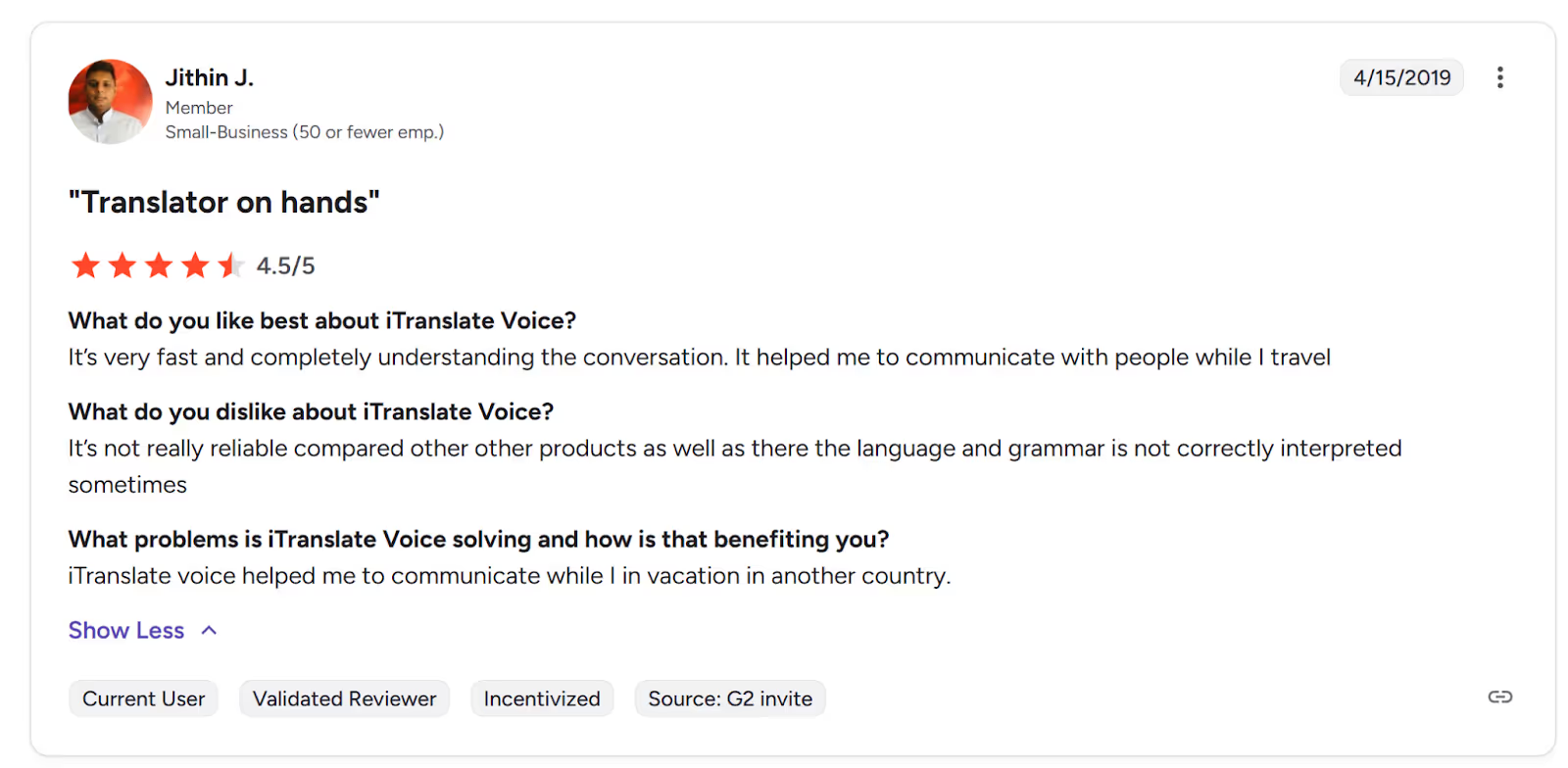
✅ Users on G2 liked the speed of the voice translation on iTranslate’s mobile app.
✅ They found iTranslate useful for communication while traveling.
What do users dislike about iTranslate?
❌ iTranslate users on Trustpilot complained that “the offline translation is horrendous and never worked.”
❌ Several users said they were charged an insane amount and called iTranslate a scam.
Which Foreign Language Interpreter App Should You Choose: JotMe or iTranslate?
Choosing between JotMe and iTranslate depends on what you need the most from a live translation app. Here’s a quick breakdown:
- If you’re looking to learn a new language with textual explanations of usage of phrases or need continuous voice-to-text translation for lengthy conversations to communicate with locals while traveling, JotMe is the better choice.
- On the other hand, if you’re a frequent traveler and need quick voice translations for chatting with locals or camera translation for reading signs and menus, iTranslate works well.
Among the various alternatives to iTranslate, JotMe stands out as the better app for language interpretation in terms of pricing, starting at $10/month (billed annually), accuracy, and an ad-free mobile version.
Moreover, features like continuous voice-to-text translation, adjusting translation quality, customizing the text translation, and more make JotMe better than iTranslate. Try JotMe today and experience effortless communication across different languages.
FAQs
Is there a free version of iTranslate?
Yes, there is a free version of iTranslate that includes text translation and a phrasebook. iTranslate even offers a free trial of seven days to access its Pro features, but you need to give your credit card details. If you want a free monthly plan without giving any payment details, you should try JotMe. JotMe offers 20 minutes of live translation and 50 minutes of transcription monthly in its free plan.
Is there an app that translates conversations in real time?
Yes, JotMe and iTranslate mobile apps translate conversations in real time. A major difference is that iTranslate starts a new chat every time you pause to think during conversations, and disrupts the flow. If you want continuous translation that keeps the conversation going without losing the context, choose JotMe.
How to use JotMe?
To use JotMe for live voice-to-text translation, simply download and install it on your mobile or desktop device. Next, set the Spoken Language and Translation language to begin the live translation. You can even get real-time summaries of your conversations, Generate Speech in the speaker’s language, use the AI translator for text-to-text translation, and more in the JotMe desktop app.
What languages are supported by JotMe?
JotMe supports 45 languages for the desktop app and 77 languages with the Chrome extension for live voice-to-text translation, and 130+ languages for text-to-text translation, including English, Japanese, Spanish, Chinese, German, Russian, Dutch, and more.
What are the best alternatives to iTranslate?
The best alternatives to iTranslate include JotMe, Google Translate, DeepL Translator, Say hi Translate, and more. Among these alternatives, JotMe turns out to be a solid AI live interpreter with accurate translations, affordable pricing plans, device compatibility, advanced AI features like Generate Speech, real-time summary, and more.
How much does iTranslate cost?
iTranslate’s web app is free, but its mobile app costs $9.99/week, which comes down to $39.96/month. iTranslate mobile’s yearly plan costs $99.99/year and comes with features like voice translation, text translation, speech-to-text translation, and more.
If you need more advanced features at a comparatively lower price, you should try JotMe. JotMe’s pricing plans start from $10/month (billed annually) and offer features like continuous translation, customization of translation tone, setting translation quality, and more.
Last updated on
April 14, 2026
Follow us on social media:
![JotMe — Is Google Translate Accurate? [2026 Test]](/_webflow-assets/0d0512afc7b037d74dff536f22fed08f.avif)