Tips
How to Use Live Chinese to English Translation in 2026 [LIVE TEST]

Narmada Kajla
May 11, 2026
.avif)
Are you struggling to find a tool that can handle live Chinese to English translation without cutting off mid-sentence, demanding context before it starts, or forcing you to paste and prompt your way through every paragraph? Are you trying to figure out which app actually keeps up with a real business meeting, an investor pitch, or a multilingual standup with a supplier in Shenzhen? Then you are at the right place, because this guide walks through three real methods to translate Chinese to English live, with side-by-side screenshots from a controlled test we ran across Google Translate, ChatGPT, and JotMe.
If you have ever searched for how to translate Chinese to English for a meeting, you already know that most tools assume you will paste a finished block of text into a box and wait. That is not how live conversation works. Conversation moves, switches direction, picks up speakers, and shifts topic without warning. The right live translation tool needs to keep up with all of that without dropping the thread, and the wrong one quietly fails at the worst moment. We tested all three on the same Chinese business meeting transcript to find out which one actually delivers.
TL;DR: Live Chinese to English Translation Apps Compared
Before going through the three methods, here is how Google Translate, ChatGPT, and JotMe stack up on the things that matter for Chinese to English live translation:
How to Use Live Chinese to English Translation
To compare these tools fairly, we used the same Chinese business meeting transcript across all three methods. The transcript is from a logistics coordination meeting and covers cross-border transportation efficiency, warehouse cost optimisation, and supply chain stability. Here is the original Chinese text we used:
This is a typical business meeting passage with industry vocabulary, multi-clause sentences, and contextual references that require the translator to maintain a professional tone throughout. We dictated this text into each tool and recorded the result.
Live Chinese to English Translation Using JotMe
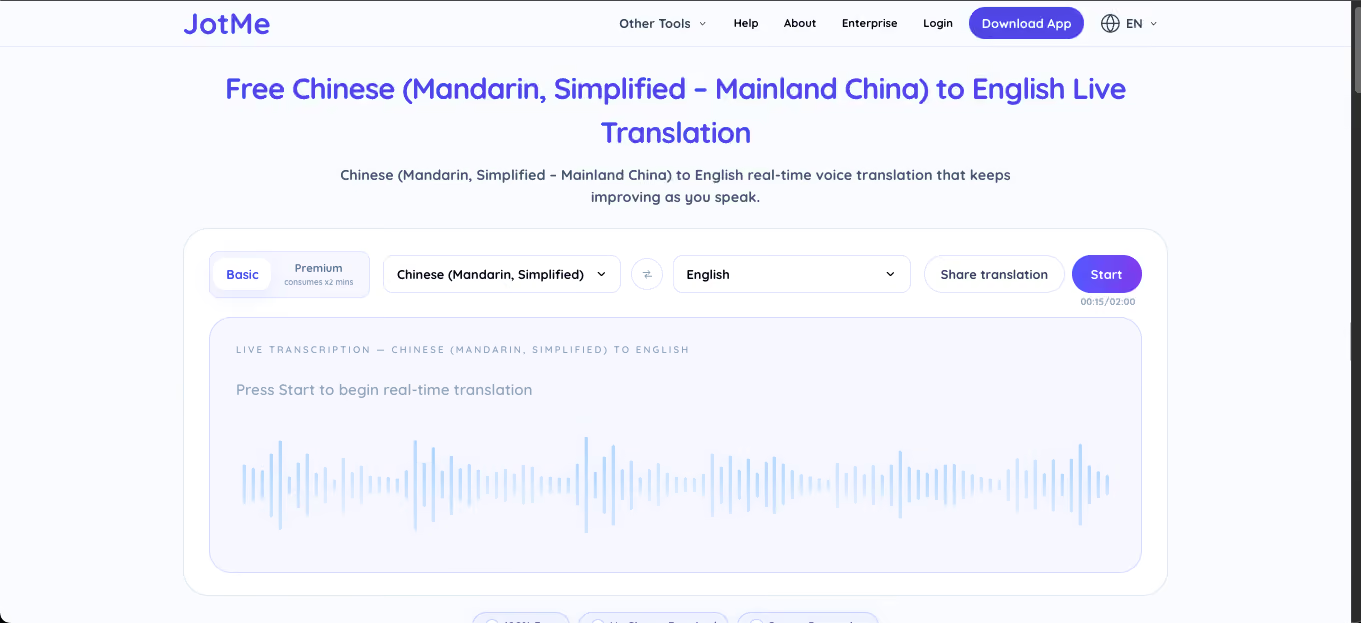
JotMe is a browser-based live translation tool that handles speech-to-text and translation in the same pass. The free Chinese to English translation flow takes under thirty seconds to set up, and the tool then runs continuously for up to two minutes on the Basic plan, or longer on Premium, transcribing the original Chinese and producing the English translation in real time as the speaker talks.
How to Use JotMe for Live Chinese to English Translation
- Open JotMe Free Chinese to English translation in any modern browser, such as Chrome, Edge, Brave, or Safari.
- The source language here is Chinese (Mandarin, Simplified). You can even select Chinese (Mandarin, Traditional), depending on the speaker. For Cantonese speakers, the Cantonese option is available in the same dropdown.
- The target language dropdown shows that the output language is set to English by default. You can select English [Australia], English [India], and more.
- Click Start. Allow microphone access when the browser prompts you. The tool begins listening immediately.
- Read the live English translation as the speaker continues. The original Chinese appears above each segment, and the translation appears below it.
Test Result for Live Chinese to English Translation Using JotMe
When we dictated the Chinese business meeting transcript into JotMe, the tool started producing the English translation within the first few seconds of speech. By the 28-second mark, it had already translated three full sentences with full context preserved and the speaker labelled as Speaker 0:
By the 39-second mark, JotMe had translated the entire opening section with full professional tone preserved, including the technical vocabulary around regional distribution centres, port delays, and phased pricing agreements with long-term carriers:
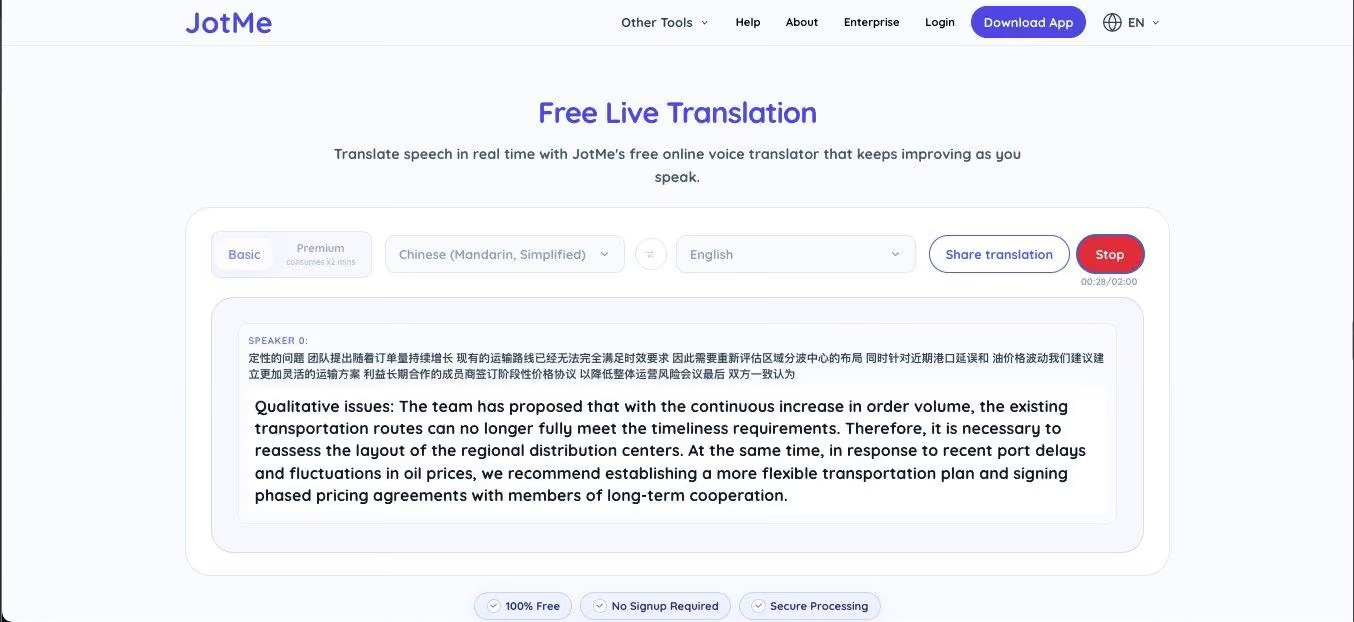
Three things stood out in the JotMe test
- JotMe identified the speaker as Speaker 0 automatically, which becomes meaningful the moment a second person joins the conversation and the labels switch to Speaker 1, Speaker 2, and so on.
- The translation captured the business context without being told what the meeting was about. Phrases like "qualitative issues," "timeliness requirements," "regional distribution centres," and "phased pricing agreements" came out as professional business English, not literal word-for-word output.
- The entire process required no setup beyond selecting the two languages. We did not type a prompt, paste a transcript, or explain the scenario.
Verdict: JotMe handled the live Chinese to English translation exactly the way a live translation app is supposed to. Speaker labelling, context awareness, professional tone, and continuous segment-by-segment output, all from a single click of Start.
Live Chinese to English Translation Using ChatGPT
ChatGPT supports voice dictation through the microphone icon in the chat box, both on mobile and on the web. The voice input gets converted into text and submitted as a regular message, which ChatGPT then responds to. If you’re wondering, can ChatGPT transcribe audio, the answer is yes, but mainly through real-time voice input rather than full standalone audio transcription workflows.
For Chinese to English translation, this means dictating the Chinese, letting ChatGPT transcribe it, and then asking for the translation in a follow-up step. The catch is that ChatGPT has no idea what the dictation is for unless you explicitly tell it.
How to Use ChatGPT for Chinese to English Translation via Dictation
- Open the ChatGPT web app or mobile app. The dictation feature is available on the free plan as well as paid plans, although audio file uploads require a paid plan.
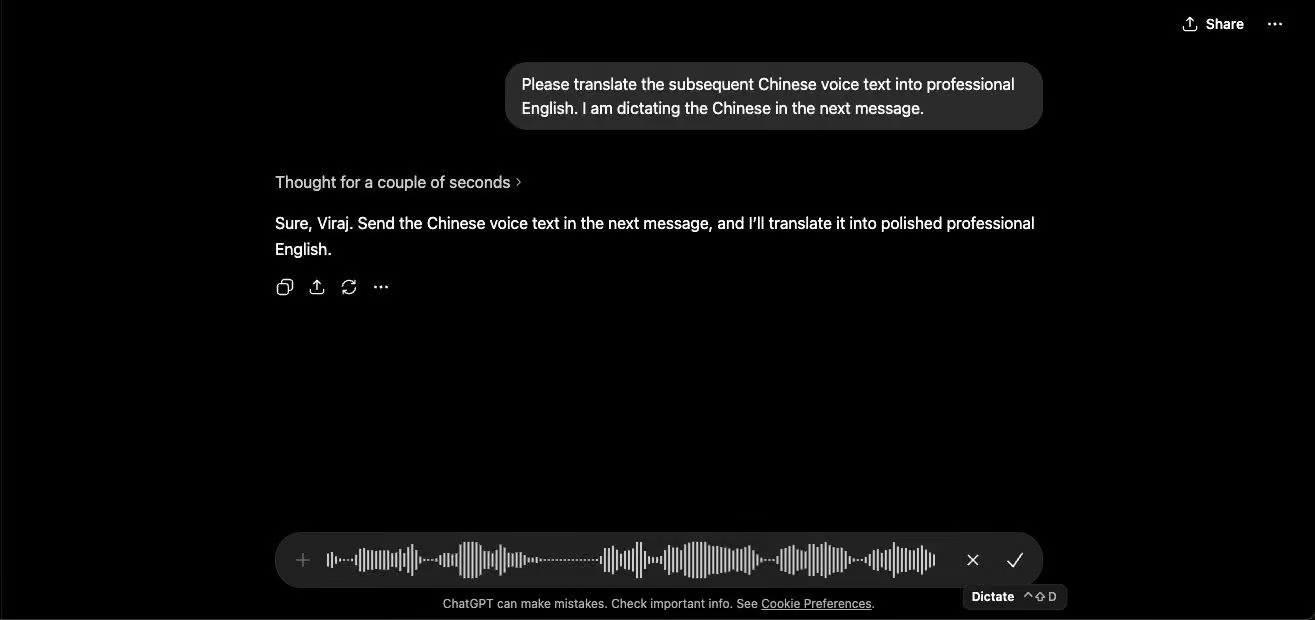
- Before dictating, type a context-setting prompt such as: "Please translate the subsequent Chinese voice text into professional English. I am dictating the Chinese in the next message."
- Wait for ChatGPT to acknowledge the instruction. It typically responds with something like: "Sure, send the Chinese voice text in the next message, and I will translate it into polished professional English."
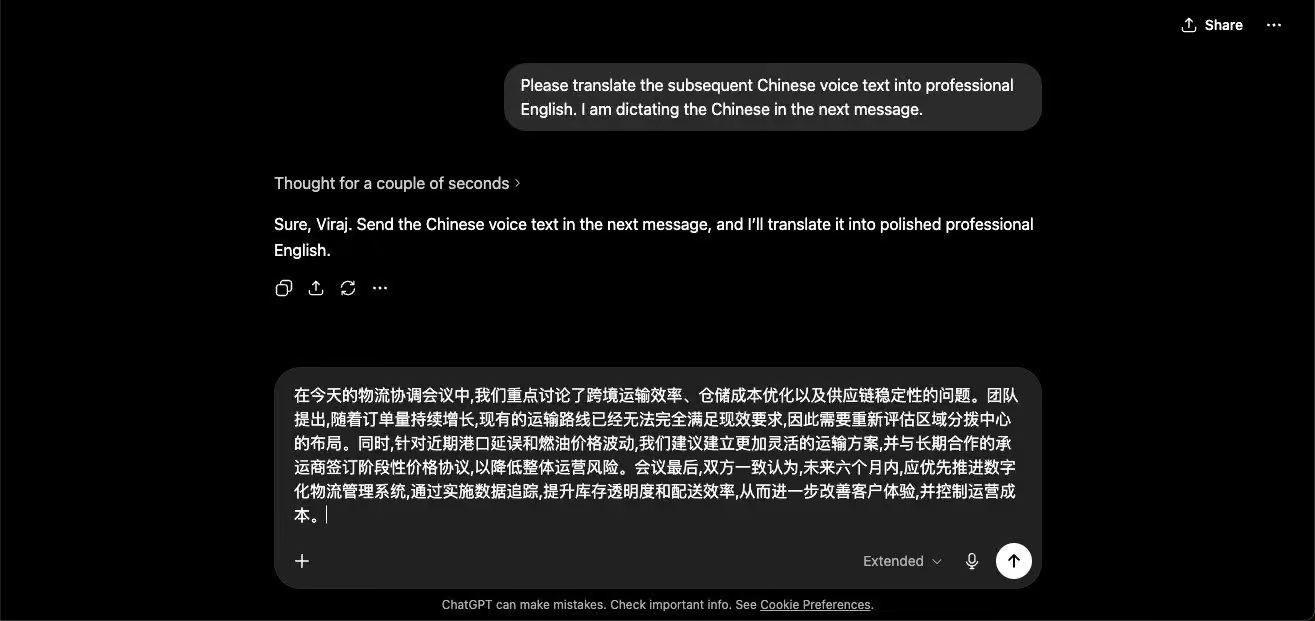
- Tap the microphone icon at the bottom of the chat to start dictation. Speak Chinese clearly into your device. The tool transcribes the speech in real time but does not translate it during dictation.
- Tap the checkmark or send the message once you are done speaking. The transcribed Chinese appears in the chat as your message.
- Wait a few seconds. ChatGPT then produces the English translation as a follow-up response.
Test Result for Live Chinese to English Translation Using ChatGPT
We started by setting the context for ChatGPT explicitly. Without this priming step, the model treats the incoming Chinese as a regular message rather than a translation task, and the response varies wildly:
Next, we dictated the Chinese meeting transcript. ChatGPT transcribed the speech into Chinese text in the chat box, but it did not translate during the dictation. The translation happened only after we submitted the message:
Once we sent the message, ChatGPT did produce a clean and well-formatted English translation. The output was professionally written, preserved the business tone, and captured the technical vocabulary correctly:
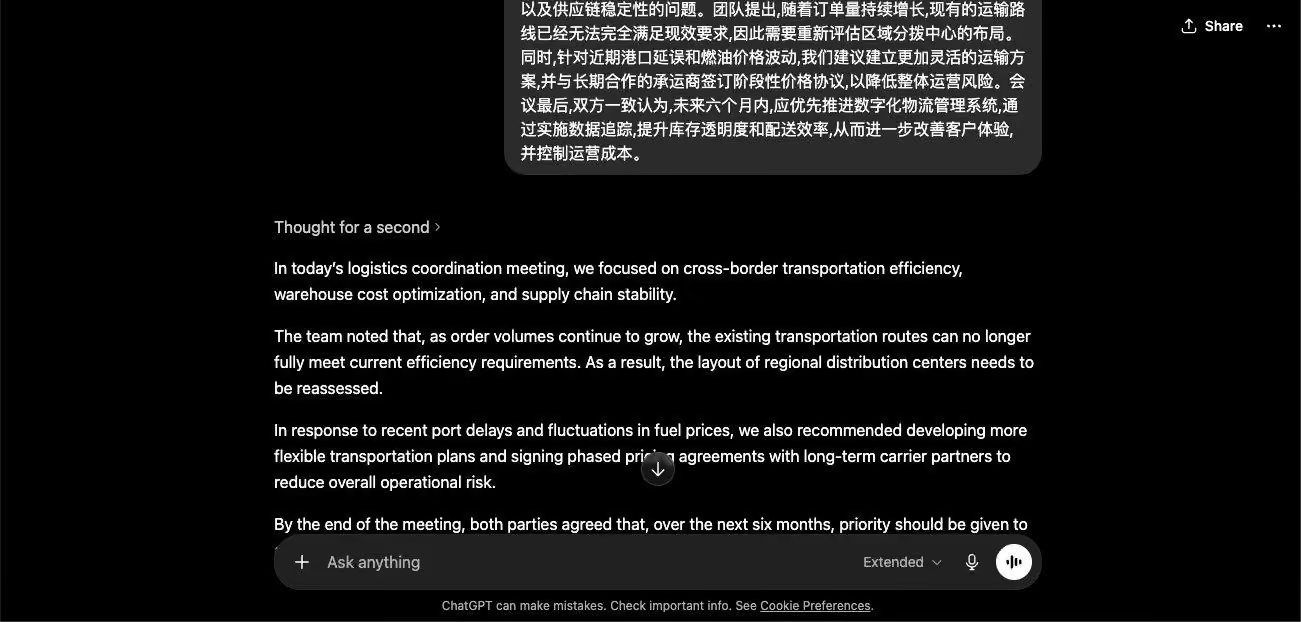
Three things stood out in the ChatGPT test:
- The translation quality itself was strong. ChatGPT produced polished business English with the correct terminology and tone.
- The process was not live in any meaningful sense. The dictation produced Chinese text, the message had to be sent, and only then did the translation appear. For a live meeting where the speaker keeps talking, this batch flow does not work because the translator is always one paragraph behind.
- There is no speaker identification, no automatic topic detection, and no continuous segment-by-segment output. ChatGPT works well as a paste-and-translate tool. It does not work as a live conversation translator.
Verdict: ChatGPT is excellent for translating a single block of Chinese text into polished English once you give it the right context. It is not designed for live Chinese to English translation during a meeting or event.
Live Chinese to English Translation Using Google Translate
Google Translate is the tool most people reach for first when they need to translate English to Chinese or Chinese to English. The web version supports voice input through a microphone icon, and the mobile app has a conversation mode that is supposed to handle back-and-forth dictation.
For a single phrase or a tourist exchange, Google Translate English to Chinese works fine. For a continuous business meeting, the dictation feature has a hard limit that most users discover only when it fails on them.
How to Use Google Translate for Chinese to English Dictation
- Open Google Translate in your browser or the Google Translate mobile app.
- Set the source language to Chinese (Traditional) or Chinese (Simplified), depending on the speaker.
- Set the target language to English.
- Click the microphone icon below the source text box. Allow microphone access if the browser prompts you.
- Start speaking in Chinese. The tool transcribes your speech and produces an English translation in the right-hand box.
- For longer passages, click the microphone again after each pause. The dictation does not run continuously by default.
Test Result for Live Chinese to English Translation Using Google Translate
When we enabled dictation on the phone and started speaking the Chinese meeting transcript into Google Translate, the tool transcribed the first sentence accurately and produced an English translation. Then it stopped listening. The microphone deactivated on its own after roughly fifteen seconds of speech, mid-paragraph, with no warning:
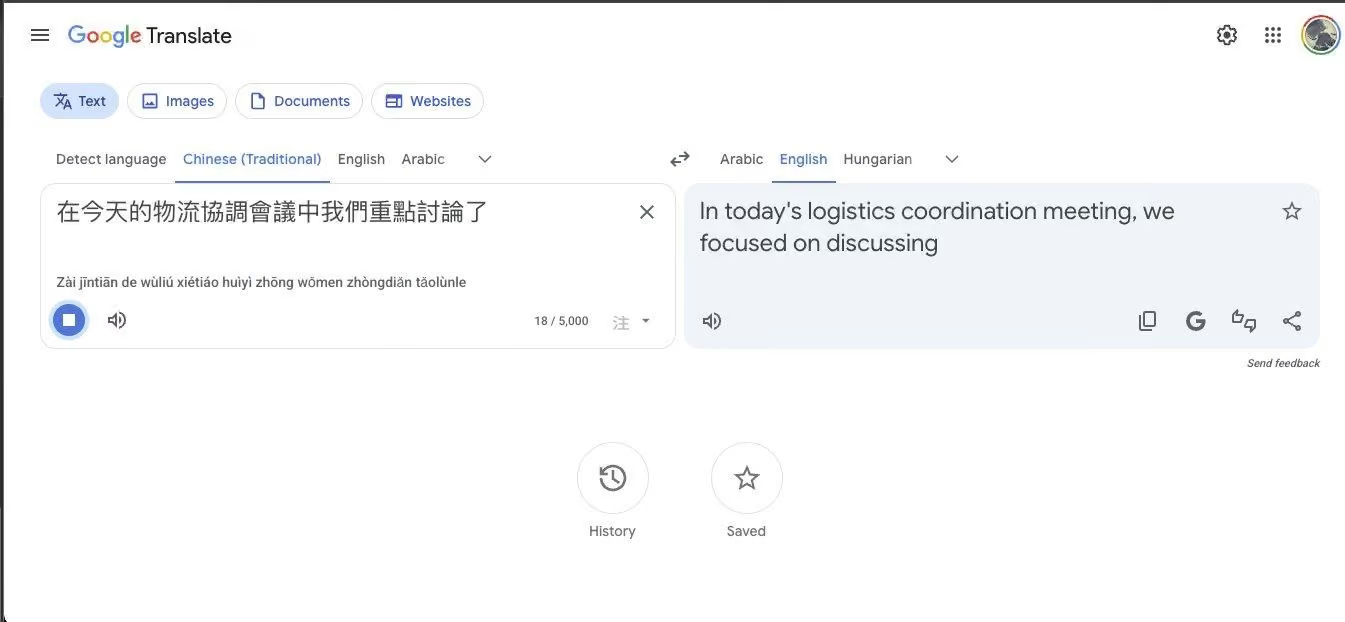
We tried this three times, with different pause lengths and different speaking speeds. Each time, the dictation stopped within fifteen to twenty seconds. For a single business sentence, this is fine. For a full meeting paragraph, it is unusable. The user would have to keep tapping the microphone after every sentence, watch for the cutoff, and stitch the resulting fragments together manually. That defeats the purpose of using a live translator app in the first place.
Three things stood out in the Google Translate test:
- The translation quality for the one sentence it did capture was acceptable. The English output was readable and reasonably accurate.
- The dictation cutoff is a hard limitation of the live input feature, not a bug, and it applies whenever you use voice input on the web or in the mobile app outside of conversation mode.
- Even Google Translate's conversation mode on mobile, which is built for back-and-forth dictation, requires the user to tap to switch speakers and does not produce continuous segment-by-segment output the way a meeting needs.
Verdict: Google Translate is fine for translating English to Chinese or Chinese to English when you have a single phrase or a short sentence. It is not built for continuous live dictation across a meeting paragraph, and the cutoff makes it the weakest of the three options for live Chinese to English translation in a business context.
Tips to Get Cleaner Live Chinese to English Translation
A few practical things make the difference between a usable live translation and one you have to rebuild from scratch:
- Match the right Chinese variant: Mandarin (Simplified) is used in mainland China and Singapore. Mandarin (Traditional) is used in Taiwan and Hong Kong for written text. Cantonese is spoken in Hong Kong and parts of Guangdong. Picking the wrong variant in the source dropdown produces noticeably worse output.
- Use a decent microphone: Built-in laptop mics work, but a basic USB headset cuts background noise and improves multilingual transcription accuracy by a wide margin, which directly improves the translation downstream.
- Place the device near the speaker: Distance kills speech recognition quality. For an in-room meeting, push the laptop closer to the Chinese speaker rather than relying on the far end of the table.
- Speak in complete clauses: Chinese is a topic-prominent language with implicit subjects that need to be inferred from context. Speakers who trail off mid-sentence or restart mid-clause produce harder-to-translate output than speakers who finish their thoughts.
- Use Premium for fast or accented speech: While using JotMe’s desktop app, you can change the basic to Premium to get accurate model translation.
- Read both columns: JotMe shows the original Chinese above each English segment. When a proper noun or a number sounds wrong, you can glance at the Chinese to verify what the speaker actually said without rewinding.
Bottom Line
Live Chinese to English translation in 2026 is no longer a problem you have to solve by hiring an interpreter or assembling a workflow out of three different tools. The right tool can keep up with a continuous business meeting, identify the speakers, preserve the professional tone, and run for free in any browser. The wrong tool stops listening after one sentence, demands a context-setting prompt before it starts, or makes you paste blocks of text after the fact.
Across the three methods tested in this article, the differences were clear. Google Translate handles single phrases well but cuts off after roughly fifteen seconds of continuous dictation, which makes it unworkable for meetings. ChatGPT produces high-quality translations of pasted or dictated Chinese, but it requires manual context priming and operates in a batch-then-respond mode that is not live. JotMe handled the same Chinese business meeting transcript with speaker identification, context awareness, and continuous real-time output, with nothing more than a click on Start.
For business meetings with Chinese suppliers, investor calls with mainland or Taiwanese counterparts, multilingual standups with Hong Kong teams, or any conversation that needs to flow rather than pause for translation, the free live Chinese to English translation tool is the lightest path. Open the page, pick Chinese and English, click Start, and read the translation as the conversation runs.
FAQs
How to automatically translate Chinese to English?
The fastest way to automatically translate Chinese to English is to use JotMe’s live translation tool that handles speech recognition and translation in the same pass. JotMe supports 200+ languages and runs for free in the browser without a sign-up.
How to convert Chinese words to English?
To convert Chinese words or sentences to English, paste the Chinese text into a translation tool of your choice and select English as the target language. For short phrases and single sentences, Google Translate or DeepL produces reliable output. For longer passages, business documents, or conversational text that requires a professional tone, JotMe's AI text translation tool handles 200+ language pairs and preserves business vocabulary better than generic translators.
What is the best translator for Chinese to English?
JotMe is the best translator for Chinese to English because it combines real-time speech recognition with speaker identification, automatic topic detection, and continuous segment-by-segment translation, all for free in the browser.
Which is the best Chinese translator app?
JotMe is the best Chinese translator app because it handles continuous speech input, identifies speakers, and produces real-time translation without requiring the user to keep tapping the microphone. Other notable apps are Google Translate, Pleco, ChatGPT, DeepL, and more.
What is the most used translator in China?
Inside mainland China, Baidu Translate is the largest, integrated across the Baidu ecosystem and widely used for both Chinese to English and English to Chinese translation. Youdao Translate is the second major player and is particularly popular among students and professionals for its dictionary features and OCR capabilities. For context awareness, JotMe is now gaining traction for professional and live translation use cases, respectively.
Is there a better Chinese translator than Google?
Yes, JotMe outperforms Google Translate for live Chinese to English translation in business meetings, because Google Translate's dictation feature cuts off after roughly fifteen seconds of continuous speech, while JotMe runs continuously with speaker identification and segment-by-segment output. For tourist-level phrase lookups and quick translations of short text, Google Translate is still the most accessible default.
Is ChatGPT Chinese accurate?
ChatGPT's Chinese to English translation is generally accurate for written text and for dictated speech that has been transcribed first. On its own, ChatGPT is competitive for accuracy. For live, real-time accuracy during a continuous conversation, the lack of continuous dictation and speaker identification makes it less suitable than a purpose-built live translator.
Last updated on
July 29, 2026
Follow us on social media: