Tips
How to Convert Audio to Text in 3 Quick Steps for Free

Viraj Mahajan
May 1, 2026
.avif)
Are you struggling to find the right audio-to-text converter? Are you someone who wants to understand how to use the best audio-to-text converter for your business, events, webinars, and personal work? Then you are at the right place, as in this exclusive guide, we will walk you through a step-by-step process to effectively use an audio-to-text converter so you can convert your MP3 audio to text online for free.
If you are like us and keep searching for online audio-to-text converters that help you translate different audio files into your preferred language, then you would agree that choosing the right tool is difficult, and it is even harder when most of the good ones are hidden behind paywalls. Thanks to JotMe, you can now use an audio-to-text converter for free, without signing up or creating any account, in 200+ languages, with every common audio format supported out of the box.
TL;DR
If you are in a hurry and looking to quickly convert audio to text online in your preferred language, here are the quick steps:
- Open a free audio to text converter from any browser.
- Pick the language you want the audio translated into
- Drop your audio file (MP3, WAV, M4A, FLAC, OPUS, and others), click Proceed, and read the translated text
What Is an Audio to Text Converter?
An audio-to-text converter is a tool that listens to an audio file and gives you a written transcript of everything that was said. You upload an MP3, a WAV, or a voice note, and the tool returns text you can read, search, copy, and edit. Most converters stop there and hand back the transcript in the same language as the original recording.
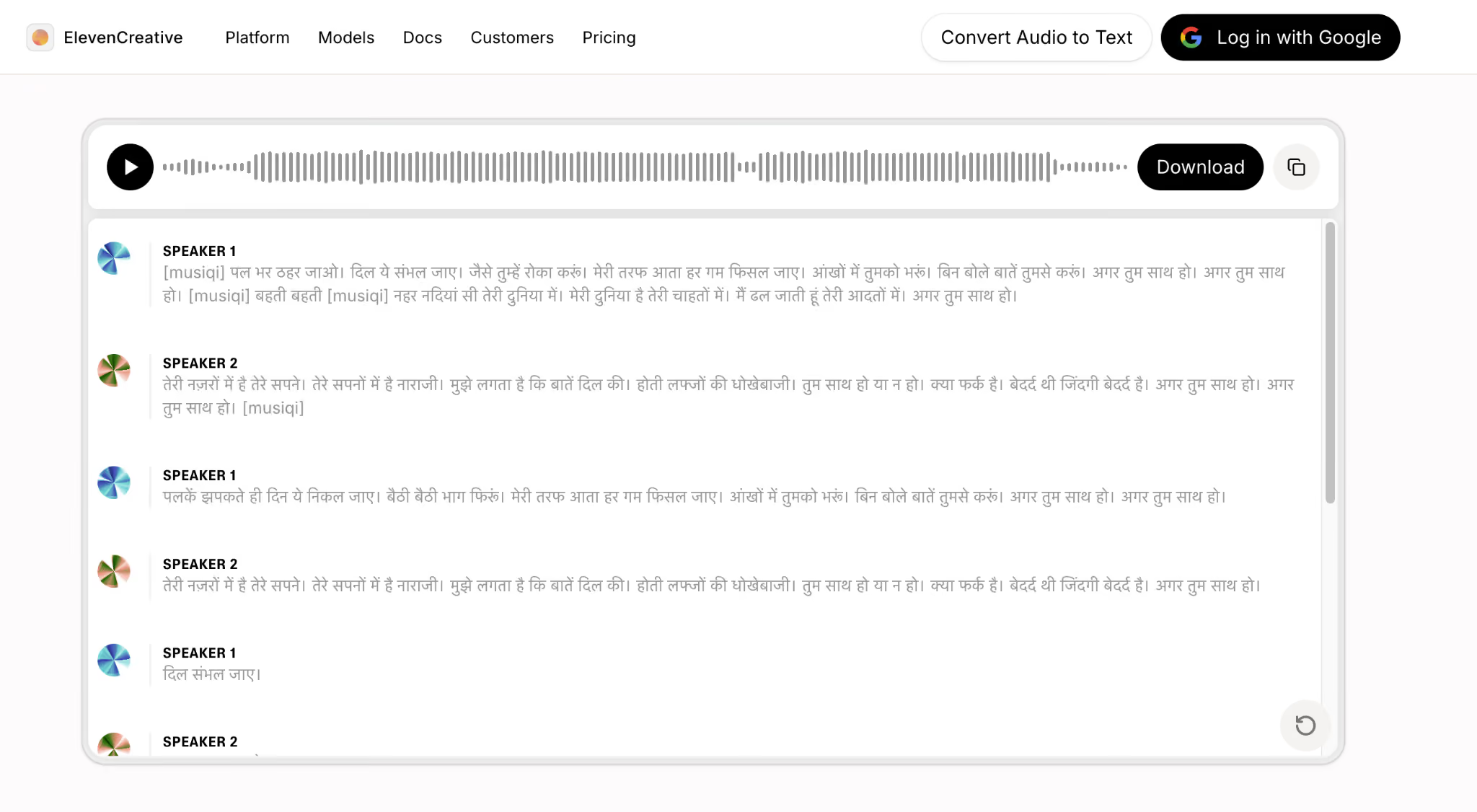
Let’s take ElevenLabs as an example. ElevenLabs is a great tool for using AI to generate images and videos. But when we tried uploading the Hindi song to it, it only transcribed it in the Hindi language. There was no option for us to translate the song into a different language, like English or Spanish.
That basic flow falls short the moment your audio is not in a language your team reads:
- A vendor sends a fifteen-minute voice note in Korean, and your team works in English
- A multilingual conference produces hours of Spanish, Japanese, and French keynote audio
- A customer support recording arrives in Mandarin and needs a same-day reply
- A podcast guest speaks Portuguese, and your editor needs an English transcript by Monday
- A song to lyrics converter is needed for a multilingual performance, as you are subtitling
This is where JotMe's audio-to-text converter goes beyond basic audio transcription.
It automatically detects the spoken language in your recording and performs the translation in a single pass, so you upload once and get the final translated text without juggling a separate translation tool. JotMe runs entirely in the browser and currently supports 200+ available languages, including regional variants like Spanish (Latin American), Portuguese (Brazil), French (Canada), and both Simplified and Traditional Mandarin, and all common audio formats, from MP3 and WAV to M4A, FLAC, and OPUS.
Additionally, JotMe offers 39,000+ language pairs. So you can easily use the English to Spanish audio translator to translate your English files or recordings. Similarly, you can use a French to English audio translator or an English to Chinese audio translator, and more.
How to Use an Audio to Text Converter in 3 Steps?
JotMe's audio-to-text converter free tool runs entirely in your browser, with nothing to install and no account required. The full process takes under a minute for most short files and breaks down into three steps.
Step 1: Open the Audio to Text Translation Page
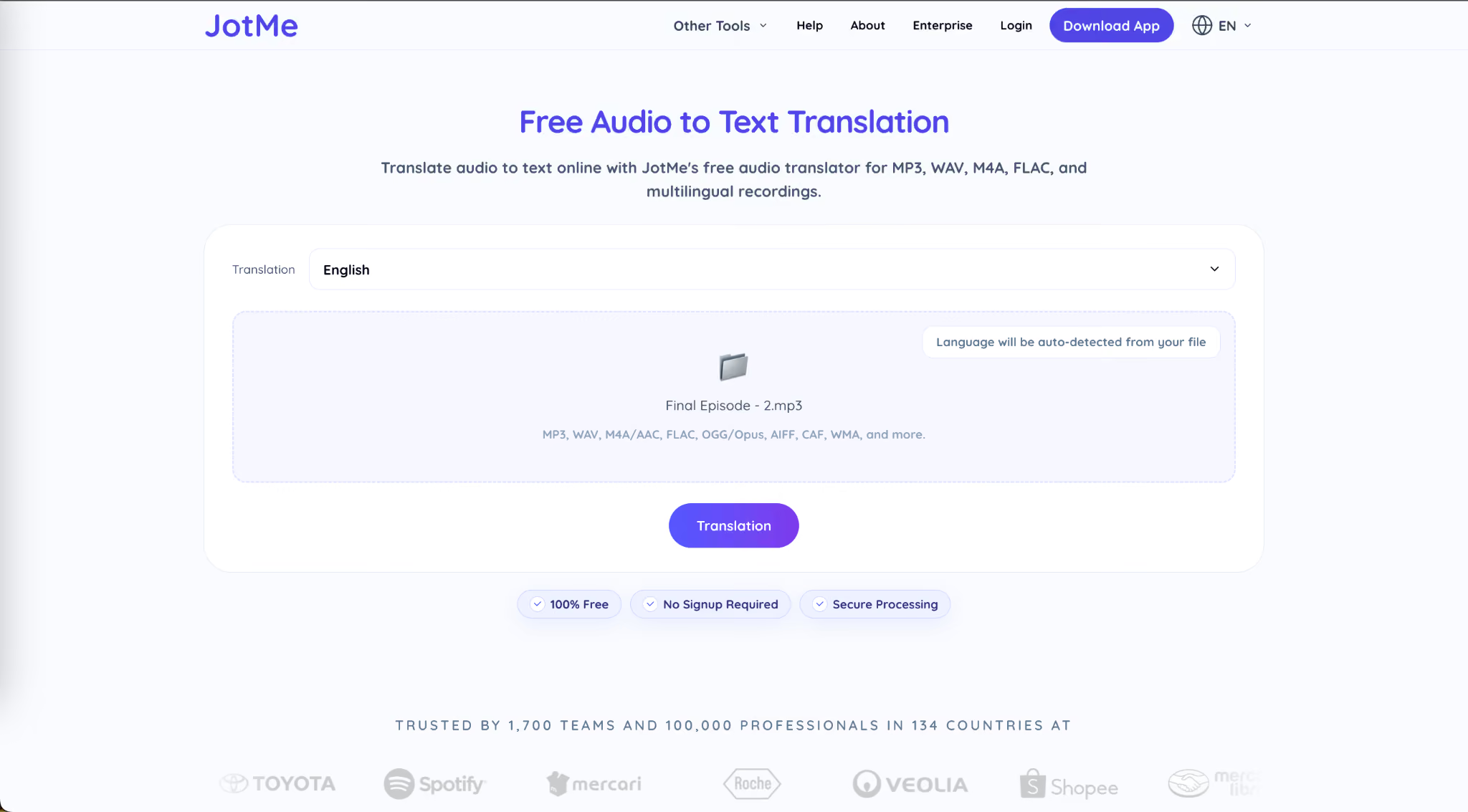
Open JotMe’s audio-to-text converter in any modern browser such as Chrome, Edge, Brave, or Safari. The page loads with the upload interface ready and visible at the top, with a target language dropdown on the left and a drag-and-drop zone in the center.
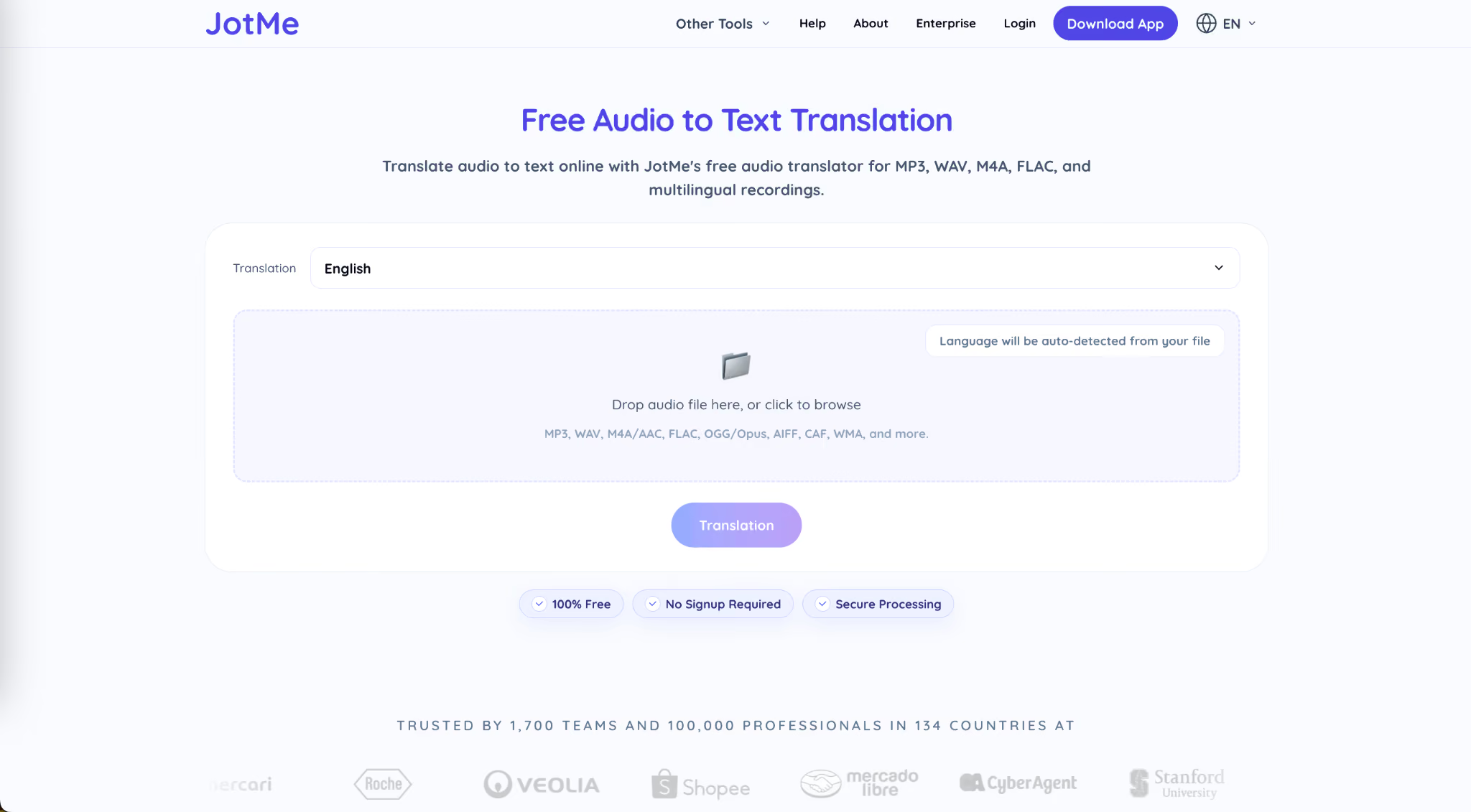
You do not need to specify the source language because JotMe's audio-to-text AI detects it automatically from the recording itself, which is useful when you receive a file and are not entirely sure whether the speaker is using Mandarin (Simplified), Mandarin (Traditional), or Cantonese.
Step 2: Upload and Confirm Your Audio File
Drag your file into the drop zone or click to browse from your computer. JotMe accepts every common audio format you are likely to encounter in real work, including MP3, WAV, M4A, AAC, FLAC, OGG, OPUS, AIFF, CAF, and WMA.
Step 3: Select Translation Language
Once the audio file is processed, use the drop-down icon to select the translation language. For this step guide, we have used Arabic (Sudan) to show you why JotMe is considered the best Arabic translator as well.
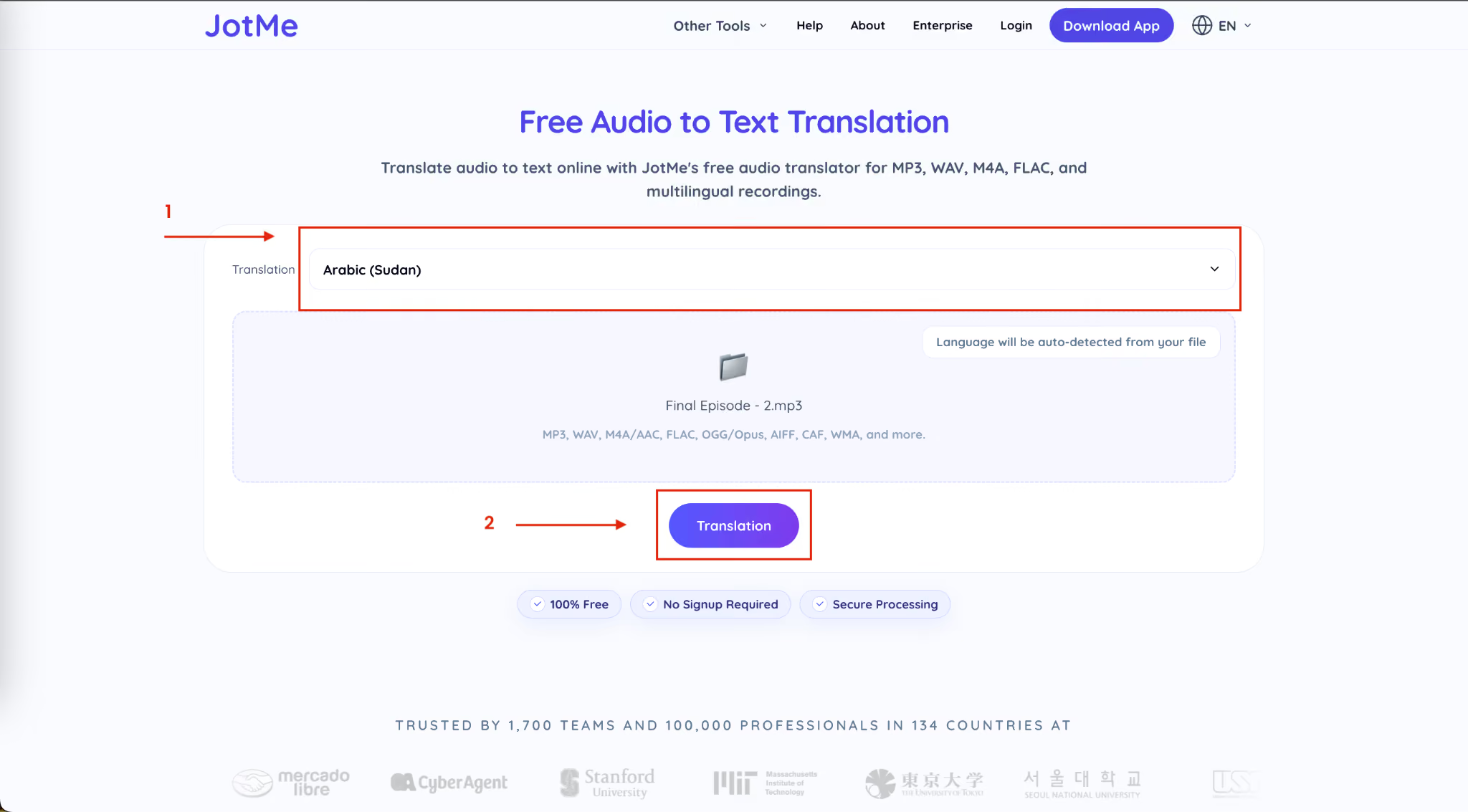
Once the translation language is selected, click on Translation. This free audio-to-text online converter will ask you to review the file, as shown here. If everything looks correct, click on ‘Proceed.’
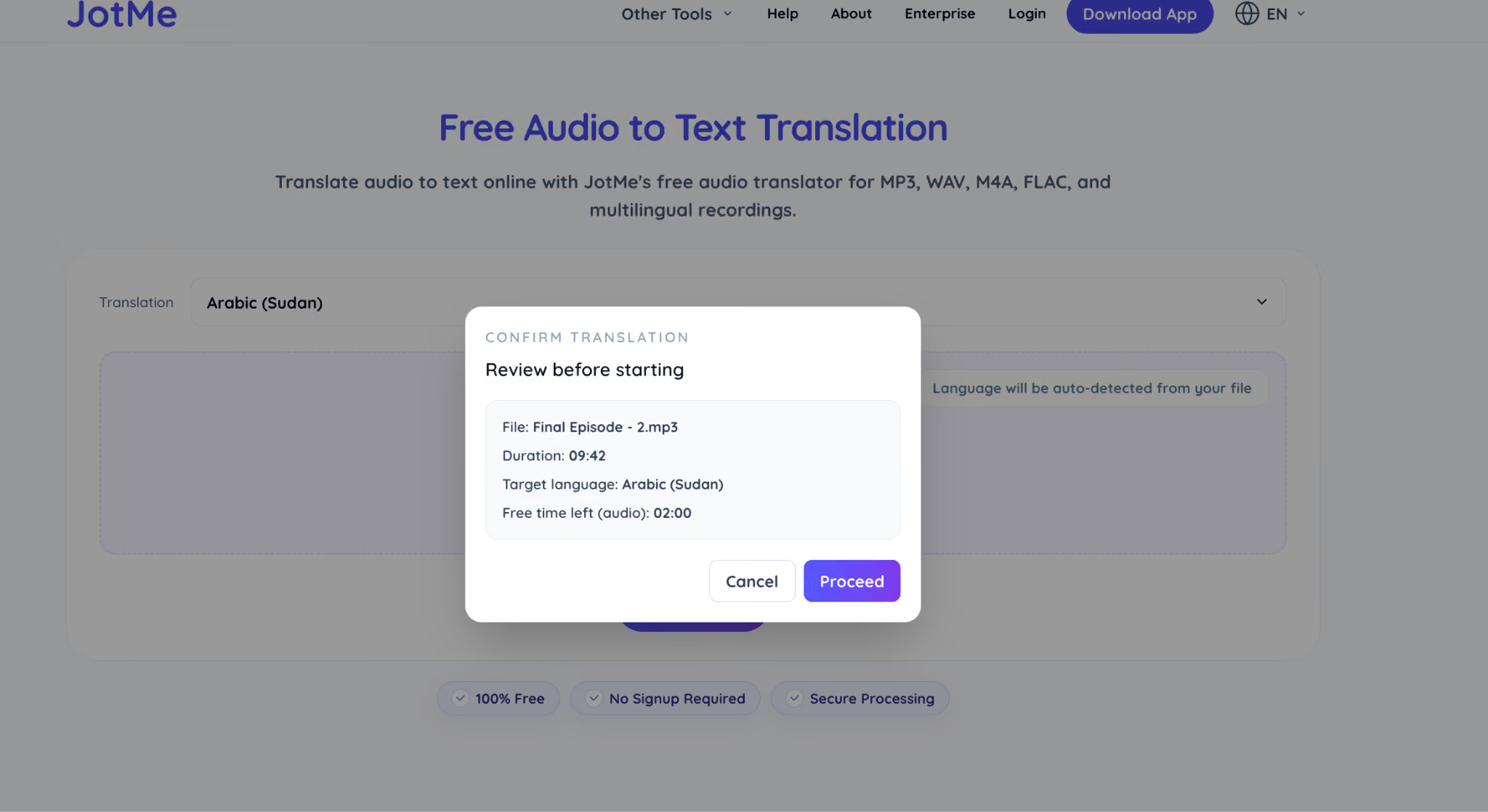
The online tool will now transcribe and translate the audio file in just 30 seconds.

Why Businesses and Event Organizers Need an Audio-to-Text Converter?
The volume of audio content produced inside businesses every week has now outgrown the human capacity to listen to all of it. Most of it sits unread because there is no fast way to turn audio into text and scan the important parts:
- Call recordings from sales and support teams across regions
- Meeting archives from Zoom, Google Meet, and Microsoft Teams
- Voice notes from international customers and vendors
- Keynote, panel, and Q&A audio from conferences and webinars
- Podcast episodes and interview recordings waiting to be localized
The global speech and voice recognition market reached $20.1 billion in 2024 and is projected to climb past $84 billion by 2032, driven primarily by enterprise demand for tools that handle multilingual transcription and translation at scale. Industry research from IDC also suggests that more than 80% of unstructured business data is now generated in audio or video form.
How Does An Audio-To-Text Converter Help Businesses?
For a business operating across markets, the cost of leaving audio unread compounds quickly, because every untranscribed call is a missed insight, a delayed reply, or a localization step that never happens. A free audio-to-text converter resets that economic equation by turning the same audio into searchable, translated text on the same day the audio was created.
Where the value shows up most clearly:
- Sales teams reviewing foreign-language vendor or client calls without waiting for a bilingual colleague
- Support teams responding to international voice notes within the same business day
- Marketing teams are pulling quotes and clips from multilingual interviews for content
- Research and product teams are analyzing customer recordings from multiple regions in one language
How Does An Audio-To-Text Converter Help Event Organizers?
For event organizers, the workflow is even more direct. A single multilingual conference produces hours of keynote audio, panel discussions, Q&A sessions, and speaker interviews, and every one of those recordings has the potential to become a downstream content asset only if you can convert audio to text in the languages your audience actually reads.
Here is how a single hour of event audio typically gets repurposed once translated text is available:
The teams that turn one event into thirty pieces of content do it because they convert audio to text the moment the recording stops, not three weeks later when the news cycle has moved on. JotMe even lets you share your translation, so your event attendees will not have to purchase any credits.
The Bottom Line
Audio is now the fastest-growing form of business and event content, and the teams that read it quickly are the ones turning recordings into decisions, articles, social posts, and customer responses while the conversation is still relevant. A free audio-to-text converter is no longer a nice-to-have utility for occasional voice notes. It is the lightest path between a multilingual recording and the text your team can actually use. The browser-based tool from JotMe handles the translation, the language detection, and the format flexibility in a single workflow, and it does so without an account, an install, or a paywall.
Try JotMe's free audio-to-text translation now by checking the demo page. Drop in an MP3, a WAV, an OPUS voice note, or any common audio file, pick your target language, and read the translated text in seconds. If it earns its place in your workflow, the JotMe Desktop app handles longer recordings, larger volumes, and team-shared transcripts as your audio workload scales.
FAQs on Audio to Text Converter
Is voice-to-text safe to use?
Yes, voice-to-text and audio-to-text converter tools are generally safe to use, though the level of safety depends entirely on which tool you choose and how it handles your data. JotMe processes audio over secure connections, is GDPR compliant, and is currently in progress for SOC 2 Type II certification, which means your uploaded files are not stored permanently or used to train models without consent.
Can ChatGPT convert audio to text?
ChatGPT itself cannot directly convert audio to text in its standard chat interface, but OpenAI offers a separate model called Whisper that does handle audio transcription and limited translation. Whisper is a strong general-purpose speech recognition model and works well for clean English audio, but it has notable limitations for real workflows.
What is the best audio-to-text converter app?
JotMe is the best audio-to-text converter app for anyone working with multilingual recordings, because it combines free browser-based use with translation across 200+ languages, side-by-side output, and support for every common audio format. For a free, no-signup, translation-first option that covers the widest range of languages and file formats, JotMe sits in the simplest position among the available tools.
Which AI is best for audio to text?
JotMe's agentic AI translation is the best for audio-to-text conversion when your work involves multiple languages, and you need translated output in a single pass. Where most AI audio-to-text tools rely on a single-shot transcription model that hands back raw text, JotMe's agentic system actively follows the recording, preserves segment context, handles language switching mid-file, and refines the translation as more of the audio is processed.
How can I transcribe audio to text free online?
You can transcribe audio to text free online with JotMe. Open JotMe’s audio to text converter, upload your audio file, choose your target language, and click Proceed. The browser-based tool creates a readable transcript and can also translate the audio into 200+ languages.
What is the difference between audio transcription and audio translation?
Audio transcription turns spoken words into written text in the same language. Audio translation goes one step further by converting that transcript into another language, which is helpful for multilingual meetings, events, podcasts, interviews, and customer recordings.
Can I use a voice to text converter for meetings and interviews?
Yes. A voice to text converter can turn meeting recordings, interviews, webinars, podcasts, and voice notes into searchable text. JotMe is especially useful when those recordings include multiple languages or need translated output after transcription.
Last updated on
July 29, 2026
Follow us on social media: