パソコン上のあらゆる通話に対応するデスクトップアプリ

多言語文字起こし、リアルタイム音声翻訳、AI議事録、AI検索、リアルタイム要約、カスタム語彙、音声録音などに対応。

対面の会話に対応するモバイルアプリ

iPhone・Android向けのリアルタイム音声翻訳とAI音声生成。

Google Meet向けChrome拡張機能

リアルタイム文字起こし、リアルタイム音声翻訳、AI議事録。
Chrome
に追加
簡単なトライアルをご利用いただけます

Google Meet Bilingual Transcript

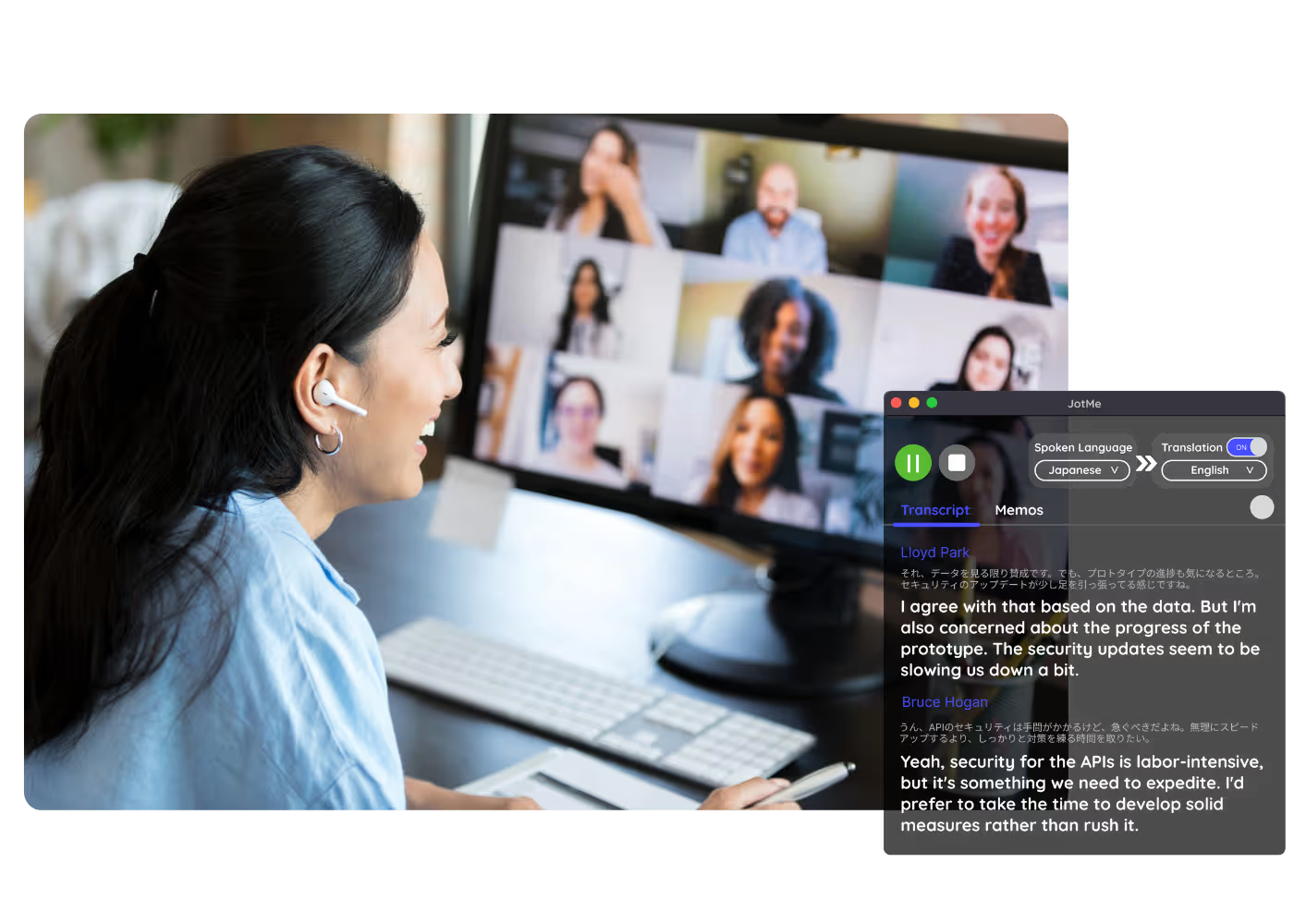
Every Google Meet becomes a bilingual transcript: the original speech and its translation side by side, line by line, with speaker labels, from live calls or recordings you upload. One accurate record both sides read.

134か国・2,000チーム・50万人のプロフェッショナルに利用されています

評価 4.7/5
GDPR準拠
SOC 2 Type II (進行中)

Transcript & Translation Chrome Extension for Google Meet

Need to verify meeting details or maintain recordings for company compliance in multiple languages? JotMe provides instant access to your bilingual transcripts right after your Google Meet sessions, supporting up to 77 languages. Sign up today for free – no credit card required – and never miss an important detail again!

How to get a bilingual transcript from Google Meet

3つの簡単なステップで!

ステップ1

1. Add the Chrome extension, or upload your Meet recording

Add JotMe to Chrome or get the desktop app. Already have a recorded Meet? Upload it for the same bilingual, side-by-side output.

ステップ2

2. Set the spoken language

Choose the language being spoken in the meeting, for example Japanese. If people switch languages, pick multilingual mode.

ステップ3

3. Open the bilingual record

The transcript on your dashboard keeps the original and translated text together, ready to review, edit speaker names, and share with both sides.

実際に使ってみよう!

What teams use bilingual transcripts for

A woman is working effectively

Reporting to HQ in another language

Run the meeting in Japanese and hand HQ a Japanese-English meeting transcript they can read, with the original right beside it for anyone who wants to check.

Track Conversations in Real-Time

Sales & client calls

Pull exact quotes and commitments from client calls when you need them.

A group a having a discussion and speech is transcribed

Recorded Meet meetings

No time to run it live? Upload the recording and JotMe returns the same accurate bilingual transcript, no need to have been in the call.

よくある質問

JotMeでの会議やイベント運営に関するあらゆる情報。

Is bilingual transcript free?

Yes! You can upgrade your plan for more translation minutes and AI credit to translate the transcript if needed.

How do I add the bilingual transcript extension for Google Meet?

Install the JotMe Chrome extension to your Chrome browser. Set the language preference to receive transcripts and translations.

Where is the Google Meet bilingual transcript stored?

Transcripts are stored on the dashboard. Access them from the transcription dashboard, Chrome extension popup, or URL.

Can I search for specific words in the bilingual transcript?

Yes! Visit the dashboard and use cmd + F to search for specific words in your transcript.

Which languages are available for Google Meet transcripts and translation?

Transcripts are available in 77 languages, including Japanese, Chinese, Korean, Spanish, Portuguese, French, German, Swedish, Finnish, Arabic, Hindi, Urdu, Turkish, Norwegian, Italian, Burmese, Russian, Filipino, Swahili, Hungarian, and more. Ensure you select the correct language during your Google Meet.

The Easiest and Most Reliable Way to Store and Access Google Meet Transcripts with Translation

対応言語
アフリカーンス語(南アフリカ)
アルバニア語 (アルバニア)
アムハラ語 (エチオピア)
アラビア語 (アラブ首長国連邦)
アラビア語 (エジプト)
アラビア語 (レバント)
アラビア語 (マグレブ)
アルメニア語 (アルメニア)
バスク語 (スペイン)
ベンガル語 (バングラデシュ)
ブルガリア語 (ブルガリア)
ミャンマー語 (ミャンマー)
カタルーニャ語 (スペイン)
中国語 (簡体字)
中国語 (繁体字)
オランダ語
英語
英語 (オーストラリア)
英語 (インド)
英語 (フィリピン)
英語 (英国)
エストニア語(エストニア)
フィリピノ語(フィリピン)
フィンランド語(フィンランド)
フランス語
フランス語(カナダ)
ガリシア語(スペイン)
グルジア語(ジョージア)
ドイツ語
グジャラート語(インド)
ヘブライ語(イスラエル)
ヒンディー語
ハンガリー語(ハンガリー)
インドネシア語(インドネシア)
イタリア語
日本語
ジャワ語(インドネシア)
カンナダ語(インド)
クメール語(カンボジア)
ルワンダ語(ルワンダ)
韓国語
ラトビア語(ラトビア)
マケドニア語(北マケドニア)
ラトビア語(ラトビア)
マケドニア語(北マケドニア)
マラヤーラム語(インド)
マラーティー語(インド)
モンゴル語(モンゴル)
ネパール語(ネパール)
北ソト語(南アフリカ)
ノルウェー語(ノルウェー)
ペルシア語(イラン)
ポーランド語(ポーランド)
ポルトガル語(ブラジル)
ポルトガル語(ポルトガル)
ルーマニア語(ルーマニア)
ロシア語
セソト語(南アフリカ
シンハラ語(スリランカ)
スロバキア語(スロバキア)
スロベニア語(スロベニア)
スペイン語(メキシコ)
スペイン語(スペイン)
スンダ語(インドネシア)
スワヒリ語
スワティ語(南アフリカ)
スウェーデン語(スウェーデン
タミル語(インド)
テルグ語(インド)
タイ語(タイ)
ヴェンダ語(南アフリカ)
ツワナ語(南アフリカ)
トルコ語(トルコ)
ウルドゥー語(パキスタン)
ウズベク語(ウズベキスタン)
ベトナム語(ベトナム)
コサ語(南アフリカ)
ツォンガ語(南アフリカ)
ズールー語(南アフリカ)

MORE THAN BILINGUAL TRANSCRIPT

JotMe not only provides bilingual transcripts but also offers real-time translation and post-meeting tools. Explore our comprehensive suite of multilingual AI tools - from AI translation to AI meeting notes. Automate your work with bilingual transcript and other tasks with JotMe to focus on more impactful tasks, such as decision-making and tackling action items effectively.

多言語オペレーションの会議・イベントを、すべてスムーズに

リアルタイム音声翻訳、文字起こし、通訳、AI議事録により、重要な会話を言語を越えて理解・共有できるようにします。

Google Meet Bilingual Transcript

Every Google Meet becomes a bilingual transcript: the original speech and its translation side by side, line by line, with speaker labels, from live calls or recordings you upload. One accurate record both sides read.

無料プラン。クレジットカード登録は不要です。

Drop in a Google Meet recording video and JotMe returns the transcript, with speakers and timestamps. Translate it for subtitles. Open the full demo.

134か国・2,000チーム・50万人のプロフェッショナルに利用されています

評価 4.7/5
GDPR準拠
SOC 2 Type II (進行中)

One accurate record, both languages side by side

Everything cross-language teams need from a Google Meet.

文脈を理解する、超高精度

正確なのは、JotMeが文脈の中で動くからです。話者、チームの業務、ここまでの会議の流れ、そしてあなたのカスタム用語まで踏まえるので、原文も訳文もしっかり通用し、どちらの側もその記録を疑いません。

原文と訳文を、1行ずつ併記

各行が原文の発言とその訳文を対にして並べる、原文+訳文併記の議事録です。言語の異なるチームの両者が同じ記録を読むので、誰も「何を言ったか」で揉めません。

200以上の言語、ライブでも録画でも

日英中英韓英、または39,000以上の組み合わせのいずれでも。ライブ通話からでも、アップロードした録画からでも、二か国語の議事録を作れます。

議事録は自動で保存されます

すべての議事録は話者ラベル付きでダッシュボードに保存され、何を言ったか確認したいときにいつでも開けます。

ボット不要、設定不要

JotMeはブラウザ内のMeetの字幕、またはパソコンの音声を取り込みます。ボットが通話に参加することはなく、他の誰かがインストールしたり有効化したりするものもありません。

カスタム辞書と自動言語検出

業界特有の用語やカスタム置換で精度を高めましょう。JotMeは話されている言語を自動で検出するので、手動で設定する必要はありません。

How to get a bilingual transcript from Google Meet

Three steps, under a minute. No Meet settings, no bot invite, no host approval. Already have a recording? Upload it instead.

STEP 1

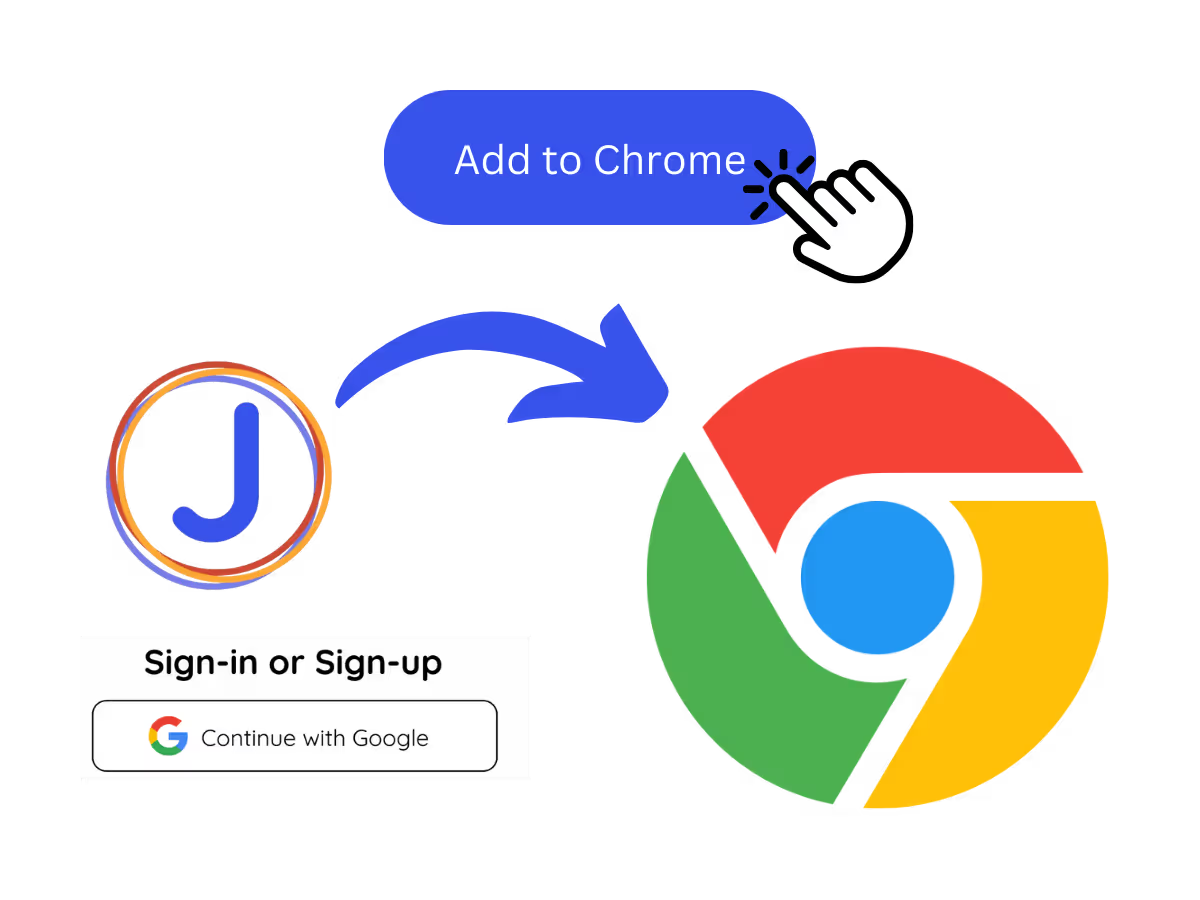
1. Add the Chrome extension, or upload your Meet recording

Add JotMe to Chrome or get the desktop app. Already have a recorded Meet? Upload it for the same bilingual, side-by-side output.
STEP 2

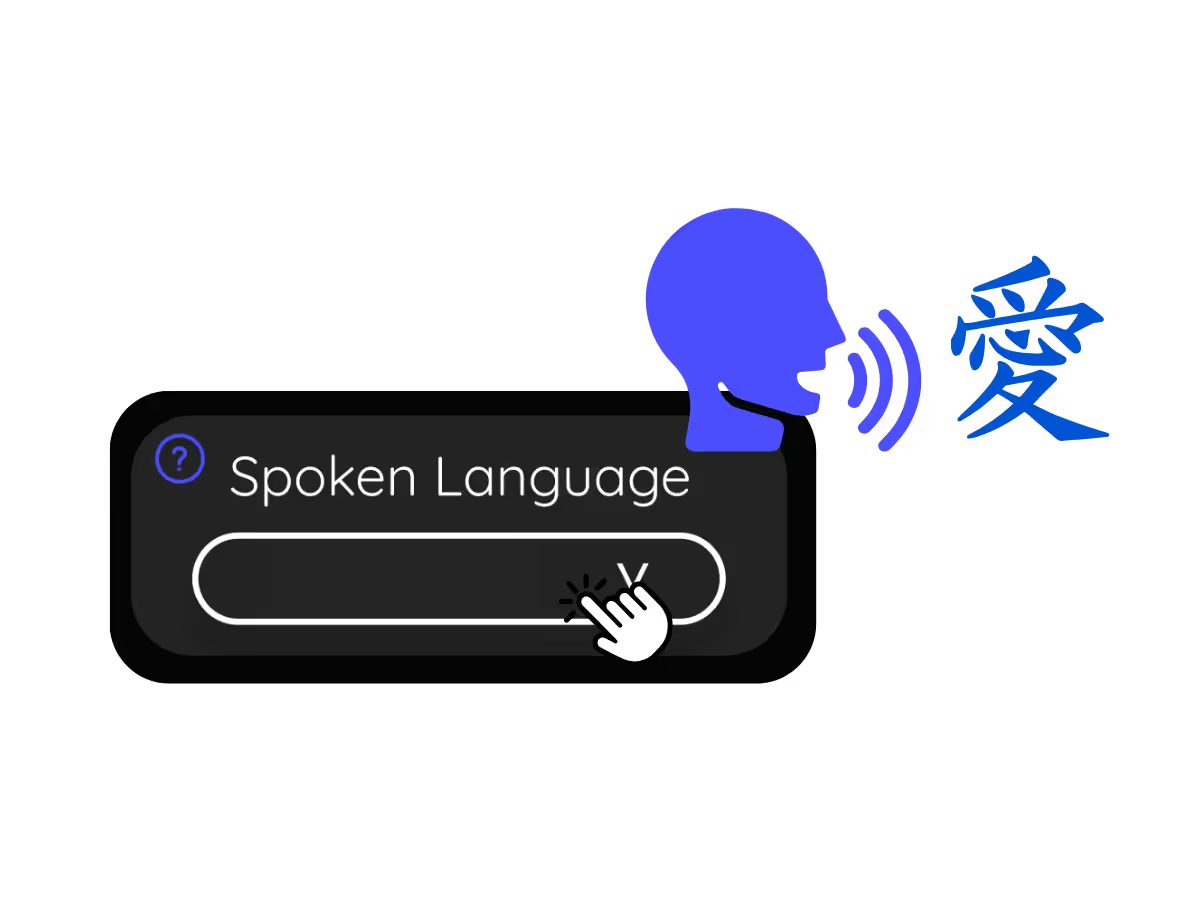
2. Set the spoken language

Choose the language being spoken in the meeting, for example Japanese. If people switch languages, pick multilingual mode.
STEP 3

3. Open the bilingual record

The transcript on your dashboard keeps the original and translated text together, ready to review, edit speaker names, and share with both sides.

What teams use bilingual transcripts for

From daily standups to all-hands, JotMe keeps every attendee in the conversation.

Reporting to HQ in another language

Run the meeting in Japanese and hand HQ a Japanese-English meeting transcript they can read, with the original right beside it for anyone who wants to check.

Sales & client calls

Pull exact quotes and commitments from client calls when you need them.

Recorded Meet meetings

No time to run it live? Upload the recording and JotMe returns the same accurate bilingual transcript, no need to have been in the call.

Compliance & documentation

Keep a searchable record of what was agreed, with speaker labels, accessible anytime on your dashboard.

See it in action

Watch a mixed-language Google Meet become one record both sides can read.

50万人以上のプロフェッショナルが、JotMeで 会議・イベントをスムーズに進行

JotMeが多言語コミュニケーションのギャップ解消にどのように役立っているかをご覧ください。

4.7/5の評価
4.7/5の評価
「私の仕事は翻訳と異文化間の橋渡しなので、このツールは日々の業務に革命をもたらすものだと感じています。」
アダムス
オペレーションスペシャリスト / Tiktok
「日本語はかつて私にとって謎でしたが、この製品は文脈を理解した上で、それを明確で分かりやすいものにしてくれました。」
スタマティス
コンサルタント / Deloitte
「JotMeは多言語会議を効率化し、テンポの速い職場環境でのスムーズな共同作業を保証してくれます。」
セザール
プログラムマネージャー / Amazon
「このバイリンガル機能は、仕事での議事録作成を効率化し、時間を節約し、両言語での効率を高めてくれます。」
ユースケ
営業部長 / NTT
「流暢でない話者にとって不可欠なツールです。リアルタイム翻訳と正確な文字起こしで、複雑な会議を簡素化してくれます。」
ジェシー
ソフトウェアフリーランサー
「長年求めていた翻訳ツールが、JotMeでついに実現しました!」
エルストン
CEO兼創業者 / Tiny.host
「私の仕事は翻訳と異文化間の橋渡しなので、このツールは日々の業務に革命をもたらすものだと感じています。」
アダムス
オペレーションスペシャリスト / Tiktok
「日本語はかつて私にとって謎でしたが、この製品は文脈を理解した上で、それを明確で分かりやすいものにしてくれました。」
スタマティス
コンサルタント / Deloitte
「JotMeは多言語会議を効率化し、テンポの速い職場環境でのスムーズな共同作業を保証してくれます。」
セザール
プログラムマネージャー / Amazon
「このバイリンガル機能は、仕事での議事録作成を効率化し、時間を節約し、両言語での効率を高めてくれます。」
ユースケ
営業部長 / NTT
「流暢でない話者にとって不可欠なツールです。リアルタイム翻訳と正確な文字起こしで、複雑な会議を簡素化してくれます。」
ジェシー
ソフトウェアフリーランサー
「長年求めていた翻訳ツールが、JotMeでついに実現しました!」
エルストン
CEO兼創業者 / Tiny.host

よくある質問

JotMeを使った会議やイベントの運営について知っておくべきすべてのこと。

Can I get a transcript in two languages from Google Meet?

Yes. JotMe keeps the original speech and its translation together, line by line with speaker labels, for any Google Meet, live or from an uploaded recording.

Can I get a bilingual transcript from a recording?

Yes. Upload the recording to Audio to Text or Video to Text, choose the translation language, and the transcript keeps both versions.

Is the bilingual transcript free?

Yes. JotMe's free plan includes transcription minutes, and no credit card is required. Upgrade when you need more.

How accurate is the bilingual transcript?

JotMe builds the transcript with five layers of context: your user profile, your operational context, real-time memory of the meeting, your custom terms, and the flow from previous speech, so both the original and the translation stay accurate. Speaker labels keep both columns easy to follow.

Can I edit, search, and share the transcript?

Yes. On your dashboard you can edit speaker names and text, search the conversation, translate it, and copy or share it.

Which language pairs are supported?

Any of 39,000+ pairs across 200+ languages, with the strongest results on pairs like Japanese-English, Chinese-English, Korean-English, and Spanish-English. See the available languages page.

Can I translate the transcript?

Yes. Translate the transcript into your language on the dashboard, and get the AI notes and summary in the same language.

Heading

You can translate
Bulgarian
Catalan
Mandarin (Simplified
Mandarin (Traditional)
Cantonese (Traditional)
Czech, Danish
Dutch
English (US)
English (UK)
English (Australia)
English (New Zealand)
English (India)
Estonian, Finnis
French
French (Canada
German
German (Switzerland
Greek
Hindi
Hungarian
Indonesian
Italian
Japanese
Korean
Latvian
Lithuanian
Malay
Dutch (Flemish)
Norwegian
Polish
Portuguese
Portuguese (Brazil)
Portuguese (Portugal)
Romanian
Russian
Slovak
Spanish
Spanish (Latin America)
Swedish
Thai
Turkish
Ukrainian
Vietnamese

One meeting, one record, two languages

One Google Meet, one record, two languages side by side, live or from a recording. The bilingual meeting minutes cross-language teams can trust.