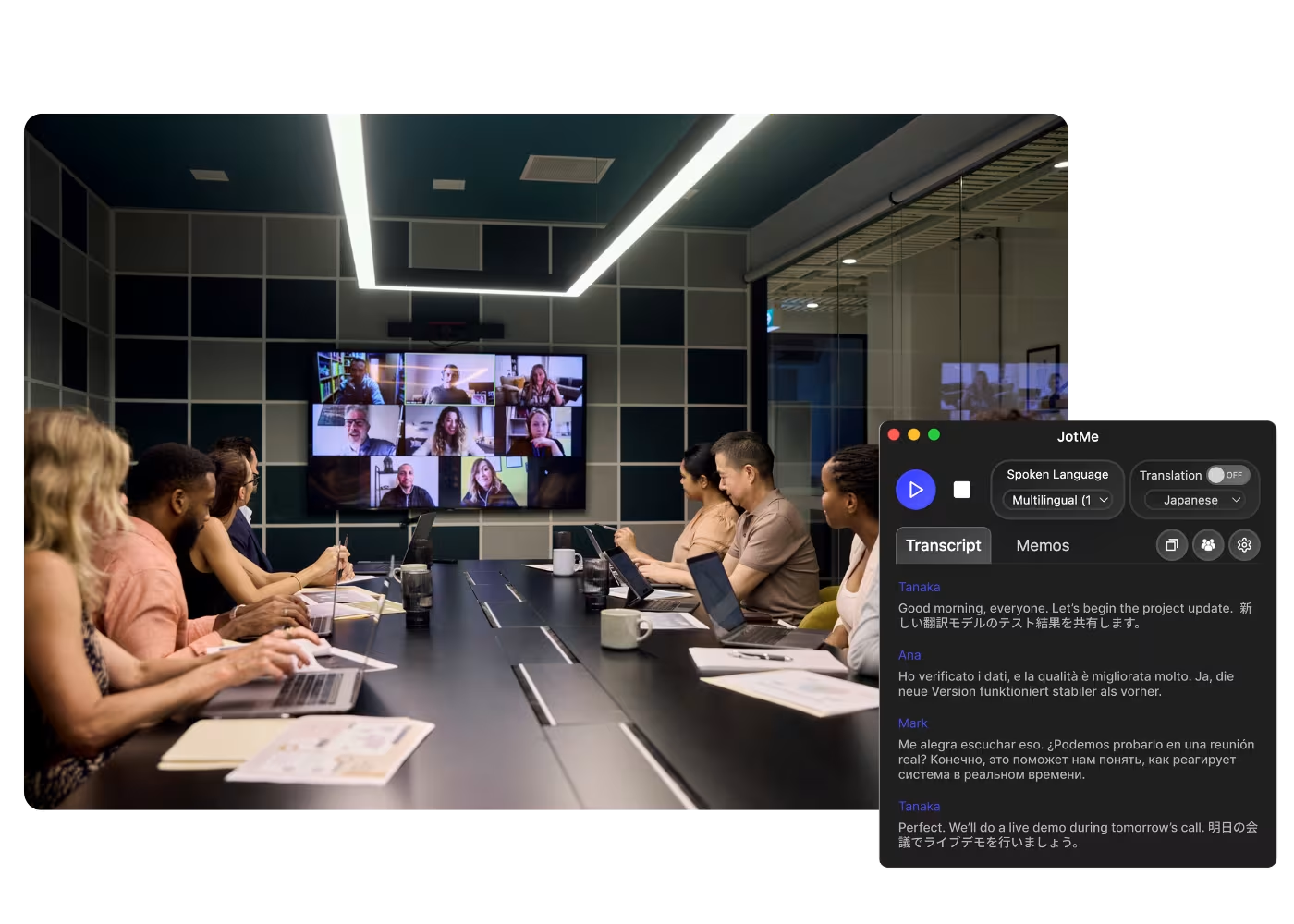
パソコン上のあらゆる通話に対応するデスクトップアプリ

多言語文字起こし、リアルタイム音声翻訳、AI議事録、AI検索、リアルタイム要約、カスタム語彙、音声録音などに対応。

対面の会話に対応するモバイルアプリ

iPhone・Android向けのリアルタイム音声翻訳とAI音声生成。

Google Meet向けChrome拡張機能

リアルタイム文字起こし、リアルタイム音声翻訳、AI議事録。
Chrome
に追加
簡単なトライアルをご利用いただけます

Google Meet AI Note Taker

JotMe takes notes for your Google Meets right in the browser with the Chrome extension or desktop app, live or from an uploaded recording, and highlights every action item in the language you choose. No bot joins the call.

134か国・2,000チーム・50万人のプロフェッショナルに利用されています

評価 4.7/5
GDPR準拠
SOC 2 Type II (進行中)

AI Note Taker on Google Meet

You receive AI-generated meeting notes after meetings, which is great. However, they’re not always exactly what you were hoping for because the AI doesn’t always know what key points matter to you. It’s not the AI’s fault—every meeting is unique, and the information you want to focus on can change. With JotMe, you can take notes during the meeting, allowing the AI to understand which details to highlight and elaborate on, all within the context of the entire conversation. Curious to see it in action? Try it for free—no credit card required!

How to get AI notes from Google Meet

3つの簡単なステップで!

ステップ1

1. Add the Chrome extension or desktop app, or upload your Meet recording

Add JotMe to Chrome for in-Meet notes, or get the desktop app. Already have a recorded Meet? Upload it for the same accurate notes, summary, and action items.

ステップ2

2. Set the spoken language

Choose the language being spoken in the meeting, for example Japanese. If people switch languages, pick multilingual mode.

ステップ3

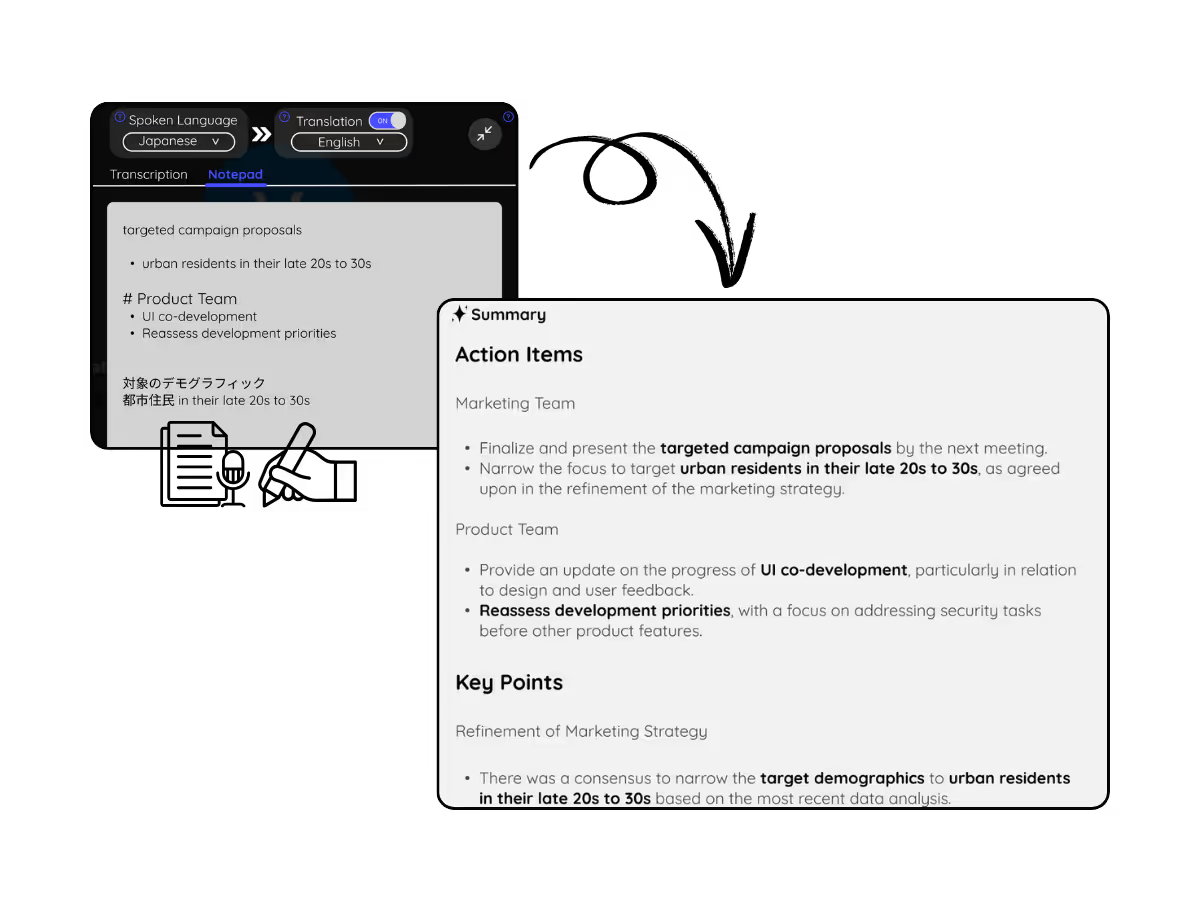
3. Jot highlights if you want

During the meeting, note key points in the Notes panel. When it ends, JotMe writes the meeting notes, summary, and action items, guided by your highlights.

実際に使ってみよう!

What teams use the Google Meet AI note taker for

A woman is working effectively

Global all-hands & team meetings

Capture decisions from HQ announcements once, and share the notes in each office's language, so nobody waits on a translated recap.

Track Conversations in Real-Time

Sales & client calls

Every requirement and objection lands in the notes with action items, even when the customer speaks another language.

A group a having a discussion and speech is transcribed

Recorded Meet meetings

No time to run it live? Upload the recording to Audio to Text or Video to Text for the same accurate notes, summary, and action items, no need to have been in the call.

よくある質問

JotMeでの会議やイベント運営に関するあらゆる情報。

Is JotMe's Google Meet AI Note Taker feature free?

Yes, it is free to get started!

How can I take notes during meetings on Google Meet?

Open the JotMe overlay on Google Meet and click “Note.” You can type anything in markdown format.

How do I use the JotMe Google Meet AI Note Taker feature?

You can use the JotMe AI meeting notes feature by installing the JotMe Chrome extension, signing up, and starting a meeting. JotMe will automatically transcribe and summarize your meeting notes based on the notes you take and the meeting transcript.

What is the default format of the JotMe Google Meet AI Note Taker?

The default format includes the Gist, Action Items, and Key Points from your meeting, allowing you to quickly grasp the essential outcomes and next steps.

Which languages are supported by JotMe’s Google Meet AI Note Taker?

JotMe currently supports Google Meet AI Note Taker in 13 different languages, with the ability to transcribe meetings in 77 languages.

The easiest and most reliable way to create the AI meeting notes you truly need on Google Meet

対応言語
アフリカーンス語(南アフリカ)
アルバニア語 (アルバニア)
アムハラ語 (エチオピア)
アラビア語 (アラブ首長国連邦)
アラビア語 (エジプト)
アラビア語 (レバント)
アラビア語 (マグレブ)
アルメニア語 (アルメニア)
バスク語 (スペイン)
ベンガル語 (バングラデシュ)
ブルガリア語 (ブルガリア)
ミャンマー語 (ミャンマー)
カタルーニャ語 (スペイン)
中国語 (簡体字)
中国語 (繁体字)
オランダ語
英語
英語 (オーストラリア)
英語 (インド)
英語 (フィリピン)
英語 (英国)
エストニア語(エストニア)
フィリピノ語(フィリピン)
フィンランド語(フィンランド)
フランス語
フランス語(カナダ)
ガリシア語(スペイン)
グルジア語(ジョージア)
ドイツ語
グジャラート語(インド)
ヘブライ語(イスラエル)
ヒンディー語
ハンガリー語(ハンガリー)
インドネシア語(インドネシア)
イタリア語
日本語
ジャワ語(インドネシア)
カンナダ語(インド)
クメール語(カンボジア)
ルワンダ語(ルワンダ)
韓国語
ラトビア語(ラトビア)
マケドニア語(北マケドニア)
ラトビア語(ラトビア)
マケドニア語(北マケドニア)
マラヤーラム語(インド)
マラーティー語(インド)
モンゴル語(モンゴル)
ネパール語(ネパール)
北ソト語(南アフリカ)
ノルウェー語(ノルウェー)
ペルシア語(イラン)
ポーランド語(ポーランド)
ポルトガル語(ブラジル)
ポルトガル語(ポルトガル)
ルーマニア語(ルーマニア)
ロシア語
セソト語(南アフリカ
シンハラ語(スリランカ)
スロバキア語(スロバキア)
スロベニア語(スロベニア)
スペイン語(メキシコ)
スペイン語(スペイン)
スンダ語(インドネシア)
スワヒリ語
スワティ語(南アフリカ)
スウェーデン語(スウェーデン
タミル語(インド)
テルグ語(インド)
タイ語(タイ)
ヴェンダ語(南アフリカ)
ツワナ語(南アフリカ)
トルコ語(トルコ)
ウルドゥー語(パキスタン)
ウズベク語(ウズベキスタン)
ベトナム語(ベトナム)
コサ語(南アフリカ)
ツォンガ語(南アフリカ)
ズールー語(南アフリカ)

MORE THAN Google Meet AI Note Taker

JotMe not only provides Google Meet AI Note Taker but also offers real-time translation and transcription tools. Explore our comprehensive suite of multilingual AI tools - from AI translation to transcription. Automate note taking process and other tasks with JotMe to focus on more impactful tasks, such as decision-making and tackling action items effectively.

多言語オペレーションの会議・イベントを、すべてスムーズに

リアルタイム音声翻訳、文字起こし、通訳、AI議事録により、重要な会話を言語を越えて理解・共有できるようにします。

Google Meet AI Note Taker

JotMe takes notes for your Google Meets right in the browser with the Chrome extension or desktop app, live or from an uploaded recording, and highlights every action item in the language you choose. No bot joins the call.

無料プラン。クレジットカード登録は不要です。

134か国・2,000チーム・50万人のプロフェッショナルに利用されています

評価 4.7/5
GDPR準拠
SOC 2 Type II (進行中)

Accurate AI meeting notes for every Google Meet

Everything you need to capture, understand, and share what happened on Meet.

文脈を理解した、圧倒的な正確さ

JotMeの議事録は意味を理解します。誰が話しているか、チームが何に取り組んでいるか、これまでに何が話されたか、あなたのカスタム用語、そして議論のつながりまで、すべての要点が考慮されます。決定事項とアクション項目が正しくまとまります。

会議にボットは参加しません

JotMeはご自身のブラウザ内のChrome拡張機能で動作します。参加者リストにボットが現れることなくMeetの議事録が取れ、有料のGeminiプランを購入する必要もありません。

200以上の言語、議事録はあなたの言語で

200以上の言語のどれで会議をしても、議事録・要約・アクション項目は選んだ言語で得られます。グローバルチームが同じ決定事項を読めます。

議事録は保存されます

議事録と全文の文字起こしは、毎回の通話後にあなたのダッシュボードに保存されます。会議が終わっても何も消えません。

ノートで導く議事録

会議中にサッと要点をメモすれば、JotMeのAIがあなたのハイライトを前面に出した完全な議事録に仕上げます。

カスタム辞書と話者言語の自動検出

業界特有の用語やカスタム置換で精度を高められます。JotMeは話される言語も自動で検出するので、手動で設定する必要はありません。

How to get AI notes from Google Meet

Three steps, under a minute. No bot invite, no host approval. Already have a recording? Upload it instead.

STEP 1

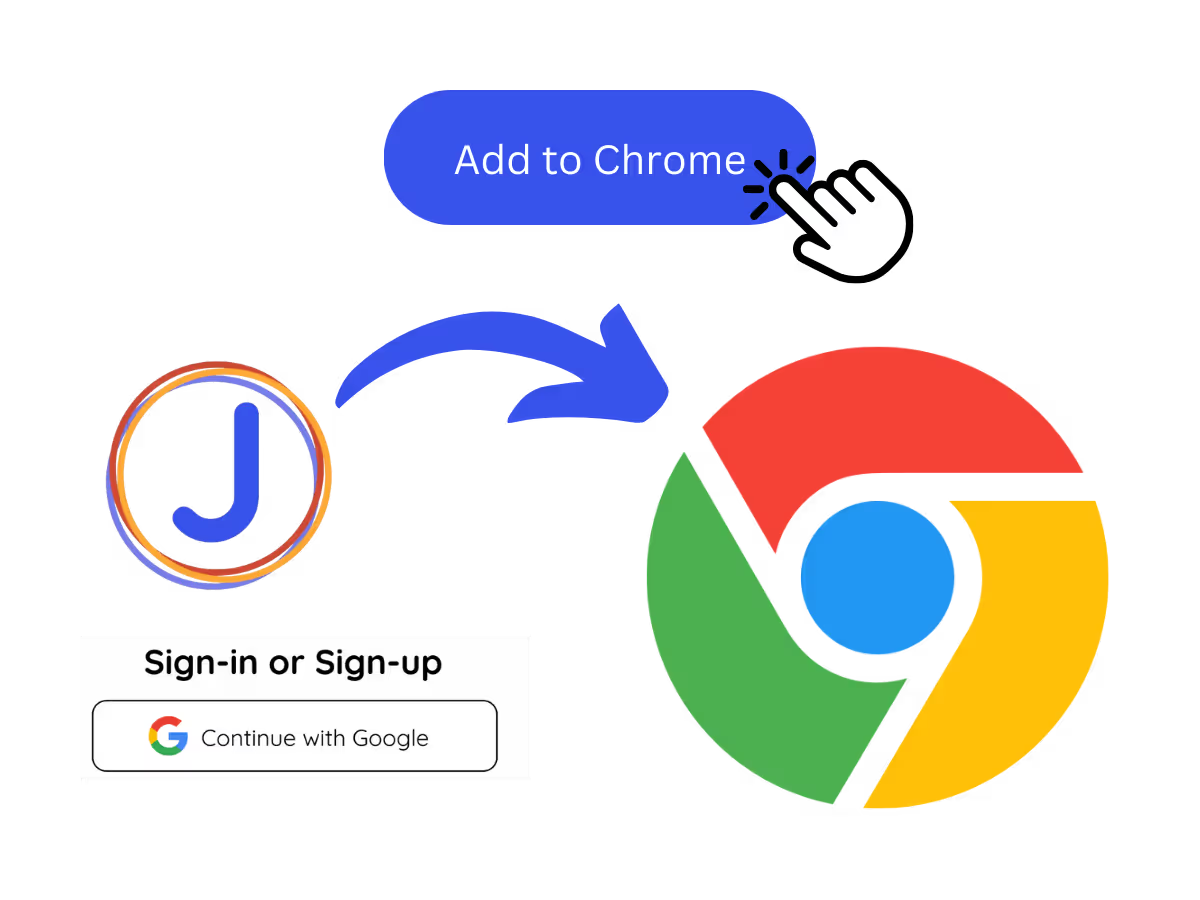
1. Add the Chrome extension or desktop app, or upload your Meet recording

Add JotMe to Chrome for in-Meet notes, or get the desktop app. Already have a recorded Meet? Upload it for the same accurate notes, summary, and action items.
STEP 2

2. Set the spoken language

Choose the language being spoken in the meeting, for example Japanese. If people switch languages, pick multilingual mode.

STEP 3

3. Jot highlights if you want

During the meeting, note key points in the Notes panel. When it ends, JotMe writes the meeting notes, summary, and action items, guided by your highlights.
What teams use the Google Meet AI note taker for

From daily standups to all-hands, JotMe keeps every attendee in the conversation.

Global all-hands & team meetings

Capture decisions from HQ announcements once, and share the notes in each office's language, so nobody waits on a translated recap.

Sales & client calls

Every requirement and objection lands in the notes with action items, even when the customer speaks another language.

Recorded Meet meetings

No time to run it live? Upload the recording to Audio to Text or Video to Text for the same accurate notes, summary, and action items, no need to have been in the call.

Interviews & research calls

Stay present with the candidate or customer while JotMe captures the details and follow-ups.

See it in action

Watch JotMe take notes on a Google Meet from the extension, live or after the meeting.

50万人以上のプロフェッショナルが、JotMeで 会議・イベントをスムーズに進行

JotMeが多言語コミュニケーションのギャップ解消にどのように役立っているかをご覧ください。

4.7/5の評価
4.7/5の評価
「私の仕事は翻訳と異文化間の橋渡しなので、このツールは日々の業務に革命をもたらすものだと感じています。」
アダムス
オペレーションスペシャリスト / Tiktok
「日本語はかつて私にとって謎でしたが、この製品は文脈を理解した上で、それを明確で分かりやすいものにしてくれました。」
スタマティス
コンサルタント / Deloitte
「JotMeは多言語会議を効率化し、テンポの速い職場環境でのスムーズな共同作業を保証してくれます。」
セザール
プログラムマネージャー / Amazon
「このバイリンガル機能は、仕事での議事録作成を効率化し、時間を節約し、両言語での効率を高めてくれます。」
ユースケ
営業部長 / NTT
「流暢でない話者にとって不可欠なツールです。リアルタイム翻訳と正確な文字起こしで、複雑な会議を簡素化してくれます。」
ジェシー
ソフトウェアフリーランサー
「長年求めていた翻訳ツールが、JotMeでついに実現しました!」
エルストン
CEO兼創業者 / Tiny.host
「私の仕事は翻訳と異文化間の橋渡しなので、このツールは日々の業務に革命をもたらすものだと感じています。」
アダムス
オペレーションスペシャリスト / Tiktok
「日本語はかつて私にとって謎でしたが、この製品は文脈を理解した上で、それを明確で分かりやすいものにしてくれました。」
スタマティス
コンサルタント / Deloitte
「JotMeは多言語会議を効率化し、テンポの速い職場環境でのスムーズな共同作業を保証してくれます。」
セザール
プログラムマネージャー / Amazon
「このバイリンガル機能は、仕事での議事録作成を効率化し、時間を節約し、両言語での効率を高めてくれます。」
ユースケ
営業部長 / NTT
「流暢でない話者にとって不可欠なツールです。リアルタイム翻訳と正確な文字起こしで、複雑な会議を簡素化してくれます。」
ジェシー
ソフトウェアフリーランサー
「長年求めていた翻訳ツールが、JotMeでついに実現しました!」
エルストン
CEO兼創業者 / Tiny.host

よくある質問

JotMeを使った会議やイベントの運営について知っておくべきすべてのこと。

Does the Google Meet AI note taker join as a bot?

No. JotMe works from the Chrome extension in your own browser and captures the meeting locally, so no bot shows in the participant list and there's nothing for the host to enable.

Can I get AI notes from a recorded Google Meet?

Yes. Upload the recording to Audio to Text or Video to Text and JotMe transcribes it and writes accurate notes, the same summary and action items as a live meeting.

Is the Google Meet AI note taker free?

Yes. JotMe's free plan includes AI meeting notes, and no credit card is required. Upgrade when you need more.

What do the AI meeting notes include?

The default format gives you the gist, key points, and action items. Jot your own highlights in the notepad during the call and JotMe folds them into the final notes.

Can I get the notes in my language?

Yes. The meeting can be in any of 200+ languages, and you choose the language for the notes, summary, and action items.

Heading

You can translate
Bulgarian
Catalan
Mandarin (Simplified
Mandarin (Traditional)
Cantonese (Traditional)
Czech, Danish
Dutch
English (US)
English (UK)
English (Australia)
English (New Zealand)
English (India)
Estonian, Finnis
French
French (Canada
German
German (Switzerland
Greek
Hindi
Hungarian
Indonesian
Italian
Japanese
Korean
Latvian
Lithuanian
Malay
Dutch (Flemish)
Norwegian
Polish
Portuguese
Portuguese (Brazil)
Portuguese (Portugal)
Romanian
Russian
Slovak
Spanish
Spanish (Latin America)
Swedish
Thai
Turkish
Ukrainian
Vietnamese

Never take Google Meet notes by hand again

Never take Google Meet notes by hand again. Jot highlights during the call, get accurate AI notes with action items after, and share them in your team's language, live or from a recording.