Tips
How to Live Translate LINE Calls With a 2-Minute Setup

Lovely Mangla
February 14, 2026

Brief Answer: To live translate LINE calls, use AI live translation apps like JotMe. During your LINE call, open the JotMe app, set the “Spoken Language” to the language spoken in the call and the “Translation” language to your required output language, and JotMe will start the real-time translation as you begin speaking, without requiring bots or integrations.
You are on a LINE call with a Japanese client, but the language barrier is making it difficult for both of you to communicate. The conversation slows down, key details get lost, and you spend more time clarifying than actually moving things forward. This is a real problem for small businesses and freelancers working globally.
JotMe’s desktop app solves this with a 2-minute setup without requiring any bots or technical expertise. JotMe runs quietly in the background, captures your LINE call audio directly from your system, and delivers contextual and continuous translation across 45+ languages in real time. JotMe helps you communicate globally with support for up to 10 simultaneous spoken languages in group calls. All these at just $10/month (billed annually).
Below is a brief overview of the steps to live translate LINE calls using JotMe’s desktop app:
- Install the JotMe Desktop App: Download and install the JotMe desktop app on your Mac or Windows device.
- Start a LINE Call: Open LINE and start a voice or video call, and open JotMe.
- Select Spoken and Translation Languages: In the JotMe window, turn on the “Translation” button, set the “Spoken Language” to the speaker’s language and “Translation” language to the one you want the translation in.
- Enable Live Translation: Once you select the languages, tap on the “Play” button to begin the live translation.
Step 1: How to Download and Install JotMe on Your Device?
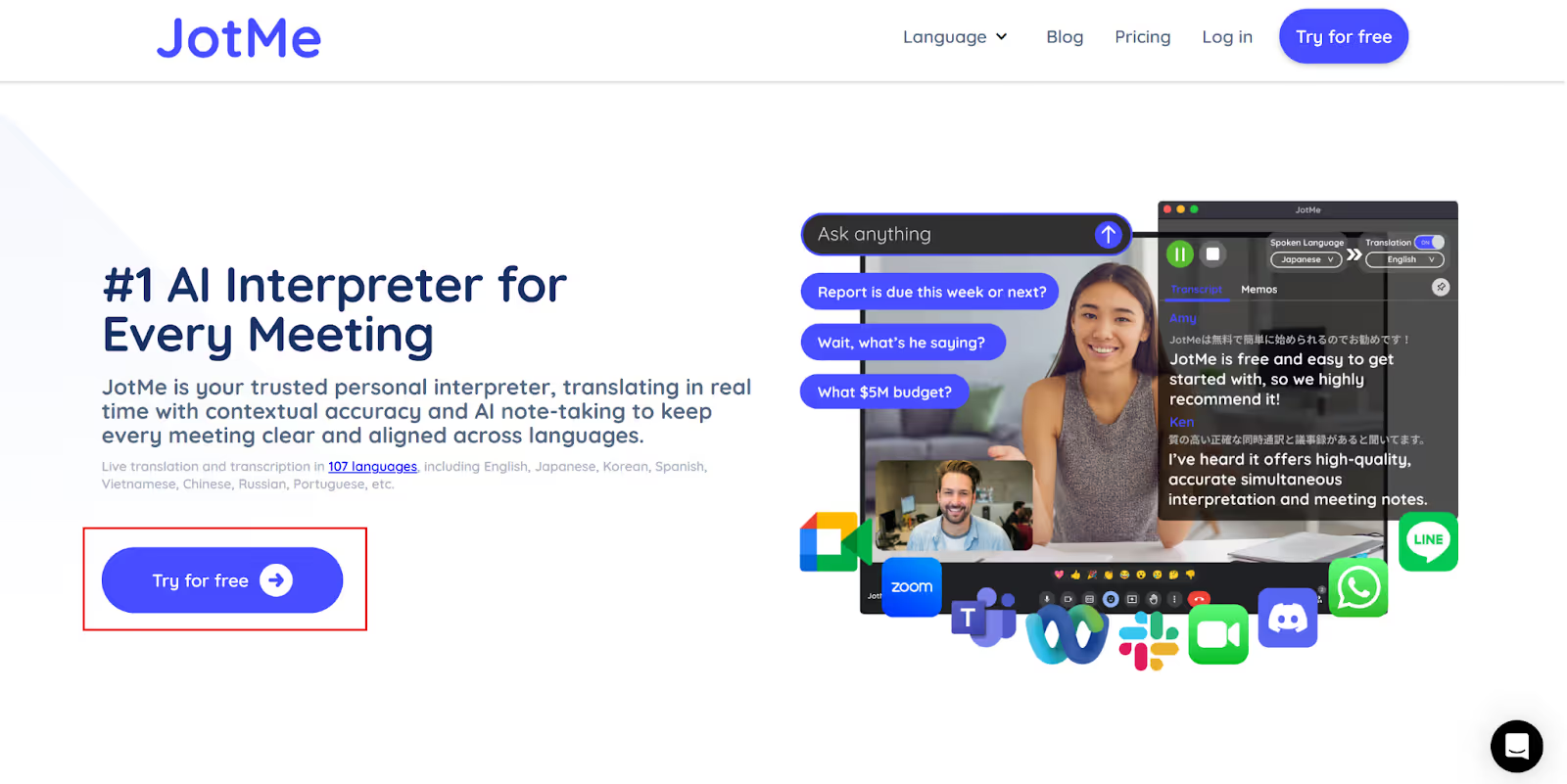
First, go to JotMe’s official website and click on “Try for free” to download the setup on your Mac or Windows device. Once downloaded, run the setup and follow the on-screen instructions to install the JotMe desktop app.
Step 2: How to Start a LINE Call in the Desktop App?
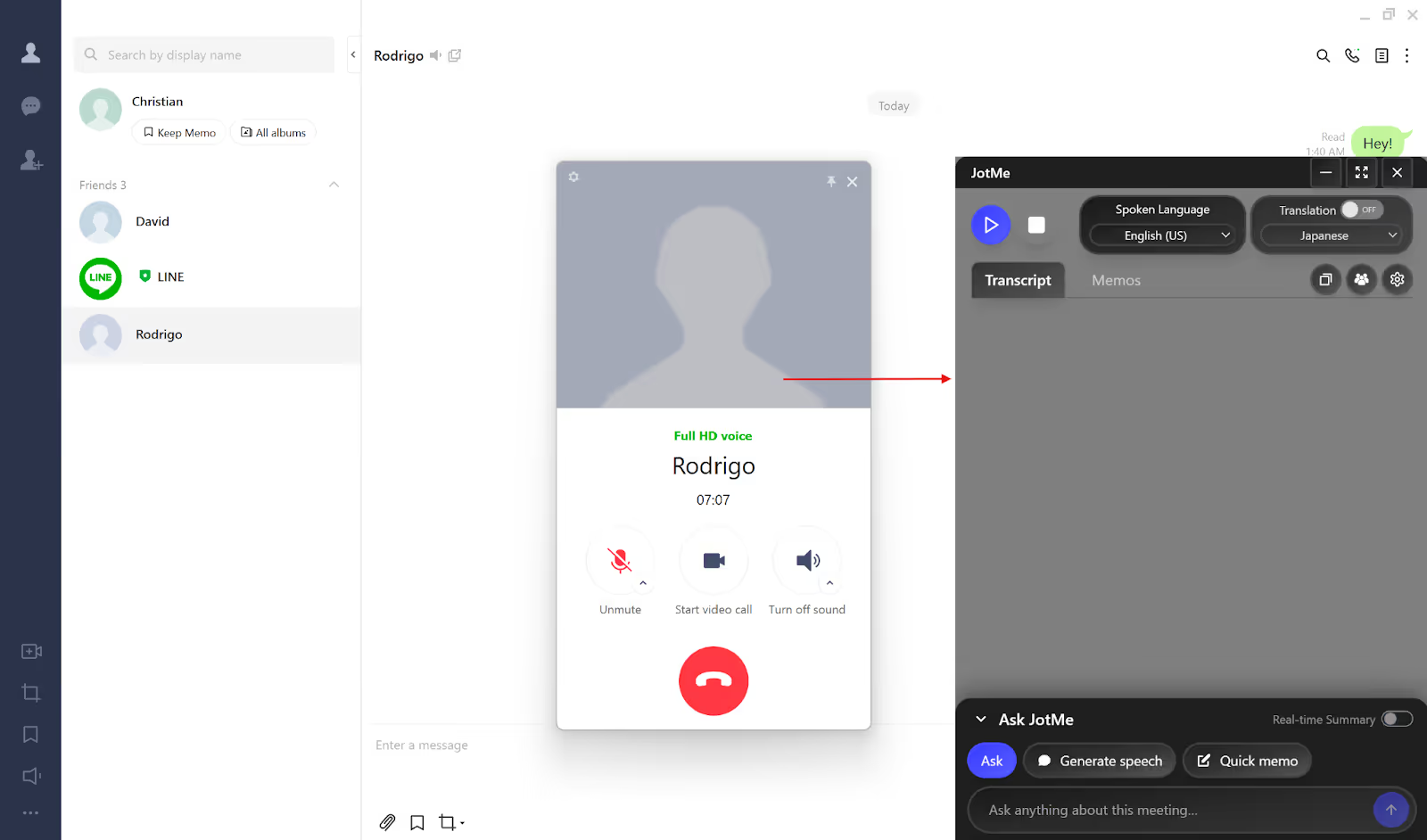
Next, open the LINE desktop app and start a video/voice call or join a meeting, and open the JotMe app, which will appear on the right.
Step 3: How to Set the Languages for Live Translation?
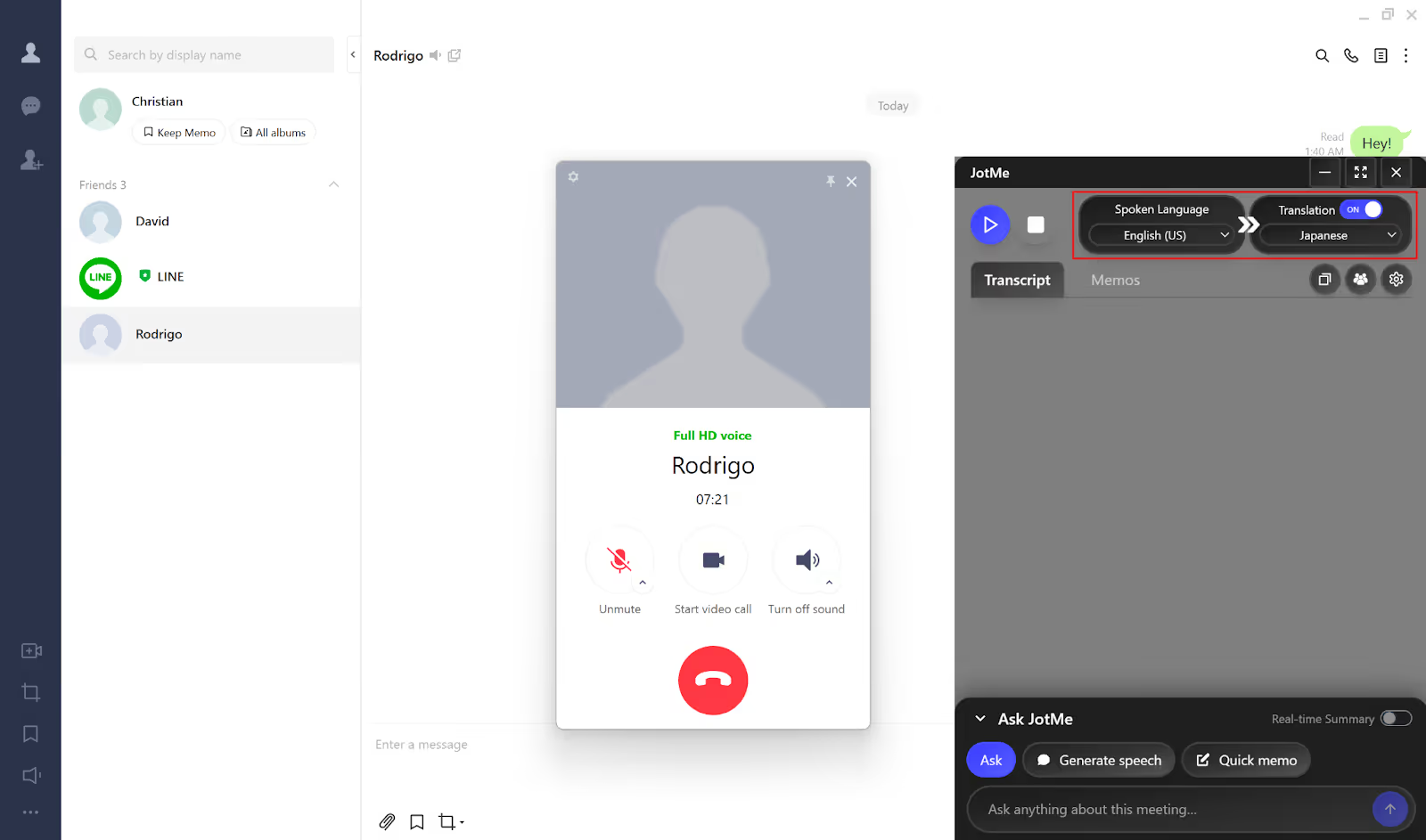
On the top-right of the JotMe window, check the “Translation” button and toggle it on if it’s off. Next, set the “Spoken Language” from the dropdown menu to the speaker’s language that you wish to translate. Set the “Translation” language to your desired output language.
Step 4: How to Enable Live Translation in JotMe?
Once you’ve set the Spoken and Translation languages, tap on the “Play” button on the top-left of the JotMe window to begin the live translation of your LINE video/voice call.
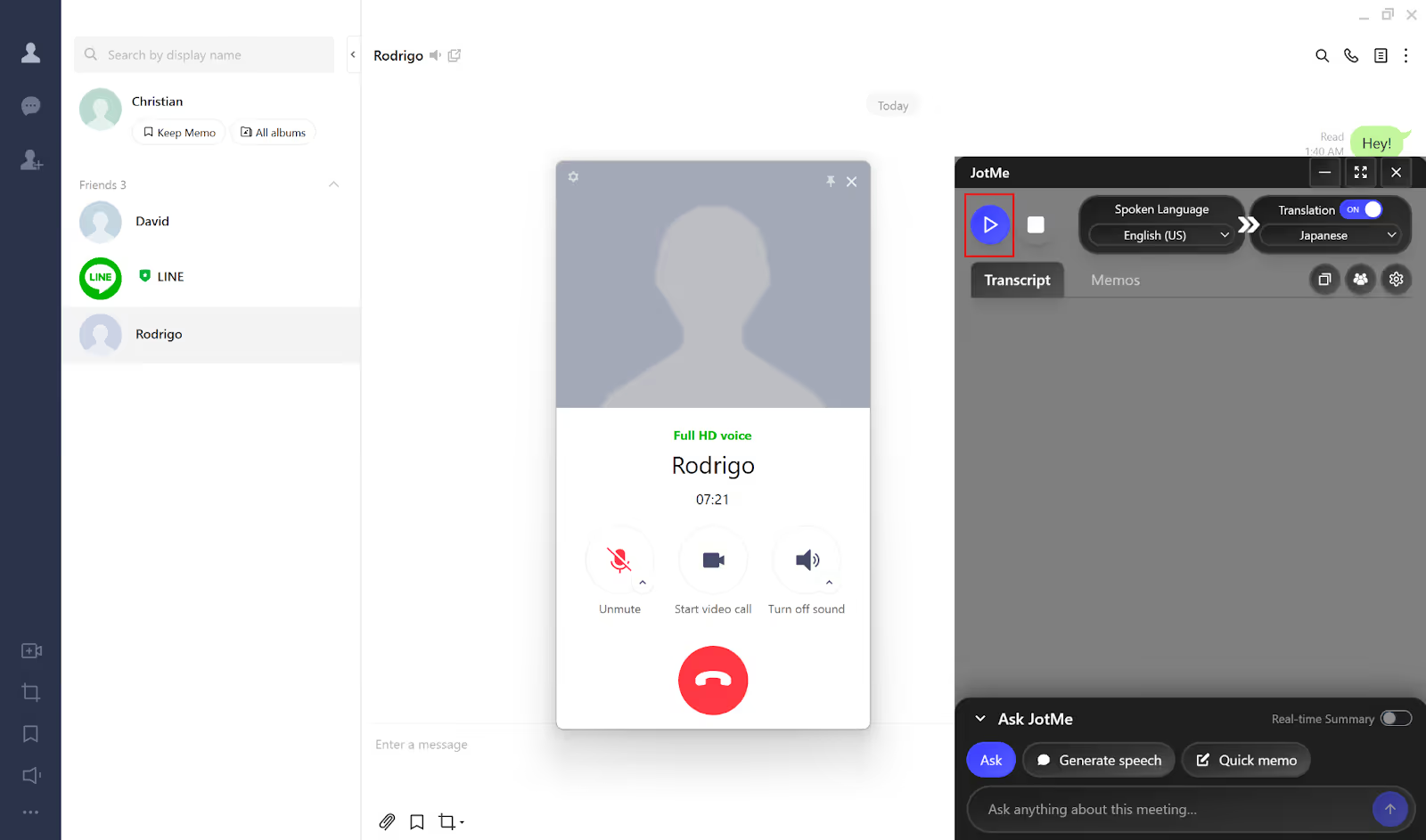
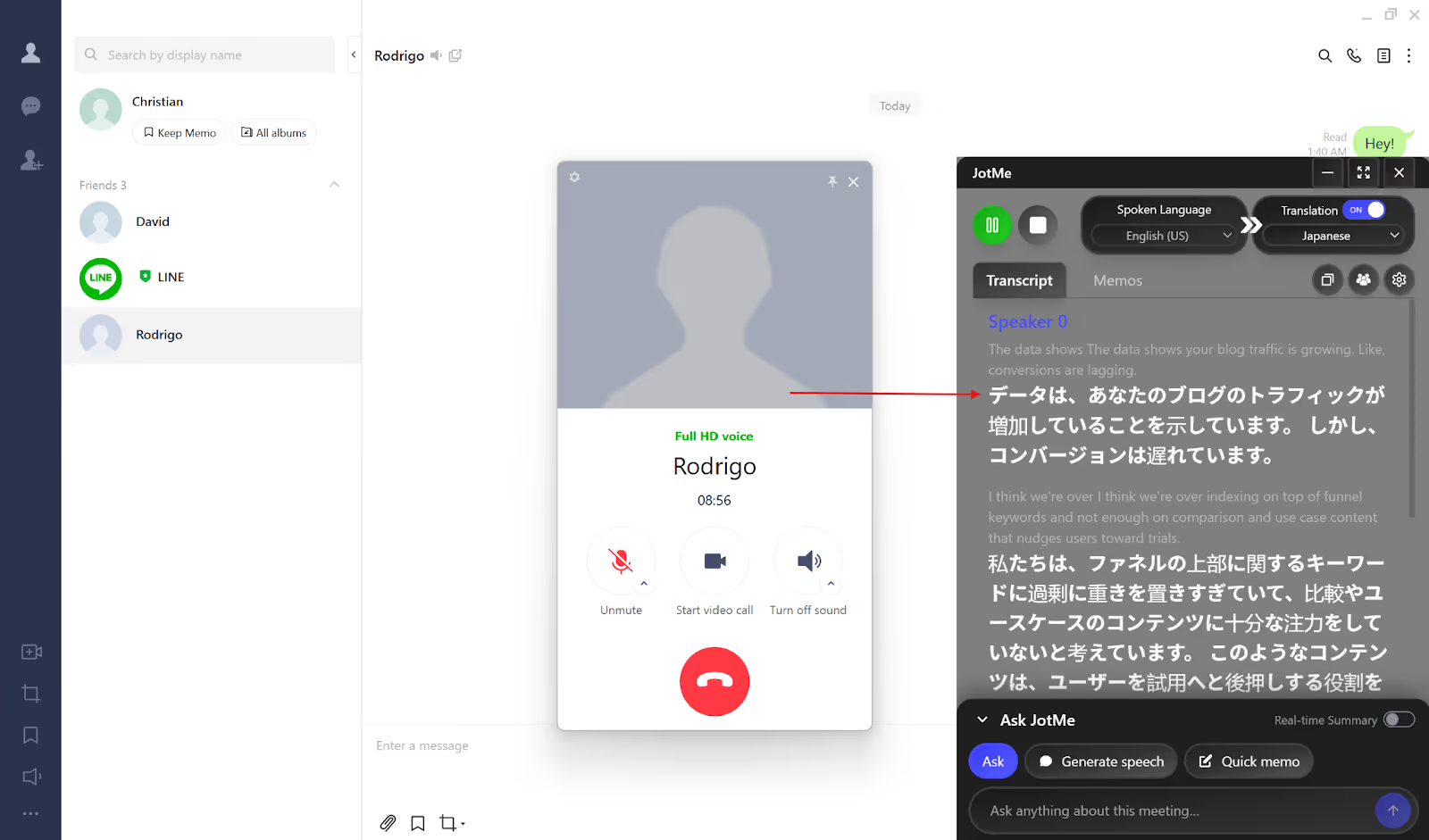
JotMe will instantly begin the real-time translation in your selected language once you tap on the “Play” button. JotMe also provides summaries of LINE video and voice calls that you can view in its dashboard after your call ends.
How Does JotMe Provide Contextual Live Translation for LINE Calls?
JotMe’s desktop app goes beyond word-for-word translation and picks up on industry-specific terms and conversational nuances to give you contextual and continuous translation in 45+ languages throughout your LINE calls. JotMe doesn’t stop the live translation when you pause mid-sentence, and keeps the conversation flow natural.
Other than LINE, JotMe’s desktop app works with multiple platforms, including Zoom, Google Meet, Microsoft Teams, Webex, and Discord. For in-person conversations while traveling to a foreign country, JotMe also provides a mobile app for Android and iOS with real-time voice-to-text translation, Generate Speech from text, setting translation quality, and more.
Check out JotMe’s desktop app features in detail below:
JotMe’s Contextual and Continuous Translation
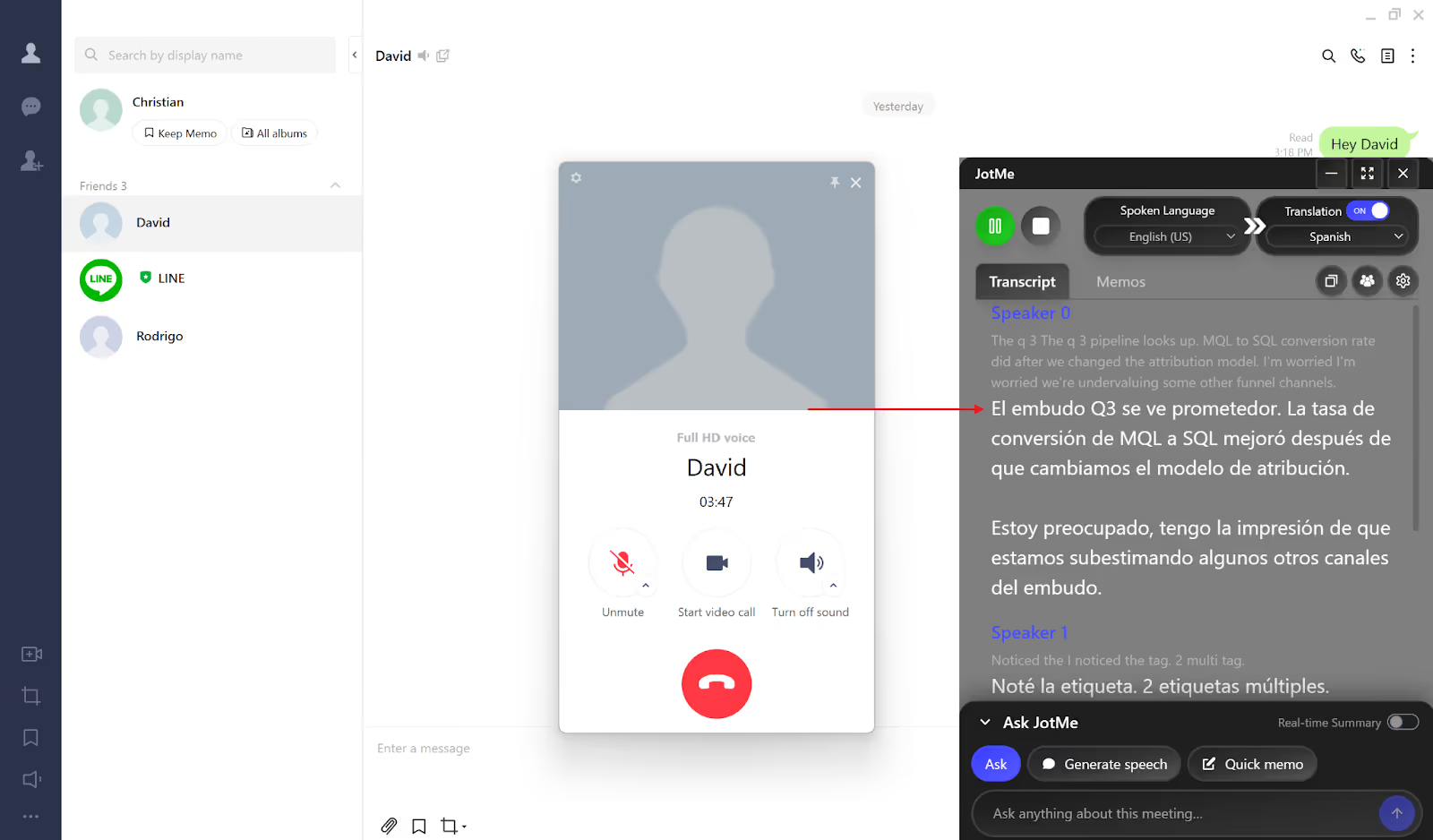
JotMe’s desktop app delivers contextual and continuous translation in real time that understands the nuances and industry-specific terms used during your LINE calls. Once you begin the live translation of your LINE calls, JotMe keeps it going in a single flow without stopping the translation, even when you pause to think or catch your breath while speaking.
JotMe’s Generate Speech Feature
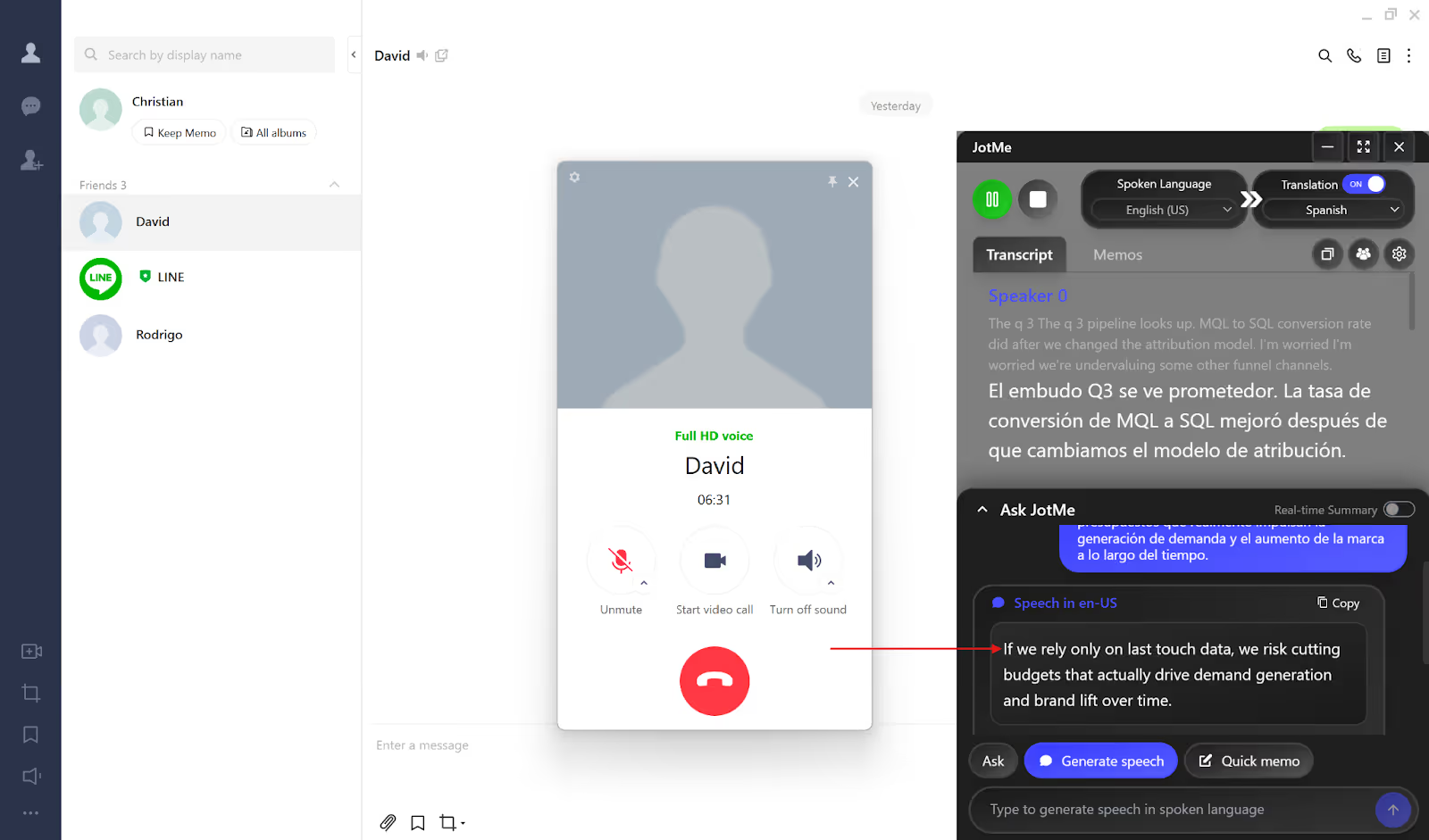
With the Generate Speech feature, you can type what you want to say in your language, and JotMe will speak it out loud in the speaker’s language. JotMe’s Generate Speech feature makes it easier for the speaker to understand what you’re trying to say without any pronunciation struggles or confusion.
JotMe’s Live Translation of Multilingual Meetings
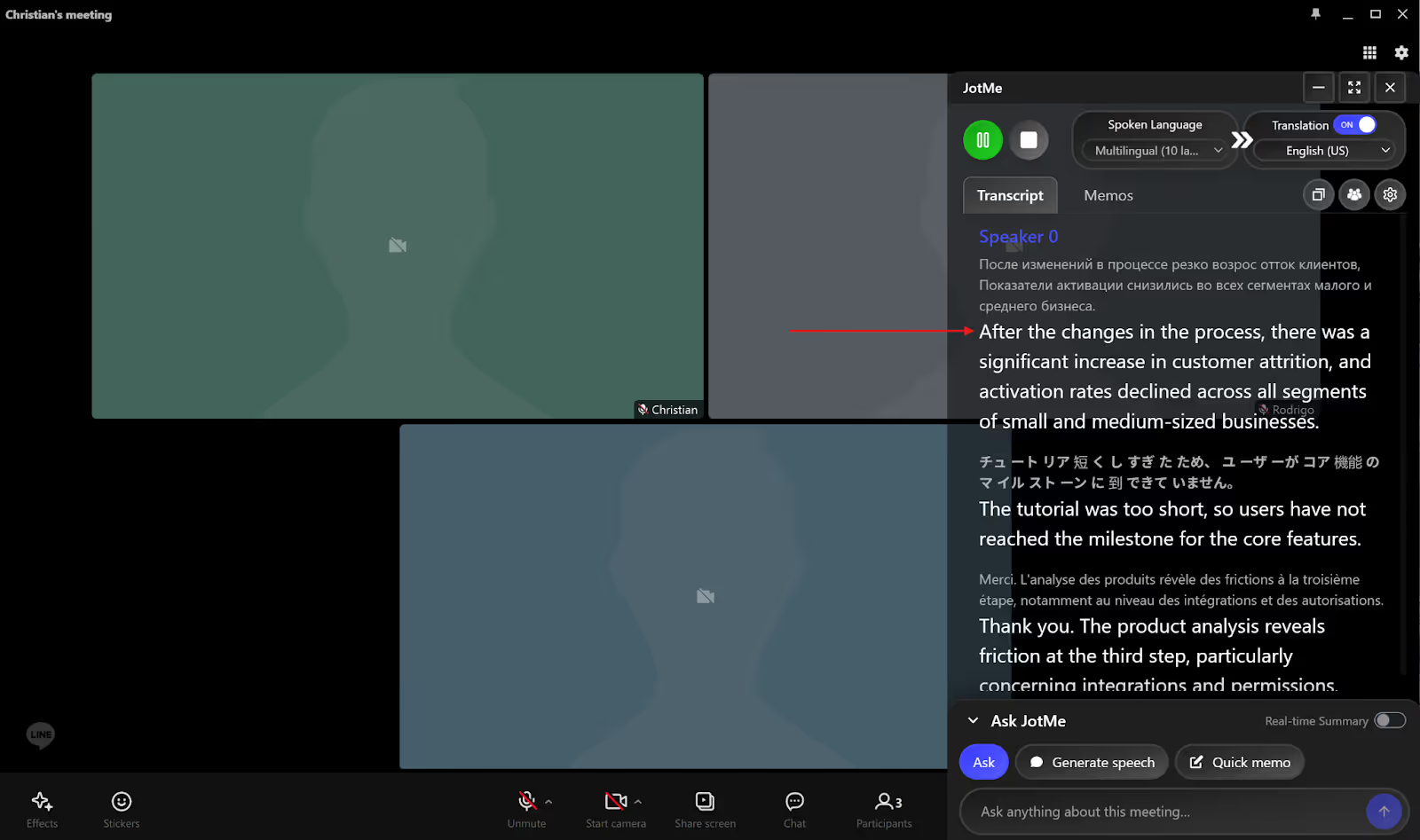
JotMe’s desktop app can translate up to 10 different spoken languages simultaneously in your preferred language, allowing you to communicate globally in your multilingual meetings or group calls.
When you’re having a LINE meeting with speakers from different language backgrounds, you can simply set the “Spoken Language” to Multilingual, and JotMe will provide real-time translation from English, Japanese, Spanish, French, German, and more, into your selected language.
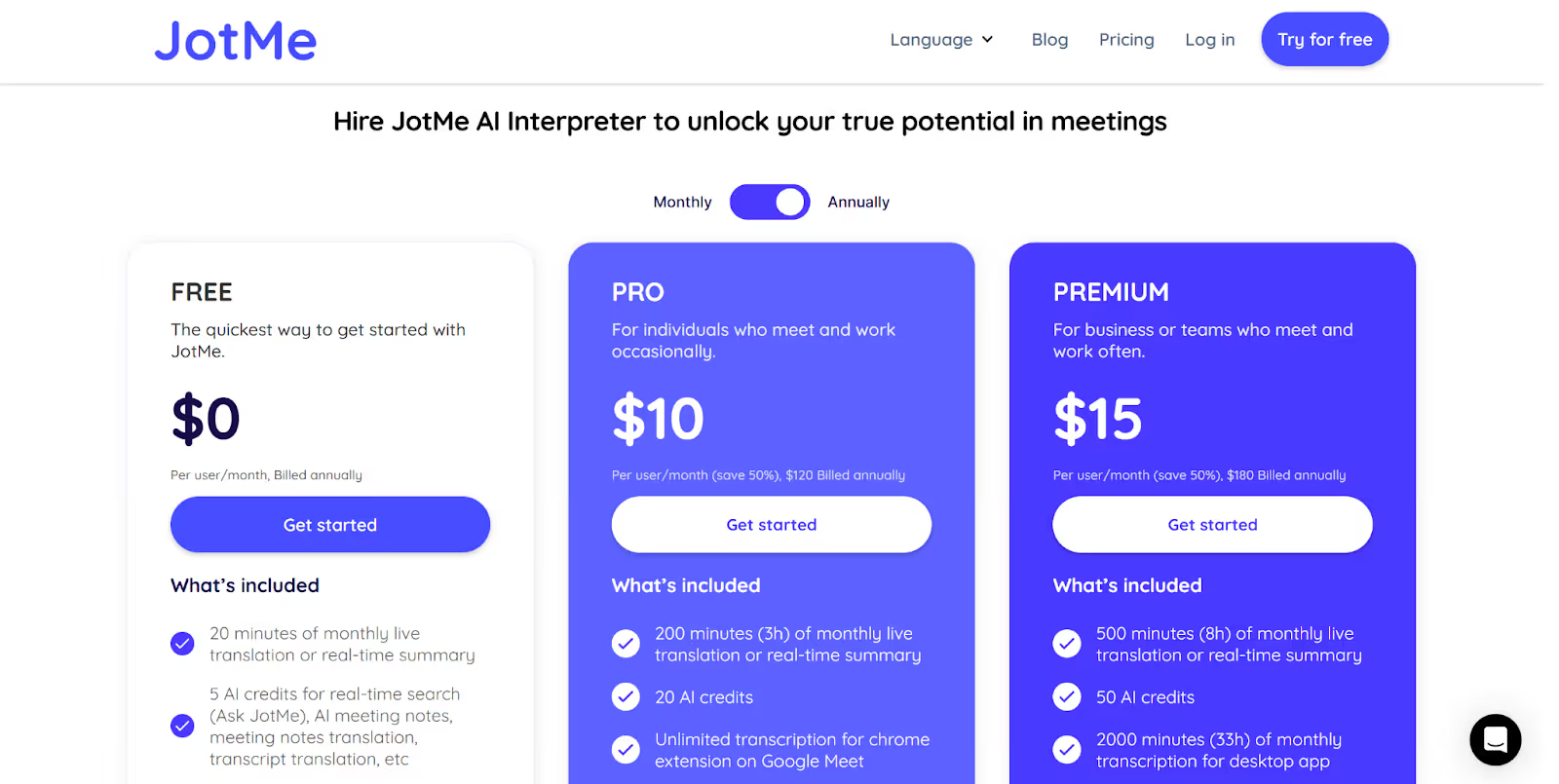
Hiring a human interpreter for your LINE business meetings costs around $100/hour, and multilingual meetings cost even more. However, with JotMe’s Pro plan at $10/month, the cost of live translation for a one-hour meeting cuts down to just $3-4, making it cost-effective than hiring a human interpreter for frequent LINE meetings.
JotMe’s Bot-Less Real-Time Translation
While most AI live translation apps require a bot to join team meetings on LINE, JotMe desktop works in the background by capturing audio directly from your system and provides cross-platform translation without bots in real time in 45+ languages.
This way, JotMe ensures a bot-less workflow without disrupting your LINE team meetings/group conversations. Plus, teams can start using JotMe right away without any technical expertise, as it offers an easy and bot-less real-time translation setup.
Conclusion: How to Get Accurate Real-Time Translation of LINE Calls?
To get accurate real-time translation of LINE calls, you must ensure a stable internet connection, a low-noise background, and clarity of speech. According to LY Corporation, there are 194M monthly active users of LINE globally, including global business teams and freelancers. This increases the demand for AI live translation apps, like JotMe, for LINE calls translation.
Here’s a quick look at the tips to get accurate live translation of LINE calls:
- Stable Internet Connection: A weak connection can cause delays or lags during the live translation.
- Low-Noise Background: Even though JotMe works accurately in noisy environments, as it captures audio directly from your system, a silent background and clean audio will provide even more accurate translations.
- Clarity of Speech: Speak naturally at a normal pace. Avoid talking too fast, as it can affect translation quality.
JotMe’s desktop app works silently in the background and provides real-time translation in 45+ languages, multilingual group call support, Generate Speech from text, and AI meeting notes & summaries. Teams can start using JotMe easily without any complex setup, and since it runs without any bots, your LINE meetings stay uninterrupted.
Try JotMe today and never miss a word on your next LINE call.
FAQs
Is there a translator for the LINE app?
Yes, JotMe’s desktop app works as a real-time translator for LINE voice and video calls. JotMe works on your Mac or Windows device in the background, supports 45+ languages, and translates up to 10 spoken languages simultaneously in group calls, without any bots or complex setup.
How do I turn on translation on LINE?
To turn on live translation on LINE calls, open the JotMe desktop app alongside your LINE call. Toggle on the “Translation” button in the JotMe window, select your spoken and output languages, and hit the “Play” button. JotMe will start translating your LINE call in real time immediately.
Is JotMe safe?
Yes, JotMe is safe. Your conversations are private, and JotMe does not share your personal data with any third-party platforms except when required by law. JotMe also doesn’t use your meeting content for model training without your explicit consent and implements industry-standard security measures, making it a privacy-first live interpretation tool.
Last updated on
April 14, 2026
Follow us on social media: