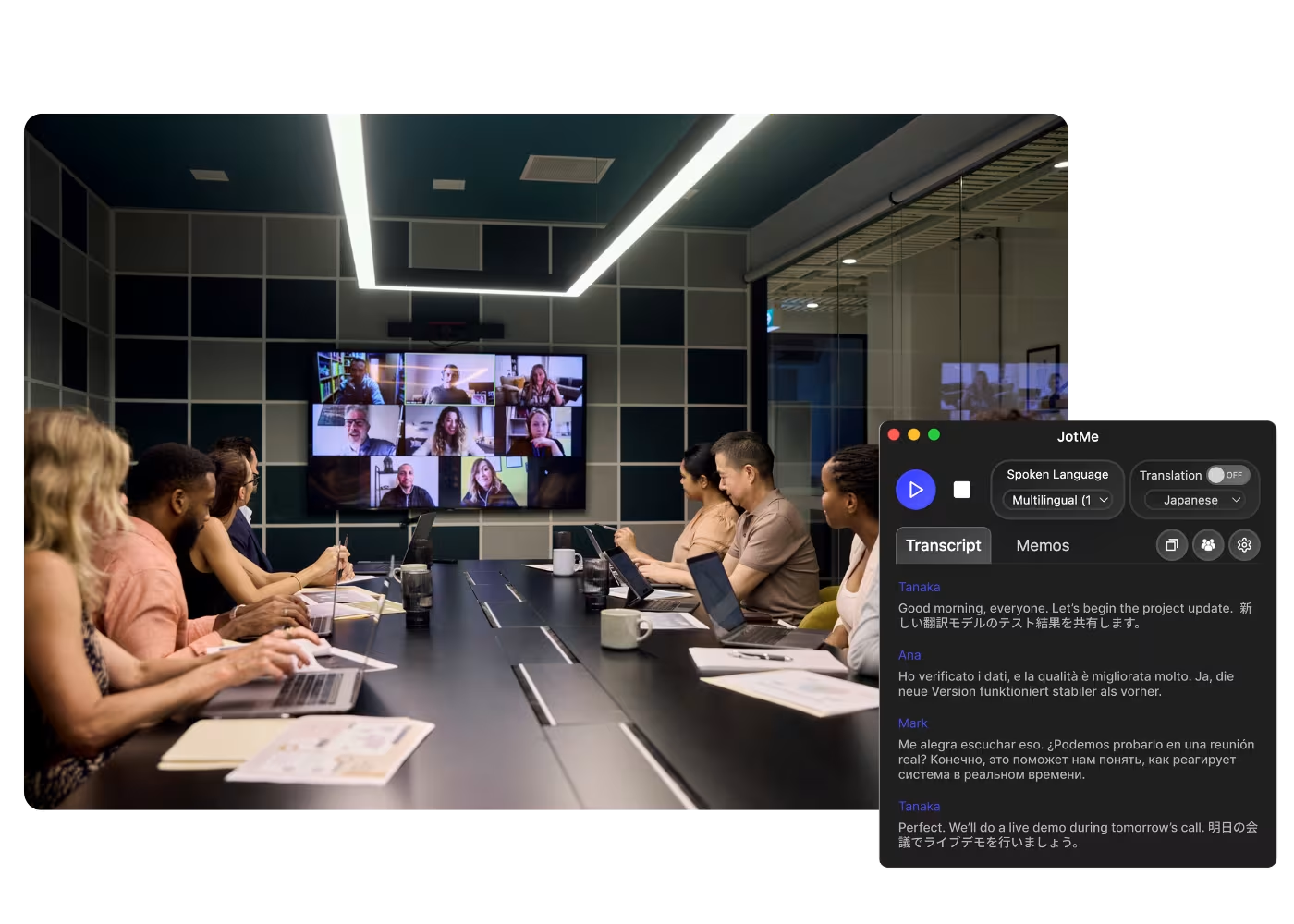
Приложение для компьютера для всех ваших звонков

Многоязычная транскрипция, голосовой перевод в реальном времени, ведение заметок, ИИ-поиск, резюме в реальном времени, пользовательский словарь, ИИ-протоколы совещаний, аудиозаписи и многое другое.

Мобильное приложение для разговоров офлайн

Голосовой перевод в реальном времени и ИИ-генерация речи для iPhone и Android.

Расширение Chrome для Google Meet

Транскрипция в реальном времени, голосовой перевод в реальном времени, ведение заметок, ИИ-протоколы совещаний.
Добавить в
Chrome
Доступен быстрый тест

Google Meet AI Note Taker

JotMe takes notes for your Google Meets right in the browser with the Chrome extension or desktop app, live or from an uploaded recording, and highlights every action item in the language you choose. No bot joins the call.

Нам доверяют 2 000 команд и 500 000 специалистов в 134 странах

Рейтинг 4,7/5
Соответствует GDPR
SOC 2 Type II (В процессе)

AI Note Taker on Google Meet

You receive AI-generated meeting notes after meetings, which is great. However, they’re not always exactly what you were hoping for because the AI doesn’t always know what key points matter to you. It’s not the AI’s fault—every meeting is unique, and the information you want to focus on can change. With JotMe, you can take notes during the meeting, allowing the AI to understand which details to highlight and elaborate on, all within the context of the entire conversation. Curious to see it in action? Try it for free—no credit card required!

How to get AI notes from Google Meet

В 3 простых шага!

ШАГ 1

1. Add the Chrome extension or desktop app, or upload your Meet recording

Add JotMe to Chrome for in-Meet notes, or get the desktop app. Already have a recorded Meet? Upload it for the same accurate notes, summary, and action items.

ШАГ 2

2. Set the spoken language

Choose the language being spoken in the meeting, for example Japanese. If people switch languages, pick multilingual mode.

ШАГ 3

3. Jot highlights if you want

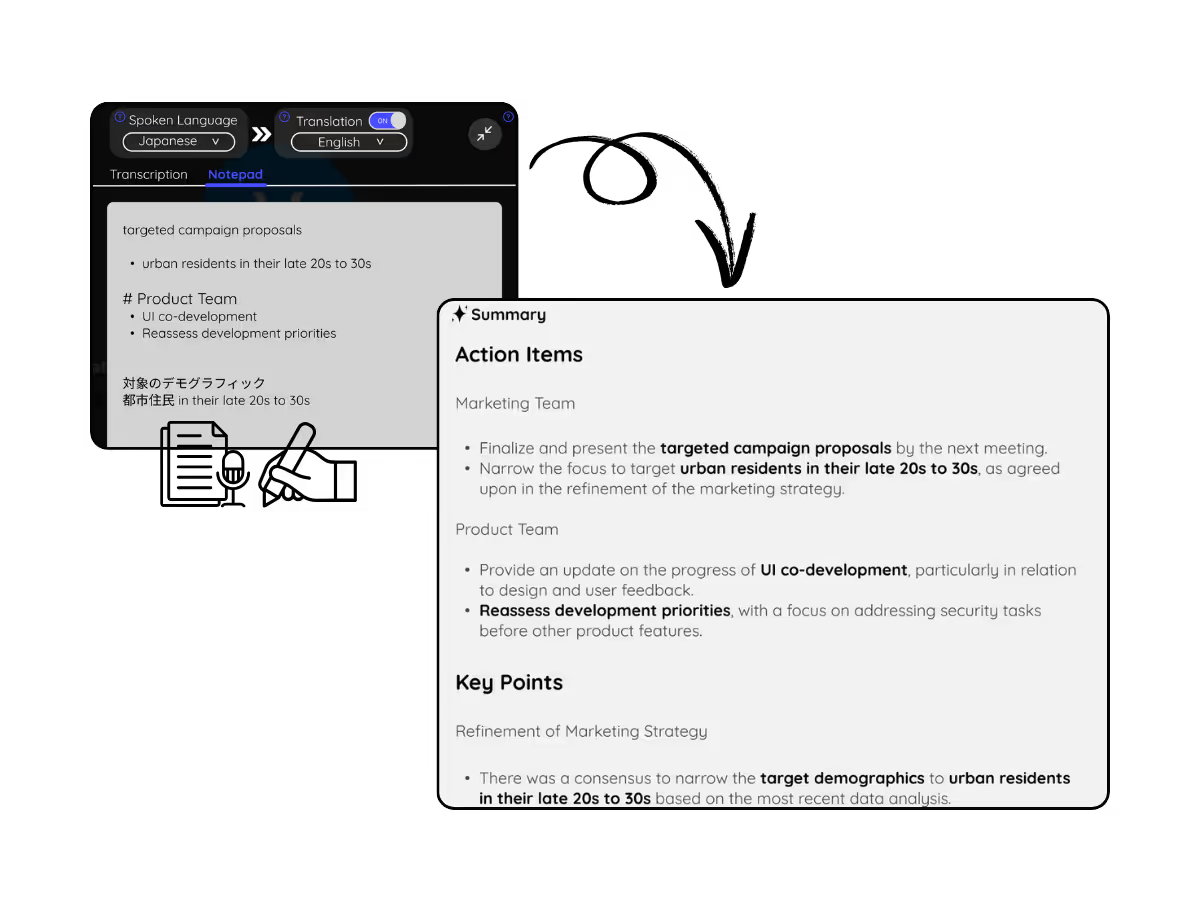
During the meeting, note key points in the Notes panel. When it ends, JotMe writes the meeting notes, summary, and action items, guided by your highlights.

Посмотрите, как это работает!

What teams use the Google Meet AI note taker for

A woman is working effectively

Global all-hands & team meetings

Capture decisions from HQ announcements once, and share the notes in each office's language, so nobody waits on a translated recap.

Track Conversations in Real-Time

Sales & client calls

Every requirement and objection lands in the notes with action items, even when the customer speaks another language.

A group a having a discussion and speech is transcribed

Recorded Meet meetings

No time to run it live? Upload the recording to Audio to Text or Video to Text for the same accurate notes, summary, and action items, no need to have been in the call.

Часто задаваемые вопросы

Всё, что вам нужно знать о проведении встреч и мероприятий с JotMe.

Is JotMe's Google Meet AI Note Taker feature free?

Yes, it is free to get started!

How can I take notes during meetings on Google Meet?

Open the JotMe overlay on Google Meet and click “Note.” You can type anything in markdown format.

How do I use the JotMe Google Meet AI Note Taker feature?

You can use the JotMe AI meeting notes feature by installing the JotMe Chrome extension, signing up, and starting a meeting. JotMe will automatically transcribe and summarize your meeting notes based on the notes you take and the meeting transcript.

What is the default format of the JotMe Google Meet AI Note Taker?

The default format includes the Gist, Action Items, and Key Points from your meeting, allowing you to quickly grasp the essential outcomes and next steps.

Which languages are supported by JotMe’s Google Meet AI Note Taker?

JotMe currently supports Google Meet AI Note Taker in 13 different languages, with the ability to transcribe meetings in 77 languages.

The easiest and most reliable way to create the AI meeting notes you truly need on Google Meet

Доступный язык
Африкаанс (ЮАР)
Албанский (Албания)
Амхарский (Эфиопия)
Арабский (ОАЭ)
Арабский (Египет)
Арабский (Левант)
Арабский (Магриб)
Армянский (Армения)
Баскский (Испания)
Бенгальский (Бангладеш)
Болгарский (Болгария)
Бирманский (Мьянма)
Каталанский (Испания)
Китайский мандарин (упрощенный)
Китайский мандарин (традиционный)
Нидерландский
Английский
Английский (Австралия)
Английский (Индия)
Английский (Филиппины)
Английский (Великобритания)
Эстонский (Эстония)
Филиппинский (Филиппины)
Финский (Финляндия)
Французский
Французский (Канада)
Галисийский (Испания)
Грузинский (Грузия)
Немецкий
Гуджарати (Индия)
Иврит (Израиль)
Хинди
Венгерский (Венгрия)
Индонезийский (Индонезия)
Итальянский
Японский
Яванский (Индонезия)
Каннада (Индия)
Кхмерский (Камбоджа)
Киньяруанда (Руанда)
Корейский
Латышский (Латвия)
Македонский (Северная Македония)
Латышский (Латвия)
Македонский (Северная Македония)
Малаялам (Индия)
Маратхи (Индия)
Монгольский (Монголия)
Непальский (Непал)
Северный сото (Южная Африка)
Норвежский (Норвегия)
Персидский (Иран)
Польский (Польша)
Португальский (Бразилия)
Португальский (Португалия)
Румынский (Румыния)
Русский
Сесото (Южная Африка)
Сингальский (Шри-Ланка)
Словацкий (Словакия)
Словенский (Словения)
Испанский (Мексика)
Испанский (Испания)
Сунданский (Индонезия)
Суахили
Свати (ЮАР)
Шведский (Швеция)
Тамильский (Индия)
Телугу (Индия)
Тайский (Таиланд)
Венда (ЮАР)
Тсвана (ЮАР)
Турецкий (Турция)
Урду (Пакистан)
Узбекский (Узбекистан)
Вьетнамский (Вьетнам)
Коса (ЮАР)
Тсонга (ЮАР)
Зулу (ЮАР)

MORE THAN Google Meet AI Note Taker

JotMe not only provides Google Meet AI Note Taker but also offers real-time translation and transcription tools. Explore our comprehensive suite of multilingual AI tools - from AI translation to transcription. Automate note taking process and other tasks with JotMe to focus on more impactful tasks, such as decision-making and tackling action items effectively.

Проводите встречи и мероприятия для многоязычных процессов без лишних сложностей

Расшифровывайте, переводите устно и письменно, превращая каждый важный разговор в контекстные инсайты, чтобы все оставались согласованными на разных языках.

Google Meet AI Note Taker

JotMe takes notes for your Google Meets right in the browser with the Chrome extension or desktop app, live or from an uploaded recording, and highlights every action item in the language you choose. No bot joins the call.

Бесплатный тариф. Банковская карта не требуется.

Нам доверяют 2 000 команд и 500 000 специалистов в 134 странах

Рейтинг 4,7/5
Соответствует GDPR
SOC 2 Type II (В процессе)

Accurate AI meeting notes for every Google Meet

Everything you need to capture, understand, and share what happened on Meet.

Учитывает контекст, предельно точно

Заметки JotMe понимают смысл: каждый пункт учитывает, кто говорит, над чем работает ваша команда, что уже было сказано, ваши особые термины и как темы связаны между собой. Решения и задачи формулируются верно.

Без бота в вашей встрече

JotMe работает из расширения Chrome в вашем собственном браузере, поэтому вы получаете протокол встреч Meet без бота в списке участников и без покупки платного тарифа Gemini.

200+ языков — заметки на вашем

Проводите встречу на любом из 200+ языков и получайте заметки, саммари и задачи на выбранном вами языке — глобальные команды читают одни и те же решения.

Ваши заметки сохраняются

Заметки и полный транскрипт сохраняются в вашем дашборде после каждого звонка — ничего не теряется, когда встреча заканчивается.

Заметки по вашим подсказкам

Отмечайте короткие тезисы во время встречи, а ИИ JotMe превратит их в полноценный протокол, вынеся ваши пометки на первый план.

Свой словарь и автоопределение языка

Повышайте точность с помощью отраслевых терминов и собственных замен. JotMe также автоматически определяет разговорный язык — вам не нужно задавать его вручную.

How to get AI notes from Google Meet

Three steps, under a minute. No bot invite, no host approval. Already have a recording? Upload it instead.

STEP 1

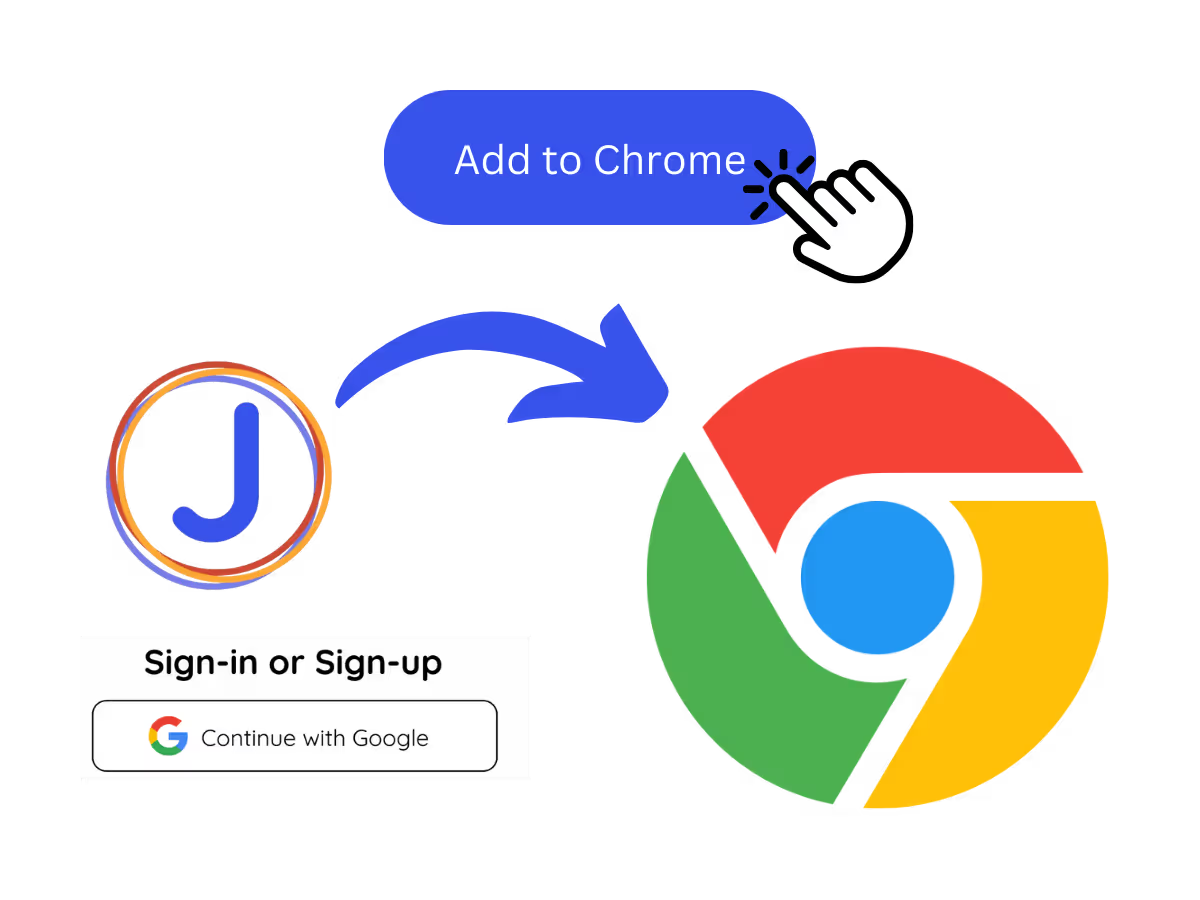
1. Add the Chrome extension or desktop app, or upload your Meet recording

Add JotMe to Chrome for in-Meet notes, or get the desktop app. Already have a recorded Meet? Upload it for the same accurate notes, summary, and action items.
STEP 2

2. Set the spoken language

Choose the language being spoken in the meeting, for example Japanese. If people switch languages, pick multilingual mode.

STEP 3

3. Jot highlights if you want

During the meeting, note key points in the Notes panel. When it ends, JotMe writes the meeting notes, summary, and action items, guided by your highlights.
What teams use the Google Meet AI note taker for

From daily standups to all-hands, JotMe keeps every attendee in the conversation.

Global all-hands & team meetings

Capture decisions from HQ announcements once, and share the notes in each office's language, so nobody waits on a translated recap.

Sales & client calls

Every requirement and objection lands in the notes with action items, even when the customer speaks another language.

Recorded Meet meetings

No time to run it live? Upload the recording to Audio to Text or Video to Text for the same accurate notes, summary, and action items, no need to have been in the call.

Interviews & research calls

Stay present with the candidate or customer while JotMe captures the details and follow-ups.

See it in action

Watch JotMe take notes on a Google Meet from the extension, live or after the meeting.

500 000+ специалистов проводят встречи и мероприятия с JotMe

Посмотрите, как пользователи закрывают многоязычные операционные пробелы с помощью JotMe.

Рейтинг 4.7/5
Рейтинг 4.7/5
«Поскольку моя работа связана с переводом и налаживанием межкультурных связей, я считаю этот инструмент настоящим прорывом в моей повседневной деятельности».
Адамс
Специалист по операциям / Tiktok
«Японский язык когда-то был для меня загадкой, но этот продукт сделал его понятным и доступным благодаря контекстному пониманию».
Стаматис
Консультант / Deloitte
«JotMe оптимизирует наши многоязычные встречи, обеспечивая бесперебойное сотрудничество в нашей динамичной рабочей среде».
Сезар
Программный менеджер / Amazon
«Эта двуязычная функция упрощает ведение заметок на работе, экономя время и повышая эффективность на обоих языках».
Юсуке
Менеджер по продажам / NTT
«Незаменим для тех, кто не владеет языком в совершенстве; упрощает сложные встречи благодаря переводу в реальном времени и точным транскрипциям».
Джесси
Фрилансер-разработчик ПО
«Инструмент для перевода, который был нам нужен годами, — теперь реальность с JotMe!»
Элстон
Генеральный директор и основатель / Tiny.host
«Поскольку моя работа связана с переводом и налаживанием межкультурных связей, я считаю этот инструмент настоящим прорывом в моей повседневной деятельности».
Адамс
Специалист по операциям / Tiktok
«Японский язык когда-то был для меня загадкой, но этот продукт сделал его понятным и доступным благодаря контекстному пониманию».
Стаматис
Консультант / Deloitte
«JotMe оптимизирует наши многоязычные встречи, обеспечивая бесперебойное сотрудничество в нашей динамичной рабочей среде».
Сезар
Программный менеджер / Amazon
«Эта двуязычная функция упрощает ведение заметок на работе, экономя время и повышая эффективность на обоих языках».
Юсуке
Менеджер по продажам / NTT
«Незаменим для тех, кто не владеет языком в совершенстве; упрощает сложные встречи благодаря переводу в реальном времени и точным транскрипциям».
Джесси
Фрилансер-разработчик ПО
«Инструмент для перевода, который был нам нужен годами, — теперь реальность с JotMe!»
Элстон
Генеральный директор и основатель / Tiny.host

Часто задаваемые вопросы

Все, что нужно знать о проведении встреч и мероприятий с помощью JotMe.

Does the Google Meet AI note taker join as a bot?

No. JotMe works from the Chrome extension in your own browser and captures the meeting locally, so no bot shows in the participant list and there's nothing for the host to enable.

Can I get AI notes from a recorded Google Meet?

Yes. Upload the recording to Audio to Text or Video to Text and JotMe transcribes it and writes accurate notes, the same summary and action items as a live meeting.

Is the Google Meet AI note taker free?

Yes. JotMe's free plan includes AI meeting notes, and no credit card is required. Upgrade when you need more.

What do the AI meeting notes include?

The default format gives you the gist, key points, and action items. Jot your own highlights in the notepad during the call and JotMe folds them into the final notes.

Can I get the notes in my language?

Yes. The meeting can be in any of 200+ languages, and you choose the language for the notes, summary, and action items.

Heading

You can translate
Bulgarian
Catalan
Mandarin (Simplified
Mandarin (Traditional)
Cantonese (Traditional)
Czech, Danish
Dutch
English (US)
English (UK)
English (Australia)
English (New Zealand)
English (India)
Estonian, Finnis
French
French (Canada
German
German (Switzerland
Greek
Hindi
Hungarian
Indonesian
Italian
Japanese
Korean
Latvian
Lithuanian
Malay
Dutch (Flemish)
Norwegian
Polish
Portuguese
Portuguese (Brazil)
Portuguese (Portugal)
Romanian
Russian
Slovak
Spanish
Spanish (Latin America)
Swedish
Thai
Turkish
Ukrainian
Vietnamese

Never take Google Meet notes by hand again

Never take Google Meet notes by hand again. Jot highlights during the call, get accurate AI notes with action items after, and share them in your team's language, live or from a recording.