Руководства
5 лучших инструментов для живого перевода с английского на японский

Viraj Mahajan
October 13, 2025

Brief Answer: The best English-to-Japanese live translation apps are JotMe, Kudo, Maestra AI, Talo, and DeepL Voice. JotMe delivers contextual translation in over 107 languages, including Japanese, with meeting notes, AI Q&A, and zero bot intrusion.
Are you struggling to find a live English-to-Japanese translation tool that actually works in meetings and webinars? The reality is, while plenty of options promise real-time language support, most fall short, either missing critical context or causing frustrating delays.
So, we rolled up our sleeves and put more than 20 English-to-Japanese live translators to the test, using everything from common business dialogue to technical and native-level Japanese discussions. After sorting through hype, we narrowed our list to five standout tools with features you'll actually use and accuracy you can trust.
- JotMe delivers accurate real-time English-to-Japanese live translation in 107 languages for just $9 a month, plus it integrates with Zoom, Google Meet, and more.
- Kudo connects you with live, industry-trained interpreters for events and webinars if you need a human touch.
- Maestra AI offers flexible pay-as-you-go pricing and advanced perks like AI voice cloning.
In this article, you will find the strengths and the quirks of each platform. From rapid-fire meeting summaries to industry-specific vocabulary, these tools bridge the gap between English and Japanese live translation, offering speed, privacy, and accuracy. This way, you can focus on your conversation, not your translator.
Summary of Each English-to-Japanese Live Translation Tool
Before getting deep into each tool, below is a concise snapshot of what each platform offers for English-to-Japanese live translation:
- JotMe: Real-time, context-aware translation in 107 languages with instant meeting summaries and AI Q&A.
- Kudo: Hybrid human+AI interpretation for professional events, supporting 60+ languages.
- Maestra AI: Pay-as-you-go voice translation, automatic subtitling, and video localization in 125+ languages.
- Talo: Seamless AI-driven live translation for video calls with intuitive browser and desktop integration.
- DeepL Voice: Instant speech-to-text translation with high-quality neural models, optimized for English-Japanese pairs.
Best English to Japanese Live Translation: Quick Comparison
Below is a side-by-side comparison of the five top English-to-Japanese live translation tools, highlighting key features such as AI real-time translation, meeting notes, translation sharing, language support, and more.
How Do We Select the Best Live Translation Tools?
Finding the right English-to-Japanese live translation tool isn't just a matter of features on a list. After putting over 20 contenders through real-world meetings, we learned that what makes a translator great comes down to a handful of practical, game-changing details. Here's how we separated the tools that truly help from those that just look good on paper:
- How Well Does It Really Translate: Anyone can promise accuracy, but we tested these apps with everything from everyday chats to industry-specific Japanese terms. The best tools didn't just swap words; they ensured that every conversation made sense and felt natural.
- How Fast and Smooth Is the Experience: Waiting for translations to catch up is the fastest way to kill a conversation. We paid close attention to lag and glitches, favoring apps that kept translations flowing in real time, even as speakers switched languages or topics.
- How Easily Can You Plug It Into Your Meetings: No one wants a complicated setup or strange bots popping into confidential calls. We looked for tools that simply connect with Zoom, Google Meet, Teams, and more—no lengthy installs or privacy worries.
- Does It Offer Helpful Extras: The top picks did more than just translate. Features like automatic meeting notes, bullet-pointed recaps, and easy transcript sharing proved particularly useful during team calls and follow-ups.
- Is the Pricing Clear and Worth It: No surprises here; a transparent, flexible billing setup matters. We favored tools with straightforward plans, free tiers, or no hidden charges, so you get what you pay for without budget shocks down the road.
By weighing these factors, we landed on a shortlist of live English-to-Japanese translation tools that work seamlessly in actual meetings without slowing anyone down.
Best English-to-Japanese Live Translation Apps for Students and Remote Teams
According to HubSpot's State of AI Report 2025, 51% of employees are eager to use AI and automation in their roles, indicating just how ready people are to rely on smart tools in their everyday work. Remote teams of students who may miss important things due to language barriers can also benefit, as English-to-Japanese live translation apps like JotMe make information accessible with accuracy. So, let's explore the top 5 tools one by one.
JotMe
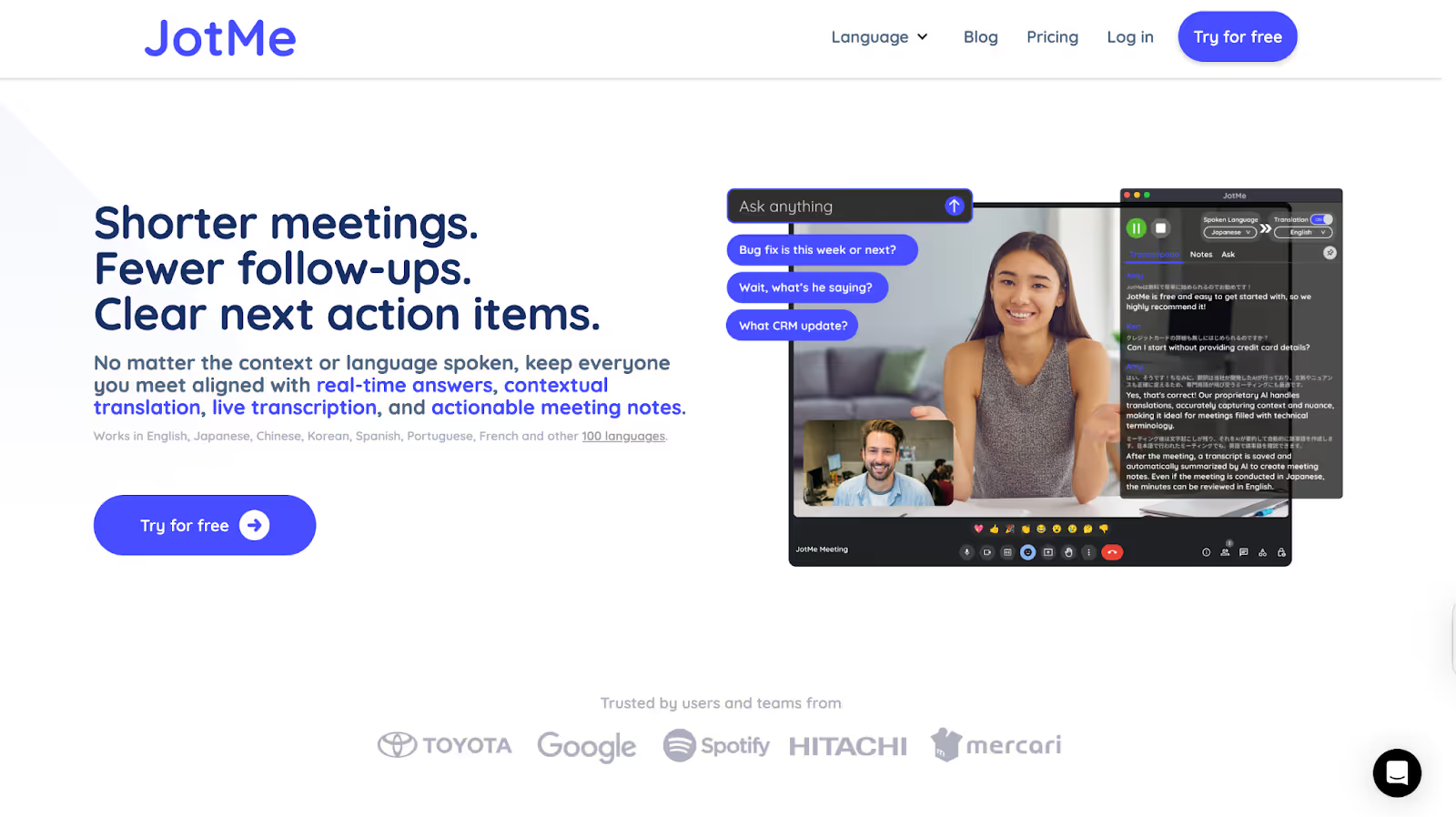
Out of all the tools we tested, JotMe was one of those that genuinely stood out. During a Google Meet session, when we wanted to communicate our weekly blog plan to our Japanese client, JotMe accurately provided real-time translation immediately. It feels like having a reliable assistant constantly working alongside us, translating contextually and even answering our questions on the fly.
JotMe supports AI-powered real-time translation in 107 languages, including Japanese, and comes packed with features such as live transcription, AI meeting notes, and AI insights during calls, meeting recordings, and more. Plus, it works seamlessly on platforms like Zoom, Teams, Google Meet, Webex, Slack, and beyond without needing any bots to join your meetings.
Supported Platforms: Zoom, Line, Google Meet, Teams, Slack, Webex, Discord, and more.
JotMe Key Features
Contextual Translation

During a recent project review held in English, JotMe translated the conversation live into Japanese. What stood out was how well it handled industry-specific terms and subtle shifts in tone. Instead of giving word-for-word outputs, the translations felt natural and easy to follow. That’s because JotMe uses advanced NLP and speech recognition to understand the full context of the discussion, not just the individual lines. As a result, even when complex ideas were shared, the Japanese translations stayed accurate and clear, helping everyone stay aligned in real time. What’s more, you will also get neatly organized bilingual meeting notes on Google Meet, helping you plan for future meetings.
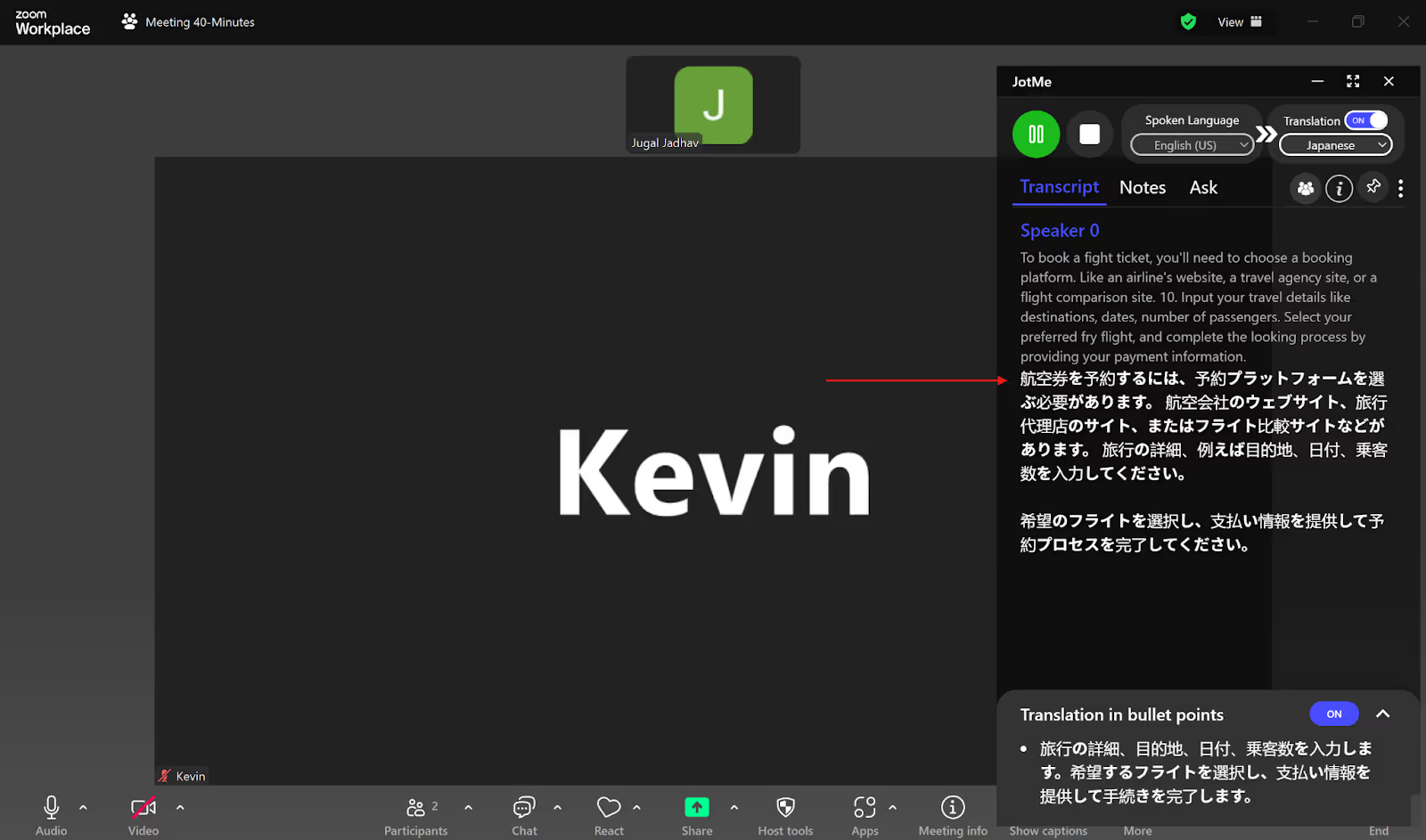
Not only this, but if by chance you mispronounce any word, the contextual translation feature of JotMe understands the word and makes it right. For example, in the translation below, one of us said ‘fight’ instead of ‘flight,’ and the Japanese translation still translated it correctly to flight!
Sharing Translation Minutes
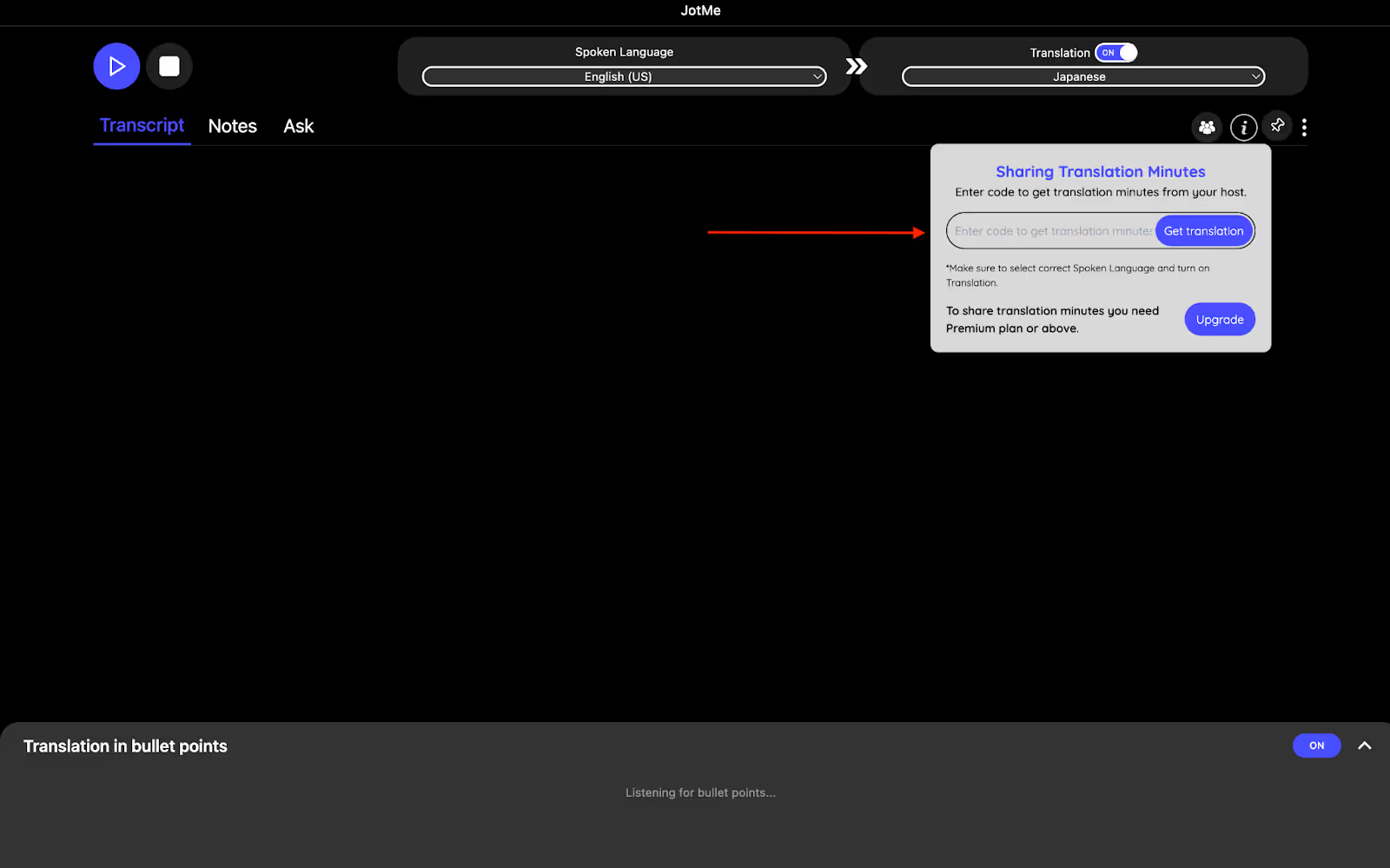
What sets JotMe apart is its sharing translation option. This option allows everyone to access the live meeting translations without needing a paid plan. An access code is generated when recording and translation are turned on, which participants can use to follow along in real time. This way, meeting notes, translations, and transcripts remain accessible to everyone, with no extra costs or additional signups required.
AI Insights & Translation in Bullet Points
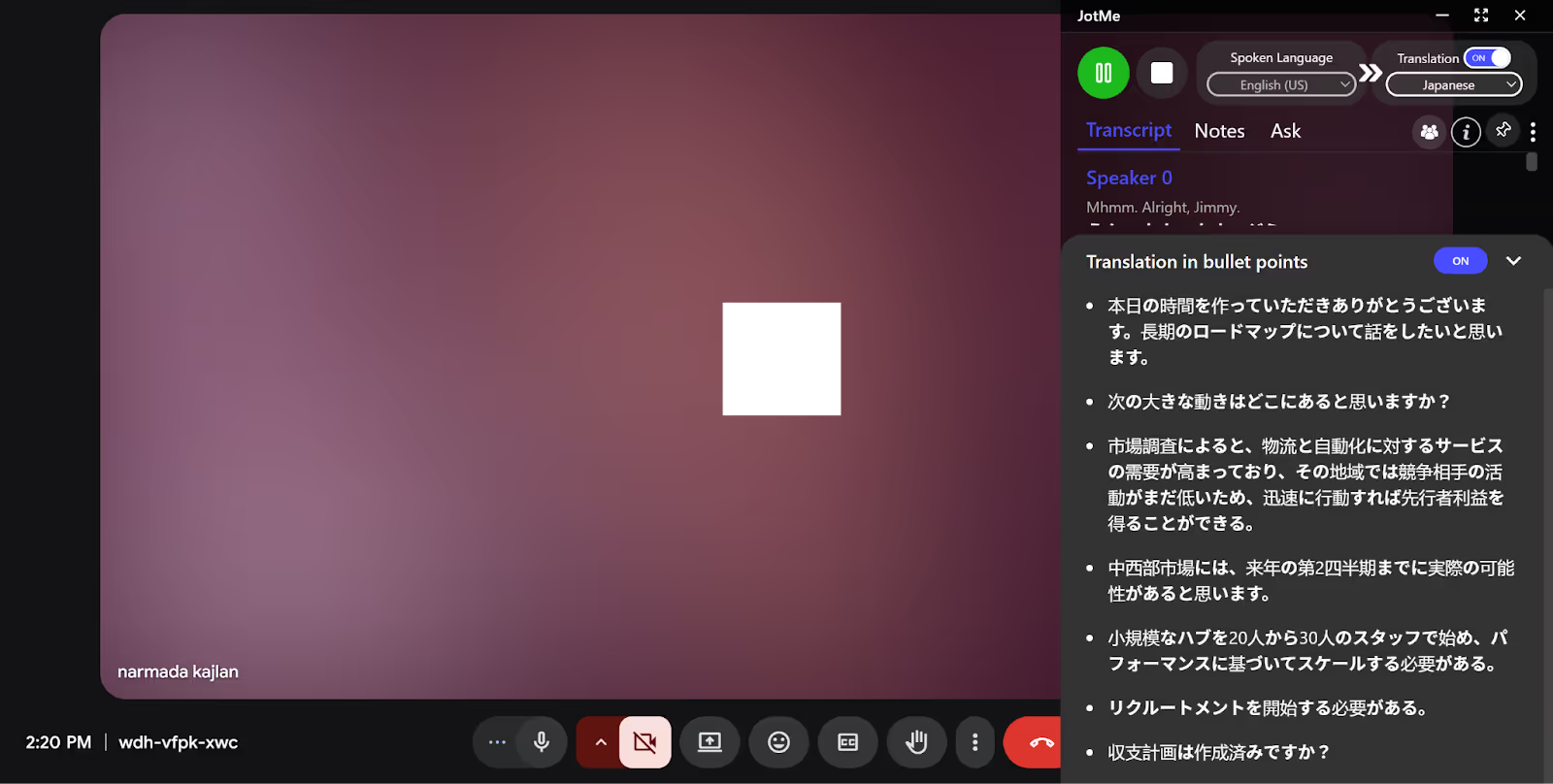
During our test, JotMe's bullet-point translation really impressed us. While discussing strategies for anger management in English, the live translation neatly organized key points into bullet lists in Japanese. The AI insights gave us quick context about meeting priorities and answered questions instantly. This makes understanding and taking action on meeting content easier for everyone involved.
Multilingual Translation
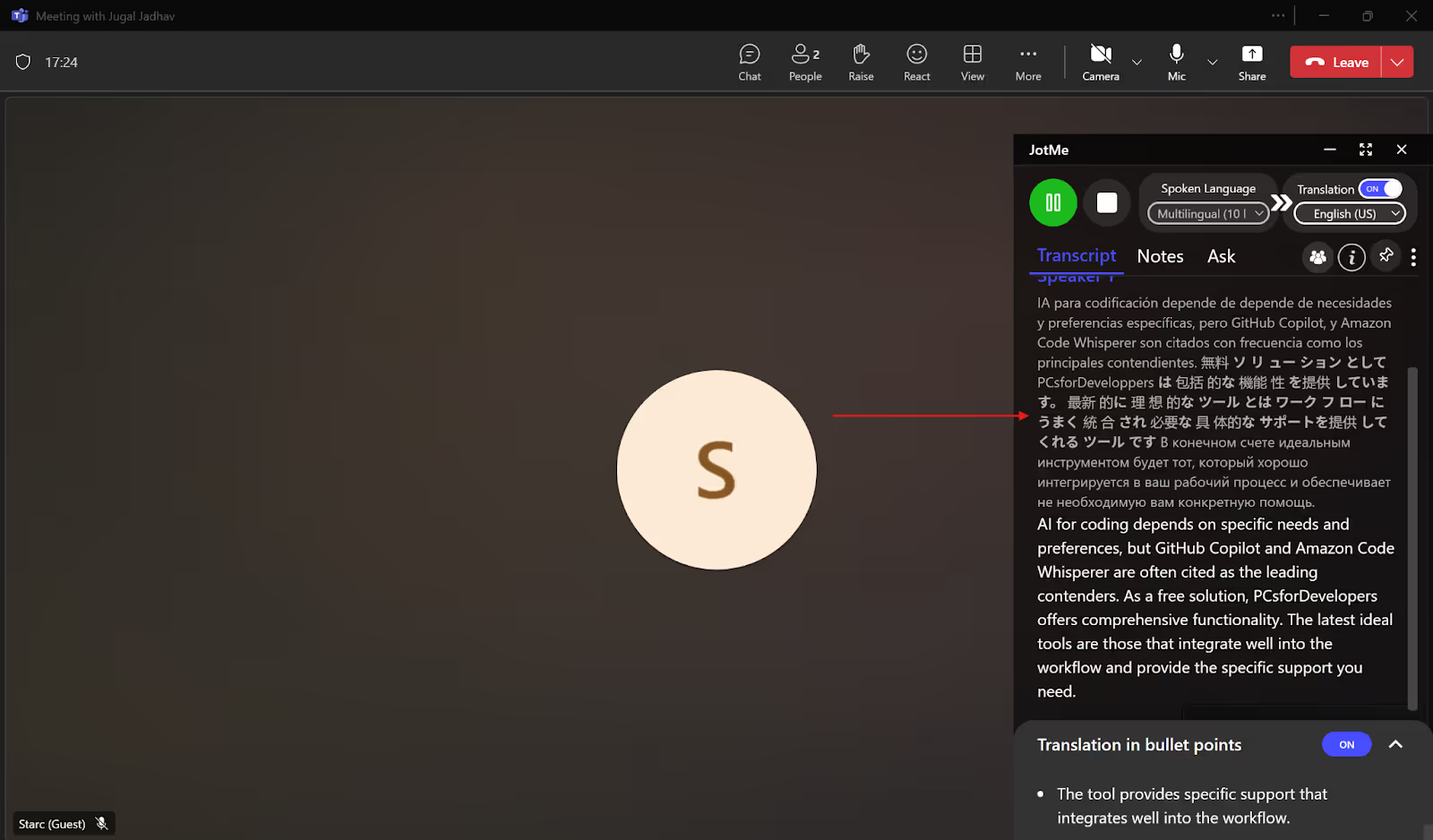
JotMe can do simultaneous real-time translation of up to 10 languages, including Japanese, English, Spanish, Russian, French, etc., into your preferred language. For this, you need to set the “Spoken Language” to Multilingual and the “Translation” language to your desired output language. JotMe will automatically detect the language spoken in your meetings and provide the live translation in your selected language. JotMe also offers a multilingual transcription option that will transcribe your multilingual meetings with ease. These two features combine and prove to be extremely helpful when you have a Teams meeting with your global team or clients who speak different languages.
JotMe Pricing
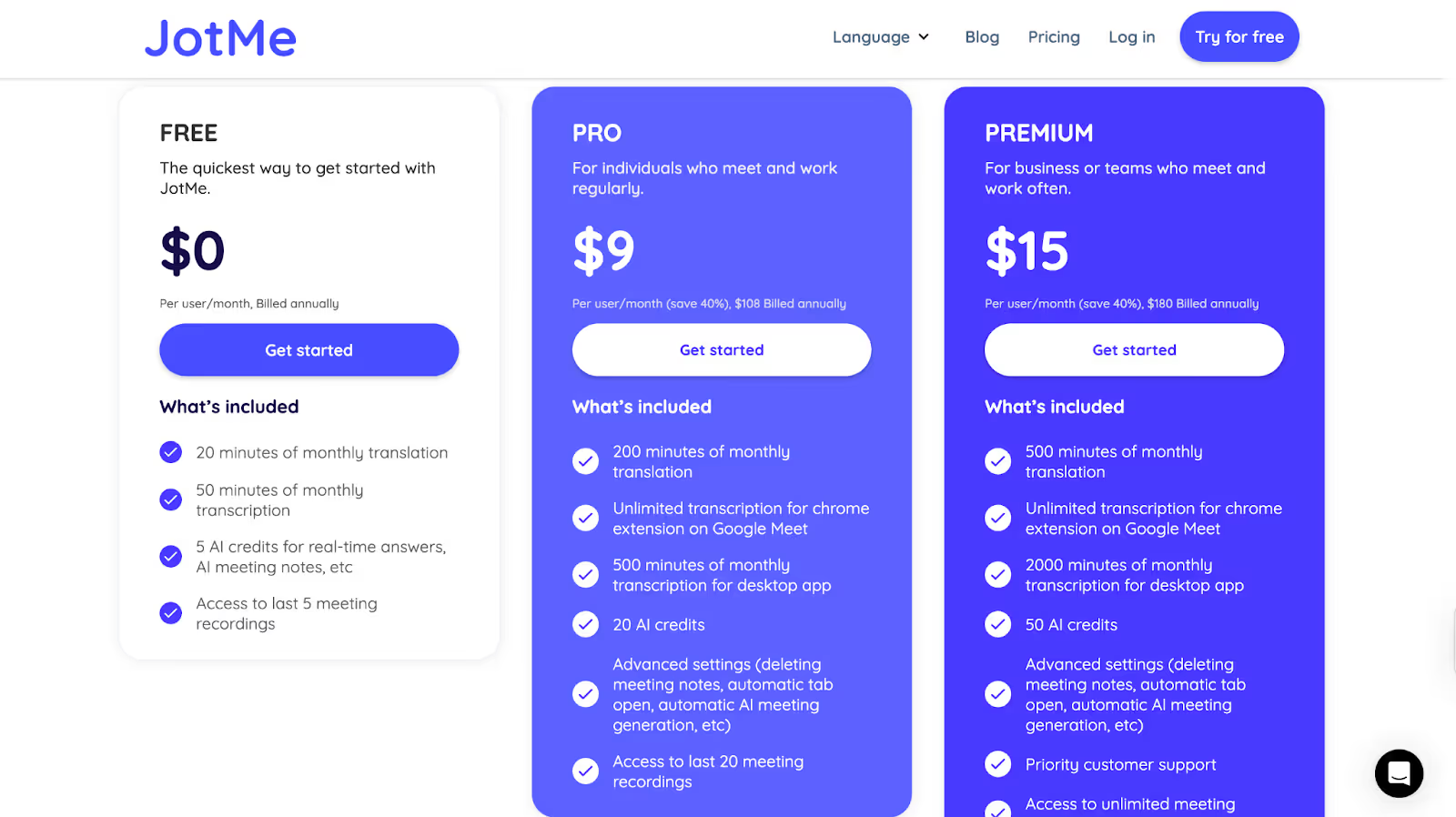
JotMe offers a flexible mix of plans that let you choose the plan as per your preference and budget:
- Free Plan: 20 minutes of translation and 50 minutes of live transcription per month, plus 5 AI credits for real-time Q&A, no credit card required.
- Pro Plan: $9/month (billed annually) includes 200 minutes of translation, 500 minutes of transcription, and 20 AI credits, with unlimited Google Meet Chrome extension use.
- Premium Plan: $15/month (billed annually) provides 500 minutes of translation, 2,000 minutes of transcription, 50 AI credits, and unlimited meeting recordings.
Pros
- Includes AI-generated meeting notes, bullet-point summaries, and instant answers
- Sharing translation minutes allows access for other participants without needing a paid plan
- Free plan available with no payment info needed
Cons
- A mobile app isn’t available yet
Kudo
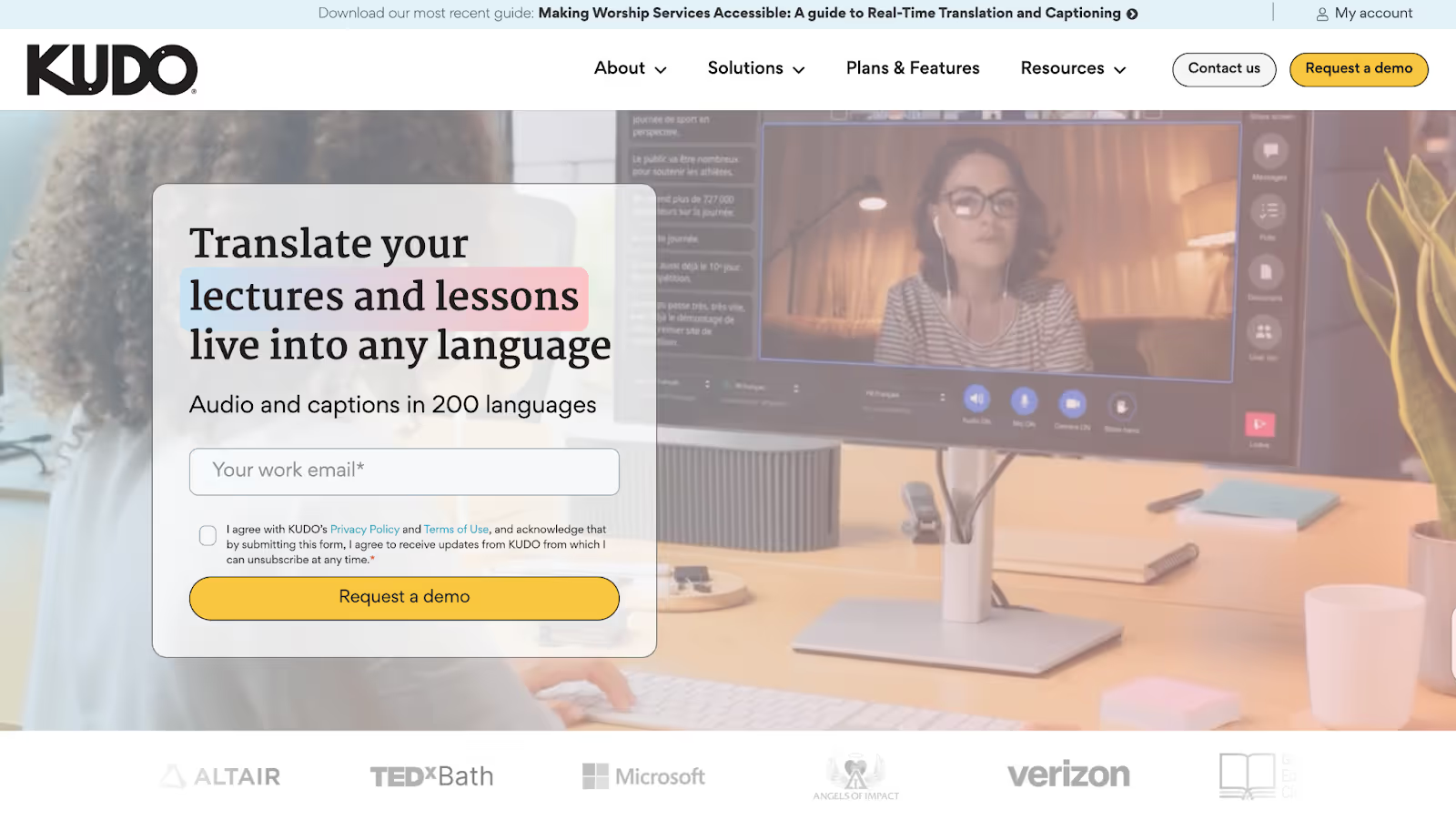
When it comes to live English-to-Japanese translation, Kudo works particularly well for hybrid and large-scale events. If you've got a global town hall or virtual summit on the calendar, Kudo makes it easy for everyone to stay on the same page. It does this by combining real-time captions with a network of professional human interpreters, so everyone can follow the conversation naturally, without missing a single detail.
Supported Platforms: Hopin, Zoom, Microsoft Teams, On24, Bizaabo.
Kudo Key Features
- AI Speech Translated Captions: Real-time subtitles in Japanese and English with Kudo's AI-powered translation.
- Certified Interpreters On Demand: Need the human touch? Connect with Kudo's global network of professional interpreters.
- Remote Simultaneous Interpretation (RSI): Let interpreters work from anywhere. Participants can simply join from their device and hear live audio in their preferred language.
- Easy Integration: You can add Kudo directly into Microsoft Teams or embed it on any platform with a quick setup.
Kudo Pricing
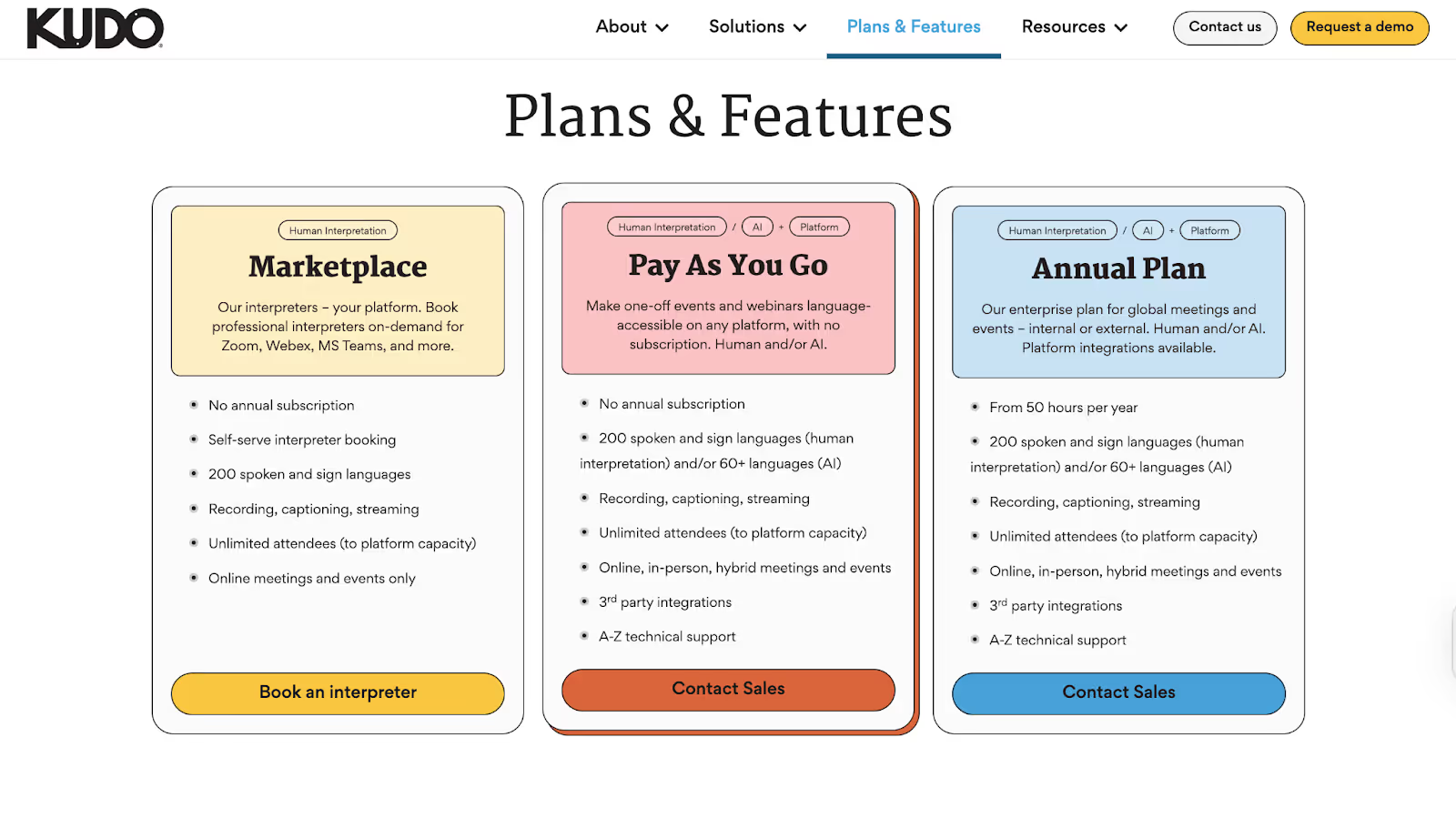
Kudo offers organization-wide annual licenses tailored to usage. Costs depend on factors such as the number of meetings, session lengths, and interpreter requirements. You can choose:
- Technology Only: AI captions and translation engine
- Interpreter Marketplace: Book professional interpreters by event
- Full-Service: End-to-end support with custom glossaries and project management
Pros
- Combines AI and live human interpretation for the highest accuracy
- Enables continuous, no-pause translation
- Native integration with Teams and an embeddable widget for all major platforms
Cons
- Licensing fees are custom-quoted; there are no transparent pricing tiers
- Overkill for casual users or small teams without frequent multilingual events
- The audio quality is not good, and sometimes the interpretation sounds unclear, as a G2 user says
Maestra AI Pricing
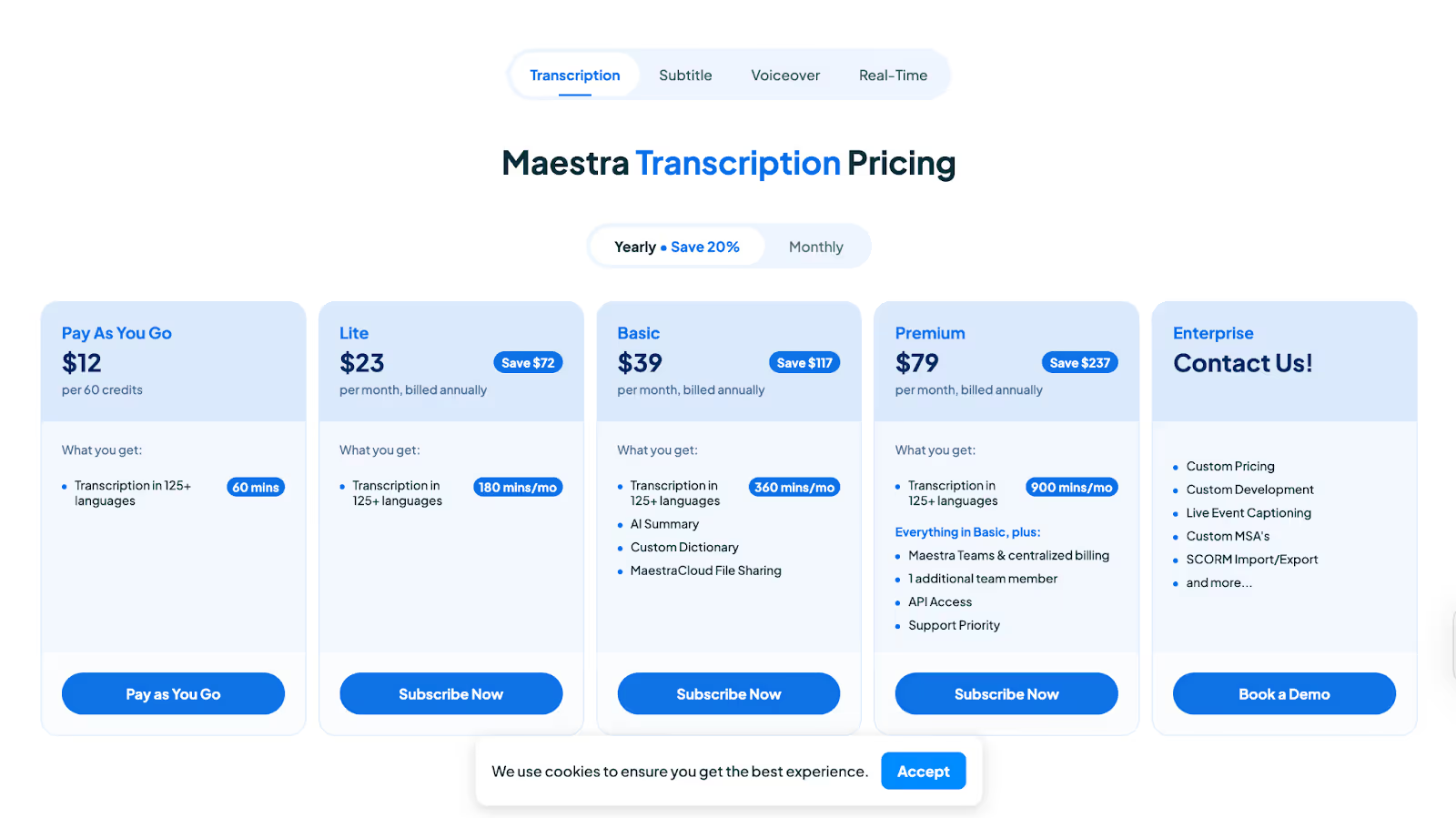
- Pay As You Go: $12 for 60 minutes, no ongoing commitment
- Lite: $23/month (billed annually) for 180 minutes/month
- Basic: $39/month (billed annually) for 360 minutes/month, AI summaries, custom dictionary, cloud file sharing
- Premium: $79/month (billed annually) for 900 minutes/month, everything in Basic plus Maestra Teams, API access, and priority support
- Enterprise: Custom; includes live event captioning, advanced integrations, and more
Pros
- Converts speech to text, subtitles, and voiceovers in 125+ languages
- Collaboration and team features are built in, so everyone stays on the same page
- Versatile export options for transcripts, audio, and video projects
Cons
- Advanced features (like voice cloning) have a learning curve, and some users find them costly (G2)
- Real-time translation minutes can run out fast on lower tiers
- Slightly complicated user interface and platform navigation.
Talo
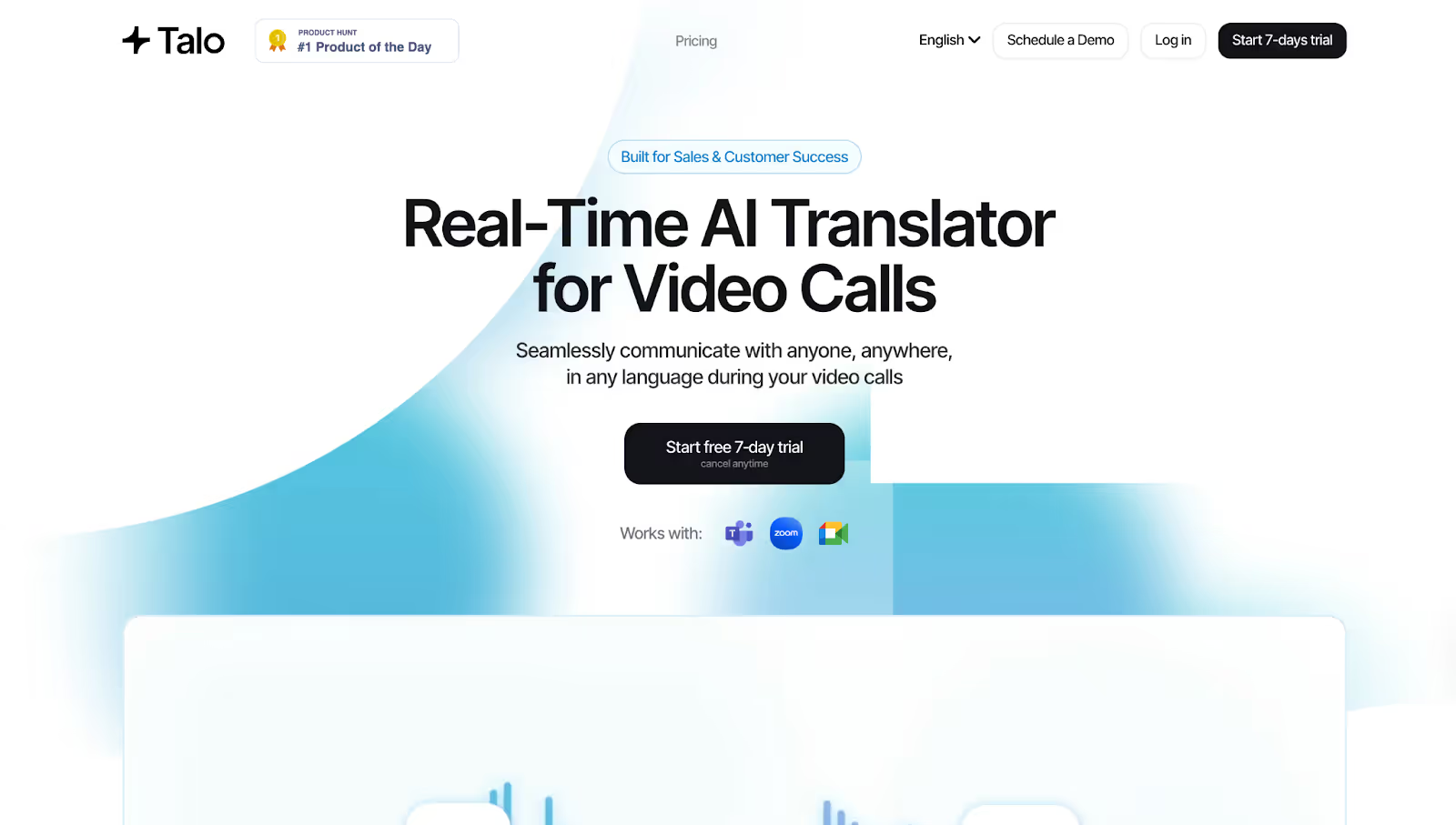
Talo brings simplicity and reliability to real-time speech translation for anyone running meetings on Google Meet, Microsoft Teams, or Zoom. We integrated Talo into a project kickoff with partners in Japan and the U.S., and it performed well: seamless live English-to-Japanese translation with just one AI-powered bot on the call.
Supported Platforms: Google Meet, Teams, and Zoom.
Talo Key Features
- Instant, Real-Time Multilingual Translation: Talo's AI listens to every speaker and translates conversations as they happen.
- Seamless Platform Integration: Talo works smoothly with Google Meet, Microsoft Teams, and Zoom.
- Single AI Bot for Multilingual Meetings: Instead of managing multiple accounts or bots for larger calls, Talo uses just one AI-powered bot to handle all translations.
- Customizable Voice Settings: Talo also includes voice options to help the translated speech sound more natural and clear.
Talo Pricing
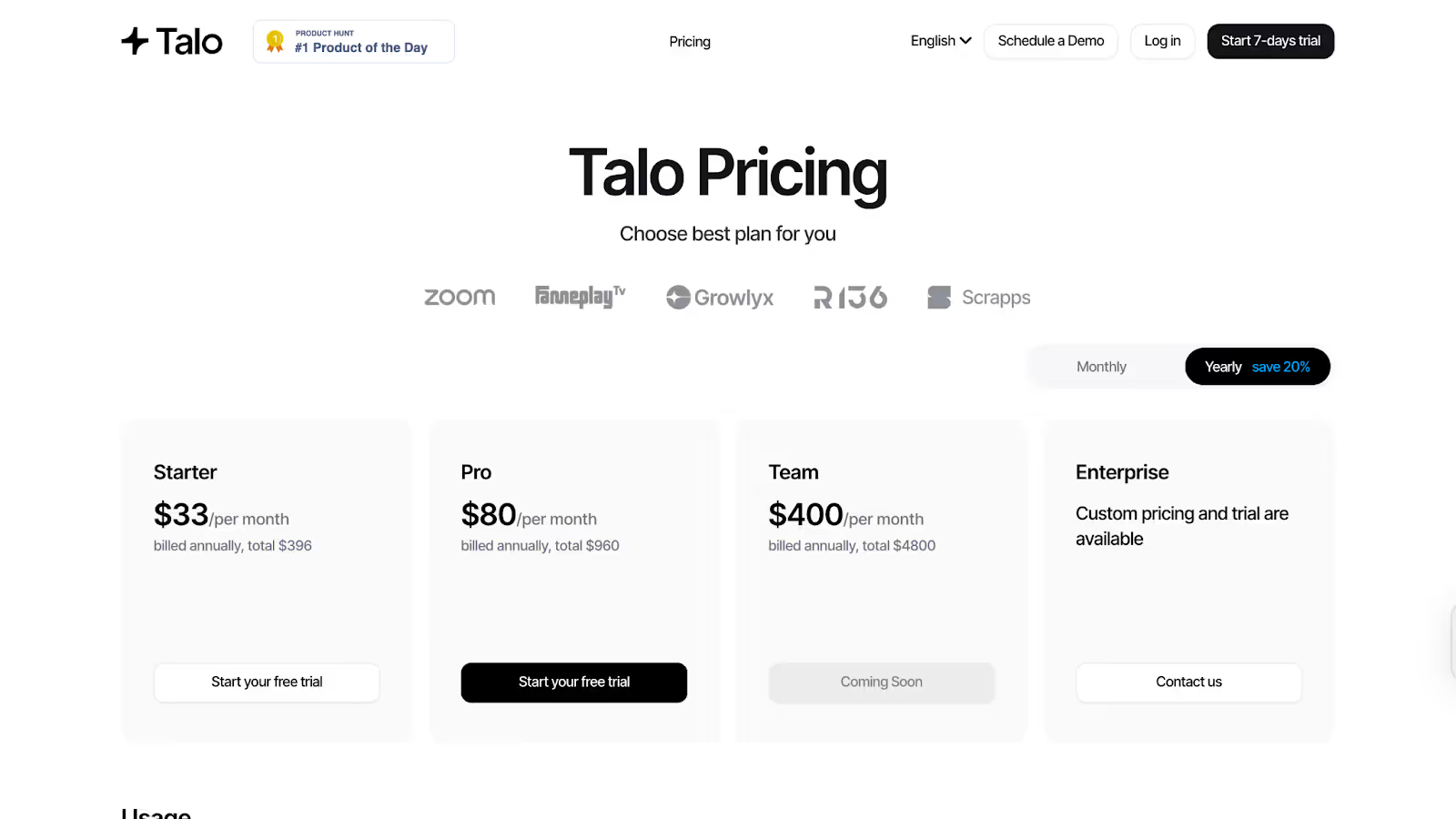
- Starter: $33/month (billed annually at $396). Includes 1 member and 1,140 translation minutes per year.
- Pro: $80/month (billed annually at $960). Includes 1 member and 4,800 translation minutes per year, plus voice settings.
- Team: $400/month (billed annually at $4,800). Supports five members and 30,000 minutes per year, with more features rolling out soon.
- Enterprise: Custom pricing, supports unlimited members and usage, with advanced support and trials available.
- Additional minutes are $0.25 each on the Starter plan and $0.20 each on the Pro plan; adding team members is $100 per seat.
Pros
- Easy to set up and use on major video platforms.
- No meeting data is retained or stored—it meets strict privacy standards.
- No need for multiple bots or logins; one AI does it all.
Cons
- No perpetual free tier; only a brief trial is available.
- Language support is at 60, which is lower than some competitors.
- Annual billing is required for the most affordable rates; pay-as-you-go is not available for all plans.
DeepL Voice
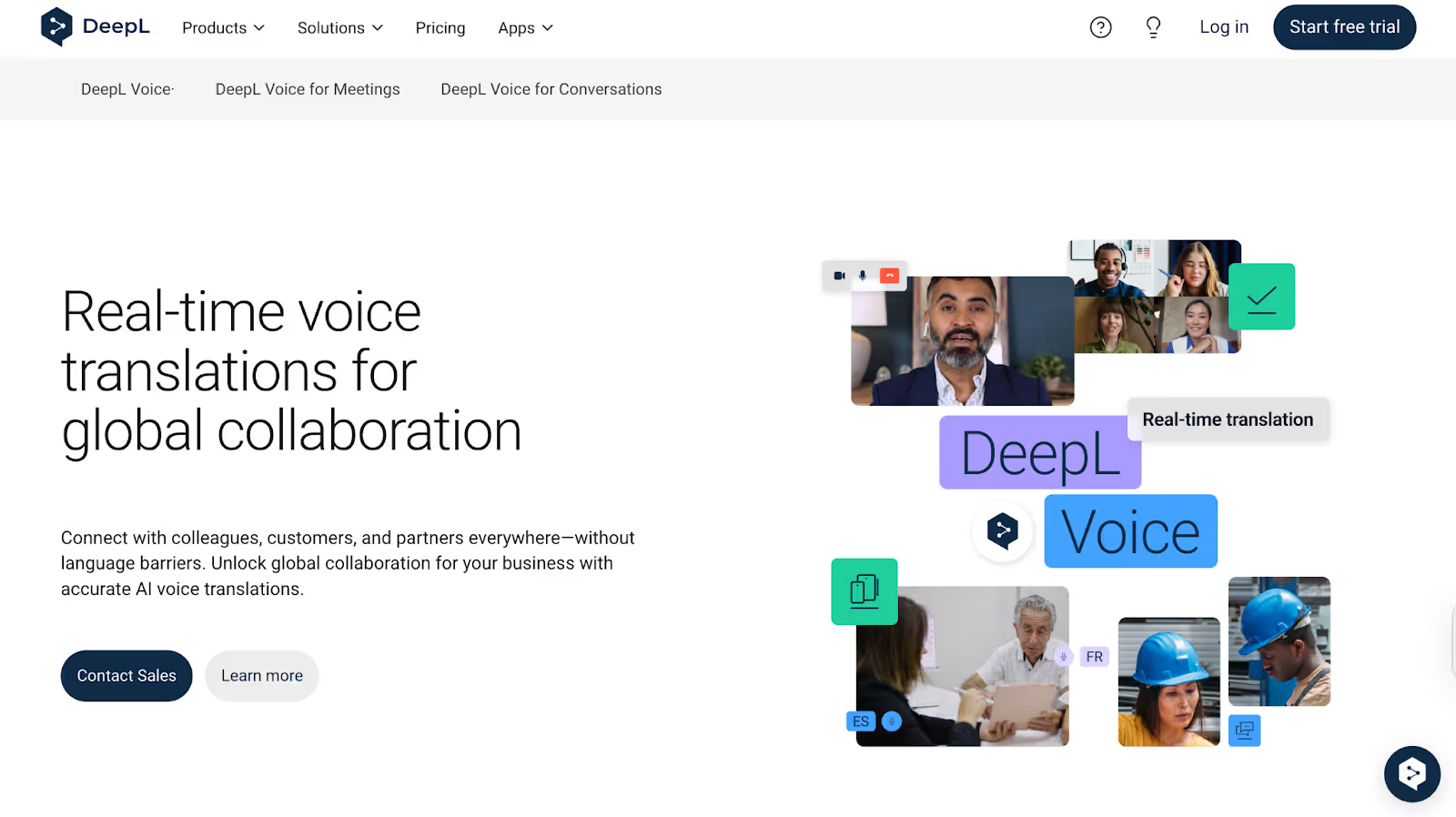
Нужен простой способ перевода разговорного английского на японский (и наоборот), который действительно звучит естественно? DeepL Voice делает именно это. Во время пробной версии перевод не отставал от непринужденных разговоров и разговоров по техническим вопросам, а также с легкостью переключался между английским и японским языками без неловких пауз. Кроме того, программа позволяет улавливать акценты и манеру речи, но если вам потребуется больше языковых опций, то, возможно, возникнут проблемы с недостаточной языковой поддержкой.
Ключевые функции голосовых клавиш DeepL
- Голосовой перевод на основе искусственного интеллекта: С DeepL Voice вы просто говорите естественно, а инструмент сразу же переводит ваши слова.
- Распознавание акцента и речевых паттернов: Если у вас есть акцент или уникальный стиль речи, DeepL Voice уловит эти тонкости и сможет их перевести.
- Простая интеграция рабочих процессов: Вы можете использовать DeepL Voice бок о бок с DeepL Translator Pro для задач, требующих как голоса, так и текста.
- Поддержка нескольких языков: Независимо от того, присоединяетесь ли вы к звонкам с международной командой или принимаете клиентов из-за рубежа, DeepL Voice поддерживает голосовой перевод в реальном времени более чем на 30 языков.
Цены на голосовую связь DeepL
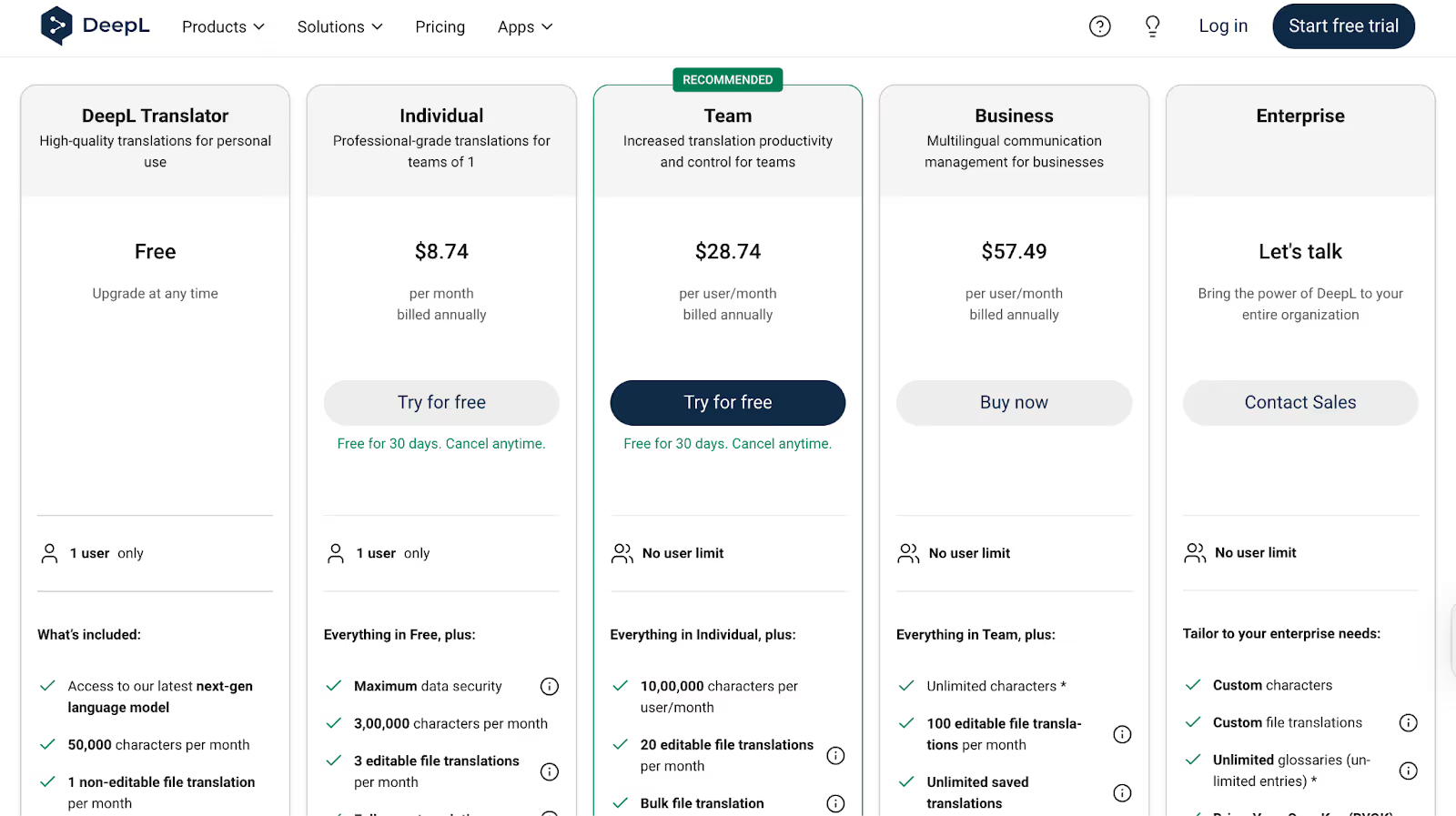
- Бесплатный план: Базовый доступ: 50 000 символов в месяц, перевод 1 файла и ограниченный глоссарий
- Индивидуальный план: 8,74 долл. США в месяц (оплачивается ежегодно), включает 300 000 символов и 3 редактируемых перевода файлов
- План команды: 28,74 доллара США за пользователя в месяц (оплачивается ежегодно), предлагает 1 000 000 символов, 20 редактируемых переводов файлов и расширенные командные функции
- Бизнес-план: 57,49 долларов США за пользователя в месяц (оплачивается ежегодно), неограниченное количество символов и 100 редактируемых переводов файлов
- Корпоративный план: Индивидуальные цены для крупных организаций с неограниченным количеством пользователей и премиальной поддержкой
Плюсы
- Естественные и плавные голосовые переводы, передающие тон
- Распознавание акцента для более четкого и точного вывода
- Использует тот же надежный искусственный интеллект, что и DeepL Translator
Минусы
- Поддержка голосового перевода ограничена более чем 30 языками
- Цены и точные сроки требуют индивидуальной консультации
- В бесплатной пробной версии вы можете вставить содержимое или загрузить его для перевода, но перевод в реальном времени невозможен
Какой онлайн-перевод с английского на японский выбрать?
Выбор подходящих инструментов для онлайн-перевода с английского на японский полностью зависит от ваших приоритетов, включая точность, рабочий процесс, бюджет и контекст.
- Если вы ищете удобный перевод на основе искусственного интеллекта, JotMe отлично подойдет благодаря поддержке 107 языков, распознаванию говорящих и возможностям автоматического создания заметок с помощью искусственного интеллекта.
- Для гибридных или очных мероприятий сеть профессиональных переводчиков Kudo обеспечивает высококачественный перевод с учетом культурных особенностей.
- DeepL Voice предоставляет бизнес-командам возможность общаться на естественном языке, а Talo — простой выбор для команд, которые ценят простоту и конфиденциальность.
Но вот в чем дело: перевод в реальном времени — это не просто обмен словами; речь идет о том, чтобы запечатлеть смысл, тон и культурный контекст. В этой области компания JotMe занимает лидирующие позиции, предлагая вопросы и ответы в режиме реального времени, беспрепятственную интеграцию платформ, контекстный перевод и удобный обмен информацией. Попробуйте JotMe бесплатно и насладитесь простым переводом с английского на японский во время следующей встречи!
Часто задаваемые вопросы
Может ли искусственный интеллект переводить языки в реальном времени?
Да, инструменты онлайн-перевода с искусственным интеллектом, такие как JotMe, могут переводить языки в реальном времени. С помощью JotMe вы можете получить перевод в реальном времени на 107 языков, а также возможность получать перевод в виде маркеров, например, делиться протоколами перевода с другими участниками совещания, а также точный контекстный перевод.
Как включить интерактивный перевод с японского на английский на моих собраниях?
С JotMe достаточно просто установить расширение Chrome и выбрать «Английский → Японский» перед звонком. Присоединяйтесь к сеансу Zoom, Google Meet или Teams в обычном режиме, и JotMe начнет переводить разговорный английский язык на японские субтитры на экране в режиме реального времени; никаких дополнительных ботов или логинов не требуется.
Нужна ли всем участникам платная подписка для просмотра субтитров и стенограмм совещания в реальном времени?
Нет. Когда вы записываете встречу с JotMe и включаете перевод, вы генерируете код совместного доступа. Любой, у кого есть этот код, может бесплатно создавать субтитры в реальном времени, заметки о встречах и стенограммы телефонных разговоров; подписка на тарифный план не требуется.
Насколько хорошо эти инструменты справляются с быстрыми динамиками и техническим жаргоном?
Такие инструменты, как JotMe и Talo, работают с быстрыми динамиками и техническим жаргоном. Однако с помощью контекстного движка JotMe вы можете получить точный перевод отраслевых терминов и даже адаптироваться к акценту говорящего. Кроме того, краткие сводки JotMe и расшифровки с возможностью поиска помогут вам быстро подтвердить или исправить любые сложные отрывки после окончания совещания.
Какой инструмент предлагает лучший уровень бесплатного пользования для периодического использования?
JotMe предлагает лучший уровень бесплатного пользования для периодического использования. Бесплатный тарифный план предусматривает 20 минут перевода в реальном времени и 50 минут транскрипции в месяц, а также 5 кредитов AI за мгновенные вопросы и ответы. Это делает его идеальным выбором для студентов или специалистов, которым нужен надежный перевод с английского на японский язык в реальном времени без постоянных затрат.
Last updated on
April 17, 2026
Follow us on social media: