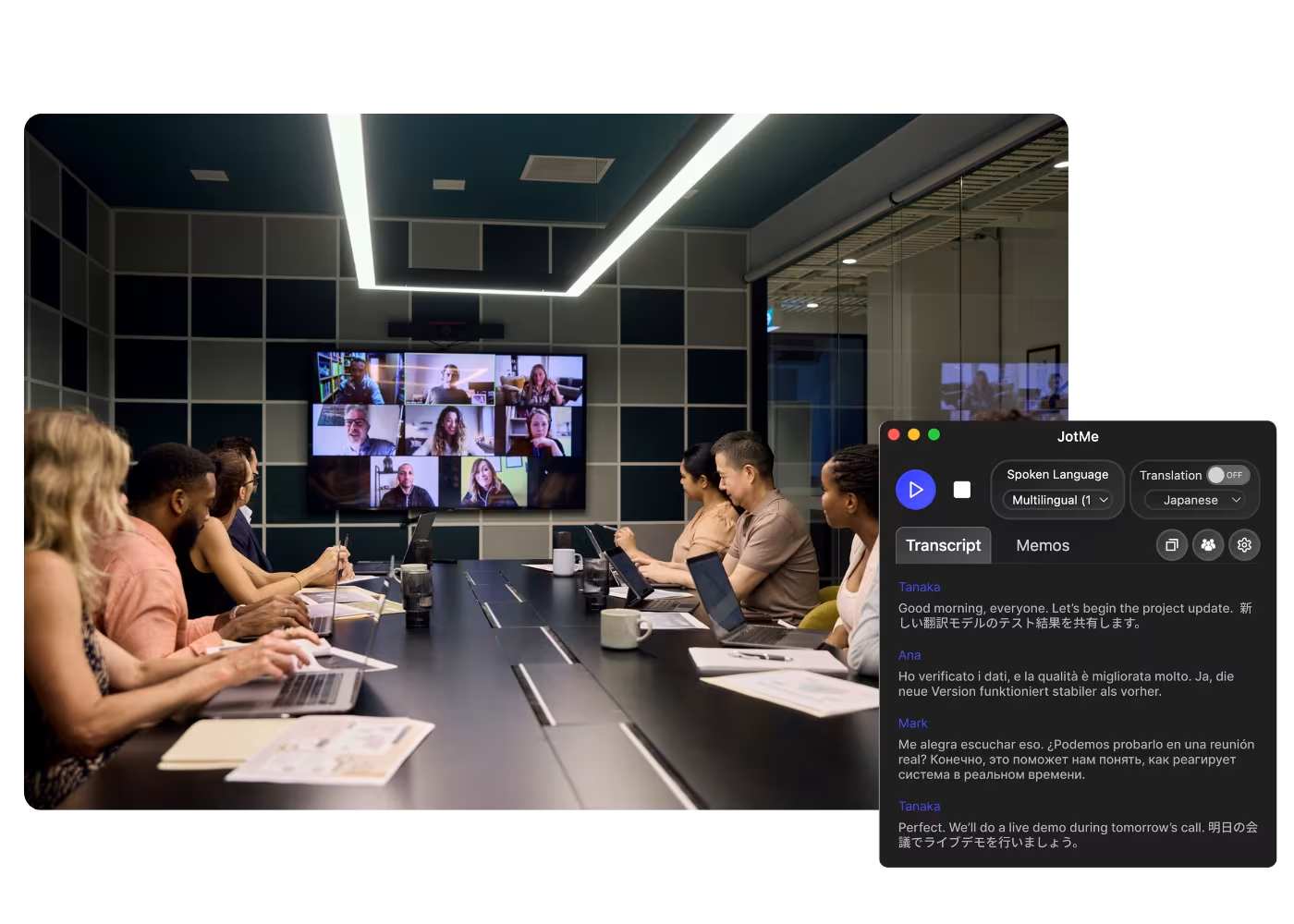
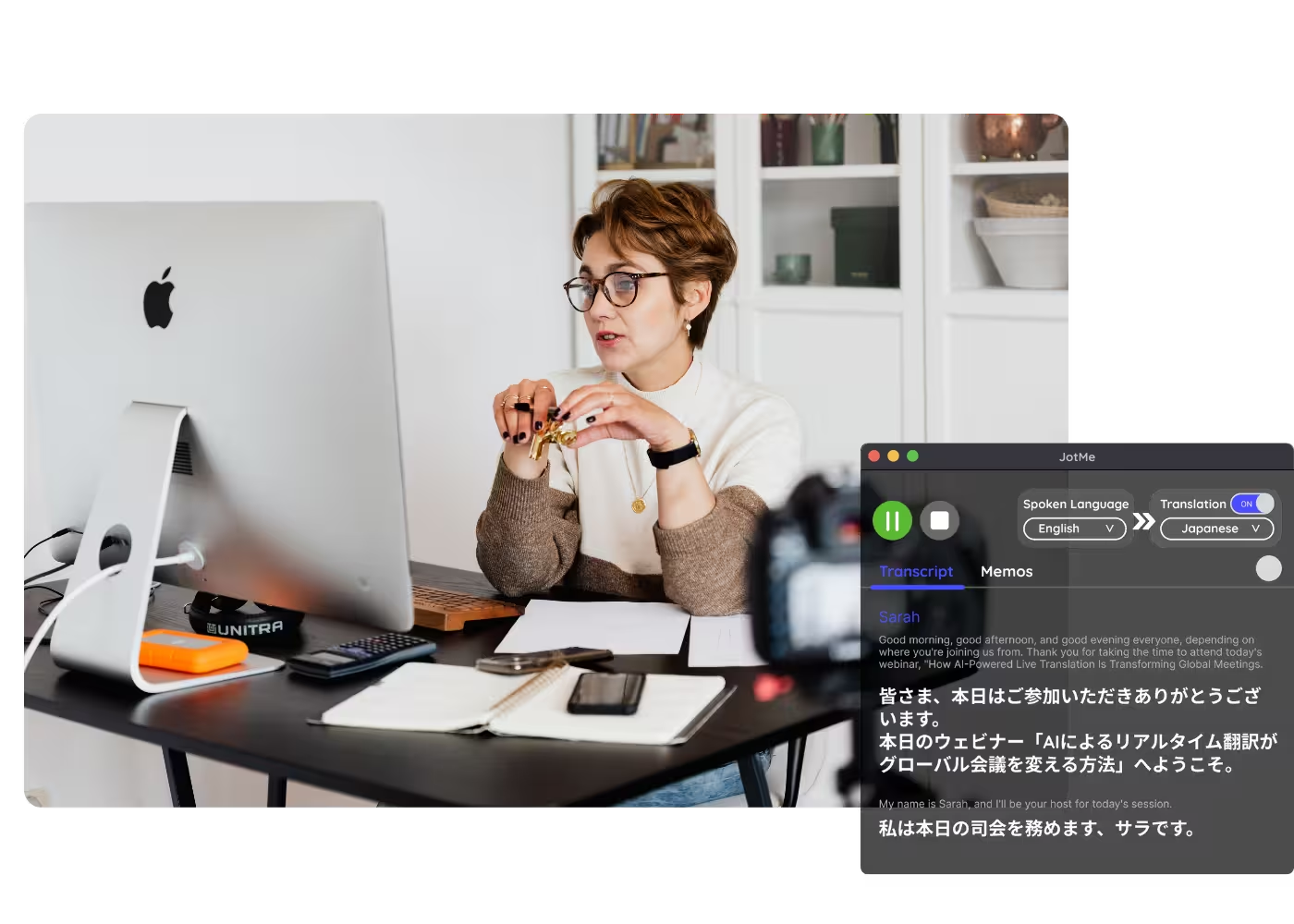
컴퓨터의 모든 통화에 대응하는데스크톱 앱

다국어 음성 텍스트 변환, 실시간 음성 번역, AI 회의록 작성, AI 검색, 실시간 요약, 사용자 정의 어휘, 음성 녹음 등을 지원.

대면 대화를 위한 모바일 앱

iPhone·Android용 실시간 음성 번역과 AI 음성 생성.

Google Meet용 Chrome 확장 프로그램

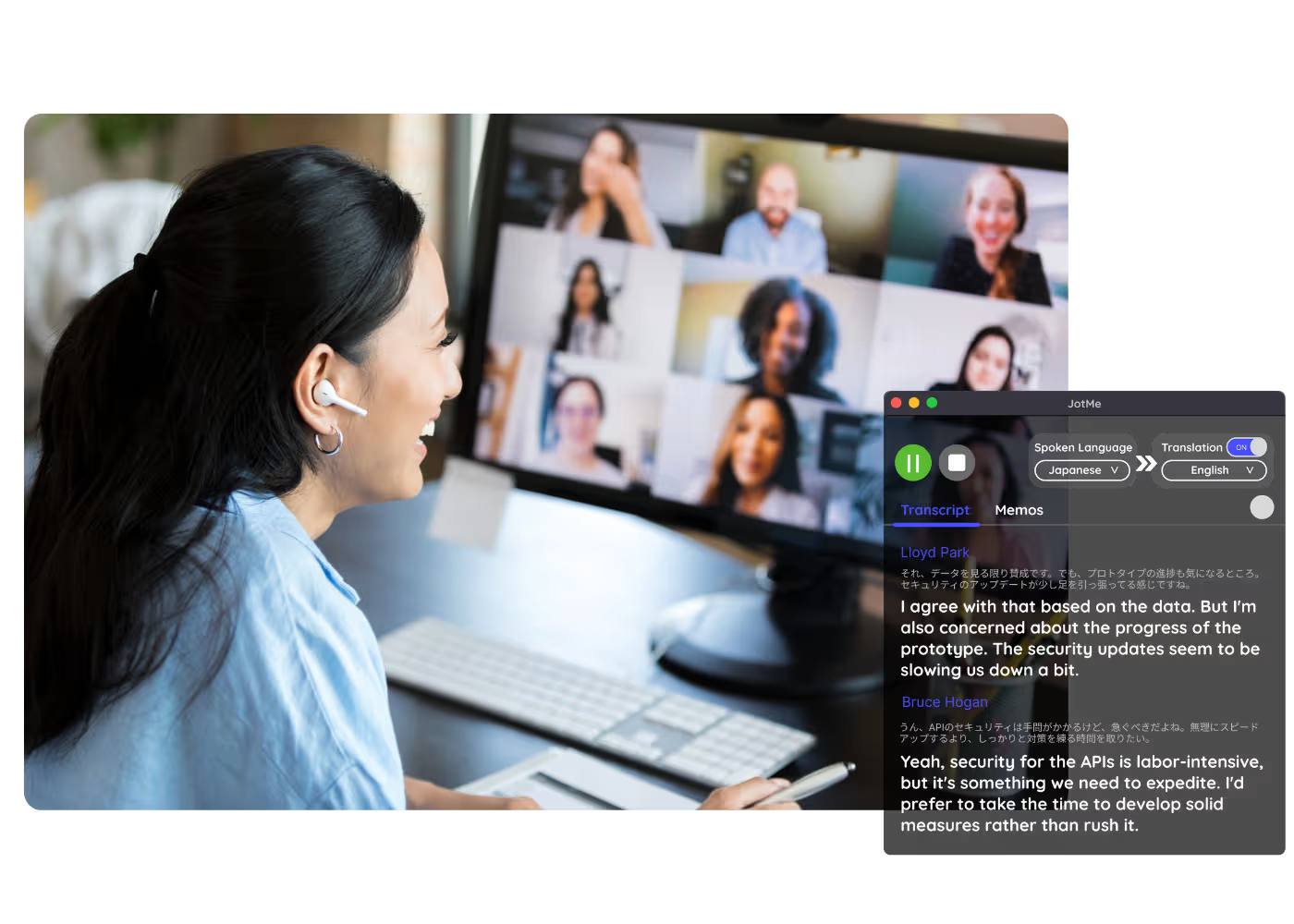
실시간 음성 텍스트 변환, 실시간 음성 번역, AI 회의록.
Chrome
에 추가
바로 체험할 수 있습니다

실시간 번역

AI를 사용한 실시간 자막으로 번역

134개국·1,700개 팀·10만 명의 비즈니스 전문가가 사용하고 있습니다

평점 4.7/5
GDPR 준수
SOC 2 Type II (진행 중)

AI 기반 실시간 자막 번역

회의에서 사용되는 언어를 이해하지 못하는 것은 고통스러운 경험입니다.게다가 사용하는 기계 번역은 전환의 전체 컨텍스트를 이해하지 못하기 때문에 의미가 없는 낮은 품질의 번역이 남게 됩니다.JotMe를 사용하면 컨텍스트와 뉘앙스, 업계 도메인 지식을 이해하는 고품질 AI 라이브 번역을 얻을 수 있습니다.번역할 수 있습니다. 77개 사용 가능한 언어 영어 또는 원하는 다른 언어로 번역할 수 있습니다.무료이며 신용카드가 없어도 시작할 수 있습니다!

실시간 AI 번역은 어떻게 받을 수 있나요?

3단계로 쉽게!

1단계

1.크롬 확장 프로그램에 JotMe를 추가하고 가입하세요

30초 이상 걸리지 않습니다!

1.크롬 확장 프로그램에 JotMe를 추가하고 가입하세요
2단계

2.“음성 언어”를 설정하세요

사람들이 회의 중에 사용하는 언어입니다.일본어를 영어로 번역하려면 이 값을 일본어로 설정해야 합니다.

2.“음성 언어”를 설정하세요
3단계

3.“번역” 언어 설정

번역하려는 언어는 이 언어입니다.일본어를 영어로 번역하려면 이 값을 영어로 설정해야 합니다.

3.“번역” 언어 설정

See It in Action!

에 대한 실시간 번역 받기

언어 장벽 제거

30초 이상 걸리지 않습니다!

연설에 대한 자신감 얻기

사람들이 회의 중에 사용하는 언어입니다.일본어를 영어로 번역하려면 이 값을 일본어로 설정해야 합니다.

언어 배우기

번역하려는 언어는 이 언어입니다.일본어를 영어로 번역하려면 이 값을 영어로 설정해야 합니다.

자주 묻는 질문

JotMe로 회의 및 이벤트 운영에 대한 모든 것.

Google Meet에서 제공하는 실시간 번역은 무료인가요?

네, 맞아요!시간이 더 필요하면 업그레이드할 수 있습니다. 계획 조트메와 함께.

Google Meet에 실시간 번역을 추가하려면 어떻게 해야 하나요?

JotMe 크롬 확장 프로그램을 크롬 브라우저에 추가할 수 있습니다.언어를 원하는 대로 설정하면 Google Meet에서 즉시 실시간 번역을 받을 수 있습니다.

Google Meet에서 회의를 자동으로 번역하려면 어떻게 해야 하나요?

JotMe 크롬 확장 프로그램을 크롬 브라우저에 추가할 수 있습니다.언어를 원하는 대로 설정하면 Google Meet에서 즉시 자동 실시간 번역이 제공됩니다.

번역을 저장하고 저장할 수 있나요?

네, 할 수 있어요!저희 사이트에서 JotMe 성적표와 번역된 대본을 찾아보실 수 있습니다. 계기반.

실시간 번역에 사용할 수 있는 언어는 무엇입니까?

77개 언어를 영어와 일본어로 번역할 수 있습니다.사용 가능한 언어는 다음과 같습니다. 일본어, 중국어, 한국어, 스페인어, 포르투갈어, 프랑스어, 독일어, 스웨덴어, 핀란드어, 아랍어, 힌디어, 우르두어, 터키어, 노르웨이어, 이탈리아어, 버마어, 러시아어, 필리핀어, 스와힐리어, 헝가리어 및 .

실시간 자막으로 온라인 회의를 번역하는 가장 쉽고 신뢰할 수 있는 방법입니다.

다국어 운영을 위한 모든 회의·이벤트를 매끄럽게

실시간 음성 번역, 음성 텍스트 변환, 통역, AI 회의록을 통해 중요한 대화를 맥락 있는 인사이트로 전환하고, 모두가 언어를 넘어 같은 이해를 유지할 수 있게 합니다.

실시간 번역

AI를 사용한 실시간 자막으로 번역

Get started within 30 seconds without credit card

Select a model and your languages, hit start, and speak. JotMe's AI sharpens the translation as the conversation continues. Open the full demo.

134개국·1,700개 팀·10만 명의 비즈니스 전문가가 사용하고 있습니다

평점 4.7/5
GDPR 준수
SOC 2 Type II (진행 중)

Try live translation

Select model, langauges, click start and start speaking. JotMe AI will improve the translation quality as you speak.

Real-time translated captions and AI-cloned voice, built for accuracy

Everything you need for accurate live translation and share it with anyone.

Fastest AI voice cloning

Translate voice-to-voice with the fastest cloning model available today. Your words, in your own voice, in another language.

Share live translation

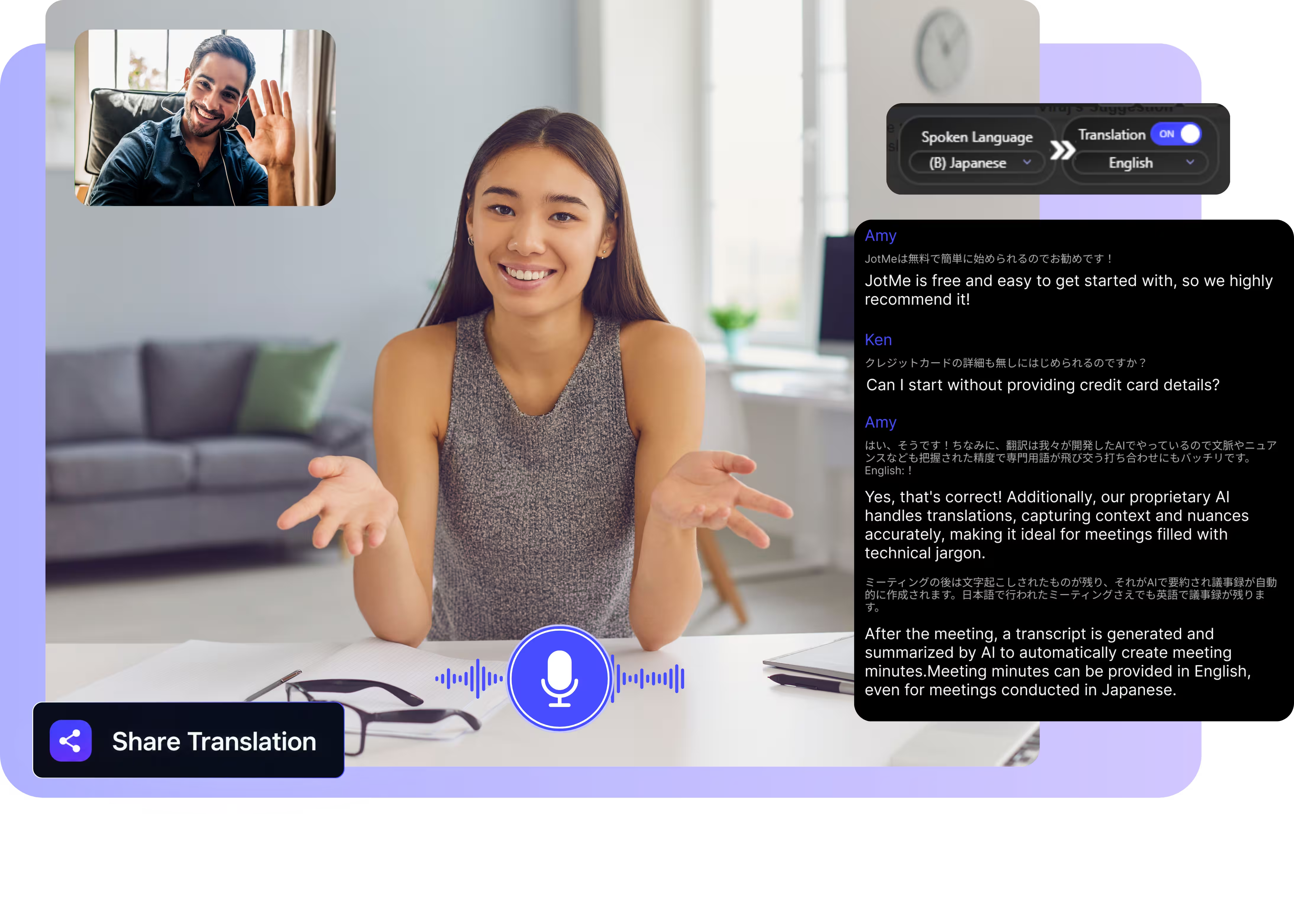
Share captions and AI-cloned voice via link, QR code, or on-camera subtitles. Anyone can follow, no app required.

Context-aware translation

JotMe preserves speaker intent and meaning as the conversation evolves, so translation keeps its context, unlike literal machine translation.

Auto language detection

Automatically detects 100+ languages with the fast model. The multilingual basic spoken-language model detects 10+ languages for easy access.

Custom dictionary

Improve accuracy by adding industry-specific terms or defining custom replacements.

Speaker diarization

Automatically separates and labels multiple speakers.

실시간 AI 번역은 어떻게 받을 수 있나요?

Download the app, set your languages, and get fast, accurate translation. Learn more.

STEP 1

1.크롬 확장 프로그램에 JotMe를 추가하고 가입하세요

30초 이상 걸리지 않습니다!

1.크롬 확장 프로그램에 JotMe를 추가하고 가입하세요
STEP 2

2.“음성 언어”를 설정하세요

사람들이 회의 중에 사용하는 언어입니다.일본어를 영어로 번역하려면 이 값을 일본어로 설정해야 합니다.

2.“음성 언어”를 설정하세요
STEP 3

3.“번역” 언어 설정

번역하려는 언어는 이 언어입니다.일본어를 영어로 번역하려면 이 값을 영어로 설정해야 합니다.

3.“번역” 언어 설정

에 대한 실시간 번역 받기

From internal operations to client relationships to live events, JotMe keeps every multilingual conversation aligned, during and after.

언어 장벽 제거

해당 언어를 구사하지 못하더라도 동료가 말하는 내용을 이해할 수 있습니다.

연설에 대한 자신감 얻기

동료를 잘 이해하면 상대방이 이해하지 못하는 다른 언어로 말하더라도 자신이 말하는 내용에 자신감을 얻을 수 있습니다.

언어 배우기

당신이 말한 것이든 동료가 말한 것이든, 당신이 더 편한 언어로 그것이 실제로 무엇을 의미하는지 알게 될 것입니다.

Webinars

Share translation by on-camera subtitles or link so every attendee stays on the same page.

See JotMe live translation in action

Watch a real speech get translated live: captions appear, your voice speaks in another language, and attendees follow along in their own language, on their own screens.

Frequently asked questions

Everything you need to know about running meetings and events with JotMe.

Google Meet에서 제공하는 실시간 번역은 무료인가요?

네, 맞아요!시간이 더 필요하면 업그레이드할 수 있습니다. 계획 조트메와 함께.

Google Meet에 실시간 번역을 추가하려면 어떻게 해야 하나요?

JotMe 크롬 확장 프로그램을 크롬 브라우저에 추가할 수 있습니다.언어를 원하는 대로 설정하면 Google Meet에서 즉시 실시간 번역을 받을 수 있습니다.

Google Meet에서 회의를 자동으로 번역하려면 어떻게 해야 하나요?

JotMe 크롬 확장 프로그램을 크롬 브라우저에 추가할 수 있습니다.언어를 원하는 대로 설정하면 Google Meet에서 즉시 자동 실시간 번역이 제공됩니다.

번역을 저장하고 저장할 수 있나요?

네, 할 수 있어요!저희 사이트에서 JotMe 성적표와 번역된 대본을 찾아보실 수 있습니다. 계기반.

실시간 번역에 사용할 수 있는 언어는 무엇입니까?

77개 언어를 영어와 일본어로 번역할 수 있습니다.사용 가능한 언어는 다음과 같습니다. 일본어, 중국어, 한국어, 스페인어, 포르투갈어, 프랑스어, 독일어, 스웨덴어, 핀란드어, 아랍어, 힌디어, 우르두어, 터키어, 노르웨이어, 이탈리아어, 버마어, 러시아어, 필리핀어, 스와힐리어, 헝가리어 및 .

How accurate is JotMe's live translation?

Accuracy improves as the meeting progresses. The agentic AI uses what's already been said (participants, domain, intent) to translate meaning, not words. Domain terms keep their professional meaning.

Which languages are supported?

200+ languages for live translation, covering 39,000+ language pairs. Strongest on enterprise-critical pairs like English, Japanese, Mandarin, Spanish, and Korean.

Does a bot join my meeting?

No. JotMe captures your system audio, so no bot joins the call and no plugin is needed for participants.

Which platforms does it work with?

Zoom, Google Meet, Microsoft Teams, Webex, LINE, and in-person. One install works everywhere.

Is my conversation private and secure?

Encrypted in transit and at rest. GDPR and SOC 2 Type II (auditing) compliant. Never sold or used to train AI models, and you own your data.

How much does it cost?

Free to start in 30 seconds, no credit card. Upgrade when your operations need more.

실시간 자막으로 온라인 회의를 번역하는 가장 쉽고 신뢰할 수 있는 방법입니다.

Context-aware, auto language detection, translation sharing, custom dictionary, and more, for every use case.