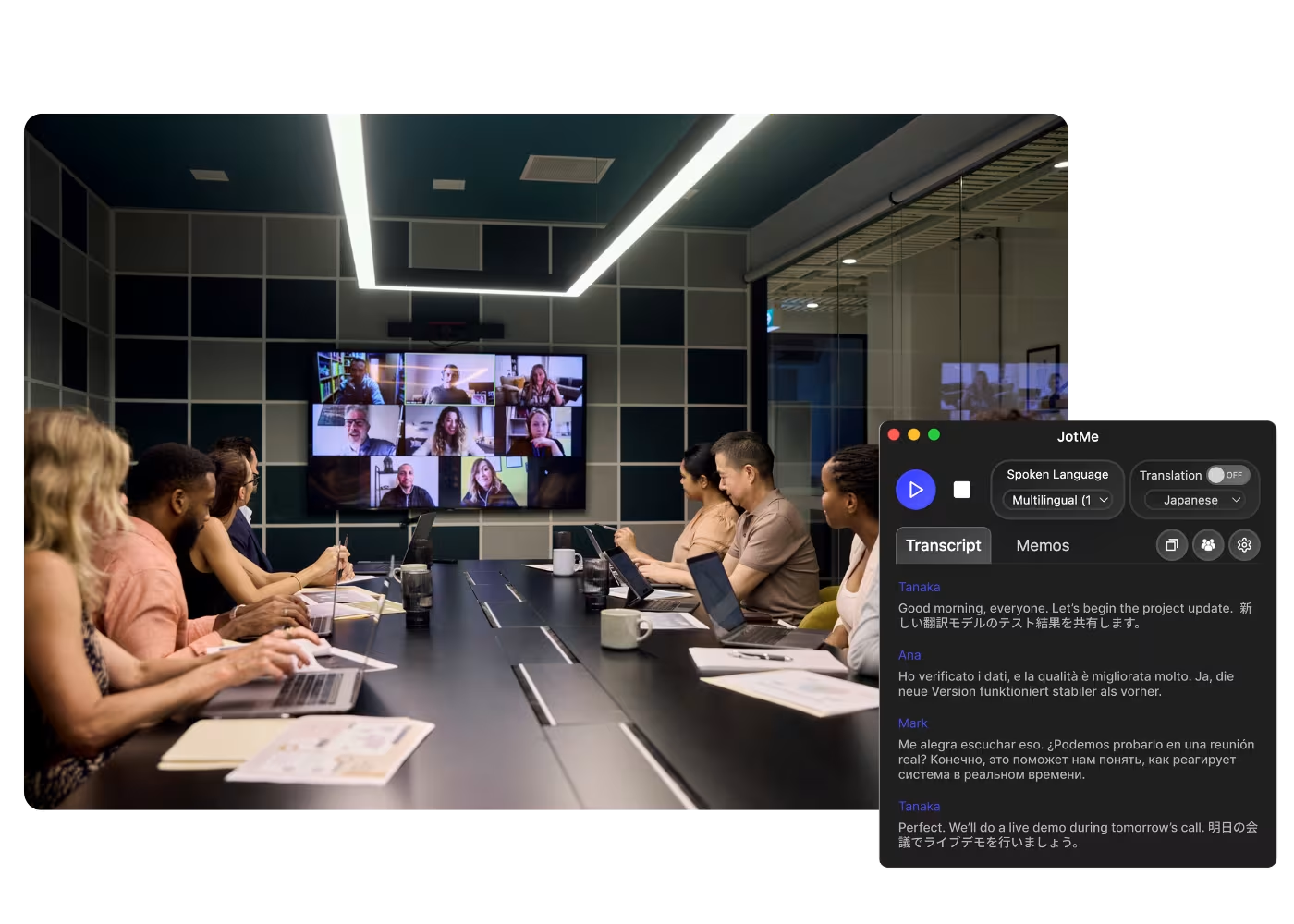
Desktop-App für alle Calls auf Ihrem Computer

Mehrsprachige Transkription, Live-Sprachübersetzung, Notizfunktion, KI-Suche, Echtzeit-Zusammenfassung, benutzerdefiniertes Vokabular, KI-Besprechungsprotokolle, Audio-Aufzeichnungen und mehr.

Mobile App für Gespräche vor Ort

Live-Sprachübersetzung und KI-Sprachgenerierung für iPhone und Android.

Chrome-Erweiterung für Google Meet

Echtzeit-Transkription, Live-Sprachübersetzung, Notizfunktion, KI-Besprechungsprotokolle.
Zu Chrome hinzufügen
Sofortiger Test verfügbar

Google Meet AI Note Taker

JotMe takes notes for your Google Meets right in the browser with the Chrome extension or desktop app, live or from an uploaded recording, and highlights every action item in the language you choose. No bot joins the call.

Vertrauensvoll genutzt von 2.000 Teams und 500.000 Fachkräften in 134 Ländern

Bewertet mit 4,7/5
DSGVO-konform
SOC 2 Typ II (in Bearbeitung)

AI Note Taker on Google Meet

You receive AI-generated meeting notes after meetings, which is great. However, they’re not always exactly what you were hoping for because the AI doesn’t always know what key points matter to you. It’s not the AI’s fault—every meeting is unique, and the information you want to focus on can change. With JotMe, you can take notes during the meeting, allowing the AI to understand which details to highlight and elaborate on, all within the context of the entire conversation. Curious to see it in action? Try it for free—no credit card required!

How to get AI notes from Google Meet

In 3 einfachen Schritten!

SCHRITT 1

1. Add the Chrome extension or desktop app, or upload your Meet recording

Add JotMe to Chrome for in-Meet notes, or get the desktop app. Already have a recorded Meet? Upload it for the same accurate notes, summary, and action items.

SCHRITT 2

2. Set the spoken language

Choose the language being spoken in the meeting, for example Japanese. If people switch languages, pick multilingual mode.

SCHRITT 3

3. Jot highlights if you want

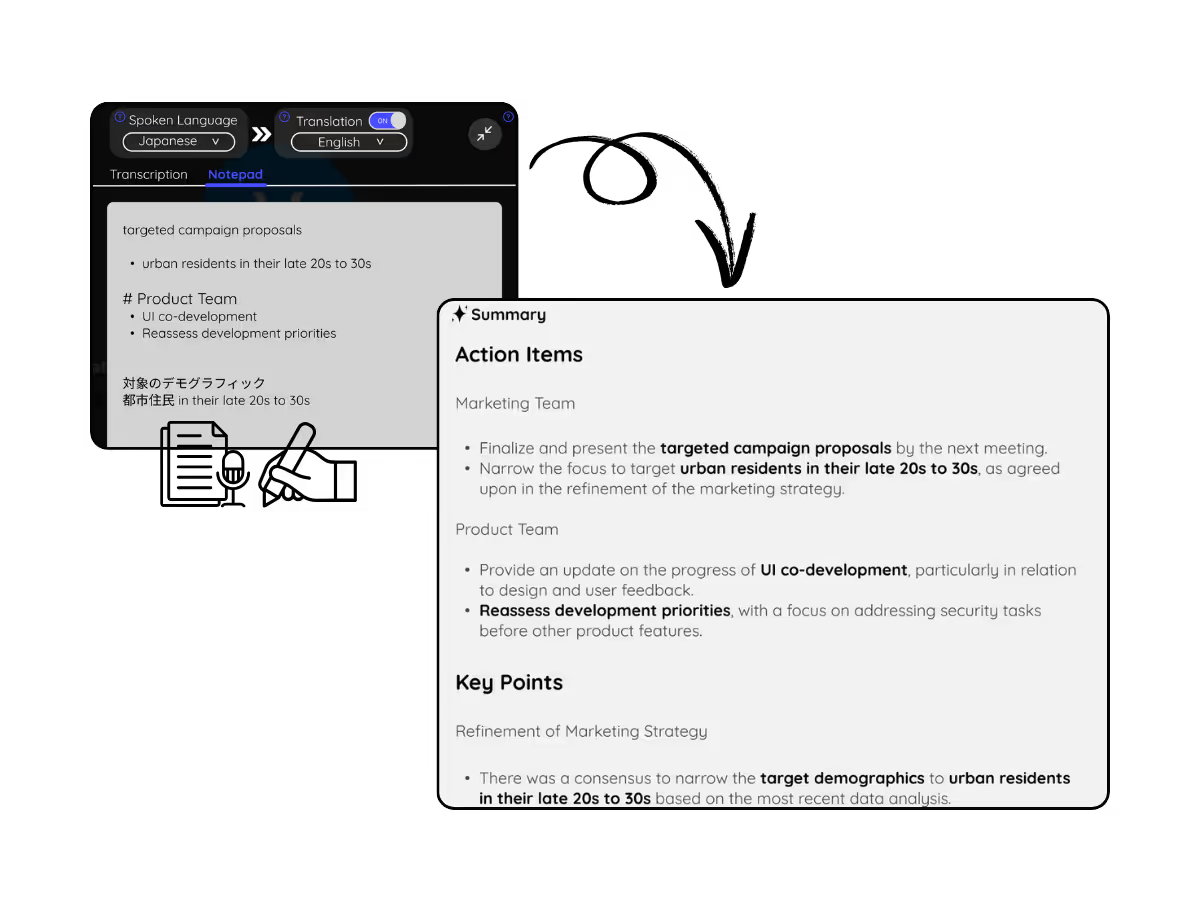
During the meeting, note key points in the Notes panel. When it ends, JotMe writes the meeting notes, summary, and action items, guided by your highlights.

Sehen Sie es in Aktion!

What teams use the Google Meet AI note taker for

A woman is working effectively

Global all-hands & team meetings

Capture decisions from HQ announcements once, and share the notes in each office's language, so nobody waits on a translated recap.

Track Conversations in Real-Time

Sales & client calls

Every requirement and objection lands in the notes with action items, even when the customer speaks another language.

A group a having a discussion and speech is transcribed

Recorded Meet meetings

No time to run it live? Upload the recording to Audio to Text or Video to Text for the same accurate notes, summary, and action items, no need to have been in the call.

Häufig gestellte Fragen

Alles, was Sie über die Durchführung von Meetings und Veranstaltungen mit JotMe wissen müssen.

Is JotMe's Google Meet AI Note Taker feature free?

Yes, it is free to get started!

How can I take notes during meetings on Google Meet?

Open the JotMe overlay on Google Meet and click “Note.” You can type anything in markdown format.

How do I use the JotMe Google Meet AI Note Taker feature?

You can use the JotMe AI meeting notes feature by installing the JotMe Chrome extension, signing up, and starting a meeting. JotMe will automatically transcribe and summarize your meeting notes based on the notes you take and the meeting transcript.

What is the default format of the JotMe Google Meet AI Note Taker?

The default format includes the Gist, Action Items, and Key Points from your meeting, allowing you to quickly grasp the essential outcomes and next steps.

Which languages are supported by JotMe’s Google Meet AI Note Taker?

JotMe currently supports Google Meet AI Note Taker in 13 different languages, with the ability to transcribe meetings in 77 languages.

The easiest and most reliable way to create the AI meeting notes you truly need on Google Meet

Verfügbare Sprache
Afrikaans (Südafrika)
Albanisch (Albanien)
Amharisch (Äthiopien)
Arabisch (Vereinigte Arabische Emirate)
Arabisch (Ägypten)
Arabisch (Levante)
Arabisch (Maghreb)
Armenisch (Armenien)
Baskisch (Spanien)
Bengalisch (Bangladesch)
Bulgarisch (Bulgarien)
Burmesisch (Myanmar)
Katalanisch (Spanien)
Chinesisch Mandarin (Vereinfacht)
Chinesisch Mandarin (Traditionell)
Niederländisch
Englisch
Englisch (Australien)
Englisch (Indien)
Englisch (Philippinen)
Englisch (UK)
Estnisch (Estland)
Filipino (Philippinen)
Finnisch (Finnland)
Französisch
Französisch (Kanada)
Galicisch (Spanien)
Georgisch (Georgien)
Deutsch
Gujarati (Indien)
Hebräisch (Israel)
Hindi
Ungarisch (Ungarn
Indonesisch (Indonesien)
Italienisch
Japanisch
Javanisch (Indonesien)
Kannada (Indien)
Khmer (Kambodscha)
Kinyarwanda (Ruanda)
Koreanisch
Lettisch (Lettland)
Mazedonisch (Nordmazedonien)
Lettisch (Lettland)
Mazedonisch (Nordmazedonien)
Malayalam (Indien)
Marathi (Indien)
Mongolisch (Mongolei)
Nepali (Nepal)
Nord-Sotho (Südafrika)
Norwegisch (Norwegen)
Persisch (Iran)
Polnisch (Polen)
Portugiesisch (Brasilien)
Portugiesisch (Portugal)
Rumänisch (Rumänien)
Russisch
Sesotho (Südafrika
Singhalesisch (Sri Lanka)
Slowakisch (Slowakei)
Slowenisch (Slowenien)
Spanisch (Mexiko)
Spanisch (Spanien)
Sundanesisch (Indonesien)
Swahili
Swati (Südafrika)
Schwedisch (Schweden)
Tamil (Indien)
Telugu (Indien)
Thailändisch (Thailand)
Tshivenda (Südafrika)
Tswana (Südafrika)
Türkisch (Türkei)
Urdu (Pakistan)
Usbekisch (Usbekistan)
Vietnamesisch (Vietnam)
Xhosa (Südafrika)
Xitsonga (Südafrika)
Zulu (Südafrika)

MORE THAN Google Meet AI Note Taker

JotMe not only provides Google Meet AI Note Taker but also offers real-time translation and transcription tools. Explore our comprehensive suite of multilingual AI tools - from AI translation to transcription. Automate note taking process and other tasks with JotMe to focus on more impactful tasks, such as decision-making and tackling action items effectively.

Führen Sie jedes Meeting und Event ür Ihre mehrsprachigen Abläufe reibungslos durch

Transkribieren, dolmetschen und übersetzen Sie jede wichtige Unterhaltung und wandeln Sie sie mit Kontext in Insights um, damit alle über Sprachgrenzen hinweg abgestimmt bleiben.

Google Meet AI Note Taker

JotMe takes notes for your Google Meets right in the browser with the Chrome extension or desktop app, live or from an uploaded recording, and highlights every action item in the language you choose. No bot joins the call.

Kostenloser Tarif. Keine Kreditkarte erforderlich.

Vertrauensvoll genutzt von 2.000 Teams und 500.000 Fachkräften in 134 Ländern

Bewertet mit 4,7/5
DSGVO-konform
SOC 2 Typ II (in Bearbeitung)

Accurate AI meeting notes for every Google Meet

Everything you need to capture, understand, and share what happened on Meet.

Kontextbewusst und hochpräzise

JotMes Notizen sind bedeutungsbewusst: Jeder Punkt berücksichtigt, wer spricht, woran Ihr Team arbeitet, was bisher gesagt wurde, Ihre eigenen Fachbegriffe und wie das Gespräch zusammenhängt. So kommen Entscheidungen und Action Items genau richtig heraus.

Kein Bot in Ihrem Meeting

JotMe läuft über die Chrome-Erweiterung in Ihrem eigenen Browser – so erhalten Sie einen Meet-Notetaker ohne Bot in der Teilnehmerliste und ohne kostenpflichtigen Gemini-Tarif, den Sie kaufen müssten.

200+ Sprachen, Protokoll in Ihrer

Führen Sie Ihr Meeting in einer von 200+ Sprachen und erhalten Sie das Protokoll, die Zusammenfassung und die Action Items in der Sprache Ihrer Wahl – so lesen globale Teams dieselben Entscheidungen.

Ihre Notizen werden gespeichert

Notizen und das vollständige Transkript werden nach jedem Call in Ihrem Dashboard gespeichert, sodass nichts verloren geht, wenn das Meeting endet.

Notizen-gesteuertes Protokoll

Halten Sie während des Meetings kurze Punkte fest, und JotMes KI macht daraus ein vollständiges Protokoll mit Ihren Highlights im Mittelpunkt.

Eigenes Wörterbuch und automatische Spracherkennung

Verbessern Sie die Genauigkeit mit branchenspezifischen Begriffen und eigenen Ersetzungen. JotMe erkennt zudem die gesprochene Sprache automatisch, sodass Sie sie nie von Hand einstellen müssen.

How to get AI notes from Google Meet

Three steps, under a minute. No bot invite, no host approval. Already have a recording? Upload it instead.

STEP 1

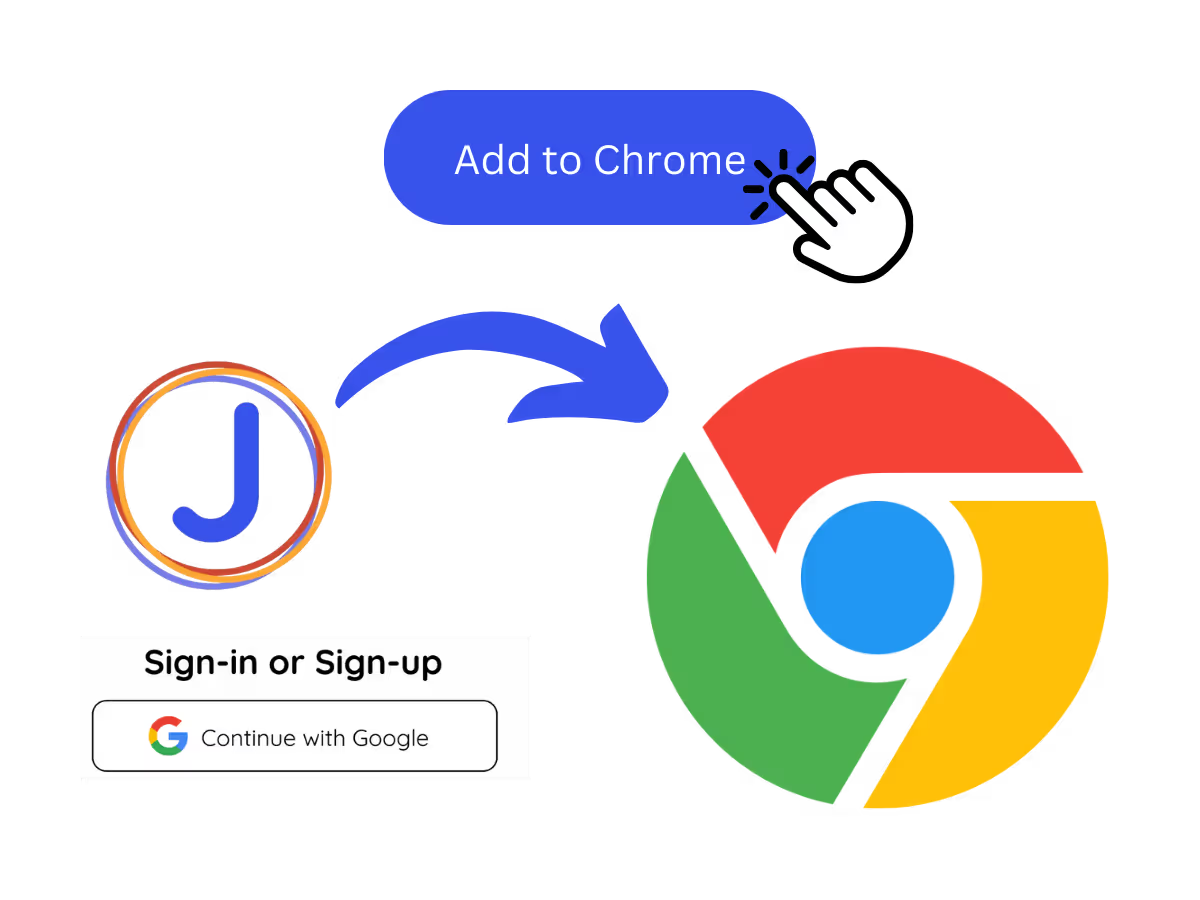
1. Add the Chrome extension or desktop app, or upload your Meet recording

Add JotMe to Chrome for in-Meet notes, or get the desktop app. Already have a recorded Meet? Upload it for the same accurate notes, summary, and action items.
STEP 2

2. Set the spoken language

Choose the language being spoken in the meeting, for example Japanese. If people switch languages, pick multilingual mode.

STEP 3

3. Jot highlights if you want

During the meeting, note key points in the Notes panel. When it ends, JotMe writes the meeting notes, summary, and action items, guided by your highlights.
What teams use the Google Meet AI note taker for

From daily standups to all-hands, JotMe keeps every attendee in the conversation.

Global all-hands & team meetings

Capture decisions from HQ announcements once, and share the notes in each office's language, so nobody waits on a translated recap.

Sales & client calls

Every requirement and objection lands in the notes with action items, even when the customer speaks another language.

Recorded Meet meetings

No time to run it live? Upload the recording to Audio to Text or Video to Text for the same accurate notes, summary, and action items, no need to have been in the call.

Interviews & research calls

Stay present with the candidate or customer while JotMe captures the details and follow-ups.

See it in action

Watch JotMe take notes on a Google Meet from the extension, live or after the meeting.

Mehr als 500.000 Fachkräfte führen Meetings und Events mit JotMe reibungslos durch

Erfahren Sie, welche Ergebnisse Nutzer mit JotMe erzielen, wenn sie Lücken in mehrsprachigen Abläufen schließen.

Bewertet 4.7/5
Bewertet 4.7/5
"Da meine Arbeit Übersetzungen und die Überbrückung von Kulturen umfasst, hat sich dieses Tool als bahnbrechend für meine tägliche Arbeit erwiesen."
Adams
Operationsspezialist / Tiktok
"Japanisch war für mich einst ein Rätsel, aber dieses Produkt machte es mit kontextuellem Verständnis klar und zugänglich."
Stamatis
Berater / Deloitte
"JotMe optimiert unsere mehrsprachigen Meetings und sorgt für eine reibungslose Zusammenarbeit in unserem schnelllebigen Arbeitsumfeld."
Cesar
Programm-Manager / Amazon
"Diese zweisprachige Funktion optimiert die Notizen bei der Arbeit, spart Zeit und steigert die Effizienz in beiden Sprachen."
Yusuke
Vertriebsleiter / NTT
"Unerlässlich für Nicht-Muttersprachler; vereinfacht komplexe Meetings mit Echtzeit-Übersetzung und präzisen Transkriptionen."
Jesse
Software-Freelancer
"Die Übersetzung, die wir seit Jahren brauchten – jetzt Realität mit JotMe!"
Elston
CEO & Gründer / Tiny.host
"Da meine Arbeit Übersetzungen und die Überbrückung von Kulturen umfasst, hat sich dieses Tool als bahnbrechend für meine tägliche Arbeit erwiesen."
Adams
Operationsspezialist / Tiktok
"Japanisch war für mich einst ein Rätsel, aber dieses Produkt machte es mit kontextuellem Verständnis klar und zugänglich."
Stamatis
Berater / Deloitte
"JotMe optimiert unsere mehrsprachigen Meetings und sorgt für eine reibungslose Zusammenarbeit in unserem schnelllebigen Arbeitsumfeld."
Cesar
Programm-Manager / Amazon
"Diese zweisprachige Funktion optimiert die Notizen bei der Arbeit, spart Zeit und steigert die Effizienz in beiden Sprachen."
Yusuke
Vertriebsleiter / NTT
"Unerlässlich für Nicht-Muttersprachler; vereinfacht komplexe Meetings mit Echtzeit-Übersetzung und präzisen Transkriptionen."
Jesse
Software-Freelancer
"Die Übersetzung, die wir seit Jahren brauchten – jetzt Realität mit JotMe!"
Elston
CEO & Gründer / Tiny.host

Häufig gestellte Fragen

Alles, was Sie über die Durchführung von Meetings und Veranstaltungen mit JotMe wissen müssen.

Does the Google Meet AI note taker join as a bot?

No. JotMe works from the Chrome extension in your own browser and captures the meeting locally, so no bot shows in the participant list and there's nothing for the host to enable.

Can I get AI notes from a recorded Google Meet?

Yes. Upload the recording to Audio to Text or Video to Text and JotMe transcribes it and writes accurate notes, the same summary and action items as a live meeting.

Is the Google Meet AI note taker free?

Yes. JotMe's free plan includes AI meeting notes, and no credit card is required. Upgrade when you need more.

What do the AI meeting notes include?

The default format gives you the gist, key points, and action items. Jot your own highlights in the notepad during the call and JotMe folds them into the final notes.

Can I get the notes in my language?

Yes. The meeting can be in any of 200+ languages, and you choose the language for the notes, summary, and action items.

Heading

You can translate
Bulgarian
Catalan
Mandarin (Simplified
Mandarin (Traditional)
Cantonese (Traditional)
Czech, Danish
Dutch
English (US)
English (UK)
English (Australia)
English (New Zealand)
English (India)
Estonian, Finnis
French
French (Canada
German
German (Switzerland
Greek
Hindi
Hungarian
Indonesian
Italian
Japanese
Korean
Latvian
Lithuanian
Malay
Dutch (Flemish)
Norwegian
Polish
Portuguese
Portuguese (Brazil)
Portuguese (Portugal)
Romanian
Russian
Slovak
Spanish
Spanish (Latin America)
Swedish
Thai
Turkish
Ukrainian
Vietnamese

Never take Google Meet notes by hand again

Never take Google Meet notes by hand again. Jot highlights during the call, get accurate AI notes with action items after, and share them in your team's language, live or from a recording.