Voice translation converts spoken language into another language in real time, delivering the output as live captions, translated audio, or both. Text translation takes written input, processes it through a translation engine, and returns written output in the target language. Both serve the same goal: making communication possible across languages. But they solve that goal at different speeds, in different contexts, and with very different levels of accuracy depending on the situation.
The distinction matters because choosing the wrong type creates more work after the conversation ends. An operations manager on a live call with a Korean supplier does not have time to type sentences into a text box. A legal team reviewing a translated contract does not need live audio captions. The workflow determines which approach works.
Here is the core difference between using a voice translation tool and a text translation tool:
| Parameters | Voice Translation | Text Translation |
|---|---|---|
| Input | Spoken audio (live or recorded) | Typed or pasted text |
| Speed | Real-time, continuous | On-demand, per sentence or document |
| Context Awareness | Handles tone, pace, filler words, and speaker intent | Works with clean, structured written input |
| Output | Live captions, translated transcript, audio output | Translated text on screen |
| Best For | Meetings, calls, events, and live conversations | Emails, documents, contracts, and chat messages |
| Post-Output Value | Transcripts, meeting notes, action items, searchable archives | Translated text only (no additional intelligence) |
| Accuracy Risk | Dependent on speech recognition quality | Dependent on input clarity and grammar |
This table covers the structural differences between the voice to text translation and text to text translation tools. But the real gap becomes clear when you test both approaches on the same business scenario.
To understand how text translation tools actually perform in real scenarios, it helps to look at how they handle the same message under different conditions. In this section, we compare how Google Translate and ChatGPT process text input, where they perform well, and where they start to break down.
Google Translate is the most widely used text translation app in the world. It accepts typed input, detects or lets you select the source language, and returns written output in the target language. For short, clear, grammatically correct sentences, it performs well.
Here is a real test we ran to help you understand the limitations of Google Translate for text-based translation.
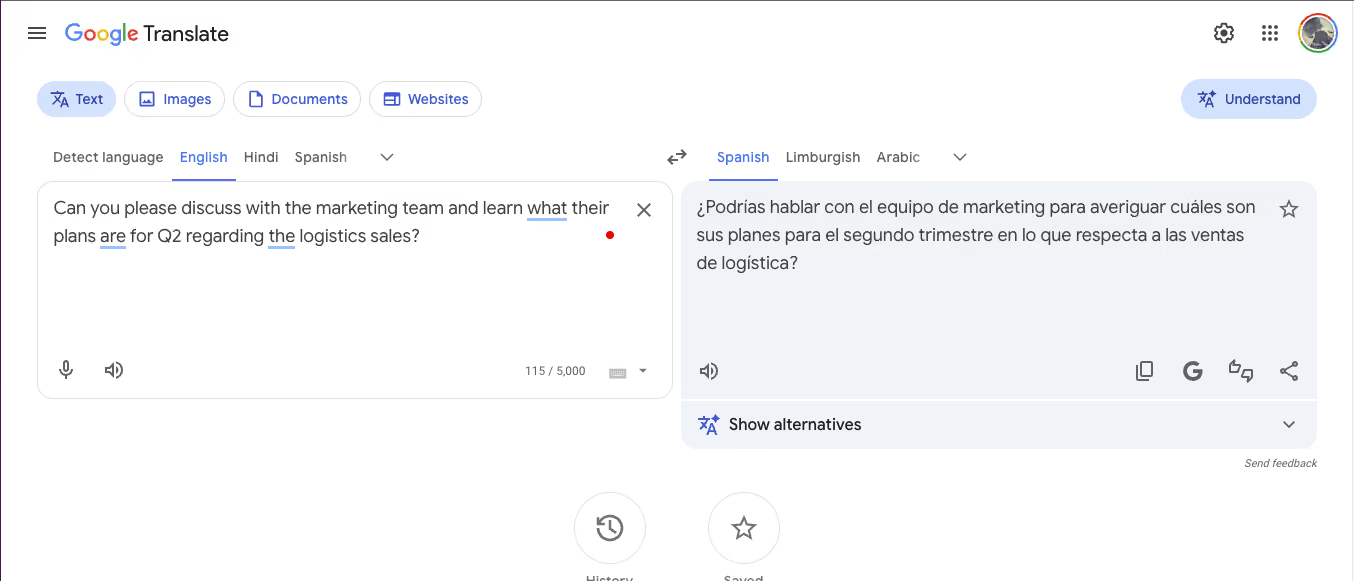
As you can see from the attached image, an English-speaking manager needs to send a message to a Spanish-speaking logistics team. The typed input in Google Translate:
"Can you please discuss with the marketing team and learn what their plans are for Q2 regarding the logistics sales?"
Google Translate returned a grammatically accurate Spanish sentence. The words were correct. The meaning was preserved at a surface level. But the output carried no tonal weight. A CXO reading that Spanish translation would receive a sentence that reads as a student wrote it, not as a senior operations lead would write it.

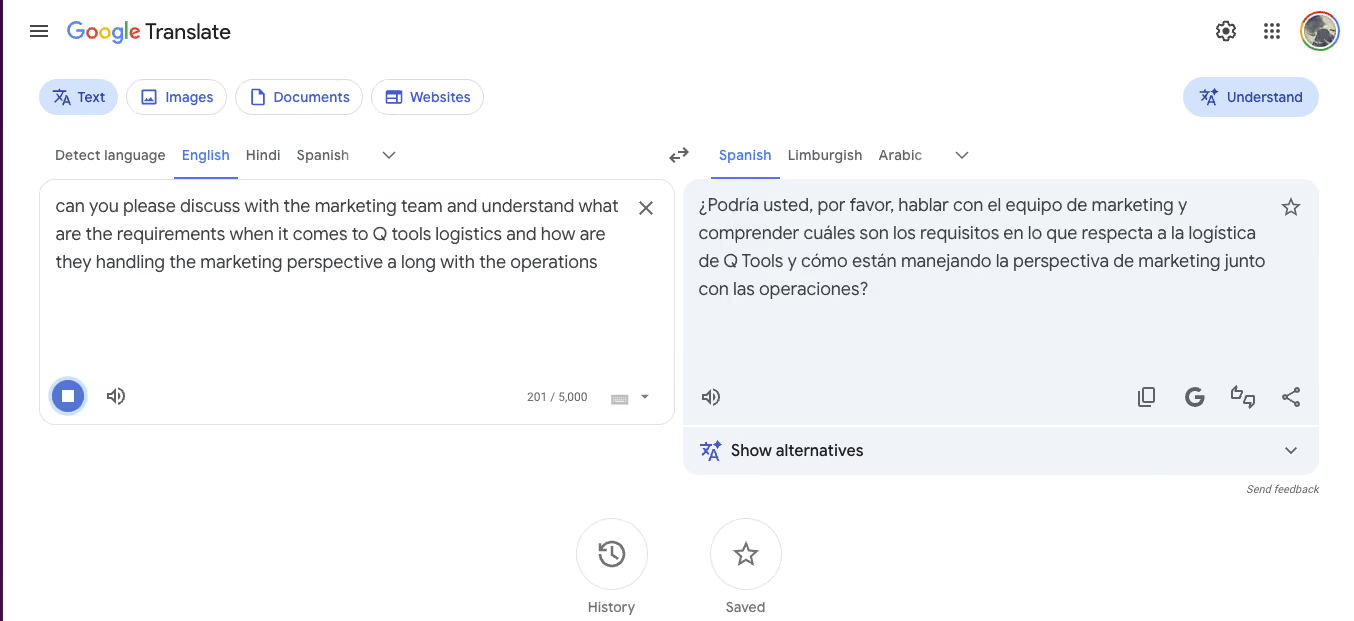
The same manager then tried a second, longer sentence using Google Translate's voice input: a spoken request about marketing requirements, Q2 logistics, and how the marketing team is handling its perspective alongside operations.
This time, Google Translate's speech recognition captured the audio, but the transcription included errors. "Q2" became "Q tools." The resulting Spanish translation contained those errors, producing a sentence the recipient would need to decode before acting on it.

As you can see from the above example, text translation tools process exactly what you give them. If the input is clean and short, the output is usable. If the input is messy, spoken, or lacks context about who is speaking and who is listening, the output breaks down.
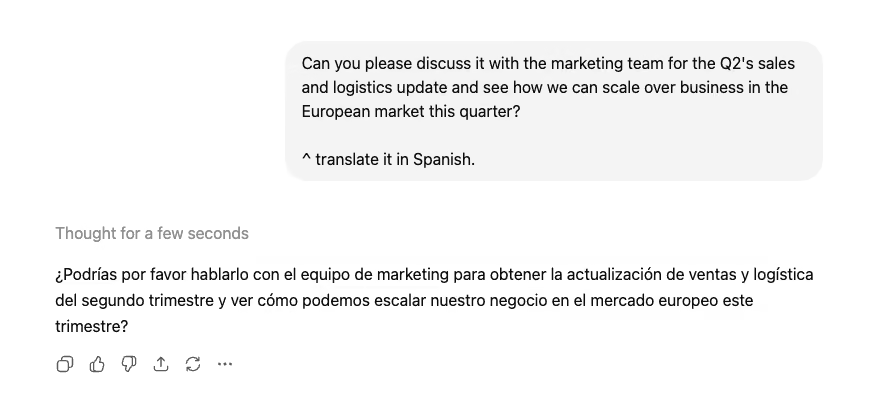
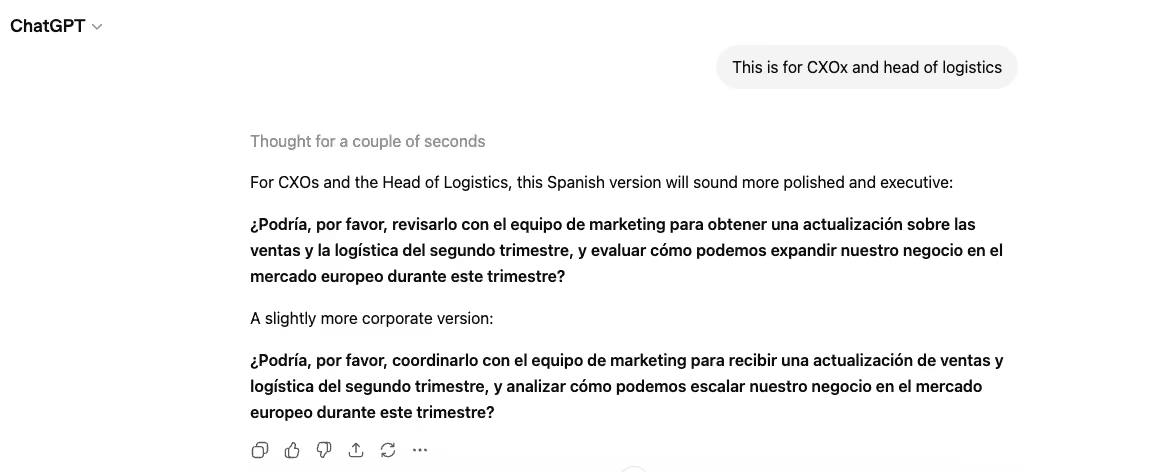
Yes, ChatGPT can handle text translation, but it comes with its own limitations. ChatGPT, as a text-based translation tool, adds a layer that Google Translate cannot: tone adjustment. When asked to translate the same business message into Spanish, ChatGPT returned a competent translation, as shown below:

But when the manager specified "this is for CXOs and heads of logistics," ChatGPT recalibrated and offered a more polished, executive register version. The transcript improved significantly, as you can see from this image:

However, if you deal with multiple meetings and operations, you would agree that ChatGPT requires two prompts to reach the right output. The user had to manually specify the tool's audience. In a live meeting, there is no time for a second prompt. The conversation has already moved forward.
Voice translation starts with live spoken audio. JotMe listens, transcribes, translates, and delivers the output in real time as the conversation continues.
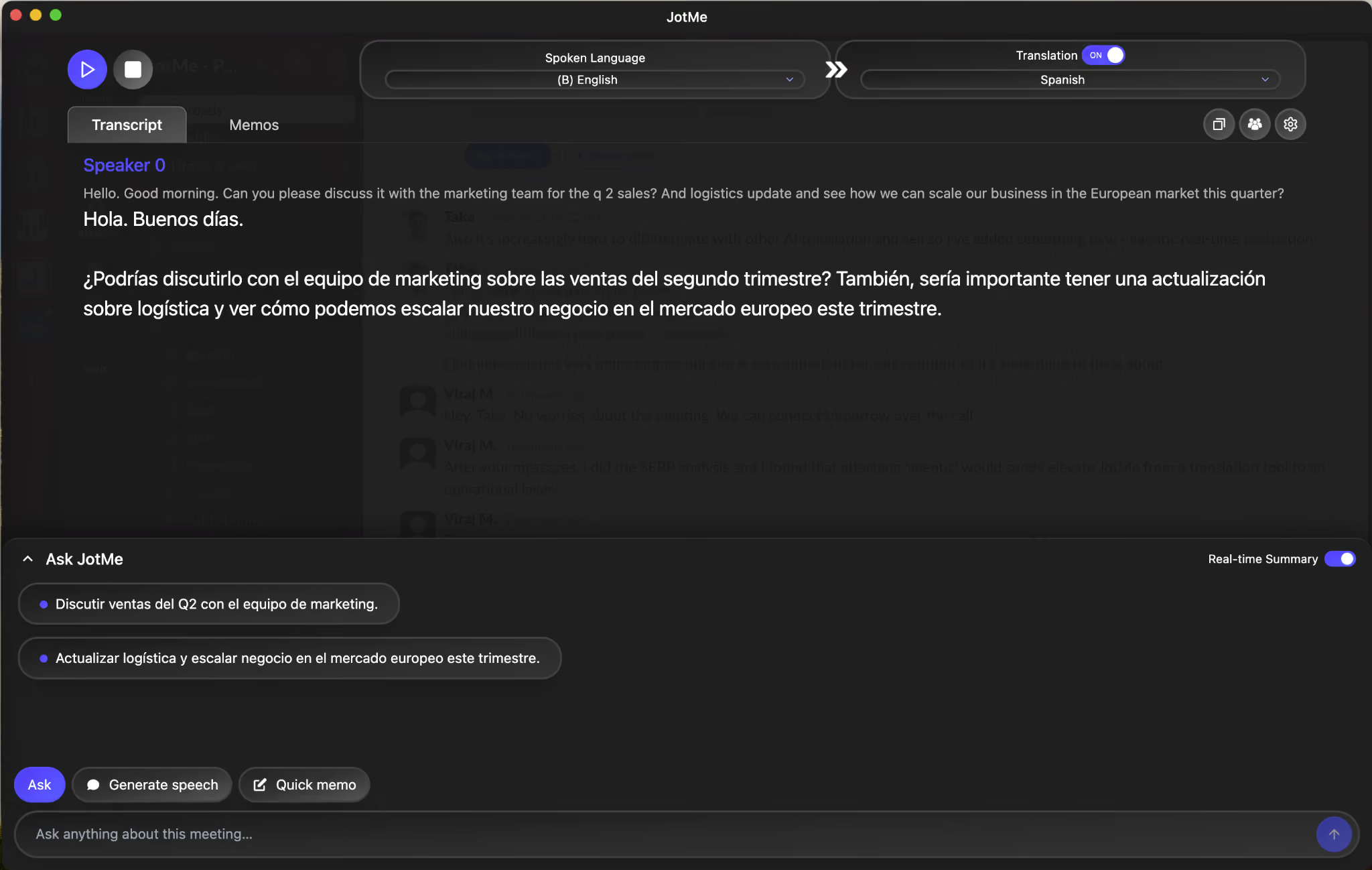
Here is the same business scenario tested on JotMe. The English-speaking manager spoke naturally during a live call:
"Hello. Good morning. Can you please discuss it with the marketing team for the Q2 sales? And logistics update and see how we can scale our business in the European market this quarter?"
JotMe captured the full audio, displayed the English transcript, and simultaneously produced a contextually appropriate English to Spanish translation. The Spanish output read naturally at a professional register. There were no follow-up prompts, no manual audience specification, and definitely no "this is for CXOs" instruction that we had to give to ChatGPT to refine the tone.

The Ask JotMe panel at the bottom of the screen generated two real-time action items in Spanish:
"Discutir ventas del Q2 con el equipo de marketing."
"Actualizar logística y escalar negocio en el mercado europeo este trimestre."
Three outputs from a single spoken input: transcript, translation, and structured action items. The manager did not type anything. The Spanish-speaking recipient received a message with the right tone, the right terminology, and a clear set of next steps.
Compare that to the text translation path: type the sentence into Google Translate (flat output, no tone), then paste it into ChatGPT (better tone, but two prompts required), then manually write the action items yourself.
Here is a use case guide stating when you actually need a voice translation and when you can rely on text translation:
| Scenario | Use Voice Translation | Use Text Translation |
|---|---|---|
| Live meeting with a Korean supplier | ✅ | ❌ |
| Translating a signed contract into French | ❌ | ✅ |
| Weekly standup with a distributed multilingual team | ✅ | ❌ |
| Sending a translated email to a partner | ❌ | ✅ |
| Client call where the other party speaks Japanese | ✅ | ❌ |
| Translating a product manual for localization | ❌ | ✅ |
| A conference keynote with a multilingual audience | ✅ | ❌ |
| Reviewing a translated proposal before sending | ❌ | ✅ |
| Post-meeting follow-up: sharing notes in another language | ✅ (auto-generated meeting notes) | Partial (manual translation required) |
| Quick chat message to a colleague in another language | ❌ | ✅ |
One area where the two approaches converge is async voice communication. Voice messages on WhatsApp, Slack voice notes, and recorded audio memos sit between live speech and typed text. They carry vocal tone, natural phrasing, and conversational flow, but they are not live.
For voice notes vs. text, the deciding factor is whether the content needs to be translated before the recipient listens or after. If a Spanish-speaking team lead sends a voice note to an English-speaking manager, a voice translation tool can transcribe and translate that recording into readable English with full context. A text translation tool would require someone to first transcribe the audio manually, then paste the transcript into a translation box. One step versus three.
AI voice translator tools are also entering this space, but most are designed for command execution (setting reminders, playing music, answering questions) rather than cross-language communication. An AI voice assistant handles "set a meeting for 3 PM" well. It does not handle "translate what the supplier just said about delivery timelines into English and generate follow-up action items."
Image Source: The banner image used in this article was generated using Google Gemini