팁
QR 코드로 AI 라이브 번역과 음성 대 음성 번역을 공유하는 방법

Taka Shirasu
March 4, 2026
컨퍼런스, 라이브 이벤트, 패널 토론, 연례 주주 총회, 프레젠테이션, 강연... 목록은 계속됩니다.그리고 이러한 행사는 주최자에게 특별한 순간입니다.
호스트는 조명, 슬라이드, 타이밍, 초청 게스트 등 모든 것에 대해 고민하게 됩니다.여러 언어를 구사하는 다양한 배경의 사람들을 참여시키는 방법도 생각해 보시는 분들도 계실 텐데요, 포용성은 오늘날 세계화된 세계에서 성공의 열쇠이기 때문이죠.
이 글을 읽고 있다면 라이브 이벤트를 위한 AI 실시간 번역을 찾고 있거나 실제로 어떻게 작동하는지 궁금할 것입니다.다른 옵션을 시도해 보셨다면 이미 알고 계실 것입니다. Google Translate와 같은 무료 도구는 실시간 이벤트에 사용할 수 없습니다.UX는 자체 워크플로우와 여행이나 일회성 번역과 같은 간단한 사용 사례를 위해 만들어졌으며, 사람들이 대화를 실시간으로 따라가야 하는 실제 무대 설정에서는 적합하지 않습니다.
Wordly, KUDO 또는 Interfy와 같은 “실시간 이벤트 번역” 솔루션을 우연히 발견하더라도 거의 항상 먼저 문의하도록 요청하며 청구서는 종종 5,000달러에서 10,000달러 정도 나옵니다.일본 기업에서 일하다가 컨퍼런스를 위해 실시간 번역이 필요할 때 그들과 함께 일해 보려고 했기 때문에 이 사실을 잘 압니다.시도해 봤지만 기술이 충분히 정교하지 못했어요.그들은 기본적으로 당신의 목소리를 받아 옮기고 번역합니다 (보통 DeepL과 같은 표준 API를 사용합니다).이는 나쁘지 않은 엔지니어링이지만, 기술 및 산업별로 논의가 진행될 수 있기 때문에 제가 필요로 하는 상황에 맞는 번역을 제공하지는 못했습니다.
그래서 저는 2년 전에 JotMe를 설립했습니다. 가격부터 기술 자체에 이르기까지 모든 것이 더 나아질 수 있다고 믿었습니다.지금까지는 상황별 실시간 번역이 이미 있었습니다. AI가 대화의 흐름을 따라가면서 문자 그대로의 단어가 아닌 의미와 의도를 가지고 번역합니다.대화의 중요성을 실시간으로 번역하는 것이 얼마나 중요한지에 대한 세상의 시각이 바뀌었고, 그 점이 자랑스럽습니다.
부족한 것은 공유였습니다.오늘, 이제 문맥을 통한 실시간 번역을 공유할 수 있게 되었다는 소식을 전해드리게 되어 기쁩니다. QR 코드 JotMe 데스크톱 애플리케이션에서.그리고 보다 인터랙티브한 소규모 대화를 위해 JotMe는 음성 대 음성 번역도 지원하므로 참가자는 자연스럽게 말을 이어가면서 번역된 음성을 원하는 언어로 들을 수 있습니다.
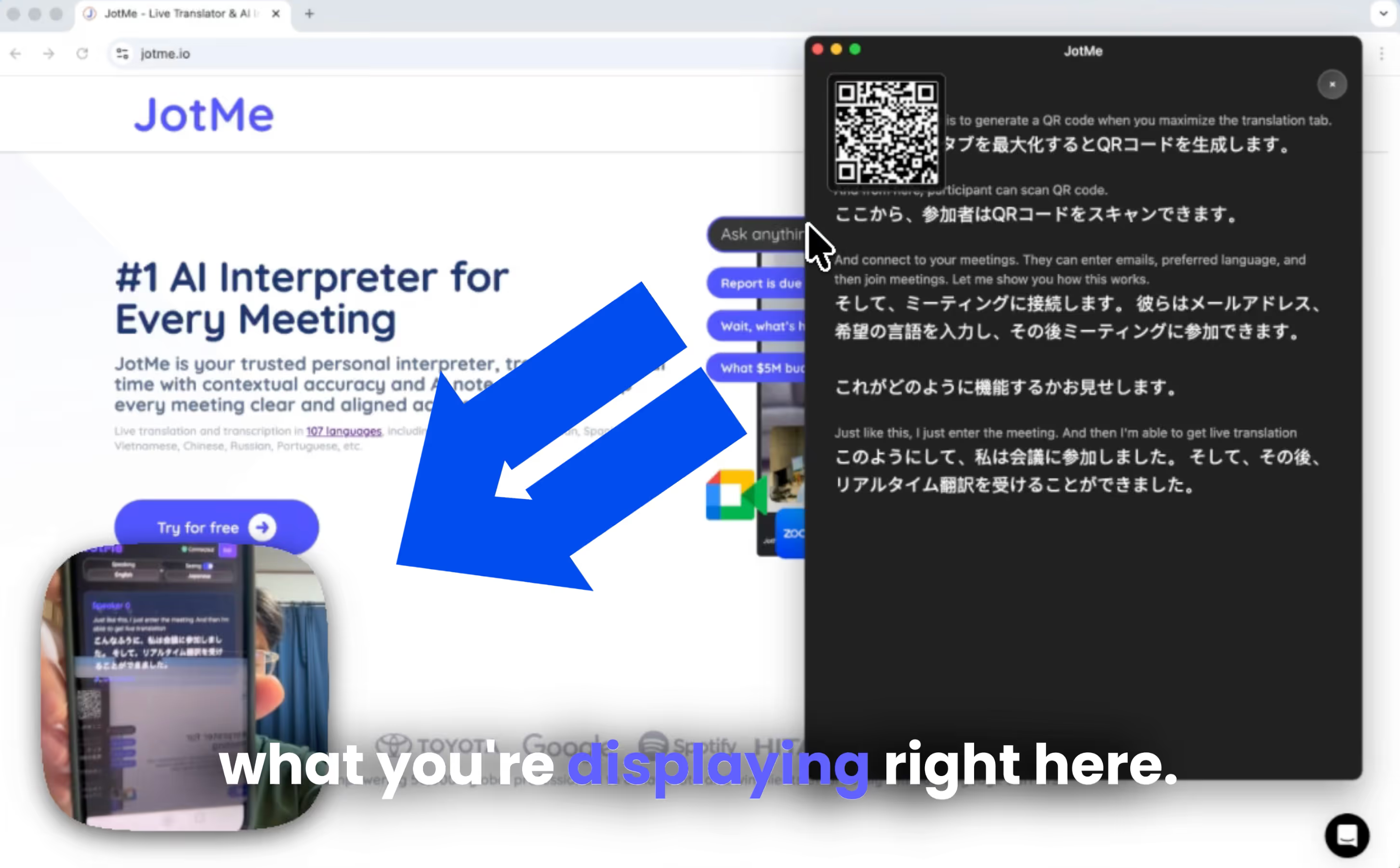
작동 원리는 다음과 같습니다. 데스크톱 앱을 열고 QR 코드 공유를 켜고 트랜스크립션 창을 최대화합니다.화면에 QR 코드가 표시됩니다.그런 다음 이벤트의 대형 모니터 또는 프로젝터에 해당 화면을 표시합니다.청중이 QR 코드를 스캔하면 즉시 실시간 번역에 참여합니다.일대일 또는 소규모 그룹 대화에서는 음성 대 음성 번역을 통해 참가자가 선택한 언어로 번역된 음성을 들으며 더 자연스럽게 대화할 수 있습니다.
그리고 청구서?번역 시간을 공유하기 때문에 청중에 따라 비용이 조정됩니다.대금 청구는 투명하며 일반적으로 비용이 많이 듭니다. 시간당 6달러 청중과 공유할 수 있습니다.소규모 행사가 있는 경우 월간 또는 연간 구독을 선택할 수도 있습니다.
- 월 120달러 ...에 대한 2,000분 (33시간)
- 또는 월 60달러 연간 결제 시 (50% 할인)
가장 좋은 견적은 사용량에 따라 다르므로 가장 쉬운 방법은 계정을 만들고 확인하는 것입니다. 조트미 가격 대시보드에서.JotMe는 언제든지 무료로 사용해 볼 수 있습니다.데스크톱 애플리케이션은 다음에서 다운로드할 수 있습니다. 조트미 공식 웹사이트 먼저 번역 품질을 테스트하십시오.
이제 QR 코드로 상황별 AI 라이브 번역을 글로벌 팀과 공유하는 방법을 알아보겠습니다.
- JotMe 데스크톱 앱을 설치하고 로그인하여 번역 시간과 프리미엄 액세스 권한이 있는지 확인하십시오.
- 앱 내에서 QR 공유를 켜고 생성된 QR 코드를 이벤트 화면에 표시합니다.
- 참석자는 QR 코드를 스캔하고 언어를 선택한 다음 브라우저에서 즉시 번역을 추적합니다.
- QR 코드로 음성 대 음성을 공유하면 팀원은 자신의 모국어로 오디오를 들을 수 있습니다.
- JotMe는 회의 후 요약 및 대화 내용을 포함한 통합 AI 회의 메모를 참가자와 자동으로 공유합니다.
또는 QR 코드를 사용하여 시청자와 AI 실시간 번역을 공유하는 방법에 대한 YouTube 튜토리얼을 시청할 수도 있습니다.
실시간 번역을 QR Code와 공유하기 위한 전제 조건은 무엇인가요?
먼저, 다운로드 JotMe 데스크톱 애플리케이션 에서 공식 웹 사이트.저희 앱은 무료로 다운로드할 수 있으며 설정하는 데 몇 분밖에 걸리지 않습니다.설치가 완료되면 계정에 로그인하기만 하면 바로 시작할 수 있습니다.
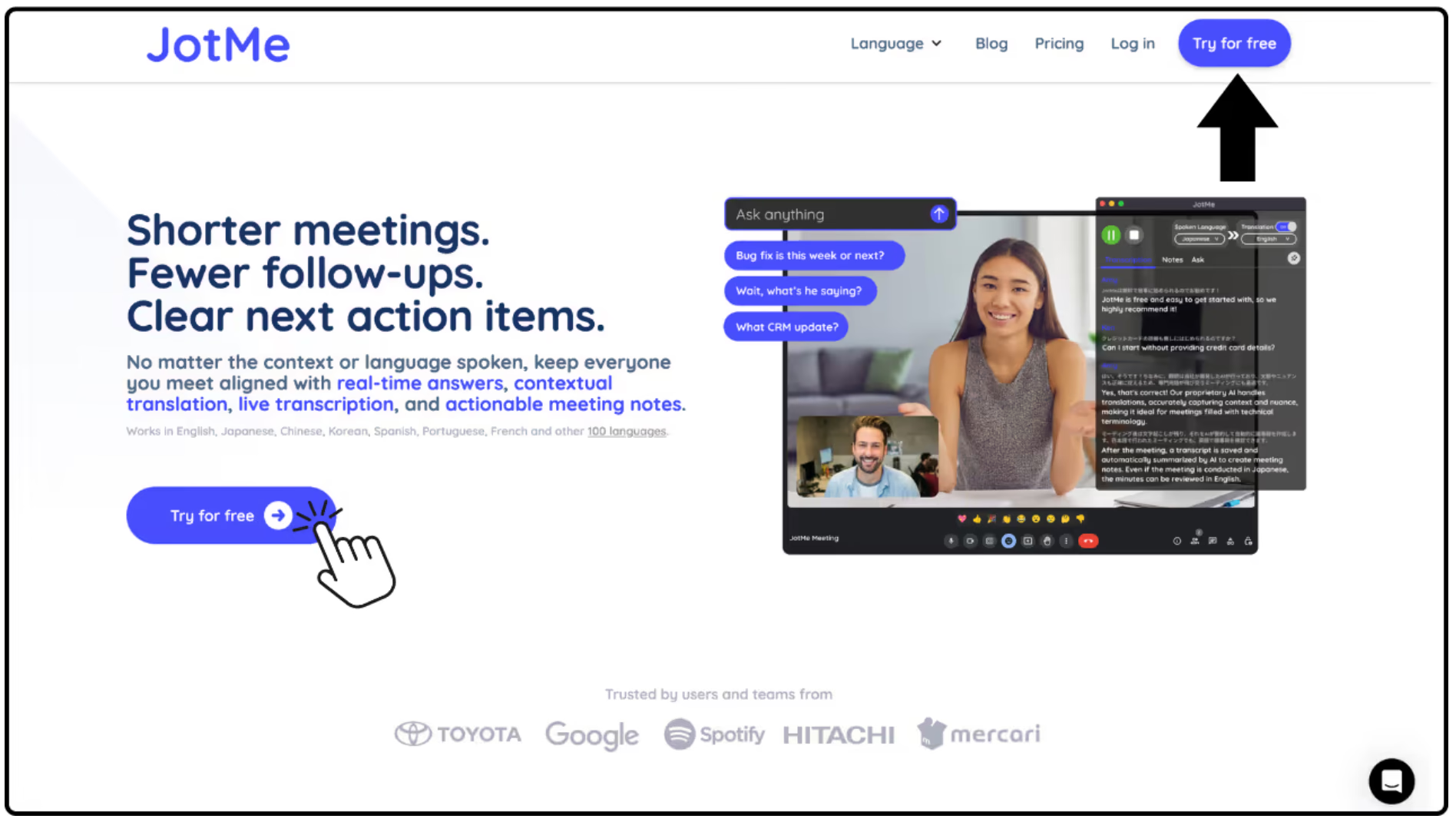
시청자와 실시간 번역을 공유하려면 계정에서 사용할 수 있는 번역 회의록과 Premium 구독이 필요합니다.
이벤트가 시작되기 전에 JotMe가 발표자의 음성을 선명하게 캡처할 수 있도록 마이크와 오디오 입력이 올바르게 설정되어 있는지 확인하세요.
실시간 번역 공유를 위한 QR 코드를 생성하는 방법은 무엇입니까?
다음으로, 여십시오 번역 공유 데스크톱 응용 프로그램 내부의 메뉴 및 켜기 QR 코드 공유.활성화되면 JotMe가 자동으로 QR 코드를 생성합니다.
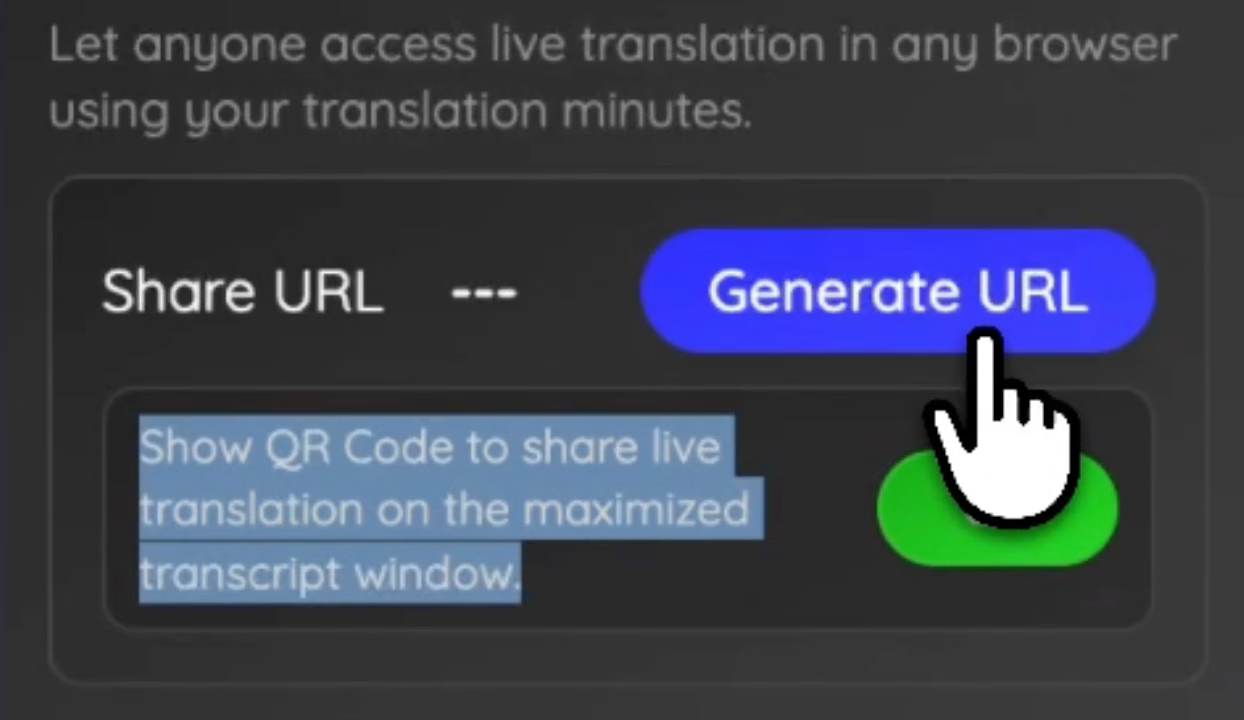
그런 다음 이 QR 코드를 프레젠테이션 화면, 프로젝터 또는 대형 모니터에 표시하여 청중이 쉽게 스캔할 수 있도록 할 수 있습니다.주최자가 JotMe에서 대본 보기를 최대화하면 QR 코드가 나타나므로 참가자가 스캔하고 실시간 번역에 참여할 수 있도록 코드를 명확하게 제시할 수 있습니다.
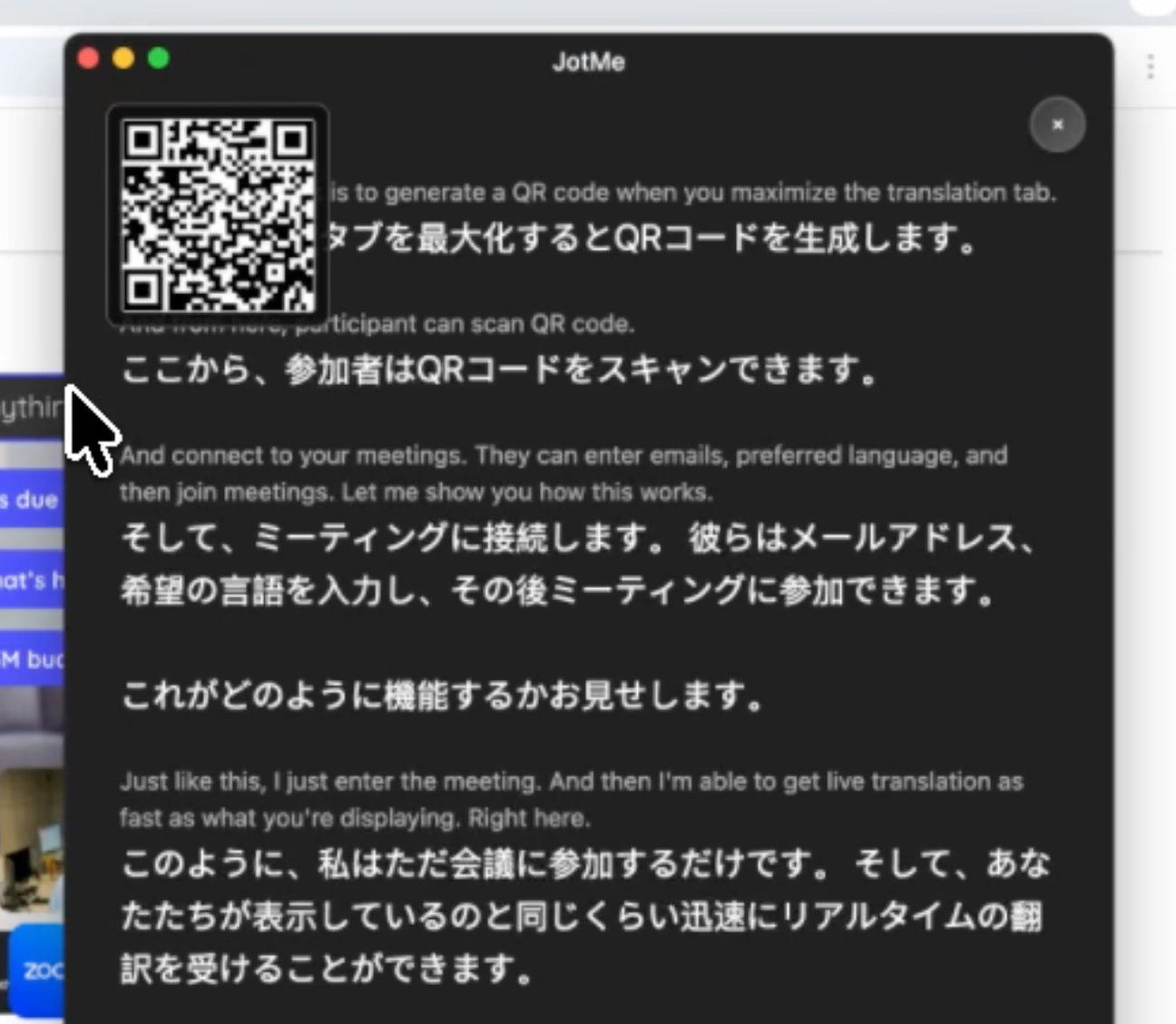
QR 코드가 대형 화면에 표시되면 시청자는 간단히 휴대폰 카메라를 열고 스캔할 수 있습니다.시청자도 바로 참여할 수 있습니다. 실시간 번역 브라우저의 페이지.
JotMe의 QR 코드는 어떤 점에서 특별한가요?
설치가 필요 없습니다.
앱 다운로드가 없습니다.
계정 생성이 필요 없습니다.
참가자는 어떻게 실시간 번역에 액세스하나요?
시청자가 QR 코드를 스캔하면 다음과 같은 몇 가지 사항을 요구하는 간단한 페이지가 표시됩니다.
- 이메일 입력
- 선호 언어 선택
- 이벤트 요약 수신을 위한 선택적 이메일 동의
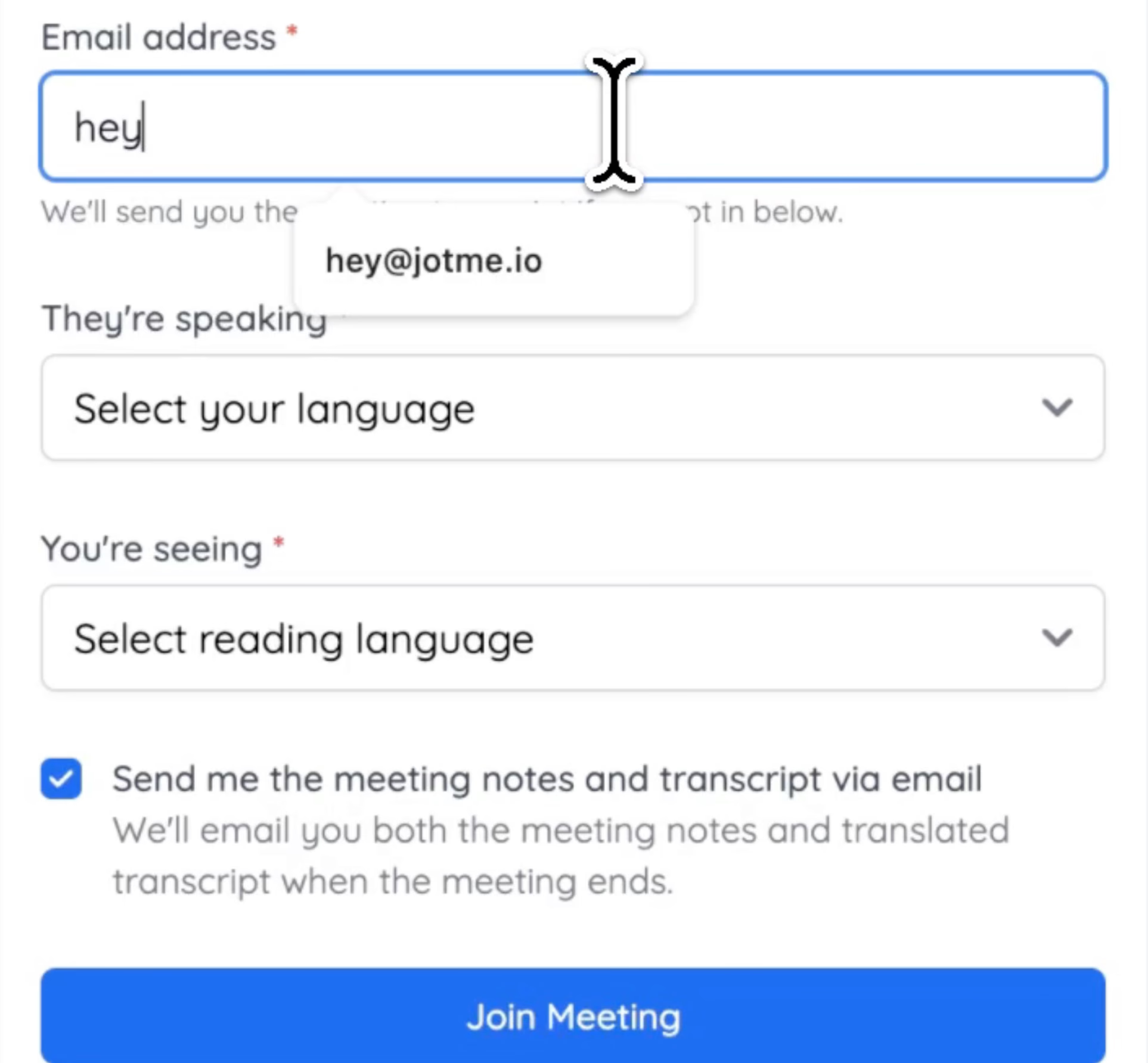
모든 세부 정보를 입력한 후 즉시 휴대폰에서 실시간 AI 번역을 받기 시작합니다.발표자가 무대에서 말하는 동안 번역이 실시간으로 업데이트됩니다.
각 청중은 자신이 선호하는 언어를 선택할 수 있습니다.한 사람은 스페인어로, 다른 사람은 일본어로, 다른 사람은 한국어로 팔로우할 수 있습니다.
이는 특히 다음과 같은 경우에 효과적입니다.
- 국제 컨퍼런스
- 글로벌 제품 출시
- 스타트업 데모데이
- 학술 컨퍼런스
- 대학 강의
- 기업 주주 총회
- 패널 토론
JotMe에서 음성 대 음성 번역을 설정하는 방법
음성 대 음성 번역을 설정하고 QR 코드로 공유하는 단계별 가이드는 다음과 같습니다.
1단계: JotMe를 열고 오른쪽 상단의 스피커(Speaker) 아이콘을 클릭합니다.
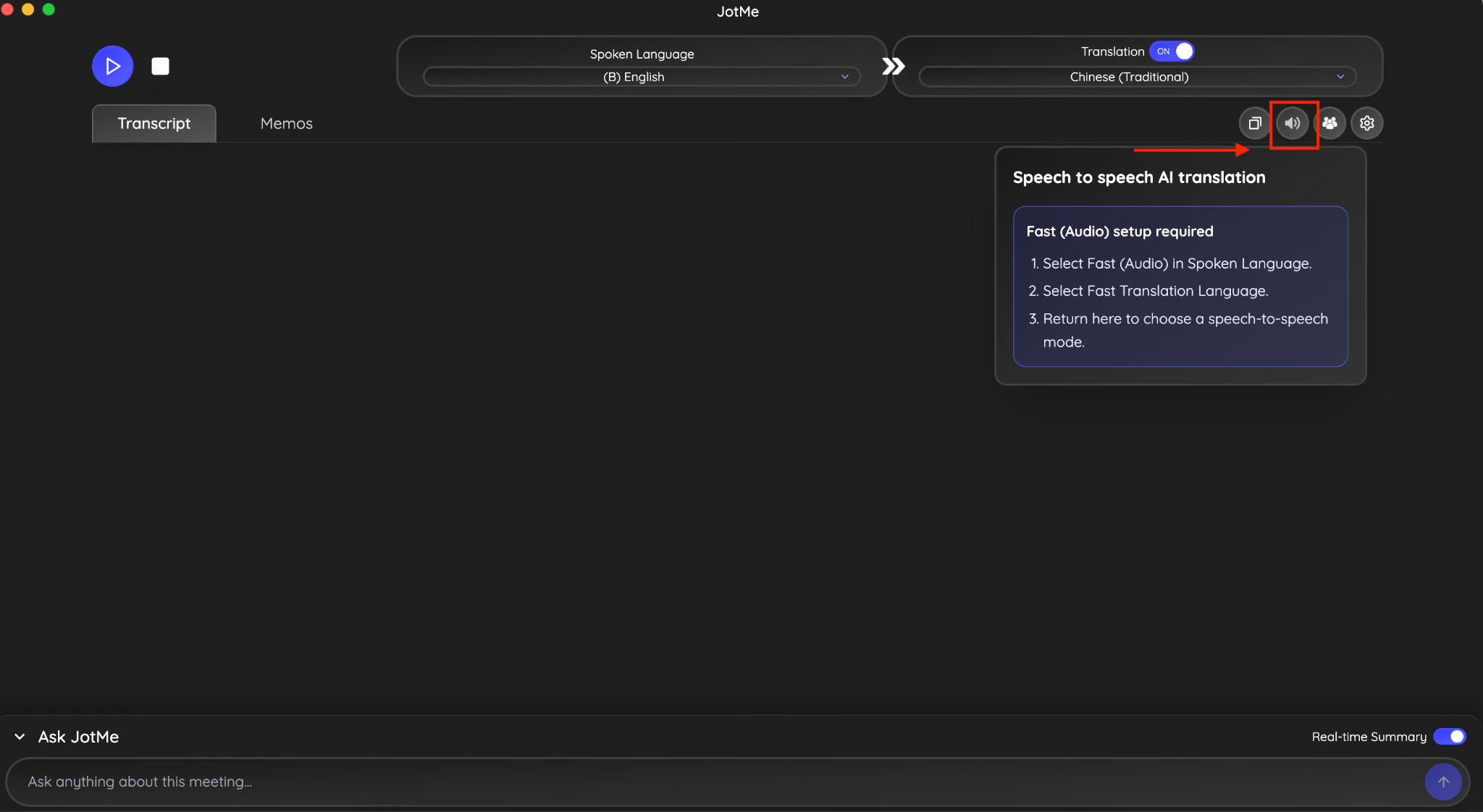
2단계: 안내되는 프롬프트에 따라 음성 언어 섹션에서 Fast Audio 옵션을 선택합니다.
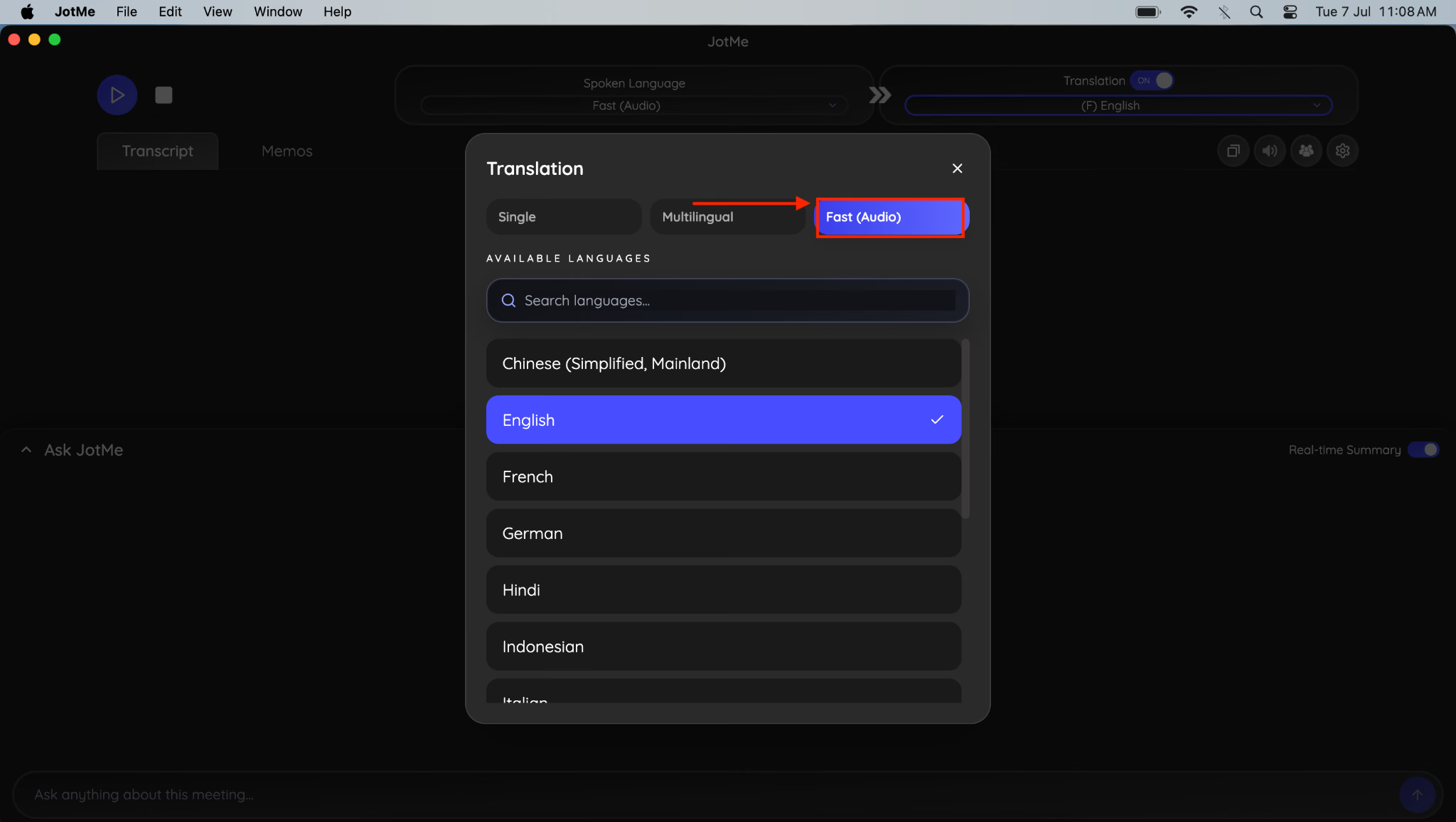
3단계: 이제 다시 오른쪽의 스피커(Speaker) 옵션으로 이동하여 음성 대 음성(speech-to-speech) AI 번역 옵션을 설정합니다.
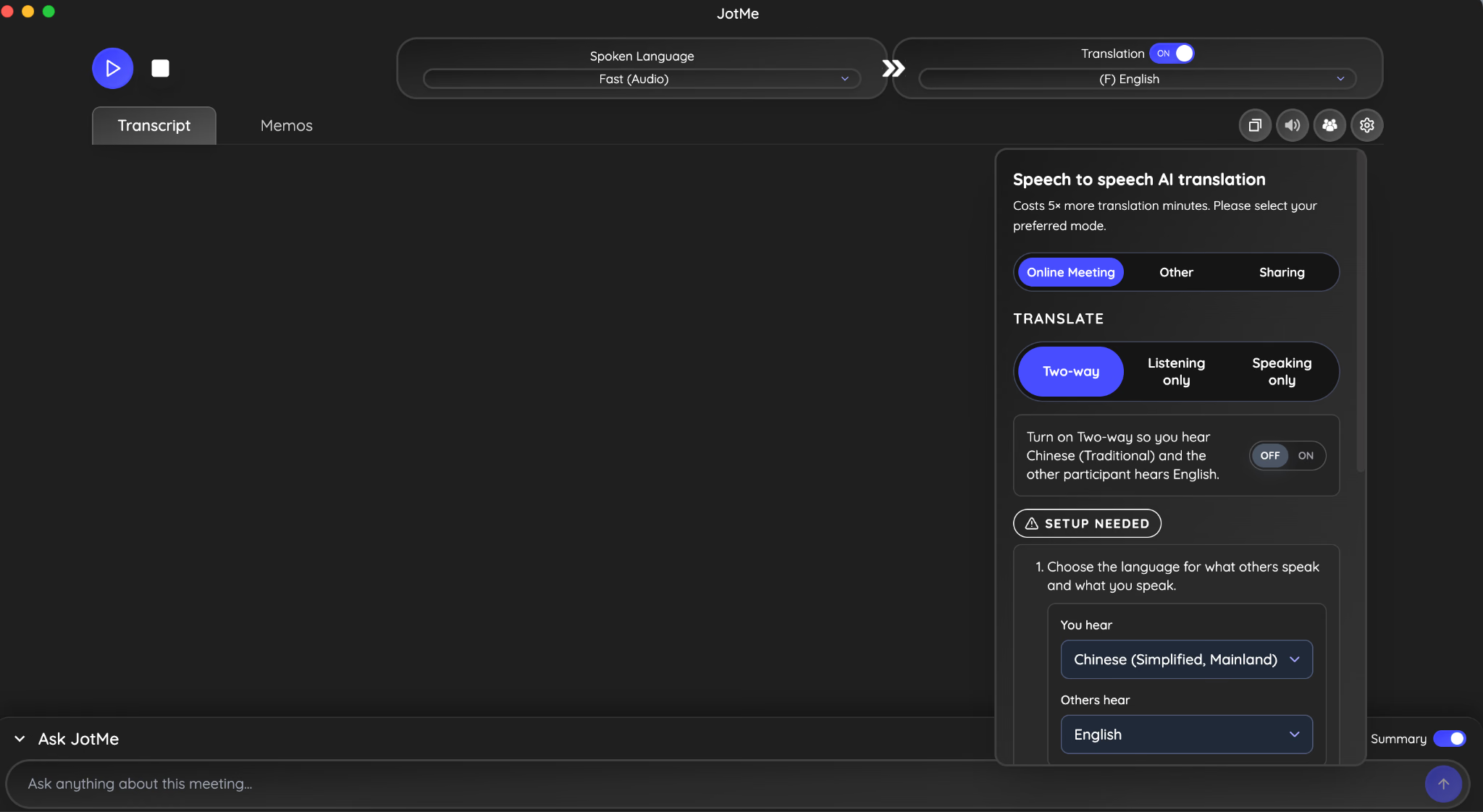
4단계: 회의 유형과 번역 옵션을 선택하고 양방향 커뮤니케이션을 활성화합니다.
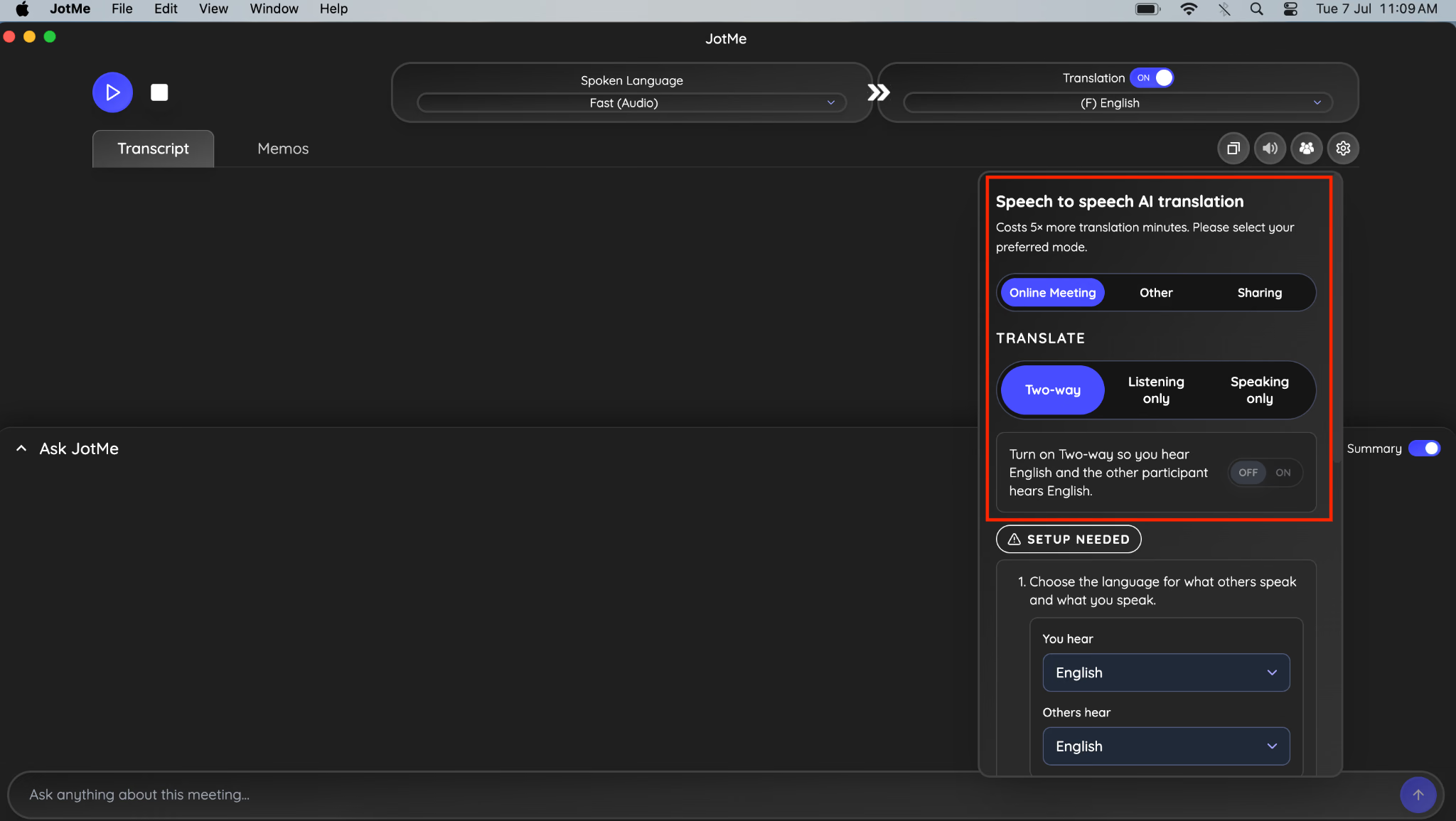
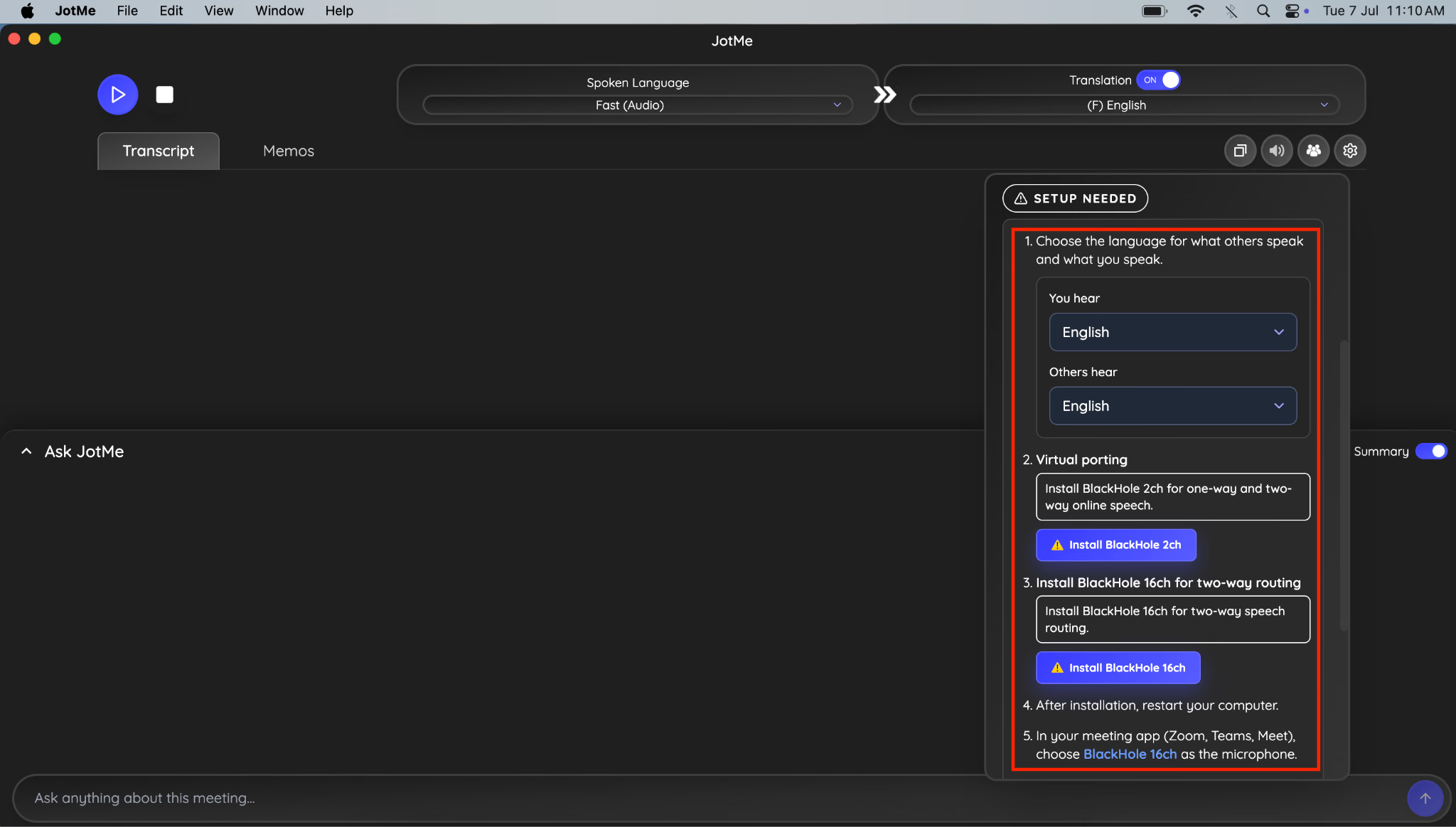
5단계: 내가 들을 언어를 선택하면 팀원이 들을 언어가 됩니다.그런 다음 BlackHole 2ch와 BlackHole 16ch를 설치합니다.
6단계: 완료되면 스피커 아이콘 옆의 공유 옵션으로 이동합니다.
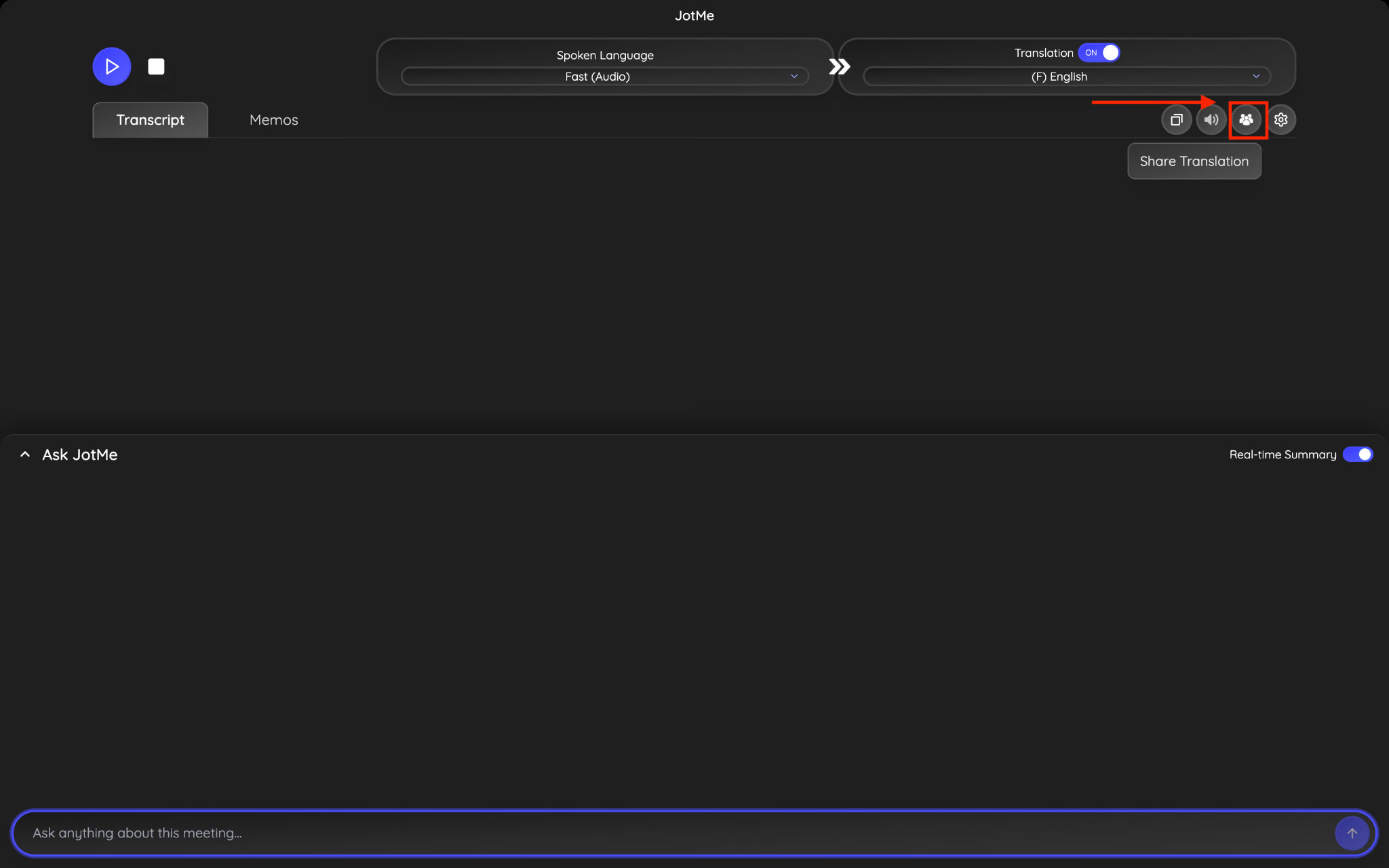
7단계: QR 코드로 이동하여 코드 생성(Generate code)을 클릭합니다.
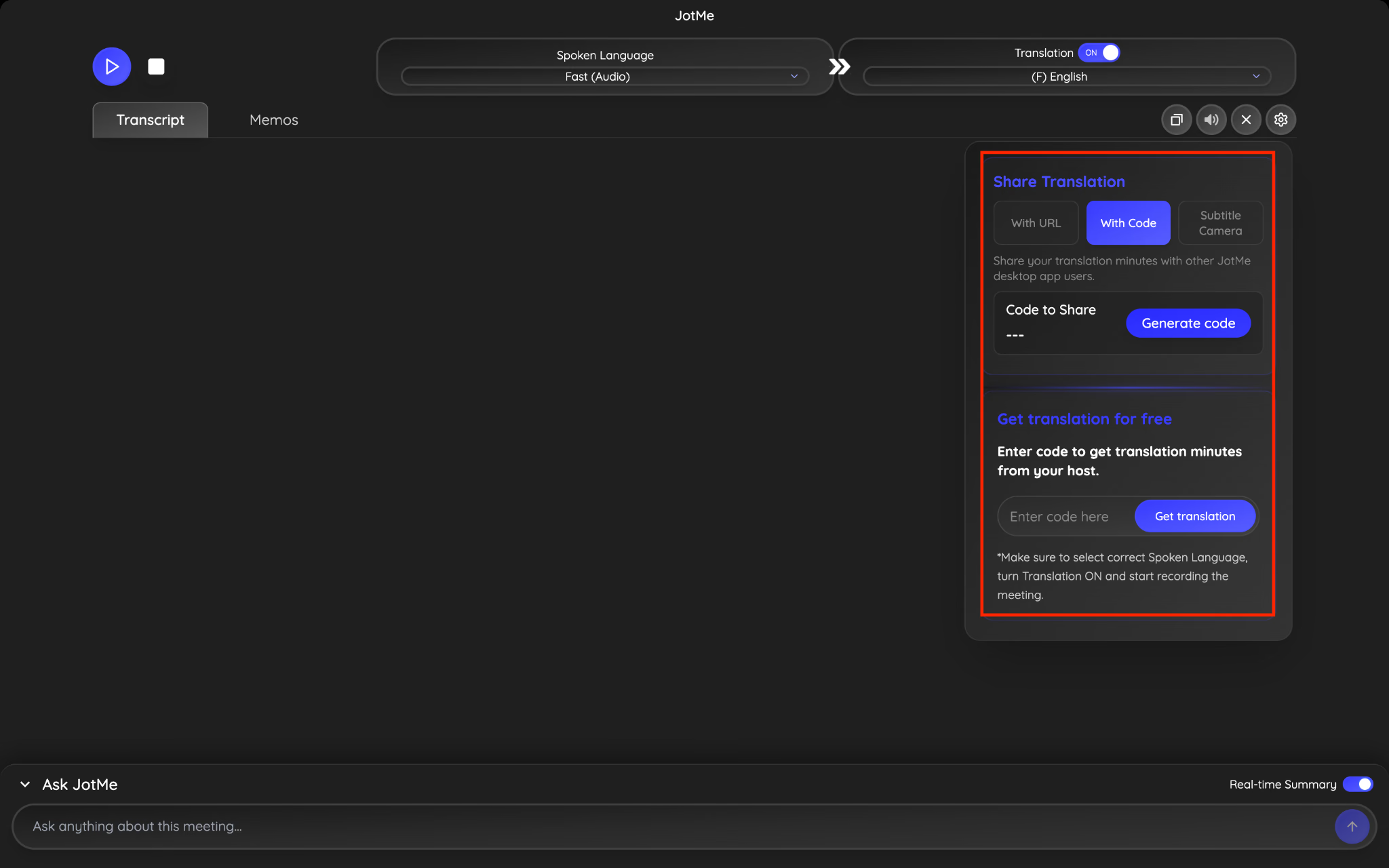
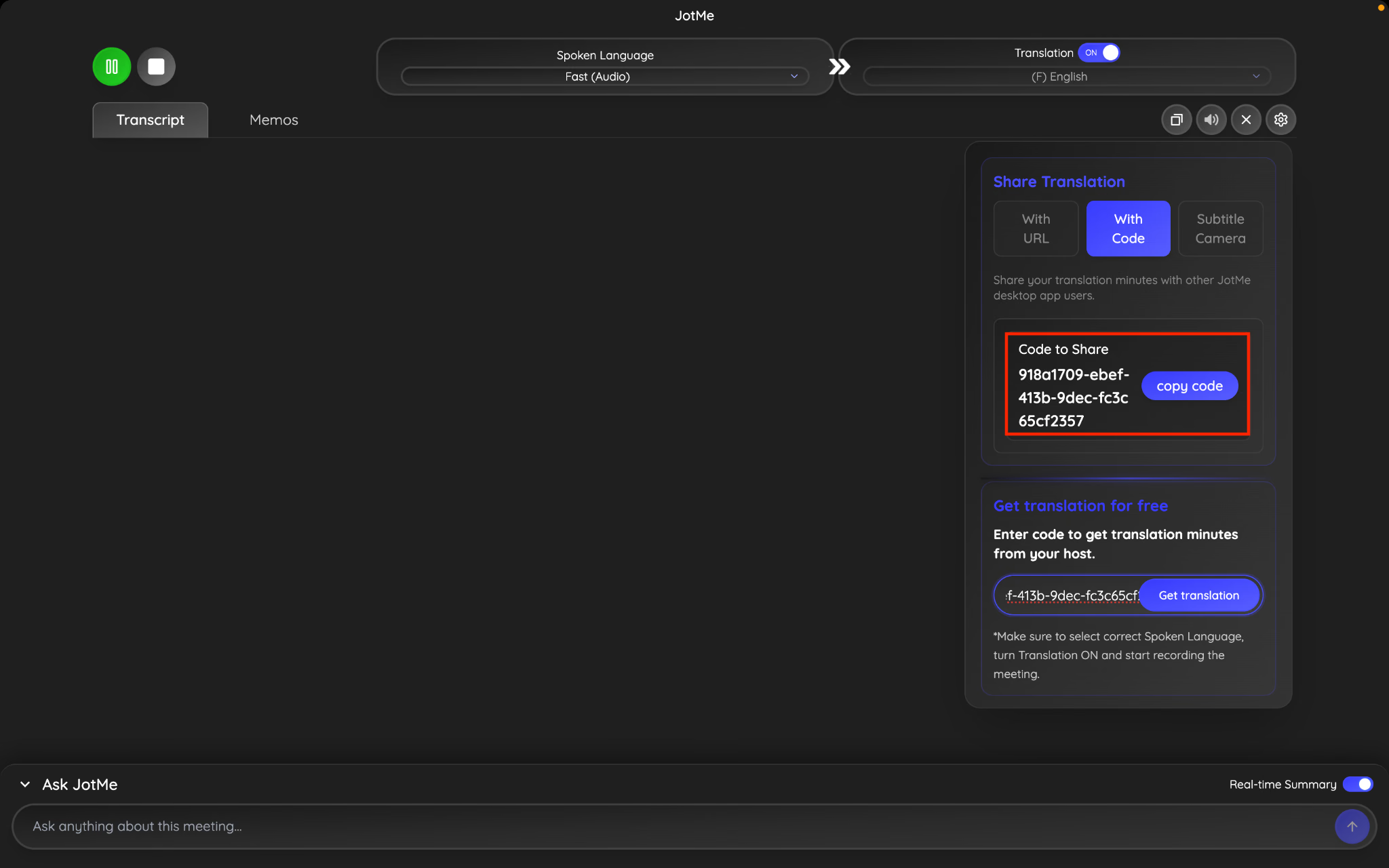
8단계: 코드를 복사하여 팀원과 공유합니다.팀원은 코드를 붙여넣고 음성을 듣고 싶은 언어를 선택하면, 실시간 번역과 함께 지연 없이 번역된 음성을 들을 수 있습니다.
다국어 팀과 회의 후 메모를 공유하는 방법은 무엇입니까?
이벤트 종료 후 JotMe는 자동으로 생성합니다. AI 회의 노트 통합 필사본과 함께.참가자는 메모를 자동으로 수신하므로 주최자가 수동으로 메모를 보낼 필요가 없습니다.여전히 JotMe 홈페이지에서 회의 기록에 액세스하여 전체 기록 및 요약을 검토할 수 있습니다.
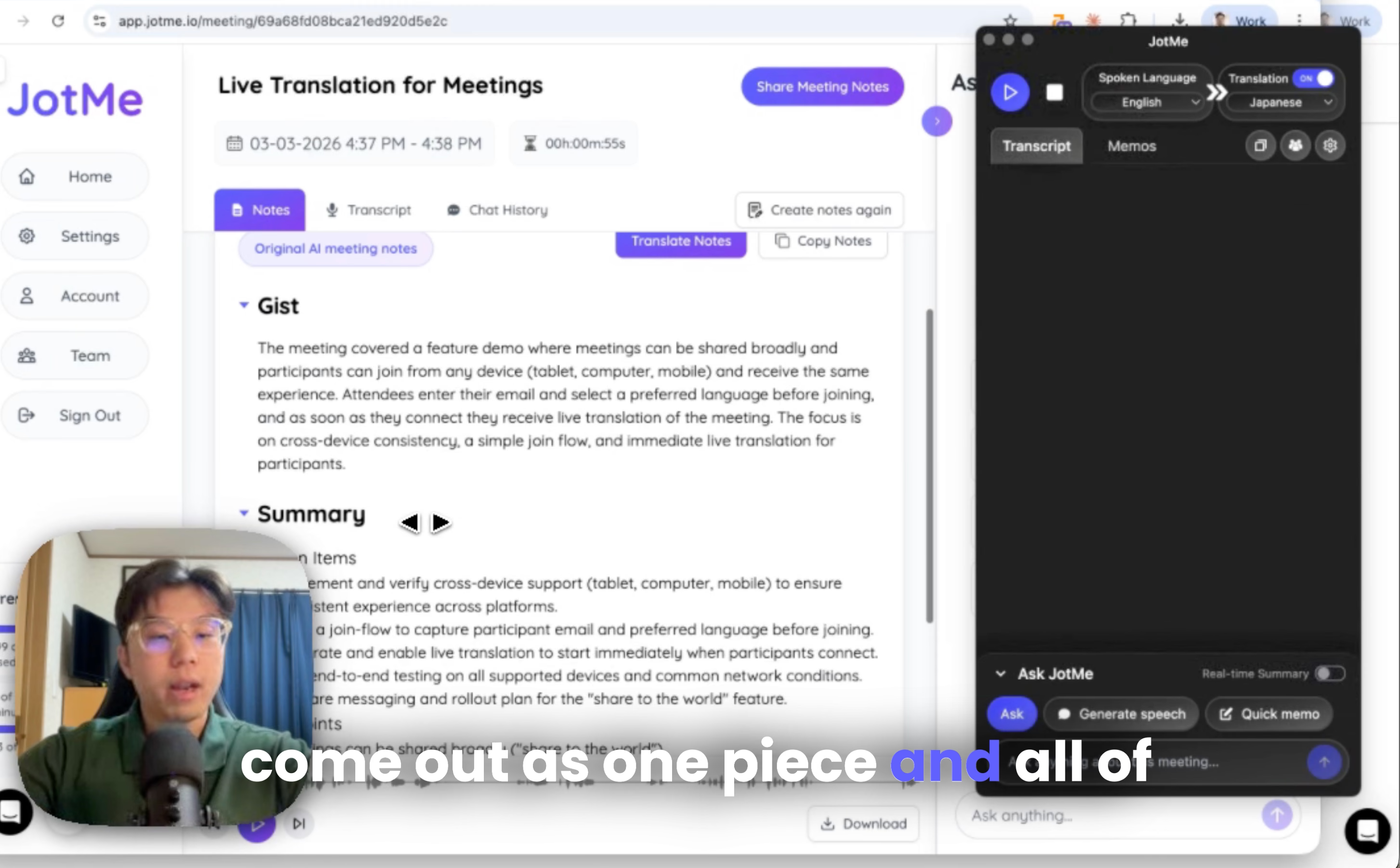
회의 후 메모는 무엇을 의미하나요?
모두 라이브 트랜스크립트 세션 중에 생성된 레코드가 하나의 레코드로 결합됩니다.
예를 들면 다음과 같습니다.
- 화자는 영어로 말했습니다.
- 일부 청중은 일본어 번역을 보았습니다.
- 기타 한국어 또는 스페인어로 본 사람
최종 레코드에는 세션 중에 말한 내용의 전체 필사본이 포함되며 다음을 사용할 수도 있습니다. AI 회의 노트 번역기 13개 이상의 언어로 메모를 번역할 수 있습니다.
아무것도 잃지 않습니다.
참가자가 이메일을 수신하기로 동의한 경우 세션이 끝난 후에도 이벤트 요약을 받을 수 있습니다.
JotMe로 실시간 번역 공유를 간편하게
이벤트당 수천 달러의 비용이 드는 값비싼 장비, 통역사 또는 엔터프라이즈 서비스가 필요했던 상황별 실시간 번역을 공유합니다.이제 QR 코드를 보여주는 것만큼 간단합니다.시청자는 QR 코드를 스캔하고 언어를 선택한 후 대화를 즉시 팔로우합니다.컨퍼런스를 위한 QR 코드 공유, 가상 이벤트를 위한 URL 공유, 프레젠테이션을 위한 웹캠 자막 공유, 또는 인터랙티브한 대화를 위한 음성 대 음성 번역 중 무엇을 선택하든 JotMe는 다국어 커뮤니케이션을 손쉽게 만들어 줍니다.
직접 사용해보고 싶다면 다음에서 JotMe를 다운로드하십시오. https://www.jotme.io/.
또는 계정을 만들고 확인하세요 가격 책정 옵션.
이벤트 주최자, 컨퍼런스 주최자 및 글로벌 이벤트를 운영하는 회사의 피드백을 언제나 기쁘게 생각합니다.궁금한 점이나 기업 관련 문의가 있는 경우 언제든지 문의해 주십시오. hey@jotme.io.
언젠가 우리는 세상이 얼마나 멋질지에 대해 대화를 나누게 될 것입니다!그럼 얘기해 보세요!
Last updated on
July 13, 2026
Follow us on social media: