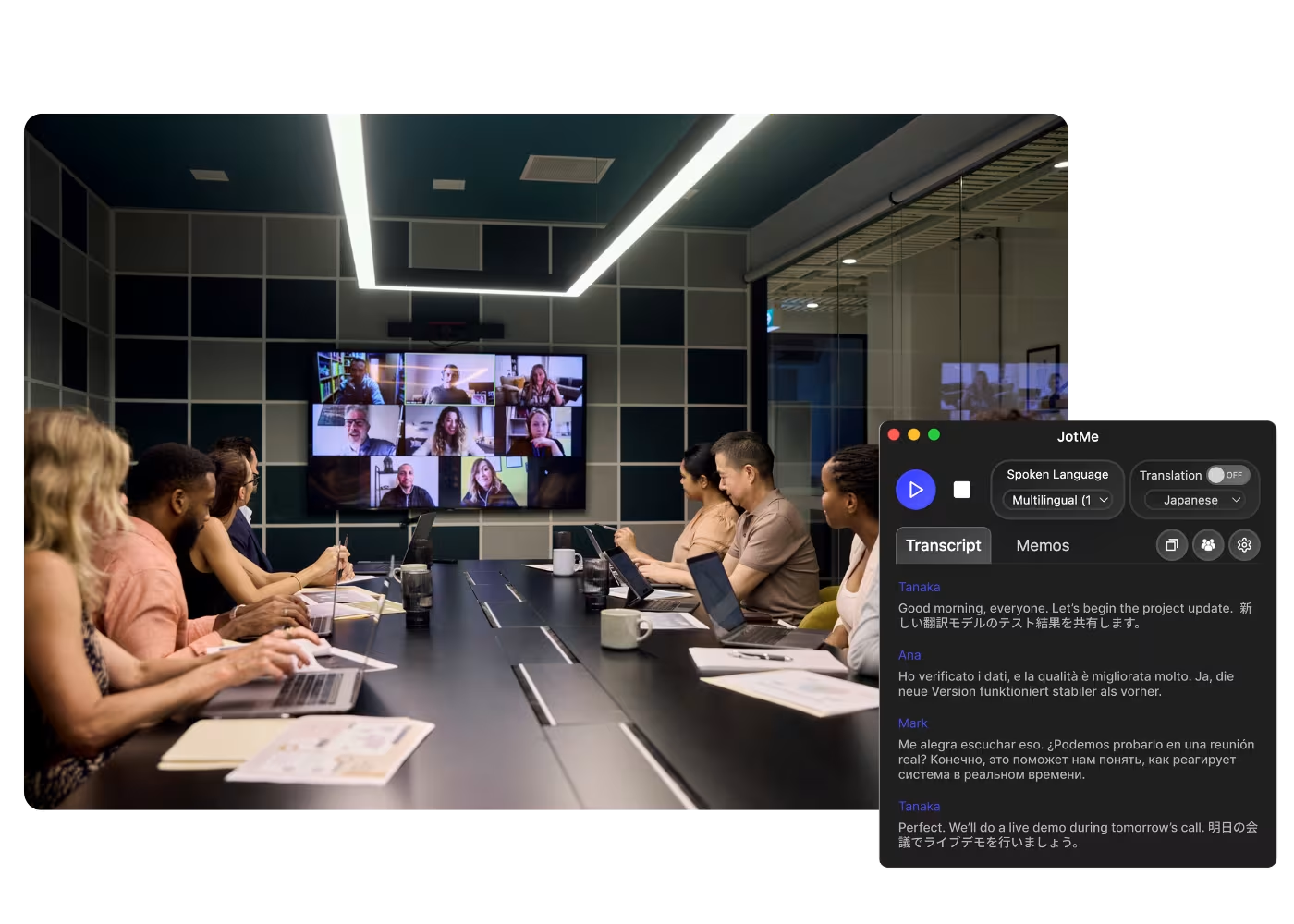
App desktop para todas as chamadas no computador

Transcrição multilíngue, tradução de voz em tempo real, anotação, busca por IA, resumo em tempo real, vocabulário personalizado, atas de reunião por IA, gravações de áudio e mais.

App móvel para conversas presenciais

Tradução de voz em tempo real e geração de voz por IA para iPhone e Android.

Extensão do Chrome para Google Meet

Transcrição em tempo real, tradução de voz em tempo real, anotação, atas de reunião por IA.
Adicionar ao
Chrome
Teste rápido disponível

Google Meet Transcript Translation

Turn any Google Meet into a transcript translated into your language, from the live call or a recording you upload, with context-aware accuracy that keeps domain terms right. Translate the record once the meeting is done.

Usado por 2.000 equipes e 500.000 profissionais em 134 países

Avaliado em 4.7/5
Em conformidade com o GDPR
SOC 2 Tipo II (Em Andamento)

Google Meet Transcript Translation

Need to translate the entire transcripts after meetings? JotMe provides instant translation for any transcripts from Google Meet in up to 77 languages. Sign up today for free – no credit card required – and never miss an important detail again in any language.

How to translate a Google Meet transcript

Em 3 passos simples!

PASSO 1

1. Add the Chrome extension, or upload your Meet recording

Add JotMe to Chrome or get the desktop app. Already have a recorded Meet? Upload it and JotMe builds the transcript, ready to translate.

PASSO 2

2. Set the spoken language

Choose the language being spoken in the meeting, for example Japanese. If people switch languages, pick multilingual mode.

PASSO 3

3. Translate the transcript

Open the meeting on your dashboard and translate the transcript into your language. Domain terms keep their professional meaning, so the translated record reads right.

Veja em Ação!

What teams use Meet transcript translation for

A woman is working effectively

Global all-hands & team meetings

Follow announcements from HQ in your language and speak up without waiting for a recap.

Track Conversations in Real-Time

Sales & client calls

Catch every requirement and objection when customers speak another language, and reply with confidence.

A group a having a discussion and speech is transcribed

Recorded Meet meetings

No time to run it live? Upload the recording to Audio to Text or Video to Text, get the transcript, and translate it accurately into your language, no need to have been in the call.

Perguntas frequentes

Tudo o que você precisa saber sobre como organizar reuniões e eventos com o JotMe.

Is translating transcripts free?

Yes! You can upgrade your plan for more AI credits to translate the transcript if needed.

How do I get translated transcript for Google Meet?

Install the JotMe Chrome extension to your Chrome browser. Select the language you want for translating transcripts on the JotMe dashboard.

Where will be the translated transcript stored?

Translated transcripts are stored on the dashboard. Access them from the transcription dashboard, Chrome extension popup, or URL.

Can I search for specific words in the translated transcript?

Yes! Visit the dashboard and use cmd + F to search for specific words in your translated transcript page.

Which languages are available for Google Meet transcripts and translation?

Transcripts are available in 77 languages, including English, Japanese, Chinese, Korean, Spanish, Portuguese, French, German, Swedish, Finnish, Arabic, Hindi, Urdu, Turkish, Norwegian, Italian, Burmese, Russian, Filipino, Swahili, Hungarian, and more. For translation, 13 languages are available. Ensure you select the correct language you need.

The Easiest and Most Reliable Way to Translate Google Meet Transcripts

Idioma Disponível
Afrikaans (África do Sul)
Albanês (Albânia)
Amárico (Etiópia)
Árabe (Emirados Árabes)
Árabe (Egito)
Árabe (Levante)
Árabe (Magrebe)
Armênio (Armênia)
Basco (Espanha)
Bengali (Bangladesh)
Búlgaro (Bulgária)
Birmanês (Mianmar)
Catalão (Espanha)
Chinês Mandarim (Simplificado)
Chinês Mandarim (Tradicional)
Neerlandês
Inglês
Inglês (Austrália)
Inglês (Índia)
Inglês (Filipinas)
Inglês (Reino Unido)
Estoniano (Estónia)
Filipino (Filipinas)
Finlandês (Finlândia)
Francês
Francês (Canadá)
Galego (Espanha)
Georgiano (Geórgia)
Alemão
Guzerate (Índia)
Hebraico (Israel)
Hindi
Húngaro (Hungria)
Indonésio (Indonésia)
Italiano
Japonês
Javanês (Indonésia)
Kannada (Índia)
Khmer (Camboja)
Kinyarwanda (Ruanda)
Coreano
Letão (Letônia)
Macedônio (Macedônia do Norte)
Letão (Letônia)
Macedônio (Macedônia do Norte)
Malaiala (Índia)
Marata (Índia)
Mongol (Mongólia)
Nepalês (Nepal)
Sotho do Norte (África do Sul)
Norueguês (Noruega)
Persa (Irã)
Polonês (Polônia)
Português (Brasil)
Português (Portugal)
Romeno (Romênia)
Russo
Sesotho (África do Sul
Cingalês (Sri Lanka)
Eslovaco (Eslováquia)
Esloveno (Eslovênia)
Espanhol (México)
Espanhol (Espanha)
Sudanês (Indonésia)
Suaíli
Suázi (África do Sul)
Sueco (Suécia
Tâmil (Índia)
Telugu (Índia)
Tailandês (Tailândia)
Tshivenda (África do Sul)
Tswana (África do Sul)
Turco (Turquia)
Urdu (Paquistão)
Uzbeque (Uzbequistão)
Vietnamita (Vietnã)
Xhosa (África do Sul)
Xitsonga (África do Sul)
Zulu (África do Sul)

MORE THAN TRANSCRIPT TRANSLATION

JotMe not only provides transcript translation but also offers real-time translation and post-meeting tools. Explore our comprehensive suite of multilingual AI tools - from AI translation to AI meeting notes. Automate transcript translation and other tasks with JotMe to focus on more impactful tasks, such as decision-making and tackling action items effectively.

 Conduza cada reunião e evento das suas operações multilíngues sem atritos

Transcreva, interprete, traduza e transforme cada conversa crítica em insights com contexto para que todos se mantenham alinhados entre idiomas.

Google Meet Transcript Translation

Turn any Google Meet into a transcript translated into your language, from the live call or a recording you upload, with context-aware accuracy that keeps domain terms right. Translate the record once the meeting is done.

Plano gratuito. Não é necessário cartão de crédito.

Drop in a Google Meet recording video and JotMe returns the transcript, with speakers and timestamps. Translate it for subtitles. Open the full demo.

Usado por 2.000 equipes e 500.000 profissionais em 134 países

Avaliado em 4.7/5
Em conformidade com o GDPR
SOC 2 Tipo II (Em Andamento)

Translated transcripts for every Google Meet

Everything you need to share what was said, in any language.

Precisa e consciente do contexto

O JotMe traduz o significado, não as palavras. Cada linha considera quem está falando, no que a sua equipe trabalha, o que já foi dito na reunião, os seus termos personalizados e como a frase se conecta à anterior. Gírias, jargões e termos técnicos saem certos na transcrição traduzida.

Funciona depois da reunião

A reunião já acabou? Envie a gravação, ou abra uma transcrição do JotMe no seu painel, e traduza a ata da reunião para o seu idioma com um clique.

200+ idiomas, ao vivo ou de uma gravação

Traduza as transcrições do Meet para mais de 200 idiomas, da chamada ao vivo ou da gravação que você enviar depois.

A sua tradução fica salva

A transcrição, a tradução e as notas ficam salvas no seu painel após cada chamada, então nada some quando a reunião termina.

Sem bot, sem configuração

O JotMe captura as legendas do Meet no seu navegador ou o áudio do seu computador. Nenhum bot entra na chamada, e não há nada que os outros precisem instalar ou ativar.

Dicionário personalizado e detecção automática de idioma

Melhore a precisão com termos específicos do seu setor e substituições personalizadas. O JotMe também detecta o idioma falado automaticamente, então você nunca configura na mão.

How to translate a Google Meet transcript

Three steps, under a minute. No Meet settings, no bot invite, no host approval. Already have a recording? Upload it instead.

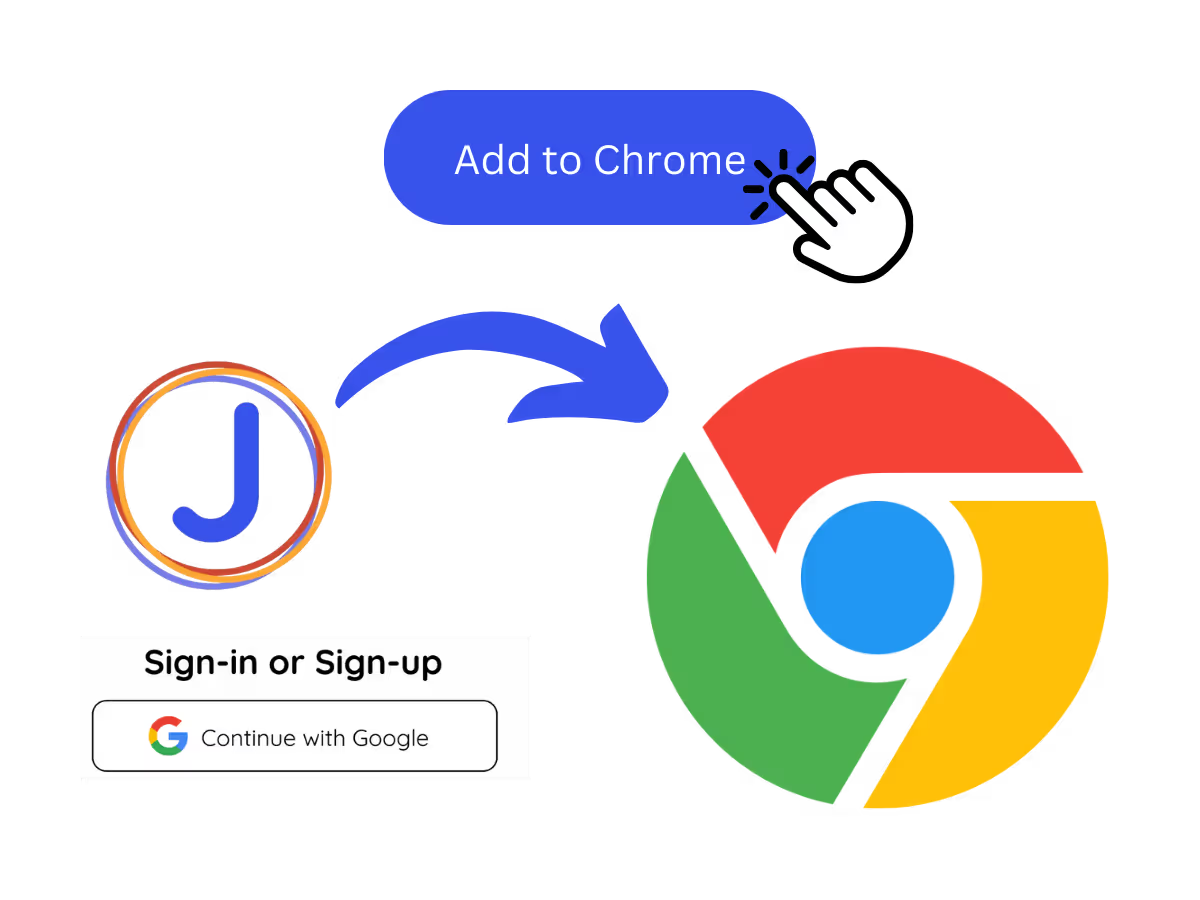
STEP 1

1. Add the Chrome extension, or upload your Meet recording

Add JotMe to Chrome or get the desktop app. Already have a recorded Meet? Upload it and JotMe builds the transcript, ready to translate.
STEP 2

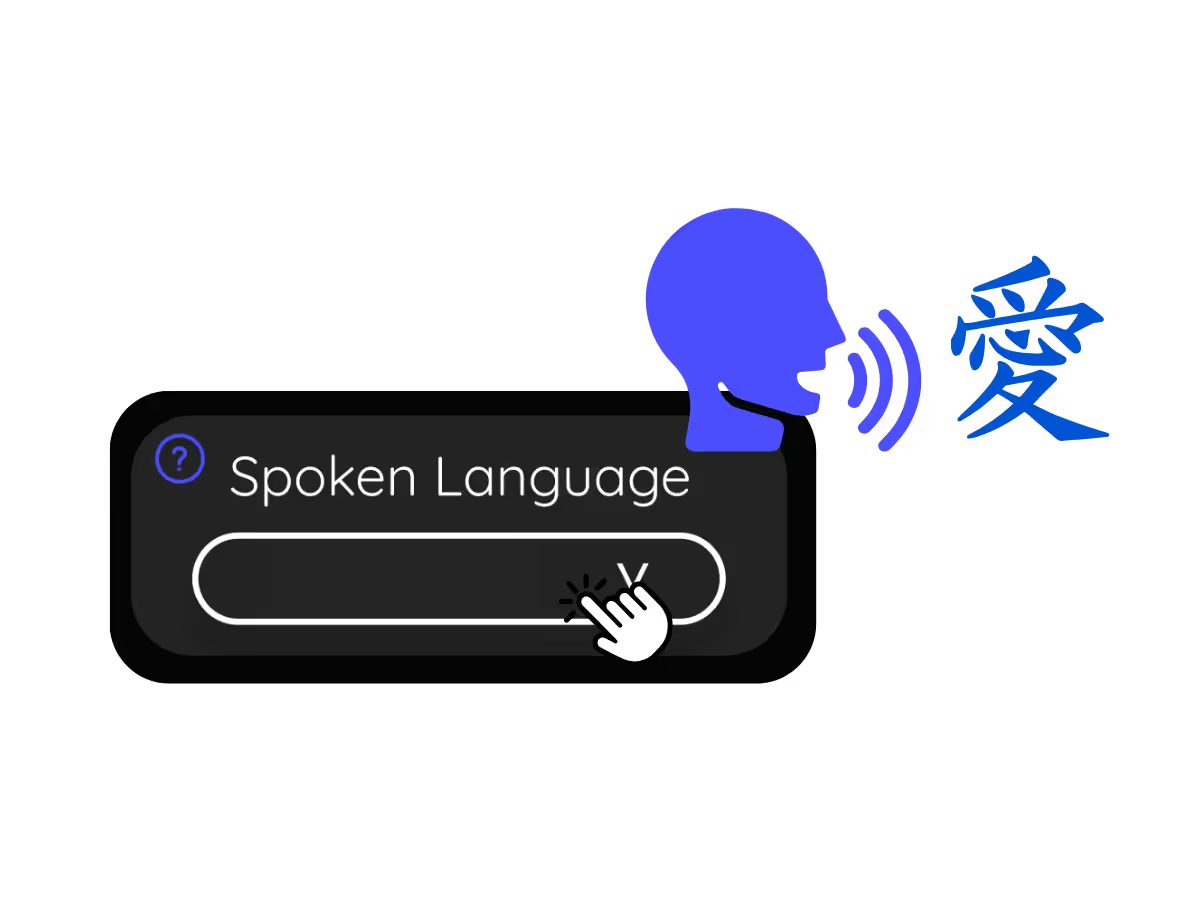
2. Set the spoken language

Choose the language being spoken in the meeting, for example Japanese. If people switch languages, pick multilingual mode.
STEP 3

3. Translate the transcript

Open the meeting on your dashboard and translate the transcript into your language. Domain terms keep their professional meaning, so the translated record reads right.
What teams use Meet transcript translation for

From daily standups to all-hands, JotMe keeps every attendee in the conversation.

Global all-hands & team meetings

Follow announcements from HQ in your language and speak up without waiting for a recap.

Sales & client calls

Catch every requirement and objection when customers speak another language, and reply with confidence.

Recorded Meet meetings

No time to run it live? Upload the recording to Audio to Text or Video to Text, get the transcript, and translate it accurately into your language, no need to have been in the call.

Webinars & training

Share a translated meeting record with everyone who needs it, so attendees and stakeholders read the session in their own language after it ends.

See it in action

Watch a Google Meet become a transcript, then flip it into another language on the dashboard.

Mais de 500.000 profissionais reuniões e conduzem reuniões e eventos com o JotMe

Veja como usuários estão usando o JotMe para eliminar lacunas em operações multilíngues.

Avaliado em 4.7/5
Avaliado em 4.7/5
"Como meu trabalho envolve tradução e conexão de culturas, considerei esta ferramenta um divisor de águas no meu dia a dia."
Adams
Especialista em Operações / Tiktok
"O japonês já foi um mistério para mim, mas este produto o tornou claro e acessível com compreensão contextual."
Stamatis
Consultor / Deloitte
"O JotMe otimiza nossas reuniões multilíngues, garantindo uma colaboração fluida em nosso ambiente de trabalho dinâmico."
Cesar
Gerente de Programa / Amazon
"Este recurso bilíngue otimiza a tomada de notas no trabalho, economizando tempo e aumentando a eficiência em ambos os idiomas."
Yusuke
Gerente de Vendas / NTT
"Essencial para quem não domina o idioma; simplifica reuniões complexas com tradução em tempo real e transcrições precisas."
Jesse
Freelancer de Software
"A ferramenta de tradução que precisávamos há anos – agora uma realidade com o JotMe!"
Elston
CEO e Fundador / Tiny.host
"Como meu trabalho envolve tradução e conexão de culturas, considerei esta ferramenta um divisor de águas no meu dia a dia."
Adams
Especialista em Operações / Tiktok
"O japonês já foi um mistério para mim, mas este produto o tornou claro e acessível com compreensão contextual."
Stamatis
Consultor / Deloitte
"O JotMe otimiza nossas reuniões multilíngues, garantindo uma colaboração fluida em nosso ambiente de trabalho dinâmico."
Cesar
Gerente de Programa / Amazon
"Este recurso bilíngue otimiza a tomada de notas no trabalho, economizando tempo e aumentando a eficiência em ambos os idiomas."
Yusuke
Gerente de Vendas / NTT
"Essencial para quem não domina o idioma; simplifica reuniões complexas com tradução em tempo real e transcrições precisas."
Jesse
Freelancer de Software
"A ferramenta de tradução que precisávamos há anos – agora uma realidade com o JotMe!"
Elston
CEO e Fundador / Tiny.host

Perguntas frequentes

Tudo o que você precisa saber sobre como realizar reuniões e eventos com o JotMe.

Can I translate a Google Meet transcript?

Yes. JotMe transcribes the meeting, live or from an uploaded recording, and translates the transcript into 200+ languages on your dashboard.

Can I translate a transcript from a recording?

Yes. Upload the recording to Audio to Text or Video to Text, and JotMe transcribes it and translates the transcript into the language you choose.

Is Meet transcript translation free?

Yes. JotMe's free plan includes live translation minutes, and no credit card is required. Upgrade when you need more minutes.

How accurate is the transcript translation?

JotMe translates with five layers of context: your user profile, your operational context, real-time memory of the meeting, your custom terms, and how each line connects to the last, so the translated transcript stays accurate. It reads true to what was said.

Can I save the translated captions?

Yes. JotMe stores the transcript and translation on your dashboard, so you can review, copy, and share them after the meeting.

What languages can transcripts be translated into?

JotMe translates Meet transcripts into 200+ target languages, including regional variants like Cantonese, Latin American Spanish, and Swiss German. See the full list on the available languages page.

Is the translation captions or voice?

Live translation shows as captions, and fast mode can speak it aloud. Voice-to-voice uses your own cloned voice in 100+ languages.

Heading

You can translate
Bulgarian
Catalan
Mandarin (Simplified
Mandarin (Traditional)
Cantonese (Traditional)
Czech, Danish
Dutch
English (US)
English (UK)
English (Australia)
English (New Zealand)
English (India)
Estonian, Finnis
French
French (Canada
German
German (Switzerland
Greek
Hindi
Hungarian
Indonesian
Italian
Japanese
Korean
Latvian
Lithuanian
Malay
Dutch (Flemish)
Norwegian
Polish
Portuguese
Portuguese (Brazil)
Portuguese (Portugal)
Romanian
Russian
Slovak
Spanish
Spanish (Latin America)
Swedish
Thai
Turkish
Ukrainian
Vietnamese

Every Google Meet, readable in any language

The transcript of every Google Meet, translated into the language your team reads, from live calls or uploaded recordings. Transcript translation the whole team can use.