Ứng dụng desktop cho mọi cuộc gọi trên máy tính

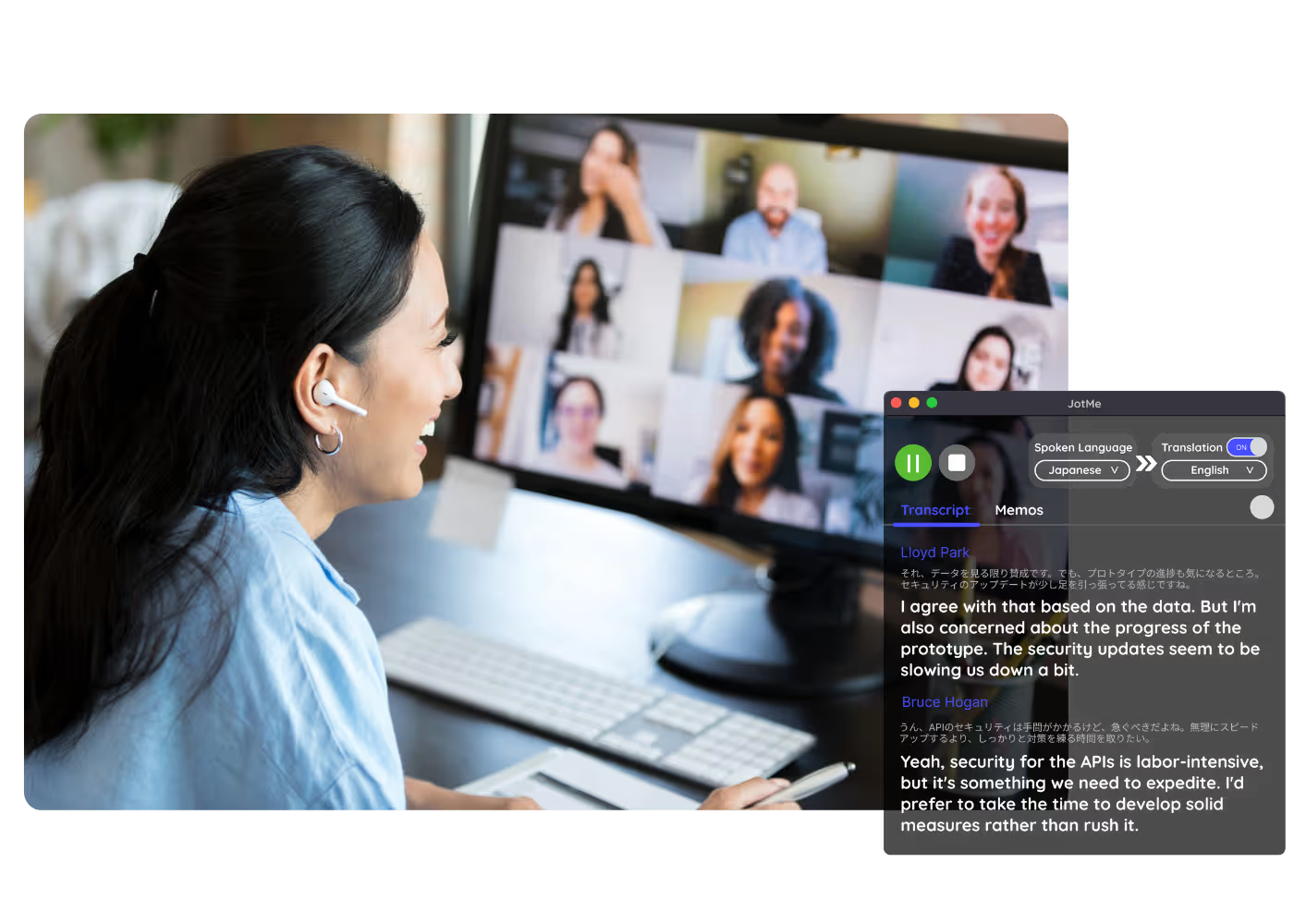
Chuyển giọng nói thành văn bản đa ngôn ngữ, dịch giọng nói thời gian thực, ghi chú, tìm kiếm bằng AI, tóm tắt theo thời gian thực, từ vựng tùy biến, biên bản cuộc họp bằng AI, ghi âm và nhiều hơn nữa.

Ứng dụng di động cho hội thoại trực tiếp

Dịch giọng nói thời gian thực và tạo giọng nói bằng AI cho iPhone và Android.

Tiện ích mở rộng Chrome cho Google Meet

Chuyển giọng nói thành văn bản theo thời gian thực, dịch giọng nói thời gian thực, ghi chú, biên bản cuộc họp bằng AI.
Thêm vào
Chrome
Có thể dùng thử nhanh

Google Meet Bilingual Transcript

Every Google Meet becomes a bilingual transcript: the original speech and its translation side by side, line by line, with speaker labels, from live calls or recordings you upload. One accurate record both sides read.

Được 2.000 đội nhóm và 500.000 chuyên gia tại 134 quốc gia tin dùng

Được đánh giá 4.7/5
Tuân thủ GDPR
SOC 2 Loại II (Đang tiến hành)

Transcript & Translation Chrome Extension for Google Meet

Need to verify meeting details or maintain recordings for company compliance in multiple languages? JotMe provides instant access to your bilingual transcripts right after your Google Meet sessions, supporting up to 77 languages. Sign up today for free – no credit card required – and never miss an important detail again!

How to get a bilingual transcript from Google Meet

Chỉ với 3 bước dễ dàng!

BƯỚC 1

1. Add the Chrome extension, or upload your Meet recording

Add JotMe to Chrome or get the desktop app. Already have a recorded Meet? Upload it for the same bilingual, side-by-side output.

BƯỚC 2

2. Set the spoken language

Choose the language being spoken in the meeting, for example Japanese. If people switch languages, pick multilingual mode.

BƯỚC 3

3. Open the bilingual record

The transcript on your dashboard keeps the original and translated text together, ready to review, edit speaker names, and share with both sides.

Xem nó hoạt động!

What teams use bilingual transcripts for

A woman is working effectively

Reporting to HQ in another language

Run the meeting in Japanese and hand HQ a Japanese-English meeting transcript they can read, with the original right beside it for anyone who wants to check.

Track Conversations in Real-Time

Sales & client calls

Pull exact quotes and commitments from client calls when you need them.

A group a having a discussion and speech is transcribed

Recorded Meet meetings

No time to run it live? Upload the recording and JotMe returns the same accurate bilingual transcript, no need to have been in the call.

Câu hỏi thường gặp

Mọi điều bạn cần biết về việc tổ chức các cuộc họp và sự kiện với JotMe.

Is bilingual transcript free?

Yes! You can upgrade your plan for more translation minutes and AI credit to translate the transcript if needed.

How do I add the bilingual transcript extension for Google Meet?

Install the JotMe Chrome extension to your Chrome browser. Set the language preference to receive transcripts and translations.

Where is the Google Meet bilingual transcript stored?

Transcripts are stored on the dashboard. Access them from the transcription dashboard, Chrome extension popup, or URL.

Can I search for specific words in the bilingual transcript?

Yes! Visit the dashboard and use cmd + F to search for specific words in your transcript.

Which languages are available for Google Meet transcripts and translation?

Transcripts are available in 77 languages, including Japanese, Chinese, Korean, Spanish, Portuguese, French, German, Swedish, Finnish, Arabic, Hindi, Urdu, Turkish, Norwegian, Italian, Burmese, Russian, Filipino, Swahili, Hungarian, and more. Ensure you select the correct language during your Google Meet.

The Easiest and Most Reliable Way to Store and Access Google Meet Transcripts with Translation

Ngôn ngữ có sẵn
Tiếng Afrikaans (Nam Phi)
Tiếng Albania (Albania)
Tiếng Amharic (Ethiopia)
Tiếng Ả Rập (Các Tiểu vương quốc Ả Rập Thống nhất)
Tiếng Ả Rập (Ai Cập)
Tiếng Ả Rập (Levant)
Tiếng Ả Rập (Maghrebi)
Tiếng Armenia (Armenia)
Tiếng Basque (Tây Ban Nha)
Tiếng Bengali (Bangladesh)
Tiếng Bulgaria (Bulgaria)
Tiếng Miến Điện (Myanmar)
Tiếng Catalan (Tây Ban Nha)
Tiếng Quan Thoại (Giản thể)
Tiếng Quan Thoại (Phồn thể)
Tiếng Hà Lan
Tiếng Anh
Tiếng Anh (Úc)
Tiếng Anh (Ấn Độ)
Tiếng Anh (Philippines)
Tiếng Anh (Vương quốc Anh)
Tiếng Estonia (Estonia)
Tiếng Filipino (Philippines)
Tiếng Phần Lan (Phần Lan)
Tiếng Pháp
Tiếng Pháp (Canada)
Tiếng Galicia (Tây Ban Nha)
Tiếng Gruzia (Gruzia)
Tiếng Đức
Tiếng Gujarati (Ấn Độ)
Tiếng Do Thái (Israel)
Tiếng Hindi
Tiếng Hungary (Hungary
Tiếng Indonesia (Indonesia)
Tiếng Ý
Tiếng Nhật
Tiếng Java (Indonesia)
Tiếng Kannada (Ấn Độ)
Tiếng Khmer (Campuchia)
Tiếng Kinyarwanda (Rwanda)
Tiếng Hàn
Tiếng Latvia (Latvia)
Tiếng Macedonia (Bắc Macedonia)
Tiếng Latvia (Latvia)
Tiếng Macedonia (Bắc Macedonia)
Tiếng Malayalam (Ấn Độ)
Tiếng Marathi (Ấn Độ)
Tiếng Mông Cổ (Mông Cổ)
Tiếng Nepal (Nepal)
Tiếng Bắc Sotho (Nam Phi)
Tiếng Na Uy (Na Uy)
Tiếng Ba Tư (Iran)
Tiếng Ba Lan (Ba Lan)
Tiếng Bồ Đào Nha (Brazil)
Tiếng Bồ Đào Nha (Bồ Đào Nha)
Tiếng Romania (Romania)
Tiếng Nga
Tiếng Sesotho (Nam Phi
Tiếng Sinhala (Sri Lanka)
Tiếng Slovak (Slovakia)
Tiếng Slovenia (Slovenia)
Tây Ban Nha (Mexico)
Tây Ban Nha (Tây Ban Nha)
Sundanese (Indonesia)
Swahili
Swati (Nam Phi)
Thụy Điển (Thụy Điển
Tamil (Ấn Độ)
Telugu (Ấn Độ)
Thái (Thái Lan)
Tshivenda (Nam Phi)
Tswana (Nam Phi)
Thổ Nhĩ Kỳ (Thổ Nhĩ Kỳ)
Urdu (Pakistan)
Uzbek (Uzbekistan)
Tiếng Việt (Việt Nam)
Xhosa (Nam Phi)
Xitsonga (Nam Phi)
Zulu (Nam Phi)

MORE THAN BILINGUAL TRANSCRIPT

JotMe not only provides bilingual transcripts but also offers real-time translation and post-meeting tools. Explore our comprehensive suite of multilingual AI tools - from AI translation to AI meeting notes. Automate your work with bilingual transcript and other tasks with JotMe to focus on more impactful tasks, such as decision-making and tackling action items effectively.

Vận hành mọi cuộc họp và sự kiện đa ngôn ngữ thật trôi chảy

Chuyển giọng nói thành văn bản, phiên dịch, dịch và biến mọi cuộc trò chuyện quan trọng thành insight có ngữ cảnh để mọi người luôn đồng bộ giữa các ngôn ngữ.

Google Meet Bilingual Transcript

Every Google Meet becomes a bilingual transcript: the original speech and its translation side by side, line by line, with speaker labels, from live calls or recordings you upload. One accurate record both sides read.

Gói miễn phí. Không cần thẻ tín dụng.

Drop in a Google Meet recording video and JotMe returns the transcript, with speakers and timestamps. Translate it for subtitles. Open the full demo.

Được 2.000 đội nhóm và 500.000 chuyên gia tại 134 quốc gia tin dùng

Được đánh giá 4.7/5
Tuân thủ GDPR
SOC 2 Loại II (Đang tiến hành)

One accurate record, both languages side by side

Everything cross-language teams need from a Google Meet.

Nhận biết ngữ cảnh, cực kỳ chính xác

Chính xác vì JotMe hoạt động theo ngữ cảnh: người nói, công việc của nhóm bạn, mạch cuộc họp cho tới lúc đó và các thuật ngữ tùy chỉnh của bạn — nên cả bản gốc lẫn bản dịch đều vững vàng, và không bên nào nghi ngờ bản ghi.

Bản gốc và bản dịch, từng dòng một

Mỗi dòng ghép lời nói gốc với bản dịch của nó — một bản ghi kèm bản dịch hiển thị song song, để cả hai bên của nhóm song ngữ cùng đọc một bản ghi và không ai tranh cãi về điều đã được nói.

200+ ngôn ngữ, trực tiếp hoặc từ bản ghi

Nhật-Anh, Trung-Anh, Hàn-Anh, hay bất kỳ cặp nào trong 39.000+ cặp ngôn ngữ. Một bản ghi song ngữ từ cuộc gọi trực tiếp hoặc bản ghi bạn tải lên.

Bản ghi của bạn được lưu lại

Mọi bản ghi được lưu trên bảng điều khiển của bạn kèm tên người nói, sẵn sàng bất cứ khi nào bạn cần đối chiếu điều đã được nói.

Không bot, không thiết lập

JotMe thu phụ đề Meet trong trình duyệt hoặc âm thanh trên máy tính của bạn. Không có bot nào tham gia cuộc gọi, và không cần ai khác cài đặt hay bật thứ gì.

Từ điển tùy chỉnh và tự nhận diện ngôn ngữ

Nâng độ chính xác với thuật ngữ chuyên ngành và cụm thay thế tùy chỉnh. JotMe cũng tự phát hiện ngôn ngữ đang nói, nên bạn không phải đặt lại bằng tay.

How to get a bilingual transcript from Google Meet

Three steps, under a minute. No Meet settings, no bot invite, no host approval. Already have a recording? Upload it instead.

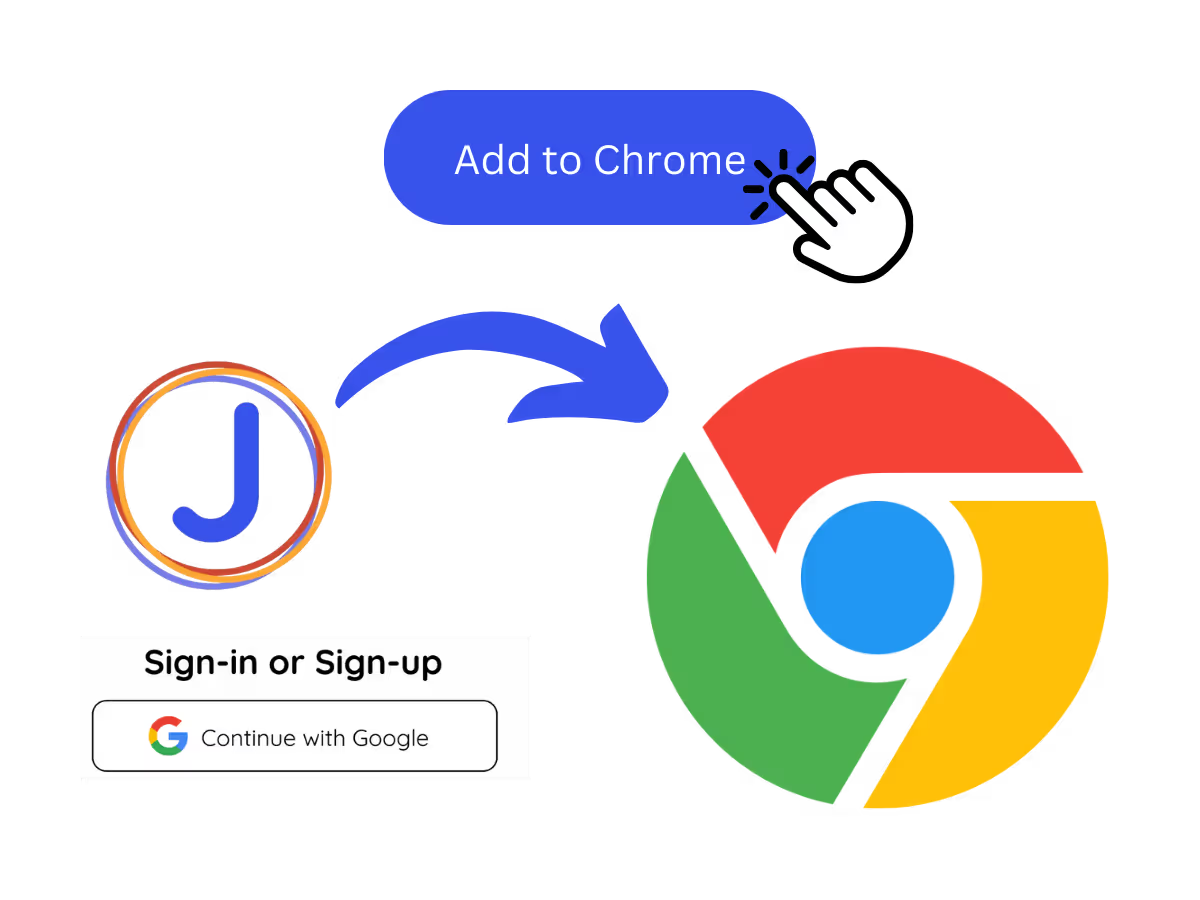
STEP 1

1. Add the Chrome extension, or upload your Meet recording

Add JotMe to Chrome or get the desktop app. Already have a recorded Meet? Upload it for the same bilingual, side-by-side output.
STEP 2

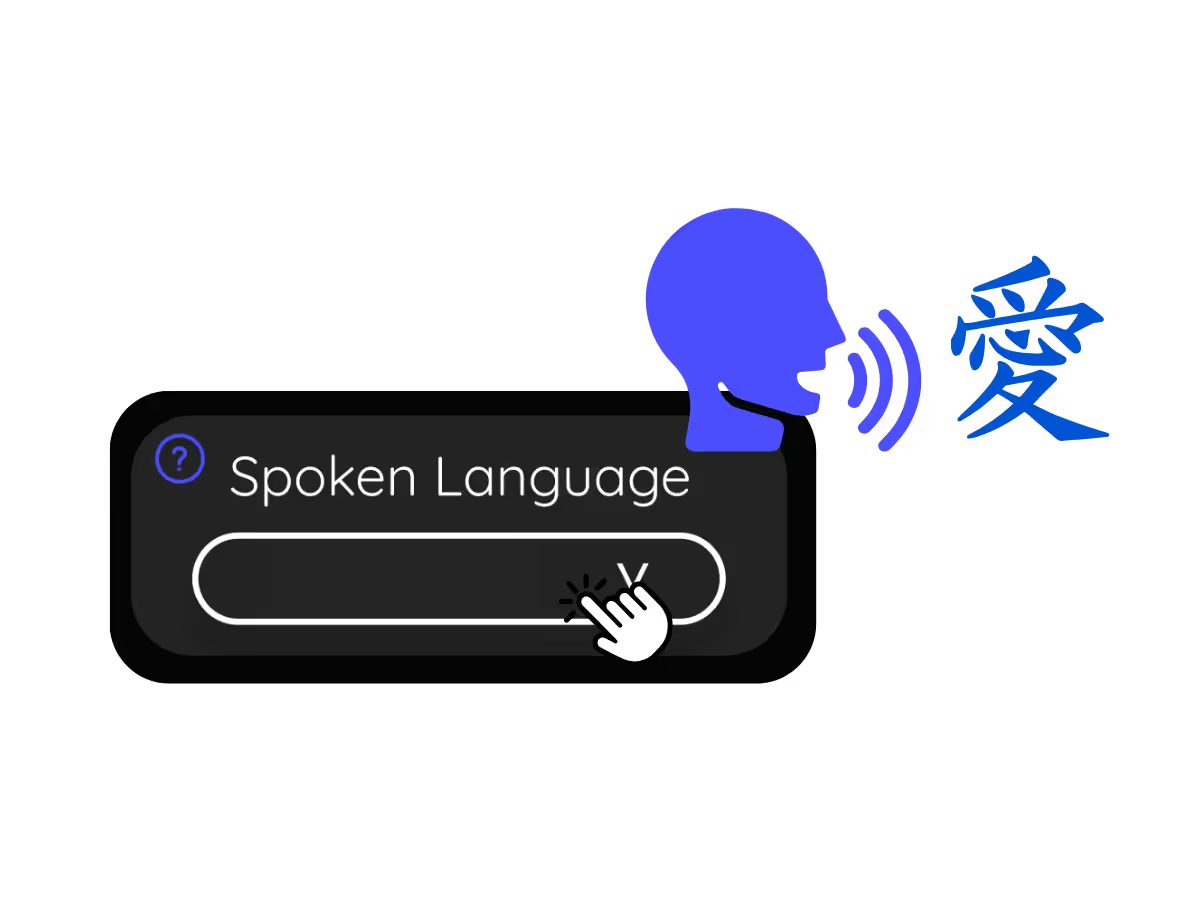
2. Set the spoken language

Choose the language being spoken in the meeting, for example Japanese. If people switch languages, pick multilingual mode.
STEP 3

3. Open the bilingual record

The transcript on your dashboard keeps the original and translated text together, ready to review, edit speaker names, and share with both sides.

What teams use bilingual transcripts for

From daily standups to all-hands, JotMe keeps every attendee in the conversation.

Reporting to HQ in another language

Run the meeting in Japanese and hand HQ a Japanese-English meeting transcript they can read, with the original right beside it for anyone who wants to check.

Sales & client calls

Pull exact quotes and commitments from client calls when you need them.

Recorded Meet meetings

No time to run it live? Upload the recording and JotMe returns the same accurate bilingual transcript, no need to have been in the call.

Compliance & documentation

Keep a searchable record of what was agreed, with speaker labels, accessible anytime on your dashboard.

See it in action

Watch a mixed-language Google Meet become one record both sides can read.

Hơn 500.000 chuyên gia ổ chức cuộc họp và sự kiện với JotMe

Xem cách người dùng dùng JotMe để lấp đầy khoảng trống trong vận hành đa ngôn ngữ.

Đánh giá 4.7/5
Đánh giá 4.7/5
"Vì công việc của tôi liên quan đến dịch thuật và kết nối các nền văn hóa, tôi thấy công cụ này là một yếu tố thay đổi cuộc chơi trong công việc hàng ngày của mình."
Adams
Chuyên viên vận hành / Tiktok
"Tiếng Nhật từng là một bí ẩn đối với tôi, nhưng sản phẩm này đã giúp nó trở nên rõ ràng và dễ tiếp cận với khả năng hiểu theo ngữ cảnh."
Stamatis
Tư vấn viên / Deloitte
"JotMe giúp các cuộc họp đa ngôn ngữ của chúng tôi diễn ra suôn sẻ, đảm bảo sự hợp tác liền mạch trong môi trường làm việc nhịp độ nhanh."
Cesar
Quản lý chương trình / Amazon
"Tính năng song ngữ này giúp việc ghi chú tại nơi làm việc trở nên hiệu quả hơn, tiết kiệm thời gian và tăng cường năng suất ở cả hai ngôn ngữ."
Yusuke
Giám đốc kinh doanh / NTT
"Thiết yếu cho người không thông thạo ngôn ngữ; đơn giản hóa các cuộc họp phức tạp với dịch thuật thời gian thực và bản ghi chính xác."
Jesse
Lập trình viên tự do
"Bản dịch chúng tôi cần bấy lâu nay – giờ đã thành hiện thực với JotMe!"
Elston
CEO & Người sáng lập / Tiny.host
"Vì công việc của tôi liên quan đến dịch thuật và kết nối các nền văn hóa, tôi thấy công cụ này là một yếu tố thay đổi cuộc chơi trong công việc hàng ngày của mình."
Adams
Chuyên viên vận hành / Tiktok
"Tiếng Nhật từng là một bí ẩn đối với tôi, nhưng sản phẩm này đã giúp nó trở nên rõ ràng và dễ tiếp cận với khả năng hiểu theo ngữ cảnh."
Stamatis
Tư vấn viên / Deloitte
"JotMe giúp các cuộc họp đa ngôn ngữ của chúng tôi diễn ra suôn sẻ, đảm bảo sự hợp tác liền mạch trong môi trường làm việc nhịp độ nhanh."
Cesar
Quản lý chương trình / Amazon
"Tính năng song ngữ này giúp việc ghi chú tại nơi làm việc trở nên hiệu quả hơn, tiết kiệm thời gian và tăng cường năng suất ở cả hai ngôn ngữ."
Yusuke
Giám đốc kinh doanh / NTT
"Thiết yếu cho người không thông thạo ngôn ngữ; đơn giản hóa các cuộc họp phức tạp với dịch thuật thời gian thực và bản ghi chính xác."
Jesse
Lập trình viên tự do
"Bản dịch chúng tôi cần bấy lâu nay – giờ đã thành hiện thực với JotMe!"
Elston
CEO & Người sáng lập / Tiny.host

Các câu hỏi thường gặp

Mọi thông tin bạn cần biết để tổ chức các cuộc họp và sự kiện với JotMe.

Can I get a transcript in two languages from Google Meet?

Yes. JotMe keeps the original speech and its translation together, line by line with speaker labels, for any Google Meet, live or from an uploaded recording.

Can I get a bilingual transcript from a recording?

Yes. Upload the recording to Audio to Text or Video to Text, choose the translation language, and the transcript keeps both versions.

Is the bilingual transcript free?

Yes. JotMe's free plan includes transcription minutes, and no credit card is required. Upgrade when you need more.

How accurate is the bilingual transcript?

JotMe builds the transcript with five layers of context: your user profile, your operational context, real-time memory of the meeting, your custom terms, and the flow from previous speech, so both the original and the translation stay accurate. Speaker labels keep both columns easy to follow.

Can I edit, search, and share the transcript?

Yes. On your dashboard you can edit speaker names and text, search the conversation, translate it, and copy or share it.

Which language pairs are supported?

Any of 39,000+ pairs across 200+ languages, with the strongest results on pairs like Japanese-English, Chinese-English, Korean-English, and Spanish-English. See the available languages page.

Can I translate the transcript?

Yes. Translate the transcript into your language on the dashboard, and get the AI notes and summary in the same language.

Heading

You can translate
Bulgarian
Catalan
Mandarin (Simplified
Mandarin (Traditional)
Cantonese (Traditional)
Czech, Danish
Dutch
English (US)
English (UK)
English (Australia)
English (New Zealand)
English (India)
Estonian, Finnis
French
French (Canada
German
German (Switzerland
Greek
Hindi
Hungarian
Indonesian
Italian
Japanese
Korean
Latvian
Lithuanian
Malay
Dutch (Flemish)
Norwegian
Polish
Portuguese
Portuguese (Brazil)
Portuguese (Portugal)
Romanian
Russian
Slovak
Spanish
Spanish (Latin America)
Swedish
Thai
Turkish
Ukrainian
Vietnamese

One meeting, one record, two languages

One Google Meet, one record, two languages side by side, live or from a recording. The bilingual meeting minutes cross-language teams can trust.